Belitsoft > AI Agent Development: Chrome Extension as In-App Guidance Tool For ERP and CRM

AI Agent Development: Chrome Extension as In-App Guidance Tool For ERP and CRM

Client

Our client is a non-technical middle-level e-commerce business founder. They don't manufacture anything herself but buys from suppliers and sells white-label products via multiple channels. The business grew fast and scaled globally. Now they have branches in the US, Poland, and the UAE, selling on marketplaces and social media.

Running a retail network requires not only selling great products but also properly administering your tech stack.

Their tech stack includes multiple specialized, complex software systems to manage operations:

  • marketplace management software (each marketplace has its own system),
  • ERP and e-invoicing software (they use Dynamics 365 Business Central Cloud),
  • and Facebook and Google for ads management.

Each system has tons of operational nuances, a unique interface with its own rules and a million little quirks.

Challenge

With constant turnover, the staffing pain in e-commerce is onboarding

You need people who can instantly wrap their heads around ERPs, marketplace dashboards, and ad platforms.

Talents who can jump in and work right away are hard to find, and when you do find them, they are expensive. Most companies end up hiring less experienced people instead. However, training newbies takes forever and costs a fortune before they actually start delivering. It takes way too long to see any ROI.

These business applications are not just complex for novices but also constantly keep changing, breaking old instructions

Without a training system, new hires either guess clicking blindly, or wait to be spoon-fed with instructions, which drags down productivity. Written guides quickly become outdated, and fast-growing companies operating on thin margins have no budget for training new hires.

Many throw staff in the deep end and leave them to sink or swim, expecting them to figure everything out on their own. But that just drives people out the door even faster, and keeps churn high.

This is especially evident with ERPs - complex systems with extensive configurations and large manuals that are rarely read. Newcomers are forced to learn dozens of features they will never even touch, which kills their drive. Motivation dies somewhere around chapter three.

Founders trying to speed up onboarding in the end find themselves sticking in a never-ending loop of training people who do not stay. Every single time someone quits, they must manually repeat the same technical explanations teaching new hires how to navigate the company's tech stack.

Every new face means answering the same questions: "Where do I click?" and "What do I fill in here?". Some pick it up fast, some are totally lost but with such high churn, you're stuck in a loop.

Business owners don't want to be full-time software instructors anymore

They're tired of repeating themselves and exhausted from hand-holding everyone through these programs.

They say: "Give me an AI that overlays the software, shows them exactly where to click, points to the right button so they understand exactly what they must do, and guides them to the result, ensuring every task is completed successfully so I do not have to".

What they really want is to stop wasting their time training employees how to use software. They want to document the workflows and decision-making processes their experts know and turn individual expertise into organizational knowledge that can be preserved even after they leave, in the form of automated instructions for everyone else.

Consulting

There are three broad categories of in-app AI assistants based on the interaction models: doing things for you (classic agent), talking with you (chatbot), and guiding you (adoption platform).

AI chatbots

This is conversational help interfaces within the app (support chat, etc). They don't interact with the interface and are like a steering wheel and pedals that you must operate yourself. Such chatbots are limited because they just produce text answers based on the documentation on how to use software and do not interact with the interface.

Execution agents

AI that executes commands, auto-fill forms, and completes autonomously other tasks and entire workflows within the app. They operate almost like autonomous vehicles, turning, accelerating and braking on their own.

Digital adoption platforms

They provide onboarding assistance overlaid on the app interface. A digital adoption agent acts like a rally co-driver, offering timely instructions on when to turn and how sharp the corner is while leaving the driver in control. Our client asked us to build the guidance agent that belongs to this category. Its job is to overlay the interface, highlight the right elements and guide the user through each step while the user retains control.

Benefits of Digital Adoption Platforms (DAP)

The challenge our client faces is a typical digital adoption case. The global digital adoption platform market is growing fast. The compound annual growth rate was expected to be between 10 and 20 percent.

The goal of a digital adoption tool, or more specifically an in-app guidance tool and AI onboarding assistant, is to guide users step by step through a software interface, highlight the required buttons and fields on each page, and verify that the user followed the correct path to complete the task.

This makes staff more independent and helps companies avoid productivity loss caused by staff turnover.
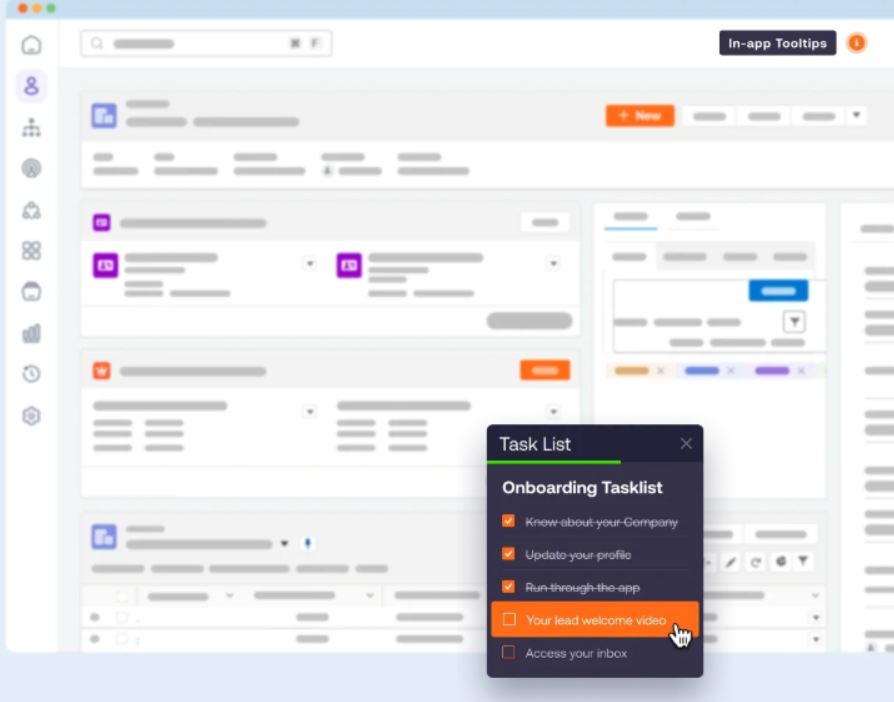
AI agent development

The standard approach of off-the-shelf digital adoption platforms is to show popup overlays with task lists that users can follow (or ignore/close)

Limitations of Off-the-Shelf Digital Adoption Platforms

A typical ready to use out of the box digital adoption tool could theoretically help our client, but such platforms are not plug-and-play solutions that you can just set and forget. They won't automatically meet the business owner's expectations right after installation without ongoing management.

You have to map out and document the steps for every business process, and then keep those scenarios updated whenever the UI or workflows change. That is something you can live with. But the real issue is that most digital adoption platforms still require a lot of time just to build walkthroughs for all your processes.

Someone on the team must have to master the digital adoption tool itself to build and maintain these walkthroughs. Most such platforms are a pain to learn, and if you are not using them all the time, you forget how they work. When they break, you end up wasting time trying to fix them.

Also, there are so many of these tools on the market that choosing the right one can take forever. None of them are perfect - just look at the complaints on review sites like G2. Some of these can cost tens of thousands a year for a license, which is too expensive for most clients' budgets.

Lastly, standard digital adoption platforms don't actually force users to follow the right path. They just throw pop ups that users can close. But that doesn't fully meet the client's original request.

Comparison with Microsoft's Built-In AI Agents

Built-in AI Agents Developed by Vendors of Your Software

Your existing systems may already have the AI agents you need. Why build custom if it's already there? Microsoft pours serious investment into AI capabilities. Does Microsoft Dynamics 365 Business Central have something near what's required?

Let's look at what the major AI agents in Business Central can do as of early 2026.

Microsoft Copilot for Dynamics 365 Business Central

Microsoft Copilot for Dynamics 365 Business Central is an AI-powered assistant built directly into Business Central. It's designed for small and midsize businesses to automate tasks and provide insights across finance, supply chain, inventory, and sales modules. Copilot uses generative AI based on Azure OpenAI to help employees work faster.

Earlier, Copilot was just a chat assistant. It answered questions by searching official documentation (public docs on learn.microsoft.com or custom knowledge bases), and then created a response based on those sources. These responses looked like traditional chat. It didn't highlight interface elements or enforce a sequence of steps to follow. Copilot as the chat assistant still exists.
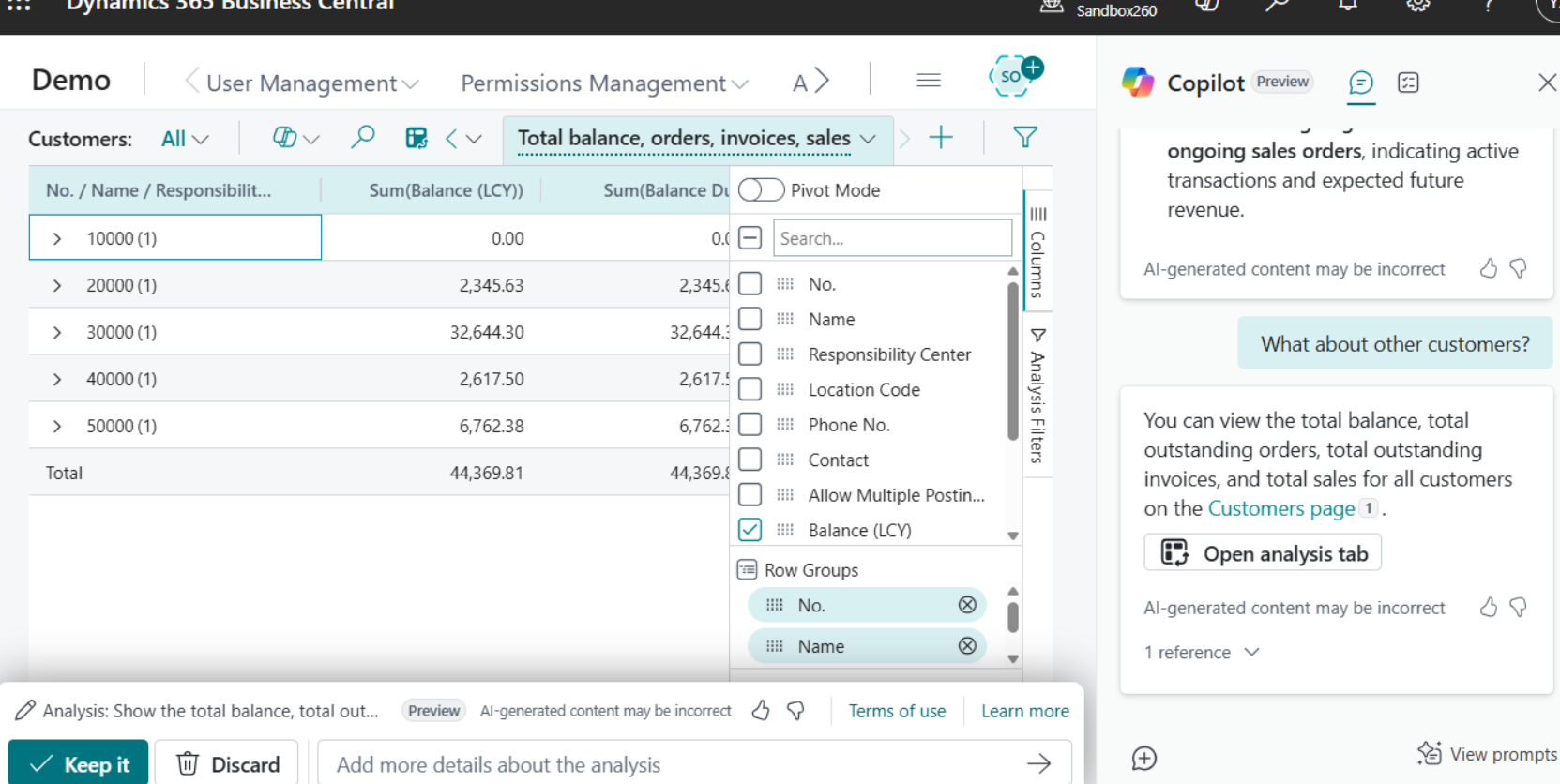
Copilot Business Central

Microsoft Copilot integrated into Dynamics 365 Business Central as a chat assistant that answers questions and provides information, but doesn't actively guide users through interface tasks

Later, Microsoft added several embedded AI features built into specific pages or forms where you're working. You click a button on that page and AI can do something right there, like Bank Reconciliation Assistance on the reconciliation page. But most ERP functions this embedded feature doesn't touch.

Finally, Microsoft added autonomous agents: Sales Order, Payables, Expense.

  • The Sales Order Agent processes emails and creates quotes automatically.
  • The Payables Agent extracts invoice data and drafts purchase invoices.
  • The Expense Agent processes receipts and creates expense reports.

These agents don't solve our client's problem at all. They don't need automation that does the work but guidance that teaches their staff where to click. All of these ready-to-use AI agents from Microsoft do the tasks themselves but none of them show a new hire how to navigate the interface.

Agent Playground

Microsoft also offers Agent Playground that lets you build custom agents that act for the user with autonomous execution in the background: open pages, navigate, and complete tasks automatically.

Agent Playground could theoretically automate more custom workflows beyond just orders, invoices, expenses. It could handle fulfillment, drop-shipment, some custom scenarios and reduce the number of tasks new hires need to learn manually.

But it still won't teach humans how to do those tasks. It won't preserve "how to do it" knowledge but only automates "doing it". You need detailed task definitions to set them up but none of them let you highlight interface elements or give you a step-by-step tour of Business Central.

So to actually onboard new staff and preserve institutional knowledge, you still need a custom guidance agent like the Chrome AI Agent extension. And you still need developers to define tasks, not just business users documenting workflows.


Solution

Custom AI Agent Development Approach

Companies facing challenges with ready-to-use solutions often have to make a choice. Either they hire engineers to build an agent from scratch, which may seem quick at first but incurs ongoing maintenance costs, or they purchase licenses for an existing platform, paying a high price to adapt another company's solution.

For businesses seeking to create an AI product in this space, especially startups, the obvious path is to develop a bespoke agent. Our client chose to invest in custom development rather than paying large licensing fees.

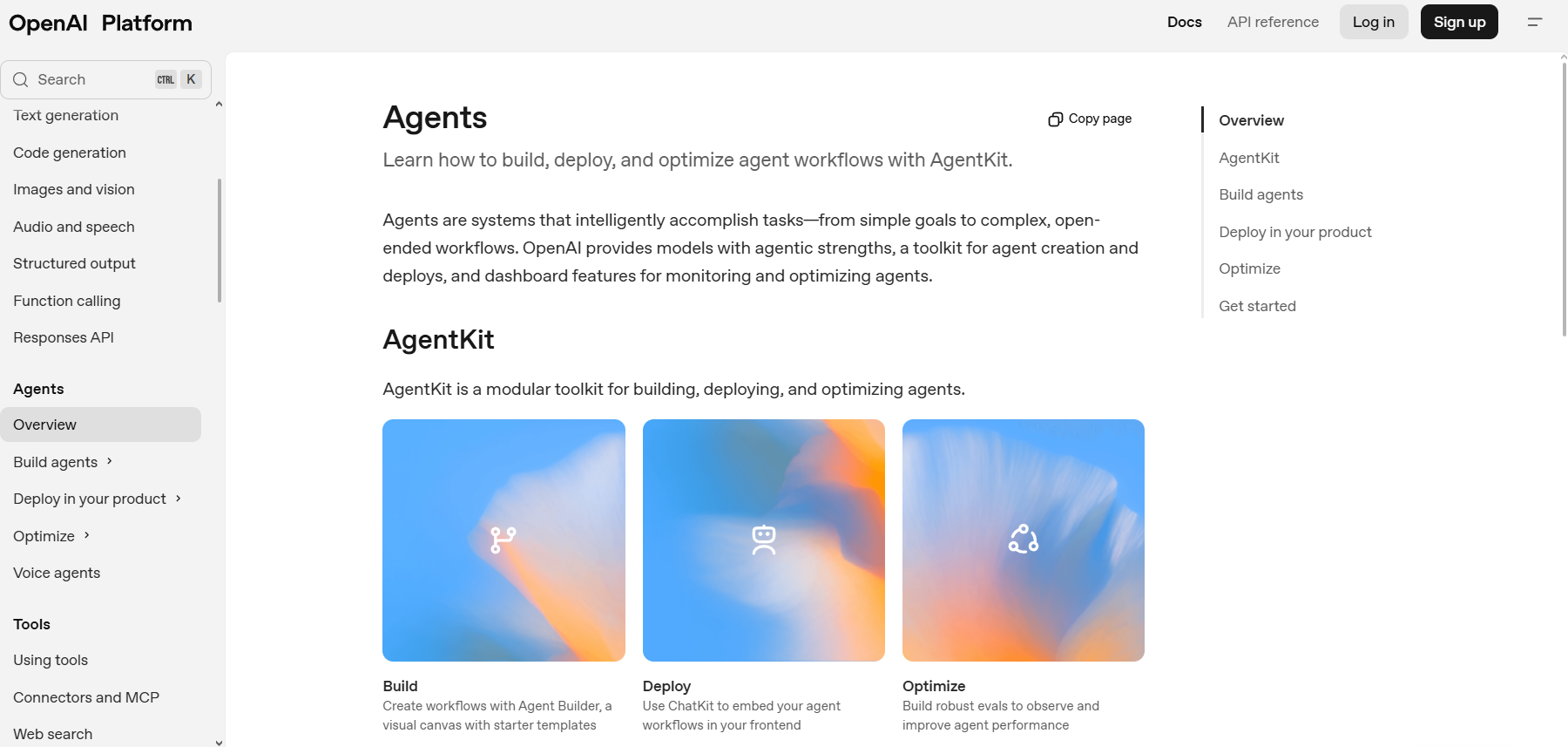
OPENAI-AI agent development

OpenAI's official toolkit for building AI agents. The client's solution uses OpenAI's models (ChatGPT API) for their custom guidance agent.

Concept and Stages

Our client really needed an AI software navigation agent. Think of it like Google Maps Navigation, but for software. The AI agent builds a route through the application and walks the user through exactly how to use it.

We broke the custom development down into stages. Since the client is a non-technical founder, we suggested a Time and Materials model.

The idea was to build and pay for a small milestone of the project first, something that would demonstrate our expertise and prove the concept on a real example. This is the so-called MVP, the minimal viable product.

For the MVP, we focused on one of the client's business apps, specifically Dynamics 365 Business Central Cloud.

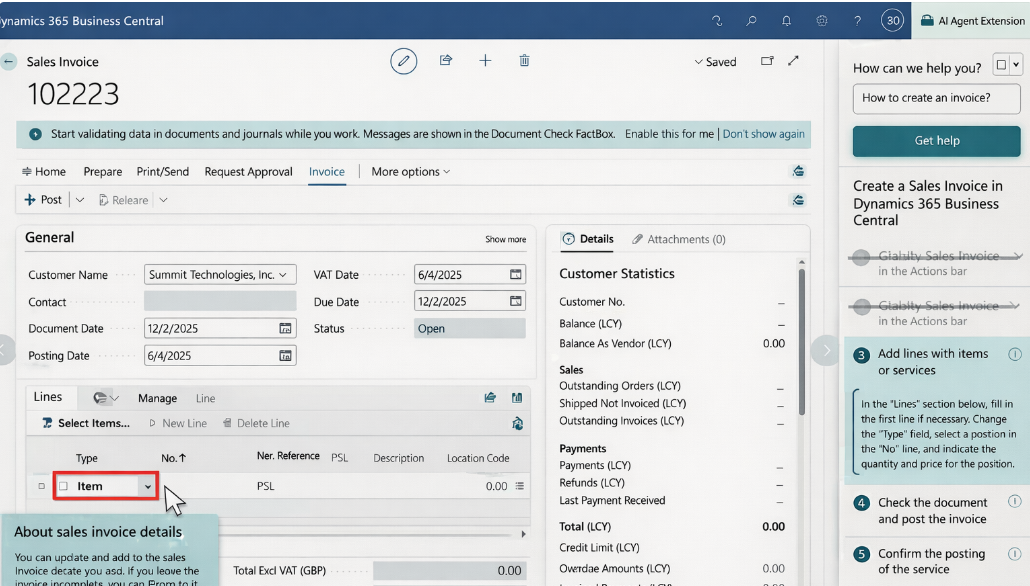
AI agent development Chrome Extension

The AI agent overlays the interface, highlights the specific UI element the user needs to interact with (the Type dropdown), and provides step-by-step guidance in the sidebar while keeping the user in control of performing the actions.

AI Agent Google Chrome Extension Development

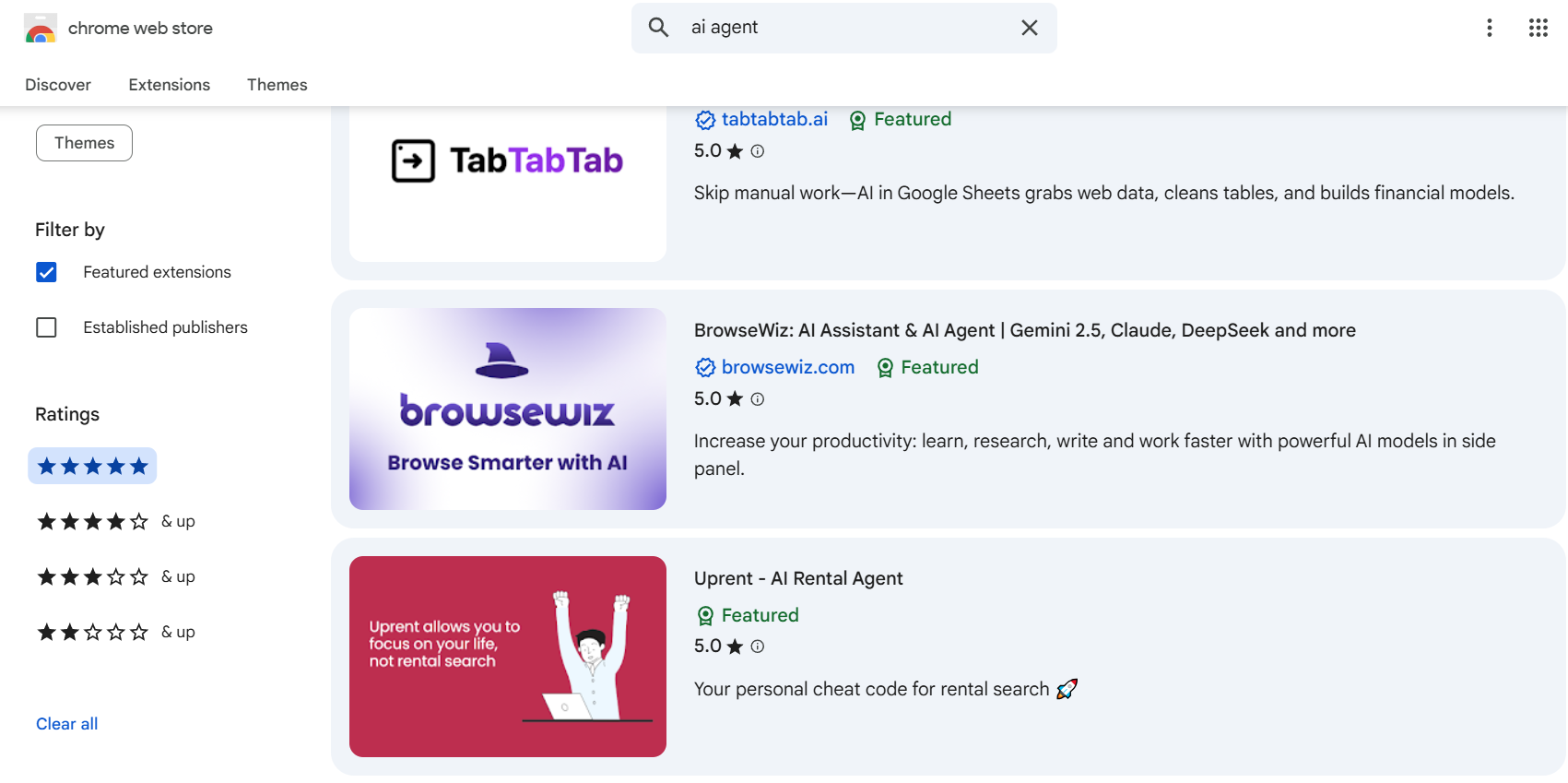
All of the client's business software is web based, which simplified the development effort, since the AI agent is easier to set up with browser access. Chrome is the most widely used engine, so we decided to build a Chrome extension as the interface for the AI agent.

AI agent development Chrome Extension

This image shows AI agents available as Chrome extensions - the exact same approach we used to build the client's guidance tool.

A Chrome extension is the perfect bridge for the agent since it can access the DOM and also grab screenshots to send over to the LLM for analysis.

Building the AI agent requires an LLM. Since fine tuning a custom model wasn't within the MVP budget of our client, we proposed using an existing commercial model. We chose OpenAI ChatGPT as the most well known option, although the choice was not critical. Most commercial models today offer very similar capabilities and comparable API pricing.

We built the extension to run as a panel on the right side of Business Central. The Google Chrome extension adds this sidebar without covering the ERP interface and blocking the main ERP screen.

This way, the user can see the full route for the task through that window. The agent's main job is to monitor the screen and keep the user following the steps defined as correct. We placed the relevant instructions in the customized system prompt for the LLM so the agent understands what is considered correct.

As the user moves through the task, the agent highlights the relevant parts of the interface (buttons and fields) in real time directly in the page's HTML to show where to click and what and where to fill in.

Process

Custom AI Agent Development Process

Just using the default OpenAI model wasn't enough. The model had no knowledge of the 2026 version of Business Central since it was released after the training cutoff, and lacked understanding of how the interface actually looks and works. We addressed this through prompt engineering customizing the commercial LLM for the client's specific requirements by providing detailed context in the system prompt.

Below is a breakdown of the customization process:

  1. We took the role of an expert user of Business Central and asked the model to build the correct workflow (the right path with the steps) for a particular business task.
  2. Every time the UI of Business Central changed (or not) after we did what the LLM suggested, we'd grab a screenshot and send it back to the model. This gave the model a way to see the results of its own advice from the point of view of a human user and track what was happening. We also sent the HTML along with it, so the model could see what was going on at the code level. That way, the model learned to double-check itself so its knowledge stayed relevant to how users of Business Central actually work within their specific workflows.
  3. By showing the LLM model the exact path, we trained it to verify user actions on the fly. In production, the LLM-powered agent will guide users without us based on this knowledge.
  4. We also trained the agent to inject JS into the current Business Central page to highlight what the user needs to do next - like clicking a button or filling out a field.
  5. We programmed the AI agent so that it won't mark the step as finished in the right sidebar - the step stays open in the task list - until the user actually finishes the action. That way, the user can track their progress and see what's already done and how many steps are still left to do.

The Ins and Outs of Custom AI Agent Development

You need more custom work hours to build an AI agent for Business Central than for other platforms. Business Central doesn't use modern frontend standards - it's packed with iframes, making it hard for AI agents to read the page correctly. You also need to design the agent to minimize requests to the OpenAI LLM.

Every request costs money, so the goal is to only hit the API when you absolutely have to, to cut down on unnecessary pings.

There is still no way to guarantee a reliable response 100 % of the time with any model on the market right now. Sometimes the LLM hangs or stops responding - LLM providers usually blame it on network problems. You must fix this under the hood by minimizing automatic background requests to the LLM, so the user never even notices a thing.

When the agent sees a request for the workflow from the user of the software for which the in-app guidance assistant is being built, it checks if the workflow for completing this task has already been built and saved in the system - either because a previous user has successfully used it, or because an expert pre-built it.

This way, the agent skips the LLM and grabs it straight from the database with storage of successful routes. If the interface updates and the old route breaks, the AI agent just goes back to the LLM to refresh it.

Finally, since each AI agent is built for specific guidance tasks, you cannot ask the guidance agent anything that is not part of the workflows it was designed for. It will not help you with financial questions - you would need a separate agent for something like that.

Challenges of Custom AI Agent Development

The challenge is not to build an AI assistant that helps users navigate complex web applications (enterprise software with tons of menus and options) but to make it work reliably and safely in a day-to-day business context.

Complex Workflows

Connecting the OpenAI or Claude API and writing a few prompts to help employees complete standard workflows feels almost magical for clients because they see immediate results. But soon they discover that the more complex the tasks they put behind the agent, the greater the number of surprises they face. Belitsoft's team fixes these issues with additional prompts, or fine-tuning a model but this shows that building an AI assistant may be an iterative, not one-time, investment.

HTML changes

It also quickly became obvious for clients that HTML changes to the software pages can break AI guidance agents. If vendors of this software make changes, you may need ongoing prompt updates and retraining as part of maintenance for your in app guidance agent. Belitsoft's AI team addresses this by designing a self-healing architecture that detects UI changes and adapts automatically using visual and structural analysis to identify elements by their function rather than by their position.

AI Context Remembering

If your employee is halfway through filling out a form and the page refreshes for some reason (timeouts, etc.), the assistant should not forget what they were doing, so they don't have to explain the whole task again to the agent. That was not an issue for Belitsoft's AI team because our AI engineers solved it upfront.

Employee Access Control

If your employee doesn't have permission to view certain data, the AI assistant must inform them they lack access instead of trying to bypass security controls or work around restrictions. Belitsoft's AI team built the AI agent to respect existing security policies from the ground up. We do things architecturally sound from the very beginning, so there were no problems here for us and our client.

Automated AI Execution Risk

The AI assistant must tell your employee what to click and which forms to fill out, but your employee should do the clicking and data entry. This type of AI agent should not execute actions on its own, so it cannot accidentally delete records, submit wrong forms, or trigger unintended workflows in your business systems. This is a known problem with execution agents. They can automatically click buttons and enter data without human oversight. Belitsoft's AI team chose the DAP approach from the start to avoid these risks entirely. DAP agents do not have this problem because the employee stays in control for every action.

Results

We built an AI-assisted Chrome extension MVP that solves the client's problem. The AI Agent suggests steps, highlights the UI, and walks the user through the whole process until their task is done.

Many companies invest in training their staff on the business software they use and cover the cost of the classes. But once trained personnel quit, you have to start the whole training process from scratch with someone new. This is where the AI assistant comes in. It supports newcomers without needing an experienced employee standing next to them constantly. Businesses usually need a way to spread the expertise of their best people across the whole team. By teaching their workflows to the agent, you are no longer hit so hard by staff turnover.

You can compare this kind of AI agent to Google Maps Navigationfor your software. It tells you where to turn and what to do next until the task is done. The only difference is that you are navigating a software interface instead of city streets.

To scale the MVP into a full-on product with the right investment, you could go the enterprise route, including fine-tuning specialized models that focus specifically on user experience.

AI guidance is quickly becoming the go-to approach. It's going from a specialized know-how to the norm for how apps are built these days.

Belitsoft is an experienced partner that has the expertise to work however you need. They can supply dedicated AI specialists via staff augmentation, or they can build the whole thing for you as a turnkey project, managing every step from the initial concept to full implementation.

1
2
3
4
5

Recommended posts

Belitsoft Blog for Entrepreneurs

Our Clients' Feedback

zensai
technicolor
crismon
berkeley
hathway
howcast
fraunhofer
apollomatrix
key2know
regenmed
moblers
showcast
ticken
Next slide
Let's Talk Business
Do you have a software development project to implement? We have people to work on it. We will be glad to answer all your questions as well as estimate any project of yours. Use the form below to describe the project and we will get in touch with you within 1 business day.
Contact form
We will process your personal data as described in the privacy notice
This site is protected by reCAPTCHA and the Google Privacy Policy and Terms of Service apply
Contact us

USA +1 (917) 410-57-57
700 N Fairfax St Ste 614, Alexandria, VA, 22314 - 2040, United States

UK +44 (20) 3318-18-53
26/28 Hammersmith Grove, London W6 7HA

Poland +48 222 922 436
Warsaw, Poland, st. Elektoralna 13/103

Email us

[email protected]

to top