During OpenAI’s DevDay in San Francisco (october 2025), the AgentKit platform was announced to help developers build custom agents. Google already offers a similar platform, Vertex AI Agent Builder, and Microsoft has its own Copilot Studio. Agent Builder is the main module of the AgentKit platform. It is designed to control the behavior of ChatGPT models much more precisely than is possible with standard prompts or custom GPTs. Agents have existed for a long time, including those using ChatGPT models, but most often they were created through third-party intermediary platforms. Now, OpenAI allows you to build custom agents on its models without intermediaries.
Why LLM-Based Agents Matter
Many try to do different things in ChatGPT, Claude, and Gemini but do not get the results they want. Not because these systems cannot do it, but because they lack correct instructions, do not call the required tools, or do not have access to the right internal files.
LLM-based agents are here to solve this.
What Can You Use OpenAI AgentKit Agents For?
The main use case now is conversational AI chat agents: customer support in e-commerce, internal agents for knowledge base search, or data analysis.
E-commerce Applications
Why use an agent in e-commerce? How is it different from a regular text chatbot?
An LLM agent converts a vague customer query into a precise, machine-readable command (JSON). The LLM agent understands that "I want to return this product" means the "returns" category. This allows you to launch traditional scripts with precision.
The LLM agent can extract data from your personal database (if you grant access) and create a personalized response directly in the chat interface, rather than just providing traditional search results.
The LLM agent outputs interactive elements (order forms, "buy" buttons) directly into the chat. The user can make a purchase without leaving the chat window.
Other Scenarios
Turn your ChatGPT projects into AI agents and workflows that your team, friends, family, or customers can use or buy
If you have built ChatGPT projects that allow you to do things in seconds that previously took hours, thanks to how you trained them, you can now sell or share these as autonomous agents hosted on your website or behind a paywall.
Create your own AI Brain
Go to templates, find "Internal Knowledge Assistant". This can classify and answer employee questions. Or maybe you have a general audience asking questions or just want to remember everything from everywhere.
Click on the Internal Knowledge Assistant template. It rewrites the user's question to make it better, so users do not have to be experts. It classifies the question: "Q&A," "Fact-finding," or "Other." Then it processes with three types of agents: Internal Q&A, External Fact-finding, or a standard agent.
You can train each one. You can upload a knowledge base, or go to "Tools" and connect to MCP Server and add various tools - Gmail, Drive, Dropbox, third-party servers - so your team, clients, or audience can ask questions here instead of asking you directly.
Example of Building a Classification Agent with ChatGPT Agent Builder
The key advantage of agents is the level of control over responses they give you.
Unlike classic GPTs, which rely on a single prompt and file uploads - leaving the model to interpret everything on its own - agents minimize errors.
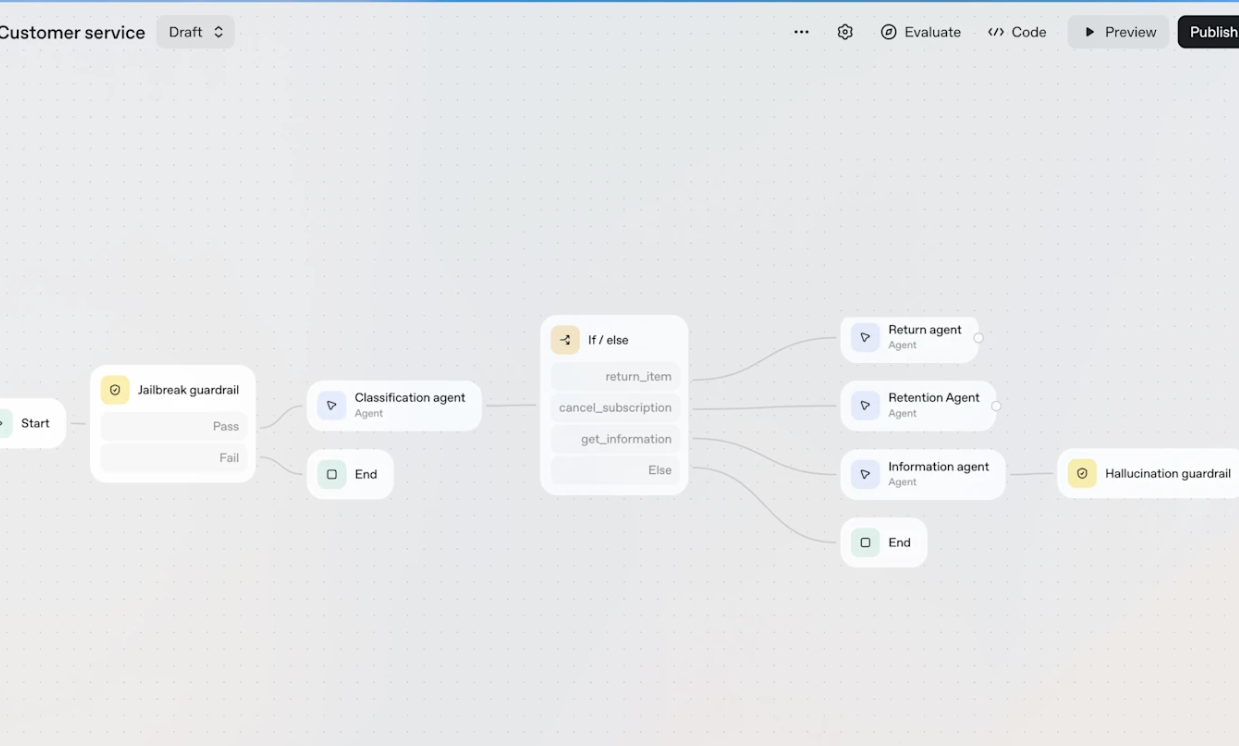
The Agent Builder can help you create a classification agent. When a user sends a request, the agent determines which of your company's information categories it belongs to.
- Use simple prompts like: "Classify a user's request into: manufacturing, inventory, or logistics". The model will assign it to one of those three categories.
- Choose your model and set how much reasoning it should do. Usually, leave "Low" reasoning turned on. Classification is not hard for GPT-5. More reasoning uses up more tokens and costs more money.
- Switch the output from "Text" to JSON. This makes sure the response fits your prompt exactly. The model will only return one of the three categories, nothing more.
- Next, add If/Else logic. That turns the JSON output from the classifier into a set of instructions. If the response says "manufacturing", your next agent knows to do one thing. If it says "inventory", it will do something else. Each output can trigger other agents or send the final answer to the user.
Why Is an Agent Built with OpenAI AgentKit Genuinely New in Terms of Business Value?
An agent created with Agent Builder offers something new for business: it combines the power of LLMs with control over logic and security, making it possible to deploy LLMs in corporate processes with a high degree of reliability.
Security Guardrails
Before Agent Builder, using LLMs in corporate systems always carried risks of unpredictable behavior, confidential data leaks (PII), or toxic content. Built-in Guardrail nodes (PII, Moderation, Jailbreak) are ready-made architectural modules that automatically filter both incoming and outgoing data. This makes LLMs safe to use in sensitive sectors (finance, healthcare, legal).
Programmable Logic
Agent Builder lets you program multi-step decision logic (via If/Else) based on the LLM's semantic interpretation. Businesses can create complex predictable workflows.
The agent does not just "reply" - it acts on a business scenario like "classify the client" (LLM/JSON) -> "check status in CRM" (MCP integration) -> "initiate a return" (MCP integration) -> "send a form to complete" (Widget).
The agent can execute transactional actions (book, buy, change status in CRM), becoming an active participant, not just an advisor, and changing states in external databases.
Data Control
Agent Builder solves the key corporate problem: it lets you use the full power of AI models while minimizing unpredictability.
You can deploy an agent via SDK/API, integrating the Agent Builder core into your mobile apps, chat systems, or backend processes. Execution logic and confidential data remain under your control.
Deployment via SDK/API means the LLM core processes and classifies data, but confidential data remains inside your secure server or database/CRM.
Critical data (names, addresses, phone numbers, credit card info, client activity, order details, CRM interactions) never go to the LLM.
They are filtered at your system boundary. The LLM receives only anonymized context to generate a response.
How Do You Start Using Agents with OpenAI AgentKit?
After creating an agent with Agent Builder, you either get code to embed the chat widget on your site, or use the Agent SDK (or API) to integrate the agent's features into your mobile app or backend system, including vibe-coded ones.
What Exactly Does Agent Builder Allow You to Do to Create a Custom Agent on OpenAI LLM?
Creating a custom agent in Agent Builder means building a workflow using a drag-and-drop interface.
As before with ChatGPT customization, you create a System Prompt (role, persona, response style), and select the LLM. Once you complete basic customization (prompt, LLM, RAG), you begin to configure parameters that control the LLM externally.
You connect the database to the agent, but now you do not pass personal data from this database to the LLM - they can be filtered by middleware on your server.
This shift from prompt-only management to management via nodes is the key business value of Agent Builder.
Workflow Configuration
You force the LLM (Agent Node) to interpret a vague customer request ("I want to buy," "how do I return") and output a structured variable (for example, "pathway": "purchasing").
With If/Else nodes, you use this JSON variable to guide the conversation down a custom path: if pathway = "purchasing", activate the "Purchase Agent"; if "returning", activate the "Return Agent".
You create or upload unique interactive elements (widget files), such as a checkout widget or purchase-complete widget. This allows the agent to do more than reply with text.
The LLM-based agent (Agent Node) is trained to fill these widgets with data from the conversation or your knowledge base. For example, it inserts the product name and price into the order widget, making the widget unique to the current dialogue.
Modular Agent Design
Instead of a single "all-knowing" GPT, Agent Builder lets you create multiple Agent nodes, each a narrow specialist:
- Greeting Agent (focuses on tone and classification)
- Purchase Agent (focuses on product knowledge and sales)
- Return Agent (focuses on policies and procedures)
This modularity allows precise control over instructions and behavior at every stage of the customer journey.
Agent Optimization Platform
Agent performance optimization is part of a broader set of tools called Agent Kit. Optimization is done on the agent optimization platform, which includes evaluation, trace grading, and datasets.
The main issue with complex agents is that they work well 80% of the time but "break" or hallucinate the other 20%. Evaluation tool automatically tests the agent on large datasets to check if it always returns the correct answer and uses correct logic.
Trace Grading helps you see step-by-step how the agent arrived at an answer. If it made a mistake, tracing shows at which node (If/Else, Agent, Tool Call) the error happened.
Reliability also means cost savings. If the agent gets it right the first time, no extra logic loops or retries - lower token use. By analyzing traces, you may find that the agent takes a long, expensive path for a simple task. You can fix the logic to make the path shorter and cheaper.
Agent Builder VS n8n
Agent Builder is designed for chat-oriented workflows. n8n is designed for automation.
Agent Kit is for consumers and teams in the OpenAI ecosystem needing quick, simple chat workflows. n8n is for developers needing complex, custom, autonomous systems.
Background Automation
The most powerful automations work in the background, invisibly. In OpenAI's Agent Builder, you are limited in triggers and cannot schedule or run things in the background - n8n clearly wins here. You only have one trigger for Agent Builder - Start. It is for chat agents. The only way to launch the agent is to send a message (via chat or API).
No scheduled triggers, no app events, no web hooks for CRM events. If you need an agent to process invoices or track leads automatically, you need real triggers. Agent Builder does not have them (at least, not now). n8n wins for background autonomy.
Chat Interface Excellence
Chatkit is where Agent Builder truly shines: easy creation of stylish, branded chat interfaces, Widget Studio for interactive visual elements (forms, calendars, product recommendations) that the agent fills with data. Professional, deployable chat interface in minutes without coding.
Ease of Use vs Control
For a complete beginner making their first agent, Agent Builder is unbeatable in simplicity. It is faster, less intimidating. But this simplicity comes with trade-offs.
In Agent Kit, it is difficult to track how variables move between nodes in debug/evaluation mode - easy to see in n8n.
n8n gives you full control of infrastructure (self-hosting), model choice, and cost control. Agent Kit is locked to OpenAI cloud only, but allows connection to OpenRouter for hundreds of models via one API. Local models supported in self-hosted n8n.
Technical Knowledge Required
To work effectively with Agent Builder, you need to know or understand core programming and development concepts
Code Logic Basics (System Concepts)
- How to build conditional logic for workflow routing
- What "true" and "false" are, how agents use them for If/Else decisions
- What repetition is and the risk of infinite loops or credit consumption
Data Structures and Variables
- How to save and reference data at workflow steps
- What JSON is - structured data for formatting agent output for next node use
- Why data must be manipulated for readability and usability at each step
Architecture and Deployment
- Understanding that LLM is only one part, integrated with external tools and controlled by logic and security nodes
- Deployment (Chat Kit, SDK) requires coding knowledge (e.g., avoiding UI widget breakage with bad output)
To work effectively, you must think in terms of software, data flows, and logic, not just writing a prompt.




.png)
.png)
 data center-image(600x250-crop).png)
.png)
.png)
.png)
.png)
.png)
.PNG)
.png)
.png)
.png)
.png)
.png)
.png)