React Native Advantages and Disadvantages
Through implementing React Native framework's native-like UI components, programmers can create IOS and Android mobile applications that have the same appearance and experience as those developed using native Android UI components and native iOS UI components. Employing React Native can reduce the cost of building and maintenance if the application has to be accessible to both iOS and Android (you don't require Kotlin and Swift developers). If you possess a React-based web app and require it for mobile apps on both the IOS and Android platforms, our software development firm holds the view that React Native is the best option.
What is React Native? What is the difference between React Native and React?
React Native is a widely used open-source framework for building mobile applications that was developed by Facebook. It leverages the use of JavaScript to enable the development of cross-platform mobile applications that exhibit true native functionalities. This implies that with a single codebase, you can create mobile applications that are natively rendered for both iOS and Android platforms at the same time.
React.js, or simply React, is a JavaScript library for building web user interfaces. But as a part of the React Native framework, React.js is used to create mobile user interfaces.
While React is basically a library for the web apps' front-ends, React Native extends React, aimed at producing front-ends for iOS and Android mobile apps.
‘React Native brings what developers are used to from React on the web — declarative self-contained UI components and fast development cycles — to the mobile platform while retaining the speed, fidelity, and feel of native applications.’
Philipp von Weitershausen, Ex-Software Engineer at Facebook
For simple functionality apps, React Native and its community libraries are sufficient. However, unsupported features require native module writing. In such instances, you may find it beneficial to hire dedicated mobile app developers from our team. You can also rely on open-source projects to provide native bridges for you if you can find a viable solution.
Can React Native work with an existing app coded in Java/Kotlin for Android and Objective-C/Swift for iOS?
Suppose you have an Android app built on Java/Kotlin. You want to create a version that works for iOS too, but you are low on funds and/or time. Streamline the process by writing one version for both platforms with React Native.
The very first challenge is almost a complete project rewrite to JavaScript. React Native is the best solution for future multi-platform mobile app development. When you are lacking native developers, you can choose React Native and spend fewer resources than on separate iOS and Android apps.
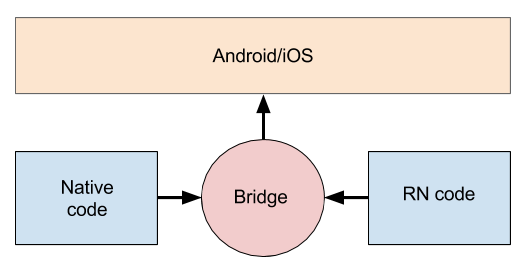
Native modules are a way of bridging native programming and React Native code. These modules need to be written in Java/Kotlin or Swift/Objective-C, depending on the mobile platform. They can’t be reused across two platforms, but they aim at improving performance in computationally heavy operations like image editing or video playback. React Native may not be suitable for the next mobile Photoshop, however, it is adequate for tasks that do not require a high level of resources.
How React Native Works
React Native relies on three threads:
- The UI Thread can access the application's user interface.
- The Shadow Thread uses React for layout calculations.
- The JavaScript Thread is an execution thread of React code.
To begin with, the JavaScript thread creates a layout by utilizing the provided code. After that, the shadow thread handles the layout computation and builds its tree with the help of the Yoga layout engine.
Communication between the two threads occurs via a React Native bridge, which serializes the data in JSON format and transfers it to the main UI thread upon receiving the rendered markup from Yoga.
After deserialization, the main thread renders the UI and completes the mapping from the browser to React Native.
Advantages of React Native
#1 Boasts of Lower Development Cost and Faster Delivery
React Native saves time on developing the apps and makes maintenance leaner because your developers don’t do the same job twice.
‘Native implementation is great in theory, but practically, we need to think about productivity/code sharing/time-to-market, which is where a cross-platform framework like React Native comes in.’
Keertimaan Tenneti, Senior Engineering Manager at Walmart Global eCommerce
For businesses that build and maintain their own apps, this approach effectively cuts the development cost.
Our offshore software development company has a React Native development expertise, and we can conclude that it can cause a cost reduction of at least 30% compared to native technologies. Savings vary the number and complexity of platform-specific features.
Updating and adding features becomes much faster because of mostly the same code base for all software versions.
Further speeding up development is the existence of an open-source library of pre-built components. No need to write code for extra features since someone has likely shared that functionality. As a result, experienced developers can get a basic React Native app up and running in just a matter of hours using pre-built components.
If you need a React Native development team, let us know.
#2 Feels like native and is as fast as native
React Native utilizes the React JavaScript library to design app interfaces that are quick and reactive. It boasts excellent rendering capabilities and follows a component-based method, which simplifies the creation of both uncomplicated and intricate UI designs.
React Native performs as well as native apps do.
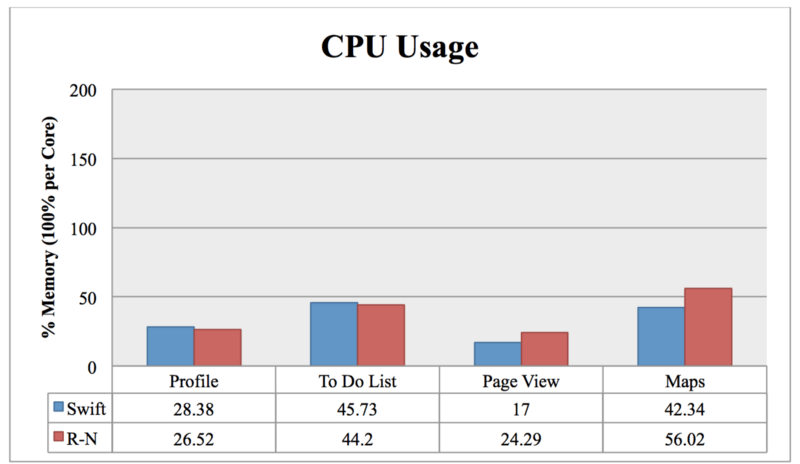
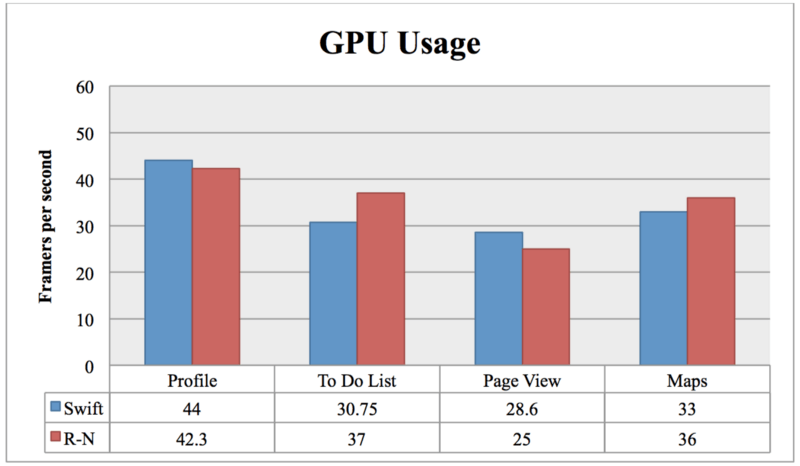
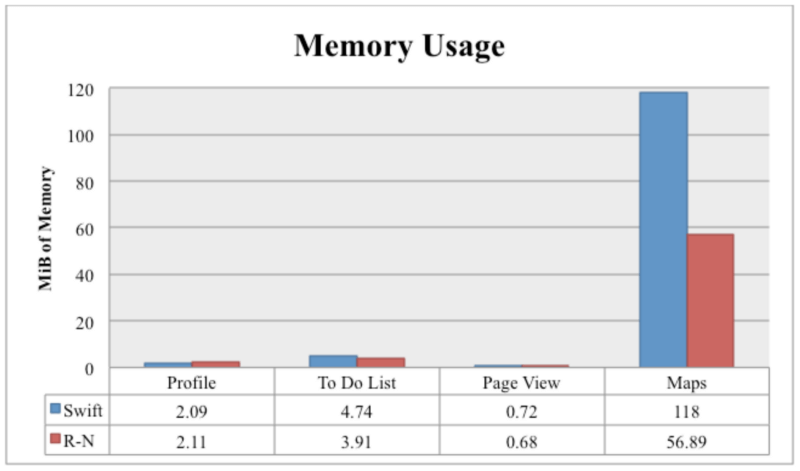
John Calderaio, a software developer, carried out research to compare the performance of the same app built in Swift and React Native. He was curious about the applications of basic functionalities and explored CPU, GPU, and memory usage differences.
The result?
The mobile apps in Swift and React Native were almost identical in their physical appearance and speed. CPU usage was over 10% lower with React Native app. However, it had the edge over Swift in GPU employment and in memory consumption.
React native was superior to Swift in two of the three categories.
The user won't see any difference between React Native and other apps. With JavaScript's interaction with the native environment, React Native offers a UI that appears and operates in a manner that is native to its platform.
Additionally, as constructing an app from scratch can be costly, React Native provides an array of third-party plugin options, including JavaScript-based and native modules. These third-party plugins negate the necessity for particular web view functions and aid in improving the app’s functionality and performance.
Extensive libraries also favor faster development. React Native already provides pre-developed UI components and multiple libraries, meaning developers just have to implement the written codes. Libraries such as Enzyme, Jest, Mocha, and Chai help in writing code free of bugs.
#3 Written in the most popular programming language in the world
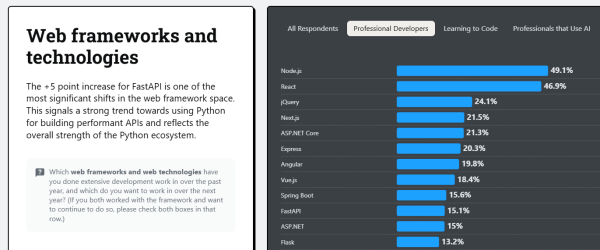
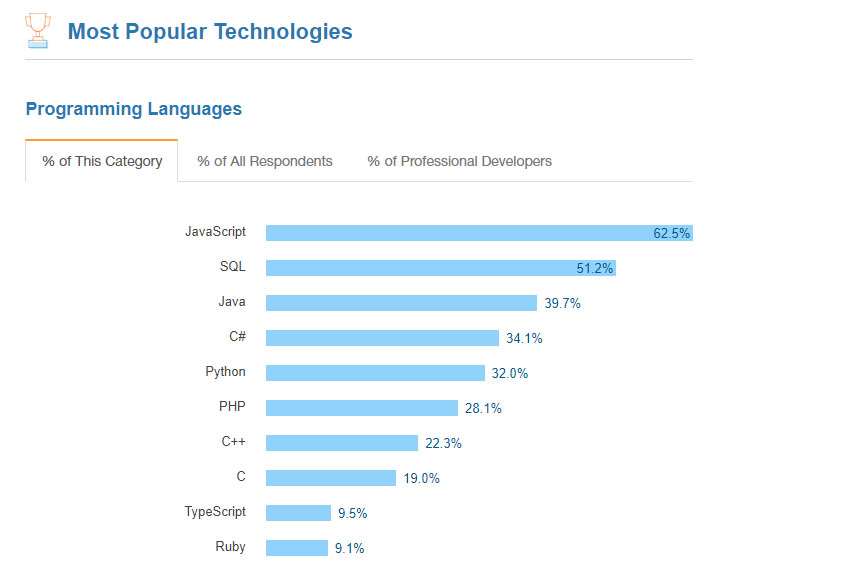
React Native coded using JavaScript, which remains the world's top language for 5 years, according to the Stack Overflow Developer Survey 2017 (36,625 responses primarily from the USA).
#4 Considered the most popular cross-platform framework for mobile development
React Native originated as a response to the demands of the developer community, resulting in over 50,000 active contributors shaping it. Facebook engineers continuously develop and update the platform, and the availability of such enthusiasts makes it easier to get expert support.
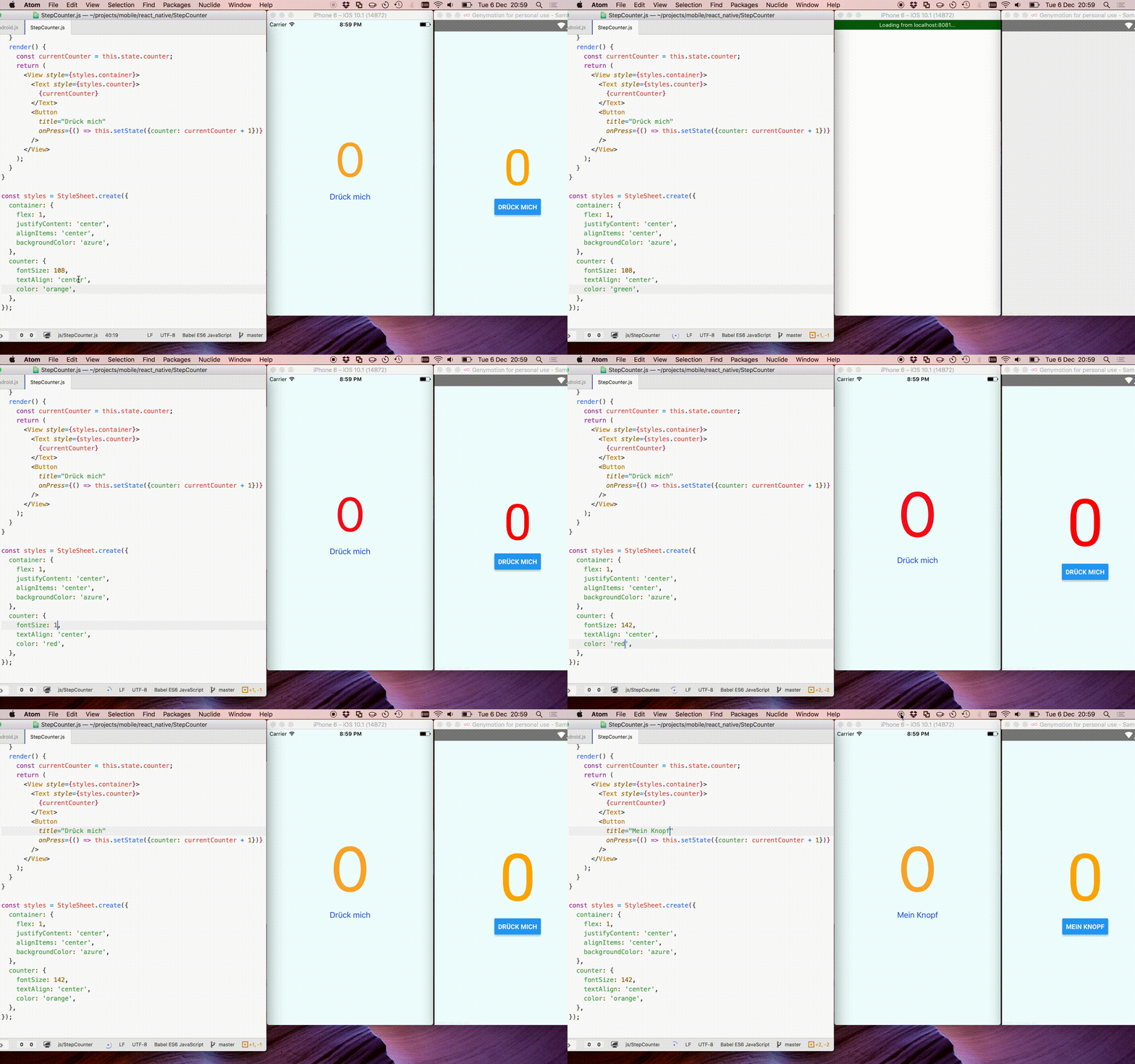
As a result, the developer experience is exceptional. React developers get significantly faster feedback during development than compared to traditional approaches because they don't need to restart their packager to see every little change. With React Native, they can develop a mobile app simultaneously for Android and iOS.
 Source: blog.behrends.io/wege-mit-react-native-zu-arbeiten-5c9f5bbcd85f
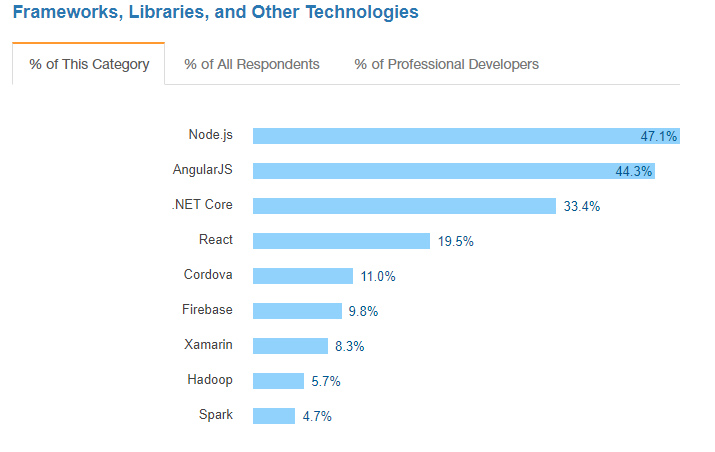
React is used much more than similar technologies like Cordova, Ionic and Xamarin, according to the Stack Overflow Developer Survey 2017 (36,625 responses primarily from the USA).
The immense popularity of React and React Native means that there are substantial communities behind them and several sources to get support and speed up development.
#5 Is highly flexible and moveable
The high productivity and speed of the React Native-based software development doesn’t slow down, even in case of any changes within your engineers' team. React Native's modular and intuitive interface enables developers to start from where someone else left off and keep working, resulting in increased team flexibility and facilitating updates and upgrades of the mobile app. By using this approach, testers can have the ability to generate test scenarios with more ease. These benefits ultimately save time and money.
Programmers don't need to start from scratch if the framework changes. Instead, they can transfer the app from React Native to either Android Studio or Xcode, and then continue the process. This makes up a significant advantage of utilizing React Native for mobile app development and bolsters its versatility.
Besides, because of a feature known as "live reloading" or "hot reloading", React Native allows engineers to visualize code modifications in a separate live preview window concurrently. This feature furnishes an excellent benefit to developers because of its real-time feedback.
#6 Requires a smaller team compared to native development
While a React Native development team still requires iOS/Android developers, most of the effort is focused on Javascript. In contrast, for native app development, a company typically needs two teams, each specializing in either iOS or Android. This division can cause communication gaps and hinder the engineering process, as the two teams may have different procedures and speeds, leading to inconsistencies in the app's appearance, functionality, and features.
By choosing React Native, a JavaScript developer with experience coding for both platforms can handle the development of the app. However, if the app requires high native features, it becomes crucial to have a programmer with native skills. Nevertheless, the team size is typically smaller and more easily manageable in most cases.
#7 Better runtime due to Hermes engine
Facebook has developed Hermes, an open-source JavaScript engine that can enhance the performance of React Native (RN) apps by enabling them to run faster. This feature offers a quicker start-up time, reduces memory usage, and lowers the download size for RN projects. Although this quality was initially available for Android only, it is now on hand for iOS as well in the latest React version, 0.64. Implementing Hermes on iOS apps will result in a 40% quicker start-up time, and using the same engine for both platforms makes cross-platform app development easier.
#8 Used by the largest companies globally
Facebook itself developed React Native back in 2015. Three years later, the tool has already gained recognition from some of the world’s leading companies, like Instagram, Tesla, Skype, Pinterest, and many more.
Facebook shows a great commitment to the project and invests considerable time and resources in enhancing the framework and releasing updates regularly. Facebook’s support makes React Native a stable and future-proof choice.
Disadvantages of React Native
#1 Difficult to debug
Debugging mobile apps developed with React Native can be challenging. The development of these apps requires different programming languages, including Java, C/C++, and JavaScript. To debug successfully, programmers must have a sound comprehension of the language of the platform.
Constant switching between JavaScript and native environments is an issue with React Native apps. And integrating Flipper can help with the debugging process.
#2 Need for the use of native languages
Accessing platform-specific features requires so called "native bridges" for React Native. These bridges are written in - you guessed it - native languages. Yang Mou, a software developer at Oscar Health, mentions this issue in this presentation.
#3 Defects of React Native libraries
Open-source libraries for RN aren't always well-tested. Having a great number of solutions to typical problems is definitely an advantage. These solutions can also bring their own unexpected difficulties. Mou speaks about them in his speech.
#4 Not apt for complex mobile apps
If your mobile app needs complex gestures, transitions, and animations, using React Native may not be suitable. It has a system for managing gestures in the app. Difficulties may arise with complex gestures due to API differences.
#5 Too frequent updates impair the framework
React Native framework experiences rapid updates and advancements. However, the constant updates often create challenges for developers. They make significant changes with every new release, granting little time to adjust prior to the next update. This fast pace can be difficult for some developers to keep up with.
#6 Constructing an effective cross-platform team is challenging
React Native is a cross-platform app development technology that requires developers to have expertise in both web and native technologies. This includes knowledge of JavaScript, project configuration, CI, and UX guidelines. Finding developers with an extensive comprehension of both is difficult, as a result, selecting a competent app development company is essential.
Top eLearning Apps Built with React Native
React Native is a suitable choice for most applications, except for fast-paced, graphically intensive games that may benefit from using a native code for Android or IOS.
Look how EdTech mobile startups built their apps on React Native reducing costs and time.
Canvas teacher
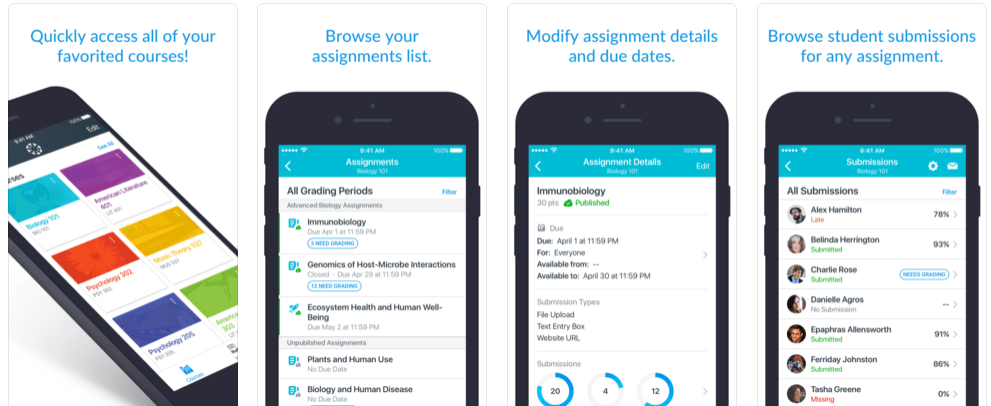
Canvas LMS by Instructure edtech company provides infrastructure and resources for institutions of K-12 and higher learning. The Network offers 300+ courses from 150 institutional partners, including USC, UNLV, Berkeley, etc.
The company guarantees automatic updates of security patches and stores info on Amazon Web Services (AWS) data centers. They ensure material privacy and security by using HTTPS for all communications and encrypting traffic with 128-bit TLS/SSL.
‘Canvas is a trusted name in learning management because, among other reasons, we take privacy seriously as a technical, ethical and practical requirement of educational data.’
Mitch Benson, senior vice president of product at Instructure
The Teacher app allows educators to promote their courses on the fly, both inside and outside the classroom. Currently, it is compatible with iOS and Android devices, but the React Native version of the app is only available on iOS. Canvas Teacher is free to download and provides the following feature set:
- Update course content and publish an assignment.
- Communicate with students, sending announcements and messages, taking part in course discussions.
- Browse submissions and grade student assignments.
The team, headed by Layne Moseley, Lead iOS Engineer at Instructure, refused Apple tools and used React Native because of its faster development cycle.
‘I will note Artsy moving to RN was one of the main reasons I considered it. I’d followed them for years. Just in general because they were such a big name in the community, and had some heavy hitters. So yeah, naturally I followed them because they document what they are doing so well. [...] When they made the switch to RN I was like “Oh, now I can take this seriously.’
Layne Moseley
Instructure started a new project and developed an iOS app from scratch with React Native. They hired two React developers to help build the basic architecture of the new program. Since then, they have used some of their React components in other apps.
‘The transition was great for most of us. There was a feeling though that things are so loose in the JavaScript world. With Apple, you do it their way. With RN, you have the entire JavaScript community and ecosystem at your disposal. And that can be a little overwhelming for some people; developer experience in general is better for us.’
Layne Moseley
Before choosing React Native, Instructure engineering tried PhoneGap. However, the performance showed insufficient results because of the HTML rendering, unlike React Native that offers native experience.
The team used the RN documentation to learn React Native and consulted with dedicated React devs. The framework allowed developers to boost their productivity by applying features like Hot Reloading. During the development process, they also used VSCode as an editor, Redux as the major library, Flow ESLint, and Danger npm module.
The navigation for React Native needs improvement, so Instructure built their own.
‘I think all native devs, regardless of experience, should at least give it a try. I believe that the React paradigm for building UIs is vastly superior to anything else out there. It’s simple to understand and it's powerful.’
Layne Moseley
Learn how we created an e-learning app for a Boston educational startup. Want a better solution? Get a free quote!
Math warriors
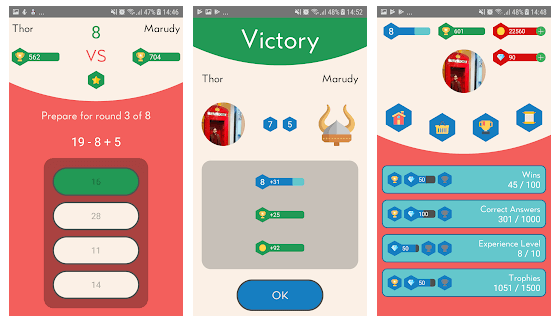
Math Warriors app is a multiplayer real-time 1vs1 game designed to support all ages and all levels. The software allows answering math questions of different difficulty and enhances mental and cognitive skills. They made the math game with React Native and available on Android only.
Before working with React Native, the Math Warriors team developed many hybrid web apps with Cordova and AngularJS. They were deciding between a web or React Native solution for the math app. The developers finally created an initial prototype in React Native, showcasing impressive performance and requiring minimal effort.
‘The experience revealed that React Native is a game changer and we decided to go with it. It was a decision that our team is still very happy with!’
Tasos Maroudas, creator of Math Warriors
Maroudas mentioned they encountered some performance issues when developing but usually they could solve the problem. Compared to what they tried before, productivity has increased. React Native allowed writing less code compared to AngularJS and provided direct access to native behavior.
‘As soon as you start getting involved in a real project, you will unavoidably find yourself in some problematic situations while coding. For me, it started while trying to convert visual designs to application views.’
Maroudas
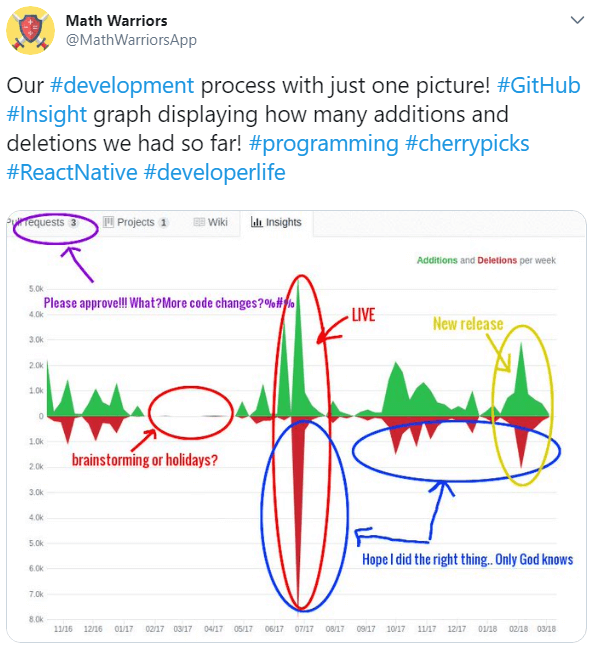
Initially, Maroudas had an introductory session with a friend specialized in React development. Then he explored RN official documentation that turned out to be “pretty decent” and constantly improved it. Its support and availability of packages developed and contributed by other programmers impressed the community.
ZeeMee
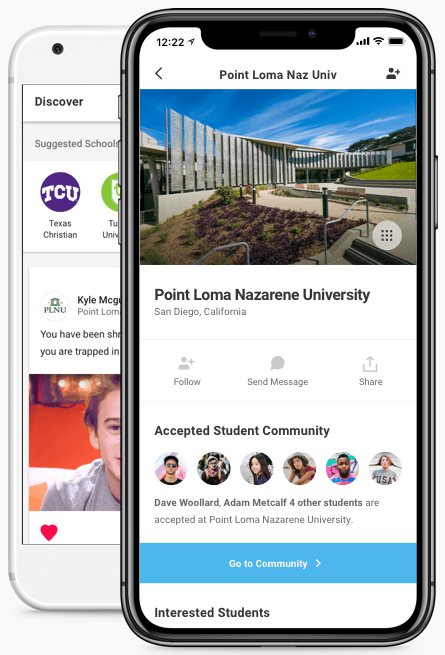
ZeeMee is a social media platform enabling students to create personal multimedia profiles to be viewed by college admissions. Users on ZeeMee can record short videos to fully express themselves in their apps. They can connect with each other through ZeeMee’s college communities and get acquainted before arriving on campus.
ZeeMee provides a professional social media experience, where applicants can connect with colleges via software used in over 150 countries. The platform is completely free for students. However, colleges pay ZeeMee for creating specific communities and communication tools that help share unique stories via video.
The company used React Native to create an iOS app from scratch. For the last couple of months, the engineering team has been deploying the framework in a production environment in order to add features to the app. The developers said it was tough, but they had a great experience. They could see changes by simply refreshing the app without having to recompile and return.
ZeeMee was impressed with the results, so they integrated React Native to the existing Android app.
‘Facebook claims that React Native is “learn once, write anywhere” instead of “write once, run anywhere”. But, in practice, our iOS React Native code mostly “just worked” on Android.’
Pete Huitsing, the former Vice President of Engineering at ZeeMee
Thus, ZeeMee engineering had to find and fix the components and styles that were inconsistent between iOS and Android.
‘Using React Native to create a great, consistent UX across Android and iOS might feel painful initially, but at the end of the day its still drastically less work and more maintainable than having two separate apps in Objective C/Swift/Java. As time goes on, you’ll start getting the feel for how to do things in React Native, which will in turn allow your app work consistently on the first try for both Android and iOS’
Alek Hurst, Ex Full Stack Engineer at ZeeMee
Socky
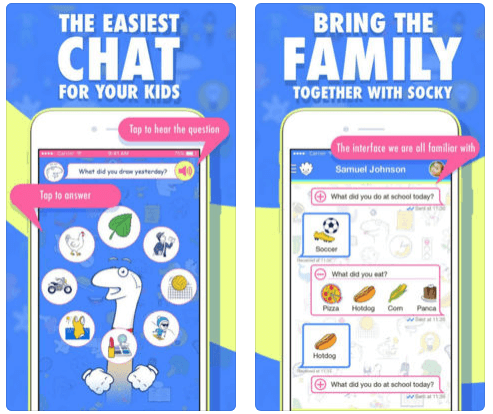
Socky is a virtual intelligent helper that accompanies the child with Autism/ASD and stimulates social communication. The app has different interfaces for the kids and adults, allowing sending one-tap messages in vocal and visual multiple-choice manner.
‘Our story started when Ofir Harel (one of my best friends today) got the A verdict — his son Adam was diagnosed with Autism when he was only 2 years old. For the first time in my life, I felt that ‘making the world a better place’ is not a cliché [...] We decided that, from now on, our mission would be to — Help children with Autism to create meaningful conversations, become independent and take an active part in the society.’
Alex Pavtoulov, CEO of Socky
Widespread deviations of social interactions and communications characterize autism. For a kid that doesn’t speak, read or write, the only way to communicate is to draw on objects or pictures. Taking it into account, the team developed an autism communication app using the most advanced technologies, UX practices, and latest research.
The Socky team picked React Native because the framework allows for reusing most of the code both for Android and iOS. However, this was one of the toughest decisions: they had an enormous number of graphics, animations, and text-to-speech to implement. Equally important, an app had to be highly productive to avoid possible glitches. Otherwise, kids with autism would lose their attention in a blink of an eye.
‘One of the events that strongly tilted us towards using RN was the growing amount of developers that were actually onboard with RN and advocate for it.’
One of the companies which facilitated the choise of React Native, was Wix.com. Inspired by their example, Socky engineering built their app with RN from scratch. They experimented with the built-in animation libraries, including Airbnb’s react-native-lottie. The toolkit allowed developers to achieve better performance, lower asset weight, and scalable UI. Moreover, they could save 25% of the R&D costs.
‘Bottom line — React Native rocks. As surprising as it may sound, we didn’t write any native custom views for it. Socky is purely JavaScript and we’re proud of it! We managed to pull it off with 2 developers (Michael Harari as mobile ninja and David Borohov the backend dragon) without any previous background in JS or Ruby. For us, React Native is an enabler and we love it.’
Learnium
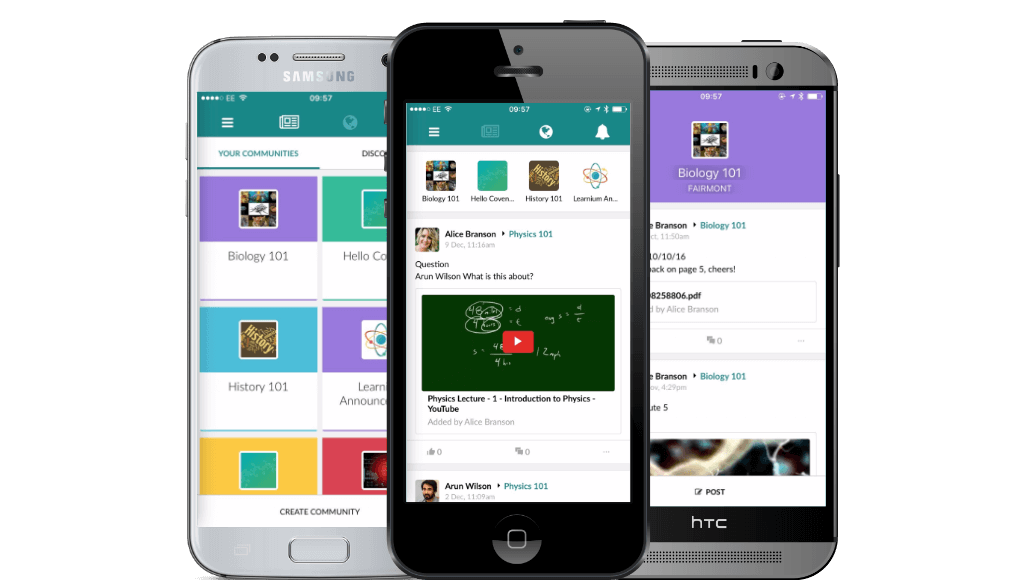
Learnium is a social education platform for universities, colleges and secondary schools. The platform started as a web product, enabling students and teachers to communicate with each other. About a year after launching, Learnium user base had comprised over 2 billion mobile web users worldwide.
‘Picture this. Your small development team has built a great web app. Traction is good and your users are now asking for mobile apps. The big question is, “How do you deliver a great user experience on the web, iOS and Android with a small dev team?”. This was our dilemma at Learnium [...]’
Dale Bradley, former CTO at Learnium, said
The engineering team found that native mobile apps offer the best user experience possible and gave it a try. They also relied on data that smartphone users spend over 85 percent of their time running native apps. Moreover, 25 percent of mobile web users in the USA are mobile-only.
The development process had several phases. First, they outsourced the project, since the company has had a small engineering team inexperienced in mobile development. Thus, Learnium saves time and money by outsourcing the project instead of hiring and training in-house staff. This approach enabled them to keep their mind off creating a mobile app from scratch and focus on improving the web solution.
Looking for a reliable offshore team to hire? Contact us!
Second, the team wanted to make Learnium responsive to different screen sizes and devices. They reached the decision to use cross-platform development tools, however, didn’t know what framework to choose. Bradley thought PhoneGap/Cordova would be the best way to create a web app with an authentic user experience. Even though this solution can speed up software release, it does not provide relevant capacity.
Another option was to use a cross-platform framework that builds native apps. Learnium engineering examined Xamarin, Titanium, and FireMonkey but they are missing essential native API access.
‘Finally, we looked at React Native. A young technology from Facebook that enables developers to build world-class mobile applications.’
Dale Bradley
Learnium used React Native in 2015. The choice was based on previous experience coding on JavaScript and rapid app development of both iOS and Android versions. Since then, they have built two pieces of software that contain the core functionality of the Learnium web app. Thus, mobile users can:
- Start discussions and communicate with like-minded users.
- Store information in personal Boards, share material with specific communities and get feedback.
- Collaborate in teams within course communities, starting real-time chats and sharing resources.
‘We believe that choosing React Native was the right choice when taking into account our resources. The developer experience has been generally issue-free and has given us the opportunity to work with an exciting new technology,” Bradley said. “If you find yourself in similar circumstances to Learnium, we recommend React Native.’
Top Healthcare Mobile Apps using React Native
React Native continues to rise triumphantly through the ranks of mobile development technologies. Look at some examples of successful healthcare companies utilizing its benefits.
Healthcare industry might be a little slow to take advantage of the new technologies. But some entrepreneurs see the opportunities that the innovations offer and embrace them.
ALAN
Alan is a French startup, aiming to disrupt the health insurance business. The market they wanted to work on was pretty packed - they were the first new French insurer in over 20 years. But, the founders could persuade the investors and have received about $13m in funding.
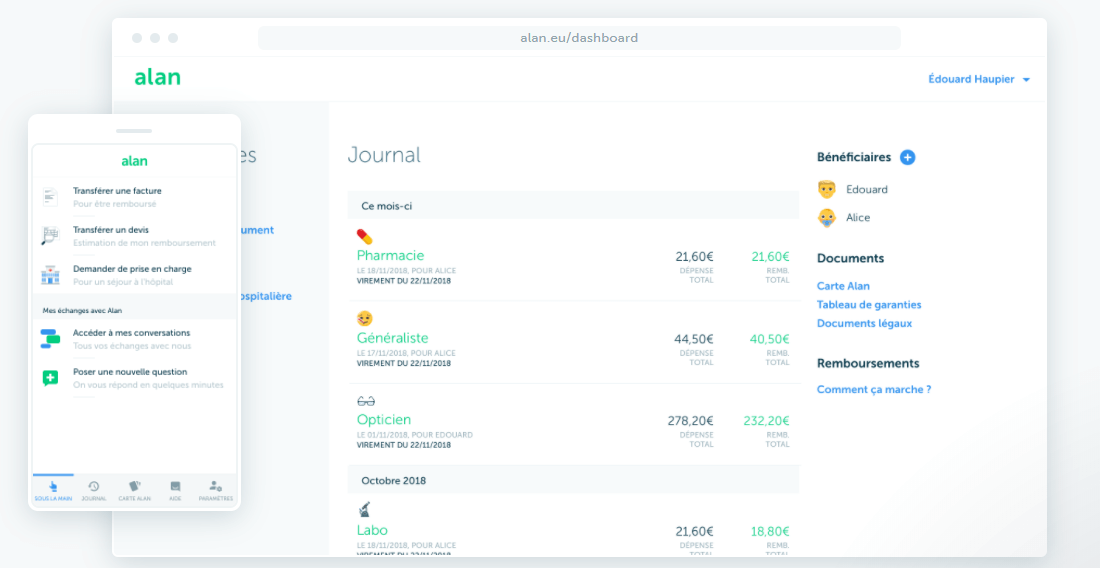
They wanted to speed up the insurance claims process dramatically. It would allow them to stand out and attract more customers. And according to Alan's website, they usually reply within a minute from the moment they’ve got the request.
Their React Native mobile app contributed to their success. It allows their customers to communicate with the insurance agents, send the photos of the documents and track their claims.
According to developer Robert Zyskowski, React Native enabled quick app release, easy access to new features and was simple to learn.
‘While investing in building classic native apps has proven to be highly flexible and scalable, they are costly to develop and have a steep learning curve for engineers who don’t have mobile experience.’
Robert Zyskowski
Moreover, React Native had turned out to have some additional benefits. Code sharing was one of the key advantages, allowing the development team to reuse the same snippets in both Android and iOS mobile apps, as well as their web application.
‘Within a month or so, we had two beautiful apps available in the App Store and on Google play.’
Robert Zyskowski
At the moment, Alan's team continues to develop their mobile application and is eager to contribute to the community.
IODINE
Iodine has made a name for themselves as a provider of plentiful and relevant information about various medicines. They use FDA (Food and Drug Administration) data to help people make informed drug decisions, as well as aggregating user reviews. It also provides information about side effects.
They’ve received $2.5M as their seed funding and have been developing their initial offering ever since.
In 2015, Iodine released Start – a mobile app for people taking antidepressants to track their condition and effectiveness of medicines. That’s when the Iodine development team has first tried React Native.
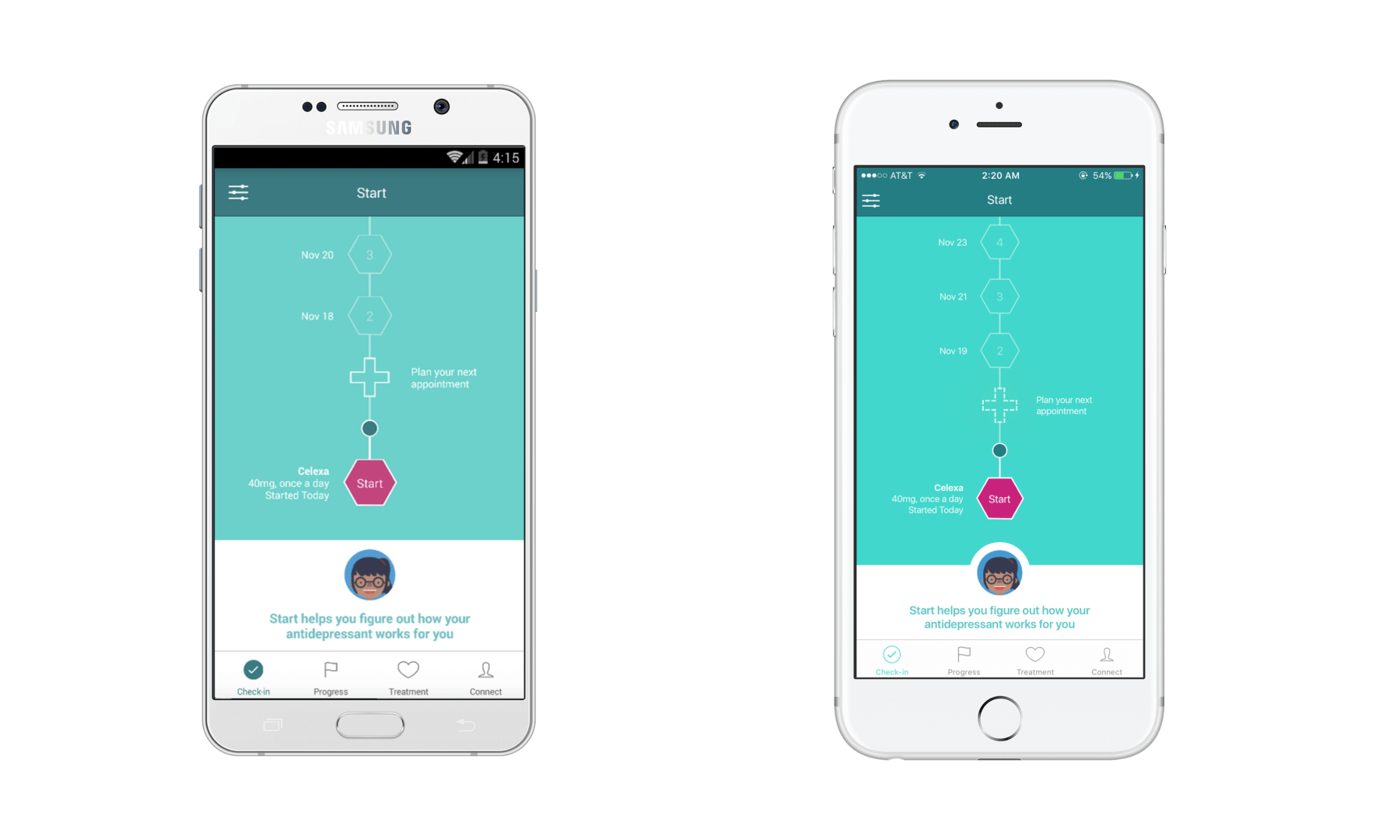
‘In retrospect, choosing to use React Native back in the spring of 2015 was risky. It had only been available for about a month at the time. We were placing a bet on a nascent, unproven, and frankly, ambitious technology.’
Iodine stated in the dedicated blog post
However, it was a calculated gamble. React Native has Facebook behind it, which gave the Iodine team reason to believe that this technology is going to be improved further. Moreover, the team was already familiar with React.js, having developed their website frontend with it.
The gamble has paid off. First, React Native turned out to produce high levels of quality and performance. It allows using the native functions of each device – hence the “native” in the name.
‘And when the framework doesn’t provide a component you need, it bends to your will, allowing you to build native components at just the right level of granularity.’
The team built the app without sacrificing quality, vital for building trust with the user.
Second, the developers cited the speed of React Native, meaning both app performance and time to deliver a complete project. The framework allows seeing the results of your code changes in seconds. So making minute adjustments and tweaking important logic becomes much faster.
‘Feedback that a native developer might get in minutes, a React Native developer realizes in seconds.’
Sending JavaScript bundles from the local server allows for quick RN code testing.
This has another unexpected benefit for iOS devices. Native code changes need App Store approval, but if your logic is in JavaScript. Updates can be released quickly without delay. Iodine developers mentioned this feature allows them to respond to user feedback in record time, which is especially important for a startup.
Another advantage of React Native, which Iodine made use of, is its vibrant community.
‘If you encounter a bug in the framework, more likely than not somebody has already opened an issue in the repo or posed a question on Stack Overflow. If you can’t find built-in support for a certain native functionality like push notifications or a tab view, somebody has probably already built it.’
Also, if there are no existing modules for your problem, you can write one yourself and contribute to the open source community.
React Native is not perfect, and Iodine mentioned several pitfalls to watch out for. Developers need to take special precautions to avoid runtime errors, and the documentation for this framework is not comprehensive. It could make programmers research extra the inner workings of RN.
In the end, the development team could release Start for iOS in three months. And later (in about a year’s time) they made an Android version in another three months.
GYROSCOPE
Gyroscope specializes in health analytics. Their online personal dashboard helps users learn more about their daily activities and achieve their health-related goals – be they 6-pack abs, weight loss or peace of mind. Gyroscope can integrate with popular fitness trackers like FitBit. It also uses AI to help teach people healthier behavior.
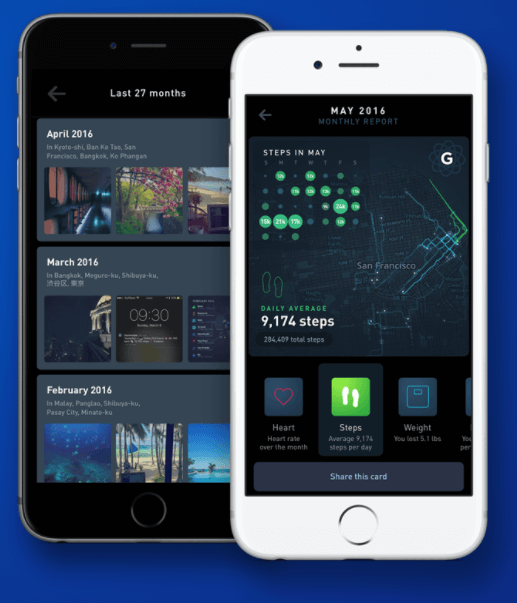
The company has received $1.3M in investment and their iPhone and Android apps rank 4,5 and 3,5 stars in their respective marketplaces.
The apps were built using React Native. It was no surprise – Eric Florenzano, one of the original co-founders, was a big fan of React.js. So he decided to try RN for their mobile app.
Anand Sharma, the other co-founder, also found it easy to use.
‘Within a few hours, I was able to edit elements on the page and style them with a Flexbox/CSS-like syntax. It was magical.’
Anand Sharma
Apparently, the experience was successful, as in April 2017 Gyroscope hired a custom software development company to create an Android version of their app also using React Native. And now it has over 100.000 downloads on Play Market.
Send us a message to get your own dedicated team!
OSCAR
Oscar is a New York-based health insurance startup. It leverages modern technologies to improve customer experience. Their mobile app offers easy communication with the concierge team and doctors available 24/7. There is even a motivation to stay fit – step tracker which rewards achieving goals with Amazon gift cards.
Since their founding three years ago, they’ve received a hefty $727.5M investment and are expected to generate $1B in revenue in 2018.
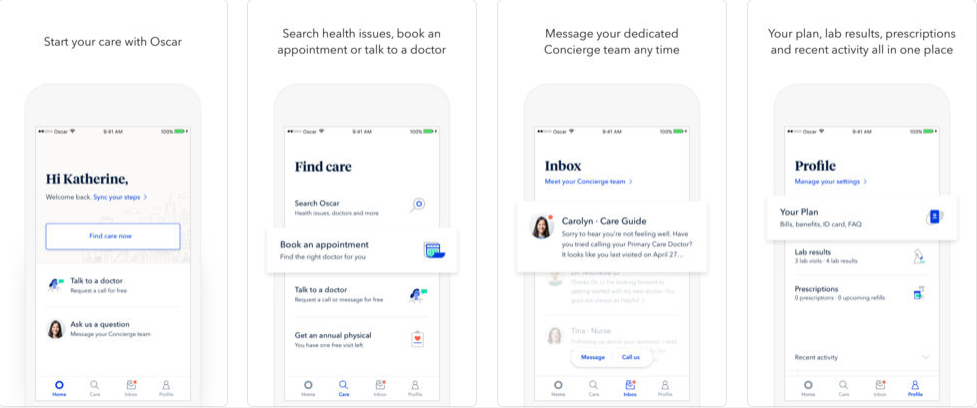 Oscar mobile app
According to Yang Mou, one of the Oscar programmers, their engineering team currently has about 80 people, which is not that big, taking the company size into account.
But thanks to their streamlined approach to the development process, it is easy for them to be full-stack developers. One team can make the same features both on mobile and on web apps, saving money for the company.
Oscar technology stack revolves around React and React Native for frontend and Python (Flask framework) for the backend. It means the developers only need to learn these few technologies to stay effective.
According to Mou, React Native allows for over 80% of code reuse, especially in typical tasks like pulling information from API. Not having to do the same job twice speeds up the development.
When they announced React Native, Facebook representatives stated the framework’s principle of “Learn once – write anywhere”. Oscar developers have already known React, which they used for their web app frontend. Although they couldn’t always just copy and paste their code, learning React Native was quick and easy for them. It was another major benefit to the Oscar team.
‘In our experience, it takes more time for native engineer to learn React Native, than it is for web engineer.’
Yang Mou
Like their Iodine counterparts, Oscar devs have fully used of the active community that has grown around React Native and improved their speed.
‘They [the community – A.K.] are very good at opensourcing. Anything you want to do, someone tried to opensource that already.’
Yang Mou
Another benefit of React Native, which provides “an unbelievable developer experience”, was the fast feedback that the programmers were able to receive. Thanks to the Hot Reloading feature, the Oscar team was able to see the results of their code changes in seconds rather than in minutes it usually takes for native developers.
Finally, Mou said that React Native and the surrounding libraries make testing the software much easier than on native technologies.
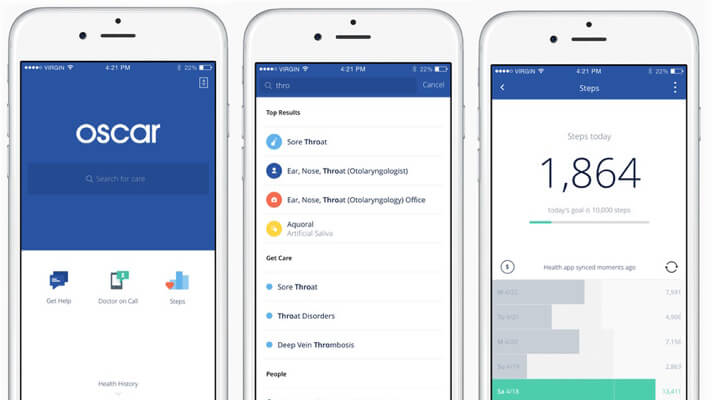
Despite the positive impression that this framework has made on them, Oscar developers mention some drawbacks of React Native. The other teams should consider them when choosing the right technology stack.
The framework develops rapidly, which means the applications built with it will always be behind the latest version and accumulate technical debt. The APIs used in the app are always under threat of breaking. And every once in a while, the project would need extra work to make sure everything stays operational despite the updates.
‘And if you fall behind, someone’s got to take a week to just get you caught up,.’
Yang Mou
A vibrant and productive community has its drawbacks as well. There are many libraries teams can use, but those libraries aren’t that well-tested, potentially giving the developers unpleasant surprises.
As much as it allows to decrease the need for native code, React Native doesn’t erase it. Some knowledge of the native Android development is still required for the app to function properly.
‘‘You cannot do it with just JavaScript engineers and then spend a lot of time figuring out why your activity disappeared.’
Yang Mou
The performance of React Native applications is also falling behind when compared to native technologies. It was acceptable for the Oscar team, but developers working on more resource-intensive applications might see it differently.
Finally, this framework still “feels like an iOS-first project”, because the Android side of it is lagging to get updates and bug fixes. Although, according to Mou, the situation has been improving lately.
Conclusion
With each passing day, more healthcare companies are turning towards promising modern technologies like React Native. Although it is not a one size fits all solution, it could be very beneficial when used properly.
Looking for React Native developers? Send us a message and get a free quote on your project!
Migrating To React Native: Top Case Studies From Well-Known Companies
There are many examples of how world-known companies migrated to React Native. Artsy engineering, for example, chose the approach to update their 3 years old iOS app that was created in Objective-C / Swift. The framework was useful for the company, intending to support other platforms in the future without creating more teams.
Bloomberg rebuilt the company’s consumer app for iOS and Android with React Native. The framework was considered as a first-rate tool to build native apps simultaneously for both iOS and Android platforms in comparison with other free software projects available in the modern market. By using React Native, developers modified the interactive animation by adding a parallax of images in the news feed, introduced a feature to swipe a headline to share or bookmark an article and allowed access to live TV or event feeds for on-demand viewing.
‘React Native is the best out there. Expect it to appear in other Bloomberg mobile apps in the future.’
Gabriel Lew, Senior Software Engineer at Bloomberg
Airbnb engineering introduced React Native into an iOS and Android code base in 2016. They developed, for example, Lottie - an open-source library that facilitates adding animation to native apps. The tool allows engineers to build richer animation without rewriting the code.
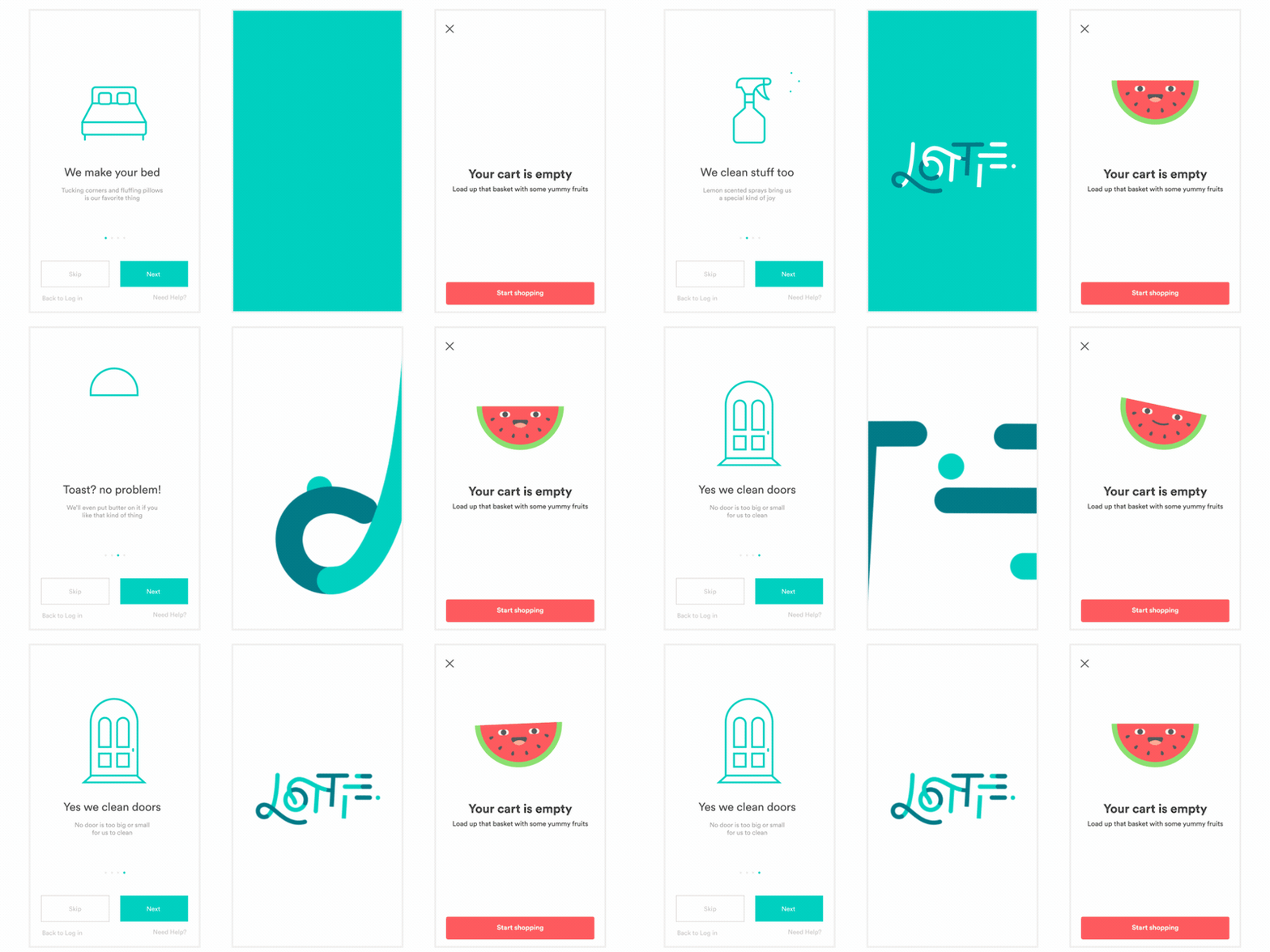
Delivery.com used React Native when integrating into the existing iOS app and built new views using JavaScript. The management was so satisfied with React Native outputs that they approved the development of a full-on Android version with the framework.
Case studies are a great way to know the experience of how other successful companies implemented React Native in their software development processes. Do you need React Native developers? We are here to help you. Get a Free Quote.
React Native vs Other Frameworks
Flutter vs React Native
Flutter is a popular alternative to React Native for cross-platform app development. It uses the Skia graphics library to create views following platform-specific design, and renders them using its C++ engine. Unlike RN, Flutter uses the Dart language that compiles directly to native libraries, which provides faster start-up time and better performance.
However, Flutter has its downsides. It doesn't provide an easy switch from web to mobile development, has a smaller community, and fewer third-party libraries to choose from compared to React Native.
Xamarin vs React Native
Xamarin is a toolset supported by Microsoft that enables developers to create cross-platform apps using C# and the .NET framework. Like React Native, it offers near-native performance and allows sharing up to 90 percent of the codebase between iOS and Android. Visual Studio tightly integrates with Xamarin, unlike React Native which offers the flexibility of choosing code editors.
Xamarin is particularly well-suited for developers who are already working within the Microsoft environment and are comfortable using C#.
Ionic vs React Native
Ionic takes a unique approach to mobile development, as it is a hybrid platform that uses web technologies like HTML, CSS, and JavaScript UI frameworks to create mobile apps. Developers can use Angular, React, or Vue.js to build apps, and Ionic uses WebViews to render the code on native platforms.
One advantages of Ionic is that developers do not need expertise in native languages, making it a cost-effective way to create two apps simultaneously. However, compared to RN, Ionic may not perform as well and may not have as sophisticated UI/UX design.
React Native vs Native development
Native app development is still the preferred choice over cross-platform technologies like React Native owing to its superior performance and ability to utilize platform-specific features of Android and iOS.
It's advisable to choose native development because:
- When developing an Android or iOS-only app.
- When creating an app with resource-intensive features like augmented or virtual reality (AR/VR) and heavy animations.
- When requiring access to all the native capabilities related to hardware, sensors, platform-specific functionality, and SDKs.
- When wanting to support new mobile features immediately after they are released.
For simpler projects, the difference in speed between React Native (RN) and native apps is often negligible for users. As a result, opting for RN can result in tremendous savings in time and cost, making it the preferred choice for:
- Teams with a strong background in JavaScript and React
- Projects with limited resources
- MVPs, demos, proof-of-concepts, or simple apps that don't require extensive processing
However, the eventual choice between RN and native development is often influenced by many other factors. It's advisable to consult tech experts before investing in a particular technology, even if it's highly praised like RN.
Migrating Cross-platform apps to React Native at Walmart
Walmart is made of many brands, such as Walmart Grocery, Sam’s Club, ASDA, Walmart.com, etc. — each with its own IT needs, requirements, and dev teams. Things get even more complex on the mobile side. Each brand has two teams of mobile developers, building apps for each OS, that are similar in functionality, but different in execution. This was not by choice, but necessity as it is very difficult to find highly skilled developers who are adept at writing native apps in both iOS/Android.
For associate tools, they mostly wrap web apps using ionic or similar solutions.
They felt that React Native could really change the paradigm.
‘Solutions in the open source world similar to what we accomplished are ‘PhoneGap’ or ‘Cordova.’ Going down this route led to a noticeable difference in performance compared to other parts of our native app. This was validated when we re-wrote those parts in React Native or mobile app technologies and saw metrics which showcased more engagement from our customers.’
Alexander Grigoryan, the senior director for software engineering, application platform and online grocery for Walmart Global eCommerce
The team also looked at Microsoft’s Xamarin tools, but decided that it wouldn’t give it benefits like reusable UI components , shared JavaScript modules and over-the-air updates as React Native.
‘Our front-end for web is also React, so it all just made sense for us to invest in React Native as the solution.’
Alexander Grigoryan, the senior director for software engineering, application platform and online grocery for Walmart Global eCommerce
So, they already have mobile apps in production that have lots of features powered by tons of code.
Typically, developers who want to move their apps to React Native would have to either rewrite their app from the ground, build a quick and dirty integration that’ll cost them later, or build a new platform and tooling for integrating React Native into their apps. Rewriting everything would be a massive investment of time, hiring, and training (translation: money). And a complete rewrite is prone to failure compared to an incremental migration approach.
Walmart went with the last option. They created the Electrode Native Platform. The basic idea here is that Electrode Native allows large companies like Walmart to take their existing apps and slowly migrate parts of their code to React Native.
Alex Grigoryan, Sr Director of Software Engineering at WalmartLabs, says, "Electrode Native offers a streamlined integration of React Native into existing mobile applications. With Electrode Native, there will no longer be a need for an engineer who specializes in both mobile and React Native technology in order to put the two technologies together. For your existing mobile application, there is no heavy infrastructure, code, or development lifecycle changes.
When considering their approach to using React Native, WalmartLabs developers decided that building features into production applications incrementally would be the solution with the highest chances of success.
As of February 2017, they migrated one of the webviews to RN. As of August 2017, they were migrating a few more webviews and building new features in RN. Walmart developers reported no scaling issues.
Native iOS and Native Android to React Native at Bloomberg
Bloomberg is a financial software, data, and media company headquartered in New York City with 9.4 billion USD revenue (2014). Bloomberg’s mobile app for iOS and Android, launched in January 2016, offers users personalized content, videos and live feeds. To develop the app, an engineering team at Bloomberg’s New York City headquarters developed the app using React Native.
- With React, Bloomberg engineers were able “to more easily and quickly rebuild the company’s consumer app for both mobile platforms”.
‘While other free software projects like Titanium and PhoneGap promise to offer developers a native look and feel, Bloomberg found that React Native was the best tool available in the market today to create native apps simultaneously for both iOS and Android platforms.’
- Before React Native, Bloomberg teams would have developed the iOS and Android versions in parallel without being able to share most of the code they wrote, leading to delays and repetition. By comparison, the React Native platform’s unified development capabilities made for a seamless process that allowed each developer to focus on one feature at a time.
‘That helped speed things along. It took the team of developers in New York just five months to develop the app—roughly half the time it would have taken had they not used React Native.’
- Another benefit of React Native is that it automates code refreshes, accelerating the release of new product features. Instead of recompiling, your app reloads instantly. Once users open the app, they get the latest update.
- That same feature lets coders experiment, iterate and quickly push out upgrades with A/B testing. For example, before the app’s launch, the team tested user preferences by placing images on the left and right sides within the app, collecting data and metrics to identify what internal beta users favored. This was just one of the many experiments the team conducted to validate this tech and workflow.
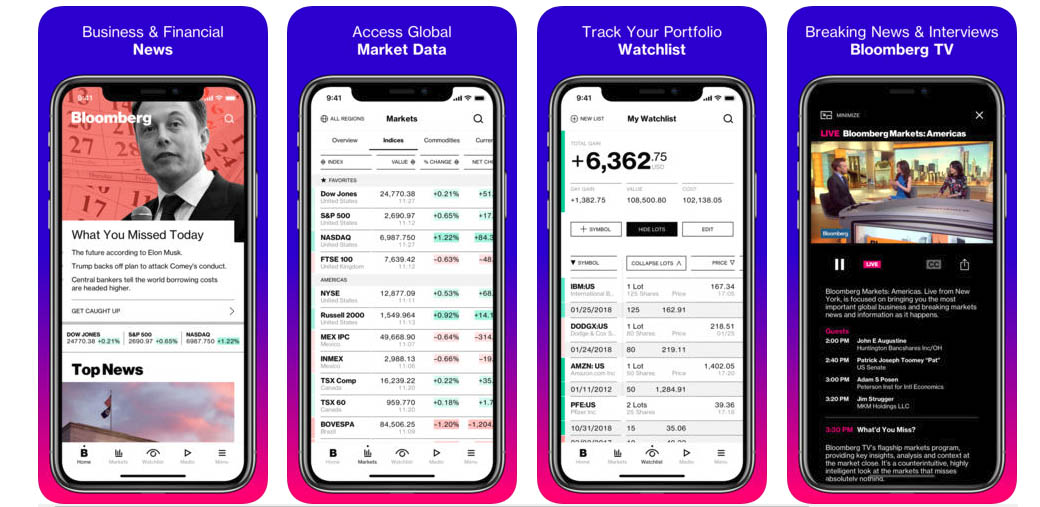 Source: itunes.apple.com/us/app/bloomberg/id281941097
- React Native made it easy for Bloomberg engineers to “sprinkle in interactive animation,” such as a parallax of images in the news feed or the ability to swipe a headline to share or bookmark an article. It also enabled the team to ensure the continual updating of the app with market-moving news, data, and analysis, all of which is accessible via personalized widgets. There is no performance impact on media features like animation because the JavaScript is running on a separate thread.
‘React Native is the best out there. Expect it to appear in other Bloomberg mobile apps in the future.’
Gabriel Lew, a senior software engineer at Bloomberg
Native iOS (Swift) to React Native at Artsy
Artsy is a New-York based startup with a total funding amount of $100.9M. It is a marketplace for buying and selling visual art online. Artsy’s database contains over 270,000 pieces for sale from the top galleries and auction houses. Artsy’s iOS app was first developed in Swift, but soon “a small team of iOS developers with decades of native experience switched to React Native”. In the series of blog posts Artsy Engineering team covers the reasons they made that choice, including “support other future platforms such as Android without creating more teams”, enabling “different business teams to work on the app without disrupting each other”, developing “our architecture in order to increase programmer efficiency”. As they concluded, “new apps going forward we will default to React Native apps”.
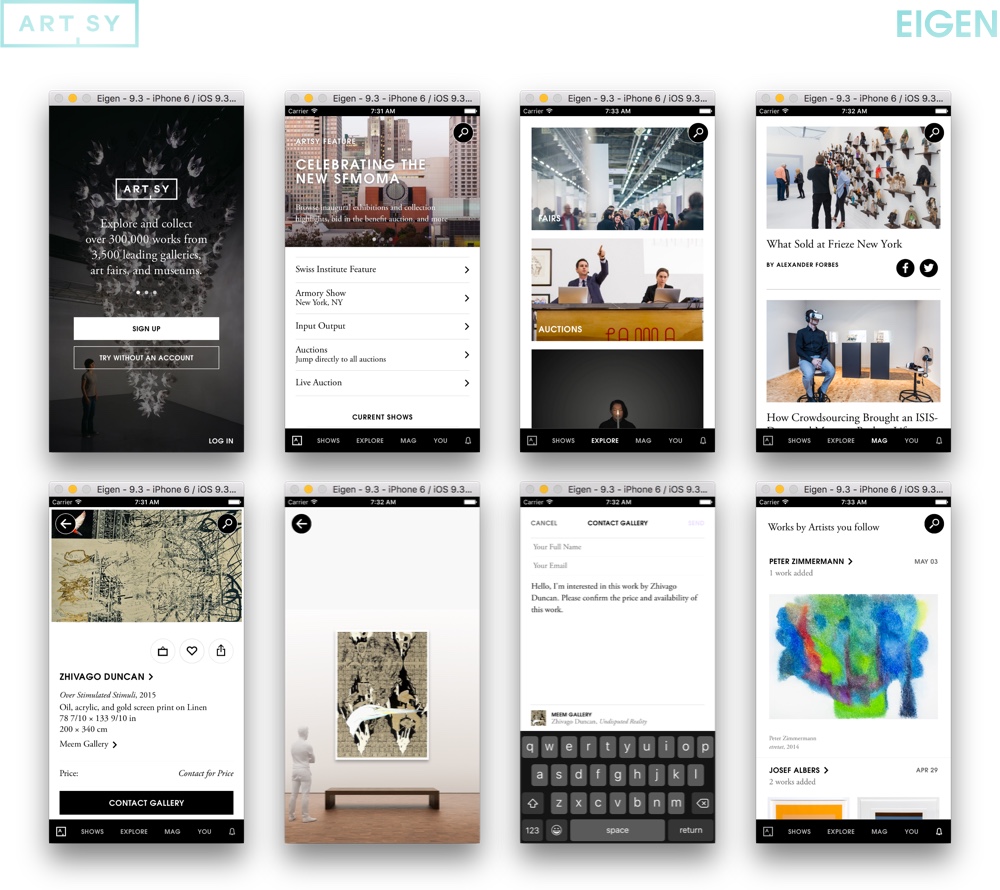 Source: github.com/artsy/eigen
Other Case Studies
- Wix.com is a cloud-based web development platform enabling users to create HTML5 web and mobile sites through the use of online drag-and-drop tools. The video-study “Building a React Native App for 80 Million Users” explains why the team chose React Native for their official app, what challenges they resolved, what methodologies they applied and what gaps they are still trying to solve. Presented by Tal Kol (Head of Mobile Engineering at Wix.com). Popularity: 49,330 views; 547 likes. Date: October 1, 2016.
- Instagram is a social networking app developed for sharing media content (photos and videos). The study “React Native at Instagram” describes how React Native was integrated into an existing Instagram native app: the major challenges and results. React Native allowed product teams to ship features faster to both their iOS and Android apps. Written by Martin Bigio, Don Yu, Brian Rosenfeld and Grace Ku (Software Engineers on the Core Client team at Instagram New York). Popularity: 3.9 K likes. Date: February 6, 2016.
- UberEATS is an online platform for ordering food from restaurants. The study “Powering UberEATS with React Native and Uber Engineering” describes how Uber’s engineering team rebuilt their app’s Restaurant Dashboard with React Native. Written by Christopher Lewis (SR Software Engineer at Uber). Popularity: 855 shares. Date: March 28, 2017.
- SoundCloud is an online music and podcast streaming platform that enables its customers to upload, record, promote, and share their originally created sounds. The study “React Native at SoundCloud” outlines how the SoundCloud engineering team constructed SoundCloud Pulse (an app for creators) with React Native, detailing their process, the lessons they learned, the features they opted for, and their plans for future React Native implementation. Written by Jan Monschke (Frontend Engineer at SoundCloud) and Peter Minarik (Engineer at SoundCloud). Date: August 3, 2016.
- Skype is a telecommunication app software product that focuses on providing video chat, voice calls and instant message communication between computers and mobile devices via the Internet. The study “Introducing the next generation of Skype” informs how the programming team rebuilt the Skype app and what new features were introduced. Popularity: 2K shares. Date: June 1, 2017.
- Facebook Ads let users who advertise on Facebook manage their accounts and create new ads on the go. The study “React Native for Android: How we built the first cross-platform React Native app” describes the way Facebook software engineers developed the Ads Manager app. The team shares how they built this Facebook’s first fully React Native app and the lessons they learned. Written by Daniel Witte (?) and Philipp von Weitershausen (Ex-Software Engineer at Facebook and Firefox, Software Engineer at Silk Labs). Popularity: 1,3 K likes. Date: September 14, 2015.
- Mapbox is a location data platform for mobile and web apps. The company provides building blocks to add location features like maps, search, and navigation into any experience its customers create. The study “Our React Native GL library is in alpha” describes the way the Mapbox mobile team rewrote their current experimental React Native library and released an alpha. Written by Nicholas Italiano (Software Engineer at Mapbox). Popularity: 352 likes. Date: September 28, 2017.
- Airbnb hosts an online marketplace and hospitality service allowing its customers to rent short-term lodging including vacation and apartment rentals, homestays, hotel rooms, and hostel beds. In the talk “Hybrid React Native Apps” the speaker focuses on how the engineering team introduced React Native into an iOS and Android code base and what fundamental challenges they faced. Presented by Leland Richardson (Software Engineer at Airbnb). Popularity: 396 likes, 71,812 views. Date: September 13, 2016.
- Glitch app allows users to buy Adidas Glitch customizable boots that can be combined with differently colored uppers and inner-shoes for more personal football cleat experience. The study “How we have been breaking patterns with the adidas GLITCH” describes how the POSSIBLE development team created the app from scratch by using React Native framework. Written by Istvan Makary (UI Developer at POSSIBLE). Popularity: 301 likes. Date: December 12, 2017.
- Clubhouse is a software development company aimed at building intuitive project management tools. The study “Going Mobile with React Native” describes what best practices the company’s development team used when building and alpha testing the Clubhouse iOS app. Written by Camille Emefa Acey (VP at Clubhouse Software). Popularity: 67 likes OR 195 shares. Date: July 6, 2017.
- Made by Many is a digital product design company specialized in product innovation and digital transformation. The study “A Year of React Native: Styling Part 2” describes how React styling concepts provided flexible ways of creating apps for iOS and Android. The developers team explained why they had chosen React Native and what best practices they had learned along the way of using the technology. Written by Sam Murray (Developer at Made by Many). Popularity: 11 shares. Date: September 21, 2017.
- Yeti Smart Home was developed to control all the home’s devices from a single app. The study “Developing beyond the screen” describes the methods how React Native and Firebase helped the team to release Yeti. Written by Jesús Darío (CTO and Co-Founder of Netbeast, today’s Yeti) . Popularity: 32 likes. Date: January 13, 2017.
- Delivery.com makes it possible to order products and services online from the local restaurants, wine and spirits shops, grocery stores, laundry and dry cleaning providers. The study “React Native in an Existing iOS App: Getting Started” brings up to speed on why the programming team used React Native to develop a new iOS app and how they built new views using JavaScript. Written by Jesse Sessler (Front End and Mobile Developer at Delivery.com). Popularity: 118 likes. Date: January 8, 2016.
- Discord is a freeware VoIP app designed for gaming communities. The developer preferred React Native features when building an iOS app from scratch in the study “Using React Native: One Year Later”. He shares his doubts about React Native usage and explains why he revised his opinion. Written by Fanghao Chen (iOS Developer at Discord). Popularity: 1,4 K likes. Date: June 7, 2016.
- Gyroscope checks the user's health aspects such as mental health, weight, physical activity, and heart rate. The study “Building the Gyroscope App with React Native” describes how the team developed and released their new iOS app on React Native and how it should deliver the best results. Written by Anand Sharma (Founder and CEO at Gyroscope). Popularity: 1 K likes. Date: June 16, 2016.
- Huiseoul is an e-commerce company that provides personalized skin care counseling and Korean skincare products exclusively to China. In the study “Building a conversational E-commerce app in 6 weeks with React Native” listed the tools that helped the developers build a mobile app for a conversational e-commerce service. Written by Johnwook Choi (Software Engineer at Huiseoul). Popularity: 50 likes. Date: September 8, 2016.
- The li.st app is a way to create lists where users can share their personal experiences, opinions and discover lists from the leading voices in TV & film, music, food, sports, news, fashion and more. The video-study “Building li.st for Android with Exponent and React Native” develops the topic about what knowledge developers should have when building large apps on React Native. Presented by Brent Vatne (Software Developer at Expo). Popularity: 18,743 views; 116 likes. Date: June 7, 2016.
- Townske is a travel publishing platform focused on sharing and discovering visual city guides to help people easily explore any city in the world. The study “Townske app in react native” is based on the experience of a web developer who built a Townske iOS app on React Native: why he chose React Native, what challenges he faced, and what benefits he discovered. Written by Dean McPherson (Co-Founder of Paperform). Popularity: 100 likes. Date: December 15, 2015.

Rate this article