Belitsoft > React Native vs Xamarin: How to Choose the Best One for Your App

React Native vs Xamarin: How to Choose the Best One for Your App

Many businesses aim to develop an app that's compatible with both iOS and Android, cost-effective, quickly deployable, and on par with native app quality. But when it's time to choose a cross-platform mobile app development framework, the decision can be daunting. In this article, we'll explore real-life scenarios to help you determine whether React Native or Xamarin is the best fit for your project.

Contents

React Native: Key Advantages and Development Tools

If you are considering a cross-platform mobile app that offers a native-like experience on both iOS and Android, React Native might be your ideal choice.

Originating as an open-source mobile application framework from Meta, React Native harnesses the capabilities of the React library, enabling the creation of impressive native mobile applications. What's more, its compatibility with most major IDEs makes developers' lives easier.

Utilizing JavaScript, CSS-style layouts, and the React Library, React Native equips developers to build well-structured apps with captivating interfaces. Notably, it delivers a seamless, native experience while effectively managing platform-specific elements.

React Native Strong Suits

  • Native-like performance delivers an experience closely resembling that of native applications.
  • Reusable UI components speed up mobile app development starting from scratch is less necessary.
  • Hot and live reloading speeds up development, especially for UI changes or bug fixes
  • Modular architecture is flexible for updates and promotes team collaboration.
  • Data binding amplifies the app's stability and reliability by instantly mirroring model changes in the UI.
  • Active community support provides rapid troubleshooting, continuous updates, and a plethora of resources, ensuring the platform remains adaptive and robust.
  • Cost-effectiveness with a single codebase for both iOS and Android platforms streamlines development time and resources, offering a more economical approach to app development.

React Native Cross-Platform App Development Tools

IDEs and Text Editors

Visual Studio Code, Android Studio, Xcode for iOS and macOS, WebStorm

SDK

Expo platform facilitating quick mobile app development and testing

Testing and Inspecting

Enzyme, Detox, React Native Testing Library, Reactotron

Beyond these, React Native provides numerous boilerplates, UI frameworks, libraries, and components available for navigation, animation, state management, and more, such as React Navigation and MobX.

When to Use React Native for Your App Development

1. You start with MVP development

React Native is particularly valuable for those launching MVPs or startup apps.

Its feature of hot reloading speeds up the development process, reducing wait times for recompilation, especially when developers are tweaking the UI or fixing minor bugs.

Plus, with a wide array of pre-built components at our disposal, from buttons, lists, maps to more complex components like navigation, modals, we can avoid building basic elements from scratch.

react native vs xamarin
CASE STUDY: An example of an MVP built on React Native, allowing our client, the US business, to launch the MVP fast and fit into the budget

2. You plan to extend your mobile app to a web version

React Native can save both time and money when developing mobile apps alongside web apps.

Extending your React Native app to the web with the help of existing developers will expedite launch and minimize costs.

A hallmark of React Native's efficiency is its emphasis on reusing of business logic. At the outset, components primed for reuse are identified. Subsequently, these components are organized into distinct modules or files, forming a cohesive shared codebase or library.

Taking it a step further, we can segment the application into Microfrontends, with the core logic isolated within Microservices. This modular approach empowers development teams to operate on different parts independently. Beyond the inherent advantages of React Native, tools such as Storybook come into play, enabling the creation of a shared UI library. This is especially beneficial when creating multiple applications with similar UI elements, which leads to a more efficient development process.

react native vs xamarin
CASE STUDY: An example of quick mobile and web apps development through to code reuse between React Native and React for the US startup

3. You build an app with real-time activities and updates

For applications that rely on real-time data updates, like chat apps or live score updates, React Native's capabilities are indispensable as they can benefit from its efficient data handling and UI updates.

We take advantage of React Native's Virtual DOM, which optimizes rendering and improves app performance. When data changes, only specific parts of the DOM get updated, ensuring efficiency. Then, we use a diffing algorithm to identify what has changed in the Virtual DOM and selectively update those parts of the actual DOM. This results in faster and more efficient updates, which is crucial for real-time data updates.

One advantage of React, which we also leverage in React Native, is its use of state and props for data management. While the state is dynamic and can change over time, props remain consistent when passed from parent to child components. This system allows efficient data flow and updates in the application, benefitting real-time data handling.

What's no less important, our developers apply numerous third-party libraries helping with real-time data handling, such as socket.io-client for WebSocket communication, or Firebase for real-time databases.

react native vs xamarin
CASE STUDY: A mobile banking app built on React Native with the support of instant, real-time payments for the EU startup

Xamarin: Key Advantages and Development Tools

If you are planning a top-notch mobile app for iOS, Android, Windows and MacOS with ease, Xamarin might be your answer.

An open-source platform for native mobile app development, Xamarin provides:

  • Xamarin.Forms: A cross-platform UI toolkit for creating native user interfaces on mobile and desktop with a unified codebase. This streamlines development and eases deployment across various platforms.
  • Xamarin Native: Including Xamarin.iOS, Xamarin.Android, and Xamarin.Mac libraries, it lets developers craft platform-tailored UIs, ensuring optimal performance and access to unique platform features
  • .NET MAUI: Evolving from Xamarin in 2022, .NET MAUI integrates the robustness of Xamarin.Forms with enhanced features, offering low-code solutions. It simplifies the task of developing both native mobile and desktop apps using C# and XAML.

Stregths of Xamarin

  • Near-native performance achieves standards almost identical to native for both Android and iOS applications.
  • Comprehensive testing tools provide a vast array, including the Xamarin Test Cloud and Test Recorder.
  • Microsoft support with Xamarin translates to savings in development costs and time, thanks to its ability to utilize a unified codebase for multiple platforms.
  • Cost-effectiveness with Xamarin translates to savings in development costs and time, thanks to its ability to utilize a unified codebase for multiple platforms.

Xamarin Cross-Platform App Development Tools

IDEs

Visual Studio, Rider

SDK

NuGet, Xamarin Inspector debugging tool, Prism framework for XAML, MFractor tool for code writing in Xamarin.Forms

Design

Adobe XD, InVision, Sketch, Balsamiq, etc

Testing

NUnit, xUnit.net, and Visual Studio Unit Testing Framework for unit testing, Instabug for beta testing

When to Use Xamarin for Your App Development

1. You're developing enterprise-level apps

We recommend Xamarin for enterprise-level apps because it's robust, compatible with .NET, and backed by Microsoft.

If your enterprise already utilizes .NET-based applications, Xamarin facilitates the transition. The development team can craft the new app in C#, leveraging the expansive .NET ecosystem, from libraries and tools to APIs.

Moreover, as a Microsoft product, Xamarin boasts consistent updates, thorough documentation, and dedicated support. Our developers find it seamless to integrate apps with services like Azure for cloud functionalities, Microsoft Graph for cloud data access, and even Office 365 for enhanced productivity features.

With Xamarin, we take advantage of secure storage and encryption to protect sensitive business data at the enterprise-level.

xamarin va react native
CASE STUDY: Crafting a Xamarin-based mobile app for a corporate learning management system

2. Your app demands extensive use of native APIs

Xamarin offers full access to a vast array of NuGet packages, facilitating seamless integration with native APIs and UI controls on both iOS and Android. This equips your app with native features and controls, ensuring an experience that feels genuinely native to users.

Moreover, Xamarin ensures uninterrupted access to platform-specific features, such as the camera, GPS, sensors, file system, and more. APIs like CLLocationManager for iOS and LocationManager for Android Android are readily accessible, enabling developers to harness the full potential of device-specific functionalities without restrictions.

For example, we built a mobile app for a delivery marketplace that involved multiple APIs, including

  • chat functionality
  • integration with Google Maps
  • tracking analytics
  • barcode image processing, and more
xamarin va react native
CASE STUDY: Crafting a Xamarin-based mobile app with native APIs and real-time functionality

3. You build an app with complex UIs

If your app requires a complex yet consistent UI across different platforms, Xamarin emerges as a formidable choice.

Xamarin.Forms empowers our development team to sculpt intricate user interfaces. These UIs may encompass diverse user interactions, advanced navigation mechanisms, dynamic content display, bespoke animations, multimedia integrations, vast data management, custom components, and responsive designs. While these elements amplify the user experience, they also compound the UI's complexity. Crafting such UIs demands meticulous planning, design, and testing for best usability and performance. However, when skillfully executed, they offer a robust and adaptable user experience.

A salient feature of Xamarin.Forms is its ability to map shared UI components to their native counterparts on each platform. This ensures that every UI element not only appears native but also behaves as users anticipate on their specific device.

To facilitate the integration with respective platform-specific features, our specialists use Xamarin.Android and Xamarin.iOS separate implementations for Android and iOS platforms. This allows developers to fine-tune the behavior and appearance of the app for each platform.

Moreover, a plethora of third-party libraries exist to supplement Xamarin.Forms, furnishing additional UI controls and design patterns. Such resources can further refine and bolster the UI's complexity and utility.

xamarin va react native
CASE STUDY: An advanced mobile app for drone data management in real time

React Native vs Xamarin: The Differences that Matter

React Native and Xamarin have long been contenders for the top spot in cross-platform mobile development. We've conducted comprehensive research to determine the current leading framework.

React Native

Xamarin

Release

2015

2011

Owner

Facebook

Microsoft

Programming languages

TypeScript

>NET, C#

Development costs

free

free

UI/UX

simple

simple

Performance

near-native

near-native

App memory consumption

lower

higher

Maintainability

instant updates

updating lags

Let's explore some independent analyses to understand how React Native and Xamarin fare against native app development.

React Native vs Xamarin: Popularity and Community

React Native

As of now, the React Native developer community boasts over 2.5K contributors who commit code to the framework's codebase.

"With so many people from the community contributing to React Native, we've seen as many as 266 new pull requests per month (up to 10 pull requests per day). Many of these are high-quality and implement widely used features."
Martin Konichek, Ex-Software Engineer at Facebook, React Native team

Increasing interest in React Native can be also observed on Google Trends.

frameworks google trends

React Native employs JavaScript, which is currently among the most dynamic programming languages. The number of developers working with JavaScript is over 63 percent according to the Stack Overflow survey 2023. Thus, it's relatively easy to hire a professional developer for your app.

Airbnb, Walmart, Skype, and Tesla are among the top users of React Native. Furthermore, Facebook's Showcase lists over 100 apps developed with this framework. We have also described some case studies of migrating to React Native in our blog.

React Native has new releases every two weeks, which means the developers get the latest features quickly. The project has over 112K stars, which makes it one of the most starred repos on GitHub.

Xamarin

Founded in 2011, the Xamarin community has grown to 1.4M developers across 120 countries. The project was acquired by Microsoft in 2016 and became part of its Visual Studio IDE. This is one of the key reasons why large companies such as Slack, Siemens, and Pinterest rely on Xamarin development services. Overall, Xamarin is used by over 15.000 companies in fields like energy, transport, healthcare and others.

Xamarin vs React Native: Comparison with Native Platforms

React Native and Xamarin apps are developed to be compatible with any selected mobile platform. The native components built into the frameworks allow them to essentially “feel” native. Thus, everything a user can see in the React Native/Xamarin cross-platform apps will be displayed in a manner as close as possible to the native one depending on the specific requirements of each mobile platform.

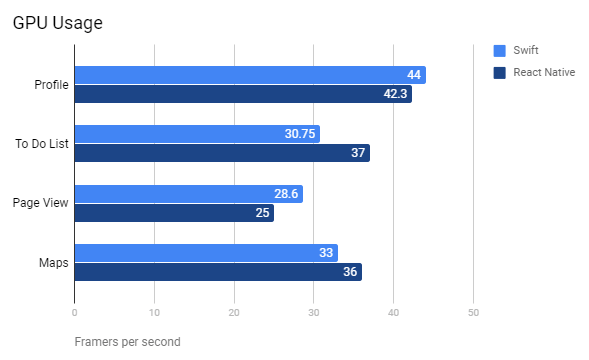
React Native (JavaScript) vs Native (Swift)

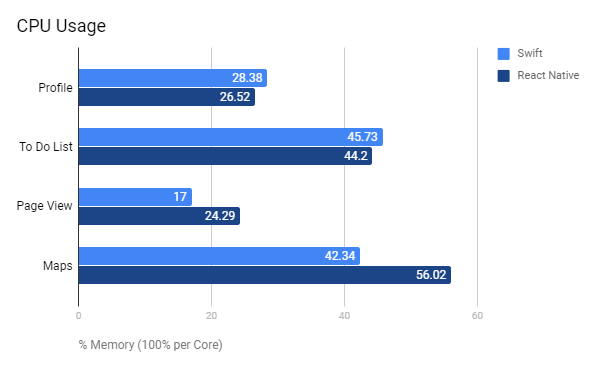
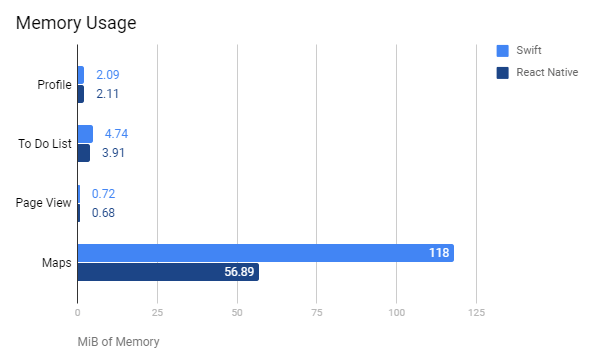
John Calderaio, a Full-Stack Software Engineer, compared the performance of apps developed in native iOS (Swift) and React Native. His analysis considered the implementation of basic app elements in both hybrid and native development while also measuring CPU, GPU, and memory usage.

The mobile apps John built with React Native and Swift have an almost identical physical appearance. In terms of performance, the React Native app utilized the CPU less efficiently (over 10% more) but was better in GPU usage and consumed less memory compared to the Swift version.

Xamarin (C#) vs Native (Objective-C and Java)

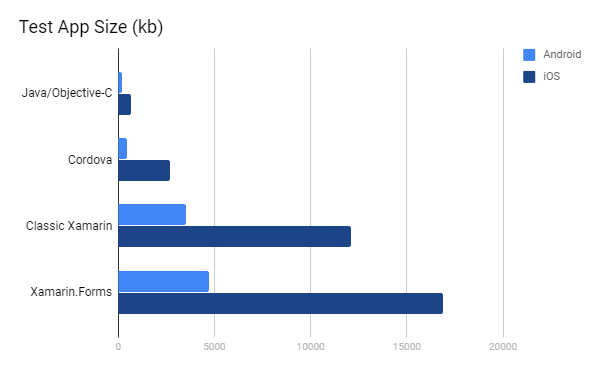
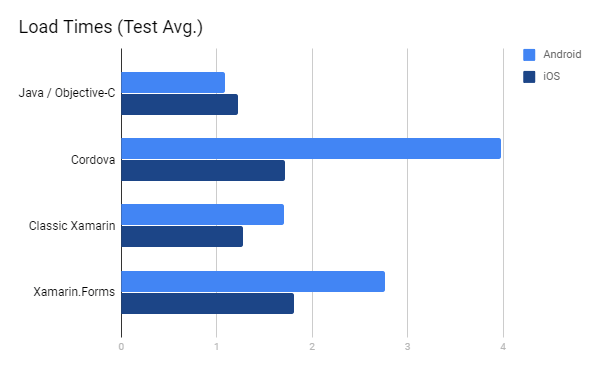
Mobile developer Kevin E. Ford compared the performance of apps developed using Native, Cordova, Classic Xamarin, and Xamarin.Forms. He evaluated apps on both iOS and Android and shared his findings on his blog.

Xamarin Test App Size

App Size. App size affects both deployment bandwidth and load time. Kevin found that Xamarin had additional size due to the .Net framework overhead.

Xamarin Load Times

Load Time. Native technologies demonstrated the quickest load times. However, apps developed with Classic Xamarin were nearly as fast as those built with native languages.

"I wanted to see how long it took the application to load into memory. While the initial load time is important, many mobile applications tend to stay in memory so it tends to have a limited impact. For this test I made sure to close all applications before each timing."
Kevin Ford

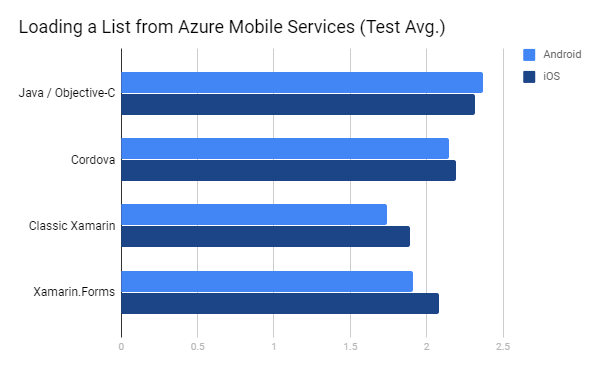
Xamarin Loading a List from AMS

Data Load Time. Kevin tested the speed of loading 1,000 records from Azure Mobile Services. Remarkably, Xamarin outperformed the rest.

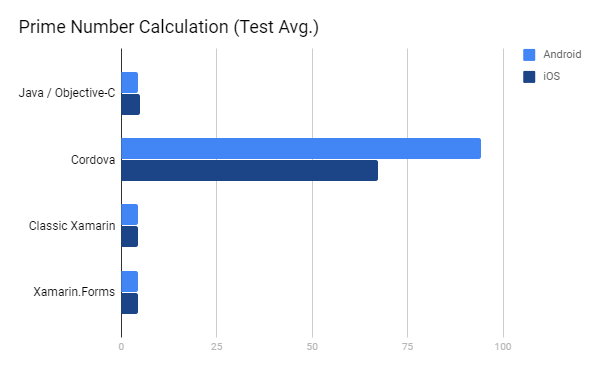
Xamarin Prime Number Calculation

CPU-Intensive Operation. In a test focusing on CPU-intensive operations, Xamarin again showcased superior performance. Objective-C lagged significantly, while Java was just a 0.2-second margin behind.

Xamarin vs React Native: Code Sharing

A primary advantage of cross-platform development is the potential to share most code between iOS and Android apps. Developers can write the code in JavaScript (React Native) or C# (Xamarin) without diving deep into Swift, Objective-C, or Java. This efficiency eliminates the redundancy of coding the same feature multiple times.

React Native

React Native Code Sharing application

While the frameworks employ native components scripted in Objective-C, Swift, or Java, developers can incorporate native ( platform-specific) code. This feature allows developers to integrate platform-specific optimizations and leverage native functionalities in their mobile applications. By creating native modules that bridge JavaScript with platform-specific code (Objective-C/Swift for iOS or Java/Kotlin for Android), developers can fine-tune their app's performance and access platform-specific features while maintaining a single codebase. This not only speeds development up but also offers several advantages, including enhanced performance, access to device features, improved user experiences, efficient development, and cross-platform consistency.

However, roughly 90% of the remaining codebase can be shared.

Xamarin

Xamarin code

In this case, developers used C# complemented with .Net framework to build mobile apps for different mobile platforms. Notably, Xamarin consolidates the development environment, allowing all app builds within Visual Studio.

Remarkably, Xamarin.Forms enables reuse of up to 96 percent of source code, expediting the development process.

Xamarin vs React Native: Licensing

Companies aiming for commercial app development must be circumspect about employing open-source code. Although cost-effective compared to proprietary libraries, open-source doesn't guarantee complete code protection.

Both React Native and Xamarin function under the MIT license, a highly favored and flexible certification ensuring developer legal protection.

The key features of MIT licensing are:

  • no obligation to publicize the source code upon software distribution
  • freedom to introduce modifications under any licensing
  • absence of mandatory change documentation in the source code
  • an implicit stance on patent usage

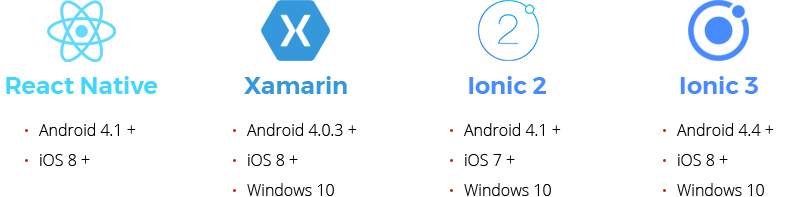
Xamarin vs React Native: Supported Platforms

react native vs xamarin vs ionic platforms

Xamarin vs React Native: Developer Experience

Taylor Milliman, a software engineer, built his first food blog app using React Native. The app allows accessing a database of over 1.000 recipes with necessary ingredients, bookmarking and sharing them with other customers.

The developer found React Native to be a powerful tool and the future of mobile development. Taylor used the Udemy course and Facebook tutorials to get started. He encountered initial challenges with some components like the CSS flexbox. Still, after acquainting himself with React Native and its resources, Taylor now confidently handles these components.

Besides, he noted the ability to share code between Android and iOS mobile apps and to reload immediately. Taylor admitted that he used Android Studio before and had to deal with 30-60 second build times as usual. Hot Reloading saves development time and makes it easier to get into the flow state avoiding time-wasting interruptions.

"React Native is a perfect example of what can happen when we apply ideas that have proven successful in one area of software (web), to a seemingly separate area (mobile)."
Taylor Milliman

Xamarin

Contrastingly, .NET Developer Nicu Maxian's 6 months experience with Xamarin presented challenges. He had to create an Android app with Xamarin by reusing Data and Domain layers belonging to the existing iOS app.

From problematic updates to adapting to a new IDE, the journey was arduous: every update resulted in a "broken" environment, so the team had to spend hours to find a solution. Secondly, they ran behind schedule because they tried to adapt to working in a new IDE. Thirdly, a notable drawback was the Xamarin community's limited size compared to native developers.

However, Nicu appreciated Xamarin's cross-platform solution and its shared code feature.

"I still don't believe in Cross Platforms and I would probably stick to native development. I would say that the price for developing Xamarin app is bigger than native application. So, it's not worthy!"
Nicu Maxian

Both React Native and Xamarin have carved their own niches in cross-platform app development. However, the consensus among developers as of 2023 leans heavily towards React Native. With a developer community almost three times larger than Xamarin's, it's evident that React Native has gained considerable traction and preference.

  • React Native's Momentum: Since its introduction, React Native has consistently grown and has a strong, active community backing it. Its open-source nature ensures continuous improvement through community contributions.
  • The Cross-Platform Future: Predictions point to a rising demand for cross-platform apps, with React Native as a favored choice.
  • Business Adoption Rate: Several notable businesses have already adopted React Native, a testament to its scalability and adaptability.

In conclusion, while both frameworks provide valuable tools, React Native's impressive growth underscores its dominant position in the industry. For businesses planning their mobile app development trajectory, aligning with React Native emerges as a forward-thinking and promising direction.

Looking for professional mobile app developers? Hire our dedicated team!

Frequently Asked Questions

React Native is entirely open-source, allowing developers to use the framework and its libraries with no cost.

On the other hand, as a part of the Visual Studio family, Xamarin requires users to install the IDE, which is distributed on a subscription basis. While it does offer a free edition for students and non-enterprise projects with up to five users, further features are available through the Professional and Enterprise licenses.

Xamarin has long been a relevant and favored tool for mobile app development. It stood out as a top choice for building cross-platform applications, allowing developers to share code across different platforms, such as iOS and Android, all while ensuring native-like experiences.

However, in 2022, Xamarin evolved into .NET MAUI (Multi-platform App UI), a modern framework that combines low-code capabilities with an improved Xamarin.Forms architecture. Now, with the power of both Xamarin and .NET MAUI, developers can seamlessly create native mobile and desktop applications using C# and XAML.

As of 2023, React Native still holds strong popularity and remains a top choice for cross-platform mobile app development. Therefore, diving into React Native would be a wise decision for mobile developers.

Never miss a post! Share it!

Written by
Chief Innovation Officer / Partner
I've been leading a department specializing in custom software development for 20 years.
4.5
22 reviews

Rate this article

Leave a comment
Your email address will not be published.

Recommended posts

Belitsoft Blog for Entrepreneurs
Senior Developers Criticize Shopify for Ditching React Native
Shopify is ditching React Native in favor of Swift and Kotlin Back in 2020, Shopify announced that they were fully committed to building any new mobile applications with React Native. In their words, this was the future. In January of 2025, Mustafa Ali, who works at Shopify, wrote an article summarizing and reflecting on five years of using React Native at Shopify. He wrote that the future of React Native was bright and that Shopify planned to keep investing in it. React Native was working well for them and, according to the article, remained an excellent framework. But native is now the future of mobile at Shopify. In September 2026, Shopify announced their plans to move off React Native and go back to native code. According to Shopify, coding agents change what it costs to build mobile apps twice, and that's why they're moving from React Native back to Swift and Kotlin. Coding models have gotten dramatically better, and for their apps and their team, building the same feature in Swift and Kotlin no longer carries the cost it used to. Shopify has been using LLMs to build software since 2021, a year before ChatGPT even launched. Initially, they used them to implement features, investigate and fix bugs, and review code. By late 2025, the models were capable enough that they questioned whether building software twice still meant doing twice the work. They rebuilt several core parts of their biggest apps in Swift and Kotlin using LLMs, and they were surprised at how well it worked. Agents could implement features on Android using the iOS version as a reference, and vice versa. They reduced the cost of maintaining parity between platforms through shared specs, tests, and review checkpoints. To develop everything natively in Kotlin and Swift, you have to build and maintain the same product twice, and that cost has not disappeared. What's changed is that agents can now do enough of the implementation, translation, testing, and review work that it's no longer the deciding factor it was in 2020. They're making the change because agents have reduced the advantages of sharing an implementation, while the advantages of building for each platform remain. Native keeps them closer to platform capabilities and tooling, with fewer frameworks and dependency layers between their code and the platform. What has already migrated The Shop app, which is regularly at the top of the shopping category in the App Store, was the first to migrate. Assisted by AI, the Shopify team went from a proof of concept to a fully rebuilt app published in the App Store in just 12 weeks. They've written about that migration in depth. The Shopify app is next. It has 300+ screens, Home Screen and Lock Screen widgets, an Apple Watch app with complications, Siri Shortcuts, and more. That migration is underway and ships later this year. What happens to the libraries Shopify maintained React Native Skia Skia is a graphics engine that powers Android and Chrome, though it's largely associated with Flutter (funny, given Flutter is moving off it). It lets you do fancy animations and crazy buttons that you'd normally do in a game engine, without being limited to native elements and layers. Shopify built React Native Skia so you get those benefits for the specific screens that need them, like Instagram Stories, where you layer things on top of a photo. Skia is way better for that than plain React Native or even native. William Candillon, a Shopify contractor and one of the best React Native YouTubers, keeps working on it. He'll fork it in the coming months and start publishing the library under a new name. The original repo will be archived when the transition is complete, with updates along the way so everyone has ample time to migrate. If you use it, consider sponsoring it. FlashList It has become the default list component for most React Native projects. Given how important this library is, Shopify will continue to fix critical issues that break compatibility, and it's in discussion with several companies about taking on long-term stewardship. Senior developers criticize Shopify for ditching React Native "Native is easier now due to AI" is an opinion, not a fact Saying that you can now delegate two separate codebases to AI doesn't mean that cross-platform frameworks are suddenly useless. AI has not solved the underlying problem: Even with AI, you will have to deploy and maintain two different repos, so double the codebases, code reviews, languages, and required expertise. Now you have twice the number of Jira tickets to push around. It's still quicker to write and maintain one app than two. Small teams or solo developers can still review the code and ship faster if it's one codebase with AI. With the web, it's not two codebases but three. Three different platforms are still three different codebases. The rewrite doesn't remove the maintenance burden In the long run, it looks like Shopify is moving from "performance tech debt" that it owns to future tech debt that… no one owns. Splitting into two codebases will eventually increase the maintenance burden and technical debt no matter how good your harness is. Creating a larger surface area for bugs AI is surprisingly good at creating small inconsistencies as codebases grow. An LLM might even create a feature in both repos without bugs 80% of the time. If you don't want bugs, or even security holes, the other 20% of the time, you cannot trust AI-generated code without review. You have to review the code, and your devs need to know Kotlin and Swift to do so, not just React Native. Is LLM-generated code actually cheap? If you look at what agent subscriptions cost across a company, it definitely is not. To get the kind of output you want, you would have to pay an insane amount of money. It's a lot of tokens to run agent loops. "A big company replaces a $100k developer with $100k on AI agents for worse quality?" — @Stone_624, YouTube The current core assumption may be that token prices will stay this cheap or get cheaper. "Five years later, when the highly subsidised $200 plan goes away, Shopify: It's too expensive! We have to use React Native!" — @abcabc-ur3bf, YouTube Why not use agents to ship faster on React Native instead of going native with them? Couldn't we argue that AI should be helping make React Native even more performant and get all the performance you could get from fully native apps? React Native allows for native modules, so if Shopify had issues, it could've used AI to fix those instead of a rewrite with the potential for bugs. Expo for React Native is so good that with it you don't have to go native. But Shopify never fully adopted it Expo is a React Native framework that makes developing Android and iOS apps easier. Since 2024, using a framework such as Expo has been the recommended approach to creating new apps. Using React Native without a framework is also supported. Expo is kind of the Next.js/Vercel of the React Native world. The Expo team has built much of the tooling needed to make React Native a good experience to work with. You can use their servers for builds, share those builds with your team, and push out over-the-air (OTA) updates. Theo Browne, a developer and YouTuber (t3.gg), argues that Shopify never fully adopted Expo, so it wasn't getting many of those benefits. The Expo team makes it easy to get a good dev client A dev client is a debug build of your app that loads its JavaScript from your computer. Theo thinks this is one of the biggest benefits of React Native. You don't need another native build until you change the native code. You can share a dev version of the app With React Native and Expo, you only need one dev to go through the signing process, and they can make a dev version of the app. Once you have that installed, you scan a QR code, you change the JavaScript code, and now you're working on the app. Can you make changes to the native share screen code without another build? No. But if you want to test how your new feature works with the share feature already in the app, you can change the JavaScript and do that. Shopify says agents can make code changes in seconds, but it takes them several minutes to test the output, which is especially difficult on mobile. To get around that, Shopify built its own CLI that lets agents iterate on the business logic in milliseconds instead of minutes, without involving simulators. But you don't have to go native to give agents a fast feedback loop. Agents work with React Native and Expo too. Expo has really good simulator support as well as web support, so agents can do a lot of the iteration without a native build. Testing your logic in the whole app compiled for web is even slightly better than testing it through a custom CLI. If you're using React Native without Expo, you're probably rebuilding Expo, because you need all of this tooling anyway. Shopify glossed over React Native OTA updates Native developers deliver fixes through app store updates, which users may not install right away Apple and Google don't want you to do updates outside their official stores. If you have a feature in native code (let's say a new button in a menu), and you ship it to all your users, you have a problem if this feature becomes a bug on some devices, like the iPhone mini (where the button gets cut off on the smaller screen you didn't account for). This can happen even if you test it on your phones and it all looks good, including in TestFlight. When you get a message about the bug from a customer, you have to decide: fix it or leave it out there as is. If you leave it, you'll be supporting all these angry requests from customers without solving their problem. If you decide to fix it, you have to make a whole new version of the app and put it up in the App Store or Google Play, so that everyone who downloads it has the fixed version. "You must create and submit a new version." — Apple "An app distributed via Google Play may not modify, replace, or update itself using any method other than Google Play's update mechanism." — Google Play But you can't guarantee that the new version will be installed immediately for everyone. Some users will get it through automatic updates; others may have to install it themselves. So you still have to support the angry requests from customers, only now the answer is "install the update." Both stores make an exception for interpreted code such as JavaScript, as long as an update doesn't change what the app is for. That exception is what makes OTA updates possible. Your users have different versions of the same app at any given time Just because Apple has approved the update doesn't mean all your users have it on their devices. What this means is you don't really have one app on iOS and Android. You have every version anyone still has installed, unless you've built in a way to deprecate old ones. And that makes it so much harder to build apps. You have to worry about forward and backward compatibility. And so do your servers and so does your support team. If you accidentally ship a bug and fix it an hour later, you can still get reports about that bug for months, if not years, because it takes so long for people to get updates on their devices. And sometimes you open an app and a big warning pops up saying, "Hey, you need to go to the app store and install the latest version." So you've fixed the bug, but the user still has to go to the app store and update the app to get the fix. React Native developers can deliver fixes through OTA updates, which the app downloads automatically If the JavaScript layer tells the native layer where to put that button, you can fix its layout and push up an OTA without making a new native build. The app can automatically download the updated JavaScript bundle, which tells the native layer how to behave differently. "EAS Update makes fixing small bugs and pushing quick fixes a snap in between app store submissions." — Expo Maybe this isn't a problem for Shopify, and it can live without OTA updates. But for smaller products with a small dev team, maybe two or three people, this is a major downside of going native. OTA updating makes it easier to understand what React Native actually is React Native is a command layer to control what native elements are rendered. It's not a replacement for native. It uses the JavaScript layer to tell the native layer on your phone where to put things and what to do. React Native uses the native components that make the app function. OTA lets you change the app's JavaScript and assets without changing the native code, and ship compatible fixes and temporary changes without submitting a new app build. Let's say you have a bug or an issue or a thing you want to turn on and off, like a fancy background on a specific holiday on your homepage that you want to have in the app for a day and then out the next. In order to do that natively, if you haven't already built in a way to control it remotely, you have to plan ahead to include it, hope your users are on the latest version by the time that date hits, and have it set to turn on at the start of the day and off at the end. And if something goes wrong that needs a change to the native code, you're back to shipping another app update. With React Native, you can push up the OTA for it at the start of the day and push up another one to get rid of it at the end. If something goes wrong in the JavaScript code, you can push up a new OTA with the fix. Since the JavaScript bundle is redownloaded automatically and tells the native layer how to behave differently, you can get small fixes out without submitting a new app build. "There are three letters that make it really hard to not use React Native if you can justify it. Those letters are OTA: over-the-air updates. I will miss OTAs if I go native." — Theo The Shop app used the old React Native architecture At the end of 2024, React Native overhauled its core architecture. The bridge, through which the JavaScript layer tells the native layer what to do, was removed, and that made React Native apps way faster. The New Architecture addresses a lot of the performance issues. It makes it easier to get things in and out of the native layer. There are also improvements to core functionality like synchronizing layouts and effects. You can read layout information synchronously in useLayoutEffect and update the UI in the same frame, instead of waiting for an asynchronous onLayout event and having things jump around after they've already appeared on screen. There are a lot of these little things that improve how much performance you can squeeze out of React Native. And it's already running in production at Meta, including in the Facebook app. Shopify was on the old architecture. "…our next major React Native investment: adopting the New Architecture." — Shopify Shopify was planning to move to the New Architecture but in the end abandoned the migration in favor of two native codebases. The company decided to ditch React Native without ever trying the New Architecture. Shopify says it would have had to go back through how its native modules were hooked up, how the app rendered things, and which parts of the code were shared versus written separately for iOS and Android. With the amount of native stuff it had written, the port would not have been trivial. But agents could have helped with that work too. "It would have been nice to see React Native's old architecture versus the New Architecture versus native. I bet the gap would be smaller, but that's a comparison we don't have." — Theo Don't compare Shopify to the rest of the market Here is how, by Theo's account, decisions like this are made at Shopify: "If you've ever worked at Shopify, you know decisions like this are made directly by Tobi, the founder and CEO of Shopify, abruptly over a weekend and they are forced on the entire company without any input from the people actually working on the apps.For a few weeks, Tobi was convinced React is slow and there was a companywide decision to move from React to Ruby on Rails for all new projects and to migrate some existing things to Ruby on Rails.Then two weeks later, he learned about server components and then removed all of the internal articles bashing React and canceled the migration decision.It happens so commonly that he drops in some Slack channel and demands things to be immediately changed without allowing any conversation with the team members. This is a thing he has historically been known for, allegedly." — Theo, Did AI Kill React Native Shopify gives a signal about where the industry is going, but that doesn't mean you should rewrite your app over a weekend, even though it might sound fun. If you can't afford a team to actually maintain two products, you shouldn't do it. Just because a giant shifts its tech paradigm doesn't mean a startup with an AI subscription can replicate that. Shopify can afford to burn money on AI agents, and it has a mobile team large enough to staff two native codebases. Smaller companies don't have that luxury: they still rely on React Native or Flutter because they're way more cost-effective. Remember, Shopify used the React Native codebase for the migration. It wasn't an exclusively vibe-coded migration. If you are two people shipping an app, a model writing your Swift code doesn't help you when there's nobody to review it, and maintaining two platforms is still maintaining two platforms. Even "the same" app is two different apps, because not all UX translates the same way to both platforms. If you have a simple app or a small company, it's still way easier to just develop one Expo app.
Hire .NET MAUI Developer in 2026
Migrating from Xamarin.Forms to .NET MAUI Microsoft's move away from Xamarin.Forms to .NET MAUI (Multi-platform App UI) is designed to make cross-platform development of mobile and desktop apps easier. Support for Xamarin.Forms ended on 1 May 2024, so it's important to keep up with the frameworks that are supported. Microsoft positions .NET MAUI as the evolution of Xamarin.Forms. It brings a single project structure, built-in support for building desktop apps along with mobile, improved dependency management, XAML hot reload and C# hot reload, and performance tuning, amongst other improvements. During the migration we'll review your current code base, dependencies and custom components to give an accurate estimate of the effort involved. Migration can be done in two ways: a compatibility port that moves your app to .NET MAUI with as little change as possible, so it behaves as it does today and meets current app store requirements, or a full modernization of your application to the latest .NET MAUI framework with custom renderers converted to handlers, built-in dependency injection in place of DependencyService, AOT compilation and trimming for production releases, and more. If an app relies on a third-party library that hasn't yet moved to .NET MAUI, our team will find or build an equivalent so you get every feature back, in full. If you want your app available on desktop computers as well as mobile devices, we replace your Xamarin UWP front end with WinUI 3 for the Windows desktop, and add a macOS desktop build through Mac Catalyst. These modern technologies offer the same native experience as your mobile apps, so users get the same look and feel whether they open the mobile app or the desktop version. When your migration is complete and your new or upgraded application is available to your customers, our team continues to support and maintain it - upgrading everything to the latest available frameworks, updating for new security requirements, fixing issues when they arise, and applying performance improvements when new tooling becomes available. .NET MAUI Developer Skills To Expect .NET MAUI lets one C#/XAML codebase deliver native apps to iOS, Android, Windows, and macOS. The unified, single-project model trims complexity, speeds releases, and cuts multi-platform costs while stable Visual Studio tooling, MAUI Community Toolkit, Telerik, Syncfusion, and Blazor-hybrid options boost UI power and reuse. The payoff isn’t automatic: top MAUI developers still tailor code for platform quirks, squeeze performance, and plug into demanding back-ends and compliance regimes. Migration skills - code refactor, pipeline and test updates, handler architecture know-how - are in demand. Teams that can judge third-party dependencies, work around ecosystem gaps, and apply targeted native tweaks turn MAUI’s "write once, run anywhere" promise into fast, secure, and scalable products. Belitsoft’s .NET MAUI developers create cross-platform apps that integrate cleanly with backend systems, scale securely, and adapt to modern needs like compliance, IoT, and AI. Core Technical Proficiency Modern MAUI work demands deep, modern .Net skills: async/await for a responsive UI, LINQ for data shaping, plus solid command of delegates, events, generics and disciplined memory management. Developers need the full .NET BCL for shared logic, must grasp MAUI’s lifecycle, single-project layout and the different iOS, Android, Windows and macOS build paths, and should track .NET 9 gains such as faster Mac Catalyst/iOS builds, stronger AOT and tuned controls. UI success hinges on fluent XAML - layouts, controls, bindings, styles, themes and resources - paired with mastery of built-in controls, StackLayout, Grid, AbsoluteLayout, FlexLayout, and navigation pages like ContentPage, FlyoutPage and NavigationPage. Clean, testable code comes from MVVM (often with the Community Toolkit), optional MVU where it fits, and Clean Architecture’s separation and inversion principles. Finally, developers must pick the right NuGet helpers and UI suites (Telerik, Syncfusion) to weave data access, networking and advanced visuals into adaptive, device-spanning interfaces. Cross-Platform Development Expertise Experienced .NET MAUI developers rely on MAUI’s theming system for baseline consistency, then drop down to Handlers or platform code when a control needs Material flair on Android or Apple polish on iOS. Adaptive layouts reshape screens for phone, tablet, or desktop, while MAUI Essentials and targeted native code unlock GPS, sensors, secure storage, or any niche API. Performance comes next: lazy-load data and views, flatten layouts, trim images, and watch for leaks, choose AOT on iOS for snappy launches and weigh JIT trade-offs on Android. Hot Reload speeds the loop, but final builds must be profiled and tuned. BlazorWebView adds another twist - teams can drop web components straight into native UIs, sharing logic across the web, mobile, and desktop. As a result, the modern MAUI role increasingly blends classic mobile skills with Blazor-centric web know-how. Modern Software Engineering Practices A well-run cross-platform team integrates .NET MAUI into a single CI/CD pipeline - typically GitHub Actions, Azure DevOps, or Jenkins - that compiles, tests, and signs iOS, Android, Windows, and macOS builds in one go. Docker images guarantee identical build agents, ending "works on my machine" while NuGet packaging pushes shared MAUI libraries and keeps app-store or enterprise shipments repeatable. Unit tests (NUnit / xUnit) cover business logic and ViewModels, integration tests catch service wiring, and targeted Appium scripts exercise the top 20% of UI flows. Such automation has been shown to cut production bugs by roughly 85%. Behind the scenes, Git with a clear branching model (like GitFlow) and disciplined pull-request reviews keep code changes orderly, and NuGet - used by more than 80% of .NET teams - locks dependency versions. Strict Semantic Versioning then guards against surprise breakages during upgrades, lowering deployment-failure rates. Together, these practices turn frequent, multi-platform releases from a risk into a routine. Security and Compliance Expertise Security has to guide every .NET MAUI decision from the first line of code. Developers start with secure-coding basics - input validation, output encoding, tight error handling - and layer in strong authentication and authorization: MFA for the login journey, OAuth 2.0 or OpenID Connect for token flow, and platform-secure stores (Keychain, EncryptedSharedPreferences, Windows Credential Locker) for secrets. All data moves under TLS and rests under AES, while dependencies are patched quickly because most breaches still exploit known library flaws. API endpoints demand the same discipline. Regulated workloads raise the bar. HIPAA apps must encrypt PHI end-to-end and log every access, PCI-DSS code needs hardened networks, vulnerability scans and strict key rotation, GDPR calls for data-minimization, consent flows and erase-on-request logic, fintech projects add AML/KYC checks and continuous fraud monitoring. Experience with Emerging Technologies Modern .NET MAUI work pairs the app shell with smart services and connected devices. Teams are expected to bring a working grasp of generative‑AI ideas - how large or small language models behave, how the emerging Model Context Protocol feeds them context, and when to call ML.NET for on‑device or cloud‑hosted inference. With those pieces, developers can drop predictive analytics, chatbots, voice control, or workflow automation straight into the shared C# codebase. The same apps must often talk to the physical world, so MAUI engineers should be fluent in IoT patterns and protocols such as MQTT or CoAP. They hook sensors and actuators to remote monitoring dashboards, collect and visualize live data, and push commands back to devices - all within the single‑project structure. Problem-Solving and Adaptability In 2025, .NET MAUI still throws the odd curveball - workload paths that shift, version clashes, Xcode hiccups on Apple builds, and Blazor-Hybrid quirks - so the real test of a developer is how quickly they can diagnose sluggish scrolling, memory leaks or Debug-versus-Release surprises and ship a practical workaround. Skill requirements rise in levels.  A newcomer with up to two years’ experience should bring solid C# and XAML, basic MVVM and API skills, yet still lean on guidance for thornier platform bugs or design choices. Mid-level engineers, roughly two to five years in, are expected to marry MVVM with clean architecture, tune cross-platform UIs, handle CI/CD and security basics, and solve most framework issues without help - dropping to native APIs when MAUI’s abstraction falls short.  Veterans with five years or more lead enterprise-scale designs, squeeze every platform for speed, manage deep native integrations and security, mentor the bench and steer MAUI strategy when the documentation ends and the edge-cases begin. .NET MAUI Use Cases and Developer Capabilities by Industry  Healthcare .NET MAUI Use Cases Healthcare teams already use .NET MAUI to deliver patient-facing portals that book appointments, surface lab results and records, exchange secure messages, and push educational content - all from one C#/XAML codebase that runs on iOS, Android, Windows tablets or kiosks, and macOS desktops.  The same foundation powers remote-patient-monitoring and telehealth apps that pair with BLE wearables for real-time vitals, enable video visits, and help manage chronic conditions, as well as clinician tools that streamline point-of-care data entry, surface current guidelines, coordinate schedules, and improve team communication. Native-UI layers keep these apps intuitive and accessible. MAUI Essentials unlock the camera for document scanning, offline storage smooths patchy connectivity, and biometric sensors support secure log-ins. Developers of such solutions must encrypt PHI end-to-end, enforce MFA, granular roles, and audit trails, and follow HIPAA, HL7, and FHIR to the letter while handling versioned EHR/EMR APIs, error states, and secure data transfer. Practical know-how with Syncfusion controls, device-SDK integrations, BLE protocols, and real-time stream processing is equally vital.  Finance .NET MAUI Use Cases In finance, .NET MAUI powers four main app types. Banks use it for cross-platform mobile apps that show balances, move money, pay bills, guide loan applications, and embed live chat. Trading desks rely on MAUI’s native speed, data binding, and custom-chart controls to stream quotes, render advanced charts, and execute orders in real time. Fintech start-ups build wallets, P2P lending portals, robo-advisers, and InsurTech tools on the same foundation, while payment-gateway fronts lean on MAUI for secure, branded checkout flows across mobile and desktop. To succeed in this domain, teams must integrate WebSocket or SignalR feeds, Plaid aggregators, crypto or market-data APIs, and enforce PCI-DSS, AML/KYC, MFA, OAuth 2.0, and end-to-end encryption. MAUI’s secure storage, crypto libraries, and biometric hooks help, but specialist knowledge of compliance, layered security, and AI-driven fraud or risk models is essential to keep transactions fast, data visualizations clear, and regulators satisfied. Insurance .NET MAUI Use Cases Mobile apps now let policyholders file a claim, attach photos or videos, watch the claim move through each step, and chat securely with the adjuster who handles it. Field adjusters carry their own mobile tools, so they can see their caseload, record site findings, and finish claim paperwork while still on-site. Agents use all-in-one apps to pull up client files, quote new coverage, gather underwriting details, and submit applications from wherever they are. Self-service web and mobile portals give customers access to policy details, take premium payments, allow personal-data updates, and offer policy download. Usage-based-insurance apps pair with in-car telematics or home IoT sensors to log real-world behavior, feeding pricing and risk models tailored to each user. .NET MAUI delivers these apps on iOS, Android, and Windows tablets, taps the camera and GPS, works offline then syncs, keeps documents secure, hooks into core insurance and CRM systems, and can host AI for straight-through claims, fraud checks, or policy advice. To build all this, developers must lock down data, meet GDPR and other laws, handle uploads and downloads safely, store and sync offline data (often with SQLite), connect to policy systems, payment gateways, and third-party data feeds, and know insurance workflows well enough to weave in AI for fraud, risk, and customer service. Logistics & Supply Chain .NET MAUI Use Cases Fleet-management apps built with .NET MAUI track trucks live on a map, pick faster routes, link drivers with dispatch, and remind teams about maintenance.  Warehouse inventory tools scan barcodes or RFID, guide picking and packing, watch stock levels, handle cycle counts, and log inbound goods. Last-mile delivery apps steer drivers, capture e-signatures, photos, and timestamps as proof of drop-off, and push real-time status back to customers and dispatch. Supply-chain visibility apps put every leg of a shipment on one screen, let partners manage orders, and keep everyone talking in the same mobile space. .NET MAUI supports all of this: GPS and mapping for tracking and navigation, the camera for scanning and photo evidence, offline mode that syncs later, and cross-platform reach from phones to warehouse tablets. It plugs into WMS, TMS, ELD, and other logistics systems and streams live data to users. Developers need sharp skills in native location services, geofencing, and mapping SDKs, barcode and RFID integration, SQLite storage and conflict-free syncing, real-time channels like SignalR, route-optimization math, API and EDI links to WMS/TMS/ELD platforms, and telematics feeds for speed, fuel, and engine diagnostics. Manufacturing .NET MAUI Use Cases On the shop floor, .NET MAUI powers mobile MES apps that show electronic work orders, log progress and material use, track OEE, and guide operators through quality checks - all in real time, even on tablets or handheld scanners. Quality-control inspectors get focused MAUI apps to note defects, snap photos or video, follow digital checklists, and, when needed, talk to Bluetooth gauges. Predictive-maintenance apps alert technicians to AI-flagged issues, surface live equipment-health data, serve up procedures, and let them close out jobs on the spot. Field-service tools extend the same tech to off-line equipment, offering manuals, parts lists, service history, and full work-order management. MAUI’s cross-platform reach covers Windows industrial PCs, Android tablets, and iOS/Android phones. It taps cameras for barcode scans, links to Bluetooth or RFID gear, works offline with auto-sync, and hooks into MES, SCADA, ERP, and IIoT back ends. To build this, developers need OPC UA and other industrial-API chops, Bluetooth/NFC/Wi-Fi Direct skills, mobile dashboards for metrics and OEE, a grasp of production, QC, and maintenance flows, and the ability to surface AI-driven alerts so technicians can act before downtime hits - ideally with a lean-manufacturing mindset. E-commerce & Retail .NET MAUI Use Cases .NET MAUI lets retailers roll out tablet- or phone-based POS apps so associates can check out shoppers, take payments, look up stock, and update customer records anywhere on the floor. The same framework powers sleek customer storefronts that show catalogs, enable secure checkout, track orders, and sync accounts across iOS, Android, and Windows. Loyalty apps built with MAUI keep shoppers coming back by storing points, unlocking tiers, and pushing personalized offers through built-in notifications. Clienteling tools give staff live inventory, rich product details, and AI-driven suggestions to serve shoppers better, while ops functions handle back-room tasks. Under the hood, MAUI’s CollectionView, SwipeView, gradients, and custom styles create smooth, on-brand UIs. The camera scans barcodes, offline mode syncs later, and secure bridges link to Shopify, Magento, payment gateways, and loyalty engines. Building this demands PCI-DSS expertise, payment-SDK experience (Stripe, PayPal, Adyen, Braintree), solid inventory-management know-how, and skill at weaving AI recommendation services into an intuitive, conversion-ready shopping journey. How Belitsoft Can Help Many firms racing to modern apps face three issues: migrating off end-of-life Xamarin, meeting strict performance + compliance targets, and stitching one secure codebase across iOS, Android, Windows, and macOS. Belitsoft removes those roadblocks. Our MAUI team audits old Xamarin code, rewrites UIs, swaps out dead libraries, and rebuilds CI/CD so a single C#/XAML project ships fast and syncs offline, taps GPS, sensors, camera, and even embeds Blazor for shared desktop-web-mobile logic. Our engineers land industry-grade features: HIPAA chat and biometric sign-on for healthcare, PCI-secure trading screens and KYC checks for finance, telematics-powered claims tools for insurers, GPS-routed fleet and warehouse scanners for logistics, MES, QC, and PdM apps with Bluetooth gauges for factories, and Stripe-ready POS, storefront, and AI-driven recommendation engines for retail. Behind the scenes we supply scarce skills - MVVM/MVU patterns, Telerik/Syncfusion UI, AOT tuning, async pipelines, GitHub-/Azure-/Jenkins-based multi-OS builds, Appium tests, OAuth 2.0, MFA, TLS/AES, and GDPR/PCI/HIPAA playbooks - plus smart layers like chatbots, voice, predictive analytics, MQTT/CoAP sensor links, and on-device ML. Belitsoft stays ahead of MAUI quirks, debugs handler-level issues, and enforces clean architecture, positioning itself as the security-first, AI-ready partner for cross-platform product futures. Partner with Belitsoft for your .NET MAUI projects and use our expertise in .NET development to build secure, scalable, and cross-platform applications tailored to your industry needs. Our dedicated team assists you every step of the way. Contact us to discuss your needs.
Healthcare Application Developer: Hiring Trends in 2025
Hospitals Hospitals want now developers who know mobility, security, compliance, integration with legacy EHR. Often tasks include integration with a statewide health information exchange, meeting CMS data transparency mandates, digitizing intake to remove paperwork and much more.   From Colorado Springs to Stockton, hospitals are growing IT teams to replace 15-year-old software held together by end-of-life vendor contracts and manual data entry. Mid-sized systems are hiring full-stack developers to modernize intranet portals, build patient-facing apps, and refactor reporting tools to meet regulatory deadlines. The talent war is no longer just in San Francisco. Developers with experience in high-regulation industries - finance, insurance, government - are now being recruited aggressively into healthcare. The code needs to work, hold up under audits, downtime protocols, accessibility standards, and a user base that includes everyone from moms to seniors managing chronic disease. Digital Patient Experience Patient care now depends on code too. In 2025, U.S. hospitals are hiring React developers, API architects, and mobile engineers to build apps because they can’t function without them.  Application developers are now integral parts of health system IT teams. Kaiser Permanente 6,000-person tech division is building everything from chronic care management tools to backend integrations for EHR systems. Their employer branding and hiring pitch is - the code supports lives in new architectural reality.  Hospital IT is hiring healthcare developers who can make a consumer-grade experience while staying inside HIPAA’s rules.  Patient portals, mobile scheduling, bill pay, and messaging systems have become the primary way hospitals compete for repeat visits - especially as patients begin to treat health systems like service providers. A broken portal is now the equivalent of a front desk that doesn’t pick up the phone. A single missed appointment due to a bad mobile UI has a direct cost. At scale, it’s a patient churn problem. A glitch in the patient portal is a care barrier. Appointment scheduling must work via a multi-platform interface and integrate with provider calendars. Lab results should be synchronized through APIs. Messaging interfaces must provide real-time updates and push alerts. Bill pay portals must not require five-step logins. Care Management & Interoperability A failed integration may lead to a care gap. Developers with experience in FHIR, HL7, and EHR APIs are getting pulled into care management platforms, patient engagement tools, and analytics systems that depend on tight integrations. It’s not just about moving data between systems but also about translating fragmented inputs - from a clinic’s outdated records to a patient’s wearable device data - into something more useful, delivered where and when it’s needed. Development teams are being asked to extend EHR platforms with custom apps, build bridges between inpatient and outpatient systems, or create clinician-facing dashboards that synchronise live with care coordination tools. AI-Powered Clinical Tools Hospitals have been talking about AI at HIMSS for years. At HIMSS 2025, AI-powered chatbots took center stage. Software engineers with AI integration experience are now being brought in to help embed ML models into clinical workflows: flagging abnormal imaging, surfacing risk scores in the EHR, automating intake summaries using NLP. At the HIMSS conference, vendors showcased AI for diagnostics, triage, scheduling, and radiology. But behind every glossy demo is a developer writing the middleware, optimizing queries, or tuning data flows to prevent false positives from overwhelming the clinical team. The hires in demand now: ML-savvy developers who know how to productionize models, engineers who can handle unstructured data in healthcare-safe formats, and developers with NLP experience who can build structured outputs from free-text clinical notes.  Health insurers Digital Member Platforms The only way to keep members, cut costs, and stay competitive is to turn legacy infrastructure into software platforms that actually work. That’s why health insurers in 2025 are staffing up like tech companies.  Members want real-time benefits, telehealth access, billing tools, and claims status - all from a single app, all with an intuitive UI. This is how payers avoid losing members to the insurer that built it first. Health plans are hiring developers who can build responsive, secure, consumer-grade apps - across mobile and web. React, Angular, Swift, Kotlin - all in scope. If you’ve built consumer apps before and have worked in healthcare too, you’re qualified and rare. And behind every new front-end is a backend team working with APIs, translating insurance logic, and connecting together systems that were never meant to talk. Data Analytics & AI Insurers sit on oceans of data: claims, outcomes, network performance, risk scores, costs, fraud patterns. Developers are now being brought in to turn that data into live tools: dashboards for care managers, predictive models for high-cost patients, automated alerts for billing anomalies. They are tasked to build fraud detectors that catch patterns before payouts, predictive systems that identify who’s at risk for a $100K admission, population health dashboards for value-based care contracts and internal platforms to highlight which providers drive the most denials. One of the biggest hiring priorities: engineers who can work across cloud data warehouses, EHR integrations, and machine learning workflow - while meeting HIPAA restrictions every step of the way. At Optum, UnitedHealth’s tech arm, teams are already building AI-based products using LLMs to guide stuff. Think: GPT-4-driven tools for reviewing care histories, summarizing notes, or flagging escalation triggers before they become denials or readmissions.  Integration & Automation of Operations Payers are still hiring developers to build the integrations that move data between insurers and providers - often over HL7, FHIR, EDI, or …worse. Prior authentication, eligibility checks, and claims adjudication don’t magically automate themselves. The stack is part modern cloud microservices, part XML graveyard. If you can build clean REST APIs while reverse-engineering brittle vendor logic, you’re in demand. Performance matters. These systems process millions of transactions. Bad code drives up costs, triggers rejections, and floods support lines. That’s why insurers are hiring backend engineers who understand scalability, observability, and fault tolerance. Enterprise fast - with no crashes. Security Insurers handle more healthcare data than some hospitals. Developers at payers are expected to understand security by default: access controls, audit trails, encryption at rest and in transit, consent tracking, breach reporting windows.  The profile insurers are hunting in 2025: engineers who’ve built high-scale web or mobile platforms (millions of users, billions of records), developers with experience in healthcare data, claims or EDI experience who also know modern API architecture, cloud-native architects (AWS, Azure), machine learning engineers who can apply models to claims, utilization, or risk. The line between developer and product owner is blurred. They want contributors who do not just follow tickets. Pharmaceutical Companies In 2025, alongside chemists and biologists, pharmaceutical companies are hiring software engineers. R&D runs on code Increasingly, drug discovery is about models that predict molecular interactions, machine learning systems that screen compound libraries, and simulations that replace years of trial-and-error. Developers are building the infrastructure that lets AI find candidates, flag dead ends, and accelerate timelines. At Merck, Roche, Pfizer developers sit inside discovery teams, writing data pipelines for omics datasets, building search tools for clinical literature, and integrating predictive models into decision flows.   That’s why job listings call for Python, R, cloud compute experience (AWS, GCP), and comfort with frameworks for NLP and ML. The goal is measurable: cut years off development, cut costs per compound, and get to market faster. The pill comes with an app When a pharma company launches a new therapy, it often launches an app with it to help with adherence, patient education, symptom tracking, or sometimes to deliver treatment itself. Developers are being hired to build mobile apps that remind patients to take medication and track side effects, digital programs that deliver cognitive behavioral therapy alongside prescriptions, remote monitoring interfaces that feed real-time patient data to care teams and tools for physicians to match treatments to patient profiles. These tools are often FDA-reviewed, and must integrate with devices, wearables, or clinical trial platforms. Infrastructure is changing LIMS platforms, pharmacovigilance dashboards, clinical trial data portals — they all need upgrades. Pharma companies are modernizing the behind-the-scenes infrastructure: automating processes that used to be manual, standardizing systems across global sites, and connecting data silos that cost them time during trials. Developers here are the ones keeping supply chains visible, keeping regulatory submissions accurate, complete, and easy to review, and ensuring researchers can trust the data behind every candidate. There’s also investment in real-world evidence tools - ingesting data from EMRs, insurance claims, and patient registries to support research and commercial decisions. These pipelines require developers with strong ETL skills, data normalization experience, and the ability to handle unstructured raw data at scale. In 2025, pharma is recruiting developers who can build and maintain AI platforms for R&D, translate scientific questions into analytics tools, develop compliant, user-friendly patient apps, integrate bioinformatics pipelines and support regulated environments with reliable software. Healthtech Startups These companies were born digital. Their app is the product and their engineering team is the company. Startups in virtual care, chronic disease management, and hospital-at-home are replacing legacy systems. A virtual therapy company doesn’t need five layers of governance as large enterprises, hospitals, or government-adjacent healthcare organisations to roll out a new CBT module - it needs React developers who can ship it before the next round of funding.  A chronic care platform needs developers to link connected devices, support live vitals streaming, and push patient alerts to clinicians. Companies like Medically Home, Talkspace, or emerging DTx ventures are building logistics platforms, mobile apps, symptom checkers, and real-time coordination tools - all on modern stacks, all in production. AI is everywhere but most still struggle to make it work Every second startup has a GenAI pitch in 2025. Most of them need engineers who can translate that into something useful. Whether it’s using LLMs for patient intake summaries, NLP to extract meaning from unstructured clinical notes, or ML models that help clinicians prioritize outreach, the demand is: Python, PyTorch, TensorFlow, LangChain, vector DBs, and real-time data pipelines. Even non-AI healthtech startups want engineers who can plug in ML for triage, personalization, predictive alerts - and make sure the outputs are trustworthy and traceable. That means software engineers who understand ML ops. Scaling is where most hiring happens The moment a startup lands a hospital contract, the development team doubles. Integration is harder than invention. One client means Epic authentication, FHIR endpoints, new dashboards, and role-based permissions. Ten clients means infrastructure work, alerting systems, downtime protocols, and performance tuning. Some startups go further - building full operating systems for care delivery: telehealth plus eRx plus billing plus labs plus messaging.  And they all need engineers. Security When a digital health startup says “we’re HIPAA-compliant”, every API call, every audit trail, every token expiration — it all has to hold up in front of hospital procurement, enterprise IT, and patient advocacy groups. That’s why even early-stage startups are hiring devs who understand access control and identity management, encryption protocols and secure cloud storage, regulatory logging and breach-handling workflows, and FDA software frameworks and clinical validation logic. And most importantly, startups want developers who can figure things out quickly - without waiting for a specification doc. They want engineers who’ve pushed something useful into production. Startups don’t want corporate energy. Instead, they're looking for builders who are allergic to endless planning, but who know how to document, refactor, and protect patient data with the same seriousness as a hospital CIO. They want engineers who show up for a standup with commits, not questions. How Belitsoft Can Help Belitsoft is the development partner for healthcare companies. We provide vetted healthcare app engineers to build, scale, and maintain secure, regulatory-ready applications from hospitals to healthtech startups. Modernization Without Risk For Hospitals & Health Systems Belitsoft provides full-stack teams that understand patient safety, clinician workflows, and regulatory constraints  and build production-grade systems around them. Extend legacy EHRs with custom apps and FHIR-based integrations Build secure mobile apps (scheduling, messaging, billing) with intuitive UX Embed AI/ML tools in clinical workflows (triage, imaging, NLP for intake) Staff React, Swift, and backend developers experienced in HIPAA environments Full-Stack Development For Health Insurers Whether you need a single app or an entire modernization plan, Belitsoft can augment your team with developers fluent in payers' data, security, and performance needs. Build consumer-grade apps for member self-service, claims status, and benefits Implement ML tools for fraud detection, risk scoring, and billing alerts Integrate with provider systems via HL7, FHIR, or EDI Staff backend/cloud engineers who can scale secure systems with audit trails R&D Support For Pharma & Life Sciences Belitsoft helps pharma teams go from prototype to production with developers who understand the science, the model, and the compliance. Build data pipelines for omics, EHR, and real-world data (RWD/RWE) Develop trial portals, pharmacovigilance dashboards, LIMS upgrades Launch digital therapeutics apps with device and FDA-compliant integrations Staff engineers with Python, ML, and HIPAA/FDA experience Scale and Compliance Support For Healthtech Startups Belitsoft brings startup-ready developers who build fast, document properly, and keep patient data safe - no handholding required. Provide full-stack teams for MVP development, AI features, and UX Add backend engineers to refactor MVPs into scalable platforms Build HIPAA-compliant systems that pass procurement checks Cover DevOps, mobile, and AI/ML integrations without waiting on hiring cycles
React Native Advantages and Disadvantages
What is React Native? What is the difference between React Native and React? React Native is a widely used open-source framework for building mobile applications that was developed by Facebook. It leverages the use of JavaScript to enable the development of cross-platform mobile applications that exhibit true native functionalities. This implies that with a single codebase, you can create mobile applications that are natively rendered for both iOS and Android platforms at the same time. React.js, or simply React, is a JavaScript library for building web user interfaces. But as a part of the React Native framework, React.js is used to create mobile user interfaces. While React is basically a library for the web apps' front-ends, React Native extends React, aimed at producing front-ends for iOS and Android mobile apps. ‘React Native brings what developers are used to from React on the web — declarative self-contained UI components and fast development cycles — to the mobile platform while retaining the speed, fidelity, and feel of native applications.’ Philipp von Weitershausen, Ex-Software Engineer at Facebook For simple functionality apps, React Native and its community libraries are sufficient. However, unsupported features require native module writing. In such instances, you may find it beneficial to hire dedicated mobile app developers from our team. You can also rely on open-source projects to provide native bridges for you if you can find a viable solution. Can React Native work with an existing app coded in Java/Kotlin for Android and Objective-C/Swift for iOS? Suppose you have an Android app built on Java/Kotlin. You want to create a version that works for iOS too, but you are low on funds and/or time. Streamline the process by writing one version for both platforms with React Native. The very first challenge is almost a complete project rewrite to JavaScript. React Native is the best solution for future multi-platform mobile app development. When you are lacking native developers, you can choose React Native and spend fewer resources than on separate iOS and Android apps. Native modules are a way of bridging native programming and React Native code. These modules need to be written in Java/Kotlin or Swift/Objective-C, depending on the mobile platform. They can’t be reused across two platforms, but they aim at improving performance in computationally heavy operations like image editing or video playback. React Native may not be suitable for the next mobile Photoshop, however, it is adequate for tasks that do not require a high level of resources. How React Native Works React Native relies on three threads: The UI Thread can access the application's user interface. The Shadow Thread uses React for layout calculations. The JavaScript Thread is an execution thread of React code. To begin with, the JavaScript thread creates a layout by utilizing the provided code. After that, the shadow thread handles the layout computation and builds its tree with the help of the Yoga layout engine. Communication between the two threads occurs via a React Native bridge, which serializes the data in JSON format and transfers it to the main UI thread upon receiving the rendered markup from Yoga. After deserialization, the main thread renders the UI and completes the mapping from the browser to React Native. Advantages of React Native #1 Boasts of Lower Development Cost and Faster Delivery React Native saves time on developing the apps and makes maintenance leaner because your developers don’t do the same job twice. ‘Native implementation is great in theory, but practically, we need to think about productivity/code sharing/time-to-market, which is where a cross-platform framework like React Native comes in.’ Keertimaan Tenneti, Senior Engineering Manager at Walmart Global eCommerce For businesses that build and maintain their own apps, this approach effectively cuts the development cost. Our offshore software development company has a React Native development expertise, and we can conclude that it can cause a cost reduction of at least 30% compared to native technologies. Savings vary the number and complexity of platform-specific features. Updating and adding features becomes much faster because of mostly the same code base for all software versions. Further speeding up development is the existence of an open-source library of pre-built components. No need to write code for extra features since someone has likely shared that functionality. As a result, experienced developers can get a basic React Native app up and running in just a matter of hours using pre-built components. If you need a React Native development team, let us know. #2 Feels like native and is as fast as native React Native utilizes the React JavaScript library to design app interfaces that are quick and reactive. It boasts excellent rendering capabilities and follows a component-based method, which simplifies the creation of both uncomplicated and intricate UI designs. React Native performs as well as native apps do. John Calderaio, a software developer, carried out research to compare the performance of the same app built in Swift and React Native. He was curious about the applications of basic functionalities and explored CPU, GPU, and memory usage differences. The result? The mobile apps in Swift and React Native were almost identical in their physical appearance and speed. CPU usage was over 10% lower with React Native app. However, it had the edge over Swift in GPU employment and in memory consumption. React native was superior to Swift in two of the three categories. The user won't see any difference between React Native and other apps. With JavaScript's interaction with the native environment, React Native offers a UI that appears and operates in a manner that is native to its platform. Additionally, as constructing an app from scratch can be costly, React Native provides an array of third-party plugin options, including JavaScript-based and native modules. These third-party plugins negate the necessity for particular web view functions and aid in improving the app’s functionality and performance. Extensive libraries also favor faster development. React Native already provides pre-developed UI components and multiple libraries, meaning developers just have to implement the written codes. Libraries such as Enzyme, Jest, Mocha, and Chai help in writing code free of bugs. #3 Written in the most popular programming language in the world React Native coded using JavaScript, which remains the world's top language for 5 years, according to the Stack Overflow Developer Survey 2017 (36,625 responses primarily from the USA). #4 Considered the most popular cross-platform framework for mobile development React Native originated as a response to the demands of the developer community, resulting in over 50,000 active contributors shaping it. Facebook engineers continuously develop and update the platform, and the availability of such enthusiasts makes it easier to get expert support. As a result, the developer experience is exceptional. React developers get significantly faster feedback during development than compared to traditional approaches because they don't need to restart their packager to see every little change. With React Native, they can develop a mobile app simultaneously for Android and iOS. Source: blog.behrends.io/wege-mit-react-native-zu-arbeiten-5c9f5bbcd85f React is used much more than similar technologies like Cordova, Ionic and Xamarin, according to the Stack Overflow Developer Survey 2017 (36,625 responses primarily from the USA). The immense popularity of React and React Native means that there are substantial communities behind them and several sources to get support and speed up development. #5 Is highly flexible and moveable The high productivity and speed of the React Native-based software development doesn’t slow down, even in case of any changes within your engineers' team. React Native's modular and intuitive interface enables developers to start from where someone else left off and keep working, resulting in increased team flexibility and facilitating updates and upgrades of the mobile app. By using this approach, testers can have the ability to generate test scenarios with more ease. These benefits ultimately save time and money. Programmers don't need to start from scratch if the framework changes. Instead, they can transfer the app from React Native to either Android Studio or Xcode, and then continue the process. This makes up a significant advantage of utilizing React Native for mobile app development and bolsters its versatility. Besides, because of a feature known as "live reloading" or "hot reloading", React Native allows engineers to visualize code modifications in a separate live preview window concurrently. This feature furnishes an excellent benefit to developers because of its real-time feedback. #6 Requires a smaller team compared to native development While a React Native development team still requires iOS/Android developers, most of the effort is focused on Javascript. In contrast, for native app development, a company typically needs two teams, each specializing in either iOS or Android. This division can cause communication gaps and hinder the engineering process, as the two teams may have different procedures and speeds, leading to inconsistencies in the app's appearance, functionality, and features. By choosing React Native, a JavaScript developer with experience coding for both platforms can handle the development of the app. However, if the app requires high native features, it becomes crucial to have a programmer with native skills. Nevertheless, the team size is typically smaller and more easily manageable in most cases. #7 Better runtime due to Hermes engine Facebook has developed Hermes, an open-source JavaScript engine that can enhance the performance of React Native (RN) apps by enabling them to run faster. This feature offers a quicker start-up time, reduces memory usage, and lowers the download size for RN projects. Although this quality was initially available for Android only, it is now on hand for iOS as well in the latest React version, 0.64. Implementing Hermes on iOS apps will result in a 40% quicker start-up time, and using the same engine for both platforms makes cross-platform app development easier. #8 Used by the largest companies globally Facebook itself developed React Native back in 2015. Three years later, the tool has already gained recognition from some of the world’s leading companies, like Instagram, Tesla, Skype, Pinterest, and many more. Facebook shows a great commitment to the project and invests considerable time and resources in enhancing the framework and releasing updates regularly. Facebook’s support makes React Native a stable and future-proof choice. Disadvantages of React Native #1 Difficult to debug Debugging mobile apps developed with React Native can be challenging. The development of these apps requires different programming languages, including Java, C/C++, and JavaScript. To debug successfully, programmers must have a sound comprehension of the language of the platform. Constant switching between JavaScript and native environments is an issue with React Native apps. And integrating Flipper can help with the debugging process. #2 Need for the use of native languages Accessing platform-specific features requires so called "native bridges" for React Native. These bridges are written in - you guessed it - native languages. Yang Mou, a software developer at Oscar Health, mentions this issue in this presentation. #3 Defects of React Native libraries Open-source libraries for RN aren't always well-tested. Having a great number of solutions to typical problems is definitely an advantage. These solutions can also bring their own unexpected difficulties. Mou speaks about them in his speech. #4 Not apt for complex mobile apps If your mobile app needs complex gestures, transitions, and animations, using React Native may not be suitable. It has a system for managing gestures in the app. Difficulties may arise with complex gestures due to API differences. #5 Too frequent updates impair the framework React Native framework experiences rapid updates and advancements. However, the constant updates often create challenges for developers. They make significant changes with every new release, granting little time to adjust prior to the next update. This fast pace can be difficult for some developers to keep up with. #6 Constructing an effective cross-platform team is challenging React Native is a cross-platform app development technology that requires developers to have expertise in both web and native technologies. This includes knowledge of JavaScript, project configuration, CI, and UX guidelines. Finding developers with an extensive comprehension of both is difficult, as a result, selecting a competent app development company is essential. Top eLearning Apps Built with React Native React Native is a suitable choice for most applications, except for fast-paced, graphically intensive games that may benefit from using a native code for Android or IOS. Look how EdTech mobile startups built their apps on React Native reducing costs and time. Canvas teacher Canvas LMS by Instructure edtech company provides infrastructure and resources for institutions of K-12 and higher learning. The Network offers 300+ courses from 150 institutional partners, including USC, UNLV, Berkeley, etc. The company guarantees automatic updates of security patches and stores info on Amazon Web Services (AWS) data centers. They ensure material privacy and security by using HTTPS for all communications and encrypting traffic with 128-bit TLS/SSL. ‘Canvas is a trusted name in learning management because, among other reasons, we take privacy seriously as a technical, ethical and practical requirement of educational data.’ Mitch Benson, senior vice president of product at Instructure The Teacher app allows educators to promote their courses on the fly, both inside and outside the classroom. Currently, it is compatible with iOS and Android devices, but the React Native version of the app is only available on iOS. Canvas Teacher is free to download and provides the following feature set: Update course content and publish an assignment. Communicate with students, sending announcements and messages, taking part in course discussions. Browse submissions and grade student assignments. The team, headed by Layne Moseley, Lead iOS Engineer at Instructure, refused Apple tools and used React Native because of its faster development cycle. ‘I will note Artsy moving to RN was one of the main reasons I considered it. I’d followed them for years. Just in general because they were such a big name in the community, and had some heavy hitters. So yeah, naturally I followed them because they document what they are doing so well. [...] When they made the switch to RN I was like “Oh, now I can take this seriously.’ Layne Moseley Instructure started a new project and developed an iOS app from scratch with React Native. They hired two React developers to help build the basic architecture of the new program. Since then, they have used some of their React components in other apps. ‘The transition was great for most of us. There was a feeling though that things are so loose in the JavaScript world. With Apple, you do it their way. With RN, you have the entire JavaScript community and ecosystem at your disposal. And that can be a little overwhelming for some people; developer experience in general is better for us.’ Layne Moseley Before choosing React Native, Instructure engineering tried PhoneGap. However, the performance showed insufficient results because of the HTML rendering, unlike React Native that offers native experience. The team used the RN documentation to learn React Native and consulted with dedicated React devs. The framework allowed developers to boost their productivity by applying features like Hot Reloading. During the development process, they also used VSCode as an editor, Redux as the major library, Flow ESLint, and Danger npm module. The navigation for React Native needs improvement, so Instructure built their own. ‘I think all native devs, regardless of experience, should at least give it a try. I believe that the React paradigm for building UIs is vastly superior to anything else out there. It’s simple to understand and it's powerful.’ Layne Moseley Learn how we created an e-learning app for a Boston educational startup. Want a better solution? Get a free quote! Math warriors Math Warriors app is a multiplayer real-time 1vs1 game designed to support all ages and all levels. The software allows answering math questions of different difficulty and enhances mental and cognitive skills. They made the math game with React Native and available on Android only. Before working with React Native, the Math Warriors team developed many hybrid web apps with Cordova and AngularJS. They were deciding between a web or React Native solution for the math app. The developers finally created an initial prototype in React Native, showcasing impressive performance and requiring minimal effort. ‘The experience revealed that React Native is a game changer and we decided to go with it. It was a decision that our team is still very happy with!’ Tasos Maroudas, creator of Math Warriors Maroudas mentioned they encountered some performance issues when developing but usually they could solve the problem. Compared to what they tried before, productivity has increased. React Native allowed writing less code compared to AngularJS and provided direct access to native behavior. ‘As soon as you start getting involved in a real project, you will unavoidably find yourself in some problematic situations while coding. For me, it started while trying to convert visual designs to application views.’ Maroudas Initially, Maroudas had an introductory session with a friend specialized in React development. Then he explored RN official documentation that turned out to be “pretty decent” and constantly improved it. Its support and availability of packages developed and contributed by other programmers impressed the community. ZeeMee ZeeMee is a social media platform enabling students to create personal multimedia profiles to be viewed by college admissions. Users on ZeeMee can record short videos to fully express themselves in their apps. They can connect with each other through ZeeMee’s college communities and get acquainted before arriving on campus.   ZeeMee provides a professional social media experience, where applicants can connect with colleges via software used in over 150 countries. The platform is completely free for students. However, colleges pay ZeeMee for creating specific communities and communication tools that help share unique stories via video. The company used React Native to create an iOS app from scratch. For the last couple of months, the engineering team has been deploying the framework in a production environment in order to add features to the app. The developers said it was tough, but they had a great experience. They could see changes by simply refreshing the app without having to recompile and return. ZeeMee was impressed with the results, so they integrated React Native to the existing Android app. ‘Facebook claims that React Native is “learn once, write anywhere” instead of “write once, run anywhere”. But, in practice, our iOS React Native code mostly “just worked” on Android.’ Pete Huitsing, the former Vice President of Engineering at ZeeMee Thus, ZeeMee engineering had to find and fix the components and styles that were inconsistent between iOS and Android. ‘Using React Native to create a great, consistent UX across Android and iOS might feel painful initially, but at the end of the day its still drastically less work and more maintainable than having two separate apps in Objective C/Swift/Java. As time goes on, you’ll start getting the feel for how to do things in React Native, which will in turn allow your app work consistently on the first try for both Android and iOS’ Alek Hurst, Ex Full Stack Engineer at ZeeMee Socky Socky is a virtual intelligent helper that accompanies the child with Autism/ASD and stimulates social communication. The app has different interfaces for the kids and adults, allowing sending one-tap messages in vocal and visual multiple-choice manner. ‘Our story started when Ofir Harel (one of my best friends today) got the A verdict — his son Adam was diagnosed with Autism when he was only 2 years old. For the first time in my life, I felt that ‘making the world a better place’ is not a cliché [...] We decided that, from now on, our mission would be to — Help children with Autism to create meaningful conversations, become independent and take an active part in the society.’ Alex Pavtoulov, CEO of Socky Widespread deviations of social interactions and communications characterize autism. For a kid that doesn’t speak, read or write, the only way to communicate is to draw on objects or pictures. Taking it into account, the team developed an autism communication app using the most advanced technologies, UX practices, and latest research. The Socky team picked React Native because the framework allows for reusing most of the code both for Android and iOS. However, this was one of the toughest decisions: they had an enormous number of graphics, animations, and text-to-speech to implement. Equally important, an app had to be highly productive to avoid possible glitches. Otherwise, kids with autism would lose their attention in a blink of an eye. ‘One of the events that strongly tilted us towards using RN was the growing amount of developers that were actually onboard with RN and advocate for it.’ One of the companies which facilitated the choise of React Native, was Wix.com. Inspired by their example, Socky engineering built their app with RN from scratch. They experimented with the built-in animation libraries, including Airbnb’s react-native-lottie. The toolkit allowed developers to achieve better performance, lower asset weight, and scalable UI. Moreover, they could save 25% of the R&D costs. ‘Bottom line — React Native rocks. As surprising as it may sound, we didn’t write any native custom views for it. Socky is purely JavaScript and we’re proud of it! We managed to pull it off with 2 developers (Michael Harari as mobile ninja and David Borohov the backend dragon) without any previous background in JS or Ruby. For us, React Native is an enabler and we love it.’ Learnium Learnium is a social education platform for universities, colleges and secondary schools. The platform started as a web product, enabling students and teachers to communicate with each other. About a year after launching, Learnium user base had comprised over 2 billion mobile web users worldwide. ‘Picture this. Your small development team has built a great web app. Traction is good and your users are now asking for mobile apps. The big question is, “How do you deliver a great user experience on the web, iOS and Android with a small dev team?”. This was our dilemma at Learnium [...]’ Dale Bradley, former CTO at Learnium, said The engineering team found that native mobile apps offer the best user experience possible and gave it a try. They also relied on data that smartphone users spend over 85 percent of their time running native apps. Moreover, 25 percent of mobile web users in the USA are mobile-only. The development process had several phases. First, they outsourced the project, since the company has had a small engineering team inexperienced in mobile development. Thus, Learnium saves time and money by outsourcing the project instead of hiring and training in-house staff. This approach enabled them to keep their mind off creating a mobile app from scratch and focus on improving the web solution. Looking for a reliable offshore team to hire? Contact us! Second, the team wanted to make Learnium responsive to different screen sizes and devices. They reached the decision to use cross-platform development tools, however, didn’t know what framework to choose. Bradley thought PhoneGap/Cordova would be the best way to create a web app with an authentic user experience. Even though this solution can speed up software release, it does not provide relevant capacity. Another option was to use a cross-platform framework that builds native apps. Learnium engineering examined Xamarin, Titanium, and FireMonkey but they are missing essential native API access. ‘Finally, we looked at React Native. A young technology from Facebook that enables developers to build world-class mobile applications.’ Dale Bradley Learnium used React Native in 2015. The choice was based on previous experience coding on JavaScript and rapid app development of both iOS and Android versions. Since then, they have built two pieces of software that contain the core functionality of the Learnium web app. Thus, mobile users can: Start discussions and communicate with like-minded users. Store information in personal Boards, share material with specific communities and get feedback. Collaborate in teams within course communities, starting real-time chats and sharing resources. ‘We believe that choosing React Native was the right choice when taking into account our resources. The developer experience has been generally issue-free and has given us the opportunity to work with an exciting new technology,” Bradley said. “If you find yourself in similar circumstances to Learnium, we recommend React Native.’ Top Healthcare Mobile Apps using React Native React Native continues to rise triumphantly through the ranks of mobile development technologies. Look at some examples of successful healthcare companies utilizing its benefits. Healthcare industry might be a little slow to take advantage of the new technologies. But some entrepreneurs see the opportunities that the innovations offer and embrace them. ALAN Alan is a French startup, aiming to disrupt the health insurance business. The market they wanted to work on was pretty packed - they were the first new French insurer in over 20 years. But, the founders could persuade the investors and have received about $13m in funding. They wanted to speed up the insurance claims process dramatically. It would allow them to stand out and attract more customers. And according to Alan's website, they usually reply within a minute from the moment they’ve got the request. Their React Native mobile app contributed to their success. It allows their customers to communicate with the insurance agents, send the photos of the documents and track their claims. According to developer Robert Zyskowski, React Native enabled quick app release, easy access to new features and was simple to learn. ‘While investing in building classic native apps has proven to be highly flexible and scalable, they are costly to develop and have a steep learning curve for engineers who don’t have mobile experience.’ Robert Zyskowski Moreover, React Native had turned out to have some additional benefits. Code sharing was one of the key advantages, allowing the development team to reuse the same snippets in both Android and iOS mobile apps, as well as their web application. ‘Within a month or so, we had two beautiful apps available in the App Store and on Google play.’ Robert Zyskowski At the moment, Alan's team continues to develop their mobile application and is eager to contribute to the community. IODINE Iodine has made a name for themselves as a provider of plentiful and relevant information about various medicines. They use FDA (Food and Drug Administration) data to help people make informed drug decisions, as well as aggregating user reviews. It also provides information about side effects. They’ve received $2.5M as their seed funding and have been developing their initial offering ever since. In 2015, Iodine released Start – a mobile app for people taking antidepressants to track their condition and effectiveness of medicines. That’s when the Iodine development team has first tried React Native. ‘In retrospect, choosing to use React Native back in the spring of 2015 was risky. It had only been available for about a month at the time. We were placing a bet on a nascent, unproven, and frankly, ambitious technology.’ Iodine stated in the dedicated blog post However, it was a calculated gamble. React Native has Facebook behind it, which gave the Iodine team reason to believe that this technology is going to be improved further. Moreover, the team was already familiar with React.js, having developed their website frontend with it. The gamble has paid off. First, React Native turned out to produce high levels of quality and performance. It allows using the native functions of each device – hence the “native” in the name. ‘And when the framework doesn’t provide a component you need, it bends to your will, allowing you to build native components at just the right level of granularity.’ The team built the app without sacrificing quality, vital for building trust with the user. Second, the developers cited the speed of React Native, meaning both app performance and time to deliver a complete project. The framework allows seeing the results of your code changes in seconds. So making minute adjustments and tweaking important logic becomes much faster. ‘Feedback that a native developer might get in minutes, a React Native developer realizes in seconds.’ Sending JavaScript bundles from the local server allows for quick RN code testing. This has another unexpected benefit for iOS devices. Native code changes need App Store approval, but if your logic is in JavaScript. Updates can be released quickly without delay. Iodine developers mentioned this feature allows them to respond to user feedback in record time, which is especially important for a startup. Another advantage of React Native, which Iodine made use of, is its vibrant community. ‘If you encounter a bug in the framework, more likely than not somebody has already opened an issue in the repo or posed a question on Stack Overflow. If you can’t find built-in support for a certain native functionality like push notifications or a tab view, somebody has probably already built it.’ Also, if there are no existing modules for your problem, you can write one yourself and contribute to the open source community. React Native is not perfect, and Iodine mentioned several pitfalls to watch out for. Developers need to take special precautions to avoid runtime errors, and the documentation for this framework is not comprehensive. It could make programmers research extra the inner workings of RN. In the end, the development team could release Start for iOS in three months. And later (in about a year’s time) they made an Android version in another three months. GYROSCOPE Gyroscope specializes in health analytics. Their online personal dashboard helps users learn more about their daily activities and achieve their health-related goals – be they 6-pack abs, weight loss or peace of mind. Gyroscope can integrate with popular fitness trackers like FitBit. It also uses AI to help teach people healthier behavior. The company has received $1.3M in investment and their iPhone and Android apps rank 4,5 and 3,5 stars in their respective marketplaces. The apps were built using React Native. It was no surprise – Eric Florenzano, one of the original co-founders, was a big fan of React.js. So he decided to try RN for their mobile app. Anand Sharma, the other co-founder, also found it easy to use. ‘Within a few hours, I was able to edit elements on the page and style them with a Flexbox/CSS-like syntax. It was magical.’ Anand Sharma Apparently, the experience was successful, as in April 2017 Gyroscope hired a custom software development company to create an Android version of their app also using React Native. And now it has over 100.000 downloads on Play Market. Send us a message to get your own dedicated team! OSCAR Oscar is a New York-based health insurance startup. It leverages modern technologies to improve customer experience. Their mobile app offers easy communication with the concierge team and doctors available 24/7. There is even a motivation to stay fit – step tracker which rewards achieving goals with Amazon gift cards. Since their founding three years ago, they’ve received a hefty $727.5M investment and are expected to generate $1B in revenue in 2018. Oscar mobile app According to Yang Mou, one of the Oscar programmers, their engineering team currently has about 80 people, which is not that big, taking the company size into account. But thanks to their streamlined approach to the development process, it is easy for them to be full-stack developers. One team can make the same features both on mobile and on web apps, saving money for the company. Oscar technology stack revolves around React and React Native for frontend and Python (Flask framework) for the backend. It means the developers only need to learn these few technologies to stay effective. According to Mou, React Native allows for over 80% of code reuse, especially in typical tasks like pulling information from API. Not having to do the same job twice speeds up the development. When they announced React Native, Facebook representatives stated the framework’s principle of “Learn once – write anywhere”. Oscar developers have already known React, which they used for their web app frontend. Although they couldn’t always just copy and paste their code, learning React Native was quick and easy for them. It was another major benefit to the Oscar team. ‘In our experience, it takes more time for native engineer to learn React Native, than it is for web engineer.’ Yang Mou Like their Iodine counterparts, Oscar devs have fully used of the active community that has grown around React Native and improved their speed. ‘They [the community – A.K.] are very good at opensourcing. Anything you want to do, someone tried to opensource that already.’ Yang Mou Another benefit of React Native, which provides “an unbelievable developer experience”, was the fast feedback that the programmers were able to receive. Thanks to the Hot Reloading feature, the Oscar team was able to see the results of their code changes in seconds rather than in minutes it usually takes for native developers. Finally, Mou said that React Native and the surrounding libraries make testing the software much easier than on native technologies. Despite the positive impression that this framework has made on them, Oscar developers mention some drawbacks of React Native. The other teams should consider them when choosing the right technology stack. The framework develops rapidly, which means the applications built with it will always be behind the latest version and accumulate technical debt. The APIs used in the app are always under threat of breaking. And every once in a while, the project would need extra work to make sure everything stays operational despite the updates. ‘And if you fall behind, someone’s got to take a week to just get you caught up,.’ Yang Mou A vibrant and productive community has its drawbacks as well. There are many libraries teams can use, but those libraries aren’t that well-tested, potentially giving the developers unpleasant surprises. As much as it allows to decrease the need for native code, React Native doesn’t erase it. Some knowledge of the native Android development is still required for the app to function properly. ‘‘You cannot do it with just JavaScript engineers and then spend a lot of time figuring out why your activity disappeared.’ Yang Mou The performance of React Native applications is also falling behind when compared to native technologies. It was acceptable for the Oscar team, but developers working on more resource-intensive applications might see it differently. Finally, this framework still “feels like an iOS-first project”, because the Android side of it is lagging to get updates and bug fixes. Although, according to Mou, the situation has been improving lately. Conclusion With each passing day, more healthcare companies are turning towards promising modern technologies like React Native. Although it is not a one size fits all solution, it could be very beneficial when used properly. Looking for React Native developers? Send us a message and get a free quote on your project! Migrating To React Native: Top Case Studies From Well-Known Companies There are many examples of how world-known companies migrated to React Native. Artsy engineering, for example, chose the approach to update their 3 years old iOS app that was created in Objective-C / Swift. The framework was useful for the company, intending to support other platforms in the future without creating more teams. Bloomberg rebuilt the company’s consumer app for iOS and Android with React Native. The framework was considered as a first-rate tool to build native apps simultaneously for both iOS and Android platforms in comparison with other free software projects available in the modern market. By using React Native, developers modified the interactive animation by adding a parallax of images in the news feed, introduced a feature to swipe a headline to share or bookmark an article and allowed access to live TV or event feeds for on-demand viewing. ‘React Native is the best out there. Expect it to appear in other Bloomberg mobile apps in the future.’ Gabriel Lew, Senior Software Engineer at Bloomberg Airbnb engineering introduced React Native into an iOS and Android code base in 2016. They developed, for example, Lottie - an open-source library that facilitates adding animation to native apps. The tool allows engineers to build richer animation without rewriting the code. Delivery.com used React Native when integrating into the existing iOS app and built new views using JavaScript. The management was so satisfied with React Native outputs that they approved the development of a full-on Android version with the framework. Case studies are a great way to know the experience of how other successful companies implemented React Native in their software development processes. Do you need React Native developers? We are here to help you. Get a Free Quote. React Native vs Other Frameworks Flutter vs React Native Flutter is a popular alternative to React Native for cross-platform app development. It uses the Skia graphics library to create views following platform-specific design, and renders them using its C++ engine. Unlike RN, Flutter uses the Dart language that compiles directly to native libraries, which provides faster start-up time and better performance. However, Flutter has its downsides. It doesn't provide an easy switch from web to mobile development, has a smaller community, and fewer third-party libraries to choose from compared to React Native. Xamarin vs React Native Xamarin is a toolset supported by Microsoft that enables developers to create cross-platform apps using C# and the .NET framework. Like React Native, it offers near-native performance and allows sharing up to 90 percent of the codebase between iOS and Android. Visual Studio tightly integrates with Xamarin, unlike React Native which offers the flexibility of choosing code editors. Xamarin is particularly well-suited for developers who are already working within the Microsoft environment and are comfortable using C#. Ionic vs React Native Ionic takes a unique approach to mobile development, as it is a hybrid platform that uses web technologies like HTML, CSS, and JavaScript UI frameworks to create mobile apps. Developers can use Angular, React, or Vue.js to build apps, and Ionic uses WebViews to render the code on native platforms. One advantages of Ionic is that developers do not need expertise in native languages, making it a cost-effective way to create two apps simultaneously. However, compared to RN, Ionic may not perform as well and may not have as sophisticated UI/UX design. React Native vs Native development Native app development is still the preferred choice over cross-platform technologies like React Native owing to its superior performance and ability to utilize platform-specific features of Android and iOS. It's advisable to choose native development because: When developing an Android or iOS-only app. When creating an app with resource-intensive features like augmented or virtual reality (AR/VR) and heavy animations. When requiring access to all the native capabilities related to hardware, sensors, platform-specific functionality, and SDKs. When wanting to support new mobile features immediately after they are released. For simpler projects, the difference in speed between React Native (RN) and native apps is often negligible for users. As a result, opting for RN can result in tremendous savings in time and cost, making it the preferred choice for: Teams with a strong background in JavaScript and React Projects with limited resources MVPs, demos, proof-of-concepts, or simple apps that don't require extensive processing However, the eventual choice between RN and native development is often influenced by many other factors. It's advisable to consult tech experts before investing in a particular technology, even if it's highly praised like RN. Migrating Cross-platform apps to React Native at Walmart Walmart is made of many brands, such as Walmart Grocery, Sam’s Club, ASDA, Walmart.com, etc. — each with its own IT needs, requirements, and dev teams. Things get even more complex on the mobile side. Each brand has two teams of mobile developers, building apps for each OS, that are similar in functionality, but different in execution. This was not by choice, but necessity as it is very difficult to find highly skilled developers who are adept at writing native apps in both iOS/Android. For associate tools, they mostly wrap web apps using ionic or similar solutions. They felt that React Native could really change the paradigm. ‘Solutions in the open source world similar to what we accomplished are ‘PhoneGap’ or ‘Cordova.’ Going down this route led to a noticeable difference in performance compared to other parts of our native app. This was validated when we re-wrote those parts in React Native or mobile app technologies and saw metrics which showcased more engagement from our customers.’ Alexander Grigoryan, the senior director for software engineering, application platform and online grocery for Walmart Global eCommerce The team also looked at Microsoft’s Xamarin tools, but decided that it wouldn’t give it benefits like reusable UI components , shared JavaScript modules and over-the-air updates as React Native. ‘Our front-end for web is also React, so it all just made sense for us to invest in React Native as the solution.’ Alexander Grigoryan, the senior director for software engineering, application platform and online grocery for Walmart Global eCommerce So, they already have mobile apps in production that have lots of features powered by tons of code. Typically, developers who want to move their apps to React Native would have to either rewrite their app from the ground, build a quick and dirty integration that’ll cost them later, or build a new platform and tooling for integrating React Native into their apps. Rewriting everything would be a massive investment of time, hiring, and training (translation: money). And a complete rewrite is prone to failure compared to an incremental migration approach. Walmart went with the last option. They created the Electrode Native Platform. The basic idea here is that Electrode Native allows large companies like Walmart to take their existing apps and slowly migrate parts of their code to React Native. Alex Grigoryan, Sr Director of Software Engineering at WalmartLabs, says, "Electrode Native offers a streamlined integration of React Native into existing mobile applications. With Electrode Native, there will no longer be a need for an engineer who specializes in both mobile and React Native technology in order to put the two technologies together. For your existing mobile application, there is no heavy infrastructure, code, or development lifecycle changes. When considering their approach to using React Native, WalmartLabs developers decided that building features into production applications incrementally would be the solution with the highest chances of success. As of February 2017, they migrated one of the webviews to RN. As of August 2017, they were migrating a few more webviews and building new features in RN. Walmart developers reported no scaling issues. Native iOS and Native Android to React Native at Bloomberg Bloomberg is a financial software, data, and media company headquartered in New York City with 9.4 billion USD revenue (2014). Bloomberg’s mobile app for iOS and Android, launched in January 2016, offers users personalized content, videos and live feeds. To develop the app, an engineering team at Bloomberg’s New York City headquarters developed the app using React Native. With React, Bloomberg engineers were able “to more easily and quickly rebuild the company’s consumer app for both mobile platforms”. ‘While other free software projects like Titanium and PhoneGap promise to offer developers a native look and feel, Bloomberg found that React Native was the best tool available in the market today to create native apps simultaneously for both iOS and Android platforms.’ Before React Native, Bloomberg teams would have developed the iOS and Android versions in parallel without being able to share most of the code they wrote, leading to delays and repetition. By comparison, the React Native platform’s unified development capabilities made for a seamless process that allowed each developer to focus on one feature at a time. ‘That helped speed things along. It took the team of developers in New York just five months to develop the app—roughly half the time it would have taken had they not used React Native.’ Another benefit of React Native is that it automates code refreshes, accelerating the release of new product features. Instead of recompiling, your app reloads instantly. Once users open the app, they get the latest update. That same feature lets coders experiment, iterate and quickly push out upgrades with A/B testing. For example, before the app’s launch, the team tested user preferences by placing images on the left and right sides within the app, collecting data and metrics to identify what internal beta users favored. This was just one of the many experiments the team conducted to validate this tech and workflow. Source: itunes.apple.com/us/app/bloomberg/id281941097 React Native made it easy for Bloomberg engineers to “sprinkle in interactive animation,” such as a parallax of images in the news feed or the ability to swipe a headline to share or bookmark an article. It also enabled the team to ensure the continual updating of the app with market-moving news, data, and analysis, all of which is accessible via personalized widgets. There is no performance impact on media features like animation because the JavaScript is running on a separate thread. ‘React Native is the best out there. Expect it to appear in other Bloomberg mobile apps in the future.’ Gabriel Lew, a senior software engineer at Bloomberg Native iOS (Swift) to React Native at Artsy Artsy is a New-York based startup with a total funding amount of $100.9M. It is a marketplace for buying and selling visual art online. Artsy’s database contains over 270,000 pieces for sale from the top galleries and auction houses. Artsy’s iOS app was first developed in Swift, but soon “a small team of iOS developers with decades of native experience switched to React Native”. In the series of blog posts Artsy Engineering team covers the reasons they made that choice, including “support other future platforms such as Android without creating more teams”, enabling “different business teams to work on the app without disrupting each other”, developing “our architecture in order to increase programmer efficiency”. As they concluded, “new apps going forward we will default to React Native apps”. Source: github.com/artsy/eigen Other Case Studies Wix.com is a cloud-based web development platform enabling users to create HTML5 web and mobile sites through the use of online drag-and-drop tools. The video-study “Building a React Native App for 80 Million Users” explains why the team chose React Native for their official app, what challenges they resolved, what methodologies they applied and what gaps they are still trying to solve. Presented by Tal Kol (Head of Mobile Engineering at Wix.com). Popularity: 49,330 views; 547 likes. Date: October 1, 2016. Instagram is a social networking app developed for sharing media content (photos and videos). The study “React Native at Instagram” describes how React Native was integrated into an existing Instagram native app: the major challenges and results. React Native allowed product teams to ship features faster to both their iOS and Android apps. Written by Martin Bigio, Don Yu, Brian Rosenfeld and Grace Ku (Software Engineers on the Core Client team at Instagram New York). Popularity: 3.9 K likes. Date: February 6, 2016. UberEATS is an online platform for ordering food from restaurants. The study “Powering UberEATS with React Native and Uber Engineering” describes how Uber’s engineering team rebuilt their app’s Restaurant Dashboard with React Native. Written by Christopher Lewis (SR Software Engineer at Uber). Popularity: 855 shares. Date: March 28, 2017. SoundCloud is an online music and podcast streaming platform that enables its customers to upload, record, promote, and share their originally created sounds. The study “React Native at SoundCloud” outlines how the SoundCloud engineering team constructed SoundCloud Pulse (an app for creators) with React Native, detailing their process, the lessons they learned, the features they opted for, and their plans for future React Native implementation. Written by Jan Monschke (Frontend Engineer at SoundCloud) and Peter Minarik (Engineer at SoundCloud). Date: August 3, 2016. Skype is a telecommunication app software product that focuses on providing video chat, voice calls and instant message communication between computers and mobile devices via the Internet. The study “Introducing the next generation of Skype” informs how the programming team rebuilt the Skype app and what new features were introduced. Popularity: 2K shares. Date: June 1, 2017. Facebook Ads let users who advertise on Facebook manage their accounts and create new ads on the go. The study “React Native for Android: How we built the first cross-platform React Native app” describes the way Facebook software engineers developed the Ads Manager app. The team shares how they built this Facebook’s first fully React Native app and the lessons they learned. Written by Daniel Witte (?) and Philipp von Weitershausen (Ex-Software Engineer at Facebook and Firefox, Software Engineer at Silk Labs). Popularity: 1,3 K likes. Date: September 14, 2015. Mapbox is a location data platform for mobile and web apps. The company provides building blocks to add location features like maps, search, and navigation into any experience its customers create. The study “Our React Native GL library is in alpha” describes the way the Mapbox mobile team rewrote their current experimental React Native library and released an alpha. Written by Nicholas Italiano (Software Engineer at Mapbox). Popularity: 352 likes. Date: September 28, 2017. Airbnb hosts an online marketplace and hospitality service allowing its customers to rent short-term lodging including vacation and apartment rentals, homestays, hotel rooms, and hostel beds. In the talk “Hybrid React Native Apps” the speaker focuses on how the engineering team introduced React Native into an iOS and Android code base and what fundamental challenges they faced. Presented by Leland Richardson (Software Engineer at Airbnb). Popularity: 396 likes, 71,812 views. Date: September 13, 2016. Glitch app allows users to buy Adidas Glitch customizable boots that can be combined with differently colored uppers and inner-shoes for more personal football cleat experience. The study “How we have been breaking patterns with the adidas GLITCH” describes how the POSSIBLE development team created the app from scratch by using React Native framework. Written by Istvan Makary (UI Developer at POSSIBLE). Popularity: 301 likes. Date: December 12, 2017. Clubhouse is a software development company aimed at building intuitive project management tools. The study “Going Mobile with React Native” describes what best practices the company’s development team used when building and alpha testing the Clubhouse iOS app. Written by Camille Emefa Acey (VP at Clubhouse Software). Popularity: 67 likes OR 195 shares. Date: July 6, 2017. Made by Many is a digital product design company specialized in product innovation and digital transformation. The study “A Year of React Native: Styling Part 2” describes how React styling concepts provided flexible ways of creating apps for iOS and Android. The developers team explained why they had chosen React Native and what best practices they had learned along the way of using the technology. Written by Sam Murray (Developer at Made by Many). Popularity: 11 shares. Date: September 21, 2017. Yeti Smart Home was developed to control all the home’s devices from a single app. The study “Developing beyond the screen” describes the methods how React Native and Firebase helped the team to release Yeti. Written by Jesús Darío (CTO and Co-Founder of Netbeast, today’s Yeti) . Popularity: 32 likes. Date: January 13, 2017. Delivery.com makes it possible to order products and services online from the local restaurants, wine and spirits shops, grocery stores, laundry and dry cleaning providers. The study “React Native in an Existing iOS App: Getting Started” brings up to speed on why the programming team used React Native to develop a new iOS app and how they built new views using JavaScript. Written by Jesse Sessler (Front End and Mobile Developer at Delivery.com). Popularity: 118 likes. Date: January 8, 2016. Discord is a freeware VoIP app designed for gaming communities. The developer preferred React Native features when building an iOS app from scratch in the study “Using React Native: One Year Later”. He shares his doubts about React Native usage and explains why he revised his opinion. Written by Fanghao Chen (iOS Developer at Discord). Popularity: 1,4 K likes. Date: June 7, 2016. Gyroscope checks the user's health aspects such as mental health, weight, physical activity, and heart rate. The study “Building the Gyroscope App with React Native” describes how the team developed and released their new iOS app on React Native and how it should deliver the best results. Written by Anand Sharma (Founder and CEO at Gyroscope). Popularity: 1 K likes. Date: June 16, 2016. Huiseoul is an e-commerce company that provides personalized skin care counseling and Korean skincare products exclusively to China. In the study “Building a conversational E-commerce app in 6 weeks with React Native” listed the tools that helped the developers build a mobile app for a conversational e-commerce service. Written by Johnwook Choi (Software Engineer at Huiseoul). Popularity: 50 likes. Date: September 8, 2016. The li.st app is a way to create lists where users can share their personal experiences, opinions and discover lists from the leading voices in TV & film, music, food, sports, news, fashion and more. The video-study “Building li.st for Android with Exponent and React Native” develops the topic about what knowledge developers should have when building large apps on React Native. Presented by Brent Vatne (Software Developer at Expo). Popularity: 18,743 views; 116 likes. Date: June 7, 2016. Townske is a travel publishing platform focused on sharing and discovering visual city guides to help people easily explore any city in the world. The study “Townske app in react native” is based on the experience of a web developer who built a Townske iOS app on React Native: why he chose React Native, what challenges he faced, and what benefits he discovered. Written by Dean McPherson (Co-Founder of Paperform). Popularity: 100 likes. Date: December 15, 2015.
Mobile App QA: Doing Testing Right
Mobile app quality: why does it matter? According to the survey from Dimensional Research, users are highly intolerant of any software issues. As a result, they are quick to ditch mobile apps after just a couple of occurrences. The key areas were mistakes are unforgivable are: Speed: 61% of users expect apps to start in 4 seconds or less; 49% of users expect apps to respond in 2 seconds or less. Responsiveness: 80% of users only attempt to use a problematic app three times or less; 53% of users uninstall or remove a mobile app with severe issues like crashes, freezes or errors; 36% of users stop using a mobile app if it is not battery-efficient. Stability: 55% of users believe that the app itself is responsible for performance issues; 37% lose interest in a company’s brand because of crashes or errors. The app markets, such as Google Play and App Store encourage users to leave reviews of apps. Low-point reviews will naturally lead to decreased app’s attractiveness. ‘Anyone can read your app store rating. There’s no way to hide poor quality in the world of mobile.’ Michael Croghan, Mobile Solutions Architect ‘Therefore,“metrics defining the mobile app user experience must be measured from the customer’s perspective and ensure it meets or exceeds expectations at all times.’ Dimensional Research The findings reinforce the importance of delivering quality mobile apps. This, in turn, necessitates establishing proper mobile app testing procedures. QA and testing: fundamentals Quality assurance and testing are often treated as the same thing. The truth is, quality assurance is a much broader term than just testing. Software Quality Assurance (SQA) consists of a means of monitoring the software engineering processes and methods used to ensure quality. SQA encompasses the entire software development process. It includes procedures such as: requirements definition, software design, coding, source code control, code reviews, software configuration management, testing, release management, and product integration. Testing, in its turn, is the execution of a system conducted to provide information about the quality of the software product or service under test. The purpose is to detect software bugs (errors or other flaws) and confirm that the product is ready for mass usage. The quality management system usually complies with one or more standards, such as ISO 9000 or model such as CMMI. Belitsoft leverages ISO 9001 certificate to continuously provide solutions that meet customer and regulatory requirements. Learn more about our testing services! Mobile app testing: core specifics The mobile market is characterized by fierce competition and users expect app vendors to update their apps frequently. Developers and testers are pushed to release new functionality in a shorter time. It often results in a “fail fast” development approach, with quick fixes later on. Source:http://www.perfecto.io Mobile applications are targeted for a variety of gadgets that are manufactured by different companies (Apple, Samsung, Lenovo, Xiaomi, Sony, Nokia, etc.). Different devices run on different operating systems (Android, iOS, Windows). The more platforms and operating systems are supported, the more combinations one has to test. Moreover, OS vendors constantly push out updated software, which forces developers to respond to the changes. Mobile phones were once devised to receive and make calls, so an application should not block communication. Mobile devices are constantly searching for the network connection (2G, 3G, 4G, WiFi, etc.) and should work decently at different data rates. Modern smartphones enable input through multiple channels (voice, keyboard, gestures, etc.). Mobile apps should take advantage of these capabilities to increase the ease and comfort of use. Mobile apps can be developed as native, cross-platform, hybrid or web (progressive web apps). Understanding the application type can influence a set of features one would check when testing an app. For example, whether an app relies on internet connection and how its behavior changes when it is online and offline. Mobile app testing: automated or manual? The right answer is both manual and automated. Each type has its merits and shortcomings and is better suited for a certain set of tasks at the certain stages of an app’s lifecycle. As the name implies, automated mobile app testing is performed with the help of automation tools that run prescripted test cases. The purpose of test automation is to make the testing process more simple and efficient. According to the World Quality Report, around 30% of testing is automated. So where is automation an option? Regression testing. This type of testing is conducted to ensure that an application is fully functional after new changes were implemented. As regression tests can be repeated, automation enables to run them quickly. Writing test scripts will require some time initially. However, it will pay off with fast testing in the long run, as the testers will not have to start the test from scratch each time. Load and performance testing. Automated testing will do a good job when it is needed to simulate an app’s behavior strained with thousands of concurrent users. Unit testing. The aim of unit testing is to inspect the correctness of individual parts of code, typically with an automated test suite. ‘A good unit test suite augments the developer documentation for your app. This helps new developers come up to speed by describing the functionality of specific methods. When coupled with good code coverage, a unit test acts as a safeguard against regressions. Unit tests are important for anything that does not produce a UI.’ Adrian Hall, AWS blog contributor Repetitive tasks. Automation can save the need to perform tedious tests manually. It makes the testing time-efficient and free of human errors.       While the primary concern of automated testing is the functionality of an app, manual testing focuses on user experience. Manual mobile app testing implies that testers manually execute test cases without any assistant automation tools. They play the role of end-user by checking the correct response of the application features as quickly as possible. Manual testing is a more flexible approach and allows for a more natural simulation of user actions. As a result, it is a good fit for agile environments, where time is extremely limited. As the mobile app unfolds, some features and functionality codes are also changing. Hence, automated test scripts have to be constantly reworked, which takes time. When working on a smaller product like MVP, manual testing allows to quickly validate whether the code behaves as it is intended. Moreover, manual testing is a common practice in: Exploratory testing. During the exploratory testing, a tester follows the given script and identify issues found in the process. Usability testing. Personal experience is the best tool to assess if the app looks, feels and responds right. This facet is about aesthetics and needs a human eye.  ‘While automated tests can streamline most of the testing required to release software, manual testing is used by QA teams to fill in the gaps and ensure that the final product really works as intended by seeing how end users actually use an application.’ Brena Monteiro, Software Engineer at iMusics Mobile app testing: where? When testing a mobile app one typically has three options for the testing environment: real devices, emulators/simulators, a cloud platform. Testing on real devices is naturally the most reliable approach that provides the highest accuracy of results. Testing in natural conditions also provides an insight into how an app actually works with all the hardware and software specifics. 70% of failures occur because apps are incompatible with device OS versions, and customization of OS by many manufacturers. About 30% of Android app failures stem from the incompatibility of apps with the hardware (memory, display, chips, sensors, etc.) Such things as push-notifications, devices sensors, geolocation, battery consumption, network connectivity, incoming interruptions, random app closing are easier to test on physical gadgets. Perfect replication and bug fixing are also can be achieved only on real devices. However, the number of mobile devices on the market makes it highly unlikely to test the software on all of them directly. The variety of manufacturers, platforms, operating systems versions, hardware and screen densities results in market fragmentation.  Moreover, not only devices from different manufacturers can behave differently, but the devices from the same manufacturer too. Source: mybroadband.co.za Source:developer.android.com. The share of Android OS versions When selecting a device’s stack, it is important not only to include the most popular of them but also to test an app on different screen sizes and OSes. Consumer trends may also vary depending on the geographical location of the target audience. Source: https://www.kantar.com As the names imply, emulators and simulators refer to special tools designed to imitate the behavior of real devices and operating systems. An emulator is a full virtual machine version of a certain mobile device that runs on a PC. It duplicates the inner structure of a device and its original behavior. Google’s Android SDK provides an Android device emulator. On the contrary, a simulator is a tool that duplicates only certain functionality of a device that does not simulate a real device’s hardware. Apple’s simulator for Xcode is an example. ‘Emulators and simulators “have many options for using different configurations, operating systems, and screen resolutions. This makes them the perfect tool for quick testing checks during a development workflow.’ John Wargo, Principal Program Manager for Visual Studio App Center at Microsoft ‘While this speeds up the testing process, it comes with a critical drawback — emulators can’t fully replicate device hardware. This makes it difficult to test against real-world scenarios using an emulator. Issues related to the kernel code, the amount of memory on a device, the Wi-Fi chip, and other device-specific features can’t be replicated on an emulator.’ Clinton Sprauve, Sauce Labs blog contributor The advent of cloud-based testing made it possible to get web-based access to a large set of devices for testing mobile apps. It can help to get over the drawbacks of both real devices and emulators/simulators. ‘If you want to just focus on quality and releasing mobile apps to the market, and not deal with device management, let the cloud do it for you.’ Eran Kinsbruner, lead software evangelist at Perfecto Amazon’s Device Farm, Google’s Firebase Test Lab, Microsoft's Xamarin Test Cloud, Kobiton, Perfecto, Sauce Labs are just some of the most popular services for cloud tests execution. ‘Emulators are good for user interface testing and initial quality assurance, but real devices are essential for performance testing, while device cloud testing is a good way to scale up the number of devices and operating systems.’ Will Kelly, a freelance technology writer Mobile app testing: what to test? Performance Performance testing explores functional realm as well as the back-end services of an app. Most vital performance characteristics include energy consumption, the usage of GPS and other battery-killing features, network bandwidth usage, memory usage, as well as whether an app operates properly under excessive loads. ‘It is recommended to start every testing activity with a fully charged battery, and then note the battery state every 10 minutes in order to get an impression of battery drain. Also, test the mobile app with a remaining device battery charge of 10–15%, because most devices will enter a battery-safe mode, disabling some hardware features of the device. In this state, it is very likely to find bugs such as requiring a turned-off hardware feature (GPS, for example).’ Daniel Knott, a mobile expert During the testing process, it is essential to check the app’s behavior when transiting to lower bandwidth networks (like EDGE) or unstable WiFi connections. Functionality Functional testing is used to ensure that the app is performing in the way in its expected. The requirements are usually predefined in specifications. Mobile devices are shipped with specific hardware features like camera, storage, screen, microphone, etc., and sensors like geolocation, accelerometer, ambient light or touch sensors. All of them should be tried out in different settings and conditions. ‘For example, “every camera with a different lens and resolution will have an impact on picture dimension and size; it is important to test how the mobile app handles the different picture resolutions, sizes, and uploading photos to the server.’ Daniel Knott No device is also safe from interruption scenarios like incoming calls, messages or other notifications. The aim is to spot potential hazards and unwanted issues that may arise in the event of an interruption. One should not also forget that mobile apps are used by human beings who don’t always do the expected things. For example, what happens when a user randomly pokes at an application screen or inputs some illogical data? To test such scenarios, monkey testing tools are used. Usability The goal of usability testing is to ensure the experience users get meets their expectations. Users easily get frustrated with their apps, and the most typical culprits on the usability side are: Layout and Design. User-friendly layout and design help to complete tasks easily. Therefore, mobile app testers should understand the guidelines each OS provides for their apps. Interaction. An application should feel natural and intuitive. Any confusion will eventually lead to the abandonment of an app. However, the assessment of an app’s convenience by a dedicated group may be a bit subjective. To get a more well-grounded insight into how your users perceive your app, one can implement A/B testing. The idea is to ship two different versions of an app to the same segment of end-users. By analyzing the users’ behavior, one can adjust the elements and features to the way the target audience likes it more. The practice can also guide marketers when making some strategic decisions. Localization When an app is targeted at the international market, it is likely to need the support of different languages to which devices are configured. The most frequent challenges associated with localization mobile app testing are related to date, phone number formats, currency conversion, language direction, and text lengths, etc. What is more, the language may also influence a general layout of the screen. For example, the look of the word “logout” varies considerably in different languages. Source: http://www.informit.com Therefore, it is important to think about language peculiarities in advance to make sure UI is adapted to handle different languages. Final thoughts The success of a mobile app largely depends on its quality. ‘The tolerance of the users is way lower than in the desktop era. The end-users who adopt mobile applications have high expectations with regards to quality, usability and, most importantly, performance.’ Eran Kinsbruner Belitsoft is dedicated to providing effective and quality mobile app testing. We adhere to the best testing practices to make the process fast and cost-effective. Write to us to get a quote!
Healthcare Application Development
Full Guide to Healthcare Application Development
The Potential of Healthcare Mobile Application Development Healthcare app development services follow a steadily growing market, at 14.8% a year. The global mHealth apps market has grown from USD 37.5 billion in 2024 to USD 49.9 billion in 2026 and has a projected market value of USD 86.4 billion by 2030, according to Grand View Research. Supportive government initiatives to the healthcare IT industry, such as the FDA guidance of January 2026 exempting low-risk wellness apps and wearables from device regulation, the Medicare App Library launched by CMS in April 2026, and the CMS ACCESS payment model for technology-enabled chronic care starting in July 2026, favor healthcare apps usage and overall growth of mobile medical app development. Moreover, in the first half of 2026, venture funding into patient solutions reached $983 million (13.9% of all digital health venture capital) and funding into wellness solutions reached $790 million (11.1%), according to Galen Growth. Mobile applications account for 28.5% of technology signals among the 2026 HealthTech 250 startups selected by Galen Growth. In Q1 2026, healthtech venture funding grew by 25.4% year-over-year to $4.6 billion, with the sport and wellness segment showing the fastest growth in deal value at 142.5% year-over-year, according to PitchBook. Direct-to-consumer apps are a big part of this growth. In the first half of 2026, 29% of all funded digital health startups sold directly to consumers, and among mental health and weight management startups this share was 64%, according to Rock Health. Multiple healthcare mobile app development companies offer their services now. But how do you know which healthcare mobile app development company to choose for beneficial mutual work? This end-to-end guide will give you a viable strategy and insight into how to hire dedicated healthcare app developers to ensure the best choice for your business. What Is Healthcare App Development? Healthcare app development is the process of developing medical applications for healthcare to help meet health and wellness goals more effectively. Custom healthcare software development brings value to healthcare professionals, healthcare providers, and patients. The key and most significant benefits of custom healthcare application development include: Healthcare app development automates medical processes, minimizing medical errors and offloading medical personnel; Health care app development improves health data accessibility, which allows enhancing communication between doctors and patients; Healthcare mobile app development helps improve patient experience and increase patient satisfaction, in particular, thanks to 24h remote delivery of healthcare through mobile applications with telehealth functionality. The variety of health mobile apps includes exercise and weight loss apps, practice management and insurance verification apps, medical coding and billing apps, telemedicine app, and many others. Among the major factors impacting the popularity of apps are their usefulness and user-friendly interface that makes it easy for the target audience to navigate and use the technical potential of the app. The Critical Role of Healthcare App Development Adoption of Medical Apps during COVID-19 The demand for mobile app development services among healthcare organizations was steadily increasing yearly. However, a true surge in popularity and demand for healthcare applications happened when the pandemic started. In the COVID-19 pandemic, healthcare mobile application development has expanded throughout both developed and developing countries. All in all, the survey showed that 41.9% of adults in the EU (Germany) started to use a pandemic medical app for patients, while 66.3% of app users agreed that using a pandemic app is a social duty. Multiple medical apps have been developed to identify prevalent symptoms and trace contacts, advanced telehealth solutions and online therapy came to the forefront for self-assessment and reducing face-to-face interaction between patients and health workers. Today, mobile health development is aimed at delivering patient health services of higher quality through healthcare mobile apps for patients. The COVID-19 made medical applications, in particular, a remote health monitoring system, secure online payment, virtual consultations and electronic prescriptions, have become a part and parcel of the medical industry. Benefits of Health Apps for Patients and Medical Professionals The offerings of healthcare app development are limitless and bring a variety of valuable opportunities and benefits to healthcare providers, patients, and medical staff. Companies hire dedicated mobile developers to resolve some biggest hurdles and get a bunch of valuable benefits. For patients: 24/7 access to health care. Such medical apps for patients as telehealth solutions enable medical consulting services to remote areas, to patients with chronic diseases or disabilities, and to millions of patients overall. Apart from virtual consultations, health care applications give access to personalized care solutions, prescription reminders, and more; Timely help and support. Healthcare web development brought to the market patient engagement systems that allow patients to manage medication regimens, reschedule appointments, alert care teams to concerning symptoms, and report adverse events. Such healthcare provider solutions ensure getting critical assistance in time; Affordable health services cost.Healthcare web applications development removes the fear of facing high medical expenses. Now, patients can compare prices online through a patient mobile app and opt for an affordable option. For medical professionals: Removing diagnostic errors.Mobile medical application development minimizes errors and increases accuracy by automating patient data analysis. It helps examine large datasets of health information, find trends in health records, and give accurate insights to doctors; Automating manual workflows.Hospital apps transform paper-based manual processes into a workflow that requires a couple of clicks. For example, a hospital app gathers unstructured electronic health records in a single database thanks to integrated healthcare solutions, manages medical appointment scheduling, By removing multiple administrative tasks, doctors allocate more time to patients thanks to using patient engagement systems. For healthcare providers: Optimizing everyday processes. Healthcare software development has provided healthcare organizations with viable tools for high-quality and timely care delivery. For example, a wide variety of hospital mobile applications help manage inventory, optimize medical coding and billing processes, enable secure payments, claim submissions and reimbursement, and more. Medical Apps vs Health Apps Not all apps for healthcare serve both patients and medical professionals. Let’s see 2 different types of applications in the healthcare industry. Medical apps are an mHealth solution aimed at helping healthcare professionals optimize and improve healthcare delivery. Among examples of such a medical app, there are: Remote patient monitoring apps; Telemedicine applications; Chronic disease management apps; Patient records monitoring; Health data gathering and tracking via IoT technology; and many more. Health apps are usually HIPAA-compliant solutions aimed at a general smartphone, tablet, o PC user who cares about their health and wellbeing. Such applications focus on improving health and fitness habits of users, for example: Apps for exercising and working regimens; Search and appointments booking in ambulatory clinics or labs; Apps for physical activity tracking; Nutrition and diet applications; and many more. Most Popular Types of Health Apps Health apps cover all aspects of healthcare and wellness, and typically, don't require recommendations or approvals of a medical professional. Below, you will see which health apps have gained major popularity among fitness fans. Fitness App Fitness applications connect fitness trainers with users in a video format. You train under the guidance of a certified trainer and get a healthy, lean physical state or reach other fitness goals. The emergence of fitness apps has popularized personal fitness worldwide. And there is no wonder, because this type of app for patients doesn’t even need you to leave home or miss out your workout routine when you travel or need to reschedule. Whenever you have enough open space and stable internet — you are ready to go! Example of a fitness application with user’s activities history, workout schedule, and detailed workout routine Weight Loss App An app for weight loss guides a user through critical lifestyle changes that allow getting into shape and keeping fit. Such a patient app instills healthy eating and sleeping habits, help with calorie counting and fasting schedules, remind about water intake, and much more. What is important, tips and routines in weight loss apps are built based on experts’ consultations. They effectively help millions of people worldwide stick to healthier habits. As a result, people manage to avoid serious diseases caused by obesity and cut down their medical expenses. Example of a weight loss application with user’s personal health data, goals, and the current progress Nutrition App Nutrition app covers one of the most confusing aspects of healthcare - personal nutrition. Experts’ opinions and recommendations differ and change regularly, leaving people without a clear vision of a healthy daily diet. It demotivates and frustrates a lot. Healthcare mobile apps for patients focus on creating personal profiles for users. Such a profile evaluates personal data, such as weight, height, age, medical background, lifestyle habits and goals, etc. Based on this information, the nutrition app recommends a suitable diet, calorie amount, the right combination of nutrients, and even ready-to-use menus. Example of a nutrition app with a daily calorie limit and nutrients goal, based on personal health data Meditation App Meditation apps connect users with experts who help start practicing and guide through the process. The key utility of such a patient app is the possibility to practice meditation anywhere you feel relaxed and comfortable — home, park, backyard, or even a hotel room. Even though meditation is often perceived as a buzzword, multiple studies have proved its beneficial influence on mental health. And taking into account that mental health is one of the neglected aspects of healthcare, meditation apps take the lead in bringing positive impact. Example of a meditation app with programs customized according to user’s goals – sleep, motivation, relaxation, etc Most Popular Types of Medical Apps Medical applications are created specifically for medical professionals – doctors, nurses, caregivers, hospice workers, and others. They help optimize both medical and administrative workflows, leading to improved health care delivery to patients and higher productivity of healthcare providers. The COVID-19 revealed that medical apps are effective tools for addressing the problem of inequity in healthcare that exists globally. Telemedicine App To help you evaluate the potential of telehealth as a key segment in healthcare mobile application development, here you have some numbers by McKinsey (the trusted advisor to the world's leading businesses and governments): The pandemic increased the use of telemedicine solutions by 38 times; Investment in digital health almost doubled – from USD 6B up to 14.6B; The revenue of telehealth players showed an 83% growth, up to USD 5.5B; The telehealth market in the US is expected to reach USD 25.88 Billion by 2027. A telehealth app virtually connects patients with doctors for a consultation. For that, only the internet connection and a smartphone or tablet are needed. A telehealth app can be integrated with a practice management solution, which allows a doctor not only to communicate with a patient, but also to manage daily activities, such as appointment scheduling, billing, and other administrative tasks. Telemedicine solutions have become critically helpful during the pandemic by minimizing face-to-face interactions. Moreover, they created favorable conditions for patients to open up to medical professionals, positively impacting patients’ mental health. Example of a telehealth app by Belitsoft for online consultation with a doctor Remote Patient Monitoring Solutions Remote patient monitoring is aimed to monitor, report, and analyze patient health anytime and anywhere from the outside the hospital or other clinic setting. For that, RPM application are linked to IoT-based smart wearables that collect patient health data around the clock. Then, patient’s patient vitals, such as blood pressure, heart rate, glucose level, and other health information, are analyzed by medical staff with the help of medical informatics solutions. As a result, a doctor makes preventive analysis and gets insights about early signs of diseases, which is critical for timely proactive health care delivery. Similar to this use case, the usage of RPM linked with smart wearables is also highly helpful for chronic conditions management. All in all, remote health monitoring system paired with IoT technology makes up highly effective healthcare analytics solutions, which have gained huge popularity both among patients and medical professionals. Example of a remote patient monitoring solution by Belitsoft with health data received from wearable devices (IoT) Patient Engagement Solutions Patient engagement is encouraging patients to manage their health more effectively. Check out our special offer for patient engagement software development. Apps for Chronic Disease Management Chronic diseases are health conditions that typically cannot be cured, but require ongoing medical attention or limit daily lifestyle activities. Among the most widespread examples of chronic diseases, there are heart problems, diabetes, obesity, and many more. Chronic disease management solutions offer the required support to such patients. One of the benefits of these patient apps is that they provide expert recommendations and educate patients about the medication, diet, and activities based on their conditions. Another benefit is that these apps serve as patient engagement systems that remind about medication intake or appointments and improve doctor-patient interaction. Example of an app for chronic disease management, aimed to manage daily health routine of a patient for improving or maintaining their condition Top Challenges in Healthcare Application Development The importance and practical advantages of applying healthcare applications, both for patients and healthcare providers, cause no doubt. The mHealth solutions have proved to be efficient tools for addressing the issue of healthcare inequity in the United States and worldwide. However, despite the rise in demand for healthcare app developers and healthcare mobile app development in general, the process itself still features particular challenges. Challenge 1: Patient Data Security Personal data has turned into an extremely valuable product that is the target of multiple cyberattacks these days. Together with personal and financial data, health information is also under threat. Medical records contain all the health information that healthcare organizations collect throughout the years, including diagnoses, treatments, and health vitals. So if this patient medical data is leaked, lost, or altered, it will have a direct impact on clinical outcome. For this reason, a healthcare app development company must strictly follow such data security measures as HIPAA (Health Insurance Portability and Accountability Act) compliance, when developing a medical app. Adherence to HIPAA regulations ensures quite a reliable security level and minimizes the threat of data loss. The companies that don’t follow these rules are subject to massive legal penalties and even imprisonment. Challenge 2: Integration with Third-Party Applications Integrated healthcare solutions play a critical role in patient experience by delivering better health care. However, integration issues exist, and they refer both to medical apps for doctors and mobile health apps for patients. From the healthcare provider’s side, to deliver comprehensive care, a practice management application must work with a telehealth platform, patient scheduling solution, and software for medical coding. From the patient's side, to make the maximum use of patient apps, they must work with phones and deliver patient data to medical staff in real time. Such integration allows managing chronic disease more effectively and improves population health management overall. However, each solution is developed by a different medical app development company. Moreover, various technology stack for mobile app development is typically used. To enable smooth electronic data exchange and seamless work of integrated applications, Application Programming Interface (API) is used. If both patients and doctors will be deprived of such comprehensive solutions, the utility of medical apps will be really limited. That’s why each forward-thinking medical application development company prioritizes integration with third-party applications. Challenge 3: Security and Compliance Testing Testing software is a core part of the app development process. It helps assess functionality, scalability, speed, user interface. During the testing process, you reveal and fix issues that could potentially dusrupt the performance and security of your solution, resulting in poor user exerience and even exposure of patient data. Apart from that, software testing ensures digital security and compliance, which is critical in building a health app. So the challenge that each healthcare app developer faces is meeting full regulatory compliance. Otherwise, strict punishment will be applied, such as huge penalties and even prison. Challenge 4: User Interface The user interface is the means of interaction of a user with a mobile application. A good user interface (UI) in a healthcare app is of paramount importance. It should be easy to use for people of all ages and technical abilities, providing a superb user experience and requiring no effort in navigating and using. Even if medical apps for patients have decent functionality, their poor interface may impede attracting a large base of users. For this reason, healthcare app developers must excel both in creativity and technical expertise to deliver a well-thought and simple-to-use UI. The 12-Step Proven Strategy for Medical Application Development Healthcare application development is a highly competitive industry, where multiple companies try to gain a bigger share of the market. To successfully enter this niche and win a significant share, you need a proven framework for medical application development. Our healthcare experts have compiled 12 expert-proven steps to develop a medical app. Step 1. Define Your Business Needs and Goals To wisely select healthcare mobile app development services for your project, start with analyzing the market. For that, clarify such fundamental aspects for healthcare application development as: challenges that you want to resolve with the help of this app; what gaps in the market you are going to fill in; your target audience; your competitors, etc. For example, for creating profitable healthcare apps for patients, it's essential to examine the specific needs of the patients that you are targeting and choose the app functionality accordingly before you start healthcare application development. Step 2. Identify Your Users Custom healthcare software development will succeed on the condition that you understand who you are targeting.  Once you've determined whether you create mobile healthcare apps for patients or for medical professionals, study the goals and needs of your end users. This will give you a clear vision of what they expect from a health care application. Step 3. Understand the Needs of Your Users The goal of healthcare web application development is always resolving a certain issue. While a healthcare provider should understand what the patients need, the healthcare web development team should clearly see the needs of both patients and healthcare providers. This is the only proven way to develop an end-to-end solution that will succeed. Often, healthcare software product development targets several problems at the same time. In this case, integrated healthcare solutions become the best option. Step 4. Choose a Monetization Model The ultimate goal of healthcare mobile application development is to bring revenue. That’s why, before starting the mHealth app development, define the best monetization model for your app. Among the monetization models typical for mobile health application development, you can select in-app ads, subscriptions, premium access, or others. We’ve described the most popular ones in our guide on How to Choose the Right Monetization Model. To achieve optimal results, make sure that the healthcare mobile app development company that you work with, clearly understands your requirement. And the medical software programmer team follows the selected model throughout the process. Step 5. Decide What Integrations You Need Before you dive into mobile health application development, it's essential to decide what integrations your solution requires. It might be separate features or entire EHR systems. It might be separate features or entire EHR systems. If you’re planning dashboards or analytics as a part of your product vision, bring a Business Intelligence (BI) consultant into the conversation early. A BI consultant for healthcare can help identify reporting requirements, metrics alignment, and data flow optimization in the process. For that, a medical software programmer and all the development team must comprehend well the requirements of both patients and healthcare organizations. The medical app development, based on this approach, will allow delivering a holistic product. Also, consider healthcare cloud computing as a perfect tool for custom mHealth app development. Step 6. Build the Framework Developing the framework is the core of healthcare product software development. Note that your healthcare app development team should find the golden mean between commonly accepted standards and their own creative vision. It allows mHealth app development team to create an app that has a user-friendly design, on the one hand, and requires minimal actions to do a certain task, on the other hand. What’s no less essential in healthcare software product development, it's a clear and intuitive design with an empathetic response to the user. Step 7. Carry Out Coding When the app design is ready, the coding process starts. The earliest thing to do at this step is to choose a technology stack. After that, the development team splits the tasks and sets deadlines that permit delivering the product in time. Step 8. Adhere to Compliance Regulations The mHealth development requires adherence to rigid compliance standards typical of the healthcare industry. Privacy regulations usually differ for iOS and Android healthcare application development. Also, there are differences in mobile health application development for various regions. So if you undertake the app development for healthcare in several states or countries, make sure to adhere to the standards of all the target regions. It’s recommended to make sure that your healthcare mobile app development company understands and strictly follows HIPAA compliance requirements. In case you develop healthcare software solutions that imply the use and management of patient data, be sure your tech partner follows NIST and CCPA privacy frameworks as well. Step 9. Perform Software Testing A healthcare mobile application as well as any other software, whether it is in the cloud or on-premises, requires thorough software testing. Software testing is performed on the basis of proven parameters, which assess functionality, usability, speed, and many more aspects. Moreover, software testing in healthcare ensures that the application adheres to HIPAA regulations. Otherwise, developers will face severe penalties. Once bugs are detected, they are documented in detail for mobile health app developers to take into consideration. Step 10. Perform app debugging Debugging in health app development involves detecting an issue, isolating its source, and then either correcting this issue or finding a way to resolve it. During the process of debugging, the bugs that impede normal app functioning are corrected. Each correction is properly documented. After that, the app goes through another testing cycle and gets debugged again if needed. Step 11. Implement the application The healthcare application can be implemented at healthcare organizations as soon as you remove all the detected issues. Be ready that the app adoption will take some time, because typically the app users, whether it's healthcare staff or patients, require time to get accustomed to the new software. Step 12. Continuous Support The cooperation with a medical mobile app development company continues after the app implementation. The company usually offers continuing support that comprises resolving any possible issues, providing updates in time, and more services at any operation stage. 4 Proven Best Practices For Medical Mobile App Development Medical applications are a booming niche in the healthcare and wellness industry. Considering such rapid growth, it’s essential to understand best practices that ensure building profitable medical applications. And even though the industry is going through constant changes and innovations, there is a list of proven best practices for successful medical mobile application development. Platform Agnostic Approach Platform agnostic is the ability to support literally any device and Operating System. Appointment booking applications, apps for patient engagement or remote patient monitoring, and multiple other medical apps have both patient and doctor sides. A patient often books an appointment using a smartphone. Then a doctor hypothetically needs to reschedule the visit and uses a computer or tablet version of the app for that. A platform-agnostic app coordinates such activities seamlessly, providing a better user experience for all users. System Interoperability Health systems get developed by numerous companies. To make their solution compatible with existing software, health app developers have to ensure the interoperability of each hospital mobile app. Healthcare interoperability among health systems allows pulling out and structuring patient records, finding test and lab results quickly, scanning orders, and performing many more tasks conveniently. Such seamless interoperability among medical platforms removes delays in care delivery, which is particularly important in time-sensitive treatment cases. In case developers don’t provide decent healthcare interoperability, using such a system becomes problematic to clinical decision-making providers, patients, and other healthcare payers. Feedback from Patients Any person regardless of their current role (patient, customer, or passenger) wants their suggestions and opinion to be heard. So an app with the possibility to leave feedback from patients impacts the overall patient experience about medical care, together with clinical outcomes. As for hospitals and other healthcare providers, feedback from patients is the easiest way to improve their working processes. It assesses all aspects of medical care, from the attitude of medical staff and food quality to billing convenience and insurance verification policy and procedure. All in all, the option of providing feedback builds trust in a patient application. Push Notifications One of the key reasons for the deterioration of chronic conditions is forgotten medication intake or missed consultations with doctors. That’s why it’s a smart approach for healthcare mobile app developers to create push notification feature in applications. They can remind patients about an upcoming appointment, prescription refill, medication intake, and other treatment aspects. Overall, healthcare mobile apps for patients that feature push notifications favor doctor and patient engagement. 15 Must-Have Features for a Healthcare Application Despite a variety of healthcare applications, healthcare professionals and developers agreed that having certain features are essential for user retention. Here we’ve compiled the 15 must-have features for a healthcare application: Feature 1. Great User Experience The healthcare industry is highly competitive nowadays. It obliges mobile health app developers to add more complex and advanced functionality to an average health app. However, in line with adding new features during mobile health app development, they must keep hospital apps for patients simple-to-use and intuitive. In other words, the major challenges in health application development are the creation of a good patient experience and the delivery of quality care through mobile healthcare app. Feature 2. Data Privacy The number of people who manage their health using healthcare apps is growing exponentially. The amount of generated data is increasing as well. Consequently, data privacy is turning into the primary concern for every digital service provider during the process of mobile healthcare application development. In case the health data is compromised or lost, it directly impacts the ability of a doctor to assign and manage patients' treatment. That's why, the major requirements for medical apps today are full protection of health data and compliance with Health Insurance Portability and Accountability Act, known as HIPAA. Feature 3. Helpful Physician Search Searching for a competent doctor, especially after moving to a new place, is rather troublesome and frustrating. And online search through an app can be highly helpful for such patients. Besides, it saves patients' time by removing the need to go to a general doctor and get a referral. A medical application with a physician search feature usually shows the list of doctors, their qualifications, the hospitals where they work, and available services. A patient can find a suitable professional and book an appointment through the app. Feature 4. Simple Patient Registration Traditionally, patient registration is a tiresome, time-consuming process that implies much paperwork. When registering a new patient, the medical staff gathers and fills in the patient’s medical history, personal data, chronic conditions and diseases, and much more data. Hospital apps for patients optimize the process, which turns patient registration into an easier and more convenient process both for medical staff and patients. For example, patients can use the app to fill in certain details before coming to the hospital. The clinical staff gets this data immediately, without the need to waste time on paperwork after the patient's arrival. Feature 5. Online Appointment Scheduling For years, booking an appointment required calling up healthcare centers, staying on hold while waiting for an administrator, and deciding upon a suitable time slot without having enough time to think it over. Online appointment scheduling is a win-win solution. With a healthcare application, a patient can book an appointment anywhere and anytime. At the same time, healthcare organizations get the possibility to reduce staff and save their budget. Feature 6. Convenient Appointment Reminders Typically, patients forget about appointments due to workload or personal stress. Or this event simply slips their mind. The problem is missing doctor’s appointments is recognized to be one of the reasons for worsening chronic diseases.  That’s why, a hospital patient app with appointment reminders is what all medical app users love to have, as it helps manage their health in a more effective way. Feature 7. Electronic Prescriptions Electronic prescription software permits medical professionals to create prescriptions using smartphones, tablets, or PCs and send them directly to the pharmacy staff. Compared to traditional handwritten workflow, e-prescription considerably speeds up handing out and refilling medication, as well as prevents fraud, misuse, or legibility issues with handwritten prescriptions. Feature 8. Timely Medication Reminder When a patient misses a medication intake, it significantly worsens such chronic conditions as blood pressure, diabetes, or heart disease. A hospital app for patients featuring medication reminders contributes a lot to better health management and helps cut healthcare spending in the long term. Patients get reminders through messages or alarms. Feature 9. Healthcare Chatbot Usually, to clarify any doubt or ask a question about treatment, medication, or anything else, a patient is obliged to visit a doctor.  With healthcare chatbots, getting advice or resolving any doubt is a few clicks away only. It's no wonder, they are increasingly gaining the trust of both doctors and patients. Chatbots favor patient engagement, building a supportive relationship between patients and doctors and helping patients make informed decisions about their health and care. Feature 10. Doctor-Patient Video Conferencing Video conferencing is a feature that favors impactful interaction between doctors and patients, similar to the chatbot feature. However, the difference is significant. Medical apps for patients with video calling or conferencing feature allow patients to see a doctor during the conversation. Thanks to this, a video-calling feature is believed to give patients trust and comfort, especially to patients with chronic diseases and elderly people. Feature 11. Cloud Integration Consider implementing cloud integration during healthcare software product development. Cloud integration provides smooth electronic data interchange, data accessibility, and collaborative environment for patients and medical staff. In the long run, pivoting to a cloud environment ensures lower costs and more satisfaction among patients and medical staff. Cloud-based healthcare product software development allows creating software that allows transferring medical data and granting quick access to health records either to patients or to healthcare providers. Feature 12. Secure Payment Integration Healthcare payment is a recommended feature that is particularly beneficial for patients who cannot guess their out-of-pocket expenses. The good news is payment options adopt technological advances as rapidly as other aspects of healthcare. Thanks to online payments gateways, patients can schedule a remote consultation with a doctor from another city or their own family doctor, and pay online in several clicks. Besides, healthcare application development should prioritize data privacy. For that, developers apply secure payment processing and protocols that enable simple and convenient payments, yet keep all sensitive health data secure. Feature 13. Analytics Integration Analytics integration is a powerful tool that increases the effectiveness of healthcare mobile app development. To illustrate, it helps analyze users’ needs, the demanded functionality, market trends, and many more aspects. Note that as sensitive health data are used in healthcare mobile app development, it´s critical to apply proper permission parameters. Knowing the difference between dashboards and reports is key to enhancing data management in healthcare apps. It integrates complex data analysis into user-friendly interfaces, transforming your organization's data analytics and patient care strategies. Feature 14. EHR Integration EHR integration plays a pivotal role in health apps. Telehealth apps are a good example. Their integration with electronic health records facilitates health data access and data exchange. As a result, doctors can better handle patient health by getting the possibility to study patient details before an appointment. Feature 15. Health Progress Tracker Mobile health apps with the function to track patient progress are highly helpful for doctors. They can better manage patients’ health conditions, using the tracking functionality to monitor the necessary patient’s vitals, such as glucose level, blood pressure, heart rate, and much more. How Medical App Development Benefits from APIs Application programming interfaces (APIs) are a way for two or more software programs to communicate with one another. Today, interoperability among diverse EHRs, mobile health apps, or other data exchange tools is increasing in demand among healthcare providers. The reason is APIs help them handle a constant flow of data between different health apps. In addition, the shift toward value-based and patient-centric care coordination and population health management requires access to electronic health record data from the patient and physician side. This challenge in mobile health app development can be easily resolved if you integrate APIs into your solution. Also, note that if your software functionality is based on the constant data exchange between sources, API takes the lead. APIs allow you to save storage space and shorten development time. By applying APIs in the healthcare industry, health app developers manage to achieve swift data exchange. API resolves one of the biggest challenges in data integration in healthcare - the diversity of data formats, particularly in EHRs. APIs help avoid differences in programming languages, facilitate, and speed up data retrieval. It enables mobile health app developers to unify information from various sources, creating a single and comprehensive data set thanks to API integration. Another benefit of APIs in custom health app development is protection from malware and other threats. APIs provide healthcare organizations with a multi-level protection scheme, acting as reliable storage for patient health informatics. Top APIs for Successful Custom Healthcare Development APIs significantly facilitate and speed up custom healthcare development by reducing the amount of coding from scratch. When medical application developers apply the ready-to-use code of APIs, they can build a mobile app faster, saving your resources. Moreover, API facilitates the processes of fixing errors, debugging, and software support. We’ve gathered some top APIs that are used for custom health app development, and will explain in short the application and significance of these APIs. Apple HealthKit API and Google Fit SDK. The two top API solutions for mobile health apps are Google Fit SDK and Apple HealthKit. Both software development kits act as a secure health-related data repository, which allows users to safely store and manage their health data. Apple HealthKit is used for iOS and watchOS-based health and fitness apps. Google Fit provides Android and REST APIs to help developers build smarter health and fitness apps. All in all, these solutions help create seamless user experience and deliver a highly informative custom health app. Google Cloud Healthcare SDK. Google Healthcare SDK focuses on seamless electronic data exchange among healthcare applications and other software stored in Google Cloud. Among distinctive features of the Cloud Healthcare API, there are FHIR de-identification and automated DICOM. Human API. Human API is a health data platform ере can be managed by consumers. It allows users to securely connect and share their health data with health applications. Human API handles data integrations from diverse third-party sources. BetterDoctor. The BetterDoctor API offers access to a database of doctors and insurance networks, which makes care access and decision-making more convenient and effective. Doximity. As the leading digital platform, Doximity offers online networking services aimed at helping medical professionals. Doximity simplifies patient-provider interaction by providing telehealth tools and collaboration functionality. Box API. By applying Box APIs in custom health app development, you can get any functionality you and your users want. For example, Box API supports any tasks with documents management, such as adding collaboration tools or the option of documents sharing. To sum up, APIs enhance patient experience, by facilitating the integration of mobile health applications with proprietary or 3rd-party software of a healthcare provider. The Key Role of User Experience in Healthcare App Development Experienced health app developers understand how indispensable user experience for the success of mobile health app development solutions is. A good UI/UX design makes mobile health applications useful for patients and helps them stay competitive on the healthcare market. While poor UI/UX negatively affects the overall health delivery, patient experience, and the performance of such a mobile app for healthcare. Mobile health application development should have a patient-centric UI/UX to efficiently deliver health care. For example, while developing a telehealth application, designers should take into account patient demographics during hospital app development to create relevant categories for the best user experience. When building a health app with advanced functionality, work with a team of qualified UI/UX designers and medical mobile app developers. Their expertise will help create mobile apps for patients with the UI/UX design that makes patient experience convenient, intuitive, simple, and efficient. In addition, during hospital mobile app development, your developers should ensure data accessibility. It means that the patients using the app can get access to their health data whenever they need it, which creates better user experiences as well. To sum up, as a result of health mobile app development, you should get an app with advanced functionality and a simple user experience, which will make the adoption of any new technology or features quick and simple for users. This will favor the popularity of your app development solution and generate high ROI. 5 Tips to Improve Your Custom Healthcare App UI/UX Medical mobile app development brings colossal revenue to the healthcare business. And sometimes, the bottlenecks during health app developmenthealthcare that mobile app developers make, directly impact the number of end users and the overall success of digital health apps. The experts in mHealth app development and UI/UX design have enlisted 5 steps that will help you ensure that the UI/UX of your app will make it competitive and profitable for you. Tip 1: Research healthcare apps in your niche Before starting the healthcare application development process, it’s wise to investigate the market. Research what makes other healthcare apps popular and what users prefer in the niche where you are going to provide healthcare app development services. Research popular features and UI/UX design to get an idea of what exactly is necessary for successful medical app development. Also, note that usually the goal of mobile health app development is to create medical apps for patients, so the task of the development team is to address the needs of both user groups through the UI/UX. Tip 2: Prioritize Functionality Functionality should always go together with UI/UX design in healthcare mobile app development. The advanced functionality of healthcare mobile apps for patients directly impacts the overall user experience. And decent healthcare app design favors addressing users’ challenges. A good example is an option of creating and accessing a personal account in mobile health apps. It enables patients to see their appointments, recommendations, prescriptions, and other details anytime they need them. Or let’s take encrypted communication features in medical application development. This functionality serves for patient-provider interactions, resulting in better UX as well. Tip 3: Make it simple and Choose the right colors The simplicity of the UX design is critical for the success of a health app. Minimalistic and simple design in custom health app development gives the impression of professionalism. And top healthcare applications prove this idea. That’s why, during healthcare app development, simplicity of the design should be the goal of a good healthcare mobile app developer. As for the color choice during custom health app development, their role shouldn’t be underestimated either. The right colors in healthcare applications create the necessary mood and communicate a certain message. Besides, colors in healthcare app development are associated with the services you offer, and should be chosen thoughtfully for that reason. Tip 4: Add notifications to health apps During mobile healthcare software development, it’s important to add notification functionality. Especially if you create health apps for patients with tracking, milestones, or reminders. For example, medical mobile apps developers add notifications about the time for medication intake. The best practice in custom health app development is to add various design elements to different types of notifications. Mobile health app developers can use animation, color coding, gestures, and other elements. Such a UI/UX design approach in custom health app development prevents users from confusion. Tip 5: Perform QA Quality assurance is a must-do step in medical mobile application development. Testing the healthcare app design will help you see clearly if your goals are achieved. For getting real feedback for your medical app, engage medical professionals or your target audience. The feedback from people outside the project will give you a truthful evaluation of the result of the custom health app development. Pivotal Regulatory Standards to Follow in Healthcare Application Development in the US and Canada Hospital apps for patients and medical professionals undergo rigorous approval before launching. The procedure ensures that custom health app development has been performed according to the Canadian and US healthcare standards and your mobile health app guarantees data privacy and protection. We’ve enlisted the core healthcare standards in the US that you need to know and follow when building a health app. HIPAA HIPAA is a standard for protecting sensitive patient health information. Compliance with HIPAA is a process that all health tech entities follow to secure patient data in accordance with the Health Insurance Portability and Accountability Act (HIPAA). In case of non-compliance, a health tech business faces serious penalties. Depending on how severe the medical data breach is, some stakeholders may even face imprisonment. Each workflow during health application development must meet HIPAA privacy and security rules. If we consider the privacy rule separately, HIPAA requires observing certain safety measures that guarantee patients' health data privacy. In addition, this privacy rule limits the usage and disclosure of any health information without prior patient's permission, and grants patients the right to get a copy of their health information anytime. This rule typically applies to healthcare clearinghouses and health plans. The HIPAA security rule considers interstate norms protecting electronic health records that can be viewed and managed by a healthcare facility. This rule comprises a series of digital, policy, and administrative measures for protecting sensitive health data. It's fully up to medical app developers to ensure compliance with HIPAA privacy and security rules. Maintaining the privacy of personal data is the key to protecting patients' health and avoiding penalties. HITECH The HITECH Act (Health Information for Economic and Clinical Health Act) was launched as an incentive for integration and use of EHRs (electronic health records).  Only 10% of healthcare providers used EHRs before the HITECH Act. That’s why, the administration of Obama introduced the HITECH Act to promote healthcare technology, specifically EHRs. The legislation is critical as the use of EHRs also enhances data privacy and security. GDPR GDPR (General Data Protection Regulation) sets up norms for healthcare businesses to gather, use, and store patient data. According to the GDPR regulation, the collected data are categorized as health data or personal data. Health data comprises information about patient health, including patient vitals, biometric data, or genetic records. Personal data identifies a patient through the identification number or demographic details. All in all, GDPR makes data usage absolutely secure, protects user privacy, and enables managing voluminous personal data—all of which benefit the healthcare sector. HL7 and FHIR standards HL7, which stands for Health Level Seven, is one of the international standards that are built for medical data management, integration, and data transfer between software applications that are used by various healthcare providers.  As an alternative to the existing HL7, FHIR standard which stands for Fast Healthcare Interoperability Resources, resolves the same tasks, yet allows health app developers as well as end users to avoid operational challenges that HL7v3 had. CCPA CCPA (California Consumer Privacy Act) provides ultimate consumer data protection in the US. It protects patient health data from being shared without their consent.  CCPA regulation gives patients the right to know if healthcare businesses collect their data and how they are going to use it. Patients can also restrict or fully stop the gathering, usage, and sharing of their data if they want it. PIPEDA Taking into consideration Canadian legislation, PIPEDA (Personal Information Protection and Electronic Documents Act) comes as the leading law for consumer data privacy. PIPEDA regulations set up privacy standards that guarantee patients that their data won’t be collected, stored, managed, or transferred without their consent. The law also controls patient privacy that safeguards medical and billing information. So, all healthcare businesses acting in Canada and managing consumer personal data, must adhere to PIPEDA regulations. 6 Pricing Factors to Consider When You Develop a Healthcare App Building a mobile healthcare application comprises 3 major stages: pre-development; development; post-development. At each stage of healthcare application development, you need to consider certain factors and typical industry challenges that affect the final cost. Let’s see these price-setting factors in detail: Factor 1. Application Design and Features The more elaborate design and extensive functionality the app has, the higher the development cost is. In particular, it refers to adding such advanced features, as Machine Learning, Artificial Intelligence, or bio-vitals assessment. For example, if you decide to add a bio-vitals assessment functionality in your healthcare app, it will require a development team with unique skills and extensive capacity of the server storage to store and manage voluminous data sets. All of this drives up the development cost exponentially. The fewer app features you add and the simpler design you make, the cheaper the app development cost will be. For example, developing a simple health app that calculates distance and calories will fit even the minimal development budget. Factor 2. Android or iOS The fact is developing an app on the Android operating system has higher costs compared to iOS platform development. However, the Android platform is known to have a larger user base, which is likely to result in more effective market penetration. The most popular strategy for application developers today is to build apps for both platforms. However, note that application development for Android and iOS might require two development teams for creating different front ends, which rockets up the cost in the end. Or, consider a cross-platform development to save the budget. Factor 3. Development Team Size and Experience Hiring a development team that consists of highly competent mobile application developers is a proven way to build a superior application. However, the best talents will cost more, impacting your overall budget. Another factor is the development team size. It’s logical that the larger your team is, the more you pay. The best practice in building a balanced team is to hire several senior-level developers that will lead and manage a team of developers with lower experience. This helps you not only build a high performance team, but also save the development budget. Factor 4. Development Process Regardless of your previous estimates, the realistic evaluation of time and cost reveals when the development process starts. It will include a more accurate estimate of hardware costs and a better vision of APIs for the required integrations. Moreover, unexpected changes will also step in due to the updated market research, revision, or urgent necessity. Factor 5. Deadlines After you agree on the app design and build the development team, the next step is setting deadlines. This is an impactful factor in pricing, as the development costs are calculated based on the achieved progress and delivered results by the agreed deadline. In case of a missed deadline, the app development cost is likely to exceed the initial estimation. Factor 6. Testing Testing is a central part of the post-development stage in application building. Testing ensures impeccable functioning of the app features, loading time, speed, and other parameters.  If the checked things meet the requirements, the medical application is ready to launch. If certain issues are detected, they are documented and fixed first, then the app undergoes another testing cycle. Overall, the estimated cost of developing a full-functional healthcare application, from design to testing, equals approximately $500k. Belitsoft has a team of experienced healthcare developers that know how to build profitable healthcare applications. Talk to them directly to discuss your idea. Custom Healthcare Applications vs Off-the-Shelf Healthcare Applications A healthcare professional who needs a healthcare application to simplify working processes can either buy an off-the-shelf software or build a custom application according to individual needs. Drawbacks of Pre-Built Apps ❌ Unlike in the case of a custom solution, buying pre-built software implies the high risk of getting a general-purpose solution that doesn’t resolve your specific healthcare organization’s needs. It often leads to the waste of time to train your medical staff or even altering the workflows in your medical organization to meet the functionality of the pre-built software. ❌ The system compatibility can become another unexpected challenge. In case your IT infrastructure doesn’t support a new pre-built application, you will be obliged to waste time revoking it and finding appropriate pre-built apps. ❌ As opposed to custom-developed software, off-the-shelf software cannot be scaled in line with the growth of your business. So if your ambulatory clinic expands to new services, the previously selected commercial software will not cover new workflows. However, purchasing pre-built software has a well-known advantage – it takes minimum time and money to implement it. Besides, pre-built software can be easily researched, which allows comparing different offers and finding the best one for your organizational needs. For example, you can use multiple reviews of other customers about pre-built applications or join a corresponding forum or community to find out more before you make a decision. Benefits of Custom Apps ✅ A custom application is built specifically for the needs and business goals of your organization. Instead of resolving general-purpose tasks, such a customized platform focuses on automating and optimizing your current workflows, which pays off in the long term. ✅ Custom healthcare apps can be adapted to your changing needs. This is especially helpful when your business grows and its needs are evolving. For example, a custom application created for a single-physician practice can be scaled up to cover the needs of ambulatory care organizations with several facilities. ✅ A medical application growing in line with your needs saves time for your medical staff. Otherwise, you would need to switch to new software, educate your staff, and wait until they will get accustomed to the new software. Some people find bottlenecks in developing a custom application from scratch. For example, if you build a complex app in a tight term, quite a large upfront investment for hospital application development is needed. Also, you cannot expect an immediate result. The good news is Belitsoft has over a decade of expertise as a medical app development company. And our experts know how to avoid these challenges. 👉Expert tip! In case you have tight terms and a complex product to develop, we recommend dividing the entire process into simpler and cheaper tasks. Decide what features you need first, and start with MVP development. Then, keep on working on your app, while your app is already in use and brings benefits. 5 Factors for Choosing a Technology Partner for Custom Healthcare App Development The number of companies that offer first-class application development services is quite extensive. It makes selecting the right mobile health app development company that will build your healthcare application a challenging process requiring research. We understand how important it is to choose a reliable and competent partner who will develop a custom healthcare application based on your individual requirements. So our experts have generated a strategy that will help you make the informed decision. Factor 1: Previously Developed Solutions The competency of mobile application development companies can be easily evaluated based on their previous track record. So the number one recommendation for a healthcare professional interested in building a custom healthcare app is to make extensive research.  Evaluate what history a company has, do they deliver in time, what medical applications they have already built, or much more helpful information. Together with such track records, your research will also give you a better vision of how other healthcare organizations launch and use such software. In addition, you might get valuable insights about your future app.  Factor 2: Experienced Leadership We highly recommend choosing a healthcare software development company with experienced leadership as your technology partner for medical app development. Here are the major reasons for that: Experienced leaders have great domain knowledge. In healthcare application development, this is especially critical, as the industry is changing rapidly. And all these novelties require deep and quick understanding. Experience gives thorough know-how for selecting a viable strategy and the correct healthcare technology stack, as such a leader understands well the workflows in medical facilities that have to be automated. Competent leadership knows how to build a balanced and highly productive mobile healthcare application development team. They are skilled in identifying talents and creating a balance of creativity and expertise within a team. Such a team is sure to deliver a high-quality custom application and meet deadlines. Factor 3: User Interface The user interface is a fundamental part of any application, as this is a point of interaction of your users with the app functionality. So the core factor to evaluate when choosing a partner for custom app development is previous interfaces in their portfolio. If a tailored application has great functionality but completing a task through it is a complex and unclear series of steps – such a medical application is doomed. Factor 4: Compliance with Data Security Measures Protecting patient data is a priority for a reliable and competent medical application development company because if patients’ health information is lost or compromised, it will impede doctors to treat patients, especially those with chronic conditions. A healthcare application that doesn’t adhere to data security measures not only endangers patients’ health, but also puts a tech company at risk of legal punishment. In case of a digital breach, a tech company is investigated thoroughly. And if the violation of security measures is detected, such a company faces serious penalties, including as severe as a company shut down. Factor 5: Company Awards Another form of recognition is awards. A medical application development company awarded for its work should be your first choice. The more awarded a company is, the better its work typically is. However, with such a company, expect higher development costs for custom software. Real-Life Cases of Healthcare App Development by Belitsoft During the last 7+ years in the healthcare industry, Belitsoft has developed a series of both web and mobile healthcare applications that successfully resolved the business challenges of our clients. Here we’ll showcase a couple of such success stories. Success Case 1. Web and mobile app for EHR integration with patient-generated data Client's Challenge: The Israeli-based digital health software company came to Belitsoft with an MVP of SaaS software that had to be customized according to the requirements of the first paying customers. How Belitsoft helped: The MVP version of the web and mobile applications was upgraded with advanced functionality and new features. For example: Belitsoft’s healthcare team automated a new medical workflow. Now, scheduling and rescheduling of a treatment plan is made automatically, based on a particular date (surgery, check-up, etc); We ensured exceptional healthcare app security by applying refactoring;  Our specialists integrated the healthcare organizations’ proprietary software with the application with the help of custom APIs; We improved User Experience by upgrading a User Interface; and a wide range of other upgrades and customizations. Belitsoft also dedicated required specialists for software testing as an essential part of healthcare application development to ensure smooth work of the applications. Result: In the end, the Client has received both web and mobile applications that are fully-functional and can be adapted to the requirements of healthcare organizations with various workflows. Such scalable and highly customizable apps have become a profitable product for the Client. The UI of the mobile app for video or text communication with a doctor A pain assessment feature in a mobile healthcare application Read about Customization of ready-to-use EHR for individual needs of particular healthcare organizations in more detail. Success Case 2. Custom EHR App Development Client’s Challenge: The US-based tech company partnered with Belitsoft to create an MVP for an Electronic Health Records (EHR) application.  How Belitsoft helped: To cut the custom healthcare application development costs and launch the app in the short term, at the 1st stage, Belitsoft decided to develop an MVP with the essential features that end customers were ready to pay for. At this stage, we had to convert business requirements into technical features and prioritize them correctly. For that, Belitsoft assigned an experienced Business Analyst with deep knowledge of the healthcare industry to the project. Then, new features were added to the app regularly. For that, the developers had to detect potentially conflicting software requirements and resolve them, before they start the development process. All in all, the Client received a full-featured app with multiple interdependencies. Belitsoft automated the billing process and integrated the app with various online payment systems; Our development team made safe data synchronization between a device (smartphone or tablet) with the app and the cloud storage to prevent patient’s data loss in case of the Internet connection interruptions; Belitsoft’s developers created the HIPAA-compliant server architecture to ensure that the healthcare application meets HIPAA's technical requirements; The developers built data collection forms and dashboards for managing collected data; Belitsoft’s team created the benchmarking functionality, showcasing the difference between treatment results of a certain patient and other similar medical cases; and many other helpful features. Result: The EHR automated manual and repetitive tasks, which reallocated the time of healthcare professionals to interacting with patients. A dashboard for building a personal treatment path for a patient with knee osteoarthritis An interface delivering a Patient Passport with all the individual medical data to a patient with the aim to engage and educate them Read about Custom Electronic Healthcare Record SaaS Development in more detail. Belitsoft is a reliable tech company with 7+ years of expertise in healthcare. Our skilled team will build you a simple-to-use and engaging healthcare app, fitting your deadlines and budget. Contact our healthcare experts for an individual free consultation.
React vs React Native
What is React in Web Development React is an open-source JavaScript library for building complex single- and multi-page web applications from reusable components, typically written in JSX. React tracks state changes and updates only the changed parts of the DOM, making the user experience interactive and highly responsive. Open-sourced by Facebook (Meta) in 2013, React is now owned by the React Foundation, an independent body. Current version is React 19 (April 2026). Most production React web apps today are built on a framework like Next.js or React Router. React is the 2nd most popular web frameworks and technology with 46.9% worldwide using it according to Stack Overflow Developer Survey 2025. It's gaining popularity with frequent updates and advancements. Area React React Native Main use Websites and web apps iOS and Android apps Renders to Browser DOM Native mobile UI views Elements div, span, button, img View, Text, Pressable, Image Styling CSS, CSS modules, Tailwind, etc. JS style objects — similar to CSS but not identical Platform APIs Browser APIs Camera, GPS, push notifications Navigation React Router or framework routing React Navigation, Expo Router, native navigation Deployment Web hosting App Store, Google Play, or Expo/EAS Should I start with React or React Native App: 3 Business Scenarios Choosing between React and React Native development for web and mobile apps requires a skilled and proficient team. At Belitsoft, React developers are experts in both React and React Native mobile app development. By leveraging their technical expertise and domain knowledge, you can save time and costs when expanding from web to mobile and vice versa. No need for additional hiring and onboarding of new specialists. Let's explore various scenarios your business might encounter: 1. Scalable, Dynamic Web App Technology Choice: React How we do it: A client approached Belitsoft to develop an educational social network for children. We selected React to create a scalable and dynamic web platform with interactive user interfaces. The web development process involved the following steps: We prepare the necessary environment for React development, including the installation of Node.js and npm. We select the appropriate framework based on the client's requirements. Our team crafts custom React web components tailored to the application's needs, ensuring a dynamic and interactive user interface. Then we manage component states and lifecycles to ensure smooth UX and optimal performance. We handle data passing, fetch data, and ensure smooth integration with APIs and backend services. We implement routing for multi-view applications using standard libraries like react-router-dom or use the capabilities of the previously selected framework. The developers use styling using the client's preferred method, usually traditional CSS, CSS Modules, or styled-components. We conduct thorough testing using frameworks like Jest and utilities like the react-testing-library. Finally, we handle the build and deployment of the React application, delivering a production-ready application that can be deployed to a static server. CASE STUDY: React-based web educational and social platform for children 2. Building a Mobile App for Android and iOS Technology Choice: React Native How we do it: A US startup founder hired Belitsoft to develop a sports mobile app with limited time and budget. To meet the client's needs for both Android and iOS apps, we selected React Native as the technology choice. We set up the development environment for React Native, including the installation of Node.js, npm, and the Expo CLI. We use the Expo CLI to initiate your project, setting up a robust foundation for your mobile application. Our React team develops custom React Native components to ensure a dynamic and interactive user interface. We handle data passing with props and fetch data as required, integrating with APIs or backend services as needed. We use react-navigation (or other standard libraries) to implement routing for multi-view applications. Our team applies styling using the StyleSheet component provided by React Native. We use libraries like Jest and utilities like the react-native-testing-library to ensure your application works as expected. Finally, we deploy the React Native application, ensuring the delivery of a standalone application that can be easily distributed through the Google Play Store or Apple App Store. CASE STUDY: React Native sports mobile app 3. Expanding an existing web app to a mobile version through React to React Native migration Technology Choice: ReactJS and React Native How we do it: A US startup founder requested Belitsoft’s expertise to create a groundbreaking marketplace app that connects farmers and laborers. The client's requirement was to initially develop a web platform and then transition to a mobile version within a short timeframe. To meet these needs, we chose React for web development and React Native for the mobile version. Our approach allows the client to save both the budget and time through the following strategies: Develop both solutions involving the same developers If you have a React app, use React Native to build your new product. In case of React to React Native migration, we boost time-to-market and reduce costs by using the expertise of the existing developers. Build a new software product separately, even if you already have a React app. Belitsoft creates new architecture for each software product to ensure functionality, scalability, and clean code. We don't reuse native code, components, or styling. However, we apply some best practices like reusing business logic or applying WebView component. Reuse business logic We often reuse business logic from your existing app in a new app, including state management (with Redux or MobX) and utility functions, and any other non-UI JavaScript code. Reusing business logic for React to React Native migration involves the following steps: Identifying the reusable business logic components Extracting the business logic into separate modules or files Creating a shared codebase or library for the logic Building platform-specific UI components in the React Native app Implementing platform-specific APIs for the business logic Testing and verifying the shared logic in the React Native app Launch a mobile version urgently using Web View Component. Suppose you have a web application and urgently need to launch a mobile version. Our React web development team implements the WebView component, which is essentially a mini-browser that you can insert right into your React Native application. It's a fitting solution for buying time for full-scale native mobile app development. For that, we adhere to the following flow: Setting up the project structure. We establish a project structure that includes specific directories for React Native components and WebView HTML files and scripts. Creating an HTML file. We create separate HTML files for iOS and Android to cater to the differences in script loading. Developing a JS script. We develop a JavaScript script to manage communication between WebView and React Native, ensuring seamless data transfer. Loading WebView. Utilizing the react-native-webview-bridge component, we load the WebView in your React Native component, enabling it to send and receive messages from the WebView. Adapting production environment. We adapt the process for a production environment, adding the WebView directory to the project bundle in Xcode and loading HTML files using a filesystem URI. Simplify code sharing using MonoRepo as a development strategy Monorepo (monolithic repository) is a strategy that stores code for mobile and web apps in one repository for simplified code sharing, dependency management, and development workflow. In short, the React to React Native migration using MonoRepo looks the following way: The developers create a single repository for all projects, with a directory structure for individual and shared code. We set up development tools, including a monorepo-supporting package manager, build tools, and testing tools. The React team develops features, making cross-project changes as needed in a single commit. And leverage the monorepo to share code, creating shared libraries or components. Then, we run tests, build, and deploy web and mobile apps, using monorepo tools. Finally, we use the monorepo for comprehensive code reviews, viewing all changes in the same commit history. CASE STUDY: Web and mobile apps built on React and React Native for the US agricultural startup
How to Create a Language Learning App [The Ultimate Guide!]
The primary idea and goal of eLearning applications is to make education available on personal users' phones and PCs, which favors studying at any time and place learners want. There are several types of eLearning apps that differ by educational goals. If your intention is to make a language learning app, keep on reading to find the detailed guide. However, if you consider creating an eLearning app with wider possibilities and purposes, use this guide on How to Develop a Learning App. Example of a real-life eLearning app by Belitsoft 9-Step Guide on How to Make a Language Learning App The app development process can be described in 9 steps, some of which can run in parallel to speed up the launch time. And, of course, you don’t need to be a developer, designer, business analyst, and QA engineer rolled into one. A skilled team of a software development company can take your ideas and help materialize them. 1. Decide on the desired app's concept Before writing the code or working on the design details, make sure you have a clear definition and description of the app.  The concept defines and describes what the app does at the functional and appearance level. For example, the concept defines what the app will do and how it will respond to user interactions, and what elements and features it’s going to have. Start describing your concept with a brief statement that summarizes the app. For that, answer the basic questions like who, what, when, why, and how. 2. Make a Business Analysis Business analysis not only helps your own team or software vendor understand your vision and preferences. It also allows your vendor to assess your requirements and evaluate the possibility of their implementation. It can also include a discovery phase. In case you have no clear vision of the project scope or the overall concept, your outsourcing team will help you figure out the best solution. During this stage, your business analyst will do the following for you: check the relevance of your concept;  verify the feasibility of functional details; thoroughly analyze the market,  obtain data regarding possible competitors,  define business goals. 3. Define the feature set and make the requirement list Together with your development team make up a list of application features. Note that when deciding on the feature set for your app, you should be careful not to overwhelm users with a large number of features. It makes the app usage puzzling and may lead to user churn as a result.  Consider starting your project with an MVP, which is wise on many occasions.  It saves time and money and gives valuable feedback from the first users that give you a clear vision of whether you go in the right or wrong direction. If your team opts for an MVP, it’s essential to choose the core features to apply. How to do this? We have a detailed guide on MVP software development with best practices from successful entrepreneurs. Also, think about integrating the latest technologies. To attract more users, apps today are integrating conversational assistants (eLearning chatbots), AI-powered features (e.g., AI-based personalized learning path), speech recognition, and AR/VR.  Duolingo can be a benchmark here. Sticking to the idea of simplicity, Duolingo has quite a simple interface, not overloaded with features. It makes the use of the app easy for language learners.  Besides, the app uses innovative AI-powered features that make the app stand out on the market. And they all are described in detail in AI in language learning. After defining the feature set, create a requirement list for your development team.  Based on it, the technical team will evaluate which tools to choose to implement your idea, and how many resources will be needed. 4. Choose the technology stack corresponding to the platform (web, iOS, Android) Having in mind that 80% of online learners use smartphones to learn, and 57% use multiple devices, it’s vital for custom eLearning software to be cross-platform. Actually, that’s what the key market players do. To attract a larger audience, Duolingo and other popular platforms are available in Google Play, Apple Store, and on the web. How to code a language learning app? Let your developers choose the right technology stack, which will depend on the chosen platform.  iOS native development Category Technologies and Tools Programming languages Objective-C, Swift Tools Xcode SDK iOS SDK Architecture MVC, MVP, MVVM and VIPER Users get used to the interaction patterns of each OS (iOS and Android), and anything that contradicts general guidelines could push them away. Apple’s Human Interface Guidelines could serve to give a general direction. Android native development Category Technologies and Tools Programming languages Java, Kotlin Tools Android Studio SDK Android SDK Architecture MVVM with Android Architecture Components The guide from Android can help understand the basic principles and requirements for building an Android-based app. Hybrid app development Category Examples Frameworks and technologies React Native, Xamarin, Flutter, Cordova Architecture Redux architecture It’s advisable to opt for hybrid development in the case of tight deadlines and a limited budget. Or if your priority is to build your app for both Android and iOS simultaneously. Web app development Category Technologies Front-end React.js, Vue.js, AngularJS Back-end Java, Python, Ruby, C#, Node.js Database (SQL) MySQL, PostgreSQL Database (NoSQL) MongoDB, Amazon DynamoDB, Apache Cassandra To develop a well-thought web application, think in advance about its architecture that must be scalable and modular. This is necessary to expand and change the functionality and allow the whole system to function under the high load efficiently. The third-party API integration should be made carefully because this choice impacts your app performance. Also, it’s recommended to store the content in cloud storage for scalable performance and almost unlimited storage capacity. Duolingo Tech Stack AI and Machine Learning As a learning experience platform, Duolingo uses AI to personalize the language learning experience. This personalization is achieved through the use of custom machine learning models. Training these models requires a high volume of data points, ranging from 100,000 to 30 million, depending on the problem. Duolingo makes more than 300 million predictions daily, which requires significant computational speed and scalability. PyTorch, a deep learning framework, is utilized for developing these models. AWS (Amazon Web Services) provides the computing platform for training and deploying these models. AWS's EC2 P3 high-performance GPU instances facilitate the deployment of the models. Duolingo's database development and data management strategies involve using Amazon DynamoDB, Amazon EMR with Amazon EBS as temporary storage, Amazon S3 for permanent storage, and Spark for computation of periodic batch predictions. Microservices and Infrastructure Duolingo initially built a monolithic application architecture using Amazon EC2 and Amazon RDS. As they scaled and their needs evolved, they started using AWS Elastic Beanstalk. Facing scaling issues and new feature releases, Duolingo transitioned from a monolithic architecture to a Docker-based microservices architecture using various cloud migration solutions. They migrated to Amazon Elastic Container Service (ECS), which provided the ability to run and manage Docker containers. Duolingo found costs rising with this new approach, as different workloads required different types of compute resources within the same ECS cluster. To optimize costs and resource utilization, Duolingo employed Spotinst's Elastigroup service, a cluster orchestration and scaling service. This service helped them reduce compute costs by 60% and total AWS costs by 25%. Today, Duolingo manages over 100 microservices on AWS. And to ensure the high quality of their services, Duolingo also implements automation testing for all of its features. The application of gamification in eLearning is evident in Duolingo's approach to making language learning more engaging and effective. Duolingo source code is unavailable to the disappointment of many people, so creating your own is an obligatory step.  5. Develop the design of the application Having all elements of an eLearning app work in a similar way makes the use of an app convenient for users.  For that, your in-house designers or specialists of the chosen software development company must consider functional and external consistency. Functional consistency means that every interactive element should work in a similar way within the e-learning app. One should be able to have access to the learning materials on mobile, laptop, or tablet without getting used to each platform’s design individually. This is ensured with the help of external consistency of design and functionality across multiple platforms. If you are uncertain about which of the two options would make a better impact on the learning abilities of users - A/B testing comes handy for defining small elements. Common UX/UI Design Mistakes for E-Learning Mobile Apps We at Belitsoft have worked on multiple eLearning projects and gained vast expertise.  We’ve interviewed one of our UX designers who specializes in eLearning apps and courses to list the most common design mistakes that can ruin any app. Badly executed information architecture Prioritizing features by popularity is something all designers should pay attention to. Content and features that are most commonly used should be placed on the top. How do you define which functions would be used more commonly?  Well, it starts with using your intuition and researching the best practices of other apps. Then make adjustments according to feedback. As our designer Kate claimed, at the beginning of her career she got acquainted with “The Non-Designer’s Design Book”. A must-have for designers. It contained the idea of CRAP - contrast, repetition, alignment, and proximity principles. Should they all be intact, the user will follow the way the designer had prepared for them. All the things displayed on-screen should be there for a reason: it is called an intentional design. Consistency issues The core of the problem is using too many font types, different styles, or selecting “wrong” color combinations on the same page of an app. Overall consistency eliminates users’ confusion and helps them save some time on navigation learning. Focus on a nice contrast between the text and background colors. Using some software to select the needed colors might help UX designers get close to the perfect color combination. Other elements of inconsistency to avoid are: Overcrowding the free space on the page without leaving any white spaces Using decorative images instead of practical ones (just for sake of filling the gaps) Not applying any design mapping Cluttering elements and inconsistent alignment The core of the problem is not making the right alignments and overcrowding the information. The navigation in the eLearning app should remain as simple as it gets. Keep all the important information in the user's sight - that is the general guideline here. Don’t discard the well-thought and consistent alignment throughout the whole course and all the platforms. Otherwise, you’ll make an understanding of the course content more complex. To fix this issue, designers should have consistent margins and align objects in the same manner throughout the whole course. Any switch in justification (from left-justified to center) should be reasonable or avoided if it is not really needed. Grid systems are helpful to keep the objects aligned. The designers in Belitsoft usually use Bootstrap for these purposes. Poor images execution Sometimes inserted images get “managed” to make them fit, or are moved to another page or side. If it is done carelessly the images get scrunched, but not scaled. Course designers should keep a close look at the ratio of the images and keep it intact. 6. Create Content Having a clear vision of all technical details and structural blocks of your language app, you can fill it with actual content. This is usually performed in parallel with working on the design. Content is the most valuable part of the app. It should be 100% correct, up-to-date, relevant, and engaging. The number one advice is to invite professional teachers. It’ll allow creating an effective curriculum and avoiding mistakes in study materials. That’s what Duolingo did. The company created its content in collaboration with language teaching experts from the linguistic communities. Another useful tip concerns the one-stop-shop approach. It means covering all 4 language skills (listening, speaking, writing, and reading). If not, your potential users will have to download another app to meet certain needs.  Let’s take Babbel as a sample. Their curriculum is divided into 10-15 minute lessons with a variety of tasks to practice all 4 language skills. 7. Develop the app (full version or MVP by your choice) After agreeing on the abovementioned design details, it’s time to pass the design layout created by the graphic and web designer to your in-house developers or a dedicated team. Develop the Front-End where the user inputs are sent for processing and giving back the answers. The common tech stack of front-end developers is HTML+CSS and JavaScript. Develop the Back-End where all the processes go. For example, a user types the request in a browser. The request is sent to the back-end where the algorithms (traditional or based on Artificial Intelligence) process the data and figure out what to do next.  To create a backend, a variety of technologies are used. Their choice depends on the complexity of the project and the platform. One more important tip, based on our experience and analysis of Duolingo and similar language learning apps. Consider building the modular architecture of your application.  In case you need to expand and advance the existing set of courses, you should be able to do this without spending an exhaustive budget every time. That’s what a modular application is needed for. 8. QA and Testing Consider applying Quality Assurance from the very beginning of the product creation to identify weaknesses and eliminate bugs ensuring the improved quality of the product.  You can create a bug-free stable-working app by using the right software testing approach, which usually implies a combination of both functional (smoke, sanity, regression, etc.) and non-functional testing (performance, security, UAT).  After creating the MVP or a beta-version of the product, conduct focus group testing so that you could see the weak points of the app before the release of the full-fledged version. To use available QA resources in the most efficient way to reduce costs and the delivery time of software without compromising on quality, follow the software testing best practices. 9. Start Marketing and Advertising Campaigns Definitely, it's not enough to make a language learning application. One of the tasks of your in-house or outsourcing team is to promote it. So be sure to take care of timely marketing support and advertising campaigns. Your team can start performing it when the development process is still in progress so as not to lose time. Here are some best practices for promoting a new application: create a landing page; start a blog or use guest posting; use social media; create a video intro and teasers; establish users’ community; work on app store optimization; consider promos, coupons, discounts, etc; ask for app reviews; apply for app awards. Having your idea backed by a professional team guarantees a fast start, predictable cost, high-level quality of the product, and support at every stage. Let’s Make Your Idea Work Together! Must-Have Features to Make a Language App that Will Succeed The creators of the top language learning applications have already invented the perfect feature set. Let’s overview how to make a language app successful with thу right features. Gamification Zan Gilani, associate product manager at Duolingo admits that well-built gamification definitely contributed big time to the international success of the company. In-app currency, pretty achievement badges, strakes and levels, leaderboard, gems and crowns, or exploring new planets are all gamification traits already used by market winners Duolingo and Memrise. Two major reasons for applying gamification are to increase encouragement and to bring on the competition. For example, you can create a league board, where users are ranked according to the amount of XP they gather by finishing lessons. Or hold a contest where users compete for a chance to win something of value like a week of the free Premium version. Microlearning Microlearning implies breaking down the learning course into small chunks.  Such a learning approach makes it easier to study because bite-sized lessons are short and more focused. Learners don’t clutter their memories with irrelevant information. RPS research states that microlearning improves focus and supports long-term retention by up to 80%. Scaffolded Support The idea of the scaffolded support is to provide users with timely relevant tips in the course of learning directly throughout the interface.  The scaffolded support is usually presented by integrated tips and word translations or dictionary articles that appear by tapping on a word or in case of a mistake.  As an app creator, make sure that the app tutorials aren’t intrusive in the learning experience. Variety of Content and Activities When Duolingo started their way, most of their users dropped out after less than 2 hours of study! According to the early research made by the company, the primary reason was the monotony of doing the same exercises. After that Duolingo diversified and enriched the content, and won. So you now have a chance to learn from their mistakes and meet all users’ needs with highly diversified content formats, including video, audio, text, pictures, etc. Here is the list of exercises used in Duolingo to stimulate the users’ interest: Arrange all the words into a grammatically correct sentence. Complete the translation of a sentence with a missing word. Select the correct translation of a sentence. Match a picture to a word. Read and choose a response. Insert missing words into blank spaces. Rearrange the words in the shuffled sentence. Speak the word or sentence into the microphone Match the word to its translation. Type the translation of a sentence. Type what you hear in the audio Answer a chatbot to continue the dialog. User-friendly design and interface The user’s interaction with your product must be simple and seamless. It means that the interface design should be user-friendly, intuitively understandable, and not overloaded with details. It’s important to use a consistent design language so that all menus, structural blocks, and buttons are created in a unified manner.  Let’s take Duolingo as an example. You can notice a vivid, appealing, and minimalistic design that attracts millions of users. The interface and navigation of the app are extremely user-friendly and don't require much time to figure out their functionality. Community and social networks After creating the app, Duolingo has also made a platform for the communication of users. It’d be wise to follow the example. Give your users a platform where they can communicate with one another. It can be a forum with customized features like choosing the emblem. You can go further than Duolingo does and link the app with social networks so that your users could brag about their success in studying languages. Simple sign-in There are many ways of authorization into an application: through an email-based login, social networks, and Google authenticator are the most popular ones. When a user launches the app for the first time, normally they answer questions about age, sex, email, name, and enter the password. But the process can be significantly simplified. For that, Duolingo integrated the app with social networks.  The feature simplifies the registration process and enables you to integrate user data from a social network. Regular assessments At the end of every section or topic within the course, offer your learners a checkpoint quiz as Duolingo does.  Such a freeform writing test asks to answer questions, challenging users and enabling the team to check the progress. Progress tracking dashboard Integrate a progress tracking dashboard to provide users with all the necessary analytical tools, such as statistics, diagrams, percentage of completed lessons, etc. If learners can constantly monitor their performance, they get a motivation to keep on.  For example, Duolingo tracks users’ progress and keeps them updated and motivated by reminding them how many skills and words they have mastered and how many lessons they have passed. In-app shop Again, let’s take Duolingo as a benchmark. A language learning app can use many ways to make money. And the in-app Shop is a perfect way to monetize the app.  The integrated Shop feature offers turning gems that a learner collects while training into real purchases. Or the gems can be bought. Push notifications Many learners give up before achieving their goals. To retain users, try push notifications. If a learner abandons the app for a day or two, push notifications are here to remind them that there is a course to complete. Chatbot tutor As helpful as a training course can be, it’ll only benefit from adding a personal tutor.  You may consider to inbuild a tool enabling users to speak and consult with their language instructor when they are in confusion.  Or use a chatbot. It will imitate a person and will serve as a tutor being online 24/7.  Chatbots are mostly used to practice speaking and pronunciation. But can also perform as tutors providing help in case a learner struggles with any exercise. Offline mode If an app doesn’t require a stable Internet connection all the time, users can complete their courses even in zero signal zones if the set of exercises is pre-downloaded.  The function is very handy for those who spend many hours in the Wi-Fi-less subway or elsewhere without an Internet connection and with a smartphone in their hands. Online payments The in-built online payment module gives you the possibility to monetize your product directly through the app. When the payment is completed, a learner enrolls automatically. Consider adding the support of credit cards by Visa and MasterCard and the most popular sales platforms like PayPal, Magento, Drupal, and others. In-built feedback form This is a useful feature for those who are planning to gather feedback and reports. Duolingo developers react to the feedback from their more than 200 million user audience rapidly.  They have a form within the app for people to leave their reports and comments. However, mind that learning tendencies are changing and the needs of online language learners are constantly increasing. It means that your product shouldn’t be limited only to the traditional functionality used by the majority. Moreover, the unique approach is highly appreciated by language learners. To win this battle, consider AI in Language Learning: 6 Key Tools Already Applied by Key Market Players. How Belitsoft Can Help You To make your language learning application user-friendly and smoothly working, to launch it in short terms and at an affordable cost, our team will take care of your app development on all the stages. You will get a detailed personalized consultation on the monetization model, an assessment of the idea, etc. You will get a clear vision of your perspectives based on business analysis and marketing research performed by us. You will understand what technologies and tools are needed to frame your idea. You will realize which cooperation model to choose best to save your time and money.  You will get your MVP or full-fledged app in the agreed time and will get a guarantee of its bug-free design. Let's Discuss Your Idea! How Do Language Learning Apps Make Money? Few apps are paid, nevertheless, they successfully make money.  For example, Duolingo generated $161 million in revenue in 2020 (106% increase YoY) being a free app. How? Language learning apps use several ways to monetize. Duolingo uses a subscription model. But less than 2% of paid subscription users make only a part of the revenue. Other parts come from ads, investors, and paid English Tests (analog of TOEFL). Check out all the available monetization ways, the pros, and cons of each of them. Then you’ll be able to select the one that agrees with your vision. 1. Freemium model The freemium model is perfect for all eLearning products (LMS, LXP, TMS, and learning apps) since in order to unlock the next lessons and learn new material, users need to pay for them. How does it work? Basically, learners access the app and the course without charge. They can explore its functionality, enjoy the content and core features.  However, some features or content are available within a paid subscription. For example, access to instructional videos, books, chatbots, further lessons, etc. Disadvantages: If the learning process isn’t engaging enough, navigation or interface is confusing, a user will likely abandon the app without paying anything. 2. In-app advertising  The idea is to allow users to access the app free of charge and obtain revenue by showing them third-party ads.  The in-app ads are usually displayed as rewarded video ads, pop-up windows, full-screen interstitials.  Rewarded video ads are especially interesting. By watching them, learners gain points, in-app coins or health, achievements, and feel far less irritated by the appearing ads. In case a learner wants to remove the ads, they have to pay a fee. Disadvantages:Users often feel distracted and annoyed by in-app ads that they are made to watch. It may lead to user churn. Thus, it’s recommended to reward your users for watching ads to keep them motivated. 3. Subscription This monetization strategy implies offering a free trial period to allow users to test the app first. It helps see all the benefits of your offer and assess its functionality. Then you suggest several subscription options.  There are three main subscription models that differ by validity period: monthly, annual, and lifetime.  The subscription model also has non-renewing and auto-renewing subscription approaches. Auto-renewing may seem beneficial in terms of simplified revenue predictions. But if a user forgets to cancel the subscription and gets charged, your product and brand will lose loyalty, get one-star reviews, and possibly the increased churn.Disadvantages: You’ll always need to keep subscribers engaged and motivate them to prolong the subscription, carefully listen to their feedback and react in short terms with effective solutions. 4. In-app shop You can use an in-app shop to sell virtual or physical goods.  Virtual products refer to coins, gems, extra lives or health, special items or equipment, characters or avatars, additional levels or playtime. Physical goods include retail merchandise with the game logo, tickets to thematic events, and so on. Best practices for setting your initial monetization strategy Research your competitors.  See how other apps in your target category charge for their content. Think it over if there are benefits of offering users other ways to pay. Study your audience.  Different segments of the audience are loyal to different payment methods. For example, if your users are more likely to pay for an ad-free, kid-friendly app, choose premium (paid) apps. Consider the target market.  When setting prices and choosing the monetization strategy in specific markets, consider local pricing patterns, pricing of competitive apps, and other market factors. Also, it’s ok to experiment. Duolingo, for example, changed its monetization strategy gradually shifting from crowdsourcing to freemium model and in-app ads. In the end, the platform found the business model that is perfect for them and their users. How Long Does It Take to Make an App Like Duolingo? We have asked our developers with rich eLearning app development expertise to assess how much of their time it would take to build a custom solution like Duolingo.  The numbers that will come up below are very rough, but they should give you an idea.  For the sake of simplification, the estimations are made for an iOS platform. Android app development takes about the same time, give or take. We can conditionally divide the app development into three stages: The kick-off of the project: architecture creation, SDK, and libraries integration Major functions development QA testing and debugging of an app Stage 1: The kick-off of the project Approximate time: 72 to 108 hours This stage includes the following: Project creation. Splash screen, app icon, architecture (8-12 hours) Integration of network interaction (16-24 hours) API research and integration (40-56 hours) Main menu. App navigation realization (8-16 hours) UI implementation (40-56 hours) At the completion of this stage, the app will be structured, designed, and ready for implementing the main functions (more on that in Stage 2 sections). As you can see, it only takes a couple of work weeks to get the app to this stage of development. Main functions implementation takes significantly more time. Stage 2: Major functions development Approximate time: 374 to 504 hours There are plenty of aspects. That is why the minimal and the maximal estimations have a 130-hours-differential. Lessons/Exercises (Including multiple-choice exercises, speaking (voice recognition), listening exercises, learning paths, other types of training) - takes 102 to 144 production hours Gamification (internal currency, experience levels, series for consecutive days, motivation with the help of cheering from the mascot or different sounds etc., leaderboards, progress bars, shop for buying extra lessons) - takes 104 to 136 hours Duolingo-like clubs creation (40-50 hours) Push notifications (24-30 hours) Offline mode (8-10 hours) Feedback form (8-10 hours) Monetization (adSense integration, ads integration) (16-22 hours) Personal cabinet setup (40-52 hours) Once again, those numbers are approximate. However, you can see the proportions of time-consuming operations. Stage 3: testing and debugging Approximate time: 125 to 165 hours Software testing usually takes 25-30% from all development stages for each of the mobile platforms. An MVP will take approximately 100 hours.  In case you decide to develop a learning app for both mobile platforms (Android and iOS), it may result in at least 770 hours for an MVP and about 1 540 — 1 750 hours for the full version. How Much Does It Cost to Build a Language App Like Duolingo? What Affects the Cost of Elearning Development? The feature set and complexity. A simple eLearning course using the standard “video - quiz” format would be much cheaper than a game-based eLearning platform integrated with social networks. Supported platforms. An iOS-only app would be cheaper than the one which would run on both iOS and Android. However, there is a caveat: using hybrid development technologies (e.g. React Native or Xamarin) would dramatically lower costs for cross-platform apps. Cooperation model. Among the options, there are fixed-priced, time and material, or dedicated team models. The choice of the most suitable model depends on your understanding of the project, budget, and time limits. If the scope of your project is likely to change or you still consider which features to add, the best option is to hire dedicated developers. Developer expertise. Companies specializing in eLearning have organizational experience allowing them to be more cost-effective. Moreover, they might have pre-made code snippets for specific features, which helps their customers get more bang for their buck. Developer location. Dedicated developers based in Eastern Europe, for example, can afford to charge less for the same level of quality, as the average cost of living is lower in these countries. Moreover, some governments offer IT businesses preferential tax regimes, allowing them to decrease costs even further. See how our Israeli client managed to reduce testing and development costs by 40% thanks to cooperating with an offshore QA team and developers. How to develop an educational app and save? If we take into consideration the price-quality ratio, one of the most affordable rates is offered by IT specialists in Eastern Europe.  Of course, you can choose companies from the USA or West Europe, but be ready to pay 2-3 times more. Here is the rough estimation of the cost to develop a language learning app like Duolingo for iOS and a website: Country Rough Estimation for MVP ~1045—1375 Rough Estimation for full feature set ~1980—2450 Eastern Europe (Poland) $36 575—48 125 $69 300—88 200 Western Europe (Germany) $67 925—89 375 $128 700—159 250 USA $83 600—110 000 $158 400—196 000 A lower or higher hourly rate doesn’t necessarily influence the quality of the development. People with a hard-working mentality and a great education. This region is famous for its World of Tanks, MSQRD, Maps.me, Viber, Apalon, PandaDoc. Developers from Eastern Europe are among the best in software development (1st in Google Hash Code 2018). Let’s turn your idea into an engaging and user-friendly language learning app at an affordable cost! Our eLearning experts are here to help!
Enterprise Mobile Applications: Key Questions to Consider Before Development
Enterprise Mobile Applications: Key Questions to Consider
What are enterprise mobile applications for? Enterprise mobile applications are meant for internal use within the company. They streamline doing business by bringing together all the processes. Examples of an enterprise mobile app Applications to supervise contractors at a construction site; In-store survey apps; Apps for merchandising audit; Field reporting applications; Applications with reference information; Applications for employee communication on work-related questions. 5 reasons for enterprise mobile application development To skip the paperwork and free up employees from transferring these data to a digital format; To enable photo and video recording; To provide an employee with the most relevant information about the task online; To manage dynamic data; To avoid communication issues within the company. A corporate mobile application should be based on a business logic that allows performing the tasks of each department and employee with minimal costs and maximum efficiency. To increase the efficiency of the application and help the business to grow, identify weak points, analyze business processes preliminarily and optimize them. Should companies provide employees with devices or require them to bring their own? Advantages of purchasing devices Development in a single native language If you don’t purchase devices for employees, you need to develop the application both on iOS and Android. Of course, now it’s possible to use Flutter or ReactNative to develop on two platforms at once. But in practice, applications in non-native languages are more suitable for simple solutions where information from the server should be displayed. There are cases when the application has to work with poor internet or no internet at all, for example, in the construction industry (a car park, a site outside the city), in supermarkets (jammers on site), etc. In such cases, the application needs to store a large amount of data (photos, videos) until the Internet restores, otherwise, all the work done will be lost. For such applications, we recommend using the native languages Swift, Kotlin, Java. Simple support Most likely, some of your employees have old gadgets. When purchasing devices, there is no problem with maintaining outdated technologies. You will know what performance you should count on and be confident in the performance of the system. Users will not complain that there is no free space on their devices Seems that in 2021 it’s not a problem, but the fact is users save megabytes. The ability to set up MDM (Mobile Device Management) You will be able to control all device data: geolocation, usage time, files, blocking. Install and update applications, restrict website visits. Cons: You will have to spend money on purchasing devices and accessories for them (cases, chargers); You will need to keep records of devices and establish the process of issuing; You need to buy SIM cards and top up the balance. How to distribute enterprise mobile applications to employees? The security team often prohibits distributing corporate mobile applications in Google Play and AppleStore. There are also the companies that don’t want to opt for the open distribution for the following reasons: Sensitive data (security requirements increase because any user can download); Customers and competitors can see the company's applications; Dependence on the moderation from Apple or Google (sometimes an application can be under moderation for 1-2 weeks due to constant addition of new requirements). And if to Android users you can simply send a link or file to download, then with iOS app development it’s much more difficult. You have two options here: Apple Developer Program ($100 per year) Apple Developer Program suits you if the number of employees who will use the application is lower than 100. Employees install the application through the TestFlight program and become its internal testers. Keep in mind that if there are more than 100 employees, the application will pass Apple moderation and go to the public AppStore.  Pros: low cost, no moderation, and no legal approval.  Cons: the limited number of users. Apple Developer Enterprise Program ($299 per year) The best way is to use the Apple Developer Enterprise Program. After passing legal procedures, you can send a download link (outside the AppStore). You don't have to wait for moderation, and most importantly, you can use over 100 users without public access.  Pros: the unlimited number of users.  Cons: the cost of service and legal restrictions on use. Bottom Line Ask yourself a few questions before a proprietary enterprise mobile app development: For which operating systems do you want to develop an application? Are you ready to purchase devices and pay for mobile services? How many employees will use the app? And where will you distribute your application? The advantages of implementing corporate mobile applications are obvious. But there are still fears that prevent some managers from digitalization. There is also a danger of sabotage by workers or a decrease in motivation if the staff is conservative. Employees are not always happy with innovations requiring a new collaborative culture in the company, and a leader himself may be at the head of such ideation.  But today, even if your company has a great past, even if it is an integral part of the country’s infrastructure, there is a risk of losing its advantage overnight. Young companies with an agile approach and creative products can overtake clumsy conservatives at once.  As stated in a press release from the British airline company Thomas Cook Airlines Limited, they could not compete with online services. This is happening everywhere. During the lockdown in many industries, only the companies that have mastered the technology have survived. And the companies that had implemented corporate digital systems before the coronavirus were the least affected and quickly moved their work to remote locations. Today it is obvious that there is no turning back, and corporate mobile applications in any company are only a matter of time. Belitsoft specializes in mobile application development. If your business is ready to level up in enterprise technologies and competitiveness, contact us for a free quote.
Hire Dedicated Mobile App Developers
What is Dedicated Mobile App Development Team A dedicated mobile app development team is responsible for building and maintaining mobile applications over an extended period. They are full-time employees hired by a client to work closely with their in-house team. Outsourcing through this option allows companies to start their project without the need to individually hire mobile developers. Additionally, the client is not responsible for welfare, taxes, or other HR administrative tasks, allowing them to focus on the core business activities. The dedicated mobile app development team model allows for flexibility in the number of developers on the team. The vendor assembles the workforce and can quickly increase or decrease the team size as needed. Renegotiating the contract with the vendor also eliminates the risk of lawsuits and financial obligations associated with layoffs. Additionally, this model provides access to a global talent pool and is often chosen for cost-effectiveness, as it allows companies to access top-quality work at a lower price by utilizing a dedicated workforce based outside their country. When to Hire Dedicated Mobile App Developers? You have an idea for an app that will fill your pockets. You want your app to compete with the top ones in Android/Apple stores but can't complete this large task yourself. Partnering with an Android app development company or iOS app development company could be the solution. You need to augment your tech team to develop a mobile app and get enough capacity to meet an agile and aggressive development schedule. You have pivoted your brand to broaden offerings. You require a cost-effective way to grow in your early stages. Build upon your beta app and create an optimal user experience with mobile app development services from Belitsoft. Get a user-friendly, intuitive, mobile app that reflects your revamped business direction. Things to Consider Before Hiring Dedicated Mobile Developers When hiring dedicated mobile app developers, it is important to have a clear understanding of the desired outcome and communicate it effectively with the team.  Understand App Type and Technology Stack Determine the type of app (native or web), the operating system(s) it should support (Android, iOS, or cross-platform), and the technology stack required. Different app types require different technology stacks. Understand Team Roles and Responsibilities Determine whether you are looking for a reliable technical partner, a team of developers who just can get the job done quickly and efficiently, a group of mobile development consultants, or a combination of all three. Each of these options has its own management, deliverables, and engagement requirements.  Understand allocated budget and deadlines Hold meetings with the business analyst and project manager to understand the financial implications of the workflow. Discuss the mode of communication, legal issues and functionalities. After the meeting, you will have a project blueprint, which details the agreed expenses and milestones, and helps to determine the deadline for the MVP and final version of the application.   Legally formalize agreements Create and sign a Non-Disclosure Agreement (NDA) and a Contract. The NDA binds all parties to keep any corporate secrets confidential and the contract outlines specific terms such as completion date, deliverables and payment timelines. The contract should also include information such as hourly rate, and warranty timeframes and conditions. How do We Select the Best Dedicated Mobile App Developers We consider more than just their resumes. In order to be considered for high-value roles, an applicant should possess particular skills. Independence Such mobile developers can take on a project, understand its requirements, come up with innovative technical solutions, and then expertly implement them - all without the need for constant supervision. They possess the skills to not only bring your project to life but also ensure it's delivered on time and to the highest level of quality, thanks to their ability to effectively manage their time and resources. Versatility in programming languages We look for mobile developers who have a strong understanding of popular languages used for different operating systems. This includes languages such as C, HTML5, C++, JavaScript, Swift, Python, and Java.  We identify mobile app developers who have experience working with both native and hybrid apps, including Xamarin app development. When conducting interviews, we try to identify candidates with diverse tech stacks and ask technical or language-specific questions to assess their skills. Ability to design and test user interfaces for multiple mobile platforms We consider their skills in designing user interfaces for multiple mobile platforms, specifically for both Android and iOS.  We test developers' ability to use reusable codes and templates, as opposed to writing new code from scratch, to speed up the development. We also look for mobile app developers with a proven track record of testing apps on both of these platforms. Knowledge of cloud infrastructure With modern app development heavily reliant on cloud technologies, it's important to find mobile developers who have experience working with multiple cloud platforms. Popular options include Microsoft Azure, AWS, and Google Cloud.   The ability to use version control systems We consider applicants who have experience using these tools as they are widely used in the industry. They allow dedicated mobile teams to add and test new features, judge their efficiency, and make decisions about the next steps. They also allow mobile developers to quickly upgrade or roll back to a stable version as needed. Popular version control tools include GitHub and similar ones.  Industry-specific business knowledge When conducting interviews we assess the applicant's business-oriented knowledge. This helps us ensure that the mobile developer has the ability to build applications that align with current trends and meet the specific needs of our clients’ industries (security, telecom, healthcare, logistics, e-learning, and so on). Why Dedicated Mobile App Developers from Belitsoft? Expertise at Your Fingertips Our dedicated mobile developers are experts in their field and adapt quickly to become an integral part of your team. We understand the importance of a smooth onboarding process and work with you to streamline it. Customized Talent Matching We focus on finding the perfect fit for your needs. Our dedicated account executive and expert talent matcher will work closely with you. We ensure that the dedicated mobile app developers we help you hire are not only technically qualified but also a good cultural fit for your company. We conduct rigorous tests to verify the candidate's interest in working for your company and gauge their abilities. We assess their skills through challenging problem-solving exercises and open-ended questions to understand their thought process. We provide detailed feedback on both the test task and the technical test after evaluating their expertise. Finally, you have the opportunity to interview the shortlisted candidates to confirm that they meet your requirements and are a good match. Scaling Made Simple Our hiring process allows you to quickly add or reduce team members as needed. Worry-Free Hiring Leave the administrative tasks to us, we handle everything from billing and payments to NDA agreements, allowing you to focus on your mobile project's success. Flexible Engagement Models  Our engagement models offer flexibility, enabling you to select part-time, or full-time options and adjust as needed.
React vs Angular vs Vue
Angular, React, and Vue.js are the popular front-end frameworks for companies of any size and domain. Each brings valuable features to the table, making the task of choosing one a complex one. How then can you determine the most fitting framework for your application? Often, it's not a mere technological choice, it's rather a mixture of factors including: Team experience. Evaluate if your in-house team is familiar and proficient with the new technology. Talent availability. In case you have no in-house team or need to augment your staff, assess the availability of skilled developers who are well-versed in the chosen frontend framework to ensure that you can hire the necessary resources for your project. Project complexity and specifics. Even though all the frameworks are great, each of them is ideal for certain cases: React is the best fit for highly customizable web apps with complex, interactive UIs, Vue.js is the perfect match for creating single-page, dynamic web applications that take the best of both React and Angular, Angular is an ideal solution for enterprise-level, easily scalable web apps with a rich feature set. Need help in identifying which framework aligns best with your business objectives? Talk to Belitsoft's front-end development experts. React is the Best for Cross-Platform Development React is a front-end JavaScript framework, the best suitable for designing cross-platform web applications that are highly customizable, replete with complex and interactive user interfaces. React is maintained by Meta and a vast community. This is one of the most popular JavaScript frameworks used by many industry-leading companies, such as Meta (Facebook and Instagram), Netflix, PayPal, DropBox, Airbnb, Uber, and BBC. ✅ High scalability and customization. The modular structure of React allows developers to swiftly assemble various pre-built components, fostering convenient customization and scalability. This results in substantial time and cost savings throughout the web application development process. ✅ Flexibility in choosing development tools. React is more of a library than a framework, which means it gives you more flexibility to choose the tools, libraries, and architecture for your project. This is different from Angular or Vue.js, which come with a defined set of rules and patterns. ✅ Code reusability. When developing React applications, the presence of reusable components significantly reduces complexity and coding effort. ✅ Efficient performance. React uses a virtual DOM (Document Object Model) that helps to handle large databases. This eliminates the reliance on traditional DOM methods, optimizing performance and resulting in faster and more efficient operations. ✅ Simplified creation of mobile apps. You can benefit from using the same React-based approach to build native mobile applications with React Native. The seamless migration of components from React to React Native allows validating the UI on mobile devices and making the necessary adjustments to optimize mobile-friendliness. This simplifies the development process and accelerates time-to-market. ✅ Predictability and ease of debugging. Since the data flows in one direction (one-way binding), it's easier to track the changes happening in your application. This also provides a clear understanding of the data flow and decreases data corruption risk. ❌ Fast-paced updates. The React ecosystem is evolving too rapidly. This means developers need to constantly learn and adapt to new ways of doing familiar things, which might decrease productivity. ❌ Requires more expertise from developers. The flexibility of React can also be a disadvantage for some teams. It requires you to make more architectural decisions, which might not be ideal for less experienced developers. Besides, React uses JSX (JavaScript XML) which is a syntax extension for JavaScript. It might require more expertise from developers. Denis V. , React developer at Belitsoft (3+ years of experience with React): "React is the best option if a client requires both web and mobile applications. These are completely different types of applications, however, they can be developed by hiring just one development team instead of two. That significantly reduces the development time and cost. React is ideal for cross-platform development thanks to React Native or even for building VR apps using React-VR.One of the main advantages of React is the performance of React-based apps thanks to the virtual DOM. DOM manipulations are the core of modern interactive web pages. They are extremely resource-intensive JavaScript operations, but React speeds them up using the virtual DOM. Facebook team is working on async rendering to make React-based apps even faster.When comparing React vs Vue vs Angular, it's important to remember that React is a library, while the other two are frameworks. It means that React as a library offers the opportunity to choose what architecture and additional libraries to use, for example, Redux or Mobx, while frameworks force you to use a certain structure in your code, making you use things the way this framework intends. Yes, React developers need to write a large amount of the boilerplate code to follow best practices for building highly scalable and reusable apps. However, there are many professional boilerplates for React, for example, this one. OUR CASE STUDY: React-based web app for the US startup Looking to boost your web app? Our skilled React developers are ready to help! We'll turn your vision into a robust, user-friendly application. Contact us today! Vue.js is the Best for Lightweight, Intuitive Apps Vue.js is an open-source JavaScript Framework used mainly for building dynamic Single Page Applications (SPA). Vue.js features two crucial aspects of its rivals: Angular's two-way data binding and React's virtual DOM. Vue stands out with its flexibility and lightweight nature, making it a unique framework in its own right. ✅ Swiftness and simplicity. Vue's code is concise and straightforward, significantly reducing the lines of code. This makes Vue.js a lightweight framework, ensuring swift download and startup times. This efficiency enables developers to create applications and templates in a time-efficient manner. ✅ Impressive performance. Third-party simulations indicate that Vue.js outperforms Angular and performs on par with React when it comes to manipulating rows and columns in tables. This advantage stems from Vue's utilization of a virtual DOM, enabling efficient operations. Vue's DOM is also lighter compared to the one used by React, contributing to its impressive performance in this context. ✅ Intuitive debugging. In Vue, debugging runs parallel to the coding process, allowing developers, including juniors, to easily debug their code by visualizing the UI as they write it. This feature enhances the debugging experience and facilitates error resolution. ❌ Ecosystem. Vue.js has a limited ecosystem, which means it may not function effectively in older versions of operating systems and web browsers. ❌ Support and trust. Frameworks like Angular and React benefit from the backing of industry giants Google and Facebook, which inherently instills trust among users. However, Vue generally lacks the same level of trust and credibility among audiences. OUR CASE STUDY: Vue.js-based enterprise software for global technology company Our Vue.js developers, armed with comprehensive knowledge and vast experience in frontend development, stands ready to turn your concepts into a dynamic, user-friendly application. Reach out to us today to discuss details! Angular is the Best for Large, Scalable Apps Angular is a TypeScript-based framework, that has replaced a former Angular JS version. Angular JS to Angular migration became vital due to the end of its life and brought multiple benefits. Angular is often preferred by enterprises that require high scalability for their large and constantly growing software. Major companies such as Google, Microsoft Office, Samsung, PayPal, Wix, and Forbes place their reliance on Angular. ✅ Rich functionality. Angular offers a plethora of well-integrated libraries and a suite of developer tools that facilitate the development and scalability of projects. With these resources at their disposal, front-end developers can create robust and powerful applications to meet your requirements effectively and reduce app development costs. ✅ Enterprise-level security. The Angular front-end development framework incorporates built-in safety measures to protect against common vulnerabilities and attacks, including cross-site scripting attacks, malware, and viruses. ✅ Ease to maintain and debug. Maintaining Angular code is typically a straightforward task, thanks to its use of TypeScript. TypeScript aids developers in identifying faulty code during the typing phase itself, facilitating an efficient debugging process. Additionally, Angular imports dependencies, including external code repositories, to streamline app testing. ✅ Smooth scalability and customization. Working on an Angular project as a team offers excellent scalability and customization possibilities, as minor changes made by any team member do not require updating the entire project structure. Furthermore, the code base in Angular maintains high consistency and readability, enhancing project efficiency. ✅ Code reusability. The clean and consistent code of Angular significantly aids in reducing both costs and time-to-market. The code can be reused multiple times without causing any confusion. ❌ Performance. Angular may underperform when dealing with complex and dynamic applications due to its real DOM usage and heavy reliance on third-party libraries. ❌ Verbosity and complexity. Angular is often considered verbose and complex, requiring a lot of code even for simple applications, which can increase development time. ❌ Migration issues. Major updates in Angular often come with breaking changes, making it hard for developers to migrate their existing applications. OUR CASE STUDY: Angular-based BI project for the US hospitality domain Use the over 17 years of front-end development expertise of our Angular developers. Utilizing industry best practices, our team is committed to building a web application that prioritizes customer engagement and satisfaction. Let's work together to create an exceptional web experience for your users. React vs Angular vs Vue: Architecture React React has a simple architecture based on components. These components are like building blocks that you use to create your website or app. Each component represents a part of the user interface (UI), like a button or a form. Each component has its own logic and controls its own rendering, or how it appears on the screen. You can reuse these components wherever you want in your app, which makes your code more organized and easier to manage. React also uses a "virtual DOM" to keep your app running fast. When a component changes, React first updates a virtual representation of the webpage, figures out the most efficient way to make these changes in the real webpage, and then makes those changes. This smart way of updating the webpage is a big part of why React apps feel so smooth and responsive. Vue.js The structure of Vue.js is simple, with all elements designed as self-contained and reusable components. One neat thing about Vue.js is that it keeps your data (the info your app handles) tied to your components. When the data changes, the component knows it needs to update how it looks on the screen. This feature is called "reactive", and it's part of what makes Vue.js easy to use. Vue.js also uses a virtual DOM, just like React. This means that when a component needs to update, Vue.js first figures out the most efficient way to make the change on a virtual model of the webpage, and then it updates the real webpage. This smart process helps keep your app running quickly and smoothly. Angular Angular uses a structure based on modules, components, and services. In Angular, you bundle these components into modules, which help you organize your code better. Each module can be a feature of your app, like a user profile or a shopping cart. Services are where you put code that you want to share across different components. Lastly, Angular uses "directives" to let you add special behavior to elements in your webpage, and "dependency injection" to make it easier to share code and data between different parts of your app. In a nutshell, Angular provides a well-organized structure for creating complex web applications by dividing them into manageable and reusable components, modules, and services. React vs Angular vs Vue: Popularity React, Angular, and Vue.js are often referred to as the "Big Three" frameworks and libraries because they have come to dominate the field in terms of popularity, community support, and adoption by major companies. The search trends tend to favor Angular and React over their younger competitor. Google Trends Results All three frameworks are widely represented on GitHub, with React leading the pack. React: GitHub Stars 181K / Fork 36.9k / Contributors 1538/ Used By 8.8 Million Users Angular: GitHub Stars 79.2K / Fork 20.8k / Contributors 1528 / Used By 2.1 Million Users Vue.js: GitHub Stars 193K / Fork 31.3k / Contributors 404 According to the StackOverflow survey, React and Angular are among the most popular frameworks professional developers use.  React vs Angular vs Vue: Performance In terms of speed, the members of the Big Three are very close. Source: https://www.stefankrause.net/js-frameworks-benchmark7/table.html Source: https://www.stefankrause.net/js-frameworks-benchmark7/table.html As they are technically similar, the actual speed of your project will depend on the skill of the developers. Rever Case Study: Migrating Angular app to Vue.js Luis Elizondo is the Director of Engineering at REVER SaaS Company that develops Idea Management Software, named Rever Score. He does back-end and front-end Web development in this Silicon Valley-based company, founded in 2015 by people that blended their experiences in Toyota, Google, Airbus, Apple, Eurocopter, Rackspace, Procter & Gamble, and a handful of tech startups. They are using Node.js / Express on the backend, vanilla Node.js with no framework for some microservices, and Python for other microservices. Everything runs inside a Docker container. In August 2017, Rever released a new version of their web client using Vue.js. Before that, they were using Angular 2 beta 9. Why did they use beta technology in their products? It was a decision recommended and implemented by the outsourcing company. Their line of thought was something along the lines of "the final Angular version will be ready by the time we finish the product, and we will update every time there's a new beta release"", and they did, for a time, until they realized it was time-consuming and added no real value. In the end, it took them 8 weeks to write the project with the Vue.js JavaScript framework. This was a medium size project from Elizondo's point of view. During that process, they were also rewriting the whole API because there were architectural mistakes on the first version. Elizondo says that he has done extensive research before making a decision to switch their technology stack. ReactJS vs AngularJS vs VueJS. Source: medium.com/reverdev/why-we-moved-from-angular-2-to-vue-js-and-why-we-didnt-choose-react-ef807d9f416 Why we ditched Angular: "I want to focus on the points, the upgrade process, and Typescript. Upgrade to Angular 2. This was not easy because there were many versions we needed to upgrade, doing this while having critical bugs was not an option since we didn’t know what things were broken because of the upgrade and what things were broken because they were already broken. Solve the critical bugs first and then upgrade. Again, not easy because I didn't have all the necessary experience in Angular 2 and the documentation was upgraded. Try solving a bug that is happening on beta9 but you don't know when it was solved or even reported with documentation that refers to Angular 2.0.0 and you´ll know what I mean. This is not Angular's fault, this was just our context. Rewrite the whole thing and redesign the UI in the process. This is the road we took, it was the easiest solution for us, too many things were failing for us to attempt to fix them. We could have done it in Angular 2 as well, or we could experiment if we had other options. We did and I do not regret it. Typescript is good, however, it was not adding real value to our medium size project. It avoids some kinds of bugs, but not all, and we had plenty, probably because of the lack of experience from the outsourcing company. We wanted to avoid that as our team grows, there's something beautiful in watching a new team member being productive after a few hours with Vuej.js, something we felt that we would not achieve with Typescript. Vue.js solves the problems that we had, I'm not saying it will solve yours, and that's why we moved, with our context, the business needs, the timing, and the available resources, I would make the same decision again because it solved our problems. The reason why we ended up using Vue was coding speed and a small learning curve, but those things pay off later, when new developers come to the project they can start being productive in a matter of hours, not days. Why we're not using Angular 4 is because it didn't exist when we made the decision to move to Vue.js". This article accepted some critics in the comments section. Francesco Belladonna, a web developer with Full-Stack experience (JavaScript, HTML, CSS, AngularJS, Redux Ruby on Rails) at Predictable Revenue (Canada) writes: "I feel like we are missing some very important points here. We are comparing a framework (again) with a view library. Not only that, but you are also comparing the speed of prototyping between the two. I could tell you that based on that comparison, you would choose Vue without writing a single line of code. A framework is meant to give you a speed boost at the start of your new product and give consistency later on. However, when developing any kind of SaaS what you really care about is how hard is to maintain such software, as in speed on fixing bugs, implement new features, refactor. React comes with just the view layer, and you are "forced" to take decisions by yourself. I'm surprised people keep listing this as a downside: it is probably the most valuable thing React delivers: freedom of choice. Feel like React setup is complex? Cool, grab one of the many available boilerplates and use one of those, Vue is just doing the same for you. While I like the overall article, I think the author failed on checking the long-term gains of one lib over the other. The more you grow, the less you want a framework, and the more you want freedom of choice. And a bigger community. That being said, this article does one thing really well: scared me a lot regarding Angular2 (or 4 for what is worth), confirming my feeling that it's a framework that came with a lot of issues (I come from Angular1 1 background)". Dennis Brandt, a Senior Programmer / Team leader (Angular, AngularJS, NodeJS, Socket.io) at MyBit BV (the Netherlands) writes: "My team and I use Angular since August 2016, we waited until there was a stable release before even looking at it. We also compared Vue, React, Angular, and even AngularJS (the first version of Angular). Took into account what we needed from the web development frameworks/libraries and the project itself, the scale, and the intended lifespan. "For us, Angular was the clear winner as it provides what we needed, but this doesn't mean we will use Angular for every project. We look at it from the scope and requirements perspective." Learning the syntax of a specific template or language is a breeze for any developer worth his/her paycheck and for me and my team has never been a reason to do or not do something. For us Typescript actually made things easier, the compiler already checks for mistakes, unit testing is simple and as it's a superset of JavaScript (ES6/7) it was almost too easy to pick up. Good that you did the research to figure out what was best for you, the team and the project, but if I can say one thing that I hope you'll keep in mind; Never choose a progressive framework or library because it's familiar or easier. Choose what best fits the requirement of the project at hand." Alex Jover Morales, a Full Stack Engineer (VueJS; Redux; Webpack; Karma, mocha, chai; NodeJS; PHP, Lumen, etc.) at Coosto (The Netherlands) writes: "I worked with the three last year (Angular, Vue, React, in that order), and although my preference goes as well for Vue.js. I'd like to clarify some things in an objective way: What I see about TypeScript in this article usually comes from people that never got into it. Creating an object in TypeScript is as easy as in JavaScript. And it offers lots of stuff, but you need to give it a bit of time (not much really). Once you get there, you don't want to go back, and that's applicable to Vue as well. In fact, I love to combine Vue and TypeScript, even recorded a course. People that come from Angular (especially 1.x) find easier to get into Vue.js, since it shares most of DSL. What takes a while is to learn new practices and patterns of Component architecture. Once you know them, it's really easy to get into both Vue or React. Of course, Angular 2+ takes much more. Personally, the easiest for me was React due to knowing already all the stuff, just needed to go to another syntax, and JSX is literally JS and HTML. Vuex or Redux - they're almost the same. I agree Vuex seems easier, especially because it doesn't need to be immutable (what it's less clean on the other hand), but they're almost the same thing with different names. What is true, lots of things are easier in Vue, for example, lazy loading + code splitting, and the DSL itself. Although, React makes composition easier since it's just JS with almost no framework context. I'm not making an opposite statement, just clarifying there is no silver bullet. They all offer mostly the same, and some find it easy/better with one, others with the other. The best thing is always to analyze and choose what's best for the project/team." Articles you might be interested in: Differences between React and React Native PHP vs Java PHP vs Node.js Frequently Asked Questions
Mobile Payment Integration
Contact us if you need a Mobile Payments integration Modern mobile payment systems make this task easier, but before choosing one you should understand how they all work. In our new article, we’ve explained how mobile payments are organized and which things to consider while integrating them with your app. Check it out and start getting an edge with the right mobile payment solution. Introduction of Google Wallet (now is Google Pay) inspired a gradual decline of traditional heavy leather wallets. It's no longer OK for mobile apps to use one tunnel for card-based transactions. To reach a wider audience of progressive users, one should also accept other payment types like digital wallets, Automated Clearing House (ACH) payments, and cryptocurrencies. However, integration of mobile payments functionality into a mobile app is more than just adding a new app screen and writing a bunch of code. Read our article to find out what things to consider while adding mobile payments to your app. Mobile payment gateway A mobile payment gateway is a front-end technology that authorizes a transfer of funds between a user’s payment portal (mobile phone) and the merchant acquiring bank. One can think of it in the same way as of a traditional Point of Sale (POS) terminal. Source: squareup.com At checkout, the gateway transfers the cardholder information to the issuing bank to verify the request. The data is further handled by a payment processor at which one has a merchant account, although some processors have their own gateways. At this stage, the bank will either approve or reject the payment with the corresponding message appearing on the end user’s mobile screen. The payment gateway is actually an API you integrate to make a request for charging a customer's card. Most reputable payment platforms provide an API that works with the backend language of your mobile app. Using this API, the app can talk to the payment platform. Typically, API integration services can complete the integration within a few working days. The data traffic that goes through a gateway is transferred privately and always enciphered. If the payment information was transmitted right to the processor (without a gateway stage) it could be easily interpreted. This would allow an intruder to make fraudulent transactions. Integration strategy The integration strategy depends on the types of goods being offered to the customers. Typically, there are two options you can have: Virtual goods (in-app purchases). Both Apple and Google take a 30 percent off any transaction that is made within your mobile app for in-app purchases. For this reason, both OSes do not allow using any third-party payment services and provide the developers with their specialized StoreKIt framework and In-App Billing API for iOS and Android respectively. The purchases are made in AppStore or Google Play via Apple or Gmail accounts that users are already supposed to have. Source: developer.apple.com/documentation/storekit Physical goods and services. When it comes to the goods and services outside of the app, both Apple and Google recommend using third-party mobile payment gateway providers. However, a platform will charge a percentage of the transaction as a fee. The most common figure is 2.9 percent. How to choose a payment solution According to the annual Mobile Payments & Fraud report, merchants that provide mobile payment capabilities in their apps offer a wide range of payment methods. However, there is a gradual shift from standard credit and debit cards to PayPal, mobile wallets, ACH or bank transfer payments, prepaid cards and cryptocurrencies. The top two consideration when choosing a payment method are: How well it integrates with your payment platform and bank account. In fact, most of the well-known payment platforms support the popular mobile payment solutions like Apple Pay, Google Pay, PayPal, Samsung Pay as well as ACH and traditional swipe cards. For cryptocurrency adopters, there will be probably a need to turn to specialized payment gateways. Yet, such payment giants as Paypal (through Braintree) and Shopify do allow their customers to pay with bitcoin, while Stripe has officially stopped its support. How secure payment data is. “The biggest fear of corporates and consumers is that transactions will not be processed properly, that their bank access details might be compromised and that their data and therefore their money may be stolen. This is why the focus on data and data security is the key to the future," Chris Skinner, Digital Bank: Strategies to launch or become a digital bank. Today, mobile payment providers have a set of security measures to stick to. Most of them never store raw cardholder information without tokenizing or encrypting it. Tokenization is a process of substituting sensitive information like the PAN (primary account number) with an algorithmically generated non-sensitive counterpart called a token to prevent credit card fraud. It means that during the payment processing the actual card data is never exposed. Tokenization is mathematically irreversible unless you get access to the original key used to generate a token. Even if the system is hacked, all the fraudster will see is a bunch of randomized devalued symbols. Source: https://developer.samsung.com Encryption transforms the data into a form unreadable by anyone without a secret decryption key. Its purpose is to ensure privacy by keeping the information hidden from anyone for whom it is not intended, even those who can see the encrypted data. Both practices decrease the number of systems allowed to see the customer’s data, thus reducing the scope of PCI Compliance. However, neither Apple Pay nor Google Pay does adhere to the standard. Therefore, they need to be integrated with the PCI-compliant payment platform, like PayPal’s Braintree or Stripe and the issuing bank must be PCI compliant. Final thoughts Integrating payments to a mobile app may seem not a big thing as reputable payment systems provide well-built APIs. Yet, being aware of the industry nuances can help to avoid unwanted risks related to the security considerations and technology deployment.
Elearning App Design Mistakes
Common UX/UI Design Mistakes for E-Learning Mobile Apps Badly executed information architecture Building (and maintaining) the correct information architecture of an app is vital for its future (and current) success. Content and features that are most commonly used should be placed on the top. Prioritizing features by popularity is something all designers should pay attention to. How do you define which functions would be used more commonly? Well, it starts with using your intuition and researching the best practices of other apps. Then make adjustments according to feedback. The core of the problem: not putting enough effort on planning information architecture within the app. While this seems to be an important issue, lack of consistent analysis in planning is an often met thing. The designers should focus on a mobile platform and what is important to users. The navigation in the E-Learning app should remain as simple as it gets. Some designers might complain that every app is using a minimalistic approach now, but in most cases, this is just what is demanded. Learning online is hard enough already, no need to make things more complex. In short, smooth information architecture is no rocket science. However, being overlooked, it might cause plenty of troubles in usability. Consistency issues The core of the problem: using too many font types, different styles on the same page of an app. It is not just the same font types on a single screen, using different fonts across several screens also confuses users. It is not just about fonts, color scheme should remain consistent throughout all the pages on an E-Learning app. More on that in the next section. Aside from simple pieces of advice like “don’t use more than three fonts per page”, there is nothing to suggest an overall improvement of this component. Overall consistency eliminates users’ confusion and helps them save some time on navigation learning. Wrong colors The core of the problem: selecting “wrong” color combinations Choosing the correct scheme should not be an issue for the experienced designer and yet those cases are still met. Some people choose Viber messenger instead of WhatsApp just because they like purple more than green. This doesn’t make lots of sense, but, as Kahneman stated in his book “Think Fast, Think Slow” - human beings are not as rational as one might think. Focus on a nice contrast between the text and background colors. Using some software to select the needed colors might help UX designers get close to the perfect color combination. Cluttering elements Even if the course is fantastic and well-structured no one is going to dive in should it be presented in a cluttered way. The core of the problem: not making right alignments and overcrowding the information Certainly, badly-structured E-Learning course is an awful thing. Dealing with an unclear and cluttered UI is also quite bad and users won’t take it. Keep all the important information in user’s sight - that is the general guideline here. Lack of interaction feedback What brings good applications closer to perfection? Good timely adjustments based on the feedback from the users. The core of the problem: not gathering feedback on UX/UI The perfect example of working with the feedback is demonstrated by one of the leaders at E-Learning market - Duolingo. They have plenty of forums and react to users’ requests immediately, making their design responsive in all the senses possible. Source: duolingo.com For instance, users absolutely love the adorable owl. As an element of gamification, one is able to select a dress for him after completing a certain learning task. This is not really applicable to UX/UI functions, yet a very illustrative example of reacting on feedback. Feedback comes in many forms - community messages, visual clues to name a few. The main qualifying criteria for its competence that it has to be natural and come from the users who use this E-Learning app on the regular basis. Visual Design Mistakes that are Hurtful for E-Learning Courses User doesn’t know what to focus on The well-structured course is the one user completes in a manner its creators intended. Eye moving patterns aren’t something new and certainly aren’t something that could be ignored by the designers. People tend to scan the screen in a Z pattern. However, their patterns might be influenced by changing colors, font sizes, restructuring other elements of the course. This part is often overlooked. Oftentimes E-Learning courses focus solely on the info that comes the user’s way and don’t even try to display information in a representative way. What could be done about it? As our designer Kate claimed, at the beginning of her career she got acquainted with “The Non-Designer’s Design Book”. A must-have for designers. It contained the idea of CRAP - contrast, repetition, alignment, and proximity principles. Should they all be intact, the user will follow the way the designer had prepared for them. All the things displayed on-screen should be there for a reason: it is called an intentional design. Poor images execution Bad images executions is an often-met design mistake that is easily solved. Sometimes inserted images get “managed” to make them fit, or being moved to another page or side. If it is done carelessly the images get scrunched, but not scaled. Course designers should keep a close look at the ratio of the images and keep it intact. The overall inconsistent visual style We’ve briefly touched this mistake in the previous article section. It makes sense to repeat some statements one more time. It would absolutely kill the mood of the user of each screen or slide will be made in a different manner. The slide-to-slide manner of completing the job might lead to this. This is just a single example of visual inconsistency in E-Learning courses that could be presented in LMS (Learning Management System) for instance. Other elements of visual inconsistency are: Using too many fonts and switching recklessly between them Overcrowding the free space on the page without leaving any white spaces Using decorative images instead of practical ones (just for sake of filling the gaps) Not applying any design mapping Alignment Looks Sloppy If you are not new to online courses, you perhaps have seen the ones with poor and sloppy alignment. These courses are lacking visual balance if you will. Online courses, like furniture in your apartments, also need feng shui in terms of alignment and keeping it throughout the whole length of it. One doesn’t need to be a feng shui master to figure out that a lonely chair in the center of the room is not the right furniture placement and bugs out the general impression of the coziness of such room. It just doesn’t look right. It might make an understanding of the course content more complex. To fix this issue, designers should have consistent margins and align objects in the same manner through the whole course. Any switch in justification (from left-justified to center) should be reasonable or avoided if it is not really needed. Grid systems are helpful to keep the objects aligned. The designers in Belitsoft usually use Bootstrap for these purposes. Consistencies, Functional and External You might be tired of hearing the word “consistency” across the article as we focus on it a lot. Goes without saying that having all elements of e-learning app work in a similar way is beneficial for the users. Leaving visual elements aside (we’ve got it covered in the previous two section with plenty of details), there is also functional and external consistency. Functional consistency means that every interactive element should work in a similar way within the e-learning app. After all, the design is not just for making the app look “cool”. What matters the most is users’ convenience. Feedback from the target audience might help with design as well. A/B testing comes handy for defining small elements of e-learning app design, If you are uncertain about which of the two options would make a better impact on the learning abilities of users - A/B test it till you get it close to perfection. As for external consistency, Design must be consistent across multiple products. It is especially important for e-learning products. One should be able to have access to the learning materials on mobile, laptop or tablet without getting to know each platform’s design individually. As online education should be available from all types of devices, and it’s vital for e-learning software to be cross-platform. As a practical step on the way to keeping this kind of consistency: Respect platform guidelines Apple’s Human Interface Guidelines and Google’s Material Design Guidelines could serve to give a general direction. Users get used to their interaction patterns of each OS (iOS and Android), and anything that contradicts general guidelines could push them away.
How to Develop a Smart Home App
State of the smart home market The smart home is a setup of in-home internet-connected devices that are remotely controlled via a smartphone or other networked device. Being a part of the Internet of Things (IoT), smart home devices typically function together and share usage data among themselves to adjust automatically to the family members’ preferences.  Smart homes came to life in 1975 with the release of Pico Electronics’ X10. A wired protocol for home automation, X10 allowed managing household appliances through power lines. In 1984 National Association of Home Builders launched a Smart Home Special Interest Group. Its task was to advocate the technology for home-building methods. The future of the smart home looks inviting with the revenue estimated at US$48,730m in 2018. The revenue is projected to grow at an annual rate of 25.0%, resulting in a market volume of US$119,088m in 2022. The household penetration rate is currently (as of June 2018) at 7.5% and is supposed to reach 19.5% by 2022. In the meantime, the Control and Connectivity segment will see 216.9 active households by 2022. The average revenue per installed smart home currently amounts to US$135.36. With the revenue of US$19.827m as of 2018, the United States is leading the smart home market economy.  According to Smart home market report, the market key growth-driving factors are: increasing awareness related to safety and security; increasing consumer need for simplicity and personalized experience; the growing adoption of cloud-based technologies. How a does smart home talk? Smart devices are electronic gadgets that leverage protocols to communicate. A protocol means the style in which a signal is transmitted from one device to another to launch an action. Put it differently, it is a language for the devices to talk to each other. Source: dellemc.com Devices that use the same protocol can communicate and can be managed via a single mobile app. The gadgets with different protocols can’t interact (in the majority of cases) and should be controlled via separate apps. At least, unless dedicated tools like multiple protocol smart hubs enter the scene. Smart home hubs are central units that allow to control all IoT devices in the house and relay commands to them via a mobile app. One has a wide variety to choose from. But until you get a solution like SmartThings or Harmony, it is worth knowing why smart home manufacturers use the protocols they do. Basically, there are two types to choose from: wired and wireless. X10 is a pioneer of the connected abode, that is currently both wireless and wired. The protocol was designed to utilize your home’s existing powerline, so no additional cables needed. Currently, X10 is also able to send wireless signals. The image from X10 casts light on the way the thing works. Source: x10.com X10-powered devices have an appealing price tag and boast a wide variety of solutions available on the market. However, given its age, the protocol has a number of flaws: only 256 devices can be addressed in a single network; lack of encryption; subject to interference; limited functionality (defines only 16 commands); slower than modern alternatives; commands can get lost. Insteon is a dual-mesh home automation protocol launched by SmartLabs in 2005. It was designed to bridge the gap between powerline and wireless radio frequency communication and uses both. Insteon devices repeat messages over both channels, ensuring a fail-safe backup path. Insteon claims, that the technology makes errors 100 times less likely. Source: insteon.com All Insteon devices can act as repeaters that receive and retransmit every command they get across the network. It makes the system interlocked and strong, unlike routed networks, where the connection can be lost when a single device fails. The communication range is 150ft (45m) unobstructed line-of-sight. Each Insteon device has its unique ID, that makes them secure from external control or eavesdropping (which may be the case with X10 and UPB). Security is further advanced with messaging encryption. Insteon enables to reach more than 16 million addresses and execute 65000 basic commands. Today it is supported by a wide range of products, as you can see in the company's catalog. Z-Wave is a purely wireless home automation protocol. It was developed by Zensys, introduced in 2001 and currently owned by Silicon Labs. It was specifically designed for the low power, low bandwidth needs of the smart home, which makes Z-Wave battery-efficient. Z-Wave operates on the 800-900 Mhz radio frequency range. The reason you might care about this is that it does not use 2.4GHz (Wi-Fi, Bluetooth, and ZigBee frequency), and is not subject to the interference. However, Z-wave devices’ frequency depends on the location, which may cause inconveniences when moving places.  Z-Wave is a mesh network, where devices route the message to each other until it reaches the destination point. The protocol allows covering the physical range of 328 ft (100m) in the open air, which makes it beautiful for larger houses. The technology supports up to 232 devices in one smart home network, which still more than suffices for most households. Unique IDs and AES-128 symmetric encryption are inborn. The asset of Z-Wave is its superb interoperability with backward compatibility to all versions. Z-Wave is supported by its alliance, a global consortium of more than 700 companies creating products and services powered by Z-Wave. You can find an impressive list of the members here. Today, there are over 2400 certified interoperable Z-Wave products worldwide. Zigbee originated in 1998, was standardized in 2003, and revised in 2006. It shares a plethora of features with Z-Wave. A wireless mesh network, Zigbee is meant for embedded applications that require low power consumption and tolerate low data rates. It ensures a long life for battery-operated devices. Still, Zigbee is faster (40-250 kbps vs. 9.6-100 kbps) and therefore requires more energy to cover the same range as Z-Wave. Transmission range varies from 32-328ft (10-100m), depending on power output and environmental characteristics. Zigbee uses 2.4 GHz as its global standard frequency. However, with many protocols residing there, local interference can occur. The technology is equipped with the same encryption type as Z-Wave, but there were some reports of its vulnerability. Zigbee can support 65.000 nodes on the mesh network, and around 2500 products from 400 members of its alliance are certified. However, as an open standard, Zigbee somewhat lacks control over the interoperability. So the devices running it do not necessarily work in concert with each other. Despite many similarities,  Zigbee is also not directly compatible with Z-wave. Introduced in 2015, Thread is an open wireless protocol that was designed in the search for a “golden standard” for the Internet of Things. Today, its alliance is supported by big players like Nest Labs (acquired by Google), Samsung, ARM, Freescale, and more. Thread operates on 2.4 GHz with AES-128 encryption and is designed to support low-power smart home products. The protocol forms a “self-healing” mesh network, that allows to link around 250 devices at the range of 100 ft (30m). And it is enough for most households. Thread devices are IP-based and do not rely on home internet connection or Wi-Fi.  One issue with all protocols mentioned above is that they can’t directly connect to smartphones, tablets, or laptops. So, first, they need to talk to a hub, that can also be specifically designed for one protocol or one manufacturer’s products. The hub will further connect to your home network either via a Wifi or Internet router. But there are the alternatives. Bluetooth is not just for listening to music and working with your mobile hands-free. Its edition, Bluetooth Low Energy (BLE) is also a keystone of connected homes, lying in the heart of a variety of smart devices. Also dubbed Bluetooth Smart, BLE was introduced as part of the Bluetooth 4.0 specification by Bluetooth Special Interest Group in 2010. It is integrated into Android, iOS and Windows operating systems and BLE devices can be accessed directly from one’s smartphone or tablet. Compared to Classic Bluetooth, Bluetooth LE is designed to reduce power consumption and cost, while maintaining nearly the same communication range (roughly 330ft/100m). BLE, however, is not suitable for data-heavy applications. It BLE also uses 2.4 GHz radio frequencies and runs the risk of interferences. In July 2017, Bluetooth mesh networking capability was added with about 32.000 nodes support, which allows creating a large-scale and reliable system. BLE mesh has robust security (AES-CCM and 128-bit keys applied) and should spend as little energy as BLE processors did before. According to ABI Research, 650 million Bluetooth smart home devices will ship in 2018. Wi-fi was never meant for home automation and can’t compare with other protocols in power efficiency for low-bandwidth communications. Yet, it is extremely popular among smart home protocols due to its ubiquitous presence. Wi-Fi operates on either a 2.4 GHz or a 5 GHz frequency. It uses a router to create a local network of your smart home gadgets, with devices freely interacting. Wi-Fi range depends on a number of factors, but a general rule is that traditional 2.4 GHz band ensures the reach of up to 150 ft (46m) indoors and 300 feet (92m) outdoors. As usual, the speed depends on the router and one's internet provider. The main downside of Wifi scenario is its relatively high power consumption so your devices will need strong batteries. It makes the protocol suited for a smaller number of devices, where bandwidth is of higher importance, such as smart security cameras. For a light bulb, for example, Wifi won’t make much sense. Theoretically, you can connect around 250 addresses to one Wifi router. Yet, in real life, the speed rating of access points can give you an idea of how much devices one router can handle. For instance, a Wifi router of 400 Mbps with 100 devices connected will operate on average 4 Mbps for each. Security of Wi-Fi has raised some concerns recently when WPA2 encryption was broken, that led to a major key replay attack, known as KRACK. In 2018, WPA3 was rolled out with the support for 128-bit (192-bit in WPA3-Enterprise mode) encryption. But how to build a smart home app that would be well-tailored both for hubs and all devices? Choose the scale... Naturally, when developing a smart home app, one should decide how many products it is supposed to cover. One has two basic options. A single-purpose app. If you want to build an app to manage only one specific product - whether it’s a smart light bulb, kettle, thermostat etc. - this is what you need. Such apps are easy to develop, which means they can provide the top-notch user experience. However, consumers will require a bunch of apps to control a single smart home, the comfort of which is questionable. A multi-purpose app. If your aim is to embrace all smart home systems under one app, then a multi-purpose app is what you need. According to the research, conducted by Alarm.com, namely this app type is most favored by the consumers. ‘It takes a true smart home, not a collection of devices, to create the kind of experience homeowners expect. They want devices to work together to proactively make the home safer, smarter and more efficient, and a single app to control everything.’ Alarm.com Yet, the approach needs more time, resources, and a team of highly-skilled professionals for its development. Belitsoft is glad to provide a team of first-class IoT developers to build smart and highly secure smart home apps right for your business. Feel free to contact us to learn more! ...and method Basically, one can go two ways: use a ready-made platform or develop everything from scratch by themselves. Using a ready-made platform:  When developing for a smart home, it is worth considering these 4 basic tiers of an IoT app: the device tier - the things themselves; the ingestion tier - software and infrastructure that gathers and arranges data from the devices. It also manages them and updates the firmware when necessary; the analytics tier - responsible for organizing and processing of data; the end-user tier - the application as your user sees it. ‘As a developer, you're unlikely to have the tools for dealing with the edge devices or gateways, or capabilities suitable for the ingestion tier anyway.’ Frank Gillet, a principal analyst at Forrester It leaves developers working on the analytics and end-user tiers and for that, it makes sense to use already existing IoT platforms. ‘These platforms usually include an ingestion tier that carries out time-series archiving for incoming data, as well as an analytics tier, thin provisioning, activation and management capabilities, a real-time message bus, and an API to allow communication between the platform and applications built on top of it.’ Paul Rubens, a tech journalist for BBC, CIO.com and others The most popular ready-made smart home platforms today include Microsoft Azure IoT Suite, Amazon Web Services, IBM Watson, Oracle IoT, KAA IoT, Google Cloud IoT. Some lesser-known vendors are Xively (now a part of Google), Mnubo, Bug Labs, ThingWorx and the like. Moreover, simplified development enables to provide a better user experience. This, in its turn, encourages people to spend more on smart home solutions. Another advantage of a ready-made platform is its proven scalability. The Internet of Things is a nascent, but promising market, application providers should be ready to scale their offerings.  Writing a custom system: Writing a smart home app from the ground up is challenging and long. ‘That would have been a considerable amount of work. Building our own back end would have slowed us by about one or two years. We would be significantly behind if we had done that.’ Lance Donny, OnFarm CEO Custom smart home app development may be more sticky, but it allows to create a personalized and original solution. Is smart home secure? The smart home is a far less secure place than you possibly think. The IoT vulnerability is multi-faceted and results form the flaws at all levels.  Recently, a team of Ben-Gurion University conducted research, where they tested 16 devices (baby monitors, doorbells, cameras, temperature sensors, [etc.]) and found menacing flaws in 14 of them. This makes the IoT devices an easy tool to launch cyber attacks. ‘Imagine that you get access to thousands or even millions of these devices and then you orchestrate them towards a given server and then you have a big attack. This was like the recent Mirai attacks – and you can run ransomware on top to get people to pay you to unlock their devices.’ Vangelis Ouzounis, Head of Secure Infrastructure & Services Unit within ENISA’s Core Operation Department This is what happened in October 2016, when multiple distributed DDoS attacks rendered big names, including GitHub, Twitter, Reddit, Netflix, Airbnb unavailable. The strikes were supposedly performed through a botnet of multiple IoT devices, such as printers, IP cameras, residential gateways and baby monitors infected with the Mirai malware. ‘No one is going to keep the door to their house unlocked. You need to think [the same way] about the appliances on your network.’ JD Sherry, vice president of technology and solutions at Tokyo-based antivirus-software maker Trend Micro Smart devices are not just prone to hacker attacks. They also put at risk the devices connected to your WiFi as they are an entry point into your network. ‘Part of the vulnerability is due to the ease with which consumer goods can be cracked. If the default passwords are not changed bypassing them is relatively simple.  A patch can be introduced retroactively, but until then, the device could be a single entry point into an entire private network, enabling hackers to uncover sensitive data or relay false information.’ Tom Lysemose Hansen, founder, and CTO of Norwegian app security firm Promon ‘Your data is sent directly to the cloud, or first via ZigBee, Z-Wave or similar, to a smart-home hub, and then to the cloud. You then access this data and send commands to your devices with a mobile application, and you use, e.g., your Facebook account to register the application to the cloud service.’ Mika Ståhlberg, CTO at Finnish antivirus firm F-Secure ‘It's possible that a hacker could steal a password to retrieve personal data or manipulate a device. He could also hack the cloud backend of that service, or gain access to device data through physical access.’ Mika Ståhlberg The vulnerability issue is also largely a result of the lack of security standards for the sector as a whole. Governance and deployment of patches and updates to hardware and software are carried out disjointedly. This is backed up by the 2017 Study on Mobile IoT Application Security study conducted by Ponemon Institute. The researchers found out the reasons why mobile and IoT apps may contain vulnerable code. One of the solutions is to use established IoT application software development platforms. As a rule, they offer many secure IoT app elements like authentication that protects from brute force attacks. ‘The security of the IoT hinges on the apps used to access, monitor and control the device – whether it’s a mobile app used to control a doorbell or a teddy bear. It is crucial this app is able to self-protect, otherwise sensitive data, such as passwords, may be leaked and misused. Ideally, the device should verify that it’s being accessed from a trusted app, and this verification process should not rely on single static factors, like default passwords, but multiple factor authentication to ensure the integrity of the private network.’ Tom Lysemose Hansen The vendors of well-engineered platforms are constantly polishing the software out, that allows you to avoid introducing inherently vulnerable code. ‘As a general security statement, we get most benefit when developers aren't doing anything. If car drivers were responsible for implementing their own airbags, they probably wouldn't work. Secure frameworks are key, and they should provide simple hooks for developers.’ Daniel Miessler, an information security professional ‘Robust frameworks can certainly help - but you do need developers who know how to use them properly and implement security properly.’ Diana Kelley, currently Cybersecurity Field CTO for Microsoft IoT apps interact directly with internet-connected devices, which may have insecurities in their firmware.  It is, therefore, vital to provide IoT apps with the mechanisms for secure firmware updates. OWASP, the application security community, released a guide for secure coding practices. Some of the tips given include ensuring that devices are able to process encrypted update files and that cryptographic signatures are used and verified before installation. And as it is difficult to secure IoT devices physically, all the data they keep should be properly encrypted. This makes the data useless for the perpetrator without the matching decryption key or password. Encryption will not solve the access control problem, but it will limit data loss even if access controls are bypassed. Features of Smart Home App According to Alarm.com’s “What Do Homeowners Really Want From the Smart Home?” survey, 54% of customers think that smart home products are too complicated to understand and set up. This amounts to roughly half of the consumers potentially avoiding using a product. Since a smart product configuration usually involves a relevant mobile app, this is where the trouble comes. Often they are too complicated to understand and overloaded with unneeded functions. That is why for users to love your app, it should be as simple as possible. It matters. However, simple does not mean defective. Despite the variety of devices and their features, there is always a set of standard functionality that every decent smart home monitoring app should include: Registration screen. Any smart home app is all about data security. It is better to explicitly ask your users for a name, phone number and e-mail address and send a verification code instead of simply allowing them to register with a network profile, for example. Access configuration.After the user is in, it is necessary to offer two types of configuration profiles: admin with a complete set of managing rights a user with restricted access to the functions granted by an admin. Source: vivint.com 3. Onboarding guide. Your users will appreciate if you dedicate some pages to explain the basic principles of how the smart home solution works and how to connect with the hub and smart devices. Source: firsttimeux.tumblr.com 4. Devices and sensors screens. The page with a list of devices active in your smart home: camera, thermostat, locks, water sensors, light bulbs and so on. There should also be a separate management page for each. Source: nestcamlogin.com 5. Groups and scenes. The features allow users to organize their devices in specific groups. The support of scenes enables to set predefined configurations to a group of devices and launch them with a single tap or voice command. ‘For example, a customer could say, “Alexa, turn on bedtime” resulting with specific lights turning off, a bedroom light changing color to a low-lit orange-hue, a ceiling fan turned on, and the temperature changed to an ideal setting for sleep.’ Michael Palermo (Amazon) Source: techcrunch.com Source: https://www.androidpolice.com 6. Push notifications. An app should always alert its users to all the actions within the smart home system, whether it is water leakage, fire alarm, trespassing, etc. or other users switching off the lights. It is reasonable to enable a special notification signal and make it loud even when the phone is in a silent mode. Source:howtogeek.com Some good examples Vivint Smart Home Vivint app helps users to control their cameras, thermostats, door and window sensors, smoke detectors etc. One can see and speak with front-door guests from anywhere with Vivint Doorbell Camera or get push notifications if the doors are open. One can download it either for iOS or Android device.  Alarm.com The application is designed to allow to monitor an Alarm.com-enabled security system from anywhere. You can promptly get notifications about everything that is happening in your home and watch the video from the camera either live or recorded. It can also control your lights, temperature, door locks and much more. iOS and Android versions are supported. June June is aimed at controlling a June Oven and allows to manage the cooking process from anywhere. With June you can remotely preheat your oven, regulate the temperature and time and watch the whole cooking process on your smartphone. Currently, the app is available only for the App Store. Kasa Kasa allows users to manage connected TP-LINK Smart Home devices from anywhere in the world.  You can set your devices in on or off mode according to your schedule and switch to away mode. The app also makes it possible to connect to Amazon Echo, Dot, Tap and The Google Assistant for voice control. It is available both for Android and iOS. Currently, it is compatible with a rather limited range of products. FTTT IFTTT enables users to create conditions between apps and other devices. Users can make the app perform certain actions under predefined circumstances. For example, you can set your smart light bulbs automatically turn on when you check your phone after the night sleep. IFTTT also supports voice control with Amazon Alexa and Google Assistant. You can download it both on your iOS and Android device. Final thoughts The smart home is a complex and interconnected system, and therefore requires a holistic approach to its development. The success of an app largely depends on the skills of its developers. Belitsoft has a tech team of full-stack IoT application developers and experts. We are dedicated to delivering robust and scalable products to connect your smart home to your mobile. Contact us for a free quote!
TOP Features that Matter in a Pill Tracker App
The Centers for Disease Control and Prevention (CDC) estimates that 50% of 2 billion prescriptions filled each year are misused. Likewise, the majority of chronic patients take less medications than prescribed or stop the drug regimen. However, what’s driving the high nonadherence rates? The most common reason among patients is forgetting. People, therefore, should create a routine, resort to something that reminds them to take the right dosage, at the right time, in the right frequency. Here come medication reminder and pill tracker apps. It’s no secret that mobile apps help patients to enhance medication adherence, even among those who lack experience with portable devices. These systems are able to track treatment regimen and send reminders whenever it is time to take a pill. Features to include in a med tracker app The highest priority of a medication reminder app is to tell users when to take which pill - plainly and accurately. This mobile assistant improves the chances patients stick to their regimen without forgetting the dose. However, today app repositories, whether App Store or Google Play, offer thousands of pill trackers. How to stand out in the crowd and draw users attention? What features to add? Let’s find out! Intuitive visual interface A wide range of med reminder apps complicates the uncomplicated. However, users clearly prefer the following characteristics: Easy to enter the medicine name, autocomplete and/or scanning are included Each pill is visualized, has a proper icon Easy to configure the times Simple rescheduling in event of a missed dose, etc. Home and Add Medication Screens from CareTime ProjectSource: dribbble.com/shots/4316701-Home-and-Add-Medication-Screen Pill reminder and medication tracker by Medisafe (both for iOS and Android) is considered the best app on the market today. Thus, it has over 5 million registered users worldwide. Google named Medisafe an “Editor’s Choice” in 2016, having analyzed and reviewed more than 2.2M apps in the Google Play Store. By the way, only 134 Android apps are listed as Editors’ Choice - just 0.00006% of mobile programs. That means people download it, keep it and use it successfully. So what made Medisafe user-attractive? Medisafe, for example, not only autocompletes a medication name. This mobile app can upload a meds list directly from the US drugstore’s account if the user provides prescriptions from CVS, Rite-Aid or Walgreens. Thus, users don’t have to enter anything at all. Another distinguishing feature is the possibility to delay a medicine with a single tap. Therefore, if a reminder pops up while the user is not home, they press “snooze till home”, and then Medisafe alerts them again by tracking the location using GPS. Drug-to-drug interaction checker Most pill trackers notify users of dangerous drug interactions, food and alcohol’s damaging effects. So if your customer receives prescriptions from different doctors, the app acts as an additional safety measure to avoid unforeseen side effects. Plus, Medisafe app also lets users know which side effects they should expect within the first 24-48 hours. Source:medisafeapp.com Rx refill reminders Just as important as reminding to take the right medication at the right time, a pill tracking app should notify users when to refill their prescriptions. MyMeds, for example, allows patients to monitor the amount of drug supplies and be informed of restocking. Plus, the pill tracker app finds the best price for prescriptions near the user. Source:play.google.com/store/apps/details?id=com.mymeds&hl=en_US Track vital signs, like blood pressure and weight MyTherapy combines the advantages of a medication reminder and apps for weight tracking and hypertension management. Therefore, the mobile app additionally demands users to do their daily light physical activity to lower blood pressure. All user’s measurement and lab values are stored by MyTherapy app in one place. Users can print their health report and share recordings with their doctors or pharmacists, for example, to review their treatment plan and choose other drug options. Source:play.google.com/store/apps/details?id=eu.smartpatient.mytherapy Medication progress reports which can be shared with caregivers If someone else is taking an active part in helping to manage user’s medications, then they prefer an app with a number of collaboration features. MyTherapy measures and stores vitals, keeps medication usage history with the ability to print personal health report and share results with a doctor or family members. CareZone uses the camera to take pictures of important documents and save them. The app helps to organize key contacts including doctors, pharmacies, insurance, and family members to safely share access to coordinate care. Users can additionally create a backup in case of emergency. It is extremely important to offer backup and restore features on the GDPR and HIPAA-compliant servers. A comprehensive set of features and user-friendly design of CareZone app allow for getting over 5 million installs and 33.000 reviews. Sync reminders with wearables Going back to MediSafe, this app can be integrated with Healthkit and Android Wear. The smartwatch owners can simply shake their wrist to mark as taken, or tap to skip a dose. Plus, wearable devices keep track of blood pressure, glucose level, and weight. Gamified point system Mango Health is a shining example of a company fighting drug non-adherence with gamification. Their gamified point system encourages users to take their medications and earn scores. Once patients reach some progress their points can be redeemed for gift cards or a donation. However, the rewards are also a source of income for Mango. The companies pay to provide those gift cards and so be advertised in a popular app. Another way to motivate people to take their medication is to start a competition. Users can compare how many doses they have taken and how many have been missed compared to the general Mango Health community. Personalized medication reminder sound Medisafe is doing its best to inject a little beauty into the medication adherence process. They continuously update a library of reminder sounds, called Medtones, which is available on their YouTube channel. Medtones are fun, short but they allow users to adhere to their daily regimen and do not always feel like a chore. Medisafe pill tracker app offers classics like Morgan Freeman or Darth Vader, and more personal like a Nagging Mom or Donald Trump. Conclusion The first obvious feature of any pill reminder app is the ability to create a personal meds list, with doses and schedule. However, to make your product stand out from the rest, extra features are needed. Thus, a medication reminder may notify about food and drug interactions, request a prescription refill, and track vital signs.
PHP vs Java
PHP vs Java
What Is PHP? PHP is a server-side scripting language primarily used for web development and DevOps tools. Its seamless integration with HTML helps make websites more dynamic and interactive. Despite being over 25 years old, PHP is still employed on approximately 80% of all websites. PHP's strengths include its ease of use and access to effective frameworks. Additionally, its platform independence ensures compatibility with any operating system or web browser. Back-end and full-stack developers widely employ PHP because of its versatility. As an open-source language, there are abundant online resources and a thriving community available for those interested in learning the language. Companies such as Slack, Wikipedia, Tumblr, Etsy, etc., have a wide application of PHP. Benefits of PHP Low development costs Highly adaptable for web app development Comprehensive learning resources for developers worldwide Disadvantages of PHP Vulnerable due to open-source text files Inconsistent documentation What Is Java? Java is a compiled, general-purpose programming language that follows the object-oriented paradigm. It’s mostly used for developing web and mobile enterprise-level applications. Java has a powerful presence in various domains, such as game consoles, mobile phones, data centers, and scientific supercomputers, owing to its computational power. Java is also a computing platform based on Java Virtual Machine and Java API. Virtual machines enable efficient operations. PHP rarely accompanies the words "computing platform", but it also has a virtual machine (Php 7 Zend Virtual Machine or Facebook's HHVM). In Java, compiled code is stored separately and requires recompilation in the JVM. Conversely, Zend's opcache module caches the compiled version of PHP, eliminating the need for recompilation in each execution. Java's popularity is clear from the fact that it was ranked as the second most popular programming language worldwide, according to The PYPL Popularity of Programming Language Index. As a result, a variety of job positions and career paths demand proficiency in Java. Lots of learning resources and online support make it a great language to start with. Such enterprises as Google, eBay, Amazon, Uber, Netflix, Instagram, etc., use Java. Benefits of Java Highly secure Offers both automatic and advanced manual memory management for large-scale enterprise applications If you're looking to hire a dedicated Java developer, you may discover that it's easy to find highly skilled programmers in the expansive talent pool available Disadvantages of Java Development can be costly as not all Java versions are free Likely poor performance during startup Typically longer code Need guidance selecting an appropriate programming language for your project? Or decided to hire a dedicated Java developer? Talk to our technical expert. PHP vs. Java: What Is the Difference? Speed Of Coding PHP's latest versions enable developers to speed up application development while simultaneously reducing memory usage. Java's ability to manage and process many instruction sequences with multiple threads allows for faster and more efficient enterprise application development. Verdict: PHP Performance While PHP requires time to interpret each requested bytecode, the latest versions of PHP support caching, which help mitigate this issue. On the other hand, Java's precompiled nature and optimization techniques give it an edge in performance over PHP, making it a more high-performing language. Verdict: Java Page Loading Speed Page load speed is a crucial factor for websites, with users typically expecting pages to load within 2-3 seconds. Slow loading times may cause users to leave. Java-based websites are relatively rare, and this is not only because they tend to be slower but also because they consume more memory to run, making them more expensive. Consequently, for sites handling millions of requests, Java might not be a cost-effective choice. In contrast, PHP loads pages faster as it requires fewer resources compared to the Java Server Pages (JSP) engine. Verdict: PHP Stability Software stability hinges on finding the right balance in code length. Code should be succinct for readability and maintainability, yet comprehensive enough to include essential logic, error handling, and documentation for stability. Java, with its well-crafted and extensive code, typically provides a higher level of stability. In contrast, PHP, which often employs shorter code, may not offer the same level of stability. Consequently, numerous FinTech companies and banks prefer Java for its track record of fewer crashes, rendering it more stable than PHP. Verdict: Java Cost of Development Typically, the cost of development isn't the major factor when choosing a programming language. It's more crucial to evaluate the current and medium-term tasks at hand. Long-term plans are often unnecessary, even for large projects, as the microservice architecture can effectively manage the task distribution. However, for businesses prioritizing cost-efficient app development, PHP-based applications often edge out Java. While Java might require a higher investment of time and resources, PHP offers a more budget-friendly alternative. The widespread use of PHP makes it easier to find and hire proficient developers. Additionally, PHP developers usually command lower salaries than their Java counterparts, making PHP development more cost-effective. PHP developer salary in the US averages 63,087 $/yr. Source: payscale.com/research/US/Job=PHP_Developer/Salary US Java developer salary averages $73,540/yr. Source: payscale.com/research/US/Job=Java_Developer/Salary Verdict: Remember to base your decision on the project's needs, not just the budget at hand. Statically Typed vs. Dynamically Typed Java is a statically typed language, meaning that the variables have a fixed type set at the time of design. Java's static typing enables the detection of errors at the early stages of the Systems Development Life Cycle process. Unlike Java, PHP does not require a fixed type for variables. You can employ strings, numbers, arrays, objects, or even functions with no declaration of their type beforehand. Verdict: Java Developer Tools PHP and Java both have a vast selection of IDEs, testing and debugging tools, documentation, security, and performance monitoring products available. Major software companies, smaller teams, and individual developers who cater to specific niches created these tools. Some of the well-known developer tools for PHP include IDEs (PHPStorm, Zend Studio, Eclipse), testing and debugging tools (PHPUnit, Selenium, Xdebug), security (RIPS, Securimage), performance monitoring (Retrace, New Relic APM, AppOptics). Some of the most used tools and products used by Java developers include IDEs (IntelliJ IDEA, Eclipse, NetBeans, BlueJ, JDeveloper), testing and debugging tools (JUnit, JBehave, Serenity, Selenium, TestNG), quality control (SonarCube, Embold), performance monitoring (Java VisualVM, Oracle Java Mission Control, NetBeans Profiler). Verdict: Both Popularity Java is currently more popular than PHP. Hiring requests for Java developers are in high demand, while those for PHP developers rank far lower. In terms of developers' preferences, 45.75% prefer to continue with Java, while only 41.6% prefer to continue with PHP. Therefore, Java is more popular than PHP. According to the “Developer Survey Results 2022”, which was conducted by StackOverflow among over ninety thousand developers from all over the world, Java is used more often compared to PHP. Source: https://survey.stackoverflow.co/2022/#most-popular-technologies-language Java is the second most-used language on GitHub. Source: octoverse.github.com Verdict: Java Talent Pool The quantity of Java developers is greater than that of experienced PHP developers, with an approximate 38.4% of developers using Java and 25.8% opting for PHP. Thus, Java boasts a more promising talent pool than PHP. Verdict: Java PHP vs. Java: What They Have in Common Object-Oriented Programming Both PHP and Java adhere to the principles of object-oriented programming (OOP). This makes it simple to comprehend and reuse code in other programs for both languages. Greater advantages of object-oriented programming become evident as the project becomes more complex and involves more developers. Using OOP reduces the time and cost of software development, maintenance, and support. Open-source programming languages Developers can freely access and use both PHP and Java with no restrictions or associated costs. This makes it simple to customize and distribute PHP and Java-based solutions based on the project's needs. Syntax PHP and Java possess comparable syntax, resulting in a shared foundation with comparable looping structures, class definitions, member functions, data member definitions, and other features. Compiled vs. Interpreted Language Java compiles code, while PHP interprets code. Although compiled and interpreted languages operate differently, various programming languages, such as Java, can function in either capacity. The effectiveness of a language depends on the specific coding task at hand. Compiled languages require the machine to read the entire code block before taking action, enabling the machine to optimize the code by establishing the global context. For instance, if two data pieces are often used together, the machine will physically store them closer in memory. However, this can cause slower code operation and it's hard to pinpoint errors. Interpreted languages involve the machine reading and executing one line of code at a time, starting from the first line. This allows for almost real-time execution, allowing the programmer to see what the code is doing. Interpreted code is easier to debug, and results can be viewed without having to wait for the entire code block to be executed, making it more user-friendly to work with. Memory Although there may be variations in the memory requirements of Java and PHP, these differences are gradually becoming smaller as technology advances. In general, the amount of memory used is more influenced by the framework and the complexity of the code being used, rather than the specific programming language being used. For memory safety, both Java and PHP share some similarities. PHP, being a language that doesn't give developers control over memory management, is relatively secure. Some people widely consider Java one of the safest programming languages in terms of usage and consumption volume. Ease-To-Learn Both PHP and Java are simple to learn. PHP is a popular choice for new programmers. As a result, many developers who are new to programming choose to begin their journey by studying PHP or Java. Don't struggle with the decision alone - reach out to our professionals. We'll help you analyze your idea and guide you to the best choice. Comparing PHP and Java: Use Cases and Developer Insights It's crucial to grasp the specific use cases of Java and PHP to fully appreciate the distinct differences between these two prominent programming languages. Java typically handles complex projects for enterprise-level development, while PHP, being simpler, is often the go-to choice for start-ups. Java serves as a general-purpose language, whereas PHP has evolved primarily to generate dynamic web pages and applications. It is always interesting to hear what other experienced developers think. Here are some quotes we gathered from the web. ‘As a professional Java programmer, I've been trying to understand - why the hate toward Java for modern web applications? I've noticed a trend that out of modern day web startups, a relatively small percentage of them appears to be using Java (compared to Java's overall popularity).’ ‘For smaller applications, Java can be overkill. It shines, however, in larger web applications such as those used by banks and insurance companies.’ ‘Small percentage of modern day web startups use Java’ Now, let's explore some key applications of these languages across the tech industry: Java Use Cases at a Glance: Developing software tools such as IDEs (e.g., NetBeans, IntelliJ Idea, Eclipse, etc.) Designing web servers, including Adobe JRun, Resin, Apache HTTP server, Rimfaxe Web Server (RWS), Apache Tomcat, etc. Creating enterprise-level web and mobile applications Designing various web applications, like shopping carts, online forms, Google Sheets, and Gmail Developing applications for the Android platform PHP Use Cases at a Glance: Designing e-commerce applications, including UberCart, ZenCart, OpenCart, and others Creating dynamic websites, such as MailChimp, iStock Photo, Flickr, Yahoo, and more Creating small web and mobile applications With these broad overviews in mind, let's now delve into a specific sector where both Java and PHP play significant roles – healthcare. In the Healthcare Sector: PHP and Java Healthcare makes use of PHP and Java. The USA-based CIO business magazine reports, “Java is popular for the creation of small to large embedded devices and is often used for the development of remote patient monitoring applications and diverse and robust sensors". According to the CIO magazine, PHP remains popular for healthcare web-based Electronic Health Record management. There is a lot of open-source health software in PHP, for example, OpenEHR. It is rather popular with many reputable healthcare organizations. Java or PHP for Enterprise Apps: Which is Better Java is often the preferred choice for enterprise-level applications, with PHP sometimes being under scrutiny. Yet, the key factor often lies in a developer's skills and knowledge, not the language. Mastering Java can be a longer and more challenging journey, leading to developers typically tackling more complex projects and tasks. Even so, at Belitsoft, you can count on our PHP developers. We take pride in providing our clients with skilled and competent developers, regardless of the technology stack. PHP and Java are both modular platforms with both free and paid licenses. However, Java tends to excel in larger web applications. The latest PHP applications speed up the development process while reducing memory usage. In contrast, Java employs multiple threads for management and processing, making it faster and more efficient. The Java programming language can interact with a variety of systems, including web services, databases, and mainframe back-ends. Both Java and PHP have robust supporting tools. Java frameworks are straightforward to install, well-documented, and effective for monitoring and troubleshooting production applications. However, most times, PHP is considered simpler to use. Java applications often follow the WORA (Write Once Run Anywhere) principle, allowing programmers to develop Java code on one system and run it on any Java-enabled system using the Java Virtual Machine (JVM) as a run-time environment. It's worth noting that PHP offers the same capability. Java does not translate the program directly into hardware-interpreted code. Instead, it converts the code into bytecode (a .class file), which is then interpreted by the Java Virtual Machine (JVM). Once compiled, it generates a bytecode file that can be run on any JVM. Java is an excellent choice for developing robust, reliable, and scalable multi-tiered applications. It has the versatility to create various types of applications, including web applications, native applications, Internet of Things (IoT)-based applications, Android applications, enterprise applications, and more. Future Perspectives The future of programming languages seems to shift towards heightened security and high-level coding that is affordable. While PHP has faster processing speeds than Java in certain projects, the choice between the two depends on the specific project requirements. The expansive language tools, improved security, and increasing Java's popularity are likely to give a slight edge over PHP in the coming future. Java and PHP can work together in two distinct ways. First, it is workable to incorporate PHP into a Java Servlet environment by supplying a SAPI module that interfaces with the Servlet server, leading to an efficient solution. Alternatively, developers can integrate Java support into the PHP environment by utilizing a Java extension. PHP and Java Developers When choosing between Java and PHP, non-technical business decision-makers should keep the following aspects in mind: Select your specialists carefully and give priority to understanding the logic behind each line of code rather than the speed of development. Be cautious about relying on recruiters or consultants who lack hands-on experience in system development and coding. Belitsoft's Experience in Using PHP and Java There are no technical difficulties in creating applications in Java or PHP for a highly experienced programmer. Finding a team of them is much harder. Belitsoft has both PHP and Java teams. Therefore, our company has resources to create PHP-based web applications and Java-based web applications. In each project, our team analyzes the requirements and expected business outcomes to determine the optimal choice between Java and PHP for web development. Our decision-making process considers various factors, including: Evaluating the current infrastructure and technology stack Assessing client's resources for support and maintenance Investigating technology trends in the market niche Considering the solution architecture and complexity Examining predicted website traffic Discovering project needs for a framework or third-party libraries Calculating TCO (Total Cost of Ownership) for different solutions We believe every task has the most suitable tool or combination of tools to accomplish it. For certain projects, the advantages of utilizing Java instead of PHP are apparent due to the extensive size and complexity of the solution or its intended future use. In such cases, we advise our clients to engage Java developers, accompanied by some Quality Assurance specialists and a designated Project Manager, to execute the project successfully. In different scenarios, when selecting between PHP and Java for backend components, we prefer PHP frequently because of its faster development speed, greater comfort for web designers, ease of making modifications, and more affordable project costs.  Dmitry Garbar has managed the PHP teams for Belitsoft since 2004. His team has over 10+ years experience in creating complex and secure applications for different industries including healthcare, backend for web and mobile applications, (Electronic Health Record management application), complex forms for lead generation platforms and SAAS platforms for insurance brokers (INSLY) and much more. We utilize modern approaches and technologies, including microservice architecture, the Laravel framework, and the most recent LTS versions of PHP. However, we can also work with older versions if a client requires customization, migration, or modernization of their legacy software. Microservice architecture promotes scalability and simplifies backend maintenance. It's a contemporary approach that supports the cost-effective development of enterprise-level applications. With Microservices, you can construct your software using a variety of programming languages. Laravel is an outstanding PHP framework known for reducing development time. PHP 8 is one of the most secure and fast versions of PHP currently available. When operating as a Laravel Development Company, our primary focus is on development, customizing and optimizing Laravel-based applications. However, we remain unbiased and prioritize the technology that best meets our client's business needs, whether that's PHP, Java, or another option. Schedule free consultation with a technical expert to make the right choice for your project.
Java vs Nodejs: How to Choose the Right Technology
What Is Node.js? ‘Node.js extends the creative potential of people with web development experience, enabling a new generation of developers to create servers, command-line tools, desktop apps, and even robots.’ Github.com Node.js enables backend development across multiple platforms with its open-source JavaScript runtime environment. Node.js primarily allows JavaScript code execution outside of web browsers. It also facilitates efficient input/output device interactions through APIs and the ability to connect with third-party libraries that use other programming languages. Node.js empowers developers to build real-time applications, chat apps, scalable mobile apps, and perform embedded programming. It achieves exceptional runtime performance thanks to engines like V8 that compile JavaScript into native machine code before execution, rather than interpreting it line-by-line. The power of Node.js lies in its capability of processing multiple concurrent requests to and from the web server (I/O). It accomplishes this through executing all requests on a singular thread, thereby facilitating thousands of simultaneous connections. This feature enables Node.js to offer incredibly swift and efficient performance, making it ideal for backend development. Node.js has become a popular choice for building large media services due to its simplicity, fast speed, cost-efficiency, and JavaScript-based nature. However, Node.js is not only applicable to these scenarios. Developers employ its versatile JavaScript-based technology in various fields, such as embedded systems, eCommerce, and the Internet of Things (IoT). Frameworks: Express.js, Sails.js, and Partial.js, etc. What Is Java? ‘Today, Java not only permeates the Internet but also is the invisible force behind many of the applications and devices that power our day-to-day lives.’ http://www.oracle.com Dedicated Java developers have used this platform-independent software programming language for over 27 years and it remains a prominent language in the industry. Java has gone through tremendous transformation and currently holds a vast part of the modern IT world owing to its dependability, protection, and steadiness. It is remarkably versatile and convenient, with the capacity to function on many operating systems and devices. Initially designed to enhance TV interactivity, Java support for concurrent computing, networks, and GUIs has garnered a large developer community. A great variety of industries use Java programming, including Fintech, eCommerce, industrial automation, and big data solutions. Java applies in different areas, including science, banking, online marketing, social media, and data analytics. Java has a plethora of libraries and frameworks that help developers in their work. The technology is continually growing with the support of an active developer community, incorporating new features that expand its potential and make it even more robust in newer versions. Frameworks: Spring, Struts, JSF, Tapestry etc. Pros and Cons of Node.js ✅ Scalability. One of Node.js's prime benefits is scalability. Its asynchronous nature makes it ideal for building interactive, real-time apps, and it can readily scale with expanding business needs. Implementing microservices and leveraging clustering capabilities further boosts scalability. ✅ Cost-efficiency due to full-stack development. Node.js is praised for its cost-effectiveness as it uses JavaScript for both server-side and client-side, reducing the need for additional programmers and expenses. This facilitates effective collaboration among developers and mitigates misunderstandings in Node.js projects. ✅ Quicker time to market. Leveraging full-stack development allows companies to reduce time-to-market, leading to faster availability of their products and services, thus enhancing customer satisfaction. ✅ Multi-platform development support. Node.js is a versatile tool that enables efficient application development across various operating systems and devices, making it an excellent choice for multi-platform development. ✅ Efficiency and lightweight. Being an event-driven environment, Node.js is lightweight and powerful, ideal for data-intensive real-time applications. ✅ Caching possibility. Node.js allows developers to utilize caching, storing frequently accessed data locally for quick retrieval. This feature boosts performance and reduces server load, especially beneficial for high-traffic websites. ✅ High speed of adoption. Developers favor Node.js due to its foundational use of JavaScript, a familiar programming language that's easy to use. Known for its outstanding performance and rapid speed, Node.js is a preferred technology among many developers. ✅ Large and active community. Node.js has a thriving community, where members actively support each other, share ideas, knowledge, and inspiration. ❌ Security issues. Due to the lack of robust native libraries, Node.js developers must depend on third-party tools, which could compromise security. ❌ Inadequate documentation for beginners. Novice developers might find the Node.js documentation lacking, desiring more detailed instructions to meet their needs. Pros and Cons of Java ✅ Great IDEs. Java tools offer more advanced capabilities for editing and operating on running source code. Java developers have access to powerful integrated development environments (IDEs) such as Eclipse, NetBeans, and IntelliJ with a wide range of debugging and server tools. ✅ Easy to adapt. Java is known for its ease of use and simplicity, making it accessible to developers of all skill levels. ✅ Simple syntax. Developers find it easy to read and understand Java's syntax because they often describe it as being very similar to human language. ✅ Bottom-up security. Built-in language security features enforced by the Java compiler and virtual machine make Java one of the most trustworthy languages for enterprise, financial, scientific and web development. ✅ Platform-agnostic nature. Its platform-agnosticism makes Java a crucial feature, offering developers the flexibility to use the same code on different platforms. Java's Virtual Machine can load, verify, and execute Java code, to ensure its accuracy and security in multiple operating systems. ✅ Robustness. ‘Robust code’ means that your program considers the code handles all the possibilities of an error. Java has a strong memory allocation and an automatic garbage collection mechanism. It provides a powerful exception-handling and type-checking structure as compared to other programming languages (e.g. JavaScript and Python). ✅ Integrations. Java is great at integration - there are specifications and implementations for incorporating many kinds of systems that you're likely to run into in an "enterprise" environment. ✅ Cost-efficiency. Developing Java applications requires minimal financial investments. ✅ Portability. The versatility of Java is an asset, as it offers high compatibility across various devices and platforms. ✅ Remote debugging support. Java offers a notable benefit of remote app fixing. Utilizing the Java enterprise stack, developers can leverage advanced servers, leading to improved telemetric activities. ✅ Active and large community. Developers can rely on the Java user community for help. ✅ Stability. Java has a significant advantage in terms of its high steadiness, which is maintained by frequent updates and improvements that work to eliminate any errors present in the language. ❌ Need for large memory space. Java experts have developed advanced libraries for converting data into Java objects, which can be a complex and resource-intensive process. However, Java requires a substantial amount of memory, and its use may negatively affect performance. ❌ Periods of low performance. A common concern among developers is the performance of Java, as it can consume a significant amount of memory. If proper backup facilities are not in place, data storage can become an issue. Complex concurrency can lead to abstractions instead of threads, complicating development. ❌ Poor GUI builder. Some developers suggest that other languages, such as Python, may offer better options for GUI builder. Complexity and verbosity are common criticisms of Java coding. Key Differences: Node.js vs. Java Performance Node.js Node.js's no-buffering feature outputs data in chunks, resulting in faster runtime. Java Java is a high-performance language, but it might be slower due to its use of compilers. We can see Java's ability to collect garbage as both a benefit and a disadvantage. We’ll observe Node.js and Java efficiency through this benchmark: Java shows itself well: it spends rather less time on handling requests than Node.js. Verdict: Both Scalability Node.js Node.js is a robust platform for building scalable applications that can handle high traffic. The non-blocking input and output system and an event-driven architecture enable it to manage multiple requests simultaneously. Furthermore, Node.js incorporates an event-loop system which permits the server to process a considerable number of requests productively, resulting in increased scalability and efficiency. Node.js takes advantage of a distributed system for greater scalability and efficiency. Java Java is a widely used language for developing enterprise applications, renowned for its superior performance and scalability. To get the best results, developers must use the proper techniques when adding computing resources like RAM and CPUs. Java offers several scaling options, including vertical and horizontal scaling, as well as solutions for the single point of failure issue. Moreover, Java's architecture is highly adaptable, capable of meeting a wide range of application requirements. Through the utilization of external applications, Java may increase its scalability, which it may lack natively. Verdict: Node.js Security Node.js Node.js is vulnerable to security risks, such as the absence of default error handling, which can be a significant safety issue. Moreover, the JavaScript environment used in Node.js is susceptible to attacks like npm phishing and denial-of-service attacks on servers. The JavaScript environment, including Node.js, is prone to Denial of Service (DoS) cyberattacks as a result of protection flaws in third-party npm packages. Java Java is famous for its robust security features, and most of its weak points originate from integration issues rather than inherent flaws in the language design. To further improve safety, developers can use TypeScript, a popular statically typed implementation for languages like Java. This helps prevent type-related errors, while bytecode verification in Java checks all code before running, ensuring an additional layer of protection. Verdict: Java I/O Communication Model IO is decrypted as an Input/Output communication model. Basically, it describes entering or displaying the data and refers to the data itself entered or shown by the computer. There are two types of I/O calls: blocking and non-blocking. Blocking IO means that a thread cannot do anything more until the IO is fully received. While a thread assists an IO request, the non-blocking IO allows it to handle the others, with no waiting for implementation of each (if needed, the request is queued straight away and processed later). Basically, it looks like that: In synchronous I/O, a thread assists a request and enters a wait state until it completes this request. A synchronous type allows a thread to continue processing another request until the operation is complete and decreases the time of implementation. Node.js Node apps are asynchronous and non-blocking. Making synchronous and blocked frameworks, such as ASP.NET and Django asynchronous, will take extra energy. Compared to the others, no additional action needs to be taken with Node.js. Java Java communication is of a blocking nature. The developer here will expect every IO request or start a thread per request. While non-blocking he can send off multiple requests. In current Java versions, both synchronous and asynchronous processes are available (depending on the method, class, and object being called). Verdict: Node.js Single vs Multi-threaded Node.js Node.js is single-threaded, which means that we have one thread to deal with all requests. Once a request arrives, that thread is used to handle it. No need to wait on a database query to return the data. While a database is executing our query, that single thread will serve another request. When the database finishes its job, it puts a message in the Event Queue. Node is continuously monitoring this queue, and after it finds the event, just takes it out and processes it. This kind of architecture makes Node ideal for I/O-intensive apps that include a lot of disk or network access, therefore we can serve more clients, without the need of throwing more hardware. And that is why Node applications are highly scalable. However, a downside to this is that while one client is being serviced, the others have to wait. For that reason, Node shouldn’t be used for CPU-intensive applications (video encoding, image manipulation service etc.). Java On the other hand, Java is multithreaded , which means that they may perform simultaneously several tasks within a program. Whereas other languages require operating system-particular procedures in order to enable multithreading, Java has made multithreaded programming integration smooth. Basically, multithreading helps applications to perform better. So, for large-scale projects that involve concurrency, Java is highly recommended whereas Node.js does not handle the thread and Java does. This is the weakest point of the JS environment. Verdict: Java Speed of coding Node.js A widespread opinion is that Node.js coding is more swift than Java. Note that project type and team size can affect coding speed. Java It often considers the Java programming language requiring more time to write code compared to other languages. However, the actual duration may vary based on various factors, such as the complexity of the project and the number of Java developers involved. Verdict: Node.js Cost of development Factors such as complexity, management, and drawbacks can complicate cost estimation. Getting multiple quotes from various businesses is beneficial to an in-depth perspective of the likely cost. This approach can help ensure that all costs are accounted for, enabling you to make informed decisions about your project budget. Node.js The typical annual salary for a Node.js developer in the United States is over $120k. Java The average annual pay for Java developers in the USA has exceeded $117k. Verdict: Varies Database support Node.js Node.js works well with different databases, including NoSQL and relational databases. This makes it a great fit for NoSQL databases, as it supports storage of data in JSON objects, which complements Node.js' JavaScript-based backends. Node.js also has a dedicated library for object data modeling with MongoDB, which enhances code readability and flexibility, leading to improved developer productivity. Java Popular databases used with Java include MySQL, SQLite, and PostgreSQL. For simpler projects, Java has built-in databases that developers and programmers can use. Additionally, JDBC-enabled databases can address the challenges of relational databases. Verdict: Both Community Node.js Node.js and Java have large and active communities of developers. As Node.js is a more recent technology, its user base is comparatively smaller. Node.js The ability for Node to increase the range of JavaScript and development became clear and led to a rise in popularity. According to StackOverflow, the global usage of this environment breaks the records: The rate ascended from 8% to 26% in four years, and is still going up. The number of countries that accept programming as a key factor for advancement is still on the rise. And the USA, are currently one of the most progressive “employers” in the world: Companies that use Node.js, by the revenue: Node.js only started reaping the benefits of the overall excitement. And there’s a reason: JavaScript became more versatile, Node itself is rather simple in use, novice-friendly and has an extensive “support” for developers (libraries, community etc.). Java Java has been around longer than Node.js, and as a result, it has a larger community of developers. Java has been here over 20 years and is still in demand: Programming may be compared to what is happening in the fashion industry: certain languages may decline in popularity, while others have experienced a surge. People want their new tools to be more simple and omnipresent. And that is the answer why so many people got hooked on Java in the late 90s. The narrative has not changed a great deal; Java is still a language that can be employed on various platforms and for diverse ends. See what countries Java has successfully inhabited: Even-so, the market is ever-evolving. Such giants as C and C++ are not utilized the way they used to be 20 years back. The stability, security, and reliability of Java is why modern IT companies give it a thumbs up. The following TIOBE index graph displayed the total attitude: Verdict: Both Microservices compatibility Node.js The Node.js platform has strong compatibility with code and service modules. Java Java frameworks, such as Spring Boot and Annotation Syntax, offer exceptional compatibility, making it well-suited for the microservice architecture. Verdict: Both Documentation Node.js The Node.js documentation page provides a comprehensive guide to the language, including detailed API reference documentation, information on ES6 features, and helpful guides to assist developers in using Node.js effectively. Java Java's documentation is a comprehensive and invaluable asset for developers regardless of their experience. This language is abundant in information, from commonplace to more specialized features. This gives developers a thorough comprehension of the language and its potential. Verdict: Both Easiness to learn Node.js Its syntax and JavaScript interpretation make Node.js easier to learn, especially for those familiar with JavaScript. It provides a better coding experience and simplified coding syntax, making it an appealing choice for constructing efficient and scalable applications. Java Compared to Node.js, Java has a more complex ecosystem and can require more time and effort to learn. Despite the difficulty in learning Java, it is achievable with commitment and effort. Even with its complex nature, Java remains a popular and powerful language for developing a wide range of applications. Verdict: Node.js Deciding on Node.js or Java When to use Node.js Node extricated JavaScript from web browsers and revealed itself as a flexible tool that is highly esteemed by the prominent companies listed above. Node.js provides developers with the opportunity to take advantage of JavaScript for both their frontend and backend development. Maximize the benefits of JavaScript for development: Fast and scalable server-side apps Small-size projects Real-time applications Programming tools (npm, bower, jspm, etc) Desktop applications Android apps E-commerce Online marketplaces Big data projects (Crawlers, parsers, and data collection) Message servers and event broadcasting (Chats, Games, Interactive) Streaming When to use Java ‘When web companies grow up, they turn into Java shops.’ James Governor Java is usually more practical for backend development because of its restricted frontend capabilities frequently requiring extra frameworks to create contemporary interfaces. Java has a broad application in tech, government, finance, healthcare, insurance, education, manufacturing, defense etc. 90% of Fortune 500 companies use Java for their backend architecture. Yet, because of its speed and scalability, many startups facing rapid growth use Java to power their tools as well. According to iDataLabs, companies that use Java are: 70% small ($1000M). Java is well-suited for: Complex web applications Enterprise software Highly concurrent applications Android apps E-commerce Financial apps with high-level security features Big data projects Social media Messaging The Internet of Things (IoT) APIs Scientific applications Node.js vs Java: What They Have in Common Popularity. Java and Node.js both have thriving developer communities that are constantly creating libraries and specialized content. The Java community is more established and versatile, with both beginners and professionals benefiting from a quick resolution of community issues. Easy testing. Java and Node.js are both capable of performing well in testing. However, Java follows a more standardized approach, while Node.js is known for its flexibility and adaptability. High developers’ salaries. According to Glassdoor, the average salary for both Java and Node.js programmers in the US is more than $100k. Despite the challenge of accurately evaluating the cost because of the various factors that influence the estimations, such as project complexity, management, and limitations, these experts are highly sought after and generously compensated. What Top Companies Choose: Node.js vs Java Node.js Netflix leverages Node.js to provide a fast, scalable, and modular application, resulting in a 70% decrease in application load times. LinkedIn, a social network with over 675 million members from over 200 countries, has employed a Node.js server-side mobile app, which is renowned for its speed, low memory usage, and speedy processing capabilities, giving it an advantage over Ruby on Rails. Uber, a leading player in on-demand ride-hailing, serves more than 900 cities and 85+ countries. Uber was the pioneer in utilizing Node.js to build its advanced matching system. Incorporation of backend technologies enabled Uber to boost app performance, data processing, and operational efficiency. PayPal initially used Java to construct its platform, but Node.js was ultimately selected to run its backend due to its efficiency in executing quick and convenient transactions. Node.js also offers robust support for over 200 markets and more than 100 currencies, making it a sound choice compared to Java for backend technology. Java Twitter, a popular social networking platform known for its microblogging features, has used Java for its development. In addition, Twitter has employed Java to create Android apps and to streamline user activities and usage. Spotify, one of the most popular music streaming platforms, enables users to stream music from a vast selection of artists, tracks, and albums. Java is one of the programming languages used in the development of this well-known app. Java has made the development process simpler and more efficient. Mini Opera is a highly popular Java application because of its fast information retrieval. Its reduced size allows for web pages to be loaded quickly, even in slow internet connections. Furthermore, it simplifies images to improve the user's experience. LinkedIn employs Java for several applications in the construction of the most popular online professional and career-based platform, including messaging, link recognition and conversion in texts, and more. Will Node.js Replace Java? Node.js and Java are both relevant technologies with their own strengths and weaknesses. It seems unlikely that either will completely replace the other. The decision to use one or the other depends on the specific needs of the project and the preferences of the developers involved. While Node.js has gained popularity in recent years, it remains to be seen if it will become more widely adopted than Java in the future. Don't guess which technology to use for your project. Get advice from our expert to turn your idea into secure and scalable software.
How to Develop a Learning App?
How to Create an eLearning App?
How to Make a Learning App in 9 steps Let's describe eLearning application development as a step-by-step process. Note that most development stages run simultaneously making the process faster. Besides, you don't need to be a pro in all spheres or hire a team of business analysts, developers, QA engineers, marketing specialists, etc. Smart and rational business owners prefer finding a reliable company with large expertise in web and mobile application development services. Thus you get skilled specialists in your team that will guarantee a bug-free product, faster launch, a well-thought business plan with recommendations regarding a monetization method, and post-launch support. As you can see, your task roughly boils down to finding a reliable software services vendor and establishing transparent cooperation. In case your aim is to create a language learning app like Duolingo, the process is exactly the same. Now let's see the particular steps that will lead you to successful eLearning app development and launch. Step 1. Deciding on Your App Concept Determine what kind of a web or mobile eLearning app you want for your business. Shall it be a stand-alone product, or a part of a larger educational platform, only a mobile app or a web version as well? Choose the learning format - text, video, audio, games, and others. You can use either one format in your app or a combination of them. Which is best depends on your target audience. For example, game-based learning suits best for children, while the audio format would be great for working professionals. Types of eLearning Apps Web applications vs Mobile applications Web applications are built for PCs, usually with access via Internet browsers. They don't need to be downloaded or installed. Mobile apps are developed for a certain operating system or can be hybrid (built for different operating systems simultaneously). Mobile apps need to be downloaded and installed once, then updated regularly if there are any updates. This type of eLearning app is gaining high popularity as it has a wider functionality and offers the possibility to learn offline. Apps with Adaptive learning approach vs Fixed one The distinctive feature of fixed learning is pre-determined learning content and learning path. In other words, all learners receive the same learning material and use it to achieve their learning goals step by step. Adaptive eLearning offers a unique learning experience to each learner based on different learning goals, knowledge levels, and skills. It means that each learner can pass the course at their own pace. Such an approach is backed by Artificial Intelligence. AI can analyze a learner's progress. If a learner is stuck on a certain topic, they get more explanations and tests at this stage. If a lesson or topic is mastered quickly, a learner will pass to the next one without losing time. Individual eLearning apps vs Collaborative eLearning apps Individual online learning allows every learner to study independently to achieve their goals on their own. Collaborative online learning relies on communication between learners. They use video conferencing tools for video connection. Usually, learners work in groups and achieve learning goals together. Step 2. Conducting a Business Analysis In case you have hired a software development company, you'll be backed by a business analyst at this stage. This person will guide you through all the necessary actions. If you work with your in-house staff, here are the tips to take for conducting business analysis. Tip 1. Make sure that the idea you want to implement has a unique sales proposition and a market demand. Tip 2. Study your target audience, their needs, and objectives. You can use websites like Quora and Reddit to ask and see what people ask. This will give you a full picture of their goals and expectations. Tip 3. Make a competitor analysis in your niche. For that, not only check out what your competitors offer but also read reviews to see what their customers are satisfied and dissatisfied with. It'll give you an insight into competitors' apps gaps that you can fill in to provide users with a better experience. Tip 4. Before you start to create e learning app, you need to choose a monetization strategy. We'll talk about which ones exist and how to choose a bit later in the Monetization Opportunities section. Tip 5. You can also make a SWOT analysis. It's about analyzing the Strengths, Weaknesses, Opportunities, and Threats for your idea. Step 3. Making the requirement list for further development The requirement list is an inventory of application features that determines what your team will implement into your project. In case you work with an eLearning app development company, the Project Manager will do that for you based on your app concept, business analysis, and your other preferences. Consider MVP Product Instead of a Full-Fledged App A minimum viable product (MVP) is a product version that has just enough features to be presented to users. On the other hand, a full-fledged app is a completed product with full-scale powerful functionality. Starting with MVP software development can be a wise decision on many occasions as it saves money and minimizes time to market. You also get feedback from the first users that will give you valuable insights for building an eLearning app. Whichever option you choose, your next step is choosing the features to apply. Together with core features, think about using some advanced technologies that perfectly work to attract and engage users. For example, gamification, eLearning chatbots, AI-powered personal recommendations, speech recognition, implementation of IoT, and AR/VR. Must-Have eLearning App Features E-learning app development starts with defining a core feature set. Here are the must-have features both for web and mobile eLearning apps: Simple Signup and Login Every app user must have several options to sign up and enter the system. Except for a standard username and password, consider signup and login through social networks and Google authenticator. Both these methods have proven to work and facilitate the process. Gamification By gamification we mean achievement badges, levels unlocking after successful completion of previous levels, strakes, leaderboards, gems and crowns, or exploring new sites, planets, etc. Gamification makes boring assignments interesting and transforms difficult into simple. This will help your users achieve real learning goals faster. blackboard.com Easy-to-Use Interface and Profile The user profile contains all information about the learner. It can include avatar, name, date of birth, contact information, current subscriptions, available topics and courses, and so on. The user interface has helpful information about the learning process. For example, the information about all previous, current and bookmarked courses, learner's achievements, certificates, etc. It's important to make the interface and profile highly intuitive, not overcrowded with icons, and with well-thought navigation and filters. In-app Payments As with the signup and login, it's better to provide users with several payment options. After the payment is completed. Consider auto-enrollment after a user completes the payment. The most popular payment options are credit cards, PayPal, Google Pay, Apple Pay. Designed by Belitsoft Progress tracking dashboard This feature lets tutors, employers, mentors, and learners track the learning progress in a convenient way. Besides, learners tend to perform better if they can regularly track their progress. So here, it's also important to make an intuitive and simple display of information about course progress, learner's performance, assignments, test results, etc. Push notifications Push notifications are majorly used for learners' retention. The app sends notifications and alerts to learners in case they miss a day or two, or to notify them about the availability of new material, new video, upcoming class, and other purposes. Quizzes and assessments Regular assessments are the best way to check learners' progress and allow them to keep track of their own performance. You can do this with the help of tests or quizzes. Actually, quizzes have proven to be quite exciting for learners. Online tests and quizzes usually go after every topic or section. If your application is powered by AI, such knowledge checks can be performed in an advanced way. Instead of a predefined series of questions, AI will ask a learner certain questions based on their performance and wrong-or-right answers to previous questions. Advanced eLearning App Features These features reveal growing trends in eLearning applications development. They will make your software stand out, gain and retain more users bringing your and your business higher profits. AI-powered Personalization One of the features that can attract and engage people to your app is the content or curriculum personalized for users' needs. You can achieve personalization by basic traditional methods. For example, let them customize their profile, pick an avatar, or let them connect the app with their social media accounts. However, deep advanced personalization is possible only with the help of Artificial Intelligence. Personalized learning using AI implies offering only highly relevant content for each learner based on their previous learning behavior, knowledge level, and goals. And that is what learners expect from modern applications and the teaching approach. But how to develop a learning app with high personalization? You can apply personalization in eLearning mobile app development by: delivering customizable virtual tutoring; using content based on learner's browsing habits and preferences; enabling users to set individual learning objectives and passing their own learning path; allowing learners to skip certain topics or parts of a course; The significance of AI-powered learning apps is that they remove teacher burnout and student anxiety by prioritizing excellent student and teacher experience. Designed by Belitsoft Microlearning This approach consists of breaking learning materials into small learning units or short-term learning activities. It means delivering learning content in a very short and easily digestible form where every chunk takes 5-10 minutes to accomplish. The reason for the popularity of microlearning is improved learners' focus and support of long-term retention by up to 80%. app.hubspot.com Chatbots Educational chatbots, especially the ones powered by AI, boost the eLearning business. They are also the key tool to providing a personalized learning experience to both students and corporate professionals. Chatbots can imitate teachers assisting a learner 24/7. No need to ask a tutor or admin directly, no need to wait for a response long. They also eliminate the fear of making a mistake. This is why chatbots increase learners' retention and favor a better use of knowledge and skills. CRM/CMS Integration By integrating your application with a Content Management System (CMS), you can easily manage the content of your app. CMS also keeps constant tabs on the learning content of the platform. Thanks to your app or LMS and CRM integration, you can create a database of learners and use them for marketing purposes, thus increasing your profit. hubspot.com Social communication This feature helps increase the interaction among app users. Using discussion forums, the app users can easily post questions, resolve their doubts, create new topics to discuss or add a comment under already existing topics. thrivelearning.com Offline mode Giving an option to pass tests and learn without access to the Internet is a nice-to-have feature. For that, consider adding an option of lesson download to pass it later whenever they have free time. duolingo.com Video streaming and content Video is one of the most popular content formats now. It increases learners' engagement and retention regardless of their age. Besides, consider adding video lesson streaming. This option allows learners to directly interact with a tutor, ask questions in the chat room or live even in the middle of the class. The teacher can stop explanations to resolve the learner's doubts and move on only after solving the learner's problem. Technologies like AR and VR More and more enterprises are starting to use AR and VR for training their employees. The reason is employees can quickly and easily immerse themselves in different scenarios, and be immediately tested in particular situations. How does it work? The camera of a user's phone or tablet captures an object. The AR/VR-powered software adds digital elements to this picture. It creates the illusion that this holographic content is a part of a real world. VR and AR-visualization allows showing complex objects in a simple and convenient way. It significantly increases both memorization of information and the depth of understanding. Step 4. Content Creation As soon as you elaborate a clear vision of the content format and structural blocks of your application, you can start gathering, creating, or digitizing content. This work goes simultaneously with the development and working on the design. The best practice for creating relevant and high-quality content without mistakes is to invite professional teachers. This tactic ensures creating an effective course and avoiding mistakes in learning materials. Step 5. Working on UI/UX Design The application design depends on your target audience. A learning application for kids usually has a more simple interface and bright colors. While an app for corporate use requires a strict interface and muted color scheme. Whatever your audience is, there is one common thing - the need for an easy-to-use and intuitive interface. Overloaded interfaces repel users. Skilled UX/UI designers have sufficient experience in e learning application development to help you make the right decision. Usually, their work starts from creating a prototype. Then designers make all the necessary changes based on the client's updates. If you cannot decide between two options, A/B testing can help decide which option will have a better impact on learners. Step 6. Choosing Tech Stack and Development Before developing an application, your in-house developers or a dedicated team choose a suitable tech stack. There are two approaches in eLearning app development: creating a native app or a cross-platform one. Native applications created only for iOS or Android have higher development costs, require higher developers' skills, and have higher performance. Cross-platform development costs lower but has limitations (for example, in animations and 3D objects). When deciding on the tech stack for your app, developers will take into account your project requirements that impact largely the choice. How to make e learning app and save money? The best practice is to make it cross-platform using React Native. React Native framework for cross-platform development is simple to use and highly adaptable. It comes with open-source pre-build libraries that can accelerate app development by reducing the codebase work by 95%. Also, React Native makes it simple to integrate third-party plugins and APIs (e.g., maps and payment modes). React Native is used by Facebook, Instagram, Tesla, Skype, Walmart, Bloomberg, etc. Tech stack needed for eLearning mobile app development Category Technologies and Tools Programming languages Java, Kotlin, Swift and Objective-C Backend/API Ruby, .NET, Postgre DB, Redis Frontend React.js, Vue.js, AngularJS SDK Android, iOS, React Native, Xamarin, Flutter Architecture MVC, MVP, MVVM and VIPER, Redux Streaming Media System Streaming Media System – Helix Universal Server, Nimble Streamer, Wowza streaming engine Database MongoDB, Cassandra, HBase, MailChimp Integration Real-time analytics Spark, Hadoop, Apache Flink, Cisco, IBM, BigData Also, we suggest you learn more about how to create a learning app with high user data protection (GDPR). Step 7. Application testing Software testing is an imperative stage of eLearning application development. It eliminates bugs ensuring smooth work and high quality of the application. One of the best practices in software testing is using a combination of functional (regression, sanity, smoke, etc.) and non-functional testing (performance, security, etc). It's also wise to run focus group testing after launching the MVP or a beta version of an app. Thus you will see the weak points of your app and will make the necessary changes in the full-fledged version. Step 8. Launch and Maintenance of the App Application development doesn't end with a launch. And your team should be prepared for maintenance of the product. In case you cooperate with an eLearning app development company, you'll get corresponding support as well. It'll be more clear if we take Belitsoft as an example. Our cooperation with a client isn't limited to software development and delivery. Belitsoft goes beyond that by offering ongoing lifetime software support and maintenance service for solutions we develop. In case your product is for mass use, we can provide technical support for its users or your clients' support too. Step 9. Promoting and Tracking KPIs Having launched an app, your in-house or outsourcing team needs to promote it. Marketing support and advertising campaigns can be started even during the development stage not to lose time. Among best practices in promoting an educational app, there is the creation of a landing page, video intros, and teasers, posting on social media, etc. Tracking the performance of your product is also crucial. And it's not only about the number of users. It's about such KPIs as retention rate, churn rate, ROI, the average revenue per user. How can Belitsoft help you? As an eLearning app development company with 17 years of expertise, Belitsoft experts know how to creatу a learning app. We are ready to take your idea, develop an app under your control, and make it successful on the market. What will we do for you? Run thorough business analysis of the market and your competitors; Hold individual consultation on the app concept, monetization model, development details, etc. Choose the most suitable technologies and tools for your project. Offer the best cooperation model for your case that will save money and time. Set up a transparent communication and reporting process to give you timely updates. Build an MVP or full-fledged app within the agreed time. Deliver a bug-free smoothly working product. Let's talk! How Much Does It Cost to Develop an E-learning App? The cost of an eLearning application development depends on 3 factors: 1. The complexity of the application. Depending on whether your app is loaded with advanced features or has only basic ones, the cost will critically differ. In case you make an MVP, it will also cost less than a full-fledged product. 2. The number of platforms. An app developed only on iOS or Android will cost less in comparison to the app for two or multiple platforms. 3. The region of the eLearning app development company. The cost of eLearning app development differs from region to region. For example in the USA, the development cost per hour is $150-$250, in Eastern Europe this cost is in the range of $35-$50. What Does the Price Include? To create e learning app, you pass through the following stages: Business analytics (with discovery phase optionally when a client has no clear vision of the project scope or the overall concept and needs vendor's help) Project management UI/UX design services Development Quality Assurance So how much does it cost to develop an e-learning app? Here is the rough estimate of all work stages for a simple cross-platform app: Type of Work Rough Hours Estimation BA and PM 80 hours UI/UX design 120 hours Development 300 hours QA 80 hours Total 580 hours Depending on the hourly rate of the selected software development company, now you can calculate the estimated cost of your project. Or simply let professionals calculate it all for you. GET A FREE QUOTE Why should you invest in eLearning apps? [Statistics] Insightful Statistics for Businesses about eLearning Apps According to the IBM training research, each $1 a company invests in building an elearning app results in a $30 return thanks to the increase in employees' productivity. 71% of Millennials report that they prefer mobile learning for L&D activities to desktop or formal methods, according to Gallup. Educational apps take 3rd place in App Store with an 8,69% share, as per Statista. Gallup reported that 71% of the people have said that the concepts are clearer with eLearning apps than the traditional way of teaching in a classroom. Owing to the Covid-19 influence, education has shifted from traditional to online. Forbes states that the popularity of eLearning apps and platforms has increased substantially. And the expected market size by the end of 2025 will equal $325 billion. So in the upcoming years, businesses will have multiple profitable opportunities for e learning application development to skyrocket the revenues. Besides, the demand for online education is pretty unlikely to decrease, which is backed by statistics and analytical predictions. That's why mobile learning apps are a great investment with high profits. 4 Real-Life Examples of Profitable eLearning Apps Let's take 4 examples of commercially successful eLearning apps to see how they differ and what they offer. Mobile App for eLearning Startup Belitsoft was contacted by a founder of the US-based EdTech startup. The idea was to create a custom elearning app for studying on the go or standing in a traffic jam. Our team has developed both a mobile app (iOS, Android) and a web app. Among the core features of the apps, there are microlearning, gamification, offline mode, simple course management, and many others. As a result, the Client saved almost $8,000 working with Belitsoft thanks to reusing the code that we have in our large database. Mobile eLearning App for Boosting Customers' Loyalty To gain new customers and increase current customers' loyalty to their desktop LMS, our Client needed a mobile strategy. Belitsoft created custom mobile apps for this LMS - for Android, iOS, and Windows. And added 12 language versions to increase the audience. Among other features to mention, the apps have got a highly personalized learner account with performance tracking, reporting, certificates, etc. Also, we created a simple-to-use and responsive course management for teachers and admins. Up to date, our Client's eLearning solutions have expanded to new markets and gained 4+ million customers (enterprises and commercial universities) in 40+ countries. Coursera Massive Open Online Course for Certification Coursera MOOC has both web and mobile apps. Its peculiarity is the largest course database with over 4,000 training courses in total. The company offers online courses and certificate programs in exchange for tuition and access fees. The company partners with hundreds of training companies and universities to get high-quality content that they deliver to their learners. For 2020, Coursera earned $293.5 million in revenues, with 59% growth year over year. coursera.com EdX App for Upskilling & Reskilling EdX eLearning app brings online courses in 30+ subjects from the best universities and eLearning companies to learners' mobile devices. Learners all over the world can build job-relevant skills, test their knowledge level, and get certificates to become more competitive on the job market. As of 2020, more than 150 corporations, non-profit organizations, and schools use or plan to use edX courses, which skyrockets the company revenue up to the estimated $95M per year. edx.org These companies used to be startups or training providers once. Now they have achieved breathtaking heights thanks to their e-learning app development solutions. And you can do that too. For that, you don't even need tech or domain expertise in case you have a trusted eLearning app development company that will fulfill your idea. Let us show you how you can grow your eLearning business or effectively train your employees as our previous clients did. Let's talk! Monetization Options in eLearning Apps When you choose a monetization model, take into account your target audience. For example, if your app is for kids and you consider an in-app ad placement, don't forget about strict guidelines on what you can and can't promote to kids. In-app ads That's when eLearning app owners get paid for advertising a specific college, educational institute, their services, or other information. Advanced data and user tracking and analytics create a favorable in-app environment that permits reaching consumers with high accuracy. Subscription The most common monetization method is when learners pay for a subscription to get access to the content. For example, the Shaw Academy subscription ranges between $49.99 and $60.00. After payment, users get full access to the course library. Freemium Some eLearning apps offer basic courses for free while making in-depth materials available only in premium courses for which they charge learners. Or the apps may offer paid installs. For example, access to books and research, instructional videos, chatbots, further lessons, etc. Featured listing Applicablу only if your app consists of the courses created by educational institutions. In this case, eLearning apps receive commissions from educational institutions in return for the courses they provide to that app. But there is another monetization source - featured listings. How does it work? Some course providers pay an extra amount to app owners to make their courses appear at the top of the courses list. So when a student searches for courses on a particular subject, the paid courses appear at the top. Such an approach also increases the popularity of a particular institution, which is win-win cooperation for both parties. Certifications The process of earning starts when learners are offered certification in exchange for an enrollment fee. After paying the fees, a learner gets access to a certification course for a certain period of time. After completing this certification course, a learner gets a certificate that confirms their skills or is needed for confirming the license. For example, Udemy list prices range from $9 to $300 for each course. Often, users can find certain courses on sale and use coupons to save some money. In-app purchases Lately, eLearning apps have been experimenting with involving commercial setups in their business style. Multiple products related to education can be bought through such app or their websites. For example, pens, registers, files, folders, or books. Benefits of eLearning Apps for Business, Learners, and Course Providers The key idea of eLearning web and mobile applications is to make the learning curriculum available on personal smartphones and PCs to study whenever and wherever learners want. Who benefits from educational apps? online courses to make their content available for larger audiences; companies to upskill and reskill their employees; companies and educational providers to offer certification courses for specialists; specialists to maintain a high qualification level or to get new skills; adults to reskill and gain new knowledge; educational institutions to solve challenges of ineffective traditional learning; kids to learn in an engaging way and ease the learning process; students to prepare for exams. How to build elearning app is not the primary question of stakeholders. The primary question is what benefits can e-learning app development solutions give your business? Benefits for business Efficiency and advancement are major priorities for businesses today. That's why businesses opt for eLearning which saves their money, time, and energy. Saved Time and Money Shifting Learning and Development into employees' phones significantly reduces training costs on traveling, accommodation, paper materials, and payment to a coach. Learners get learning materials on their smartphones, tablets, or personal computers and study whenever and wherever they want. Boosted Performance & Increased Profits With mobile access and bite-sized lessons, people tend to feel more engaged and complete courses faster. It means that your employees will spend less time on learning and more time on their duties. Actualized certificates and knowledge, newly mastered skills, and higher engagement - all that leads to higher profit for your company. Effective Training of New Hires Usually, your new employees spend weeks if not months to adapt to new technologies or internal systems. Using mobile eLearning apps for onboarding accelerates and facilitates onboarding. Especially for Generation Z. Educational applications can also be beneficial for remote workers, telecommuters, gig workers, or off-site recruits to learn new methodology, tools, and tasks remotely. Reduced Employee Turnover By providing your in-house workers with the possibility to upskill and reskill, you build a culture of continuous learning and internal mobility. Investing in L&D through training apps helps business stakeholders retain talents while avoiding the costs of new hires' training. Streamlined Licensing & Compliance Training Employees can access compliance training through a learning app at any time permitting employees to learn at their own pace. Thanks to personalization, adaptive learning, and advanced analytical tools powered by AI, employees can also identify their weak areas and resolve the issue by pinpointing these weaknesses instead of passing a unified course. Benefits for training companies Increased Retention Rates among Users Web and mobile eLearning apps ensure better completion and retention rates than traditional learning methods. One of the reasons is the microlearning approach. The apps offer content in a bite-sized manner. In this way, learners can quickly learn one course and jump onto the next one. Besides, apps usually use interactive, audio, and video media materials that make learning more engaging. Performance Insights to Motivate Learners Educational apps provide insightful data on learners' current knowledge level and their progress. The report prepared by these apps can be examined by employers, tutors, and other responsible personas. It gives them insight into time spent studying, the best and the worst performers, etc. Holistic and Diverse Training for High Learners' SatisfactionIt's about offering multiple content formats, instructional information together with tests and quizzes. Holistic learning will directly influence learners' performance and increased satisfaction among learners. Benefits for learners Significant Money Saving A learner saves money by using an app instead of paying a tutor. Paying once for a subscription or a course, they get full access to all information and even certificates that prove the acquisition of new skills. Also, learners don't waste money to travel to conferences and courses that take place in other cities. It translates to huge savings on traveling, accommodation, and other collateral expenses. Flexibility and Accessibility Elearning applications have made education flexible and versatile by offering various learning options to the students in the form of podcasts, videos, AI tutoring, etc. One of the areas these apps intensely focus on is making the apps accessible anywhere and anytime. It's important for busy people, for those who live in remote areas, and even for people with disabilities. Learner-centric approach Modern eLearning apps are built with a focus on a learner. What does it look like? Now eLearning apps start to massively use AI to create highly relevant and personalized content that is specific to each learner's needs and aligns with their career pathways and goals. Also, thanks to AI chatbots learners get assistance and tutoring 24/7. Wide choice of materials People no longer need to choose only courses available in their city. Thanks to eLearning they are free to choose from multiple learning materials online. Are you a business stakeholder who understands the necessity of employee training? Or an EdTech company that wants to successfully sell their courses? Contact our eLearning expert to validate your idea and get a FREE consultation.
How to develop an app like TikTok?
What is the idea of Tik Tok? TikTok is a mobile service for creating and posting short videos. Today, the app is available in two versions: Douyin, which was launched by ByteDance in 2016 for the Chinese market, and TikTok - its international version launched in 2017. In 2018, Tik Tok acquired Musical.ly - an app with similar features and 100 million users, mostly in the west - to strengthen its reach on the US market. Existing accounts of Musical.ly users have been migrated to TikTok. According to Sensor Tower, by the Q1 2019, TikTok has surpassed the 1.1 billion installs mark both on the App Store and Google Play globally. TikTok was also the third most downloaded app during Q1 2019 across both platforms, coming ahead of Instagram, Youtube, and Snapchat. The basic idea of an app is to give users a tool to share their creativity, knowledge and precious life moments. The videos should fit within a 15 seconds limit (but users can clip together several pieces for up to 60 sec of recording or upload longer videos that were recorded outside the app). While Tik Tok is primarily associated with lip-synching, it is actually widely used for act-out memes with favorite background music. You may even think of it as a massive newsfeed of short user videos that aim at gaining likes through their visual appeal, often with a comic effect. Dance, Comedy, Vlog, Food, Sports, DIY, Animals are just some of the categories users can discover along the journey. Apart from creating standalone videos, users are also actively encouraged to leave feedback in the form of video reactions, duets, mirrors, clones, etc. For this, Tik Tok offers users a huge music library, countless face filters, beauty effects, emoji stickers as well as tools for painless trimming, cutting, merging and duplicating video clips. TikTok success factors Short-form content that is easy to build. According to some research, the age of the smartphone with information overload has led to decreased attention spans as people lose interest more quickly. TikTok made a wise move by limiting video duration. Once you open TikTok, you get straight to a full-screen video that is replaced by another 15-second clip from a seemingly endless feed. Also, it is extremely easy to create videos on TikTok, not just because of mobile-oriented editing tools, but also because of a large selection of prompting ideas (sounds and clips collections, challenges, memes, etc.) Right target audience. Unlike other social platforms that try to cover different age groups and overtake giants like Facebook, TikTok aims at younger generations, that express themselves more on social media and are believed to be the most addicted to their smartphones. Those aged 15-24 check their phones every 8.6 minutes plus an average of 4 hours of active daily phone usage, which is more than any other age group. Source: www.businessofapps.com Brands and celebrities. Many big-name brands like Coca Cola, Guess, and Michael Kors are flocking to TikTok as a powerful social media platform to run their influencer marketing campaigns for a “cut-price rate” while potentially reaching millions of users. “Young people are incredibly hard to reach and brands need to be seen where these people are, to connect with them, form a bond and ultimately want them to buy their products. Given the platform is so new, there isn’t really a set pricing model,” James Hacking, founder and head of innovation at Socially Powerful, said. To attract a larger audience, the app has also partnered with prominent Instagram influencers to introduce other audiences to their style and community. Celebrities like Ariana Grande, Jimmy Fallon, and Khloe Kardashian can also be found among TikTok users. For TikTok, the presence of well-known names means a surefire way to spread app awareness and engagement. It creates an image of an app where celebrities are sharing their content and gives a sense of involvement by using celebrity-generated soundtracks. Money-earning potential for individual users. TikTok gives its fans and followers a range of opportunities to make money from using an app. One of them is the live-streaming feature (which is visible to those with more than 1000 followers though). Their viewers can buy and send them virtual gifts as a sign of appreciation. Gifts will on the receiver’s account as Diamonds that can be exchanged for cash once the total sum reaches US$100. Source: techjunkie.com Other chances to make money on TikTok include winning prizes in the challenge contest, receiving sponsorship from brands and taking part in promotion campaigns. TikTok prominent features AI-based recommendations. TikTok leverages artificial intelligence to automatically analyze users’ interests and preferences based on their previous interactions. The most obvious hint is the “For you” page that caters the most relevant content to a certain user. Tik Tok starts making its guesswork from the first time you open the app and builds the intricate model of what you presumably tend to watch. The app has also taken the lesson of Vine, its direct forerunner, and allows you to start exploring without a single account in the “following list”. "What Tiktok does really effectively is reduce the distance and friction between people, other people and information. You download the app and you're instantly engaged," Dan Patterson, CNET producer, said. Source: https://factordaily.com Hashtag challenges. On TikTok, hashtags are actually not for trending news, but for various challenges, that serve as a uniting force for the app community. As you might have guessed, challenges encourage users to compete for the best video in response to a certain topic. The feature is widely popular among brands as a tool for viral content promotion. For example, #InMyDenim challenge launched by Guess asked users to share their short videos of them flaunting their fashion outfits with the branded hashtag. Launched in September 2019, it boasts 38 million views now. Source: businesswire.com “As the platform is still populated mostly by organic content, users are open to ads that fit with the app’s participatory nature,” Katy Young, a behavioural analyst at Canvas8, explains. Most TikTok challenges are not sponsored. They are created by the app community or seeded by TikTok itself to give creators something to post about and ensure the content is fresh and relevant. For example, in the #faketravel challenge users pretended to be on a luxurious vacation, while #unmakeupchallenge speaks for itself. Duets and Reactions are a core part of the TikTok experience. Using Duets lets users to appear on the same screen with a person they want, be it a celebrity, their loved one or just a random person. Imagine that you come across some funny clip or other quality content and want to add your touch to it. You can do it with Duets by creating a side-by-side video. Reactions are similar to Duets, but allow to record a video of you while watching a clip, change the shape and size of the reaction window and move it around the screen. https://www.guidingtech.com In-Built Video editor and music library. The app offers up-to-date means to showcase their creativity without using third-party editors. The toolset includes a selection of filters, AR effects, animations and stickers, intuitive editing tools, and a large music library of any genre. A user chooses a song to lip-sync, dance, or skit along with the music before starting the recording. If you want to capture something right at the moment, you can add the background music later. How does TikTok make money? Tik Tok has not yet publicly released its ad platform, but have been spotted testing native ads continuously in 2019. Currently, advertisers collaborate directly with TikTok to buy ads. For now, TikTok gets its revenue by selling virtual gifts and brand partnerships such as Guess “fashion takeover” campaign. According to SensorTower, its in-app user purchases have reached 9 million worldwide on May,2019 outside of China’s third-party Android stores. This is a 500% increase from May 2018. At the same time, the gross revenue of TikTok is projected to cross the $100 million mark in June 2019. How long does it take to develop a MVP for an app like TikTok? We’ve asked our developers to assess how much time does it take to build a custom solution like TikTok. The numbers presented here are approximate and aim to give you a general vision of the project. The information is based on our experience with video streaming and entertainment app development. For the sake of simplification we can split the development into three common stages: The project launch: we design software architecture, integrate needed SDK and libraries Major functions development App debugging and stabilization Stage 1 Approximate time: iOS: 116-164 man-hours , Android: 127.6-180.4 man-hours, backend & design: 11-147 man-hours This stage includes the following: Project creation. Splash screen, app icon, architecture: iOS: 8-12 man-hours, Android: 8.8-13.2 man-hours, backend & design: 10-13 man-hours Integration of network interaction: iOS: 16-24 man-hours, Android: 17,6 - 26.4 man-hours, backend: 12-18 man-hours API research and integration: iOS: 40-56 man-hours, Android: 44-61.6 man-hours, backend: 30-42 man-hours Bottom menu. App navigation realization: iOS: 12-16 man-hours, Android: 13.2-17.6 man-hours, backend & design: 13-16 man-hours App registration (email, phone, FB, Google): iOS: 40-56 man-hours, Android: 44-61.6 man-hours, backend & design: 46- 58 man-hours The work performed during this stage will give your app a structure and design vision and get it ready for implementing the main functions. Stage 2 Approximate time: iOS: 956-1310 man-hours, Android: 1051.6-1441 man-hours, backend & design: 1026-1320 man-hours Broadcasting music videos (including live streaming): iOS: 60-80 man-hours, Android: 66-88 man-hours, backend & design: 76-96 man-hours Uploading videos: iOS: 40-60 man-hours, Android: 44-66 man-hours, backend & design: 56-76 man-hours Slideshow videos maker: iOS: 70-100 man-hours, Android: 77-110 man-hours, backend & design: 58-76 man-hours Video-editing with effects, speed adjustment, background music sounds: iOS: 140-180 man-hours, Android: 154-198 man-hours, backend & design: 108-132 man-hours Integration with other social platforms: iOS: 60-80 man-hours, Android: 66-88 man-hours, backend & design: 36-56 man-hours Hearts, comments, private messaging, hashtags: iOS: 160-200 man-hours, Android: 176-220 man-hours, backend & design: 192-232 man-hours Music library: iOS: 60-80 man-hours, Android: 66-88 man-hours, backend & design: 84-104 man-hours Profile setup: iOS: 30-50 man-hours, Android: 33-55 man-hours, backend & design: 36-46 man-hours Geolocation-based videos: iOS: 24-32 man-hours, Android: 26.4-35.2 man-hours, backend & design: 38-48 man-hours React and Duet videos: iOS: 40-60 man-hours, Android: 44-66 man-hours, backend & design: 56-76 man-hours Personalized recommendations: iOS: 40-60 man-hours, Android: 44-66 man-hours, backend & design: 64-84 man-hours Implementation of the main functions of an app like TikTok takes much more time and depends on a lot of factors. That’s why the minimum and maximum estimation of needed man-hours can vary significantly. Stage 3 Approximate time: iOS: 150-200 man-hours, Android: 165-220 man-hours, backend: 120-160 man-hours As seen, it will take about 1222-1674 man-hours to deliver a fully-functional app for iOS 1344.2- 1841.4 man-hours for Android version of an app 1257-1627 man-hours for backend and design development. Once again, we can't tell you the exact quote in the article, as every project case is individual. However, you can see how time-consuming building an app like TikTok is based on our estimations and will be able to calculate the costs depending on the rates of your provider. Key takeaways TikTok is an international version of the Chinese app Douyin The standard video duration is 15 seconds, which makes it easier to keep viewers’ attention and use the app on the go. TikTok target audience is millennials and Gen Z due to their higher propensity for sharing on the internet and greater mobile usage time. Brands and celebrities presence and helps TikTok to draw a larger audience, increasing awareness and engagement. TikTok allows individual users to earn money through receiving gifts, winning prizes and collaborating with brands. The app leverages artificial intelligence to offer users personalized content and stimulate them to explore more content. Hashtag challenges are the core tools to engage users and create viral promotion campaigns for brands. Duets & Reactions feature allows users to appear on the same screen with the people they want to. Users can edit their videos with cutting-edge tools without leaving the app as well as select from a huge selection of background music. TikTok makes its revenue through gifts payments and brand partnerships. The app does not have an ad platform now, but is actively testing native ads. It will take from around 3823 to 5142 man-hours to build a video streaming network like TikTok both for Android and iOS (including backend and design). If you want to build your own Tik-Tok-like app, get in touch with our mobile application development department.
How to develop a voice assistant like Siri
In this article we’re shedding the light on how voice assistants work, how to implement each step as well give some tips on building an MVP for your own voice assistant. What is Siri? Siri is a built-in voice-controlled virtual assistant developed and maintained by Apple and incorporated in all the products in its ecosystem. The basic idea is to let users talk to the device to get the system to perform an action. This personal assistant supports a wide range of commands, including sending texts and making phone calls or reminding of those setting reminders, alarms, scheduling events and assisting in other everyday tasks searching for music and playing the songs one wants running smart home appliances and creating triggers for certain actions (e.g. turning on the lights when the user gets home) handling device settings like adjusting display brightness or turning off Wi-Fi searching the Internet to check facts or answering questions the assistant already knows with pre-programmed responses making routes and analyzing traffic translating words and phrases from English to other languages doing calculations handling payments, etc. Based on users routines, the system can make suggestions for what they might actually want by privately analyzing personal usage of different iOS applications. In other words, Siri does all the groundwork for you. However, based on machine-learning technologies, voice assistants are the sum of several complex components. To understand how to develop one, it is worth exploring basic processes that stand behind this new technology to develop your own Siri-like voice product. How do voice assistants work? Once the voice assistant is activated and receives audio input, the voice recognition software launches a sequence of steps needed to process the data and generate appropriate response. Source: https://learn.g2.com To put it simply, the stages a typical voice assistant goes through are: speech recording coupled with noise reduction, (background sounds elimination), and identification of speech components that the machine is able to process; speech rendering into its textual representation based on extracted patterns; singling out most important words and the anticipated intent; asking specifying questions if needed; retrieving information by APIs calls to access a relevant knowledge base; information handling and fulfilling requested action. The core of most of these steps lies within a natural language processing (NLP) technology, a subfield of computer science, information engineering, and artificial intelligence concerned with the ability of machines to recognize human speech and analyze its meaning. Voice assistants mainly rely on natural language generation (NLG) and natural language understanding (NLU) as the parts of NLP. Obviously, NLU is responsible for accurate speech comprehension, while NLG transforms data into understandable to human ear parlance. Based on this info, we can distinguish the major challenges any voice assistant deals with to become a working solution. How to transform speech to text? Voice assistants have to be able to distinguish between different accents, voice rates and pitches as well as abstract from any ambient sounds. After this, audio segmentation steps in to divide it into short consistent pieces that are later converted into text. Much of this speech-to-text routine takes place on the servers and in the cloud, where your phone can access the corresponding database and software that analyze your speech. Since those remote servers are accessed by many people, the more it is used, the more knowledgeable the system gets. Prior to any recognition process, the system should have an implemented acoustic model (AM) trained from a speech database and a linguistic model (LM) that determines the possible sequence of words/sentences. The data is handled to machine learning and server then compares the trained model with the input stream. “The software breaks your speech down into tiny, recognizable parts called phonemes — there are only 44 of them in the English language. It’s the order, combination and context of these phonemes that allows the sophisticated audio analysis software to figure out what exactly you’re saying … For words that are pronounced the same way, such as eight and ate, the software analyzes the context and syntax of the sentence to figure out the best text match for the word you spoke. In its database, the software then matches the analyzed words with the text that best matches the words you spoke,”Scienceline says. Source: medium.com For the system to transcribe your speech correctly, it should also be able to isolate the actual wording from any background sounds. This could be done both with hardware and software means. For instance, Siri uses Apple’s hardware. Yet, as long as noise reduction is based on algorithms, the process is first done with some software. After this stage, it is either moved to the hardware (if it is possible as in the case with Apple) or uses an OS preprocessor that removes rough noises (ex. baby cry, bark, clicks and similar sudden sounds). For stationary noise - a random noise for which the probability that the noise voltage lies within any given interval does not change with time (ex. street, underground, trains) the procedure is different. Stationary noise is used to train an AM with the help of machine learning. Initially, it accumulates a solid noise-free database and is later added background sounds that are also included in the AM. This way, the system is able to recognize a human speech with stationary noise on the background without going through noise reduction stage. How to describe text structure? Machines can read, process and retrieve information from a text only when it is structured in a way that all the key elements are identified and classified into predefined categories. Such default categories may include names of persons, companies, places, time expressions, quantities, monetary value, percentages, etc. Words and phrases can also be assigned a certain grammatical role related to other text components, such as parent companies and their subsidiaries. This procedure of locating and labeling these elements is called entity extraction. Text entity extraction enables the voice system to correlate words to their meanings and relevance within a sentence. It greatly contributes to the degree a voice assistant understands how the language works and to the ability of the system to trace certain sentence patterns to certain meanings. How to identify the intent? However, to interpret the exact meaning of users speech, it’s essential to identify the single intent - or aim - of the message. The challenge is that languages provide us with multiple ways to convey one and the same intent: What is the weather like today? Can you tell me whether I should put on my jacket? How cold will it in the evening? Or imagine someone asks the voice assistant to tell about a certain city, what should the system extract as a real intent? Is this the latest city news, timetables, the weather forecast or something else pertaining to the name of the city? People rarely do say things explicitly, and may even omit the keywords. If the voice assistant is not able to recognize the intent, it won’t operate efficiently. Source: https://www.marketo.com One example of a successful intent abstraction is IBM DeepQA, a software architecture for deep content analysis and evidence-based reasoning. Here is how it works: “First up, DeepQA works out what the question is asking, then works out some possible answers based on the information it has to hand, creating a thread for each. Every thread uses hundreds of algorithms to study the evidence, looking at factors including what the information says, what type of information it is, its reliability, and how likely it is to be relevant, then creating an individual weighting based on what Watson has previously learned about how likely they are to be right. It then generated a ranked list of answers, with evidence for each of its options.” How to convert intent into action? Finally, the intent should be translated into action to respond to the user’s request. Voice assistant like Siri have come a long way from answering trivial questions about the weather to controlling cars and smart home devices. The process of impelling the system to perform a desired operation belongs to the OS level and is no different from those with tactile input. How much would an MVP for a voice assistant cost? There is one key rule for building a minimum viable product (MVP) for any voice initiative - start small and keep it simple. MVPs should include only those critical features that are needed for a product to function, yet demonstrate enough value for its earlier adopters. We will use a driver’s voice assistant as an example and try to give you a rough idea of the costs associated with it. Note that we won’t be covering the hardware-related issues, such as porting to multiple platforms, noise dampening etc. For an MVP you will need the voice assistant to react to about 20 most popular commands, e.g. “Voice assistant on”, “Navigate home”, “Find contact/location” etc. If your assistant is designed for the disabled people, you might need to prepare additional commands to accommodate their needs. The first step would be to create suitable acoustic and linguistic models. To do this you should record at least a thousand people speaking the necessary commands. This number should include both men and women of varying ages and education levels. Creating a model would cost around 5000 USD. The second step would require a team, including programmers, R&D specialists, QA engineers, and other professionals. They will create, test and train a deep neural network that would process the commands and act on them. We would estimate this part at around 20.000 USD. Key takeaways Voice assistants like Siri focus on assisting users in their devices’ control. Natural language understanding (NLU) and natural language processing (NLP) and responsible for accurate speech recognition and correct data output. Before speech becomes a piece of text, it first goes through segmentation and analysis with the help of trained models. Text entity extraction is used to add structure to text by labeling its elements with certain meanings. For the system to determine the correct intent of the utterance, the text undergoes a complex weighting based the information type, its reliability, etc. After the desired action is identified, the system responds to it on the OS level in the same way as with tactile input. To develop an MVP choose a certain niche and train the system to respond to a set of the most basic commands.
Top Mobile Shopping App Features and Why You Need Them
‘In the beginning, ecommerce was really about getting commodity products online as cheaply as possible. Now, we’re moving into the more exciting phase of ecommerce, where it’s about emotional products – the things that people really cherish.’ Jason Goldberg, founder, and CEO of Fab.com We’ve cast a look at how top ecommerce traders are responding to the shift in consumer expectations and are sharing their best practices in this article. Mobile apps conquer shopping landscape ‘Big box and department stores have an advantage over Amazon and other ecommerce giants, thanks to in-person interactions with customers.’ The State of Mobility in Department & Big Box Stores 2017, DMI Inc. Consumers may still be super positive about traditional brick and mortar stores, but in 2018 54% of customers expect physical retailers to offer a mobile shopping app. Their willingness to spend online results in about 12% of all retail purchases worldwide made on the Internet. This adds up to almost 2.85 trillion U.S. dollars from global e-retail sales. According to Criteo Global Commerce Review 2018, mobile accounts for more than 50% of online transactions. At the same time, namely, mobile apps make up 70% of sales for retailers who invest in both mobile web and mobile app features. In North America, shopping apps show 3 times better conversion rates than mobile web. Source: Criteo, North America, Q1 2018 More than that, mobile also drives conversions for other channels. In 2017, around every fourth desktop purchase was preceded by a click on a mobile device. Must-have mobile shopping app features Building any mobile app requires knowledge of the target audience. Modern shoppers perceive simple browsing and buying functionality as something that comes with any shopping app by default. To increase customer loyalty, app vendors should go the extra mile and offer innovative ecommerce features such as discounts, rewards, recommendations or augmented reality. Discounts and loyalty rewards - TOP the wanted features list Consumers want e-commerce apps to provide them with exclusive, individually tailored content and deals that would prompt them to make a purchase. 85% of app users would make purchases to get discounts, while 84% would turn on push notifications about any deals. Walgreens offers its customers paperless coupons for certain items. They can clip and redeem them later either in a brick and mortar store or online. However, as more new mobile apps enter the market, it’s becoming vital for top ecommerce apps to introduce more sophisticated features like gamification to engage and retain the customers. ‘Winning is tied into the pleasure circuits of the brain. Every time we achieve, dopamine is released -- achieve bigger goals, release larger amounts of dopamine. In this way, humans are hardwired to want to play games.’ Brandon Marsala, Creative director of content and strategy at Mindspace The basic principle of gamification is to reward the involvement with the brand and nurture a sense of loyalty. This method is often used in eLearning to increase students’ involvement and interest. Some of the top apps, like Duolingo, owe their success to gamification. For example, Aliexpress’ gamified UX is primarily built around urging users to earn coins and exchange them for discount coupons. To get the coins, the users should complete a variety of daily tasks or play mini-games within the app. Source: technewshere.com Offering some kinds of loyalty rewards, your app can attract more than 80% of mobile shoppers. Walgreens also encourages its users to get discounts based on their health habits and exercise achievements. Each mile of walking, running or cycling gives the user 20 points. 1000 points collected is 1$ off a future check. The popularity of Starbucks is also closely tied up to their rewards program, However, the brand went even further with its mobile payment service and became the most popular mobile proximity payment app in the US, staying ahead of Apple Pay and Google Pay. ‘The Starbucks app is one of the bigger success stories in mobile proximity payments. It has gained traction thanks to its ability to tie payments to its loyalty rewards program. For users of the app, the value of paying with their smartphone is clear and simple—you can save time and money at the register, all while racking up rewards and special offers.’ eMarketer forecasting analyst Cindy Liu The Rewards feature of the Starbucks app allows its members to earn 2 stars per each dollar spent, which they can later use to get the sum off the check, birthday rewards, free in-store refills, special offers as well as the ability to order ahead and pay via a mobile app. Recommendations and reviews The mobile shopping journey is much more about browsing than searching. When app users are not yet exactly sure which item or from which brand they want to buy, it is a good time for an app to give them a helping hand. User-friendly e-commerce apps analyze the browsing history and previous orders and come up with recommendations for similar items. 70% of the customers said they would use recommendations. Their enthusiasm is backed up by the fact that 35% of purchases on Amazon come from custom-designed recommendations. Source: www.clutch.co According to Local Consumer Review Survey 2018 prepared by BrightLocal, 91% of 18-34 year old consumers trust online reviews as much as personal recommendations. In-store integration While the line between digital and physical worlds is blurring over, so is the gap between online and on-location shopping experience. ‘About 57% of consumers surveyed said they have used a retailer's mobile app while in-store’ RetailDive reports At the same time, 44% of customers believe that using mobile devices enriches their brick-and-mortar shopping experience. That gives retailers an excellent chance to engage their customers on a more personal level, driving shoppers’ loyalty and, consequently, sales. Walmart’s re-imagined mobile app is one of the examples of blending the two worlds to enhance the brick-and-mortar shopping. Once a customer enters the store, the app automatically transforms into Store Assistant. With the Walmart app, shoppers can: create sophisticated shop lists (which is 80% of Walmart shoppers actually do) and see whether the wanted products are in stock and even their exact in-store location; locate the wanted items with in-store maps feature; see which special services are offered in this particular store as well as department hours and contact information; scan products to easily read reviews and double-check prices. As most retail operations are linked to barcodes, it would not hurt to get the most value from them and integrate scanning functionality as one of your mobile shopping app features. Source: www.scandit.com For example, Macy’s app in-store mode allows its users to scan barcodes to check the price, study reviews and see color and size options. When the item is in the shopping cart, users can easily apply relevant discounts and rewards. Then they should go the checkout counters where the cashier verifies the purchase, removes security tags and bags the purchase. Augmented reality Consumers love hi-tech features. More than half (54%) mobile shoppers said that they would use an augmented reality technology if an app offered it. 61% of shoppers would shop in a store that offers augmented reality on the list of its ecommerce app features over one that does not. 72% have made purchases they were not going to make just because of AR. And 40% would be ready to pay more for an item if they could experience it through augmented reality. ‘Augmented reality is in a really exciting place right now. It’s a great way to show how the mobile experience can literally exist in real life and help drive confidence to the user that the purchase they are making is a sound one.’ Dan Healy, COO of Prolific Interactive Many retailers are striving to overshadow their competitors by offering a highly curated experience that combines the best of in-store and online shopping. For example, Amazon uses the phone’s camera to scan the surroundings. When a user selects an item from the catalog, the app renders the chosen piece of furniture to show how it will look in your home. Sephora’s Virtual Artist, for example, gives its shoppers the opportunity to virtually try on infinite variations of shades and colors, save, share and buy their favorite looks. ‘With these additions, Sephora Virtual Artist continues to put the power and expertise of Sephora quite literally in the palm of our clients’ hands.’ Bridget Dolan, VP of innovation at Sephora ‘Since launching Sephora Virtual Artist in 2016, our clients have virtually tried on hundreds of millions of shade combinations. It gives her the freedom to choose when, where and how she wants to shop as she creates customized looks and discovers the products that are just right for her.’ Bridget Dolan Image recognition “The future of search is going to be about pictures instead of keywords” Pinterest’s CEO Ben Silbermann, said. And the strategies of such major retailers as Amazon, Macy’s, Wayfair, eBay, and Asos seem to dovetail with that standpoint. Pinterest has published an interesting insight based on the most popular searches its users made with its Lens (visual search tool in 2017). It seems that brands that come from fashion and home decor sectors have the best chances to reap profits from a visual search feature. With eBay’s Image Search one can just take a pic or upload an existing one of the item wanted and the app will show the list of the items with similar visual features. ‘When you upload images to run Find It On eBay and Image Search, we use a deep learning model called a convolutional neural network to process the images. The output of the model gives us a representation of your image that we can use to compare to the images of the live listings on eBay. Then, we rank the items based on visual similarity and use our open-source Kubernetes platform to quickly bring these results to you, wherever you are in the world.’ eBay blog post Social integration 41% of m-commerce customers want their apps to have an option to share the content on their social media accounts. Integration with social networks enriches the user experience. It satisfies a natural desire of people to connect with others, keeps them more engaged within the app and adds a personal aspect to the shopping. For ecommerce apps, sharing with friends feature can not only naturally increase traffic, but also lead to higher sales. A Sprout Social report found out that 75% of people make purchases because they have seen the item on social media. Amazon took a fresh stance on its social media presence when it launched Amazon Spark in 2017. Part of the Amazon app, Spark allows users to discover its inventory with a “shoppable feed of stories photos”. Source: techcrunch.com New users select a few interests to create a feed of personalized content from other followers and are encouraged to post and react to the content they love. One can buy a product with a simple click of a button on the shopping bag icon. The motivation behind the feature was to redirect the social activity from third-party sites and apps back to Amazon. Chatbots According to Statista survey conducted in 2017 worldwide, 34% of respondents said they would be willing to receive customer service from AI chatbots in online retail (more than in any other industry). Many brands have already adopted AI-powered chatbots to improve customer service, provide tailored recommendations and drive sales. As Ubisend 2017 Chatbot Survey states, 70% of consumers are encouraged to interact with chatbots because of the opportunity to get instant answers to their questions; 43% of respondents perceive companies offering chatbots as innovative; 22% see them as ‘more efficient’ in their customer service 1 in 5 (21%) shoppers would buy goods and services from a chatbot Consumers are willing to spend up to $615 via chatbot. Chatbots serve not only as another channel for deals and making mobile purchases. This feature helps to establish a lasting point of reference and dynamic communication with potential clients on their way to the checkout page. The fashion clothing brand H&M developed an interactive chatbot based on the Kik messaging platform. The purpose of the bot is to help mobile users to navigate through the brand’s offerings. The experience starts with selecting the photos of clothing you like and answering simple questions. When the chatbot gets a comprehensive picture of one’s style, it gives the user personal look recommendations, allows to save and socially share the outfit and redirects to purchasing the clothing. Source:https://uxplanet.org Belitsoft has worked with similar ideas. A chatbot we’ve developed for one of our clients handles lead generation for several healthcare companies. Simple and intuitive Hick’s law says that the more alternatives to choose from the user has, the more time they require to make a decision. Users bombarded with options have to take time to analyze and make a decision which is not what e-commerce owners really need. For example, larger product images can increase the conversion rate by almost 10%. Consequently, a fewer number of items on the page encourages a smoother shopping experience. In the world where the average human attention span is 8 seconds, a proper visual hierarchy is crucial for the success of any design. Source: dribble.com Hick’s law is also a principle to follow when designing, perhaps, the most crucial element of any e-commerce app - checkout page. Instead of pressing the whole knotty payment feature on a single page, one can divide the process into several screens. Reduced number of options on a screen makes the process more clear and user-friendly. A satisfied user is much more likely to complete the payment and not abandon it halfway through. Key Takeaways 50% of e-commerce transactions are made via mobile devices; 85% of mobile shoppers want to get discounts on items similar to their past purchases; 81% of users would like to receive loyalty rewards from your app; 70% of the customers use recommendations in mobile shopping apps; 51% of people who use retail apps use them when they are in-store; 61% of shoppers would choose a store that offers AR features over one that does not; 41% of consumers want to share their findings on social media; 21% of shoppers would buy from a chatbot; larger product images in ecommerce apps increase sales by 10%.
How to Develop a Video Streaming App like Netflix
Video streaming app: overview Video streaming refers to the method of displaying the content directly over the Internet. It saves the need of downloading a media piece on the device. The user can begin watching while further content is being constantly transmitted to them. The numbers speak for themselves. The online video market is growing at the pace to be envied by other industries. According to Statista, the revenue generated from online video content will more than double from 2016 to 2027. Online video revenue worldwide from 2016 to 2027 (in billion U.S. dollars) Ovum estimates that video will amount to 70% of all mobile data traffic by 2020, an increase from 56% in 2014. Pew Research Center found out that about 6 out of 10 young adults in the US will choose online streaming services to watch TV. But before plunging into the mobile digital video world, one should make sure to distinguish between these two functional types of video streaming: On-demand video streaming. These apps allow users to select and watch preloaded content such as movies or TV shows anytime and anyplace. The data is stored on the server. The sector is dominated by big-league vendors like Netflix, Amazon Prime, and Hulu. Live video streaming. This type of apps is meant for simultaneous media recording and broadcasting it in real time to the viewer. The videos can be either stored on a server and be accessed by other users for a certain time or broadcasted directly to a user without storing. The latter means the content is available only in online mode for the time of streaming.    In fact, 80% of users said they would rather watch live video from a brand than read a blog, while 82% prefer live video from a brand to social posts. Live video streaming is mostly represented by Facebook Live, YouTube, Snapchat’s Live Stories, Periscope, Twitter and YouNow. Belitsoft has successfully developed a live video streaming application for our Client who owns a video surveillance system company. The app allows multiple users to connect to the cameras and get the real-time image on their devices. The functionality of the app also includes viewing of the videos recorded earlier. The app is available on Windows Client as well as iOS and Android platforms.   Video streaming app: technical challenges Everyone wants a video in high resolution and no one wants it with “loading” screens showing up. As Limelight Networks’ “The State of Online Video 2017” states, 21.6 % of people will quit a video page if it stops and rebuffers during playback. The second occurrence will lead to 61 % stop watching, while rebuffering for the third time means 84.7 % of the audience is lost. 23% of people who have been presented with a poor quality video experience said they would hesitate to purchase from that brand. The quality of a video stream largely depends on the available bandwidth. Generally, a higher bitrate means a higher image quality in video output and the more bandwidth required. Yet, original-sized media is generally too big for the common Internet connection speeds. This is one of the reasons any video goes through encoding. Video codecs - software or hardware tools - are used to compress and decompress digital data. Compressed files have fewer bitrates and require less bandwidth while preserving approximate video quality after decompression. For end-user, this means flawless streaming experience without any buffer issues. Today, H.264 or AVC (Advanced Video Coding) is the most commonly accepted format for high quality streaming over the Internet. In a chart below you can check out the bandwidth for your own mobile streaming app with H.264 codec. Source: technet.microsoft.com This matters because if the user’s download speed is lesser than that of a stream, the device will compress the file and the video will be choppy. H.265 or HEVC (High Efficiency Video Coding) brought about a format that can deliver equal to H.264 image quality at approximately half the bit rate required compared to H.264/AVC. ‘Compression is key to streaming video. With good compression, you can avoid blocky or blurry artifacts, shorten waiting times for video to start, pare back your network usage and sometimes upgrade to higher-resolution video, like 4K, without having to upgrade your broadband connection’ Stephen Shankland, senior reporter at cnet.com The price is more computer and memory intensiveness. As a result, it is compatible with fewer devices and reaches a smaller audience. In fact, it wasn’t until 2017, that Apple announced H.265 support for iOS 11. There is also VP9, a royalty-free codec developed by Google. Netflix, however, has found out it performs worse than H.264 in the most resolutions and quality metrics. One can also check out currently supported video codecs for Android and iOS. Another important thing to consider is that variable bitrate (VBR) will give a better image quality than constant bitrate (CBR) in most cases. The main difference is that the former adapts the data stream depending on the complexity of each video segment. CBR, on the other side, does not optimize media files for quality. Issues like latency and buffering are heated up in high-stress scenarios, such as an increase in user demand. To prevent users from frustration, content delivery networks are implemented. This type of network service allows keeping important content in multiple globally distributed data centers. It makes it closer to end-users and faster to download. Source: technig.com Redirecting the visitors to edge services can also help to reduce the strain on the network and solve the issue of scalability. ‘Сonsider a CDN like a flexible water main with a variable diameter and any number of drinking fountains. Instead of water, you are sending data. Scalability is the ability of the CDN to push just the right amount of data to all the spigots so everybody drinks just the right flow.’ suggested George Avgerakis, a newtek.com blog contributor The networks are also effective against DDoS attacks since the large distributed server infrastructure can absorb the scale of the attack. Do you already know what your app should look like but need developers for your product? Contact us to hire a dedicated team! Or read on for some more ideas. Video streaming app: features What should a successful video streaming app offer to gain the interest and love of users apart from high-quality content? There is a certain set of basic functionalities that any decent app should have such as a registration screen (either via a social network or e-mail), personal profile, onboarding screens, push notifications, inbuilt feedback forms. We’ve touched them upon in our previous articles, where we’ve described how to develop a smart home app and a language learning app. We have also talked about the best Android and iOS design practices, as each platform has a set of defined rules to reckon with. Yet, for video streaming, there are some engaging features that have already proved their success with the industry-leading apps. Content search Users should have a chance to search for preferred content with filters for a genre, actors, user ratings and comments, ownership, movie or TV show, etc. For those hesitant to choose, Netflix came up with Netflix Roulette. Based on a short list of criteria the service will return its random choices. One can then watch the suggested content or spin the wheel again, adjusting the criteria.  Enabling geolocation tracking can help users discover trending broadcasts in their vicinity or at a certain location worldwide. Conversely, a geo-blocking feature should exist to restrict content visibility in a particular area because of privacy issues. Comments and sharing Comments are especially vital for live streaming apps. As Facebook said, they get "more than 10 times more comments on Facebook Live videos than regular ones." After all, part of the attractiveness of live videos is real-time communication with reactions, questions, and opinions. With 92% of mobile video consumers sharing videos with others and 55% of people watching videos online every day, the potential of the sharing function for audience reach is huge. Allowing integration with contacts and social media platforms will drive the engagement. Source: www.smartinsights.com Watchlist Watchlist or My Stuff like it is called in Hulu is a place to store the things you want to keep track of. The users can add to the list content they are interested in like TV shows, movies, networks, sporting events, etc. The app also sorts the videos that one has already watched and that are yet to be finished. Clicking on the “expiring” category shows the content which will be deleted from the server soon. Source: https://itunes.apple.com 360-degree streaming. Video immersion is a new trend. Such brands as Youtube, Facebook and Periscope already offer its support. However, some additional hardware is required. Periscope, for example, natively integrates with Insta360 Nano for iOS and Insta360 Air for Android. Video monetization. Except for making the world a better place, every app seeks to get financial returns. Statista conducted research to find out which app monetization models worked best in 2017. As seen from the chart, the top way to gain profits is implementing in-app purchases in freemium-based apps. In that kind of apps, users do not pay any money to download it but are offered to purchase additional features. Subscribing to YouTube Premium, for example, gives access to background video playing, offline mode, original content an ads-free experience. The strategy is opposed to paid apps. However, most apps like Hulu still offer some free trial period. Moreover, in Hulu, a user can buy a subscription to No Commercials plan. About 40% of Hulu subscribers pay extra $4 extra to eliminate adverts from the service. Netflix has long been famous for its categoric stance on ads and belief in subscription, ad-free model: ‘Internet TV is divorced of the need of advertising revenue because we can develop direct relationships with the consumer. Marketers need to find a different place to advertise.’ Neil Hunt, Netflix chief product officer However, recently the company may seem to have changed its mind and introduced trial ads to the unanimous frustration of its users.  ‘In this particular case, we are testing whether surfacing recommendations between episodes helps members discover stories they will enjoy faster. It is important to note that a member is able to skip a video preview at anytime if they are not interested.’ Netflix’s official statement Final Thoughts Users love glitch-free video streaming apps. Developing one of your own always implies deep technical knowledge and a pinch of creativity. At Belitsoft, we have talents and expertise to build an app tailored to your specific requirements. Check out our mobile development portfolio and feel free to ask us any questions!
Java Vs Python Tried and true Vs "modern and new"
Python Source: https://pixabay.com/ ‘A programming language changes the world.’ Python.org According to Wikipedia, Python was released in 1991 as a high-level language for general-purpose programming. But it actually dates back to 1989. The interest around Python began to rise only around 2000, and today Python is loved for its highly readable code. That is why many programmers believe it's the easiest language to get started with. Why is that? Well, the story starts decades ago. In the 90s, if you wanted a managed, Object Oriented language, there was surprisingly little choice. C# and Java didn't exist, nor did Ruby. We had a sloppy Perl and TCL that had OOP only as an extra feature. Above all, lots of languages were Windows-only like Delphi or Visual Basic. In the meantime, C++ was frightening to beginners, and Smalltalk always felt like a nice idea, but not something you actually wrote software with. And here we go, Python seemed better than everything else what was out there. Java was around since 1995, but it seemed too 'corporate'. In 2000 C# was coming out, but it was, again, Windows only. Source: https://www.reddit.com Today Python is one of the most important and popular languages in the world and is still gaining our attention. Java Source: https://bgr.com/ ‘Java is arguably the most popular programming language as 90% of the Fortune 500 companies heavily use it. Its famous slogan “write once, run anywhere” captures one of the keys that makes Java so valuable — its powerful Java Virtual Machine (JVM), which makes it cross-platform compatible.’ Alexander Petkov, Medium.freecodecamp.org It was 1995 and C++ was the language of choice for building large-scale software systems. It was a powerful object-oriented language, the successor of widely used C. But not only was C++ powerful, it was also quite complicated. Here’s the point where Java was released. Java is a high-level object-oriented language. Initially conceived and developed in 1991 under the name OAK, it was designed for handheld devices and set-top boxes, but due to some circumstances the name was changed to Java and modified the target to the then evolving World Wide Web. So, at the moment, Java is one of the most widely-used languages for developing and delivering content on the web plus developing enterprises applications and Android apps. An estimated 9 million developers use it and more than 3 billion mobile phones run it. #1: History: long ride vs short bite Both languages were developed relatively at the same time, in 1991. But started to draw attention in quite different periods: Java wasn’t really itself back then, and Python just started to open his little pixel-eyes. Nevertheless, they both are actively engaged in making improvements and perfecting the current results: Python. Since the popularity reached a peak, it had given rise to long discussions. Source: https://octoverse.github.com/ 15 most popular languages according to GitHub in 2017 So the answer to “How did Python transform itself into one of the most popular languages?” is still in demand. A few things  had happened that shifted the attitude towards Python and made it more viable as a web development language: FastCGI came, and then WSGI (before that, you had to run Python scripts as ordinary Common Gateway Interface, which wasn’t fast enough). So instead of creating a new process for each request, FastCGI uses permanent processes to handle a series of requests. It increases the speed of implementation and reduces time on development. Prominent universities began using Python in their curriculum, teaching algorithm and other classes (e.g. University of Oxford, Harvard, Binghamton University, Carnegie Mellon University, New York University Polytechnic School of Engineering etc.). Visible developers and standards developers, such as Joe Gregorio and Mark Pilgrim were both using Python to implement the prototypes of the Atom protocol. During that time, Python was stable and has implemented features such as Unicode support, a new Garbage Collector, generators and functional methods, etc. A huge step was applying the Django framework - it’s fast, secure and makes the code clean and easy to write. And Google, of course. It was the main reason why Python had risen so tremendously in literally several years. Google adopted Python back in 2006. They’ve used it as a top-tier implementation language for many platforms and applications since. By reinvesting in development of the language they perfected it and built up the trust. Source: https://stackoverflow.blog/ Java. ‘Java code may never dominate all computers or all platforms, but it is as close to a lingua franca as there is.’ Peter Wayner, InfoWorld. Java is the one that always has been there. It was developed at Sun Microsystems in 1991, and released in 1995. The first ten years were packed with intensive adoption and explosive growth. The developers managed to create something simpler than C++ which equals its performance capabilities. Over time, Sun has released three major versions of Java: 1.0, 1.1 and 1.2. Version 1.2 seems to finally bring Java into the prime time, in particular where user interface tools are concerned. A couple of years later J2SE 1.3 added something new, including the Hotspot JVM, a new version of the Java Virtual Machine (JVM), the sound API and improved debugging. Java core was simple and powerful compared to what they had back there. The role of JVM was crucial. It broke the limitations of that time and significantly drew attention to the Sun’s flagship. Then there were libraries. A huge impact was made, just because from now on developers shifted their focus from struggles with the infrastructure to the application itself. This aspect made Java even more popular than it used to be. Source: StackOverflow Survey 2018 Source: StackOverflow Survey 2018 In 2002, version 1.4 added new tools in the language. And then in 2004, J2SE 5.0 was released, known internally as 1.5. From this point forward Java would be known as Java 5, Java 6, Java 7, and Java 8 and so on. Unfortunately, several years ago Sun Microsystems had ceased to exist being swallowed by the Oracle on January 27, 2010. In the end, Java’s still expected to be everywhere, whether it is a web, desktop or mobile devices. It’s gradually expanding the influence on the whole of modern programming industry. TIOBE index for August 2018 #2:  Functionality Static & Compiled vs Dynamic & Interpreted Static and Dynamic typing: The main idea here is when the types of variables are checked. Statically typed languages define the type of a variable at compile time. In short, types are checked before run-time. For some languages, this means that the programmer must specify what type each variable is (Java, C, C++). The main advantage here is that all kinds of checking can be done by the compiler, and therefore a lot of trivial bugs are caught at a very early stage. Dynamically typed languages are checking types on the fly, during execution. This means that a programmer writes a little quicker because he does not have to specify types every time. Languages that support this type are Perl, Ruby, and Python. Most scripting languages have this feature as there is no compiler to do static type-checking anyway, but you may find yourself searching for a bug that is due to the interpreter misinterpreting the type of a variable. Dynamic typing Static typing Comparison of Dynamic vs. Static Typing in Programming: Dynamic typing associates a type with the value of a variable at runtime, while static typing enforces type checks at compile-time Supporting dynamic typing is an important reason why programmers can be more productive with Python. They simply don’t have to deal with the overhead of Java’s static typing. In the meantime, BECAUSE it is dynamic, there are many design restrictions that are reported by some Python developers and the need to search for bugs every time the code has an error (in static typing the compiler makes it for you). It also requires more testing time, and the errors show up when the applications are finally run. The visible difference looks like that: Java Python Source: https://www.quora.com Interpreted and compiled languages: Python is an interpreted language. In an interpreted language most of its implementations execute the code directly and freely, without previously compiling a program into machine-language instructions. So, while a compiled language after the implementation has ready-to-go instructions for the device you use, in the interpreted language an interpreter interprets the original code every time the program runs. Javacan be either interpreted or compiled. As a compiled language, it has its implementations executed by compilers (translators that generate machine code from source code). Java, C/C++, Assembler, COBOL and many others are translated by running the source code through a compiler. This results in very efficient code that can be executed any number of times. The overhead for the translation is incurred just once when the source is compiled; thereafter, it need only be loaded and executed. Interpreted languages, in contrast, must be parsed, interpreted, and executed each time the program runs, thereby greatly adding to the cost of running the program. Advantages and disadvantages: Interpreted languages: Pros: Good when it comes to the projects with time restrictions on development Ease of future changes to the program Are generally more suited to ad hoc requests, rather than predefined (fixing, editing happens on-the-go) Easier to use (errors are immediately displayed and corrected by a user until the program is able to be executed) Smaller executable package size comparing with a compiled source code Cons: Higher execution costs - more time required for the implementation The interpreted program must be translated every time it is executed Less efficient than compiled programs Interpreters can be 2 to 10 times slower than compilers (they have to translate the same statements over and over again) Compiled languages: Pros: Optimized for the target hardware Fast execution Optimizing compilers may increase speed and decrease the size of a file. Compilers ensure that static variables can be created so that providing less probability of runtime errors Security (the compiled version of a code is not clear and cannot be read this makes application hard for reverse engineering). Cons: Require a compiler (developers need to spend the time to install additional software before they start working on a project) Editing + deploying the code is sometimes much slower than interpreters Performance Python executes with the help of an interpreter instead of the compiler, which causes it to slow down because compilation and execution help it to work normally. On the other hand, it can be seen that it is fast for many web applications too. Python is one of the slowest popular languages around. If you do the same amount of work as a JavaScript program, python takes upwards of 10x the processing, e.g. upwards of 1000x the processing to do the same amount of work as Java or C#): Source: https://benchmarksgame-team.pages.debian.net/benchmarksgame/ The full benchmark of Python vs Java fastest programs (and some more languages) is available here. The speed isn’t Python strong suit. In contrast, Java is faster - high-level languages are expected to act on a high velocity and be genuinely effective, as represented in the graph below: Source: https://medium.freecodecamp.org/ As you can see, the program written in different languages runs consuming a different amount of time. E.g. Python handled this test for 694 secs, comparing to Java that required only 6 seconds. #3: Application Python. ‘Python was so friendly and versatile to begin with that it became viral.’ By Toni Alatalo on Quora.com The most basic use case for Python is as a scripting and automation language. Python isn’t just a replacement for shell scripts or batch files; it is also used to automate interactions with web browsers or application GUIs (Graphical User Interface). Python is also used for system operations, web development, machine learning, server and administrative tools, deployment, scientific modeling and much more. Source: https://stackoverflow.blog/ But, surprisingly, many developers don’t pick up Python as their primary language. Because it’s so easy to use and learn, they choose it as a second or third language. Java is a cross-platform language that is applied in many fields including: Healthcare Finances Government Science Education Transportation, etc. Moreover, Java is highly portable as it must be executed through a cross-platform compatible Java Virtual Machine (JVM). That is why it’ is easily applied on a wide range of hardware devices like television sets, VCRs, toasters and many other devices. Java was, is and will be successfully applied in many domains including, first of all, enterprise and Android applications, experimental stuff, web development and desktop. It won’t be first forever, but shining in its element. Source: http://codingnomads.co/ #4: Ease of use There are two schools of thought about language complexity. One school believes that in order for a programming language to be fully “expressive,” you need an abundance of sophisticated features. Even if these features make the language much bigger, more complex, and much more difficult to learn. Examples include C++, D, Scala, Vala, Rust, and JavaScript. The other school believes in minimalism, in keeping the language small, simple, easy to learn, and easy to use. Examples include Smalltalk, Scheme, Forth, Go, Pascal, and Oberon. Python. Python allows programmers to code faster with less effort. Above all, due to its simplicity and usability, Python is a great language to learn first. But, here comes a disadvantage: while Python lovers become so accustomed to its features and its extensive libraries, they face problem in learning or working on other programming languages. Python experts may see even the requirements of adding curly braces or semicolons as an onerous task. However, because ease of use and fast learning made their contribution, Python drew attention in the late 90s and up to present days. And the output you get is that Python requires less effort compared to other giants, such as C++, Java or even Javascript. Collections described in both languages: Source: https://python-scripts.com/ Java. Java’s simplicity, comparing to its predecessors, also explains the position of Java as one of the most popular programming languages in the world. Add a huge ecosystem packed with libraries and frameworks, a super-optimized JVM runtime, and you have the formula for a killer language. Anyways, nobody refers to Java as the most simple language that is readable for kids. See the example below: “Hello world” written in Java and Python: Source: https://python-scripts.com/ Null in both languages: Source: https://python-scripts.com/ Working with files in Java and Python: Source: https://python-scripts.com/ Java can’t be classified as one of the complex and difficult ones. However, this language is not a piece of cake so you’ve got to make an effort to become totally comfortable with it.   Conclusion The famous guy who created C++ said once: ‘There are only two kinds of programming languages: those people always b*tch about and those nobody uses.’ Bjarne Stroustrup Today, Python is popular because it's easy to get started with, has a lot of libraries and frameworks available, and if you're OK with dynamic types, it's a decent enough language. On the other hand, we have Java. A top-notch language that is applied literally everywhere. A unique set of standard libraries doesn’t concede in any place. The virtual machine that performs greatly on any platform, sturdy garbage collection and the overall ecosystem itself define Java as a beautiful creation that will be in the forefront for a long time. Make your choice that is based on your specific experience and remember, that both Python and Java are worthy to be on top. So, do these programming languages really need to fight? Well, the thing is, they were created for particular purposes and can be successfully implemented in different domains showing unique performance.
How to Design a Healthcare App
Mobile health is a growing IT sector that focuses on transforming how healthcare providers interact with their patients. According to Zion Market Research, the global mHealth market size is expected to reach $102.43 billion by 2022. Industry experts predict that 70% of healthcare organizations will invest in healthcare mobile app development by 2018. ‘The market for digital health tools is finally starting to catch up to the demand. Unfortunately, this increase can lead to a surge in unreliable tools. Nearly half of consumers today are considered digital health adopters—and that number is only going to rise as the benefits become apparent and tech-savvy generations get older.’ Nitin Goyal, MD, Orthopaedic Surgeon, Founder & CEO at Pulse Platform The following statistic displays the number of mHealth apps available on Google Play. During the last measured period, the store offered just over 51.000 medical apps, representing a 5.7 percent growth over the previous quarter. The most income-generating mHealth apps on Google Play are fitness and calories counter systems. Source: statista.com/statistics/779919/health-apps-available-google-play-worldwide Apps have become an essential part of the healthcare field. Medicare providers and patients all benefit from up-to-date, user-friendly, and free or minimal-cost healthcare apps. Due to rising supply, it has become increasingly important to offer a high-quality product. Thus, designing mHealth apps that provide efficient and convenient ways of providing healthcare services is among the top-most concerns of developers. In this article, we talk about what colors are best suited for healthcare mobile software and give you some examples. We then focus on app notification design. Surely we compare iOS and Android design style and show you some key differences with actual screenshots. Finally, we refer to best practices to customize your app for users with disabilities. Have an idea to create an mHealth app? Contact us to start your business! Familiarizing with colors As part of the development process, it is necessary to choose a proper color scheme and fonts. Users should feel peaceful with confidence that they run a right medicare software to address their needs and concerns. To that end, vibrant colors should be replaced with a more delicate and calm color palette. Fortunately, there are many hues to pick from both cold and warm sides of the spectrum. Cold tones are most often used for the background. These hues establish an overall sense of tranquility that is necessary to help users concentrate on the more important features of the healthcare app. White Fitbit - an activity tracker for iOS and Android Oscar Health - a health insurance app for iOS and Android Blue Calm - a meditation app A pharmacy app by Lewis+Humphreys Grey BioDigital - a 3D health visualization system Clue - a female health app Green Omada - a behavior change program HealthTap - an online doctor consultation app Warm tones are great for accent colors and for attracting attention. However, products designed in this color scheme as their dominant may be used in obstetrics and gynecology. All because in Europe and the USA, pink is often associated with the women. Pink Flo - a fertility and pregnancy calendar Blogilate - a fitness app Purple Zipdrug - a medication delivery app Cliniklik healthcare app design by Pablo Barzet, Source Yellow GoodRX - a drug price tracking app in the USA Red Pills On Time - a medication reminder and pills tracker Orange MINDBODY - fitness, salon and spa booking app App notification design Notifications are crucial to mHealth apps, especially for those that provide tracking and reminders. Giving them different designs enables indicating importance and urgency. For example, an app reminds users of their scheduled time to take a pill. Along with this, it also notifies of an upcoming physician’s appointment. To avoid confusion and highlight relevance, developers have to give the reminders various design elements. To this end, they can use color-coding, font choices, gestures, or notification behavior/animation. CareZone - a medication management app MyTherapy - a medication reminder and pill tracker Couch to 5K - a running trainer Sleep Cycle - an intelligent alarm clock For our take on healthcare software development take a look at the latest EHR we've developed. This article give insights into the approach we used: How to Build an EHR System Android vs iOS: Different design styles Most popular apps, including mHealth, are released for both iOS and Android. The following are some differences to be taken into account when developing a mobile app. — First off, the design rules for Android devices are determined by Material Design, while for iOS - by Human Interface Guidelines. The first one is based on a layered "paper" approach providing more hierarchy with realistic shadows, light, and motion. As for iOS, designers can use the effects of transparency, blurring, gradients or shadows to attract users attention. — Moving between screens is a common action users take on apps. On Android, there is a universal navigation bar at the bottom. The back button is the simplest way to go back to a previous screen and it works in all apps. Runtastic Balance Food Tracker and Calorie Counter for Android The vision on iOS is a little different. As can be seen on the screenshot below, there is no back button here. Thus, the app screen has a button on the top left corner. Moreover, designers can also use the name of the previous page behind the back icon to let customers know where they will go back. Runtastic Balance Food Tracker and Calorie Counter for iOS In addition, Apple introduced a gesture of swiping from left to right in apps to go back. The animation for the collecting samples flow for Bloodline for iOS by Bryce Thompson, Source — Apps have different areas within them, usually organized as tabs. Different sections on Android are displayed on top of the app. In addition, the Android version shows only icons on the tab row, whereas the iOS version also has labels. However, iOS app’s sections are organized as tabs on the bottom of the screen. Doctor On Demand for Android Doctor On Demand for iOS MyFitnessPal for Android MyFitnessPal for iOS — Action buttons are those that enable users to take some actions like share, upload/download etc. Both Android and iOS have their own icon styles. My Diet Coach - a weight loss motivating and tracking app for Android My Diet Coach for iOS Understand target audiences A proper quality design is important for any mobile app, but it’s especially vital when creating a program for sensitive target users. ‘I’m not the first entrepreneur to create a digital health app for patients. But as a surgeon, I’m very aware of the day-to-day issues that arise, including the nuanced relationship between patient and provider. Not all entrepreneurs in digital healthcare have this level of awareness. That means some digital health tools don’t consider a patient’s best interest.’ Nitin Goyal said The following are some obstacles disabled users have met: Blind people may use screen reader software or Braille devices to access content but only text-based. Deaf users cannot access audio content unless it is transcribed. People who can’t use a mouse have to able to access content with a keyboard alone. Users with low vision, dyslexia, or attention deficit are difficult to process extensive texts and require more white space, simple screen images, and proper color contrast. Examples of color disabilities Site: w3.org/WAI/GL/low-vision-a11y-tf/wiki/Overview_of_Low_Vision Since this field is mainly represented by older people, or who might have sensory impairments and other disabilities or technically challenged, it’s necessary to tailor healthcare mobile app design. Source: greatcall.com/greatcall/lp/is-mobile-healthcare-the-future-infographic.aspx Designing for low- and no-vision and hearing: legislation Developing software that can be used by all people without the need for adaptation or specialized design is called “universal design”. Many software companies, unfortunately, focus on the characteristics of the “average” user. ‘The term user experience is now widely used, especially by major players in the industry including Apple, IBM and Microsoft. However, in many cases, the term is contrasted to usability which is often depicted as a much narrower concept focusing on systems being easy to use.’ Tom Stewart, Chair of the ISO sub-committee With a view to making software accessible for people with disabilities, the U.S. Congress has passed legislation in a range of areas. Section 504 of the Rehabilitation Act of 1973 and its amendment 508 suggested in 1986 require that information technology funded/used by the federal government must be designed to be accessible to people with disabilities. The Americans with Disabilities Act of 1990 (ADA) and ADA Amendments Act of 2008 require public software be accessible to users with physical, sensory, or cognitive disabilities, regardless of what audience is targeted. In 2017, the U.S. Access Board published a final rule updating accessibility requirements for information and communication technology (ICT). Further, it boosts international harmonization, in particular with Canada, Germany, France, Australia, New Zealand, and Japan. Designing for low- and no-vision and hearing: best practices The “mobile accessibility” standards address devices that interact with the web, including smartphones, tablets, and wearables. Most often, mobile devices have a small screen size that limits how much information users can actually view at one time. Especially, when zoom is used by people with low vision. Some best practices for helping low-vision users to make the most of small screens include: Cut the amount of the displayed content by providing a dedicated mobile version (providing fewer content modules, fewer images, or focus on important mobile usage scenarios) or a responsive design (on narrow screens the navigation menus may be hidden until a user taps a menu button). The left picture shows a page with no modification, print preview at 100%. The picture on the right shows the same page at 200%. Source: w3.org/WAI/GL/low-vision-a11y-tf/wiki/Printing_Customized_Text Provide a reasonable default size for content and touch controls to prevent text magnification by the user. The content has to be resizable without assistive technology up to 200 percent. Supply with on-page controls to change the text size (e.g. magnifying lens view under user’s finger). Source: pcworld.com/article/3131925 Avoid using complicated and decorative fonts because they can be discerned much harder. Use standard fonts like Arial or Times New Roman instead. Create alternative CSS with a highly contrasting color scheme. The WCAG 2.0. suggests Minimum (at least 4.5:1 or 3:1 for large-scale text) and Enhanced (at least 7:1 or 4.5:1 for large-scale text) contrasts. Arrange interactive elements where they can be easily seen when the device is held in different positions. Use a range of clearly contrasting colors and hues instead of relying on black and white as the design's only contrasting colors. Type1 Diabetes Mobile App Design Source: behance.net/gallery/32173645/Type-1-Diabetes-Mobile-App Avoid hard-to-see color combos, e.g: Green & red. Green & brown. Blue & purple. Green & Blue. Blue & Grey.  Green & Grey. Indicate clearly interactive elements (buttons or links) from non-actionable elements (content, status info, etc.) through the following parameters: Conventional shape: rounded-corner shaded button shape. Iconography:  question mark, home icon, back arrow, etc. for conventional visual icons. Color offset: various text color, shape with a different background color to distinguish the element from the page background. Conventional style: underlined text and different colors for links. To ensure access to all potential audiences, it is essential that software companies develop products to be compatible with assistive technology. When a mobile app is designed to be accessible to users with a broad range of disabilities, the others benefit too. For example, video transcripts enable deaf users to access the content. However, this feature allows for viewing it in a noisy environment, or for whom English is a second language. User-friendly design An important step toward a successful UX design for mHealth apps is to practice simplicity. We’ve reviewed dozens of healthcare apps, both on Google Play and App Store, and noticed there is one thing in common: simplistic or minimalist design. Indeed, such programs give users a clean and professional experience. ‘Don’t re-invent the wheel. Use models and frameworks developed by others, and modify them as needed [...] and incorporate what has worked before. Once that framework is established, it’s easier to go in and add elements that personalize or brand the experience.’ Jeffery Kendall, SVP and GM at Kony Health tracking app by Jakub Antalík Source: dribbble.com/shots/2834322-Health-tracking-app-case-study It is also essential to facilitate the register/sign-in process. User authorization has to take the minimum amount of time avoiding numerous screens and clicks. The simplification principle also applies to emergency data accessing, like doctor phone number, prescription medication, or allergies. Icon sets used in healthcare apps should be highly intuitive so that users can easily understand what a particular icon means. However, more creative symbols can be added while including their description at hand. Thus, developers avoid the possibility of confusing their customers. Medical Icon Set by Vivek Karthikeyan Source: dribbble.com/shots/3121056-Medical-Icon-Set Medical Icons by Asif Hussain Source: dribbble.com/shots/4131178-Medical-Icons Complete Medical App by Asif Hussain Source: dribbble.com/shots/4078004-A-Complete-Medical-Application Conclusion Designing an effective healthcare mobile app requires focusing on what works best for target audiences. Design should be centered around an intuitive UI/UX and proper coloring schemes. Moreover, to reach a wide audience, mHealth apps should be tailored for sensory impairment users. You want your app to have a modern and harmonious look? Our talented designers will liven it up! Contact us for advice!
Design for Android vs. Design for iOS
Android vs. iOS: platform choice When deciding on a platform on which to develop your next mobile app, there are some things to keep in mind. Android has a huge market and in the second quarter of 2018, almost 88% of users worldwide had phones that run on the Android OS. IOS had a much lesser reach with slightly more than 12% consumers. The previous figures also translate into the number of app downloads. The number of Google Play apps installed per user account for the first time is about 2.8 times higher than that downloaded from Apple Store. Despite the lower number of iOS apps available, Apple generates 80% or 1.8 times more profits from its App Store. The trend is motivated by the number of factors. Among them are the availability of Apple Store in China as well as the presence of other Android app stores (like Amazon Appstore and Samsung Store).  Moreover, Apple devices are generally associated with prestige and high-end security and are owned by more affluent users. Android vs. iOS design: where to start? Design for both platforms may not seem much different at first sight. But there are specific platform features that will significantly impact the usability and perception of an app. Both Android and iOS have developed their own sets of rules, that tell how their applications should look like. Android devices are primarily based on Google’s Material Design, while Apple adheres to Human Interface Guidelines. Both operating systems support UI kits to make it easier for designers to understand how the apps should be structured and look like. For example, one can download and try out: iOS 11 iPhone GUI for Sketch by Great Simple Studio or similar GUI both for Photoshop and Sketch designed by Facebook. Android Lollipop UI Design Kit by UXPin or Android Nougat GUI by Great Simple Studio for Photoshop and Sketch. But before going deeper into platforms’ design features, let’s backtrack to this - skeuomorphism. The term “skeuomorph” is compounded from Greek skéuos (meaning 'container or tool'), and morphḗ (meaning 'shape'). According to Techopedia, “skeuomorphism refers to a design principle in which design cues are taken from the physical world.”  In other words, this is the approach of imitating the shape of real-life objects with 3D effects. The users should be able to easily deduce what the function of the element is. The aim is to invoke a feeling of familiarity in users, allowing them to apply their background knowledge. The technique was widely used in the 2000s and first years of the 2010s when most users were transiting to the digital world. It helped users get acclimated to new technologies as painlessly as possible. Source: mashable.com. IOS Newsstand looks like a wooden shelf Source: mashable.com. IOS Podcast app imitates an old fashioned recorder with spools Skeuomorphism was hugely supported by Apple and Steve Jobs was a fan of it. However, the current company's chief design officer, Jonathan Ive, does not share this standpoint. So Apple officially ditched skeuomorphism at the Worldwide Developers Conference and presented its all-new flat-based iOS 7 interface. Source: youtube.com. IOS 6 on the left, ioS 7 on the right Source: cs2024.wordpress.com. Calculator app on iOS 6 on the left, iOS 7 on the right Human Interface Guidelines is now based on three primary themes: clarity, deference, and depth. This approach celebrates minimalism, use of crisp elements, and focuses on typography and flat colors. ‘Negative space, color, fonts, graphics, and interface elements subtly highlight important content and convey interactivity.’ HIG To make the experience with the content smooth and pleasing, a designer is allowed to apply the effects of translucency and blurring. Bezels, gradients, and drop shadows can also be used, but only minimally and just to “keep the interface light and airy, while ensuring that content is paramount.” The planes do not intersect and should allow for a clear distinction between background and foreground layers. ‘Distinct visual layers and realistic motion convey hierarchy, impart vitality, and facilitate understanding.’ HIG This design perspective allows focusing on the meaningful elements while leaving things fully responsive and visually appealing. Google introduced its Material Design out of the need to unify the UI across different Android devices. The design is inspired by the real world and its textures and reimagines the mediums of paper and ink. ‘But unlike real paper, our digital material can expand and reform intelligently. Material has physical surfaces and edges. Seams and shadows provide meaning about what you can touch.’ Matías Duarte, Google's Vice President of Design In other words, Material design can be treated as an enhanced version of flat design with a touch of skeuomorphism. ‘Material design may be aesthetically flat, specifically the colors, but it is multi-dimensional: it takes the Z-axis into consideration.’ MK Cook, UX/UI Designer ‘Material design adds animation, layers, and a hint of skeuomorphism to flat design making things easily distinguishable like buttons.’ Melissa Galle, graphic design manager Android’s design aims at creating interfaces that are optimized for the digital and embrace the real world just enough to make the interface intuitive. To make things more illustrative, we will shed light on the main differences that every UX and UI designer should know before designing an app for iOS and Android. Android vs. iOS design: app icons An app icon is usually the first visual expression of your brand that a user gets acquainted with. Icons reflect the key idea and purpose of your product concisely. Every icon should be distinct and memorable, but each platform’s guidelines also have something to say about its concept and execution. All iOS icons are created square-shaped and are later automatically rounded off the corners. Apple vouches for flattened images with no transparency and a simple background. The company also recommends avoiding unnecessary elements like nonessential words, photos, and interface elements. An icon should be friendly and clear. Source: developer.apple.com Similarly, in its Material guidelines for product icons, Android, among other things, approves the use of paper shadows and provides recommendations about the range of colors to use. However, unlike iOS, Android icons can be transparent in the background and therefore get any shape that fits the icon area. Source: material.io Android vs iOS design: vocabulary differences Android and iOS share a set of basic elements, but apply different names to identify them. In order to avoid confusion, it is worth to know how each bar is called on Android and iOS. The thing is, these elements should comply with the platform style and size restrictions to provide the native user experience. Android vs iOS design: navigation Both Android and iOS have taken some different views on how the navigation of their interfaces should feel and look like. One of the core components of both Android and iOS is the status bar, where such information as time, network connection, battery charge and other system data is placed. It has a different layout on both platforms with iOS info distributed along the bar length and Android’s shifted to the right corner. The app bar/ navigation bar goes next and serves to display a name or current page of an app. On iOS, the bar is centered, while on Android it is left-sided. Source: medium.com One of the most common action users take is backward and forward moving within apps. Android provides its users with a navigation bar at the bottom. This is a set of three buttons (either physical or digital, depending on the device) that function as back, home and overview routes. IOS sticks to a little different approach. Neither its devices nor its interface has a universal back button. It means that designers must ensure decent navigation within the app and add a back indicator on the top left corner of every iOS app page.  Source: medium.com. LinkedIn Android app LinkedIn iOS app. Source: medium.com Navigation on both platforms may also differ in terms of tabs use and placement. Android originally prefers a drawer bar on the left side of the page with a hamburger menu or a top tab bar. Source: developer.android.com IOS, in its turn, firmly supports a bottom tab bar that allows for relatively easy access to the menu. Source: www.nextgeekers.com However, since 2016, bottom navigation has also become part of Android Material design and is implemented in such apps as Instagram and Foursquare. Source: play.google.com. Instagram Android app Source: itunes.apple.com. Instagram iOS app And the drawer menu is still sometimes present in iOS apps. Source: itunes.apple.com One of the most eye-catching distinctions between the two operating systems is the presence of a floating action button (FAB) on Android interfaces. It is commonly used to perform the primary action on a screen like composing an e-mail or adding a new post in a social network app. FAB usually appears in the right bottom corner to ease single-hand operation and is positioned in front of the screen content. However, sometimes it can be spotted in other places like at the junction of two areas that makes it more noticeable. As a rule, it has a circular form with an icon in the middle. Source: material.io One can also use extended buttons that are wider and contain a text label. Source: material.io The counterpart of the FAB button for iOS is a call to action button. One can typically find it in the center of tab bars or in the upper right corner, like in twitter app. Source: optocrypto.com. Twitter app for Android Source: 9to5mac.com. Twitter app for iOS However, rules are meant to be broken, and iOS apps also sometimes use those FAB. Take the LinkedIn iOS app, for example. Android vs. iOS design: typography Each system has its own default fonts that are recommended for designers to use. They help to create a sense of consistency and native look and feel across the platform. Android suggests Roboto as its default system font. IOS prefers San Francisco font, which has two variants depending on the point size. SF Pro Text is used for text 19 points or smaller, while for text 20 points or larger one should switch to SF Pro Display, and adjust the spacing between letters appropriately. Source: https://material.io Android vs. iOS: Screen resolutions When designing an app, one needs to have a solid idea of how interface elements will appear on the screens with different resolutions. One of the great tools for examining how the things might respond is Sketch’s Resizing Constraints. Android OS supports devices from different manufacturers, which leads to a number of screen sizes and densities to accommodate. Android uses a density-independent pixel (DP) as a core measurement unit. This is equivalent to iOS’ points. On a standard-resolution screen, one point counts as one pixel. High-resolution screens have a higher pixel density and require images with more pixels. When it’s time to export graphical elements, Android will, as a rule, require 1x, 1.5x, 2x, 3x and 4x scaling factor. Source: design.google Apple iOS devices are much more uniform in terms of image resolution. Source: developer.apple.com Android vs. iOS design: patterns gallery So we’ve touched upon main peculiarities of both platforms. To get some inspiration designers can also use some nice online galleries with modern apps templates. Some of them are: Dribble for Android and iOS - a resource where designers share their design samples, including the most trendy ones. Pttrns for iOS and Android — a collection of design patterns, resources, and inspiration. Inspired UI for iOS and Android - a showcase of the best examples of beautifully designed mobile apps. Mobile patterns for iOS and Android - a library of screenshots for designers and developers to reference. iOSpirations - a showcase gallery featuring the best iOS apps and icon designs for inspiration. Android Niceties — a collection of the most beautiful, well-built Android apps. Final thoughts This is by no means an ultimate list of differences between the two systems. But paying attention to these features will help you understand how the same tasks can be performed across the platforms. However, there are some examples of apps that borrow certain design patterns from their competitor’s OS principles. The final choice should depend on your users’ preferences. Belitsoft provides mobile development and design services for both iOS and Android. Our talented designers know how to create engaging interfaces that follow both systems’ best practices to make your apps stand out. Write to us to learn more!
Responsive Website vs Mobile App
Responsive and adaptive websites Responsive websites, like any other, consist of a set of interconnected HTML pages that can be opened via any browser. The difference is, they are designed to adapt to the way the content is rendered on a variety of screen sizes with the help of CSS media queries. The idea is to provide a user with a perfect experience regardless of the device they access the website. It saves the need to resize anything manually to view content. One should not confuse responsive and adaptive websites. The latter term is used to name a website that leverages different layouts designed for a certain set of screen sizes. It means that a developer should bear in mind all the possible existing size and resolution options. If the website does not support one of them, it will not be displayed decently. Meanwhile, the former type implies that there is only one layout that is “fluid” and adapts automatically the way it is optimal for the given screen. The animation demonstrates the basic difference between the two. Responsive web design is above, adaptive below. Source: css-tricks.com While both ideas have their right to exist, a responsive website approach is recommended by Google. The history of website adapting its layout to the browser viewpoint width parameters can be traced back to 2001 and Audi.com. The term “responsive web design” itself was coined in 2010 by Ethan Marcotte.  Mashable called 2013 “the year of responsive web design”.   But it was not until 2015 when the “responsive” idea was reinforced by Google. The company announced that it will adjust its search mechanisms to promote the rankings of mobile-friendly pages. The concept was even dubbed Mobilegeddon. Google believes that the measure will lead to better user experience, since “the desktop version of a site might be difficult to view and use on a mobile device”. Google also states, that “61% of users are unlikely to return to a mobile site that they had trouble accessing from their phone, and 40% go to a competitor’s.” Statista claims, that 52.5 % of all website traffic worldwide in 2018 is generated through mobile phones. Percentage of all global web pages served to mobile phones from 2009 to 2018 Thus, well-designed mobile experience is no more a matter of preference, but an apparent need for businesses. Mobile apps One of the pivotal moments that gave rise for mobile apps was a 2007 Steve Jobs Keynote Speech, where the concept of the first iPhone was unveiled. A year later, on July 10, 2008, Apple launched the first ever Apple App Store with 500 apps. A few months later, on 22 October 2008, Android Market ( Google play since 2012) with 50 apps showed up. The word “app” was named as “Word of the Year” by the American Dialect Society for 2010. After almost a decade, apps hold a predominant position when it comes to the share of mobile time. More than 80% of mobile minutes worldwide are spent on apps. There are three main options for creating a mobile app: native, hybrid and cross-platform. A native mobile app is coded in a specific programming language for each targeted platform, such as Objective C and Swift for iOS or Java, Kotlin and C/C++ for Android. Hybrid mobile apps are designed for multiple operating systems. They are written using web technologies (like JavaScript, CSS, and HTML5) and then wrapped into a mobile app with WebView to run on each platform. The most popular frameworks for hybrid app development are PhoneGap, Cordova, and Ionic. Like the hybrid, cross-platform mobile apps are aimed at running on different platforms. However, they do not wield HTML and CSS and talk directly to the mobile OS. Mobile application development is one of Belitsoft’s top priorities. Learn more about why you should choose us for your next mobile app. Do you want to reach a broader audience? Typically, the first move one is likely to do when coming across an unfamiliar brand is google it. While both apps and responsive websites can appear in search results, a responsive website is made for both mobile and desktop browsers and allows to capture a broader audience. Moreover, one generally tends to explore an unfamiliar brand via a website first. The reason is a user does not have to download or install it, thus they should not allocate some treasured mobile storage for an app of a brand they do not know. ‘Mobile web is an acquisition channel, and may be first time people are experiencing our company. Once they have a strong relationship with the brand, we use the app to create personalized experiences that cater to the customer.’ Director of mobile, large US office supply retailer To earn users’ loyalty to the brand, companies cook up all kinds of bonus systems. For example, Starbucks Rewards app enables its users to receive stars for purchases that add up to some free food and drinks later. That is, mobile websites are a good choice for establishing initial awareness and engagement. However, for more personalized customer-user interactions and retention, it is better to go with an app. Another advantage of a responsive website is that it can be accessed via any device regardless of the OS it is based on. The only thing to bear in mind is HTML5 compatibility. In fact, all of the big-league browsers like Internet Explorer, Edge, Firefox, Chrome, Safari, Opera, Safari for IOS and Android-optimized browsers support HTML5, but some features vary from browser to browser. What about time and resources? Responsive website development will have a much lower price tag and time needed than a native mobile app build up. The reason is that instead of one responsive website you have to develop at least two apps from scratch (one for Android and one for iOS) and hire a development team for each version. This, in turn, entails two times more work and resources while bug fixing and adding new features. It also makes maintenance cost higher. Yet, responsive websites can’t provide a full-scale mobile experience (more on it below) and you still have to pay for domain and hosting. However, if you still do want an app, but do not have resources and time for native apps development, you may consider going hybrid or cross-platform. Both approaches require building only one app for all platforms, which means shorter development time (including later updates and new features integration) and efficient maintenance. For example, Ionic 2 code is nearly 100% reusable. Such apps will run seamlessly regardless of the OS. Though some UI components still need to be adjusted to the target platform requirements. React Native and Xamarin allow to retain approximately 90% and up to 96% of code respectively. Read more about how Ionic 2, React Native and Xamarin compare in our blog. By the way, to distribute your apps in market stores it is also necessary to pay the registration fee. The price is one-time 25$ to Google Play and annual 99$ for the Apple Developer Program or 299 USD for the Apple Developer Enterprise Program to App Store. Are you going to update a lot? A website requires fewer efforts and costs for its maintaining compared to mobile apps. For example, you only have to edit your website once and the upgrades will be immediately active across all kinds of devices. Meanwhile, editing a native mobile app is a more knotty procedure. After an upgraded version for each OS type is prepared, it should be approved by the marketplaces. On average, it takes from 24 hours for 50% of apps to 48 hours for over 90% of apps to be reviewed on App Store. What for Google Play, it suggests waiting for at least 24 hours for an update to appear before contacting its support team. Besides, an end-user either has to set automatic updates on or upgrade an app manually after each update to get the changes. Since hybrid apps leverage HTML5, you get an ability to update an app without asking a user to upgrade it on their device. It allows for easier app management by enabling developers to implement updates and fix bugs as needed. In addition, there is no waiting time to get the update approved. Cross-platform apps built with React Native can also benefit from the Over-the-Air update feature. However, for some significant upgrades like adding new features, it is recommended to send out an app to an app store for review. What industry are you aiming at? User’s choice of a means for accessing the Internet largely depends on a type of activity they want to engage in. IAB conducted a Global mobile experience study, where they divided mobile activities into 3 groups: functionality, entertainment, and communications. Consumers tend to use mobile web for utility-directed tasks like searching, booking, and purchasing products. When entertainment and communications come into play, mobile apps are, for the most part, a far more favored alternative. Another research further proves the idea that things like communication, weather, games, music, photo and video, physical activity tracking, and daily management are better off as an app. Imagine that if it were not for an Instagram app, you should open a mobile browser, log in and only then could you see that awesome picture of a friend. All this instead of simple tap on the app’s icon. ‘Though responsive design is much better than having to ‘pinch-and-zoom’, it isn’t an optimized experience for mobile visitors. At its core, responsive design makes the desktop experience look good on mobile, but it doesn’t address the specific needs of mobile visitors.’ Talia Wolf, listed among influential voices in conversion optimization Do you need offline mode? Responsive websites require a constant Internet connection. Of course, you can save a certain webpage for offline reading both on iOS and Android, but for anything else you need to stay online. Apps can work both online and offline. While it may not be such an issue for the “first world” countries, it makes a difference for developing states. So when your users must have access to an app’s data anytime and anywhere, better go with an app. Some examples of apps that provide offline functionality are: Google Maps, that offers offline access to maps and turn-by-turn navigation. However, it's necessary to download the area of interest from Google Maps in advance to use it offline. Spotify - a music streaming app, Premium version of which allows users to enjoy their music offline. A variety of dictionaries like Merriam Webster, Dictionary.com, and WordWeb to name a few. Take a look at our mobile app portfolio to see some examples of apps with offline mode. Do you need mobile native features? Mobile devices earned their popularity not just because they fit in the pocket, but also because they are stuffed with such features as Bluetooth, camera, GPS, contact list, speech recognition and many more. Since native mobile apps are designed specifically for each target platform, they can immediately access all device-specific features. It is also feasible to leverage required mobile functionality in hybrid apps with the help of PhoneGap or Cordova. Cross-platform React Native apps can also access native functionality using native modules. Mobile internet browsers are helping to bridge the gap between an app and a website. However, the user experience may depend on the OS and browser one chooses. While both iOS Safari and Android Chrome can support geolocation, they still lack geofencing functionality. Android Chrome. Source: https://whatwebcando.today IOS Safari. Source: https://whatwebcando.today Geofencing integrated into mobile apps is a powerful tool for mobile marketers to boost engagement. It enables triggering push notifications every time a user enters a certain location. The idea is to drive interaction by targeting the right people in the right places and at the right time. According to a Global Market Insights report, the geofencing market size was estimated at over 200 million in 2016 with a CAGR of over 28% from 2017 to 2024. Walmart was one of the first retailers to introduce geofencing in its app with a “Store Mode”. ‘When you enter the store with the mobile app, say you're in Store Mode, you can search the store, and it can also give you the local ad for the store you're in so you know what's on sale in that store. We were one of the first retailers to do that.’ Ojonimi Bako, director of innovation for Walmart Labs By the way, not every mobile browser even supports push notifications. Android/Chrome. Source: https://whatwebcando.today Safari. Source: https://whatwebcando.today IOS/Chrome. Source: https://whatwebcando.today It means that even if your iPhone or iPad has a browser like Chrome installed, you still will not be able to receives pushes on your device. Android browsers, however, favor the feature. Why does it matter? Leanplum says, that promotional push notifications lead to an almost tenfold increase in purchases and 16 % more money spend with your brand. Neither iOS Safari nor Android Chrome browser won’t be useful if one wants to embrace NFC. Android Chrome. Source: https://whatwebcando.today IOS Safari. Source: https://whatwebcando.today The technology is widely implemented in the mobile payment industry. Apps like Apple Pay, Samsung Pay or MasterCard PayPass are vivid specimens. Yet NFC is not only about payments. For example, InstaWifi app allows to easily share WiFi login information through NFC tag or QR code. EndlessID is a great idea of NFC implementation in healthcare. The app enables sharing of medical and emergency contact information, ensuring the safety of your loved ones. BelitSoft has extensive expertise in healthcare solutions development. Write to us to get a free quote! A responsive website can also strip you of access to contacts, SMS sharing, task scheduling, and wake lock. Android Chrome. Source: https://whatwebcando.today IOS Safari. Source: https://whatwebcando.today Android Chrome. Source: https://whatwebcando.today IOS Safari. Source: https://whatwebcando.today To crown it all, with iOS websites one also will not be able to enjoy the features like speech recognition, VR, AR, fullscreen mode, access to battery status and some others. Android Chrome. Source: https://whatwebcando.today IOS Safari. Source: https://whatwebcando.today Android Chrome. Source: https://whatwebcando.today IOS Safari. Source: https://whatwebcando.today Android Chrome. Source: https://whatwebcando.today IOS Safari. Source: https://whatwebcando.today Android Chrome. Source: https://whatwebcando.today IOS Safari. Source: https://whatwebcando.today What about Progressive Web Apps? Introduced in 2015 by Google, Progressive web apps (PWAs) are roughly defined as a website that looks and behaves as if it is a mobile app. PWAs are built to take advantage of native mobile device features, without requiring the end user to visit an app store, make a purchase and download software locally. Instead, a PWA can be located with a search engine query and accessed immediately through a browser. There is no need to write different code for each platform - one app will do it all. However, its functionality may be still limited by browsers. For example, Firefox adds icon badges to a PWA’s home screen image, while Chrome still does not. Apple, though neglecting PWAs for a long time, has also finally introduced its main components - Service Workers and Web App Manifest - to Safari 11.1. It allows Safari-run PWAs to work offline and be pinned to the home screen, providing more native-like experience. Yet, Apple, unlike others, still does not allow its PWA users to get web push notifications. Brands like Twitter, Forbes, Washington Post, Flipkart Lite and Aliexpress have successfully implemented a new app-style and are reaping the rewards. For example, Aliexpress PWA resulted in a 74% increase in time spent per session and 104% conversion rate growth for new customers. With its PWA, Forbes saw a 43% increase in sessions per user compared to the previous mobile site, and engagement was up 100%. Twitter designed its PWA with the focus on instant loading, user engagement, and lower data consumption. It helped reduce a size app from 23.5MB Android version to only 600KB of PWA. By this, Twitter aims at covering a broader audience, including those of emerging markets. As a result, the number of pages viewed per session increased by 65% and the bounce rate decreased by 20%. Conclusion Choosing between a responsive website and a mobile app is not a black-and-white issue. The decision should be made based on your business’ goals and resources. While apps generally provide a more personalized experience, going responsive can attract a broader audience and save a lot of money. Besides, a mobile approach can reasonably include both options.
Java vs Kotlin: a Veteran against the Upstart Challenger
What is Java Java is an object-oriented statically-typed programming language and computing platform. It was released by Sun Microsystems in 1995 (later acquired by Oracle Corporation). Today, most major elements of Java are accessible as open source, and those that do not mostly have open replacements for them. Sun, the original developers of Java, placed much of it under the GNU General Public Licence in 2006. Java is employed in the development of Android apps, server apps, web apps, websites, embedded systems.  It is especially popular in financial software development. What is Kotlin Kotlin is a statically typed programming language that targets the JVM, Android, JavaScript, and Native. Kotlin is open source developed under the Apache 2.0 license. The source code is available on GitHub. The language combines both object-oriented and functional programming features. You can use it in both OO and FP fashion, or blend elements of the two. Kotlin boasts the support of all major Java IDEs including IntelliJ IDEA (the brainchild of JetBrains), Android Studio, Eclipse, and NetBeans. It can be used for most kind of apps, be it server-side, client-side web or Android. Kotlin/Native, that is currently in the pipeline, will provide support for other platforms such as embedded systems, macOS, and iOS. Java to Kotlin story Although Kotlin v1.0 was released only on February 15, 2016, the history of this programming language dates back to 2011. Kotlin was created by JetBrains out of their practical needs. The company had 70% of its products build on Java but started to realize its shortcomings - mainly excessive verbosity. They wanted a language that would be Java-compatible since rewriting everything into a completely new language seemed a no-go option. They started experimenting with Scala but were not satisfied. That is when the concept of a new language, Kotlin, was born. Another motivation behind Kotlin is fairly straightforward: ‘We expect Kotlin to drive the sales of IntelliJ IDEA.’ Dmitry Jemerov, one of the Kotlin blog contributors Java vs Kotlin: Market situation The influence of Java on the development world is huge, which is backed up by the reputable Tiobe Index. As of July 2019, Java has maintained its number one spot compared to July 2018. Kotlin, though still a young language, has made it to the top 50 of the rankings, setting down at number 43. Google  I/O 2017 conference was marked by the promotion of Kotlin to the ranks of its “first-class” programming languages for Android app development. It joined the good old Java and C++. The announcement has fueled up the interest over Kotlin, causing the spectacular growth in its popularity. Source: realm.io ‘Android developers have an official guarantee that the language will be supported, which will lead to further adoption of Kotlin.’ Andrey Breslav, the lead language designer of Kotlin at JetBrains Square, Pinterest, Basecamp, Netflix, Amazon, Uber, Trello, and Twitter have already declared their conversion to Kotlin. AppBrain offers the following numbers for the share of Kotlin apps in Google Play as of July 30, 2019. Java vs Kotlin: Painless transition Kotlin was designed with a strong focus on its interoperability with its elder sibling Java. It means you can translate any Java code into Kotlin or vice versa without changes in their operability. There may be certain features for which you’d prefer Kotlin or some, where Java seems a better option and it’s ok. Since both Kotlin and Java codes compile to JVM bytecode, end users will not be able to tell where the one ends and the other continues. ‘One of the key focuses of Kotlin has been interoperability and seamless support for mixed Java+Kotlin projects.’ Andrey Breslav in his blog post Java vs Kotlin: Verbosity The verbosity of Java has long been its major shortcoming and a source of frustration for the developers. Kotlin is designed to reduce the number of boilerplate code one needs to write.   Source:quiita.com Kotlin conciseness helps to increase a cut in the lines of code by approximately 40 %, according to JetBrains. Real tests show that after converting “App Lock” app from Java into Kotlin, the number of code lines reduces by 30% (from 12,371 lines of Java, to 8,564 lines of Kotlin).   Kotlin also provides a heap of nice-to-use features that Java does not have, like: Extensions, that help to extend a class functionality; Coroutines, aimed at avoiding thread blocking, thus minimizing the risk of errors; Null-safety, that ensures no null references occur, thus reducing the risk of an app going faulty and more. As a result, a more robust and safe code can be written with fewer efforts. The time needed for the amount of the output generation and bugs fixing cuts down. ‘Kotlin isn't revolutionary (with the possible exception of its null-handling) but feels like a very careful amalgamation of some of the best features of other languages. Its approach is very pragmatic and emphasizes interoperability with Java and a lack of surprise.’ Rob Fletcher, a senior software developer at Netflix Mobile app development (Android and iOS) is one of our specialties. Let us know how we can help. Java vs Kotlin: Android Studio 3.0 Support Java implementation in Android ecosystem seems to lag behind the demands of the developers’ community. Though the latest version of Java is SE 10, Android Studio 3.0 and later supports Java 7 and only some of Java 8 features. Thus, developers that are denied the opportunity to embrace the full potential of the latest versions are starting to shift more towards Kotlin. Bearing in mind that Android Studio is based on the JetBrains’ IntelliJ IDEA, it is easy to predict its excellent support for Kotlin. ‘For Android developers, Kotlin support is a chance to use a modern and powerful language, helping solve common headaches such as runtime exceptions and source code verbosity.’ Maxim Shafirov, JetBrains’ CEO, commented in his blog post Java vs Kotlin: Adoption Costs Kotlin is open source, thus you can bring it into play for free. You can start exploring the language simply by translating it via Java-to-Kotlin converter.  Kotlin is compatible with all Java libraries and frameworks, even those that rely on annotation processing. It also perfectly integrates into building tools like Gradle, Maven, Ant, or Kobalt. All you need is to install a Kotlin plugin. ‘Kotlin is easy to get started with and can be gradually introduced into existing projects, which means that your existing skills and technology investments are preserved.’ JetBrains' CEO Maxim Shafirov However, though similar, at their core Java and Kotlin are two different languages. The latter is currently a new language, that means that there is no established equivalent to the sources like Effective Java for best programming practices. So there will be a learning curve for your in-house team to master the Kotlin tricks. Java vs Kotlin: Community support Java is a programming player with more than 2 decades of history. It naturally leads to the unfathomable number of Java projects implemented and an impressive community it gathered. At the time of writing, there were 801,248 repository results for "Java" query at GitHub. The larger the community is, the more likely that someone has already left tips on the issue you are searching for. This, in its turn, makes the development process in a language more easy and enjoyable. Despite the fact Kotlin is gaining more and more traction, its community is still small compared to Java’s. GitHub gave us only 33,182 "Kotlin" tagged results. Therefore, there are few tools to pump up the skills and not so many Kotlin experts to ask (at the time of writing there were 361 job results for "Android Kotlin Developer" www.indeed.com compared to only 2 resumes). Java vs Kotlin: Performance & compile time JetBrains claims that a Kotlin application runs as fast as an equivalent Java one, thanks to very similar bytecode structure. Yet, Kotlin's support for inline functions allows code using lambdas to run even faster than the same code written in Java. The tests conducted show that Java compiles 10-15 % faster for clean builds. However, for incremental compilation, Kotlin shows identical to Java or even slightly better results. Decreased compile time means less unproductive time for a developer. Conclusion Kotlin is not a complete revolution, but rather a pragmatic enhancement of Java. They resemble each other in structure and can peacefully coexist within one project. But because Kotlin is a fresh start to some extent, it adds a variety of state-of-the-art features. Java, however, is like a friend that stood the test of time.
Mobile App Trends
Mobile App Trends
Mobile matters As reported by Statista, global mobile app revenues are projected to rise to 189 US billion dollars by 2020. The data of the researchers differ, but on the whole one conclusion can be traced: about half of the world population have got smartphones and access to mobile devices to another half is just a matter of time. With the increasing number of smartphone users, the growth spurt in app revenues is sure to continue. The soaring number of smartphone users has naturally led to a staggering increase in the number of apps that customers use on their devices. 2017 saw more than 178 billion mobile app downloads with an upward trend to 258 billion in 2022. Google Play alone currently boasts around 4.1 million apps, followed by its main competitor Apple App Store with around 2 million apps. As user behavior is rapidly changing, companies must also adapt to the latest trends in order to meet the needs of their customers. So what does mobile future has in store for us? Blockchain is the new black 2017 Blockchain popularity skyrocketed with more attention drawn to it than to any other technology. Here is was Statista says for «size of the blockchain technology market worldwide»: And it seems that back in 2016 people were hardly aware of the thing. Now, according to IBM research, “nine in ten government organizations plan to invest in blockchain for use in financial transaction management, asset management, contract management and regulatory compliance by 2018.” Analysts from Research and Markets, in turn, expect that by 2020 around 65 percent of all companies will use blockchain technologies. As a result, Google Play and Apple App Store see a continuous increase in new blockchain-related applications. Today mobile blockchain apps are mostly wallets and currency calculators.  However, some of them are really worth having a closer look: Civic allows you to securely register and confirm personal data to partner websites for account sign up and access. For this, it leverages technologies that no longer require legacy usernames and passwords. It is designed to avoid fraud with credit history and information theft. ‘If Civic was to ever get hacked, your information would never be released because we just don’t have it.’ Vinny Lingham, co-founder, and CEO of Civic  Verisart employs blockchain security to certify and verify artworks and collectibles. It also allows creative people to protect copyright. With the Slock.it application, you can rent IoT devices: find them, locate and monitor them using smart contracts. And we surely could not forget about mining mobile apps. Recently, some Android apps that help you mine cryptocurrency have appeared. DroidMiner BTC/LTC/DOGE Miner, Electroneum, and  ARM Miner Bitcoin are just a few examples. There have been even a few mining apps that managed to sneak to App Store, although Apple hurried to remove them out. Calendar 2 had a crypto mining feature, but because of Apple’s concerns over the app’s power-efficiency, the developers had to get rid of the mining feature. If you are looking to build your blockchain-based app, go no further. We know a thing or two about secure blockchains, smart contracts, and their real-life applications. So contact us for a free quote! Sick of just one reality? The Consumer Electronics Show (CES) in Las Vegas gave an initial outlook that AR and VR could be one of the hottest trends of the 2018 mobile year. Combined, the AR marketplace and gaming MVR marketplace were displayed on the area of 45.000 net square feet of exhibit space. And that’s not really surprising. According to Digi-Capital, the revenues of augmented reality could increase from 85 to 90 billion dollars by 2022. Meanwhile, virtual reality might generate from 10 to 15 billion dollars. The remarkable success of Pokemon GO showed the true potential of generated realities. For this reason, both Google and Apple are actively improving the compatibility and capabilities of mobile devices in this area. In June 2017, Apple introduced the ARKit platform (and ARKit 2 in 2018), simplifying the development of iOS-applications with augmented reality. After a couple of months, Google released a similar solution for Android - ARCore. However, AR is not only a source of fun but a valuable assistant in practical tasks. For example, a popular language-learning app Mondly makes use of AR to bring the virtual language assistant right to where you are. Google Translate has also benefited from adding an AR feature, Word Lens. Now it is possible to turn on the camera mode within the software and make a pic of the lines you would like to translate. The rest will be done by the app. Magic Leap, Microsoft, Meta, ODG, Mira, and DAQRI have already introduced their AR headsets. At the same time Apple, Google, Facebook, and Snap are actively engaged in developing a smartphone-based AR. The market for augmented reality applications will primarily focus on retail, healthcare, engineering, and real estate. The technology’s value lies in the fact that the customer can test the utility of a product or service before making a transaction. It provides a personal experience, which is one of the main drivers of sales. One of the pioneers is Ikea Place, which enables its customers to have a 3D view from different angles of over 2,000 products. As for the virtual reality, it will continue to be widely implemented in the gaming and entertainment fields. The world is looking forward to the new Harry Potter game by the developers of Pokemon GO. 2018 will certainly have us seeing new exciting developments in mobile apps, with the borders between the reality and virtual world blurring further. Staying connected The Internet of Things wave has certainly reached us and placed the IoT apps in a most favorable position. Mobile app experts predict that 2018 will be a breakthrough year for the IoT market. And integration of IoT with automation technology will be the main trend in the development of mobile applications. We cannot appreciate the trend without actually looking at the market perspectives. For comparison: Internet of Things market amounted to $170 billion in 2017 and is projected to reach  561 USD billion by 2022. The number of connected devices is set to rise from 20 billion in 2015 up to 42 billion in 2022, as shown by Statista.   The scope of industries taking advantage of IoT is also somewhat impressive. Source: Forbes.com Yet we still have to control all this. And this is where apps show up. To ease the process of IoT app development both Google and Apple came up with their own toolkits - Brillo and HomeKit respectively. To have a better idea of what IoT apps actually are, let’s have a closer look at some cool examples of them. Nest allows users to monitor all IoT devices at their homes right from their hands with the help of a dedicated app. You can control your thermostat, arm or disarm the alarm system, see what is going in your home with a camera and be aware of whether your protect alarm is triggered. Blossom is a smart-watering system that employs real-time weather data to adapt your watering plan. The system consists of a Bluetooth-powered controller and a mobile app, that makes it easy to install and manage. Pawscout empowers you to track your pet’s whereabouts. The device, namely a Bluetooth Low Energy (BLE) GPS tag is attached to a pet’s collar and connects to the mobile app. Other features include digital pet profiles and medical records, the online community for pet owners or a map with pet-oriented places. The flourishing wearables market is immensely contributing to the popularity of IoT apps.   The interest is in large driven by the latest wearables solutions like Apple Watch with eSim, Garmin Forerunner 935, Xiaomi Mi Band 3 or Google Glasses 2.0. Swapping wallets A good old leather purse can soon be a vestige of the past. About 2.1 billion consumers worldwide will use a mobile wallet to make a payment or send money in 2019. This is a nearly 30% increase from 1.6 billion recorded at the end of 2017 - a new study from Juniper Research suggests. Mobile wallets were first promoted in 2014 with Apple introducing Apple Pay on its gadgets. The example was quickly followed by Samsung Pay, Android Pay, and Microsoft Wallet. As of 2017, these apps made it to the forefront of the mobile payment industry: During CES 2018, Google Wallet and Android Pay rolled into a single platform called Google Play. ‘With Google Pay, it’ll be easier for you to use the payment information saved to your Google Account, so you can speed through checkout with peace of mind.’ Vice President of Product Management for Payments Pali Bhat announced in a Google blog post According to Allied market research, the mobile payments market size is predicted to reach $4,574 billion by 2023. Part of what has stimulated this trend is the inclusion of mobile wallets in the most popular phones, as well as wide acceptance of such software by its users. For companies, this is a great way to collect data and analyze customers, and for customers - a more clear sailing way to pay for purchases. The product you want is just a few taps away. As they say, time is money. Right? Those who have not yet considered mobile wallets as an option for their customers should definitely do so in 2018. Meanwhile, mobile payment and banking apps are also… Going Artificial? With the introduction of AI, customers' expectations concerning individual experience and interactivity have also shot up, making it another craze for the upcoming years. And the market is definitely reaping these rewards: Сhatbots were among the favorite applications of AI in recent years. Now they are making their way to mobile to become a commonplace attribute of 2018. According to Ubised research, over 50 % of the people believe that businesses should be available for them around the clock. So Bank of America is currently rolling out its Erica mobile banking chatbot. ‘Everything we do is based on what we hear from our clients: how they want to interact with us and how we can make their financial lives better. Erica delivers on this in many ways, from making it easy for clients to find what they are looking for to providing new and interactive ways to do their banking using voice, text or gesture. Through Erica, we are also delivering personalized solutions at scale by providing insights, such as how you can improve your credit score or create a budget.’ Michelle Moore, Bank of America Digital Banking Manage The e-learning industry is also gripping the advantages of chatbots. They assist users in a variety of tasks from foreign language study or feedback gathering to improving corporate learning experience. Juniper Research believes that chatbots will result in more than $8 billion in cost savings per year from now to 2022. This is an increase from the $20 million in 2017. AI-powered solutions are generally associated with providing customers with a more personalized experience. For example, Starbucks came up with its “My Starbucks Barista” mobile app. Customers need to just tell what they want and the order is placed for them. Taco Bell went even further and outshined automated ordering. Their new tool Taco Bot recommends personalized menu options by analyzing user purchase behavior. Pure machine learning can be further represented by Netflix, which leverages algorithms adapting to user behavior for perfect personal recommendations. There is also Tinder, that reorders you photos based on their popularity, assisting you in finding your soulmate. Gartner predicts that by the 2018 world’s largest 200 companies will take advantage of AI apps to refine their offers and increase profits. Android Instant Apps Android instant apps were first presented at Google I/O 2016 but became generally available to all Android developers only in 2017. What are they for? Well, look at this: This is a percentage of mobile apps that have been used only once during the first six months of ownership from 2010 to 2017. Android Instant Apps give you the opportunity to launch apps right away, without actually installing them on your smartphone.   The course of action is simple. You just have to choose an app in Play Store and tap “Try it now” button. Once it loads up from an URL, you can use it like any other app. The same is true for any in-app shared links. While it looks like a better experience for end-users, businesses can also benefit from the thing. Just think about the increased number of potential customers who are more likely now to try out your app due to pages sharing option and better discoverability. New phones - new rules The hype over iPhone X  made bezel-less design one of the most relevant trends for the upcoming year. The ending of the physical Home button era, a fundamentally new screen shapes and dimensions offer its users more display space for better content immersion. iPhone X’ "notch" also makes app designers find ways to accommodate it in style. ‘Don't attempt to hide the device's rounded corners, sensor housing, or indicator for accessing the home screen by placing black bars at the top and bottom of the screen.’ Apple guidelines To reinforce the trend Apple issued the following statement: ‘Starting July 2018, all iOS app updates submitted to the App Store must be built with the iOS 11 SDK and must support the Super Retina display of iPhone X.’ GDPR If you are also fed up with hearing phrases like “data leakage” or “hacker attack” then we have good news for you. 2018 takes mobile app security to a whole new level. The EU’s General Data Protection Regulation (GDPR)  took effect on May, 25. It changes the way in which apps are authorized to collect, use, and store personal data and how straightforwardly should they ask for collecting the data in the first place. It also stipulates that users must have access to easily opt-out and remove their data whenever they want to. Make sure you know how to follow the directive’s guidelines by checking our GDPR compliance checklist. Or click here for examples of what a good custom app development company can do.
PHP vs Node.js
PHP vs Node.js
According to the “Developer Survey Results 2016”, which was conducted by STACKOVERFLOW, among over fifty thousand developers from all over the world, PHP is more widely used back-end technology compared to Node.js among back-end developers. Source: stackoverflow.com/research/developer-survey-2016 PHP 7 vs Node.JS: Terminology differences PHP is a programming language. Node.js is not a programming language, it is rather an interpreter of Javascript code (due to the Google Chrome V8 engine) to the operating system installed on the server. But Node.js is more than just that because it is extended with the libuv library that focuses on asynchronous I/O. To execute JavaScript code on the server, one needs a Node.js installer. PHP cannot work without a web server. Node.js has built-in tools for creating servers, hence it can work without the help of external servers. However, as a rule, Nginx server is used as a reverse proxy before Node.js server on a production hardware server. PHP was created in 1994, Apache – in 1995, Javascript – in 1995, Nginx – in 2002, and Node.js – in 2009.  Let’s take a look at the history of creating Node.js and reasons for its development. PHP 7 vs Node.JS: Behind Node.JS creation As everybody can see from the first presentation of Node.js in 2009, Ryan Dahl, the creator of Node.js, criticized: The limited possibilities of the most popular web server in 2009, Apache HTTP Server to handle a lot of concurrent connections (up to 10,000 or more); The most common way of creating code (sequential programming), when code either blocked the entire process or implied multiple execution stacks (read as “more hardware and software”, more money) in the case of simultaneous connections. As Ryan Dahl noted, Node.js and Javascript were able to solve this problem at that time at no extra cost: Node.js provides a purely evented, non-blocking infrastructure to script highly concurrent programs. Javascript is designed specifically to be used with an event loop: anonymous functions, closures; only one callback at a time; I/O through DOM event callbacks. The culture of JavaScript is already geared towards evented programming. Ryan Dahl‘s presentation was regaled with ovations. One of the most common web applications' performance problems was resolved! No additional hardware! No additional monthly hosting costs! The only strict requirement was retraining programmers to teach them using event loops, callbacks, and non-blocking I/O. The disadvantages of being single-threaded: your code will run in single thread only and so you can’t do anything complicated. If your code needs to process data for each request and it’s going to take just 10 milliseconds and there are 1000 concurrent connections, it will take 10 seconds to finish all of them. It’s pretty bad response time, isn’t it? Some large companies expressed interest in the implementation of Node.js into their live project. As was reported, the transition from Rails to Node.js improved the scalability of LinkedIn’s mobile backend infrastructure. There’s been a lot of talk about PayPal moving from Java to Node.js for an application platform. ‘Node.js is not the best server side system ever’ admitted Ryan Dahl in his interview (2017) PHP 7 vs Node.JS Perfomance In 2015, PHP 7 with new long-expected features was introduced.  PHP 7 is based on the PHPNG engine that speeds up PHP applications more than the previous PHP interpreter (Zend Engine 2.0). Thanks to PHPNG, your apps see up to 2x faster performance and 50% better memory consumption than PHP 5.6 Source: zend.com/en/resources/php7_infographic With PHP 7, possible differences in performance are already not an issue when one compares Node.js with PHP. But even earlier, in 2013, Phil Sturgeon made a test and concluded: ‘PHP is not sucking as bad as some people would expect. Removing the blocking PHP approach (because obviously, it's slow) and running just the other three scripts [PHP 5.5.5 + ReactPHP + phpQuery] looks like this [take a look on the image below]. Look, they're the same. At this point, it is just a network test. The speed between the two systems for handling this specific task is essentially identical.’ Need Node.js or PHP developers? Hire a dedicated team! PHP 7 VS NODE.JS: PHP is alive and has learnt its lessons from Node.JS to be stronger than before A lot has changed since 2009. The WebSocket protocol was standardized in 2011 and NGINX server started to support it. PHP programmers have learned to use event loops, callbacks, and non-blocking I/O with ReactPHP. So, today’s experienced developers can choose what tool to use for any particular project. What do they take into account when considering what tool to use? Andrey M., a software developer at Belitsoft Company (10 years of experience with PHP, 1 year – with Node.js): For some tasks, Node.js may be faster than the “standard” webserver with PHP because it runs as a single thread with non-blocking IO for each connection, hence there is no memory overrun. Due to this, Node.js is useful when there is a need to process data in real-time (chats, games, video, big data streams without logic). However, Node.js can also be used for creating CMSs, e-commerce, and other web applications, which are usually developed using PHP. Node.js is also able to perform high-load tasks, but these tasks should be moved away from the main thread using appropriate tools such as callbacks, workers etc. On the other hand, tasks for which Node.js is an excellent choice can be performed using PHP. For example, ReactPHP enables developers to write PHP-based socket server to process requests constantly as well as Node.js does it (yes, Node.js is faster, but the fact is that PHP can also do it). The same thing with Workers (the classes responsible for running asynchronous jobs and synchronizing their results) or Amp (libraries that are used for writing non-blocking asynchronous code). Hence, it is easy to create long running processes using PHP. Additionally, there are a lot of tools for supporting and managing these processes (such as supervisord). Finally, Node.js can be used as complement to the PHP (or to another programming language) with the aim of reducing load on a server and performing program (or, as one can say, PHP can be used as complement to Node.js :))) For example, the first version of a website was built in PHP and then the client asked to develop a real-time system that gets data from stock data systems. I would prefer to develop that real-time system as a separate application using Node.js (and then integrate it into the PHP-based application). So, the same tasks may be performed either with PHP or with Node.js. The question "what tool to use" is a question of personal preferences. I use Node.js for tasks involving big data flows and PHP for tasks involving complex logic, high-load tasks, for dealing with external utilities, applications, and OS. PHP has a lot of different libraries, frameworks, and it is more standardized than Node.js (however, Node.js is not far behind and continues to gain momentum). In general, I think it is a good idea not to counterpose them, but use them cooperatively. Sergey K., a software developer at Belitsoft Company, participant and award winner of various hackathons (8 years of experience with PHP, 1 year – with Node.js): Comparatively low entry barrier for writing PHP code means there are many PHP specialists on the market, hence, it is pretty easy to find developers for PHP-based projects. Due to age factor, PHP has more production-ready modules, frameworks, and CMSs. It means if a client needs a product and there are ready solutions in PHP, then it is better to use PHP because it will be cost effective. I think the entry barrier for writing Node.js code is higher. Node.js uses JavaScript, but it does not mean that any front-end developer can easily start writing back-end using JavaScript. And it does not mean that any front-end developer can use the same code snippets both on the front-end and back-end. PHP and Node.js are tools that can very often be used interchangeably for the same tasks. However, Node.js is often used for real-time applications, web sockets and workers (especially, persistent workers), and rarely for high-load tasks and computation. From the scalability perspective, there are no big differences between PHP and Node.js, it is more important to consider the project’s architecture. It is always interesting to hear what other experienced developers think. Here is what we have gathered from the web. PHP 7 vs Node.JS: Some opinions from the Web Jonathan: We are planning to run a large-scale E-commerce marketplace (eventually a pool of websites, one for each country) and we are trying to decide on whether to use PHP + Apache Stack or go with Node.js. We plan to get 5000 peak simultaneous connections for our "product search" function. What would you suggest? Thomas Hunter (a Senior Node.js Engineer): I'd lean towards PHP as you're probably not going to benefit from any real-time communication, shared data between different users, etc. Also, if Node crashes, it could cause a lot of trouble, especially since most of what you are doing is transactional, but if one PHP execution fails, it's much less dangerous. There's also a lot of PHP eCommerce applications and libraries out there already that you could make use of. Azat Mardan: There are many better alternatives to PHP, e.g., Ruby on Rails and Django, however, nothing is as approachable as Node.js. I worked with many technologies including Ruby on Rails, Python, Java/J2EE, VB, ASP, Perl and of course PHP. However, my focus during the past couple of years has been dedicated solely to Node.js and front-end JavaScript frameworks like Backbone.js. So my opinion might be biased. Juan (a developer with experience on Node.js, PHP, and Ruby): I developed an amazing and faster webRTC solution using Node.js and an astounding video portal using PHP that receives 1, 5 million visits every day; however I don’t think that I can achieve these projects’ goals by interchanging those technologies. Laurens: I still doubt whether to use Node.js or native PHP sockets. Wouldn’t it make more sense to use default PHP instead of Node.js? As far as I know, Node.js is limited and barely has support for a good MYSQL connection, isn’t PHP more optimized for this? I know that Apache is slower than Node.js, but for what kind of application is it better to use Node.js? I do not have any idea of Node.js advantages over PHP Socket, perhaps the speed, but I will be using Nginx. Gonzalo Ayuso (an experienced web architect and web developer): WebSockets with Rachet (PHP) works fine. I started to play with socket.io (node.js) some time ago and now I’m very comfortable with it. I haven’t done any in-depth benchmark to choose one or another, indeed. Socket.io for example, has a very fail-over system to work with old browsers (it works even with IE6), but Rachet works fine with newer ones. As you said, to perform traditional SQL operations is a bit of a nightmare using node. This is mainly because of the functional nature of js (OK js is not a fully functional programming, but it’s very close). I don’t have this problem because I always rely on backend server (PHP for me) and I only use node.js for the strictly real-time operations. My node.js servers for WebSockets are just a proxy and all the logic is bypass to the backend. Anyway, if you choose PHP or node.js for WebSockets you must take into account that you will need to handle two different servers. That’s means share authorization layer and things like that. Since WordPress.com has moved to Node.JS, do you think Laravel will also look towards that option even though PHP 7 is here? Dayle Rees (a Laravel Framework contributor and developer): For a long time PHP was the butt of many language jokes, but I honestly feel that it’s becoming not only a popular language but a powerful one. PHP7 is great. The speed boost is one thing, but having optional support for full type hinting is a game changer. We’ve also got modern tools like Laravel and Composer, breathing new life into the language and its supporting community. With this in mind, I think it’s unlikely that Laravel will move from PHP. I think it’s more likely to gain further integration with front-end tools to provide a complete application building platform. That’s where I see it heading in terms of future expansion. I’m sure Node will continue to excel when dealing with microservices and threaded applications. Contact us and get a free quote on your PHP or Node.js project!

Our Clients' Feedback

Any software development, programming, or design needs we have had, Belitsoft company has always been able to handle this for us

We have been working for over 10 years and they have become our long-term technology partner. Any software development, programming, or design needs we have had, Belitsoft company has always been able to handle this for us.

We are very happy with Belitsoft

Belitsoft has been the driving force behind several of our software development projects within the last few years. This company demonstrates high professionalism in their work approach. They have continuously proved to be ready to go the extra mile. We are very happy with Belitsoft, and in a position to strongly recommend them for software development and support as a most reliable and fully transparent partner focused on long term business relationships.

We can recommend Belitsoft and are looking forward to start a follow-up project

It was a great pleasure working with Belitsoft. Software Development Company. New requirements and adjustments were implemented fast and precisely. We can recommend Belitsoft and are looking forward to start a follow-up project.

Let's Talk Business
Do you have a software development project to implement? We have people to work on it. We will be glad to answer all your questions as well as estimate any project of yours. Use the form below to describe the project and we will get in touch with you within 1 business day.
Contact form
We will process your personal data as described in the privacy notice
This site is protected by reCAPTCHA and the Google Privacy Policy and Terms of Service apply
Contact us

USA +1 (917) 410-57-57
700 N Fairfax St Ste 614, Alexandria, VA, 22314 - 2040, United States

UK +44 (20) 3318-18-53
26/28 Hammersmith Grove, London W6 7HA

Poland +48 222 922 436
Warsaw, Poland, st. Elektoralna 13/103

Email us

[email protected]