Belitsoft > How to Develop a Video Streaming App like Netflix

How to Develop a Video Streaming App like Netflix

With 70% of mobile traffic generated by video content in 2020, streaming apps are conquering the digital space. Dreaming of giving the world an app that would become the next Netflix? Read this article to learn more about the technical as well as user sides of the venture!

Contents

Video streaming app: overview

Video streaming refers to the method of displaying the content directly over the Internet. It saves the need of downloading a media piece on the device. The user can begin watching while further content is being constantly transmitted to them.

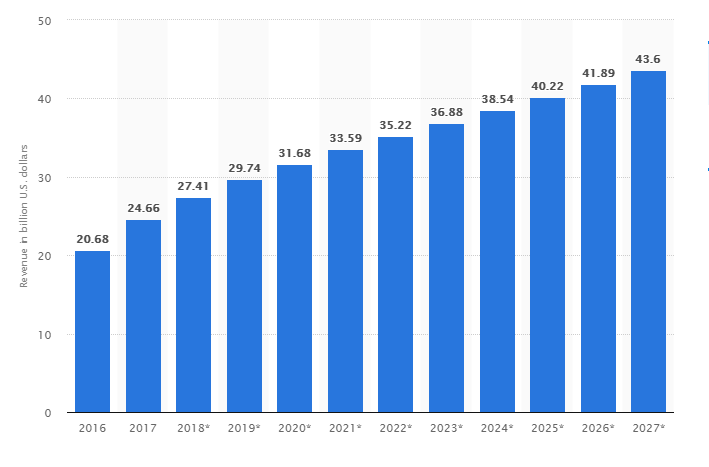
The numbers speak for themselves. The online video market is growing at the pace to be envied by other industries. According to Statista, the revenue generated from online video content will more than double from 2016 to 2027.

Video streaming app: revenue Online video revenue worldwide from 2016 to 2027 (in billion U.S. dollars)

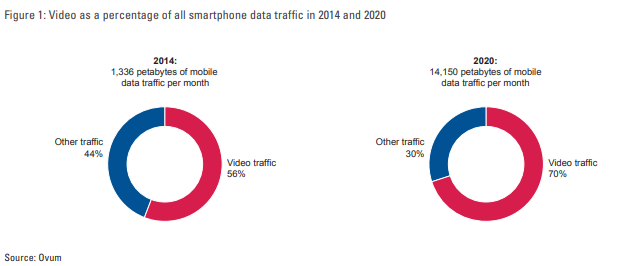
Ovum estimates that video will amount to 70% of all mobile data traffic by 2020, an increase from 56% in 2014.

Video streaming app: share

Pew Research Center found out that about 6 out of 10 young adults in the US will choose online streaming services to watch TV.

But before plunging into the mobile digital video world, one should make sure to distinguish between these two functional types of video streaming:

  • On-demand video streaming. These apps allow users to select and watch preloaded content such as movies or TV shows anytime and anyplace. The data is stored on the server.
    The sector is dominated by big-league vendors like Netflix, Amazon Prime, and Hulu.
  • Live video streaming. This type of apps is meant for simultaneous media recording and broadcasting it in real time to the viewer. The videos can be either stored on a server and be accessed by other users for a certain time or broadcasted directly to a user without storing. The latter means the content is available only in online mode for the time of streaming.   

In fact, 80% of users said they would rather watch live video from a brand than read a blog, while 82% prefer live video from a brand to social posts.

Live video streaming is mostly represented by Facebook Live, YouTube, Snapchat’s Live Stories, Periscope, Twitter and YouNow.

Belitsoft has successfully developed a live video streaming application for our Client who owns a video surveillance system company. The app allows multiple users to connect to the cameras and get the real-time image on their devices. The functionality of the app also includes viewing of the videos recorded earlier. The app is available on Windows Client as well as iOS and Android platforms.  

Video streaming app: technical challenges

Everyone wants a video in high resolution and no one wants it with “loading” screens showing up.

As Limelight Networks’ “The State of Online Video 2017” states, 21.6 % of people will quit a video page if it stops and rebuffers during playback. The second occurrence will lead to 61 % stop watching, while rebuffering for the third time means 84.7 % of the audience is lost.

23% of people who have been presented with a poor quality video experience said they would hesitate to purchase from that brand.

The quality of a video stream largely depends on the available bandwidth. Generally, a higher bitrate means a higher image quality in video output and the more bandwidth required.

Yet, original-sized media is generally too big for the common Internet connection speeds. This is one of the reasons any video goes through encoding.

Video codecs - software or hardware tools - are used to compress and decompress digital data.

Compressed files have fewer bitrates and require less bandwidth while preserving approximate video quality after decompression. For end-user, this means flawless streaming experience without any buffer issues.

Today, H.264 or AVC (Advanced Video Coding) is the most commonly accepted format for high quality streaming over the Internet.

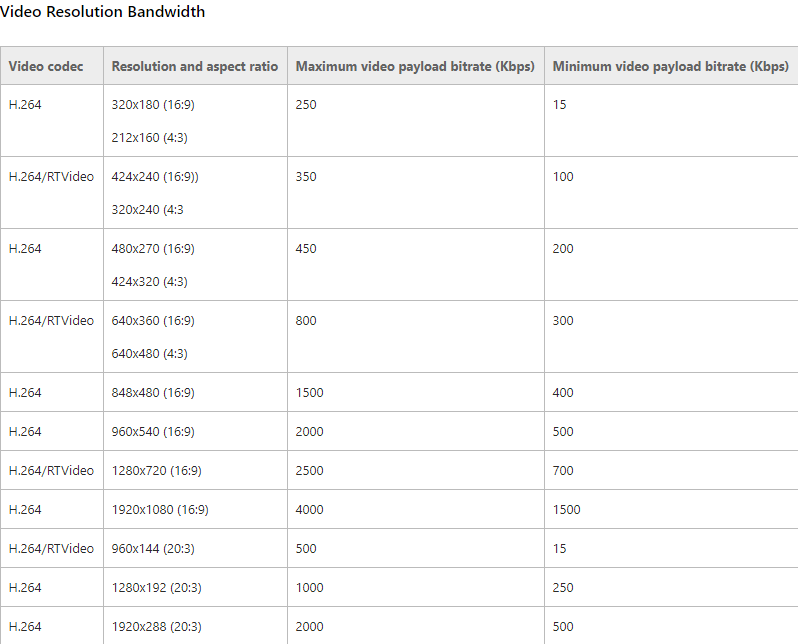
In a chart below you can check out the bandwidth for your own mobile streaming app with H.264 codec.

Video streaming app: resolution and bitrates Source: technet.microsoft.com

This matters because if the user’s download speed is lesser than that of a stream, the device will compress the file and the video will be choppy.

H.265 or HEVC (High Efficiency Video Coding) brought about a format that can deliver equal to H.264 image quality at approximately half the bit rate required compared to H.264/AVC.

‘Compression is key to streaming video. With good compression, you can avoid blocky or blurry artifacts, shorten waiting times for video to start, pare back your network usage and sometimes upgrade to higher-resolution video, like 4K, without having to upgrade your broadband connection’
Stephen Shankland, senior reporter at cnet.com

The price is more computer and memory intensiveness. As a result, it is compatible with fewer devices and reaches a smaller audience. In fact, it wasn’t until 2017, that Apple announced H.265 support for iOS 11.

There is also VP9, a royalty-free codec developed by Google. Netflix, however, has found out it performs worse than H.264 in the most resolutions and quality metrics.

One can also check out currently supported video codecs for Android and iOS.

Another important thing to consider is that variable bitrate (VBR) will give a better image quality than constant bitrate (CBR) in most cases. The main difference is that the former adapts the data stream depending on the complexity of each video segment. CBR, on the other side, does not optimize media files for quality.

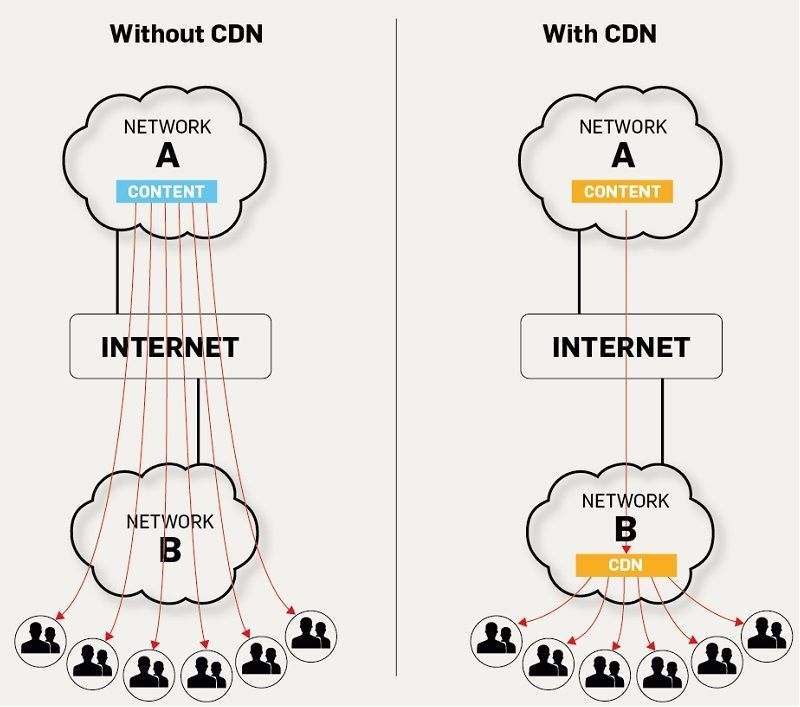
Issues like latency and buffering are heated up in high-stress scenarios, such as an increase in user demand. To prevent users from frustration, content delivery networks are implemented. This type of network service allows keeping important content in multiple globally distributed data centers. It makes it closer to end-users and faster to download.

Mobile streaming app: CDN Source: technig.com

Redirecting the visitors to edge services can also help to reduce the strain on the network and solve the issue of scalability.

‘Сonsider a CDN like a flexible water main with a variable diameter and any number of drinking fountains. Instead of water, you are sending data. Scalability is the ability of the CDN to push just the right amount of data to all the spigots so everybody drinks just the right flow.’
suggested George Avgerakis, a newtek.com blog contributor

The networks are also effective against DDoS attacks since the large distributed server infrastructure can absorb the scale of the attack.

Do you already know what your app should look like but need developers for your product? Contact us to hire a dedicated team! Or read on for some more ideas.

Video streaming app: features

What should a successful video streaming app offer to gain the interest and love of users apart from high-quality content?

There is a certain set of basic functionalities that any decent app should have such as

  • a registration screen (either via a social network or e-mail),
  • personal profile,
  • onboarding screens,
  • push notifications,
  • inbuilt feedback forms.

We’ve touched them upon in our previous articles, where we’ve described how to develop a smart home app and a language learning app.

We have also talked about the best Android and iOS design practices, as each platform has a set of defined rules to reckon with.

Yet, for video streaming, there are some engaging features that have already proved their success with the industry-leading apps.

Content search

Users should have a chance to search for preferred content with filters for a genre, actors, user ratings and comments, ownership, movie or TV show, etc.

For those hesitant to choose, Netflix came up with Netflix Roulette. Based on a short list of criteria the service will return its random choices. One can then watch the suggested content or spin the wheel again, adjusting the criteria. 

Enabling geolocation tracking can help users discover trending broadcasts in their vicinity or at a certain location worldwide. Conversely, a geo-blocking feature should exist to restrict content visibility in a particular area because of privacy issues.

Comments and sharing

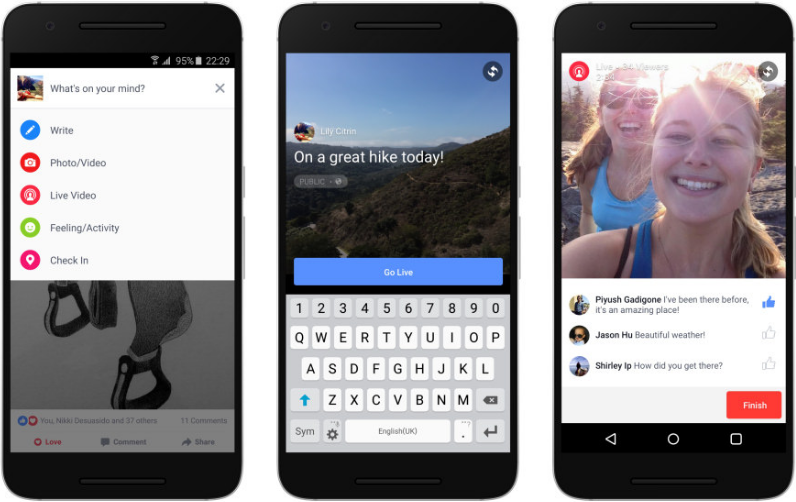
Comments are especially vital for live streaming apps. As Facebook said, they get "more than 10 times more comments on Facebook Live videos than regular ones." After all, part of the attractiveness of live videos is real-time communication with reactions, questions, and opinions.

With 92% of mobile video consumers sharing videos with others and 55% of people watching videos online every day, the potential of the sharing function for audience reach is huge. Allowing integration with contacts and social media platforms will drive the engagement.

Live video streaming app Source: www.smartinsights.com

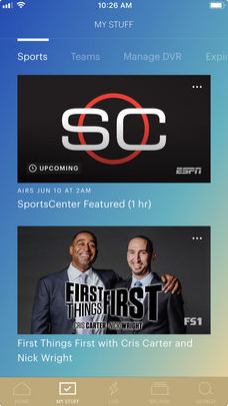
Watchlist

Watchlist or My Stuff like it is called in Hulu is a place to store the things you want to keep track of. The users can add to the list content they are interested in like TV shows, movies, networks, sporting events, etc. The app also sorts the videos that one has already watched and that are yet to be finished. Clicking on the “expiring” category shows the content which will be deleted from the server soon.

Mobile streaming app: watchlist Source: https://itunes.apple.com

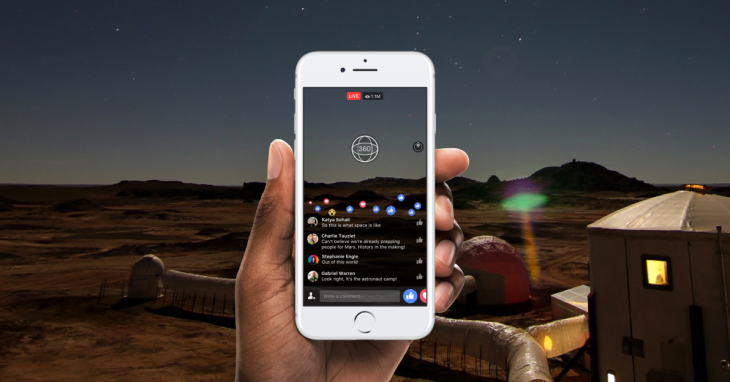
360-degree streaming.

Video immersion is a new trend. Such brands as Youtube, Facebook and Periscope already offer its support.

However, some additional hardware is required. Periscope, for example, natively integrates with Insta360 Nano for iOS and Insta360 Air for Android.

Video streaming app: 360 degree video

Video monetization.

Except for making the world a better place, every app seeks to get financial returns.

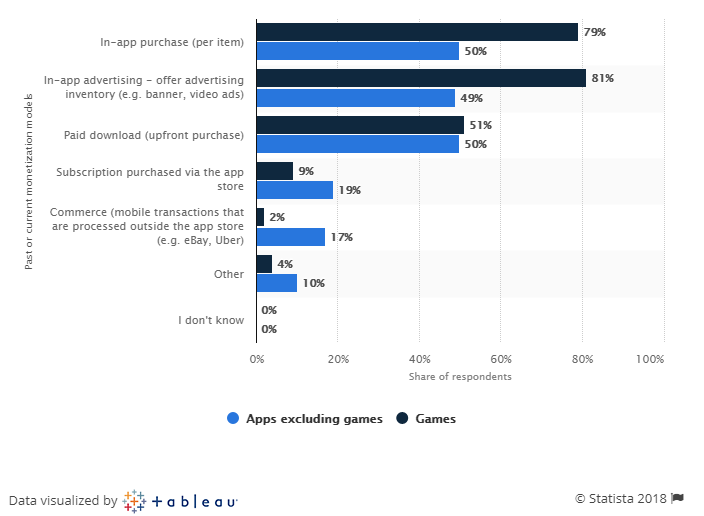
Statista conducted research to find out which app monetization models worked best in 2017.

Video streaming app: monetization

As seen from the chart, the top way to gain profits is implementing in-app purchases in freemium-based apps. In that kind of apps, users do not pay any money to download it but are offered to purchase additional features.

Subscribing to YouTube Premium, for example, gives access to

  • background video playing,
  • offline mode,
  • original content
  • an ads-free experience.

The strategy is opposed to paid apps. However, most apps like Hulu still offer some free trial period.

Moreover, in Hulu, a user can buy a subscription to No Commercials plan. About 40% of Hulu subscribers pay extra $4 extra to eliminate adverts from the service.

Netflix has long been famous for its categoric stance on ads and belief in subscription, ad-free model:

‘Internet TV is divorced of the need of advertising revenue because we can develop direct relationships with the consumer. Marketers need to find a different place to advertise.’
Neil Hunt, Netflix chief product officer

However, recently the company may seem to have changed its mind and introduced trial ads to the unanimous frustration of its users. 

‘In this particular case, we are testing whether surfacing recommendations between episodes helps members discover stories they will enjoy faster. It is important to note that a member is able to skip a video preview at anytime if they are not interested.’
Netflix’s official statement

Final Thoughts

Users love glitch-free video streaming apps. Developing one of your own always implies deep technical knowledge and a pinch of creativity.

At Belitsoft, we have talents and expertise to build an app tailored to your specific requirements. Check out our mobile development portfolio and feel free to ask us any questions!

Never miss a post! Share it!

Written by
Senior Business Development Manager
4.5
8 reviews

Rate this article

Leave a comment
Your email address will not be published.

Recommended posts

Belitsoft Blog for Entrepreneurs
Hire .NET MAUI Developer in 2026
Migrating from Xamarin.Forms to .NET MAUI Microsoft's move away from Xamarin.Forms to .NET MAUI (Multi-platform App UI) is designed to make cross-platform development of mobile and desktop apps easier. Support for Xamarin.Forms ended on 1 May 2024, so it's important to keep up with the frameworks that are supported. Microsoft positions .NET MAUI as the evolution of Xamarin.Forms. It brings a single project structure, built-in support for building desktop apps along with mobile, improved dependency management, XAML hot reload and C# hot reload, and performance tuning, amongst other improvements. During the migration we'll review your current code base, dependencies and custom components to give an accurate estimate of the effort involved. Migration can be done in two ways: a compatibility port that moves your app to .NET MAUI with as little change as possible, so it behaves as it does today and meets current app store requirements, or a full modernization of your application to the latest .NET MAUI framework with custom renderers converted to handlers, built-in dependency injection in place of DependencyService, AOT compilation and trimming for production releases, and more. If an app relies on a third-party library that hasn't yet moved to .NET MAUI, our team will find or build an equivalent so you get every feature back, in full. If you want your app available on desktop computers as well as mobile devices, we replace your Xamarin UWP front end with WinUI 3 for the Windows desktop, and add a macOS desktop build through Mac Catalyst. These modern technologies offer the same native experience as your mobile apps, so users get the same look and feel whether they open the mobile app or the desktop version. When your migration is complete and your new or upgraded application is available to your customers, our team continues to support and maintain it - upgrading everything to the latest available frameworks, updating for new security requirements, fixing issues when they arise, and applying performance improvements when new tooling becomes available. .NET MAUI Developer Skills To Expect .NET MAUI lets one C#/XAML codebase deliver native apps to iOS, Android, Windows, and macOS. The unified, single-project model trims complexity, speeds releases, and cuts multi-platform costs while stable Visual Studio tooling, MAUI Community Toolkit, Telerik, Syncfusion, and Blazor-hybrid options boost UI power and reuse. The payoff isn’t automatic: top MAUI developers still tailor code for platform quirks, squeeze performance, and plug into demanding back-ends and compliance regimes. Migration skills - code refactor, pipeline and test updates, handler architecture know-how - are in demand. Teams that can judge third-party dependencies, work around ecosystem gaps, and apply targeted native tweaks turn MAUI’s "write once, run anywhere" promise into fast, secure, and scalable products. Belitsoft’s .NET MAUI developers create cross-platform apps that integrate cleanly with backend systems, scale securely, and adapt to modern needs like compliance, IoT, and AI. Core Technical Proficiency Modern MAUI work demands deep, modern .Net skills: async/await for a responsive UI, LINQ for data shaping, plus solid command of delegates, events, generics and disciplined memory management. Developers need the full .NET BCL for shared logic, must grasp MAUI’s lifecycle, single-project layout and the different iOS, Android, Windows and macOS build paths, and should track .NET 9 gains such as faster Mac Catalyst/iOS builds, stronger AOT and tuned controls. UI success hinges on fluent XAML - layouts, controls, bindings, styles, themes and resources - paired with mastery of built-in controls, StackLayout, Grid, AbsoluteLayout, FlexLayout, and navigation pages like ContentPage, FlyoutPage and NavigationPage. Clean, testable code comes from MVVM (often with the Community Toolkit), optional MVU where it fits, and Clean Architecture’s separation and inversion principles. Finally, developers must pick the right NuGet helpers and UI suites (Telerik, Syncfusion) to weave data access, networking and advanced visuals into adaptive, device-spanning interfaces. Cross-Platform Development Expertise Experienced .NET MAUI developers rely on MAUI’s theming system for baseline consistency, then drop down to Handlers or platform code when a control needs Material flair on Android or Apple polish on iOS. Adaptive layouts reshape screens for phone, tablet, or desktop, while MAUI Essentials and targeted native code unlock GPS, sensors, secure storage, or any niche API. Performance comes next: lazy-load data and views, flatten layouts, trim images, and watch for leaks, choose AOT on iOS for snappy launches and weigh JIT trade-offs on Android. Hot Reload speeds the loop, but final builds must be profiled and tuned. BlazorWebView adds another twist - teams can drop web components straight into native UIs, sharing logic across the web, mobile, and desktop. As a result, the modern MAUI role increasingly blends classic mobile skills with Blazor-centric web know-how. Modern Software Engineering Practices A well-run cross-platform team integrates .NET MAUI into a single CI/CD pipeline - typically GitHub Actions, Azure DevOps, or Jenkins - that compiles, tests, and signs iOS, Android, Windows, and macOS builds in one go. Docker images guarantee identical build agents, ending "works on my machine" while NuGet packaging pushes shared MAUI libraries and keeps app-store or enterprise shipments repeatable. Unit tests (NUnit / xUnit) cover business logic and ViewModels, integration tests catch service wiring, and targeted Appium scripts exercise the top 20% of UI flows. Such automation has been shown to cut production bugs by roughly 85%. Behind the scenes, Git with a clear branching model (like GitFlow) and disciplined pull-request reviews keep code changes orderly, and NuGet - used by more than 80% of .NET teams - locks dependency versions. Strict Semantic Versioning then guards against surprise breakages during upgrades, lowering deployment-failure rates. Together, these practices turn frequent, multi-platform releases from a risk into a routine. Security and Compliance Expertise Security has to guide every .NET MAUI decision from the first line of code. Developers start with secure-coding basics - input validation, output encoding, tight error handling - and layer in strong authentication and authorization: MFA for the login journey, OAuth 2.0 or OpenID Connect for token flow, and platform-secure stores (Keychain, EncryptedSharedPreferences, Windows Credential Locker) for secrets. All data moves under TLS and rests under AES, while dependencies are patched quickly because most breaches still exploit known library flaws. API endpoints demand the same discipline. Regulated workloads raise the bar. HIPAA apps must encrypt PHI end-to-end and log every access, PCI-DSS code needs hardened networks, vulnerability scans and strict key rotation, GDPR calls for data-minimization, consent flows and erase-on-request logic, fintech projects add AML/KYC checks and continuous fraud monitoring. Experience with Emerging Technologies Modern .NET MAUI work pairs the app shell with smart services and connected devices. Teams are expected to bring a working grasp of generative‑AI ideas - how large or small language models behave, how the emerging Model Context Protocol feeds them context, and when to call ML.NET for on‑device or cloud‑hosted inference. With those pieces, developers can drop predictive analytics, chatbots, voice control, or workflow automation straight into the shared C# codebase. The same apps must often talk to the physical world, so MAUI engineers should be fluent in IoT patterns and protocols such as MQTT or CoAP. They hook sensors and actuators to remote monitoring dashboards, collect and visualize live data, and push commands back to devices - all within the single‑project structure. Problem-Solving and Adaptability In 2025, .NET MAUI still throws the odd curveball - workload paths that shift, version clashes, Xcode hiccups on Apple builds, and Blazor-Hybrid quirks - so the real test of a developer is how quickly they can diagnose sluggish scrolling, memory leaks or Debug-versus-Release surprises and ship a practical workaround. Skill requirements rise in levels.  A newcomer with up to two years’ experience should bring solid C# and XAML, basic MVVM and API skills, yet still lean on guidance for thornier platform bugs or design choices. Mid-level engineers, roughly two to five years in, are expected to marry MVVM with clean architecture, tune cross-platform UIs, handle CI/CD and security basics, and solve most framework issues without help - dropping to native APIs when MAUI’s abstraction falls short.  Veterans with five years or more lead enterprise-scale designs, squeeze every platform for speed, manage deep native integrations and security, mentor the bench and steer MAUI strategy when the documentation ends and the edge-cases begin. .NET MAUI Use Cases and Developer Capabilities by Industry  Healthcare .NET MAUI Use Cases Healthcare teams already use .NET MAUI to deliver patient-facing portals that book appointments, surface lab results and records, exchange secure messages, and push educational content - all from one C#/XAML codebase that runs on iOS, Android, Windows tablets or kiosks, and macOS desktops.  The same foundation powers remote-patient-monitoring and telehealth apps that pair with BLE wearables for real-time vitals, enable video visits, and help manage chronic conditions, as well as clinician tools that streamline point-of-care data entry, surface current guidelines, coordinate schedules, and improve team communication. Native-UI layers keep these apps intuitive and accessible. MAUI Essentials unlock the camera for document scanning, offline storage smooths patchy connectivity, and biometric sensors support secure log-ins. Developers of such solutions must encrypt PHI end-to-end, enforce MFA, granular roles, and audit trails, and follow HIPAA, HL7, and FHIR to the letter while handling versioned EHR/EMR APIs, error states, and secure data transfer. Practical know-how with Syncfusion controls, device-SDK integrations, BLE protocols, and real-time stream processing is equally vital.  Finance .NET MAUI Use Cases In finance, .NET MAUI powers four main app types. Banks use it for cross-platform mobile apps that show balances, move money, pay bills, guide loan applications, and embed live chat. Trading desks rely on MAUI’s native speed, data binding, and custom-chart controls to stream quotes, render advanced charts, and execute orders in real time. Fintech start-ups build wallets, P2P lending portals, robo-advisers, and InsurTech tools on the same foundation, while payment-gateway fronts lean on MAUI for secure, branded checkout flows across mobile and desktop. To succeed in this domain, teams must integrate WebSocket or SignalR feeds, Plaid aggregators, crypto or market-data APIs, and enforce PCI-DSS, AML/KYC, MFA, OAuth 2.0, and end-to-end encryption. MAUI’s secure storage, crypto libraries, and biometric hooks help, but specialist knowledge of compliance, layered security, and AI-driven fraud or risk models is essential to keep transactions fast, data visualizations clear, and regulators satisfied. Insurance .NET MAUI Use Cases Mobile apps now let policyholders file a claim, attach photos or videos, watch the claim move through each step, and chat securely with the adjuster who handles it. Field adjusters carry their own mobile tools, so they can see their caseload, record site findings, and finish claim paperwork while still on-site. Agents use all-in-one apps to pull up client files, quote new coverage, gather underwriting details, and submit applications from wherever they are. Self-service web and mobile portals give customers access to policy details, take premium payments, allow personal-data updates, and offer policy download. Usage-based-insurance apps pair with in-car telematics or home IoT sensors to log real-world behavior, feeding pricing and risk models tailored to each user. .NET MAUI delivers these apps on iOS, Android, and Windows tablets, taps the camera and GPS, works offline then syncs, keeps documents secure, hooks into core insurance and CRM systems, and can host AI for straight-through claims, fraud checks, or policy advice. To build all this, developers must lock down data, meet GDPR and other laws, handle uploads and downloads safely, store and sync offline data (often with SQLite), connect to policy systems, payment gateways, and third-party data feeds, and know insurance workflows well enough to weave in AI for fraud, risk, and customer service. Logistics & Supply Chain .NET MAUI Use Cases Fleet-management apps built with .NET MAUI track trucks live on a map, pick faster routes, link drivers with dispatch, and remind teams about maintenance.  Warehouse inventory tools scan barcodes or RFID, guide picking and packing, watch stock levels, handle cycle counts, and log inbound goods. Last-mile delivery apps steer drivers, capture e-signatures, photos, and timestamps as proof of drop-off, and push real-time status back to customers and dispatch. Supply-chain visibility apps put every leg of a shipment on one screen, let partners manage orders, and keep everyone talking in the same mobile space. .NET MAUI supports all of this: GPS and mapping for tracking and navigation, the camera for scanning and photo evidence, offline mode that syncs later, and cross-platform reach from phones to warehouse tablets. It plugs into WMS, TMS, ELD, and other logistics systems and streams live data to users. Developers need sharp skills in native location services, geofencing, and mapping SDKs, barcode and RFID integration, SQLite storage and conflict-free syncing, real-time channels like SignalR, route-optimization math, API and EDI links to WMS/TMS/ELD platforms, and telematics feeds for speed, fuel, and engine diagnostics. Manufacturing .NET MAUI Use Cases On the shop floor, .NET MAUI powers mobile MES apps that show electronic work orders, log progress and material use, track OEE, and guide operators through quality checks - all in real time, even on tablets or handheld scanners. Quality-control inspectors get focused MAUI apps to note defects, snap photos or video, follow digital checklists, and, when needed, talk to Bluetooth gauges. Predictive-maintenance apps alert technicians to AI-flagged issues, surface live equipment-health data, serve up procedures, and let them close out jobs on the spot. Field-service tools extend the same tech to off-line equipment, offering manuals, parts lists, service history, and full work-order management. MAUI’s cross-platform reach covers Windows industrial PCs, Android tablets, and iOS/Android phones. It taps cameras for barcode scans, links to Bluetooth or RFID gear, works offline with auto-sync, and hooks into MES, SCADA, ERP, and IIoT back ends. To build this, developers need OPC UA and other industrial-API chops, Bluetooth/NFC/Wi-Fi Direct skills, mobile dashboards for metrics and OEE, a grasp of production, QC, and maintenance flows, and the ability to surface AI-driven alerts so technicians can act before downtime hits - ideally with a lean-manufacturing mindset. E-commerce & Retail .NET MAUI Use Cases .NET MAUI lets retailers roll out tablet- or phone-based POS apps so associates can check out shoppers, take payments, look up stock, and update customer records anywhere on the floor. The same framework powers sleek customer storefronts that show catalogs, enable secure checkout, track orders, and sync accounts across iOS, Android, and Windows. Loyalty apps built with MAUI keep shoppers coming back by storing points, unlocking tiers, and pushing personalized offers through built-in notifications. Clienteling tools give staff live inventory, rich product details, and AI-driven suggestions to serve shoppers better, while ops functions handle back-room tasks. Under the hood, MAUI’s CollectionView, SwipeView, gradients, and custom styles create smooth, on-brand UIs. The camera scans barcodes, offline mode syncs later, and secure bridges link to Shopify, Magento, payment gateways, and loyalty engines. Building this demands PCI-DSS expertise, payment-SDK experience (Stripe, PayPal, Adyen, Braintree), solid inventory-management know-how, and skill at weaving AI recommendation services into an intuitive, conversion-ready shopping journey. How Belitsoft Can Help Many firms racing to modern apps face three issues: migrating off end-of-life Xamarin, meeting strict performance + compliance targets, and stitching one secure codebase across iOS, Android, Windows, and macOS. Belitsoft removes those roadblocks. Our MAUI team audits old Xamarin code, rewrites UIs, swaps out dead libraries, and rebuilds CI/CD so a single C#/XAML project ships fast and syncs offline, taps GPS, sensors, camera, and even embeds Blazor for shared desktop-web-mobile logic. Our engineers land industry-grade features: HIPAA chat and biometric sign-on for healthcare, PCI-secure trading screens and KYC checks for finance, telematics-powered claims tools for insurers, GPS-routed fleet and warehouse scanners for logistics, MES, QC, and PdM apps with Bluetooth gauges for factories, and Stripe-ready POS, storefront, and AI-driven recommendation engines for retail. Behind the scenes we supply scarce skills - MVVM/MVU patterns, Telerik/Syncfusion UI, AOT tuning, async pipelines, GitHub-/Azure-/Jenkins-based multi-OS builds, Appium tests, OAuth 2.0, MFA, TLS/AES, and GDPR/PCI/HIPAA playbooks - plus smart layers like chatbots, voice, predictive analytics, MQTT/CoAP sensor links, and on-device ML. Belitsoft stays ahead of MAUI quirks, debugs handler-level issues, and enforces clean architecture, positioning itself as the security-first, AI-ready partner for cross-platform product futures. Partner with Belitsoft for your .NET MAUI projects and use our expertise in .NET development to build secure, scalable, and cross-platform applications tailored to your industry needs. Our dedicated team assists you every step of the way. Contact us to discuss your needs.
Hire Dedicated Development Team To Cut Costs by more than 40%
How to Hire a Dedicated Development Team
What Is a Dedicated Software Development Team Model? A dedicated development team is a partnership between a client and outsourced developers. This kind of model works like having your own in-house team, but without the extra hassle, like administrative, HR, tax, and social benefits issues. You can focus on important business tasks while your dedicated software development services team takes care of the rest. Areas of Responsibility Your Software Development Vendor: hire skilled talents for the software development project build dedicated team for the project plan software development resources and workflow set up an effective communication between the dedicated software development team and you equip and supply infrastructure for the dedicated team seamless transfer knowledge and roles within the project Your Company: approve the members of a dedicated team monitor the product development provide feedback and reviews to the dedicated development team accept the software development results if they meet your expectations Hire dedicated offshore developers from Belitsoft to reveal your full business capacity. Talk directly to our specialist on building a dedicated development team. The Structure of a Dedicated Development Team A highly performing dedicated software development team comprises specialists with strong professional skills, motivation to achieve the goal, transparent communication, and a clear understanding of their roles and duties. The dedicated development team typically includes the roles agreed for a specific project. In practice, this structure may differ. A dedicated team includes: Front-end engineers. Companies hire dedicated front-end developers if they want to get experts who code and test the elements and functionality of the user interface—the “visible” part of the product. Back-end engineers. When you need experts who are to develop the inner part and the background components, you can hire dedicated backend developers. DevOps. If your processes require the involvement of skilled professionals who specialize in coordination of software development, IT operations, and testing, hire dedicated DevOps engineers. UX/UI designers. Specialists who make the user experience simple, intuitive, and engaging. QA engineers. Software product businesses often use a dedicated testing team model to ensure the optimal quality and bug-free functioning of their main assets. Project managers. The team leaders who mitigate risks, plan, manage, track, and optimize the entire development process. Responsible for delivering project requirements to the dedicated team and reporting to the client. Business analysts. The mediator between the development team and the business. They determine requirements, evaluate processes, make reports, and offer suggestions to CEOs, business owners, and other stakeholders. The dedicated development team size varies based on your specific needs. We can start a project with 1-2 specialists, adding more along with the project evolution. We have also built dedicated development teams of 100+ developers and IT experts in an extended period for our clients. Dedicated Development Team Services Custom web and mobile development Testing and QA UX/UI design Data backup and migration services Product engineering services Big Data analytics Remote hosting services for IT infrastructure Maintenance and support for IT infrastructure When You Should Hire Dedicated Development Team Early-stage startups Assemble the required dedicated software team quickly for an early-stage startup with growth aspirations. Hire dedicated developers to save money and speed up the software development process without resorting to full-time in-house developers. Large projects with changing scope To skip a time-consuming recruiting process and build a professional dedicated team quickly, opt to hiring a dedicated software development team for large growing projects. Optimize the working processes by assigning more important, business-oriented tasks to the in-house staff and forward additional work to the remote team. New product launch Hiring a dedicated software development team is an effective way to create and launch a new product. In case your company lacks technical specialists with the enforced skills. So you have to spend a lot of time recruiting. It results in product launch delays. When you decide to work with an outsourcing software development vendor, it speeds the recruitment of a professional dedicated team. Business scaling While your business enlarges, it demands more dedicated developers. Connect to those companies with access to a large pool of proficient engineers. They can supply rapidly extra resources and adjust them to your existing procedures, while offering a thorough experience for every stage of development. Lack of unique skills When there’s a realm that requires specific expertise you don’t have inside your company, or you need to engage specialists who may be limited in your region. With a dedicated development team model, all talents are available to you worldwide. Urgent need for scaling the development capacity An increased scope or unexpected changes to your current development team may cause difficulties with handling the project. Hiring dedicated development teams is an alternative solution, it saves you time and effort on recruitment and HR processes, while providing a functional line-up immediately. When You Should Not Hire Dedicated Development Team Short and middle-term projects If your project is not large and has well-defined requirements, it may not be urgent to hire a dedicated development team. More likely, you need an in-house team to carry out the outlined tasks. For short-term projects, a fixed-price model is suitable, whereas the Time & Material approach is appropriate for medium-term projects. Projects with a full defined scope Projects with well-defined requirements and a rational plan of execution don't demand a dedicated development team. The choice between a fixed-price or Time & Material model should be based on the size and scope of the project. Short overlap time with the vendor Most outsourcing vendors work in different countries. So you need to choose the one that offers convenient working conditions in terms of availability and response time. Agree with your prospective vendor about the minimal overlap period. Otherwise, the working process won’t be smooth. How Much Does It Cost to Hire a Dedicated Development Team? The pricing model in a dedicated development team is quite simple. Every member has a monthly salary. Just as you pay your in-house workforce, you pay remote workers monthly as well. Plus, the vendor’s fee for administrative, overhead, and infrastructure expenses. The total cost of your project depends on the duration and scope. No extra expenses such as renting an office for a dedicated team, purchasing equipment, paying taxes, electricity bills, taking care of sick leaves, etc. Benefits Of Hiring Dedicated Development Team Hiring a dedicated team with Belitsoft ensures you control the development while we guarantee smooth integration with other teams in your company. Access to global talent Hire dedicated developers at Belitsoft and select skilled experts from a wide talent pool. Do not be limited to the experts within your city. Get a wide range of technology expertise. Make your business agile and your products versatile through outsourcing vendors with talents in mobile apps and web apps, blockchain, IoT, and AI. Time & resources savings on hiring Collaborating with outsourcing vendors, you skip the expensive recruitment process. Bring in talents hand-picked on your requirements for your particular project. The dedicated development team model implies your participation in hiring as well. Your role is to select the best candidates from the shortlist suggested by the vendor. Benefit from a quick and simple software development staff augmentation. Transparent and effective management Effective communication is key to the success of an outsourcing model. With tools such as Skype, Basecamp, JIRA, and GoToMeeting, you keep informed and in control of the project's progress. Regular communication and collaboration between the client and the development team ensure transparency, boost productivity, and create a smooth workflow. Flexibility in time, materials, and scalability With a dedicated development team model, you get the best of all the engagement models. You earn flexibility in time and material along with predictability in cost. Cost-efficiency in comparison with in-house models There are no single statistics, but the average outsourcing rate is much lower compared to the average in-house rate. Sometimes, the difference in the rates is not so large. But such vendors usually offer the top efficiency that could hardly be reached with the in-house workforce. Cut extra expenses and resources on equipment, office and infrastructure. Apart from arrangement activities, release more time and resources for important business processes such as competitor analysis and technology research. Dedicated team scalability Access the flexibility to determine the size of the dedicated team on their project. Throughout the development process, you can increase or decrease the team as required. Quality infrastructure Setting up a full IT department is expensive for startups and mid-sized companies. Hiring a dedicated development team offers a cost-effective solution for creating complex tech products with the best resources without additional investments. A software development vendor is already well-equipped to handle projects of varying sizes or complexities, and deliver optimal results. Continuous integration Ongoing evolution and enhancement are crucial for large project success. A dedicated team model is effective for projects that need growth and evolution. Keeping the dedicated team intact avoids the need to expand or set up a new one. What Are the Challenges When Hiring Dedicated Development Teams? Finding remote developers matching company values Finding a development team that aligns with your company's values and approach to software creation can sometimes pose a challenge. While industry standards and recommended methods are widely known, not all practitioners follow them. Setting up effective communication Commonly, dedicated development teams are composed of remote workers who may be co-in a shared office, but not necessarily at your physical location. As a result, managing remote teams presents typical challenges such as maintaining effective communication and keeping dedicated team members motivated. Fortunately, these difficulties are less pronounced when you hire remote dedicated development team with a higher level of experience. Ensuring high level of security For security considerations, especially during the early stages of working with a specific development team, we advise to keep critical projects and software development processes in-house. Over time, as you build a relationship and gain a deeper understanding of the team's capabilities, you can determine the extent to which you can rely on outsourcing. How to Build a Dedicated Development Team? Define requirements and estimate the scope Although changes during the development process are inevitable, it's important to have a well-defined framework in place. It may include the type of solution you need (such as web or mobile), the problem that this solution should solve, and the timeline. To ensure they meet the requirements, the software development vendor needs to understand clearly the tasks and the specialists required. A business analyst works with the clients to determine their needs, and then define the project requests and scope. There are two potential scenarios in determining the project scope: The client has a predefined scope. Here the budget is discussed with the client, considering the priorities and estimated or given timelines. The client does not understand precisely the exact scope. Then, a discovery stage may be conducted to make hypotheses and test them through prototypes. Based on the test results, they analyze the existing scope to determine if it meets the objectives. If not, they conduct further discovery and research, until they identify the needed scope. Choosing a reliable software development vendor We recommend you to pay attention to 3 important aspects, like experience, portfolio, and level of communication. But there are so many results that you definitely need to narrow down the search. And here are great ways to do this: Searching in Google works the best, B2B portals such as Clutch, References from other clients. Find outsourcing vendors with pricing, descriptions, and real reviews from other clients. It facilitates your choice. Searching and interviewing team members The software provider selects suitable candidates for every needed role and interviews. It gives you the option to take part in the interviewing process, providing a valuable opportunity to clarify expectations for the project goals and each development team member's role and responsibilities. By being involved in the hiring process, you can select dedicated software developers who not only possess the technical expertise, but also align with the company culture and exhibit strong soft skills. The goal of this stage is to build a team of highly skilled and motivated professionals to work on your project. Before you hire a dedicated team Before hiring a dedicated team, it's important to agree on the responsibility distribution. Clearly understand the development process and determine in advance who will be responsible for each task to avoid conflicts during critical moments of the project. At this step, the outsourcing vendor deals with the legal nuances of your cooperation. The set of documents usually includes: Non-Disclosure Agreement (NDA). A dedicated team works with sensitive internal information. That’s why such cooperation normally starts with signing an NDA. The document outlines what material and knowledge should be confidential and what the penalty for its disclosure will be. Master Services Agreement (MSA). It’s a contract specifying most of the terms of the cooperation. Usually, it covers payment terms, protocols for invoicing & payment, dispute resolution, available volume discounts, product warranties, credit limits and credit periods, intellectual property ownership, and liabilities. And the critical thing to mention. To grant all the rights for the developed product to you and your company, it shall clearly state this condition in the MSA.  Statement of work (SOW). This document describes and defines all terms and conditions of your project. It clarifies deliverables, timeline, costs, project conditions, and special requirements. It’s essential to make the SOW clear to every party, which will help avoid misunderstanding and disputes. The development team is given the go-ahead, and the collaboration begins with a call to meet the team, discuss responsibilities, receive access to development tools, align project and business priorities, and establish regular check-ins. Managing the development team To ensure a successful development process with your dedicated team, it's important to stay involved and maintain open communication. Some actions you may take for that include: Holding regular online meetings to review progress and address any issues. Encouraging development team members to ask questions and provide feedback. Staying in touch with the vendor's project manager to ensure everything is on track. Consider holding an offline meeting with the dedicated team to build personal relationships and foster a positive work environment. By actively participating and being available to the team, you can help ensure a successful outcome and build a positive reputation as a supportive client. Why Hire a Dedicated Development Team from Belitsoft? Tangible cost reduction Hiring dedicated developers with Belitsoft allows you to cut your software development costs due to lower rates compared to the US, UK, Israel, and many other countries. You also save on creating IT infrastructure, as well as hiring and onboarding costs. Faster time-to-market Belitsoft’s ability to create a dedicated development team within a shorter timeframe and scale it up promptly afterwards helps reduce your solution’s time-to-market. Team scaling speed and capacity In a matter of weeks, we can assemble a top-notch, multidisciplinary team of 6–8 dedicated software developers and other specialists to work on your project. To get things started quickly, we can even provide you with 1–2 developers right away. For example, in one of our major long-term projects, we have started by providing the enterprise with a dedicated team of 5 specialists, and then gradually expanded the team up to 100+ software developers and QA testers. Multidisciplinary & cross-domain expertise We have created Dedicated Teams for startups, well-established clients, and projects that aimed to merge multiple other standalone projects. Our dedicated development teams comprise skilled professionals in a variety of technologies, including Java developers, .NET developers, including those proficient in SharePoint development, Python developers, PHP developers, C++ developers, and more. As for domains, our team has strong expertise in eLearning, Healthcare, Business Intelligence, Insurance, Logistics, etc. Great flexibility Wherever our clients are located, we make our schedule with at least several hours of time overlap. When you require closer collaboration, our dedicated teams adjust their working hours bound to your schedule. Effective management and regular communication Our dedicated teams are self-sufficient and expertly led by experienced Project Managers with years of managing expertise. By assigning a dedicated project manager to oversee the day-to-day operations and workflows, we ensure that the project is transparent and aligned with your goals. The project manager will keep in regular contact with your in-house project manager or product owner to keep you informed. This allows you to focus on the key aspects of the project while still retaining full technical ownership. Gain access to our company's best practices and the project artifacts and knowledge accumulated during the project. Control the results without spending time on daily management. Quick start To assemble a tailored dedicated development team for you promptly, we refer to the extensive pool of over 400 in-house Developers, Product Managers, and Business Analysts. This vast network and access to top talent from major software development hubs also helps us create dedicated teams that meet your specific needs. Efficient recruitment processes and fast turnaround times allow us to quickly add more skilled developers to your team as on demand. Most times, we can provide an additional 1-2 software developers almost immediately. Years of hands-on expertise Belitsoft has been in software development and IT consulting for 20+ years. We’ve received experience in various business scenarios and environments, including mergers and acquisitions, project recovery, and collaboration with both in-house and third-party development teams, among others. These experts have honed their skills in overcoming challenges and delivering successful outcomes. Reliable support Our dedicated development teams provide support services during and after product implementation. You get technical support and backups for your product. This ensures exceptional customer service in the long run. Total security and compliance All the dedicated teams at Belitsoft have a proven track record of delivering successful projects that meet the needs of our clients. Now that we use our ISO 9001 certified quality management system, we ensure that projects are executed with a focus on meeting our customers' expectations for quality, time, and budget. Additionally, Belitsoft provides assurance that our customers' data is protected and secure. Invest in a dedicated development team with us for a smart and profitable solution and get top-notch results at a fair price. Let’s talk. 5 Factors That Make Dedicated Development Team Work Define requirements and goals Before assembling a dedicated development team or outsourcing to a third-party provider, it's crucial to take the time to assess your business needs. From there, establish well-defined goals based on these requirements, including the project's scope, desired outcomes, and potential benefits. Do your own research Before hiring a dedicated development team, it's crucial to conduct a thorough background check. This includes reviewing references, experiences, portfolios, and client testimonials. Assess the team's expertise in handling projects similar to yours, including the number of projects they have completed, the types of clients they have worked with, and the technology they use. With this information you have a better understanding of the development team's ability to meet your expectations. When it comes to long-term projects, consider conducting interviews and skill assessments for each dedicated team member to ensure they are the right fit for the job. Maintain transparent communication Effective communication is crucial for the success of your project and outsourcing relationships. Before deciding, consider the cultural differences, common language, and time zone differences. For example, if you are based in the US and looking to hire a dedicated development team based in India, these factors can greatly affect the outcome of the project. Misalignment in these areas can lead to difficulties in feedback and communication, thus hindering the progress of the project. Build trust To ensure the success of remote projects, establishing trust is essential. Building trust is a gradual process and requires continuous effort from both parties. One way to foster trust is by offering flexible work arrangements, clearly communicating project expectations, being transparent in payment processes, and avoiding changes in project requirements without proper compensation. By making credit a priority, you can ensure a strong and productive relationship with your dedicated development team. Start small To get initiated with hiring a dedicated development team, set up with a small project. This allows you to assess the viability of this model for your needs and determine if you can form a long-lasting relationship with the dedicated team. Starting small reduces risks and helps manage costs effectively, which is beneficial for startups, as well as small and mid-sized businesses. Dedicated Development Team VS Fixed Price Model A fixed-price model is a cooperation based on a fixed budget for the project, regardless of the time and resources needed to complete the project. It means that you and the software vendor agree on the price, deadline, project scope, technologies, and detailed product requirements in advance. However, the vendor needs more time to prepare the detailed specifications. The key favor of a fixed-price is skipping budget-related surprises. The major disadvantage—you cannot make changes in the workflow. Actually, you can work it out, but be ready for extra pay and moving the deadline. The fixed price will work for: MVP development Short-term projects Projects with clear deadlines Projects with determined specifications Dedicated Team VS Time & Material Model The time & material model means that the client pays only for time and resources spent on the project. The leading improvement of the time & material model is the freedom in changing project requirements and scope of work alongside the development. While the key obstacle is the difficulty in planning and controlling the budget because of such changes. This engagement model is suitable for: Projects where requirements can change The market is not thoroughly explored Product market fit is yet to be determined Belitsoft's Engagement Models to Choose From Belitsoft offers several engagement models that ensure an efficient solution to your software development needs, whether it's to expand your in-house team, acquire specialized technical knowledge, or speed up the development process. The Dedicated Team model provides access to Belitsoft's top-notch software development professionals on a long-term basis. The Team Extension model ensures you receive a highly skilled software development team that aligns with the required expertise and cultural fit for your project. The Project-based model offers a dependable collaboration between you and Belitsoft specialists who are focused on delivering specific project objectives. Ready to work with a dedicated team? No need to spend your valuable time searching for a reliable and experienced partner. At Belitsoft we offer top technical talents and 10+ years of expertise. With us, you will reduce costs of software development by over 40%. Need assistance?
Healthcare Application Developer: Hiring Trends in 2025
Hospitals Hospitals want now developers who know mobility, security, compliance, integration with legacy EHR. Often tasks include integration with a statewide health information exchange, meeting CMS data transparency mandates, digitizing intake to remove paperwork and much more.   From Colorado Springs to Stockton, hospitals are growing IT teams to replace 15-year-old software held together by end-of-life vendor contracts and manual data entry. Mid-sized systems are hiring full-stack developers to modernize intranet portals, build patient-facing apps, and refactor reporting tools to meet regulatory deadlines. The talent war is no longer just in San Francisco. Developers with experience in high-regulation industries - finance, insurance, government - are now being recruited aggressively into healthcare. The code needs to work, hold up under audits, downtime protocols, accessibility standards, and a user base that includes everyone from moms to seniors managing chronic disease. Digital Patient Experience Patient care now depends on code too. In 2025, U.S. hospitals are hiring React developers, API architects, and mobile engineers to build apps because they can’t function without them.  Application developers are now integral parts of health system IT teams. Kaiser Permanente 6,000-person tech division is building everything from chronic care management tools to backend integrations for EHR systems. Their employer branding and hiring pitch is - the code supports lives in new architectural reality.  Hospital IT is hiring healthcare developers who can make a consumer-grade experience while staying inside HIPAA’s rules.  Patient portals, mobile scheduling, bill pay, and messaging systems have become the primary way hospitals compete for repeat visits - especially as patients begin to treat health systems like service providers. A broken portal is now the equivalent of a front desk that doesn’t pick up the phone. A single missed appointment due to a bad mobile UI has a direct cost. At scale, it’s a patient churn problem. A glitch in the patient portal is a care barrier. Appointment scheduling must work via a multi-platform interface and integrate with provider calendars. Lab results should be synchronized through APIs. Messaging interfaces must provide real-time updates and push alerts. Bill pay portals must not require five-step logins. Care Management & Interoperability A failed integration may lead to a care gap. Developers with experience in FHIR, HL7, and EHR APIs are getting pulled into care management platforms, patient engagement tools, and analytics systems that depend on tight integrations. It’s not just about moving data between systems but also about translating fragmented inputs - from a clinic’s outdated records to a patient’s wearable device data - into something more useful, delivered where and when it’s needed. Development teams are being asked to extend EHR platforms with custom apps, build bridges between inpatient and outpatient systems, or create clinician-facing dashboards that synchronise live with care coordination tools. AI-Powered Clinical Tools Hospitals have been talking about AI at HIMSS for years. At HIMSS 2025, AI-powered chatbots took center stage. Software engineers with AI integration experience are now being brought in to help embed ML models into clinical workflows: flagging abnormal imaging, surfacing risk scores in the EHR, automating intake summaries using NLP. At the HIMSS conference, vendors showcased AI for diagnostics, triage, scheduling, and radiology. But behind every glossy demo is a developer writing the middleware, optimizing queries, or tuning data flows to prevent false positives from overwhelming the clinical team. The hires in demand now: ML-savvy developers who know how to productionize models, engineers who can handle unstructured data in healthcare-safe formats, and developers with NLP experience who can build structured outputs from free-text clinical notes.  Health insurers Digital Member Platforms The only way to keep members, cut costs, and stay competitive is to turn legacy infrastructure into software platforms that actually work. That’s why health insurers in 2025 are staffing up like tech companies.  Members want real-time benefits, telehealth access, billing tools, and claims status - all from a single app, all with an intuitive UI. This is how payers avoid losing members to the insurer that built it first. Health plans are hiring developers who can build responsive, secure, consumer-grade apps - across mobile and web. React, Angular, Swift, Kotlin - all in scope. If you’ve built consumer apps before and have worked in healthcare too, you’re qualified and rare. And behind every new front-end is a backend team working with APIs, translating insurance logic, and connecting together systems that were never meant to talk. Data Analytics & AI Insurers sit on oceans of data: claims, outcomes, network performance, risk scores, costs, fraud patterns. Developers are now being brought in to turn that data into live tools: dashboards for care managers, predictive models for high-cost patients, automated alerts for billing anomalies. They are tasked to build fraud detectors that catch patterns before payouts, predictive systems that identify who’s at risk for a $100K admission, population health dashboards for value-based care contracts and internal platforms to highlight which providers drive the most denials. One of the biggest hiring priorities: engineers who can work across cloud data warehouses, EHR integrations, and machine learning workflow - while meeting HIPAA restrictions every step of the way. At Optum, UnitedHealth’s tech arm, teams are already building AI-based products using LLMs to guide stuff. Think: GPT-4-driven tools for reviewing care histories, summarizing notes, or flagging escalation triggers before they become denials or readmissions.  Integration & Automation of Operations Payers are still hiring developers to build the integrations that move data between insurers and providers - often over HL7, FHIR, EDI, or …worse. Prior authentication, eligibility checks, and claims adjudication don’t magically automate themselves. The stack is part modern cloud microservices, part XML graveyard. If you can build clean REST APIs while reverse-engineering brittle vendor logic, you’re in demand. Performance matters. These systems process millions of transactions. Bad code drives up costs, triggers rejections, and floods support lines. That’s why insurers are hiring backend engineers who understand scalability, observability, and fault tolerance. Enterprise fast - with no crashes. Security Insurers handle more healthcare data than some hospitals. Developers at payers are expected to understand security by default: access controls, audit trails, encryption at rest and in transit, consent tracking, breach reporting windows.  The profile insurers are hunting in 2025: engineers who’ve built high-scale web or mobile platforms (millions of users, billions of records), developers with experience in healthcare data, claims or EDI experience who also know modern API architecture, cloud-native architects (AWS, Azure), machine learning engineers who can apply models to claims, utilization, or risk. The line between developer and product owner is blurred. They want contributors who do not just follow tickets. Pharmaceutical Companies In 2025, alongside chemists and biologists, pharmaceutical companies are hiring software engineers. R&D runs on code Increasingly, drug discovery is about models that predict molecular interactions, machine learning systems that screen compound libraries, and simulations that replace years of trial-and-error. Developers are building the infrastructure that lets AI find candidates, flag dead ends, and accelerate timelines. At Merck, Roche, Pfizer developers sit inside discovery teams, writing data pipelines for omics datasets, building search tools for clinical literature, and integrating predictive models into decision flows.   That’s why job listings call for Python, R, cloud compute experience (AWS, GCP), and comfort with frameworks for NLP and ML. The goal is measurable: cut years off development, cut costs per compound, and get to market faster. The pill comes with an app When a pharma company launches a new therapy, it often launches an app with it to help with adherence, patient education, symptom tracking, or sometimes to deliver treatment itself. Developers are being hired to build mobile apps that remind patients to take medication and track side effects, digital programs that deliver cognitive behavioral therapy alongside prescriptions, remote monitoring interfaces that feed real-time patient data to care teams and tools for physicians to match treatments to patient profiles. These tools are often FDA-reviewed, and must integrate with devices, wearables, or clinical trial platforms. Infrastructure is changing LIMS platforms, pharmacovigilance dashboards, clinical trial data portals — they all need upgrades. Pharma companies are modernizing the behind-the-scenes infrastructure: automating processes that used to be manual, standardizing systems across global sites, and connecting data silos that cost them time during trials. Developers here are the ones keeping supply chains visible, keeping regulatory submissions accurate, complete, and easy to review, and ensuring researchers can trust the data behind every candidate. There’s also investment in real-world evidence tools - ingesting data from EMRs, insurance claims, and patient registries to support research and commercial decisions. These pipelines require developers with strong ETL skills, data normalization experience, and the ability to handle unstructured raw data at scale. In 2025, pharma is recruiting developers who can build and maintain AI platforms for R&D, translate scientific questions into analytics tools, develop compliant, user-friendly patient apps, integrate bioinformatics pipelines and support regulated environments with reliable software. Healthtech Startups These companies were born digital. Their app is the product and their engineering team is the company. Startups in virtual care, chronic disease management, and hospital-at-home are replacing legacy systems. A virtual therapy company doesn’t need five layers of governance as large enterprises, hospitals, or government-adjacent healthcare organisations to roll out a new CBT module - it needs React developers who can ship it before the next round of funding.  A chronic care platform needs developers to link connected devices, support live vitals streaming, and push patient alerts to clinicians. Companies like Medically Home, Talkspace, or emerging DTx ventures are building logistics platforms, mobile apps, symptom checkers, and real-time coordination tools - all on modern stacks, all in production. AI is everywhere but most still struggle to make it work Every second startup has a GenAI pitch in 2025. Most of them need engineers who can translate that into something useful. Whether it’s using LLMs for patient intake summaries, NLP to extract meaning from unstructured clinical notes, or ML models that help clinicians prioritize outreach, the demand is: Python, PyTorch, TensorFlow, LangChain, vector DBs, and real-time data pipelines. Even non-AI healthtech startups want engineers who can plug in ML for triage, personalization, predictive alerts - and make sure the outputs are trustworthy and traceable. That means software engineers who understand ML ops. Scaling is where most hiring happens The moment a startup lands a hospital contract, the development team doubles. Integration is harder than invention. One client means Epic authentication, FHIR endpoints, new dashboards, and role-based permissions. Ten clients means infrastructure work, alerting systems, downtime protocols, and performance tuning. Some startups go further - building full operating systems for care delivery: telehealth plus eRx plus billing plus labs plus messaging.  And they all need engineers. Security When a digital health startup says “we’re HIPAA-compliant”, every API call, every audit trail, every token expiration — it all has to hold up in front of hospital procurement, enterprise IT, and patient advocacy groups. That’s why even early-stage startups are hiring devs who understand access control and identity management, encryption protocols and secure cloud storage, regulatory logging and breach-handling workflows, and FDA software frameworks and clinical validation logic. And most importantly, startups want developers who can figure things out quickly - without waiting for a specification doc. They want engineers who’ve pushed something useful into production. Startups don’t want corporate energy. Instead, they're looking for builders who are allergic to endless planning, but who know how to document, refactor, and protect patient data with the same seriousness as a hospital CIO. They want engineers who show up for a standup with commits, not questions. How Belitsoft Can Help Belitsoft is the development partner for healthcare companies. We provide vetted healthcare app engineers to build, scale, and maintain secure, regulatory-ready applications from hospitals to healthtech startups. Modernization Without Risk For Hospitals & Health Systems Belitsoft provides full-stack teams that understand patient safety, clinician workflows, and regulatory constraints  and build production-grade systems around them. Extend legacy EHRs with custom apps and FHIR-based integrations Build secure mobile apps (scheduling, messaging, billing) with intuitive UX Embed AI/ML tools in clinical workflows (triage, imaging, NLP for intake) Staff React, Swift, and backend developers experienced in HIPAA environments Full-Stack Development For Health Insurers Whether you need a single app or an entire modernization plan, Belitsoft can augment your team with developers fluent in payers' data, security, and performance needs. Build consumer-grade apps for member self-service, claims status, and benefits Implement ML tools for fraud detection, risk scoring, and billing alerts Integrate with provider systems via HL7, FHIR, or EDI Staff backend/cloud engineers who can scale secure systems with audit trails R&D Support For Pharma & Life Sciences Belitsoft helps pharma teams go from prototype to production with developers who understand the science, the model, and the compliance. Build data pipelines for omics, EHR, and real-world data (RWD/RWE) Develop trial portals, pharmacovigilance dashboards, LIMS upgrades Launch digital therapeutics apps with device and FDA-compliant integrations Staff engineers with Python, ML, and HIPAA/FDA experience Scale and Compliance Support For Healthtech Startups Belitsoft brings startup-ready developers who build fast, document properly, and keep patient data safe - no handholding required. Provide full-stack teams for MVP development, AI features, and UX Add backend engineers to refactor MVPs into scalable platforms Build HIPAA-compliant systems that pass procurement checks Cover DevOps, mobile, and AI/ML integrations without waiting on hiring cycles
How to Build an EHR system or Custom EHR
Belitsoft is a technology partner that has in-depth experience in the healthcare industry and understands the unique challenges of developing EHR systems, a trusted advisor that can help you achieve your strategic goals, and an EHR development company that is able to provide excellent customer support for the long-term. Hire EHR developers to customize HIPAA-compliant EHR for your healthtech business. Get A Proposal For EHR Customization Reasons Behind the Custom EHR Development The growing demand for security, scaling, and sharing data is causing trouble for those who use legacy EHR Systems. If patient information is spread across incompatible systems, it's difficult to get a complete picture and use real-time updates. Because users have to manually enter data, transferring information between systems leads to errors. Sharing patient data raises concerns about protecting patient privacy and complying with legal requirements. Such EHRs may have weak security, increasing the risk of data breaches or unauthorized access. Many legacy EHR systems have unintuitive interfaces, making them annoying to use. Organizations that have custom EHR system want modify and expand them on a variety of reasons. They may want get positive net financial return, decrease expenses by participating in state programs (Promoting Interoperability Program, MIPS and the Quality Payment Program) or satisfy the legal requirements ( HIPAA certification, ONC certification) and so on. “[...] A long-term approach that seeks to achieve small, incremental changes in processes [...] enables organizations to fine-tune their EHRs in response to changing healthcare regulations, new technologies, evolving patient needs and a growing aging population. Without change management, however, the EHR operates in a silo and doesn’t align with the way clinicians practice medicine or with new industry demands, which creates dissatisfaction and underutilized technology.”. KPMG How we estimate custom EHR development The cost of EHR development depends on the number of features you need right away - the more of them and the more unique they are (SCOPE), the sooner you need to implement them (TIME) - the more expensive the development is likely to become (COST) (the so-called Quality triangle). The most expensive part of creating a new EHR is backend and integrations, not user interfaces. Healthtech companies express interest in our custom EHR development services for the following reasons: proven experience in working with healthcare domain; competitive pricing; good reviews and references available online. They want to know how much it would cost to customize their EHR systems and see examples of EHR systems we have developed in the past. In many cases, each customer has their own very specific requirements. We asks our customers to help us clearly identify their needs and requirements to inform our EHR design and development team before the estimation process begins. After the NDA is submitted, our EHR Business Analyst talks to customers on a video call and asks detailed questions on features of their EHR system to estimate the development costs for each function. After all the questions have been answered, the information is passed to our Senior EHR Developers. They prepared the “Use-Case Based Requirements Specification” with interactive Figma prototypes. Based on mentioned documents our proposal includes detailed descriptions of all the features and detailed estimation. We suggest to split the EHR project development into three main phases in accordance with the hierarchy of goals: Proof of Concept (POC). At this stage, we suggest to customize the basic elements of the EHR system. Within this phase, our clients in a cost-effective and timely manner can evaluate our performance and see the first results. Minimum Viable Product (MVP). At this stage, we suggest to create the scope of work and prototypes for the things that have not been specified in detail earlier but are required. 'Phase 3'. At this stage, we suggest to create other functionality that was not mandatory for the MVP. The final estimation based on the hierarchy of goals is presented via a video call. Customers invite their own technical specialist to evaluate our EHR team’s skills in the real time. Often, after that, the budget is approved and the contract is signed. How we manage custom EHR development The Agile software development process is often chosen because our clients want to build a large and complex software product while being highly involved in the project development and customization. At its core, Agile is a software development methodology that make it possible to quickly change the EHR software in accordance with business changes. Effective communication is always 50-60% of a successful custom application development, that is why we establish a proper communication plan. The communication is mostly remote. The client can visit the Belitsoft office before the development process begin, if necessary. The EHR software development process is often divided into sprints - periods of time during which a portion of programming work has to be completed and be ready for the client’s review. We prepare e-mail reports for clients every 1-2 weeks to enable them to make any changes or refinements promptly. The Business Analysts (BA) acts as a primary contact person for a client, having regular Teams/Skype meetings, systematizing all the requirements correctly and showing demos (sprint releases). The BA is also responsible for the conformity of the final product to the documented requirements. Communication by email is used when our clients need time to make important strategic decisions. EHR System Testing Plan The high quality of a custom healthcare software can be guaranteed only when a proper testing process is established. Our experienced EHR project manager Dmitry Garbar applied best practices to boost the productivity of the EHR software development and testing team on the EHR project. The system then can be successfully implemented into clinics. Example of EHR interface development EHR System Architecture API-enabled EHR Modern EHR system is a medical database software with user-friendly interface and forms for gathering, accessing, managing and transferring clinical records (also called “health records”, “medical records”, or “patient records”). According to the U.S. Department of Health and Human Services, the core function of an EHR is integration and access to the storage using interoperability standards (such as HL7 FHIR). In fact, we talk about so-called "API-enabled EHR database". All eligible professionals and hospitals in the USA are obligated to use CEHRT - 2015 edition certified electronic health record technology - to meet the requirements of the Promoting Interoperability Program (Meaningful Use). The ability of an interoperable EHR platform to seamlessly integrate with other medical systems and devices along with business intelligence reports generation and clinical decision support can enable medical business excellence. The project development team uses the interoperability approach to architecture design. The application is often splitted into several modules (services) and these modules communicate with each other and third-party modules via REST API. This type of architecture provides great possibilities of scaling, fault isolation and maintenance. The HIPAA compliant server architecture is proposed by Belitsoft to clients to make sure that the medical application meets the HIPAA's technical requirements. The architecture of the system often contains the following parts: 1) Backend: Database Layer (for example, MySQL) and API layer (API for the web admin panel and API for the frontend apps); 2) Frontend: tablet-friendly mobile and web application. Tablets are very convenient tools that are widely used in leading hospitals and healthcare systems. 3) Frontend: web admin panel based on React.js or other frameworks of choice for form templates and User Management. To prevent the loss of patients’ information, we develop a synchronization module. If a doctor’s tablet goes offline while they’re entering clinical data, this module will save the notes and upload them to the cloud when the Internet connection is restored. However, the arhcitecture of the EHR solution may be significantly more complex that this one like here when cloud technologies are involved. Core EHR Modules We Often Deal With Medical Scheduling Module A medical scheduling module for EHR system is often integrated with billing and practice management modules. Below see a use case of a receptionist checking a patient in. Today is February 5. A patient named Shawn Robertson asked to schedule a visit from 5 to 12 of February at any time and with any physician. Theresa Russell, a receptionist, sees that there are several options available during that period. She offers Shawn Robertson to visit Dr. Simon McKinney on February 7 at 8.30 AM. After getting the patient's consent, the receptionist clicks the chosen time slot. A pop-up window appears and offers Theresa to confirm the chosen time slot, the relevant patient data is automatically pulled from the system's database. After clicking the "Schedule an Appointment" button the patient is signed up. After getting authorized Dr. Simon McKinney moves to the “Encounter” tab and sees the patients that have a visit scheduled during the chosen timeframe (e.g. today, this week, this month). Today, on the 7th of February, there are 9 patients scheduled. The doctor sees the names of the first two and can look up the brief information on all the patients by clicking the “7 more encounters” link. After clicking the “7 more encounters” link Dr. Simon McKinney can see the brief information (including the chief complaint, if mentioned) about each patient to be seen today. EHR Charting Module Medical charting is the systematic documentation of interactions with patients concerning a patient's care, condition, and treatment. It is also a legal document: medical providers are required to keep detailed charting documentation, which could affect claims reimbursement in the case of an audit. With custom charting module the provider can spend less time typing, and focus on the patients and their health. Dr. Simon McKinney clicks the patient’s name and moves to the “Patient Chart” section - a medical dashboard that pulls generalized historical data about the patient from other sections of the system: demographics, vitals, allergies, latest documents (e.g. lab results, a user can add new documents straight from the dashboard without opening additional windows), prescriptions, immunizations, medications. The “vitals” section shows the vital signs’ history and deviations from the norm if any. The information can be filtered by specific timeframes. At the beginning of the encounter, after pressing the “create new encounter” button, a pop-up window appears that automatically pulls patient information necessary to begin the encounter. Dr. Simon McKinney can enter the chief complaint if it wasn’t entered earlier. They can also add the patient’s general information, if necessary. After pressing the “Start new encounter” button Dr. Simon McKinney goes to the empty form of the current encounter (this slide shows the finished visit with the conducted examinations). To begin the diagnostic process, the doctor presses the “Examinations” button. To begin the billing process, the doctor (or the receptionist) presses the “Administration” button. After pressing the “Examinations” button a pop-up window containing the available examinations appears. A user can select the necessary examination by pressing the appropriate tab at the top of the page. At this stage, the doctor fills in the vitals and can either save and close the examinations panel or save and continue with the examinations. The doctor presses the “Administration” button causing a pop-up window to appear. This window shows the available options to begin the billing procedure. The “Fee sheet” section allows the doctor to choose the price level and patient type. Then the doctor chooses the codes of the conducted procedures according to CPT4, as well as the ICD-10 diagnosis (the doctor can enter a keyword or part of the code into the search window to quickly choose the necessary code from the list). The chosen codes are displayed below, possibly with the prices and modifiers. The diagnosis should be supported by a procedure in the “Justify” field. After the billing form creation is complete the doctor presses the “Save and close” button and finishes the encounter. Medical History. This element logs the patient’s conditions throughout their life. It can include the growth chart, medication and immunization history, allergies, family and social data, habits (e.g. smoking and alcohol use), surgeries, obstetric information and more. Having it on hand allows doctors to gain insights as to the causes of the patient’s current condition. Medical Encounters. When someone visits a physician, this is where the doctor puts the gathered information on the patient’s current condition. Encounter data includes the chief complaint, history of present illness, physical examination results, vital signs, assessment, and treatment plan.  Orders and Prescriptions. This feature creates and stores the medication orders and prescriptions. These can be printed or sent electronically to the pharmacy straight from the point of care. Capabilities: submit e-prescriptions from your patient’s chart, automatic drug-drug and drug-allergy interaction checks, send prescriptions electronically to your patient’s local pharmacy, complete prescription refill requests electronically, view prescription costs at various pharmacies and medication alternatives, medical decision support, e-prescribing of controlled substances. Progress Notes. Regular, chronological updates on the patient’s condition. These are used mostly for hospitalized patients and can be entered by all clinical professionals participating in the care: doctors, nurses, pharmacists, dentists, etc. Test Results. Blood tests, biopsies, X-rays and other similar examinations are stored and managed by this module. Images (e.g. MRIs) can be either stored as-is using formats like DICOM or handled elsewhere, in which case the chart will likely contain the reports as text.  Information exchange. To increase their efficiency, the charts should exchange data with other modules in your EHR/EMR. Demographic information and vital signs (heart rate, blood pressure, temperature, etc.) should automatically be taken from other modules and entered in the forms so that the clinicians don’t have to do it several times. And integration with the billing module can help with assigning codes and decrease the number of errors. PHI Copying. According to HIPAA, patients can ask for and receive a copy of their personal health information (with certain caveats). This means that the charts should be either printable or convertible to a popular electronic format, e.g. PDF.  Guidelines. Including information like normative lab values, weight parameters, dosage guidelines, screening recommendations, etc. gives the physicians a benchmark to quickly measure patient stats against. A reference point like this helps doctors provide better care.  These values can also be accessible to the patients via the portal, thus improving their knowledge about their own health. Customizable/Specialty-specific Charting Templates. A dentist and a psychiatrist can include different things in the patient charts. So it would be preferable if the system adapted to accommodate their needs. This could be either done by making the charts highly customizable or including specialty-specific templates in the charting module. Speech-to-text. Dictating notes instead of typing them allows doctors to spend more time with the patient instead of the computer. The physician’s spoken words can either be transferred straight to the EHR/EMR and reviewed by the same physician later, or they can be sent to a medical scribe for a preliminary check first. EHR Telemedicine Module E-visits and medical consultations. The main idea of telehealth is to connect patients and physicians around the world quickly and securely through live video. This enables two-way, face-to-face interactions on a computer or mobile device with high-quality video and audio.  Secured communication can be held by a wired or wireless Internet connection.  The solution also allow screen sharing and multiway video so 3rd parties (such as caregivers or translators) can participate in a virtual consultation. All the additional attendees are added by the doctor. Consultation Notes. The feature allows doctors to create notes during the sessions with patients in order not to lose goals, medications prescribed, invoices, follow up appointments, or care plans they may have discussed. Patient-initiated. Patients can book follow-up appointments to their clinic visits or online consultations and consult with you via video sessions. This will definitely save the providers’ time compared with written communication.  Moreover, the patients can clearly see the type of appointment while checking their schedule so that they can plan their visits or video calls. EHR Voice Recognition Doctors and nurses were spending too much time on EHR-related tasks. This meant they either had less time for patients or more overtime work. Implementing speech recognition could be a solution to the problem - by talking to the machine the medical professionals could enter information quicker and even do it while examining the patient. The speech recognition system integrated with our client’s EHR was built as an on-premise solution due to security concerns. Its most notable features included: Voice input of text and numbers; Voice commands for navigation inside the system; Automatic expansion of medical acronyms and abbreviations; An option of adding more dictionaries for medical specializations; An option to adapt to the voice of a specific medical professional. The first release included three core dictionaries: general medicine, pathology, CT/MRT. Each contained the data the system needs to recognize and process the words relevant to the appropriate niche. The “general medicine” dictionary was useful for all fields within medicine, while “pathology” and “CT/MRT” had relatively few words and were cost-effective to implement. The system also included the option to expand the dictionary list, as mentioned above. As one of the customer’s requirements we have also created an open API for the system to make it easy to integrate with other medical solutions. We have also been tasked with finding the most suitable headset for doctors and nurses. It had to be convenient enough to be worn 8 hours a day and provide high signal quality. The resulted system has successfully solved the customer’s problems. Time spent on clerical tasks has decreased by 23%. The results were even better with older doctors, who were experts in medicine, but not experts in computers. Moreover, the focus group has reported higher satisfaction with their work environment. Patient Portal Features Medical patient portal is an extension of EHR. Data from it is published by a healthcare organization to the application with 24/7 online access. Accessing personal health information. Having entered a unique username and password, patients can browse (and print if necessary) health information including recent doctor visits; case reports; medication lists; immunizations; allergies; lab & test results. Updating contact and demographic information. Get patients to complete their registration and update their information online. Health professionals, for their part, have to check the accuracy and quality of registering data before it is accepted into their EHR. Scheduling appointments online. Patients can get the appointment booked via the portal without going through the hospital telephone system and auto attendants. They receive an alert as the doctor confirms or reschedules the appointment. They later modified the feature, making patients able to request a viable appointment. Thus, they can browse the hours for each location, every doctor who works there and their timetable, as well as check-up types they accept. Patient portals can help practitioners with cutting down on phone calls and decreasing non-appearance. Messaging with a healthcare team. When a patient portal is integrated with an EHR system, secure encrypted messaging is the simplest and most efficient way to exchange information and test results both for patients and medical professionals. Receiving notifications. If a patient books an appointment with a health professional, the system can reply with an e-mail, a text message (SMS) or a push notification to a mobile device. Plus, users can be reminded to take prescription medication or check a glucose level if the patient has diabetes. Integration with third-party apps and systems. More and more people use monitoring devices. Whether it be a fitness tracker, a medication reminder or a glucose monitor, these systems store patient vitals and can be useful for diagnosis and treatment. To reduce the amount of data entry required, patients can upload information directly from medical devices, fitness trackers or smartphones. Payments. Patient portals enhance customer experience in many ways, especially when providing the ability to make payments. This option makes it easier for patients to understand and handle their financial responsibility. So, what payment features should be supported? Insurance information: Login to the portal and view/update insurance data. Billing query: Submit billing-related questions via the patient portal. e-Payment: Make online payments via multiple modes. History storage: View records of medical payment amounts and dates in one place. Saved payment method: Securely hold a credit card or bank information for repeat payments. Downloading and completing registration forms. Whether patients complete registration forms online or when they are in the office, it usually takes 10 to 15 minutes to do all the paperwork. For those who complete pre-visit forms online, the system has to notify them of how long it takes to register. Accessing educational materials and communities. Just as patients want to see their health history, they also want to figure out these records. However, diagnoses and treatment plans are usually difficult for users to understand. With a portal, they are able to access supplemental information online. For users with lower health literacy, some health IT providers integrate natural language processing to translate certain clinical terms, thus making patient portal records more accessible. The most effective way to improve customer health literacy lies in offering patient education where applicable. More and more health IT vendors have signed licensing agreements with educational platforms, allowing them to integrate patient education materials into their systems. Patients often seek out people with similar health states for advice and support. Thus, for example, our client asked us to create a website for a community of people challenged with different diseases. Having logged in, they can access blog posts, chat with other community members and express their emotions with special icons. Medical Billing Module EHR needs to have a robust module to handle payments and reimbursements. Capabilities: generate invoices for the consultation and procedures, tracking payment status, automated billing codes transcription, composing and submitting claims to the insurance agencies, track the status of the claims (received, accepted for processing, denied or rejected), alerting on rejected claims with clarification, E/M Calculator, insurance card scanning, copayment calculator, automated eligibility verification. Claim Submission. This feature allows the practice to create superbills and electronically submit claims to a clearinghouse or directly to the insurance company. It must also be able to generate bills and patient statements for the patients who need to pay for the visit.  The claims are usually submitted in groups to save staff time. However, if even one of the claims is found to be non-compliant with HIPAA, the whole batch will be sent back for corrections, which cost time and, therefore, money. That is why EHR providers integrate “claim scrubbing” - automatic checking for errors before the claim is submitted.  It is estimated that 90% of claim denials are preventable by using better procedures, making a well-designed submission module a valuable tool for improving a practice’s bottom line. Copayment/Coinsurance/Deductible Processing. Your EHR should notify the reception staff if a patient needs to pay for the visit out of their pocket. This would help your practice increase the collection rate. Given the abysmal overall payment rates among patients (e.g. the average payment rate for people with high-deductible plans receiving outpatient care is only 18.2%), any improvement in this area is bound to be meaningful. Billing Reports. You can’t manage what you can’t measure, which is why EHR needs flexible billing reports. They will demonstrate the rates of reimbursement and patient collections, recent and historical trends, and more.  Many off-the-shelf EHRs have the option to create custom reports or tailor the existing ones to better fit the needs of the practice. In turnkey systems, the nature and flexibility of the reports are discussed in advance and then created according to the customer’s requirements. Claim Rejection Analysis. This module processes the rejected claims and highlights the errors that need to be corrected. The reasons could include incomplete or incorrect information, non-covered services, missing codes, etc. When the mistakes are fixed, the claims can be resubmitted.  Automated Coding. ICD-10 has almost 70.000 diagnosis codes. Together with a multitude of CPT codes, this creates a problem for the billing staff, as coding mistakes can lead to claim rejections or denials. An automated system will help the clinicians with assigning the correct values to the diagnosis and treatment, and will also transfer these values to the claim form, reducing human involvement and risk of error. A specialty-specific EHR, e.g. for Orthopedics or Behavioral Health, might have a module that suggests the codes most relevant for that specialty. This makes the work of clinicians and coders easier and once again decreases errors.  Automated Eligibility Verification. The EHR can be integrated with the insurance companies’ databases. As a result, the administrative staff can see the patient’s insurance details (if the patient is covered), and the clinic can avoid rejections.  Moreover, this data can also be transferred directly to the claim form to save time and decrease risk. Payment Tracking. This module helps manage financial resources by following each bill through every stage of its processing, from submission to payment. With this information, the administrative staff can estimate the reimbursement timeline Integrated Clearinghouse. A clearinghouse is a system that processes the documents sent from medical practice to the insurance company and vice versa (claims, 835 forms, etc.). Its purpose is to convert the data to the format that the receiving company’s software would accept.  It is often a third-party solution. However, there are EHRs that have a built-in clearinghouse, thus eliminating the need for intermediaries and saving the practice money on using external services. Messaging. An inbuilt messaging system will allow quick and secure communication between clinicians and administrative staff, which would be useful in claims preparation and rejection analysis. The same feature could be reused in a patient portal or for coordinated patient care if your EHR is connected to those of your partners - labs, specialized medical centers, etc. Referral Management. In certain cases, if the incoming patient doesn’t have a referral the insurance might not pay for their treatment. Having an integrated referral management system will help your billing team and reception employees be aware of the situation. Moreover, it will automatically inform the referring practice about the visit, closing the loop and freeing your employees from the need to follow-up via phone or fax. Accounts Receivable Management. If a claim has been denied it doesn’t mean that your practice will never see that money. More than three-quarters of them are eventually paid. But your employees need to work to make it happen. That’s where an A/R management system will come in handy. It tracks the outstanding payments, helps correct the forms and resubmits the claims. Lab Integration Module Capabilities: submit patient lab orders directly from chart; receive patient test results; share results with patients via the patient portal; automated reporting and analysis of the results (notification if normal parameters are overcome); submit electronic data on reportable lab results to public health agencies; checking lab results for possible impact of prescribed medication. Appointment Management for Patients and Staff Capabilities: scheduling an appointment via Patient Portal, website or manually by practice's personnel; automated check-in for physicians availability and preventing double bookings; appointment reminders via phone call, SMS, email and other means; patient recall system; appointment calendar with color coding; forming of wait lists of patients; automated notifications for cancelled appointments; calendars synchronization (iCal, Google or Outlook); composing schedules for clinicians (setting available dates & times, time-breaks, and locations); appointment management for receptionists (comparing physicians’ strains, view physicians’ appointments per day, week or month, schedule a recall visit); flowboard (filter by date, visit category, visit status, facility, physician). Send us your request for information to learn more. We can customize EHRs and improve UI/UX Design; develop additional functionality; help you deploy it to the cloud; set up backups; transfer data from your old EHR; provide you with dedicated technical support; consult you during your EHR implementation.
Mobile App QA: Doing Testing Right
Mobile app quality: why does it matter? According to the survey from Dimensional Research, users are highly intolerant of any software issues. As a result, they are quick to ditch mobile apps after just a couple of occurrences. The key areas were mistakes are unforgivable are: Speed: 61% of users expect apps to start in 4 seconds or less; 49% of users expect apps to respond in 2 seconds or less. Responsiveness: 80% of users only attempt to use a problematic app three times or less; 53% of users uninstall or remove a mobile app with severe issues like crashes, freezes or errors; 36% of users stop using a mobile app if it is not battery-efficient. Stability: 55% of users believe that the app itself is responsible for performance issues; 37% lose interest in a company’s brand because of crashes or errors. The app markets, such as Google Play and App Store encourage users to leave reviews of apps. Low-point reviews will naturally lead to decreased app’s attractiveness. ‘Anyone can read your app store rating. There’s no way to hide poor quality in the world of mobile.’ Michael Croghan, Mobile Solutions Architect ‘Therefore,“metrics defining the mobile app user experience must be measured from the customer’s perspective and ensure it meets or exceeds expectations at all times.’ Dimensional Research The findings reinforce the importance of delivering quality mobile apps. This, in turn, necessitates establishing proper mobile app testing procedures. QA and testing: fundamentals Quality assurance and testing are often treated as the same thing. The truth is, quality assurance is a much broader term than just testing. Software Quality Assurance (SQA) consists of a means of monitoring the software engineering processes and methods used to ensure quality. SQA encompasses the entire software development process. It includes procedures such as: requirements definition, software design, coding, source code control, code reviews, software configuration management, testing, release management, and product integration. Testing, in its turn, is the execution of a system conducted to provide information about the quality of the software product or service under test. The purpose is to detect software bugs (errors or other flaws) and confirm that the product is ready for mass usage. The quality management system usually complies with one or more standards, such as ISO 9000 or model such as CMMI. Belitsoft leverages ISO 9001 certificate to continuously provide solutions that meet customer and regulatory requirements. Learn more about our testing services! Mobile app testing: core specifics The mobile market is characterized by fierce competition and users expect app vendors to update their apps frequently. Developers and testers are pushed to release new functionality in a shorter time. It often results in a “fail fast” development approach, with quick fixes later on. Source:http://www.perfecto.io Mobile applications are targeted for a variety of gadgets that are manufactured by different companies (Apple, Samsung, Lenovo, Xiaomi, Sony, Nokia, etc.). Different devices run on different operating systems (Android, iOS, Windows). The more platforms and operating systems are supported, the more combinations one has to test. Moreover, OS vendors constantly push out updated software, which forces developers to respond to the changes. Mobile phones were once devised to receive and make calls, so an application should not block communication. Mobile devices are constantly searching for the network connection (2G, 3G, 4G, WiFi, etc.) and should work decently at different data rates. Modern smartphones enable input through multiple channels (voice, keyboard, gestures, etc.). Mobile apps should take advantage of these capabilities to increase the ease and comfort of use. Mobile apps can be developed as native, cross-platform, hybrid or web (progressive web apps). Understanding the application type can influence a set of features one would check when testing an app. For example, whether an app relies on internet connection and how its behavior changes when it is online and offline. Mobile app testing: automated or manual? The right answer is both manual and automated. Each type has its merits and shortcomings and is better suited for a certain set of tasks at the certain stages of an app’s lifecycle. As the name implies, automated mobile app testing is performed with the help of automation tools that run prescripted test cases. The purpose of test automation is to make the testing process more simple and efficient. According to the World Quality Report, around 30% of testing is automated. So where is automation an option? Regression testing. This type of testing is conducted to ensure that an application is fully functional after new changes were implemented. As regression tests can be repeated, automation enables to run them quickly. Writing test scripts will require some time initially. However, it will pay off with fast testing in the long run, as the testers will not have to start the test from scratch each time. Load and performance testing. Automated testing will do a good job when it is needed to simulate an app’s behavior strained with thousands of concurrent users. Unit testing. The aim of unit testing is to inspect the correctness of individual parts of code, typically with an automated test suite. ‘A good unit test suite augments the developer documentation for your app. This helps new developers come up to speed by describing the functionality of specific methods. When coupled with good code coverage, a unit test acts as a safeguard against regressions. Unit tests are important for anything that does not produce a UI.’ Adrian Hall, AWS blog contributor Repetitive tasks. Automation can save the need to perform tedious tests manually. It makes the testing time-efficient and free of human errors.       While the primary concern of automated testing is the functionality of an app, manual testing focuses on user experience. Manual mobile app testing implies that testers manually execute test cases without any assistant automation tools. They play the role of end-user by checking the correct response of the application features as quickly as possible. Manual testing is a more flexible approach and allows for a more natural simulation of user actions. As a result, it is a good fit for agile environments, where time is extremely limited. As the mobile app unfolds, some features and functionality codes are also changing. Hence, automated test scripts have to be constantly reworked, which takes time. When working on a smaller product like MVP, manual testing allows to quickly validate whether the code behaves as it is intended. Moreover, manual testing is a common practice in: Exploratory testing. During the exploratory testing, a tester follows the given script and identify issues found in the process. Usability testing. Personal experience is the best tool to assess if the app looks, feels and responds right. This facet is about aesthetics and needs a human eye.  ‘While automated tests can streamline most of the testing required to release software, manual testing is used by QA teams to fill in the gaps and ensure that the final product really works as intended by seeing how end users actually use an application.’ Brena Monteiro, Software Engineer at iMusics Mobile app testing: where? When testing a mobile app one typically has three options for the testing environment: real devices, emulators/simulators, a cloud platform. Testing on real devices is naturally the most reliable approach that provides the highest accuracy of results. Testing in natural conditions also provides an insight into how an app actually works with all the hardware and software specifics. 70% of failures occur because apps are incompatible with device OS versions, and customization of OS by many manufacturers. About 30% of Android app failures stem from the incompatibility of apps with the hardware (memory, display, chips, sensors, etc.) Such things as push-notifications, devices sensors, geolocation, battery consumption, network connectivity, incoming interruptions, random app closing are easier to test on physical gadgets. Perfect replication and bug fixing are also can be achieved only on real devices. However, the number of mobile devices on the market makes it highly unlikely to test the software on all of them directly. The variety of manufacturers, platforms, operating systems versions, hardware and screen densities results in market fragmentation.  Moreover, not only devices from different manufacturers can behave differently, but the devices from the same manufacturer too. Source: mybroadband.co.za Source:developer.android.com. The share of Android OS versions When selecting a device’s stack, it is important not only to include the most popular of them but also to test an app on different screen sizes and OSes. Consumer trends may also vary depending on the geographical location of the target audience. Source: https://www.kantar.com As the names imply, emulators and simulators refer to special tools designed to imitate the behavior of real devices and operating systems. An emulator is a full virtual machine version of a certain mobile device that runs on a PC. It duplicates the inner structure of a device and its original behavior. Google’s Android SDK provides an Android device emulator. On the contrary, a simulator is a tool that duplicates only certain functionality of a device that does not simulate a real device’s hardware. Apple’s simulator for Xcode is an example. ‘Emulators and simulators “have many options for using different configurations, operating systems, and screen resolutions. This makes them the perfect tool for quick testing checks during a development workflow.’ John Wargo, Principal Program Manager for Visual Studio App Center at Microsoft ‘While this speeds up the testing process, it comes with a critical drawback — emulators can’t fully replicate device hardware. This makes it difficult to test against real-world scenarios using an emulator. Issues related to the kernel code, the amount of memory on a device, the Wi-Fi chip, and other device-specific features can’t be replicated on an emulator.’ Clinton Sprauve, Sauce Labs blog contributor The advent of cloud-based testing made it possible to get web-based access to a large set of devices for testing mobile apps. It can help to get over the drawbacks of both real devices and emulators/simulators. ‘If you want to just focus on quality and releasing mobile apps to the market, and not deal with device management, let the cloud do it for you.’ Eran Kinsbruner, lead software evangelist at Perfecto Amazon’s Device Farm, Google’s Firebase Test Lab, Microsoft's Xamarin Test Cloud, Kobiton, Perfecto, Sauce Labs are just some of the most popular services for cloud tests execution. ‘Emulators are good for user interface testing and initial quality assurance, but real devices are essential for performance testing, while device cloud testing is a good way to scale up the number of devices and operating systems.’ Will Kelly, a freelance technology writer Mobile app testing: what to test? Performance Performance testing explores functional realm as well as the back-end services of an app. Most vital performance characteristics include energy consumption, the usage of GPS and other battery-killing features, network bandwidth usage, memory usage, as well as whether an app operates properly under excessive loads. ‘It is recommended to start every testing activity with a fully charged battery, and then note the battery state every 10 minutes in order to get an impression of battery drain. Also, test the mobile app with a remaining device battery charge of 10–15%, because most devices will enter a battery-safe mode, disabling some hardware features of the device. In this state, it is very likely to find bugs such as requiring a turned-off hardware feature (GPS, for example).’ Daniel Knott, a mobile expert During the testing process, it is essential to check the app’s behavior when transiting to lower bandwidth networks (like EDGE) or unstable WiFi connections. Functionality Functional testing is used to ensure that the app is performing in the way in its expected. The requirements are usually predefined in specifications. Mobile devices are shipped with specific hardware features like camera, storage, screen, microphone, etc., and sensors like geolocation, accelerometer, ambient light or touch sensors. All of them should be tried out in different settings and conditions. ‘For example, “every camera with a different lens and resolution will have an impact on picture dimension and size; it is important to test how the mobile app handles the different picture resolutions, sizes, and uploading photos to the server.’ Daniel Knott No device is also safe from interruption scenarios like incoming calls, messages or other notifications. The aim is to spot potential hazards and unwanted issues that may arise in the event of an interruption. One should not also forget that mobile apps are used by human beings who don’t always do the expected things. For example, what happens when a user randomly pokes at an application screen or inputs some illogical data? To test such scenarios, monkey testing tools are used. Usability The goal of usability testing is to ensure the experience users get meets their expectations. Users easily get frustrated with their apps, and the most typical culprits on the usability side are: Layout and Design. User-friendly layout and design help to complete tasks easily. Therefore, mobile app testers should understand the guidelines each OS provides for their apps. Interaction. An application should feel natural and intuitive. Any confusion will eventually lead to the abandonment of an app. However, the assessment of an app’s convenience by a dedicated group may be a bit subjective. To get a more well-grounded insight into how your users perceive your app, one can implement A/B testing. The idea is to ship two different versions of an app to the same segment of end-users. By analyzing the users’ behavior, one can adjust the elements and features to the way the target audience likes it more. The practice can also guide marketers when making some strategic decisions. Localization When an app is targeted at the international market, it is likely to need the support of different languages to which devices are configured. The most frequent challenges associated with localization mobile app testing are related to date, phone number formats, currency conversion, language direction, and text lengths, etc. What is more, the language may also influence a general layout of the screen. For example, the look of the word “logout” varies considerably in different languages. Source: http://www.informit.com Therefore, it is important to think about language peculiarities in advance to make sure UI is adapted to handle different languages. Final thoughts The success of a mobile app largely depends on its quality. ‘The tolerance of the users is way lower than in the desktop era. The end-users who adopt mobile applications have high expectations with regards to quality, usability and, most importantly, performance.’ Eran Kinsbruner Belitsoft is dedicated to providing effective and quality mobile app testing. We adhere to the best testing practices to make the process fast and cost-effective. Write to us to get a quote!
How To Hire A Software Developer: Complete Guide
I’ve been working in an outsourcing software development business from a vendor side for many years and on some projects, I have to be involved in the process of creating remote dedicated software development teams as an account and overall control manager. Usually, this new staff (mostly software programmers) is going to be a part of existing dedicated teams or we plan such programmers to be the core of new teams. My experience is connected with creating/augmentation small/medium sized teams (from 2 to 25 people) where direct project management and technical leads (employees of clients) are sometimes situated overseas. This peculiarity (remote and overseas manager who approves the last candidate in the team), requires a specific approach for the exact hiring process and this article is aimed at providing some tips and tricks on how to organize it effectively. If our internal personnel resources are not enough to satisfy customer’s needs, we usually hire programmers from our job market. To optimize the recruiting process and improve the result, I have divided it into three key parts: Pre-screening and Preparation, Interviewing, and Hiring. Preparation and screening The primary motivation behind the groundwork is to ensure that your outsourcing vendor comprehends the job vacancy clearly, as well as having the capacity to envisage the most qualified individual for the role (under skills and salary package requirements) - this will aid in finding the ideal candidate. In order to increase the number of quality candidates and decrease the number of irrelevant ones, vendor recruiters should prepare the most detailed, attractive (but, of course, honest) description of the vacancy and working conditions. At least the following information should be provided in a clear and obvious way: Information about the vendor, its location; optionally about you as a client. Project details — every project has its own history, perspectives, and advantages. It is important to mention its duration, age, and give some links if possible. Even if it is only supporting the current system (some individuals are content with this kind of work — providing aid and not being interested in more taxing endeavors). Potential candidate’s role and charge at a project – vendors should pay attention to this point. It is crucial to provide true info about the position. It's better to mention if the project assumes any career growth in perspective, business trips or other benefits. Project team – who are they? Great if a newcomer will consider them as a talented team! Benefits and Perks of vendor’s social package. Ideal and must have skills, education, level of English and required years of working experience, etc. Planned budget. If you provide detailed information on each point, you will get a lot of CVs. If you receive a little of CVs, it means that either your recruiting team is not performing well enough or there is required to be fixed in vacancy description (like in the picture below) to attract more candidates: Anyway, with the low or high number of CVs, the next step will be - SCREENING. The major goal of screening is to make sure that your outsourcing vendor doesn’t miss any potentially suitable candidates. Screening a lot of CVs looks like a very simple process, but actually, many people are making mistakes at this most important initial stage. The common mistake is in conclusion for the definition of an “ideal” and “non-perfect” CV of a candidate. "Ideal" CV means the candidate has a lot of required experience, references, text in CV is divided into logical blocks and everything looks perfect. When getting such a CV, you want to hire this person immediately. Please, keep calm, because sometimes it means that either: Candidate used someone who helped him with a fulfilling CV (real programmers care little about formatting text in CV). Or candidate has already visited many companies and is trying to create a better CV to improve his chances at the next interview. Better to double check all skills, experience and career steps mentioned in such CVs. I had an unpleasant experience with candidates with “ideal” CVs, so please pay serious attention to this point. “Non-perfect" CV means the candidate does not provide a lot of details. It is a maximum-page list with a very laconic description of their working career, skills, and experience. Sometimes these CVs do not pass the first recruiter’s filter. Not all talented programmers are good at describing their skills how recruiters like. That’s why you have to pay additional attention to such CVs and if you see the candidate is supposed to be appropriate for your project, do not hesitate to review such CVs more accurately and get more info from this candidate. Believe me, sometimes people with "non-perfect CV" surprise you with their performance. Though some CVs still should be passed on. After your outsourcing vendor has fulfilled Preparation and Screening stages, he definitely has to ask his recruiters to speak with selected candidates over phone/Skype to check: candidate’s communication skills – if required English, as well candidate’s adequateness, personal qualities and motivation candidate’s opinion on the experience of some key technologies used in the project terms of start introductory level of requested salary That is a completing process for two previous steps. All the received info will help your outsourcing vendor to create the initial profile (at least in their mind for each potential candidate and compare how it matches their expectations. According to my practice, if at this stage a candidate complements at least 50% to the "ideal" profile, he (she) can move to the next stage. You can ask "why only 50% of similarity", the answer is simple - the candidate has passed, but the screening process, and you never know how a real person will perform at the following stages and if you find better candidates. The accurate Preparation and Screening processes will definitely increase the chances of getting a lot of quality candidates. Interviewing The principal goal is to make sure that the candidate is fully suitable for your requirements for the project or at least he (she) has the good potentiality to improve required skills in the shortest period. To make the process more effective and less time consuming for our client we use 2 steps of technical interview scenario: First step - all the actions being fulfilled on the outsource Executor side (on our side), such as seeking for people, screening them, preliminary and technical interviewing. Second and final step is done by our client, who receives just A FEW best candidates from tens screened and who can carry out full technical (based on results of the first step) or just general interview (checking some critical things like a degree of matching with the team on client’s side, communication abilities, level of English etc.). Usually, I start the first step after I’ve completed building a candidate’s profile and got all the needed clarifications from recruiters and clients. Time is really important and your vendor shouldn’t wait for CV’s of different candidates. They should work with CVs one by one as they come from recruiters. Before I arrange a technical interview, I call each candidate via Skype or phone to have an “overall discussion”. The main goal of this action is to communicate with a particular candidate, present a company and project to him (her), arouse additional interest and check his (her) adequateness, personal qualities etc. In any case, it is really a friendly gesture when someone from team management (but not recruiters) takes an initiative to talk directly with a candidate informally and candidates appreciate it certainly. Note: ‘It takes some time, but it’s just 15-20 minutes via Skype or phone and the eventual result has a huge effect - it intrigues the candidate much more than from conversations with recruiters and awaits the following steps.’ Next step is the technical interview. Mostly, I prefer to do that in live mode - we invite a candidate to our office, meet and greet him/her with our technical interviewers (they could work together in the future) and examine him/her technically. This approach works perfectly but has an issue negative moment – it takes a lot of time since tens of candidates can be interviewed before we will find one rock star. Note: ‘In order to save time of valuable tech specialists it might be a good idea to arrange a preliminary technical interview (10-15 min) via Skype/phone when we determine if this candidate is worthy of being invited to the office and spend 1 - 2 hours of tech-related talk. If this concern is explained properly, candidates will fully agree with it, because this procedure saves their time also and technical interviewer’s time is really expensive nowadays.’ Keep in mind we hire programmers into your team (as a part of your dedicated team) and a friendly gesture from your outsourcing vendor is to inform you on time about updates on the results achieved. I email to my client presenting only 3 CVs of candidates interviewed and selected by our tech team + brief comments on each candidate. If there are over 3 CVs I prepare an Excel list with pros and cons of the candidates. This informative and clear email will make the choice of who your team interviews, eventually. This meeting will be conducted using Skype, Google Hangout or any other service for voice conferences. Note: ‘It will be a good idea if your overseas technical team will be informed by your vendor what questions (in one page list) the vendor has already asked the candidate and what were the answers (pass or no pass). That will really help you not to check additionally.’ Hiring The main goal here is to make sure that all of the previous efforts lead to the positive final result and you will not lose your “ideal” candidates, otherwise it will take time/effort to find new ones. In case you see that one or a few candidates are suitable for the project, you can ask your vendor to prepare a personal Job Offer. The most important thing is describing calendar terms of Job Offer acceptance (usually it is about 2-3 business days). This moment will discipline candidates on fast responding to Job Offer acceptance or decline. You can ask why the terms of accepting or disclaiming are so short? I insist that in case the candidate you’ve chosen has passed so many steps and he/she is still available, it will be easy for him/her to make the final decision. Also, making a Job offer is significant. It can be a final personal meeting in a relaxing and friendly atmosphere in the vendor’s office where a person who is in charge of this exact position will present the Offer accompanying it with some inspiring message. We send the Offer via email, but you or your vendor should inform your candidate via phone and explain to him/her that he/she was chosen as the best candidate and so on and so forth. Sometimes you like a candidate but you feel that for some reasons he/she will not accept your offer (for example a project is not so suitable for him/her, or proposed salary package is not fully suitable to the candidate’s expectations). Here, you can make a Job offer to several candidates simultaneously and just wait to see who will accept it first - in this case, you need to clarify to the candidates that the offer was made to several people and the best candidate will be selected from those who agree. I can mention that you/your vendor can combine the approaches described according to your wishes. The most important thing here is to have a fast and effective process to hire proper and qualified programmers. And hope your vendor won’t forget to inform the candidates who will not have passed your selection steps. Who knows, probably a couple of weeks/months later, you will interview them for a different project and they will fully suit it. As last words, I wish you all the best when working with outsourcing vendors as like in any business. It is a partnership of 2 companies where both depend on one another in order to achieve their business results goals.
How Much Does a Custom Software Development Cost
How to Calculate Software Development Cost: Our Detailed Estimation Process Every project brings unique challenges. Relying solely on the Ballpark Estimation often yields rough, risk-prone estimates. While quick, we steer clear of this method. Why? Our aim is to offer you precise estimations, ensuring you can plan your budget effectively and mitigate project risks. You can contact me directly right now to discuss your project. Step 1: Detailed Requirements Gathering Clear and well-defined requirements are the cornerstone of accurate project costing. Typically, we commence with 1 to 3 complimentary meetings. During these interactions our business analyst (BA) works closely with the customer to grasp the idea and its intended product outcome. From this collaborative dialogue, a Proposal for Discovery Phase, along with estimates, is prepared, highlighting its projected duration. Once the proposal receives approval, we launch the Discovery Phase. Depending on project complexity, this phase usually spans between 40 to 160 hours. Drawing from our vast experience, this timeframe ensures a thorough yet efficient process of gathering. The main goal during this stage is to define the project's scope in detail. The outcome of this effort is that our Business Analyst crafts Vision and Scope document, which sets the stage for accurate cost estimation. Example of a Vision and Scope document Following this, the Work Breakdown Structure (WBS) is created— a clear, structured table that serves as the blueprint for project cost estimation. An exemplar WBS table derived from the Vision and Scope Step 2: In-Depth Cost Estimation by Senior Specialists Upon gaining a comprehensive understanding of the product vision during the discovery phase, we transition to the cost estimation step led by a specialized team. This team functions like a SWAT unit, comprising senior-level experts. The core of such a SWAT team is a back-end developer with system architect experience and a front-end developer. Depending on the project's nuances, we may also involve a UX/UI designer, project manager, and business analyst. With the groundwork laid by the business analyst during the discovery phase, where the BA aids in risk mitigation, our SWAT team refines and finalizes the hours needed for each feature or piece of functionality. Their calculations draw from extensive experience with projects of similar complexity and scope. Though our methodology finds its origins in the three-point estimation from the Project Management Body of Knowledge (PMBOK guide), it’s been enhanced over nearly two decades of practical experience. We strive for a consistent 20% margin between optimistic and pessimistic cost projections. When risks are higher, this gap may expand. In such cases, we pair the optimistic value with a risk percentage, and the pessimistic value becomes their product. Whenever risks exceed our 20% target, we pinpoint the cause and suggest ways to mitigate it. Throughout this process, the project manager communicates with the client, spotlighting risks and presenting alternative trajectories. This collaborative approach ensures that clients remain informed and can make pivotal decisions with clarity. For clarity, here's a sample cost estimation by a front-end developer based on the WBS This meticulous approach to cost estimation extends to all specialists involved in the project. Step 3: Personal Client Demo To present the cost estimation results, Belitsoft team organizes a video call or a face-to-face meeting, depending on your location and preferences. This direct interaction lets us elucidate the reasoning behind every figure and discuss all associated risks. It also allows you to verify the expertise of our team and assess their grasp of your project. You're placed in the driver's seat from this point onwards. We prioritize clarity over complexity. Instead of inundating clients with intricate formulas, we ensure the entire cost estimation process is transparent and accessible. During the demo, we provide a consolidated table detailing rates and the final cost estimation. We incorporate an 'Agile coefficient,' set at 20%. This coefficient accounts for sprint planning, daily meetings, reporting, presenting demos, and incorporating your feedback. This approach guarantees you remain informed and actively involved, preventing any blind spots regarding the project's progress. The example of a final cost estimation table that includes hours, developers' rates, three-point estimation, and Agile coefficient Navigating High Cost Estimations If our cost projection seems steep, we usually recommend a phased development approach. The MVP Strategy The initiation with a Minimum Viable Product (MVP) is a beneficial method for startups and businesses. We help prioritize MVP features so that in a few months, you have a functional product to present to investors and gather initial user feedback. This approach not only aids in cost management but also provides valuable insights for further development. Learn more about MVP software development in our detailed post, where we explore feature selection and other essential considerations. Risk Management Our primary focus on risk management ensures final project cost aligns with initial optimistic estimates. This commitment reflects our dedication to transparency and trust. A Practical Scenario For instance, if tasked with developing a registration form with SMS-based two-factor authentication (2FA) and the client suggests an unfamiliar service provider with limited documentation, this raises potential risks. To address these, we propose: Switching to a more cost-effective email-based 2FA, generally more economical than its SMS counterpart. Using Twilio, a platform we're well-acquainted with, which offers comprehensive documentation. Both options are geared towards minimizing risks and delivering value. What You Receive at the Conclusion Comprehensive Documentation. Vision and Scope, as well as Work Breakdown Structure (WBS) documents, meticulously crafted in line with international best practices. Clear Estimations. A detailed breakdown of hours and corresponding USD rates for the project, coupled with a projected development timeline. Strategic Recommendations. Insights on segmenting the project into phases (MVP, 1.0, 2.0, etc.) for optimal execution. Technical Guidance. Expert advice on the ideal tech stack tailored to your project's unique demands. Team Composition. Proposals regarding the optimal size, scope, and roles of the delivery team for efficient project completion. Risk Management. Identification of potential risks, accompanied by actionable strategies to mitigate them. This ensures your budget and timeline remain consistent with initial projections. Our method ensures that its cost estimation will be both accurate and human-centric. Contact me to discuss your project.
React Native vs Xamarin: How to Choose the Best One for Your App
React Native vs Xamarin
React Native: Key Advantages and Development Tools If you are considering a cross-platform mobile app that offers a native-like experience on both iOS and Android, React Native might be your ideal choice. Originating as an open-source mobile application framework from Meta, React Native harnesses the capabilities of the React library, enabling the creation of impressive native mobile applications. What's more, its compatibility with most major IDEs makes developers' lives easier. Utilizing JavaScript, CSS-style layouts, and the React Library, React Native equips developers to build well-structured apps with captivating interfaces. Notably, it delivers a seamless, native experience while effectively managing platform-specific elements. React Native Strong Suits Native-like performance delivers an experience closely resembling that of native applications. Reusable UI components speed up mobile app development starting from scratch is less necessary. Hot and live reloading speeds up development, especially for UI changes or bug fixes Modular architecture is flexible for updates and promotes team collaboration. Data binding amplifies the app's stability and reliability by instantly mirroring model changes in the UI. Active community support provides rapid troubleshooting, continuous updates, and a plethora of resources, ensuring the platform remains adaptive and robust. Cost-effectiveness with a single codebase for both iOS and Android platforms streamlines development time and resources, offering a more economical approach to app development. React Native Cross-Platform App Development Tools IDEs and Text Editors Visual Studio Code, Android Studio, Xcode for iOS and macOS, WebStorm SDK Expo platform facilitating quick mobile app development and testing Testing and Inspecting Enzyme, Detox, React Native Testing Library, Reactotron Beyond these, React Native provides numerous boilerplates, UI frameworks, libraries, and components available for navigation, animation, state management, and more, such as React Navigation and MobX. When to Use React Native for Your App Development 1. You start with MVP development React Native is particularly valuable for those launching MVPs or startup apps. Its feature of hot reloading speeds up the development process, reducing wait times for recompilation, especially when developers are tweaking the UI or fixing minor bugs. Plus, with a wide array of pre-built components at our disposal, from buttons, lists, maps to more complex components like navigation, modals, we can avoid building basic elements from scratch. CASE STUDY: An example of an MVP built on React Native, allowing our client, the US business, to launch the MVP fast and fit into the budget 2. You plan to extend your mobile app to a web version React Native can save both time and money when developing mobile apps alongside web apps. Extending your React Native app to the web with the help of existing developers will expedite launch and minimize costs. A hallmark of React Native's efficiency is its emphasis on reusing of business logic. At the outset, components primed for reuse are identified. Subsequently, these components are organized into distinct modules or files, forming a cohesive shared codebase or library. Taking it a step further, we can segment the application into Microfrontends, with the core logic isolated within Microservices. This modular approach empowers development teams to operate on different parts independently. Beyond the inherent advantages of React Native, tools such as Storybook come into play, enabling the creation of a shared UI library. This is especially beneficial when creating multiple applications with similar UI elements, which leads to a more efficient development process. CASE STUDY: An example of quick mobile and web apps development through to code reuse between React Native and React for the US startup 3. You build an app with real-time activities and updates For applications that rely on real-time data updates, like chat apps or live score updates, React Native's capabilities are indispensable as they can benefit from its efficient data handling and UI updates. We take advantage of React Native's Virtual DOM, which optimizes rendering and improves app performance. When data changes, only specific parts of the DOM get updated, ensuring efficiency. Then, we use a diffing algorithm to identify what has changed in the Virtual DOM and selectively update those parts of the actual DOM. This results in faster and more efficient updates, which is crucial for real-time data updates. One advantage of React, which we also leverage in React Native, is its use of state and props for data management. While the state is dynamic and can change over time, props remain consistent when passed from parent to child components. This system allows efficient data flow and updates in the application, benefitting real-time data handling. What's no less important, our developers apply numerous third-party libraries helping with real-time data handling, such as socket.io-client for WebSocket communication, or Firebase for real-time databases. CASE STUDY: A mobile banking app built on React Native with the support of instant, real-time payments for the EU startup Xamarin: Key Advantages and Development Tools If you are planning a top-notch mobile app for iOS, Android, Windows and MacOS with ease, Xamarin might be your answer. An open-source platform for native mobile app development, Xamarin provides: Xamarin.Forms: A cross-platform UI toolkit for creating native user interfaces on mobile and desktop with a unified codebase. This streamlines development and eases deployment across various platforms. Xamarin Native: Including Xamarin.iOS, Xamarin.Android, and Xamarin.Mac libraries, it lets developers craft platform-tailored UIs, ensuring optimal performance and access to unique platform features .NET MAUI: Evolving from Xamarin in 2022, .NET MAUI integrates the robustness of Xamarin.Forms with enhanced features, offering low-code solutions. It simplifies the task of developing both native mobile and desktop apps using C# and XAML. Stregths of Xamarin Near-native performance achieves standards almost identical to native for both Android and iOS applications. Comprehensive testing tools provide a vast array, including the Xamarin Test Cloud and Test Recorder. Microsoft support with Xamarin translates to savings in development costs and time, thanks to its ability to utilize a unified codebase for multiple platforms. Cost-effectiveness with Xamarin translates to savings in development costs and time, thanks to its ability to utilize a unified codebase for multiple platforms. Xamarin Cross-Platform App Development Tools IDEs Visual Studio, Rider SDK NuGet, Xamarin Inspector debugging tool, Prism framework for XAML, MFractor tool for code writing in Xamarin.Forms Design Adobe XD, InVision, Sketch, Balsamiq, etc Testing NUnit, xUnit.net, and Visual Studio Unit Testing Framework for unit testing, Instabug for beta testing When to Use Xamarin for Your App Development 1. You're developing enterprise-level apps We recommend Xamarin for enterprise-level apps because it's robust, compatible with .NET, and backed by Microsoft. If your enterprise already utilizes .NET-based applications, Xamarin facilitates the transition. The development team can craft the new app in C#, leveraging the expansive .NET ecosystem, from libraries and tools to APIs. Moreover, as a Microsoft product, Xamarin boasts consistent updates, thorough documentation, and dedicated support. Our developers find it seamless to integrate apps with services like Azure for cloud functionalities, Microsoft Graph for cloud data access, and even Office 365 for enhanced productivity features. With Xamarin, we take advantage of secure storage and encryption to protect sensitive business data at the enterprise-level. CASE STUDY: Crafting a Xamarin-based mobile app for a corporate learning management system 2. Your app demands extensive use of native APIs Xamarin offers full access to a vast array of NuGet packages, facilitating seamless integration with native APIs and UI controls on both iOS and Android. This equips your app with native features and controls, ensuring an experience that feels genuinely native to users. Moreover, Xamarin ensures uninterrupted access to platform-specific features, such as the camera, GPS, sensors, file system, and more. APIs like CLLocationManager for iOS and LocationManager for Android Android are readily accessible, enabling developers to harness the full potential of device-specific functionalities without restrictions. For example, we built a mobile app for a delivery marketplace that involved multiple APIs, including chat functionality integration with Google Maps tracking analytics barcode image processing, and more CASE STUDY: Crafting a Xamarin-based mobile app with native APIs and real-time functionality 3. You build an app with complex UIs If your app requires a complex yet consistent UI across different platforms, Xamarin emerges as a formidable choice. Xamarin.Forms empowers our development team to sculpt intricate user interfaces. These UIs may encompass diverse user interactions, advanced navigation mechanisms, dynamic content display, bespoke animations, multimedia integrations, vast data management, custom components, and responsive designs. While these elements amplify the user experience, they also compound the UI's complexity. Crafting such UIs demands meticulous planning, design, and testing for best usability and performance. However, when skillfully executed, they offer a robust and adaptable user experience. A salient feature of Xamarin.Forms is its ability to map shared UI components to their native counterparts on each platform. This ensures that every UI element not only appears native but also behaves as users anticipate on their specific device. To facilitate the integration with respective platform-specific features, our specialists use Xamarin.Android and Xamarin.iOS separate implementations for Android and iOS platforms. This allows developers to fine-tune the behavior and appearance of the app for each platform. Moreover, a plethora of third-party libraries exist to supplement Xamarin.Forms, furnishing additional UI controls and design patterns. Such resources can further refine and bolster the UI's complexity and utility. CASE STUDY: An advanced mobile app for drone data management in real time React Native vs Xamarin: The Differences that Matter React Native and Xamarin have long been contenders for the top spot in cross-platform mobile development. We've conducted comprehensive research to determine the current leading framework. React Native Xamarin Release 2015 2011 Owner Facebook Microsoft Programming languages TypeScript >NET, C# Development costs free free UI/UX simple simple Performance near-native near-native App memory consumption lower higher Maintainability instant updates updating lags Let's explore some independent analyses to understand how React Native and Xamarin fare against native app development. React Native vs Xamarin: Popularity and Community React Native As of now, the React Native developer community boasts over 2.5K contributors who commit code to the framework's codebase. "With so many people from the community contributing to React Native, we've seen as many as 266 new pull requests per month (up to 10 pull requests per day). Many of these are high-quality and implement widely used features." Martin Konichek, Ex-Software Engineer at Facebook, React Native team Increasing interest in React Native can be also observed on Google Trends. React Native employs JavaScript, which is currently among the most dynamic programming languages. The number of developers working with JavaScript is over 63 percent according to the Stack Overflow survey 2023. Thus, it's relatively easy to hire a professional developer for your app. Airbnb, Walmart, Skype, and Tesla are among the top users of React Native. Furthermore, Facebook's Showcase lists over 100 apps developed with this framework. We have also described some case studies of migrating to React Native in our blog. React Native has new releases every two weeks, which means the developers get the latest features quickly. The project has over 112K stars, which makes it one of the most starred repos on GitHub. Xamarin Founded in 2011, the Xamarin community has grown to 1.4M developers across 120 countries. The project was acquired by Microsoft in 2016 and became part of its Visual Studio IDE. This is one of the key reasons why large companies such as Slack, Siemens, and Pinterest rely on Xamarin development services. Overall, Xamarin is used by over 15.000 companies in fields like energy, transport, healthcare and others. Xamarin vs React Native: Comparison with Native Platforms React Native and Xamarin apps are developed to be compatible with any selected mobile platform. The native components built into the frameworks allow them to essentially “feel” native. Thus, everything a user can see in the React Native/Xamarin cross-platform apps will be displayed in a manner as close as possible to the native one depending on the specific requirements of each mobile platform. React Native (JavaScript) vs Native (Swift) John Calderaio, a Full-Stack Software Engineer, compared the performance of apps developed in native iOS (Swift) and React Native. His analysis considered the implementation of basic app elements in both hybrid and native development while also measuring CPU, GPU, and memory usage. The mobile apps John built with React Native and Swift have an almost identical physical appearance. In terms of performance, the React Native app utilized the CPU less efficiently (over 10% more) but was better in GPU usage and consumed less memory compared to the Swift version. Xamarin (C#) vs Native (Objective-C and Java) Mobile developer Kevin E. Ford compared the performance of apps developed using Native, Cordova, Classic Xamarin, and Xamarin.Forms. He evaluated apps on both iOS and Android and shared his findings on his blog. App Size. App size affects both deployment bandwidth and load time. Kevin found that Xamarin had additional size due to the .Net framework overhead. Load Time. Native technologies demonstrated the quickest load times. However, apps developed with Classic Xamarin were nearly as fast as those built with native languages. "I wanted to see how long it took the application to load into memory. While the initial load time is important, many mobile applications tend to stay in memory so it tends to have a limited impact. For this test I made sure to close all applications before each timing." Kevin Ford Data Load Time. Kevin tested the speed of loading 1,000 records from Azure Mobile Services. Remarkably, Xamarin outperformed the rest. CPU-Intensive Operation. In a test focusing on CPU-intensive operations, Xamarin again showcased superior performance. Objective-C lagged significantly, while Java was just a 0.2-second margin behind. Xamarin vs React Native: Code Sharing A primary advantage of cross-platform development is the potential to share most code between iOS and Android apps. Developers can write the code in JavaScript (React Native) or C# (Xamarin) without diving deep into Swift, Objective-C, or Java. This efficiency eliminates the redundancy of coding the same feature multiple times. React Native While the frameworks employ native components scripted in Objective-C, Swift, or Java, developers can incorporate native ( platform-specific) code. This feature allows developers to integrate platform-specific optimizations and leverage native functionalities in their mobile applications. By creating native modules that bridge JavaScript with platform-specific code (Objective-C/Swift for iOS or Java/Kotlin for Android), developers can fine-tune their app's performance and access platform-specific features while maintaining a single codebase. This not only speeds development up but also offers several advantages, including enhanced performance, access to device features, improved user experiences, efficient development, and cross-platform consistency. However, roughly 90% of the remaining codebase can be shared. Xamarin In this case, developers used C# complemented with .Net framework to build mobile apps for different mobile platforms. Notably, Xamarin consolidates the development environment, allowing all app builds within Visual Studio. Remarkably, Xamarin.Forms enables reuse of up to 96 percent of source code, expediting the development process. Xamarin vs React Native: Licensing Companies aiming for commercial app development must be circumspect about employing open-source code. Although cost-effective compared to proprietary libraries, open-source doesn't guarantee complete code protection. Both React Native and Xamarin function under the MIT license, a highly favored and flexible certification ensuring developer legal protection. The key features of MIT licensing are: no obligation to publicize the source code upon software distribution freedom to introduce modifications under any licensing absence of mandatory change documentation in the source code an implicit stance on patent usage Xamarin vs React Native: Supported Platforms Xamarin vs React Native: Developer Experience Taylor Milliman, a software engineer, built his first food blog app using React Native. The app allows accessing a database of over 1.000 recipes with necessary ingredients, bookmarking and sharing them with other customers. The developer found React Native to be a powerful tool and the future of mobile development. Taylor used the Udemy course and Facebook tutorials to get started. He encountered initial challenges with some components like the CSS flexbox. Still, after acquainting himself with React Native and its resources, Taylor now confidently handles these components. Besides, he noted the ability to share code between Android and iOS mobile apps and to reload immediately. Taylor admitted that he used Android Studio before and had to deal with 30-60 second build times as usual. Hot Reloading saves development time and makes it easier to get into the flow state avoiding time-wasting interruptions. "React Native is a perfect example of what can happen when we apply ideas that have proven successful in one area of software (web), to a seemingly separate area (mobile)." Taylor Milliman Xamarin Contrastingly, .NET Developer Nicu Maxian's 6 months experience with Xamarin presented challenges. He had to create an Android app with Xamarin by reusing Data and Domain layers belonging to the existing iOS app. From problematic updates to adapting to a new IDE, the journey was arduous: every update resulted in a "broken" environment, so the team had to spend hours to find a solution. Secondly, they ran behind schedule because they tried to adapt to working in a new IDE. Thirdly, a notable drawback was the Xamarin community's limited size compared to native developers. However, Nicu appreciated Xamarin's cross-platform solution and its shared code feature. "I still don't believe in Cross Platforms and I would probably stick to native development. I would say that the price for developing Xamarin app is bigger than native application. So, it's not worthy!" Nicu Maxian Both React Native and Xamarin have carved their own niches in cross-platform app development. However, the consensus among developers as of 2023 leans heavily towards React Native. With a developer community almost three times larger than Xamarin's, it's evident that React Native has gained considerable traction and preference. Trends and Forecasts React Native's Momentum: Since its introduction, React Native has consistently grown and has a strong, active community backing it. Its open-source nature ensures continuous improvement through community contributions. The Cross-Platform Future: Predictions point to a rising demand for cross-platform apps, with React Native as a favored choice. Business Adoption Rate: Several notable businesses have already adopted React Native, a testament to its scalability and adaptability. In conclusion, while both frameworks provide valuable tools, React Native's impressive growth underscores its dominant position in the industry. For businesses planning their mobile app development trajectory, aligning with React Native emerges as a forward-thinking and promising direction. Looking for professional mobile app developers? Hire our dedicated team! Frequently Asked Questions
Healthcare Application Development
Full Guide to Healthcare Application Development
The Potential of Healthcare Mobile Application Development Healthcare app development services follow a steadily growing market, at 14.8% a year. The global mHealth apps market has grown from USD 37.5 billion in 2024 to USD 49.9 billion in 2026 and has a projected market value of USD 86.4 billion by 2030, according to Grand View Research. Supportive government initiatives to the healthcare IT industry, such as the FDA guidance of January 2026 exempting low-risk wellness apps and wearables from device regulation, the Medicare App Library launched by CMS in April 2026, and the CMS ACCESS payment model for technology-enabled chronic care starting in July 2026, favor healthcare apps usage and overall growth of mobile medical app development. Moreover, in the first half of 2026, venture funding into patient solutions reached $983 million (13.9% of all digital health venture capital) and funding into wellness solutions reached $790 million (11.1%), according to Galen Growth. Mobile applications account for 28.5% of technology signals among the 2026 HealthTech 250 startups selected by Galen Growth. In Q1 2026, healthtech venture funding grew by 25.4% year-over-year to $4.6 billion, with the sport and wellness segment showing the fastest growth in deal value at 142.5% year-over-year, according to PitchBook. Direct-to-consumer apps are a big part of this growth. In the first half of 2026, 29% of all funded digital health startups sold directly to consumers, and among mental health and weight management startups this share was 64%, according to Rock Health. Multiple healthcare mobile app development companies offer their services now. But how do you know which healthcare mobile app development company to choose for beneficial mutual work? This end-to-end guide will give you a viable strategy and insight into how to hire dedicated healthcare app developers to ensure the best choice for your business. What Is Healthcare App Development? Healthcare app development is the process of developing medical applications for healthcare to help meet health and wellness goals more effectively. Custom healthcare software development brings value to healthcare professionals, healthcare providers, and patients. The key and most significant benefits of custom healthcare application development include: Healthcare app development automates medical processes, minimizing medical errors and offloading medical personnel; Health care app development improves health data accessibility, which allows enhancing communication between doctors and patients; Healthcare mobile app development helps improve patient experience and increase patient satisfaction, in particular, thanks to 24h remote delivery of healthcare through mobile applications with telehealth functionality. The variety of health mobile apps includes exercise and weight loss apps, practice management and insurance verification apps, medical coding and billing apps, telemedicine app, and many others. Among the major factors impacting the popularity of apps are their usefulness and user-friendly interface that makes it easy for the target audience to navigate and use the technical potential of the app. The Critical Role of Healthcare App Development Adoption of Medical Apps during COVID-19 The demand for mobile app development services among healthcare organizations was steadily increasing yearly. However, a true surge in popularity and demand for healthcare applications happened when the pandemic started. In the COVID-19 pandemic, healthcare mobile application development has expanded throughout both developed and developing countries. All in all, the survey showed that 41.9% of adults in the EU (Germany) started to use a pandemic medical app for patients, while 66.3% of app users agreed that using a pandemic app is a social duty. Multiple medical apps have been developed to identify prevalent symptoms and trace contacts, advanced telehealth solutions and online therapy came to the forefront for self-assessment and reducing face-to-face interaction between patients and health workers. Today, mobile health development is aimed at delivering patient health services of higher quality through healthcare mobile apps for patients. The COVID-19 made medical applications, in particular, a remote health monitoring system, secure online payment, virtual consultations and electronic prescriptions, have become a part and parcel of the medical industry. Benefits of Health Apps for Patients and Medical Professionals The offerings of healthcare app development are limitless and bring a variety of valuable opportunities and benefits to healthcare providers, patients, and medical staff. Companies hire dedicated mobile developers to resolve some biggest hurdles and get a bunch of valuable benefits. For patients: 24/7 access to health care. Such medical apps for patients as telehealth solutions enable medical consulting services to remote areas, to patients with chronic diseases or disabilities, and to millions of patients overall. Apart from virtual consultations, health care applications give access to personalized care solutions, prescription reminders, and more; Timely help and support. Healthcare web development brought to the market patient engagement systems that allow patients to manage medication regimens, reschedule appointments, alert care teams to concerning symptoms, and report adverse events. Such healthcare provider solutions ensure getting critical assistance in time; Affordable health services cost.Healthcare web applications development removes the fear of facing high medical expenses. Now, patients can compare prices online through a patient mobile app and opt for an affordable option. For medical professionals: Removing diagnostic errors.Mobile medical application development minimizes errors and increases accuracy by automating patient data analysis. It helps examine large datasets of health information, find trends in health records, and give accurate insights to doctors; Automating manual workflows.Hospital apps transform paper-based manual processes into a workflow that requires a couple of clicks. For example, a hospital app gathers unstructured electronic health records in a single database thanks to integrated healthcare solutions, manages medical appointment scheduling, By removing multiple administrative tasks, doctors allocate more time to patients thanks to using patient engagement systems. For healthcare providers: Optimizing everyday processes. Healthcare software development has provided healthcare organizations with viable tools for high-quality and timely care delivery. For example, a wide variety of hospital mobile applications help manage inventory, optimize medical coding and billing processes, enable secure payments, claim submissions and reimbursement, and more. Medical Apps vs Health Apps Not all apps for healthcare serve both patients and medical professionals. Let’s see 2 different types of applications in the healthcare industry. Medical apps are an mHealth solution aimed at helping healthcare professionals optimize and improve healthcare delivery. Among examples of such a medical app, there are: Remote patient monitoring apps; Telemedicine applications; Chronic disease management apps; Patient records monitoring; Health data gathering and tracking via IoT technology; and many more. Health apps are usually HIPAA-compliant solutions aimed at a general smartphone, tablet, o PC user who cares about their health and wellbeing. Such applications focus on improving health and fitness habits of users, for example: Apps for exercising and working regimens; Search and appointments booking in ambulatory clinics or labs; Apps for physical activity tracking; Nutrition and diet applications; and many more. Most Popular Types of Health Apps Health apps cover all aspects of healthcare and wellness, and typically, don't require recommendations or approvals of a medical professional. Below, you will see which health apps have gained major popularity among fitness fans. Fitness App Fitness applications connect fitness trainers with users in a video format. You train under the guidance of a certified trainer and get a healthy, lean physical state or reach other fitness goals. The emergence of fitness apps has popularized personal fitness worldwide. And there is no wonder, because this type of app for patients doesn’t even need you to leave home or miss out your workout routine when you travel or need to reschedule. Whenever you have enough open space and stable internet — you are ready to go! Example of a fitness application with user’s activities history, workout schedule, and detailed workout routine Weight Loss App An app for weight loss guides a user through critical lifestyle changes that allow getting into shape and keeping fit. Such a patient app instills healthy eating and sleeping habits, help with calorie counting and fasting schedules, remind about water intake, and much more. What is important, tips and routines in weight loss apps are built based on experts’ consultations. They effectively help millions of people worldwide stick to healthier habits. As a result, people manage to avoid serious diseases caused by obesity and cut down their medical expenses. Example of a weight loss application with user’s personal health data, goals, and the current progress Nutrition App Nutrition app covers one of the most confusing aspects of healthcare - personal nutrition. Experts’ opinions and recommendations differ and change regularly, leaving people without a clear vision of a healthy daily diet. It demotivates and frustrates a lot. Healthcare mobile apps for patients focus on creating personal profiles for users. Such a profile evaluates personal data, such as weight, height, age, medical background, lifestyle habits and goals, etc. Based on this information, the nutrition app recommends a suitable diet, calorie amount, the right combination of nutrients, and even ready-to-use menus. Example of a nutrition app with a daily calorie limit and nutrients goal, based on personal health data Meditation App Meditation apps connect users with experts who help start practicing and guide through the process. The key utility of such a patient app is the possibility to practice meditation anywhere you feel relaxed and comfortable — home, park, backyard, or even a hotel room. Even though meditation is often perceived as a buzzword, multiple studies have proved its beneficial influence on mental health. And taking into account that mental health is one of the neglected aspects of healthcare, meditation apps take the lead in bringing positive impact. Example of a meditation app with programs customized according to user’s goals – sleep, motivation, relaxation, etc Most Popular Types of Medical Apps Medical applications are created specifically for medical professionals – doctors, nurses, caregivers, hospice workers, and others. They help optimize both medical and administrative workflows, leading to improved health care delivery to patients and higher productivity of healthcare providers. The COVID-19 revealed that medical apps are effective tools for addressing the problem of inequity in healthcare that exists globally. Telemedicine App To help you evaluate the potential of telehealth as a key segment in healthcare mobile application development, here you have some numbers by McKinsey (the trusted advisor to the world's leading businesses and governments): The pandemic increased the use of telemedicine solutions by 38 times; Investment in digital health almost doubled – from USD 6B up to 14.6B; The revenue of telehealth players showed an 83% growth, up to USD 5.5B; The telehealth market in the US is expected to reach USD 25.88 Billion by 2027. A telehealth app virtually connects patients with doctors for a consultation. For that, only the internet connection and a smartphone or tablet are needed. A telehealth app can be integrated with a practice management solution, which allows a doctor not only to communicate with a patient, but also to manage daily activities, such as appointment scheduling, billing, and other administrative tasks. Telemedicine solutions have become critically helpful during the pandemic by minimizing face-to-face interactions. Moreover, they created favorable conditions for patients to open up to medical professionals, positively impacting patients’ mental health. Example of a telehealth app by Belitsoft for online consultation with a doctor Remote Patient Monitoring Solutions Remote patient monitoring is aimed to monitor, report, and analyze patient health anytime and anywhere from the outside the hospital or other clinic setting. For that, RPM application are linked to IoT-based smart wearables that collect patient health data around the clock. Then, patient’s patient vitals, such as blood pressure, heart rate, glucose level, and other health information, are analyzed by medical staff with the help of medical informatics solutions. As a result, a doctor makes preventive analysis and gets insights about early signs of diseases, which is critical for timely proactive health care delivery. Similar to this use case, the usage of RPM linked with smart wearables is also highly helpful for chronic conditions management. All in all, remote health monitoring system paired with IoT technology makes up highly effective healthcare analytics solutions, which have gained huge popularity both among patients and medical professionals. Example of a remote patient monitoring solution by Belitsoft with health data received from wearable devices (IoT) Patient Engagement Solutions Patient engagement is encouraging patients to manage their health more effectively. Check out our special offer for patient engagement software development. Apps for Chronic Disease Management Chronic diseases are health conditions that typically cannot be cured, but require ongoing medical attention or limit daily lifestyle activities. Among the most widespread examples of chronic diseases, there are heart problems, diabetes, obesity, and many more. Chronic disease management solutions offer the required support to such patients. One of the benefits of these patient apps is that they provide expert recommendations and educate patients about the medication, diet, and activities based on their conditions. Another benefit is that these apps serve as patient engagement systems that remind about medication intake or appointments and improve doctor-patient interaction. Example of an app for chronic disease management, aimed to manage daily health routine of a patient for improving or maintaining their condition Top Challenges in Healthcare Application Development The importance and practical advantages of applying healthcare applications, both for patients and healthcare providers, cause no doubt. The mHealth solutions have proved to be efficient tools for addressing the issue of healthcare inequity in the United States and worldwide. However, despite the rise in demand for healthcare app developers and healthcare mobile app development in general, the process itself still features particular challenges. Challenge 1: Patient Data Security Personal data has turned into an extremely valuable product that is the target of multiple cyberattacks these days. Together with personal and financial data, health information is also under threat. Medical records contain all the health information that healthcare organizations collect throughout the years, including diagnoses, treatments, and health vitals. So if this patient medical data is leaked, lost, or altered, it will have a direct impact on clinical outcome. For this reason, a healthcare app development company must strictly follow such data security measures as HIPAA (Health Insurance Portability and Accountability Act) compliance, when developing a medical app. Adherence to HIPAA regulations ensures quite a reliable security level and minimizes the threat of data loss. The companies that don’t follow these rules are subject to massive legal penalties and even imprisonment. Challenge 2: Integration with Third-Party Applications Integrated healthcare solutions play a critical role in patient experience by delivering better health care. However, integration issues exist, and they refer both to medical apps for doctors and mobile health apps for patients. From the healthcare provider’s side, to deliver comprehensive care, a practice management application must work with a telehealth platform, patient scheduling solution, and software for medical coding. From the patient's side, to make the maximum use of patient apps, they must work with phones and deliver patient data to medical staff in real time. Such integration allows managing chronic disease more effectively and improves population health management overall. However, each solution is developed by a different medical app development company. Moreover, various technology stack for mobile app development is typically used. To enable smooth electronic data exchange and seamless work of integrated applications, Application Programming Interface (API) is used. If both patients and doctors will be deprived of such comprehensive solutions, the utility of medical apps will be really limited. That’s why each forward-thinking medical application development company prioritizes integration with third-party applications. Challenge 3: Security and Compliance Testing Testing software is a core part of the app development process. It helps assess functionality, scalability, speed, user interface. During the testing process, you reveal and fix issues that could potentially dusrupt the performance and security of your solution, resulting in poor user exerience and even exposure of patient data. Apart from that, software testing ensures digital security and compliance, which is critical in building a health app. So the challenge that each healthcare app developer faces is meeting full regulatory compliance. Otherwise, strict punishment will be applied, such as huge penalties and even prison. Challenge 4: User Interface The user interface is the means of interaction of a user with a mobile application. A good user interface (UI) in a healthcare app is of paramount importance. It should be easy to use for people of all ages and technical abilities, providing a superb user experience and requiring no effort in navigating and using. Even if medical apps for patients have decent functionality, their poor interface may impede attracting a large base of users. For this reason, healthcare app developers must excel both in creativity and technical expertise to deliver a well-thought and simple-to-use UI. The 12-Step Proven Strategy for Medical Application Development Healthcare application development is a highly competitive industry, where multiple companies try to gain a bigger share of the market. To successfully enter this niche and win a significant share, you need a proven framework for medical application development. Our healthcare experts have compiled 12 expert-proven steps to develop a medical app. Step 1. Define Your Business Needs and Goals To wisely select healthcare mobile app development services for your project, start with analyzing the market. For that, clarify such fundamental aspects for healthcare application development as: challenges that you want to resolve with the help of this app; what gaps in the market you are going to fill in; your target audience; your competitors, etc. For example, for creating profitable healthcare apps for patients, it's essential to examine the specific needs of the patients that you are targeting and choose the app functionality accordingly before you start healthcare application development. Step 2. Identify Your Users Custom healthcare software development will succeed on the condition that you understand who you are targeting.  Once you've determined whether you create mobile healthcare apps for patients or for medical professionals, study the goals and needs of your end users. This will give you a clear vision of what they expect from a health care application. Step 3. Understand the Needs of Your Users The goal of healthcare web application development is always resolving a certain issue. While a healthcare provider should understand what the patients need, the healthcare web development team should clearly see the needs of both patients and healthcare providers. This is the only proven way to develop an end-to-end solution that will succeed. Often, healthcare software product development targets several problems at the same time. In this case, integrated healthcare solutions become the best option. Step 4. Choose a Monetization Model The ultimate goal of healthcare mobile application development is to bring revenue. That’s why, before starting the mHealth app development, define the best monetization model for your app. Among the monetization models typical for mobile health application development, you can select in-app ads, subscriptions, premium access, or others. We’ve described the most popular ones in our guide on How to Choose the Right Monetization Model. To achieve optimal results, make sure that the healthcare mobile app development company that you work with, clearly understands your requirement. And the medical software programmer team follows the selected model throughout the process. Step 5. Decide What Integrations You Need Before you dive into mobile health application development, it's essential to decide what integrations your solution requires. It might be separate features or entire EHR systems. It might be separate features or entire EHR systems. If you’re planning dashboards or analytics as a part of your product vision, bring a Business Intelligence (BI) consultant into the conversation early. A BI consultant for healthcare can help identify reporting requirements, metrics alignment, and data flow optimization in the process. For that, a medical software programmer and all the development team must comprehend well the requirements of both patients and healthcare organizations. The medical app development, based on this approach, will allow delivering a holistic product. Also, consider healthcare cloud computing as a perfect tool for custom mHealth app development. Step 6. Build the Framework Developing the framework is the core of healthcare product software development. Note that your healthcare app development team should find the golden mean between commonly accepted standards and their own creative vision. It allows mHealth app development team to create an app that has a user-friendly design, on the one hand, and requires minimal actions to do a certain task, on the other hand. What’s no less essential in healthcare software product development, it's a clear and intuitive design with an empathetic response to the user. Step 7. Carry Out Coding When the app design is ready, the coding process starts. The earliest thing to do at this step is to choose a technology stack. After that, the development team splits the tasks and sets deadlines that permit delivering the product in time. Step 8. Adhere to Compliance Regulations The mHealth development requires adherence to rigid compliance standards typical of the healthcare industry. Privacy regulations usually differ for iOS and Android healthcare application development. Also, there are differences in mobile health application development for various regions. So if you undertake the app development for healthcare in several states or countries, make sure to adhere to the standards of all the target regions. It’s recommended to make sure that your healthcare mobile app development company understands and strictly follows HIPAA compliance requirements. In case you develop healthcare software solutions that imply the use and management of patient data, be sure your tech partner follows NIST and CCPA privacy frameworks as well. Step 9. Perform Software Testing A healthcare mobile application as well as any other software, whether it is in the cloud or on-premises, requires thorough software testing. Software testing is performed on the basis of proven parameters, which assess functionality, usability, speed, and many more aspects. Moreover, software testing in healthcare ensures that the application adheres to HIPAA regulations. Otherwise, developers will face severe penalties. Once bugs are detected, they are documented in detail for mobile health app developers to take into consideration. Step 10. Perform app debugging Debugging in health app development involves detecting an issue, isolating its source, and then either correcting this issue or finding a way to resolve it. During the process of debugging, the bugs that impede normal app functioning are corrected. Each correction is properly documented. After that, the app goes through another testing cycle and gets debugged again if needed. Step 11. Implement the application The healthcare application can be implemented at healthcare organizations as soon as you remove all the detected issues. Be ready that the app adoption will take some time, because typically the app users, whether it's healthcare staff or patients, require time to get accustomed to the new software. Step 12. Continuous Support The cooperation with a medical mobile app development company continues after the app implementation. The company usually offers continuing support that comprises resolving any possible issues, providing updates in time, and more services at any operation stage. 4 Proven Best Practices For Medical Mobile App Development Medical applications are a booming niche in the healthcare and wellness industry. Considering such rapid growth, it’s essential to understand best practices that ensure building profitable medical applications. And even though the industry is going through constant changes and innovations, there is a list of proven best practices for successful medical mobile application development. Platform Agnostic Approach Platform agnostic is the ability to support literally any device and Operating System. Appointment booking applications, apps for patient engagement or remote patient monitoring, and multiple other medical apps have both patient and doctor sides. A patient often books an appointment using a smartphone. Then a doctor hypothetically needs to reschedule the visit and uses a computer or tablet version of the app for that. A platform-agnostic app coordinates such activities seamlessly, providing a better user experience for all users. System Interoperability Health systems get developed by numerous companies. To make their solution compatible with existing software, health app developers have to ensure the interoperability of each hospital mobile app. Healthcare interoperability among health systems allows pulling out and structuring patient records, finding test and lab results quickly, scanning orders, and performing many more tasks conveniently. Such seamless interoperability among medical platforms removes delays in care delivery, which is particularly important in time-sensitive treatment cases. In case developers don’t provide decent healthcare interoperability, using such a system becomes problematic to clinical decision-making providers, patients, and other healthcare payers. Feedback from Patients Any person regardless of their current role (patient, customer, or passenger) wants their suggestions and opinion to be heard. So an app with the possibility to leave feedback from patients impacts the overall patient experience about medical care, together with clinical outcomes. As for hospitals and other healthcare providers, feedback from patients is the easiest way to improve their working processes. It assesses all aspects of medical care, from the attitude of medical staff and food quality to billing convenience and insurance verification policy and procedure. All in all, the option of providing feedback builds trust in a patient application. Push Notifications One of the key reasons for the deterioration of chronic conditions is forgotten medication intake or missed consultations with doctors. That’s why it’s a smart approach for healthcare mobile app developers to create push notification feature in applications. They can remind patients about an upcoming appointment, prescription refill, medication intake, and other treatment aspects. Overall, healthcare mobile apps for patients that feature push notifications favor doctor and patient engagement. 15 Must-Have Features for a Healthcare Application Despite a variety of healthcare applications, healthcare professionals and developers agreed that having certain features are essential for user retention. Here we’ve compiled the 15 must-have features for a healthcare application: Feature 1. Great User Experience The healthcare industry is highly competitive nowadays. It obliges mobile health app developers to add more complex and advanced functionality to an average health app. However, in line with adding new features during mobile health app development, they must keep hospital apps for patients simple-to-use and intuitive. In other words, the major challenges in health application development are the creation of a good patient experience and the delivery of quality care through mobile healthcare app. Feature 2. Data Privacy The number of people who manage their health using healthcare apps is growing exponentially. The amount of generated data is increasing as well. Consequently, data privacy is turning into the primary concern for every digital service provider during the process of mobile healthcare application development. In case the health data is compromised or lost, it directly impacts the ability of a doctor to assign and manage patients' treatment. That's why, the major requirements for medical apps today are full protection of health data and compliance with Health Insurance Portability and Accountability Act, known as HIPAA. Feature 3. Helpful Physician Search Searching for a competent doctor, especially after moving to a new place, is rather troublesome and frustrating. And online search through an app can be highly helpful for such patients. Besides, it saves patients' time by removing the need to go to a general doctor and get a referral. A medical application with a physician search feature usually shows the list of doctors, their qualifications, the hospitals where they work, and available services. A patient can find a suitable professional and book an appointment through the app. Feature 4. Simple Patient Registration Traditionally, patient registration is a tiresome, time-consuming process that implies much paperwork. When registering a new patient, the medical staff gathers and fills in the patient’s medical history, personal data, chronic conditions and diseases, and much more data. Hospital apps for patients optimize the process, which turns patient registration into an easier and more convenient process both for medical staff and patients. For example, patients can use the app to fill in certain details before coming to the hospital. The clinical staff gets this data immediately, without the need to waste time on paperwork after the patient's arrival. Feature 5. Online Appointment Scheduling For years, booking an appointment required calling up healthcare centers, staying on hold while waiting for an administrator, and deciding upon a suitable time slot without having enough time to think it over. Online appointment scheduling is a win-win solution. With a healthcare application, a patient can book an appointment anywhere and anytime. At the same time, healthcare organizations get the possibility to reduce staff and save their budget. Feature 6. Convenient Appointment Reminders Typically, patients forget about appointments due to workload or personal stress. Or this event simply slips their mind. The problem is missing doctor’s appointments is recognized to be one of the reasons for worsening chronic diseases.  That’s why, a hospital patient app with appointment reminders is what all medical app users love to have, as it helps manage their health in a more effective way. Feature 7. Electronic Prescriptions Electronic prescription software permits medical professionals to create prescriptions using smartphones, tablets, or PCs and send them directly to the pharmacy staff. Compared to traditional handwritten workflow, e-prescription considerably speeds up handing out and refilling medication, as well as prevents fraud, misuse, or legibility issues with handwritten prescriptions. Feature 8. Timely Medication Reminder When a patient misses a medication intake, it significantly worsens such chronic conditions as blood pressure, diabetes, or heart disease. A hospital app for patients featuring medication reminders contributes a lot to better health management and helps cut healthcare spending in the long term. Patients get reminders through messages or alarms. Feature 9. Healthcare Chatbot Usually, to clarify any doubt or ask a question about treatment, medication, or anything else, a patient is obliged to visit a doctor.  With healthcare chatbots, getting advice or resolving any doubt is a few clicks away only. It's no wonder, they are increasingly gaining the trust of both doctors and patients. Chatbots favor patient engagement, building a supportive relationship between patients and doctors and helping patients make informed decisions about their health and care. Feature 10. Doctor-Patient Video Conferencing Video conferencing is a feature that favors impactful interaction between doctors and patients, similar to the chatbot feature. However, the difference is significant. Medical apps for patients with video calling or conferencing feature allow patients to see a doctor during the conversation. Thanks to this, a video-calling feature is believed to give patients trust and comfort, especially to patients with chronic diseases and elderly people. Feature 11. Cloud Integration Consider implementing cloud integration during healthcare software product development. Cloud integration provides smooth electronic data interchange, data accessibility, and collaborative environment for patients and medical staff. In the long run, pivoting to a cloud environment ensures lower costs and more satisfaction among patients and medical staff. Cloud-based healthcare product software development allows creating software that allows transferring medical data and granting quick access to health records either to patients or to healthcare providers. Feature 12. Secure Payment Integration Healthcare payment is a recommended feature that is particularly beneficial for patients who cannot guess their out-of-pocket expenses. The good news is payment options adopt technological advances as rapidly as other aspects of healthcare. Thanks to online payments gateways, patients can schedule a remote consultation with a doctor from another city or their own family doctor, and pay online in several clicks. Besides, healthcare application development should prioritize data privacy. For that, developers apply secure payment processing and protocols that enable simple and convenient payments, yet keep all sensitive health data secure. Feature 13. Analytics Integration Analytics integration is a powerful tool that increases the effectiveness of healthcare mobile app development. To illustrate, it helps analyze users’ needs, the demanded functionality, market trends, and many more aspects. Note that as sensitive health data are used in healthcare mobile app development, it´s critical to apply proper permission parameters. Knowing the difference between dashboards and reports is key to enhancing data management in healthcare apps. It integrates complex data analysis into user-friendly interfaces, transforming your organization's data analytics and patient care strategies. Feature 14. EHR Integration EHR integration plays a pivotal role in health apps. Telehealth apps are a good example. Their integration with electronic health records facilitates health data access and data exchange. As a result, doctors can better handle patient health by getting the possibility to study patient details before an appointment. Feature 15. Health Progress Tracker Mobile health apps with the function to track patient progress are highly helpful for doctors. They can better manage patients’ health conditions, using the tracking functionality to monitor the necessary patient’s vitals, such as glucose level, blood pressure, heart rate, and much more. How Medical App Development Benefits from APIs Application programming interfaces (APIs) are a way for two or more software programs to communicate with one another. Today, interoperability among diverse EHRs, mobile health apps, or other data exchange tools is increasing in demand among healthcare providers. The reason is APIs help them handle a constant flow of data between different health apps. In addition, the shift toward value-based and patient-centric care coordination and population health management requires access to electronic health record data from the patient and physician side. This challenge in mobile health app development can be easily resolved if you integrate APIs into your solution. Also, note that if your software functionality is based on the constant data exchange between sources, API takes the lead. APIs allow you to save storage space and shorten development time. By applying APIs in the healthcare industry, health app developers manage to achieve swift data exchange. API resolves one of the biggest challenges in data integration in healthcare - the diversity of data formats, particularly in EHRs. APIs help avoid differences in programming languages, facilitate, and speed up data retrieval. It enables mobile health app developers to unify information from various sources, creating a single and comprehensive data set thanks to API integration. Another benefit of APIs in custom health app development is protection from malware and other threats. APIs provide healthcare organizations with a multi-level protection scheme, acting as reliable storage for patient health informatics. Top APIs for Successful Custom Healthcare Development APIs significantly facilitate and speed up custom healthcare development by reducing the amount of coding from scratch. When medical application developers apply the ready-to-use code of APIs, they can build a mobile app faster, saving your resources. Moreover, API facilitates the processes of fixing errors, debugging, and software support. We’ve gathered some top APIs that are used for custom health app development, and will explain in short the application and significance of these APIs. Apple HealthKit API and Google Fit SDK. The two top API solutions for mobile health apps are Google Fit SDK and Apple HealthKit. Both software development kits act as a secure health-related data repository, which allows users to safely store and manage their health data. Apple HealthKit is used for iOS and watchOS-based health and fitness apps. Google Fit provides Android and REST APIs to help developers build smarter health and fitness apps. All in all, these solutions help create seamless user experience and deliver a highly informative custom health app. Google Cloud Healthcare SDK. Google Healthcare SDK focuses on seamless electronic data exchange among healthcare applications and other software stored in Google Cloud. Among distinctive features of the Cloud Healthcare API, there are FHIR de-identification and automated DICOM. Human API. Human API is a health data platform ере can be managed by consumers. It allows users to securely connect and share their health data with health applications. Human API handles data integrations from diverse third-party sources. BetterDoctor. The BetterDoctor API offers access to a database of doctors and insurance networks, which makes care access and decision-making more convenient and effective. Doximity. As the leading digital platform, Doximity offers online networking services aimed at helping medical professionals. Doximity simplifies patient-provider interaction by providing telehealth tools and collaboration functionality. Box API. By applying Box APIs in custom health app development, you can get any functionality you and your users want. For example, Box API supports any tasks with documents management, such as adding collaboration tools or the option of documents sharing. To sum up, APIs enhance patient experience, by facilitating the integration of mobile health applications with proprietary or 3rd-party software of a healthcare provider. The Key Role of User Experience in Healthcare App Development Experienced health app developers understand how indispensable user experience for the success of mobile health app development solutions is. A good UI/UX design makes mobile health applications useful for patients and helps them stay competitive on the healthcare market. While poor UI/UX negatively affects the overall health delivery, patient experience, and the performance of such a mobile app for healthcare. Mobile health application development should have a patient-centric UI/UX to efficiently deliver health care. For example, while developing a telehealth application, designers should take into account patient demographics during hospital app development to create relevant categories for the best user experience. When building a health app with advanced functionality, work with a team of qualified UI/UX designers and medical mobile app developers. Their expertise will help create mobile apps for patients with the UI/UX design that makes patient experience convenient, intuitive, simple, and efficient. In addition, during hospital mobile app development, your developers should ensure data accessibility. It means that the patients using the app can get access to their health data whenever they need it, which creates better user experiences as well. To sum up, as a result of health mobile app development, you should get an app with advanced functionality and a simple user experience, which will make the adoption of any new technology or features quick and simple for users. This will favor the popularity of your app development solution and generate high ROI. 5 Tips to Improve Your Custom Healthcare App UI/UX Medical mobile app development brings colossal revenue to the healthcare business. And sometimes, the bottlenecks during health app developmenthealthcare that mobile app developers make, directly impact the number of end users and the overall success of digital health apps. The experts in mHealth app development and UI/UX design have enlisted 5 steps that will help you ensure that the UI/UX of your app will make it competitive and profitable for you. Tip 1: Research healthcare apps in your niche Before starting the healthcare application development process, it’s wise to investigate the market. Research what makes other healthcare apps popular and what users prefer in the niche where you are going to provide healthcare app development services. Research popular features and UI/UX design to get an idea of what exactly is necessary for successful medical app development. Also, note that usually the goal of mobile health app development is to create medical apps for patients, so the task of the development team is to address the needs of both user groups through the UI/UX. Tip 2: Prioritize Functionality Functionality should always go together with UI/UX design in healthcare mobile app development. The advanced functionality of healthcare mobile apps for patients directly impacts the overall user experience. And decent healthcare app design favors addressing users’ challenges. A good example is an option of creating and accessing a personal account in mobile health apps. It enables patients to see their appointments, recommendations, prescriptions, and other details anytime they need them. Or let’s take encrypted communication features in medical application development. This functionality serves for patient-provider interactions, resulting in better UX as well. Tip 3: Make it simple and Choose the right colors The simplicity of the UX design is critical for the success of a health app. Minimalistic and simple design in custom health app development gives the impression of professionalism. And top healthcare applications prove this idea. That’s why, during healthcare app development, simplicity of the design should be the goal of a good healthcare mobile app developer. As for the color choice during custom health app development, their role shouldn’t be underestimated either. The right colors in healthcare applications create the necessary mood and communicate a certain message. Besides, colors in healthcare app development are associated with the services you offer, and should be chosen thoughtfully for that reason. Tip 4: Add notifications to health apps During mobile healthcare software development, it’s important to add notification functionality. Especially if you create health apps for patients with tracking, milestones, or reminders. For example, medical mobile apps developers add notifications about the time for medication intake. The best practice in custom health app development is to add various design elements to different types of notifications. Mobile health app developers can use animation, color coding, gestures, and other elements. Such a UI/UX design approach in custom health app development prevents users from confusion. Tip 5: Perform QA Quality assurance is a must-do step in medical mobile application development. Testing the healthcare app design will help you see clearly if your goals are achieved. For getting real feedback for your medical app, engage medical professionals or your target audience. The feedback from people outside the project will give you a truthful evaluation of the result of the custom health app development. Pivotal Regulatory Standards to Follow in Healthcare Application Development in the US and Canada Hospital apps for patients and medical professionals undergo rigorous approval before launching. The procedure ensures that custom health app development has been performed according to the Canadian and US healthcare standards and your mobile health app guarantees data privacy and protection. We’ve enlisted the core healthcare standards in the US that you need to know and follow when building a health app. HIPAA HIPAA is a standard for protecting sensitive patient health information. Compliance with HIPAA is a process that all health tech entities follow to secure patient data in accordance with the Health Insurance Portability and Accountability Act (HIPAA). In case of non-compliance, a health tech business faces serious penalties. Depending on how severe the medical data breach is, some stakeholders may even face imprisonment. Each workflow during health application development must meet HIPAA privacy and security rules. If we consider the privacy rule separately, HIPAA requires observing certain safety measures that guarantee patients' health data privacy. In addition, this privacy rule limits the usage and disclosure of any health information without prior patient's permission, and grants patients the right to get a copy of their health information anytime. This rule typically applies to healthcare clearinghouses and health plans. The HIPAA security rule considers interstate norms protecting electronic health records that can be viewed and managed by a healthcare facility. This rule comprises a series of digital, policy, and administrative measures for protecting sensitive health data. It's fully up to medical app developers to ensure compliance with HIPAA privacy and security rules. Maintaining the privacy of personal data is the key to protecting patients' health and avoiding penalties. HITECH The HITECH Act (Health Information for Economic and Clinical Health Act) was launched as an incentive for integration and use of EHRs (electronic health records).  Only 10% of healthcare providers used EHRs before the HITECH Act. That’s why, the administration of Obama introduced the HITECH Act to promote healthcare technology, specifically EHRs. The legislation is critical as the use of EHRs also enhances data privacy and security. GDPR GDPR (General Data Protection Regulation) sets up norms for healthcare businesses to gather, use, and store patient data. According to the GDPR regulation, the collected data are categorized as health data or personal data. Health data comprises information about patient health, including patient vitals, biometric data, or genetic records. Personal data identifies a patient through the identification number or demographic details. All in all, GDPR makes data usage absolutely secure, protects user privacy, and enables managing voluminous personal data—all of which benefit the healthcare sector. HL7 and FHIR standards HL7, which stands for Health Level Seven, is one of the international standards that are built for medical data management, integration, and data transfer between software applications that are used by various healthcare providers.  As an alternative to the existing HL7, FHIR standard which stands for Fast Healthcare Interoperability Resources, resolves the same tasks, yet allows health app developers as well as end users to avoid operational challenges that HL7v3 had. CCPA CCPA (California Consumer Privacy Act) provides ultimate consumer data protection in the US. It protects patient health data from being shared without their consent.  CCPA regulation gives patients the right to know if healthcare businesses collect their data and how they are going to use it. Patients can also restrict or fully stop the gathering, usage, and sharing of their data if they want it. PIPEDA Taking into consideration Canadian legislation, PIPEDA (Personal Information Protection and Electronic Documents Act) comes as the leading law for consumer data privacy. PIPEDA regulations set up privacy standards that guarantee patients that their data won’t be collected, stored, managed, or transferred without their consent. The law also controls patient privacy that safeguards medical and billing information. So, all healthcare businesses acting in Canada and managing consumer personal data, must adhere to PIPEDA regulations. 6 Pricing Factors to Consider When You Develop a Healthcare App Building a mobile healthcare application comprises 3 major stages: pre-development; development; post-development. At each stage of healthcare application development, you need to consider certain factors and typical industry challenges that affect the final cost. Let’s see these price-setting factors in detail: Factor 1. Application Design and Features The more elaborate design and extensive functionality the app has, the higher the development cost is. In particular, it refers to adding such advanced features, as Machine Learning, Artificial Intelligence, or bio-vitals assessment. For example, if you decide to add a bio-vitals assessment functionality in your healthcare app, it will require a development team with unique skills and extensive capacity of the server storage to store and manage voluminous data sets. All of this drives up the development cost exponentially. The fewer app features you add and the simpler design you make, the cheaper the app development cost will be. For example, developing a simple health app that calculates distance and calories will fit even the minimal development budget. Factor 2. Android or iOS The fact is developing an app on the Android operating system has higher costs compared to iOS platform development. However, the Android platform is known to have a larger user base, which is likely to result in more effective market penetration. The most popular strategy for application developers today is to build apps for both platforms. However, note that application development for Android and iOS might require two development teams for creating different front ends, which rockets up the cost in the end. Or, consider a cross-platform development to save the budget. Factor 3. Development Team Size and Experience Hiring a development team that consists of highly competent mobile application developers is a proven way to build a superior application. However, the best talents will cost more, impacting your overall budget. Another factor is the development team size. It’s logical that the larger your team is, the more you pay. The best practice in building a balanced team is to hire several senior-level developers that will lead and manage a team of developers with lower experience. This helps you not only build a high performance team, but also save the development budget. Factor 4. Development Process Regardless of your previous estimates, the realistic evaluation of time and cost reveals when the development process starts. It will include a more accurate estimate of hardware costs and a better vision of APIs for the required integrations. Moreover, unexpected changes will also step in due to the updated market research, revision, or urgent necessity. Factor 5. Deadlines After you agree on the app design and build the development team, the next step is setting deadlines. This is an impactful factor in pricing, as the development costs are calculated based on the achieved progress and delivered results by the agreed deadline. In case of a missed deadline, the app development cost is likely to exceed the initial estimation. Factor 6. Testing Testing is a central part of the post-development stage in application building. Testing ensures impeccable functioning of the app features, loading time, speed, and other parameters.  If the checked things meet the requirements, the medical application is ready to launch. If certain issues are detected, they are documented and fixed first, then the app undergoes another testing cycle. Overall, the estimated cost of developing a full-functional healthcare application, from design to testing, equals approximately $500k. Belitsoft has a team of experienced healthcare developers that know how to build profitable healthcare applications. Talk to them directly to discuss your idea. Custom Healthcare Applications vs Off-the-Shelf Healthcare Applications A healthcare professional who needs a healthcare application to simplify working processes can either buy an off-the-shelf software or build a custom application according to individual needs. Drawbacks of Pre-Built Apps ❌ Unlike in the case of a custom solution, buying pre-built software implies the high risk of getting a general-purpose solution that doesn’t resolve your specific healthcare organization’s needs. It often leads to the waste of time to train your medical staff or even altering the workflows in your medical organization to meet the functionality of the pre-built software. ❌ The system compatibility can become another unexpected challenge. In case your IT infrastructure doesn’t support a new pre-built application, you will be obliged to waste time revoking it and finding appropriate pre-built apps. ❌ As opposed to custom-developed software, off-the-shelf software cannot be scaled in line with the growth of your business. So if your ambulatory clinic expands to new services, the previously selected commercial software will not cover new workflows. However, purchasing pre-built software has a well-known advantage – it takes minimum time and money to implement it. Besides, pre-built software can be easily researched, which allows comparing different offers and finding the best one for your organizational needs. For example, you can use multiple reviews of other customers about pre-built applications or join a corresponding forum or community to find out more before you make a decision. Benefits of Custom Apps ✅ A custom application is built specifically for the needs and business goals of your organization. Instead of resolving general-purpose tasks, such a customized platform focuses on automating and optimizing your current workflows, which pays off in the long term. ✅ Custom healthcare apps can be adapted to your changing needs. This is especially helpful when your business grows and its needs are evolving. For example, a custom application created for a single-physician practice can be scaled up to cover the needs of ambulatory care organizations with several facilities. ✅ A medical application growing in line with your needs saves time for your medical staff. Otherwise, you would need to switch to new software, educate your staff, and wait until they will get accustomed to the new software. Some people find bottlenecks in developing a custom application from scratch. For example, if you build a complex app in a tight term, quite a large upfront investment for hospital application development is needed. Also, you cannot expect an immediate result. The good news is Belitsoft has over a decade of expertise as a medical app development company. And our experts know how to avoid these challenges. 👉Expert tip! In case you have tight terms and a complex product to develop, we recommend dividing the entire process into simpler and cheaper tasks. Decide what features you need first, and start with MVP development. Then, keep on working on your app, while your app is already in use and brings benefits. 5 Factors for Choosing a Technology Partner for Custom Healthcare App Development The number of companies that offer first-class application development services is quite extensive. It makes selecting the right mobile health app development company that will build your healthcare application a challenging process requiring research. We understand how important it is to choose a reliable and competent partner who will develop a custom healthcare application based on your individual requirements. So our experts have generated a strategy that will help you make the informed decision. Factor 1: Previously Developed Solutions The competency of mobile application development companies can be easily evaluated based on their previous track record. So the number one recommendation for a healthcare professional interested in building a custom healthcare app is to make extensive research.  Evaluate what history a company has, do they deliver in time, what medical applications they have already built, or much more helpful information. Together with such track records, your research will also give you a better vision of how other healthcare organizations launch and use such software. In addition, you might get valuable insights about your future app.  Factor 2: Experienced Leadership We highly recommend choosing a healthcare software development company with experienced leadership as your technology partner for medical app development. Here are the major reasons for that: Experienced leaders have great domain knowledge. In healthcare application development, this is especially critical, as the industry is changing rapidly. And all these novelties require deep and quick understanding. Experience gives thorough know-how for selecting a viable strategy and the correct healthcare technology stack, as such a leader understands well the workflows in medical facilities that have to be automated. Competent leadership knows how to build a balanced and highly productive mobile healthcare application development team. They are skilled in identifying talents and creating a balance of creativity and expertise within a team. Such a team is sure to deliver a high-quality custom application and meet deadlines. Factor 3: User Interface The user interface is a fundamental part of any application, as this is a point of interaction of your users with the app functionality. So the core factor to evaluate when choosing a partner for custom app development is previous interfaces in their portfolio. If a tailored application has great functionality but completing a task through it is a complex and unclear series of steps – such a medical application is doomed. Factor 4: Compliance with Data Security Measures Protecting patient data is a priority for a reliable and competent medical application development company because if patients’ health information is lost or compromised, it will impede doctors to treat patients, especially those with chronic conditions. A healthcare application that doesn’t adhere to data security measures not only endangers patients’ health, but also puts a tech company at risk of legal punishment. In case of a digital breach, a tech company is investigated thoroughly. And if the violation of security measures is detected, such a company faces serious penalties, including as severe as a company shut down. Factor 5: Company Awards Another form of recognition is awards. A medical application development company awarded for its work should be your first choice. The more awarded a company is, the better its work typically is. However, with such a company, expect higher development costs for custom software. Real-Life Cases of Healthcare App Development by Belitsoft During the last 7+ years in the healthcare industry, Belitsoft has developed a series of both web and mobile healthcare applications that successfully resolved the business challenges of our clients. Here we’ll showcase a couple of such success stories. Success Case 1. Web and mobile app for EHR integration with patient-generated data Client's Challenge: The Israeli-based digital health software company came to Belitsoft with an MVP of SaaS software that had to be customized according to the requirements of the first paying customers. How Belitsoft helped: The MVP version of the web and mobile applications was upgraded with advanced functionality and new features. For example: Belitsoft’s healthcare team automated a new medical workflow. Now, scheduling and rescheduling of a treatment plan is made automatically, based on a particular date (surgery, check-up, etc); We ensured exceptional healthcare app security by applying refactoring;  Our specialists integrated the healthcare organizations’ proprietary software with the application with the help of custom APIs; We improved User Experience by upgrading a User Interface; and a wide range of other upgrades and customizations. Belitsoft also dedicated required specialists for software testing as an essential part of healthcare application development to ensure smooth work of the applications. Result: In the end, the Client has received both web and mobile applications that are fully-functional and can be adapted to the requirements of healthcare organizations with various workflows. Such scalable and highly customizable apps have become a profitable product for the Client. The UI of the mobile app for video or text communication with a doctor A pain assessment feature in a mobile healthcare application Read about Customization of ready-to-use EHR for individual needs of particular healthcare organizations in more detail. Success Case 2. Custom EHR App Development Client’s Challenge: The US-based tech company partnered with Belitsoft to create an MVP for an Electronic Health Records (EHR) application.  How Belitsoft helped: To cut the custom healthcare application development costs and launch the app in the short term, at the 1st stage, Belitsoft decided to develop an MVP with the essential features that end customers were ready to pay for. At this stage, we had to convert business requirements into technical features and prioritize them correctly. For that, Belitsoft assigned an experienced Business Analyst with deep knowledge of the healthcare industry to the project. Then, new features were added to the app regularly. For that, the developers had to detect potentially conflicting software requirements and resolve them, before they start the development process. All in all, the Client received a full-featured app with multiple interdependencies. Belitsoft automated the billing process and integrated the app with various online payment systems; Our development team made safe data synchronization between a device (smartphone or tablet) with the app and the cloud storage to prevent patient’s data loss in case of the Internet connection interruptions; Belitsoft’s developers created the HIPAA-compliant server architecture to ensure that the healthcare application meets HIPAA's technical requirements; The developers built data collection forms and dashboards for managing collected data; Belitsoft’s team created the benchmarking functionality, showcasing the difference between treatment results of a certain patient and other similar medical cases; and many other helpful features. Result: The EHR automated manual and repetitive tasks, which reallocated the time of healthcare professionals to interacting with patients. A dashboard for building a personal treatment path for a patient with knee osteoarthritis An interface delivering a Patient Passport with all the individual medical data to a patient with the aim to engage and educate them Read about Custom Electronic Healthcare Record SaaS Development in more detail. Belitsoft is a reliable tech company with 7+ years of expertise in healthcare. Our skilled team will build you a simple-to-use and engaging healthcare app, fitting your deadlines and budget. Contact our healthcare experts for an individual free consultation.
How to Create a Language Learning App [The Ultimate Guide!]
The primary idea and goal of eLearning applications is to make education available on personal users' phones and PCs, which favors studying at any time and place learners want. There are several types of eLearning apps that differ by educational goals. If your intention is to make a language learning app, keep on reading to find the detailed guide. However, if you consider creating an eLearning app with wider possibilities and purposes, use this guide on How to Develop a Learning App. Example of a real-life eLearning app by Belitsoft 9-Step Guide on How to Make a Language Learning App The app development process can be described in 9 steps, some of which can run in parallel to speed up the launch time. And, of course, you don’t need to be a developer, designer, business analyst, and QA engineer rolled into one. A skilled team of a software development company can take your ideas and help materialize them. 1. Decide on the desired app's concept Before writing the code or working on the design details, make sure you have a clear definition and description of the app.  The concept defines and describes what the app does at the functional and appearance level. For example, the concept defines what the app will do and how it will respond to user interactions, and what elements and features it’s going to have. Start describing your concept with a brief statement that summarizes the app. For that, answer the basic questions like who, what, when, why, and how. 2. Make a Business Analysis Business analysis not only helps your own team or software vendor understand your vision and preferences. It also allows your vendor to assess your requirements and evaluate the possibility of their implementation. It can also include a discovery phase. In case you have no clear vision of the project scope or the overall concept, your outsourcing team will help you figure out the best solution. During this stage, your business analyst will do the following for you: check the relevance of your concept;  verify the feasibility of functional details; thoroughly analyze the market,  obtain data regarding possible competitors,  define business goals. 3. Define the feature set and make the requirement list Together with your development team make up a list of application features. Note that when deciding on the feature set for your app, you should be careful not to overwhelm users with a large number of features. It makes the app usage puzzling and may lead to user churn as a result.  Consider starting your project with an MVP, which is wise on many occasions.  It saves time and money and gives valuable feedback from the first users that give you a clear vision of whether you go in the right or wrong direction. If your team opts for an MVP, it’s essential to choose the core features to apply. How to do this? We have a detailed guide on MVP software development with best practices from successful entrepreneurs. Also, think about integrating the latest technologies. To attract more users, apps today are integrating conversational assistants (eLearning chatbots), AI-powered features (e.g., AI-based personalized learning path), speech recognition, and AR/VR.  Duolingo can be a benchmark here. Sticking to the idea of simplicity, Duolingo has quite a simple interface, not overloaded with features. It makes the use of the app easy for language learners.  Besides, the app uses innovative AI-powered features that make the app stand out on the market. And they all are described in detail in AI in language learning. After defining the feature set, create a requirement list for your development team.  Based on it, the technical team will evaluate which tools to choose to implement your idea, and how many resources will be needed. 4. Choose the technology stack corresponding to the platform (web, iOS, Android) Having in mind that 80% of online learners use smartphones to learn, and 57% use multiple devices, it’s vital for custom eLearning software to be cross-platform. Actually, that’s what the key market players do. To attract a larger audience, Duolingo and other popular platforms are available in Google Play, Apple Store, and on the web. How to code a language learning app? Let your developers choose the right technology stack, which will depend on the chosen platform.  iOS native development Category Technologies and Tools Programming languages Objective-C, Swift Tools Xcode SDK iOS SDK Architecture MVC, MVP, MVVM and VIPER Users get used to the interaction patterns of each OS (iOS and Android), and anything that contradicts general guidelines could push them away. Apple’s Human Interface Guidelines could serve to give a general direction. Android native development Category Technologies and Tools Programming languages Java, Kotlin Tools Android Studio SDK Android SDK Architecture MVVM with Android Architecture Components The guide from Android can help understand the basic principles and requirements for building an Android-based app. Hybrid app development Category Examples Frameworks and technologies React Native, Xamarin, Flutter, Cordova Architecture Redux architecture It’s advisable to opt for hybrid development in the case of tight deadlines and a limited budget. Or if your priority is to build your app for both Android and iOS simultaneously. Web app development Category Technologies Front-end React.js, Vue.js, AngularJS Back-end Java, Python, Ruby, C#, Node.js Database (SQL) MySQL, PostgreSQL Database (NoSQL) MongoDB, Amazon DynamoDB, Apache Cassandra To develop a well-thought web application, think in advance about its architecture that must be scalable and modular. This is necessary to expand and change the functionality and allow the whole system to function under the high load efficiently. The third-party API integration should be made carefully because this choice impacts your app performance. Also, it’s recommended to store the content in cloud storage for scalable performance and almost unlimited storage capacity. Duolingo Tech Stack AI and Machine Learning As a learning experience platform, Duolingo uses AI to personalize the language learning experience. This personalization is achieved through the use of custom machine learning models. Training these models requires a high volume of data points, ranging from 100,000 to 30 million, depending on the problem. Duolingo makes more than 300 million predictions daily, which requires significant computational speed and scalability. PyTorch, a deep learning framework, is utilized for developing these models. AWS (Amazon Web Services) provides the computing platform for training and deploying these models. AWS's EC2 P3 high-performance GPU instances facilitate the deployment of the models. Duolingo's database development and data management strategies involve using Amazon DynamoDB, Amazon EMR with Amazon EBS as temporary storage, Amazon S3 for permanent storage, and Spark for computation of periodic batch predictions. Microservices and Infrastructure Duolingo initially built a monolithic application architecture using Amazon EC2 and Amazon RDS. As they scaled and their needs evolved, they started using AWS Elastic Beanstalk. Facing scaling issues and new feature releases, Duolingo transitioned from a monolithic architecture to a Docker-based microservices architecture using various cloud migration solutions. They migrated to Amazon Elastic Container Service (ECS), which provided the ability to run and manage Docker containers. Duolingo found costs rising with this new approach, as different workloads required different types of compute resources within the same ECS cluster. To optimize costs and resource utilization, Duolingo employed Spotinst's Elastigroup service, a cluster orchestration and scaling service. This service helped them reduce compute costs by 60% and total AWS costs by 25%. Today, Duolingo manages over 100 microservices on AWS. And to ensure the high quality of their services, Duolingo also implements automation testing for all of its features. The application of gamification in eLearning is evident in Duolingo's approach to making language learning more engaging and effective. Duolingo source code is unavailable to the disappointment of many people, so creating your own is an obligatory step.  5. Develop the design of the application Having all elements of an eLearning app work in a similar way makes the use of an app convenient for users.  For that, your in-house designers or specialists of the chosen software development company must consider functional and external consistency. Functional consistency means that every interactive element should work in a similar way within the e-learning app. One should be able to have access to the learning materials on mobile, laptop, or tablet without getting used to each platform’s design individually. This is ensured with the help of external consistency of design and functionality across multiple platforms. If you are uncertain about which of the two options would make a better impact on the learning abilities of users - A/B testing comes handy for defining small elements. Common UX/UI Design Mistakes for E-Learning Mobile Apps We at Belitsoft have worked on multiple eLearning projects and gained vast expertise.  We’ve interviewed one of our UX designers who specializes in eLearning apps and courses to list the most common design mistakes that can ruin any app. Badly executed information architecture Prioritizing features by popularity is something all designers should pay attention to. Content and features that are most commonly used should be placed on the top. How do you define which functions would be used more commonly?  Well, it starts with using your intuition and researching the best practices of other apps. Then make adjustments according to feedback. As our designer Kate claimed, at the beginning of her career she got acquainted with “The Non-Designer’s Design Book”. A must-have for designers. It contained the idea of CRAP - contrast, repetition, alignment, and proximity principles. Should they all be intact, the user will follow the way the designer had prepared for them. All the things displayed on-screen should be there for a reason: it is called an intentional design. Consistency issues The core of the problem is using too many font types, different styles, or selecting “wrong” color combinations on the same page of an app. Overall consistency eliminates users’ confusion and helps them save some time on navigation learning. Focus on a nice contrast between the text and background colors. Using some software to select the needed colors might help UX designers get close to the perfect color combination. Other elements of inconsistency to avoid are: Overcrowding the free space on the page without leaving any white spaces Using decorative images instead of practical ones (just for sake of filling the gaps) Not applying any design mapping Cluttering elements and inconsistent alignment The core of the problem is not making the right alignments and overcrowding the information. The navigation in the eLearning app should remain as simple as it gets. Keep all the important information in the user's sight - that is the general guideline here. Don’t discard the well-thought and consistent alignment throughout the whole course and all the platforms. Otherwise, you’ll make an understanding of the course content more complex. To fix this issue, designers should have consistent margins and align objects in the same manner throughout the whole course. Any switch in justification (from left-justified to center) should be reasonable or avoided if it is not really needed. Grid systems are helpful to keep the objects aligned. The designers in Belitsoft usually use Bootstrap for these purposes. Poor images execution Sometimes inserted images get “managed” to make them fit, or are moved to another page or side. If it is done carelessly the images get scrunched, but not scaled. Course designers should keep a close look at the ratio of the images and keep it intact. 6. Create Content Having a clear vision of all technical details and structural blocks of your language app, you can fill it with actual content. This is usually performed in parallel with working on the design. Content is the most valuable part of the app. It should be 100% correct, up-to-date, relevant, and engaging. The number one advice is to invite professional teachers. It’ll allow creating an effective curriculum and avoiding mistakes in study materials. That’s what Duolingo did. The company created its content in collaboration with language teaching experts from the linguistic communities. Another useful tip concerns the one-stop-shop approach. It means covering all 4 language skills (listening, speaking, writing, and reading). If not, your potential users will have to download another app to meet certain needs.  Let’s take Babbel as a sample. Their curriculum is divided into 10-15 minute lessons with a variety of tasks to practice all 4 language skills. 7. Develop the app (full version or MVP by your choice) After agreeing on the abovementioned design details, it’s time to pass the design layout created by the graphic and web designer to your in-house developers or a dedicated team. Develop the Front-End where the user inputs are sent for processing and giving back the answers. The common tech stack of front-end developers is HTML+CSS and JavaScript. Develop the Back-End where all the processes go. For example, a user types the request in a browser. The request is sent to the back-end where the algorithms (traditional or based on Artificial Intelligence) process the data and figure out what to do next.  To create a backend, a variety of technologies are used. Their choice depends on the complexity of the project and the platform. One more important tip, based on our experience and analysis of Duolingo and similar language learning apps. Consider building the modular architecture of your application.  In case you need to expand and advance the existing set of courses, you should be able to do this without spending an exhaustive budget every time. That’s what a modular application is needed for. 8. QA and Testing Consider applying Quality Assurance from the very beginning of the product creation to identify weaknesses and eliminate bugs ensuring the improved quality of the product.  You can create a bug-free stable-working app by using the right software testing approach, which usually implies a combination of both functional (smoke, sanity, regression, etc.) and non-functional testing (performance, security, UAT).  After creating the MVP or a beta-version of the product, conduct focus group testing so that you could see the weak points of the app before the release of the full-fledged version. To use available QA resources in the most efficient way to reduce costs and the delivery time of software without compromising on quality, follow the software testing best practices. 9. Start Marketing and Advertising Campaigns Definitely, it's not enough to make a language learning application. One of the tasks of your in-house or outsourcing team is to promote it. So be sure to take care of timely marketing support and advertising campaigns. Your team can start performing it when the development process is still in progress so as not to lose time. Here are some best practices for promoting a new application: create a landing page; start a blog or use guest posting; use social media; create a video intro and teasers; establish users’ community; work on app store optimization; consider promos, coupons, discounts, etc; ask for app reviews; apply for app awards. Having your idea backed by a professional team guarantees a fast start, predictable cost, high-level quality of the product, and support at every stage. Let’s Make Your Idea Work Together! Must-Have Features to Make a Language App that Will Succeed The creators of the top language learning applications have already invented the perfect feature set. Let’s overview how to make a language app successful with thу right features. Gamification Zan Gilani, associate product manager at Duolingo admits that well-built gamification definitely contributed big time to the international success of the company. In-app currency, pretty achievement badges, strakes and levels, leaderboard, gems and crowns, or exploring new planets are all gamification traits already used by market winners Duolingo and Memrise. Two major reasons for applying gamification are to increase encouragement and to bring on the competition. For example, you can create a league board, where users are ranked according to the amount of XP they gather by finishing lessons. Or hold a contest where users compete for a chance to win something of value like a week of the free Premium version. Microlearning Microlearning implies breaking down the learning course into small chunks.  Such a learning approach makes it easier to study because bite-sized lessons are short and more focused. Learners don’t clutter their memories with irrelevant information. RPS research states that microlearning improves focus and supports long-term retention by up to 80%. Scaffolded Support The idea of the scaffolded support is to provide users with timely relevant tips in the course of learning directly throughout the interface.  The scaffolded support is usually presented by integrated tips and word translations or dictionary articles that appear by tapping on a word or in case of a mistake.  As an app creator, make sure that the app tutorials aren’t intrusive in the learning experience. Variety of Content and Activities When Duolingo started their way, most of their users dropped out after less than 2 hours of study! According to the early research made by the company, the primary reason was the monotony of doing the same exercises. After that Duolingo diversified and enriched the content, and won. So you now have a chance to learn from their mistakes and meet all users’ needs with highly diversified content formats, including video, audio, text, pictures, etc. Here is the list of exercises used in Duolingo to stimulate the users’ interest: Arrange all the words into a grammatically correct sentence. Complete the translation of a sentence with a missing word. Select the correct translation of a sentence. Match a picture to a word. Read and choose a response. Insert missing words into blank spaces. Rearrange the words in the shuffled sentence. Speak the word or sentence into the microphone Match the word to its translation. Type the translation of a sentence. Type what you hear in the audio Answer a chatbot to continue the dialog. User-friendly design and interface The user’s interaction with your product must be simple and seamless. It means that the interface design should be user-friendly, intuitively understandable, and not overloaded with details. It’s important to use a consistent design language so that all menus, structural blocks, and buttons are created in a unified manner.  Let’s take Duolingo as an example. You can notice a vivid, appealing, and minimalistic design that attracts millions of users. The interface and navigation of the app are extremely user-friendly and don't require much time to figure out their functionality. Community and social networks After creating the app, Duolingo has also made a platform for the communication of users. It’d be wise to follow the example. Give your users a platform where they can communicate with one another. It can be a forum with customized features like choosing the emblem. You can go further than Duolingo does and link the app with social networks so that your users could brag about their success in studying languages. Simple sign-in There are many ways of authorization into an application: through an email-based login, social networks, and Google authenticator are the most popular ones. When a user launches the app for the first time, normally they answer questions about age, sex, email, name, and enter the password. But the process can be significantly simplified. For that, Duolingo integrated the app with social networks.  The feature simplifies the registration process and enables you to integrate user data from a social network. Regular assessments At the end of every section or topic within the course, offer your learners a checkpoint quiz as Duolingo does.  Such a freeform writing test asks to answer questions, challenging users and enabling the team to check the progress. Progress tracking dashboard Integrate a progress tracking dashboard to provide users with all the necessary analytical tools, such as statistics, diagrams, percentage of completed lessons, etc. If learners can constantly monitor their performance, they get a motivation to keep on.  For example, Duolingo tracks users’ progress and keeps them updated and motivated by reminding them how many skills and words they have mastered and how many lessons they have passed. In-app shop Again, let’s take Duolingo as a benchmark. A language learning app can use many ways to make money. And the in-app Shop is a perfect way to monetize the app.  The integrated Shop feature offers turning gems that a learner collects while training into real purchases. Or the gems can be bought. Push notifications Many learners give up before achieving their goals. To retain users, try push notifications. If a learner abandons the app for a day or two, push notifications are here to remind them that there is a course to complete. Chatbot tutor As helpful as a training course can be, it’ll only benefit from adding a personal tutor.  You may consider to inbuild a tool enabling users to speak and consult with their language instructor when they are in confusion.  Or use a chatbot. It will imitate a person and will serve as a tutor being online 24/7.  Chatbots are mostly used to practice speaking and pronunciation. But can also perform as tutors providing help in case a learner struggles with any exercise. Offline mode If an app doesn’t require a stable Internet connection all the time, users can complete their courses even in zero signal zones if the set of exercises is pre-downloaded.  The function is very handy for those who spend many hours in the Wi-Fi-less subway or elsewhere without an Internet connection and with a smartphone in their hands. Online payments The in-built online payment module gives you the possibility to monetize your product directly through the app. When the payment is completed, a learner enrolls automatically. Consider adding the support of credit cards by Visa and MasterCard and the most popular sales platforms like PayPal, Magento, Drupal, and others. In-built feedback form This is a useful feature for those who are planning to gather feedback and reports. Duolingo developers react to the feedback from their more than 200 million user audience rapidly.  They have a form within the app for people to leave their reports and comments. However, mind that learning tendencies are changing and the needs of online language learners are constantly increasing. It means that your product shouldn’t be limited only to the traditional functionality used by the majority. Moreover, the unique approach is highly appreciated by language learners. To win this battle, consider AI in Language Learning: 6 Key Tools Already Applied by Key Market Players. How Belitsoft Can Help You To make your language learning application user-friendly and smoothly working, to launch it in short terms and at an affordable cost, our team will take care of your app development on all the stages. You will get a detailed personalized consultation on the monetization model, an assessment of the idea, etc. You will get a clear vision of your perspectives based on business analysis and marketing research performed by us. You will understand what technologies and tools are needed to frame your idea. You will realize which cooperation model to choose best to save your time and money.  You will get your MVP or full-fledged app in the agreed time and will get a guarantee of its bug-free design. Let's Discuss Your Idea! How Do Language Learning Apps Make Money? Few apps are paid, nevertheless, they successfully make money.  For example, Duolingo generated $161 million in revenue in 2020 (106% increase YoY) being a free app. How? Language learning apps use several ways to monetize. Duolingo uses a subscription model. But less than 2% of paid subscription users make only a part of the revenue. Other parts come from ads, investors, and paid English Tests (analog of TOEFL). Check out all the available monetization ways, the pros, and cons of each of them. Then you’ll be able to select the one that agrees with your vision. 1. Freemium model The freemium model is perfect for all eLearning products (LMS, LXP, TMS, and learning apps) since in order to unlock the next lessons and learn new material, users need to pay for them. How does it work? Basically, learners access the app and the course without charge. They can explore its functionality, enjoy the content and core features.  However, some features or content are available within a paid subscription. For example, access to instructional videos, books, chatbots, further lessons, etc. Disadvantages: If the learning process isn’t engaging enough, navigation or interface is confusing, a user will likely abandon the app without paying anything. 2. In-app advertising  The idea is to allow users to access the app free of charge and obtain revenue by showing them third-party ads.  The in-app ads are usually displayed as rewarded video ads, pop-up windows, full-screen interstitials.  Rewarded video ads are especially interesting. By watching them, learners gain points, in-app coins or health, achievements, and feel far less irritated by the appearing ads. In case a learner wants to remove the ads, they have to pay a fee. Disadvantages:Users often feel distracted and annoyed by in-app ads that they are made to watch. It may lead to user churn. Thus, it’s recommended to reward your users for watching ads to keep them motivated. 3. Subscription This monetization strategy implies offering a free trial period to allow users to test the app first. It helps see all the benefits of your offer and assess its functionality. Then you suggest several subscription options.  There are three main subscription models that differ by validity period: monthly, annual, and lifetime.  The subscription model also has non-renewing and auto-renewing subscription approaches. Auto-renewing may seem beneficial in terms of simplified revenue predictions. But if a user forgets to cancel the subscription and gets charged, your product and brand will lose loyalty, get one-star reviews, and possibly the increased churn.Disadvantages: You’ll always need to keep subscribers engaged and motivate them to prolong the subscription, carefully listen to their feedback and react in short terms with effective solutions. 4. In-app shop You can use an in-app shop to sell virtual or physical goods.  Virtual products refer to coins, gems, extra lives or health, special items or equipment, characters or avatars, additional levels or playtime. Physical goods include retail merchandise with the game logo, tickets to thematic events, and so on. Best practices for setting your initial monetization strategy Research your competitors.  See how other apps in your target category charge for their content. Think it over if there are benefits of offering users other ways to pay. Study your audience.  Different segments of the audience are loyal to different payment methods. For example, if your users are more likely to pay for an ad-free, kid-friendly app, choose premium (paid) apps. Consider the target market.  When setting prices and choosing the monetization strategy in specific markets, consider local pricing patterns, pricing of competitive apps, and other market factors. Also, it’s ok to experiment. Duolingo, for example, changed its monetization strategy gradually shifting from crowdsourcing to freemium model and in-app ads. In the end, the platform found the business model that is perfect for them and their users. How Long Does It Take to Make an App Like Duolingo? We have asked our developers with rich eLearning app development expertise to assess how much of their time it would take to build a custom solution like Duolingo.  The numbers that will come up below are very rough, but they should give you an idea.  For the sake of simplification, the estimations are made for an iOS platform. Android app development takes about the same time, give or take. We can conditionally divide the app development into three stages: The kick-off of the project: architecture creation, SDK, and libraries integration Major functions development QA testing and debugging of an app Stage 1: The kick-off of the project Approximate time: 72 to 108 hours This stage includes the following: Project creation. Splash screen, app icon, architecture (8-12 hours) Integration of network interaction (16-24 hours) API research and integration (40-56 hours) Main menu. App navigation realization (8-16 hours) UI implementation (40-56 hours) At the completion of this stage, the app will be structured, designed, and ready for implementing the main functions (more on that in Stage 2 sections). As you can see, it only takes a couple of work weeks to get the app to this stage of development. Main functions implementation takes significantly more time. Stage 2: Major functions development Approximate time: 374 to 504 hours There are plenty of aspects. That is why the minimal and the maximal estimations have a 130-hours-differential. Lessons/Exercises (Including multiple-choice exercises, speaking (voice recognition), listening exercises, learning paths, other types of training) - takes 102 to 144 production hours Gamification (internal currency, experience levels, series for consecutive days, motivation with the help of cheering from the mascot or different sounds etc., leaderboards, progress bars, shop for buying extra lessons) - takes 104 to 136 hours Duolingo-like clubs creation (40-50 hours) Push notifications (24-30 hours) Offline mode (8-10 hours) Feedback form (8-10 hours) Monetization (adSense integration, ads integration) (16-22 hours) Personal cabinet setup (40-52 hours) Once again, those numbers are approximate. However, you can see the proportions of time-consuming operations. Stage 3: testing and debugging Approximate time: 125 to 165 hours Software testing usually takes 25-30% from all development stages for each of the mobile platforms. An MVP will take approximately 100 hours.  In case you decide to develop a learning app for both mobile platforms (Android and iOS), it may result in at least 770 hours for an MVP and about 1 540 — 1 750 hours for the full version. How Much Does It Cost to Build a Language App Like Duolingo? What Affects the Cost of Elearning Development? The feature set and complexity. A simple eLearning course using the standard “video - quiz” format would be much cheaper than a game-based eLearning platform integrated with social networks. Supported platforms. An iOS-only app would be cheaper than the one which would run on both iOS and Android. However, there is a caveat: using hybrid development technologies (e.g. React Native or Xamarin) would dramatically lower costs for cross-platform apps. Cooperation model. Among the options, there are fixed-priced, time and material, or dedicated team models. The choice of the most suitable model depends on your understanding of the project, budget, and time limits. If the scope of your project is likely to change or you still consider which features to add, the best option is to hire dedicated developers. Developer expertise. Companies specializing in eLearning have organizational experience allowing them to be more cost-effective. Moreover, they might have pre-made code snippets for specific features, which helps their customers get more bang for their buck. Developer location. Dedicated developers based in Eastern Europe, for example, can afford to charge less for the same level of quality, as the average cost of living is lower in these countries. Moreover, some governments offer IT businesses preferential tax regimes, allowing them to decrease costs even further. See how our Israeli client managed to reduce testing and development costs by 40% thanks to cooperating with an offshore QA team and developers. How to develop an educational app and save? If we take into consideration the price-quality ratio, one of the most affordable rates is offered by IT specialists in Eastern Europe.  Of course, you can choose companies from the USA or West Europe, but be ready to pay 2-3 times more. Here is the rough estimation of the cost to develop a language learning app like Duolingo for iOS and a website: Country Rough Estimation for MVP ~1045—1375 Rough Estimation for full feature set ~1980—2450 Eastern Europe (Poland) $36 575—48 125 $69 300—88 200 Western Europe (Germany) $67 925—89 375 $128 700—159 250 USA $83 600—110 000 $158 400—196 000 A lower or higher hourly rate doesn’t necessarily influence the quality of the development. People with a hard-working mentality and a great education. This region is famous for its World of Tanks, MSQRD, Maps.me, Viber, Apalon, PandaDoc. Developers from Eastern Europe are among the best in software development (1st in Google Hash Code 2018). Let’s turn your idea into an engaging and user-friendly language learning app at an affordable cost! Our eLearning experts are here to help!
Enterprise Mobile Applications: Key Questions to Consider Before Development
Enterprise Mobile Applications: Key Questions to Consider
What are enterprise mobile applications for? Enterprise mobile applications are meant for internal use within the company. They streamline doing business by bringing together all the processes. Examples of an enterprise mobile app Applications to supervise contractors at a construction site; In-store survey apps; Apps for merchandising audit; Field reporting applications; Applications with reference information; Applications for employee communication on work-related questions. 5 reasons for enterprise mobile application development To skip the paperwork and free up employees from transferring these data to a digital format; To enable photo and video recording; To provide an employee with the most relevant information about the task online; To manage dynamic data; To avoid communication issues within the company. A corporate mobile application should be based on a business logic that allows performing the tasks of each department and employee with minimal costs and maximum efficiency. To increase the efficiency of the application and help the business to grow, identify weak points, analyze business processes preliminarily and optimize them. Should companies provide employees with devices or require them to bring their own? Advantages of purchasing devices Development in a single native language If you don’t purchase devices for employees, you need to develop the application both on iOS and Android. Of course, now it’s possible to use Flutter or ReactNative to develop on two platforms at once. But in practice, applications in non-native languages are more suitable for simple solutions where information from the server should be displayed. There are cases when the application has to work with poor internet or no internet at all, for example, in the construction industry (a car park, a site outside the city), in supermarkets (jammers on site), etc. In such cases, the application needs to store a large amount of data (photos, videos) until the Internet restores, otherwise, all the work done will be lost. For such applications, we recommend using the native languages Swift, Kotlin, Java. Simple support Most likely, some of your employees have old gadgets. When purchasing devices, there is no problem with maintaining outdated technologies. You will know what performance you should count on and be confident in the performance of the system. Users will not complain that there is no free space on their devices Seems that in 2021 it’s not a problem, but the fact is users save megabytes. The ability to set up MDM (Mobile Device Management) You will be able to control all device data: geolocation, usage time, files, blocking. Install and update applications, restrict website visits. Cons: You will have to spend money on purchasing devices and accessories for them (cases, chargers); You will need to keep records of devices and establish the process of issuing; You need to buy SIM cards and top up the balance. How to distribute enterprise mobile applications to employees? The security team often prohibits distributing corporate mobile applications in Google Play and AppleStore. There are also the companies that don’t want to opt for the open distribution for the following reasons: Sensitive data (security requirements increase because any user can download); Customers and competitors can see the company's applications; Dependence on the moderation from Apple or Google (sometimes an application can be under moderation for 1-2 weeks due to constant addition of new requirements). And if to Android users you can simply send a link or file to download, then with iOS app development it’s much more difficult. You have two options here: Apple Developer Program ($100 per year) Apple Developer Program suits you if the number of employees who will use the application is lower than 100. Employees install the application through the TestFlight program and become its internal testers. Keep in mind that if there are more than 100 employees, the application will pass Apple moderation and go to the public AppStore.  Pros: low cost, no moderation, and no legal approval.  Cons: the limited number of users. Apple Developer Enterprise Program ($299 per year) The best way is to use the Apple Developer Enterprise Program. After passing legal procedures, you can send a download link (outside the AppStore). You don't have to wait for moderation, and most importantly, you can use over 100 users without public access.  Pros: the unlimited number of users.  Cons: the cost of service and legal restrictions on use. Bottom Line Ask yourself a few questions before a proprietary enterprise mobile app development: For which operating systems do you want to develop an application? Are you ready to purchase devices and pay for mobile services? How many employees will use the app? And where will you distribute your application? The advantages of implementing corporate mobile applications are obvious. But there are still fears that prevent some managers from digitalization. There is also a danger of sabotage by workers or a decrease in motivation if the staff is conservative. Employees are not always happy with innovations requiring a new collaborative culture in the company, and a leader himself may be at the head of such ideation.  But today, even if your company has a great past, even if it is an integral part of the country’s infrastructure, there is a risk of losing its advantage overnight. Young companies with an agile approach and creative products can overtake clumsy conservatives at once.  As stated in a press release from the British airline company Thomas Cook Airlines Limited, they could not compete with online services. This is happening everywhere. During the lockdown in many industries, only the companies that have mastered the technology have survived. And the companies that had implemented corporate digital systems before the coronavirus were the least affected and quickly moved their work to remote locations. Today it is obvious that there is no turning back, and corporate mobile applications in any company are only a matter of time. Belitsoft specializes in mobile application development. If your business is ready to level up in enterprise technologies and competitiveness, contact us for a free quote.
Hire Dedicated Mobile App Developers
What is Dedicated Mobile App Development Team A dedicated mobile app development team is responsible for building and maintaining mobile applications over an extended period. They are full-time employees hired by a client to work closely with their in-house team. Outsourcing through this option allows companies to start their project without the need to individually hire mobile developers. Additionally, the client is not responsible for welfare, taxes, or other HR administrative tasks, allowing them to focus on the core business activities. The dedicated mobile app development team model allows for flexibility in the number of developers on the team. The vendor assembles the workforce and can quickly increase or decrease the team size as needed. Renegotiating the contract with the vendor also eliminates the risk of lawsuits and financial obligations associated with layoffs. Additionally, this model provides access to a global talent pool and is often chosen for cost-effectiveness, as it allows companies to access top-quality work at a lower price by utilizing a dedicated workforce based outside their country. When to Hire Dedicated Mobile App Developers? You have an idea for an app that will fill your pockets. You want your app to compete with the top ones in Android/Apple stores but can't complete this large task yourself. Partnering with an Android app development company or iOS app development company could be the solution. You need to augment your tech team to develop a mobile app and get enough capacity to meet an agile and aggressive development schedule. You have pivoted your brand to broaden offerings. You require a cost-effective way to grow in your early stages. Build upon your beta app and create an optimal user experience with mobile app development services from Belitsoft. Get a user-friendly, intuitive, mobile app that reflects your revamped business direction. Things to Consider Before Hiring Dedicated Mobile Developers When hiring dedicated mobile app developers, it is important to have a clear understanding of the desired outcome and communicate it effectively with the team.  Understand App Type and Technology Stack Determine the type of app (native or web), the operating system(s) it should support (Android, iOS, or cross-platform), and the technology stack required. Different app types require different technology stacks. Understand Team Roles and Responsibilities Determine whether you are looking for a reliable technical partner, a team of developers who just can get the job done quickly and efficiently, a group of mobile development consultants, or a combination of all three. Each of these options has its own management, deliverables, and engagement requirements.  Understand allocated budget and deadlines Hold meetings with the business analyst and project manager to understand the financial implications of the workflow. Discuss the mode of communication, legal issues and functionalities. After the meeting, you will have a project blueprint, which details the agreed expenses and milestones, and helps to determine the deadline for the MVP and final version of the application.   Legally formalize agreements Create and sign a Non-Disclosure Agreement (NDA) and a Contract. The NDA binds all parties to keep any corporate secrets confidential and the contract outlines specific terms such as completion date, deliverables and payment timelines. The contract should also include information such as hourly rate, and warranty timeframes and conditions. How do We Select the Best Dedicated Mobile App Developers We consider more than just their resumes. In order to be considered for high-value roles, an applicant should possess particular skills. Independence Such mobile developers can take on a project, understand its requirements, come up with innovative technical solutions, and then expertly implement them - all without the need for constant supervision. They possess the skills to not only bring your project to life but also ensure it's delivered on time and to the highest level of quality, thanks to their ability to effectively manage their time and resources. Versatility in programming languages We look for mobile developers who have a strong understanding of popular languages used for different operating systems. This includes languages such as C, HTML5, C++, JavaScript, Swift, Python, and Java.  We identify mobile app developers who have experience working with both native and hybrid apps, including Xamarin app development. When conducting interviews, we try to identify candidates with diverse tech stacks and ask technical or language-specific questions to assess their skills. Ability to design and test user interfaces for multiple mobile platforms We consider their skills in designing user interfaces for multiple mobile platforms, specifically for both Android and iOS.  We test developers' ability to use reusable codes and templates, as opposed to writing new code from scratch, to speed up the development. We also look for mobile app developers with a proven track record of testing apps on both of these platforms. Knowledge of cloud infrastructure With modern app development heavily reliant on cloud technologies, it's important to find mobile developers who have experience working with multiple cloud platforms. Popular options include Microsoft Azure, AWS, and Google Cloud.   The ability to use version control systems We consider applicants who have experience using these tools as they are widely used in the industry. They allow dedicated mobile teams to add and test new features, judge their efficiency, and make decisions about the next steps. They also allow mobile developers to quickly upgrade or roll back to a stable version as needed. Popular version control tools include GitHub and similar ones.  Industry-specific business knowledge When conducting interviews we assess the applicant's business-oriented knowledge. This helps us ensure that the mobile developer has the ability to build applications that align with current trends and meet the specific needs of our clients’ industries (security, telecom, healthcare, logistics, e-learning, and so on). Why Dedicated Mobile App Developers from Belitsoft? Expertise at Your Fingertips Our dedicated mobile developers are experts in their field and adapt quickly to become an integral part of your team. We understand the importance of a smooth onboarding process and work with you to streamline it. Customized Talent Matching We focus on finding the perfect fit for your needs. Our dedicated account executive and expert talent matcher will work closely with you. We ensure that the dedicated mobile app developers we help you hire are not only technically qualified but also a good cultural fit for your company. We conduct rigorous tests to verify the candidate's interest in working for your company and gauge their abilities. We assess their skills through challenging problem-solving exercises and open-ended questions to understand their thought process. We provide detailed feedback on both the test task and the technical test after evaluating their expertise. Finally, you have the opportunity to interview the shortlisted candidates to confirm that they meet your requirements and are a good match. Scaling Made Simple Our hiring process allows you to quickly add or reduce team members as needed. Worry-Free Hiring Leave the administrative tasks to us, we handle everything from billing and payments to NDA agreements, allowing you to focus on your mobile project's success. Flexible Engagement Models  Our engagement models offer flexibility, enabling you to select part-time, or full-time options and adjust as needed.
10x Software Developers
Victor Volkman, Senior Software Engineer at ProQuest (Ann Arbor, Michigan) Software developer with 30 years of experience, currently working in AWS cloud environment with Python, Linux, MySQL, Lucene/SOLR, and related tools. He has taught Computer Science at community college level. He is also the publisher at LHPress.com having produced more than 100 books in print in the past 13 years. “The sheer silliness of the idea that one developer is 10 times more effective than another is nothing but a gross exaggeration. That being said, the vast majority of software engineers will do no more than the strict assignment of what is given them.  The “10x” designates someone who is willing to challenge themselves to provide more value. As a full-time employee, you are responsible for more than just coding. You have to think about bigger issues such as “Where will the project end up in a year?”, “What do I have to do to get this other department to do their part of the project properly?”, “How am I managing customer expectations?”.... How fast do 10x programmers really code? ‘When you’re in the “zone”, no phone calls, meetings, or breaks, you can comfortably maybe turn out about 200 to 300 good lines of code in an 8 hour shift.’ Most of this depends on how well you understand the particular problem you are solving and the techniques you are using to get there. Python allows for an improvisational type of thinking. You can gather up information from here and there, and put it in a nested-dictionary-of-dictionaries (JSON style), and then pull it back out as needed, so I no longer obsess about whether I should have used an array, or a set, or whatever. I just take whichever feels closest to the simplest representation of what I’m working on. Also, and ONLY with practice, your skills will improve in the divide-and-conquer sense. You’ll identify isolatable parts of the problem quicker and solve specific sub-goals along the way to achieving the overall outcome. You can easily spot the programmers who can’t or are too stubborn to do this. They have functions that are hundreds of lines long and use more than 2 or 3 nested loops in any one function. Either is a sign that you are not decomposing the problem into easier and more testable units. Is there any way to prevent boring-time when coding? There are a few classic ways to alleviate boredom in doing some kind of rote coding work: Really good music will help you stay mentally motivated, make the time pass faster, and drown out the mindless chatter of your co-workers.  Turn the problem on its head. I faced with an extremely dull task of implementing 27 different database queries in Python, which were all slightly different variants of the same problem. I wrote three or four of those, which have exhaustive test cases that I had to prepare from scratch. At the end of that phase, I decided I could not survive such boredom. ‘My solution was to invent a mini-query language, which could express the key features of each query in a YAML file. Thus, I had the excitement of developing a new expressive language, which was a genuine intellectual challenge as opposed to tedious cut-and-paste mechanics. The end result was much more pleasing to myself.’ Try an unfamiliar Design Pattern. Look for an algorithm or a problem-solving technique “out of left field”, something that you have never tried before. Or a newer language feature recently introduced in the latest version of the programming language you are using. Or a third-party open source library that you can use as a “helper”. Should I quit programming as languages are going to be dead? Naive people think that programming is all about languages. Believe me it’s not. After your first 10 years of experience, you will begin to think only in terms of solving problems and the language is the expression of your pure thoughts to get the problem done. At that level, you can switch languages at any time with about two weeks notice. Here’s an example: in 2010 I was hired as a contractor at a Fortune 50 company doing smartphone development for iPhone, Android, and Blackberry. However, I had done neither Java nor Objective C on a professional basis — that is, I had taken 3 courses in Java at school. ‘Within three weeks, I had learned how to write and deploy apps on all three platforms (iPhone, Android, and Blackberry).’ This kind of thing happens all the time, you completely change gears and re-learn in about two to three weeks a whole new development system. If you are not willing to suffer this amount of change, then, perhaps, you are not temperamentally suited for this type of career. What communication skills do you find to be most important as a 10x software developer? Every time I violate these rules, embarrassment or lost productivity, or both will happen: Listening. So much depends on actually hearing what people are saying. How do you do this? By not “preparing your answer” while you are listening. Let people finish what they are saying. You think you are doing them a favor by interrupting a question in the middle. In reality, you are “one-upping” them very subtlety. Did you really think that saving two seconds by cutting them off was going to help? Ask questions when you don’t understand. Especially each time a keyword or acronym goes by. The longer you wait, the dumber you will seem and it will be psychologically impossible to ask “What does HTTP mean?”, when you are 10, 20, or 30 minutes into the conversation. Put it in writing. Always document what you are about to do before you do it. This insures that your manager knows what you are doing and can guide you if you are heading into the weeds. This is much better than spending a day writing code that solves the wrong problem. Ask for specific examples. Never start a project without at least what is believed to be an accurate simulation of data. Ask for a simpler/simplest example. When you are faced with a complex transaction, fallback and ask for one with fewer pieces to understand or less preparation to see if you can understand how to solve the simplest case. Then increase in complexity. As a 10x programmer, do you slack at times? In order to keep your mind sharp, you have to have the ability to take breaks. Even a Forumla 1 racecar has to take a pitstop, get the tires changed and so forth before heading out at a top speed. The trick is to do things that are at least somewhat work related: Catch up on work emails; Read news about your programming language or platform. This may even trigger some fresh ideas; Ask you co-workers about their daughter’s volleyball tournament (or whatever); Ask those who said they were previously stuck whether they found a way around and if so how they did it; Do a “circuit” of the building, an entire floor or perhaps two, to get the blood moving and raise your heartrate again. At what age will a software developer not be able to get a raise? With 30 years under my belt as a professional software developer, I think it is fair to say that you’ll not get “major” raises above 10 years experience except by joining a new company.  Do you want a real raise? Start working for YOURSELF on nights and weekends. Stretch yourself into an unfamiliar area which will force you to learn a few new skills. You won’t get much more than pennies on the dollar if your wages are all tied to working for The Man. Joe Francis, Architect at Pull-A-Part (Doraville, Georgia) 56 years old in 2017, 26 years as a military officer, 25 years as a Microsoft platform software engineer for Fortune 500s, 19 of that as a manager or architect. “I am typically cranking out close to 100,000 lines of code per year, but I feel like I've paid a high price and had ideal conditions to achieve that goal. At the risk of sounding like a braggart, here are some of my stats: Worked an average of 74 hours per week with no vacations; Read over 2000 books on computers; Typically allowed to focus on the work for days at a time without interruption, often working from home; Typically had the luxury of others trying to intercept distractions before they got to me; Typically able to achieve good focus in a matter of moments after being distracted. How do you prepare yourself to work everyday? I always start the day with a plan, typically setting aside about 30 minutes to review my open tasks and prioritize them. I generally prioritize whatever my boss wanted first, then communications tasks, then start working through them in a priority order. Is eight hours too short for a 10x software engineer? If you are developing software in a focused way for 8–9 hours per day, you are offering an employer excellent value.   What distinguishes a great software engineer from a good one? A terrible software engineer leaves defects in the code that routinely have to be found by others. A good engineer can write code that is reasonably bug free and can accurately estimate how long it will take.  A great engineer can do the work of three good engineers, design the system, and work effectively with others. In software engineering, is it better to focus on one field or try to learn a handful of fields? In my experience, it is best to master a particular platform, such as .NET or Java, but master the entire stack of fundamental technologies from the user interface level to the database. Maintaining that mastery is best for the working software engineer. Understanding computer science topic in breadth and depth comes second. Mastering specialty technologies like CRM, ERP, content management systems, etc., would come last. This is because if your platform and computer science fundamentals are in a good shape, you can learn other things pretty quickly, and competent employers understand that. What should a 40-year-old software engineer do to be relevant in the high tech industry when he turns 50? I have routinely devoted an average of a couple of hours per day for over 35 years to maintaining and improving my technical skills. I typically divide my time equally between learning new things (docker right now), reviewing fundamentals (Java right now), and higher-level stuff (microservice architecture right now). If you learn all the techniques of writing quality code, learn some DBA skills, and learn some project management skills, that will benefit you later. I have never gotten tired of learning more about computer programming - for me it was simply very exciting.  All day at work, during commutes, at the gym, even just two minutes walking to my car - I am always reading something, listening to something, or watching something. I almost always have a set of wireless earbuds around my neck to listen to more things. Some people double or triple the speed of such media, but I typically set it at about 1.5x. For a lot of reading, I just scan a topic quickly. I’ll read enough to know where I can look up essentials later on if I need to, only reading in depth if I think I really need to. I have completed about 80 college courses, 1500 Pluralsight courses, and can easily help my two college-aged children with any subject at their university. What do 10X software engineers do in their spare time? Here is what I do in my spare time, in order: Physical Fitness. This is mainly because I am 55 years old and concerned that this should be my top priority now if I want to keep working. I use Marine Corps physical fitness test standards as my guide and typically run 3–4 miles five times a week. Time with Family. I have a wife, two elderly parents, and two college-aged children. I probably spend less time with family than others do, as I am kind of work-focused. I know where all my time is going and even keep track of it. Home Maintenance. I own a nice home (3600 square foot). A lot of this is done by others, but I do the hard things. One thing I don’t do - I don’t watch much TV. Marc Weiner (Founder at Ciro. Formerly Director of Front-End Engineering, UX at Advizr (New York, New York)) 15+ years of experience, expertise is in software architecture, full-stack development, technical strategy, R&D, process design, team building, leadership, business analysis, and UI. He has worked across medical, industrial, e-commerce, financial, and entertainment industries.  “If you want to become a great programmer, I would recommend working on your English (this applies to native English speakers as well). A great programmer communicates well with others. Great programmers thoroughly understand the problems that they are trying to solve and to do that, they ask lots of good questions. Other than lots of time, practice, reading, and experience—communication is what differentiates the junior programmers from senior programmers. So my recommendations are: Read. Fiction, non-fiction, programming books, and blogs/articles. This will help with your English and also allow you to keep growing and prevent you from hitting a plateau. Try to understand the theory and take part in the conversation. Growth ensures that you won’t become obsolete and will always have a job. Practice and stay curious. Put problems in front of you and rise to the challenge. If you don’t know how something works, you should be curious about how it works. Go find out. Try to get a job where you can have a mentor. It’s much easier to have someone help you, and they will push you forward much faster. Try to understand the business and product side of things. Why are you building what you’re building? How are people using it and why? What is their mind frame? What is the business model? Learning how to be a great programmer is a lifelong journey, and only a fraction of it is actually knowing how to write code. Knowing how to write code does not make one a software engineer—much in the same way that being able to speak English does not give one the ability to argue a point, write a novel, or compose a poem. Programming is a career in learning. Don’t worry about memorizing syntax or the latest framework fad. These things are constantly changing anyway. ‘In a year, you may be doing something entirely different.’ These days I focus on User Experience (UX for short). Much of it isn’t even really programming. It’s a mashup of complementary disciplines (psychology, art, human interaction, logic, etc). For me, programming the most sophisticated algorithm and writing esoteric code isn’t important. Quite the opposite—I want simple looking, pedestrian code that’s easy to read. The only thing that is constant in software is change. I like to think of myself as a professional student. Don’t worry about what you know today. Worry about what you’ll know tomorrow. Personally, I’d stick with PHP. It may not be the hippest, coolest language out there today, but it still runs the majority of websites and some of the largest most popular ones! It’s proven that it can scale, is flexible, and is relatively easy to learn. There is a massive community to help you out (bigger than most others combined). For the foreseeable future, you won’t have a hard time finding a job as a PHP programmer, and there is often less ‘hipster shit’ going on within the community. They focus on getting the job done and don’t care too much about what other people think. You’ll find that PHP (or any language for that matter) has its strengths and weaknesses. You’ll learn how to play to its strengths, and compensate for its problems. You’ll learn that a programming language is just a tool—it’s not what’s important. Problem solving, self-study, collaboration, and domain knowledge is more important.  ‘A great programmer, on the other hand, has the ability to write readable code. I usually spend 1/4 of my time solving a problem, and 3/4 my time making it readable to anyone not myself.’ In my opinion, if you learn how to make your code neat, clean and organized, you’ll already be ahead of 90% of the developers out there. I started programming at a very young age, and have over 15 years of professional experience. I think my abilities simply come from my experience having worked across various industries, and in many roles. I’ll tell you what worked for me (my last full-time salary and job offers reflect that): Get a job that you’re a little under-qualified for, but where you’ll be able to learn or improve at a skill that you’d like to have. This skill should be applicable to your next job. Leave as soon as you feel like you have mastered that skill, or taken as much as you can from the job. It’s probably best to stay there somewhere between 6–12 months, depending on the job. Repeat step 1. That’s what worked for me. I talked myself into a lead front-end software engineer position at Marvel, building their new “responsive” website, without any “responsive design” experience. I was able to sell myself as someone who likes to learn new things, excels at R&D, and someone who cared about costs and deadlines. Within the following months of hard work and a lot of reading/experimentation, I became a leading expert on the subject of responsive design.   Takeaways are: 1) never stop learning and 2) work at many different companies, never staying long at any one place. If you do this correctly, you also get a substantial salary bump, every step of the way. You’ll almost always get more money finding a new job, than staying at your current company. Always go for salary, don’t worry about stock options. Unless you fall in love with the company you’re working for, it’s too risky staying at the same startup, hoping your stock will be worth something someday. It probably won’t—and in the meantime, you’ll be stagnating, and not learning as much as you could. Work hard and furiously at every job, take a break, and then jump into the next. Keep selling yourself, and getting in over your head. If your next job isn’t at least a little scary, then find a scarier one. You need to enjoy what you’re doing, and you’ll need to keep the rest of your life in balance. Don’t burn yourself out. ‘60 hour weeks for extended periods is NOT recommended, and is not a good long-term strategy. Also, make sure you have fun once in awhile! Go kayaking, snowboarding, whatever!’ What is one quality that separates 10x programmers from the rest? ‘If I were to choose only one, it would be the ability to predict future problems before they occur.’ This kind of developer is able to draw on a vast array of past experience, and intuitively recognize the familiarity of the problem. He/she is able to think about edge cases, both from a technical perspective and a business perspective. The problem may even be outside of his/her scope of purview. This ability allows the developer to bypass the iterative process to a degree, and save their employers potentially millions of dollars in lost time, effort, and business opportunity. Again, this kind of developer is leaning heavily on past experience, recognize familiar patterns, and the ability to take off their blinders and think of the bigger picture. This comes with age, maturity, and having worked on a variety of projects and roles. How to recover from 'programmers burnout'? It’s proven that working too hard will lower your productivity, with the end result being burnout—which means losing talent and hiring someone new. This is a massive waste, and makes no sense for a company with limited resources. Most likely, you’ll be burning yourself out for little compensation, while at the same time, not growing in your career. If you were learning new things instead of doing “gruntwork as fast as possible,” I don’t believe you would have burned out so quickly.  ‘Personally, I’ve experienced burnout severely myself. The key is to be social, get away from the computer for a while, exercise, go outside, and enjoy life. Again, programming doesn’t have to be unhealthy. It’s piss poor management who leans heavily on their subordinates to make up for their incompetence that makes it unhealthy. In a culture of one-upping and backstabbing, nobody wins. Not the company, and not the programmers. So if you see one of these…walk away. It’s just not worth it.’ Never stop learning, and never stop moving. Is it a good idea to take a break from your software job to develop your software skills? Sometimes you just need to work on something for yourself. Just imagine no deadlines, nobody telling you what to do, or how to do it. You can use any language you want, any technology you want. You can work on all of it; Front-end, Back-end, server architecture, build tools, QA, anything. The results of this can be eye-opening. Aside from possibly building something that can someday turn into a business, here are a few benefits: Since you’re doing everything, you are guaranteed to learn something new. You may learn to appreciate your co-worker's jobs, and get a better understanding of what it is that they do. This will help you communicate better with them, and will make you a better engineer, manager, or product owner. You can finally learn/test out that new language, technology, or library, without consequences. You may discover you like doing x better than y. It’s nice to take a break from your job! People work too damn much. Build your project on your own schedule, and have time to relax. You will see how fast you can work without dealing with people and documentation. Or, you’ll learn the value of people helping you and documentation.
Mobile Payment Integration
Contact us if you need a Mobile Payments integration Modern mobile payment systems make this task easier, but before choosing one you should understand how they all work. In our new article, we’ve explained how mobile payments are organized and which things to consider while integrating them with your app. Check it out and start getting an edge with the right mobile payment solution. Introduction of Google Wallet (now is Google Pay) inspired a gradual decline of traditional heavy leather wallets. It's no longer OK for mobile apps to use one tunnel for card-based transactions. To reach a wider audience of progressive users, one should also accept other payment types like digital wallets, Automated Clearing House (ACH) payments, and cryptocurrencies. However, integration of mobile payments functionality into a mobile app is more than just adding a new app screen and writing a bunch of code. Read our article to find out what things to consider while adding mobile payments to your app. Mobile payment gateway A mobile payment gateway is a front-end technology that authorizes a transfer of funds between a user’s payment portal (mobile phone) and the merchant acquiring bank. One can think of it in the same way as of a traditional Point of Sale (POS) terminal. Source: squareup.com At checkout, the gateway transfers the cardholder information to the issuing bank to verify the request. The data is further handled by a payment processor at which one has a merchant account, although some processors have their own gateways. At this stage, the bank will either approve or reject the payment with the corresponding message appearing on the end user’s mobile screen. The payment gateway is actually an API you integrate to make a request for charging a customer's card. Most reputable payment platforms provide an API that works with the backend language of your mobile app. Using this API, the app can talk to the payment platform. Typically, API integration services can complete the integration within a few working days. The data traffic that goes through a gateway is transferred privately and always enciphered. If the payment information was transmitted right to the processor (without a gateway stage) it could be easily interpreted. This would allow an intruder to make fraudulent transactions. Integration strategy The integration strategy depends on the types of goods being offered to the customers. Typically, there are two options you can have: Virtual goods (in-app purchases). Both Apple and Google take a 30 percent off any transaction that is made within your mobile app for in-app purchases. For this reason, both OSes do not allow using any third-party payment services and provide the developers with their specialized StoreKIt framework and In-App Billing API for iOS and Android respectively. The purchases are made in AppStore or Google Play via Apple or Gmail accounts that users are already supposed to have. Source: developer.apple.com/documentation/storekit Physical goods and services. When it comes to the goods and services outside of the app, both Apple and Google recommend using third-party mobile payment gateway providers. However, a platform will charge a percentage of the transaction as a fee. The most common figure is 2.9 percent. How to choose a payment solution According to the annual Mobile Payments & Fraud report, merchants that provide mobile payment capabilities in their apps offer a wide range of payment methods. However, there is a gradual shift from standard credit and debit cards to PayPal, mobile wallets, ACH or bank transfer payments, prepaid cards and cryptocurrencies. The top two consideration when choosing a payment method are: How well it integrates with your payment platform and bank account. In fact, most of the well-known payment platforms support the popular mobile payment solutions like Apple Pay, Google Pay, PayPal, Samsung Pay as well as ACH and traditional swipe cards. For cryptocurrency adopters, there will be probably a need to turn to specialized payment gateways. Yet, such payment giants as Paypal (through Braintree) and Shopify do allow their customers to pay with bitcoin, while Stripe has officially stopped its support. How secure payment data is. “The biggest fear of corporates and consumers is that transactions will not be processed properly, that their bank access details might be compromised and that their data and therefore their money may be stolen. This is why the focus on data and data security is the key to the future," Chris Skinner, Digital Bank: Strategies to launch or become a digital bank. Today, mobile payment providers have a set of security measures to stick to. Most of them never store raw cardholder information without tokenizing or encrypting it. Tokenization is a process of substituting sensitive information like the PAN (primary account number) with an algorithmically generated non-sensitive counterpart called a token to prevent credit card fraud. It means that during the payment processing the actual card data is never exposed. Tokenization is mathematically irreversible unless you get access to the original key used to generate a token. Even if the system is hacked, all the fraudster will see is a bunch of randomized devalued symbols. Source: https://developer.samsung.com Encryption transforms the data into a form unreadable by anyone without a secret decryption key. Its purpose is to ensure privacy by keeping the information hidden from anyone for whom it is not intended, even those who can see the encrypted data. Both practices decrease the number of systems allowed to see the customer’s data, thus reducing the scope of PCI Compliance. However, neither Apple Pay nor Google Pay does adhere to the standard. Therefore, they need to be integrated with the PCI-compliant payment platform, like PayPal’s Braintree or Stripe and the issuing bank must be PCI compliant. Final thoughts Integrating payments to a mobile app may seem not a big thing as reputable payment systems provide well-built APIs. Yet, being aware of the industry nuances can help to avoid unwanted risks related to the security considerations and technology deployment.
Elearning App Design Mistakes
Common UX/UI Design Mistakes for E-Learning Mobile Apps Badly executed information architecture Building (and maintaining) the correct information architecture of an app is vital for its future (and current) success. Content and features that are most commonly used should be placed on the top. Prioritizing features by popularity is something all designers should pay attention to. How do you define which functions would be used more commonly? Well, it starts with using your intuition and researching the best practices of other apps. Then make adjustments according to feedback. The core of the problem: not putting enough effort on planning information architecture within the app. While this seems to be an important issue, lack of consistent analysis in planning is an often met thing. The designers should focus on a mobile platform and what is important to users. The navigation in the E-Learning app should remain as simple as it gets. Some designers might complain that every app is using a minimalistic approach now, but in most cases, this is just what is demanded. Learning online is hard enough already, no need to make things more complex. In short, smooth information architecture is no rocket science. However, being overlooked, it might cause plenty of troubles in usability. Consistency issues The core of the problem: using too many font types, different styles on the same page of an app. It is not just the same font types on a single screen, using different fonts across several screens also confuses users. It is not just about fonts, color scheme should remain consistent throughout all the pages on an E-Learning app. More on that in the next section. Aside from simple pieces of advice like “don’t use more than three fonts per page”, there is nothing to suggest an overall improvement of this component. Overall consistency eliminates users’ confusion and helps them save some time on navigation learning. Wrong colors The core of the problem: selecting “wrong” color combinations Choosing the correct scheme should not be an issue for the experienced designer and yet those cases are still met. Some people choose Viber messenger instead of WhatsApp just because they like purple more than green. This doesn’t make lots of sense, but, as Kahneman stated in his book “Think Fast, Think Slow” - human beings are not as rational as one might think. Focus on a nice contrast between the text and background colors. Using some software to select the needed colors might help UX designers get close to the perfect color combination. Cluttering elements Even if the course is fantastic and well-structured no one is going to dive in should it be presented in a cluttered way. The core of the problem: not making right alignments and overcrowding the information Certainly, badly-structured E-Learning course is an awful thing. Dealing with an unclear and cluttered UI is also quite bad and users won’t take it. Keep all the important information in user’s sight - that is the general guideline here. Lack of interaction feedback What brings good applications closer to perfection? Good timely adjustments based on the feedback from the users. The core of the problem: not gathering feedback on UX/UI The perfect example of working with the feedback is demonstrated by one of the leaders at E-Learning market - Duolingo. They have plenty of forums and react to users’ requests immediately, making their design responsive in all the senses possible. Source: duolingo.com For instance, users absolutely love the adorable owl. As an element of gamification, one is able to select a dress for him after completing a certain learning task. This is not really applicable to UX/UI functions, yet a very illustrative example of reacting on feedback. Feedback comes in many forms - community messages, visual clues to name a few. The main qualifying criteria for its competence that it has to be natural and come from the users who use this E-Learning app on the regular basis. Visual Design Mistakes that are Hurtful for E-Learning Courses User doesn’t know what to focus on The well-structured course is the one user completes in a manner its creators intended. Eye moving patterns aren’t something new and certainly aren’t something that could be ignored by the designers. People tend to scan the screen in a Z pattern. However, their patterns might be influenced by changing colors, font sizes, restructuring other elements of the course. This part is often overlooked. Oftentimes E-Learning courses focus solely on the info that comes the user’s way and don’t even try to display information in a representative way. What could be done about it? As our designer Kate claimed, at the beginning of her career she got acquainted with “The Non-Designer’s Design Book”. A must-have for designers. It contained the idea of CRAP - contrast, repetition, alignment, and proximity principles. Should they all be intact, the user will follow the way the designer had prepared for them. All the things displayed on-screen should be there for a reason: it is called an intentional design. Poor images execution Bad images executions is an often-met design mistake that is easily solved. Sometimes inserted images get “managed” to make them fit, or being moved to another page or side. If it is done carelessly the images get scrunched, but not scaled. Course designers should keep a close look at the ratio of the images and keep it intact. The overall inconsistent visual style We’ve briefly touched this mistake in the previous article section. It makes sense to repeat some statements one more time. It would absolutely kill the mood of the user of each screen or slide will be made in a different manner. The slide-to-slide manner of completing the job might lead to this. This is just a single example of visual inconsistency in E-Learning courses that could be presented in LMS (Learning Management System) for instance. Other elements of visual inconsistency are: Using too many fonts and switching recklessly between them Overcrowding the free space on the page without leaving any white spaces Using decorative images instead of practical ones (just for sake of filling the gaps) Not applying any design mapping Alignment Looks Sloppy If you are not new to online courses, you perhaps have seen the ones with poor and sloppy alignment. These courses are lacking visual balance if you will. Online courses, like furniture in your apartments, also need feng shui in terms of alignment and keeping it throughout the whole length of it. One doesn’t need to be a feng shui master to figure out that a lonely chair in the center of the room is not the right furniture placement and bugs out the general impression of the coziness of such room. It just doesn’t look right. It might make an understanding of the course content more complex. To fix this issue, designers should have consistent margins and align objects in the same manner through the whole course. Any switch in justification (from left-justified to center) should be reasonable or avoided if it is not really needed. Grid systems are helpful to keep the objects aligned. The designers in Belitsoft usually use Bootstrap for these purposes. Consistencies, Functional and External You might be tired of hearing the word “consistency” across the article as we focus on it a lot. Goes without saying that having all elements of e-learning app work in a similar way is beneficial for the users. Leaving visual elements aside (we’ve got it covered in the previous two section with plenty of details), there is also functional and external consistency. Functional consistency means that every interactive element should work in a similar way within the e-learning app. After all, the design is not just for making the app look “cool”. What matters the most is users’ convenience. Feedback from the target audience might help with design as well. A/B testing comes handy for defining small elements of e-learning app design, If you are uncertain about which of the two options would make a better impact on the learning abilities of users - A/B test it till you get it close to perfection. As for external consistency, Design must be consistent across multiple products. It is especially important for e-learning products. One should be able to have access to the learning materials on mobile, laptop or tablet without getting to know each platform’s design individually. As online education should be available from all types of devices, and it’s vital for e-learning software to be cross-platform. As a practical step on the way to keeping this kind of consistency: Respect platform guidelines Apple’s Human Interface Guidelines and Google’s Material Design Guidelines could serve to give a general direction. Users get used to their interaction patterns of each OS (iOS and Android), and anything that contradicts general guidelines could push them away.
How to Build an Online Learning Platform
The go-to option for both getting a top-quality eLearning platform and saving money on hiring the required specialists is outsourcing custom eLearning development to a professional eLearning company. We create/customize and implement eLearning systems for businesses from the USA, Canada, Israel, the UK, and other European countries and provide full-cycle e-learning development. Have an idea or a current project? Talk to our eLearning expert to see how we can help. An eLearning platform is a piece of web or mobile software designed to deliver and manage the learning process in a manner that boosts its effectiveness to the maximum extent. For learners -> it helps develop skills and accomplish learning tasks at their own pace and from any place. For training staff -> it’s a gateway for creating and delivering content (video, text, podcasts, etc.), keeping track of the results and assessments, and pulling reports to measure the business impact of learning - all in a more convenient, adaptable, and accessible way. The competitive advantage of eLearning platforms is delivering a comprehensive learning experience online, through any device (mobile phone, PC, or tablet). It should feel like a classroom experience where traditional instructor-student interactions like Q&As, discussion, games, collaborative projects, quizzes, etc. are achieved thanks to innovative features and tools that engage students (chatbots, game-based programs, awards, interactive content, etc). The most popular types of eLearning platforms are  Talent Management Systems for corporate training; Learning Experience Platforms/LXPs (Degreed, Cornerstone);  Learning Management Systems/LMSs (JoomLMS, Docebo);  Education marketplaces/MOOC platforms (Coursera, Udemy); Language learning platforms (Duolingo, Mondly); And some others. Example of what a learning platform for corporate training may look like. Designed by Belitsoft. Customizing vs Building an Online Learning Platform from Scratch If you are considering how to develop an online learning platform, you have two options here: creating a new platform or customizing an existing one. Choose to develop a new online learning platform if you prioritize: Scalability. If you expect millions of users on your product, you can design the architecture and structure the code to ensure it is ready for the high load; Unique process. An eLearning project which differs from the competitors by unique instructional design should likely be developed from scratch to meet your learning goals; Budget and time flexibility. A completely new eLearning system usually has a higher upfront cost and may take a few months to build, and you take it into account when planning the development process. Customizing an existing learning platform is right for you if you have: Lower scalability requirements. The learning platform would have features that are excessive for your product. This tends to make customized solutions more “heavy” and harder to scale than their turnkey counterparts; Unique features. It would be easier to implement the majority of lacking features by customizing an existing solution. For example, you can add a live chat, the leaderboard and awards, in-app payment, and many more; Limited budget. Typically, existing learning platforms already have the basic and most demanded functionality a learner and instructor might need. This helps cash-strapped startups save money on development and customize Moodle or JoomLMS instead to get the necessary functionality at a lower cost. Either way, you need to follow an elearning software development strategy that includes: STEP 1. Make Proof of Concept.Requirements analysis, detailed specification, learners’ needs and goals analysis, and success criteria are necessary so that the software development team has got the full and clear project vision and business stakeholders know what to expect in terms of budget, time, and outcomes. STEP 2. Choose Core Features. Add to your eLearning platform the features that favor learner engagement and boost learning efficiency, for example, gamification, social learning, and personalized content recommendations. STEP 3. Develop Learning Content. Either content creation from scratch or digitization of existing materials is a go-to option. At this step, you should make sure that the used content format is widely used and compatible with other platforms. STEP 4. Create Instructional Design. You should decide which learning methodology to follow when organizing and delivering the learning content in a way that favors its faster acquisition and overall learner engagement. STEP 5. Work on UX/UI Design. To create a great first impression and user experience, think over the page hierarchy and structure, font and color palette, the strategic use of white space, and CTAs. STEP 6. Develop and test an eLearning platform. Choose a tech stack based on your project specifics and your current IT infrastructure, develop the software, ensure its security, and test the result. STEP 1. Make Proof of Concept POC is the process meant to determine the feasibility of the idea or to verify that the idea will function as envisioned. To ensure that you timely detect and remove all the possible limitations and flaws from your idea, at this stage, we recommend: 1. Decide What Learners’ Problems and Needs You Are Targeting Learners are your paying customers, so understanding what they expect to achieve at the end of a training program should be your primary goal. To understand what problem they are trying to solve or what goals they have, start by segmenting and choosing the right target use case for you. Most Popular and Demanded Corporate Use Cases Onboarding An eLearning platform is meant to speed up pre-hire skills assessment, new hire orientation through policies, working processes, and culture, as well as safety training and more, depending on the industry. If a platform for onboarding is your case, you might be interested in an LMS that provides immersive content. So apart from the ability to deliver and track the completion of required training modules, it might include a virtual office tour or a welcome video. Retaining top talent An eLearning platform is meant to help recruit and retain top talent by providing opportunities for self-directed learning in pursuit of professional development and individual growth. If a platform for talent retaining is your case, you should look for an LXP that includes an off-the-shelf course library for soft skills development, upskilling, reskilling, or cross-training. Such platforms should also have social learning features (communities and knowledge sharing between learners) as a source of motivation and engagement. Certification and Compliance training An eLearning platform is meant to automate certification or licensing, initial and ongoing compliance and regulatory training, continuing education credit, re-certification, and skills training. If a platform for compliance training is your case, your go-to option may be an LMS with well-structured training modules that include various types of content and assessment modules. 2. Define Success Criteria Software development becomes much easier when you have a definite vision of your goals and corresponding success criteria. So don’t skip business analysis and market research before starting the development. It will significantly optimize your time, expenses, and developer team efforts. When defining success criteria, you may rely on the proven S.M.A.R.T. approach (Specific, Measurable, Achievable, Relevant, and Timely goals). Based on this approach, an example of your success criteria might be: “XX% of enrolled learners complete the course.” “The product gets XXX users in the first year.” “New employees successfully pass onboarding online in X weeks.” 3. Layout Your Timeline and Milestones The last step in your Proof of Concept is to define milestones, specifying start dates and end dates. Also, schedule your objectives for each milestone. Typically, there are no more than 4 milestones, each no longer than 1-2 weeks. STEP 2. Choose features for your eLearning platform The must-have feature set for any eLearning product comprises such functionality as: Single Sign-On, Course builder, Assessment tool, Learning analytics, In-app payments, etc. Together with core functionality, consider including some advanced technologies that favor user engagement and retention. Let´s mention the essential ones: Personalized learning path Personalizing learning experience helps learn faster and more efficiently, which results in faster knowledge acquisition, better knowledge retention, shorter training time, and reduced training costs.  For example, learner A has more years of experience and a higher skill level than learner B. Based on the previous learning activities, data about job experience, position, goals and interests, learners get personalized curriculum within the same course. A dashboard with a personal learning path for employees’ professional growth Tasks Automation The purpose of task automation is to refocus educators’ time from manual, repetitive admin tasks to teaching. An online learning platform should automate such activities as group enrollment, task assignments, assessments, notifications, and more. A dashboard with several options of automated assessments Content recommendations Content recommendations in an eLearning platform are based on learning goals. For example, an employee indicates the position of a senior accountant as a goal. Based on this goal, the platform automatically recommends relevant training content.  The eLearning platforms can also personalize recommended content types. For example, some learners get information better when watching videos, while others prefer learning through reading. So the suggested content will be majorly adjusted to these preferences. A dashboard of a learning platform with recommendations based on individual interests and goals Gamification Gamification includes elements that motivate users by making the learning process fun and competitive. The approach has proven to be effective and is widely accepted among the top e-learning companies. Some of the popular features are: Progress bar showing how much the learner has already studied; Badges as a reward for achievements, like 10 successful answers in a row or 5 tests passed. Leaderboard which lets learners compete with friends Experience points and levels showing the user’s expertise in a given class; The in-app currency which could be spent on bonus lessons or cosmetic elements. A personal profile where the number of earned badges is highlighted Mobile-friendly design Regardless of your industry, make sure that your learners can access training content on the go. It will give them absolute flexibility and freedom in the self-learning cycle. It’d also be smart to add the ability to save courses on learners’ devices to take them when offline. A mobile design of a learning platform Social learning A learning platform that allows discussions and collaboration is a good way to motivate learners to share their knowledge. Add communication tools, such as groups, private messages, chats, and forums.  Another great idea is to implement mentorship when more experienced employees help their peers to advance. The learners who have accomplished their learning goals can perform as mentors. Thus, the eLearning platform suggests struggling learners contact those who have completed the course and ask for help. As a result, admins or L&D specialists don’t have to do it manually or force learners to collaborate. A dashboard with mentors that less skilled learners can address to Third-party learning content Access to 3rd-party content, like LinkedIn Learning or Udemy, is a must for creating a rich content library. Such an approach allows admins or instructors to skip creating all courses from scratch. Besides, it allows diversifying training materials to cover various employees' needs. A dashboard with courses from various content providers STEP 3. Develop Elearning Content The most appealing design and attractive platform are useless if the content is bad. Content includes the learning materials and tests/quizzes/exercises. There are two ways to get content for your eLearning platform: digitize existing content; create content from scratch. To create content yourself, you need authoring tools. Their purpose is to help prepare all kinds of learning materials, games, animations, and tests. Many learning platforms include authoring tools to help training staff create learning materials fast. Alternatively, there are companies specializing in eLearning content development. But you should clearly state your preferences and goals and participate in regular meetings with the team to make sure everything goes as planned. The easiest way to create learning content is by digitizing existing content. Note that in this case, you should be especially attentive to content formats. Among the typical eLearning formats are audio, video, PDF, XML, MP3, MP4, SCORM, AICC, Tin Can, and more. To avoid dependence on specific formats and software and corresponding risks and expenses, check that your online eLearning platform supports the major ones. If you have learning content in some other format, apply industry standards that are aimed at unifying learning materials. Among the most popular eLearning standards, there are: SCORM. A SCORM standard makes your learning content compatible with almost every learning platform on the market. So even if you decide to use it on another platform, your content will stay compatible with a new platform. xAPI. An xAPI standard is aimed to gather structured data and track the learning statistics from your eLearning platform. LTI. An LTI standard suits for connecting a third-party cloud-based course or tool (“tool provider”) with your LMS, LXP, or an eLearning app. STEP 4. Create Instructional Design Simply put, instructional design is a framework for building content. It goes beyond simply creating learning content, it considers how users learn and what materials and methods will most effectively help them achieve learning goals. So the instructional design boils down to the way how educational tools should be designed, created, and delivered to learners for the most effective knowledge acquisition. Having a subject matter expert would be of great help at this stage to understand: What do we want our users to do? How should they do it? What should happen after they do it? After replying to these questions, you’ll be able to see the whole picture of how your platform would work. Here is how a standard instructional design in corporate training looks like 1. Reveal skill gaps by defining current knowledge and setting a target level A skill gap is the disparity between the current knowledge level of an employee and the target level. The current level can be measured by a certified examination, an AI-powered assessment tool, or self-assessment. The goal of corporate training through a learning platform is to close skills gap by upskilling employees.  A dashboard with skills that an employee has to master to achieve their learning and career goals 2. Deliver the training through a personalized learning path according to the revealed skill gaps To effectively address the revealed skills gaps and educate employees faster, a learning path should be based on the current knowledge level, employee’s interests, preferences, and the learning goal. A personalized learning path that a learning platform offers to an employee with the aim to achieve a target skill level 3. Promote internal mobility based on the training results Once the target skill is mastered, the information gets into the HR software, where an employer and the HR team gets information about top performers to promote them or offer available positions. A dashboard with learning results that demonstrate to the employer and the HR team which employees can fit the open position STEP 5. Working on UX/UI Design The research by Google discovers that people form a stable first impression about your website within 50 ms. That’s why your eLearning platform's homepage should make it immediately obvious that the users have come to the place where they can get the knowledge they are looking for. Besides, we should take into consideration short attention spans and busy working schedules that leave little time for learning, people won’t spend more than a few moments searching for the necessary content. So no matter how good the content of your eLearning platform is, if learners can’t quickly find what they need, they won’t be able to consume it. That´s why great User Experience (UX) takes the lead. An easy-to-navigate and engaging platform is what makes learners come back. To provide employees with easily searchable and engaging learning content, consider applying 5 key UX/UI design tips of eLearning platforms that convert visitors. 1. Create a well-balanced hierarchy To create a design that converts successfully, it’s critical to think over the hierarchy of the layout elements, starting from the position of the login form and CTAs to the video player size. By creating a balanced elements hierarchy, you favor an intuitive user journey and seamless UX. As a result, visitors coming to your platform will easily find what they need and be more likely to convert. Option 1: Symmetrical design. The experts with years of hands-on experience in the eLearning industry suggest aligning layout elements with each other to create a symmetrical design. Important content, like the course or lesson collection, should be presented consistently in symmetrical blocks, which makes them easier to identify. Option 2: Grid Design. This type of design separates the platform wireframe into straight rows and columns, generating modules of equal or similar size. Grid alignment creates a sense of order and guides visitors’ gaze to move naturally across the screen. The modular grid layout inclines users to stay longer on your platform. For example, the course pages work best with a hierarchical grid layout, when the content is hierarchically structured based on visitors’ views, completion rates, or other criteria. 2. Follow the “F” heatmap pattern An eye-tracking study has revealed that people typically follow an “F” pattern while looking for information on any website. So when organizing the layout of your eLearning platform, place the most essential and helpful information where visitors look the most - at the page top and going all the way from left to right, then down with a focus on the left-hand side of the screen. For example, organize your homepage following this pattern. Consider using “hot” spots for placing a brief tutorial video, social proof, and enticing statistics (how many students your platform has, what renowned brands use your platform, etc).  3. Leverage white space for better UX The challenge any eLearning platform development team should overcome is to create a UX that minimizes the mental and physical effort that massive amounts of content may cause.  On eLearning platforms, the purpose of white space is to help learners gain new knowledge without mental and visual stress. Thoughtfully used white space also reduces distraction and focuses the learners’ attention on important pieces of content. 4. Use fonts and colors that attract and improve readability A visitor’s decision to stay and use your eLearning platform, which literally means paying you money, also depends on the fonts and colors. They impact on the perception of information and website’s legibility, subsequently improving your conversion rate. Font. The best practice is using typical fonts that are already familiar to visitors, for example, Sans Serif fonts like Roboto and Futura. Excessive experimenting may alienate visitors.  Size. You should also pay attention to the size of the font, which should not go below 12px or exceed 18px for the main copy, although this really depends on the font. Headlines, of course, can and should be much larger in size. Color. Using the right color palette favors creating an appealing and engaging experience. The most widely used colors in eLearning are blue, orange, purple, and yellow. According to color psychology, these colors are subconsciously associated with feelings of trust (blue), mental stimulation (orange), wisdom (purple), and optimism (yellow). 5. Use CTAs to create an efficient user journey  Call-To-Actions are meant to trigger conversions, whether it is a subscription, course enrollment, or any other action.  Tips for creating effective СTAs: Use a bold button design with vivid, contrasting colors to display these triggers clearly and make them stand out against the background; Match the CTA buttons' color and style with your logo to highlight your brand consistency;  Create a short, to-the-point message that motivates users to make the conversion decision;  Use words that inspire and entice.  Leverage a smart trick by preceding your СTA with a course preview or the learning curve to boost interest.  Add a social proof (like an authentic learner review) before a Call-To-Action button for improving conversion. Check out the examples of what an e-learning development company can do. STEP 6. Develop and Test an eLearning Platform 1. Choose the tech stack. To decide which technologies will meet your goals best of all, it’s necessary to evaluate: the size and complexity of your project; the platform functionality; system load requirements; timeline of the project;  the existing IT infrastructure; availability of specialists with the necessary tech skills. 2. Ensure reliability and security. A security breach may cost the company's reputation and brand image. So handling sensitive information is one of the more important tasks when building an eLearning platform. Ensuring that the eLearning platform has the proper security level includes: setting up security protocols,  using firewalls and SSL; data encryption;  two-step verification;  biometric authentication, etc. 3. Develop your platform or its MVP. After defining all the details, you can start the development process. It can be performed either by your in-house developers or by a dedicated team. Consider starting by developing a minimum viable product (MVP) as the first step to save money, minimize time to market and get feedback from the first users that will give you valuable insights for building a full-fledged platform. Developing an MVP basically means building the core features (including the ones that differentiate your product from the competitors’) and launching them in the shortest possible term. Then, with a functionaning product that gains money and valuable feedback, you continue the development of a full-scale version. 4. Test the eLearning platform quality. After the development stage, QA specialists test the product and remove bugs and technical glitches еo ensure the quality and integrity of the platform. Following a QA checklist, they test every function, element, compatibility, etc. Such a procedure guarantees that all other functionalities are in place and work properly. As shown in our guide on how to build an online learning platform, the process requires a mix of skills in instructional design, programming, content creation, UX/UI design, media production, and more. This is why outsourcing this job to a team with real-life domain expertise can be a decision that will save your business time and money. ORDER FROM US Cost of Building an eLearning Platform Before you start the development, estimate the cost of your project, leveraging the following 4 factors that influence the cost of building an eLearning platform: 1. Complexity Depending on the use case defined in a POC, the learning goals and the needs of your learners will differ. It directly impacts the complexity of an online learning platform. The more personalized, interactive, and automated platform you build, the more specialists you’ll need and the more hours you’ll have to pay, which translates into higher development costs. 2. Developers' Rates Depending on whether you have an in-house development team or search for a vendor, your expenses will significantly vary. The rates of dedicated developers from Eastern Europe can be 3 times lower than the US developers, for example. 3. Development Team Size and Skillset Based on your project requirements, choose the necessary developer roles. The more specific and complex your technology stack is, the more you spend on corresponding specialists. The more complex the software is, the more working hours the development team will require to deliver the expected result. Outsourcing developers would be a good option, as you can get all the necessary technical expertise in one place and at a significantly lower cost. 4. Content Creation Efforts If you digitize your hard-copy content, it’ll be a more affordable option. If you need customized content, the expenses will increase. The cost grows even higher when you contract a subject expert to create the content. Whichever your option is, consider including images, videos, animations, and other interactive content to get high engagement rates. 5. Must-have Features You can significantly reduce the cost of building an online learning platform and time to market by creating an MVP with core functionality first. As described in our step-by-step guide, these decisions should be taken before the development starts. As you can see, the development cost depends on various factors and differs a lot for each project. Let’s evaluate your project to define its development cost. DISCOVER THE PRICE
How to Develop a Smart Home App
State of the smart home market The smart home is a setup of in-home internet-connected devices that are remotely controlled via a smartphone or other networked device. Being a part of the Internet of Things (IoT), smart home devices typically function together and share usage data among themselves to adjust automatically to the family members’ preferences.  Smart homes came to life in 1975 with the release of Pico Electronics’ X10. A wired protocol for home automation, X10 allowed managing household appliances through power lines. In 1984 National Association of Home Builders launched a Smart Home Special Interest Group. Its task was to advocate the technology for home-building methods. The future of the smart home looks inviting with the revenue estimated at US$48,730m in 2018. The revenue is projected to grow at an annual rate of 25.0%, resulting in a market volume of US$119,088m in 2022. The household penetration rate is currently (as of June 2018) at 7.5% and is supposed to reach 19.5% by 2022. In the meantime, the Control and Connectivity segment will see 216.9 active households by 2022. The average revenue per installed smart home currently amounts to US$135.36. With the revenue of US$19.827m as of 2018, the United States is leading the smart home market economy.  According to Smart home market report, the market key growth-driving factors are: increasing awareness related to safety and security; increasing consumer need for simplicity and personalized experience; the growing adoption of cloud-based technologies. How a does smart home talk? Smart devices are electronic gadgets that leverage protocols to communicate. A protocol means the style in which a signal is transmitted from one device to another to launch an action. Put it differently, it is a language for the devices to talk to each other. Source: dellemc.com Devices that use the same protocol can communicate and can be managed via a single mobile app. The gadgets with different protocols can’t interact (in the majority of cases) and should be controlled via separate apps. At least, unless dedicated tools like multiple protocol smart hubs enter the scene. Smart home hubs are central units that allow to control all IoT devices in the house and relay commands to them via a mobile app. One has a wide variety to choose from. But until you get a solution like SmartThings or Harmony, it is worth knowing why smart home manufacturers use the protocols they do. Basically, there are two types to choose from: wired and wireless. X10 is a pioneer of the connected abode, that is currently both wireless and wired. The protocol was designed to utilize your home’s existing powerline, so no additional cables needed. Currently, X10 is also able to send wireless signals. The image from X10 casts light on the way the thing works. Source: x10.com X10-powered devices have an appealing price tag and boast a wide variety of solutions available on the market. However, given its age, the protocol has a number of flaws: only 256 devices can be addressed in a single network; lack of encryption; subject to interference; limited functionality (defines only 16 commands); slower than modern alternatives; commands can get lost. Insteon is a dual-mesh home automation protocol launched by SmartLabs in 2005. It was designed to bridge the gap between powerline and wireless radio frequency communication and uses both. Insteon devices repeat messages over both channels, ensuring a fail-safe backup path. Insteon claims, that the technology makes errors 100 times less likely. Source: insteon.com All Insteon devices can act as repeaters that receive and retransmit every command they get across the network. It makes the system interlocked and strong, unlike routed networks, where the connection can be lost when a single device fails. The communication range is 150ft (45m) unobstructed line-of-sight. Each Insteon device has its unique ID, that makes them secure from external control or eavesdropping (which may be the case with X10 and UPB). Security is further advanced with messaging encryption. Insteon enables to reach more than 16 million addresses and execute 65000 basic commands. Today it is supported by a wide range of products, as you can see in the company's catalog. Z-Wave is a purely wireless home automation protocol. It was developed by Zensys, introduced in 2001 and currently owned by Silicon Labs. It was specifically designed for the low power, low bandwidth needs of the smart home, which makes Z-Wave battery-efficient. Z-Wave operates on the 800-900 Mhz radio frequency range. The reason you might care about this is that it does not use 2.4GHz (Wi-Fi, Bluetooth, and ZigBee frequency), and is not subject to the interference. However, Z-wave devices’ frequency depends on the location, which may cause inconveniences when moving places.  Z-Wave is a mesh network, where devices route the message to each other until it reaches the destination point. The protocol allows covering the physical range of 328 ft (100m) in the open air, which makes it beautiful for larger houses. The technology supports up to 232 devices in one smart home network, which still more than suffices for most households. Unique IDs and AES-128 symmetric encryption are inborn. The asset of Z-Wave is its superb interoperability with backward compatibility to all versions. Z-Wave is supported by its alliance, a global consortium of more than 700 companies creating products and services powered by Z-Wave. You can find an impressive list of the members here. Today, there are over 2400 certified interoperable Z-Wave products worldwide. Zigbee originated in 1998, was standardized in 2003, and revised in 2006. It shares a plethora of features with Z-Wave. A wireless mesh network, Zigbee is meant for embedded applications that require low power consumption and tolerate low data rates. It ensures a long life for battery-operated devices. Still, Zigbee is faster (40-250 kbps vs. 9.6-100 kbps) and therefore requires more energy to cover the same range as Z-Wave. Transmission range varies from 32-328ft (10-100m), depending on power output and environmental characteristics. Zigbee uses 2.4 GHz as its global standard frequency. However, with many protocols residing there, local interference can occur. The technology is equipped with the same encryption type as Z-Wave, but there were some reports of its vulnerability. Zigbee can support 65.000 nodes on the mesh network, and around 2500 products from 400 members of its alliance are certified. However, as an open standard, Zigbee somewhat lacks control over the interoperability. So the devices running it do not necessarily work in concert with each other. Despite many similarities,  Zigbee is also not directly compatible with Z-wave. Introduced in 2015, Thread is an open wireless protocol that was designed in the search for a “golden standard” for the Internet of Things. Today, its alliance is supported by big players like Nest Labs (acquired by Google), Samsung, ARM, Freescale, and more. Thread operates on 2.4 GHz with AES-128 encryption and is designed to support low-power smart home products. The protocol forms a “self-healing” mesh network, that allows to link around 250 devices at the range of 100 ft (30m). And it is enough for most households. Thread devices are IP-based and do not rely on home internet connection or Wi-Fi.  One issue with all protocols mentioned above is that they can’t directly connect to smartphones, tablets, or laptops. So, first, they need to talk to a hub, that can also be specifically designed for one protocol or one manufacturer’s products. The hub will further connect to your home network either via a Wifi or Internet router. But there are the alternatives. Bluetooth is not just for listening to music and working with your mobile hands-free. Its edition, Bluetooth Low Energy (BLE) is also a keystone of connected homes, lying in the heart of a variety of smart devices. Also dubbed Bluetooth Smart, BLE was introduced as part of the Bluetooth 4.0 specification by Bluetooth Special Interest Group in 2010. It is integrated into Android, iOS and Windows operating systems and BLE devices can be accessed directly from one’s smartphone or tablet. Compared to Classic Bluetooth, Bluetooth LE is designed to reduce power consumption and cost, while maintaining nearly the same communication range (roughly 330ft/100m). BLE, however, is not suitable for data-heavy applications. It BLE also uses 2.4 GHz radio frequencies and runs the risk of interferences. In July 2017, Bluetooth mesh networking capability was added with about 32.000 nodes support, which allows creating a large-scale and reliable system. BLE mesh has robust security (AES-CCM and 128-bit keys applied) and should spend as little energy as BLE processors did before. According to ABI Research, 650 million Bluetooth smart home devices will ship in 2018. Wi-fi was never meant for home automation and can’t compare with other protocols in power efficiency for low-bandwidth communications. Yet, it is extremely popular among smart home protocols due to its ubiquitous presence. Wi-Fi operates on either a 2.4 GHz or a 5 GHz frequency. It uses a router to create a local network of your smart home gadgets, with devices freely interacting. Wi-Fi range depends on a number of factors, but a general rule is that traditional 2.4 GHz band ensures the reach of up to 150 ft (46m) indoors and 300 feet (92m) outdoors. As usual, the speed depends on the router and one's internet provider. The main downside of Wifi scenario is its relatively high power consumption so your devices will need strong batteries. It makes the protocol suited for a smaller number of devices, where bandwidth is of higher importance, such as smart security cameras. For a light bulb, for example, Wifi won’t make much sense. Theoretically, you can connect around 250 addresses to one Wifi router. Yet, in real life, the speed rating of access points can give you an idea of how much devices one router can handle. For instance, a Wifi router of 400 Mbps with 100 devices connected will operate on average 4 Mbps for each. Security of Wi-Fi has raised some concerns recently when WPA2 encryption was broken, that led to a major key replay attack, known as KRACK. In 2018, WPA3 was rolled out with the support for 128-bit (192-bit in WPA3-Enterprise mode) encryption. But how to build a smart home app that would be well-tailored both for hubs and all devices? Choose the scale... Naturally, when developing a smart home app, one should decide how many products it is supposed to cover. One has two basic options. A single-purpose app. If you want to build an app to manage only one specific product - whether it’s a smart light bulb, kettle, thermostat etc. - this is what you need. Such apps are easy to develop, which means they can provide the top-notch user experience. However, consumers will require a bunch of apps to control a single smart home, the comfort of which is questionable. A multi-purpose app. If your aim is to embrace all smart home systems under one app, then a multi-purpose app is what you need. According to the research, conducted by Alarm.com, namely this app type is most favored by the consumers. ‘It takes a true smart home, not a collection of devices, to create the kind of experience homeowners expect. They want devices to work together to proactively make the home safer, smarter and more efficient, and a single app to control everything.’ Alarm.com Yet, the approach needs more time, resources, and a team of highly-skilled professionals for its development. Belitsoft is glad to provide a team of first-class IoT developers to build smart and highly secure smart home apps right for your business. Feel free to contact us to learn more! ...and method Basically, one can go two ways: use a ready-made platform or develop everything from scratch by themselves. Using a ready-made platform:  When developing for a smart home, it is worth considering these 4 basic tiers of an IoT app: the device tier - the things themselves; the ingestion tier - software and infrastructure that gathers and arranges data from the devices. It also manages them and updates the firmware when necessary; the analytics tier - responsible for organizing and processing of data; the end-user tier - the application as your user sees it. ‘As a developer, you're unlikely to have the tools for dealing with the edge devices or gateways, or capabilities suitable for the ingestion tier anyway.’ Frank Gillet, a principal analyst at Forrester It leaves developers working on the analytics and end-user tiers and for that, it makes sense to use already existing IoT platforms. ‘These platforms usually include an ingestion tier that carries out time-series archiving for incoming data, as well as an analytics tier, thin provisioning, activation and management capabilities, a real-time message bus, and an API to allow communication between the platform and applications built on top of it.’ Paul Rubens, a tech journalist for BBC, CIO.com and others The most popular ready-made smart home platforms today include Microsoft Azure IoT Suite, Amazon Web Services, IBM Watson, Oracle IoT, KAA IoT, Google Cloud IoT. Some lesser-known vendors are Xively (now a part of Google), Mnubo, Bug Labs, ThingWorx and the like. Moreover, simplified development enables to provide a better user experience. This, in its turn, encourages people to spend more on smart home solutions. Another advantage of a ready-made platform is its proven scalability. The Internet of Things is a nascent, but promising market, application providers should be ready to scale their offerings.  Writing a custom system: Writing a smart home app from the ground up is challenging and long. ‘That would have been a considerable amount of work. Building our own back end would have slowed us by about one or two years. We would be significantly behind if we had done that.’ Lance Donny, OnFarm CEO Custom smart home app development may be more sticky, but it allows to create a personalized and original solution. Is smart home secure? The smart home is a far less secure place than you possibly think. The IoT vulnerability is multi-faceted and results form the flaws at all levels.  Recently, a team of Ben-Gurion University conducted research, where they tested 16 devices (baby monitors, doorbells, cameras, temperature sensors, [etc.]) and found menacing flaws in 14 of them. This makes the IoT devices an easy tool to launch cyber attacks. ‘Imagine that you get access to thousands or even millions of these devices and then you orchestrate them towards a given server and then you have a big attack. This was like the recent Mirai attacks – and you can run ransomware on top to get people to pay you to unlock their devices.’ Vangelis Ouzounis, Head of Secure Infrastructure & Services Unit within ENISA’s Core Operation Department This is what happened in October 2016, when multiple distributed DDoS attacks rendered big names, including GitHub, Twitter, Reddit, Netflix, Airbnb unavailable. The strikes were supposedly performed through a botnet of multiple IoT devices, such as printers, IP cameras, residential gateways and baby monitors infected with the Mirai malware. ‘No one is going to keep the door to their house unlocked. You need to think [the same way] about the appliances on your network.’ JD Sherry, vice president of technology and solutions at Tokyo-based antivirus-software maker Trend Micro Smart devices are not just prone to hacker attacks. They also put at risk the devices connected to your WiFi as they are an entry point into your network. ‘Part of the vulnerability is due to the ease with which consumer goods can be cracked. If the default passwords are not changed bypassing them is relatively simple.  A patch can be introduced retroactively, but until then, the device could be a single entry point into an entire private network, enabling hackers to uncover sensitive data or relay false information.’ Tom Lysemose Hansen, founder, and CTO of Norwegian app security firm Promon ‘Your data is sent directly to the cloud, or first via ZigBee, Z-Wave or similar, to a smart-home hub, and then to the cloud. You then access this data and send commands to your devices with a mobile application, and you use, e.g., your Facebook account to register the application to the cloud service.’ Mika Ståhlberg, CTO at Finnish antivirus firm F-Secure ‘It's possible that a hacker could steal a password to retrieve personal data or manipulate a device. He could also hack the cloud backend of that service, or gain access to device data through physical access.’ Mika Ståhlberg The vulnerability issue is also largely a result of the lack of security standards for the sector as a whole. Governance and deployment of patches and updates to hardware and software are carried out disjointedly. This is backed up by the 2017 Study on Mobile IoT Application Security study conducted by Ponemon Institute. The researchers found out the reasons why mobile and IoT apps may contain vulnerable code. One of the solutions is to use established IoT application software development platforms. As a rule, they offer many secure IoT app elements like authentication that protects from brute force attacks. ‘The security of the IoT hinges on the apps used to access, monitor and control the device – whether it’s a mobile app used to control a doorbell or a teddy bear. It is crucial this app is able to self-protect, otherwise sensitive data, such as passwords, may be leaked and misused. Ideally, the device should verify that it’s being accessed from a trusted app, and this verification process should not rely on single static factors, like default passwords, but multiple factor authentication to ensure the integrity of the private network.’ Tom Lysemose Hansen The vendors of well-engineered platforms are constantly polishing the software out, that allows you to avoid introducing inherently vulnerable code. ‘As a general security statement, we get most benefit when developers aren't doing anything. If car drivers were responsible for implementing their own airbags, they probably wouldn't work. Secure frameworks are key, and they should provide simple hooks for developers.’ Daniel Miessler, an information security professional ‘Robust frameworks can certainly help - but you do need developers who know how to use them properly and implement security properly.’ Diana Kelley, currently Cybersecurity Field CTO for Microsoft IoT apps interact directly with internet-connected devices, which may have insecurities in their firmware.  It is, therefore, vital to provide IoT apps with the mechanisms for secure firmware updates. OWASP, the application security community, released a guide for secure coding practices. Some of the tips given include ensuring that devices are able to process encrypted update files and that cryptographic signatures are used and verified before installation. And as it is difficult to secure IoT devices physically, all the data they keep should be properly encrypted. This makes the data useless for the perpetrator without the matching decryption key or password. Encryption will not solve the access control problem, but it will limit data loss even if access controls are bypassed. Features of Smart Home App According to Alarm.com’s “What Do Homeowners Really Want From the Smart Home?” survey, 54% of customers think that smart home products are too complicated to understand and set up. This amounts to roughly half of the consumers potentially avoiding using a product. Since a smart product configuration usually involves a relevant mobile app, this is where the trouble comes. Often they are too complicated to understand and overloaded with unneeded functions. That is why for users to love your app, it should be as simple as possible. It matters. However, simple does not mean defective. Despite the variety of devices and their features, there is always a set of standard functionality that every decent smart home monitoring app should include: Registration screen. Any smart home app is all about data security. It is better to explicitly ask your users for a name, phone number and e-mail address and send a verification code instead of simply allowing them to register with a network profile, for example. Access configuration.After the user is in, it is necessary to offer two types of configuration profiles: admin with a complete set of managing rights a user with restricted access to the functions granted by an admin. Source: vivint.com 3. Onboarding guide. Your users will appreciate if you dedicate some pages to explain the basic principles of how the smart home solution works and how to connect with the hub and smart devices. Source: firsttimeux.tumblr.com 4. Devices and sensors screens. The page with a list of devices active in your smart home: camera, thermostat, locks, water sensors, light bulbs and so on. There should also be a separate management page for each. Source: nestcamlogin.com 5. Groups and scenes. The features allow users to organize their devices in specific groups. The support of scenes enables to set predefined configurations to a group of devices and launch them with a single tap or voice command. ‘For example, a customer could say, “Alexa, turn on bedtime” resulting with specific lights turning off, a bedroom light changing color to a low-lit orange-hue, a ceiling fan turned on, and the temperature changed to an ideal setting for sleep.’ Michael Palermo (Amazon) Source: techcrunch.com Source: https://www.androidpolice.com 6. Push notifications. An app should always alert its users to all the actions within the smart home system, whether it is water leakage, fire alarm, trespassing, etc. or other users switching off the lights. It is reasonable to enable a special notification signal and make it loud even when the phone is in a silent mode. Source:howtogeek.com Some good examples Vivint Smart Home Vivint app helps users to control their cameras, thermostats, door and window sensors, smoke detectors etc. One can see and speak with front-door guests from anywhere with Vivint Doorbell Camera or get push notifications if the doors are open. One can download it either for iOS or Android device.  Alarm.com The application is designed to allow to monitor an Alarm.com-enabled security system from anywhere. You can promptly get notifications about everything that is happening in your home and watch the video from the camera either live or recorded. It can also control your lights, temperature, door locks and much more. iOS and Android versions are supported. June June is aimed at controlling a June Oven and allows to manage the cooking process from anywhere. With June you can remotely preheat your oven, regulate the temperature and time and watch the whole cooking process on your smartphone. Currently, the app is available only for the App Store. Kasa Kasa allows users to manage connected TP-LINK Smart Home devices from anywhere in the world.  You can set your devices in on or off mode according to your schedule and switch to away mode. The app also makes it possible to connect to Amazon Echo, Dot, Tap and The Google Assistant for voice control. It is available both for Android and iOS. Currently, it is compatible with a rather limited range of products. FTTT IFTTT enables users to create conditions between apps and other devices. Users can make the app perform certain actions under predefined circumstances. For example, you can set your smart light bulbs automatically turn on when you check your phone after the night sleep. IFTTT also supports voice control with Amazon Alexa and Google Assistant. You can download it both on your iOS and Android device. Final thoughts The smart home is a complex and interconnected system, and therefore requires a holistic approach to its development. The success of an app largely depends on the skills of its developers. Belitsoft has a tech team of full-stack IoT application developers and experts. We are dedicated to delivering robust and scalable products to connect your smart home to your mobile. Contact us for a free quote!
e-Learning Platforms for Selling Courses Online
Overview So you want to make your knowledge earn money for you. As proven by many existing examples, this is entirely possible. You only need to choose how. Selecting the platform for your future course is at the core of the matter because it will impact everything from the structure of your material to the way you accept money. Custom Platforms Developing a e-learning platform from scratch takes time and money. However, it also grants you the most freedom in the way your content is structured: it can support pretty much any unique instructional design decisions you have made. You are also free to choose marketing tools, payment methods, and hosting. At the same time, you are also the one responsible for the maintenance of the platform. Premade Self-Hosted Platforms Systems like JoomlaLMS or Open edX allow more flexibility at the cost of more responsibility. With them, you have more freedom in your course structure and payment methods, but you’ll need to buy your own hosting, hire someone to handle maintenance (or do it yourself), and connect the payment gateway. This implies the need for technical skills on your part or an outsourced team. Premade SaaS Platforms Websites like Udemy, Skillshare, Teachable, and other MOOCs are a popular and convenient way to sell courses. They take care of all your hosting and maintenance needs, have payment gateways, and often include built-in marketing tools. Custom Platforms These platforms are built from scratch and tailored to the customer’s specifications. Custom systems have a number of advantages over their boxed counterparts: Better long-term value. You don’t have to pay licensing fees to anyone, as you are the owner of the product. So in the long run these systems are cheaper. Total control. Everything from the content formats and system architecture to the colors of the buttons is done according to the customer’s requirements.  Better security. No system is entirely impervious to attack. But all the users of a given boxed system will share the same vulnerabilities, while your system would require the hacker to do a lot of extra work. Improved valuation. Custom software is a valuable asset. Having it would increase the valuation should your company decide to become public. Content for Custom Platforms Custom platforms can be made to display any kind of existing eLearning content, from simple text to VR simulations. So they are uniquely suited to the courses that employ unusual instructional design decisions. And if you want a little more flexibility, it is relatively easy to make the system compatible with the popular eLearning standards like SCORM, xAPI, or LTI. This will allow it to accept premade content packaged in accordance with these standards or stream learning materials from third-party websites. The courses could be buffed up with gamification. It has proven to be a powerful factor in increasing the learners’ motivation but the existing SaaS solutions either don’t support it at all, or allow only the simplest or options. Besides the course itself, custom platforms allow creating specific and detailed reports that are beyond anything currently offered by the SaaS platforms. Examples of Custom Platforms from Belitsoft We have developed and launched numerous custom course platforms. These are some of our most successful examples. 1. Extraas (A Platform for Math and Language Training) High school education is highly reliant on standardized testing. The students spend a lot of time preparing for them, because these tests can have a decisive effect on their future. They practice on their own or with the tutors that their parents hire. The problem is, Gen-Z learners aren’t very fond of rote memorization - the main learning method in such cases. They prefer learning by doing, especially if it is digitized and gamified. That’s why our customer hired us to develop Extraas, the custom course platform that teaches children mathematics and Dutch. It makes preparing for exams fun by using both gamification and game-based learning for better outcomes. Only a few months after launch it already had thousands of happy customers that rate it 9.7 out of 10. For more details on the idea and the development process, see the Extraas showcase. 2. Ticken (A Unique Touch-Typing Course) The existing typing courses just weren’t up to par. They were either overpriced, boring, ineffective, or all of the above. So our customer used his instructional design knowledge to come up with a completely different solution. It was dubbed Ticken and focused on increased engagement and modern teaching approach to make the process more effective. As a result, in only 15 hours the students were able to up their typing speed to 140 characters per minute. This made Ticken a commercial success with over 100.000 satisfied customers. See the relevant showcase for more information on how we helped our customer achieve this. 3. TET (A Turnkey Driving Theory Course Platform) The existing methods of preparation for driving theory exams were underwhelming, as evidenced by about 50% student fail rate. Our customer had an idea of how to fix the situation: replace rote learning with simulation, stimulate interest with some game-design elements, and make the online course mobile-friendly to let the students study whenever they want. The platform that we’ve delivered for him was named TET. It allows users to prepare for theoretical exams for a car, a motorcycle, or a scooter, and do it in a convenient and effective way. TET gives users a personal dashboard to track their progress, lets them practice with various tests, and uses innovative learning methods to improve knowledge retention. TET turned out to be a success with more than 22,000 satisfied customers that rate the platform 8.3 out of 10 on average. Take a look at the showcase for TET to discover more about the system itself and how we helped our customer launch it. Conclusion Custom systems are unrivalled in ability to implement unique instructional design decisions and innovative teaching methods. They offer maximum flexibility and the best long-term value due to absence of license payments. We create courses from scratch. Do you have an idea for a new course? Let's discuss it Premade Self-Hosted Platforms These systems are basically LMS’ that are deployed on either your own or a managed server. You will need to buy the domain name and handle the maintenance yourself (or hire someone to do it for you). There are such systems on the market already, but you can always custom-build a new one. Self-hosted systems are an older approach to deployment, but they still have their advantages: More flexibility. Cloud-based systems have very limited customization options, otherwise, any update would cause technical issues. Self-hosted systems allow for more advanced modifications, including adaptation for unique instructional design choices. Better data security potential. SaaS platforms are generally secure. However, with a self-hosted system you can implement more stringent security measures. Better integrations. Self-hosted platforms generally provide better stability when connected to other systems (HRM, CRM, ERP, etc.) Top Self-Hosted Platforms JoomlaLMS JoomlaLMS is a powerful, yet easy to use software that is based on the popular Joomla! Content Management System. It is available in both cloud-based and desktop versions and has a mobile app. Core features: Built-in authoring tool Videoconferencing support Mobile learning Learner portal SCORM / xAPI / LTI compliance Course communication tool / forum Here’s what the users praise it for: Cost-efficiency.“As a teacher, I appreciate it when a platform I use is very user-friendly and cost-effective. I like that JoomlaLMS satisfies my professional needs. I am also very satisfied with the support team because they helped me a lot since my IT skills are not outstanding.” — Ljiljana G. Convenience.“Super friendly and modern interface receives frequent updates including security. It has several free and paid templates to make the look professional. As well as extensions to add features to the website or blog.” — Carlos R. Flexibility.“In every instance that we had, where customization was not possible, we were able to find a satisfactory workaround. For example, if students need to sit a final, external exam that is not part of the online training, the results can be manually added via JoomlaLMS. No other moderately-priced programme that we looked at was able to do this. This flexibility makes JoomlaLMS far more powerful than is seen at first glance.” — Dile S. Open edX Open edX is a free open-source LMS created by MIT and Harvard University. It is mostly focused on delivering MOOCs. Open EdX. Source Core features: In-built authoring tool SCORM support Gamification This is what the users like about it: Convenient course management.“It is easy to break long courses into manageable chunks and to check a learner's understanding at each step. Usually this would require me to fly to meet my new sales agents, but now I can simply sign them up for the course and track their progress.” — Marianne L. Powerful features.“Awesome features... I use less dynamic LMS platforms and this one is one of the most engaging. It feels like a real classroom; students can engage in real time as long as they follow syllabi. If you fall behind you can reset your dates and your grades are rolled over from the previous date. I've used the live video conferencing feature which adds to real-life interaction. The discussion boards and forums are aesthetically pleasing. You can download the app and the features are equally good. You can audit the course.” — Carol H. Helpful community.“Openedx has a wonderful community behind it - we have always got help from them if we ever get stuck. The product has evolved over the years and with a fantastic mobile app available - it has made learning and reaching the users far easier” — Million L. And this is what they don’t: Access control issues.“We had to find a work-around for being able to hide internal (Sales agent) courses from the general public. It would be nice to have an internal course option available.” — Marianne L. Complicated to install.“The deployment can be a bit cumbersome since it's a fairly large project. Luckily you are able to get help from the community or reach out to vendors.” — Luiz A. Weak learner interaction tools.“The tools for learner interaction (i.e. the forums) are fairly weak. They need more modern features, and especially more support for team-based moderation.” — Reviewer verified by LinkedIn Moodle Moodle is a free LMS that is available in both cloud-based and on-premise versions. It is highly customizable and has a vibrant community around it.  Moodle. Source Core features: Built-in authoring tool Gamification Videoconferencing support Mobile learning Learner portal SCORM compliance Moodle advantages: Good documentation."There is a good amount of helping documentation with Moodle you can find almost anything on their documentation. I am happy to say that our students are still using it daily." Good design.“The design and layout is simple and the best part about it is that it makes learning fun and interactive for the students.” Low cost.“Moodle is open source, and therefore inexpensive and low risk to test. If a company is considering eLearning, this should be your first option as a pilot. No pre-planning is as good as actual experience.” Moodle disadvantages: Complicated implementation.“This is difficult to set up, particularly if you want to make use of the assessments. You need to define your users and your strategy upfront or it can become a muddle with different departments adding "courses". Buggy updates.“Whenever updates for Moodle are released (six-monthly) there are always some problems with existing content, especially with non-standard features that have been designed exclusively for a course or institution. Sometimes they are not immediately evident and can cause issues during the teaching period.” Hard for newbies.“Moodle is not intuitive to the novice. It took some time for me to learn how to use its many features and implement them well. I have been doing this for at least 8 years, but I am still learning more about the system and its capabilities.” Content for Self-Hosted Platforms The self-hosted platforms accept a great variety of content by default thanks to the LMS functionality. In addition, they can be modified and host pretty much anything. The thing is, some forms of content (e.g. learning games) require technical skills to create and upload. How to Make Money with Self-Hosted Platforms There are many ways to earn money with a self-hosted eLearning platform. Selling courses. This is pretty self-explanatory. You can offer your courses under a subscription-based model, or just let people buy once and use forever. Freemium. Offer some content for free, and have the users pay if they want access to the more advanced courses. Advertising. You can sell space on your website and display ads there. Just don’t overdo it. Affiliate marketing. You can promote other people’s courses that pose no competition to your own. Note that you’ll need to integrate your platform with a payment processor (e.g. PayPal, Braintree, or Stripe) to manage and receive payments. Unless you possess the necessary skills yourself, you’ll have to hire a development team to do that. Marketing/Promotion While the systems typically provide some marketing functionality, attracting learners is entirely up to the instructor. Summary Self-Hosted platforms allow instructors much more flexibility. This comes with more responsibility: managing hardware, customizing the platform itself, and promoting it. Premade SaaS Platforms This term includes all the products that are commercially available. What is an eLearning Platform An eLearning platform is like an operating system that serves as a basis for all the learning applications (courses, games, etc.) that run on it. The term is vague. The Learning Management Systems (LMS), for example, can be included in it or excluded depending on the person’s viewpoint. The platforms can be separated into two types by their commercial availability: boxed solutions and custom solutions (built from scratch). There are also customized solutions, that use an existing platform as a foundation, but include dramatic changes (e.g. new features or the content formats that the original system doesn’t support). The benefits of an eLearning platform are as follows: Basis. It provides a convenient way to store, present, and sell eLearning courses. While the format of the said courses might differ, the essence stays the same. Integrations. The platform allows relatively easy integrations with other software that you might need (e.g. HRM or CRM). Analytics. The platforms tend to include reporting tools that monitor both academic and business aspects of the hosted courses and present this information to the owners. They, in turn, can make the necessary adjustments and improvements. The eLearning platforms have these core features: Course management. The whole point of an eLearning platform is to host and present content in various formats. This feature allows uploading, modifying, and removing materials from the course. User management. This includes enrolling and removing learners, assigning administrator privileges, and more. e-Commerce. Various payment methods, payment plans, and at least some marketing functionality (e.g. discounts).  Content for the Premade Platforms One of the major drawbacks of all the boxed platforms is the limits that they impose on the courses. These include available file formats, quiz types, pricing, and more. In addition, the course must be approved by the platform’s admins before it is released. The platforms provide the guidelines so that the instructors know what is required of them, and often include authoring tools so people can create courses on the platform itself. Udemy Udemy supports the courses that follow the typical “video-quiz” patterns in the lessons. It requires the course to have a stereo audio track (preferably in MP3 or AAC) and at least 30 minutes of HD video content. Free courses have different limitations: no more than 2 hours of video. Udemy course quality checklist There must be at least 5 lectures that teach something meaningful to the audience. There is also a certification option. In any case, your course must adhere to the requirements of Udemy to get published. Once the course is complete, the instructor must submit it for a review before it goes live. The process takes no more than 2 business days. Thinkific Thinkific has a robust authoring tool that allows creating courses to be displayed on the platform itself or on a connected website with a separate domain name. It lets users upload lessons created with third-party authoring tools (Articulate, Captivate, iSpring, etc.), create or upload their own multiple-choice quizzes, integrate Google Docs content, and much more. Thinkific doesn’t require courses to adhere to any specific requirements, although it has recommendations for the technical characteristics of the video and audio content the user uploads. How to Make Money with Premade Platforms Each platform has its own approach to paying instructors. Udemy Udemy calculates the revenue for instructors based on their net revenue (the sum that remains after the appropriate taxes, processing fee, affiliate expenses, etc.). Self-promotion. If a learner bought your course thanks to your own advertising activities (coupons or affiliate links, for example), you get 97% of the money due to the 3% administrative processing fee (4% for Japan). Organic. If a learner doesn’t use the instructor’s link or coupon, the revenue is shared 50/50. However, if the sale was made via the mobile app, Google or Apple will take 30% of the total. Paid User Acquisition Sales Channels. The instructor can opt to participate in a Marketing Boost Program that authorizes Udemy to promote your course on external websites. In this case, you get only 25% - the rest goes to cover advertising costs. All the payouts are in US dollars, irrespective of the currency of actual purchase. The instructors receive their money via PayPal or Payoneer about 30 days after the end of the month to allow for refunds. Note that if a user decides to participate in the promotional programs, they need to study the promotions policy that allows Udemy to sell the courses at a large discount. Thinkific Thinkific has several payment plans that differ by the features they let users access. Besides the basic free plan, there are three more that cost from USD 49/month and up to USD 499/month. Paying for the whole year gives you a 20% discount. Thinkific has built-in integrations with Stripe and PayPal. Both typically charge 2.9%+ USD 0.30 per successful transaction. In addition, the system allows integrating other payment gateways. The platform itself doesn’t charge anything for processing payments (unless you have a legacy plan, and know these things already). Teachable Teachable also uses plan-based pricing. The basic one costs USD 29/month if billed annually, the most advanced one - USD 249/month, if billed annually. There is also a free trial option. Teachable allows payment via Stripe and PayPal but operates only in the US, UK, and Canada. The payouts are received via PayPal and in US dollars only, even if the course is priced in a different currency. The user can also choose to receive the payouts either daily, weekly, or monthly. The platform takes a 5% processing fee in the basic plan, but not in its more expensive counterparts. However, the platform will reserve 10% of each card transaction and keep it for 45 days to account for refunds. After the time has elapsed, the money is transferred to the instructor’s account with the next payment. Top 5 Platforms for Selling Courses Online Udemy Udemy is one of the most famous companies of its kind. It was launched in 2010 and now has over 57.000 instructors and more than 50 million students. Udemy Core features: In-built authoring tool Communication with learners Course hosting eCommerce Here’s what the users dislike about Udemy: High processing fees. They are still evolving their platform and sometimes they make changes that impact a lot of users who have no control. They also take 50% of the revenue of students they bring which seems high as they are constantly running sales. Ineffective quality control. MOST of the courses say they teach something but at the end is false because the course content does not match with the description. The course videos are very poor, instead of videos some courses put stupid notes about the previous lesson, I have returned 50% of the courses I purchased because they do not meet expectations. You have to review really carefully each of the courses before purchasing them because most of them lie. Thinkific Thinkific allows users to create their own branded sites to sell eLearning courses. It combines powerful course builder with HTML/CSS editing capabilities to achieve better flexibility. Thinkific Core features: In-built authoring tool Communication with learners Course hosting eCommerce Here’s what the users dislike about Thinkific: Bad customer support. Very frustrating! Not a customer-friendly service. While they are friendly and say they hope you are having a nice day, they do not answer questions (or apparently read email chains). There is no support for European customers I fed this back to them when I first signed up around 2 years ago and nothing has changed. I have given them all of the feedback given here but they do not take any action. Underwhelming reporting. Reporting leaves much to be desired - best count on using Zapier to pull data into a 3rd party for analyzing user progress and completion rates. It's also frustrating that I have to wait for some reports to be emailed to me after requesting them. Perhaps the most frustrating part is that the front-end is designed using Liquid, which is difficult for a novice with basic CSS / HTML knowledge to navigate in order to make small text changes across the site. Expensive. Pricing for me was the only con; I had purchased a lifetime subscription to another course building platform and decided to switch to that otherwise I’d still be using Thinkific. Teachable Teachable has been on the market since 2014 and has gathered a substantial following. Teachable Core features: In-built authoring tool Communication with learners Course hosting eCommerce This is what the users consider the platform’s disadvantages: E-mail issues. "I have experienced serious problems with their built-in email application. Since this is the primary way teachers communicate with students, it should be a priority for them." Questionable pricing. There is no middle ground between the starter plan and the next plan - it's expensive for the starter plan compared to other course platform options with hardly any of the perks the others offer. The promise of being able to fully customize your school is negated by the very real fact that you HAVE to be able to 'code' to do so, taking away from the ease of use. The quizzes available are restricted to multiple-choice or true and false - students aren't able to upload assignments and there is also no room for free flow questions. Complicated page design. The only con about Teachable is that they recently changed how their creators can design their sales pages for their courses. This can be a learning curve if you don't know much about web designing. Skillshare Skillshare is a relative newcomer in the MOOC world (launched in 2017), which focuses on “learning by doing” via educational videos.  Skillshare Core features: In-built authoring tool Communication with learners Course hosting eCommerce According to the reviewers, Skillshare has the following disadvantages: Bad customer service. Their customer experience. It seems like only incompetent outsourced Indians look after their customers and this hurts their trust a lot. No answer in more than 30 days and I've tried to contact them everywhere - Facebook, Twitter, Instagram, email - and no real human tried to contact me back. If their customer experience had been a ship, it would have been Titanic. Total failure. Streaming problems. The platform seems to have streaming issues. Both the website and the Android app take forever to load and frequently stall. I've tried on several devices, so it's not a device or browser issue, and I can watch Netflix and YouTube with no issues or stall at all, so it isn't my internet. Coggno Coggno offers both a MOOC platform and an LMS. It serves both individual users and companies. Coggno Core features: SCORM compliance Communication with learners Course hosting eCommerce This is what the users dislike about Coggno: Limited customization. Site configuration tools could benefit from more options...it does not allow for full customization. No authoring tools. To create content for a course you have to purchase easygenerator, if you don't purchase this tool you would have to create your own SCORM. Marketing/Promotion Each platform has its own ways of promoting the courses it hosts. Udemy This platform allows the instructors to promote their own courses as they see fit, supported by the coupons and affiliate links functionality. In this case, Udemy pays the instructor 97% of the net revenue. However, there are also several opt-in promotion programs. Participation in them allows Udemy to take a bigger cut of the profits. Udemy Deals. It allows the company to advertise and sell your courses at a large discount (but not lower than USD 10) unless in several specified countries. In this case, the revenue will be split 50/50. Marketing Boost. This program authorizes Udemy to advertise your course through third parties, e.g. resellers and affiliates. Your cut of the sales through this channel is 25%. Udemy for Business. This option allows Udemy to include any of your courses in collections that business users can access by subscription. It puts limitations on your ability to modify them and includes a noncompete clause. Your share of the sales would depend on how long was your content viewed. Thinkific Thinkific allows integration with tools like MailChimp, Google Analytics, and Keap. However, it also has some in-built marketing functions. Membership sites. The ordinary course sites focus on one-time course purchases. Membership sites focus on subscriptions, ongoing training, and learner retention. Free trials. Allow users to get a taste of your content with no payment and no strings attached. Discounts. Set reduced prices to attract new learners or retain the existing ones. The user needs to manage their marketing activities themselves, although Thinkific often publishes advice in its blog. Teachable Teachable operates by giving instructors their personalized websites (“schools”). User acquisition is each instructor’s own responsibility, though the platform itself has a few marketing functions. SEO. Instructors can customize their course’s URL, page title, and meta-description that makes the course easier to find on Google. Affiliates. Using special codes, an instructor can give other users a cut of the revenue in an exchange for promoting the school as a whole or a specific course only. An affiliate receives money whenever a purchase is made with the code assigned to them. There is no limit on the number of affiliates a school can have. Summary The premade SaaS platforms are relatively simple to join and start working with but have a number of drawbacks that are worth thinking about. Firstly, there is a huge competition between the users of the same website. Udemy alone has more than 100.000 courses. Rising to the top would be difficult.  Secondly, the existing platforms have a very limited array of gamification options (if any at all). Given that it is now the leading motivation tool, lack of it is a significant flaw. Thirdly,  the existing platforms for selling courses would force you to adhere to their standards. They support a very limited number of quizzes, give little leeway in determining the learning paths, and are pretty much incompatible with courses that are unique in some way. Finally, the reporting in them leaves much to be desired. You either have to use what few analytical tools you have or integrate third-party services. How Belitsoft Can Help Helping customers turn their unique ideas to life is our forte. If none of the existing platforms are a fit for your course, reach out to us for a free consultation and a free quote on your project!
TOP Features that Matter in a Pill Tracker App
The Centers for Disease Control and Prevention (CDC) estimates that 50% of 2 billion prescriptions filled each year are misused. Likewise, the majority of chronic patients take less medications than prescribed or stop the drug regimen. However, what’s driving the high nonadherence rates? The most common reason among patients is forgetting. People, therefore, should create a routine, resort to something that reminds them to take the right dosage, at the right time, in the right frequency. Here come medication reminder and pill tracker apps. It’s no secret that mobile apps help patients to enhance medication adherence, even among those who lack experience with portable devices. These systems are able to track treatment regimen and send reminders whenever it is time to take a pill. Features to include in a med tracker app The highest priority of a medication reminder app is to tell users when to take which pill - plainly and accurately. This mobile assistant improves the chances patients stick to their regimen without forgetting the dose. However, today app repositories, whether App Store or Google Play, offer thousands of pill trackers. How to stand out in the crowd and draw users attention? What features to add? Let’s find out! Intuitive visual interface A wide range of med reminder apps complicates the uncomplicated. However, users clearly prefer the following characteristics: Easy to enter the medicine name, autocomplete and/or scanning are included Each pill is visualized, has a proper icon Easy to configure the times Simple rescheduling in event of a missed dose, etc. Home and Add Medication Screens from CareTime ProjectSource: dribbble.com/shots/4316701-Home-and-Add-Medication-Screen Pill reminder and medication tracker by Medisafe (both for iOS and Android) is considered the best app on the market today. Thus, it has over 5 million registered users worldwide. Google named Medisafe an “Editor’s Choice” in 2016, having analyzed and reviewed more than 2.2M apps in the Google Play Store. By the way, only 134 Android apps are listed as Editors’ Choice - just 0.00006% of mobile programs. That means people download it, keep it and use it successfully. So what made Medisafe user-attractive? Medisafe, for example, not only autocompletes a medication name. This mobile app can upload a meds list directly from the US drugstore’s account if the user provides prescriptions from CVS, Rite-Aid or Walgreens. Thus, users don’t have to enter anything at all. Another distinguishing feature is the possibility to delay a medicine with a single tap. Therefore, if a reminder pops up while the user is not home, they press “snooze till home”, and then Medisafe alerts them again by tracking the location using GPS. Drug-to-drug interaction checker Most pill trackers notify users of dangerous drug interactions, food and alcohol’s damaging effects. So if your customer receives prescriptions from different doctors, the app acts as an additional safety measure to avoid unforeseen side effects. Plus, Medisafe app also lets users know which side effects they should expect within the first 24-48 hours. Source:medisafeapp.com Rx refill reminders Just as important as reminding to take the right medication at the right time, a pill tracking app should notify users when to refill their prescriptions. MyMeds, for example, allows patients to monitor the amount of drug supplies and be informed of restocking. Plus, the pill tracker app finds the best price for prescriptions near the user. Source:play.google.com/store/apps/details?id=com.mymeds&hl=en_US Track vital signs, like blood pressure and weight MyTherapy combines the advantages of a medication reminder and apps for weight tracking and hypertension management. Therefore, the mobile app additionally demands users to do their daily light physical activity to lower blood pressure. All user’s measurement and lab values are stored by MyTherapy app in one place. Users can print their health report and share recordings with their doctors or pharmacists, for example, to review their treatment plan and choose other drug options. Source:play.google.com/store/apps/details?id=eu.smartpatient.mytherapy Medication progress reports which can be shared with caregivers If someone else is taking an active part in helping to manage user’s medications, then they prefer an app with a number of collaboration features. MyTherapy measures and stores vitals, keeps medication usage history with the ability to print personal health report and share results with a doctor or family members. CareZone uses the camera to take pictures of important documents and save them. The app helps to organize key contacts including doctors, pharmacies, insurance, and family members to safely share access to coordinate care. Users can additionally create a backup in case of emergency. It is extremely important to offer backup and restore features on the GDPR and HIPAA-compliant servers. A comprehensive set of features and user-friendly design of CareZone app allow for getting over 5 million installs and 33.000 reviews. Sync reminders with wearables Going back to MediSafe, this app can be integrated with Healthkit and Android Wear. The smartwatch owners can simply shake their wrist to mark as taken, or tap to skip a dose. Plus, wearable devices keep track of blood pressure, glucose level, and weight. Gamified point system Mango Health is a shining example of a company fighting drug non-adherence with gamification. Their gamified point system encourages users to take their medications and earn scores. Once patients reach some progress their points can be redeemed for gift cards or a donation. However, the rewards are also a source of income for Mango. The companies pay to provide those gift cards and so be advertised in a popular app. Another way to motivate people to take their medication is to start a competition. Users can compare how many doses they have taken and how many have been missed compared to the general Mango Health community. Personalized medication reminder sound Medisafe is doing its best to inject a little beauty into the medication adherence process. They continuously update a library of reminder sounds, called Medtones, which is available on their YouTube channel. Medtones are fun, short but they allow users to adhere to their daily regimen and do not always feel like a chore. Medisafe pill tracker app offers classics like Morgan Freeman or Darth Vader, and more personal like a Nagging Mom or Donald Trump. Conclusion The first obvious feature of any pill reminder app is the ability to create a personal meds list, with doses and schedule. However, to make your product stand out from the rest, extra features are needed. Thus, a medication reminder may notify about food and drug interactions, request a prescription refill, and track vital signs.
Communication in the Offshore Software Development
For a good level of communication, I mean fully transparent situation for all project team members: each of the team members exactly knows his tasks; each of the team members clearly understands the final aim of software development; each of the team members shares the common responsibility for project development; project team finds easy and quick ways to resolve any critical issue. Communication Challenges in Global Software Development I faced with some examples when project team coach on customer's side did not understand what was going on the project development before the situation became critical and unresolved without serious loss. I also can list even dozens of examples when a project successfully started at the beginning, became unsuccessful in the middle or at the final circle of the development process, because of changing people who were involved in the project in such stages as planning, development, and implementation the project from Executor and Customer sides. The main issue was that new staff was not able to work on the same approaches which were used by previous people and that caused a lot of problems on the project development circle. How We Anticipate Challenges With a Communication Plan We are trying to acquaint each member of a project team on the Executor side and Customer side and aim to communicate directly with appropriate person from the Customer side. We create a Communication plan and approve it with all team members. The communication plan: describes roles for all the team members from the both sides – Executor and Customer; covers overlapping hours which will be used for project communication. Overlapping hours will guarantee that the Customer will not be alone in the case when he needs any advice or real help in some emergency situations; lists communication channels (non-verbal and verbal). Email as a Non-verbal Communication Tool My personal opinion is that the most important and effective approach in non-verbal communication is using email correspondence together with any mail clients such as Outlook, The Bat, Mozilla Thunderbird and etc. Why are emails are so important in our everyday work, especially in activity mostly connected with manager duties? I think due to the fact that writing an email can help you to create really structured and logically understandable texts. You can send these texts to a lot of recipients, you can receive their replies and you can save all the texts as email correspondence with all history of your communication with your current clients and potential customers. When you also use any of email clients, you can really get very strong tool which can help you to be very fast on responses, save your previous correspondence in different folders (one for each of your contact) and do not forget about your current tasks, meetings and future plans. My Main Tips On Email Correspondence Are: Provide really fast response or update for received emails. I use the following rule for this: if I do not have any update within 8 hours, I have to send a message about it and I have to mention when I will have requested an update. Use reminders for emails, which could be updated not earlier than 3 days. Text in email should be quite short, structured and informative. Text should stimulate recipient for some action: response message or solution for current issues. Someone can tell me that using emails in such a way can create a lot of bureaucracy in communication. This way of bureaucracy will make you more responsible and accurate.  Skype, Viber, Google Talk and etc. as Non-verbal Communication Tools Another way to organize non-verbal communication is using some instant messaging clients, such as Skype, Viber, Google Talk and etc. The main advantage of using such way of communication is live and quick converse. Sometimes it really helps people to understand each other, if they spend a couple of minutes to talk and discuss current issues and tasks. The main difference on this way of communication from email correspondence is that you can really save your time and time of your counterpart. You do not need to think a lot about texts and structure of these texts, you can write them as it is and sometimes that really works. ‘I think that approach of combining email correspondence and instant messengers on non-verbal communication in proportion 70/30 for each of them can increase your chances to be understood and to be heard by a client or your potential customer.’ Verbal Forms Of Communication Verbal forms of communication are also very important, especially for establishing personal contacts, relations and long-term partnership. When you talk with your counterpart by phone or you meet him personally, from a psychological point of view it is much easy to understand each other and solve current issues on the quicker way. It is mostly because you can hear or see real and existing “person”. This fact helps people try to find solutions which will be effective for both sides. If the project is going to be really huge (at least 8-12 months of development), the idea to make a visit to the Customer side and discover his business will look logically and justifiable. That visit will help to establish a good level of trust and rapport. The return visit from customers’ side will also strengthen the relations. For relations, I mean not only relations between the companies, but relations between people who work in these companies, as relations on the basic human level. My Main Tips On Verbal Forms Of Communication: You have to prepare agenda or list of questions for discussion, especially if you have “face to face” meeting. You have to create meeting notes after each passed meeting (especially if you talked mostly not about the weather outside but about some current issues) and update your counterpart about the status of executing mentioned points on the meetings notes. It means that you also can request from your counterpart the same obligation for the points which belong to his responsibility. If you use a phone's headset (in case you are using Skype, Viber and etc.) make sure that connection is on the good level, you do not have any outside noise and you can hear each other on the enough level. If you record the meeting please inform about it before the meeting started. On “face to face” meetings please be relaxed and cordial. The best way to attract your partner or customer is to behave on the friendly atmosphere, in spite of the fact that you try to solve very difficult problems, what requires some tough actions from your side. On “face to face” meetings you can speak about the most critical issues and discuss them without any hesitation. Other ways of communication will not provide to you such possibility to be opened to each other. Sometimes that really helps to realize why you have current obstacles and why you were not able to evade the obstacles using email or phone in communication. ‘For me, the verbal form of communication is really essential. If you use it in a proper way, you will always have a good connection and you will always be “on the same page” with your customers and partners, that means that your working activity will be productive and result oriented.’ The Wall Street Journal How We Anticipate Challenges Keeping a Customer Up to Date on Progress In any case, updates of the project status, any faced issues connected with project requirements, project budget, problems with developers and etc. should be done at least 2-3 times a week – this is very important in software outsourcing as the customer needs to know that you are working on his project but not having fun for customer’s money. Ideally, if you promised something to your Customer and gave the timeline, you have to inform him immediately after timeline passed. In case your update is not “good news” you have to describe why it happened and a few possible ways on how you can try to solve the issue. In my practice I realized, that existence of any problem is not so bad if you could propose some ideas how to solve it. The customer really appreciates this approach because he sees the real example how you can help him. How to Save Thousands of Dollars with the Offshore Development Center? One-half of unsuccessful projects are related to ineffective communications and this translates to US$75,000 that are at risk for every US$1 million spent on the projects, according to the business research from The Project Management Institute (the US nonprofit professional organization for project management, 480,000+ members). A company is not only risking funds, but also it is risking project success rates. However, the study finds that only one out of four organizations can be described as a highly-effective communicator, the others have difficulty communicating with the appropriate level of clarity and detail and in the appropriate language to all stakeholders. Business owners speak the language of money, they want to know «yes or no», «hard numbers». They are more focused on the «cost and benefits» and «business value». Programmers speak about issues such as «browser inconsistencies», «responsive Web design», and «encryption key authentication». They need detailed technical requirements describing the business functionality to estimate cost and time frame properly. The staff of a good offshore software development company is not just well versed in topics such as .NET, Java, PHP, HTML5, CSS3, JS, SQL, XML, JSON, IDEs, APIs and so on, but also can explain how to use them to help meet the business goals of its clients. Such staff is often called business analysts or  technical project managers or team leads. ‘It means that a good offshore software development company should provide clients with the efficient staff with great communications skills, technical background and a problem solving client-oriented outlook.’ What is like to communicate directly with developers with and without seasoned expert who can translate business needs into technical requirements? Alex Turnbull (CEO of Groove, Newport, the USA) shares his experience about language challenges he faced as a non-tech founder: I was lucky to team up with one of my best friend - developer who had just left Yahoo! and agreed to join me. Before he got started, I tried to sit him down and explain all of the features and functionality I imagined our app would have. After about five rambling minutes, he stopped me. “We can’t build from a list,” he explained. “Let’s organize your thoughts and map this out so that we know what it’ll look like first.” I started to draw sketches. And then those turned into wireframes. And finally, I learned how to use Photoshop and built mockups of the app. It bridged the gap between the thoughts in my head and my cofounder’s understanding of them, which meant that we saved a lot of time on changes and iterations early on. And while these days I’ve ditched Photoshop and switched to Balsamiq for mockups, it’s still my favorite way to show our team exactly what we need to do…. Early on at my second startup, we were trying to build a login page for our customers, and it was going…poorly. “The form needs to be bigger, and we need fewer navigation links,” I emailed our development lead. “No problem,” he’d say. And an hour later, I’d get a new version with a too-big form box and critical links missing from the header. We had been dancing this dance for days; me flat-footedly asking for vague changes, and him dutifully matching my steps. That afternoon, we had a long discussion that was incredibly helpful for me. I learned the importance of giving clear, thorough feedback. Now, instead of “fewer navigation links,” I might say “let’s remove the About, Contact and Features links, and increase the size of the form submit button by 20%.” Things move a whole lot smoother”. The user of Reddit (networking service with headquarters in San Francisco, the United States) with ChiefMaster nickname notes that he works hard to close communication gaps with his programmer: I'm a non-technical founder. I have a full-time developer that works for me and we work really well together. A lot of why we work together is we communicate well. Here's some general advice: […] one of the most frustrating things for a developer is when the schematics are constantly changing or if the expectations aren't clear. It makes my brain hurt, but I try to write out/draw out in as much detail as possible what I want to avoid any confusion. As more of a creative/sales person this relies on skills that don't come naturally to me so it takes a concerted effort to be really clear, but it makes things MUCH easier for the developer and also helps the timeline. As a point of consideration, most large organizations have "translators" that help non-technical and technical people communicate more effectively. A qualified expert can handle all described above issues in an easy and convenient for the client way. Belitsoft is an offshore software development company that operates since 2004. We successfully provide software development services (software development, software testing &QA, software maintenance, dedicated teams). Our highly-effective resource managers deliver custom projects to companies both large and small. Senior technical resource manager Dmitry Baraishuk is working with us since 2005. He began his professional career as a software developer. Now he is responsible for managing several projects, controlling development processes and creating new teams. During his career in IT, he efficiently solved marketing, sales, technical, managerial issues and leaded successfully TOP company projects. He has strong training and coordination skills, also ability to work with parallel assignments simultaneously keeping good quality and delivering on time. Senior technical resource manager/business analyst Dmitry Garbar is working with us since 2007. He started his career as a software programmer. Currently he manages several types of projects, including fixed price and Agile. His team usually consists of 10 in-office developers, designers, html coders and a number of distributed non-staff members. He is strong-willed, keeps a very tight rein on all processes and provides high-quality software products on time. Our experts know for sure how to empower your business with a solid and skilled outsourcing team. Let's talk business!
How to Build a High-Performance Software Development Team
What is a high-performance team? A high-performance team is a group of people who collaborate and produce outstanding, consistent results. High-performance teams meet goals with little management oversight. They can decide and feel strongly accountable for results. "Investors in start-ups often value the quality of the team and the interaction of the founding members more than the idea itself." McKinsey & Company Characteristics of High-Performance Teams The global and most impactful HR society SHRM declares that in order to create effective software development teams, managers and business leaders should develop the following characteristics within their teams. Let's outline the core ones: clearly defined and measurable objectives determined operating rules a performant and respected leader transparent communication the diversity of expertise 5 best practices to follow for building a high-performance development team Alex Kom, Business Development Director at Belitsoft with 14+ years of expertise, comments: "An experienced vendor is capable of building a solid team and eliminating common bottlenecks. Years of practice lead to this knowledge. Let us consider Belitsoft. For 17+ years, we’ve been building and managing dedicated software development teams for businesses from startups to global corporations. With our substantial understanding and skill set, we can suggest 5 best practices that will aid in developing team characteristics." Best practice #1: Set clear and measurable software development team goals. Team members work better when their goals are clear. So each member must understand what and why they are doing it. You can measure software development team goals using 3 different methods: Method 1. Setting SMART goals. According to a S.M.A.R.T. way to define management goals, the objectives should be: Specific Narrow down your goal to target a specific area. Measurable Determine progress indicators. Attainable Specify who will accomplish a goal and in what time frame. Realistic Align your goal with resources. Time-related Establish a reasonable deadline. Example: Follow test-driven development (TDD), achieving ~85% code coverage writing 300+ unit tests with JUnit in 1 month. Just for information, Apple uses SMART goals in its marketing plan. Method 2. Objectives and Key Results (OKR) OKR is a collaborative method for setting goals hierarchically: Level 1. Company objectives. Level 2. Team objectives. Level 3. Individual objectives OKR improves communication between departments and decentralizes decision-making, favoring the creativity and pro-activeness of employees. The successful companies that use OKR are Google, Amazon, Twitter, Netflix, Uber, and Adobe. OKRs are written with an Objective and 3 to 5 supporting Key Results. Example of applying OKRs for setting software development team goals Method 3. Agile Metrics: 4 KPI for a software development team Agile metrics help team leaders keep performance in check by measuring different aspects of project development. Agile metrics focus on continuous improvement. Based on his rich experience, the certified team coach Joel Bancroft-Connors defines 4 metrics to track for creating the best software development teams: Cycle Time. It reflects Productivity - getting more done having the same time or resources Escaped Defect Rate. It's related to Quality - creating a product free of defects or issues. Planned-to-Done Ratio. Aligning plans and deliveries creates Predictability. Happiness Metric. Stability maintains the same pace indefinitely. Example of applying agile metrics for aligning plans to deliveries (Predictability) Best practice #2: Determine operating rules for your team. Operating rules are business rules, guidelines, policies, norms, and regulations within a company. Each team member has to actually discuss and agree to follow the operating rules. Here is a checklist for your team's operating rules: Does Your Team Have? Clear roles and responsibilities within a team Well-defined workflow and principles of working together Documented procedures for how to handle issues and conflicts Clear expectations between developers and project stakeholders Focus on a result and an agreed-upon “definition of done” for each step Regular performance assessment Team success recognition Keep working until you get positive answers. Best practice #3: Become or choose a performant and respected leader for a team. A leader of esteemed reputation and capability is the one who can keep the goals relevant and meaningful ensure that software development team members constantly enhance their skills manage relationships to remove obstacles that might hinder group performance and do the actual work required. How to Lead a Software Development Team to Get Superior Results? Educate and Mentor. A study by Degreed shows that 69% of employees first turn to their bosses to learn and ask something. By mentoring and educating, companies boost leadership, constant development in their teams, and create a shared value for the organization. Engage. Build a strong team spirit where everyone can share their thoughts and concerns. Authorize key team members to drive initiatives. Invite them to join strategic planning meetings. Empower. Encourage your team members to act on their own. Outline the boundaries within which your team can decide on their own. Innovate. Promote innovation and continuous excellence for building a high-performance team for software development. Take in fresh ideas by arranging regular discussions to spot improvement areas and dedicate time for reviews after every iteration. Examples of Global Enterprises Leadership Styles We've gathered examples of how world-known companies build the leadership culture and team management in software development. Google. Managers concentrate on sharing leadership, inspiring teams to succeed, and clearing roadblocks. Traditional management is no longer their focus. Netflix. Its leaders don't make all the big decisions and control every high-stakes situation. Instead, they lay out the context, so that employees feel empowered and informed to make the judgment call themselves. GitLab. Employees get a lot of freedom for the tasks they work on. They call themselves a remote-first company with the workflows built and ready for remote work. Facebook. The company has a famous little red book. The major principles described in it are the importance of releasing fast, failing fast, and learning fast. Buffer. Transparency comes first. Revenues, employee salaries, diversity stats, and code are public. Best practice #4: Create small teams with transparent communication. Team unity requires communication. No goals or plans will be successful unless everyone understands them and can act accordingly. The challenge is: Communication increases with larger teams. An acclaimed business, learning, and skill acquisition expert Josh Kaufman in his bestselling book “The Personal MBA” states: “If you lead a team of 8+ people, at least 80% of your job will boil down to communicating”. The solution is: Keep your team small and autonomous for optimal performance. “Studies of effective teamwork usually recommend working in groups of three to eight people. Once group size expands above eight, each additional team member requires more investment in communication than they add in productive capacity”. Josh Kaufman How to Set Up Effective Communication in a Software Development Team? To improve the efficiency of communication within your team, put into practice: Face-to-face interactions via daily standups Pair programming using software development team tools Retrospectives (assessing past results and processes for future improvement) Collaborative communication in person or using online white boarding tools A continuous cycle of feedback Group chats and calls Files sharing Video recording and archiving Best practice #5: A well-thought HR strategy to bring a diversity of expertise to a team. Teamwork is more effective when skills are complementary. Here are some tips to construct a successful software development team properly that will provide a range of proficiency within your team. It comes down to the building of productive software development teams, including: Creating a cross-functional software development team. A cross-functional team comprises people who have different functional expertise and can use it to achieve a common goal. Bringing people together from different disciplines can improve problem-solving and lead to more thorough decision-making. Hiring people with T-Shaped skills. T-shaped people have both depth and breadth in their skills. The earliest reference to this approach was in the 90s when it was used by HRs in McKinsey & Company for recruiting and developing partners and consultants. Agile software development with distributed teams now frequently uses the expression “T-shaped skills” and implies the necessity for cross-trained developers and testers in an agile team. Used by Procter & Gamble, Nike, Apple, to mention a few. Balancing Generalists and Specialists. Generalists are engineers who master a wide range of areas, skills, and technologies. Specialists are experts in a narrow field. They are best at their roles and can be responsible for a certain part of the project. Balancing generalists and specialists, you maintain a balance in the expertise needed for successful project completion. How to Hire the Right People for Your Software Development Team? Working effectively alone doesn't guarantee success in a team. Why? The perfect answer once gave the legend Michael Jordan: “Talent wins games, but teamwork and intelligence win championships.” When selecting a software developer for your team, focus on these essential traits for forming an exceptional software development team: They are team players. Try spotting people who gladly share their experience of achieving a goal with a team. People who can handle controversial opinions, and recognize the individual input of their peers. They're proactive. These candidates want to join your company because of an interesting and challenging project. They feel inspired to ask questions, share their ideas, and help other team members think. They take responsibility. It's challenging to guess if a person is responsible. Ask how they plan their day, prioritize tasks, make reports, and handle unexpected issues. They can go out of their comfort zone. An ideal candidate is a self-learner who enjoys picking up new skills. They're open to facing unfamiliar tasks. Where to find the right candidate? Here you have two options: 1. Find each software developer individually (freelance or in-house). The best platforms for that are Hired, Angellist, Codementor.io, HackerEarth, LinkedIn, and others. 2. Find a ready-to-start team at outsourcing companies. The most popular resources to find such companies are Clutch and Goodfirms. Belitsoft has the skillful personnel to assemble a software development team that can offer you first-rate software promptly and at an economical rate. We'll find the best team from our 380+ pool of specialists to help your business succeed. Consult the expert! Hire a High-Performance Software Development Team Ready to Start Right Away Whether you need to develop world-class software, modernize or customize the existing product, a go-to option is to hire a dedicated software development team. Hiring outsourced dedicated developers leads to a timely, cost-efficient product. That will involve: bringing you professionals that are ready to work autonomously or together with your in-house team keeping your essential experts on your project through using our top strategies providing you with a product in a timely manner that will meet your and your customers' expectations Other benefits you get by partnering with the Belitsoft software development team: Find up to 100 remote dedicated developers available by utilizing our services. Manage the team less and control the project more. Pay a fixed monthly cost per developer, with no hidden expenses. Easily adjust your team size. Cut integration of new employees to 2 weeks (instead of 3 months). Keep up with your team's progress.Our project manager keeps emails, phone calls, and texts on track. Speak directly with your programmers. No middlemen, no miscommunication. Talk to our business development manager to complete your tasks with benefits. Examples of Designing High-Performance Software Development Teams for Our Clientele Case Study #1. 50% Savings Building an LMS for Microsoft Partner Using our IT team augmentation services, the team behind SharePoint LMS (still a startup), received 36 IT specialists to build an LMS from scratch while decreasing their expenses to up to 50%. Case Study #2. 40% Reduction for High-Tech Enterprise We hired and managed 100 people (70 QA engineers and 30 software developers) for a large enterprise company from Israel to customize the company's applications. We saved 40% of the client's budget. 85% of the team have been on this project for 2+ years. Case Study #3. An App with 7 Million Users Developed by a Dedicated Team We provided a dedicated team of top-skilled .NET developers to help a New York-based telecommunication company develop a web application used by 7 million users. Get the right talents promptly to create leading-edge software. Request a complimentary consultation today!
How to Develop a Learning App?
How to Create an eLearning App?
How to Make a Learning App in 9 steps Let's describe eLearning application development as a step-by-step process. Note that most development stages run simultaneously making the process faster. Besides, you don't need to be a pro in all spheres or hire a team of business analysts, developers, QA engineers, marketing specialists, etc. Smart and rational business owners prefer finding a reliable company with large expertise in web and mobile application development services. Thus you get skilled specialists in your team that will guarantee a bug-free product, faster launch, a well-thought business plan with recommendations regarding a monetization method, and post-launch support. As you can see, your task roughly boils down to finding a reliable software services vendor and establishing transparent cooperation. In case your aim is to create a language learning app like Duolingo, the process is exactly the same. Now let's see the particular steps that will lead you to successful eLearning app development and launch. Step 1. Deciding on Your App Concept Determine what kind of a web or mobile eLearning app you want for your business. Shall it be a stand-alone product, or a part of a larger educational platform, only a mobile app or a web version as well? Choose the learning format - text, video, audio, games, and others. You can use either one format in your app or a combination of them. Which is best depends on your target audience. For example, game-based learning suits best for children, while the audio format would be great for working professionals. Types of eLearning Apps Web applications vs Mobile applications Web applications are built for PCs, usually with access via Internet browsers. They don't need to be downloaded or installed. Mobile apps are developed for a certain operating system or can be hybrid (built for different operating systems simultaneously). Mobile apps need to be downloaded and installed once, then updated regularly if there are any updates. This type of eLearning app is gaining high popularity as it has a wider functionality and offers the possibility to learn offline. Apps with Adaptive learning approach vs Fixed one The distinctive feature of fixed learning is pre-determined learning content and learning path. In other words, all learners receive the same learning material and use it to achieve their learning goals step by step. Adaptive eLearning offers a unique learning experience to each learner based on different learning goals, knowledge levels, and skills. It means that each learner can pass the course at their own pace. Such an approach is backed by Artificial Intelligence. AI can analyze a learner's progress. If a learner is stuck on a certain topic, they get more explanations and tests at this stage. If a lesson or topic is mastered quickly, a learner will pass to the next one without losing time. Individual eLearning apps vs Collaborative eLearning apps Individual online learning allows every learner to study independently to achieve their goals on their own. Collaborative online learning relies on communication between learners. They use video conferencing tools for video connection. Usually, learners work in groups and achieve learning goals together. Step 2. Conducting a Business Analysis In case you have hired a software development company, you'll be backed by a business analyst at this stage. This person will guide you through all the necessary actions. If you work with your in-house staff, here are the tips to take for conducting business analysis. Tip 1. Make sure that the idea you want to implement has a unique sales proposition and a market demand. Tip 2. Study your target audience, their needs, and objectives. You can use websites like Quora and Reddit to ask and see what people ask. This will give you a full picture of their goals and expectations. Tip 3. Make a competitor analysis in your niche. For that, not only check out what your competitors offer but also read reviews to see what their customers are satisfied and dissatisfied with. It'll give you an insight into competitors' apps gaps that you can fill in to provide users with a better experience. Tip 4. Before you start to create e learning app, you need to choose a monetization strategy. We'll talk about which ones exist and how to choose a bit later in the Monetization Opportunities section. Tip 5. You can also make a SWOT analysis. It's about analyzing the Strengths, Weaknesses, Opportunities, and Threats for your idea. Step 3. Making the requirement list for further development The requirement list is an inventory of application features that determines what your team will implement into your project. In case you work with an eLearning app development company, the Project Manager will do that for you based on your app concept, business analysis, and your other preferences. Consider MVP Product Instead of a Full-Fledged App A minimum viable product (MVP) is a product version that has just enough features to be presented to users. On the other hand, a full-fledged app is a completed product with full-scale powerful functionality. Starting with MVP software development can be a wise decision on many occasions as it saves money and minimizes time to market. You also get feedback from the first users that will give you valuable insights for building an eLearning app. Whichever option you choose, your next step is choosing the features to apply. Together with core features, think about using some advanced technologies that perfectly work to attract and engage users. For example, gamification, eLearning chatbots, AI-powered personal recommendations, speech recognition, implementation of IoT, and AR/VR. Must-Have eLearning App Features E-learning app development starts with defining a core feature set. Here are the must-have features both for web and mobile eLearning apps: Simple Signup and Login Every app user must have several options to sign up and enter the system. Except for a standard username and password, consider signup and login through social networks and Google authenticator. Both these methods have proven to work and facilitate the process. Gamification By gamification we mean achievement badges, levels unlocking after successful completion of previous levels, strakes, leaderboards, gems and crowns, or exploring new sites, planets, etc. Gamification makes boring assignments interesting and transforms difficult into simple. This will help your users achieve real learning goals faster. blackboard.com Easy-to-Use Interface and Profile The user profile contains all information about the learner. It can include avatar, name, date of birth, contact information, current subscriptions, available topics and courses, and so on. The user interface has helpful information about the learning process. For example, the information about all previous, current and bookmarked courses, learner's achievements, certificates, etc. It's important to make the interface and profile highly intuitive, not overcrowded with icons, and with well-thought navigation and filters. In-app Payments As with the signup and login, it's better to provide users with several payment options. After the payment is completed. Consider auto-enrollment after a user completes the payment. The most popular payment options are credit cards, PayPal, Google Pay, Apple Pay. Designed by Belitsoft Progress tracking dashboard This feature lets tutors, employers, mentors, and learners track the learning progress in a convenient way. Besides, learners tend to perform better if they can regularly track their progress. So here, it's also important to make an intuitive and simple display of information about course progress, learner's performance, assignments, test results, etc. Push notifications Push notifications are majorly used for learners' retention. The app sends notifications and alerts to learners in case they miss a day or two, or to notify them about the availability of new material, new video, upcoming class, and other purposes. Quizzes and assessments Regular assessments are the best way to check learners' progress and allow them to keep track of their own performance. You can do this with the help of tests or quizzes. Actually, quizzes have proven to be quite exciting for learners. Online tests and quizzes usually go after every topic or section. If your application is powered by AI, such knowledge checks can be performed in an advanced way. Instead of a predefined series of questions, AI will ask a learner certain questions based on their performance and wrong-or-right answers to previous questions. Advanced eLearning App Features These features reveal growing trends in eLearning applications development. They will make your software stand out, gain and retain more users bringing your and your business higher profits. AI-powered Personalization One of the features that can attract and engage people to your app is the content or curriculum personalized for users' needs. You can achieve personalization by basic traditional methods. For example, let them customize their profile, pick an avatar, or let them connect the app with their social media accounts. However, deep advanced personalization is possible only with the help of Artificial Intelligence. Personalized learning using AI implies offering only highly relevant content for each learner based on their previous learning behavior, knowledge level, and goals. And that is what learners expect from modern applications and the teaching approach. But how to develop a learning app with high personalization? You can apply personalization in eLearning mobile app development by: delivering customizable virtual tutoring; using content based on learner's browsing habits and preferences; enabling users to set individual learning objectives and passing their own learning path; allowing learners to skip certain topics or parts of a course; The significance of AI-powered learning apps is that they remove teacher burnout and student anxiety by prioritizing excellent student and teacher experience. Designed by Belitsoft Microlearning This approach consists of breaking learning materials into small learning units or short-term learning activities. It means delivering learning content in a very short and easily digestible form where every chunk takes 5-10 minutes to accomplish. The reason for the popularity of microlearning is improved learners' focus and support of long-term retention by up to 80%. app.hubspot.com Chatbots Educational chatbots, especially the ones powered by AI, boost the eLearning business. They are also the key tool to providing a personalized learning experience to both students and corporate professionals. Chatbots can imitate teachers assisting a learner 24/7. No need to ask a tutor or admin directly, no need to wait for a response long. They also eliminate the fear of making a mistake. This is why chatbots increase learners' retention and favor a better use of knowledge and skills. CRM/CMS Integration By integrating your application with a Content Management System (CMS), you can easily manage the content of your app. CMS also keeps constant tabs on the learning content of the platform. Thanks to your app or LMS and CRM integration, you can create a database of learners and use them for marketing purposes, thus increasing your profit. hubspot.com Social communication This feature helps increase the interaction among app users. Using discussion forums, the app users can easily post questions, resolve their doubts, create new topics to discuss or add a comment under already existing topics. thrivelearning.com Offline mode Giving an option to pass tests and learn without access to the Internet is a nice-to-have feature. For that, consider adding an option of lesson download to pass it later whenever they have free time. duolingo.com Video streaming and content Video is one of the most popular content formats now. It increases learners' engagement and retention regardless of their age. Besides, consider adding video lesson streaming. This option allows learners to directly interact with a tutor, ask questions in the chat room or live even in the middle of the class. The teacher can stop explanations to resolve the learner's doubts and move on only after solving the learner's problem. Technologies like AR and VR More and more enterprises are starting to use AR and VR for training their employees. The reason is employees can quickly and easily immerse themselves in different scenarios, and be immediately tested in particular situations. How does it work? The camera of a user's phone or tablet captures an object. The AR/VR-powered software adds digital elements to this picture. It creates the illusion that this holographic content is a part of a real world. VR and AR-visualization allows showing complex objects in a simple and convenient way. It significantly increases both memorization of information and the depth of understanding. Step 4. Content Creation As soon as you elaborate a clear vision of the content format and structural blocks of your application, you can start gathering, creating, or digitizing content. This work goes simultaneously with the development and working on the design. The best practice for creating relevant and high-quality content without mistakes is to invite professional teachers. This tactic ensures creating an effective course and avoiding mistakes in learning materials. Step 5. Working on UI/UX Design The application design depends on your target audience. A learning application for kids usually has a more simple interface and bright colors. While an app for corporate use requires a strict interface and muted color scheme. Whatever your audience is, there is one common thing - the need for an easy-to-use and intuitive interface. Overloaded interfaces repel users. Skilled UX/UI designers have sufficient experience in e learning application development to help you make the right decision. Usually, their work starts from creating a prototype. Then designers make all the necessary changes based on the client's updates. If you cannot decide between two options, A/B testing can help decide which option will have a better impact on learners. Step 6. Choosing Tech Stack and Development Before developing an application, your in-house developers or a dedicated team choose a suitable tech stack. There are two approaches in eLearning app development: creating a native app or a cross-platform one. Native applications created only for iOS or Android have higher development costs, require higher developers' skills, and have higher performance. Cross-platform development costs lower but has limitations (for example, in animations and 3D objects). When deciding on the tech stack for your app, developers will take into account your project requirements that impact largely the choice. How to make e learning app and save money? The best practice is to make it cross-platform using React Native. React Native framework for cross-platform development is simple to use and highly adaptable. It comes with open-source pre-build libraries that can accelerate app development by reducing the codebase work by 95%. Also, React Native makes it simple to integrate third-party plugins and APIs (e.g., maps and payment modes). React Native is used by Facebook, Instagram, Tesla, Skype, Walmart, Bloomberg, etc. Tech stack needed for eLearning mobile app development Category Technologies and Tools Programming languages Java, Kotlin, Swift and Objective-C Backend/API Ruby, .NET, Postgre DB, Redis Frontend React.js, Vue.js, AngularJS SDK Android, iOS, React Native, Xamarin, Flutter Architecture MVC, MVP, MVVM and VIPER, Redux Streaming Media System Streaming Media System – Helix Universal Server, Nimble Streamer, Wowza streaming engine Database MongoDB, Cassandra, HBase, MailChimp Integration Real-time analytics Spark, Hadoop, Apache Flink, Cisco, IBM, BigData Also, we suggest you learn more about how to create a learning app with high user data protection (GDPR). Step 7. Application testing Software testing is an imperative stage of eLearning application development. It eliminates bugs ensuring smooth work and high quality of the application. One of the best practices in software testing is using a combination of functional (regression, sanity, smoke, etc.) and non-functional testing (performance, security, etc). It's also wise to run focus group testing after launching the MVP or a beta version of an app. Thus you will see the weak points of your app and will make the necessary changes in the full-fledged version. Step 8. Launch and Maintenance of the App Application development doesn't end with a launch. And your team should be prepared for maintenance of the product. In case you cooperate with an eLearning app development company, you'll get corresponding support as well. It'll be more clear if we take Belitsoft as an example. Our cooperation with a client isn't limited to software development and delivery. Belitsoft goes beyond that by offering ongoing lifetime software support and maintenance service for solutions we develop. In case your product is for mass use, we can provide technical support for its users or your clients' support too. Step 9. Promoting and Tracking KPIs Having launched an app, your in-house or outsourcing team needs to promote it. Marketing support and advertising campaigns can be started even during the development stage not to lose time. Among best practices in promoting an educational app, there is the creation of a landing page, video intros, and teasers, posting on social media, etc. Tracking the performance of your product is also crucial. And it's not only about the number of users. It's about such KPIs as retention rate, churn rate, ROI, the average revenue per user. How can Belitsoft help you? As an eLearning app development company with 17 years of expertise, Belitsoft experts know how to creatу a learning app. We are ready to take your idea, develop an app under your control, and make it successful on the market. What will we do for you? Run thorough business analysis of the market and your competitors; Hold individual consultation on the app concept, monetization model, development details, etc. Choose the most suitable technologies and tools for your project. Offer the best cooperation model for your case that will save money and time. Set up a transparent communication and reporting process to give you timely updates. Build an MVP or full-fledged app within the agreed time. Deliver a bug-free smoothly working product. Let's talk! How Much Does It Cost to Develop an E-learning App? The cost of an eLearning application development depends on 3 factors: 1. The complexity of the application. Depending on whether your app is loaded with advanced features or has only basic ones, the cost will critically differ. In case you make an MVP, it will also cost less than a full-fledged product. 2. The number of platforms. An app developed only on iOS or Android will cost less in comparison to the app for two or multiple platforms. 3. The region of the eLearning app development company. The cost of eLearning app development differs from region to region. For example in the USA, the development cost per hour is $150-$250, in Eastern Europe this cost is in the range of $35-$50. What Does the Price Include? To create e learning app, you pass through the following stages: Business analytics (with discovery phase optionally when a client has no clear vision of the project scope or the overall concept and needs vendor's help) Project management UI/UX design services Development Quality Assurance So how much does it cost to develop an e-learning app? Here is the rough estimate of all work stages for a simple cross-platform app: Type of Work Rough Hours Estimation BA and PM 80 hours UI/UX design 120 hours Development 300 hours QA 80 hours Total 580 hours Depending on the hourly rate of the selected software development company, now you can calculate the estimated cost of your project. Or simply let professionals calculate it all for you. GET A FREE QUOTE Why should you invest in eLearning apps? [Statistics] Insightful Statistics for Businesses about eLearning Apps According to the IBM training research, each $1 a company invests in building an elearning app results in a $30 return thanks to the increase in employees' productivity. 71% of Millennials report that they prefer mobile learning for L&D activities to desktop or formal methods, according to Gallup. Educational apps take 3rd place in App Store with an 8,69% share, as per Statista. Gallup reported that 71% of the people have said that the concepts are clearer with eLearning apps than the traditional way of teaching in a classroom. Owing to the Covid-19 influence, education has shifted from traditional to online. Forbes states that the popularity of eLearning apps and platforms has increased substantially. And the expected market size by the end of 2025 will equal $325 billion. So in the upcoming years, businesses will have multiple profitable opportunities for e learning application development to skyrocket the revenues. Besides, the demand for online education is pretty unlikely to decrease, which is backed by statistics and analytical predictions. That's why mobile learning apps are a great investment with high profits. 4 Real-Life Examples of Profitable eLearning Apps Let's take 4 examples of commercially successful eLearning apps to see how they differ and what they offer. Mobile App for eLearning Startup Belitsoft was contacted by a founder of the US-based EdTech startup. The idea was to create a custom elearning app for studying on the go or standing in a traffic jam. Our team has developed both a mobile app (iOS, Android) and a web app. Among the core features of the apps, there are microlearning, gamification, offline mode, simple course management, and many others. As a result, the Client saved almost $8,000 working with Belitsoft thanks to reusing the code that we have in our large database. Mobile eLearning App for Boosting Customers' Loyalty To gain new customers and increase current customers' loyalty to their desktop LMS, our Client needed a mobile strategy. Belitsoft created custom mobile apps for this LMS - for Android, iOS, and Windows. And added 12 language versions to increase the audience. Among other features to mention, the apps have got a highly personalized learner account with performance tracking, reporting, certificates, etc. Also, we created a simple-to-use and responsive course management for teachers and admins. Up to date, our Client's eLearning solutions have expanded to new markets and gained 4+ million customers (enterprises and commercial universities) in 40+ countries. Coursera Massive Open Online Course for Certification Coursera MOOC has both web and mobile apps. Its peculiarity is the largest course database with over 4,000 training courses in total. The company offers online courses and certificate programs in exchange for tuition and access fees. The company partners with hundreds of training companies and universities to get high-quality content that they deliver to their learners. For 2020, Coursera earned $293.5 million in revenues, with 59% growth year over year. coursera.com EdX App for Upskilling & Reskilling EdX eLearning app brings online courses in 30+ subjects from the best universities and eLearning companies to learners' mobile devices. Learners all over the world can build job-relevant skills, test their knowledge level, and get certificates to become more competitive on the job market. As of 2020, more than 150 corporations, non-profit organizations, and schools use or plan to use edX courses, which skyrockets the company revenue up to the estimated $95M per year. edx.org These companies used to be startups or training providers once. Now they have achieved breathtaking heights thanks to their e-learning app development solutions. And you can do that too. For that, you don't even need tech or domain expertise in case you have a trusted eLearning app development company that will fulfill your idea. Let us show you how you can grow your eLearning business or effectively train your employees as our previous clients did. Let's talk! Monetization Options in eLearning Apps When you choose a monetization model, take into account your target audience. For example, if your app is for kids and you consider an in-app ad placement, don't forget about strict guidelines on what you can and can't promote to kids. In-app ads That's when eLearning app owners get paid for advertising a specific college, educational institute, their services, or other information. Advanced data and user tracking and analytics create a favorable in-app environment that permits reaching consumers with high accuracy. Subscription The most common monetization method is when learners pay for a subscription to get access to the content. For example, the Shaw Academy subscription ranges between $49.99 and $60.00. After payment, users get full access to the course library. Freemium Some eLearning apps offer basic courses for free while making in-depth materials available only in premium courses for which they charge learners. Or the apps may offer paid installs. For example, access to books and research, instructional videos, chatbots, further lessons, etc. Featured listing Applicablу only if your app consists of the courses created by educational institutions. In this case, eLearning apps receive commissions from educational institutions in return for the courses they provide to that app. But there is another monetization source - featured listings. How does it work? Some course providers pay an extra amount to app owners to make their courses appear at the top of the courses list. So when a student searches for courses on a particular subject, the paid courses appear at the top. Such an approach also increases the popularity of a particular institution, which is win-win cooperation for both parties. Certifications The process of earning starts when learners are offered certification in exchange for an enrollment fee. After paying the fees, a learner gets access to a certification course for a certain period of time. After completing this certification course, a learner gets a certificate that confirms their skills or is needed for confirming the license. For example, Udemy list prices range from $9 to $300 for each course. Often, users can find certain courses on sale and use coupons to save some money. In-app purchases Lately, eLearning apps have been experimenting with involving commercial setups in their business style. Multiple products related to education can be bought through such app or their websites. For example, pens, registers, files, folders, or books. Benefits of eLearning Apps for Business, Learners, and Course Providers The key idea of eLearning web and mobile applications is to make the learning curriculum available on personal smartphones and PCs to study whenever and wherever learners want. Who benefits from educational apps? online courses to make their content available for larger audiences; companies to upskill and reskill their employees; companies and educational providers to offer certification courses for specialists; specialists to maintain a high qualification level or to get new skills; adults to reskill and gain new knowledge; educational institutions to solve challenges of ineffective traditional learning; kids to learn in an engaging way and ease the learning process; students to prepare for exams. How to build elearning app is not the primary question of stakeholders. The primary question is what benefits can e-learning app development solutions give your business? Benefits for business Efficiency and advancement are major priorities for businesses today. That's why businesses opt for eLearning which saves their money, time, and energy. Saved Time and Money Shifting Learning and Development into employees' phones significantly reduces training costs on traveling, accommodation, paper materials, and payment to a coach. Learners get learning materials on their smartphones, tablets, or personal computers and study whenever and wherever they want. Boosted Performance & Increased Profits With mobile access and bite-sized lessons, people tend to feel more engaged and complete courses faster. It means that your employees will spend less time on learning and more time on their duties. Actualized certificates and knowledge, newly mastered skills, and higher engagement - all that leads to higher profit for your company. Effective Training of New Hires Usually, your new employees spend weeks if not months to adapt to new technologies or internal systems. Using mobile eLearning apps for onboarding accelerates and facilitates onboarding. Especially for Generation Z. Educational applications can also be beneficial for remote workers, telecommuters, gig workers, or off-site recruits to learn new methodology, tools, and tasks remotely. Reduced Employee Turnover By providing your in-house workers with the possibility to upskill and reskill, you build a culture of continuous learning and internal mobility. Investing in L&D through training apps helps business stakeholders retain talents while avoiding the costs of new hires' training. Streamlined Licensing & Compliance Training Employees can access compliance training through a learning app at any time permitting employees to learn at their own pace. Thanks to personalization, adaptive learning, and advanced analytical tools powered by AI, employees can also identify their weak areas and resolve the issue by pinpointing these weaknesses instead of passing a unified course. Benefits for training companies Increased Retention Rates among Users Web and mobile eLearning apps ensure better completion and retention rates than traditional learning methods. One of the reasons is the microlearning approach. The apps offer content in a bite-sized manner. In this way, learners can quickly learn one course and jump onto the next one. Besides, apps usually use interactive, audio, and video media materials that make learning more engaging. Performance Insights to Motivate Learners Educational apps provide insightful data on learners' current knowledge level and their progress. The report prepared by these apps can be examined by employers, tutors, and other responsible personas. It gives them insight into time spent studying, the best and the worst performers, etc. Holistic and Diverse Training for High Learners' SatisfactionIt's about offering multiple content formats, instructional information together with tests and quizzes. Holistic learning will directly influence learners' performance and increased satisfaction among learners. Benefits for learners Significant Money Saving A learner saves money by using an app instead of paying a tutor. Paying once for a subscription or a course, they get full access to all information and even certificates that prove the acquisition of new skills. Also, learners don't waste money to travel to conferences and courses that take place in other cities. It translates to huge savings on traveling, accommodation, and other collateral expenses. Flexibility and Accessibility Elearning applications have made education flexible and versatile by offering various learning options to the students in the form of podcasts, videos, AI tutoring, etc. One of the areas these apps intensely focus on is making the apps accessible anywhere and anytime. It's important for busy people, for those who live in remote areas, and even for people with disabilities. Learner-centric approach Modern eLearning apps are built with a focus on a learner. What does it look like? Now eLearning apps start to massively use AI to create highly relevant and personalized content that is specific to each learner's needs and aligns with their career pathways and goals. Also, thanks to AI chatbots learners get assistance and tutoring 24/7. Wide choice of materials People no longer need to choose only courses available in their city. Thanks to eLearning they are free to choose from multiple learning materials online. Are you a business stakeholder who understands the necessity of employee training? Or an EdTech company that wants to successfully sell their courses? Contact our eLearning expert to validate your idea and get a FREE consultation.
Starting an Online Course Business
How Belitsoft Can Help Course creation. If you have the knowledge but don’t know how to turn it into a elearning course, we can help to do just that. Check out our elearning portfolio Custom course platform development. Some courses are just too unique in their instructional design to fit a premade platform. We can develop a custom one that fits your needs.  GET A FREE QUOTE Favorable Conditions Educational technology (edtech) market has been growing rapidly for the past decade. In 2019 investment in elearning companies has reached USD 18,66 billion and the overall market is expected to grow up to USD 400 billion by 2026. And some businesses in the industry have seen over 200% growth in their userbase due to the COVID-19 pandemic. What’s more, people are getting more used to eLearning in general. British and American doctors, for example, already use it for continual education, language-learning apps like Duolingo have hundreds of millions of users, and even school students are learning online. Online courses can definitely be a profitable venture, as there are numerous examples of people earning quite a lot of money with them. John Omar and Eliot Arntz, for example, earned over a million dollars with their iOS development course. Rob Percival, featured on Business Insider, has released four courses earning him around three million. That is not to say that it is going to be easy. Just like any other business, it requires hard work. The heroes of the abovementioned success stories didn’t have the money just fall into their laps - it took careful planning, patience, and some clever marketing to get where they are now. But the resulting profits and freedom are totally worth all that. Why Do You Need To Launch an Online Course Business? With a little business sense and knowledge you can create a new source of income for yourself. It can be beneficial for anyone with expertise that people are willing to pay for: Domain experts. People with outstanding experience or achievements in a certain field can create an online course to monetize them. For example, the Masterclass platform builds its entire business model around high-profile trainers: Tony Hawk (skateboarding), Neil Gaiman and Margaret Atwood (creative writing), Gordon Ramsay (cooking), Samuel L. Jackson (acting), and many more.  Nothing is stopping you from re-using this model for your business. Coaches and trainers. If people are willing to pay for what you know, they will likely pay for you teaching them online. Cornelius Fichtner, a project management trainer, started his online course and extended his audience a thousandfold. Non-fiction authors. Publishing a book of practical advice is a powerful driver for a personal brand. Creating an online course based on this book can further improve it and add more profit to boot. For example, Neil Patel, an online marketing guru, has a course that supplements his published work. Is This Business Right for You? Anyone can start an online course, but not everyone has what it takes to make it successful. 1. Knowledge Whether it is coding, photography, music, or training cats, you have to have practical knowledge of the subject. Otherwise, you won’t be able to answer the questions from your learners. Moreover, your course won’t bring any value to the customers, who will ask for refunds. This knowledge should also be something that enough people are willing to pay for. Teaching the dragon language from Skyrim might seem like a cool and novel idea at first glance, but it is unlikely to have long-term earning potential.  2. Teaching Methodology Being good at something is one thing. Teaching it to other people is quite another. If you don’t know how to impart your knowledge on the others, there are online courses for that as well, by the way. Another part of this is the presentation. Depending on the nature of your course, it could be done best by screen capture, video of you doing the thing, or any other kind of visuals. In some cases, the methodology is so unique and effective that it becomes a major selling point for the course. See a couple of examples here and here. Steps to Creating an Online Business The course itself is not yet a business - it is just a product. It certainly is important, but it needs many other elements to propel you to success. This is how you should go about creating a course-selling business. 1. Decide on a Topic Suppose you are good at teaching German as a foreign language. So you decide to bring your skills online and find out that there are thousands of other people offering a similar service. That’s why it is a good idea to narrow down the scope of your course. Instead of just “German as a foreign language” teach “Business German”, or “German for Tourists”, or “German Slang”. Or even “Teaching German as a Foreign Language” - maybe there is a market among the aspiring instructors. Besides distinguishing yourself from your competitors, this approach is more cost-efficient. Making a single course encompassing the whole scope of the German language is a massive task. But breaking it into small chunks and releasing them piece-by-piece will allow you to start earning money earlier. Dentistry, for example, is a huge field with a ton of potential subtopics. However, Dr. Ken Nicholson specializes in implants, so this is what he chose as the primary focus of his online course.  After launching the core course and seeing its success, he expanded the offering: a course for nurses, a course in Spanish, etc.  2. Define a Target Audience Before committing fully to creating an online training program and paying the associated expenses, it is important to see whether there would be enough people willing to pay for the end product.  There are several ways to do so: Research. When Martin Beijer was working on his third project, a platform for teaching math and Dutch to high school students, he only needed to see the stats for the number of children who work with private tutors to augment the curriculum. Enough people were willing to pay to prepare their kids for important exams, so there was a niche for this project. Asking. If you have a social media presence or other forms of a powerful personal brand (email list, popular website, etc.), you can simply run a poll inquiring about the possible topics. This will give you a ballpark idea of how much demand there would be for your course. Presales. What’s a better way to gauge the willingness to buy your product than actually selling it? Companies like Kamibot have been using platforms like Kickstarter to both finance the development of their products and check whether their offering is attractive enough.  Your target audience is a major factor that affects everything - from your topic to your presentation and pricing. Children, for example, are taught in a different way than adults. Moreover, it is their parents who will buy them your course, so that should be considered in your marketing efforts later. The old people, on the other hand, are generally not as tech-savvy as their younger counterparts. Picking the right target audience can make-or-break the course, so time spent selecting it and learning more about it is never spent in vain. 3. Research Your Competition If you think you don’t have any competitors, there are two possible scenarios: either your topic is not profitable enough for other people to work on, or you haven’t given it much thought. The chance that you are opening an untapped market are infinitesimal. Just to be sure, check out Google Keyword Planner - it shows how often do people search for certain words online, which can be used to extrapolate the actual demand for your future course.  Example of keyword planner search Start by researching other online courses on similar topics. What exactly do they offer? How do they present themselves? How do they gain new customers? This could both give you ideas for improvement and show some ways to stand out from the crowd. Other competitors can include live classes, books, podcasts, and YouTube videos that serve the same target audience.  4. Create a Personal Brand No one is expecting you to become as well-known as Richard Branson or Elon Musk. However, personal branding is important for two main reasons: authority and positioning. Firstly, you need to demonstrate to your future customers that your knowledge is worth something. You can prove it by showing your experience, awards, and professional achievements. Moreover, if you are already a well-known expert in your field, you can charge a premium for your course and it would still be in demand. Secondly, you need to set yourself apart from your competitors. What do you offer that they don’t? Maybe you have closed a thousand high-profile deals with German partners? Or lived in Germany for decades, while being immersed in their business culture? The more achievements you have, the better your prospects are. This is also a way to set up your positioning. You can’t please everyone, so focus on a specific target audience you’ve defined at step 2 and work on your brand accordingly. For example, if you have worked with German companies for years and closed deals with them, it makes you more appealing to the businessmen. There are other benefits a personal brand can provide, like networking opportunities or the potential to expand into other niches more easily. 5. Attract People You can’t earn money from your course if no one buys it (duh). That is why you need to begin your marketing activities even before your course is live, to build anticipation and even hype (if you already have a strong personal brand). Start with offering something for free in return for attention and email addresses. This can include useful articles, simple brief lessons, or any other thing that is valuable enough for people to keep you in mind. Then, once your course goes live, you will already have a user base that is aware of it. Note that marketing should be done continuously if you want to succeed. As for the exact method - content marketing, email marketing, SEM, etc. -  that is entirely up to you. Landing Page The first thing you’ll need to do is create a landing page. It would be the public face of the course and the place all your advertising will send people to. Premade SaaS and self-hosted platforms have the option to edit this page. Custom solutions can be built to your specification. Here’s what you need to include on a landing page: Catchy title. This will attract the visitors’ attention and compel them to learn more. Pain points. Completing your course solves certain problems for the learners. Describe them vividly and stress what could happen if these issues remain unaddressed. Solution. Write about your course and mention how exactly it will help solve the above mentioned problems. Value. What exactly does your course give learners and how does it differ from its competitors? About the teacher. A few sentences about you and your qualifications to lend credibility to the course. Pricing/Warranty. This would likely be something every visitor is interested in. How much your course costs (with tiers), and is there any chance to get a refund. Marketing There are several major options for marketing your e-learning product: Ads. Contextual advertising on search engines, banners, promotion blocks on social media, and other forms of advertising. This is a valid option for promoting a course because of the wide variety of available advertising software and reasonable costs. For example, advertising on Google for the keyword “learn German online” costs $3-5 per click. Compare that to the “offshore software development” at $104 per click. Social media marketing. Depending on your target audience, different social networks can show different efficiency. For example, learners for business courses can reliably be found on LinkedIn, while art or fitness courses would be better off looking for learners on Instagram. The goal is to build a community that would serve as brand ambassadors and social proof. Content marketing. Show your expertise and attract new users by making useful and engaging content: articles, infographics, videos, etc. The nature and topics of the content would, of course, depend on your target audience. This goes hand-in-hand with Search Engine Marketing/Search Engine Optimization (SEM/SEO) as good content increases your discoverability. Affiliate marketing. Have somebody else promote your course for the cut of the revenue. Suppose you created a video-editing course. You partner up with a movie reviewer on YouTube and give them a special personalized link. If a person coming through this link makes a purchase, the blogger gets a share of the money, so it is in their interest to advertise you. There are many more options but these ones are the most popular and cost-effective. Also, premade SaaS platforms like Udemy tend to have inbuilt on-platform advertising instruments that are also worth a look. 6. Develop a Course How you should go about creating a course entirely depends on its nature and the platform you want to use to sell it. In some cases, the platform itself will provide all the necessary software. In other, you’ll need to turn to third-party authoring tools or even hire a development company to make a unique training program. For more details on that feel free to read the relevant article. A good practice is to conduct user acceptance testing before the release. If you can, gather a group of people belonging from your target audience and have them try your course out. The feedback they provide could be invaluable and would show whether the lessons you’ve included provide as much value as you’ve expected. Note! Depending on the choice of the learning platform you might have to adapt your content to it.  The format and teaching method would depend on the topic and the audience that you’ve defined in step 1. For example, the founder of Extraas, a platform that prepares children for exams, knew that his target audience would benefit the most from a game-based learning approach. This is why he built his entire project around it and got many customers who rate it 9.4/10 on average.  These are the options you have for content creation: Do it yourself. Most online courses consist of a series of video lessons, sometimes supported by PDFs, PowerPoint presentations, and other extras. This is something you can make yourself with a good smartphone camera, a tripod, and a computer with the necessary software.Note that there are specialized authoring tools - applications designed for creating learning materials. They have more domain-specific features and make it easier to work with content like that. For more details on how to develop learning content yourself, see our articleon it. Hire someone. If you don’t have the time required for making quality educational materials, you can contact a company that specializes in such work. You will be the subject matter expert, while they will handle all the technical issues.  In the cases where you need more complex learning content (VR simulations, serious games, unique exercises, etc.) this would be the preferable option, as learning to do this yourself would take an unreasonable amount of time and effort. Creating the course: planning Making a detailed plan of your course would not only save you a lot of time on remaking and editing lessons but would also give you an understandable program to work with. If you’ve decided to work on the materials yourself, start with defining the learning objectives - what the users should know and be able to do by the time they finish your course. This will set a benchmark for you to judge whether the training was effective.  The optimal course of action would be to work backward and think of the final lesson in the curriculum. Then, move to its prerequisite and so on, until you get to the reasonable initial lesson.  By the end of your work, you should have a clear outline of the curriculum and a path that a learner needs to follow to succeed.  Creating the course: education The whole point of an online course is to teach something. So you need to make sure your lessons deliver on this promise. The key is to keep the balance: giving enough information for the lesson to be useful but not too much so your learners don’t feel overwhelmed. This is where the objectives you’ve defined come into play. Before adding something, think about whether this will ultimately bring the user closer to the goal. If the answer is “no”, feel free to skip this bit of information. This is also the first step to differentiate your course from the competitors. Think about how can you make it different, whether by presenting information from a different angle, giving more practical examples, or using a more efficient teaching method.  The educational side of the content is at the core of the course’s learning experience.  Creating the course: engagement Once you have an idea of what you are going to teach in your lessons, it’s time to think about how it would be done. This is the difference between people finishing your course and dropping out along the way - the average completion rate is 5 to 15%. For online courses, there are three things you should strive for in this regard: Clear expectations. Once again, your learning objectives come into play. Having a defined goal motivates learners and sets their expectations at the appropriate level. Usefulness. This goes hand-in-hand with the previous one. If the learners know that your course would benefit them in some way, they will work harder to get this benefit. Ease-of-use. If all the information is accessible without unreasonable obstacles (e.g. clunky and illogical interface), users would perceive it as better and more useful, thus getting more motivated. To engage your users you can also provide a different viewpoint, arrange your lessons as a story, or use “cliffhangers” for creating an emotional investment. 7. Monetization So now you have a product and a place to sell it. It is time to think about how exactly you will earn money with it. This is a multifaceted question that requires a lot of thought. Otherwise, you might lose revenue or even severely hamper your marketing efforts.  Business model There are two broad categories that all the courses fall into: one-time payment and recurrent payments.  The first one implies a single money transfer (could be split into several installments) in exchange for long-term (or even unlimited) access to the course. The access time is usually long enough to complete the course several times. To appeal to a wider audience, you can offer several payment plans with different perks.  For example, Ticken uses this approach. The platform offers four payment plans. The basic one has just the course, while the more expensive ones include certification and a special keyboard cover that makes training more effective.  The second one means that a learner regularly pays a certain amount of money to get limited-time access to the course. Once again, this can be open to interpretation. For example, a 6-months plan could give the learner a per-month discount and at the same time allow you to make more sales.  TET, an online driving theory learning platform, is monetized in this way. There are four plans (1,2,4, and 6 months) with each giving the user a better bulk discount.  The models can be combined. For example, if you run a creative writing course, the basic curriculum could be subscription-based, while various extras (like feedback from the professional editors) require single payments.  The rule of thumb in choosing a monetization model is this: if your course can be finished in one go, charge a lump sum; otherwise, go for a subscription.  Price Setting the right price is very important for two main reasons: Profit. Finding the balance between the number of sales and an average purchase amount is key to maximizing revenue. Positioning. Sometimes you want a luxury dining experience in a high-class restaurant, other times you would be just fine with getting a quick meal at the nearest watering hole. This principle works in the eLearning industry as well. If your course teaches people how to choose a luxury yacht, pricing it low would turn the customers away.  One thing you absolutely shouldn’t do is setting an extra-low price in hopes of attracting more customers. This is why: It is pointless. Even though your course is the cheapest, selling it is just as hard as with an expensive one. You’d be better off fitting the price to your target audience. After all, Ferraris aren’t cheap but somehow the manufacturer manages to turn a profit. It devalues your product. People intuitively tie the price of a product with its value. They don’t expect cheap to be good, so keeping the price higher might entice more people to buy the course. Ineffective marketing. Suppose you spend USD 100 on advertising a course that costs USD 12. You will need at least nine sales to turn a profit. Increasing the price to USD 15 will bring the necessary sales down to 7.  The low price also prevents you from using affiliate marketing, which has proven to be quite effective. Potential affiliates just won’t be interested in the pitiful commission they could make from promoting a cheap course. Damping. Just as there is always a bigger fish, there is always someone with a lower price. Trying to outcompete by bringing your own price down will only lead to financial ruin - use the quality of the material and usefulness of the course to gain new buyers. Getting the price right would require effort. You can start by researching the competition and selling your product for a similar sum. Then try raising and lowering the price until you hit the sweet spot.  Value The length of the course has no direct correlation with its perceived value. Sometimes it’s the opposite - the above mentioned Ticken uses the fact that it’s the shortest touch-typing course on the market as its unique selling proposition. In just 15 hours you will be able to type 140 characters per minute! There are different ways you can create value for your students besides making the course fun and useful. Certification. Awarding a certificate to those who complete your course is a way to give learners additional motivation and achievement they can share. It could be a paid add-on or a part of the main course. Consultations/coaching. Your involvement as a teacher is valuable. You could hold individual sessions with your learners, provide feedback for their homework assignments, or run extra webinars. Extra resources. Downloadable guides, worksheets, or manuals make the course seem more desirable. Pricing tiers. Giving users several options in this regard makes them feel in control. Besides, allowing them to pay in several installments makes your product attractive to those who can’t afford a single large payment. 8. Retain Customers If you are familiar with marketing metrics, you might know about the CPC (cost per customer). Getting each new person to buy your course costs money, whether it is spent on ads, content marketing, or giving away flyers. Repeat business, on the other hand, is far more cost-effective. Customer retention can be done in several complementary ways. The first one is a valuable product. If your course has been useful and fun to the customer, there is a high chance of them buying your further courses. The second one is customer service. When (not “if”) a learner has questions, they need to be able to ask you. Quick, genuine, and polite answers will endear you to your audience and cause them to support you.  Finally, keeping in touch with your students, perhaps offering them more free stuff, is also a way to keep them returning to you. 9. Grow Once you’ve released your first course, you’ll realize that there is so much more you can teach to the people. This is the right time to expand your offering. Create new courses that are relevant to the target audience. Build a team of like-minded instructors to provide better lessons and customer service. Or maybe branch out in other similar niches. In any case, all the previous steps have brought you here, so they can be repeated for the same good results. Expansion The first and the most obvious thing you could do to expand is to create another course. Now you can cover a different aspect of the topic or make an in-depth version of your basic course.  The second option is to add extra goods as a complement to the course. For example, Ticken sells a special keyboard cover to discourage looking at the letters and show learners the correct finger placement at the same time. It can be bought separately or as part of a more expensive payment plan.  You can even partner up with a manufacturer of goods that would be useful for your learners. Although this option would require a decent number of learners before it can be implemented. Upgrades Another route you can use is outfitting your course with all manners of improvements to make it more engaging and more effective. More content formats. Some people like videos, others prefer text, still others favor podcasts. Adding new types of content to your course makes it appealing for everyone. Gamification. Adding game elements to a serious environment is a popular and effective approach to increasing engagement. Virtual rewards like points and badges are motivating enough to keep users glued to your course. For detail on gamification, see the relevant article in our blog. Microlearning. With decreasing attention spans (thanks for making it this far into the article!) and busy schedules, sitting through 45-minute videos might not be very appealing to your learners. Microlearning is a concept that suggests breaking the lessons down into smaller chunks so that they would be easier to study. There are topics where this approach doesn’t work but it has proven to be very effective for on-demand learning. Success Stories Here are some of the eLearning businesses that we helped launch. Ticken Ticken is an award-winning online touch-typing course. It is based on fun practical exercises and allows learners to raise their typing speed to 140 characters per minute in just 15 hours. As Ticken uses the teaching methods that aren’t supported by MOOC platforms, its author hired us to develop a custom standalone course website. And the initial investment in development has more than paid off: TIcken had sold more than 110,000 licenses. Ticken is distributed under a Software-as-a-Service model. A single payment grants the customer year-long access to the content. There are four basic plans; the more expensive ones include extras like a special keyboard cover and a certification option. In addition, this course has a version for businesses and schools. These have different pricing models and allow for licenses to be purchased in bulk, saving the customers money while still being profitable for the course owner. For more information on the development process, see our portfolio showcase. TET TET is a custom driving theory course that helps students prepare for exams. It boasts a gamification system and a test-based learning approach that increases knowledge retention. Once again this was a custom-built website for a course that doesn’t fit any MOOC platform. It actually offers three slightly different courses: one for a car, one for a motorcycle, and one for a scooter. All of them are priced the same, though.  There are four packages: 1, 2, 4, and 6-month access. The last three also include a theory course, not just tests. TET is rather popular: more than 22,000 users have passed its tests and the reviewers rate it 8,4/10. Feel free to read our portfolio showcase to learn more about this project. Extraas Extraas is a platform for teaching mathematics and Dutch to the children in the Netherlands. It heavily utilizes gamification and game-based learning for better motivation and knowledge retention. At the moment, no MOOCs support game-based learning, so a standalone platform was chosen to host this course. There are three main sections: mathematics, Dutch, and tests. All of them are priced the same, but you’ll also need to purchase them separately. There are four subscription plans: for 1, 3, 6, and 12 months. Extraas has been launched relatively recently, but it has already received high praise from its users - the average rating is 9.5/10. For more information on Extraas check out our showcase. Conclusion Selling online courses can seem simple, but it is a business just like any other and requires a significant amount of work to be successful. But if you have valuable knowledge and understand how to pass it on, you can make some serious money with it. We can help you with that, by the way. If you feel intimidated by the amount of work that goes into a course, we can convert the knowledge in your head into an attractive and effective series of lessons. And if the course is too complicated and unique for the common MOOC platforms, we can build you a custom one, just like we did for our other successful customers.
How to Protect Intellectual Property / Confidential Information
Maximizing the economic value of an software development asset critically depends on understanding how best to use the available forms of legal regulations to protect intellectual rights. If vendor cannot be trusted to protect trade secrets, then the risks of an outsourcing software development may outweigh its potential benefits.  Hence, it is critical to review the intellectual property policy of the potential outsourcing supplier. According to the World Intellectual Property Organization, offshoring software development means that company A turns over responsibility, in whole or in part, of an in-house software development to company B whose location is outside of company A’s national jurisdiction.  Each type of intellectual property asset may be involved in such relationships: Patents for ideas, systems, methods, and functions embodied in a software product; Trade secrets (the code with embedded ideas and concepts); Copyright and related rights to protect the source code and certain unique elements of the user interface. The intellectual property protection policy of an outsourcing software development company must be reflected in these crucial documents: General Agreement; Non-Disclosure Agreement; Employee Confidentiality Contract. General Agreement: How Good Outsourcing Company Should Protect Clients’ Intellectual Property Rights When Doing Work For Hire We understand the importance of intellectual property to our Clients’ business development. The ownership of intellectual property assets created by our software developers, as a part of the work done for hire, as well as patents, copyrights and all the data related to the Clients and their projects, belongs to our Clients. This may be reflected in our software development Agreement in the following manner: The SERVICE PROVIDER transfers to the CUSTOMER property rights on the developed software under an exclusive license. The exclusive right means the right to use the software at its sole discretion in any form and in any way. Exclusive rights are transferred for the whole period of copyrights and act in any territory of the world. Exclusive rights are transferred on a grant basis. The transfer of exclusive rights from the SERVICE PROVIDER to the CUSTOMER is reflected in the Confirmation of services rendered. Date of transfer of exclusive rights is the date of signing the Confirmation of the services rendered by the Parties. The source code of the software is transferred to the CUSTOMER in electronic form to the email address specified in this Agreement or to the server of the CUSTOMER. Moreover, our Clients’ lawyers feel free to make changes in the Agreement and NDA which are signed prior to the start of any development work.  Non-Disclosure Agreement: How Good Outsourcing Software Development Company Treats Confidential Information During And After The Project ‘To assure that Belitsoft treats intellectual property of its Clients with the ultimate care, we sign a Non-Disclosure Agreement (NDA) with all our Clients at the start of a business relationship.’ Its contents may vary, but would typically contain the following statements: “Confidential Information" includes all information, technical data, or know-how, including, but not limited to, that which relates to a disclosing party's research, products, hardware, software, designs, inventions, ideas, processes, drawings, business plans, product implementations, financial information, marketing techniques, business operation and systems, pricing policies, information concerning current and possible new employees, customers, and/or vendors disclosed by one party to another in writing, orally, by inspection, or otherwise. The receiving party and its Representatives shall not disclose any Confidential Information to third parties, in any manner, and shall protect the Confidential Information for five (5) years following the date of its disclosure. Nothing in this Agreement is intended to grant or imply any rights, by license or otherwise, to either party under any patent, copyright, trade secret, or other intellectual property right, nor shall this Agreement grant or imply to either party any rights in or to the other party's Confidential Information. The receiving party shall take all measures reasonably necessary to protect the Confidential Information received from the disclosing party, at least as great as the measures it takes to protect its own confidential information. These Terms and Conditions shall be governed by and construed in accordance with English law. Disputes arising in connection with these Terms and Conditions shall be subject to the exclusive jurisdiction of the English courts. Employee Confidentiality Contract: Not Only Contract Party But Each Member Of Software Development Company’s Team Should Be Responsible To assure that all Belitsoft developers are fully aware of the critical importance of protecting Clients’ rights, all Belitsoft developers sign Employee Confidentiality Contract along with their Employee Contract upon joining the company. These contracts would normally state that developers must comply with Belitsoft intellectual property protection policy. In addition, each developer can sign a personal NDA with the Client directly on demand. The Bottom Line “My idea is brilliant, but what is there to stop them from seeing my concept as a lucrative idea, but saying to me 'hey, sorry, but we're not interested' and moving forward with the idea themselves?!' Meanwhile, they have my product in their hands and can tweak it a bit and 'make it their own'. I'll be left with nothing…” Belitsoft is a business with 17 years of experience on the global market. Dozens of startups and enterprises come to us with innovative ideas every month. We value our reputation highly and would not sacrifice it for the sake of short-term gain. You can see testimonials of our big and small clients along with other independent reviews they keep giving us. These include healthcare companies and startups who trusted us to work with their highly secure solutions.
How to Succeed at eLearning Implementation
How Belitsoft Can Help After 12 years on the eLearning market and with 110+ projects delivered we’ve gathered a vast amount of experience that would help you set your eLearning program with maximum efficiency. Here’s what we can do for you: Consulting. If you have an existing system, our instructional design experts will analyze it and suggest areas for improvement. If you want to start a new program or switch from traditional training, we will help you arrange that. This includes everything from choosing the best LMS to data migration and personnel training. LMS Customization. We can modify an open-source LMS to fit your company’s needs perfectly, be it branding or adding new features. Custom LMS Development. Should none of the boxed LMS’ be what you’re looking for, we can make you a turnkey one. Content Development. We can help you populate your system with quality learning content in any format: text, video, audio, learning games, etc.  GET A FREE QUOTE What is eLearning? eLearning is a term describing any training that uses electronic technologies to access educational curriculum outside of a traditional classroom. In most cases today it means learning delivered online. The word was coined in 2003, though there were examples of computer-based training in the early eighties. The market for it is huge and rapidly growing, expected to reach USD 375 billion by 2026. Why are Companies into eLearning? Computer-based training is widely popular among businesses. It is used by both SMEs and multinational corporations like Wal-Mart, Starbucks, and Deloitte. This is because eLearning has a number of advantages over traditional classroom-based training. Cost-efficiency. It requires neither extra office space nor salaries for instructors. In addition, learners can use their own devices to access the materials. Once you make the initial investment in going digital, further expenses are much lower than with traditional learning. Modern teaching methods. The field of instructional design offers a lot of tools that are hard or even impossible to use in classroom-based training. Digital training will keep employees motivated with gamification, provide them timely answers with just-in-time learning, and allow them to study on the go with microlearning. Convenience. eLearning allows people to study whenever and wherever they feel like it: on their morning commute, during an overseas flight, or even in the middle of their workday. This also includes using whichever device they find the most fitting, be it a desktop/laptop PC, a smartphone, or a tablet. Multimedia lessons. Videos, presentations, audio tracks, and even learning games and VR simulations - eLearning offers a wide variety of training content options. Social learning. eLearning suites generally include a social element, be it a forum, a leaderboard, or a group chat. The purposes might be different - to motivate or strengthen cohesion and teamwork, for example. But in either case, this improves overall learning outcomes. Personalization. Thanks to modern technologies like LXP the training could adapt to the needs of each individual user, making it more effective. How to Deliver eLearning The most common way of delivering eLearning is using a Learning Management System - software designed to host and play instructional content, as well as evaluate the learners’ performance. There are hundreds of such systems on the market: JoomlaLMS, TalentLMS, Moodle, Litmos, etc. They differ in their feature sets, deployment model (cloud/on-premise), pricing, etc. You might also have a custom LMS developed just for you. Check out our article on selecting an LMS for details. However, depending on your needs, an LMS might not be needed. Sometimes a basic online course could do the trick. Why Should Small Business Invest in eLearning? The two biggest factors are employee retention and upskilling. Large corporations can handle turnover and the training of the new hires (and the associated costs) due to their size. SMEs often don’t have such luxury, especially if these businesses require highly-skilled labor. eLearning provides value to the employees, making them feel like they are getting better at their jobs. This is a major retention factor. Upskilling goes hand-in-hand with the abovementioned retention. Finding and hiring an experienced specialist is much more expensive than growing one yourself. eLearning is an efficient way to do just that. Moreover, it sets you up for the future - after all, few businesses are content with staying small. Best Practices for eLearning Implementation eLearning Implementation Plan 1. Choose Your Goals To understand whether your implementation was a success, you need to define what success is. This is done by setting clear metrics that you can monitor. The goal can start as simple “teach the new employees to use the X tool” - a basic definition of what you are aiming at. Make it more precise by including time, completion, graduation rate, etc., so it would look like this: “in two weeks 100% of new employees complete the course on using the X tool and pass the final test”. For guidance, use the SMART approach: Specific Measurable Achievable/Attainable Realistic/Relevant Timeframe Now that you know what you are going towards, you can understand how things are and whether you are still on track to success or need to make adjustments. 2. Assemble the Implementation Team These people will be in charge of launching your eLearning project. Of course, smaller companies don’t need as many people - the important thing is to make sure the positions are covered, even if a single person fills several of them. Here’s who you need: 1. Project Manager This person manages the day-to-day work of the team, stays in touch with the LMS vendor, monitors the KPIs, and holds responsibility for the overall success of the implementation. 2. eLearning SpecialistThis person supervises the creation/transfer or learning materials. They will also be the one who shows other people how to use your eLearning program when it’s live. 3. IT-Expert This person handles connecting your LMS with other systems (e.g. HRM, ERP, etc.) and deals with other technical tasks. Large companies can have more positions for more flexibility and precision: Lead Super User (an employee that will study the system and teach others later), L&D Administrator (a specialist who manages compliance issues), and more. The “less is more” rule still applies though. As long as your team is not overworked, it is recommended to use as few people as possible. 3. Create a Plan and a Timeline The eLearning implementation plan should list everything you and the vendor (if there is one) must do as well as the deadline for each task. This is important for resource management and efficiency tracking. The plan will likely change somewhat over the course of implementation but having some form of visualization will help keep the project going. Communication Plan This part of the whole plan is of special importance because mutual understanding can make of break the project. Here’s what you should list in it: Roles. Make sure everyone’s responsibilities are clearly defined to avoid confusion. Tools. Write down all the means of communication (email, messengers, wiki pages, etc.) that you plan to use and for what. Meetings timeline. Everyone involved with implementation needs to know when they need to be in the meeting. Escalation plan. If the problem can’t be solved by someone, how should they transfer the issue to the higher-ups? If you decide to hire a vendor, have them send you regular progress reports. This is important to keep the project on track and to make sure you are getting what you asked for. 4. Develop Learning Materials You can either do that yourself using any of the popular authoring tools or hire someone to do that for you. Just make sure your LMS (or another system) supports the content that you produce. In any case, you should ask yourself the following questions before getting to work: What kind of content would you need: presentations, videos, interactive tests, learning games, etc.? Which format would be the best: PPT, MP4, XLSX, etc.? Should you package your content using one of the eLearning standards (SCORM, xAPI, AICC, etc.?) For more information on eLearning standards see this article. eLearning Implementation Process Once the plan is complete, move to the implementation itself.   1. Pick a system that you’ll use Given that there are hundreds of boxed systems and an option to make a custom one, making the right choice becomes a non-trivial task. See our guide on selecting an LMS for more information. 2. Customize Ready-made LMS’ need at least some measure of customization before they are ready to do their job. This takes time, so make sure to factor it in your implementation plan beforehand. 3. Upload courses This is pretty self-explanatory. One can’t teach people when there is nothing to teach them. 4. Conduct training On the user level, the modern LMS’ are usually rather simple and intuitive. However, that doesn’t mean that you should neglect the training aspect - what is obvious to one person might not be so for another. 5. Conduct User-Acceptance Testing Before the system is live, it is important to test it on a group of people who will actually be using it. This can help work out the kinks in implementation and see how well it works in practice. 6. Go Live After you launch your eLearning program you shouldn’t just leave it be. Monitor the KPIs you’ve set and look for ways to improve the process. Challenges in Implementing eLearning These are the typical problems a company could face when launching their digital instruction program. High Initial Investment While eLearning is definitely cheaper in the long run, it requires a relatively high upfront investment, especially when you create your training materials from scratch and need a custom system to support them. For some companies, these costs may be prohibitive. There are ways to address it, though. Using an MVP approach is one such way: choose only the most important features for the first iteration and add everything else later. This is a common startup approach that has proven its value. Complicated Learner-Instructor Communication Live training allows students to ask questions there and then. It is not as simple with online learning - there may be delays in communication and sometimes the learners can even be ignored. This is why you should have an eLearning specialist or a superuser on your implementation team. They will be able to answer the questions pertaining both to the course and to the usage of the system itself. Technical Skill Required Millennials and younger generations are generally tech-savvy enough to easily understand how online learning works. The older people, however, might feel intimidated by the system and feel resentful towards it. If you follow our advice and train your users, this will address the issue. Internal Resistance This can include both the employees resisting the switch to something new and the executives unwilling to spend money on the transition to digital. There are no universal solutions to these problems, but people can be persuaded. Common employees - with demonstrable value. Higher-ups - with examples of their competitors having improved bottom lines.
EHR Implementation Guide
Contact us to learn how our EHR experts could help you with EHR transitioning and selection, EHR implementation, training or support! The cost of implementing an EHR system EHR adoption and implementation costs include purchasing and installing hardware and software, converting paper charts to electronic ones, and training end-users.  The maintenance of an EHR can also be expensive. In fact, physicians frequently cite upfront costs and ongoing maintenance costs as the largest barriers to the adoption and implementation of an EHR. The financial incentives built into the HITECH Act are designed to defray some of the costs associated with EHR adoption, especially for smaller organizations. Physicians with more than 30% of their patients paying with Medicaid are eligible for up to US$63,750 in incentives over a 6-year period. On the other hand, physicians accepting more Medicare patients are eligible for up to US$44,000 over a 5-year period as long as they can meet the “meaningful use” criteria starting the first year. Hospitals are also eligible for incentives under the HITECH Act. The base amount to each hospital that complies with the meaningful use criteria will be more than US$2 million. Request a custom price quote for your EHR System. Use the form with EHR Features list here to describe the project and we will get in touch with you within 1 business day. EHR Implementation Case Study: HealthTexas Provider Network The total cost of implementation of an EHR for a five-physician practice through the first year was $232,885 (including maintenance costs). The trusted source EHR Implementation Cost Breakdown Expenditures First-year costs Hardware costs (fixed) $25,000 Hardware costs (variable) $35,290 Software license, hosting, etc. (variable) $85,500 Network implementation team (fixed) $28,025 Practice implementation team (fixed) $7,413 Practice end-user (variable) $51,657 Total per practice $232,885 Total per physician $46,577 EHR Implementation Case Study: Belleville Family Medical Clinic The total cost of implementation of an EHR for practice with six resident physicians through the first year was $220,800 – $260,800 (including technical support). The trusted source EHR Implementation Cost Breakdown Expenditures First-year costs Vendor costs: software, interface, training $51, 500 Hardware costs: database server, desktop computers, printers $67,000 Other costs: wiring, remodeling, surge protectors, etc. $12,000 Project manager: half time for nine months $24,000 Project team: a portion of regular compensation accounted for by estimated time devoted to the project $60,000 – $100,000 Training time: staff $6,300 Total per practice $220,800 – $260,800 Total per physician $36,800 – $43,467 EHR Implementation Case Study: 14 solo/small-group primary care practices in 12 states The financial costs (min-max) per FTE physician per year was $20,419-75,567. Variations in financial costs reflect exceptional heterogeneity among small practices in pre-EHR hardware and in technical and negotiating skills. The trusted source EHR Implementation Cost Breakdown Expenditures Financial costs (min-max) per full-time equivalent (FTE) physician per year Software, training, and installation costs $8,475 - $32,607 Hardware costs $5,261 - $23,600 Revenue losses from reduced visits during training and implementation  $0 - $20,000 Software maintenance and support $1,200 - $3,800 IS staff and external IT contractors  $0 - $5,556 Initial data abstraction costs and extra telecommunication costs. $0 - $12,394 Total per physician $20,419-75,567 Software included license or maintenance costs for EHR or related software (for interfaces, databases). Installation included vendor and contractor costs for installing software.  Hardware included computer equipment (desktop computers, laptops, servers, storage), related ancillary equipment (printers, scanners, monitors), and networking (routers, wiring). Revenue losses at implementation were attributable to provider productivity decreases resulting from reduced visit schedules.  IS staff and external IT contractor costs included increases resulting from the EHR.  EHR Implementation Plan To ensure efficiency, there is a series of steps the provider’s staff must follow to ensure proper implementation and handling of the EHR system. 1. Assemble the implementation team These people will make sure the new EHR is adopted on time and budget. The team should include medical professionals, administrators, compliance specialists and technical specialists (if applicable to your practice). The American Medical Association (AMA) recommends to appoint people to three key positions: Project Manager The PM’s primary job is to serve as a liaison between the practice and the EHR vendor. Their duties also include monitoring the project timelines and running the day-to-day activities of the team. A PM could be either a member of your own team, a vendor’s employee, or a third-party specialist. Lead Physician This position should be occupied by a medical professional, preferably from your own hospital. A Lead Physician should make sure that the needs of doctors and nurses - the end users of the new EHR - will be addressed during the implementation process.  As building a custom EHR implies working with a focus group from clinical staff members to gather requirements and test the system, a person from that group would make a great Lead Physician. They already have experience in communicating their needs and providing feedback. Lead Super User The Lead Super User should be a tech-savvy person who knows the clinical workflow of your practice. Whenever a medical professional has a problem with the new EHR this is the person they contact. The Lead Super User along with their team (in larger practices)  will have received training with your custom system and will transfer this knowledge to their coworkers. There should be at least one super user for each of your offices. In small organizations, this position could be combined with PM. This is also true for implementing custom-built EHRs, as the creation of forms and workflows would be done at the development stage.  The Office of National Coordinator for Health IT (ONC) suggests a similar approach, but defines a more extensive leadership team, including Nurse Champion, Lab Staff Lead, Billing Lead and others. Whether you do need to fill those positions depends on your organization’s circumstances and goals. 2. Adapt workflows AMA strongly recommends reviewing your clinical workflows before implementing a new EHR. Otherwise, the problems caused by their inefficiency will only get worse.  As this is a medical issue and not a software-related one, your doctors and nurses would be far better qualified to give you advice on how to proceed with changing the workflows. The EHR can and should be adapted to accommodate them. 3. Prepare the Hardware  This stage includes preparing all the physical tools that will work with the EHR, from the servers (if you’ve chosen an on-premise system) to the tablets, desktop computers, and patient-facing registration screens. It is typically done either by the practice’s in-house IT team or by a third-party company, independent from the EHR provider. If there is a need for it, the same company can also be hired to provide continuous hardware support. Off-the-shelf systems have a set of technical requirements that the vendor will give you, while in custom EHRs this matter would be discussed between you and the development company in advance.  4. Customize EHR software Even if the EHR you’re implementing is tailored to your medical specialty (e.g. orthopedics or mental health), it needs extra tuning to adapt to your practice’s workflow. This part also includes ensuring whether your software provides adequate protection of the patients’ data, so feel free to check out our HIPAA-compliance checklist. In turnkey systems customization starts before the actual development process and is included in the quote. The contractor works with a focus group of stakeholders (typically, clinical and business staff) to determine the challenges and ways to solve them. Then, over the course of the development process, this group tests the system’s functionality and provides feedback so that it can be improved. As a result, the EHR is form-fitted to your practice’s needs and a number of core personnel are already familiar with it, decreasing the time needed for training. In off-the-shelf EHRs this is done in the beginning of the implementation stage. The vendor’s team will adapt their product to your requirements and workflows. The costs will depend on the rates of the company that supplies your EHR.  5. Migrate Information This stage includes the transfer of both clinical (diagnoses, treatment plans, allergies, etc.) and non-clinical (e.g. insurance) data from your old system to the new one. Transition is risky - corrupted or incomplete records might deny your employees access to the new EHR’s functions or even present a health risk to your patients (especially in case of allergy or drug interaction information). ONC makes a compelling case for tasking your outgoing vendor with data transfer and even suggests including it as a provision in your contract right from the start. Besides saving you money and giving you confidence, this way you won’t become hostage to the inefficient system, should you decide to switch to a different provider later. The information should be presented in an accessible way, for example FHIR format, so that the new provider can easily migrate it to their system. Alternatively, the outgoing vendor can give you the documentation and/or software that will allow your in-house specialists or the incoming vendor to handle the transfer themselves.  As the change takes time, make sure to keep access to your old EHR until your new system is up and running, so you will be able to continuously provide care to your patients. You should also check whether you are legally required to maintain access to the old records, as this varies depending on the state you’re based in. For example, Indiana requires keeping the records for 7 years, while in neighboring Ohio the healthcare provider “must retain medical records for 6 years since the date of discharge”.  6. Choose the implementation strategy There are two major approaches to adopting a new EHR, whether you are switching from the old system, or implementing a new one from scratch: “The Big Bang” (immediate approach) and incremental. Both have their inherent pros and cons.  7. Plan for downtime You can have the most secure and reliable EHR possible, but it is all for naught if your internet cable is cut by a stray excavator or the power is out due to a hurricane or ice storm. Your provider might discover a security vulnerability that requires an immediate fix. Or shutting the system down might be necessary in the case of a cyberattack to control the damage from it.  That’s why your practice needs to prepare procedures for both planned and unplanned EHR downtime. It can be a part of a Medicare-required continuity of operations plan.  The emergency procedures should cover communication with the staff and the patients, patient processing, documentation, billing, prescriptions, and procedures for entering the information back into the EHR once it’s up again. Each location in your practice needs a copy of the plan (or several).  While the organizational issues would be better addressed by your practice’s leadership, your EHR vendor can help set up the backup procedures and assist in restoring the information. As with other emergency procedures, you should periodically conduct drills so your staff is prepared for the moment the real disaster strikes.  8. Conduct EHR training ONC recommends three ways you can teach your employees to work with a new EHR: Super users. This is a trickle-down approach, which implies training a core group of employees that will, in turn, train their coworkers. Role-based. Everyone gets the training depending on their position within the practice: doctors learn only the part related to patient processing; billing staff - financial reporting, payments, insurance etc. Process-based. “Suppose we have a patient complaining about his broken leg. This is how we would handle it with the new EHR…” Off-the-shelf systems providers have knowledge bases that are accessible to their customers and dedicated implementation specialists to conduct onsite and offsite training.  A  custom EHR development company, like ours, can set up online courses to help with onboarding of your current and future staff.  How We can help with implementing a custom EHR Data migration. We can work together with your outgoing vendor to speed up the transfer of records from your old system to the new one. Backup procedure preparation. We can advise you on how to make your system ready for emergencies and quickly restore lost data in case of malicious acts. Super user training. We thoroughly document the software we build and can use it to teach the core group of your employees who will then impart their knowledge on their colleagues. Long-term education and onboarding. We can set up a complete training course that will help your current staff refresh their knowledge of your custom EHR and your new employees to quickly become proficient with the system. Additional resources The ONC Health IT Playbook contains extensive information on EHR implementation, including sample articles for contracts with a vendor, data transfer advice and workflow optimization. AMA has a training module dedicated to switching from paper records to EHR. The HIPAA compliance checklist will help you secure both the EHR and your practice in general. The GDPR-compliance checklist is applicable to organizations processing the information of EU citizens, but also contains useful data security practices.
How to launch an edtech startup
How Belitsoft Can Help We have been on the eLearning market for more than 15 years and have helped launch a dozen successful startups. Here’s what we can do for you: Product development. If you have an idea and a business plan, we can provide the technical skill to make it an actual product and an actual business. You can either hire a dedicated team and manage it yourself, order a full-cycle product development, or anything in-between. Consulting. Our consulting services can help you plan your gamification strategy, software architecture, monetization, and other facets of the new product. Customization. Sometimes the most cost-effective option would be to take an existing open-source product and modify it to suit your needs. We can both recommend a suitable basis for customization and conduct the necessary changes. Content development. Should you need eLearning content for your product, we can help. This includes anything from text-based lessons to interactive videos and learning games. GET A FREE QUOTE What is EdTech This term describes all the software that is used to teach people, whether as a part of a blended learning environment or as a standalone experience. The first examples of it appeared before even the Internet was created. Now it is a thriving industry with the global EdTech market expecting to reach USD 341 billion in 2025. Modern EdTech includes LMS’, learning platforms, educational mobile apps, webinar services, authoring tools and more. Reasons to Launch an EdTech Startup The expanding market still has place for more ambitious companies willing to make the world a better place and make money in the process. Here’s why you should start one. 1. EdTech is Important for Learners. According to recent research, 72% of schools already use cloud collaboration tools, 57% assign their students mobile devices to use in class, and 48% provide online classes. The trend continues in adult education as well, with top companies promoting the culture of life-long learning. Deloitte, Wal-Mart, PwC, and many others use eLearning tools to train their employees from their first day at work and throughout their whole career. As there is a need for edtech solutions for both governmental and private organizations, your company can fill it. 2.The Market is Not Yet Saturated The world is expected to spend a whopping USD 8 trillion on education by 2025. The USA is still among the top dogs in financing learning, but the leading positions are now occupied by Asian countries like China and India.  And yet digital education in the world remains severely underfunded with only 3% of funding going its way. Which means that the market is far from being saturated. If a company is determined enough, it can win its rightful place there. Angel.co, a startup platform, shows over 21,000 educational companies, an increase from 16,000 two years ago. 3. A Modern Startup Can Be Cheap When the computers were large and their screens – small, programmers were rare and expensive. With the advent of open source and an increase in the number of reliable outsourcing companies, you can now have a piece of software built for a fraction of what it used to cost. In addition, open-source solutions further decrease the expenses of building a new edtech product. Using them, the costs can go down by 20-50%. 4. There Are Many Unexplored Opportunities. Gamification, while a hot topic in the eLearning circles, has been relatively underused in recent years. AR/VR is growing in popularity but remains mostly a gaming technology, despite the fact that education needs it more. Interactive videos help bridge the gap between the classic and the new learning formats. Overall, there are many niches your nascent company can fill and many trending technologies that you can use to get ahead. 5. eLearning Is Attractive to the Investors The venture capitalists consider EdTech an attractive place to invest their money. Source While the amount of investment grows, the number of deals is declining, which means the VCs are pickier about the startups they fund. Seeking assistance from an incubator or accelerator might be a good idea in these conditions. How to Fund an EdTech Startup How to start education startup? There are a number of ways to get money for the nascent eLearning company. None of them is easy, but each has something to offer. 1. Bootstrapping Paying for the startup with your own money is risky, but gives you the ultimate control over all the decisions, as no one else has a stake in the business. However, getting the necessary amount can be problematic. 2. Loans Almost every bank can lend you money to start your own business. But there are also state and governmental initiatives that can make getting funds a bit easier. You have to pay the loans back with interest even if the business fails, might have to provide collateral, and carry a personal litigation risk (if you default). But managing loans payment is straightforward (fixed monthly payments), the lender doesn’t have any control over your business, and the interest payments can be deducted as expenses. 3. Investment Investors can give you money in exchange for a stake in your company - if they find your idea viable, that is. If you get investor funding, you might also get mentoring, networking, and other help (especially in case of accelerators), repayment is more flexible, and if the startup has to close, you don’t have to give the investment money back. 4. Grants As education is something that is considered to make the world a better place, there are organizations that support educational initiatives. There are also general-purpose grants that are available to the businesses regardless of the industry. You don’t have to pay the grants back, however, your business needs to fit the specific grant’s requirements. 5. Crowdfunding Since 2016, crowdfunding equity has surpassed the investment one. Under this model a large number of people contribute relatively small sums in exchange for a gift or a non-monetary bonus once the product or service is live. Crowdfunding allows you to remain in control of your business, great for pitching niche ideas, and can bring you money in a matter of a month. However, you need to invest in marketing to attract donors, must have a clear proposition, and if the crowd doesn’t pledge enough funds, you get nothing. EdTech Startup Best Practices Experts suggest following these recommendations to increase your chances of success. Top reasons for startup failure according to CBS Insights 1. Clear Business Model/Monetization Strategy An initiative to make the world a better place is laudable, but a startup is a business first and foremost. So before you even write the first line of code think about what problem will your product actually solve and how will it bring you money. This includes knowing your target audience and its preferences, planning the monetization strategy, measuring the impact your product is expected to make and taking steps to address the risks. These measures will help you present a solid case before the investors (should you need them) and will guide you as your product goes live. Note that in EdTech the “customer” (person/organization who pays for the product) and “consumer” (person who uses the product) are often two different entities. Your marketing strategy should clearly define who is who to properly target them. 2. Start With an MVP This is true for pretty much any startup and doubly so for a new eLearning company. MVP stands for “Minimum Viable Product” and allows you to go to market quicker while risking less money in the process. The goal of an MVP is to choose the most valuable features, the ones that will solve the problem you are addressing and differentiate you from the competitors, and launch them first. On the one hand, this gives you a chance to test your ideas in an actual market. On the other - if they prove to be less stellar than you expected, you won’t lose as much as you would have with all the bells and whistles included.  Value vs Complexity Quadrant - one of the methods for choosing MVP features. Source For a more detailed view of an MVP approach and a guide on how to choose the necessary features, see our article.  3. Pay Attention to Retention In eLearning getting customers is relatively simple, the hard part is keeping them active. So think about how you will keep the retention metrics up. For example, you can gamify your product to increase the users’ motivation to learn. Or make it very effective at teaching a useful skill. Or even both. The key idea is to ensure that people come to you over and over. 4. Watch Out for the Differences in Priorities This risk is rather sneaky, though it becomes obvious when pointed out. Your company and your users might have different and even opposite priorities. For example, you might want a learner to stay on your app for as long as possible, but the learner themselves wants to get the needed information ASAP. Gaps like this should be identified and addressed early, otherwise, you might find yourself in a position where the mistakes can’t be fixed anymore. Why EdTech Startups Fail Education is a niche that has quite a lot of differences from the “mainstream” startup scene. These differences are often the reasons why seemingly good businesses don’t succeed. inBloom This startup was poised to create a breakthrough in education. It had everything: ambitious ideas (a centralized platform for curricula, data sharing, and learning apps), USD 100 million in funding from the Gates foundation, political support in several American states. However, it closed just a year after the launch. So what went wrong? Personal Data Use While this is mostly a case of “wrong time, wrong place”, it is worth mentioning to illustrate the existing risk. inBloom’s launch coincided with a number of scandals related to online privacy: Edward Snowden’s reveal of the NSA spying program, the breach of 40 million customer accounts in Target, and a slew of others. The trust towards the technology initiatives and Bill Gates personally went down, and it became a major obstacle preventing the acceptance of inBloom by the teachers.  SharpScholar When this startup announced its closure, it came as a shock: the company enjoyed positive media coverage, was featured on Dragon’s Den (Canadian equivalent of the Shark Tank show), and had about 5,000 university students as users. Jawwad Siddiqui, one of the founders, listed a few reasons that caused his company’s downfall. Too many layers of approval A teacher can’t just pick and choose their own tools - they have to keep in mind the needs and requirements of students, school administration, district school board - all the way up to the government.  SharpScholar depended on approval from the students and admins, which made life more complicated for the teachers, who were unwilling to use this tool as a result. “Free lunch” mentality The abundance of free services (e.g. Facebook and Snapchat) caused people to expect software to be provided to them at no charge. Giants like Microsoft and Google didn’t make things any easier by offering free or discounted educational tools, even though teaching is not the core business for them. So the target users didn’t want to pay for SharpScholar as well. Tutorspree An “AirBnB for tutors”, as the company positioned itself, graduated from the prestigious Y Combinator, received about USD 1.8 million in funding, and had over 7000 teachers on its platform, but still shut down. The tutoring market itself is complicated: after one starts working with the student, there is nothing stopping them from cutting out the middleman at all. But this wasn’t the reason for the startup’s closure, nor was money - the founders have even returned some of the investment they were given.  Founders gave up The first reason was opportunity cost.Tutorspree was earning some money, but it was way too little to be worth the efforts the owners had to make to keep the business afloat. So they decided to throw in the towel and focus on something else. Too reliant on Google traffic The company was extremely reliant on the visitors that Google search brought them. It proved a major risk, as the changes in the algorithm caused disruption in the Tutorspree’s workflow. Successful EdTech Startup Examples Learn from those who have prevailed. USA Coursera Coursera is one of the top MOOC (Massive Open Online Course) platforms. Coursera It has partnered with over 190 major educational institutions to deliver quality educational content to anywhere in the world, as long as there is access to the Internet. Besides getting knowledge and learning useful skills, through this platform a user can receive a certificate or even a valid diploma. Coursera has secured over USD 145 million in funding and is steadily growing in popularity. Skillshare Skillshare is a platform that focuses on educational videos. Skillshare The company now has over 2 million students and has received more than USD 50 million in funding. Europe Ticken Ticken is a gamified touch-typing course that started in the Dutch market but has since added English, German, and French versions. Ticken To date, more than 100.000 people have completed this course and improved their typing speed. It has won a prestigious Thuiswinkel Starters Award and admiration of both users and critics. See the relevant case study to learn more. Amboss A startup that unites healthcare and education, Amboss is a Berlin-based company that targets medical students. It started as an app that helps users study “smarter, not harder”, but is aiming to become a major knowledge platform used by both doctors in training and on the job. Amboss The app reduces the average research time needed for doctors to make a clinical decision from 30 minutes to 30 seconds. And the company has received funding from Target Global, Cherry Ventures, Wellington Partners and Holtzbrinck Digital. UK Kano Kano is a London-based startup that teaches kids computer science. Kano computer. Source This company sells both hardware kits and software classes, making it a one-stop place to learn about computers. They have received USD 44.5 million in funding. Memrise Memrise is a British language platform that uses spaced repetition to improve learning outcomes. Memrise. Source It has won a number of awards and has been profitable since 2016. To date it has over 35 million registered users.
How to Develop a MOOC Platform
Basic MOOC Features We produce all kinds of E-Learning software in Belitsoft. Contact us here. Or take a look at our e-learning software development portfolio first. Let’s list the most common components of the leading MOOCs on the market: Video materials Reading materials Integrated activities Course forums and chats Sectional organization Test sections Final test examination (sometimes in the form of a project) Let us stop at each of this components realization for a better-detailed view. Video materials These are actually the lectures mentioned earlier but adapted for the course. The tutor records series of lectures, they get dissected into smaller parts. Usually, videos are 2-10 minutes long. Source: coursera.org It is fairly easy to integrate the media from other sources, including Youtube into a course. Reading materials As far as we are concerned, old textbooks are there for a reason. Certainly, with MOOCs,  you won’t have to visit some dusty libraries. However, ebooks and certain PDF-transcript of video lectures are usually recommended, or even required for the successful course completion. Integrated activities Sometimes truck drivers turn-on their inner “autopilots” and get asleep while they are driving. The repercussions of these might be horrible, as you could guess. While courses are usually not as monotonous as long-distance driving, there can also be some boring parts in them. In order to not get asleep (or go auto-pilot) trying to absorb knowledge, students should get little challenges along the way. Short breaks in the time of lectures should be filled with quizzes or a very small project. For instance, it’s only fair to ask you some questions that were just covered by the tutor, or make you write a line or two of the code that was previously described in the video. Also, the learner might be redirected to an outside source of information to dig out more on a certain topic on their own. This is a good changeup for interrupting the routine actions and making students get some experience. Sectional organization MOOC completion usually takes several weeks, so it’s only logical to organize the series of study materials into certain sections, completing of which would take a week. Sometimes the course is scheduled, so many students go through it simultaneously, and the current phase (e.g. Week 4) is identical for all the enrolled people. The other courses have “learn-at-own-pace” structure, but they also have to be organized anyway. Sectional organization of the course serves as the additional guideline for the student to complete the course effectively and in time. Test sections There is nothing special in those sections but they are a necessity that deserves to be mentioned separately. In order to reinforce the studied material of the section, the course is completed with tests. Sometimes it comes in a form of a project, in other cases tests consist of multiple choice questions, or come in some other forms. Final test examination Upon the completion of MOOC, final examination comes on stage to give a definite conclusion of whether the young acolyte has completed the course or not. In most cases, there are no grades, just pass/fail system is in action. After completing the course one usually gets a certificate, which is sometimes more valuable than a college diploma, but more on that in the next section. MOOC Graduate Degrees If MOOCs are almost like college, why can’t it be monetized like college? Well, maybe with some sort of a discount or something like that to not scare online students off. Turns out, graduates of MOOC programs can be awarded Masters degree already. Udacity has teamed up with Georgia Tech and AT&T to offer an online Master´s degree in Computer Science. 6,000 students enrolled for the course. As the competition is tough between MOOC platforms, Coursera (and the University of Illinois) have announced their own MBA program that was able to attract over 800 students for enrollment. edX and Georgia Tech also started Online Masters in Analytics program, and if we count the potential revenue to just these three degrees program, it is already over $65 million (based on the number of enrolled students and tuition fees). There are plenty of plans in that direction. For now, we can claim with the certainty that Coursera alone plans to launch at least 15-20 such programs by the end of 2019. Seems like MOOC platform owners found a nice way to boost the revenue, and who could blame them? Comparing TOP MOOC Platforms in Brief Reviews.com have made a complete guide on MOOC platforms comparison. Certainly, they made it for the users to have a comparative analysis and choose the one to pass certain courses. Source: diygenius.com However, the article could be useful for those who are thinking about creating the new MOOC that could have the place in this highly competitive market niche. Have a look at core metrics and sub-metrics. Core metrics include: Credentialing Course Diversity Course Features Social Features Partner Institutions Based on the top performers in each category, we would try to draw the picture of how a perfect new MOOC would look like. Credentialing Credentialing is an important part of passing the course. Ideally, the platform has to offer a verified certificate for all courses free of charge. EdX and Coursera in certain cases charge the students for the certificates. This might be a valid source of revenue, but definitely will be noticed by the students. It also would be nice to offer some courses with the ability to gain college credits (according to Reviews.com, Coursera gains a lot here and some platforms like FutureLearn and iversity get 0 points). Also, the more specializations and accredited degrees can be offered by the platform, the better for them. These are valid sub-metrics. Course Diversity Obviously, the big number of offered courses would never hurt. If you have just a couple of courses in the beginning, it would be very difficult to take a good start. Anyway, even if in the beginning the number of courses is small, you should provide users with decent search filters. Grouping the courses into categories would allow users to select what they need after your platform will scale to a massive course collection. Most of the platforms offer both self-paced and scheduled courses. The exceptions among the top-6 platforms in the industry are FutureLearn (scheduled courses only) and Cognitive Class (self-paced courses only). Course Features Coursera, edX, Udacity, and Iversity all offer both automated and human grading. This is sort of an industry standard for all the top platforms. You should also care about multi-language courses. A good practice is adding subtitles in 5-6 languages to your courses. Go mobile! This should go without saying. If you only have a desktop version, people will gladly choose the course they would enjoy on the tablet or mobile phone elsewhere. Social Features Most of the top MOOC platform have social profiles. Some of them even offer the reputation system for contributors. Also, don’t hesitate to allow all sorts of collaborative activities for students. People enjoy working in groups and socializing while passing the course. Partner Institutions The leader in terms of the biggest number of partner institutions and courses is Coursera. This platform also has all the top colleges in their collections - there are courses from MIT and Harvard professors. It wouldn’t be easy to compete with this platform. However, big names are not what makes the platform successful. If you could land professors from lesser known universities and they still provide your courses with valuable information, why not do it? Current State of MOOC Platforms in Numbers Source: class-central.com The biggest worldwide operating MOOCs are Coursera (with 30 million students), non-profit MOOC edX (14 million) and Udacity (8 million students). There is also a Chinese MOOC XuetangX with 9.3 students. Over 800 universities have launched at least one MOOC. MOOC providers are also partnering with tech companies for courses launch. The total number of MOOCs out there is at 9,400 by the end of 2017. Source: class-central.com The numbers are keep growing exponentially. Should you jump on this bandwagon? Why Wouldn’t Everyone Get Own MOOC Platform? Why wouldn’t everyone get themselves their own MOOC platform? This doesn’t seem like an overly big task for software developers to build and maintain. At least from the technical point of view, it wouldn’t be a more difficult task than building a learning app like Duolingo. A medium-sized software company would gladly accept your order to build such a custom decision. The main obstacle is getting relevant courses from big and famous colleges. Just have a look at the board of directors of EdX - Harvard and MIT professors. It could be hard to persuade them to start a course on the beginner’s MOOC platform. Source: open.edx.org However, if you have sources of creating some quality courses, this could be a very profitable goldmine for you to dig in.
How to develop an app like TikTok?
What is the idea of Tik Tok? TikTok is a mobile service for creating and posting short videos. Today, the app is available in two versions: Douyin, which was launched by ByteDance in 2016 for the Chinese market, and TikTok - its international version launched in 2017. In 2018, Tik Tok acquired Musical.ly - an app with similar features and 100 million users, mostly in the west - to strengthen its reach on the US market. Existing accounts of Musical.ly users have been migrated to TikTok. According to Sensor Tower, by the Q1 2019, TikTok has surpassed the 1.1 billion installs mark both on the App Store and Google Play globally. TikTok was also the third most downloaded app during Q1 2019 across both platforms, coming ahead of Instagram, Youtube, and Snapchat. The basic idea of an app is to give users a tool to share their creativity, knowledge and precious life moments. The videos should fit within a 15 seconds limit (but users can clip together several pieces for up to 60 sec of recording or upload longer videos that were recorded outside the app). While Tik Tok is primarily associated with lip-synching, it is actually widely used for act-out memes with favorite background music. You may even think of it as a massive newsfeed of short user videos that aim at gaining likes through their visual appeal, often with a comic effect. Dance, Comedy, Vlog, Food, Sports, DIY, Animals are just some of the categories users can discover along the journey. Apart from creating standalone videos, users are also actively encouraged to leave feedback in the form of video reactions, duets, mirrors, clones, etc. For this, Tik Tok offers users a huge music library, countless face filters, beauty effects, emoji stickers as well as tools for painless trimming, cutting, merging and duplicating video clips. TikTok success factors Short-form content that is easy to build. According to some research, the age of the smartphone with information overload has led to decreased attention spans as people lose interest more quickly. TikTok made a wise move by limiting video duration. Once you open TikTok, you get straight to a full-screen video that is replaced by another 15-second clip from a seemingly endless feed. Also, it is extremely easy to create videos on TikTok, not just because of mobile-oriented editing tools, but also because of a large selection of prompting ideas (sounds and clips collections, challenges, memes, etc.) Right target audience. Unlike other social platforms that try to cover different age groups and overtake giants like Facebook, TikTok aims at younger generations, that express themselves more on social media and are believed to be the most addicted to their smartphones. Those aged 15-24 check their phones every 8.6 minutes plus an average of 4 hours of active daily phone usage, which is more than any other age group. Source: www.businessofapps.com Brands and celebrities. Many big-name brands like Coca Cola, Guess, and Michael Kors are flocking to TikTok as a powerful social media platform to run their influencer marketing campaigns for a “cut-price rate” while potentially reaching millions of users. “Young people are incredibly hard to reach and brands need to be seen where these people are, to connect with them, form a bond and ultimately want them to buy their products. Given the platform is so new, there isn’t really a set pricing model,” James Hacking, founder and head of innovation at Socially Powerful, said. To attract a larger audience, the app has also partnered with prominent Instagram influencers to introduce other audiences to their style and community. Celebrities like Ariana Grande, Jimmy Fallon, and Khloe Kardashian can also be found among TikTok users. For TikTok, the presence of well-known names means a surefire way to spread app awareness and engagement. It creates an image of an app where celebrities are sharing their content and gives a sense of involvement by using celebrity-generated soundtracks. Money-earning potential for individual users. TikTok gives its fans and followers a range of opportunities to make money from using an app. One of them is the live-streaming feature (which is visible to those with more than 1000 followers though). Their viewers can buy and send them virtual gifts as a sign of appreciation. Gifts will on the receiver’s account as Diamonds that can be exchanged for cash once the total sum reaches US$100. Source: techjunkie.com Other chances to make money on TikTok include winning prizes in the challenge contest, receiving sponsorship from brands and taking part in promotion campaigns. TikTok prominent features AI-based recommendations. TikTok leverages artificial intelligence to automatically analyze users’ interests and preferences based on their previous interactions. The most obvious hint is the “For you” page that caters the most relevant content to a certain user. Tik Tok starts making its guesswork from the first time you open the app and builds the intricate model of what you presumably tend to watch. The app has also taken the lesson of Vine, its direct forerunner, and allows you to start exploring without a single account in the “following list”. "What Tiktok does really effectively is reduce the distance and friction between people, other people and information. You download the app and you're instantly engaged," Dan Patterson, CNET producer, said. Source: https://factordaily.com Hashtag challenges. On TikTok, hashtags are actually not for trending news, but for various challenges, that serve as a uniting force for the app community. As you might have guessed, challenges encourage users to compete for the best video in response to a certain topic. The feature is widely popular among brands as a tool for viral content promotion. For example, #InMyDenim challenge launched by Guess asked users to share their short videos of them flaunting their fashion outfits with the branded hashtag. Launched in September 2019, it boasts 38 million views now. Source: businesswire.com “As the platform is still populated mostly by organic content, users are open to ads that fit with the app’s participatory nature,” Katy Young, a behavioural analyst at Canvas8, explains. Most TikTok challenges are not sponsored. They are created by the app community or seeded by TikTok itself to give creators something to post about and ensure the content is fresh and relevant. For example, in the #faketravel challenge users pretended to be on a luxurious vacation, while #unmakeupchallenge speaks for itself. Duets and Reactions are a core part of the TikTok experience. Using Duets lets users to appear on the same screen with a person they want, be it a celebrity, their loved one or just a random person. Imagine that you come across some funny clip or other quality content and want to add your touch to it. You can do it with Duets by creating a side-by-side video. Reactions are similar to Duets, but allow to record a video of you while watching a clip, change the shape and size of the reaction window and move it around the screen. https://www.guidingtech.com In-Built Video editor and music library. The app offers up-to-date means to showcase their creativity without using third-party editors. The toolset includes a selection of filters, AR effects, animations and stickers, intuitive editing tools, and a large music library of any genre. A user chooses a song to lip-sync, dance, or skit along with the music before starting the recording. If you want to capture something right at the moment, you can add the background music later. How does TikTok make money? Tik Tok has not yet publicly released its ad platform, but have been spotted testing native ads continuously in 2019. Currently, advertisers collaborate directly with TikTok to buy ads. For now, TikTok gets its revenue by selling virtual gifts and brand partnerships such as Guess “fashion takeover” campaign. According to SensorTower, its in-app user purchases have reached 9 million worldwide on May,2019 outside of China’s third-party Android stores. This is a 500% increase from May 2018. At the same time, the gross revenue of TikTok is projected to cross the $100 million mark in June 2019. How long does it take to develop a MVP for an app like TikTok? We’ve asked our developers to assess how much time does it take to build a custom solution like TikTok. The numbers presented here are approximate and aim to give you a general vision of the project. The information is based on our experience with video streaming and entertainment app development. For the sake of simplification we can split the development into three common stages: The project launch: we design software architecture, integrate needed SDK and libraries Major functions development App debugging and stabilization Stage 1 Approximate time: iOS: 116-164 man-hours , Android: 127.6-180.4 man-hours, backend & design: 11-147 man-hours This stage includes the following: Project creation. Splash screen, app icon, architecture: iOS: 8-12 man-hours, Android: 8.8-13.2 man-hours, backend & design: 10-13 man-hours Integration of network interaction: iOS: 16-24 man-hours, Android: 17,6 - 26.4 man-hours, backend: 12-18 man-hours API research and integration: iOS: 40-56 man-hours, Android: 44-61.6 man-hours, backend: 30-42 man-hours Bottom menu. App navigation realization: iOS: 12-16 man-hours, Android: 13.2-17.6 man-hours, backend & design: 13-16 man-hours App registration (email, phone, FB, Google): iOS: 40-56 man-hours, Android: 44-61.6 man-hours, backend & design: 46- 58 man-hours The work performed during this stage will give your app a structure and design vision and get it ready for implementing the main functions. Stage 2 Approximate time: iOS: 956-1310 man-hours, Android: 1051.6-1441 man-hours, backend & design: 1026-1320 man-hours Broadcasting music videos (including live streaming): iOS: 60-80 man-hours, Android: 66-88 man-hours, backend & design: 76-96 man-hours Uploading videos: iOS: 40-60 man-hours, Android: 44-66 man-hours, backend & design: 56-76 man-hours Slideshow videos maker: iOS: 70-100 man-hours, Android: 77-110 man-hours, backend & design: 58-76 man-hours Video-editing with effects, speed adjustment, background music sounds: iOS: 140-180 man-hours, Android: 154-198 man-hours, backend & design: 108-132 man-hours Integration with other social platforms: iOS: 60-80 man-hours, Android: 66-88 man-hours, backend & design: 36-56 man-hours Hearts, comments, private messaging, hashtags: iOS: 160-200 man-hours, Android: 176-220 man-hours, backend & design: 192-232 man-hours Music library: iOS: 60-80 man-hours, Android: 66-88 man-hours, backend & design: 84-104 man-hours Profile setup: iOS: 30-50 man-hours, Android: 33-55 man-hours, backend & design: 36-46 man-hours Geolocation-based videos: iOS: 24-32 man-hours, Android: 26.4-35.2 man-hours, backend & design: 38-48 man-hours React and Duet videos: iOS: 40-60 man-hours, Android: 44-66 man-hours, backend & design: 56-76 man-hours Personalized recommendations: iOS: 40-60 man-hours, Android: 44-66 man-hours, backend & design: 64-84 man-hours Implementation of the main functions of an app like TikTok takes much more time and depends on a lot of factors. That’s why the minimum and maximum estimation of needed man-hours can vary significantly. Stage 3 Approximate time: iOS: 150-200 man-hours, Android: 165-220 man-hours, backend: 120-160 man-hours As seen, it will take about 1222-1674 man-hours to deliver a fully-functional app for iOS 1344.2- 1841.4 man-hours for Android version of an app 1257-1627 man-hours for backend and design development. Once again, we can't tell you the exact quote in the article, as every project case is individual. However, you can see how time-consuming building an app like TikTok is based on our estimations and will be able to calculate the costs depending on the rates of your provider. Key takeaways TikTok is an international version of the Chinese app Douyin The standard video duration is 15 seconds, which makes it easier to keep viewers’ attention and use the app on the go. TikTok target audience is millennials and Gen Z due to their higher propensity for sharing on the internet and greater mobile usage time. Brands and celebrities presence and helps TikTok to draw a larger audience, increasing awareness and engagement. TikTok allows individual users to earn money through receiving gifts, winning prizes and collaborating with brands. The app leverages artificial intelligence to offer users personalized content and stimulate them to explore more content. Hashtag challenges are the core tools to engage users and create viral promotion campaigns for brands. Duets & Reactions feature allows users to appear on the same screen with the people they want to. Users can edit their videos with cutting-edge tools without leaving the app as well as select from a huge selection of background music. TikTok makes its revenue through gifts payments and brand partnerships. The app does not have an ad platform now, but is actively testing native ads. It will take from around 3823 to 5142 man-hours to build a video streaming network like TikTok both for Android and iOS (including backend and design). If you want to build your own Tik-Tok-like app, get in touch with our mobile application development department.
How to develop a voice assistant like Siri
In this article we’re shedding the light on how voice assistants work, how to implement each step as well give some tips on building an MVP for your own voice assistant. What is Siri? Siri is a built-in voice-controlled virtual assistant developed and maintained by Apple and incorporated in all the products in its ecosystem. The basic idea is to let users talk to the device to get the system to perform an action. This personal assistant supports a wide range of commands, including sending texts and making phone calls or reminding of those setting reminders, alarms, scheduling events and assisting in other everyday tasks searching for music and playing the songs one wants running smart home appliances and creating triggers for certain actions (e.g. turning on the lights when the user gets home) handling device settings like adjusting display brightness or turning off Wi-Fi searching the Internet to check facts or answering questions the assistant already knows with pre-programmed responses making routes and analyzing traffic translating words and phrases from English to other languages doing calculations handling payments, etc. Based on users routines, the system can make suggestions for what they might actually want by privately analyzing personal usage of different iOS applications. In other words, Siri does all the groundwork for you. However, based on machine-learning technologies, voice assistants are the sum of several complex components. To understand how to develop one, it is worth exploring basic processes that stand behind this new technology to develop your own Siri-like voice product. How do voice assistants work? Once the voice assistant is activated and receives audio input, the voice recognition software launches a sequence of steps needed to process the data and generate appropriate response. Source: https://learn.g2.com To put it simply, the stages a typical voice assistant goes through are: speech recording coupled with noise reduction, (background sounds elimination), and identification of speech components that the machine is able to process; speech rendering into its textual representation based on extracted patterns; singling out most important words and the anticipated intent; asking specifying questions if needed; retrieving information by APIs calls to access a relevant knowledge base; information handling and fulfilling requested action. The core of most of these steps lies within a natural language processing (NLP) technology, a subfield of computer science, information engineering, and artificial intelligence concerned with the ability of machines to recognize human speech and analyze its meaning. Voice assistants mainly rely on natural language generation (NLG) and natural language understanding (NLU) as the parts of NLP. Obviously, NLU is responsible for accurate speech comprehension, while NLG transforms data into understandable to human ear parlance. Based on this info, we can distinguish the major challenges any voice assistant deals with to become a working solution. How to transform speech to text? Voice assistants have to be able to distinguish between different accents, voice rates and pitches as well as abstract from any ambient sounds. After this, audio segmentation steps in to divide it into short consistent pieces that are later converted into text. Much of this speech-to-text routine takes place on the servers and in the cloud, where your phone can access the corresponding database and software that analyze your speech. Since those remote servers are accessed by many people, the more it is used, the more knowledgeable the system gets. Prior to any recognition process, the system should have an implemented acoustic model (AM) trained from a speech database and a linguistic model (LM) that determines the possible sequence of words/sentences. The data is handled to machine learning and server then compares the trained model with the input stream. “The software breaks your speech down into tiny, recognizable parts called phonemes — there are only 44 of them in the English language. It’s the order, combination and context of these phonemes that allows the sophisticated audio analysis software to figure out what exactly you’re saying … For words that are pronounced the same way, such as eight and ate, the software analyzes the context and syntax of the sentence to figure out the best text match for the word you spoke. In its database, the software then matches the analyzed words with the text that best matches the words you spoke,”Scienceline says. Source: medium.com For the system to transcribe your speech correctly, it should also be able to isolate the actual wording from any background sounds. This could be done both with hardware and software means. For instance, Siri uses Apple’s hardware. Yet, as long as noise reduction is based on algorithms, the process is first done with some software. After this stage, it is either moved to the hardware (if it is possible as in the case with Apple) or uses an OS preprocessor that removes rough noises (ex. baby cry, bark, clicks and similar sudden sounds). For stationary noise - a random noise for which the probability that the noise voltage lies within any given interval does not change with time (ex. street, underground, trains) the procedure is different. Stationary noise is used to train an AM with the help of machine learning. Initially, it accumulates a solid noise-free database and is later added background sounds that are also included in the AM. This way, the system is able to recognize a human speech with stationary noise on the background without going through noise reduction stage. How to describe text structure? Machines can read, process and retrieve information from a text only when it is structured in a way that all the key elements are identified and classified into predefined categories. Such default categories may include names of persons, companies, places, time expressions, quantities, monetary value, percentages, etc. Words and phrases can also be assigned a certain grammatical role related to other text components, such as parent companies and their subsidiaries. This procedure of locating and labeling these elements is called entity extraction. Text entity extraction enables the voice system to correlate words to their meanings and relevance within a sentence. It greatly contributes to the degree a voice assistant understands how the language works and to the ability of the system to trace certain sentence patterns to certain meanings. How to identify the intent? However, to interpret the exact meaning of users speech, it’s essential to identify the single intent - or aim - of the message. The challenge is that languages provide us with multiple ways to convey one and the same intent: What is the weather like today? Can you tell me whether I should put on my jacket? How cold will it in the evening? Or imagine someone asks the voice assistant to tell about a certain city, what should the system extract as a real intent? Is this the latest city news, timetables, the weather forecast or something else pertaining to the name of the city? People rarely do say things explicitly, and may even omit the keywords. If the voice assistant is not able to recognize the intent, it won’t operate efficiently. Source: https://www.marketo.com One example of a successful intent abstraction is IBM DeepQA, a software architecture for deep content analysis and evidence-based reasoning. Here is how it works: “First up, DeepQA works out what the question is asking, then works out some possible answers based on the information it has to hand, creating a thread for each. Every thread uses hundreds of algorithms to study the evidence, looking at factors including what the information says, what type of information it is, its reliability, and how likely it is to be relevant, then creating an individual weighting based on what Watson has previously learned about how likely they are to be right. It then generated a ranked list of answers, with evidence for each of its options.” How to convert intent into action? Finally, the intent should be translated into action to respond to the user’s request. Voice assistant like Siri have come a long way from answering trivial questions about the weather to controlling cars and smart home devices. The process of impelling the system to perform a desired operation belongs to the OS level and is no different from those with tactile input. How much would an MVP for a voice assistant cost? There is one key rule for building a minimum viable product (MVP) for any voice initiative - start small and keep it simple. MVPs should include only those critical features that are needed for a product to function, yet demonstrate enough value for its earlier adopters. We will use a driver’s voice assistant as an example and try to give you a rough idea of the costs associated with it. Note that we won’t be covering the hardware-related issues, such as porting to multiple platforms, noise dampening etc. For an MVP you will need the voice assistant to react to about 20 most popular commands, e.g. “Voice assistant on”, “Navigate home”, “Find contact/location” etc. If your assistant is designed for the disabled people, you might need to prepare additional commands to accommodate their needs. The first step would be to create suitable acoustic and linguistic models. To do this you should record at least a thousand people speaking the necessary commands. This number should include both men and women of varying ages and education levels. Creating a model would cost around 5000 USD. The second step would require a team, including programmers, R&D specialists, QA engineers, and other professionals. They will create, test and train a deep neural network that would process the commands and act on them. We would estimate this part at around 20.000 USD. Key takeaways Voice assistants like Siri focus on assisting users in their devices’ control. Natural language understanding (NLU) and natural language processing (NLP) and responsible for accurate speech recognition and correct data output. Before speech becomes a piece of text, it first goes through segmentation and analysis with the help of trained models. Text entity extraction is used to add structure to text by labeling its elements with certain meanings. For the system to determine the correct intent of the utterance, the text undergoes a complex weighting based the information type, its reliability, etc. After the desired action is identified, the system responds to it on the OS level in the same way as with tactile input. To develop an MVP choose a certain niche and train the system to respond to a set of the most basic commands.
Top Mobile Shopping App Features and Why You Need Them
‘In the beginning, ecommerce was really about getting commodity products online as cheaply as possible. Now, we’re moving into the more exciting phase of ecommerce, where it’s about emotional products – the things that people really cherish.’ Jason Goldberg, founder, and CEO of Fab.com We’ve cast a look at how top ecommerce traders are responding to the shift in consumer expectations and are sharing their best practices in this article. Mobile apps conquer shopping landscape ‘Big box and department stores have an advantage over Amazon and other ecommerce giants, thanks to in-person interactions with customers.’ The State of Mobility in Department & Big Box Stores 2017, DMI Inc. Consumers may still be super positive about traditional brick and mortar stores, but in 2018 54% of customers expect physical retailers to offer a mobile shopping app. Their willingness to spend online results in about 12% of all retail purchases worldwide made on the Internet. This adds up to almost 2.85 trillion U.S. dollars from global e-retail sales. According to Criteo Global Commerce Review 2018, mobile accounts for more than 50% of online transactions. At the same time, namely, mobile apps make up 70% of sales for retailers who invest in both mobile web and mobile app features. In North America, shopping apps show 3 times better conversion rates than mobile web. Source: Criteo, North America, Q1 2018 More than that, mobile also drives conversions for other channels. In 2017, around every fourth desktop purchase was preceded by a click on a mobile device. Must-have mobile shopping app features Building any mobile app requires knowledge of the target audience. Modern shoppers perceive simple browsing and buying functionality as something that comes with any shopping app by default. To increase customer loyalty, app vendors should go the extra mile and offer innovative ecommerce features such as discounts, rewards, recommendations or augmented reality. Discounts and loyalty rewards - TOP the wanted features list Consumers want e-commerce apps to provide them with exclusive, individually tailored content and deals that would prompt them to make a purchase. 85% of app users would make purchases to get discounts, while 84% would turn on push notifications about any deals. Walgreens offers its customers paperless coupons for certain items. They can clip and redeem them later either in a brick and mortar store or online. However, as more new mobile apps enter the market, it’s becoming vital for top ecommerce apps to introduce more sophisticated features like gamification to engage and retain the customers. ‘Winning is tied into the pleasure circuits of the brain. Every time we achieve, dopamine is released -- achieve bigger goals, release larger amounts of dopamine. In this way, humans are hardwired to want to play games.’ Brandon Marsala, Creative director of content and strategy at Mindspace The basic principle of gamification is to reward the involvement with the brand and nurture a sense of loyalty. This method is often used in eLearning to increase students’ involvement and interest. Some of the top apps, like Duolingo, owe their success to gamification. For example, Aliexpress’ gamified UX is primarily built around urging users to earn coins and exchange them for discount coupons. To get the coins, the users should complete a variety of daily tasks or play mini-games within the app. Source: technewshere.com Offering some kinds of loyalty rewards, your app can attract more than 80% of mobile shoppers. Walgreens also encourages its users to get discounts based on their health habits and exercise achievements. Each mile of walking, running or cycling gives the user 20 points. 1000 points collected is 1$ off a future check. The popularity of Starbucks is also closely tied up to their rewards program, However, the brand went even further with its mobile payment service and became the most popular mobile proximity payment app in the US, staying ahead of Apple Pay and Google Pay. ‘The Starbucks app is one of the bigger success stories in mobile proximity payments. It has gained traction thanks to its ability to tie payments to its loyalty rewards program. For users of the app, the value of paying with their smartphone is clear and simple—you can save time and money at the register, all while racking up rewards and special offers.’ eMarketer forecasting analyst Cindy Liu The Rewards feature of the Starbucks app allows its members to earn 2 stars per each dollar spent, which they can later use to get the sum off the check, birthday rewards, free in-store refills, special offers as well as the ability to order ahead and pay via a mobile app. Recommendations and reviews The mobile shopping journey is much more about browsing than searching. When app users are not yet exactly sure which item or from which brand they want to buy, it is a good time for an app to give them a helping hand. User-friendly e-commerce apps analyze the browsing history and previous orders and come up with recommendations for similar items. 70% of the customers said they would use recommendations. Their enthusiasm is backed up by the fact that 35% of purchases on Amazon come from custom-designed recommendations. Source: www.clutch.co According to Local Consumer Review Survey 2018 prepared by BrightLocal, 91% of 18-34 year old consumers trust online reviews as much as personal recommendations. In-store integration While the line between digital and physical worlds is blurring over, so is the gap between online and on-location shopping experience. ‘About 57% of consumers surveyed said they have used a retailer's mobile app while in-store’ RetailDive reports At the same time, 44% of customers believe that using mobile devices enriches their brick-and-mortar shopping experience. That gives retailers an excellent chance to engage their customers on a more personal level, driving shoppers’ loyalty and, consequently, sales. Walmart’s re-imagined mobile app is one of the examples of blending the two worlds to enhance the brick-and-mortar shopping. Once a customer enters the store, the app automatically transforms into Store Assistant. With the Walmart app, shoppers can: create sophisticated shop lists (which is 80% of Walmart shoppers actually do) and see whether the wanted products are in stock and even their exact in-store location; locate the wanted items with in-store maps feature; see which special services are offered in this particular store as well as department hours and contact information; scan products to easily read reviews and double-check prices. As most retail operations are linked to barcodes, it would not hurt to get the most value from them and integrate scanning functionality as one of your mobile shopping app features. Source: www.scandit.com For example, Macy’s app in-store mode allows its users to scan barcodes to check the price, study reviews and see color and size options. When the item is in the shopping cart, users can easily apply relevant discounts and rewards. Then they should go the checkout counters where the cashier verifies the purchase, removes security tags and bags the purchase. Augmented reality Consumers love hi-tech features. More than half (54%) mobile shoppers said that they would use an augmented reality technology if an app offered it. 61% of shoppers would shop in a store that offers augmented reality on the list of its ecommerce app features over one that does not. 72% have made purchases they were not going to make just because of AR. And 40% would be ready to pay more for an item if they could experience it through augmented reality. ‘Augmented reality is in a really exciting place right now. It’s a great way to show how the mobile experience can literally exist in real life and help drive confidence to the user that the purchase they are making is a sound one.’ Dan Healy, COO of Prolific Interactive Many retailers are striving to overshadow their competitors by offering a highly curated experience that combines the best of in-store and online shopping. For example, Amazon uses the phone’s camera to scan the surroundings. When a user selects an item from the catalog, the app renders the chosen piece of furniture to show how it will look in your home. Sephora’s Virtual Artist, for example, gives its shoppers the opportunity to virtually try on infinite variations of shades and colors, save, share and buy their favorite looks. ‘With these additions, Sephora Virtual Artist continues to put the power and expertise of Sephora quite literally in the palm of our clients’ hands.’ Bridget Dolan, VP of innovation at Sephora ‘Since launching Sephora Virtual Artist in 2016, our clients have virtually tried on hundreds of millions of shade combinations. It gives her the freedom to choose when, where and how she wants to shop as she creates customized looks and discovers the products that are just right for her.’ Bridget Dolan Image recognition “The future of search is going to be about pictures instead of keywords” Pinterest’s CEO Ben Silbermann, said. And the strategies of such major retailers as Amazon, Macy’s, Wayfair, eBay, and Asos seem to dovetail with that standpoint. Pinterest has published an interesting insight based on the most popular searches its users made with its Lens (visual search tool in 2017). It seems that brands that come from fashion and home decor sectors have the best chances to reap profits from a visual search feature. With eBay’s Image Search one can just take a pic or upload an existing one of the item wanted and the app will show the list of the items with similar visual features. ‘When you upload images to run Find It On eBay and Image Search, we use a deep learning model called a convolutional neural network to process the images. The output of the model gives us a representation of your image that we can use to compare to the images of the live listings on eBay. Then, we rank the items based on visual similarity and use our open-source Kubernetes platform to quickly bring these results to you, wherever you are in the world.’ eBay blog post Social integration 41% of m-commerce customers want their apps to have an option to share the content on their social media accounts. Integration with social networks enriches the user experience. It satisfies a natural desire of people to connect with others, keeps them more engaged within the app and adds a personal aspect to the shopping. For ecommerce apps, sharing with friends feature can not only naturally increase traffic, but also lead to higher sales. A Sprout Social report found out that 75% of people make purchases because they have seen the item on social media. Amazon took a fresh stance on its social media presence when it launched Amazon Spark in 2017. Part of the Amazon app, Spark allows users to discover its inventory with a “shoppable feed of stories photos”. Source: techcrunch.com New users select a few interests to create a feed of personalized content from other followers and are encouraged to post and react to the content they love. One can buy a product with a simple click of a button on the shopping bag icon. The motivation behind the feature was to redirect the social activity from third-party sites and apps back to Amazon. Chatbots According to Statista survey conducted in 2017 worldwide, 34% of respondents said they would be willing to receive customer service from AI chatbots in online retail (more than in any other industry). Many brands have already adopted AI-powered chatbots to improve customer service, provide tailored recommendations and drive sales. As Ubisend 2017 Chatbot Survey states, 70% of consumers are encouraged to interact with chatbots because of the opportunity to get instant answers to their questions; 43% of respondents perceive companies offering chatbots as innovative; 22% see them as ‘more efficient’ in their customer service 1 in 5 (21%) shoppers would buy goods and services from a chatbot Consumers are willing to spend up to $615 via chatbot. Chatbots serve not only as another channel for deals and making mobile purchases. This feature helps to establish a lasting point of reference and dynamic communication with potential clients on their way to the checkout page. The fashion clothing brand H&M developed an interactive chatbot based on the Kik messaging platform. The purpose of the bot is to help mobile users to navigate through the brand’s offerings. The experience starts with selecting the photos of clothing you like and answering simple questions. When the chatbot gets a comprehensive picture of one’s style, it gives the user personal look recommendations, allows to save and socially share the outfit and redirects to purchasing the clothing. Source:https://uxplanet.org Belitsoft has worked with similar ideas. A chatbot we’ve developed for one of our clients handles lead generation for several healthcare companies. Simple and intuitive Hick’s law says that the more alternatives to choose from the user has, the more time they require to make a decision. Users bombarded with options have to take time to analyze and make a decision which is not what e-commerce owners really need. For example, larger product images can increase the conversion rate by almost 10%. Consequently, a fewer number of items on the page encourages a smoother shopping experience. In the world where the average human attention span is 8 seconds, a proper visual hierarchy is crucial for the success of any design. Source: dribble.com Hick’s law is also a principle to follow when designing, perhaps, the most crucial element of any e-commerce app - checkout page. Instead of pressing the whole knotty payment feature on a single page, one can divide the process into several screens. Reduced number of options on a screen makes the process more clear and user-friendly. A satisfied user is much more likely to complete the payment and not abandon it halfway through. Key Takeaways 50% of e-commerce transactions are made via mobile devices; 85% of mobile shoppers want to get discounts on items similar to their past purchases; 81% of users would like to receive loyalty rewards from your app; 70% of the customers use recommendations in mobile shopping apps; 51% of people who use retail apps use them when they are in-store; 61% of shoppers would choose a store that offers AR features over one that does not; 41% of consumers want to share their findings on social media; 21% of shoppers would buy from a chatbot; larger product images in ecommerce apps increase sales by 10%.
How to Design a Healthcare App
Mobile health is a growing IT sector that focuses on transforming how healthcare providers interact with their patients. According to Zion Market Research, the global mHealth market size is expected to reach $102.43 billion by 2022. Industry experts predict that 70% of healthcare organizations will invest in healthcare mobile app development by 2018. ‘The market for digital health tools is finally starting to catch up to the demand. Unfortunately, this increase can lead to a surge in unreliable tools. Nearly half of consumers today are considered digital health adopters—and that number is only going to rise as the benefits become apparent and tech-savvy generations get older.’ Nitin Goyal, MD, Orthopaedic Surgeon, Founder & CEO at Pulse Platform The following statistic displays the number of mHealth apps available on Google Play. During the last measured period, the store offered just over 51.000 medical apps, representing a 5.7 percent growth over the previous quarter. The most income-generating mHealth apps on Google Play are fitness and calories counter systems. Source: statista.com/statistics/779919/health-apps-available-google-play-worldwide Apps have become an essential part of the healthcare field. Medicare providers and patients all benefit from up-to-date, user-friendly, and free or minimal-cost healthcare apps. Due to rising supply, it has become increasingly important to offer a high-quality product. Thus, designing mHealth apps that provide efficient and convenient ways of providing healthcare services is among the top-most concerns of developers. In this article, we talk about what colors are best suited for healthcare mobile software and give you some examples. We then focus on app notification design. Surely we compare iOS and Android design style and show you some key differences with actual screenshots. Finally, we refer to best practices to customize your app for users with disabilities. Have an idea to create an mHealth app? Contact us to start your business! Familiarizing with colors As part of the development process, it is necessary to choose a proper color scheme and fonts. Users should feel peaceful with confidence that they run a right medicare software to address their needs and concerns. To that end, vibrant colors should be replaced with a more delicate and calm color palette. Fortunately, there are many hues to pick from both cold and warm sides of the spectrum. Cold tones are most often used for the background. These hues establish an overall sense of tranquility that is necessary to help users concentrate on the more important features of the healthcare app. White Fitbit - an activity tracker for iOS and Android Oscar Health - a health insurance app for iOS and Android Blue Calm - a meditation app A pharmacy app by Lewis+Humphreys Grey BioDigital - a 3D health visualization system Clue - a female health app Green Omada - a behavior change program HealthTap - an online doctor consultation app Warm tones are great for accent colors and for attracting attention. However, products designed in this color scheme as their dominant may be used in obstetrics and gynecology. All because in Europe and the USA, pink is often associated with the women. Pink Flo - a fertility and pregnancy calendar Blogilate - a fitness app Purple Zipdrug - a medication delivery app Cliniklik healthcare app design by Pablo Barzet, Source Yellow GoodRX - a drug price tracking app in the USA Red Pills On Time - a medication reminder and pills tracker Orange MINDBODY - fitness, salon and spa booking app App notification design Notifications are crucial to mHealth apps, especially for those that provide tracking and reminders. Giving them different designs enables indicating importance and urgency. For example, an app reminds users of their scheduled time to take a pill. Along with this, it also notifies of an upcoming physician’s appointment. To avoid confusion and highlight relevance, developers have to give the reminders various design elements. To this end, they can use color-coding, font choices, gestures, or notification behavior/animation. CareZone - a medication management app MyTherapy - a medication reminder and pill tracker Couch to 5K - a running trainer Sleep Cycle - an intelligent alarm clock For our take on healthcare software development take a look at the latest EHR we've developed. This article give insights into the approach we used: How to Build an EHR System Android vs iOS: Different design styles Most popular apps, including mHealth, are released for both iOS and Android. The following are some differences to be taken into account when developing a mobile app. — First off, the design rules for Android devices are determined by Material Design, while for iOS - by Human Interface Guidelines. The first one is based on a layered "paper" approach providing more hierarchy with realistic shadows, light, and motion. As for iOS, designers can use the effects of transparency, blurring, gradients or shadows to attract users attention. — Moving between screens is a common action users take on apps. On Android, there is a universal navigation bar at the bottom. The back button is the simplest way to go back to a previous screen and it works in all apps. Runtastic Balance Food Tracker and Calorie Counter for Android The vision on iOS is a little different. As can be seen on the screenshot below, there is no back button here. Thus, the app screen has a button on the top left corner. Moreover, designers can also use the name of the previous page behind the back icon to let customers know where they will go back. Runtastic Balance Food Tracker and Calorie Counter for iOS In addition, Apple introduced a gesture of swiping from left to right in apps to go back. The animation for the collecting samples flow for Bloodline for iOS by Bryce Thompson, Source — Apps have different areas within them, usually organized as tabs. Different sections on Android are displayed on top of the app. In addition, the Android version shows only icons on the tab row, whereas the iOS version also has labels. However, iOS app’s sections are organized as tabs on the bottom of the screen. Doctor On Demand for Android Doctor On Demand for iOS MyFitnessPal for Android MyFitnessPal for iOS — Action buttons are those that enable users to take some actions like share, upload/download etc. Both Android and iOS have their own icon styles. My Diet Coach - a weight loss motivating and tracking app for Android My Diet Coach for iOS Understand target audiences A proper quality design is important for any mobile app, but it’s especially vital when creating a program for sensitive target users. ‘I’m not the first entrepreneur to create a digital health app for patients. But as a surgeon, I’m very aware of the day-to-day issues that arise, including the nuanced relationship between patient and provider. Not all entrepreneurs in digital healthcare have this level of awareness. That means some digital health tools don’t consider a patient’s best interest.’ Nitin Goyal said The following are some obstacles disabled users have met: Blind people may use screen reader software or Braille devices to access content but only text-based. Deaf users cannot access audio content unless it is transcribed. People who can’t use a mouse have to able to access content with a keyboard alone. Users with low vision, dyslexia, or attention deficit are difficult to process extensive texts and require more white space, simple screen images, and proper color contrast. Examples of color disabilities Site: w3.org/WAI/GL/low-vision-a11y-tf/wiki/Overview_of_Low_Vision Since this field is mainly represented by older people, or who might have sensory impairments and other disabilities or technically challenged, it’s necessary to tailor healthcare mobile app design. Source: greatcall.com/greatcall/lp/is-mobile-healthcare-the-future-infographic.aspx Designing for low- and no-vision and hearing: legislation Developing software that can be used by all people without the need for adaptation or specialized design is called “universal design”. Many software companies, unfortunately, focus on the characteristics of the “average” user. ‘The term user experience is now widely used, especially by major players in the industry including Apple, IBM and Microsoft. However, in many cases, the term is contrasted to usability which is often depicted as a much narrower concept focusing on systems being easy to use.’ Tom Stewart, Chair of the ISO sub-committee With a view to making software accessible for people with disabilities, the U.S. Congress has passed legislation in a range of areas. Section 504 of the Rehabilitation Act of 1973 and its amendment 508 suggested in 1986 require that information technology funded/used by the federal government must be designed to be accessible to people with disabilities. The Americans with Disabilities Act of 1990 (ADA) and ADA Amendments Act of 2008 require public software be accessible to users with physical, sensory, or cognitive disabilities, regardless of what audience is targeted. In 2017, the U.S. Access Board published a final rule updating accessibility requirements for information and communication technology (ICT). Further, it boosts international harmonization, in particular with Canada, Germany, France, Australia, New Zealand, and Japan. Designing for low- and no-vision and hearing: best practices The “mobile accessibility” standards address devices that interact with the web, including smartphones, tablets, and wearables. Most often, mobile devices have a small screen size that limits how much information users can actually view at one time. Especially, when zoom is used by people with low vision. Some best practices for helping low-vision users to make the most of small screens include: Cut the amount of the displayed content by providing a dedicated mobile version (providing fewer content modules, fewer images, or focus on important mobile usage scenarios) or a responsive design (on narrow screens the navigation menus may be hidden until a user taps a menu button). The left picture shows a page with no modification, print preview at 100%. The picture on the right shows the same page at 200%. Source: w3.org/WAI/GL/low-vision-a11y-tf/wiki/Printing_Customized_Text Provide a reasonable default size for content and touch controls to prevent text magnification by the user. The content has to be resizable without assistive technology up to 200 percent. Supply with on-page controls to change the text size (e.g. magnifying lens view under user’s finger). Source: pcworld.com/article/3131925 Avoid using complicated and decorative fonts because they can be discerned much harder. Use standard fonts like Arial or Times New Roman instead. Create alternative CSS with a highly contrasting color scheme. The WCAG 2.0. suggests Minimum (at least 4.5:1 or 3:1 for large-scale text) and Enhanced (at least 7:1 or 4.5:1 for large-scale text) contrasts. Arrange interactive elements where they can be easily seen when the device is held in different positions. Use a range of clearly contrasting colors and hues instead of relying on black and white as the design's only contrasting colors. Type1 Diabetes Mobile App Design Source: behance.net/gallery/32173645/Type-1-Diabetes-Mobile-App Avoid hard-to-see color combos, e.g: Green & red. Green & brown. Blue & purple. Green & Blue. Blue & Grey.  Green & Grey. Indicate clearly interactive elements (buttons or links) from non-actionable elements (content, status info, etc.) through the following parameters: Conventional shape: rounded-corner shaded button shape. Iconography:  question mark, home icon, back arrow, etc. for conventional visual icons. Color offset: various text color, shape with a different background color to distinguish the element from the page background. Conventional style: underlined text and different colors for links. To ensure access to all potential audiences, it is essential that software companies develop products to be compatible with assistive technology. When a mobile app is designed to be accessible to users with a broad range of disabilities, the others benefit too. For example, video transcripts enable deaf users to access the content. However, this feature allows for viewing it in a noisy environment, or for whom English is a second language. User-friendly design An important step toward a successful UX design for mHealth apps is to practice simplicity. We’ve reviewed dozens of healthcare apps, both on Google Play and App Store, and noticed there is one thing in common: simplistic or minimalist design. Indeed, such programs give users a clean and professional experience. ‘Don’t re-invent the wheel. Use models and frameworks developed by others, and modify them as needed [...] and incorporate what has worked before. Once that framework is established, it’s easier to go in and add elements that personalize or brand the experience.’ Jeffery Kendall, SVP and GM at Kony Health tracking app by Jakub Antalík Source: dribbble.com/shots/2834322-Health-tracking-app-case-study It is also essential to facilitate the register/sign-in process. User authorization has to take the minimum amount of time avoiding numerous screens and clicks. The simplification principle also applies to emergency data accessing, like doctor phone number, prescription medication, or allergies. Icon sets used in healthcare apps should be highly intuitive so that users can easily understand what a particular icon means. However, more creative symbols can be added while including their description at hand. Thus, developers avoid the possibility of confusing their customers. Medical Icon Set by Vivek Karthikeyan Source: dribbble.com/shots/3121056-Medical-Icon-Set Medical Icons by Asif Hussain Source: dribbble.com/shots/4131178-Medical-Icons Complete Medical App by Asif Hussain Source: dribbble.com/shots/4078004-A-Complete-Medical-Application Conclusion Designing an effective healthcare mobile app requires focusing on what works best for target audiences. Design should be centered around an intuitive UI/UX and proper coloring schemes. Moreover, to reach a wide audience, mHealth apps should be tailored for sensory impairment users. You want your app to have a modern and harmonious look? Our talented designers will liven it up! Contact us for advice!
Design for Android vs. Design for iOS
Android vs. iOS: platform choice When deciding on a platform on which to develop your next mobile app, there are some things to keep in mind. Android has a huge market and in the second quarter of 2018, almost 88% of users worldwide had phones that run on the Android OS. IOS had a much lesser reach with slightly more than 12% consumers. The previous figures also translate into the number of app downloads. The number of Google Play apps installed per user account for the first time is about 2.8 times higher than that downloaded from Apple Store. Despite the lower number of iOS apps available, Apple generates 80% or 1.8 times more profits from its App Store. The trend is motivated by the number of factors. Among them are the availability of Apple Store in China as well as the presence of other Android app stores (like Amazon Appstore and Samsung Store).  Moreover, Apple devices are generally associated with prestige and high-end security and are owned by more affluent users. Android vs. iOS design: where to start? Design for both platforms may not seem much different at first sight. But there are specific platform features that will significantly impact the usability and perception of an app. Both Android and iOS have developed their own sets of rules, that tell how their applications should look like. Android devices are primarily based on Google’s Material Design, while Apple adheres to Human Interface Guidelines. Both operating systems support UI kits to make it easier for designers to understand how the apps should be structured and look like. For example, one can download and try out: iOS 11 iPhone GUI for Sketch by Great Simple Studio or similar GUI both for Photoshop and Sketch designed by Facebook. Android Lollipop UI Design Kit by UXPin or Android Nougat GUI by Great Simple Studio for Photoshop and Sketch. But before going deeper into platforms’ design features, let’s backtrack to this - skeuomorphism. The term “skeuomorph” is compounded from Greek skéuos (meaning 'container or tool'), and morphḗ (meaning 'shape'). According to Techopedia, “skeuomorphism refers to a design principle in which design cues are taken from the physical world.”  In other words, this is the approach of imitating the shape of real-life objects with 3D effects. The users should be able to easily deduce what the function of the element is. The aim is to invoke a feeling of familiarity in users, allowing them to apply their background knowledge. The technique was widely used in the 2000s and first years of the 2010s when most users were transiting to the digital world. It helped users get acclimated to new technologies as painlessly as possible. Source: mashable.com. IOS Newsstand looks like a wooden shelf Source: mashable.com. IOS Podcast app imitates an old fashioned recorder with spools Skeuomorphism was hugely supported by Apple and Steve Jobs was a fan of it. However, the current company's chief design officer, Jonathan Ive, does not share this standpoint. So Apple officially ditched skeuomorphism at the Worldwide Developers Conference and presented its all-new flat-based iOS 7 interface. Source: youtube.com. IOS 6 on the left, ioS 7 on the right Source: cs2024.wordpress.com. Calculator app on iOS 6 on the left, iOS 7 on the right Human Interface Guidelines is now based on three primary themes: clarity, deference, and depth. This approach celebrates minimalism, use of crisp elements, and focuses on typography and flat colors. ‘Negative space, color, fonts, graphics, and interface elements subtly highlight important content and convey interactivity.’ HIG To make the experience with the content smooth and pleasing, a designer is allowed to apply the effects of translucency and blurring. Bezels, gradients, and drop shadows can also be used, but only minimally and just to “keep the interface light and airy, while ensuring that content is paramount.” The planes do not intersect and should allow for a clear distinction between background and foreground layers. ‘Distinct visual layers and realistic motion convey hierarchy, impart vitality, and facilitate understanding.’ HIG This design perspective allows focusing on the meaningful elements while leaving things fully responsive and visually appealing. Google introduced its Material Design out of the need to unify the UI across different Android devices. The design is inspired by the real world and its textures and reimagines the mediums of paper and ink. ‘But unlike real paper, our digital material can expand and reform intelligently. Material has physical surfaces and edges. Seams and shadows provide meaning about what you can touch.’ Matías Duarte, Google's Vice President of Design In other words, Material design can be treated as an enhanced version of flat design with a touch of skeuomorphism. ‘Material design may be aesthetically flat, specifically the colors, but it is multi-dimensional: it takes the Z-axis into consideration.’ MK Cook, UX/UI Designer ‘Material design adds animation, layers, and a hint of skeuomorphism to flat design making things easily distinguishable like buttons.’ Melissa Galle, graphic design manager Android’s design aims at creating interfaces that are optimized for the digital and embrace the real world just enough to make the interface intuitive. To make things more illustrative, we will shed light on the main differences that every UX and UI designer should know before designing an app for iOS and Android. Android vs. iOS design: app icons An app icon is usually the first visual expression of your brand that a user gets acquainted with. Icons reflect the key idea and purpose of your product concisely. Every icon should be distinct and memorable, but each platform’s guidelines also have something to say about its concept and execution. All iOS icons are created square-shaped and are later automatically rounded off the corners. Apple vouches for flattened images with no transparency and a simple background. The company also recommends avoiding unnecessary elements like nonessential words, photos, and interface elements. An icon should be friendly and clear. Source: developer.apple.com Similarly, in its Material guidelines for product icons, Android, among other things, approves the use of paper shadows and provides recommendations about the range of colors to use. However, unlike iOS, Android icons can be transparent in the background and therefore get any shape that fits the icon area. Source: material.io Android vs iOS design: vocabulary differences Android and iOS share a set of basic elements, but apply different names to identify them. In order to avoid confusion, it is worth to know how each bar is called on Android and iOS. The thing is, these elements should comply with the platform style and size restrictions to provide the native user experience. Android vs iOS design: navigation Both Android and iOS have taken some different views on how the navigation of their interfaces should feel and look like. One of the core components of both Android and iOS is the status bar, where such information as time, network connection, battery charge and other system data is placed. It has a different layout on both platforms with iOS info distributed along the bar length and Android’s shifted to the right corner. The app bar/ navigation bar goes next and serves to display a name or current page of an app. On iOS, the bar is centered, while on Android it is left-sided. Source: medium.com One of the most common action users take is backward and forward moving within apps. Android provides its users with a navigation bar at the bottom. This is a set of three buttons (either physical or digital, depending on the device) that function as back, home and overview routes. IOS sticks to a little different approach. Neither its devices nor its interface has a universal back button. It means that designers must ensure decent navigation within the app and add a back indicator on the top left corner of every iOS app page.  Source: medium.com. LinkedIn Android app LinkedIn iOS app. Source: medium.com Navigation on both platforms may also differ in terms of tabs use and placement. Android originally prefers a drawer bar on the left side of the page with a hamburger menu or a top tab bar. Source: developer.android.com IOS, in its turn, firmly supports a bottom tab bar that allows for relatively easy access to the menu. Source: www.nextgeekers.com However, since 2016, bottom navigation has also become part of Android Material design and is implemented in such apps as Instagram and Foursquare. Source: play.google.com. Instagram Android app Source: itunes.apple.com. Instagram iOS app And the drawer menu is still sometimes present in iOS apps. Source: itunes.apple.com One of the most eye-catching distinctions between the two operating systems is the presence of a floating action button (FAB) on Android interfaces. It is commonly used to perform the primary action on a screen like composing an e-mail or adding a new post in a social network app. FAB usually appears in the right bottom corner to ease single-hand operation and is positioned in front of the screen content. However, sometimes it can be spotted in other places like at the junction of two areas that makes it more noticeable. As a rule, it has a circular form with an icon in the middle. Source: material.io One can also use extended buttons that are wider and contain a text label. Source: material.io The counterpart of the FAB button for iOS is a call to action button. One can typically find it in the center of tab bars or in the upper right corner, like in twitter app. Source: optocrypto.com. Twitter app for Android Source: 9to5mac.com. Twitter app for iOS However, rules are meant to be broken, and iOS apps also sometimes use those FAB. Take the LinkedIn iOS app, for example. Android vs. iOS design: typography Each system has its own default fonts that are recommended for designers to use. They help to create a sense of consistency and native look and feel across the platform. Android suggests Roboto as its default system font. IOS prefers San Francisco font, which has two variants depending on the point size. SF Pro Text is used for text 19 points or smaller, while for text 20 points or larger one should switch to SF Pro Display, and adjust the spacing between letters appropriately. Source: https://material.io Android vs. iOS: Screen resolutions When designing an app, one needs to have a solid idea of how interface elements will appear on the screens with different resolutions. One of the great tools for examining how the things might respond is Sketch’s Resizing Constraints. Android OS supports devices from different manufacturers, which leads to a number of screen sizes and densities to accommodate. Android uses a density-independent pixel (DP) as a core measurement unit. This is equivalent to iOS’ points. On a standard-resolution screen, one point counts as one pixel. High-resolution screens have a higher pixel density and require images with more pixels. When it’s time to export graphical elements, Android will, as a rule, require 1x, 1.5x, 2x, 3x and 4x scaling factor. Source: design.google Apple iOS devices are much more uniform in terms of image resolution. Source: developer.apple.com Android vs. iOS design: patterns gallery So we’ve touched upon main peculiarities of both platforms. To get some inspiration designers can also use some nice online galleries with modern apps templates. Some of them are: Dribble for Android and iOS - a resource where designers share their design samples, including the most trendy ones. Pttrns for iOS and Android — a collection of design patterns, resources, and inspiration. Inspired UI for iOS and Android - a showcase of the best examples of beautifully designed mobile apps. Mobile patterns for iOS and Android - a library of screenshots for designers and developers to reference. iOSpirations - a showcase gallery featuring the best iOS apps and icon designs for inspiration. Android Niceties — a collection of the most beautiful, well-built Android apps. Final thoughts This is by no means an ultimate list of differences between the two systems. But paying attention to these features will help you understand how the same tasks can be performed across the platforms. However, there are some examples of apps that borrow certain design patterns from their competitor’s OS principles. The final choice should depend on your users’ preferences. Belitsoft provides mobile development and design services for both iOS and Android. Our talented designers know how to create engaging interfaces that follow both systems’ best practices to make your apps stand out. Write to us to learn more!
Responsive Website vs Mobile App
Responsive and adaptive websites Responsive websites, like any other, consist of a set of interconnected HTML pages that can be opened via any browser. The difference is, they are designed to adapt to the way the content is rendered on a variety of screen sizes with the help of CSS media queries. The idea is to provide a user with a perfect experience regardless of the device they access the website. It saves the need to resize anything manually to view content. One should not confuse responsive and adaptive websites. The latter term is used to name a website that leverages different layouts designed for a certain set of screen sizes. It means that a developer should bear in mind all the possible existing size and resolution options. If the website does not support one of them, it will not be displayed decently. Meanwhile, the former type implies that there is only one layout that is “fluid” and adapts automatically the way it is optimal for the given screen. The animation demonstrates the basic difference between the two. Responsive web design is above, adaptive below. Source: css-tricks.com While both ideas have their right to exist, a responsive website approach is recommended by Google. The history of website adapting its layout to the browser viewpoint width parameters can be traced back to 2001 and Audi.com. The term “responsive web design” itself was coined in 2010 by Ethan Marcotte.  Mashable called 2013 “the year of responsive web design”.   But it was not until 2015 when the “responsive” idea was reinforced by Google. The company announced that it will adjust its search mechanisms to promote the rankings of mobile-friendly pages. The concept was even dubbed Mobilegeddon. Google believes that the measure will lead to better user experience, since “the desktop version of a site might be difficult to view and use on a mobile device”. Google also states, that “61% of users are unlikely to return to a mobile site that they had trouble accessing from their phone, and 40% go to a competitor’s.” Statista claims, that 52.5 % of all website traffic worldwide in 2018 is generated through mobile phones. Percentage of all global web pages served to mobile phones from 2009 to 2018 Thus, well-designed mobile experience is no more a matter of preference, but an apparent need for businesses. Mobile apps One of the pivotal moments that gave rise for mobile apps was a 2007 Steve Jobs Keynote Speech, where the concept of the first iPhone was unveiled. A year later, on July 10, 2008, Apple launched the first ever Apple App Store with 500 apps. A few months later, on 22 October 2008, Android Market ( Google play since 2012) with 50 apps showed up. The word “app” was named as “Word of the Year” by the American Dialect Society for 2010. After almost a decade, apps hold a predominant position when it comes to the share of mobile time. More than 80% of mobile minutes worldwide are spent on apps. There are three main options for creating a mobile app: native, hybrid and cross-platform. A native mobile app is coded in a specific programming language for each targeted platform, such as Objective C and Swift for iOS or Java, Kotlin and C/C++ for Android. Hybrid mobile apps are designed for multiple operating systems. They are written using web technologies (like JavaScript, CSS, and HTML5) and then wrapped into a mobile app with WebView to run on each platform. The most popular frameworks for hybrid app development are PhoneGap, Cordova, and Ionic. Like the hybrid, cross-platform mobile apps are aimed at running on different platforms. However, they do not wield HTML and CSS and talk directly to the mobile OS. Mobile application development is one of Belitsoft’s top priorities. Learn more about why you should choose us for your next mobile app. Do you want to reach a broader audience? Typically, the first move one is likely to do when coming across an unfamiliar brand is google it. While both apps and responsive websites can appear in search results, a responsive website is made for both mobile and desktop browsers and allows to capture a broader audience. Moreover, one generally tends to explore an unfamiliar brand via a website first. The reason is a user does not have to download or install it, thus they should not allocate some treasured mobile storage for an app of a brand they do not know. ‘Mobile web is an acquisition channel, and may be first time people are experiencing our company. Once they have a strong relationship with the brand, we use the app to create personalized experiences that cater to the customer.’ Director of mobile, large US office supply retailer To earn users’ loyalty to the brand, companies cook up all kinds of bonus systems. For example, Starbucks Rewards app enables its users to receive stars for purchases that add up to some free food and drinks later. That is, mobile websites are a good choice for establishing initial awareness and engagement. However, for more personalized customer-user interactions and retention, it is better to go with an app. Another advantage of a responsive website is that it can be accessed via any device regardless of the OS it is based on. The only thing to bear in mind is HTML5 compatibility. In fact, all of the big-league browsers like Internet Explorer, Edge, Firefox, Chrome, Safari, Opera, Safari for IOS and Android-optimized browsers support HTML5, but some features vary from browser to browser. What about time and resources? Responsive website development will have a much lower price tag and time needed than a native mobile app build up. The reason is that instead of one responsive website you have to develop at least two apps from scratch (one for Android and one for iOS) and hire a development team for each version. This, in turn, entails two times more work and resources while bug fixing and adding new features. It also makes maintenance cost higher. Yet, responsive websites can’t provide a full-scale mobile experience (more on it below) and you still have to pay for domain and hosting. However, if you still do want an app, but do not have resources and time for native apps development, you may consider going hybrid or cross-platform. Both approaches require building only one app for all platforms, which means shorter development time (including later updates and new features integration) and efficient maintenance. For example, Ionic 2 code is nearly 100% reusable. Such apps will run seamlessly regardless of the OS. Though some UI components still need to be adjusted to the target platform requirements. React Native and Xamarin allow to retain approximately 90% and up to 96% of code respectively. Read more about how Ionic 2, React Native and Xamarin compare in our blog. By the way, to distribute your apps in market stores it is also necessary to pay the registration fee. The price is one-time 25$ to Google Play and annual 99$ for the Apple Developer Program or 299 USD for the Apple Developer Enterprise Program to App Store. Are you going to update a lot? A website requires fewer efforts and costs for its maintaining compared to mobile apps. For example, you only have to edit your website once and the upgrades will be immediately active across all kinds of devices. Meanwhile, editing a native mobile app is a more knotty procedure. After an upgraded version for each OS type is prepared, it should be approved by the marketplaces. On average, it takes from 24 hours for 50% of apps to 48 hours for over 90% of apps to be reviewed on App Store. What for Google Play, it suggests waiting for at least 24 hours for an update to appear before contacting its support team. Besides, an end-user either has to set automatic updates on or upgrade an app manually after each update to get the changes. Since hybrid apps leverage HTML5, you get an ability to update an app without asking a user to upgrade it on their device. It allows for easier app management by enabling developers to implement updates and fix bugs as needed. In addition, there is no waiting time to get the update approved. Cross-platform apps built with React Native can also benefit from the Over-the-Air update feature. However, for some significant upgrades like adding new features, it is recommended to send out an app to an app store for review. What industry are you aiming at? User’s choice of a means for accessing the Internet largely depends on a type of activity they want to engage in. IAB conducted a Global mobile experience study, where they divided mobile activities into 3 groups: functionality, entertainment, and communications. Consumers tend to use mobile web for utility-directed tasks like searching, booking, and purchasing products. When entertainment and communications come into play, mobile apps are, for the most part, a far more favored alternative. Another research further proves the idea that things like communication, weather, games, music, photo and video, physical activity tracking, and daily management are better off as an app. Imagine that if it were not for an Instagram app, you should open a mobile browser, log in and only then could you see that awesome picture of a friend. All this instead of simple tap on the app’s icon. ‘Though responsive design is much better than having to ‘pinch-and-zoom’, it isn’t an optimized experience for mobile visitors. At its core, responsive design makes the desktop experience look good on mobile, but it doesn’t address the specific needs of mobile visitors.’ Talia Wolf, listed among influential voices in conversion optimization Do you need offline mode? Responsive websites require a constant Internet connection. Of course, you can save a certain webpage for offline reading both on iOS and Android, but for anything else you need to stay online. Apps can work both online and offline. While it may not be such an issue for the “first world” countries, it makes a difference for developing states. So when your users must have access to an app’s data anytime and anywhere, better go with an app. Some examples of apps that provide offline functionality are: Google Maps, that offers offline access to maps and turn-by-turn navigation. However, it's necessary to download the area of interest from Google Maps in advance to use it offline. Spotify - a music streaming app, Premium version of which allows users to enjoy their music offline. A variety of dictionaries like Merriam Webster, Dictionary.com, and WordWeb to name a few. Take a look at our mobile app portfolio to see some examples of apps with offline mode. Do you need mobile native features? Mobile devices earned their popularity not just because they fit in the pocket, but also because they are stuffed with such features as Bluetooth, camera, GPS, contact list, speech recognition and many more. Since native mobile apps are designed specifically for each target platform, they can immediately access all device-specific features. It is also feasible to leverage required mobile functionality in hybrid apps with the help of PhoneGap or Cordova. Cross-platform React Native apps can also access native functionality using native modules. Mobile internet browsers are helping to bridge the gap between an app and a website. However, the user experience may depend on the OS and browser one chooses. While both iOS Safari and Android Chrome can support geolocation, they still lack geofencing functionality. Android Chrome. Source: https://whatwebcando.today IOS Safari. Source: https://whatwebcando.today Geofencing integrated into mobile apps is a powerful tool for mobile marketers to boost engagement. It enables triggering push notifications every time a user enters a certain location. The idea is to drive interaction by targeting the right people in the right places and at the right time. According to a Global Market Insights report, the geofencing market size was estimated at over 200 million in 2016 with a CAGR of over 28% from 2017 to 2024. Walmart was one of the first retailers to introduce geofencing in its app with a “Store Mode”. ‘When you enter the store with the mobile app, say you're in Store Mode, you can search the store, and it can also give you the local ad for the store you're in so you know what's on sale in that store. We were one of the first retailers to do that.’ Ojonimi Bako, director of innovation for Walmart Labs By the way, not every mobile browser even supports push notifications. Android/Chrome. Source: https://whatwebcando.today Safari. Source: https://whatwebcando.today IOS/Chrome. Source: https://whatwebcando.today It means that even if your iPhone or iPad has a browser like Chrome installed, you still will not be able to receives pushes on your device. Android browsers, however, favor the feature. Why does it matter? Leanplum says, that promotional push notifications lead to an almost tenfold increase in purchases and 16 % more money spend with your brand. Neither iOS Safari nor Android Chrome browser won’t be useful if one wants to embrace NFC. Android Chrome. Source: https://whatwebcando.today IOS Safari. Source: https://whatwebcando.today The technology is widely implemented in the mobile payment industry. Apps like Apple Pay, Samsung Pay or MasterCard PayPass are vivid specimens. Yet NFC is not only about payments. For example, InstaWifi app allows to easily share WiFi login information through NFC tag or QR code. EndlessID is a great idea of NFC implementation in healthcare. The app enables sharing of medical and emergency contact information, ensuring the safety of your loved ones. BelitSoft has extensive expertise in healthcare solutions development. Write to us to get a free quote! A responsive website can also strip you of access to contacts, SMS sharing, task scheduling, and wake lock. Android Chrome. Source: https://whatwebcando.today IOS Safari. Source: https://whatwebcando.today Android Chrome. Source: https://whatwebcando.today IOS Safari. Source: https://whatwebcando.today To crown it all, with iOS websites one also will not be able to enjoy the features like speech recognition, VR, AR, fullscreen mode, access to battery status and some others. Android Chrome. Source: https://whatwebcando.today IOS Safari. Source: https://whatwebcando.today Android Chrome. Source: https://whatwebcando.today IOS Safari. Source: https://whatwebcando.today Android Chrome. Source: https://whatwebcando.today IOS Safari. Source: https://whatwebcando.today Android Chrome. Source: https://whatwebcando.today IOS Safari. Source: https://whatwebcando.today What about Progressive Web Apps? Introduced in 2015 by Google, Progressive web apps (PWAs) are roughly defined as a website that looks and behaves as if it is a mobile app. PWAs are built to take advantage of native mobile device features, without requiring the end user to visit an app store, make a purchase and download software locally. Instead, a PWA can be located with a search engine query and accessed immediately through a browser. There is no need to write different code for each platform - one app will do it all. However, its functionality may be still limited by browsers. For example, Firefox adds icon badges to a PWA’s home screen image, while Chrome still does not. Apple, though neglecting PWAs for a long time, has also finally introduced its main components - Service Workers and Web App Manifest - to Safari 11.1. It allows Safari-run PWAs to work offline and be pinned to the home screen, providing more native-like experience. Yet, Apple, unlike others, still does not allow its PWA users to get web push notifications. Brands like Twitter, Forbes, Washington Post, Flipkart Lite and Aliexpress have successfully implemented a new app-style and are reaping the rewards. For example, Aliexpress PWA resulted in a 74% increase in time spent per session and 104% conversion rate growth for new customers. With its PWA, Forbes saw a 43% increase in sessions per user compared to the previous mobile site, and engagement was up 100%. Twitter designed its PWA with the focus on instant loading, user engagement, and lower data consumption. It helped reduce a size app from 23.5MB Android version to only 600KB of PWA. By this, Twitter aims at covering a broader audience, including those of emerging markets. As a result, the number of pages viewed per session increased by 65% and the bounce rate decreased by 20%. Conclusion Choosing between a responsive website and a mobile app is not a black-and-white issue. The decision should be made based on your business’ goals and resources. While apps generally provide a more personalized experience, going responsive can attract a broader audience and save a lot of money. Besides, a mobile approach can reasonably include both options.
Mobile App Trends
Mobile App Trends
Mobile matters As reported by Statista, global mobile app revenues are projected to rise to 189 US billion dollars by 2020. The data of the researchers differ, but on the whole one conclusion can be traced: about half of the world population have got smartphones and access to mobile devices to another half is just a matter of time. With the increasing number of smartphone users, the growth spurt in app revenues is sure to continue. The soaring number of smartphone users has naturally led to a staggering increase in the number of apps that customers use on their devices. 2017 saw more than 178 billion mobile app downloads with an upward trend to 258 billion in 2022. Google Play alone currently boasts around 4.1 million apps, followed by its main competitor Apple App Store with around 2 million apps. As user behavior is rapidly changing, companies must also adapt to the latest trends in order to meet the needs of their customers. So what does mobile future has in store for us? Blockchain is the new black 2017 Blockchain popularity skyrocketed with more attention drawn to it than to any other technology. Here is was Statista says for «size of the blockchain technology market worldwide»: And it seems that back in 2016 people were hardly aware of the thing. Now, according to IBM research, “nine in ten government organizations plan to invest in blockchain for use in financial transaction management, asset management, contract management and regulatory compliance by 2018.” Analysts from Research and Markets, in turn, expect that by 2020 around 65 percent of all companies will use blockchain technologies. As a result, Google Play and Apple App Store see a continuous increase in new blockchain-related applications. Today mobile blockchain apps are mostly wallets and currency calculators.  However, some of them are really worth having a closer look: Civic allows you to securely register and confirm personal data to partner websites for account sign up and access. For this, it leverages technologies that no longer require legacy usernames and passwords. It is designed to avoid fraud with credit history and information theft. ‘If Civic was to ever get hacked, your information would never be released because we just don’t have it.’ Vinny Lingham, co-founder, and CEO of Civic  Verisart employs blockchain security to certify and verify artworks and collectibles. It also allows creative people to protect copyright. With the Slock.it application, you can rent IoT devices: find them, locate and monitor them using smart contracts. And we surely could not forget about mining mobile apps. Recently, some Android apps that help you mine cryptocurrency have appeared. DroidMiner BTC/LTC/DOGE Miner, Electroneum, and  ARM Miner Bitcoin are just a few examples. There have been even a few mining apps that managed to sneak to App Store, although Apple hurried to remove them out. Calendar 2 had a crypto mining feature, but because of Apple’s concerns over the app’s power-efficiency, the developers had to get rid of the mining feature. If you are looking to build your blockchain-based app, go no further. We know a thing or two about secure blockchains, smart contracts, and their real-life applications. So contact us for a free quote! Sick of just one reality? The Consumer Electronics Show (CES) in Las Vegas gave an initial outlook that AR and VR could be one of the hottest trends of the 2018 mobile year. Combined, the AR marketplace and gaming MVR marketplace were displayed on the area of 45.000 net square feet of exhibit space. And that’s not really surprising. According to Digi-Capital, the revenues of augmented reality could increase from 85 to 90 billion dollars by 2022. Meanwhile, virtual reality might generate from 10 to 15 billion dollars. The remarkable success of Pokemon GO showed the true potential of generated realities. For this reason, both Google and Apple are actively improving the compatibility and capabilities of mobile devices in this area. In June 2017, Apple introduced the ARKit platform (and ARKit 2 in 2018), simplifying the development of iOS-applications with augmented reality. After a couple of months, Google released a similar solution for Android - ARCore. However, AR is not only a source of fun but a valuable assistant in practical tasks. For example, a popular language-learning app Mondly makes use of AR to bring the virtual language assistant right to where you are. Google Translate has also benefited from adding an AR feature, Word Lens. Now it is possible to turn on the camera mode within the software and make a pic of the lines you would like to translate. The rest will be done by the app. Magic Leap, Microsoft, Meta, ODG, Mira, and DAQRI have already introduced their AR headsets. At the same time Apple, Google, Facebook, and Snap are actively engaged in developing a smartphone-based AR. The market for augmented reality applications will primarily focus on retail, healthcare, engineering, and real estate. The technology’s value lies in the fact that the customer can test the utility of a product or service before making a transaction. It provides a personal experience, which is one of the main drivers of sales. One of the pioneers is Ikea Place, which enables its customers to have a 3D view from different angles of over 2,000 products. As for the virtual reality, it will continue to be widely implemented in the gaming and entertainment fields. The world is looking forward to the new Harry Potter game by the developers of Pokemon GO. 2018 will certainly have us seeing new exciting developments in mobile apps, with the borders between the reality and virtual world blurring further. Staying connected The Internet of Things wave has certainly reached us and placed the IoT apps in a most favorable position. Mobile app experts predict that 2018 will be a breakthrough year for the IoT market. And integration of IoT with automation technology will be the main trend in the development of mobile applications. We cannot appreciate the trend without actually looking at the market perspectives. For comparison: Internet of Things market amounted to $170 billion in 2017 and is projected to reach  561 USD billion by 2022. The number of connected devices is set to rise from 20 billion in 2015 up to 42 billion in 2022, as shown by Statista.   The scope of industries taking advantage of IoT is also somewhat impressive. Source: Forbes.com Yet we still have to control all this. And this is where apps show up. To ease the process of IoT app development both Google and Apple came up with their own toolkits - Brillo and HomeKit respectively. To have a better idea of what IoT apps actually are, let’s have a closer look at some cool examples of them. Nest allows users to monitor all IoT devices at their homes right from their hands with the help of a dedicated app. You can control your thermostat, arm or disarm the alarm system, see what is going in your home with a camera and be aware of whether your protect alarm is triggered. Blossom is a smart-watering system that employs real-time weather data to adapt your watering plan. The system consists of a Bluetooth-powered controller and a mobile app, that makes it easy to install and manage. Pawscout empowers you to track your pet’s whereabouts. The device, namely a Bluetooth Low Energy (BLE) GPS tag is attached to a pet’s collar and connects to the mobile app. Other features include digital pet profiles and medical records, the online community for pet owners or a map with pet-oriented places. The flourishing wearables market is immensely contributing to the popularity of IoT apps.   The interest is in large driven by the latest wearables solutions like Apple Watch with eSim, Garmin Forerunner 935, Xiaomi Mi Band 3 or Google Glasses 2.0. Swapping wallets A good old leather purse can soon be a vestige of the past. About 2.1 billion consumers worldwide will use a mobile wallet to make a payment or send money in 2019. This is a nearly 30% increase from 1.6 billion recorded at the end of 2017 - a new study from Juniper Research suggests. Mobile wallets were first promoted in 2014 with Apple introducing Apple Pay on its gadgets. The example was quickly followed by Samsung Pay, Android Pay, and Microsoft Wallet. As of 2017, these apps made it to the forefront of the mobile payment industry: During CES 2018, Google Wallet and Android Pay rolled into a single platform called Google Play. ‘With Google Pay, it’ll be easier for you to use the payment information saved to your Google Account, so you can speed through checkout with peace of mind.’ Vice President of Product Management for Payments Pali Bhat announced in a Google blog post According to Allied market research, the mobile payments market size is predicted to reach $4,574 billion by 2023. Part of what has stimulated this trend is the inclusion of mobile wallets in the most popular phones, as well as wide acceptance of such software by its users. For companies, this is a great way to collect data and analyze customers, and for customers - a more clear sailing way to pay for purchases. The product you want is just a few taps away. As they say, time is money. Right? Those who have not yet considered mobile wallets as an option for their customers should definitely do so in 2018. Meanwhile, mobile payment and banking apps are also… Going Artificial? With the introduction of AI, customers' expectations concerning individual experience and interactivity have also shot up, making it another craze for the upcoming years. And the market is definitely reaping these rewards: Сhatbots were among the favorite applications of AI in recent years. Now they are making their way to mobile to become a commonplace attribute of 2018. According to Ubised research, over 50 % of the people believe that businesses should be available for them around the clock. So Bank of America is currently rolling out its Erica mobile banking chatbot. ‘Everything we do is based on what we hear from our clients: how they want to interact with us and how we can make their financial lives better. Erica delivers on this in many ways, from making it easy for clients to find what they are looking for to providing new and interactive ways to do their banking using voice, text or gesture. Through Erica, we are also delivering personalized solutions at scale by providing insights, such as how you can improve your credit score or create a budget.’ Michelle Moore, Bank of America Digital Banking Manage The e-learning industry is also gripping the advantages of chatbots. They assist users in a variety of tasks from foreign language study or feedback gathering to improving corporate learning experience. Juniper Research believes that chatbots will result in more than $8 billion in cost savings per year from now to 2022. This is an increase from the $20 million in 2017. AI-powered solutions are generally associated with providing customers with a more personalized experience. For example, Starbucks came up with its “My Starbucks Barista” mobile app. Customers need to just tell what they want and the order is placed for them. Taco Bell went even further and outshined automated ordering. Their new tool Taco Bot recommends personalized menu options by analyzing user purchase behavior. Pure machine learning can be further represented by Netflix, which leverages algorithms adapting to user behavior for perfect personal recommendations. There is also Tinder, that reorders you photos based on their popularity, assisting you in finding your soulmate. Gartner predicts that by the 2018 world’s largest 200 companies will take advantage of AI apps to refine their offers and increase profits. Android Instant Apps Android instant apps were first presented at Google I/O 2016 but became generally available to all Android developers only in 2017. What are they for? Well, look at this: This is a percentage of mobile apps that have been used only once during the first six months of ownership from 2010 to 2017. Android Instant Apps give you the opportunity to launch apps right away, without actually installing them on your smartphone.   The course of action is simple. You just have to choose an app in Play Store and tap “Try it now” button. Once it loads up from an URL, you can use it like any other app. The same is true for any in-app shared links. While it looks like a better experience for end-users, businesses can also benefit from the thing. Just think about the increased number of potential customers who are more likely now to try out your app due to pages sharing option and better discoverability. New phones - new rules The hype over iPhone X  made bezel-less design one of the most relevant trends for the upcoming year. The ending of the physical Home button era, a fundamentally new screen shapes and dimensions offer its users more display space for better content immersion. iPhone X’ "notch" also makes app designers find ways to accommodate it in style. ‘Don't attempt to hide the device's rounded corners, sensor housing, or indicator for accessing the home screen by placing black bars at the top and bottom of the screen.’ Apple guidelines To reinforce the trend Apple issued the following statement: ‘Starting July 2018, all iOS app updates submitted to the App Store must be built with the iOS 11 SDK and must support the Super Retina display of iPhone X.’ GDPR If you are also fed up with hearing phrases like “data leakage” or “hacker attack” then we have good news for you. 2018 takes mobile app security to a whole new level. The EU’s General Data Protection Regulation (GDPR)  took effect on May, 25. It changes the way in which apps are authorized to collect, use, and store personal data and how straightforwardly should they ask for collecting the data in the first place. It also stipulates that users must have access to easily opt-out and remove their data whenever they want to. Make sure you know how to follow the directive’s guidelines by checking our GDPR compliance checklist. Or click here for examples of what a good custom app development company can do.
Portfolio

Portfolio
Moodle LMS Course Converter to BlackBoard
We created a course converter to process all data from Moodle (including quizzes/tests, web pages, video, audio, SCORM packages, learning path, etc). And to make the exact copy of the course to be added and deployed into Blackboard LMS.

Our Clients' Feedback

Any software development, programming, or design needs we have had, Belitsoft company has always been able to handle this for us

We have been working for over 10 years and they have become our long-term technology partner. Any software development, programming, or design needs we have had, Belitsoft company has always been able to handle this for us.

We are very happy with Belitsoft

Belitsoft has been the driving force behind several of our software development projects within the last few years. This company demonstrates high professionalism in their work approach. They have continuously proved to be ready to go the extra mile. We are very happy with Belitsoft, and in a position to strongly recommend them for software development and support as a most reliable and fully transparent partner focused on long term business relationships.

We can recommend Belitsoft and are looking forward to start a follow-up project

It was a great pleasure working with Belitsoft. Software Development Company. New requirements and adjustments were implemented fast and precisely. We can recommend Belitsoft and are looking forward to start a follow-up project.

Let's Talk Business
Do you have a software development project to implement? We have people to work on it. We will be glad to answer all your questions as well as estimate any project of yours. Use the form below to describe the project and we will get in touch with you within 1 business day.
Contact form
We will process your personal data as described in the privacy notice
This site is protected by reCAPTCHA and the Google Privacy Policy and Terms of Service apply
Contact us

USA +1 (917) 410-57-57
700 N Fairfax St Ste 614, Alexandria, VA, 22314 - 2040, United States

UK +44 (20) 3318-18-53
26/28 Hammersmith Grove, London W6 7HA

Poland +48 222 922 436
Warsaw, Poland, st. Elektoralna 13/103

Email us

[email protected]