How to launch an edtech startup

In this article, we will take a look at some good reasons to launch an EdTech startup, suggest several uncommon, but useful best practices for that, and provide a number of examples of successful learning startups.

Contents

How Belitsoft Can Help

We have been on the eLearning market for more than 15 years and have helped launch a dozen successful startups. Here’s what we can do for you:

  • Product development. If you have an idea and a business plan, we can provide the technical skill to make it an actual product and an actual business. You can either hire a dedicated team and manage it yourself, order a full-cycle product development, or anything in-between.
  • Consulting. Our consulting services can help you plan your gamification strategy, software architecture, monetization, and other facets of the new product.
  • Customization. Sometimes the most cost-effective option would be to take an existing open-source product and modify it to suit your needs. We can both recommend a suitable basis for customization and conduct the necessary changes.
  • Content development. Should you need eLearning content for your product, we can help. This includes anything from text-based lessons to interactive videos and learning games.

What is EdTech

This term describes all the software that is used to teach people, whether as a part of a blended learning environment or as a standalone experience. The first examples of it appeared before even the Internet was created. Now it is a thriving industry with the global EdTech market expecting to reach USD 341 billion in 2025.

Modern EdTech includes LMS’, learning platforms, educational mobile apps, webinar services, authoring tools and more.

Reasons to Launch an EdTech Startup

The expanding market still has place for more ambitious companies willing to make the world a better place and make money in the process. Here’s why you should start one.

1. EdTech is Important for Learners.

According to recent research, 72% of schools already use cloud collaboration tools, 57% assign their students mobile devices to use in class, and 48% provide online classes.

National Report

The trend continues in adult education as well, with top companies promoting the culture of life-long learning. Deloitte, Wal-Mart, PwC, and many others use eLearning tools to train their employees from their first day at work and throughout their whole career.

As there is a need for edtech solutions for both governmental and private organizations, your company can fill it.

2.The Market is Not Yet Saturated

The world is expected to spend a whopping USD 8 trillion on education by 2025. The USA is still among the top dogs in financing learning, but the leading positions are now occupied by Asian countries like China and India. 

And yet digital education in the world remains severely underfunded with only 3% of funding going its way. Which means that the market is far from being saturated. If a company is determined enough, it can win its rightful place there. Angel.co, a startup platform, shows over 21,000 educational companies, an increase from 16,000 two years ago.

3. A Modern Startup Can Be Cheap

When the computers were large and their screens – small, programmers were rare and expensive. With the advent of open source and an increase in the number of reliable outsourcing companies, you can now have a piece of software built for a fraction of what it used to cost.

In addition, open-source solutions further decrease the expenses of building a new edtech product. Using them, the costs can go down by 20-50%.

4. There Are Many Unexplored Opportunities.

Gamification, while a hot topic in the eLearning circles, has been relatively underused in recent years. AR/VR is growing in popularity but remains mostly a gaming technology, despite the fact that education needs it more. Interactive videos help bridge the gap between the classic and the new learning formats.

Overall, there are many niches your nascent company can fill and many trending technologies that you can use to get ahead.

5. eLearning Is Attractive to the Investors

The venture capitalists consider EdTech an attractive place to invest their money.

Deal Volume and Funding total for US edtech companies

Source

While the amount of investment grows, the number of deals is declining, which means the VCs are pickier about the startups they fund. Seeking assistance from an incubator or accelerator might be a good idea in these conditions.

How to Fund an EdTech Startup

How to start education startup? There are a number of ways to get money for the nascent eLearning company. None of them is easy, but each has something to offer.

1. Bootstrapping

Paying for the startup with your own money is risky, but gives you the ultimate control over all the decisions, as no one else has a stake in the business. However, getting the necessary amount can be problematic.

2. Loans

Almost every bank can lend you money to start your own business. But there are also state and governmental initiatives that can make getting funds a bit easier. You have to pay the loans back with interest even if the business fails, might have to provide collateral, and carry a personal litigation risk (if you default). But managing loans payment is straightforward (fixed monthly payments), the lender doesn’t have any control over your business, and the interest payments can be deducted as expenses.

3. Investment

Investors can give you money in exchange for a stake in your company - if they find your idea viable, that is. If you get investor funding, you might also get mentoring, networking, and other help (especially in case of accelerators), repayment is more flexible, and if the startup has to close, you don’t have to give the investment money back.

4. Grants

As education is something that is considered to make the world a better place, there are organizations that support educational initiatives. There are also general-purpose grants that are available to the businesses regardless of the industry. You don’t have to pay the grants back, however, your business needs to fit the specific grant’s requirements.

5. Crowdfunding

Since 2016, crowdfunding equity has surpassed the investment one. Under this model a large number of people contribute relatively small sums in exchange for a gift or a non-monetary bonus once the product or service is live.

Crowdfunding allows you to remain in control of your business, great for pitching niche ideas, and can bring you money in a matter of a month. However, you need to invest in marketing to attract donors, must have a clear proposition, and if the crowd doesn’t pledge enough funds, you get nothing.

EdTech Startup Best Practices

Experts suggest following these recommendations to increase your chances of success.

Top reasons for startup failure according

Top reasons for startup failure according to CBS Insights

1. Clear Business Model/Monetization Strategy

An initiative to make the world a better place is laudable, but a startup is a business first and foremost. So before you even write the first line of code think about what problem will your product actually solve and how will it bring you money.

This includes knowing your target audience and its preferences, planning the monetization strategy, measuring the impact your product is expected to make and taking steps to address the risks. These measures will help you present a solid case before the investors (should you need them) and will guide you as your product goes live.

Note that in EdTech the “customer” (person/organization who pays for the product) and “consumer” (person who uses the product) are often two different entities. Your marketing strategy should clearly define who is who to properly target them.

2. Start With an MVP

This is true for pretty much any startup and doubly so for a new eLearning company. MVP stands for “Minimum Viable Product” and allows you to go to market quicker while risking less money in the process.

The goal of an MVP is to choose the most valuable features, the ones that will solve the problem you are addressing and differentiate you from the competitors, and launch them first. On the one hand, this gives you a chance to test your ideas in an actual market. On the other - if they prove to be less stellar than you expected, you won’t lose as much as you would have with all the bells and whistles included. 

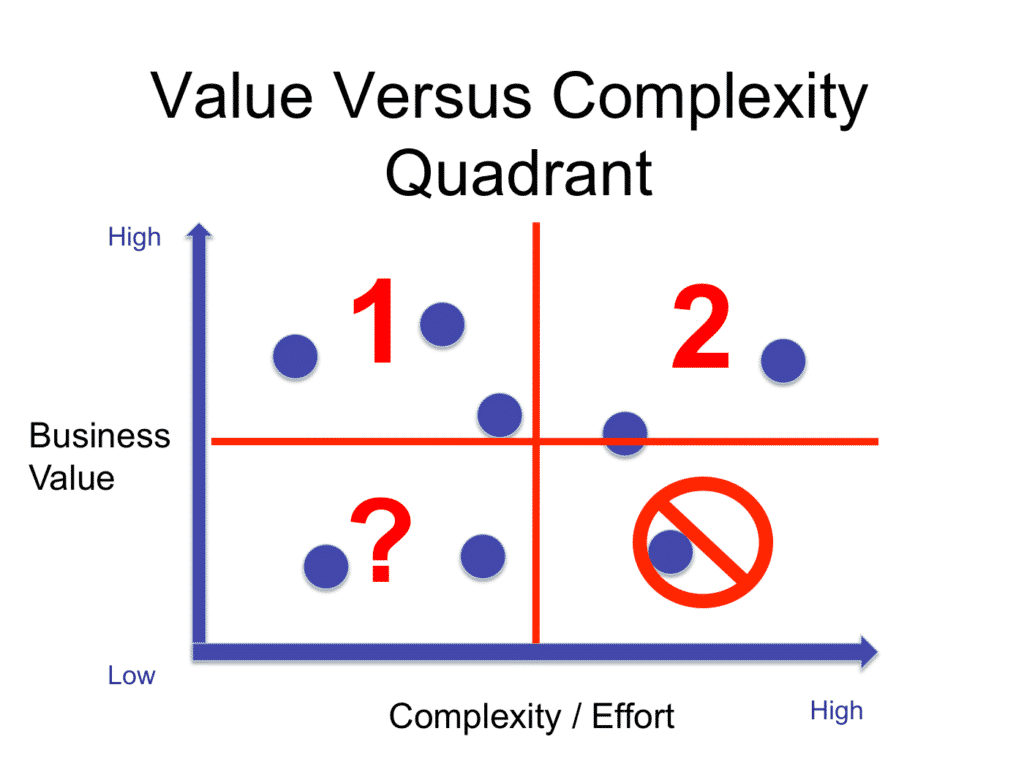
Value vs Complexity Quadrant

Value vs Complexity Quadrant - one of the methods for choosing MVP features. Source

For a more detailed view of an MVP approach and a guide on how to choose the necessary features, see our article. 

3. Pay Attention to Retention

In eLearning getting customers is relatively simple, the hard part is keeping them active. So think about how you will keep the retention metrics up.

For example, you can gamify your product to increase the users’ motivation to learn. Or make it very effective at teaching a useful skill. Or even both. The key idea is to ensure that people come to you over and over.

4. Watch Out for the Differences in Priorities

This risk is rather sneaky, though it becomes obvious when pointed out. Your company and your users might have different and even opposite priorities. For example, you might want a learner to stay on your app for as long as possible, but the learner themselves wants to get the needed information ASAP.

Gaps like this should be identified and addressed early, otherwise, you might find yourself in a position where the mistakes can’t be fixed anymore.

Why EdTech Startups Fail

Education is a niche that has quite a lot of differences from the “mainstream” startup scene. These differences are often the reasons why seemingly good businesses don’t succeed.

inBloom

This startup was poised to create a breakthrough in education. It had everything: ambitious ideas (a centralized platform for curricula, data sharing, and learning apps), USD 100 million in funding from the Gates foundation, political support in several American states.

However, it closed just a year after the launch. So what went wrong?

Personal Data Use

While this is mostly a case of “wrong time, wrong place”, it is worth mentioning to illustrate the existing risk.

inBloom’s launch coincided with a number of scandals related to online privacy: Edward Snowden’s reveal of the NSA spying program, the breach of 40 million customer accounts in Target, and a slew of others. The trust towards the technology initiatives and Bill Gates personally went down, and it became a major obstacle preventing the acceptance of inBloom by the teachers. 

SharpScholar

When this startup announced its closure, it came as a shock: the company enjoyed positive media coverage, was featured on Dragon’s Den (Canadian equivalent of the Shark Tank show), and had about 5,000 university students as users.

Jawwad Siddiqui, one of the founders, listed a few reasons that caused his company’s downfall.

Too many layers of approval

A teacher can’t just pick and choose their own tools - they have to keep in mind the needs and requirements of students, school administration, district school board - all the way up to the government. 

SharpScholar depended on approval from the students and admins, which made life more complicated for the teachers, who were unwilling to use this tool as a result.

“Free lunch” mentality

The abundance of free services (e.g. Facebook and Snapchat) caused people to expect software to be provided to them at no charge. Giants like Microsoft and Google didn’t make things any easier by offering free or discounted educational tools, even though teaching is not the core business for them. So the target users didn’t want to pay for SharpScholar as well.

Tutorspree

An “AirBnB for tutors”, as the company positioned itself, graduated from the prestigious Y Combinator, received about USD 1.8 million in funding, and had over 7000 teachers on its platform, but still shut down.

The tutoring market itself is complicated: after one starts working with the student, there is nothing stopping them from cutting out the middleman at all. But this wasn’t the reason for the startup’s closure, nor was money - the founders have even returned some of the investment they were given. 

Founders gave up

The first reason was opportunity cost.Tutorspree was earning some money, but it was way too little to be worth the efforts the owners had to make to keep the business afloat. So they decided to throw in the towel and focus on something else.

Too reliant on Google traffic

The company was extremely reliant on the visitors that Google search brought them. It proved a major risk, as the changes in the algorithm caused disruption in the Tutorspree’s workflow.

Successful EdTech Startup Examples

Learn from those who have prevailed.

USA

Coursera

Coursera is one of the top MOOC (Massive Open Online Course) platforms.

iSpring Suite

Coursera

It has partnered with over 190 major educational institutions to deliver quality educational content to anywhere in the world, as long as there is access to the Internet. Besides getting knowledge and learning useful skills, through this platform a user can receive a certificate or even a valid diploma.

Coursera has secured over USD 145 million in funding and is steadily growing in popularity.

Skillshare

Skillshare is a platform that focuses on educational videos.

Skillshare

Skillshare

The company now has over 2 million students and has received more than USD 50 million in funding.

Europe

Ticken

Ticken is a gamified touch-typing course that started in the Dutch market but has since added English, German, and French versions.

Ticken

Ticken

To date, more than 100.000 people have completed this course and improved their typing speed. It has won a prestigious Thuiswinkel Starters Award and admiration of both users and critics.

See the relevant case study to learn more.

Amboss

A startup that unites healthcare and education, Amboss is a Berlin-based company that targets medical students. It started as an app that helps users study “smarter, not harder”, but is aiming to become a major knowledge platform used by both doctors in training and on the job.

Amboss

Amboss

The app reduces the average research time needed for doctors to make a clinical decision from 30 minutes to 30 seconds. And the company has received funding from Target Global, Cherry Ventures, Wellington Partners and Holtzbrinck Digital.

UK

Kano

Kano is a London-based startup that teaches kids computer science.

Kano

Kano computer. Source

This company sells both hardware kits and software classes, making it a one-stop place to learn about computers. They have received USD 44.5 million in funding.

Memrise

Memrise is a British language platform that uses spaced repetition to improve learning outcomes.

Memrise

Memrise. Source

It has won a number of awards and has been profitable since 2016. To date it has over 35 million registered users.

Never miss a post! Share it!

Written by
Chief Innovation Officer / Partner
I've been leading a department specializing in custom software development for 20 years.
5.0
16 reviews

Rate this article

Leave a comment
Your email address will not be published.

Recommended posts

Belitsoft Blog for Entrepreneurs
Hire Dedicated Development Team To Cut Costs by more than 40%
How to Hire a Dedicated Development Team
What Is a Dedicated Software Development Team Model? A dedicated development team is a partnership between a client and outsourced developers. This kind of model works like having your own in-house team, but without the extra hassle, like administrative, HR, tax, and social benefits issues. You can focus on important business tasks while your dedicated software development services team takes care of the rest. Areas of Responsibility Your Software Development Vendor: hire skilled talents for the software development project build dedicated team for the project plan software development resources and workflow set up an effective communication between the dedicated software development team and you equip and supply infrastructure for the dedicated team seamless transfer knowledge and roles within the project Your Company: approve the members of a dedicated team monitor the product development provide feedback and reviews to the dedicated development team accept the software development results if they meet your expectations Hire dedicated offshore developers from Belitsoft to reveal your full business capacity. Talk directly to our specialist on building a dedicated development team. The Structure of a Dedicated Development Team A highly performing dedicated software development team comprises specialists with strong professional skills, motivation to achieve the goal, transparent communication, and a clear understanding of their roles and duties. The dedicated development team typically includes the roles agreed for a specific project. In practice, this structure may differ. A dedicated team includes: Front-end engineers. Companies hire dedicated front-end developers if they want to get experts who code and test the elements and functionality of the user interface—the “visible” part of the product. Back-end engineers. When you need experts who are to develop the inner part and the background components, you can hire dedicated backend developers. DevOps. If your processes require the involvement of skilled professionals who specialize in coordination of software development, IT operations, and testing, hire dedicated DevOps engineers. UX/UI designers. Specialists who make the user experience simple, intuitive, and engaging. QA engineers. Software product businesses often use a dedicated testing team model to ensure the optimal quality and bug-free functioning of their main assets. Project managers. The team leaders who mitigate risks, plan, manage, track, and optimize the entire development process. Responsible for delivering project requirements to the dedicated team and reporting to the client. Business analysts. The mediator between the development team and the business. They determine requirements, evaluate processes, make reports, and offer suggestions to CEOs, business owners, and other stakeholders. The dedicated development team size varies based on your specific needs. We can start a project with 1-2 specialists, adding more along with the project evolution. We have also built dedicated development teams of 100+ developers and IT experts in an extended period for our clients. Dedicated Development Team Services Custom web and mobile development Testing and QA UX/UI design Data backup and migration services Product engineering services Big Data analytics Remote hosting services for IT infrastructure Maintenance and support for IT infrastructure When You Should Hire Dedicated Development Team Early-stage startups Assemble the required dedicated software team quickly for an early-stage startup with growth aspirations. Hire dedicated developers to save money and speed up the software development process without resorting to full-time in-house developers. Large projects with changing scope To skip a time-consuming recruiting process and build a professional dedicated team quickly, opt to hiring a dedicated software development team for large growing projects. Optimize the working processes by assigning more important, business-oriented tasks to the in-house staff and forward additional work to the remote team. New product launch Hiring a dedicated software development team is an effective way to create and launch a new product. In case your company lacks technical specialists with the enforced skills. So you have to spend a lot of time recruiting. It results in product launch delays. When you decide to work with an outsourcing software development vendor, it speeds the recruitment of a professional dedicated team. Business scaling While your business enlarges, it demands more dedicated developers. Connect to those companies with access to a large pool of proficient engineers. They can supply rapidly extra resources and adjust them to your existing procedures, while offering a thorough experience for every stage of development. Lack of unique skills When there’s a realm that requires specific expertise you don’t have inside your company, or you need to engage specialists who may be limited in your region. With a dedicated development team model, all talents are available to you worldwide. Urgent need for scaling the development capacity An increased scope or unexpected changes to your current development team may cause difficulties with handling the project. Hiring dedicated development teams is an alternative solution, it saves you time and effort on recruitment and HR processes, while providing a functional line-up immediately. When You Should Not Hire Dedicated Development Team Short and middle-term projects If your project is not large and has well-defined requirements, it may not be urgent to hire a dedicated development team. More likely, you need an in-house team to carry out the outlined tasks. For short-term projects, a fixed-price model is suitable, whereas the Time & Material approach is appropriate for medium-term projects. Projects with a full defined scope Projects with well-defined requirements and a rational plan of execution don't demand a dedicated development team. The choice between a fixed-price or Time & Material model should be based on the size and scope of the project. Short overlap time with the vendor Most outsourcing vendors work in different countries. So you need to choose the one that offers convenient working conditions in terms of availability and response time. Agree with your prospective vendor about the minimal overlap period. Otherwise, the working process won’t be smooth. How Much Does It Cost to Hire a Dedicated Development Team? The pricing model in a dedicated development team is quite simple. Every member has a monthly salary. Just as you pay your in-house workforce, you pay remote workers monthly as well. Plus, the vendor’s fee for administrative, overhead, and infrastructure expenses. The total cost of your project depends on the duration and scope. No extra expenses such as renting an office for a dedicated team, purchasing equipment, paying taxes, electricity bills, taking care of sick leaves, etc. Benefits Of Hiring Dedicated Development Team Hiring a dedicated team with Belitsoft ensures you control the development while we guarantee smooth integration with other teams in your company. Access to global talent Hire dedicated developers at Belitsoft and select skilled experts from a wide talent pool. Do not be limited to the experts within your city. Get a wide range of technology expertise. Make your business agile and your products versatile through outsourcing vendors with talents in mobile apps and web apps, blockchain, IoT, and AI. Time & resources savings on hiring Collaborating with outsourcing vendors, you skip the expensive recruitment process. Bring in talents hand-picked on your requirements for your particular project. The dedicated development team model implies your participation in hiring as well. Your role is to select the best candidates from the shortlist suggested by the vendor. Benefit from a quick and simple software development staff augmentation. Transparent and effective management Effective communication is key to the success of an outsourcing model. With tools such as Skype, Basecamp, JIRA, and GoToMeeting, you keep informed and in control of the project's progress. Regular communication and collaboration between the client and the development team ensure transparency, boost productivity, and create a smooth workflow. Flexibility in time, materials, and scalability With a dedicated development team model, you get the best of all the engagement models. You earn flexibility in time and material along with predictability in cost. Cost-efficiency in comparison with in-house models There are no single statistics, but the average outsourcing rate is much lower compared to the average in-house rate. Sometimes, the difference in the rates is not so large. But such vendors usually offer the top efficiency that could hardly be reached with the in-house workforce. Cut extra expenses and resources on equipment, office and infrastructure. Apart from arrangement activities, release more time and resources for important business processes such as competitor analysis and technology research. Dedicated team scalability Access the flexibility to determine the size of the dedicated team on their project. Throughout the development process, you can increase or decrease the team as required. Quality infrastructure Setting up a full IT department is expensive for startups and mid-sized companies. Hiring a dedicated development team offers a cost-effective solution for creating complex tech products with the best resources without additional investments. A software development vendor is already well-equipped to handle projects of varying sizes or complexities, and deliver optimal results. Continuous integration Ongoing evolution and enhancement are crucial for large project success. A dedicated team model is effective for projects that need growth and evolution. Keeping the dedicated team intact avoids the need to expand or set up a new one. What Are the Challenges When Hiring Dedicated Development Teams? Finding remote developers matching company values Finding a development team that aligns with your company's values and approach to software creation can sometimes pose a challenge. While industry standards and recommended methods are widely known, not all practitioners follow them. Setting up effective communication Commonly, dedicated development teams are composed of remote workers who may be co-in a shared office, but not necessarily at your physical location. As a result, managing remote teams presents typical challenges such as maintaining effective communication and keeping dedicated team members motivated. Fortunately, these difficulties are less pronounced when you hire remote dedicated development team with a higher level of experience. Ensuring high level of security For security considerations, especially during the early stages of working with a specific development team, we advise to keep critical projects and software development processes in-house. Over time, as you build a relationship and gain a deeper understanding of the team's capabilities, you can determine the extent to which you can rely on outsourcing. How to Build a Dedicated Development Team? Define requirements and estimate the scope Although changes during the development process are inevitable, it's important to have a well-defined framework in place. It may include the type of solution you need (such as web or mobile), the problem that this solution should solve, and the timeline. To ensure they meet the requirements, the software development vendor needs to understand clearly the tasks and the specialists required. A business analyst works with the clients to determine their needs, and then define the project requests and scope. There are two potential scenarios in determining the project scope: The client has a predefined scope. Here the budget is discussed with the client, considering the priorities and estimated or given timelines. The client does not understand precisely the exact scope. Then, a discovery stage may be conducted to make hypotheses and test them through prototypes. Based on the test results, they analyze the existing scope to determine if it meets the objectives. If not, they conduct further discovery and research, until they identify the needed scope. Choosing a reliable software development vendor We recommend you to pay attention to 3 important aspects, like experience, portfolio, and level of communication. But there are so many results that you definitely need to narrow down the search. And here are great ways to do this: Searching in Google works the best, B2B portals such as Clutch, References from other clients. Find outsourcing vendors with pricing, descriptions, and real reviews from other clients. It facilitates your choice. Searching and interviewing team members The software provider selects suitable candidates for every needed role and interviews. It gives you the option to take part in the interviewing process, providing a valuable opportunity to clarify expectations for the project goals and each development team member's role and responsibilities. By being involved in the hiring process, you can select dedicated software developers who not only possess the technical expertise, but also align with the company culture and exhibit strong soft skills. The goal of this stage is to build a team of highly skilled and motivated professionals to work on your project. Before you hire a dedicated team Before hiring a dedicated team, it's important to agree on the responsibility distribution. Clearly understand the development process and determine in advance who will be responsible for each task to avoid conflicts during critical moments of the project. At this step, the outsourcing vendor deals with the legal nuances of your cooperation. The set of documents usually includes: Non-Disclosure Agreement (NDA). A dedicated team works with sensitive internal information. That’s why such cooperation normally starts with signing an NDA. The document outlines what material and knowledge should be confidential and what the penalty for its disclosure will be. Master Services Agreement (MSA). It’s a contract specifying most of the terms of the cooperation. Usually, it covers payment terms, protocols for invoicing & payment, dispute resolution, available volume discounts, product warranties, credit limits and credit periods, intellectual property ownership, and liabilities. And the critical thing to mention. To grant all the rights for the developed product to you and your company, it shall clearly state this condition in the MSA.  Statement of work (SOW). This document describes and defines all terms and conditions of your project. It clarifies deliverables, timeline, costs, project conditions, and special requirements. It’s essential to make the SOW clear to every party, which will help avoid misunderstanding and disputes. The development team is given the go-ahead, and the collaboration begins with a call to meet the team, discuss responsibilities, receive access to development tools, align project and business priorities, and establish regular check-ins. Managing the development team To ensure a successful development process with your dedicated team, it's important to stay involved and maintain open communication. Some actions you may take for that include: Holding regular online meetings to review progress and address any issues. Encouraging development team members to ask questions and provide feedback. Staying in touch with the vendor's project manager to ensure everything is on track. Consider holding an offline meeting with the dedicated team to build personal relationships and foster a positive work environment. By actively participating and being available to the team, you can help ensure a successful outcome and build a positive reputation as a supportive client. Why Hire a Dedicated Development Team from Belitsoft? Tangible cost reduction Hiring dedicated developers with Belitsoft allows you to cut your software development costs due to lower rates compared to the US, UK, Israel, and many other countries. You also save on creating IT infrastructure, as well as hiring and onboarding costs. Faster time-to-market Belitsoft’s ability to create a dedicated development team within a shorter timeframe and scale it up promptly afterwards helps reduce your solution’s time-to-market. Team scaling speed and capacity In a matter of weeks, we can assemble a top-notch, multidisciplinary team of 6–8 dedicated software developers and other specialists to work on your project. To get things started quickly, we can even provide you with 1–2 developers right away. For example, in one of our major long-term projects, we have started by providing the enterprise with a dedicated team of 5 specialists, and then gradually expanded the team up to 100+ software developers and QA testers. Multidisciplinary & cross-domain expertise We have created Dedicated Teams for startups, well-established clients, and projects that aimed to merge multiple other standalone projects. Our dedicated development teams comprise skilled professionals in a variety of technologies, including Java developers, .NET developers, including those proficient in SharePoint development, Python developers, PHP developers, C++ developers, and more. As for domains, our team has strong expertise in eLearning, Healthcare, Business Intelligence, Insurance, Logistics, etc. Great flexibility Wherever our clients are located, we make our schedule with at least several hours of time overlap. When you require closer collaboration, our dedicated teams adjust their working hours bound to your schedule. Effective management and regular communication Our dedicated teams are self-sufficient and expertly led by experienced Project Managers with years of managing expertise. By assigning a dedicated project manager to oversee the day-to-day operations and workflows, we ensure that the project is transparent and aligned with your goals. The project manager will keep in regular contact with your in-house project manager or product owner to keep you informed. This allows you to focus on the key aspects of the project while still retaining full technical ownership. Gain access to our company's best practices and the project artifacts and knowledge accumulated during the project. Control the results without spending time on daily management. Quick start To assemble a tailored dedicated development team for you promptly, we refer to the extensive pool of over 400 in-house Developers, Product Managers, and Business Analysts. This vast network and access to top talent from major software development hubs also helps us create dedicated teams that meet your specific needs. Efficient recruitment processes and fast turnaround times allow us to quickly add more skilled developers to your team as on demand. Most times, we can provide an additional 1-2 software developers almost immediately. Years of hands-on expertise Belitsoft has been in software development and IT consulting for 20+ years. We’ve received experience in various business scenarios and environments, including mergers and acquisitions, project recovery, and collaboration with both in-house and third-party development teams, among others. These experts have honed their skills in overcoming challenges and delivering successful outcomes. Reliable support Our dedicated development teams provide support services during and after product implementation. You get technical support and backups for your product. This ensures exceptional customer service in the long run. Total security and compliance All the dedicated teams at Belitsoft have a proven track record of delivering successful projects that meet the needs of our clients. Now that we use our ISO 9001 certified quality management system, we ensure that projects are executed with a focus on meeting our customers' expectations for quality, time, and budget. Additionally, Belitsoft provides assurance that our customers' data is protected and secure. Invest in a dedicated development team with us for a smart and profitable solution and get top-notch results at a fair price. Let’s talk. 5 Factors That Make Dedicated Development Team Work Define requirements and goals Before assembling a dedicated development team or outsourcing to a third-party provider, it's crucial to take the time to assess your business needs. From there, establish well-defined goals based on these requirements, including the project's scope, desired outcomes, and potential benefits. Do your own research Before hiring a dedicated development team, it's crucial to conduct a thorough background check. This includes reviewing references, experiences, portfolios, and client testimonials. Assess the team's expertise in handling projects similar to yours, including the number of projects they have completed, the types of clients they have worked with, and the technology they use. With this information you have a better understanding of the development team's ability to meet your expectations. When it comes to long-term projects, consider conducting interviews and skill assessments for each dedicated team member to ensure they are the right fit for the job. Maintain transparent communication Effective communication is crucial for the success of your project and outsourcing relationships. Before deciding, consider the cultural differences, common language, and time zone differences. For example, if you are based in the US and looking to hire a dedicated development team based in India, these factors can greatly affect the outcome of the project. Misalignment in these areas can lead to difficulties in feedback and communication, thus hindering the progress of the project. Build trust To ensure the success of remote projects, establishing trust is essential. Building trust is a gradual process and requires continuous effort from both parties. One way to foster trust is by offering flexible work arrangements, clearly communicating project expectations, being transparent in payment processes, and avoiding changes in project requirements without proper compensation. By making credit a priority, you can ensure a strong and productive relationship with your dedicated development team. Start small To get initiated with hiring a dedicated development team, set up with a small project. This allows you to assess the viability of this model for your needs and determine if you can form a long-lasting relationship with the dedicated team. Starting small reduces risks and helps manage costs effectively, which is beneficial for startups, as well as small and mid-sized businesses. Dedicated Development Team VS Fixed Price Model A fixed-price model is a cooperation based on a fixed budget for the project, regardless of the time and resources needed to complete the project. It means that you and the software vendor agree on the price, deadline, project scope, technologies, and detailed product requirements in advance. However, the vendor needs more time to prepare the detailed specifications. The key favor of a fixed-price is skipping budget-related surprises. The major disadvantage—you cannot make changes in the workflow. Actually, you can work it out, but be ready for extra pay and moving the deadline. The fixed price will work for: MVP development Short-term projects Projects with clear deadlines Projects with determined specifications Dedicated Team VS Time & Material Model The time & material model means that the client pays only for time and resources spent on the project. The leading improvement of the time & material model is the freedom in changing project requirements and scope of work alongside the development. While the key obstacle is the difficulty in planning and controlling the budget because of such changes. This engagement model is suitable for: Projects where requirements can change The market is not thoroughly explored Product market fit is yet to be determined Belitsoft's Engagement Models to Choose From Belitsoft offers several engagement models that ensure an efficient solution to your software development needs, whether it's to expand your in-house team, acquire specialized technical knowledge, or speed up the development process. The Dedicated Team model provides access to Belitsoft's top-notch software development professionals on a long-term basis. The Team Extension model ensures you receive a highly skilled software development team that aligns with the required expertise and cultural fit for your project. The Project-based model offers a dependable collaboration between you and Belitsoft specialists who are focused on delivering specific project objectives. Ready to work with a dedicated team? No need to spend your valuable time searching for a reliable and experienced partner. At Belitsoft we offer top technical talents and 10+ years of expertise. With us, you will reduce costs of software development by over 40%. Need assistance?
How to Build an EHR system or Custom EHR
Belitsoft is a technology partner that has in-depth experience in the healthcare industry and understands the unique challenges of developing EHR systems, a trusted advisor that can help you achieve your strategic goals, and an EHR development company that is able to provide excellent customer support for the long-term. Hire EHR developers to customize HIPAA-compliant EHR for your healthtech business. Get A Proposal For EHR Customization Reasons Behind the Custom EHR Development The growing demand for security, scaling, and sharing data is causing trouble for those who use legacy EHR Systems. If patient information is spread across incompatible systems, it's difficult to get a complete picture and use real-time updates. Because users have to manually enter data, transferring information between systems leads to errors. Sharing patient data raises concerns about protecting patient privacy and complying with legal requirements. Such EHRs may have weak security, increasing the risk of data breaches or unauthorized access. Many legacy EHR systems have unintuitive interfaces, making them annoying to use. Organizations that have custom EHR system want modify and expand them on a variety of reasons. They may want get positive net financial return, decrease expenses by participating in state programs (Promoting Interoperability Program, MIPS and the Quality Payment Program) or satisfy the legal requirements ( HIPAA certification, ONC certification) and so on. “[...] A long-term approach that seeks to achieve small, incremental changes in processes [...] enables organizations to fine-tune their EHRs in response to changing healthcare regulations, new technologies, evolving patient needs and a growing aging population. Without change management, however, the EHR operates in a silo and doesn’t align with the way clinicians practice medicine or with new industry demands, which creates dissatisfaction and underutilized technology.”. KPMG How we estimate custom EHR development The cost of EHR development depends on the number of features you need right away - the more of them and the more unique they are (SCOPE), the sooner you need to implement them (TIME) - the more expensive the development is likely to become (COST) (the so-called Quality triangle). The most expensive part of creating a new EHR is backend and integrations, not user interfaces. Healthtech companies express interest in our custom EHR development services for the following reasons: proven experience in working with healthcare domain; competitive pricing; good reviews and references available online. They want to know how much it would cost to customize their EHR systems and see examples of EHR systems we have developed in the past. In many cases, each customer has their own very specific requirements. We asks our customers to help us clearly identify their needs and requirements to inform our EHR design and development team before the estimation process begins. After the NDA is submitted, our EHR Business Analyst talks to customers on a video call and asks detailed questions on features of their EHR system to estimate the development costs for each function. After all the questions have been answered, the information is passed to our Senior EHR Developers. They prepared the “Use-Case Based Requirements Specification” with interactive Figma prototypes. Based on mentioned documents our proposal includes detailed descriptions of all the features and detailed estimation. We suggest to split the EHR project development into three main phases in accordance with the hierarchy of goals: Proof of Concept (POC). At this stage, we suggest to customize the basic elements of the EHR system. Within this phase, our clients in a cost-effective and timely manner can evaluate our performance and see the first results. Minimum Viable Product (MVP). At this stage, we suggest to create the scope of work and prototypes for the things that have not been specified in detail earlier but are required. 'Phase 3'. At this stage, we suggest to create other functionality that was not mandatory for the MVP. The final estimation based on the hierarchy of goals is presented via a video call. Customers invite their own technical specialist to evaluate our EHR team’s skills in the real time. Often, after that, the budget is approved and the contract is signed. How we manage custom EHR development The Agile software development process is often chosen because our clients want to build a large and complex software product while being highly involved in the project development and customization. At its core, Agile is a software development methodology that make it possible to quickly change the EHR software in accordance with business changes. Effective communication is always 50-60% of a successful custom application development, that is why we establish a proper communication plan. The communication is mostly remote. The client can visit the Belitsoft office before the development process begin, if necessary. The EHR software development process is often divided into sprints - periods of time during which a portion of programming work has to be completed and be ready for the client’s review. We prepare e-mail reports for clients every 1-2 weeks to enable them to make any changes or refinements promptly. The Business Analysts (BA) acts as a primary contact person for a client, having regular Teams/Skype meetings, systematizing all the requirements correctly and showing demos (sprint releases). The BA is also responsible for the conformity of the final product to the documented requirements. Communication by email is used when our clients need time to make important strategic decisions. EHR System Testing Plan The high quality of a custom healthcare software can be guaranteed only when a proper testing process is established. Our experienced EHR project manager Dmitry Garbar applied best practices to boost the productivity of the EHR software development and testing team on the EHR project. The system then can be successfully implemented into clinics. Example of EHR interface development EHR System Architecture API-enabled EHR Modern EHR system is a medical database software with user-friendly interface and forms for gathering, accessing, managing and transferring clinical records (also called “health records”, “medical records”, or “patient records”). According to the U.S. Department of Health and Human Services, the core function of an EHR is integration and access to the storage using interoperability standards (such as HL7 FHIR). In fact, we talk about so-called "API-enabled EHR database". All eligible professionals and hospitals in the USA are obligated to use CEHRT - 2015 edition certified electronic health record technology - to meet the requirements of the Promoting Interoperability Program (Meaningful Use). The ability of an interoperable EHR platform to seamlessly integrate with other medical systems and devices along with business intelligence reports generation and clinical decision support can enable medical business excellence. The project development team uses the interoperability approach to architecture design. The application is often splitted into several modules (services) and these modules communicate with each other and third-party modules via REST API. This type of architecture provides great possibilities of scaling, fault isolation and maintenance. The HIPAA compliant server architecture is proposed by Belitsoft to clients to make sure that the medical application meets the HIPAA's technical requirements. The architecture of the system often contains the following parts: 1) Backend: Database Layer (for example, MySQL) and API layer (API for the web admin panel and API for the frontend apps); 2) Frontend: tablet-friendly mobile and web application. Tablets are very convenient tools that are widely used in leading hospitals and healthcare systems. 3) Frontend: web admin panel based on React.js or other frameworks of choice for form templates and User Management. To prevent the loss of patients’ information, we develop a synchronization module. If a doctor’s tablet goes offline while they’re entering clinical data, this module will save the notes and upload them to the cloud when the Internet connection is restored. However, the arhcitecture of the EHR solution may be significantly more complex that this one like here when cloud technologies are involved. Core EHR Modules We Often Deal With Medical Scheduling Module A medical scheduling module for EHR system is often integrated with billing and practice management modules. Below see a use case of a receptionist checking a patient in. Today is February 5. A patient named Shawn Robertson asked to schedule a visit from 5 to 12 of February at any time and with any physician. Theresa Russell, a receptionist, sees that there are several options available during that period. She offers Shawn Robertson to visit Dr. Simon McKinney on February 7 at 8.30 AM. After getting the patient's consent, the receptionist clicks the chosen time slot. A pop-up window appears and offers Theresa to confirm the chosen time slot, the relevant patient data is automatically pulled from the system's database. After clicking the "Schedule an Appointment" button the patient is signed up. After getting authorized Dr. Simon McKinney moves to the “Encounter” tab and sees the patients that have a visit scheduled during the chosen timeframe (e.g. today, this week, this month). Today, on the 7th of February, there are 9 patients scheduled. The doctor sees the names of the first two and can look up the brief information on all the patients by clicking the “7 more encounters” link. After clicking the “7 more encounters” link Dr. Simon McKinney can see the brief information (including the chief complaint, if mentioned) about each patient to be seen today. EHR Charting Module Medical charting is the systematic documentation of interactions with patients concerning a patient's care, condition, and treatment. It is also a legal document: medical providers are required to keep detailed charting documentation, which could affect claims reimbursement in the case of an audit. With custom charting module the provider can spend less time typing, and focus on the patients and their health. Dr. Simon McKinney clicks the patient’s name and moves to the “Patient Chart” section - a medical dashboard that pulls generalized historical data about the patient from other sections of the system: demographics, vitals, allergies, latest documents (e.g. lab results, a user can add new documents straight from the dashboard without opening additional windows), prescriptions, immunizations, medications. The “vitals” section shows the vital signs’ history and deviations from the norm if any. The information can be filtered by specific timeframes. At the beginning of the encounter, after pressing the “create new encounter” button, a pop-up window appears that automatically pulls patient information necessary to begin the encounter. Dr. Simon McKinney can enter the chief complaint if it wasn’t entered earlier. They can also add the patient’s general information, if necessary. After pressing the “Start new encounter” button Dr. Simon McKinney goes to the empty form of the current encounter (this slide shows the finished visit with the conducted examinations). To begin the diagnostic process, the doctor presses the “Examinations” button. To begin the billing process, the doctor (or the receptionist) presses the “Administration” button. After pressing the “Examinations” button a pop-up window containing the available examinations appears. A user can select the necessary examination by pressing the appropriate tab at the top of the page. At this stage, the doctor fills in the vitals and can either save and close the examinations panel or save and continue with the examinations. The doctor presses the “Administration” button causing a pop-up window to appear. This window shows the available options to begin the billing procedure. The “Fee sheet” section allows the doctor to choose the price level and patient type. Then the doctor chooses the codes of the conducted procedures according to CPT4, as well as the ICD-10 diagnosis (the doctor can enter a keyword or part of the code into the search window to quickly choose the necessary code from the list). The chosen codes are displayed below, possibly with the prices and modifiers. The diagnosis should be supported by a procedure in the “Justify” field. After the billing form creation is complete the doctor presses the “Save and close” button and finishes the encounter. Medical History. This element logs the patient’s conditions throughout their life. It can include the growth chart, medication and immunization history, allergies, family and social data, habits (e.g. smoking and alcohol use), surgeries, obstetric information and more. Having it on hand allows doctors to gain insights as to the causes of the patient’s current condition. Medical Encounters. When someone visits a physician, this is where the doctor puts the gathered information on the patient’s current condition. Encounter data includes the chief complaint, history of present illness, physical examination results, vital signs, assessment, and treatment plan.  Orders and Prescriptions. This feature creates and stores the medication orders and prescriptions. These can be printed or sent electronically to the pharmacy straight from the point of care. Capabilities: submit e-prescriptions from your patient’s chart, automatic drug-drug and drug-allergy interaction checks, send prescriptions electronically to your patient’s local pharmacy, complete prescription refill requests electronically, view prescription costs at various pharmacies and medication alternatives, medical decision support, e-prescribing of controlled substances. Progress Notes. Regular, chronological updates on the patient’s condition. These are used mostly for hospitalized patients and can be entered by all clinical professionals participating in the care: doctors, nurses, pharmacists, dentists, etc. Test Results. Blood tests, biopsies, X-rays and other similar examinations are stored and managed by this module. Images (e.g. MRIs) can be either stored as-is using formats like DICOM or handled elsewhere, in which case the chart will likely contain the reports as text.  Information exchange. To increase their efficiency, the charts should exchange data with other modules in your EHR/EMR. Demographic information and vital signs (heart rate, blood pressure, temperature, etc.) should automatically be taken from other modules and entered in the forms so that the clinicians don’t have to do it several times. And integration with the billing module can help with assigning codes and decrease the number of errors. PHI Copying. According to HIPAA, patients can ask for and receive a copy of their personal health information (with certain caveats). This means that the charts should be either printable or convertible to a popular electronic format, e.g. PDF.  Guidelines. Including information like normative lab values, weight parameters, dosage guidelines, screening recommendations, etc. gives the physicians a benchmark to quickly measure patient stats against. A reference point like this helps doctors provide better care.  These values can also be accessible to the patients via the portal, thus improving their knowledge about their own health. Customizable/Specialty-specific Charting Templates. A dentist and a psychiatrist can include different things in the patient charts. So it would be preferable if the system adapted to accommodate their needs. This could be either done by making the charts highly customizable or including specialty-specific templates in the charting module. Speech-to-text. Dictating notes instead of typing them allows doctors to spend more time with the patient instead of the computer. The physician’s spoken words can either be transferred straight to the EHR/EMR and reviewed by the same physician later, or they can be sent to a medical scribe for a preliminary check first. EHR Telemedicine Module E-visits and medical consultations. The main idea of telehealth is to connect patients and physicians around the world quickly and securely through live video. This enables two-way, face-to-face interactions on a computer or mobile device with high-quality video and audio.  Secured communication can be held by a wired or wireless Internet connection.  The solution also allow screen sharing and multiway video so 3rd parties (such as caregivers or translators) can participate in a virtual consultation. All the additional attendees are added by the doctor. Consultation Notes. The feature allows doctors to create notes during the sessions with patients in order not to lose goals, medications prescribed, invoices, follow up appointments, or care plans they may have discussed. Patient-initiated. Patients can book follow-up appointments to their clinic visits or online consultations and consult with you via video sessions. This will definitely save the providers’ time compared with written communication.  Moreover, the patients can clearly see the type of appointment while checking their schedule so that they can plan their visits or video calls. EHR Voice Recognition Doctors and nurses were spending too much time on EHR-related tasks. This meant they either had less time for patients or more overtime work. Implementing speech recognition could be a solution to the problem - by talking to the machine the medical professionals could enter information quicker and even do it while examining the patient. The speech recognition system integrated with our client’s EHR was built as an on-premise solution due to security concerns. Its most notable features included: Voice input of text and numbers; Voice commands for navigation inside the system; Automatic expansion of medical acronyms and abbreviations; An option of adding more dictionaries for medical specializations; An option to adapt to the voice of a specific medical professional. The first release included three core dictionaries: general medicine, pathology, CT/MRT. Each contained the data the system needs to recognize and process the words relevant to the appropriate niche. The “general medicine” dictionary was useful for all fields within medicine, while “pathology” and “CT/MRT” had relatively few words and were cost-effective to implement. The system also included the option to expand the dictionary list, as mentioned above. As one of the customer’s requirements we have also created an open API for the system to make it easy to integrate with other medical solutions. We have also been tasked with finding the most suitable headset for doctors and nurses. It had to be convenient enough to be worn 8 hours a day and provide high signal quality. The resulted system has successfully solved the customer’s problems. Time spent on clerical tasks has decreased by 23%. The results were even better with older doctors, who were experts in medicine, but not experts in computers. Moreover, the focus group has reported higher satisfaction with their work environment. Patient Portal Features Medical patient portal is an extension of EHR. Data from it is published by a healthcare organization to the application with 24/7 online access. Accessing personal health information. Having entered a unique username and password, patients can browse (and print if necessary) health information including recent doctor visits; case reports; medication lists; immunizations; allergies; lab & test results. Updating contact and demographic information. Get patients to complete their registration and update their information online. Health professionals, for their part, have to check the accuracy and quality of registering data before it is accepted into their EHR. Scheduling appointments online. Patients can get the appointment booked via the portal without going through the hospital telephone system and auto attendants. They receive an alert as the doctor confirms or reschedules the appointment. They later modified the feature, making patients able to request a viable appointment. Thus, they can browse the hours for each location, every doctor who works there and their timetable, as well as check-up types they accept. Patient portals can help practitioners with cutting down on phone calls and decreasing non-appearance. Messaging with a healthcare team. When a patient portal is integrated with an EHR system, secure encrypted messaging is the simplest and most efficient way to exchange information and test results both for patients and medical professionals. Receiving notifications. If a patient books an appointment with a health professional, the system can reply with an e-mail, a text message (SMS) or a push notification to a mobile device. Plus, users can be reminded to take prescription medication or check a glucose level if the patient has diabetes. Integration with third-party apps and systems. More and more people use monitoring devices. Whether it be a fitness tracker, a medication reminder or a glucose monitor, these systems store patient vitals and can be useful for diagnosis and treatment. To reduce the amount of data entry required, patients can upload information directly from medical devices, fitness trackers or smartphones. Payments. Patient portals enhance customer experience in many ways, especially when providing the ability to make payments. This option makes it easier for patients to understand and handle their financial responsibility. So, what payment features should be supported? Insurance information: Login to the portal and view/update insurance data. Billing query: Submit billing-related questions via the patient portal. e-Payment: Make online payments via multiple modes. History storage: View records of medical payment amounts and dates in one place. Saved payment method: Securely hold a credit card or bank information for repeat payments. Downloading and completing registration forms. Whether patients complete registration forms online or when they are in the office, it usually takes 10 to 15 minutes to do all the paperwork. For those who complete pre-visit forms online, the system has to notify them of how long it takes to register. Accessing educational materials and communities. Just as patients want to see their health history, they also want to figure out these records. However, diagnoses and treatment plans are usually difficult for users to understand. With a portal, they are able to access supplemental information online. For users with lower health literacy, some health IT providers integrate natural language processing to translate certain clinical terms, thus making patient portal records more accessible. The most effective way to improve customer health literacy lies in offering patient education where applicable. More and more health IT vendors have signed licensing agreements with educational platforms, allowing them to integrate patient education materials into their systems. Patients often seek out people with similar health states for advice and support. Thus, for example, our client asked us to create a website for a community of people challenged with different diseases. Having logged in, they can access blog posts, chat with other community members and express their emotions with special icons. Medical Billing Module EHR needs to have a robust module to handle payments and reimbursements. Capabilities: generate invoices for the consultation and procedures, tracking payment status, automated billing codes transcription, composing and submitting claims to the insurance agencies, track the status of the claims (received, accepted for processing, denied or rejected), alerting on rejected claims with clarification, E/M Calculator, insurance card scanning, copayment calculator, automated eligibility verification. Claim Submission. This feature allows the practice to create superbills and electronically submit claims to a clearinghouse or directly to the insurance company. It must also be able to generate bills and patient statements for the patients who need to pay for the visit.  The claims are usually submitted in groups to save staff time. However, if even one of the claims is found to be non-compliant with HIPAA, the whole batch will be sent back for corrections, which cost time and, therefore, money. That is why EHR providers integrate “claim scrubbing” - automatic checking for errors before the claim is submitted.  It is estimated that 90% of claim denials are preventable by using better procedures, making a well-designed submission module a valuable tool for improving a practice’s bottom line. Copayment/Coinsurance/Deductible Processing. Your EHR should notify the reception staff if a patient needs to pay for the visit out of their pocket. This would help your practice increase the collection rate. Given the abysmal overall payment rates among patients (e.g. the average payment rate for people with high-deductible plans receiving outpatient care is only 18.2%), any improvement in this area is bound to be meaningful. Billing Reports. You can’t manage what you can’t measure, which is why EHR needs flexible billing reports. They will demonstrate the rates of reimbursement and patient collections, recent and historical trends, and more.  Many off-the-shelf EHRs have the option to create custom reports or tailor the existing ones to better fit the needs of the practice. In turnkey systems, the nature and flexibility of the reports are discussed in advance and then created according to the customer’s requirements. Claim Rejection Analysis. This module processes the rejected claims and highlights the errors that need to be corrected. The reasons could include incomplete or incorrect information, non-covered services, missing codes, etc. When the mistakes are fixed, the claims can be resubmitted.  Automated Coding. ICD-10 has almost 70.000 diagnosis codes. Together with a multitude of CPT codes, this creates a problem for the billing staff, as coding mistakes can lead to claim rejections or denials. An automated system will help the clinicians with assigning the correct values to the diagnosis and treatment, and will also transfer these values to the claim form, reducing human involvement and risk of error. A specialty-specific EHR, e.g. for Orthopedics or Behavioral Health, might have a module that suggests the codes most relevant for that specialty. This makes the work of clinicians and coders easier and once again decreases errors.  Automated Eligibility Verification. The EHR can be integrated with the insurance companies’ databases. As a result, the administrative staff can see the patient’s insurance details (if the patient is covered), and the clinic can avoid rejections.  Moreover, this data can also be transferred directly to the claim form to save time and decrease risk. Payment Tracking. This module helps manage financial resources by following each bill through every stage of its processing, from submission to payment. With this information, the administrative staff can estimate the reimbursement timeline Integrated Clearinghouse. A clearinghouse is a system that processes the documents sent from medical practice to the insurance company and vice versa (claims, 835 forms, etc.). Its purpose is to convert the data to the format that the receiving company’s software would accept.  It is often a third-party solution. However, there are EHRs that have a built-in clearinghouse, thus eliminating the need for intermediaries and saving the practice money on using external services. Messaging. An inbuilt messaging system will allow quick and secure communication between clinicians and administrative staff, which would be useful in claims preparation and rejection analysis. The same feature could be reused in a patient portal or for coordinated patient care if your EHR is connected to those of your partners - labs, specialized medical centers, etc. Referral Management. In certain cases, if the incoming patient doesn’t have a referral the insurance might not pay for their treatment. Having an integrated referral management system will help your billing team and reception employees be aware of the situation. Moreover, it will automatically inform the referring practice about the visit, closing the loop and freeing your employees from the need to follow-up via phone or fax. Accounts Receivable Management. If a claim has been denied it doesn’t mean that your practice will never see that money. More than three-quarters of them are eventually paid. But your employees need to work to make it happen. That’s where an A/R management system will come in handy. It tracks the outstanding payments, helps correct the forms and resubmits the claims. Lab Integration Module Capabilities: submit patient lab orders directly from chart; receive patient test results; share results with patients via the patient portal; automated reporting and analysis of the results (notification if normal parameters are overcome); submit electronic data on reportable lab results to public health agencies; checking lab results for possible impact of prescribed medication. Appointment Management for Patients and Staff Capabilities: scheduling an appointment via Patient Portal, website or manually by practice's personnel; automated check-in for physicians availability and preventing double bookings; appointment reminders via phone call, SMS, email and other means; patient recall system; appointment calendar with color coding; forming of wait lists of patients; automated notifications for cancelled appointments; calendars synchronization (iCal, Google or Outlook); composing schedules for clinicians (setting available dates & times, time-breaks, and locations); appointment management for receptionists (comparing physicians’ strains, view physicians’ appointments per day, week or month, schedule a recall visit); flowboard (filter by date, visit category, visit status, facility, physician). Send us your request for information to learn more. We can customize EHRs and improve UI/UX Design; develop additional functionality; help you deploy it to the cloud; set up backups; transfer data from your old EHR; provide you with dedicated technical support; consult you during your EHR implementation.
Difference between SCORM, xAPI, LTI and cmi5 eLearning Standards
SCORM vs xAPI vs cmi5 vs LTI: Difference & Use Cases
How Belitsoft Can Help We have been working in the eLearning domain since the early 2000s. Here’s how we can use our experience to assist you: Content Development. We can create new eLearning content and package it with the format of your choosing. Custom eLearning software development. If you want to break into the eLearning market with a great new product, we can provide the technical know-how and capable professionals to help you. LXP Consulting & Development. We can share our knowledge of learning experience platforms to guide you along your path to success. LET'S CREATE YOUR SUCCESSFUL CASE TOGETHER! What Are eLearning Standards? Elearning standards are common guidelines for content, authoring tools, and learning software (LMS, LXP, eLearning applications) that specify how learning content should be created and delivered over various platforms or how those platforms should interoperate. The need for unified eLearning standards appeared as a reaction to the emergence of dozens of Learning Management Systems on the market. If they only accepted content tailored to their exact specification and couldn´t interact with other software, this would lead to vendor lock-in (dependence) with the corresponding risks and expenses. Why Do You Need to Apply eLearning Standards? Compatibility. Suppose you have a course that is hosted on a specific LMS. Eventually, you grow dissatisfied with that system and decide to migrate to another. As your course is SCORM-compliant, it can be transferred to the new LMS in a few clicks. It ensures that the investment in learning resources will pay off as you can move your intellectual capital from one system to the next. Tracking capabilities. Thanks to eLearning standards, especially xAPI, you can monitor completion rates and speed, and even user activity in learning games and on third-party websites. Which eLearning Standard Should You Use? SCENARIO 1: To gather structured data and effectively track the learning stats from your LMS or LXP, choose an xAPI standard. It can work in conjunction with either cmi5 profile (which is a common practice) or another one of your choice. SCENARIO 2: To make your learning content compatible with almost every LMS, LXP, or another learning app on the market, use a SCORM standard. In this case, even if you decide to move to another LMS, your content will be compatible with a new system. SCENARIO 3: To plug in new tools and software into your LMS, LXP, or an eLearning app (virtual classroom, live chat, etc), choose an LTI standard as a Consumer. It will act as a connecting tool between your software and external tools and systems. Or select an LTI standard as a Tool Provider to plug yourself into 3rd-party commercial platforms. As you see, each eLearning standard has its own purposes. They don’t exclude one another and can be applied together. Now, let’s dig deeper to examine what exactly each eLearning standard benefits your LMS and what pros and cons it has. SCORM What is SCORM? SCORM stands for Sharable Content Object Reference Model. The goal of SCORM development was to standardize learning content formats. This eLearning standard was developed as a solution to the pain point of spending too much time and money on content customization and delivering learning materials across multiple platforms. Among several SCORM versions, there are two that are still relevant and popular to use: SCORM 1.2 and SCORM 2004. Both versions are massively supported by authoring tools and LMSs. However, they have some differences, and it might be useful for you to know them: Supported statuses. SCORM 1.2 supports simple lesson statuses “browsed”, “not attempted”, “passed”, “failed”, “incomplete”, and “completed”). SCORM 2004 has two-level statuses: a ‘completion_status’ (completed/incomplete) and ‘success_status’ (passed/failed). Reading and writing function. With SCORM 1.2, you have only write interaction, while with SCORM 2004, you can specify the “read” or “write” interaction. For example, a learner answers a question at the beginning (write interaction), so they don’t get one more chance to reply it again (read interaction). Sequencing. Compared to SCORM 1.2, SCORM 2004 has improved author’s control over content through sequencing. It provides certain rules defining the order in which learners can access learning content. For example, you can allow learners to save their results and resume learning later. What can you do with SCORM? SCORM is a set of technical standards for packaging learning courses into special files that can be read by any SCORM-compliant application. When you create a learning course and want it to work with a new LMS, you pack it into a SCORM package.  SCORM package is a .zip archive, which contains files in a specific hierarchy.  As a result, you get a cross-platform e-Learning course. Plenty of authoring tools have a SCORM conversion feature. Advantages of SCORM ✅ Simple content creation. SCORM enables content creation, publication, and playback across multiple platforms even for those users who have no coding skills and at a low cost. ✅ Unified standard of files. SCORM converts out-of-date content into a standard ZIP format.  ✅ Massive support by authoring tools and LMSs. SCORM compliance is a must for major tools and systems today, so migrating your learning materials between platforms becomes a no-brainer. ✅ Easy content blending from various sources. SCORM allows mixing content developed by diverse authoring tools or exported from different LMSs. ✅ Tracking and sequencing support. SCORM allows tracking course completion with the time spent. Moreover, it allows you to set rules for how much time learners can spend on a course, or how long learners should remain on a page before they are allowed to go further. Disadvantages of SCORM ❌ Limited tracking and reporting capabilities. SCORM lacks in-depth analysis of user activity, allowing only limited metrics for tracking (assessment scores, time spent on course, ) and fairly limited reporting on these tracking metrics, meanwhile it still forces that at least basic tracking will be there, while it may not with non-SCORM content. xAPI (Tin Can API) What is xAPI? Experience API (xAPI or Tin Can API) is a new specification for communicating data about learning activities among different systems (not only LMSs).  Most think of xAPI as a SCORM replacement. In reality, their roles and purposes differ. While SCORM serves for content creation and delivery, xAPI is developed to store learning data and transfer it among different learning systems. What can you do with xAPI? People interact with learning content and other learners everywhere - both offline and online.  All their actions and activities are recorded and then stored with the help of xAPI. For that, an application or LMS sends secure statements to a Learning Record Store (LRS), which is a part of an xAPI concept that can exist on its own or be a part of an LMS. An LRS stores all the statements and shares them with other Learning Record Stores. For example, an LRS of your affiliate can share data with your headquarter’s LRS. Learner experiences, accordingly, can be transferred from one LRS (or organization) to another. Advantages of xAPI ✅ Tracking outside an LMS. When we use xAPI and LRS, it doesn’t restrict tracking learning activities. The advantageous peculiarity of an LRS is that it can be anywhere else on the internet, not necessarily in the same domain as the content, and still capture learning statistics. It communicates data from different systems, allowing tracking a bigger number of e-Learning scenarios. ✅ Support of multiple devices. Tracking starts every time a learner begins learning, no matter which device. xAPI statements can be sent by mobile phones, electronic games, medical devices, hardware simulations, etc. ✅ Recording the majority of learning activities. The structure of xAPI statements supports nouns, verbs, and objects. Such a variety allows the recording of almost any learning activity. ✅ Secure storage of personal data. Learners can store their personal learning information inside specific “personal data lockers” that can be transferred between organizations if needed. Disadvantages of xAPI ❌ Elaborate metrics setup. As xAPI measures data across multiple learning activities, it requires time to set up the right performance analytics to benefit from the results. ❌ Measuring impact. Some reporting includes basic data that a learner did something. This doesn’t allow making qualitative or quantitative conclusions about the activity impact overall. Cmi5 What is cmi5? While xAPI is very powerful and robust, it is also not very specific and restrictive, which makes it very broad and applicable to a large number of eLearning environments with possibility of their own implementations. This is why a more unified and precise specification for xAPI was developed - cmi5 (computer-managed instruction, 5th attempt). Cmi5 is an xAPI profile that defines how an LMS will communicate with xAPI-powered learning activities, like playing a course in an LMS. What can you do with cmi5? With CMI5 you can implement xAPI and be sure that you can broadly incorporate other systems with no additional efforts. Which will help you benefit in terms of broader market possibilities. “Since the xAPI specification is highly generalized to support many different use cases, a set of “extra rules” (called a “profile”) is needed to ensure interoperability for a given use case. The cmi5 profile ensures plug-and-play interoperability between learning content and LMS systems. The use case that the cmi5 profile is specifically designed for is one where the learner launches the learning content/activity from the LMS user interface,” as the authors of the standard put it. Cmi5 provides a file with XML metadata that describes a Course Structure as a series of container blocks and Assignable Units (AUs, which are the launchable content of the package). This file is provided to a cmi5-compatible system (usually, an LMS) for import.  Advantages of cmi5 Well, you have all the advantages of xAPI as cmi5 profile is a specific implementation of xAPI. However, the specific benefit of cmi5 use for xAPI is: ✅ High precision of statements. Cmi5 features precise categories for the statements, usually captured by the Assignable Units. There’s a “cmi5 defined” statement that is specifically designed for capturing session details and core eLearning principles such as pass/fail, content completion, duration, and score. You can group these by the assignable units. Disadvantages of cmi5 ❌ Strict limitations. Compared to the general-purpose xAPI, cmi5 creates restrictions to sift massive amounts of data. AICC What is AICC? AICC stands for Aviation Industry Computer-based Training Committee. The organization created the AICC format to standardize the materials and technology for training airline workers. AICC file format kept evolving until the organization switched to xAPI. However, some of their xAPI-based work lives on as CMI-5. What can you do with AICC? Actually, you can’t do much with it, as most of the industry, and if you are reading this then probably everyone you would be engaging with, has already switched to xAPI+cmi5.  Advantages of AICC ✅ Deployment flexibility. AICC is able to host content on a separate server from your LMS server. ✅ Security. AICC supports highly secure HTTPS data transfers between learning content and an LMS.  Disadvantages of AICC ❌ [Killer] Not supported or updated anymore. It is mostly used in legacy applications, almost no new AICC content is being made. Before dissolving, the organization worked on making its content compliant with a new set of guidelines called Computer Managed Instruction (CMI5); ❌ Limited functionality. It lacks progress tracking capabilities and has limited functionality compared to its more modern counterparts. ❌ Limited compliance. There are still many AICC-compliant systems. However, they frequently lack the necessary features, which means that you need to spend time and money on manual coding to add them. LTI What is LTI? Learning Tools Interoperability (LTI) is a specification that allows you to plug-and-play external learning content, software, tools, etc into your LMS or LXP or your tool/LMS/LXP into an external platform. With LTI, a learner enters an LMS and selects a resource link to play a learning course. Then, this external resource is seamlessly launched into a remote tool in an iframe (an HTML element that loads another HTML page within the document) or a new browser. What can you do with LTI? The LTI tool provider sends to the LMS administrator access data, such as a URL and key. The LMS admin uploads this data into the LMS.  After that, LMS learners can use a new tool through their LMS interfaces. Advantages of LTI ✅ Seamless integration. LTI enables seamless tool integration and fast navigation between all the connected tools. ✅ Fast and secure authentication. LTI supports SSO (single sign-on). ✅ Sales channels extension. Tool providers benefit from LTI, because by plugging other tools to your software, more users get acquainted with your product. ✅ New possibilities without budget spending. Consumers can easily enrich the platform with 3rd party tool and not spend hundreds of thousand on elearning development company. Disadvantages of LTI ❌ Not all LMSs support it. As an example, both Google Classroom and Microsoft Teams - both of which have over 100 million users - do not support LTI.  ❌ Mediocre User Experience. As an integrated tool is typically opened in an iframe, working in it restricts the UX of your LMS or app. ❌ No access to all relevant data. LTI integrations don’t cover some helpful LMS features. For example, the LTI standard doesn’t allow an LTI app to communicate with a learner's agenda in their LMS. For that, you need an xAPI.
What is Artificial Intelligence? AI vs Traditional Software
Is AI considered Software? "AI" (artificial intelligence) is the knowledge and techniques that enable machines to mimic humans' cognitive functions (learning, problem-solving, perception, and decision-making). But when you implement AI concepts into a program or application, that becomes AI software. For example, an application like a chatbot that uses NLP is AI software you can run, and interact with. AI is like the theory, and AI software is the practical application of that theory. Just like how mathematics isn't software, but a calculator app (which uses mathematical algorithms) is software. Even when we talk about AI models, those models are part of the software, but not standalone software by itself. A trained AI model is more like a file containing structured data, weights and other data in a format like .pt (PyTorch), which a program (AI software) loads and executes. The training process (which produces the model) is done before it becomes part of AI software. Once trained, a model is just a structured dataset that doesn't "run" by itself without AI software that loads and executes it. AI can exist as a service (AIaaS), which is still software delivered via the cloud. But again, that's the software implementation of AI. Comparison between Traditional Programming and Machine Learning (ML) Machine Learning (ML) contrasts with traditional programming. While traditional programming relies on programmers to define explicit, scenario-specific logic and instructions, ML enables machines to learn autonomously and make decisions without detailed instructions for each task. Comparison Using The Example of Marketing Automation in E-commerce Traditional Programming Standard programming techniques involve creating precise instructions. For example, for a common application, SQL queries are used to target specific demographic groups based on predefined criteria, such as age, purchase history, and gender. In this case, a marketer specifies the target audience, and the programmer manually crafts the necessary query. A diagram showing the input, logic, and output of a traditional software program ML-Based Approach ML changes the traditional approach by employing past data to train models and identify patterns. Once trained, these models can then predict outcomes on new, unseen data. For instance, ML models autonomously determine target customers for marketing campaigns, based on insights from data patterns. This simplifies the marketing process and reduces the need for manual targeting and segmentation programming. A diagram illustrating a high probability of customers purchasing sports equipment after buying sports wear Advanced Segmentation with ML Instead of manually segmenting audiences based on predetermined criteria, an ML model can analyze complex data patterns to identify new target groups. This process reveals insights that traditional analysis may overlook, potentially making the marketer's strategy more effective and less manual effort. Necessity of Technical Expertise in ML However, it's important to note that ML models still require initial programming, setup, and ongoing maintenance, often by data scientists or ML engineers. Collaboration between marketers and technical professionals is still necessary. Marketers provide input on campaign goals and parameters, while data professionals develop, train, and maintain the ML models. ML's Superiority Using machine learning in marketing has significant benefits, particularly in targeting strategies. ML algorithms can analyze large sets of data more efficiently and effectively than traditional methods. They can uncover complex patterns, trends, and customer behaviors that human analysts might miss. This leads to more precise and sophisticated audience segmentation. Long-Term Benefits of ML While ML models require initial resources, they can ultimately reduce the workload for marketers and programmers. Automated processes for data analysis and audience segmentation free up human resources for more strategic tasks. ML enables personalized marketing at a scale challenging to achieve manually. It tailors marketing messages and offers to specific segments based on customer preferences and behaviors, increasing marketing campaigns effectiveness. In the long run, using ML can be more cost-effective. Refined targeting minimizes waste in marketing spend, as campaigns more accurately engage the intended audience. ML also provides a competitive edge. Companies that leverage advanced analytics and predictive modeling can often outperform competitors in terms of customer engagement and conversion rates. Comparison Using The Example of Sales Predictions Limitations of Traditional Predictive Software While traditional software can make basic predictions based on historical data, its predictive capabilities are not as advanced as those of machine learning. For instance, traditional software might predict that if sales in January have been around $100,000 for the past few years, then the next January's sales will likely be similar. This form of prediction is a basic extrapolation, assuming that past patterns will repeat under similar conditions. Advanced Pattern Recognition in ML Machine learning, however, employs algorithms to identify complex patterns and relationships in data that are not immediately obvious or predictable through simple extrapolation. ML models adapt their predictions based on new data, continually refining their accuracy. An ML model predicting sales, for instance, might consider historical sales figures, changing customer preferences, market trends, economic conditions, and adjusts predictions with new data. Traditional rule-based systems lack this adaptability. Data Processing: Traditional vs. ML Approaches Both ML models and traditional software can access the same data, such as past sales figures, customer preferences, market trends, and economic conditions. The key difference lies in how they process and utilize this data. Traditional software operates based on explicit rules set by programmers. For example, a programmer might establish a rule like, "If past sales were X and the economic conditions are Y, predict sales to be Z." This approach is limited by the programmer's ability to anticipate and code for every potential scenario. In contrast, ML models learn directly from the data. They autonomously detect complex patterns and relationships within the data, with no need for explicit programming for each scenario. ML algorithms can discover subtle correlations and trends that may not be evident or predictable in advance. Adaptability of ML vs. Static Traditional Software A significant difference is that traditional software does not adapt or learn independently. If market dynamics change or new trends emerge, the software will continue to operate based on its original programming until a programmer updates the rules. Meanwhile, ML models continuously update their understanding and predictions as new data arrives. This allows them to adapt to changes in patterns and trends without human intervention. Probabilistic Nature of ML Models However, there is a nuance with machine learning models not found in traditional programming. Unlike the deterministic outputs of traditional software, ML models provide probabilistic estimates. This means they predict the likelihood of various outcomes rather than offering absolute certainties. As such, continuous evaluation and potential retraining of these models are essential to maintain their accuracy. Two types of ML: Supervised Versus Unsupervised Learning Models Supervised Learning Model (Labeled Data) Supervised Learning Applications In supervised learning, models learn from data that has predefined labels, and algorithms must find structure and patterns in the data with guidance on what outcomes to predict. Supervised learning is used in a wide range of applications, including but not limited to voice recognition (learning to understand and transcribe speech), and medical diagnosis (learning to identify diseases from symptoms and test results). A diagram showing a typical supervised learning prediction workflow Let's use teaching a supervised machine learning model to identify dog breeds as an example Preparing a Labeled Dataset The first step is to collect a large dataset of dog images, labeling each image with the correct breed. For example, Golden Retrievers are labeled as "Golden Retriever," Poodles as "Poodle," and so on for each breed you want the model to recognize. Feature Analysis and Training the Model The model examines the features in each image, such as color patterns, ear shape, size, fur texture, and other physical characteristics distinctive to each breed. During training, the model is fed these images and their corresponding breed labels. The model's task is to learn the patterns and characteristics indicative of each breed. For example, it may learn that Beagles often have a certain ear shape or that Huskies commonly have a specific fur texture. Improving ML Accuracy As the model goes through more images, it improves at recognizing and understanding the subtle differences between breeds. It adjusts its internal parameters to reduce prediction errors, like mistaking a Labrador for a Golden Retriever. Recognizing dog breeds is more complex than simply identifying if an image contains a dog. Breeds can have subtle differences, and there's significant variation within each breed. Hence, the model needs to learn to focus on breed-specific characteristics while ignoring individual variances. Testing the Trained Model on Unseen Data After training, the model is tested with a set of images it hasn't seen before. For instance, if it has never seen a picture of a dog breed like a Dalmatian during training, it may struggle to identify a Dalmatian. The more diverse and comprehensive the training data (different breeds, colors, sizes, backgrounds), the better the model becomes at correctly identifying dog breeds. During the training phase, the model iteratively adjusts its parameters to minimize the difference between its predictions and the actual labels in the training data. This process is typically quantified using a loss function, which the model aims to minimize. Some breeds may be harder to distinguish, requiring a larger or more diverse set of training images. Over time, adding more images and examples of difficult-to-distinguish breeds can improve the model's accuracy. The quality of a supervised learning model depends heavily on the training data. Poor quality data can lead to issues like overfitting, underfitting, or biased predictions. Unsupervised Learning Model (Unlabeled Data) Applications and Advantages of Unsupervised Learning Unsupervised learning is helpful in scenarios when we want to discover new patterns in data that were not previously considered. Common applications include market segmentation, anomaly detection, and organizing large datasets. Unlike supervised learning, where models learn from data that has predefined labels, unsupervised learning algorithms work with data that has no labels. The algorithms must find structure and patterns in the data without guidance on predicting outcomes. The focus is on understanding the structure and distribution of the data. Example of K-means Clustering K-means Clustering is a classic example of an unsupervised learning algorithm. It partitions the data into 'k' distinct clusters. The algorithm assigns each data point to the nearest cluster. The goal is to minimize variance within each cluster and maximize variance between different clusters. Feature-Based Clustering in Unsupervised Learning Imagine, you possess a large collection of dog photos without breed labels. Your task is to organize these photos meaningfully without knowing the breed of each dog. The unsupervised learning model analyzes photo features like dog size, fur length, ear shape, and color patterns without prior knowledge of dog breeds. Pattern Recognition and Grouping in Unsupervised Learning The model then tries to find patterns among these features. It might notice that some dogs have long fur and floppy ears, while others have short fur and pointy ears. Based on these observed patterns, the model starts grouping the photos. Dogs with short fur and pointy ears might be grouped together, while those with long fur and floppy ears might be placed in a different group. The model measures the similarity of features to create these clusters. Each cluster represents a set of dogs that look similar. In an ideal scenario, these clusters might end up representing actual dog breeds, like one cluster having mostly Labrador Retrievers and another mostly German Shepherds. However, the model doesn't know the specific breeds; it only recognizes similar groups. Dimensionality and Visualization in Data Clustering Unsupervised learning models represent data points in two or three dimensions for visualization and easier comprehension. For instance, in dog images, one axis might represent fur color, another the tail length, and so on. Data points close together are considered more similar and may belong to the same group or cluster. High-Dimensional Data and Dimensionality Reduction Techniques While data can have many dimensions (with each dimension representing a feature or characteristic of the data points), humans are best at visualizing in two or three dimensions. By plotting the data points based on these features, we can visually inspect the data. Data points that are similar will be closer together in this space, while different ones will be further apart. For example, images of a specific dog breed cluster together based on shared features like ear size and fur length. In practice, data often has over 3 dimensions (high-dimensional), making direct visualization impossible. Techniques are used to reduce the number of dimensions while preserving as much of the significant structure in the data as possible. As the observer, you can look at these clusters and recognize the breeds based on your knowledge. You can also adjust the criteria or the number of clusters (like determining the desired number of groups) to better match what you know about dog breeds. Looking for AI solutions customized to meet the unique requirements of your business? Get in touch with us to find out how we can support your project. You can't write the code for a car to navigate a roundabout, but AI can Driving a car with software is impossible. You can't write the code with an if-then-else statement, case statement, or switch statement for a car to navigate a roundabout. But software can't train a car to drive. That's what AI does. While conventional software is programmed to perform a task, AI is programmed to learn to perform the task. Code is the primary artifact of “traditional” software. In AI software, code is not the primary artifact. Yes, when we build AI software we have to write code. But the primary artifact of AI is the data (data collection, data labeling, data analytics using algorithms to spot patterns). Row Data Collection The software cannot drive a car. But software can collect data. Cars have near-field sensors, microphones, cameras, lidar, and radar. And then AI just starts learning. It learns how to make a right turn, how to make a left turn, how to go straight, how to recognize a stop sign, how to recognize a traffic light. Because of patterns, because it's got all this data. Once it sees a thousand stop signs, it can recognize a stop sign itself. That stop sign could be straight on. It can be cocked a bit, it can be bent, and it recognizes it because it's seen it enough times. “The reason that cars can drive now and they couldn't drive themselves 10 years ago or 20 years ago is because of the cloud. The cloud changed the game with AI” James A. Whittaker The cloud changed the game because all that data that AI needs to learn takes a bit of storage. You know, Google had a cloud, a proprietary cloud that did nothing but search. Amazon had a private proprietary cloud that did nothing but e-commerce. Facebook had a proprietary cloud that did nothing but store social data. This is where the modern AI was born - in these clouds. Alongside these technological giants, cloud migration companies have emerged to help various businesses and organizations leverage cloud capabilities. You know, all that camera data from all those cars going through all those roundabouts takes a bit of storage! And the algorithm has to have access to it all. Before the cloud, it didn't. Data labeling Data labeling is the process of identifying raw data (images, text files, videos, etc.) and adding meaningful labels to provide context so that a machine learning model can learn from it. For example, you prepare 10 000 pictures of cats and label them "these pictures have cats". Then you prepare a bunch of pictures that don't have cats so they have the label "not a cat". And over time, the AI figures it out itself. If you've ever taught a child to read letters, you show them the flashcards over and over. They guess it right, you're like "Hey, good job!" Guess it's wrong "No, you did wrong." We do the same thing with AI. We show it a bunch of examples, and when it gets it wrong, you change how data is labeled so it knows it got it wrong. It’s reinforcement learning. “Let me make a prediction… Whereas programmers, developers in modern times are the most central to a team developing software, my prediction is data scientists are going to take over as the most important part of an AI project. Not coding. Because you have to recognize good data from bad data. You have to be able to label it correctly. Those labels help the algorithms to understand what's going on” James A. Whittaker Machine Learning Algorithms You take your data, you label it, you organize it as well as a human can. And then you stick the algorithms on it. Algorithms are used to analyze data, to gain insight, and to subsequently make a prediction or create a determination with it. For example, look at the reinforced learning algorithm that provides recommendations for you on YouTube. After watching a video, the platform will show you similar titles that you believe you will like. But if you watch the recommendation and do not finish it, the machine understands that the recommendation would not be a good one and will try another approach next time. Machine learning is a set of algorithms that enable the software to update itself and "learn" from previous outcomes with no programmer intervention. In summary, a traditional algorithm takes some input and some logic as the code and drums up the output. As opposed to this, a Machine Learning Algorithm takes an input and an output and gives some logic, which can then work with new input to give one an output. I think instead of universities studying the nuances of programming languages, we're going to be studying the nuances of algorithms… The nuances of data structures, how control structures work, whether to use an if-statement or a switch-statement or a lookup table are not going to matter. The skill that is going to matter is your understanding of probability statistics”James A. Whittaker Finding Patterns A good data scientist can look at data and say, “That's probably the algorithm we should start with.” But that's the process: get the data and start running the algorithms through it and hope that those algorithms start finding patterns. AI use cases fall into one or more of seven common patterns. The 7 patterns are hyper-personalization, autonomous systems, predictive analytics and decision support, conversational/human interactions, patterns and anomalies, recognition systems, and goal-driven systems. For example, an algorithm can find such a pattern as “fraud/risk” demonstrating that things are out of the ordinary or expected. “And this is a key skill that distinguishes a good Data Scientist from a mediocre Data Scientist. It's picking the right algorithms, understanding those patterns, and then iterating, combining algorithms to generate patterns” James A. Whittaker Feedback loop Another fundamental difference between AI and conventional software is that software never changes. We build software, we release it to the field and it just does the same repeatedly. But once it gets out in the wild, it doesn't really change unless humans update it. AI changes. An artificially intelligent car will go through a roundabout and it might discover something new. It might discover a car driving the wrong way on the roundabout. And once it figures out what to do - that's new data. That's the thing about AI: it keeps learning even after it's released. “The conventional software didn't wake up one day and said, "You know what? Fuck that shit. "I'm tired of processing those inputs. I'm gonna do something else. James A. Whittaker“ That's not the way conventional software works. The AI software does work that way. AI software gets better itself. The feedback loop is a cycle without an end: AI observes user actions and system events and captures data for analysis. AI analyzes this data against historical trends and data from other sources, if necessary. AI predicts outcomes and recommends specific actions. The loop starts over again. The system continues to refine its recommendations based on the latest feedback (whether the user accepted the recommendation and what happened after). Rule-based chatbots vs AI chatbots One illustrative example of the difference between traditional software and AI-driven software is the contrast between rule-based chatbots and AI chatbots—a distinction we're well-versed in, thanks to our extensive experience in custom chatbot development, both rule-based and AI-driven. Rule-based chatbots work with simple instructions. They follow a script like, "If the user says 'A,' then reply with 'B.'" You'll find them handy for frequently asked questions or basic customer service tasks. Think of them as those voice-operated phone menus that guide you through a list of options. However, these bots have a big limitation: they don't learn or adapt. If a user asks something outside the script, the bot won't have an answer. This can make user interactions feel robotic and often frustrating, requiring ongoing tweaks from developers. On the flip side, AI chatbots are a lot smarter. They use tech like machine learning and language understanding to figure out what users really want. Over time, they actually get better at helping people thanks to the data they collect. They can even notice patterns in questions from different users and refine their answers. These bots can handle multiple languages and tailor their responses to individual users. Plus, they know when a problem is too complex and a human needs to step in. That's why businesses that want more natural, intelligent interactions are going for AI bots. Our example of Artificial Intelligence software in use today As you see, the most important potential for AI is to be a recommendation engine. Having solid experience in custom eLearning development, it is not surprising that our offshore software development company is looking for ways to implement AI in eLearning projects. The core idea of AI in eLearning is the implementation of a Recommendation Engine on the eLearning platform. This tool recommends micro-learning content to the user based on their learning experience and other data that a user might provide (including search history or specific requests). From the UI/UX perspective, it looks like an AI-powered chatbot or an AI-powered dashboard like YouTube or LinkedIn has. Such chatbot assistants can automatically imitate tutors, understand the level of expertise of a learner, and pick information that is well fitted to a particular level. For example, it can recommend skills to acquire for each learner and then match them with the corresponding courses. That is just a small fraction of what we do. Recommendation Engine is developed to address a specific business need. It's hard to find a one-size-fits-all solution. Enhance efficiency and customize operations with our AI software development services, designed for your specific data and business needs. Contact our experts for project support
How To Hire A Software Developer: Complete Guide
I’ve been working in an outsourcing software development business from a vendor side for many years and on some projects, I have to be involved in the process of creating remote dedicated software development teams as an account and overall control manager. Usually, this new staff (mostly software programmers) is going to be a part of existing dedicated teams or we plan such programmers to be the core of new teams. My experience is connected with creating/augmentation small/medium sized teams (from 2 to 25 people) where direct project management and technical leads (employees of clients) are sometimes situated overseas. This peculiarity (remote and overseas manager who approves the last candidate in the team), requires a specific approach for the exact hiring process and this article is aimed at providing some tips and tricks on how to organize it effectively. If our internal personnel resources are not enough to satisfy customer’s needs, we usually hire programmers from our job market. To optimize the recruiting process and improve the result, I have divided it into three key parts: Pre-screening and Preparation, Interviewing, and Hiring. Preparation and screening The primary motivation behind the groundwork is to ensure that your outsourcing vendor comprehends the job vacancy clearly, as well as having the capacity to envisage the most qualified individual for the role (under skills and salary package requirements) - this will aid in finding the ideal candidate. In order to increase the number of quality candidates and decrease the number of irrelevant ones, vendor recruiters should prepare the most detailed, attractive (but, of course, honest) description of the vacancy and working conditions. At least the following information should be provided in a clear and obvious way: Information about the vendor, its location; optionally about you as a client. Project details — every project has its own history, perspectives, and advantages. It is important to mention its duration, age, and give some links if possible. Even if it is only supporting the current system (some individuals are content with this kind of work — providing aid and not being interested in more taxing endeavors). Potential candidate’s role and charge at a project – vendors should pay attention to this point. It is crucial to provide true info about the position. It's better to mention if the project assumes any career growth in perspective, business trips or other benefits. Project team – who are they? Great if a newcomer will consider them as a talented team! Benefits and Perks of vendor’s social package. Ideal and must have skills, education, level of English and required years of working experience, etc. Planned budget. If you provide detailed information on each point, you will get a lot of CVs. If you receive a little of CVs, it means that either your recruiting team is not performing well enough or there is required to be fixed in vacancy description (like in the picture below) to attract more candidates: Anyway, with the low or high number of CVs, the next step will be - SCREENING. The major goal of screening is to make sure that your outsourcing vendor doesn’t miss any potentially suitable candidates. Screening a lot of CVs looks like a very simple process, but actually, many people are making mistakes at this most important initial stage. The common mistake is in conclusion for the definition of an “ideal” and “non-perfect” CV of a candidate. "Ideal" CV means the candidate has a lot of required experience, references, text in CV is divided into logical blocks and everything looks perfect. When getting such a CV, you want to hire this person immediately. Please, keep calm, because sometimes it means that either: Candidate used someone who helped him with a fulfilling CV (real programmers care little about formatting text in CV). Or candidate has already visited many companies and is trying to create a better CV to improve his chances at the next interview. Better to double check all skills, experience and career steps mentioned in such CVs. I had an unpleasant experience with candidates with “ideal” CVs, so please pay serious attention to this point. “Non-perfect" CV means the candidate does not provide a lot of details. It is a maximum-page list with a very laconic description of their working career, skills, and experience. Sometimes these CVs do not pass the first recruiter’s filter. Not all talented programmers are good at describing their skills how recruiters like. That’s why you have to pay additional attention to such CVs and if you see the candidate is supposed to be appropriate for your project, do not hesitate to review such CVs more accurately and get more info from this candidate. Believe me, sometimes people with "non-perfect CV" surprise you with their performance. Though some CVs still should be passed on. After your outsourcing vendor has fulfilled Preparation and Screening stages, he definitely has to ask his recruiters to speak with selected candidates over phone/Skype to check: candidate’s communication skills – if required English, as well candidate’s adequateness, personal qualities and motivation candidate’s opinion on the experience of some key technologies used in the project terms of start introductory level of requested salary That is a completing process for two previous steps. All the received info will help your outsourcing vendor to create the initial profile (at least in their mind for each potential candidate and compare how it matches their expectations. According to my practice, if at this stage a candidate complements at least 50% to the "ideal" profile, he (she) can move to the next stage. You can ask "why only 50% of similarity", the answer is simple - the candidate has passed, but the screening process, and you never know how a real person will perform at the following stages and if you find better candidates. The accurate Preparation and Screening processes will definitely increase the chances of getting a lot of quality candidates. Interviewing The principal goal is to make sure that the candidate is fully suitable for your requirements for the project or at least he (she) has the good potentiality to improve required skills in the shortest period. To make the process more effective and less time consuming for our client we use 2 steps of technical interview scenario: First step - all the actions being fulfilled on the outsource Executor side (on our side), such as seeking for people, screening them, preliminary and technical interviewing. Second and final step is done by our client, who receives just A FEW best candidates from tens screened and who can carry out full technical (based on results of the first step) or just general interview (checking some critical things like a degree of matching with the team on client’s side, communication abilities, level of English etc.). Usually, I start the first step after I’ve completed building a candidate’s profile and got all the needed clarifications from recruiters and clients. Time is really important and your vendor shouldn’t wait for CV’s of different candidates. They should work with CVs one by one as they come from recruiters. Before I arrange a technical interview, I call each candidate via Skype or phone to have an “overall discussion”. The main goal of this action is to communicate with a particular candidate, present a company and project to him (her), arouse additional interest and check his (her) adequateness, personal qualities etc. In any case, it is really a friendly gesture when someone from team management (but not recruiters) takes an initiative to talk directly with a candidate informally and candidates appreciate it certainly. Note: ‘It takes some time, but it’s just 15-20 minutes via Skype or phone and the eventual result has a huge effect - it intrigues the candidate much more than from conversations with recruiters and awaits the following steps.’ Next step is the technical interview. Mostly, I prefer to do that in live mode - we invite a candidate to our office, meet and greet him/her with our technical interviewers (they could work together in the future) and examine him/her technically. This approach works perfectly but has an issue negative moment – it takes a lot of time since tens of candidates can be interviewed before we will find one rock star. Note: ‘In order to save time of valuable tech specialists it might be a good idea to arrange a preliminary technical interview (10-15 min) via Skype/phone when we determine if this candidate is worthy of being invited to the office and spend 1 - 2 hours of tech-related talk. If this concern is explained properly, candidates will fully agree with it, because this procedure saves their time also and technical interviewer’s time is really expensive nowadays.’ Keep in mind we hire programmers into your team (as a part of your dedicated team) and a friendly gesture from your outsourcing vendor is to inform you on time about updates on the results achieved. I email to my client presenting only 3 CVs of candidates interviewed and selected by our tech team + brief comments on each candidate. If there are over 3 CVs I prepare an Excel list with pros and cons of the candidates. This informative and clear email will make the choice of who your team interviews, eventually. This meeting will be conducted using Skype, Google Hangout or any other service for voice conferences. Note: ‘It will be a good idea if your overseas technical team will be informed by your vendor what questions (in one page list) the vendor has already asked the candidate and what were the answers (pass or no pass). That will really help you not to check additionally.’ Hiring The main goal here is to make sure that all of the previous efforts lead to the positive final result and you will not lose your “ideal” candidates, otherwise it will take time/effort to find new ones. In case you see that one or a few candidates are suitable for the project, you can ask your vendor to prepare a personal Job Offer. The most important thing is describing calendar terms of Job Offer acceptance (usually it is about 2-3 business days). This moment will discipline candidates on fast responding to Job Offer acceptance or decline. You can ask why the terms of accepting or disclaiming are so short? I insist that in case the candidate you’ve chosen has passed so many steps and he/she is still available, it will be easy for him/her to make the final decision. Also, making a Job offer is significant. It can be a final personal meeting in a relaxing and friendly atmosphere in the vendor’s office where a person who is in charge of this exact position will present the Offer accompanying it with some inspiring message. We send the Offer via email, but you or your vendor should inform your candidate via phone and explain to him/her that he/she was chosen as the best candidate and so on and so forth. Sometimes you like a candidate but you feel that for some reasons he/she will not accept your offer (for example a project is not so suitable for him/her, or proposed salary package is not fully suitable to the candidate’s expectations). Here, you can make a Job offer to several candidates simultaneously and just wait to see who will accept it first - in this case, you need to clarify to the candidates that the offer was made to several people and the best candidate will be selected from those who agree. I can mention that you/your vendor can combine the approaches described according to your wishes. The most important thing here is to have a fast and effective process to hire proper and qualified programmers. And hope your vendor won’t forget to inform the candidates who will not have passed your selection steps. Who knows, probably a couple of weeks/months later, you will interview them for a different project and they will fully suit it. As last words, I wish you all the best when working with outsourcing vendors as like in any business. It is a partnership of 2 companies where both depend on one another in order to achieve their business results goals.
How Much Does a Custom Software Development Cost
How to Calculate Software Development Cost: Our Detailed Estimation Process Every project brings unique challenges. Relying solely on the Ballpark Estimation often yields rough, risk-prone estimates. While quick, we steer clear of this method. Why? Our aim is to offer you precise estimations, ensuring you can plan your budget effectively and mitigate project risks. You can contact me directly right now to discuss your project. Step 1: Detailed Requirements Gathering Clear and well-defined requirements are the cornerstone of accurate project costing. Typically, we commence with 1 to 3 complimentary meetings. During these interactions our business analyst (BA) works closely with the customer to grasp the idea and its intended product outcome. From this collaborative dialogue, a Proposal for Discovery Phase, along with estimates, is prepared, highlighting its projected duration. Once the proposal receives approval, we launch the Discovery Phase. Depending on project complexity, this phase usually spans between 40 to 160 hours. Drawing from our vast experience, this timeframe ensures a thorough yet efficient process of gathering. The main goal during this stage is to define the project's scope in detail. The outcome of this effort is that our Business Analyst crafts Vision and Scope document, which sets the stage for accurate cost estimation. Example of a Vision and Scope document Following this, the Work Breakdown Structure (WBS) is created— a clear, structured table that serves as the blueprint for project cost estimation. An exemplar WBS table derived from the Vision and Scope Step 2: In-Depth Cost Estimation by Senior Specialists Upon gaining a comprehensive understanding of the product vision during the discovery phase, we transition to the cost estimation step led by a specialized team. This team functions like a SWAT unit, comprising senior-level experts. The core of such a SWAT team is a back-end developer with system architect experience and a front-end developer. Depending on the project's nuances, we may also involve a UX/UI designer, project manager, and business analyst. With the groundwork laid by the business analyst during the discovery phase, where the BA aids in risk mitigation, our SWAT team refines and finalizes the hours needed for each feature or piece of functionality. Their calculations draw from extensive experience with projects of similar complexity and scope. Though our methodology finds its origins in the three-point estimation from the Project Management Body of Knowledge (PMBOK guide), it’s been enhanced over nearly two decades of practical experience. We strive for a consistent 20% margin between optimistic and pessimistic cost projections. When risks are higher, this gap may expand. In such cases, we pair the optimistic value with a risk percentage, and the pessimistic value becomes their product. Whenever risks exceed our 20% target, we pinpoint the cause and suggest ways to mitigate it. Throughout this process, the project manager communicates with the client, spotlighting risks and presenting alternative trajectories. This collaborative approach ensures that clients remain informed and can make pivotal decisions with clarity. For clarity, here's a sample cost estimation by a front-end developer based on the WBS This meticulous approach to cost estimation extends to all specialists involved in the project. Step 3: Personal Client Demo To present the cost estimation results, Belitsoft team organizes a video call or a face-to-face meeting, depending on your location and preferences. This direct interaction lets us elucidate the reasoning behind every figure and discuss all associated risks. It also allows you to verify the expertise of our team and assess their grasp of your project. You're placed in the driver's seat from this point onwards. We prioritize clarity over complexity. Instead of inundating clients with intricate formulas, we ensure the entire cost estimation process is transparent and accessible. During the demo, we provide a consolidated table detailing rates and the final cost estimation. We incorporate an 'Agile coefficient,' set at 20%. This coefficient accounts for sprint planning, daily meetings, reporting, presenting demos, and incorporating your feedback. This approach guarantees you remain informed and actively involved, preventing any blind spots regarding the project's progress. The example of a final cost estimation table that includes hours, developers' rates, three-point estimation, and Agile coefficient Navigating High Cost Estimations If our cost projection seems steep, we usually recommend a phased development approach. The MVP Strategy The initiation with a Minimum Viable Product (MVP) is a beneficial method for startups and businesses. We help prioritize MVP features so that in a few months, you have a functional product to present to investors and gather initial user feedback. This approach not only aids in cost management but also provides valuable insights for further development. Learn more about MVP software development in our detailed post, where we explore feature selection and other essential considerations. Risk Management Our primary focus on risk management ensures final project cost aligns with initial optimistic estimates. This commitment reflects our dedication to transparency and trust. A Practical Scenario For instance, if tasked with developing a registration form with SMS-based two-factor authentication (2FA) and the client suggests an unfamiliar service provider with limited documentation, this raises potential risks. To address these, we propose: Switching to a more cost-effective email-based 2FA, generally more economical than its SMS counterpart. Using Twilio, a platform we're well-acquainted with, which offers comprehensive documentation. Both options are geared towards minimizing risks and delivering value. What You Receive at the Conclusion Comprehensive Documentation. Vision and Scope, as well as Work Breakdown Structure (WBS) documents, meticulously crafted in line with international best practices. Clear Estimations. A detailed breakdown of hours and corresponding USD rates for the project, coupled with a projected development timeline. Strategic Recommendations. Insights on segmenting the project into phases (MVP, 1.0, 2.0, etc.) for optimal execution. Technical Guidance. Expert advice on the ideal tech stack tailored to your project's unique demands. Team Composition. Proposals regarding the optimal size, scope, and roles of the delivery team for efficient project completion. Risk Management. Identification of potential risks, accompanied by actionable strategies to mitigate them. This ensures your budget and timeline remain consistent with initial projections. Our method ensures that its cost estimation will be both accurate and human-centric. Contact me to discuss your project.
Artificial Intelligence in Education [Ultimate Knowledge Hub]
Artificial intelligence in education
How we can help? We provide development of eLearning systems from scratch if the business needs are very specific (for example, require the utilization of interactive game-based learning, personalized learning using AI, etc). If rational, we can use our own proprietary eLearning platform to cut costs. Of course, we can digitize the hard-copy curriculum or any other material and migrate it to the e-learning platform. We can also customize the legacy LMS to fit the evolving needs of your business or help you migrate your eLearning content to a new platform. Applying AI in education doesn’t imply replacing your eLearning software but creating an add-on for your actual LMS, LXP, TMS, or learning application. Get free expert eLearning AI consulting Benefits of AI-based Education The most impressive AI benefits for business and the L&D department are: L&D experts can better understand learners' behavior patterns. Backed by AI, they can deliver relevant to-the-point learning curriculum. Companies can receive the same learning outcome in fewer hours compared to a traditional educational approach. When learners complete a tutoring session fast, they put what they've learned to work immediately. It results in huge time and money savings.  The major benefits of AI-based education for training providers: The e-learning companies can use AI to create powerful software that will stand out and win the market (e.g., use AI chatbots for education or personalized learning using AI). AI can extract data from multiple sources and analyze it fast. That said, you get in-depth forecasts of upcoming learning trends and events. How Can AI Be Used in Education? AI in education is a global trend. And the application of Artificial Intelligence in eLearning software will be continuously increasing. The application of AI in education affects 3 areas: Gathering data about every learner before starting the training. These data are compared with a model (competency matrix) to define the existing knowledge gaps for everyone individually. It enables the creation of a personalized learning path including only relevant topics to be learned instead of passing a generalized curriculum created for all learners. As a result, the learning process gets much faster. Automated tracking of learner’s progress during the training. It helps timely detect gaps in knowledge acquisition by using knowledge assessments created by AI. Also, it allows forecasting the learner’s performance to get valuable insight for adjusting personal curriculum or timely intervening in the learning process. Further increasing the effectiveness of the training. This is achieved by creating a personalized learning path for every learner and its automated adjustments along the learning process based on regular AI-powered reassessments. Corporations, education tech startups, training companies, universities, schools and students — all parties get a lot of prominent benefits from online learning, like covering larger audiences online. At the same time, AI boosts e-learning to a new level by addressing challenges that are not obvious at first glance. Dmitry Baraishuk Belitsoft’s CTO on Forbes.com What skills to teach Teaching starts from revealing skills gaps. However, traditional approaches haven’t succeeded a lot in this direction. For example, more than 30% of HR leaders shared that their major challenges include the lack of visibility and understanding of current skill gaps. Solution Revealing skill gaps using AI-based skills assessment. How it works The process starts from creating a competency matrix that maps required skills for a particular position, project, etc. it’s required to create it once manually before AI will be able to parse the competency matrix autonomously. An AI-based tool for skills assessment automatically grades the current skills of every employee or student by comparing their profiles with the competency matrix. The tool gives the score before the education process starts and after its completion. As a result, stakeholders get visibility and understanding of current skill gaps before any training and after it. How it may look like Examples of skills assessment with the help of AI in Talent Management skyhive.io retrain.ai You can even consider comparing the skills in your organization with the industry average by implementing benchmarking data from special providers. retrain.ai What to do with this information After understanding the skills gaps you can provide your students or employees with the educational content that fills these particular skills gaps. You can either create a custom one from scratch or integrate third-party ready-to-use teaching content. Eventually, you need an eLearning software in place that is capable of revealing skills gaps and pulling out the appropriate learning content from the content library to fill in these gaps.  If you already have an LMS you can integrate an AI add-on to it. If not, you have an option either to purchase a ready-to-use standalone LXP or a more general Talent management System with integrated LXP.  The third option is to develop a custom eLearning solution if off-the-shelf eLearning software doesn’t fit you (it has some well-known limitations).  Regardless of the chosen option, it’s also necessary to consider which systems, that have already been implemented in your organization, you’ll integrate with your new AI-based tools. Tracking the effectiveness of training programs Without a well-structured and accurate measuring system, managers and stakeholders have no idea whether the training outcomes in numbers meet the initial expectations. And if not, where the problem lies and how to fix it. Some businesses leverage traditional tracking methods. The issue is such measuring methods are manually performed by HR managers or educators, which consumes quite many resources and can be rather biased. Solution Tracking the learning progress and predicting learning outcomes using precise AI-driven learning progress tracking and AI-powered predictive learning analytics tools. How It Works The software aggregates data about learner's performance from a learning platform, including knowledge assessment scores, missing or past due assignments, etc. After processing these data, a progress tracking tool powered by AI algorithms starts analyzing them to calculate the level and speed of competencies acquisitions, compares the results of every learner against the learning objectives, and provides the benchmark comparing the productivity of all learners of this course.  With AI algorithms running over and over again, the software starts to identify patterns of learning behavior inherent to each learner. Having the pattern defined, an AI-powered predictive analytics tool can predict the outcomes for each learner individually. Predictive reports with these data are generated automatically.  The cycle repeats, detecting new input data and building new patterns without human intervention. That actually represents the difference between AI and traditional software. How It May Look Like Example of performance tracking using a competency matrix Example of a predictive report built by Artificial Intelligence in K-12 beacon.io What to Do with This Information After getting progress tracking results, educators and L&D managers can use it to objectively and without bias identify top performers and flag low-performing learners. It can be especially helpful for verifying who has best mastered new knowledge and can be offered a promotion, and who needs help or follow-up. Accurately forecasting learners’ performance allows predicting the chances for a learner to succeed or fall behind. It leads to timely uncovering pitfalls, enabling early interventions, and as a result, increasing learners' success rate and retention. By getting well-structured and intuitive reports with timely analytical data, educators or an L&D team get a clear understanding of whether the training program works or fails, and can optimize it accordingly to increase the effectiveness of training. All in all, the role of AI in education is to favor easy scaling and automating of repetitive processes in education to save valuable time and resources and avoid bias. Increasing the effectiveness of training programs Having a vision of current skills gaps and providing the most suitable educational content doesn’t guarantee the expected outcomes. Increasing training efficiency is where, probably, all the power of AI reveals.  Solution 1 Increasing the effectiveness of training using a personalized learning path created by AI individually for every learner.  How It Works After identifying a learner’s current skill set and goals, the AI-based software uses these data to build a personalized learning curriculum starting from the topic that most suits to the current level of a particular learner's skills, and not just the common topic for all learners.  While going through the topic, a learner is offered a series of questions with hints and detailed explanations in case of incorrect answers. The difficulty level of every following question is adaptable: it depends on a previous learner’s answer. If a learner answers correctly, the difficulty levels up. In the case of an incorrect answer, the difficulty levels down. This is how adaptive learning AI technology works. After completing a certain number of topics or passing a determined amount of hours in the learning path, the skill assessment tool automatically reassesses learners to see what topics they’ve retained. As it’s close to impossible to make a myriad of tests for checking every mastered skill or piece of knowledge, AI can compile on-demand tests autonomously. Based on the results of the assessment there are two options. The topics a learner has done well will move to the mastered category. And the topics where a student has struggled will go back to the learning path to be reviewed again. Speeding up knowledge acquisition using improved learning techniques. The faster employees acquire new knowledge, the earlier they start applying it in the working process. To gain this competitive advantage, companies need learning tools for effective knowledge acquisition. How: personalized learning path, microlearning A personalized learning path is a unique learning road map built individually for every learner based on their learning objectives. So learners aren’t obliged to learn a course from scratch. They start learning exactly what they need, skipping mastered or irrelevant topics. How does it work? Firstly, the AI-based recommendation engine gathers data about the learner's current skills and targets (either skills or a job position). Secondly, AI matches current skills to the required ones, highlighting missing skills. Finally, AI recommends only relevant bite-sized learning materials (microlearning) for acquiring missing skills and knowledge. Microlearning is a learning approach based on dividing learning content into relatively small learning units. Microlearning courses are highly focused, so learning at the workplace becomes shorter, quicker, and sharper. In its turn, less learning time leads to fewer training payroll hours and more working hours for employees. How does it work? The entire course gets divided into units or modules from 2 to 10 minutes each. But can reach 20 minutes as a maximum. Every module covers a specific concept, skill, idea, or topic. And is focused on achieving a unique learning objective. Example of a learning path based on microlearning on Hubspot How It May Look Like Examples of building a personalized learning path for corporations fuel50.com retrain.ai Example of a personalized learning path built by AI in Higher Education curriculum aleks.com Example of AI-powered language learning application with a personalized learning path Elsa Solution 2 Increasing the effectiveness of training using AI chatbots for education. How It Works The process starts by creating a knowledge database with real learners’ questions and routine situations. Getting a question, a chatbot responds in seconds if a question is already in its knowledge base.  If a bot doesn’t know an answer, the question is sent to a human team.  As a human answers new questions, the AI adds new data to its database to answer it autonomously the next time. So the chatbot is constantly increasing the array of circumstances and questions it can manage without human intervention.  How It May Look Like Example of an AI chatbot assisting a student during enrollment admithub.com By identifying what skills to teach, how to track and increase the effectiveness of training programs, you resolve the core problems in education and set up the educational process that brings actual benefits that are positively revealed on the bottom line. Want to develop AI chatbot and implement it in your learning and development process? Our eLearning experts are excited to share their multi-year expertise and provide you with a solution. Just contact us for that! Tracking employees' skills for maintaining workforce capacity at the necessary level. By measuring and tracking employees' performance, managers get a clear understanding of: Employees' strengths and weaknesses; The best role for each employee and their skills; Balance between company goals and workforce capacity; Efficiency of corporate training programs. For accurate and regular workforce skills assessment and tracking, AI-driven tools are applied. On the one hand, AI-driven data analysis discovers and highlights the skill gaps that learners need to improve. On the other hand, AI also helps trainers decide on a scale which tutoring courses to assign to specific users to enhance their performance. How: skills assessment Skills assessment is an evaluation of current employees and job applicants to see whether they have the necessary skills to perform a certain job. The most accurate and advanced way to measure it at the moment is an AI-based tool for workforce skills assessment. How does it work? To start measuring individuals' skills, a company should create a skill matrix. Then, the data about employees' skills that are stored in TMS, HRIS, LXP, or LMS user profiles are compared against the skill matrix. Finally, AI algorithms grade the job-ready skills based on employees' profiles and a competency matrix. As a result, managers get a list of top-performers and underachievers within a company as shown in the picture below. They can also use a skill matrix to evaluate whether new candidates possess the skills that the company needs. teamguru.com Facilitating internal mobility processes to avoid talent risk To avoid Talent Risk, the №1 threat for companies, forward-thinking organizations invest in the Internal mobility processes. Why is that important? Internal mobility helps keep valuable talents within the company in the long term. Not only does it give employees new opportunities for advancement, but also reduces recruiting costs and gives HR managers a wider pool of candidates. The proven tactic of creating internal mobility is upskilling and reskilling the workforce. For that, AI tools are integrated into Talent Management Systems, Learning Experience Platforms, or Learning Management Platforms. How: integration of AI-powered TMS with LXP or AI LMS To start, it's necessary to integrate a company TMS featuring available positions and required skills with a learning platform. When an employee is searching for new job opportunities, they can see all the open positions within their organization and the necessary skills for each position. After that, AI algorithms analyze the actual skills of an employee. And compare them against the job requirements, highlighting the missing skills. Finally, AI assigns corresponding tutoring materials from LXP or LMS to close those gaps. This approach leads to more effective training because it is based on a high learners' motivation and is supported by a more personalized learning experience. A learner’s dashboard showing current skills and the skills to be improved ddi-dev.com Automating administrative tasks for reducing the workload of L&D and HR teams Automation is the reduction or complete elimination of human participation in certain learning processes. Automation of HR processes saves 14 hours per week for HR managers, undertaking such tasks as generating offer letters, performing competency mapping, collecting and maintaining documents. By taking mundane administrative tasks off the everyday business life of your L&D team, you refocus them on impactful work, like helping to upskill employees or onboarding new hires faster. Together with basic eLearning automation features (enrollment, reporting, notifications), AI-powered tools such as chatbots are already in active use. How: chatbots The AI chatbot is software that mimics a human-like conversation through text or voice commands. The primary role of chatbots is answering common questions about onboarding, a learning course, and any other staff. How does it work? A knowledge database is created on the basis of real conversations. If a chatbot gets a question that is already in a database, it responds in seconds. What if not? If a chatbot has no answer, the question is sent to a human L&D or HR team. After a manager answers a new question, Artificial Intelligence learns its answer by including new data in the database. As a result, the AI chatbot boosts its capability to deal with an increasing number of questions without human interaction. In what situation can AI chatbot be used in the corporate segment? Actually, in multiple cases. And the most common are onboarding a new employee, sending announcements and proactive reminders to the workforce about a learning course or the working process. You can also integrate it with other corporate solutions (CRM, ERP) and communication software like Slack. Or, use a chatbot as an AI-powered tutoring and content recommendation tool during learning, as shown in the picture below. Chatbot providing recommendations on Node.js courses ddi-dev.com Forecasting potential skills gaps for timely addressing them 87% of companies report suffering from the skills gaps or expect them within a few years. McKinsey reports that 75 to 375 million people may need to learn new skills and switch occupations. To avoid the challenging disruption, farsighted stakeholders are working on predicting emerging jobs and potential skill gaps to have time for addressing them. How: predictive analytics The workforce forecasting tool powered by AI can accurately predict skill gaps that your company may face in the next few years. For that, you need access to the database with average industry trends. That will be a benchmark for comparing the actual state of your company. The 1st step. AI-based forecasting software analyzes your human capital - actual and required job positions and skills, company trends, etc. The 2nd step. AI algorithms compare your company's results with the actual industry average. The 3rd step. AI makes a list of emerging jobs and in-demand skills that your company needs to invest in. As a result, company stakeholders get AI-driven recommendations for jobs redeployment strategies. Example of a skills database Retrain.ai forecasting tool Discover what AI-driven tools can fit your business in the article AI in Talent Management and in Learning and Development. 3 types of AI-based eLearning platforms to consider now Let's now take a sneak peek at the three types of AI-based platforms that training providers and enterprises need to consider for streamlining the L&D and HR processes. AI-powered Learning Management System LMS is a learning platform geared to craft, implement and assess tutoring processes in corporate ecosystems. AI LMS platforms use ML-driven algorithms to learn and analyze educational activities. The more it feeds on data, the more enhanced info the AI engine harvests on users' abilities, learning habits, weak spots, and progress. It can then provide in-depth forecasts and suggestions tailored to the specific learner's profile. You can either create an AI-fueled LMS from scratch guided by your business goals or augment an existing learning environment. Here are AI LMS features that can skyrocket your L&D and HR efficiency: A traditional LMS, compared with AI-based, is an admin-controlled platform. This person can manually evaluate learners' progress, manage tutoring programs and carry out in-depth analyses. AI LMS is an LMS with enhanced functionality. It means that it has both proven features for traditional eLearning software and advanced functions. Personalized learning paths. AI-basedLMS platforms provide unique educational roadmaps tailored to the individual employee's profile. Advanced analytics and reporting. AI LMS equips you with extensive insights into the HR and L&D environments. It also provides forecasts on emerging skills and jobs allowing businesses to address potential skill gaps in time. Rock-solid security. You can be sure your data is safe and sound. Modern LMS may leverage biometric authentication, two-step verification, and improved vulnerability management. Excellent compatibility. LMS ensures rich integration options with third-party platforms. There is full compliance with SCORM, xAPI, cmi5, LTI, and GDPR standards. Efficient use of resources. LMS automates and optimizes multiple routine activities of the HR and L&D departments. Including administrative tasks management, competency mapping, document maintenance, to name a few. In such a way, your employees can focus on more crucial tasks. In-built gamification. You can morph your tutoring process into an interactive and engaging experience. Game-based LMS can help you foster a competitive spirit within a company and enable a high level of motivation. Chatbots. Learners will benefit from immediate and accurate assistance 24/7. While an L&D team will significantly lower the amount of administrative routine tasks and will focus on strategic tasks instead. Example of an LMS by Belitsoft AI-powered Learning Experience Platform Both LMS and LXP solutions are widely utilized to help employees gain the necessary knowledge and skills in a timely manner. These tools allow experts to excel at their jobs and quickly adapt to a company's ecosystem. What is the key difference between a standard LMS and an LXP solution? The first one provides only manually loaded tutoring courses. They are primarily developed by a certain eLearning content provider. And has a rigorous learning path created by instructional designers or system admins. In its turn, LXP gets its content from different providers via API and provides learners with the ability to study at their own pace, following their own learning paths. Learn more about the key differences between LXP and LMS platforms. Here are a few compelling features of AI LXP for business: Personalized content recommendation. The AI-fueled LXP's interface is similar to those of Linkedin or YouTube, to which it’s often compared. It's easy to find the tutoring materials you want. And user-oriented algorithms recommend what else you can learn on the subject. Adaptive learning plans. AI LXP allows learners to develop a wide range of skills while sticking to a customized learning path. Microlearning. AI LXPs provide snippets or short videos to answer numerous questions (e.g., "How to create a comparison table in Excel"). Tutoring materials are split into small chunks for better understanding. Thus, specialists learn faster and stay as highly motivated and engaged as possible during the entire workday. Social learning. LXP platforms facilitate collaborative learning and development. Experts can choose any content they like, leave their feedback and send recommendations to their colleagues. Employees can also find out what their senior manager is learning at the moment. Example of LXP AI-powered Talent Management System A talent management system is a platform for HR activities, onboarding, learning and development, skills assessment, and so on. TMS systems are designed to help companies reach their long-term goals through human capital assets. In other words, a TMS solution is an employee-oriented software that puts talents at the forefront. It doesn't focus on managing administrative tasks.  You may deploy it as a stand-alone solution or implement it with other L&D and HR systems that you already have. All thanks to excellent compatibility with all the major eLearning standards. The use of AI in talent management helps resolve the key business issues: finding the right talent, losing key employees, filling skill gaps, and upskilling and reskilling. AI-fueled TMS is often enriched with the following features: Chatbot tutor to guide your employees through onboarding and learning. Skills assessment to help HR and L&D teams evaluate job seekers and employees based on a unified skills matrix. Tailor-made suggestions to ensure seamless upskilling and reskilling. Learner profiles to identify users' behavior patterns and keep all the information in one place. Personalized learning paths (in integration with LMS or LXP) to effectively upskill and reskill employees. Workforce forecasting based on comparing actual company skill set and job positions against the industry benchmark to predict future-proof skills and jobs. retrain.ai Our in-house software engineers with over 15 years of expertise in eLearning will analyze your case and audience and recommend the best custom-designed solution. We are ready to put your disruptive ideas in motion. Please don't hesitate to drop us a line any time you see fit. How to implement AI in your learning process? Follow your core needs. Define the pain points that AI-driven software can help you cope with. What business goals would you like to accomplish backed by AI-based enhancements? Identify your critical issues and find out how this technology can optimize these processes. Asking the right questions is the key to success, so consider making a development plan based on the answers. Start with easy solutions To get early results, start with fast and easy-to-apply solutions. Proven technology that can replace simple evaluative tools for formative testing can immediately provide teachers with extra time, making them interested in more holistic solutions. Get expert eLearning software consultingToday you can face a myriad of competing solutions, many of which promise much but deliver little. Understanding what is working and what is not for you is therefore critical. With a plethora of competing solutions out there, it's vital to understand all the functionality features this technology can offer. Consider expert consultation. And find a proactive team of custom eLearning development professionals to carry out your project. Consider the smooth integration of AI into your existing eLearning infrastructure. It might be more cost-effective not just to replace your legacy systems with new ones but to think about the opportunities to leverage them in a new environment where it makes sense. Start with MVP. To get early results and check your project viability, you might want to start with the MVP software development. If you are an education provider, it's a great way to test market demand for your product and draw early adopters.
AI in EdTech: Top 15 EdTech AI Startups that Won the Market
At Belitsoft, we leverage our extensive experience in eLearning software development, AI chatbot development, LXP consulting and development, skills management software development, talent management software development, custom LMS development, and custom software development for startups. Aleks EdTech AI for math and chemistry by McGraw Hill Funding: disclosed Country: USA AI application: knowledge check, personalized path ALEKS (Assessment and Learning in Knowledge Spaces) is a web-based AI assessment and learning program for online math and chemistry (from K-12 to Higher Education). ALEKS starts with an AI-enabled initial knowledge check to determine a student's understanding of a subject and then suggests individually tailored learning paths. ALEKS is trained to identify the exact topics each student is ready to learn and does not suggest anything that is too easy and boring or too hard and frustrating for them. Santa EdTech AI for TOEIC preparation by Riid Funding: $248M Country: South Korea AI application: AI tutor The app helps prepare for TOEIC English test (TOEIC RC/LC practice questions, TOEIC video lectures, TOEIC vocabulary, and TOEIC sample vocabularies) and quickly achieve the desired score. It has 4 million downloads on the App Store and Google Play Store. Santa's level test predicts a student’s TOEIC score in three minutes, analyzes weaknesses in each part (listening, vocabulary, grammar, etc.), and recommends a personalized study course with only the necessary lectures and questions. Amira Learning SaaS Edtech Funding: $40.7M Country: USA Technology: Natural Language Processing Amira Learning represents an intelligent reading assistant that accelerates reading mastery by listening, assessing, and tutoring. It can also screen a student for the risk of dyslexia. Knowre Funding: $15.1M Country: South Korea AI application: tutoring, scaffolded support Knowres revolutionary technology identifies individual student learning gaps and fills those gaps through algorithmically generated curricula and interactive, scaffolded support. Teachers get actionable and comprehensive data to support struggling students. Founded in South Korea, it's expanded over the world. Knowre now partners with schools, private education companies, and other corporations. Back in 2021, Knowre was awarded the grand prize at Global K-Startup, a competition sponsored by Google, the Korean Internet and Security Agency, and the Korea Communications Commission. Also, it won first place in the GapApp Challenge sponsored by the New York City Department of Education. CenturyTech Funding: $12.6M Country: UK AI application: AI-based learning CENTURY is an AI-powered platform for schools, colleges, and universities. It uses learning science, AI, and neuroscience for developing customized teaching and learning plans. CENTURY helps teachers save time on marking and data analysis and make timely interventions to assist students. Century is an AI Award 2020 Winner by Reimagine Education, TechCrunch Award winner in 2016, and Connected Society Award finalist in 2019. Elsa Funding: $10.3M Country: China AI application: speech recognition ELSA (English Language Speech Assistant) is a mobile application that uses speech recognition to train pronunciation and reduce accent in short fun dialogues. The program provides instant and precise feedback on every sound. ELSA is available both for your businesses and schools. The learners' progress can be tracked in real-time from the teacher's or organization's dashboard. With over 7mln of users, ELSA keeps on expanding to new markets. The company has a Fast Company's 2020 World-Changing Ideas Award and is included in a prestigious CB Insights AI 100 list. Querium Funding: $6.2m Country: USA AI application: AI content recommendation and analytics Querium has created customized STEM courses aimed at high-school and college students to master their skills and enable them to achieve their career goals. The AI software analyzes students' answers and the duration of time required to complete a lesson. These data then give profound analytics to teachers and insight into students' performance. Querium has helped 24 million students and was recognized as the Most Promising IT and Web Company by the Rice Alliance for Technology and Entrepreneurship in Houston. Thinkster Math Funding: $4.3m Country: USA AI application: AI tutor Thinkster Math is a math tutoring application. AI math tutor integrates one-on-one teaching and math curriculum and guides students in developing and mastering their math skills. The program developers guarantee a 90% improvement in math within 3 months. It includes the initial knowledge check, custom-curated math worksheets, detailed and immediate feedback, and profound reports to teachers. Thinkster Math Wins EdTech Award Recognizing Innovation and Impact on Learning, The National Parenting Center's Seal of Approval, and continues its successful pace. Kadho Funding: $3.5M Country: USA AI application: automatic speech recognition (ASR) The renowned product of the Kadho company is Kidsense.ai. This software uses revolutionary technology in children's embedded automatic speech recognition (ASR) and speech assessment. With over five years of data, KidSense is the only voice AI tailored towards children in English, Mandarin, Korean, and more. Lately, the project was acquired by the leader in speech recognition Roybi. Cognii Funding: $118k Country: USA AI application: AI-powered virtual assistant Cognii focuses on developing AI tools for higher education institutions and corporate training for organizations. The program is powered by a virtual assistant that uses conversational and interactive methods to teach learners. The AI virtual assistant guides a student in open-format responses that improves students' critical thinking skills. Besides, Cognii provides instant feedback, deep analytics, and automatic grading feature. The company has got The National Science Foundation Grant, Best Learning Assessment Innovation Award by Reimagine Education, and EdTech Innovation of the Year in 2016. Early start in AI means a lot because the more input data you'll gather for AI till the launch, the better your product will harness its possibilities. So if you want to hit the market before AI becomes mainstream, it's smart to act now. Get a FREE consultation from our eLearning expert who works with EdTech startups to know where to start. How is AI used in EdTech? Top 6 Ideas to Consider Artificial Intelligence is a key to delivering online education with superior learning outcomes and cost-efficiency. Here is what AI-powered tools successful EdTech companies apply to achieve these goals. 1. Knowledge check to customize learning based on the current knowledge level When a student enters the Learning Mode for the first time, the system suggests taking a knowledge check that consists of a series of questions. The application of AI consists in the fact that the consequence of these questions is not predetermined as in traditional eLearning software but depends on every student's answer. Once a student gives consistently correct answers, they move on with more challenging questions. In the case of a wrong answer, the AI algorithm will shift them back. The goal of a knowledge check is to assess the current level of students' knowledge and adjust their curriculum to fill in their knowledge gaps. AI EdTech Startups Using It: ALEKS, Elsa aleks.com 2. Personalized learning path to effectively close knowledge gaps Based on the results of the knowledge check, the AI-based learning software suggests students their most ready-to-learn topic to master. The process of learning resembles the initial check. If a student answers correctly, the system moves them further to fully master the topic. In case a student answers wrong, the AI-enabled software gives a hint (allows revising the learning material or watching a short instructional video). After studying the entire topic, the AI-based knowledge check will automatically reassess a student to see if the topic is mastered or still needs to work on. AI EdTech Startups Using It: Century Tech, ALEKS, Carnegie Learning, Memrise. aleks.com 3. Virtual assistants and chatbots to perform as personal tutors The chatbot-style learning is built as a conversation where an AI-enabled chatbot or virtual assistant imitates a human teacher in all key activities: prompting students to answer a series of questions within the topic, tutoring them with personalized hints and tips, providing on-demand support in the moments of struggling, giving instant formative assessment, guiding students towards the topic mastery. AI EdTech Startups Using It: Knowre Math, Cognii, Riid, Amira Learning, Querium. Knowre 4. Predictive analytics to forecast and timely address possible gaps The AI algorithms analyze students' data along the learning process and detect underlying patterns in their performance. Then the data are compared with a benchmark, which is based on a predefined curriculum. Using the results of this analysis, the system makes a forecast of students' future performance. AI predictive analytics helps teachers timely detect which students require their intervention or support. And address the increasing problem earlier in the learning cycle. AI EdTech Startups Using It: Kidaptive, Dreambox dreambox.com 5. Grading and assessment to automate repeated and admin tasks To automatically grade assignments, at first, the AI software needs to learn from the available data. For that, the software gathers the metrics for grading assignments from papers graded by human teachers. Having these data, the AI engine learns to replicate the human grading process. The process iterates and improves thanks to the possibility of AI to learn constantly. For this purpose, the software stores the manual grading information for updating its own grading metrics. The advanced level of the automatic assessment process is hand-written paper grading as shown in the example below. AI EdTech Startups Using It: Gradescope, CenturyTech. gradescope.com 6. Speech recognition to engage students and improve the learning experience Speech recognition, as a subfield of AI, can be used for language learning, teaching kids to read fluently and debate, delivering lectures from teachers to students, tutoring, and other learning activities. Let's dig into the speech recognition technique in language learning. The engine "listens" to a speaker. Then compares the input data with the benchmark. The benchmark, in this case, is the voices of native speakers. Based on the comparison of the input speech and the benchmark, the AI assesses the speaker. AI EdTech Startups Using It: Elsa, Nuance, Kadho Elsa Any of the mentioned tools can be embedded into the existing LMS, LXP, or learning application. Or serve as a basis for a new eLearning project. For that, you only need a skilled team that will fulfill your ideas fast, at a high-quality level, and at a moderate cost.Let's discuss your idea! How to apply AI in Software for Education in 7 Steps There is a quick overview of 7 major steps in developing comprehensive AI software for education. Why only a quick overview? In reality, the entire process for an EdTech startup boils down to choosing the experienced and skilled software development team that will assist and support you from the first step till the launch of your product. So while your team codes, designs, and tests, the role of a startup founder majorly comes down to ideation, hiring the right talents in your team, supervising, and providing timely feedback throughout all the following stages. Step 1. Making the concept of your idea Start with creating a clear concept of how your software will improve the learning process, what it should do, how it will interact with students, and where the data will be stored. Step 2. Hiring AI developers After shaping your ideas into a well-thought concept, start searching for a development team. Before you hire dedicated developers, it's recommended to examine reviews about the software vendor and check their experience in custom eLearning software development. Step 3. Deciding on technological details Again, having hired a good team, you get high-skilled specialists who will advise you on the right solution. So you don't need to be an AI expert to launch your EdTech AI startup. Based on your project's concept with features and requirements, the team will select a suitable technological solution. Step 4. Gathering input data Most AI features, such as a personalized learning path, use existing algorithms and train them using your input data. The more input data you provide, the better the AI algorithm will perform its task. The input data can be in the format of text documents, excel files, FAQ, teaching programs, etc. Step 5. Development of your startup Your development team will perform several processes in parallel with your gathering input data. Their tasks will include the development of the front-end and back components of your software. The team of UX/UI designers will streamline the design to make it responsive, easy-to-use, and engaging. Step 6. Testing of your AI software Software testing is the next necessary stage before you receive your AI software for education. To ensure that the algorithm works in the way it should, your team will test the model using a ready-made dataset. Step 7. Integration into the education process The development team will integrate your software into the actual educational ecosystems, such as a website or a mobile app. Once the AI program is up and running, you can start measuring its KPIs to improve and succeed. Do you know that our eLearning team has already helped several EdTech startups to develop and launch their projects? We have rich expertise and a corresponding team of talents. We'll help you bring your idea to life. Get a FREE Consultation! Benefits of AI software for Education Decrease in routine tasks for teachers Automated assessment, grading, grouping students, reports, and analytics of students' performance are all performed by AI algorithms. It frees up teachers' time for mentoring struggling students and improve in-person relationships. Individual pace of learning AI software adapts the learning process to each student's level of knowledge, speed of learning, and desired goals. Also, AI can identify student's weaknesses and offer courses that suit best for filling the gaps. So the learning experience becomes highly personalized, and students get the most out of their education. High engagement rates Personalization powered by AI tailors the course for each student addressing individual goals and weaknesses. The AI-based learning process flows at a pace that is natural for a certain student. As a result, education becomes relevant, to-the-point and leads to higher students' engagement. Mentorship and tutoring for every student AI virtual assistants and chatbots help students improve their skills and close knowledge gaps without the help of a teacher. AI tutors provide a one-on-one learning experience swift and anytime. In fact, an AI-powered chatbot can answer students' questions within 2.7 seconds. Elimination of trial-and-error intimidation Trial and error is an integral part of learning. But the idea of failing intimidates many students. AI software for education is a far better way to deal with the issue. It allows teaching students in a relatively judgment-free environment, especially when AI tutors can offer solutions for improvement. All the mentioned benefits lead to a single and primary goal of applying AI in education: to increase the speed of knowledge acquisition and improve its retention. With this goal in mind, the attention turns from traditional eLearning solutions to AI LMS, AI-powered language learning apps, and LXP that harness the power of data to bring better educational outcomes. EdTech AI Market Trends The fact that cannot be denied is a steady growth of investments in AI in education The primary reasons for the focus on AI in EdTech: growing need for automating administrative tasks; rising demand for personalized education. AI in Education Market size exceeded USD 1 billion in 2020. From 2021 to 2027, it's expected to grow at a CAGR of over 40%. Among the drivers for the increasing demand for AI software for education: the increasing demand for integration of Intelligent Tutoring Systems in the learning process; rising research and development activities in deep learning; the growing focus on improving the quality of higher education; increasing demand for virtual classrooms across organizations; By application of AI in education, the market is shared the following way: Learning Platforms and Virtual Facilitators Intelligent Tutoring System Smart Content Fraud and Risk Management This is a perfect hint of what AI education startups should focus on to compete in the market. Key Players Propelling AI in Education There are 4 major players that share the overwhelming $250+ million of the AI-based learning market. Large providers of educational content Pearson, McGraw Hill, Cengage, and Knewton are the most familiar names in developing AI in higher education and K-12. For example, Knewton's Alta is a digitized platform focused on the AI-powered personalized learning experience. Pearson has created an AI department that is working on building the right algorithms using Artificial Intelligence to become more efficient and attractive to their customers. Weakness: Compared with the technological companies, the educational providers aren't specialized in technology. Strength: However, they use their in-depth industry knowledge and robust user base to expand traditional education to new territories. Higher Ed institutes Massachusetts Institute of Technology, Harvard Kennedy School, Alan Turing Institute, the Oxford University are among the leaders. They understand that in AI the early start is essential for success. Harvard Kennedy School was among the first ones in 2015 to nurture the AI Initiative. They started to assemble researchers, students, and experts to explore and develop Artificial Intelligence. In 2018 MIT announced an investment of $1 billion in a new AI college to prepare AI talents for the future. Strength: Compared with tech giants and content providers, the universities have top talents in AI and impressive research fundings. Weakness: The institutes don't create AI-powered software to sell. They are focused on training talents and upskilling society. EdTech startups Riid, Cognii, Elsa, Memrise, and Alef are only a few EdTech AI startups that have gained worldwide recognition. The AI software for education is often focused but not limited to adaptive learning systems, tutoring AI, smart grading, chatbots for education, etc. For example, Alef represents the application of Artificial Intelligence in K-12. With this AI-powered educational solution, students get personalized multimedia content, learn at their own pace. To support and assist students, teachers provide adaptive instructions along with AI-recommended interventions. Weakness: Compared with other market players, startups are usually newer and smaller. It means they are likely to have unsubstantial or irregular fundings, small talents pool, and the absence of well-established positions in the industry. Strength: EdTech startups are comparatively more market-oriented. They are more eager to experiment with new technologies and ideas. And they are more flexible in delivering their solutions. Considering the pandemic influence and the fact that the global EdTech market is expected to reach USD 341 billion by 2025, it looks like a perfect time to get a share in this market pie. To avoid common mistakes and grow your business, there are time-proven best practices describing how to successfully start an EdTech startup. Or get a direct FREE consultation from the skilled eLearning experts who have helped other EdTech startups to ground their ideas off the ground. To be successful with AI in EdTech, what you need is a robust engaging idea and a skilled well-coordinated team. We are ready to take responsibility for the latter. Just come to us with your idea!
Cloud vs Self-Hosted LMS
How Belitsoft Can Help LMS Consulting. Using our elearning software development and implementation experience for startups, SMEs, and large enterprises, we can recommend the deployment mode and the LMS that suits your company best. LMS Migration. We can help your business to move from cloud to on-premise and vice versa. Custom LMS Development. Thanks to 15+ years of building and maintaining eLearning applications and a proven experience in making LMS’ from scratch, we can provide you with a unique and powerful system for improved learning outcomes. Ready-made LMS. We have a boxed LMS solution that could be just what you are looking for. Available in both cloud and on-premise versions. LMS Customization. Our team can tailor any open-source LMS to your requirements, whatever they may be. LXP platform consulting, development and implementation. Learning Experience Platforms offer several features that are often not available in traditional Learning Management Systems to create a more personalized learning experience. We usually implement skill mapping to identify the skills present within an organization and mapping them to available learning resources; automatically customized courses based on individual learner preferences, skills, and career goals based on AI-powered recommendations, microlearning and gamification. We also provide career development tools such as career path visualization based on the skills and courses completed. GET A FREE QUOTE What Is a Self-Hosted LMS The LMS part of the term is pretty clear - Learning Management System. The “self-hosted” is a bit trickier: it means that the company using the LMS also owns and controls the hosting server, whether on-premise or elsewhere. Who Needs a Self-Hosted LMS Now that these systems have become more of a niche option than a universal one, here’s who can benefit from them the most: Security-conscious companies. In the case of organizations that store very sensitive information in their system, even the best cloud-based LMS’ become a liability. Large enterprises. Big companies likely have the infrastructure and specialists that can support self-hosted systems without trouble. They can also benefit from the better long-term value of such LMS’. Unique courses. If your company needs a custom workflow or a very special curriculum, cloud-based systems aren’t flexible enough to support them. Self-hosted LMS vs Cloud LMS While self-hosted systems are losing in popularity to their cloud-based counterparts, they have a number of advantages over the cloud-based ones. More Customization Flexibility Custom functions are an Achilles’ heel of the cloud-based systems. And it gets especially noticeable when the vendor is making updates. Any update has a chance to disrupt the custom features and even third-party integrations a user has. Feel free to check the reviews of the popular LMS’ to see what we are talking about. This is why the vendors of the cloud-based systems limit the users’ ability to make changes - it’s a one-size-fits-all approach. On-premise systems don’t have this problem. Your company would be an exclusive user of your version of the LMS and you’ll be free to modify it as you see fit. Better Data Security Possibilities Any LMS vendor worth their salt will take steps to protect their product against malicious actors. While cloud-based systems are generally pretty safe, self-hosted ones have more inherent potential in this regard. This ties in with the previous point on the list. For example, you need your system to be HIPAA-compliant. Implementing many of these security measures wouldn’t be viable for a common cloud-based system, but there is nothing stopping you from using them on your own server. Another part of the issue is that people using the same system share the same vulnerabilities. No software is unbreakable, and if a hacker locates an exploit that lets them access sensitive information, all the people on the shared platform become threatened. If your system has been modified, the vulnerability in question might not exist. Moreover, you can host your LMS on a server without access to the Internet whatsoever, negating the risk almost entirely. Better Integrations If you need to connect a self-hosted LMS to other software (HRM, CRM, ERP, etc.) you’ll have a much easier time. The shared cloud-based systems typically have integration options, but they are more limited and less reliable. More Independence from Vendor If the LMS vendor goes out of business, people using the shared cloud-based platform can kiss their system goodbye. The on-premise systems, however, have a number of ways to ensure that they remain working no matter what happens to the company that developed them. Examples include giving customers perpetual licenses for free, making the system open source, or distributing the on-premise version of the LMS as open source by default. Disadvantages of Self-Hosted LMS This is where the self-hosted LMS’ are inferior to cloud-based systems. Higher Upfront Costs Hosting an LMS yourself requires a substantial initial investment. This includes the payment for the perpetual license, as well as (possibly) domain name, hosting services, hardware, IT-team salaries, and more. The long-term total cost of ownership is lower, but the initial payment is much higher. More Responsibility Hosting and managing your LMS yourself takes much more effort than with a shared cloud-based system. You have to take care of maintenance, security, uptime, and many other things that are otherwise the provider’s responsibility. Updating Issues Working with a cloud-based LMS allows you to get all the updates almost immediately. Yes, sometimes they can disrupt the work, but other times they bring useful new features and improvements. In the case of a self-hosted LMS you’ll have to remain without updates entirely, pay for them, or have your IT-team work on upgrading the system. Popular Self-Hosted LMS’ JoomlaLMS JoomlaLMS is a powerful, yet easy to use software that is based on the popular Joomla! Content Management System. It is available in both cloud-based and desktop versions and has a mobile app. Core features: Built-in authoring tool Videoconferencing support Mobile learning Learner portal SCORM compliance Here’s what the users praise it for: Cost-efficiency. “As a teacher, I appreciate when a platform I use is very user-friendly and cost-effective. I like that JoomlaLMS satisfies my professional needs. I am also very satisfied with the support team because they helped me a lot since my IT skills are not outstanding.” — Ljiljana G. Convenience. “Super friendly and modern interface receives frequent updates including security. It has several free and paid templates to make the look professional. As well as extensions to add features to the website or blog.” — Carlos R. Flexibility. “In every instance that we had, where customization was not possible, we were able to find a satisfactory workaround. For example, if students need to sit a final, external exam that is not part of the online training , the results can be manually added via JoomlaLMS. No other moderately-priced programme that we looked at was able to do this. This flexibility makes JoomlaLMS far more powerful than is seen at first glance.” — Dile S. But there are some disadvantages too: Complicated maintenance. “It is difficult to show someone else how to maintain the website, as so many features are organized in strange fashions. Also, you have to click many times just to get to one item, and often has very clunky ways to finish up a project. Also, after a while, many links were irreparably broken. I also got multiple emails from Joomla - sometimes every few minutes. That seemed to be a flaw” — Mary W. Open edX Open edX is a free open-source LMS created by MIT and Harvard University. It is mostly focused on delivering MOOCs. Open EdX. Source Core features: In-built authoring tool SCORM support Gamification This is what the users like about it: Convenient course management. “It is easy to break long courses into manageable chunks and to check a learner's understanding at each step. Usually this would require me to fly to meet my new sales agents, but now I can simply sign them up for the course and track their progress.” — Marianne L. Powerful features. “Awesome features... I use less dynamic LMS platforms and this one is one of the most engaging. It feels like a real classroom; students can engage in real time as long as they follow syllabi. If you fall behind you can reset your dates and your grades are rolled over from the previous date. I've used the live video conferencing feature which adds to real-life interaction. The discussion boards and forums are aesthetically pleasing. You can download the app and the features are equally good. You can audit the course.” — Carol H. Helpful community. “Openedx has a wonderful community behind it - we have always got help from them if we ever get stuck. The product has evolved over the years and with a fantastic mobile app available - it has made learning and reaching the users far easier” — Million L.. And this is what they don’t: Access control issues. “We had to find a work-around for being able to hide internal (Sales agent) courses from the general public. It would be nice to have an internal course option available.” — Marianne L. Complicated to install. “The deployment can be a bit cumbersome since it's a fairly large project. Luckily you are able to get help from the community or reach out to vendors.” — Luiz A. Weak learner interaction tools. “The tools for learner interaction (i.e. the forums) are fairly weak. They need more modern features, and especially more support for team-based moderation.” — Reviewer verified by LinkedIn Moodle Moodle is a free LMS that is available in both cloud-based and on-premise versions. It is highly customizable and has a vibrant community around it.  Moodle. Source Core features: Built-in authoring tool Gamification Videoconferencing support Mobile learning Learner portal SCORM compliance Moodle advantages: Good documentation. "There is a good amount of helping documentation with Moodle you can find almost anything on their documentation. I am happy to say that our students are still using it daily." Good design. “The design and layout is simple and the best part about it is that it makes learning fun and interactive for the students.” Low cost. “Moodle is open source, and therefore inexpensive and low risk to test. If a company is considering eLearning, this should be your first option as a pilot. No pre-planning is as good as actual experience.” Moodle disadvantages: Complicated implementation. “This is difficult to set up, particularly if you want to make use of the assessments. You need to define your users and your strategy upfront or it can become a muddle with different departments adding "courses". Buggy updates. “Whenever updates for Moodle are released (six-monthly) there are always some problems with existing content, especially with non-standard features that have been designed exclusively for a course or institution. Sometimes they are not immediately evident and can cause issues during the teaching period.” Hard for newbies. “Moodle is not intuitive to the novice. It took some time for me to learn how to use its many features and implement them well. I have been doing this for at least 8 years, but I am still learning more about the system and its capabilities.” Chamilo Chamilo is an open-source LMS from Spain, which has been on the eLearning market since 2010. Chamilo. Source Core features: Built-in authoring tool Videoconferencing support Mobile learning SCORM compliance These are the Chamilo’s advantages: Flexibility. “Stable, mature, solid software. You can use it as a fully working LMS or just as a framework to create your own solution. Also the possibility for gamification or selling courses/sessions makes it even more attractive for running your own online academy. And with the skill wheel, talent management got easier.” Good UI and UX. “Chamilo is really easy to use as a student. As a teacher it is intuitive but very broad. You can create simple basic courses (text courses with multiple choice quizzes) or really advanced courses (conditional questions, wiki, assignments, group collaboration, forums, ...) It offers a huge set of features to organize students in classes, work with sessions (date based set of courses) or single courses. It fully pulls the card of open source and is thus invested in reaching out to open source solutions like Big Blue Button or OpenMeetings for webinar features.” Free. “Chamillo is a free learning management system that has can be used for medium sized businesses. Installation is easy as it comes in Softacoulous bundle available in any standard hosting.” And these are its disadvantages: Questionable architecture. “At the team, we are not 100% happy with the architecture behind Chamilo. It's not easy to make modifications since the html code is distributed in hard to follow chunks all over the place. The fact that it's using an unsafe language like PHP doesn't make it easier.” SCORM compatibility issues. “Although it supports SCORM content , some of the SCORM files I tried on Chamilo didn't work. That was the reason I had to move away . However , its internal authoring tool developed content functioned very smoothly.” iSpring Learn This venerable system has been on the market since 2001 and has both cloud-based and self-hosted versions.  iSpring Learn. Source Core features: Built-in authoring tool Gamification Videoconferencing support Mobile learning Learner portal SCORM compliance This is what the users like about iSpring: Ease of use. “iSpring Learn is an affordable and easy-to-use solution. You don't need to be an expert to use it and you can set the solution in just a couple of hours! Thus, you can quickly offer e-Learning courses to your customers. The users can also access to courses on their mobile devices with the app, which is a really great feature. iSpring Suite is perfectly integrated with iSpring Learn, so you can directly publish your presentations to the LMS. That means time saving.” Offline mode. “iSpring learn have the capability to track all my assignments and their completion statistics. the courses could be used offline. also the courses could adapt to any screen size. its a great platform for learning and enhancing one's skills.” Cost-efficiency. “Reasonable/fair billing No limit for on-line content I found this amazing when I first started using iSpring Learn in 2010. There seems to be no limit to how much content can be uploaded to iSpring Learn servers. I currently have about 10gb in the system. Other learning management systems I have used charged by the megabyte combined with the number of students. Great up-time track record. It goes without saying that students must have consistent access to the eLearning system.” And this is what they don’t: Slow to improve. “New functionality has only been added piecemeal, presumably where a client has paid for a new feature to match their specific requirements. The new functions then aren't applied across the whole system (since the client didn't pay for that work). The result is a "swiss cheese" of a product, with huge holes. For example, the API doesn't allow you to retrieve attributes that were added in new functionality. The API itself allows you to set and retrieve (limited parts of) individual records, but doesn't let you get access to reports programmatically. SSO is all-or-nothing - you have to have the same SSO for all Organizations, which sucks if you're using the same course material in-house as well as externally. And SSO doesn't support the latest standards. Discussion forums are similarly only open to all and can't be limited to Organizations. Presumably both SSO and Discussions were added before some client paid for multiple Organizations to be added.” Limited features. “eCommerce is limited. iSpring's definition of a "Course" is just about any content item (presentation, reading material, test, assignment, etc.). My "courses" typically have 10 modules and as many as 28 lessons. Each lesson contains about 5 content items. For eCommerce, it would be better to provide access to a full course (by my definition), instead of a single content item.” Weak reporting. “A report writer has been identified as one feature which would greatly assist the administrator in creating reports on the fly according to requirements he may have to get a view of course progress. The available online reports are good but self-generated reports would be a great feature.”
Best Learning Experience Platforms (LXPs) in 2023
A few years ago, the LXP market was estimated to be about $300 million and has been increasing by over 50% annually. By 2026, the LXP market is expected to reach almost $2.2 billion. Thanks to big data analysis, artificial intelligence and an adjustable interface, LXP adapts to each customer’s preferences and needs. LXP could be compared with Netflix in e-learning because of its user-oriented approach and intelligent content recommendation. Dmitry Baraishuk Belitsoft’s CTO on Forbes.com How Custom LXP Resolves Typical Learning Challenges The Forbes expert with 17+ years in eLearning, Belitsoft’s CTO, shows how the LXP helps businesses discover skills gaps across the company, address them by providing properly recommended content, analyze learning outcomes, and improve learning efficiency. Challenge 1. What to teach? The primary goal of continuous learning is addressing skills gaps by upskilling employees. However, business and HR leaders often lack full visibility of what set of skills the employees master and don't measure what skill levels they have. Without this data, they aren't able to timely reveal skills gaps and make data-backed decisions about what to teach for addressing them. LXP-based Solution: Reveal skills gaps to decide what to teach We've created a skills management software framework that offers high customization and swift implementation, ensuring you get the best fit for your needs. Teaching should start from discovering skills gaps, which is the difference between current skills and target skills. For that, the company creates a skills matrix where they describe which abilities and knowledge should correlate with every skill level. Having the skills matrix, the company can set up target levels for each position to benchmark the expected competencies for their teams. An example of applying the skills matrix for skills assessment. The manager or educator sets up a Target Level of mastering the Big Data Analysis skill for a position of a Data Scientist. The corresponding requirements are previously determined for each level To discover a skill gap, the current skills of each employee have to be assessed. It can be realized in different ways: by AI-powered assessment tool that is getting popular in Talent Management; there is a certified examination made up by the company or a content provider; otherwise, employees themselves or their mentors do the self-assessment. For example, a Data Scientist with the current level 3 in Big Data Analysis can open the position of Data Scientist and see the Target Level and the series of skills that are obligatory for the position. Here you can see the current skillset of a Data Scientist. The competency in Big Data Analysis is self-assessed, the current Skill Level is 3 . The target level for a Data Scientist position requires level 5 in Big Data Analysis, which reveals a skill gap for the employee with skill level 3 Thanks to the skills matrix, the skills gaps can be measured and analyzed not only on an individual level, but also on a company level. All the information about current skills of employees across the company is gathered in a single analytical dashboard. Thus, managers or educators can see which skills gaps the company faces. An analytical dashboard showing that the current level of the Data Analysis skill of employees across the company is 3.38, which is far below the Target Level 5 and testifies the existing skills gap The goal of learning through the LXP is to close this gap by upskilling employees. Challenge 2. How to teach? Traditionally, L&D managers or educators offer one-size-fits-all content with a strict, predefined learning path for all employees. Such an approach may not take into account learner's interests, current skills level, and individual learning goals. Besides, the businesses have to manually update their learning library, spending extra resources on it regularly. Otherwise, the content quickly gets out-of-date and dull, leading to low engagement and poor learning outcomes. LXP-based Solution: Create a learning path with individually recommended content To properly address the revealed skills gaps, it's time to create a learning path with the properly recommended content. Once an employee enters their own profile page, they can see a learning plan assigned to them by the company to develop the target skillset. An example of a learner profile in the LXP, illustrating Your Plan that has been assigned to master the necessary skills and Your Assignments. The profile may also contain learner's achievements, current skills, recommended content, and other learning details Instead of passing the entire learning process from a zero level, the LXP suggests the employee finding the appropriate content based on their current skill level. An interface shows that an employee has chosen a skill to master. Based on self-assessment, which gives Skill Level 4, the LXP suggests finding appropriate content by clicking the Find Content button Once a learner selects and enters a course, they see a detailed learning path and start learning. When going through the course, the current progress is automatically calculated and shown to a user After completing a learning path for mastering a certain skill, an employee returns to the skill assessment. Depending on an LXP, there might be different assessment methods. The most popular and demanded one is a test or exam with certification as a reward. Challenge 3. How to measure results? To track the learning process and outcomes, HR and L&D managers or educators regularly create tests or arrange interviews. The process is based on manual work, which consumes a lot of time and implies the risk of biased assessment. On top of that, without real-time automated analytics, business leaders don't see how many employees are learning, how fast skill gaps are reducing, who are the top performers in their company, and many other useful metrics. As a result, top managers cannot make timely and data-backed decisions about further learning activities. LXP-based Solution: Automate the tracking of learning progress and outcomes to make data-backed decisions By tracking the learning progress and outcomes, L&D managers and educators can use it to identify top and low-performing learners objectively. Having such data can be used to see who has best mastered new competencies and can be promoted, and who needs assistance or follow-up. An example of a report where all employees are assessed separately for each hard skill, and where a manager can see top performers and those who need control Company managers and educators can also analyze if a skill gap is getting less across the company by getting skill rating analytics. An example of a dashboard with learning results for 3 months, showing that the Data Analysis skill across the company has improved by 8%, with the current average of 3.67 In addition, the company management can get insights about the learning process from multiple other aspects. For example, how many employees are active learners, how many courses are used for learning, which content is most popular, and many other useful metrics. An example of an analytics dashboard with insights about the learning process overall Challenge 4. How to improve results? Most learning programs are considered successfully completed after finishing the course, without further analysis of whether the learning process has been useful and engaging, and whether employees feel satisfied with the experience. As a result, employees don't feel motivated to start training new skills, the skill gap across the company grows, and investment in training doesn't bring expected outcomes to business. LXP-based Solution: Keep high learners' engagement to accelerate the adoption of new knowledge What would you do in case the learning performance tracking shows poor results, or you want to improve the learning outcomes even more? Think, how engaging is the learning content that your company offers? Learners' engagement is critical for the success of learning. That's why LXPs include not only courses assigned by the company, but also learning based on employee's personal interests. That's one of the differences between LXP and LMS. The LXP can both import the internal learning content from the company's LMS and integrate external content providers, such as YouTube, TED videos, Google podcasts, and others via xAPI. (xAPI retrieves records from external sources and aggregates them in a learning record store – LRS. xAPI is compliant and widely used by the top LMSs, such as Moodle, Blackboard, Docebo, Learndash, etc.). Mixing internal and external content makes an LXP a perfect solution to the issue of the up-to-date content shortage that is typical of an LMS. Microsoft General Manager of Enterprise Corporate Learning, Alessandro Giacobbe, confirms the profitability of integrating LMS and LXP, stating that there is no point in replacing LMS as it’s critical for compliance and professional development; instead, their aim is to provide employees with the broad learning catalog by uniting LXP and LMS. To illustrate, it can be a Sharepoint-based LMS and Microsoft Viva, which also seamlessly interact with Microsoft 365 and Teams, turning into a holistic learning solution. Anyway, whether you use a standalone LXP or its combination with LMS, here are a couple of features that increase employees' engagement when applied in the LXP. AI-based content recommendations Based on data about an employee, their learning performance, interests, and learning paths, the engine powered by Artificial Intelligence finds patterns and makes predictions about learner's interest and recommends the relevant content Content recommendations based on learner's personal choice To find out what content to recommend you, the LXP asks a learner to define their interests, current level, content preferences, and learning goals Interactive Chat-based Learning An example of an interactive chat-based learning model when a learner interacts with a chatbot as a virtual tutor in the form of a dialogue Social learning An example of LXP where employees choose mentors to communicate, exchange knowledge and content. There is also a possibility to turn on a feed like in social media with public comments, talking with peers, etc. Students recommend external materials for each topic. After being approved by an Admin, new materials are added to the course. It makes the LXP a self-growing and replenished system Set of Criteria for Identifying Top LXPs We've chosen a single set of criteria to be objective and concise in choosing top Learning Experience Platforms on the market: LXPs' rating on the most trusted customer reviews platforms—g2.com, capterra.com, and softwarereviews.com;  Support of key LXP features that form the basis of a highly effective learning experience and make LXPs stand out of the competition: Personalized learning path and content recommendations is when every learner gets a highly relevant content and learning program that is based on their knowledge, goals, and interests; In-built Artificial Intelligence as a supreme level of personalization. It allows predicting learners' interest and content relevance, automate progress tracking, and forecast learning outcomes; Microlearning, which means dividing learning content in short and highly precise chunks. As a result, a learner advances in the study even if they are limited in time (learn during lunch breaks, while commuting, etc.); Gamification is using game-based elements in learning (awards, unlocking new levels, leaderboard). It has proven to increase motivation, engagement, and lead to better learning outcomes; Social learning is about interacting with others while learning. It allows learners to get advice from experts, share achievements with peers, discuss content, generate ideas, and much more; Simple content creation and management. Admins can integrate content from an LMS or other external sources in seconds thanks to the support of all common eLearning standards (SCORM, xAPI, CMI5, AICC); Automated knowledge assessments on diverse stages of the learning process: for initial skills assessment, for regular checkups, and for examining and certifying learners upon course completion; Real-time analytics and reporting allows getting insights about the skills gaps in your company, the efficiency of training, the best and the worst performing learners—all of which allows making data-backed decisions in employee management; Rich integration capabilities for binding the LXP with other company software (CRM, HRM, ERP, etc). For example, by integrating the LXP with your HR portal, you can use learning outcomes for building a more effective business strategy, because you can see top performers and promote them; Mobile version is critical to favor learning anywhere and anytime on any device without sacrificing the quality of user experience. Top 10 Ready-to-Use LXPs Overview LinkedIn Learning LXP Microsoft-owned LinkedIn Learning is a cross between a MOOC platform and an LXP. It appeared in California in 1995 as Lynda.com. For individuals, a monthly subscription equals $29.99, or there is an annual subscription for $19.99 per month. As for companies, $379,88 is the cost for 1 user per year, which equals almost $380,000 yearly for 1000 users [2022]. Though, enterprises are suggested to connect with them directly and discuss the cost individually. Free trials are offered. LinkedIn Learning. Source LinkedIn Learning has the following core features: Personalized learning path and content recommendations ✅ In-built Artificial Intelligence ✅ Microlearning ✅ Gamification ✅ Social learning ✅ Simple content creation and management (SCORM, xAPI, CMI5, AICC) ✅ Automated knowledge assessments ✅ Real-time analytics and reporting ✅ Rich integration capabilities ✅ Mobile design ✅ One of the advantages this Learning Experience Platform has over its competitors is its access to the users’ LinkedIn profiles. The platform uses this to improve content curation. For example, you can get recommendations based on your job function, industry, or skills you've mentioned. LinkedIn Learning has great UI and UX on both desktop and mobile devices. However, its customization options are extremely limited, while some users find content recommendations not as robust as in other systems. Besides, numerous users feel worried that LinkedIn Learning certificates aren't officially recognized in their industries. ✅“I am an expert in online education and have been in the EdTech industry for 11 years. I like the format of presented mini-courses in the directory. The UI and UX are pretty good, and the learning process does not cause negative emotions. Spending as little as 30-45 minutes a day on education, you can get impressive results pretty quickly,” Oleksandr T., a CTO in a Company with up to 50 employees. ❌“The course recommendations do not always feel relevant to my profession. There are too many courses available and it can be overwhelming! There is also not enough test of your comprehension of a course at the end. Some have questions while others do not,” Kerry A., a Civil Engineer in a Company with up to 1000 employees. Capterra Rating: 4 out of 5 G2 Rating: 4.4 out of 5 SoftwareReviews Rating: NA Coorpacademy LXP Coorpacademy started in 2013 as a European startup. It is reportedly used by CEOs, MDs, entrepreneurs, HR Directors, CDO’s and Corporate training Managers. The LXP has a free trial and SaaS pricing. The subscription cost isn´t revealed on the official website and can be found in 3rd-party sources only. For SMBs, the price equals 8€ monthly per user. For enterprises, 15€ per user every month, which could reach whopping €180,000 for 1000 licenses yearly, though the company promises decrease in price as the number of users increases [2022]. Coorpacademy. Source Coorpacademy has all the main functions a Learning Experience Platform needs: Personalized learning path and content recommendations ✅ In-built Artificial Intelligence ❌ Microlearning ✅ Gamification ✅ Social learning ✅ Simple content creation and management (SCORM, xAPI, CMI5, AICC) ✅ Automated knowledge assessments ✅ Real-time analytics and reporting ✅ Rich integration capabilities ✅ Mobile design ✅ This system has one of the best data visualization systems in the LXP field. It also features a unique game-based learning system allowing users to challenge one another. ✅“Interactive and innovative learning tool. Easy to use and re-start after break. Keeps you motivated to raise your learning level,” Bittu V., a Head of Business Analytics in Food and Beverages Industry, the company up to 10,000 employees ❌”Gamification has cons. The points and how they are earned. A more precise indicator is necessary to make sure the rankings are coherent to the information learned,” Andrew C., a Trade Market Coordinator in the company with 10,000+ employees. Capterra Rating: 4.7 out of 5 G2 Rating: NA SoftwareReviews Rating: 6.9 out of 10 Degreed LXP Degreed was launched in the US, California, back in 2012. Up to date, it has won over 25 industry awards. Degreed is an upskilling platform with SaaS pricing plans and no free trial. The official website discloses its subscription costs upon request, though let’s rely on Venturebeat data. For enterprises, Degree offers annual contracts aligned to an organization's size, ranging from $10 to $12 per user, which equals at least $120,000 yearly per 1000 users [2022].  Degreed also targets individual users. To receive certification in a specific skill, individuals pay $129 or $399 for an unlimited membership. Degreed Learning Experience Platform has the following core functions: Personalized learning path and content recommendations ✅ In-built Artificial Intelligence ❌ Microlearning ✅ Gamification ✅ Social learning ✅ Simple content creation and management (SCORM, xAPI, CMI5, AICC) ✅ Automated knowledge assessments ✅ Real-time analytics and reporting ✅ Rich integration capabilities ✅ Mobile design ✅ All-in-all, Degreed has a wide array of powerful features. However, some of them require extra fees, others still have to be improved, as some users believe. ✅“Content aggregation very strong. Ability to create learning paths from both external and internal content and assign to users/groups. Ease of creating and following learning groups. Easy to tag and create daily learning feeds. So easy to share and add content from any web source to existing internally create learning paths.,” Aaron B., People Vevelopment Representative in Organization with up to 10,000 employees. ❌”The lack of a fully developed native app and the reporting are lacking. I would like the same experience on my mobile device as I have on my laptop. Would love greater analytics e.g. to see how my team are progressing,” Todd S., a VP of Leadership & Organization Development in Real Estate. Capterra Rating: 4.4 out of 5 G2 Rating: 4.3 out of 5 SoftwareReviews Rating: 7.4 out of 10 Percipio LXP Percipio Learning Experience Platform is developed by Skillsoft - a company specializing in eLearning since 1998 and well-known for its Skillport LMS development. The Percipio App offers over 80,000 tools in 29 languages. Also, it is the broadest and deepest library of courses, books, and videos. The LXP offers a free trial for users. The official Percipio website has no available data about the LXP pricing, however, there is data in the 3rd-party source that a basic content collection can cost as low as $5/user for 1000 users, while for enterprise collections it can go up to $90/user for 1000 users, translating into $90,000 yearly for an enterprise. Percipio. Source The features of Percipio include: Personalized learning path and content recommendations ✅ In-built Artificial Intelligence ❌ Microlearning ✅ Gamification ✅ Social learning ❌ Simple content creation and management (SCORM, xAPI, CMI5, AICC) ✅ Automated knowledge assessments ✅ Real-time analytics and reporting ✅ Rich integration capabilities ✅ Mobile design ✅ Moreover, this Learning Experience Platform has a Google Chrome extension that allows you to search for content on the platform just by highlighting certain words or phrases as you surf the web. Still, the system isn’t perfect—for example, it suggests a lot of low-quality and outdated content. ✅“The Percipio interface is easy to use for both searching for courses as well as uploading new courseware. I also like the ability to house both our own company-developed content as well as content we curate from the SkillSoft library (or elsewhere) in one place,” Deborah S, HR Manager in L&D, Information Services Company with 10,000+ employees ❌“Issue with 3rd party content – right now if you have 3rd party content yourself and want to take it in Percipio, you must connect via a link. Removing outdated content and/or updating isn’t really there. I saw a lot of bad and outdated content,” Craig Weiss, a CEO and Lead Analyst for The Craig Weiss Group. Capterra Rating: 4.4 out of 5 G2 Rating: 4.1 out of 5 SoftwareReviews Rating: 7.8 out of 10 Learn Amp LXP Learn Amp is a UK-based company founded in 2017.Learn Amp is a combination of LXP and LMS for business. Its pricing info is closed on Learn Amp website, but can be discovered in other eLearning sources. The subscription cost starts at $4 per user monthly, which equals $48,000 for 1000 users for 1 year [2022]. Minimal license is sold for 100 users, billed annually, and there is a free trial. Learn Amp. Source Learn Amp has every essential feature that you might need: Personalized learning path and content recommendations ✅ In-built Artificial Intelligence ✅ Microlearning ✅ Gamification ✅ Social learning ✅ Simple content creation and management (SCORM, xAPI, CMI5, AICC) ✅ Automated knowledge assessments ✅ Real-time analytics and reporting ✅ Rich integration capabilities ✅ Mobile design ✅ Learn Amp is a well-balanced system with an amazing set of features. However, it seems to have gaps in content management, reporting and analytics, and might be difficult to start working with, according to some users. ✅“Having access to a large curated library allowed learners to find what they need, when they need it. There are some great social features such as the ability to rate and comment on content as well as the ability to share content with others,” Stephen P., a CEO at a Market Research Company with up to 200 employees. ❌”It would be helpful if the platform recognised Powerpoint as a file upload [...] Lacks some basics such as browser detection and SCORM logs/reports, and admin UI is clunky, especially when reviewing new/pending content, lack of search filters/tags is a pain,” Amanda R., a Head of L&D in the Entertainment company with up to 200 employees. Capterra Rating: 4.9 out of 5 G2 Rating: 4.8 out of 5 SoftwareReviews Rating: 9.4 out of 10 Thrive LXP Thrive is a UK-based company that launched its LXP in 2019. Thrive is the LXP that, according to the company statement, can seamlessly replace a traditional LMS. They don't have a free version or a free trial. To use the platform, there are SaaS-based subscription plans. Users need to subscribe for at least 3 years. The subscription cost depends on the number of users, for example, for 500-1000 users you'll pay $36,500 annually [2022]. Thrive Source Thrive Learning Experience Platform has the following core features: Personalized learning path and content recommendations ✅ In-built Artificial Intelligence ✅ Microlearning ✅ Gamification ✅ Social learning ✅ Simple content creation and management (SCORM, xAPI, CMI5, AICC) ✅ Automated knowledge assessments ✅ Real-time analytics and reporting ✅ Rich integration capabilities ✅ Mobile design ✅ True to the LXP concept, Thrive has a great UI and UX and a powerful set of additional features such as video conferencing. However, the gaps in content management set it back, some users say. ✅“The whole user experience is fantastic—it's easy, it's reminiscent of our favourite social media channels, it's simple and super intuitive—No instruction guides required!”, Angela T., a Director of L&D at Real Estate Company with up to 500 employees. ❌“The only negative I think is the versioning of content being uploaded, so you can't version a new SCORM package. We couldn't edit the content to our brand,” Andy H., a Digital Learning Specialist, Financial Services with up to 500 employees. Capterra Rating: 4.7 out of 5 G2 Rating: 4.7 out of 5 SoftwareReviews Rating: 8.7 out of 10 Infuse LXP Infuse Learning Experience Platform was developed by Absorb in 2019, following the famous Absorb LMS. The platform has a free trial and SaaS pricing depending on the features. Hosted pricing from Absorb starts at $1,350 per month for 500 users, which results in $29,000 per year for up to 1000 users [2022]. However, this pricing has been lately applied rather to Absorb LMS with LXP cost available upon request only. Absorb Infuse. Source Infuse comprises the following major functions: Personalized learning path and content recommendations ✅ In-built Artificial Intelligence ❌ Microlearning ✅ Gamification ✅ Social learning ✅ Simple content creation and management (SCORM, xAPI, CMI5, AICC) ✅ Automated knowledge assessments ✅ Real-time analytics and reporting ✅ Rich integration capabilities ✅ Mobile design ✅ Infuse’s UI is good, although inconsistent in some places. It also has certain in-built gamification elements and its skills/certification management is solid as well. However, it could have easier content management and support, as some users claim. ✅“Admin side is intuitive and offers easy templates for a variety of customizations, while the user side offers multiple layouts that they can control and different options to check in on their training progress and certificates. It's so easy now to push out training and reminder messages to mass groups or individuals,” Pamela B, HR at Healthcare Organization with up to 1000 employees. ❌“No versioning, so when you update a course, you have to re-enroll all users. Enrollment delays with our new learners are also frustrating for the learners and our teams. The delayed support response times when submitting a ticket have been very long, resulting in extended down times. Not being able to call the support team direct for a quick inquiry or assistance is very frustrating,” Sunny B., a Marketing and Advertising Manager in a company with up to 1,000 employees. Capterra Rating: 4.4 out of 5  G2 Rating: NA SoftwareReviews Rating: NA Edcast LXP Edcast is a US-based eLearning company that has been founded in 2013. EdCast LXP is a SaaS solution. Its subscription data is available upon request only. According to AWS sources, the EdCast enterprise plan costs $2 per user monthly, which translates into $24,000 yearly for 1000 users. Note that the enterprise plan supposedly has the minimal threshold of 2000 user licenses [2022]. No free trial is available. Edcast on a mobile device. Source Edcast Learning Experience Platform features include: Personalized learning path and content recommendations ✅ In-built Artificial Intelligence ✅ Microlearning ✅ Gamification ✅ Social learning ✅ Simple content creation and management (SCORM, xAPI, CMI5, AICC) ✅ Automated knowledge assessments ✅ Real-time analytics and reporting ✅ Rich integration capabilities ✅ Mobile design ✅ In addition, the company has a marketplace where the users can buy quality learning content and connect from experienced corporate trainers. Edcast is liked for its rich functionality and powerful AI for talent management. However, the administration side as well as mobile UX still has to be improved, some users say. ✅“Features like progress tracker, pathway, timely notifications, AI enabled suggestions among others helped in staying engaged with the course in the long run. All this put together with the powerful integrations from various platforms have made Edcast an Ideal LXP platform which is sure to lead the way in this industry,” Vira S., a Digital Marketer in Software Development Company with up to 50 employees. ❌“The Android app sometimes fails to log in, it requires some bug fixing [...] there are many blank and empty pages and buttons which don't lead to any content.” Abhay J., a Senior Manager in the Enterprise with over 1000 employees. Capterra Rating: 5 out of 5 G2 Rating: 4.6 out of 5 SoftwareReviews Rating: 8.5 out of 10 Valamis LXP This Finnish company has been on the market since 2003, although its LXP offering is much younger, its development started in 2010. Valamis LXP is available like a SaaS or perpetual license. Best for large enterprises for £15,000 per instance, according to the UK governmental source (official info upon individual request). Paying for instance means that a company gets a copy of the product and can use it for all their employees, whether it be 100 or 1000 users. A free trial is offered. Valamis. Source Valamis has all the core features of a Learning Experience Platform and a bit more: Personalized learning path and content recommendations ✅ In-built Artificial Intelligence ✅ Microlearning ✅ Gamification ✅ Social learning ✅ Simple content creation and management (SCORM, xAPI, CMI5, AICC) ✅ Automated knowledge assessments ✅ Real-time analytics and reporting ✅ Rich integration capabilities ✅ Mobile design ✅ As the platform has only been on the market for a short time, there are still few comments. Customers praise Valamis for its flexibility and scalability, although they consider it to be quite pricey and lacking some functionality. ✅“One of the best learning platforms and best IT-project what I have lead as a customer. Softwares best parts are xApi interface and it's scaleability for different usecases and ammount of users,” Ville T., Manager at Educational Organization with up to 1000 employees.  ❌“Pricey. No built-in shopping cart. Course Library managed by the third party,”Akshata Fernando, a Digital Marketing Professional Capterra Rating: 4.5 out of 5 G2 Rating: NA SoftwareReviews Rating: NA Instilled LXP The Instilled LXP has been released in 2019. After its launch, this system was named as a Top 20 Learning Experience Platform by Training Industry 2 years in a row. Instilled LXP has a free trial and SaaS pricing depending on the number of users. The pricing information is closed and should be requested individually. Instilled. Source These functions are at the core of Instilled LXP: Personalized learning path and content recommendations ✅ In-built Artificial Intelligence ❌ Microlearning ✅ Gamification ✅ Social learning ✅ Simple content creation and management (SCORM, xAPI, CMI5, AICC) ✅ Automated knowledge assessments ✅ Real-time analytics and reporting ✅ Rich integration capabilities ✅ Mobile design ✅ Instilled is praised for its powerful authoring tools (especially video editing), robust analytics, major eLearning standards integration, and seamless UI and UX. Unfortunately, the lackluster data visualization and lack of content partners are its bottlenecks. ✅“Very good video editing tool. UI is crisp, UX is solid. Ability to subscribe to your favorite videos and/or playlists. Can upload your own content – many LXPs do not offer this, I know shocking. Anyway, accepts SCORM too. Solid Admin UX,” Craig Weiss, a CEO and lead analyst for The Craig Weiss Group ❌“Data visualization is there but needs more options, better visualization … what is there, works, but if there was just a touch more of ability to only have video as content. No content partners upon launch,” Craig Weiss, a CEO and lead analyst for The Craig Weiss Group Capterra Rating: NA G2 Rating: NA SoftwareReviews Rating: NA Custom LXP vs Ready-Made LXP Top LXPs on the market are great examples of intuitive and engaging learning platforms with great functionality. However, the peculiarity of any ready-made solutions is that they target a wide range of use cases instead of focusing on what your company or industry needs. So your employees, clients, or students might need to adapt to a platform. Belitsoft’s eLearning team has researched the common issues of top 10 LXPs on the market, so that you could see how critical they might be for your case and what you can do to avoid similar issues. Below you'll find about 40 verified customer reviews from the most trusted services such as trustraduis.com, capterra.com, elearningindustry.com, and g2.com. They reveal what top Learning Experience Platforms on the market may lack from customers' viewpoint. The research is aimed to help you see common bottlenecks in ready-to-use platforms and make an informed decision whether these issues are non-critical for your business or you'd better opt for a custom solution. The reviewed LXPs are Degreed, Edcast, Learn Amp, LinkedIn Learning, Percipio, Thrive, Coorpacademy, Valamis, Absorb Infuse, and Instilled. Top 6 Disadvantages of the Best Ready-Made LXPs & Ways to Resolve Them 1. Security issues Security is the core priority for enterprises. Secure software keeps all your employees' data and learning materials safe and private. Some ready-made solutions may create the risk of your data going public due to some internal technical issues. One of the reviews from the government administration reported such an issue while using Degreed. Brian N., a Retirement Benefits Specialist, the Government Administration with up to 1000 employees: “Occasionally the Integrations section bugs out and it requires you to make your information public. Given security, there is no easy answer to that but wish there was a way to interconnect but keep others sites private.” How Custom LXP Resolves the Issue Developing a custom LXP is your go-to solution for having full control and security. In this case, you own it and can implement any changes to boost its security level.  For example, your development team can  ensure GDPR compliance,  create strong backup system,  restrict user privileges to prevent risky files downloading and sharing,  encrypt data for safety,  keep up with security updates, enable 2-factor authentication, and  apply other security measures based on your industry and company demands.  As a result, you can control the security of your software without letting a 3rd party into your company data. 2. High subscription fees Upskilling and reskilling employees implies their continuous learning, which in its turn, requires purchasing a subscription plan. All the top LXPs on the market have a SaaS pricing model. It means that you pay a monthly or yearly subscription fee that usually grows with every new feature or employee.  For example, Coorpacademy that is reportedly used by CEOs, entrepreneurs, HR Directors, and CDOs charges SMBs 8€ per user monthly. For enterprises, the cost is 15€ per user monthly, which translates into €180,000 for 1000 user licenses per year [2022]. In LinkedIn Learning, an annual subscription equals $19.99 per month [2022]. As a result, the expenses for educating 1000 employees reach the staggering $240,000 per year.  Andreea C., a B2B strategist in a company with up to 1000 employees, notes that the price of LinkedIn Learning LXP is quite high:  “As all with regards to Linkedin, the prices are very high. They are VIP prices that would best go down.” Avani J., a Marketing analyst in a small company with up to 50 employees, agrees that: “LinkedIn Learning is an expensive platform - there are alternative applications that let you subscribe to particular courses that you want to opt for - saving you the hefty price of paying for the entire library.” How Custom LXP Resolves the Issue To save in a long term due to avoiding subscription fees, companies, especially enterprises with 1000+ employees, sooner or later come to the idea of developing their custom learning platform. With a custom system, you don’t pay subscription or license fees.  In addition, when your initial investment pays off, a custom LXP will become a highly demanded product that you can resell. The high demand on LXPs confirms the global analyst Josh Bersin that refers to LXP as “the learning delivery platform of the future”. He states that investments in LXPs are growing exponentially. By 2026, the LXP market is supposed to reach almost $2,2 Billion.  3. Gaps in content management No possibility to conveniently upload 3rd-party content Andy H., a Digital Learning Specialist, Financial Services with up to 500 employees, wish that the LXP would love to upload new content to Thrive LXP easily:  “The only negative I think is the versioning of content being uploaded, so you can’t version a new SCORM package.” Craig Weiss, a CEO and Lead Analyst for The Craig Weiss Group, met with the problem of content updating in Percipio LXP:  “Issue with 3rd party content – right now if you have 3rd party content yourself and want to take it in Percipio, you must connect via a link. Culling i.e. removing outdated content and/or updating isn’t really there. I saw a lot of bad and outdated content.” No downloading and offline learning option Carmen Rodriguez, an Enterprise Retail Sales Manager, the Bank of America with 1000+ employees, the user of Degreed LXP: “Degreed does not allow me to download articles or learn topics shared by my co-workers. This would be an incredible feature since you could have the learning outside the platform, without the need to be connected to it.” Richard (Ric) Hazel, a Senior Project/Process Analyst, FedEx Customer Technologies, 10,001+ employees, the user of Percipio LXP: “The biggest issue I have is that you have to be online to read the books. It would be nice if there was a download option where you could read the book in an e-reader app like Kindle or Nook. Having an option to highlight sections of the book as you are reading it would be very helpful.” Few content formats are supported Kristin, a Sales Operations Analyst, a company with up 1000 employees, the user of Percipio LXP: “Sometimes, there's only access to audiobook versions. At least let me access a transcript.” Amanda R., a Head of L&D, the entertainment company with up to 200 employees, the user of Learn Amp LXP: “Doesn't recognise Powerpoint...” Darcy M., a Director at L&D, the Construction Company with up to 1000 employees, also names some issues while using Thrive LXP: “Currently not able to add images to quizzes or use quizzes as real-time edited knowledge checks or surveys. Not able to add images to articles, questions, or comments.” Craig Weiss, a CEO and lead analyst for The Craig Weiss Group, would prefer to have more useful content in Instilled LXP:  “Data visualization is there but needs more options, better visualization … what is there, works, but if there was just a touch more of ability to only have video as content. Yes, you can have the match of a PDF, PPT, etc. to the video, but in the playlist, it is video content only… ” How Custom LXP Resolves the Issue Building a proprietary LXP can resolve all the abovementioned issues that impede your employers to learn and grow. The software development team can ensure the following content management functionality in your LXP: Easy uploading of a 3-rd party content due to SCORM, xAPI compatibility; Content downloading and offline learning thanks to the offline mode support; Support of multiple content formats including video, audio, text, pictures, etc. to stimulate users’ retention and better outcomes. 4. Lacking admin functionality When an admin doesn’t have full visibility of the system or lacks functionality, it might lead to poor learning outcomes overall.  Among the major drawbacks of ready-to-use platforms for admins, usually L&D officers, there are the absence of customization for industry needs, scarce reporting that impedes evaluating the ROI of learning, no leaderboards, or the limited possibility to manage content. Sasha Brito, a Marketing Director at GAL, Real Estate Enterprise with up to 5000 employees, finds employees’ progress monitoring through Degreed LXP rather troublesome:  “One of the main challenges that have arisen during the use of Degreed is that I must constantly review the learning behavior of each of my employees. Degreed does not have a notification system that alerts me when an employee is active on the platform and is learning, this platform does not offer me that notification system. It is a bit annoying having to watch out that our employees are fulfilling their duties in the apprenticeship that has been placed on them.” Suraj M., an LMS Specialist, the Enterprise with 1000+ employees, confirms that admin functionality in Degreed LXP could be optimized: “As an admin, some abilities are desired. Insights dashboards on the admin fronts could have more customization options. Option to clear Notifications would be helpful. Expiring content, a simple LMS under the hood would be great.” Rachel M, an L&D Officer, a Mid-Market company with up to 1000 employees, would prefer some customization capacity as an admin of Edcast LXP: “I would love for them to allow us to built custom dashboards as per our industry needs.” Jack P., a Senior Learning Consultant, Financial Services with up to 1000 employees, wishes Thrive LXP worked as he’s hoped:  “The quiz function doesn't provide us with the feedback/stats that we were hoping for. Some of the admin features are very light in comparison a traditional LMS. An example of this, is the reliance on external API links to view the data rather than having reports that can be customisable in Thrive can limit the admin experience and does require IT resource to help set this up and external software to review the data.” Vicki B., a People Manager, the Food & Beverages services with up to 200 employees, considers the lack of some features in Thrive LXP to be weird:  “Some of the functionality can be odd - eg why can't we get live information on points, some people really want to know where they are on the leader board. Having to go through each user is laborious and I would really loathe this job with more than 150 employees! Would be great to have a 'read and understood' option in learning pathways to have evidence that users have completed their assigned training.” Matt, a CEO, the Human Resources services with up to 10 employees, would love to get reports from Thrive LXP:  “There are some things that are missing from the nice to have list, such as detailed and easy to use reporting features.” Frank Z., a representative of an Enterprise with 1000+ employees, feels rather dissatisfied that user management in Edcast LXP is not well-thought:  “Administrators can't proxy in as users to see their experience in the system. It does not allow Admins to complete content for users.” Susan M., a Representative of the Automotive Company with 10,001+ employees, also notices some problems as an admin:  “As managers, we can’t measure or track the progress of our specific team. It’s hard to navigate through to know where you are in the courses.” Hitesh M., a digital marketer at IIM Udaipur, a Mid-Market company with up to 1000 employees, suggests more interaction between admins and users within Edcast LXP:  “I have one suggestion to add more points of interactions [of admin] with the user and make it easy to access the report of these interactions to understand and improve engagement.” Samantha H., an Office Manager, the Travel & Tourism company with up to 200 employees, the user of Learn Amp LXP:  “As mentioned from an administrator point of view, the set up does require some time and thought. More video tutorials would have been helpful so that I didn't need to call up, although I do always get a swift response.” Savannah, a teacher, also had this issue with Learn Amp LXP:  “When we just started working together, there were specific requirements regarding the management reports, some of them required additional development.” How Custom LXP Resolves the Issue Building a proprietary LXP deprives you of any decisions that third parties might make, such as changes in the interface or navigation and limited admin functionality. Your software development team can add all the functionality that ready-made platforms may lack enabling: Transferring data among your LXP, HR, LMS, and other in-house software with the help of API integrations; Customization for industry and company needs; Setting up automated notifications for admins about users’ activities; Applying a leaderboard for maintaining users’ interest;  Detailed and customizable reporting for getting timely insights about the learning progress and outcomes; Automating training and on-boarding process through creating a series of tutorials and manuals for users and LXP admins. 5. Buggy user experience An engaging eLearning experience requires an LXP to be well-designed, user-friendly, and simple to use. However, there are multiple offers on the LXP market with a series of issues that make a user experience troublesome. Poor navigation, filtering, and content search Pamela B., a Business Analyst and Project Manager, Management Consulting Company with up to 10 employees, the user of Thrive LXP:  “Inability to section our customer content, lot of messing about tagging and setting up custom fields to ensure customer sees learning content, this should get easier soon. Sections not being able to subsection to make pathway left hand side menu be slicker and easier for the learner.” Laura S., a Web Designer, Higher Education Enterprise with 1000+ employees, the user of LinkedIn Learning: “The amount of content is poorly organized and is overwhelming. It would be helpful to have an option to filter and to be able to wort by difficulty or video length so that you could easily find something to fit your experience level and time constraints.” Matt LeMaire, a Vice President, Peel Mutual Insurance, up to 50 employees, the user of LinkedIn Learning: “If you have created a Learning Path, the editing of courses and order/placement can be problematic as rather than being able to easily shuffle courses between sections of a learning path, you would have to delete and start over. I should be able to move course x from section c to section a without issue.” Ashley D, an Account Manager, an Enterprise with 1000+ employees, gives an extended answer on what content management functionality in Degreed LXP is lacking: “What I dislike is how I have to go back to the course's main page to mark each item as complete. I wish it would hide my finished section and then prompt me to move on to the next section. Since I have to be redirected back to the list, I can miss items. It also doesn't have a pop-up for when I'm 100% complete so I never know that. I also don't get an email confirmation when I complete something. That means I have to go back and check. There should also be something where I can group my classes by Completed, In progress. Unfortunately currently no way.” Olha K, a marketing manager, Small Business with up to 50 employees, the user of Edcast LXP: “... there are many blank and empty pages and buttons which don't lead to any content.” Irrelevant learning materials and follow-up tasks Kerry A, Civil Engineer, a company with 1000+ employees, had problems with the relevance of the courses in LinkedIn Learning:  “The course recommendations do not always feel relevant to my profession.” Emmanuel B., a Governance web manager, Electrical/Electronic Manufacturing, 10,001+ employees:  “Some quizzes questions are not relevant: sometimes the answer is different to what is said in the video, sometimes the question requires an EXACT word for the answer: this is completely useless!! To succeed you need to review the video to stop and catch the exact sentence and to write it as an answer: Big loss of time for nothing.” Jeyaseelan M., ITSO, Farming, 10,001+ employees: “Some links are not clear that the users need to click in order to move on to the next level. Not possible to review correct answers after the testing is over - no means of reference - even to quote reference in this exercise.” How Custom LXP Resolves the Issue Building a custom LXP powered by Artificial Intelligence will resolve the mentioned issues. AI-based LXP gives you key functionality that favors business, such as:  personalized learning paths,  accurate content recommendation,  automated skills assessment,  workforce performance progress tracking,  workforce performance forecasting, and many more. 6. Technical issues Among the disadvantages of ready-made LXPs named by customers, there are also some technical issues. For example, Zoom doesn’t work normally, there is poor audio quality, timing out and logging out a user after a few minutes of standby, and some others depending on a platform. Missree V., an Assistant Manager - Offer Marketing, Electrical/Electronic Manufacturing, 10,001+ employees, the user of Coorpacademy LXP: “Sometimes, the interface is super slow and it is irrespective of the network connection.” Josh H., Co-Founder & CEO of a small business with up to 50 employees, reports rather poor audio quality in LinkedIn Learning: “The audio quality for the videos goes in and out when I'm listening while driving. It gets pretty poor quality oftentimes.” Rick, Tech Writer in the Hospital & Health Care company with over 1000 employees, didn’t manage to import certificates into his personal account from LinkedIn Learning:  “There is an issue with the certificate import from one account to another. Sometimes, due to the availability of a premium account through organizational mail, people tend to complete the expensive courses using it and avail certificate but cannot add it to their personal account without any hassle. This issue is irritating. There should be a way to validate the authenticity of the user and then help them import the certificate.” Abhay J, Senior Manager, the Enterprise with over 1000 employees, the user of Edcast LXP:  “The android app sometimes fails to log in, it requires some bug fixing.” Kristie, a Designer, found that Zoom meeting in LinkedIn Learning might work not properly:  “Several times, I have used LinkedIn to learn about a specific job like Product Management and when I tried to use the Zoom meeting, I never got let into the meeting. It might be a technical issue but I have missed out on a lot of meetings on LinkedIn because the Zoom meetings were not coordinated properly.” Steven, a Senior Business Development, an Enterprise with 1000+ employees admits having issues when working with Percipio LXP:  “It times out if you leave the window open without advancing. Sometimes I will have to start over and log back in if I don't take any actions for a few minutes.” Janelle M., an L&D Manager/Instructional Designer at Ten Group with up to 1000 employees, found Learn Amp LXP difficult to set up: “While launching, we had some problems with some of our learners not being able to log in and use the system.” Felipe R, School Advisory Council, up to 50 employees, also had some bugs while using Edcast LXP: “[I’d like] the correction of some bugs such as the pages do not load automatically, being necessary to make an update with some frequency.” How Custom LXP Resolves the Issue When you build a custom LXP, you partner with a software development company that will take responsibility of building the software with clean, usable code. The developers will apply software testing and Quality Assurance best practices to deliver a robust platform with efficient and thorough code that prevent any of the abovementioned bugs. Three strong reasons to opt for a custom LXP: 1. Full control and security Developing a custom LXP, you own it, and you are free to decide what functionality, design, and branding it will have. You can tailor the LXP to your company, industry, employees, and learning goals. Also, you ensure the security level you want and can control this aspect without letting a 3rd-party into your personal space. 2. Saving in the long run due to avoiding subscription fees. All the top LXPs on the market have a SaaS pricing model. It means that you pay a monthly or yearly subscription fee that usually grows with every new feature or employee. With a custom system, you don't pay subscription or license fees. When your initial investment pays off, a custom LXP will become an asset. 3. Adding new functionality like AI or API integrations. By implementing Artificial Intelligence into your LXP, you get key tools that favor business, such as personalized learning paths, accurate content recommendation, automated skills assessment, workforce performance forecasting, and many more. As for API integrations, they allow you to transfer data among your LXP, HR, LMS, and other software that you currently have in use. 4. Getting your own LXP as a product and reselling it. The LXP is “the learning delivery platform of the future”, claims the global analyst Josh Bersin. And investments in LXPs are growing exponentially. By 2026, the LXP market is supposed to reach almost $2,2 Billion. How Belitsoft Can Help Custom LXP development. This is your option in case ready-made LXPs don't fit your needs, our eLearning team will build you a custom LXP from scratch, like we already did for the US training company. LXP customization. Opt for this option if you're using an open-source system ready-made or custom LXP already, but want to change a logo and a color scheme or add new features and modules. LXP consulting. If you need an expert opinion, address to our team, led by a CTO who is an eLearning Forbes Council with 17+ years of expertise. We'll examine your needs in depth and recommend the best solution for your individual case. GET A FREE QUOTE Help your employees demonstrate higher levels of productivity by upskilling and reskilling them in an engaging manner. Attract more clients and students by delivering easily digestible and relevant content. Use an LXP that will directly impact your business success. Our eLearning experts welcome you to discuss your ideas.
Gamification in eLearning
As one of the experienced elearning software development companies, we specialize in creating comprehensive eLearning solutions tailored to your needs, with the potential to integrate advanced gamification capabilities. These can range from simple elements like badges to complex features such as branching scenarios, immersive interactions, and AR mini-games. Our team is skilled in crafting visually engaging designs that promote interactivity, and we can incorporate real-time performance analysis tools for immediate feedback. We have the expertise to develop AI chatbots for enhanced interaction and can design mobile-friendly solutions for convenient learning on-the-go. Our capabilities include creating custom learning management systems with features like complex workflows and personalized learning paths, along with a sophisticated system for calculating achievement points. We can also enrich the learning experience by integrating a variety of gamification elements, including storytelling, points, leaderboards, and rewards, ensuring a comprehensive, engaging, and effective learning journey. What is Gamification Gamification is defined as the application of game elements in a non-game activity or environment. It is sometimes confused with a different approach called “game-based learning” - using play to achieve specific educational outcomes. For example, giving an app user a badge as a reward for studying 10 days in a row is gamification. Playing a word game to expand foreign language vocabulary is game-based learning. Both concepts have been in use for hundreds of years: ancient and medieval commanders played chess to prepare for war, Boy Scouts received badges to reward mastery of certain skills and even lion cubs develop their hunting skills by playing with each other. Today gamification and game-based learning are used at schools, Fortune 500 businesses, and even the military. Benefits and Risks A research team from the University of Tampere, Finland, analyzed the existing studies on the effect of gamification in learning and found that “the results reported in the reviewed studies are strongly positively oriented,” although not without certain caveats (more on that later).  Benefits 1. Learning effectiveness Gamification leads to improved learning outcomes, as evidenced by a number of examples. As part of an experiment by the University of Alcala, researchers have introduced a gamification system to the “Qualifications for users of ICT” course. This system included a leaderboard, personal stats, 36 challenge achievements, and 7 participation achievements. The students who have got at least 6 of those “got significantly higher final scores” than their counterparts who have used the non-gamified version. In addition, digital learning didn’t stand in the way of the real-world study: “there is no evidence that can confirm that the gamified experience yields worse results in written examinations or somehow prevents students from participating in class activities”. Another study showed that the group participating in a gamification experiment was much more successful in completing exercises without mistakes, although the overall test scores were only marginally above the control group. However, the authors of the paper point out that the grades tell only part of the truth, as they don’t measure knowledge retention or transfer of learned skills.  2. Increased Motivation Studies show that gamification increases people’s desire to learn.  In the experiment by the University of Aalto researchers, 74% of the participants reported increased motivation: “I got a feeling like in a car game. It was funny how much I wanted to unlock them (the badges - author).” This was supported by fact that the students in the gamified group spent more time studying: 13.4 hours compared to 11.4 hours in the control group. An almost 15% increase is nothing to sneeze at. Interestingly enough, the badges which were given for early turn-in of the assignments were somewhat successful in dealing with traditional student procrastination. Another analysis of published studies on gamification also noted that people were more motivated to learn when there were game elements involved. 3. Fun While it is hard to quantify people’s enjoyment, it can and does have demonstrable results. Folding virus proteins is not what most people would consider doing in their spare time. But when turned into a game, it can yield extraordinary effect: using Foldit the enthusiastic gamers were able to solve a problem that has puzzled biochemists for 15 years. It took the players just three weeks. The analysis of studies that we’ve mentioned above, also notes that all of the papers reported increased engagement and enjoyment. Risks Gamification is not a one-size-fits-all approach, which is the root of most of the risks present in its implementation. 1. Requires buy-in by learners In some cases, introducing game elements only made their results worse. Professor Ethan Mollick from Wharton conducted a study on “Slam-Dunk” - a basketball-themed sales game that rewarded players for cold calling, closing deals, getting leads, and other sales activities. The research showed that while it was beneficial for many participants, some were turned off by it and even suffered a hit to their KPIs. The difference was in consent - players who actively embraced the game succeeded, while those who didn’t want to play got negative feelings towards their job and company. “Without consent — people’s sense of willingness and involvement in the game — a company is left trying to create “mandatory fun,” as Mollick put it. 2. Might give wrong motivation This risk is twofold: firstly, what you thought to be encouraging to the learners might actually have the opposite effect. Secondly, the motivation to learn might be replaced by the desire to simply earn more badges or get a higher position on the leaderboard, which will hamper knowledge retention. In the previously mentioned study by the Aalto University researchers, the “early bird” badges caused students to move from turning in assignments right before the deadline to frantically completing them as soon as possible, even before the topics were introduced in class. The badge for completing an assignment without errors on the first try also wasn’t the best motivator for careful study because “once the first mistake is made, the badge is lost and no longer offers an incentive to avoid resubmissions”. In each of these examples, the authors note that a more careful approach to the badge condition is needed to stimulate the desired behavior. Other researchers point out that points and badges can be a shallow attempt at giving learners extrinsic motivation. The focus shifts from the learning outcome towards earning the rewards and knowledge retention suffers as a result. 3. More information is needed Compared to some other fields, there was relatively little research done on gamification. Prof. Jonna Koivisto stated that she analyzed about 800 studies on this topic, but only 300 of them were based on empirical information. As such, “we can’t very confidently say much of anything about what works and what doesn’t”. How Does Gamification Work This approach is based on human psychology and works in three ways. 1. Goal-setting A badge, a level, a position on a leaderboard - these are visible and attainable goals. As a result, the learners set their expectations higher (this gives a stronger motivation to achieve them) and increased performance. Moreover, reaching your goals is satisfying, which pushes people towards new achievements. As a side effect, there is completionism - in the study by the Aalto University researchers, many students worked towards 100% grade, even though 90% was enough. As the authors point out, getting the maximum result could be gamification in itself - each percent is a point. 2. Social interaction and competition Humans inherently want acceptance by others of our kind and recognition of their worth. Social aspects of the gamified environment, like a leaderboard, or an open profile that proudly displays the user’s achievements, directly appeal to both of these motivators which have a proven effect on the effectiveness of learning. Competition is a bit more tricky in this regard. Some people are naturally drawn to it, so they strive to get to the top of the leaderboard. Others are okay with just getting on the least of the best learners. Still others are discouraged by it. As stated previously, this matter greatly depends on the context. 3. Usefulness and Ease of use. When a user finds that a system is enhancing their performance (“perceived usefulness”) and is obstacle-free (“ease of use”), it increases the value of that system. A well-gamified educational program fits both of these criteria and causes learners to spend more time in it. Popular Gamification Methods There are many game-design elements that can be used in an e-learning environment. We will list the five most widespread ones. Note that the users shouldn’t lose their hard-earned rewards - this can be very demotivating. Points When a learner completes an assignment, they receive a certain number of points as a reward. They present an understandable benchmark to gauge a user’s progress. Points in Mondly - a language-learning application. Leaderboard A leaderboard appeals to our need for status and social acceptance. It can also be very motivating for the naturally competitive learners. This feature should only be used for positive reinforcement - “loserboards” are very demotivating. Leaderboard in Duolingo - a language learning app. Source Achievement Badges To reward a specific behavior, like continuous study or careful preparation, a user might be awarded a badge to commemorate their achievement. Badges in NaNoWriMo - a platform for aspiring writers Levels In a role-playing game, a character can gain experience and increase their level. The same approach can be applied to a user in eLearning software. For example, a hundred points are enough to reach level 2. The levels can be used to scale the challenge difficulty to fit the learner, as well as serve as a demonstration of the user’s skills and persistence. Levels in Duolingo - the crowns denote the level of a specific skill. Source Story Adding a narrative increases a user’s motivation. This can be something as simple as launching a rocket to the moon, with each step bringing the learner a bit closer to success, or an elaborate story with conflict, setting and 3-dimensional characters. GamiCAD - gamified tutorial for AutoCAD users. Source Gamification in Practice There are many companies that successfully use gamification to improve the outcomes for internal and external users alike. Ticken Ticken is an innovative touch-typing course developed by Belitsoft for a Dutch serial entrepreneur Martin Beijer. It utilizes a unique training method and a simple, yet effective gamification system to get ahead of the competitors. As a result, a learner needs only 15 hours to raise their typing speed to 140 characters per minute, and 98% of the users pass the final exam on the first try. Since its launch in 2010, more than 100.000 people bought the course and the average user rating is still at 8,6/10. The gamification suite in Ticken includes a progress bar so the users can see their progress in the exercise, a leaderboard, and seven learning games to improve knowledge retention. For more information on Ticken see this case study. Duolingo Duolingo is one of the most popular language-learning apps in the world with over 200 million users and dozens of available languages. Gamification is one of its core advantages and a major factor in its success, as stated by Zan Gilani, its product manager. The relevant features include but not limited to: Points that also double as in-app currency. They can be spent on purchasing cosmetic items for the mascot or special bonus lessons. Achievements that reward learning streaks, social interaction, lesson completion, etc. Leaderboards separated by language, location, friends group, etc. Levels to display the user’s skills in specific areas of their chosen language. Mascot that provides support, motivation, and meme potential. For a more detailed analysis of the Duolingo see this article. Achievements in Duolingo Deloitte Leadership Academy Deloitte, one of the four largest accounting and auditing firms in the world, has found out that leadership can literally make or break companies: good leadership adds 15% to valuation in the eyes of the investment consultants, while bad one reduces this number by 20%. So it is no wonder that Deloitte themselves have an advanced leadership training program. It was a powerhouse already, with courses from institutions like Harvard, Stanford, and Melbourne Business School. But gamification has made it even more attractive: in five years since its inception in 2008 it had over 20.000 users with a 37% increase in returns to the site after the game elements were added. The gamification methods used in Deloitte Leadership Academy include Badges.  Adaptive leaderboards. There is a separate leaderboard for each general “level” of user, so that they can compete in their own weight class. Moreover, the results are reset each week, so everyone has a chance to get to the top and no one would miss out if they have to take a break (a vacation or a sick leave, for example). Personalization. The user’s profile can be modified and connected to their Twitter and LinkedIn profiles to improve engagement. Deloitte Leadership Academy. Source How to Gamify Well Professors Armstrong and Landers, who have hands-on gamification experience, suggest starting with a tried and true ADDIE: Assess the needs Design Develop Implement Evaluate. The first step should be finding the pain points that gamification needs to address. When the problems are identified and the goals are set, you will have a direction that your program needs to take. It may also drive you to other methods of improving your eLearning process. Deloitte experts recommend adapting your strategy to the player types you have in your company. Depending on your corporate culture, you may attract different personalities that have different motivations: some enjoy exploring content, others like competition, still others want to achieve 100% in everything. A Harvard Business Review contributor and an HR company partner Jeanne C. Meister advises to set up a plan for tracking the effectiveness of your gamification. Set up KPIs (engagement level, completion rate, etc.), the benchmarks and the means to analyze whether the program is achieving the desired results.
AI in Talent Management and in Learning and Development
How can your business benefit from implementing AI in L&D and HR processes? Our team with 15+ years of expertise in custom eLearning development will analyze your business needs and recommend the best solution. Talk with an expert for an insight! The number one threat for CEOs is the “talent risk” or the difficulty to find and keep the right talent and skillsets. Nearly 90% of executives and managers say their companies either already face skill gaps or expect them within the next five years. The most common tactic for addressing skill gaps is upskilling and reskilling for internal mobility (cited by 56% of respondents), and, of course, external hiring. However, almost 70% of HR professionals are still not satisfied with their organization’s ability to meet their internal mobility goals. At the same time, top-performing companies such as IBM, Hilton, Unilever, and others already have adopted Artificial Intelligence tools to successfully manage this challenge.  AI-enabled Software to Solve Talent Management Challenges Attracting and retaining enough employees at all levels to meet the needs of a company's growth, developing a robust leadership pipeline, and transferring key knowledge are among the top talent management challenges.  AI helps to raise to a new level the hiring, upskilling, and reskilling processes.  AI-powered talent management software is often based on three key components: AI-based tool for workforce skills assessment. Managers use it for a clear understanding of the skills and capabilities of their workforces to be transparent with employees about the skills that are needed, especially when the workers don’t possess them.  AI-driven career path with integrated LMS/LXP for upskilling & reskilling. The tool identifies the skill set a person needs to excel in their role and their skill gap, then connects the person with training content from LMS or LXP that corresponds to that gap. AI-powered workforce forecasting tool. It can accurately forecast talent gaps which your company may face in near future. It benchmarks your employees' skills set with competitors to align with industry trends. AI provides recommendations for internal mobility or redeployment strategies. 1. AI-based tool for workforce skills assessment AI provides HR managers with a greater understanding of an employee's skill set than they would get by assessing the feedback from manager surveys. Using machine learning algorithms, talent management software automatically grades and ranks the job-ready skills of every employee based on their profiles and competency matrix. Before the implementation of this approach, skills need to be described only once by humans. And then these descriptions will be parsed by a machine. Thanks to the implementation of AI, a manager will end up with a list of candidates with their ranked level for the skills the company needs. retrain.ai matrix lms skyhive.io 2. AI-driven career path with integrated LMS/LXP for upskilling & reskilling AI-powered talent management software integrated with eLearning software such as LXP or LMS is designed to fill skill gaps by reskilling individuals from within the organization (or even outside) to meet the demands of digital transformation and to keep pace with future skill needs.  An employee, when looking for new opportunities, uses the tool for a clear understanding of the open positions within their organization and the required skills for each position. AI algorithms analyze an employee's existing skillset, match them against the job requirements, highlight the missing skills, and recommend the appropriate courses to acquire these skills. This approach leads to more effective training because it is based on a high motivation from the outset and supported by a more personalized learning experience. By implementing Artificial Intelligence in education of employees, internal career growth opportunities enable businesses to more effectively retain top talents. fuel50.com retrain.ai skyhive.io 3. AI-powered workforce forecasting tool AI-driven workforce and skills forecasting software performs human capital analysis and compares results with the real-time industry average. It predicts emerging jobs and evolving skills that companies need to invest into their future-ready teams. retrain.ai How to implement AI in your HR and L&D processes? Companies that are aiming at the more effective strategy to address skill gaps may consider taking these actions: Start with creating a competency matrix and perform employees’ current skill set analysis. Understanding which skills to develop in the workforce requires comparing the supply of each skill with the business’s strategic goals. Integrate your HR software with eLearning software using the Talent Management framework. Organizations will likely need to join homegrown learning resources with eLearning content from multiple providers (online platforms, universities, and eLearning content providers).  Get expert HR/eLearning software integration consulting. They gather business requirements for digital transformation, perform an audit of the current level of workflow automation, help you make the right software decision, and perform implementation using AI where it offers better value for money). 
Learning Experience Platform vs LMS
Based on 15+ years of expertise in eLearning software development, we will analyze your business needs in-depth and recommend the system that will resolve all the challenges your company faces, whether it is LMS development, LXP development or even skills management software implementation. Get a free quote! What is LXP? LXP stands for Learning Experience Platform. As software for professional learning, LXP is a solution to the problem of the up-to-date content shortage typical for an LMS. There are a lot of high-quality learning libraries with content that is automatically updating. It's more cost-efficient just to integrate your e-learning platform with this ready-to-use content than to deal with old content that you need to import manually into your LMS. With LXP functionality both options are possible: you can import some courses manually, as well as integrate with courses providers via API. LXP provides high engagement. Compared with a strict predefined learning path in LMS, LXP's learners build their own path that gives them more control and more productivity, both in acquiring new skills and in upgrading their qualifications. Artificial Intelligence behind LXP accelerates the adoption of new knowledge. AI-driven algorithms recommend to the learner personally structured content that is exactly what the learner needs exactly at this time. Neither more nor less. Some experts compare LXP with Netflix in eLearning due to its consumer-oriented methodology and intelligent content recommendation. Here is how its interface usually looks like (example of Linkedin LXP). linkedin.com LMS vs LXP: Key Differences LMS development LXP development Learner’s course is predefined and scheduled. Learners choose content based on recommendations and their own interests. Learners follow predefined curricula. The learning path is laid out before them and they just need to complete each milestone to get to the finish. Learning paths are self-directed and built when learners pick what they want to learn about. Focus on corporate learning for onboarding, compliance training, and licensing. Perfect fit for mandatory training when learners must complete specific, predetermined steps. Focus on user experience and continuous professional development with company purpose to grow highly performing professionals. Administrator-centric system when an admin (HR, leadership member, trainer) creates and delivers formal training to workforces. Learner-centric system when learners choose content based on their interests. Based on an internal company course catalog. Based on materials from internal knowledge base, external resources, and user-generated content. The line between those two classes of software is blurry and will depend on the functionality of a given system. For example, many LMS’, including Docebo and D2L, have addons that let the system perform as an LXP. Any educational software that supports the LTI standard can stream third-party learning content. On the other hand, features like learning paths and social integration are pretty much industry standard for an LMS. So companies may have an LXP, an LMS, or both depending on their goals and employees’ training approach. Use the LXP and LMS in tandem to: launch and track LMS-created course in LXP; augment your LMS-based training with a vast content library that LXP provides; allow admins to easily manage all corporate learning processes; get all analytical data from different platforms in one place. Have an LMS and cannot decide if you need to switch to LXP or just add more functionality to upgrade your LMS to get all innovative features? Contact our eLearning expert to get professional advice based on your situation. How LXP resolves business challenges Learning Experience Platforms appeared as a response to new business challenges that stakeholders faced and couldn’t resolve without an innovative approach. Among the major business challenges that companies face now there are: the need for continuous upskilling and reskilling of the workforce; preventing talent shortage; organizing internal mobility; timely building of employees’ in-demand and future-proof skills; leadership retiring and preparation of the next generation; avoiding employees’ burnout and increasing engagement. To address the mentioned business challenges, the learning content within the LXP must be highly relevant and just-in-time, which is achieved through highly personalized recommendations.  Personalized recommendations allow learners to choose the learning path that will mostly favor their skill-building and keep up their engagement rates. Let’s turn to Josh Bersin, the expert researcher in the topics of corporate HR, talent management, and technology. He suggests that LXPs recommend content based on the following approaches: 1. Skills-based recommendations. An LXP associates a job position with a certain skill set. So creating a profile in an LXP requires mentioning your actual skills.  When employees decide to upskill or reskill they choose the desired position. The LXP detects the skills they are supposed to possess.  Then the system matches these skills with the available content. The content for learning will be recommended based on the gap between the actual skills and the skills required for the desired job position. degreed.com 2. AI-based recommendations. An AI engine collects data about learners, their performance, behavior, and learning paths. Imagine you give an AI engine 1000 learners’ profiles. AI labels all the data from the profiles (skills, expertise) and the requested content (course categories, difficulty level).  Then the engine finds patterns that allow making automatic predictions about the interest of learners and the content relevance. Essentially, the underlying task of Artificial Intelligence is to predict the engagement of learners, given contextual information about the learners and courses. valamis.com 3. Usage data-based recommendations. The LXP aggregates massive amounts of the data of other learners with similar profile information to use as a basis for your content recommendations.  Such an approach has its bottleneck. If some course is widely recommended, it outcompetes other content that could be more relevant and valuable. And the LXP developers are working to resolve the issue. Some LXPs also let learners segment into communities. Thanks to this, the platform can recommend the most relevant and popular content within the community.  linkedin.com 4. Recommendations based on learner’s personal choice. To find out what content to recommend you can directly ask the learner. This experience is similar to the first launch of Spotify when you need to choose your preferences.  In the case of LXPs, thanks to defining your interests and goals, the system gets relevant information about your learning preferences.  Except for the content recommendation directly, this approach can be used for the best learning process adjustment. So the system may ask you about your level of expertise and your preferable way of learning (e.g., through articles, podcasts, or videos). learn.filtered.com Have you thought about deploying one of these innovative content recommendation approaches into your corporate training? Discuss all the options with our eLearning expert. Key LXP features The first step to deploying an LXP in your company is to understand what your employees expect from the program. Based on this information, you can decide what LXP functionality would be the best fit.  However, there are the key LXP features every solid platform must have. Highly intuitive individualized interface The interfaces of LXPs are much like Netflix and Google have. They reveal past interactions, learning paths, preferences, and recommendations. The user interface is responsive, individualized, and ubiquitous in delivery. It provides highly immersive learning experiences to users of the platform. edcast.com Social learning This includes inbuilt functionality for communication and knowledge exchange (e.g. community-recommended or user-generated content); Many learning experience platforms have rating systems, public comments, and sharing options like in social media networks. Moreover, learners can showcase their expertise in the topic to their peers. thrivelearning.com Microlearning LXPs include brief learning pieces that answer topic questions precisely (e.g. “How to create a diagram in Google Doc”).  Such bite-sized learning allows employees to learn within the working environment, easily switching to the LXP on the desktop or a mobile device.  The microlearning method supports different types of learning, including blended learning, group-based learning, problem-based learning, ILT.  linkedin.com Gamification in LXP Gamification is using game-design elements in a non-game environment. For example, a system of points, levels, and badges awarded for diligent study and high test grades is gamification. Gamification is used much more often, as it requires less investment to implement. Yet it has proven its effectiveness. Here’s what it brings: Better learning outcomes. Studies show that gamified software is more effective at teaching than its non-gamified counterparts. Improved motivation. Game elements make people willingly spend more time studying, thus increasing the overall effectiveness of learning. Fun. People who participate in gamified learning as part of their work report increased enjoyment and loyalty towards their company. For more information on gamification, its benefits, and risks see our article. And for examples of this approach in corporate training, read another one. Don’t confuse gamification with game-based learning. Game-based learning, on the other hand, is using play to teach skills or transfer knowledge. Solving equations quickly to make your racecar run faster than the opponents is an example of game-based learning. servicetick.com Extensive integration capabilities Being a learning gateway, an LXP is usually just a part of a corporate L&D and HR system. It integrates with many other types of business software, including CRM, HRM, ERP, LRS, etc. It permits the platform to collect the data it needs to curate content more effectively and to get valuable data for improving employee management. For example, an LXP integrates with an LRS to deliver trends and patterns through data analytics. The purpose is to help in personalizing learning even further. In-Built Artificial Intelligence A key feature of the LXP is the Artificial Intelligence engine for content recommendation and personalization of a learning path. The platform automatically recommends relevant learning materials based on a learner’s job position, experience level, previously completed courses, and other relevant information.  The use of AI includes the recommendation of lessons from third parties and “non-learning” systems such as YouTube. Artificial Intelligence also performs a prediction function.  Thanks to the integration with HR, LRS, CRM platforms, AI collects data and identifies trends and patterns in the on-demand skills and jobs So based on these data, business stakeholders can make informed training and learning decisions. Advanced analytics with xAPI (SCORM, cmi5, LTI) One of the primary goals of an LXP as a basis of a corporate learning culture is to connect learning with on-the-job performance. To perform it successfully, LXPs have adopted advanced standards, such as experience API (xAPI), cmi5, LTI, or SCORM (as the one of the previous generation but still highly in use). For example, it allows tracking how learners succeed in the course, what certificates they get, what skills they master, which courses are the most relevant and effective, etc. All this information helps business stakeholders understand how the learning process influences the work that people perform and whether your training is truly effective. Seamless access to multiple devices  It’s critical to give learners the ability to access content anytime and anywhere so that they could start a desktop course and be able to complete it later on a mobile device.  For that, your content must be available on any device, including desktop, native mobile, and progressive web apps.  edcast.com How Belitsoft Can Help Being in the eLearning market for more than 15 years and having delivered several LXPs, we know what we are talking about. Here’s how we can help you: Custom LXP development. If none of the boxed solutions fit your needs we can make you a new one from scratch. LXP customization. If you need to make a few tweaks to an existing open-source system (whether it is changing a logo and a color scheme or adding new features and modules) we can do that. LXP consulting. We can discuss your needs in depth and recommend the system that would be the most beneficial for your company. Content development. Should also need to create lessons and quizzes or repackage the existing ones in a different format, we can do it for you. GET A FREE QUOTE Frequently Asked Questions
AI Chatbots for Education: Corporate Training, Higher Education and K-12
Use cases of AI chatbots for Learning and Development in corporates 1. Employee coach Corporate learning is not something people love. But it doesn’t have to be this way. And when the companies compete for better employees, good learning opportunities can be an edge. The learning process can be performed through a Facebook messenger bot which trains and quizzes employees. It is designed with microlearning approach in mind – small chunks of information for brief attention spans. The bot can adapt messages to individual employees and boasts a 98% engagement rate. The developers of such chatbots claim that corporate learning bots can save employees about 2-5 days per year which would be spent on actual work, rather than study. 2. Curriculum Customizer Personalized learning is one of the top trends right now. Just as chatbots are. No wonder people look for ways to combine them. Released a month after Facebook messenger, MOOCBuddy was a bot for finding the right Massive Open Online Course (MOOC). Services like Coursera or edX made online learning widely available but choosing the right class was still a problem. MOOCBuddy talked to people and suggested courses based on the topic, language, duration, accreditation and several other factors. It also sent reminders and updates, unless the users opted out. MOOCBuddy was likely the first chatbot of its kind, but at the moment it is no longer available. The concept is still alive, however. Magpie continues the idea. Besides suggesting optimal courses based on user’s profile, it can also recommend educational information in public domain: TED, HBR, BBC and more. The bot begins by asking user several questions to determine their job, position, and industry. That is enough to get a quick recommendation. But if the user provides details like workday structure or skills self-assessment, Magpie can create a detailed list. The bot doesn’t eliminate human involvement. The content that it suggests is taken from a database approved by living, breathing editors. Use cases of AI chatbots for improving student’s learning experience Across the world, classes have migrated online, and often educators cannot personally reach students for teaching, giving feedback, or encouraging them to enroll. It is elevating the use of chatbots in the education sector that serve now as a medium of student-teacher communication. The AI chatbot comes especially handy as: Virtual tutoring tool to personalize every lesson and engage students. Tool for students’ support 24/7 to get instant answers to common questions and to manage students’ life effectively. 1. Virtual tutoring with AI chatbots The most useful application of AI in education is automated, intelligent tutoring. The AI chatbots can help teach students using a series of messages, just like a common chat conversation, but made out of a lecture. A chatbot can test students, give questions, and assess them. Students do not need to contact their teachers and wait a few hours for the information. They can send a message directly to an educational AI chatbot and get real-time scaffolded support with instruction and continuous assessment.  Such on-demand support helps students become independent learners by reducing student frustration and by providing appropriate guidance at the moment of struggle. Also, such a tutor chatbot opens up the teacher’s time to engage with students one-on-one. The chatbot assesses every student’s level of understanding and then provides them with the following parts of a lecture according to their progress. And because data is constantly collected along the way, the chatbot can identify the skills students need to work on to increase their score and will suggest practicing the skill again. Knowre Another popular AI chatbot application is language learning. A good example is Duolingo that has been investing in AI and machine learning to make language learning more engaging by automatically tailoring lessons to each individual — kind of the way a human tutor might. The great thing about using an AI bot is that it will get smarter the more it is used. The purpose of an AI-powered chatbot is to simulate a human for practicing scenarios that users are likely to encounter. They focus principally on functional skills and prepare students to use their language skills in the real world. The language learning chatbots use AI algorithms to understand the user context and be able to answer contextually and uniquely. It means that every user gets a different response for a similar inquiry. Duolingo 2. Virtual students’ support 24/7 with AI chatbots 64 percent of internet users consider 24-hour availability to be the best feature of chatbots. For schools, colleges, and universities, which don’t operate 24/7, chatbots are a way for students to get answers instantly whatever the time. When a teacher has a bunch of students to teach, answering repetitive questions about lesson plans, classes, and schedules is tiring and time-consuming. That’s when AI chatbots and virtual assistants come especially handy. Artificial Intelligence chatbots and virtual assistants don’t just answer simple questions or tell students what the temperature will be tomorrow, but they can organize student’s life on a personal level by proactively taking actions and managing tasks on their behalf. The most famous AI-powered virtual assistant chatbot is Genie, developed and implemented at Deakin University, Australia. Presented through a mobile application, it leverages chatbots, artificial intelligence, voice recognition, and a predictive analytics engine to deliver personalized advice and services, guided assistance, and curated content. It gives students easy access to their unit information, results, timetable, or answers to common student questions. Genie Genie is a proactive agent. So if you have an exam in two days and you haven’t been reading the material, Genie is going to remind you that the exam is coming up and you haven’t touched your material,” Deakin's chief digital officer William Confalonieri said. “To know that, we need to know that you haven’t been reading material (because the learning management system hasn’t been accessed) - we collect all that information in a predictive analytics engine that gathers data and allows Genie to react.” However, software developers realize the limits of AI and use AI chatbots to facilitate conversations with the right support staff when needed. Need your own chatbot? Contact us for a free quote! Use cases of AI chatbots for improving educators’ productivity To educational leaders who struggle to reach a generation that shuns official websites and mass emails, the use of a chatbot in education solves the issue. The reason is students feel communicating in chats more personal. Besides, chatbots are available 24/7 and respond instantly. The response time for 99 percent of queries ranges from 6 to 10 seconds. The increasing number of administrations and teachers recognize this cost-effective and valuable way to keep their students hooked and streamline educational and administrative processes more efficiently. For education stakeholders, AI-powered chatbots come especially handy as: Tool for automation of administrative tasks to save educators’ time and switch their focus on more critical tasks. Tool for gathering feedback about learning material to understand the efficiency of teaching methods and improve the curriculum. 1. Automation of administrative tasks with AI chatbots Admission & Enrollment Forward-thinking educational leaders use AI-powered chatbots both to relieve admissions staff work by answering repetitive questions and to reach students for matters like encouraging them to enroll.  Using a chatbot reduces the summer melt, the phenomenon when students who apply and are accepted to a college fail to enroll. Summer melt affects 22,8% of college-intending high school graduates each year.  By using the AI chatbot to send personalized reminders and walk students through admission processes, Georgia State University reduced summer melt by 19 percent in the first year of implementation and increased the percentage of students completing pre-enrollment processes. An AI virtual chat assistant can answer questions about documents or deadlines and give instructions. Answer common inquiries about types of financial aid (e.g. grants, scholarships, loans) and provide standard fees info.  The chatbot isn’t just the recipient of inquiries and questions – schools, colleges, and universities can use it to proactively send reminders, messages, or news. AdmitHub Retention Poor support is one of the reasons students drop out of college. This means it is necessary for every institution to always guide their students by giving them timely and accurate information. But with no optimization, it is almost impossible to ensure each student is getting proper support. That’s when AI-chatbots come to help. They are programmed to answer common questions instantly and help students with administrative topics 24/7. An AI chatbot has a knowledge database based on real students’ conversations. Once it gets a question, a bot responds in seconds. However, when a bot doesn’t know an answer, the question is sent to a human team. As a human answers new questions, the AI learns by adding new data to its database. It leads to the chatbot’s capability of handling an increasing array of circumstances and questions without human input. 2. Gathering feedback about learning materials with AI chatbot Seeing students’ performance is easy for a teacher. Understanding which of your methods contributed to achieving such performance is another thing entirely. AI chatbots are ideal for teachers and institutes to collect students’ feedbacks. Its usage upgrades the learning processes thanks to increasing the participation of students. Replacing the traditional surveys, a chatbot talks to students via a special messenger and processes their feedbacks, letting the teacher know what works well, what is ineffective, and what else they can implement. HelloTars As the answers are coming in, the AI software analyzes the semantics of what the students have said and prepares a report that a teacher or administrator can review.  NLP and ML are those technologies that can analyze the feedback and understand the sentiment, looking for specific nouns or verbs as well as positive or negative words, the frequency of certain words to derive the overall tone. Then feedbacks are divided into positive (green), neutral (grey), and negative (red) based on the words and associated emotions. As a result, educators can understand the pain points faced by dissatisfied students and find out effective ways to identify and remove those bottlenecks. Belitsoft specializes in both chatbots and e-learning. If you have a project in mind, contact us for a free quote. No strings attached. How to implement AI chatbot in education Building AI chatbots in eLearning differs a lot from basic Q&A bots and needs a thorough analysis.  Implementing an AI chatbot for educational institutions may include the following stages:  Start with the analysis of your objectives. Based on the primary needs of your administration, teachers, and students, it’s necessary to decide what features your chatbot must have and what tasks it must solve. The use cases described in this article can help you analyze. Find an expert development and consulting team. Building an AI bot capable of a human-like conversation requires highly professional programming skills, thorough analysis, and strategy. That's why many educational stakeholders decide to hire outsourcing companies to implement their ideas professionally, cost-effectively, and fast. Such services usually cover all the stages of the bot implementation and include consulting, development, and post-launch support, saving educators’ time and headache. Test your chatbot. At this stage, an AI-powered chatbot is tested to communicate with a restricted group of real students to see if it can be helpful and resolve the assigned task. Deploy and assess. Deploying a chatbot is not time-consuming. Your development team will just need to ensure that all endpoints are connected, and the bot is integrated with your entire infrastructure.  AI chatbots in the education industry can be used both to optimize the teaching process and to make the learning process more engaging and personalized for students. They can also significantly reduce the workload of the administrative staff of the educational institutions. As a result, we can expect an immense growth of the education sector, beneficiary interactions between students and educators, and a superior classroom environment. Feel like starting your own eLearning project yet? Hire a dedicated team for it!
Adaptive Learning AI Technology in Education
AI-Powered Adaptive Learning
What is adaptive learning in education? Adaptive learning is defined as an educational method where students get a personalized learning experience. Teachers use this approach to change the curriculum according to learners' needs. As a result, it helps students learn faster, easier, and more efficiently. Imagine that you are in a classroom, struggling to understand a difficult topic. Your instructor will provide different hints based on your actions. For instance, they could shift the lesson's course, provide real-life examples, or even come up with another activity. The teacher changes the class to help the student. It's a prominent example of adaptive learning in the classroom. However, the approach is only efficient when there are a few learners. Providing an individualized learning path for a big group at once is nearly impossible for one instructor. That's where AI for education makes an entrance. If we speak of AI-powered e-learning software development, the number of students may be limitless. AI algorithms analyze the way a learner studies. Based on the information they get, the algorithms start showing customized content. For example, if you make a mistake in the same task more than once, the program will provide similar assignments, explanations, and related materials. So instead of moving to a new topic, you'll have to correct your mistakes. This will help you understand the subject better. Teachers already apply the technology by implementing AI in K-12 education. Who can learn with adaptive learning technologies? The main feature of adaptive learning is that it makes the learning process suitable for everyone. It doesn't matter whether the learner is a K-12 pupil, university student, corporate employee, or anyone else. The technology adapts the material according to your knowledge. AI-powered adaptive learning can be applied in any learning area like: Languages; Economy; Science, and others. The field of study doesn't matter. Artificial intelligence and machine learning can amplify the results of any educational process. That's the benefit of EdTech! 5 ways how AI-powered adaptive learning solves educational challenges Artificial intelligence implemented in LXP, LMS, TMS, or other eLearning applications solves multiple educational challenges, for example, through custom LMS development. You will find a detailed explanation below. 1. Saves training resources to minimize the budget. People learn faster when they are mentored. In fact, 97% of mentees find this approach undoubtedly valuable. However, you can't hire one for each employee in a big corporation. That would lead to huge expenses. Adaptive learning maximizes your training resources. By analyzing all available data, the software provides relevant materials and tasks for each employee. The technology literally adapts the program to their needs. You could think of it as a personal digital mentor. 2. Enhances knowledge retention to improve learners' long-lasting skills. If you don't apply your knowledge for a long time, it constantly moves to a passive state. The same goes for your employees. They are unlikely to remember all the training and courses you've made them complete. Adaptive learning ensures your team is ready to handle any issue whenever it appears. The technology constantly analyzes what the learners remember, detecting knowledge gaps and providing appropriate recommendations. Thus, they are always ready to solve any problem. 3. Boosts learners' engagement to help create a continuous learning culture. A traditional course would force all employees to follow the same curriculum. Everyone has got a different experience, meaning that some people from your team might find more than half of the course as a waste of time. You can't make the whole company study the same material – it's just ineffective. AI-based adaptive learning helps each employee get engaged in the studying process. There aren't any monotonous tasks that can be copied from the Internet. Instead, each member completes a unique path to enhance their skills. Take a look, for example, at how a Learning Experience Platform works. The software will continuously assess the learner to detect their weaknesses and, consequently, remove knowledge gaps. This will keep your team focused on important activities. As a result, employees increase their qualifications, and companies get more competent specialists. 4. Increases time efficiency to reduce training time. E-learning takes 40-60% less time than the traditional classroom. By adding adaptive learning technologies, your employees start to use the time for education more efficiently. The course content is being adapted to the learner, skipping the material you already know. 5. Performs deep analytics to track training efficiency and learners' performance. Training managers can get metrics that show each employee's progress. It's an excellent addition to track their success, understand strengths and weaknesses, and also provide a better learning experience. By the way, AI in talent management is another common use case! It's time to develop your eLearning software! Let's discuss your project now! What is an example of AI-powered adaptive learning in education? Many applications apply adaptive learning in education. Duolingo Duolingo combines machine learning and adaptive learning in artificial intelligence to provide a better experience for all users. This app is focused on language learning through gamification and adaptivity. The software tracks various information like: The number of times you've seen a word; Your mistakes in specific topics; The topics and phrases you know best. It uses AI to predict the probability a learner would recall a word in the given context. The technology also calculates how much the student should practice to memorize the material as much as possible. So that you'd understand the speed at which Duolingo “learns” from your interactions, here's an example. When you open the app for the first time, you'll be asked to complete a placement test. All questions are based on your previous answers. It takes less than five minutes for the system to determine your language level. If you've had four years of English at the university, you don't have to start from scratch. Show your language level and enjoy the tasks! Prodigy Math Another adaptive and gamified learning app is Prodigy Math. Again, students see the recommended content that is completely based on an adaptive algorithm. It is capable of detecting the learner's strengths and weaknesses to provide a better learning environment. As a result, students get the following: Content that is challenging enough to develop new skills and abilities; To-the-point tasks that help them apply previous knowledge. The best part is that learners don't even understand that their answers are being estimated because there is an absence of traditional assessment interfaсes. All assessment work is being done behind the scenes. Prodigy Math applies its adaptive algorithm to provide personalized tasks. It always works in the background, making calculations and predictions. Imagine that there is a student who attempts to master a new skill. They pass 10 questions, and each is correct. The algorithm assumes that material is acquired, so it provides new topics that are a bit more challenging. It is even possible to get content designed for a higher grade, thus continuing the learner's development. Now let us look at another student. They want to master the same skill, but there are several mistakes in their answers. This results in the algorithm assuming the learner is struggling with the topic. Thus, before the skill is mastered, the student must complete a different pathway with more questions and explanations. That's how AI helps people get an individual experience. Embibe Embibe combines AI and data science to help K-12 learners prepare for exams and fill in knowledge gaps. It's very similar to the uplisted two apps because it also uses diagnostic tests, analyzes the students current level, and helps them fix learning gaps. Artificial intelligence gives its users the following: Personalized guidance; Tasks and materials to improve current grades; Theory extracts in the form of hidden tips explain why a learner struggles with a specific topic. Thus, anyone can enhance their knowledge with this technology. It provides relevant explanations and assists learners on their path. Lexia PowerUp Lexia PowerUp is an adaptive blending learning application designed to help struggling learners increase their literacy skills from grades 6-12. The software uses placement tests to determine which programs and assignments the student should complete. For example, if the child struggles with a task too long, the app will provide hints and solutions. They are available both in text and audio format. Adaptive learning technologies help students: Determine their current knowledge level; Get a personalized learning pathway; Get adaptive instructions throughout the process. Lexia PowerUp combines adaptive technologies with fun ways to engage learners. Apart from personalized instructions, they also get humorous videos, elements of gamification, and self-monitoring tools. If you pay close attention, you'll see that the only differences in each app are the number of features, target audiences, and learning areas. The best platforms always attempt to apply gamification in the learning process because it increases engagement, development and boosts memorization. Interested in creating an AI-based adaptive learning solution? Contact us to learn more! How does adaptive learning AI work? The adaptive learning technology in education works based on the following three steps: Assessing the learner's knowledge. The system gathers data from the whole course or separate modules. Then, it calculates the student's mistakes, weaknesses, and strong points. Providing targeted content. After analysis, the software recommends the user to read different materials, complete assignments, or proceed to the next module. Everything depends on the results of the assessment. Interacting with feedback data at all times. An adaptive model constantly monitors all processes. So, for example, if a user struggles with a particular task, AI will provide different variations of the topic in the next assignments. One of the common use cases of AI in education is the integration of AI in an LMS to get better insights into the whole process. Not only does it provide personalized content for learners, but it also gives you an understanding of which topics need more focus. The system applies multiple algorithms to figure out how to meet the student's needs. What is adaptive machine learning? Adaptive machine learning is a technique that needs human assistance only when it matters most. It is capable of learning autonomously as long as new data is provided. Adaptive ML represents the 4th generation of machine learning. 1st generation: rule-based machine learning Rule-based ML works based on rules created manually by people. Let’s suppose that a software developer created a rule that “Ford” followed by “Focus” would mean a car, while preceded by “Harisson” would mean a person. It would help the software identify whether the text is about a car or a human. The key disadvantage of this approach is manual work that can't cover all existing rules for each word and phrase. The process is very time-consuming and lacks accuracy. Even if a specialist managed to add all the words and phrases they could think of, new contexts and meanings would still appear. The world is changing rapidly, so it is necessary to have a time-efficient method. 2nd generation: simple machine learning Simple ML works based on statistics. So, for example, if a sentence includes the word “Ford” that is already labeled as a car, it will automatically assume that “Focus” as the following word is enough contextual evidence. While the statistical approach makes this generation faster and more accurate, its efficiency depends on the number of labeled data for supervised learning. Thus, you need a lot of examples to make this ML generation work properly. 3rd generation: deep learning Deep learning is based on neural networks with multiple layers, almost like a human's brain. For example, the algorithm gets raw data, and it makes a decision of its own whether the info is relevant. The more data it acquires, the more efficient it becomes. It is extremely close to mimicking a human's mind. Deep learning creates patterns, detects objects, and makes decisions, all based on former experience. Also, the system may be taught through raw data that may remain unlabeled. 4th generation: adaptive learning Adaptive machine learning combines the best features of all ML generations and learns continuously. This algorithm may also use unsupervised machine learning, which makes it stand out even more. As we have already mentioned, adaptive ML will always be up-to-date because of its nature. The system isn't tied to one specific feature. It can adapt and survive in changing conditions. How are traditional ML and adaptive ML different? The first difference between these types of machine learning is that traditional ML has two channels. One is used for training, the other for predictions. Because of this separation, the process takes a lot of time. An adaptive system is single-channeled. It gathers data and learns at the same time, making the whole process much faster. That's why it is considered to be superior. The second difference is that traditional ML is based on a static environment. If we apply some changes to it, we might encounter some serious errors. Changing the system's behavior requires a lot of resources. Adaptive machine learning is based on its main feature – adaptability. It doesn't matter whether the environment is static or constantly changing. The system can change its behavior without involving losses and applying outdated info. The last point is that adaptive ML, unlike its traditional counterpart, can learn from its former data. The more data it acquires, the better it works. Additional knowledge helps the system be more accurate with its predictions and avoid mistakes. What are the types of machine learning algorithms? Machine learning applies different algorithms to get new data, process it, and make decisions. Supervised learning Supervised learning means machines are taught by examples. For instance, people provide a number of processed data with their desired inputs and results. Then, the algorithms search for patterns and similarities to make predictions. Human supervision is required to correct the machine when it makes a mistake. The whole process lasts until the machine gets a high level of accuracy. Semi-supervised learning Semi-supervised learning applies examples with both processed and raw data. The general idea is that the machine learns from the labeled information and applies the knowledge to label raw data. Unsupervised learning Unsupervised learning teaches the machine to find patterns without human intervention. No answers or hints are provided. The machine groups data into various categories based on its analysis. The more data is processed, the easier it is to make an accurate decision. Reinforcement learning Reinforcement learning provides the machine with rules and required results. The algorithm then analyzes all existing options to find the optimal result. It's a complex sequence of decisions that make the machine apply former experience. That's how adaptive machine learning works. What are adaptive learning AI tools? We may divide adaptive learning tools into two categories. Simple. This type applies a linear model to determine a learner's progress. For example, a correct answer will take you to Point 1, while a wrong answer will result in Point 2. It is the very foundation of personalization. The only drawback is that the user constantly follows a predefined route, which isn't complete adaptivity. Complex. This type uses different data to show appropriate content. For instance, it could track previous answers, a number of interactions, current situations, and many complex conditions. The core is AI's inference engine that applies logical rules to make assumptions. Adobe Captivate is an example of an adaptive learning tool that may be placed in the “simple” category. It helps instructors to create branched scenarios. While this is the basic version of course adaptation, a complex solution does this task far better. However, a complex adaptive learning tool needs a skilled development team. The future of adaptive learning in education It is expected that the global corporate e-learning market will cost $50 billion by 2026. That's not a surprise, with more than 90% of corporations using these technologies to teach their employees. Increasing one's qualification is even possible via a smartphone. Combine this with adaptive learning, and it will be no wonder people become more engaged in corporate training. The general e-learning market is projected to reach $243 billion by 2022. This is because forced distance education boosted the whole industry, driving the implementation of new technologies. And, of course, adaptive learning is among the leading positions. We can see AI in higher education, K-12 classes, corporate training, online courses, and any other field related to studying. It is suitable for all areas and ages. A report from 2017 stated that AI and machine learning in the US educational system would grow 47,5% by 2021, and we can already reap the benefits. Everyone strives toward personalization and real-time feedback. Most teachers also see it as an optimal solution to improve education. So it's the perfect time to invest in AI-based EdTech! Do you want to get AI-based adaptive learning technologies in your software? How about creating an e-learning platform from scratch? We'll help you make the right choice. Let's talk!
How to Create a Language Learning App [The Ultimate Guide!]
The primary idea and goal of eLearning applications is to make education available on personal users' phones and PCs, which favors studying at any time and place learners want. There are several types of eLearning apps that differ by educational goals. If your intention is to make a language learning app, keep on reading to find the detailed guide. However, if you consider creating an eLearning app with wider possibilities and purposes, use this guide on How to Develop a Learning App. Example of a real-life eLearning app by Belitsoft 9-Step Guide on How to Make a Language Learning App The app development process can be described in 9 steps, some of which can run in parallel to speed up the launch time. And, of course, you don’t need to be a developer, designer, business analyst, and QA engineer rolled into one. A skilled team of a software development company can take your ideas and help materialize them. 1. Decide on the desired app's concept Before writing the code or working on the design details, make sure you have a clear definition and description of the app.  The concept defines and describes what the app does at the functional and appearance level. For example, the concept defines what the app will do and how it will respond to user interactions, and what elements and features it’s going to have. Start describing your concept with a brief statement that summarizes the app. For that, answer the basic questions like who, what, when, why, and how. 2. Make a Business Analysis Business analysis not only helps your own team or software vendor understand your vision and preferences. It also allows your vendor to assess your requirements and evaluate the possibility of their implementation. It can also include a discovery phase. In case you have no clear vision of the project scope or the overall concept, your outsourcing team will help you figure out the best solution. During this stage, your business analyst will do the following for you: check the relevance of your concept;  verify the feasibility of functional details; thoroughly analyze the market,  obtain data regarding possible competitors,  define business goals. 3. Define the feature set and make the requirement list Together with your development team make up a list of application features. Note that when deciding on the feature set for your app, you should be careful not to overwhelm users with a large number of features. It makes the app usage puzzling and may lead to user churn as a result.  Consider starting your project with an MVP, which is wise on many occasions.  It saves time and money and gives valuable feedback from the first users that give you a clear vision of whether you go in the right or wrong direction. If your team opts for an MVP, it’s essential to choose the core features to apply. How to do this? We have a detailed guide on MVP software development with best practices from successful entrepreneurs. Also, think about integrating the latest technologies. To attract more users, apps today are integrating conversational assistants (eLearning chatbots), AI-powered features (e.g., AI-based personalized learning path), speech recognition, and AR/VR.  Duolingo can be a benchmark here. Sticking to the idea of simplicity, Duolingo has quite a simple interface, not overloaded with features. It makes the use of the app easy for language learners.  Besides, the app uses innovative AI-powered features that make the app stand out on the market. And they all are described in detail in AI in language learning. After defining the feature set, create a requirement list for your development team.  Based on it, the technical team will evaluate which tools to choose to implement your idea, and how many resources will be needed. 4. Choose the technology stack corresponding to the platform (web, iOS, Android) Having in mind that 80% of online learners use smartphones to learn, and 57% use multiple devices, it’s vital for custom eLearning software to be cross-platform. Actually, that’s what the key market players do. To attract a larger audience, Duolingo and other popular platforms are available in Google Play, Apple Store, and on the web. How to code a language learning app? Let your developers choose the right technology stack, which will depend on the chosen platform.  iOS native development Category Technologies and Tools Programming languages Objective-C, Swift Tools Xcode SDK iOS SDK Architecture MVC, MVP, MVVM and VIPER Users get used to the interaction patterns of each OS (iOS and Android), and anything that contradicts general guidelines could push them away. Apple’s Human Interface Guidelines could serve to give a general direction. Android native development Category Technologies and Tools Programming languages Java, Kotlin Tools Android Studio SDK Android SDK Architecture MVVM with Android Architecture Components The guide from Android can help understand the basic principles and requirements for building an Android-based app. Hybrid app development Category Examples Frameworks and technologies React Native, Xamarin, Flutter, Cordova Architecture Redux architecture It’s advisable to opt for hybrid development in the case of tight deadlines and a limited budget. Or if your priority is to build your app for both Android and iOS simultaneously. Web app development Category Technologies Front-end React.js, Vue.js, AngularJS Back-end Java, Python, Ruby, C#, Node.js Database (SQL) MySQL, PostgreSQL Database (NoSQL) MongoDB, Amazon DynamoDB, Apache Cassandra To develop a well-thought web application, think in advance about its architecture that must be scalable and modular. This is necessary to expand and change the functionality and allow the whole system to function under the high load efficiently. The third-party API integration should be made carefully because this choice impacts your app performance. Also, it’s recommended to store the content in cloud storage for scalable performance and almost unlimited storage capacity. Duolingo Tech Stack AI and Machine Learning As a learning experience platform, Duolingo uses AI to personalize the language learning experience. This personalization is achieved through the use of custom machine learning models. Training these models requires a high volume of data points, ranging from 100,000 to 30 million, depending on the problem. Duolingo makes more than 300 million predictions daily, which requires significant computational speed and scalability. PyTorch, a deep learning framework, is utilized for developing these models. AWS (Amazon Web Services) provides the computing platform for training and deploying these models. AWS's EC2 P3 high-performance GPU instances facilitate the deployment of the models. Duolingo's database development and data management strategies involve using Amazon DynamoDB, Amazon EMR with Amazon EBS as temporary storage, Amazon S3 for permanent storage, and Spark for computation of periodic batch predictions. Microservices and Infrastructure Duolingo initially built a monolithic application architecture using Amazon EC2 and Amazon RDS. As they scaled and their needs evolved, they started using AWS Elastic Beanstalk. Facing scaling issues and new feature releases, Duolingo transitioned from a monolithic architecture to a Docker-based microservices architecture using various cloud migration solutions. They migrated to Amazon Elastic Container Service (ECS), which provided the ability to run and manage Docker containers. Duolingo found costs rising with this new approach, as different workloads required different types of compute resources within the same ECS cluster. To optimize costs and resource utilization, Duolingo employed Spotinst's Elastigroup service, a cluster orchestration and scaling service. This service helped them reduce compute costs by 60% and total AWS costs by 25%. Today, Duolingo manages over 100 microservices on AWS. And to ensure the high quality of their services, Duolingo also implements automation testing for all of its features. The application of gamification in eLearning is evident in Duolingo's approach to making language learning more engaging and effective. Duolingo source code is unavailable to the disappointment of many people, so creating your own is an obligatory step.  5. Develop the design of the application Having all elements of an eLearning app work in a similar way makes the use of an app convenient for users.  For that, your in-house designers or specialists of the chosen software development company must consider functional and external consistency. Functional consistency means that every interactive element should work in a similar way within the e-learning app. One should be able to have access to the learning materials on mobile, laptop, or tablet without getting used to each platform’s design individually. This is ensured with the help of external consistency of design and functionality across multiple platforms. If you are uncertain about which of the two options would make a better impact on the learning abilities of users - A/B testing comes handy for defining small elements. Common UX/UI Design Mistakes for E-Learning Mobile Apps We at Belitsoft have worked on multiple eLearning projects and gained vast expertise.  We’ve interviewed one of our UX designers who specializes in eLearning apps and courses to list the most common design mistakes that can ruin any app. Badly executed information architecture Prioritizing features by popularity is something all designers should pay attention to. Content and features that are most commonly used should be placed on the top. How do you define which functions would be used more commonly?  Well, it starts with using your intuition and researching the best practices of other apps. Then make adjustments according to feedback. As our designer Kate claimed, at the beginning of her career she got acquainted with “The Non-Designer’s Design Book”. A must-have for designers. It contained the idea of CRAP - contrast, repetition, alignment, and proximity principles. Should they all be intact, the user will follow the way the designer had prepared for them. All the things displayed on-screen should be there for a reason: it is called an intentional design. Consistency issues The core of the problem is using too many font types, different styles, or selecting “wrong” color combinations on the same page of an app. Overall consistency eliminates users’ confusion and helps them save some time on navigation learning. Focus on a nice contrast between the text and background colors. Using some software to select the needed colors might help UX designers get close to the perfect color combination. Other elements of inconsistency to avoid are: Overcrowding the free space on the page without leaving any white spaces Using decorative images instead of practical ones (just for sake of filling the gaps) Not applying any design mapping Cluttering elements and inconsistent alignment The core of the problem is not making the right alignments and overcrowding the information. The navigation in the eLearning app should remain as simple as it gets. Keep all the important information in the user's sight - that is the general guideline here. Don’t discard the well-thought and consistent alignment throughout the whole course and all the platforms. Otherwise, you’ll make an understanding of the course content more complex. To fix this issue, designers should have consistent margins and align objects in the same manner throughout the whole course. Any switch in justification (from left-justified to center) should be reasonable or avoided if it is not really needed. Grid systems are helpful to keep the objects aligned. The designers in Belitsoft usually use Bootstrap for these purposes. Poor images execution Sometimes inserted images get “managed” to make them fit, or are moved to another page or side. If it is done carelessly the images get scrunched, but not scaled. Course designers should keep a close look at the ratio of the images and keep it intact. 6. Create Content Having a clear vision of all technical details and structural blocks of your language app, you can fill it with actual content. This is usually performed in parallel with working on the design. Content is the most valuable part of the app. It should be 100% correct, up-to-date, relevant, and engaging. The number one advice is to invite professional teachers. It’ll allow creating an effective curriculum and avoiding mistakes in study materials. That’s what Duolingo did. The company created its content in collaboration with language teaching experts from the linguistic communities. Another useful tip concerns the one-stop-shop approach. It means covering all 4 language skills (listening, speaking, writing, and reading). If not, your potential users will have to download another app to meet certain needs.  Let’s take Babbel as a sample. Their curriculum is divided into 10-15 minute lessons with a variety of tasks to practice all 4 language skills. 7. Develop the app (full version or MVP by your choice) After agreeing on the abovementioned design details, it’s time to pass the design layout created by the graphic and web designer to your in-house developers or a dedicated team. Develop the Front-End where the user inputs are sent for processing and giving back the answers. The common tech stack of front-end developers is HTML+CSS and JavaScript. Develop the Back-End where all the processes go. For example, a user types the request in a browser. The request is sent to the back-end where the algorithms (traditional or based on Artificial Intelligence) process the data and figure out what to do next.  To create a backend, a variety of technologies are used. Their choice depends on the complexity of the project and the platform. One more important tip, based on our experience and analysis of Duolingo and similar language learning apps. Consider building the modular architecture of your application.  In case you need to expand and advance the existing set of courses, you should be able to do this without spending an exhaustive budget every time. That’s what a modular application is needed for. 8. QA and Testing Consider applying Quality Assurance from the very beginning of the product creation to identify weaknesses and eliminate bugs ensuring the improved quality of the product.  You can create a bug-free stable-working app by using the right software testing approach, which usually implies a combination of both functional (smoke, sanity, regression, etc.) and non-functional testing (performance, security, UAT).  After creating the MVP or a beta-version of the product, conduct focus group testing so that you could see the weak points of the app before the release of the full-fledged version. To use available QA resources in the most efficient way to reduce costs and the delivery time of software without compromising on quality, follow the software testing best practices. 9. Start Marketing and Advertising Campaigns Definitely, it's not enough to make a language learning application. One of the tasks of your in-house or outsourcing team is to promote it. So be sure to take care of timely marketing support and advertising campaigns. Your team can start performing it when the development process is still in progress so as not to lose time. Here are some best practices for promoting a new application: create a landing page; start a blog or use guest posting; use social media; create a video intro and teasers; establish users’ community; work on app store optimization; consider promos, coupons, discounts, etc; ask for app reviews; apply for app awards. Having your idea backed by a professional team guarantees a fast start, predictable cost, high-level quality of the product, and support at every stage. Let’s Make Your Idea Work Together! Must-Have Features to Make a Language App that Will Succeed The creators of the top language learning applications have already invented the perfect feature set. Let’s overview how to make a language app successful with thу right features. Gamification Zan Gilani, associate product manager at Duolingo admits that well-built gamification definitely contributed big time to the international success of the company. In-app currency, pretty achievement badges, strakes and levels, leaderboard, gems and crowns, or exploring new planets are all gamification traits already used by market winners Duolingo and Memrise. Two major reasons for applying gamification are to increase encouragement and to bring on the competition. For example, you can create a league board, where users are ranked according to the amount of XP they gather by finishing lessons. Or hold a contest where users compete for a chance to win something of value like a week of the free Premium version. Microlearning Microlearning implies breaking down the learning course into small chunks.  Such a learning approach makes it easier to study because bite-sized lessons are short and more focused. Learners don’t clutter their memories with irrelevant information. RPS research states that microlearning improves focus and supports long-term retention by up to 80%. Scaffolded Support The idea of the scaffolded support is to provide users with timely relevant tips in the course of learning directly throughout the interface.  The scaffolded support is usually presented by integrated tips and word translations or dictionary articles that appear by tapping on a word or in case of a mistake.  As an app creator, make sure that the app tutorials aren’t intrusive in the learning experience. Variety of Content and Activities When Duolingo started their way, most of their users dropped out after less than 2 hours of study! According to the early research made by the company, the primary reason was the monotony of doing the same exercises. After that Duolingo diversified and enriched the content, and won. So you now have a chance to learn from their mistakes and meet all users’ needs with highly diversified content formats, including video, audio, text, pictures, etc. Here is the list of exercises used in Duolingo to stimulate the users’ interest: Arrange all the words into a grammatically correct sentence. Complete the translation of a sentence with a missing word. Select the correct translation of a sentence. Match a picture to a word. Read and choose a response. Insert missing words into blank spaces. Rearrange the words in the shuffled sentence. Speak the word or sentence into the microphone Match the word to its translation. Type the translation of a sentence. Type what you hear in the audio Answer a chatbot to continue the dialog. User-friendly design and interface The user’s interaction with your product must be simple and seamless. It means that the interface design should be user-friendly, intuitively understandable, and not overloaded with details. It’s important to use a consistent design language so that all menus, structural blocks, and buttons are created in a unified manner.  Let’s take Duolingo as an example. You can notice a vivid, appealing, and minimalistic design that attracts millions of users. The interface and navigation of the app are extremely user-friendly and don't require much time to figure out their functionality. Community and social networks After creating the app, Duolingo has also made a platform for the communication of users. It’d be wise to follow the example. Give your users a platform where they can communicate with one another. It can be a forum with customized features like choosing the emblem. You can go further than Duolingo does and link the app with social networks so that your users could brag about their success in studying languages. Simple sign-in There are many ways of authorization into an application: through an email-based login, social networks, and Google authenticator are the most popular ones. When a user launches the app for the first time, normally they answer questions about age, sex, email, name, and enter the password. But the process can be significantly simplified. For that, Duolingo integrated the app with social networks.  The feature simplifies the registration process and enables you to integrate user data from a social network. Regular assessments At the end of every section or topic within the course, offer your learners a checkpoint quiz as Duolingo does.  Such a freeform writing test asks to answer questions, challenging users and enabling the team to check the progress. Progress tracking dashboard Integrate a progress tracking dashboard to provide users with all the necessary analytical tools, such as statistics, diagrams, percentage of completed lessons, etc. If learners can constantly monitor their performance, they get a motivation to keep on.  For example, Duolingo tracks users’ progress and keeps them updated and motivated by reminding them how many skills and words they have mastered and how many lessons they have passed. In-app shop Again, let’s take Duolingo as a benchmark. A language learning app can use many ways to make money. And the in-app Shop is a perfect way to monetize the app.  The integrated Shop feature offers turning gems that a learner collects while training into real purchases. Or the gems can be bought. Push notifications Many learners give up before achieving their goals. To retain users, try push notifications. If a learner abandons the app for a day or two, push notifications are here to remind them that there is a course to complete. Chatbot tutor As helpful as a training course can be, it’ll only benefit from adding a personal tutor.  You may consider to inbuild a tool enabling users to speak and consult with their language instructor when they are in confusion.  Or use a chatbot. It will imitate a person and will serve as a tutor being online 24/7.  Chatbots are mostly used to practice speaking and pronunciation. But can also perform as tutors providing help in case a learner struggles with any exercise. Offline mode If an app doesn’t require a stable Internet connection all the time, users can complete their courses even in zero signal zones if the set of exercises is pre-downloaded.  The function is very handy for those who spend many hours in the Wi-Fi-less subway or elsewhere without an Internet connection and with a smartphone in their hands. Online payments The in-built online payment module gives you the possibility to monetize your product directly through the app. When the payment is completed, a learner enrolls automatically. Consider adding the support of credit cards by Visa and MasterCard and the most popular sales platforms like PayPal, Magento, Drupal, and others. In-built feedback form This is a useful feature for those who are planning to gather feedback and reports. Duolingo developers react to the feedback from their more than 200 million user audience rapidly.  They have a form within the app for people to leave their reports and comments. However, mind that learning tendencies are changing and the needs of online language learners are constantly increasing. It means that your product shouldn’t be limited only to the traditional functionality used by the majority. Moreover, the unique approach is highly appreciated by language learners. To win this battle, consider AI in Language Learning: 6 Key Tools Already Applied by Key Market Players. How Belitsoft Can Help You To make your language learning application user-friendly and smoothly working, to launch it in short terms and at an affordable cost, our team will take care of your app development on all the stages. You will get a detailed personalized consultation on the monetization model, an assessment of the idea, etc. You will get a clear vision of your perspectives based on business analysis and marketing research performed by us. You will understand what technologies and tools are needed to frame your idea. You will realize which cooperation model to choose best to save your time and money.  You will get your MVP or full-fledged app in the agreed time and will get a guarantee of its bug-free design. Let's Discuss Your Idea! How Do Language Learning Apps Make Money? Few apps are paid, nevertheless, they successfully make money.  For example, Duolingo generated $161 million in revenue in 2020 (106% increase YoY) being a free app. How? Language learning apps use several ways to monetize. Duolingo uses a subscription model. But less than 2% of paid subscription users make only a part of the revenue. Other parts come from ads, investors, and paid English Tests (analog of TOEFL). Check out all the available monetization ways, the pros, and cons of each of them. Then you’ll be able to select the one that agrees with your vision. 1. Freemium model The freemium model is perfect for all eLearning products (LMS, LXP, TMS, and learning apps) since in order to unlock the next lessons and learn new material, users need to pay for them. How does it work? Basically, learners access the app and the course without charge. They can explore its functionality, enjoy the content and core features.  However, some features or content are available within a paid subscription. For example, access to instructional videos, books, chatbots, further lessons, etc. Disadvantages: If the learning process isn’t engaging enough, navigation or interface is confusing, a user will likely abandon the app without paying anything. 2. In-app advertising  The idea is to allow users to access the app free of charge and obtain revenue by showing them third-party ads.  The in-app ads are usually displayed as rewarded video ads, pop-up windows, full-screen interstitials.  Rewarded video ads are especially interesting. By watching them, learners gain points, in-app coins or health, achievements, and feel far less irritated by the appearing ads. In case a learner wants to remove the ads, they have to pay a fee. Disadvantages:Users often feel distracted and annoyed by in-app ads that they are made to watch. It may lead to user churn. Thus, it’s recommended to reward your users for watching ads to keep them motivated. 3. Subscription This monetization strategy implies offering a free trial period to allow users to test the app first. It helps see all the benefits of your offer and assess its functionality. Then you suggest several subscription options.  There are three main subscription models that differ by validity period: monthly, annual, and lifetime.  The subscription model also has non-renewing and auto-renewing subscription approaches. Auto-renewing may seem beneficial in terms of simplified revenue predictions. But if a user forgets to cancel the subscription and gets charged, your product and brand will lose loyalty, get one-star reviews, and possibly the increased churn.Disadvantages: You’ll always need to keep subscribers engaged and motivate them to prolong the subscription, carefully listen to their feedback and react in short terms with effective solutions. 4. In-app shop You can use an in-app shop to sell virtual or physical goods.  Virtual products refer to coins, gems, extra lives or health, special items or equipment, characters or avatars, additional levels or playtime. Physical goods include retail merchandise with the game logo, tickets to thematic events, and so on. Best practices for setting your initial monetization strategy Research your competitors.  See how other apps in your target category charge for their content. Think it over if there are benefits of offering users other ways to pay. Study your audience.  Different segments of the audience are loyal to different payment methods. For example, if your users are more likely to pay for an ad-free, kid-friendly app, choose premium (paid) apps. Consider the target market.  When setting prices and choosing the monetization strategy in specific markets, consider local pricing patterns, pricing of competitive apps, and other market factors. Also, it’s ok to experiment. Duolingo, for example, changed its monetization strategy gradually shifting from crowdsourcing to freemium model and in-app ads. In the end, the platform found the business model that is perfect for them and their users. How Long Does It Take to Make an App Like Duolingo? We have asked our developers with rich eLearning app development expertise to assess how much of their time it would take to build a custom solution like Duolingo.  The numbers that will come up below are very rough, but they should give you an idea.  For the sake of simplification, the estimations are made for an iOS platform. Android app development takes about the same time, give or take. We can conditionally divide the app development into three stages: The kick-off of the project: architecture creation, SDK, and libraries integration Major functions development QA testing and debugging of an app Stage 1: The kick-off of the project Approximate time: 72 to 108 hours This stage includes the following: Project creation. Splash screen, app icon, architecture (8-12 hours) Integration of network interaction (16-24 hours) API research and integration (40-56 hours) Main menu. App navigation realization (8-16 hours) UI implementation (40-56 hours) At the completion of this stage, the app will be structured, designed, and ready for implementing the main functions (more on that in Stage 2 sections). As you can see, it only takes a couple of work weeks to get the app to this stage of development. Main functions implementation takes significantly more time. Stage 2: Major functions development Approximate time: 374 to 504 hours There are plenty of aspects. That is why the minimal and the maximal estimations have a 130-hours-differential. Lessons/Exercises (Including multiple-choice exercises, speaking (voice recognition), listening exercises, learning paths, other types of training) - takes 102 to 144 production hours Gamification (internal currency, experience levels, series for consecutive days, motivation with the help of cheering from the mascot or different sounds etc., leaderboards, progress bars, shop for buying extra lessons) - takes 104 to 136 hours Duolingo-like clubs creation (40-50 hours) Push notifications (24-30 hours) Offline mode (8-10 hours) Feedback form (8-10 hours) Monetization (adSense integration, ads integration) (16-22 hours) Personal cabinet setup (40-52 hours) Once again, those numbers are approximate. However, you can see the proportions of time-consuming operations. Stage 3: testing and debugging Approximate time: 125 to 165 hours Software testing usually takes 25-30% from all development stages for each of the mobile platforms. An MVP will take approximately 100 hours.  In case you decide to develop a learning app for both mobile platforms (Android and iOS), it may result in at least 770 hours for an MVP and about 1 540 — 1 750 hours for the full version. How Much Does It Cost to Build a Language App Like Duolingo? What Affects the Cost of Elearning Development? The feature set and complexity. A simple eLearning course using the standard “video - quiz” format would be much cheaper than a game-based eLearning platform integrated with social networks. Supported platforms. An iOS-only app would be cheaper than the one which would run on both iOS and Android. However, there is a caveat: using hybrid development technologies (e.g. React Native or Xamarin) would dramatically lower costs for cross-platform apps. Cooperation model. Among the options, there are fixed-priced, time and material, or dedicated team models. The choice of the most suitable model depends on your understanding of the project, budget, and time limits. If the scope of your project is likely to change or you still consider which features to add, the best option is to hire dedicated developers. Developer expertise. Companies specializing in eLearning have organizational experience allowing them to be more cost-effective. Moreover, they might have pre-made code snippets for specific features, which helps their customers get more bang for their buck. Developer location. Dedicated developers based in Eastern Europe, for example, can afford to charge less for the same level of quality, as the average cost of living is lower in these countries. Moreover, some governments offer IT businesses preferential tax regimes, allowing them to decrease costs even further. See how our Israeli client managed to reduce testing and development costs by 40% thanks to cooperating with an offshore QA team and developers. How to develop an educational app and save? If we take into consideration the price-quality ratio, one of the most affordable rates is offered by IT specialists in Eastern Europe.  Of course, you can choose companies from the USA or West Europe, but be ready to pay 2-3 times more. Here is the rough estimation of the cost to develop a language learning app like Duolingo for iOS and a website: Country Rough Estimation for MVP ~1045—1375 Rough Estimation for full feature set ~1980—2450 Eastern Europe (Poland) $36 575—48 125 $69 300—88 200 Western Europe (Germany) $67 925—89 375 $128 700—159 250 USA $83 600—110 000 $158 400—196 000 A lower or higher hourly rate doesn’t necessarily influence the quality of the development. People with a hard-working mentality and a great education. This region is famous for its World of Tanks, MSQRD, Maps.me, Viber, Apalon, PandaDoc. Developers from Eastern Europe are among the best in software development (1st in Google Hash Code 2018). Let’s turn your idea into an engaging and user-friendly language learning app at an affordable cost! Our eLearning experts are here to help!
AI in Language Learning: 6 Key Tools Already Applied by Key Market Players
AI in Language Learning
Discuss your idea of creating an AI-powered language learning tool with Belitsoft's eLearning experts. Interested in adding innovative tools to your eLearning software? We offer assistance, including AI-based chatbot development services, and have the expertise to guide and support you. Major Online Language Learning Challenges and Ways to Solve Them To create your own language learning app, it's necessary to understand what major challenges online learners face and choose the tools to overcome them. Find below the top 4 challenges in language learning with a short review of features solving these challenges. The features and tools based on AI will be described in detail later on.  1. Lack of motivation Even highly motivated people are getting bored after several lessons. The main reasons for it are too long lessons, boring exercises, unfitting difficulty level, insufficient rules explanation, or absence of personalization. How to solve: Placement test to detect the current level and start learning from that point; Diversity of exercise types to alter different types of activities and avoid boredom; Smart notifications to remind learners about today's lesson at the best time; Gamification to create a competitive spirit and award for diligent learning; Personalized learning path to offer only relevant materials for studying. 2. Not covering grammar well Intuitive learning is good at the beginning when grammar is simple and it's enough to focus on vocabulary. But once the topics get more complicated, learners need deeper explanations.  In the meanwhile, 20% of learners report not getting enough grammar instruction from the platform. And without understanding grammar, a learner will always make the same mistakes. So the task of a well-thought language learning app is to cover all the aspects of language learning. How to solve: Scaffolded support to give on-demand explanation during exercises or in case of mistakes; Chatbots to offer a rule explanation upon learner’s request. 3. Poor knowledge retention Language learning apps are aimed to teach fast. For example, Duolingo states that 34 hours of studying using the app equals one semester at the university.  The problem is all newly learned information is easily forgotten if not repeated. How to solve: Data-driven spaced repetition technique to repeat new information with certain intervals for better knowledge retention; Regular assessments to detect learners' knowledge gaps and address them. 4. Overcoming the language barrier Most students are afraid to make mistakes and sound bad when speaking. Even when people meet natives they are afraid to test their skills. Learning languages online helps overcome this fear by starting to practice with AI instead of a real person. Later on, learning techniques that involve other people can be added. All the conversations are close to real-life scenarios to practice speaking skills that with high probability will be needed in real life. How to solve: Speech recognition techniques to train learners to speak during the learning process Applying immersive learning with AR and VR to create real-life situations Social learning to enable learners to communicate with peers Most of the mentioned tools that allow solving these top challenges are based on Artificial Intelligence. Let's see now how they work. 6 Key Applications of AI in Language Learning By resolving major learners' problems and fears, the creators of AI-powered language learning programs make such software more appealing for users and as a result for investors.  Let's find out which AI tools you should consider for that. Placement test To offer learners the course of the difficulty level corresponding to their actual skills, provide them with a thoroughly designed placement test at the start of learning.  The AI-based placement test is not a series of questions predefined by admins. The system adjusts the difficulty of every new question based on your previous answer.  After a learner answers correctly, a more complex question comes next. In the case of a mistake, the next question will be simpler. The purpose of a placement test is to evaluate a learner's knowledge level and detect weaknesses that shall be practiced first. Elsa Сhatbots (text and voice) Chatbots for communication practice is another useful application of AI-powered language learning apps. It will imitate real-life conversation allowing learners to improve their communication skills. The language learning chatbots use AI algorithms to understand the context of the conversation and answer in a unique way. It means that every learner gets a different answer for a similar inquiry.  Duolingo The latest trend is AI chatbots based on speech recognition for teaching the right pronunciation. An AI-powered voice chatbot speaks with a learner in real-time. The conversations cover topics from everyday life. A learner simply uses the mic of the smartphone, and the AI listens and assesses pronunciation instantly, without downtime. Then AI scores a learner based on a benchmark (native speakers' voices) and highlights the mistakes. A learner can click on the sentence and get more detailed feedback on pronunciation, intonation, and fluency. Elsa Personalized learning path To satisfy and retain learners, the app must offer a personalized approach to learning. The AI algorithm assesses each learner's strengths and weaknesses and provides a personalized set of learning materials. Using AI in language learning helps to reduce the learning time thanks to a more immersive and tailored approach to learners' needs. Elsa In addition, the algorithm applies a spaced repetition to ensure that learners repeat new information for long-term memorization. AI-powered spaced repetition technique adjusts the time when a piece of content shall be revised based on the difficulty level of the mastered material. Here is how AI-driven spaced repetition may look like for users. Every topic has five difficulty levels. After completing all five levels, the topic is considered finished (highlighted with gold). But passed some time (defined by AI), the icon gets shattered, which means that the material needs to be reviewed. Duolingo Automated assessment The most advanced example of implementing AI for automated assessment is the Duolingo English Test. This test defines the language level according to the international standard benchmark.  AI technologies (namely, Machine Learning and Natural Language Processing) are used to: automatically create thousands of assessment tests; assess and grade complex answers; align the test results with CEFR language proficiency levels (A1 - C2); gather all information to count the final score; Duolingo Proactive smart notifications Notifications reminding to train skills allow learners not to deviate from the course and help the app retain users. AI can be used to improve the effectiveness of app notifications. For that, it's necessary to figure out when to send notifications and what to tell every learner.  Having a daily activity log in the app, AI picks a time when to best send the reminder and also what to say in that reminder to return a learner back. After applying AI-enabled notifications, Duolingo reported having big gains in terms of the number of people coming back. Duolingo Scaffolded support To assist a learner in the moment of a struggle or in the case of a mistake, it's smart to use short instructional videos, integrated tips, and dictionary articles.  They can be opened by tapping or hovering over the word and can show a rule explanation, pronunciation samples, or possible word forms. Duolingo Benefits of AI in language learning The described AI tools not only eliminate challenges in online learning but also bring obvious benefits to learners and consequently to software creators. Adapting to the needs of learners With AI integrated into language learning, the system collects multiple data about learners, their skills, interests, etc. When analyzed, these data are used to make learning highly relevant to learners interests and tailored to their actual skills and expected goals. As a result, learners can study at their own pace. AI-based language learning apps and platforms repeat topics and emphasize things that learners struggle with and engage them with the tasks they’re best at.  In case a language learning platform or app is used as a part of blended learning, AI data also gives detailed information about students performance and even predicts their future performance. Providing instant feedback The AI engine instantly grades tests and even evaluates essays automatically. This allows learners to immediately analyze mistakes, repeat a topic, and probably make more tests to reinforce the acquired knowledge. Getting feedback fast lowers the intensity of expecting the results. Besides, it helps to detect weaknesses and address them effectively. The reason is when learners still remember test questions and their own answers, analyzing mistakes becomes more effective.  Producing smart content A language learning app or platform usually stores learning content in large amounts. Using this data, AI can generate bite-sized lessons that are relevant to a learner's knowledge level and interests. The use of bite-sized lessons, also known as the microlearning approach, leads to better knowledge retention and high engagement of learners who don't get bored during short learning sessions. New ways of perceiving information (visualization or simulation) can also be powered by AI, making the course more engaging and real-life. Trial-and-error learning without the fear of failing Making mistakes is normal for learning but still intimidating. Most learners start feeling ashamed or even scared. AI in language learning won't criticize learners in front of the class. AI evaluates learners without judging them. Redefining the role of teachers Now the number one problem for teachers is the lack of time. A large part of their teaching activity is focused on organizational tasks instead of students. Thanks to AI, such administrative and repeated tasks as grading, assignments, grouping, etc can be automated. Instead, teachers will be able to focus on learners and on teaching instead of spending valuable time on side tasks. Top 5 AI-powered Language Learning Apps Duolingo An American language-learning website and mobile app, Duolingo is the most popular language-learning platform in the world. Its revenue was estimated to be $180 million in 2020. The total number of users is over 300 million.  Duolingo offers 106 different language courses in 38 languages. It's fully equipped with AI algorithms to offer each learner a customized learning experience. With their language chatbots, Duolingo helps people learn a new language without the embarrassment that might happen by miscommunicating with a native speaker. Thу application has got multiple awards. For example, it's included in TIME Magazine's 50 Genius Companies and named one of Forbes's "Next Billion-Dollar Startups 2019". The AI features used by Duolingo: chatbots to imitate real-life communication with native speakers; the placement test to define the current skills level of a learner proactive reminders to notify smartly about the necessity to start learning; custom lessons to calibrate the difficulty level of exercises for a specific learner; Monetization model: The company uses a freemium model. The content is fully accessible without charge, although Duolingo also offers a premium service for a fee. Memrise A British language platform, Memrise is focused on the increase of knowledge retention by using spaced repetition of flashcards. The application won the best App winner award in Google Play Awards in 2017. Memrise can help to learn 23 languages. Among their users, there are more than 50 million people in 189 countries. The company revenue as of 2020 was estimated to be about $23 million.  The peculiarity of the app is real-time object identification. This method means that users can take a photo of an object and feed it to the app to discover the name of the object in the target language. Memrise was named as one of the Best App winners of the second edition of Google Play awards back in 2017. The AI features used by Memrise: personalized learning activity to adjust the difficulty level and content relevance for each user; speech recognition function to practice pronunciation text chatbots to practice learner's vocabulary in conversational situations Monetization model: Memrise started as a free language app with premium paid features. Later the company shifted its business model to a full paid language app. The early learning courses and content is still available for free to let a learner try the app without paying. Rosetta Stone Created by the American EdTech company, the Rosetta Stone app is reported to have now a revenue of over $101 million and more than 515 thousand subscribers. This language learning application helps users to learn 30 languages. This app uses the TruAccent speech engine to ensure users get the right articulation and uses images, text, and sound to teach words and grammar by spaced repetition method. The company cooperated with the US Army offering a special military version of Arabic to help troops in the Middle East learn the language for conversations and phrases important in a military situation.  Rosetta Stone also won multiple awards from non-profit organizations, magazines, and the software industry. The AI features used by Rosetta Stone: speech recognition to analyze learner's pronunciation of new words and provide instant feedback; real-time objects recognition to detect objects around a learner and learn new words. Monetization model: The company offers a 3-day free trial. Then a learner needs to pay for a subscription to access the content. Busuu Created in Spain and with headquarters in the UK, London, Busuu is focused on allowing users to interact with native speakers. The company was supposed to generate more than $40 million in revenues in 2020.  Busuu provides courses in 12 different languages on the web and mobile to over 100 million learners worldwide. The peculiarity of Busuu is language learning based on the combination of AI-powered learning content, interaction with other learners, and one-to-one live tutoring with professional teachers. The company also has Busuu for Organisations for universities and businesses. Organizations can give their students or employees access to Busuu Premium, track learner's progress, and use the app over time. Besides, organizations get personalized courses that include lessons about specific contexts. For example, Uber gets lessons with situations and vocabulary that a driver would encounter with their passengers. In 2016, Busuu became a launch partner for Google Home Assistant, offering voice-activated lessons in Spanish. A year later it launched a VR app for learning Spanish for the Oculus Gear and Oculus Go. And after one more year, Busuu launched a comprehension test for the Amazon Alexa platform. The AI features used by Busuu: personalized learning to provide content that is relevant to learners interests, goals, and skills; grammar training tool to review rules on-demand and practice weaknesses vocabulary training tool to timely train vocabulary for better retention Monetization model: Learners can sign up for free, or subscribe to a Premium membership to unlock further features like advanced grammar lessons, Offline Mode, McGraw-Hill Education certification or our adaptive Vocabulary Trainer. Babel Babel is a German language learning app and eLearning platform with an office in the US. The company revenue as of 2020 equaled $129 million. The number of users surpasses 20 million. Babel offers courses in 14 languages. In 2016, Fast Company recognized it as the most innovative company in education. Babbel learning focuses on real-life situations by offering interactive dialogues. Curated review sessions reinforce previously learned material by bringing it back in new contexts. The AI features used by Busuu: speech recognition technology to build correct pronunciation; personalized learning activities to engage learners; review manager tool to enhance knowledge retention based on spaced repetition method. Monetization model: After launching the first free beta version, Babbel's founders upgraded the app a year later and decided against an advertising and mixed-finance model (freemium), opting for paid content. Learners can choose among 4 subscription plans by course duration. 3 Everyday AI Tools from Google Available for All Language Learners Everyone can try the basics of using AI for language learning without a specific application, AI-powered LMS or LXP. Just make sure that you have added English to the list of languages in their smartphone or PC settings. It’s necessary so that the system could understand and transcribe the learner’s speech. 1. Google Docs speech recognition Google Docs has added the possibility of typing with voice. This voice recognition feature is a free and mobile-friendly tool. It can assist in conversational activities. Learners can use it to evaluate the intelligibility of their speech. 2. Interacting with Google Assistant Google Assistant is a perfect tool to train speaking and listening skills. A language learner can ask the assistant simple questions such as ‘What is the latest news?’, ‘What’s the weather like?’, ‘What are the best TV shows to watch for foreigners?’, etc.  This is a great way to test the intelligibility of pronunciation as well as listening and comprehension skills. 3. Using Google Maps to practice directions Tools with integrated AI are not only helpful for practicing pronunciation but also for developing speaking skills. Google Maps is a navigation, mapping app not meant for language learning. But when you study directions, names of different places, and how to get somewhere, using this app is highly helpful. To start with, a learner can study the basic commands such as: turn right/left, cross the street, next to, go straight ahead, opposite to, etc. list nearby places. After that, learners can practice their speaking capabilities by telling how to go from their location to the places listed. Takeaway There are over 1 bn people in the world learning a language. And over 56$ bn is the actual size of the language learning market. So every new startup and EdTech company has a chance to succeed and get a slice of the market. To stand out from the competition and succeed, it's wise to use the benefits of Artificial Intelligence in Education.  For effective deployment of AI, the early start is critically important. So creating a language learning app, consider which AI tools you will apply. Get free expert consultation now!
LMS Tips for Startups
How Belitsoft Can Help Boxed LMS. We offer a ready-made LMS that has all the necessary features to get you started. Custom LMS development. With extensive experience in custom software development for startups, our skilled team will ensure your project is executed to spec, on time, and within budget. LMS Customization. If there is an open-source LMS that almost fits your business needs we can tailor it so that it is a perfect match. Product Development. We can use our 15+ years of software development experience to assist you with your product at all the stages - from prototyping and MVP to post-launch support. Learning content development. If you don’t have the time to develop your own learning materials, we can create them for you.  GET A FREE QUOTE How an LMS Helps Startups Grow Fast 1. Timely Answers One of the latest trends in eLearning is microlearning: instead of having the educational materials packaged as hour-long lessons, cut them in small chunks and make them instantly available to anyone who needs them. Does a sales rep have a problematic customer? Now they can get the solution to their problem immediately and convert the lead instead of letting him go. Does a developer need to know what a certain piece of code does? Now they don’t have to dig into the documentation to find out. Such an approach increases the team’s effectiveness dramatically and directly affects the bottom line. 2. Customer Training and Retention If your product requires customer training, no one can do it better than your own people. An LMS-based course would both show your clients how to get the most out of your product and save you from having to keep designated trainers on your team. Availability of training is one of the key criteria in choosing software, so having one gives you an edge on your competitors. What’s more, this is also a customer retention tool. According to Salesforce, the clients who buy their training program, are four times as likely to remain clients. 3. Quick Onboarding While it might take a while for a new hire to understand and adopt your company’s culture, they need to learn their responsibilities and duties right now. LMS makes it a breeze: instead of reading through boring manuals or wandering around like a lost puppy, the employee can watch a series of videos, pass quizzes, play games, and so immerse themselves in their new position. 4. Compliance Training Depending on the domain you work in, your employees might need to undergo compliance training, perhaps repeatedly. LMS can automate this process at all stages. When an employee is hired, the system automatically assigns them a course depending on the employee’s position, follows the learning process, and issues a certificate at the end. If your startup is growing rapidly, this is a must - imagine having to arrange classes for people at different learning levels. 5. Reporting and Analytics An LMS can track the progress of the learners and the way they approach the training process itself. Moreover, thanks to technologies like xAPI it can even monitor the users’ interaction with learning content that isn’t included in the LMS (e.g. MOOCs, YouTube, etc.). The information that the system gathers can be used to improve the training process later. 6. Scalability When you have a lot of new people joining the company, an LMS is the most convenient option to scale your training process quickly and cheaply. You don’t need to hire extra coaches or allocate classes and printed materials - just have your new hires log in and start. You might need to purchase additional LMS licenses, but that’s about it. Why Startups Should Use LMS' 1. Quick To Start As a small company on a tight schedule and budget, you need to start training right now. Thankfully, LMS gives you just that. With a cloud-based system, you can get started within a day, as long as you have your learning materials ready. Just upload them and let your employees know about that.  2. Better Engagement Modern LMS’ use a plethora of methods to make sure that users keep learning and enjoy the process. Microlearning, gamification, on-the-job training - all of these approaches help the individual people and the company as a whole. 3. Social Learning The ability to learn together has a ton of benefits that startups can make use of. Firstly, it promotes competition. Naturally competitive people will strive to outdo their peers both in learning and on the job. As long as those, who don’t want to participate in this, aren’t punished, this is a powerful motivation method. Secondly, it helps your employees solve problems on the go. Learning materials might miss something or your company can grow too fast for them. In these situations, the employees can only rely on each other for help. Once the solution for the problem is created, it can be spread through forums, chats, and other LMS communication features. Finally, it brings the team closer together. The friendly competition and mutual assistance improve morale and employee retention. 4. Continuing Development An LMS is the most convenient and functional way to help your employees constantly grow while they’re working. Thanks to the multimedia support, connectivity, and analytics, your people will become better at what they do and will be thankful to you for that. Most Popular LMS’ for Startups JoomlaLMS JoomlaLMS is a feature-rich yet easy-to-use LMS. It also has mobile apps for iOS and Android. JoomlaLMS has a free trial and both cloud and on-premise versions. The on-premise version starts at USD 299/yr and the perpetual license will set you back by at least USD 1196. The standard cloud version costs USD 37/month and covers up to 50 users. Core features: Built-in authoring tool Videoconferencing support Mobile learning Learner portal SCORM compliance Here’s what the users praise it for: Cost-efficiency. Convenience. Flexibility. But there are some disadvantages too: Complicated maintenance. TalentLMS Talent LMS is used by tens of thousands of people worldwide thanks to its user-friendliness and powerful array of features. TalentLMS. Source TalentLMS is free for up to 5 users and up to 10 courses. The cheapest plan costs USD 59/month is paid annually and USD 79/month if billed monthly. Core features: Built-in authoring tool Gamification Videoconferencing support Mobile learning Learner portal SCORM compliance This is what its users consider the system’s advantages: Good UI/UX design. Powerful features. Cost-efficiency. And this is what they count as disadvantages: Requires workarounds. Limited language options. Problematic updates. iSpring Learn This venerable system has been on the market since 2001 and has both cloud-based and self-hosted versions.  iSpring Learn. Source For the first 100 users, iSpring charges USD 3.66 per user per month (billed annually). Core features: Built-in authoring tool Gamification Videoconferencing support Mobile learning Learner portal SCORM compliance This is what the users like about iSpring: Ease of use. Offline mode. Cost-efficiency. And this is what they don’t: Slow to improve. Limited features. Weak reporting. Coassemble Coassemble (formerly eCoach) is a powerful LMS famous for its attractive visuals and smooth UX. It is accessible from mobile devices but doesn’t have mobile apps. Coassemble. Source Coassemble costs at least USD 249/month (if billed annually) and USD 299/month if billed monthly. Core features: Built-in authoring tool Mobile learning Learner portal SCORM compliance Gamification This is what its users consider its advantages: Ease of use. Solid customer support. Rapid course development. And this is what they consider disadvantages: Limited feature set. High cost. GoSkills GoSkills is a flexible LMS with great microlearning support. GoSkills. Source GoSkills has a free trial. The cheapest option covers 2 licenses and costs USD 29 per learner per month if billed monthly or USD 14.5 per learner per month if billed annually. Core features: Built-in authoring tool Gamification Videoconferencing support Mobile learning Learner portal SCORM compliance This is what the users like about GoSkills: Smooth microlearning. Ease of use. Mobile compatibility. And here’s what they didn’t: Video playback on Apple devices: No offline mode. Limited course creation functions.
10x Software Developers
Victor Volkman, Senior Software Engineer at ProQuest (Ann Arbor, Michigan) Software developer with 30 years of experience, currently working in AWS cloud environment with Python, Linux, MySQL, Lucene/SOLR, and related tools. He has taught Computer Science at community college level. He is also the publisher at LHPress.com having produced more than 100 books in print in the past 13 years. “The sheer silliness of the idea that one developer is 10 times more effective than another is nothing but a gross exaggeration. That being said, the vast majority of software engineers will do no more than the strict assignment of what is given them.  The “10x” designates someone who is willing to challenge themselves to provide more value. As a full-time employee, you are responsible for more than just coding. You have to think about bigger issues such as “Where will the project end up in a year?”, “What do I have to do to get this other department to do their part of the project properly?”, “How am I managing customer expectations?”.... How fast do 10x programmers really code? ‘When you’re in the “zone”, no phone calls, meetings, or breaks, you can comfortably maybe turn out about 200 to 300 good lines of code in an 8 hour shift.’ Most of this depends on how well you understand the particular problem you are solving and the techniques you are using to get there. Python allows for an improvisational type of thinking. You can gather up information from here and there, and put it in a nested-dictionary-of-dictionaries (JSON style), and then pull it back out as needed, so I no longer obsess about whether I should have used an array, or a set, or whatever. I just take whichever feels closest to the simplest representation of what I’m working on. Also, and ONLY with practice, your skills will improve in the divide-and-conquer sense. You’ll identify isolatable parts of the problem quicker and solve specific sub-goals along the way to achieving the overall outcome. You can easily spot the programmers who can’t or are too stubborn to do this. They have functions that are hundreds of lines long and use more than 2 or 3 nested loops in any one function. Either is a sign that you are not decomposing the problem into easier and more testable units. Is there any way to prevent boring-time when coding? There are a few classic ways to alleviate boredom in doing some kind of rote coding work: Really good music will help you stay mentally motivated, make the time pass faster, and drown out the mindless chatter of your co-workers.  Turn the problem on its head. I faced with an extremely dull task of implementing 27 different database queries in Python, which were all slightly different variants of the same problem. I wrote three or four of those, which have exhaustive test cases that I had to prepare from scratch. At the end of that phase, I decided I could not survive such boredom. ‘My solution was to invent a mini-query language, which could express the key features of each query in a YAML file. Thus, I had the excitement of developing a new expressive language, which was a genuine intellectual challenge as opposed to tedious cut-and-paste mechanics. The end result was much more pleasing to myself.’ Try an unfamiliar Design Pattern. Look for an algorithm or a problem-solving technique “out of left field”, something that you have never tried before. Or a newer language feature recently introduced in the latest version of the programming language you are using. Or a third-party open source library that you can use as a “helper”. Should I quit programming as languages are going to be dead? Naive people think that programming is all about languages. Believe me it’s not. After your first 10 years of experience, you will begin to think only in terms of solving problems and the language is the expression of your pure thoughts to get the problem done. At that level, you can switch languages at any time with about two weeks notice. Here’s an example: in 2010 I was hired as a contractor at a Fortune 50 company doing smartphone development for iPhone, Android, and Blackberry. However, I had done neither Java nor Objective C on a professional basis — that is, I had taken 3 courses in Java at school. ‘Within three weeks, I had learned how to write and deploy apps on all three platforms (iPhone, Android, and Blackberry).’ This kind of thing happens all the time, you completely change gears and re-learn in about two to three weeks a whole new development system. If you are not willing to suffer this amount of change, then, perhaps, you are not temperamentally suited for this type of career. What communication skills do you find to be most important as a 10x software developer? Every time I violate these rules, embarrassment or lost productivity, or both will happen: Listening. So much depends on actually hearing what people are saying. How do you do this? By not “preparing your answer” while you are listening. Let people finish what they are saying. You think you are doing them a favor by interrupting a question in the middle. In reality, you are “one-upping” them very subtlety. Did you really think that saving two seconds by cutting them off was going to help? Ask questions when you don’t understand. Especially each time a keyword or acronym goes by. The longer you wait, the dumber you will seem and it will be psychologically impossible to ask “What does HTTP mean?”, when you are 10, 20, or 30 minutes into the conversation. Put it in writing. Always document what you are about to do before you do it. This insures that your manager knows what you are doing and can guide you if you are heading into the weeds. This is much better than spending a day writing code that solves the wrong problem. Ask for specific examples. Never start a project without at least what is believed to be an accurate simulation of data. Ask for a simpler/simplest example. When you are faced with a complex transaction, fallback and ask for one with fewer pieces to understand or less preparation to see if you can understand how to solve the simplest case. Then increase in complexity. As a 10x programmer, do you slack at times? In order to keep your mind sharp, you have to have the ability to take breaks. Even a Forumla 1 racecar has to take a pitstop, get the tires changed and so forth before heading out at a top speed. The trick is to do things that are at least somewhat work related: Catch up on work emails; Read news about your programming language or platform. This may even trigger some fresh ideas; Ask you co-workers about their daughter’s volleyball tournament (or whatever); Ask those who said they were previously stuck whether they found a way around and if so how they did it; Do a “circuit” of the building, an entire floor or perhaps two, to get the blood moving and raise your heartrate again. At what age will a software developer not be able to get a raise? With 30 years under my belt as a professional software developer, I think it is fair to say that you’ll not get “major” raises above 10 years experience except by joining a new company.  Do you want a real raise? Start working for YOURSELF on nights and weekends. Stretch yourself into an unfamiliar area which will force you to learn a few new skills. You won’t get much more than pennies on the dollar if your wages are all tied to working for The Man. Joe Francis, Architect at Pull-A-Part (Doraville, Georgia) 56 years old in 2017, 26 years as a military officer, 25 years as a Microsoft platform software engineer for Fortune 500s, 19 of that as a manager or architect. “I am typically cranking out close to 100,000 lines of code per year, but I feel like I've paid a high price and had ideal conditions to achieve that goal. At the risk of sounding like a braggart, here are some of my stats: Worked an average of 74 hours per week with no vacations; Read over 2000 books on computers; Typically allowed to focus on the work for days at a time without interruption, often working from home; Typically had the luxury of others trying to intercept distractions before they got to me; Typically able to achieve good focus in a matter of moments after being distracted. How do you prepare yourself to work everyday? I always start the day with a plan, typically setting aside about 30 minutes to review my open tasks and prioritize them. I generally prioritize whatever my boss wanted first, then communications tasks, then start working through them in a priority order. Is eight hours too short for a 10x software engineer? If you are developing software in a focused way for 8–9 hours per day, you are offering an employer excellent value.   What distinguishes a great software engineer from a good one? A terrible software engineer leaves defects in the code that routinely have to be found by others. A good engineer can write code that is reasonably bug free and can accurately estimate how long it will take.  A great engineer can do the work of three good engineers, design the system, and work effectively with others. In software engineering, is it better to focus on one field or try to learn a handful of fields? In my experience, it is best to master a particular platform, such as .NET or Java, but master the entire stack of fundamental technologies from the user interface level to the database. Maintaining that mastery is best for the working software engineer. Understanding computer science topic in breadth and depth comes second. Mastering specialty technologies like CRM, ERP, content management systems, etc., would come last. This is because if your platform and computer science fundamentals are in a good shape, you can learn other things pretty quickly, and competent employers understand that. What should a 40-year-old software engineer do to be relevant in the high tech industry when he turns 50? I have routinely devoted an average of a couple of hours per day for over 35 years to maintaining and improving my technical skills. I typically divide my time equally between learning new things (docker right now), reviewing fundamentals (Java right now), and higher-level stuff (microservice architecture right now). If you learn all the techniques of writing quality code, learn some DBA skills, and learn some project management skills, that will benefit you later. I have never gotten tired of learning more about computer programming - for me it was simply very exciting.  All day at work, during commutes, at the gym, even just two minutes walking to my car - I am always reading something, listening to something, or watching something. I almost always have a set of wireless earbuds around my neck to listen to more things. Some people double or triple the speed of such media, but I typically set it at about 1.5x. For a lot of reading, I just scan a topic quickly. I’ll read enough to know where I can look up essentials later on if I need to, only reading in depth if I think I really need to. I have completed about 80 college courses, 1500 Pluralsight courses, and can easily help my two college-aged children with any subject at their university. What do 10X software engineers do in their spare time? Here is what I do in my spare time, in order: Physical Fitness. This is mainly because I am 55 years old and concerned that this should be my top priority now if I want to keep working. I use Marine Corps physical fitness test standards as my guide and typically run 3–4 miles five times a week. Time with Family. I have a wife, two elderly parents, and two college-aged children. I probably spend less time with family than others do, as I am kind of work-focused. I know where all my time is going and even keep track of it. Home Maintenance. I own a nice home (3600 square foot). A lot of this is done by others, but I do the hard things. One thing I don’t do - I don’t watch much TV. Marc Weiner (Founder at Ciro. Formerly Director of Front-End Engineering, UX at Advizr (New York, New York)) 15+ years of experience, expertise is in software architecture, full-stack development, technical strategy, R&D, process design, team building, leadership, business analysis, and UI. He has worked across medical, industrial, e-commerce, financial, and entertainment industries.  “If you want to become a great programmer, I would recommend working on your English (this applies to native English speakers as well). A great programmer communicates well with others. Great programmers thoroughly understand the problems that they are trying to solve and to do that, they ask lots of good questions. Other than lots of time, practice, reading, and experience—communication is what differentiates the junior programmers from senior programmers. So my recommendations are: Read. Fiction, non-fiction, programming books, and blogs/articles. This will help with your English and also allow you to keep growing and prevent you from hitting a plateau. Try to understand the theory and take part in the conversation. Growth ensures that you won’t become obsolete and will always have a job. Practice and stay curious. Put problems in front of you and rise to the challenge. If you don’t know how something works, you should be curious about how it works. Go find out. Try to get a job where you can have a mentor. It’s much easier to have someone help you, and they will push you forward much faster. Try to understand the business and product side of things. Why are you building what you’re building? How are people using it and why? What is their mind frame? What is the business model? Learning how to be a great programmer is a lifelong journey, and only a fraction of it is actually knowing how to write code. Knowing how to write code does not make one a software engineer—much in the same way that being able to speak English does not give one the ability to argue a point, write a novel, or compose a poem. Programming is a career in learning. Don’t worry about memorizing syntax or the latest framework fad. These things are constantly changing anyway. ‘In a year, you may be doing something entirely different.’ These days I focus on User Experience (UX for short). Much of it isn’t even really programming. It’s a mashup of complementary disciplines (psychology, art, human interaction, logic, etc). For me, programming the most sophisticated algorithm and writing esoteric code isn’t important. Quite the opposite—I want simple looking, pedestrian code that’s easy to read. The only thing that is constant in software is change. I like to think of myself as a professional student. Don’t worry about what you know today. Worry about what you’ll know tomorrow. Personally, I’d stick with PHP. It may not be the hippest, coolest language out there today, but it still runs the majority of websites and some of the largest most popular ones! It’s proven that it can scale, is flexible, and is relatively easy to learn. There is a massive community to help you out (bigger than most others combined). For the foreseeable future, you won’t have a hard time finding a job as a PHP programmer, and there is often less ‘hipster shit’ going on within the community. They focus on getting the job done and don’t care too much about what other people think. You’ll find that PHP (or any language for that matter) has its strengths and weaknesses. You’ll learn how to play to its strengths, and compensate for its problems. You’ll learn that a programming language is just a tool—it’s not what’s important. Problem solving, self-study, collaboration, and domain knowledge is more important.  ‘A great programmer, on the other hand, has the ability to write readable code. I usually spend 1/4 of my time solving a problem, and 3/4 my time making it readable to anyone not myself.’ In my opinion, if you learn how to make your code neat, clean and organized, you’ll already be ahead of 90% of the developers out there. I started programming at a very young age, and have over 15 years of professional experience. I think my abilities simply come from my experience having worked across various industries, and in many roles. I’ll tell you what worked for me (my last full-time salary and job offers reflect that): Get a job that you’re a little under-qualified for, but where you’ll be able to learn or improve at a skill that you’d like to have. This skill should be applicable to your next job. Leave as soon as you feel like you have mastered that skill, or taken as much as you can from the job. It’s probably best to stay there somewhere between 6–12 months, depending on the job. Repeat step 1. That’s what worked for me. I talked myself into a lead front-end software engineer position at Marvel, building their new “responsive” website, without any “responsive design” experience. I was able to sell myself as someone who likes to learn new things, excels at R&D, and someone who cared about costs and deadlines. Within the following months of hard work and a lot of reading/experimentation, I became a leading expert on the subject of responsive design.   Takeaways are: 1) never stop learning and 2) work at many different companies, never staying long at any one place. If you do this correctly, you also get a substantial salary bump, every step of the way. You’ll almost always get more money finding a new job, than staying at your current company. Always go for salary, don’t worry about stock options. Unless you fall in love with the company you’re working for, it’s too risky staying at the same startup, hoping your stock will be worth something someday. It probably won’t—and in the meantime, you’ll be stagnating, and not learning as much as you could. Work hard and furiously at every job, take a break, and then jump into the next. Keep selling yourself, and getting in over your head. If your next job isn’t at least a little scary, then find a scarier one. You need to enjoy what you’re doing, and you’ll need to keep the rest of your life in balance. Don’t burn yourself out. ‘60 hour weeks for extended periods is NOT recommended, and is not a good long-term strategy. Also, make sure you have fun once in awhile! Go kayaking, snowboarding, whatever!’ What is one quality that separates 10x programmers from the rest? ‘If I were to choose only one, it would be the ability to predict future problems before they occur.’ This kind of developer is able to draw on a vast array of past experience, and intuitively recognize the familiarity of the problem. He/she is able to think about edge cases, both from a technical perspective and a business perspective. The problem may even be outside of his/her scope of purview. This ability allows the developer to bypass the iterative process to a degree, and save their employers potentially millions of dollars in lost time, effort, and business opportunity. Again, this kind of developer is leaning heavily on past experience, recognize familiar patterns, and the ability to take off their blinders and think of the bigger picture. This comes with age, maturity, and having worked on a variety of projects and roles. How to recover from 'programmers burnout'? It’s proven that working too hard will lower your productivity, with the end result being burnout—which means losing talent and hiring someone new. This is a massive waste, and makes no sense for a company with limited resources. Most likely, you’ll be burning yourself out for little compensation, while at the same time, not growing in your career. If you were learning new things instead of doing “gruntwork as fast as possible,” I don’t believe you would have burned out so quickly.  ‘Personally, I’ve experienced burnout severely myself. The key is to be social, get away from the computer for a while, exercise, go outside, and enjoy life. Again, programming doesn’t have to be unhealthy. It’s piss poor management who leans heavily on their subordinates to make up for their incompetence that makes it unhealthy. In a culture of one-upping and backstabbing, nobody wins. Not the company, and not the programmers. So if you see one of these…walk away. It’s just not worth it.’ Never stop learning, and never stop moving. Is it a good idea to take a break from your software job to develop your software skills? Sometimes you just need to work on something for yourself. Just imagine no deadlines, nobody telling you what to do, or how to do it. You can use any language you want, any technology you want. You can work on all of it; Front-end, Back-end, server architecture, build tools, QA, anything. The results of this can be eye-opening. Aside from possibly building something that can someday turn into a business, here are a few benefits: Since you’re doing everything, you are guaranteed to learn something new. You may learn to appreciate your co-worker's jobs, and get a better understanding of what it is that they do. This will help you communicate better with them, and will make you a better engineer, manager, or product owner. You can finally learn/test out that new language, technology, or library, without consequences. You may discover you like doing x better than y. It’s nice to take a break from your job! People work too damn much. Build your project on your own schedule, and have time to relax. You will see how fast you can work without dealing with people and documentation. Or, you’ll learn the value of people helping you and documentation.
Personalized Learning Using AI
Want to get one of the AI-powered tools in your eLearning product or create a personalized learning platform using AI from scratch? Our LMS development company will implement the features that will bring you the maximum benefit. Let's talk! Example of AI-based Personalization in Corporate Learning The importance of effective workforce training is becoming critical. To cope with this issue, the forward-looking leaders already started to adopt progressive tools, including AI in talent management and continuous education. The management of the US-based air medical transport company (Air Methods, a 2,800-person helicopter company in Englewood, Colorado), understood the importance of well-organized continuous education to train pilots. When using traditional webinar-based training, every employee used to receive the same course, regardless of their learning speed and current skills. Such a method required a lot of time, drew little engagement, and didn’t motivate pilots to grow. So the company adopted an aviation training system built on Artificial Intelligence. Process of Implementing Personalized Learning Using AI The system tested every learner using short quizzes and games. Then AI adapted the learning path to each learner’s knowledge of a topic based on the test results.  If a pilot struggled with a certain topic, the AI LMS repeated it by presenting the information in a new way. After completing a section, every pilot was retested and progressed to the next module. Results after Implementing Personalized Learning Using AI According to the company leaders, the implementation of AI personalized learning in corporate training not only boosted the effectiveness of the training course but also helped to attract talent. The company could also significantly reduce their training and onboarding costs by cutting half the number of personal instructor-led training classes together with the duration of their onboarding program from 10 to 5 days.  Belitsoft has experience in developing personalized eLearning solutions for Healthcare, Aviation, Finance, and other important industries. And we know what tools and features can become your competitive advantage. Let's discuss your case! What is Personalized eLearning? Personalized learning is an educational approach to address the individual learning needs and interests of each learner. The goal of personalized online learning is faster knowledge acquisition and better knowledge retention. According to the L&D Global Sentiment Survey, the two hottest topics in online education now are personalization and Artificial Intelligence. But why? By personalizing your learning content with the help of AI, you make the learning process faster and more effective.  In its turn, this leads to shorter training time, reduced training costs, and higher productivity of the trained workforce.  Features of Personalized Learning Software using AI The major components of the personalized learning platforms that can be customized for each learner are: Relevant information. Using only relevant content that is based on learner’s interests leads to faster and better results. Preferred eLearning content types. By detecting the preferences of each learner, the system builds a personalized path majorly using preferred content types (video, audio, text, etc.) to increase engagement. Individual pace of learning. Thanks to adjusting the learning pace, every learner gets the necessary amount of time needed to master every topic or skill. Corresponding difficulty level. Using the right tools, especially an AI-powered skill map, the system more quickly identifies the competency level and learning gaps that impede progress, allowing learners to achieve the desired results faster. Immediate feedback. Thanks to more frequent and immediate feedback, learners can understand their performance and progress in real-time. It happens through formative assessments, quizzes, and knowledge checks. Get all benefits of customized e-learning. Our experts will consult you about selecting the best way to personalize your training course. Benefits of AI in Personalized Learning for Any Business With more companies facing the challenge of upskilling and reskilling or arranging an effective professional education and licensing for their workforce, personalized learning has become a proven method that can bring success to businesses in a scalable manner. And the most obvious benefits that using personalized learning software brings to business are: Speed up the professional education process and increase its quality. Licensing and professional education require a lot of time, which negatively affects the working process.  But personalized learning makes learning targeted. Learners receive tailor-made information they require to fill gaps and achieve learning goals quickly. Also, the information is usually bite-sized, which makes classes short and increases knowledge retention. Such an approach encourages employees to self-direct their training and favors creating a culture of continuous learning within a company. Boost engagement and motivation that leads to higher productivity. When adult learners can control and self-direct the learning process, they are likely to feel more motivated.  Learners pick up lessons skipping unwanted information that doesn’t correspond to their role, need, experience, or skill level. Besides, they take a proactive role in their education and study at a comfortable pace.  That’s why personalized learning is a good choice to introduce professional learning on a regular basis. Reduce training hours and boost ROI. Profit margin growth is the result of higher productivity and shorter training time.  Personalization usually implies a bite-sized learning (microlearning) method. So learning at the working place becomes shorter and quicker. It equates to less learning time and fewer training payroll hours. Besides, personalized learning information is consumed faster and with better results. So employees spend less time on training and demonstrate equal or even better outcomes. Want to increase revenue, boost productivity, and streamline internal mobility within a company? Personalize your LMS or LXP with the help of AI tools. Or create an AI-powered platform from scratch. We'll recommend the tools and features that will bring you the maximum benefit. Let's talk! How to Get Started with AI Personalized Learning in a Company? Deep personalization that includes key aspects of training is performed with the help of algorithms. And even though traditional algorithms can perform this task, their possibilities are limited.  Only AI-powered systems can provide a high level of personalization that improves over time. The reason is the AI engine constantly refines recommendations without the intervention of developers or admins by updating themselves based on previous outcomes. Personalized learning with AI encompasses all the core aspects of online training: personalized learning path; relevant content based on knowledge level, skills, interests, and goals; automated knowledge checks; prediction of knowledge gaps; proactive learners’ support; tutoring, etc. Here is an example of AI-powered training software with individual learning paths and personally recommended content. linkedin.com Setting up personalized learning with an AI engine requires the following steps: Step 1. Create a skill matrix. To determine the learner's knowledge and then build a learning profile, start with creating a skill matrix. For this, skills should be described by humans once. It can be done by analyzing employees’ CVs with the help of text analytics. Or employees can fill in a simple form with skills in rows and knowledge levels in columns. And then these data will be parsed by a machine. As a result, every learner will have an individual profile that reveals their current knowledge level and skills. Step 2. Aggregate data about the learning background. However, knowing only skills will not give a complete picture. Artificial Intelligence captures, gathers, and analyzes employees’ learning backgrounds from different sources within the company. This can be easily performed with the help of xAPI. With xAPI you will collect information about employees' previous and current learning experience from LMS, LXP, TMS, HRIS, etc with a great degree of detail. Step 3. Use the AI engine to find patterns. Having aggregated all the data, the AI spots trends and builds patterns for each learner.  These data give admins or an L&D team valuable insights about learners’ performance and educational preferences. In the next step, this information will be used to suggest the most relevant content. Step 4. Build a training course based on AI-driven recommendations. By identifying learning trends, the system can provide learners with study materials in the formats and of the difficulty level that best suit their learning preferences and skills.  For example, AI informs an admin that a certain employee uses short videos as the major content resource and tends to watch about “Technical SEO”. Based on this data, the recommendation engine starts suggesting this learner more videos instead of a textual format, all around the preferred topic. Thanks to getting highly relevant content in a preferred format, more learners succeed in the training course. Step 5. Measure and assess regularly to adjust the course. Learners start training using an LMS or LXP. The performance of each learner is measured and assessed regularly.  The AI engine takes the latest results of a learner and adjusts the course. And this cycle constantly repeats. Any business that implements AI in training courses gets a strategic advantage thanks to the possibility to detect missing skills in the workforce and arrange effective upskilling and reskilling to address this problem in time. 5 Pillars of Personalized Learning using AI-powered LMS/LXP AI-based knowledge checks to detect the current knowledge level and gaps. To discover a learner’s educational background and knowledge gaps, an AI-based system starts with a knowledge check. This is a test that has no predefined consequence of questions. Every next question depends on a previous learner’s answer. In the case of correct answers, the difficulty level of questions constantly grows. In the case of an incorrect answer, the difficulty level lowers.  The AI-powered LMS or LXP tests learners’ knowledge regularly to guide and adjust learning activities in time.  After understanding the baseline proficiency, the learner is given a personalized learning path corresponding to the current knowledge level. pluralsight.com AI-selected training content to address individual learning goals Artificial Intelligence tracks how a learner is performing and progressing in the course. The previous performance is also taken into consideration.  Then AI uses the gathered data to detect the level of learners’ proficiency and their interests. The next step that AI makes is finding and recommending corresponding learning materials. So the course starts from the tasks revealing the learners' knowledge level. The proper selection of the content translates into faster knowledge acquisition and higher productivity of the workforce after completing such training.  When it comes to the personalization of content types, modern LXPs and LMSs can also suggest multiple content types.  For example, some learners get information better when watching short videos. Others learn quickly through reading. So the course will be majorly built on these preferences.  linkedin.com AI-created learning path to target detected knowledge gaps After detecting your knowledge, interests, and goals as well as selecting relevant content, AI builds a non-linear learning path. Non-linear means not predefined, chosen by learners by their needs and allowing them to complete the course at their own pace.  Learners are not forced to learn what they already know. They skip certain segments of a course and start learning what they actually need.  This is a key to higher motivation and engagement. Besides, it saves a lot of valuable time that will be spent on work thanks to efficient to-the-point learning.  valamis.com AI-powered tutoring to provide proactive assistance in learning AI virtual assistants and chatbots for education now act like tutors giving proactive recommendations about learning materials and assisting during the process. They teach by simulating a human tutor like in the learning app Duolingo and can also remind learners about assignments and due dates. Another aim of AI assistants is the selection and recommendation of the right courses for learners based on the topic, skills, duration, goals, and other factors.  Besides suggesting optimal courses based on the user’s profile, it can also recommend educational information in the public domain (TED, HBR, BBC, etc) or help find a human tutor when needed. juji.io AI-enabled feedback to give a responsive assessment immediately AI algorithms guide a learner through the learning path giving an immediate responsive assessment.  For example, a learner struggles with a certain topic, there can be additional tools like pop-up hints, dictionaries, calculators, etc. Meaningful and immediate feedback helps learners understand how they are progressing, detect weak and strong points, and get information that addresses their weaknesses. An immediate machine-driven assessment also excludes a direct interaction with an admin or instructor, which represents an effective trial-and-error method of problem-solving ( eliminating the fear and hesitation of direct interaction with an instructor).
What platform to choose for your eLearning course
How Belitsoft Can Help Need assistance with launching your course? This is what we can do for you: Content development. We can prepare any kind of learning content: diagrams, videos, educational games, etc. Just let us know what you need. Ready-made LMS. We have an LMS that we’ve been supporting and updating for over a decade. If you need to start quickly, this is your best bet. LMS customization. We can adapt an open-source LMS to fit your needs - from custom branding to new and unique features. Turnkey course development. We have experience in making and launching successful standalone online courses. This includes a driving theory course, touch-typing lessons, exams preparation, and others. Our eLearning software development expertise will ensure the technical implementation is aligned with your course objectives. GET A FREE QUOTE What is a Learning Platform A learning platform, while similar to an LMS, is a wider term. Just like an operating system provides a basis for the other applications to run on, a learning platform does this for courses, games, and the like. There are several telltale features of a learning platform: SaaS model. It should be accessible via the internet and support many simultaneous users. Interoperability. The whole point of a learning platform is to seamlessly work with multiple applications. Social learning. The software of this kind promotes communication between learners to share knowledge and increase motivation. Self-guided learning. Learning platforms support user-generated content and allow learners to discover new materials on their own. There is a wide variety of options available, which is both a blessing and a curse. On the one hand, you can choose the one that fits you best. On the other, having so many things to choose from can be overwhelming. We will give you some guidance. Specialized Learning Platforms Services like Thinkific, Teachable, or Learnworlds allow you to conveniently create, market, and sell your courses. They are a relatively simple solution, as these platforms handle much of the technical overhead you might have. Moreover, they allow you to start making and selling the courses quickly and at relatively low upfront costs. However, they have inherent disadvantages. Platforms like these are limited in their feature set. In addition, having your course on a third-party service makes you affected if the platform owners decide to change their policies.  Thinkific This platform has been on the market since 2012 and prides itself on providing good branding options, solid userbase, and ease of use. Thinkific. Source Here’s what the users like about it: Newbie-friendly. “For a newbie like me, I began setting things up months ago while I was working on my course. As I completed it, I began uploading the lectures and made some changes to my text and landing page and other info. Easy to make it your own. I am happy with how professional it all looks. Now I will get busy with the marketing end and Thinkific can help with info about that too!” Good user interface. “User and admin interfaces are easy to use and very intuitive. I feel like it's much better than Teachable or Kajabi in terms of UI. Also very easy to design your curriculum and draft your courses.” All-in-one. “I liked that you could design the access portal, the courses, and the payment methods all in 1 interface without any needs for additional products. I particularly enjoy how easy it is to set the courses up if you have your curriculum designed.” Branding. “Better yet, I LIKE how it looks to the user. I LIKE how the site can look like mine -- not another platform. It does look different, but MY site name is on top, visible, so users know where they are immediately.” Some reviews, however, were less favorable: Bad customer service. “While they are friendly and say they hope you are having a nice day, they do not answer questions (or apparently read email chains). There is no support for European customers I fed this back to them when I first signed up around 2 years ago and nothing has changed.” Video issues. “Uploading video content is limited to size and file type. A few times certain videos would not play or only play a few minutes and crash.” Underwhelming analytics. “Reporting leaves much to be desired - best count on using Zapier to pull data into a 3rd party for analyzing user progress and completion rates. It's also frustrating that I have to wait for some reports to be emailed to me after requesting them.” Teachable Teachable was launched in 2014 and has enjoyed steady growth. To date, it has served over 83.000 instructors and more than 23 million students. Teachable. Source Among the positive aspects that the users mentioned were: Integrations. “First of all, you get a lot of options to integrate with 3rd party software which is great since you don't have to start from scratch in some aspects.” Streamlined payments. “I found that building a sales page was not difficult and sending people to the sales page with discount coupons was a smooth process. Payments were collected and paid out promptly at the end of the month (for my plan).” Easy to use. “My favourite thing about Teachable is it 'just works' out of the box. Most of its functionality is intuitive and it doesn't try to add a million features that most people won't use. It's a software tool that knows what it is and who it's for. It makes it very easy to make a good looking site and get a course up for sale.” Still, not all is sunshine and roses: Built-in email troubles. “I have experienced serious problems with their built-in email application. Since this is the primary way teachers communicate with students, it should be a priority for them. There were days when it wasn't working when I needed to send links to live classes and webinars. It's difficult to customize "Welcome" emails and there's no way to schedule sends or save drafts.” Payout delays. “The timing of payments is in the USA which means users in other countries need to wait for the USA opening hours to get support. In a company such as this, you would expect 24/7 international support online at least. Money is not paid regularly and you can be waiting for months to receive the money from your courses. Not worth it at all of this income is important to you!” No built-in contact form. “No built-in contact form capabilities and I don't know that you could code your own (if you're tech-savvy enough), so that leaves you with a cheesy free embed form that will have someone else's branding on it, or paying at least $10 a month for a white-labeled contact form.” Poor mobile app. “The mobile app is non-functional. Try to do the same things you do on a browser using the same interface and you'll probably uninstall the app as I did. It just doesn't work.” Learnworlds Learnworlds is a cloud-based eLearning platform that positions itself as a one-stop solution for all the user’s course-related needs. Learnworlds. Source The users praise it for: Understanding the pros. “My courses are serious investigations to make a sizable income. LearnWorlds has so many professionals on staff that they understood that concept and are helping me to attract those who need CPD credits as an ESL teacher or a respectable career as an English Tutor in as little as a week." Easy to use.  “It is very easy to use, flexible and intuitive. The value/price equation is excellent. The app allows you to grow with it. It is very powerful and has many extras that most elearning platforms don't have, like the interactive videos app included with the subscription.” Good support. “Lots of articles explaining how to use and make the best of your school and you can always reach out for support and they are very responsive.” However, it has certain flaws: Lackluster gamification. “The platform offers gamification but it is not completely developed so it is not very useful. However, they stated it is in the process of being improved.” Limited reporting. “There is no overview of student progress and activity. If you need to know when a course was completed you have to search through the activity log. So far the integration options are also very limited.” Hard to manage uploads. “I wish the uploading system had the option to organize your files in folders. I use a lot of images in my academy and it can become hard to find what you're looking for after a certain number of uploads.” Self-Hosted LMS Another option for getting your course online is hosting it yourself. You need to pick a suitable self-hosted LMS and a reliable hosting provider. The advantages of this approach are: More control. There are no third-party policies and limitations. You are the owner of both the content and the platform it is on, so your word is the law. More customization. While the platforms allow a certain degree of branding, with your own LMS there are far more options. In addition, the LMS’ can do many things that the boxed platforms can’t, like quick content uploads with SCORM. Better long-term value. Having your own LMS and hosting is cheaper in the long run than paying for a license over and over. This is especially true in case your course is feature-rich and requires an expensive subscription plan. Blended learning. Self-hosted LMS’ can function in both wholly online and blended environments. If your course contains practical exercises that are better guided in person, this is a better option. Still, there are certain drawbacks of this approach: Technical overhead. Your own system gives you more control, but also more responsibility. Keeping it accessible and functional is your job now, which can require technical skills or keeping IT-talent on retainer. Higher upfront costs. Customizing an existing LMS takes time and money. The expenditure of both is higher than just slapping your logo on a template and changing colors to fit your brand. Turnkey Solution The third option is creating an eLearning platform from scratch. While it can be based on an existing LMS, it is reworked enough to be unrecognizable. This approach is the best fit for unique courses that use a methodology that is not supported by the major platforms. The benefits of custom learning courses are: Feature freedom. Depending on your needs and your budget, your turnkey platform can have any features you need. This includes both learning functions (e.g. unique quiz types or exercises) and business-related ones (analytics, payment, etc.). Flexible pricing. A custom course could be a well-disguised LMS. Using the premade features will save a lot of time and money while still giving you something unique as a result. Total control. In this case, the only limitations your course can have are technical and financial ones. Everything will work exactly how you want it, and the information you receive is yours to use however you want. Best long-term value. There are no license costs to pay in this case, so once you’ve recovered the initial investment, the course will bring profit for years to come. There are a few things that can give you pause, however: High upfront costs. Building a new eLearning platform from the ground up or extensive customization of an existing system requires technical know-how and skill. Such talent can be expensive. Longer time-to-market. With a ready-made platform, you can start making courses right away. A custom one requires time to be designed, developed, and tested. Conclusion If your course is structurally simple, doesn’t need advanced authoring tools to develop, and has to be launched ASAP, an existing eLearning platform is your best bet. If you want to strike a balance between flexibility, control, and costs, you should choose a self-hosted LMS. If your course needs extensive preparation, uses a unique teaching approach, or requires uncommon features to reach peak efficiency, you should go for custom development.
Integrate Your CRM with LMS to Increase Sales [Start now!]
At elearning software development company Belitsoft, we know how to integrate CRM and LMS, create a new LMS with CRM integration, or add CRM to your learning platform. We are open to hear your needs and help you implement them. Let’s discuss your challenge now! 5 CRM and LMS Integration Use Cases The key benefit of CRM and LMS integration is that customer’s actions documented in one system can initiate actions in the other system. These actions are called “triggers”.  Let’s take 5 use cases to see how this integration works and what marketing and sales tasks it resolves. 1. Sales Prospect Learning When a prospect subscribes to your blog, watches a demo, downloads a whitepaper, or registers for a webinar, CRM tracks these activities. Every link your sales prospects click and every page they visit on your website are also tracked. Then, all these triggers are shared with your LMS.  Having all this information, your marketing team can engage prospects by driving timely training recommendations, managing the timing and tone of targeted messages for cross-selling and up-selling communication.  Also, your sales team can identify which accounts have been inactive for a long time, and make a proactive effort to reach out to such customers. hubspot.com 2. Customer Learning CRM stores information about your customers, including what and when they bought, why, and how many times they interacted with your support team.  When all these triggers go to the LMS, they allow to create personalized customer training recommendations and intelligently build customers’ learning paths. Well-trained customers tend to buy more, write to support less, and stay loyal to your product longer. The sooner your customers find value from using your product or service, the more likely they’ll invest in your brand again.  Phil Nanus, Vice President of Customer Success Research for TSIA, says: “The goal of customer success is to enable effective adoption of technology and services, which can lead to contract renewal and more revenue from existing customers through up-sell and cross-sell.” CRM and LMS integration for customer learning also reduces support costs. Your profit margin decreases with every support message or phone call from a customer.  Providing customers with relevant learning content minimizes the number of basic inquiries.  The integrated LMS serves as a self-service tool with video manuals, step-by-step guides, etc that resolve customers’ questions in the moment of need. learninglight.com 3. Partner Certification With LMS–CRM integration, you can create channel certification programs for partners’ training and entitlements. Such programs favor a well-organized tiered channel relationship structure.  For example, some of your partners complete training. They achieve a certified partner designation. And their commission rate automatically increases from 10% up to 20%. pega.com 4. Sales Staff Learning All sales teams use a CRM for account management. It makes the system ideal for onboarding and ongoing product training. Thanks to LMS and CRM software integration, your employees can practice their professional skills directly in the CRM they use for work. For that, a new tab is added inside the CRM. It displays a personalized training plan and the course content.  Your employees will learn on a regular basis, and you can assess onboarding training outcomes, ongoing training performance, and course completion. trailhead.salesforce.com 5. Talent Nurturing via Talent CRM Let’s mention another, not typical but innovative application of CRM and LMS integration where CRM stands for Candidates Relationship Management. Such a CRM is usually called a Talent CRM. A Talent CRM helps HR professionals reach out, build and nurture relationships with potential job candidates. Potential candidates apply for the training course or event through the LMS. Their data go to the CRM where the L&D team can enroll a trainee into the course. The company’s instructors then track the learning progress. After the trainees complete the course, the data about their skills and course completion transfers to the CRM. As a result, the HR department gets a pool of candidates.  When the company needs to fill the required positions, they are aware of the availability of the necessary professionals and can hire the right person fast.  Such an approach to talent management allows companies to avoid the talent shortage. avanture.net How to Integrate CRM and LMS? CRM and LMS integration is performed with the help of API. This is a set of protocols, standards, and tools that let different platforms communicate and share data. Once the LMS administrator installs the API, you can decide which fields and data from your LMS to push to CRM.  The fields and data that can be transferred to CRM can include actual and completed courses, scores, and certificates along with all contact details. How can organizations start with LMS+CRM-driven customer training? Here are the top recommendations: Start with a small training course Building a massive training curriculum with dozens of courses is a risky methodology. Take an agile approach and just get started. Then get feedback from the first customers to adjust the training process if needed. It’s like building an MVP - the method that’s proved its efficiency. Choose a solid LMS Choosing the right LMS will help you provide a quality learning experience. Your purpose is to provide a quality learning experience. The best option will be a customizable LMS that will grow with you for the next few years covering the growing needs of your education services. Create a custom LMS from scratch with in-built CRM integration Apart from using a ready-made LMS and customizing it for your needs, you can opt for a custom LMS development featuring all the integrations you need for business (CRM, HRIS, ERP, etc). Focus on key data You should understand what data you’ll measure to assess the ROI of your customer training. Make sure at the starting point that the system gathers the key data you need. The core features for smooth CRM and LMS integration Auto-enrollment Users can be automatically enrolled to LMS from CRM based on contact or user profile fields to reduce manual assignments and possible errors. The process may look the following way. In the templates module of your CRM, create an email template with a link to the training platform with log-in instructions. Use a single unlimited use access code (enrollment key) and rotate it periodically. Then you need to create a workflow rule in the CRM with a trigger based on an opportunity stage. Usually, the change of case status serves as a trigger. You can also set up the workflow action to trigger after a certain number of hours/days after the case status changes. The customer receives the message with instructions and can start using the training course through the LMS right away. Single-Sign-On This is an authentication method that permits to securely log into both CRM and LMS with one click. No need for a set of additional login credentials to improve the user experience while providing extra security. User data synchronization It implies the ability to automatically sync learners with their account in CRM using a unique identifier (email, name, address, birth date, ID, social security number, etc).  As a result, you can view all user learning records directly in the CRM. Usually, it's an extra tab with access to the learning course information. It permits launching and assigning courses, viewing material, etc without leaving the CRM. Training recommendation Training recommendation engine analyzes input data that may include user metadata (age, gender, or membership); user interactions (views, likes, or signups); item metadata (description of purchases, their category). Based on such triggers taken directly from the CRM, customers get relevant recommendations for courses. Course analytics in CRM LMS can automatically transfer data about the training process directly to the CRM. These data usually involve: Trainee first name, last name, and email address; Course titles and links; Enrollment and completion statuses; Certifications; Promotion or access codes used (can help track performance by channel); Subscriptions; Date and time of registration. Why can't CRM work without LMS anymore? The original purpose of a CRM where you store all of your customer and partner data is to manage and track this information, including: New customer acquisition rate; Repeat purchases and renewals; Complementary and cross-product purchases; Support call or trouble ticket volumes; Customer satisfaction scores. But all these powerful capabilities of a CRM don’t directly lead to an increase in sales. As you’ve seen, you can resolve this issue with the custom CRM development featuring LMS integration for the training of employees, partners, franchisees, distributors, and most importantly, your customers. Customer education is another great business benefit from such an integration. It’s not focused on connecting directly with customers before, during, and after a sale with the purpose to improve customer experience. It involves easy product onboarding and feature adoption, ongoing engagement, and overall customer success. Educated customers are the most loyal and profitable customers. To confirm, let’s look at the research led by the Technology Services Industry Association (TSIA). At least 64% of customers use products more after they participate in training ( eLearning, virtual instructor-led, classroom, or on-site).  The LMS capabilities together with the CRM functionality give great strategic benefits for a company from the point of view of sales, brand awareness, and human resources. We can do CRM and LMS integration for your business fast and accurately. Contact us for more details!
Social Learning Platforms: Studying Online Together
How Belitsoft Can Help We have cut our teeth on eLearning software (110+ projects) and are willing to use the experience we’ve gained to help you. Here’s how: Custom LMS development. If you don’t like the social features in any of the existing systems, we can develop a brand-new one with as much or as little interpersonal contact as you need. LMS customization. Alternatively, we can use an open-source system and add the features you require, if your budget is tight. GET A FREE QUOTE What Is a Social Learning Platform Today the term “social learning” (SL) covers every educational activity that includes observing and imitating others. This can include eLearning too - no one said anything about SL being a face-to-face only thing. A social learning platform is a piece of software that heavily uses social learning to improve engagement and motivation. They might include everything from LMS/LXP-type systems to custom online courses. Social learning can be done through many features: group exercises, webinars, leaderboards, etc. The core idea is to enable sharing the knowledge between the users. Social learning is used in both academic and corporate environments. For example, Deloitte Leadership Academy has dynamic leaderboards and group exercises. And Yale University actively utilizes it in many of their classes. Social and Emotional Learning Platforms This is a different kind of software that focuses on soft skills development. Social and Emotional Learning (SEL) is defined as “the process through which children and adults understand and manage emotions, set and achieve positive goals, feel and show empathy for others, establish and maintain positive relationships, and make responsible decisions.” Notable examples include Kickboard, Everfi, and other similar products. Social Media as a Learning Platform Integrations with various social media platforms (Facebook, Twitter, LinkedIn, Pinterest, etc.) are quite common among the learning tools. They allow showing off your success and give the tool itself a bit more brand recognition. But there are ways to use social media themselves to teach and learn. Ashford University, for example, suggests a number of ways for that, including: Pinterest for sharing learning materials and inspiration YouTube for making video content Twitter hashtags to discuss a relevant topic And more There are examples where learning is integrated somewhat deeper. One is LinkedIn Learning (formerly Lynda.com). It offers online courses on various professional topics from coding to leadership and project management. The system has LXP features that allow it to suggest the most fitting courses to each specific user. LinkedIn Learning. Source Another example is a Facebook social learning group. Their functionality is identical to a regular FB group except for three things: Admins can organize posts into units and change the order in which they appear. Group members can click the “I'm done” button to let the admin know they've interacted with the unit. Admins can view group insights and see details on unit and post completion. While this works for some courses, the functionality is severely limited: No grading No gamification No auto-enrollment No integrations Limited analytics Top Social Learning Platforms Check out some of the most popular social learning platforms out there. JoomLMS JoomLMS is a flexible, feature-rich LMS that is available in both cloud-based and desktop versions. It also offers a mobile app. Core features: Built-in authoring tool Videoconferencing support Mobile learning Learner portal SCORM compliance Here’s what the users praise it for: Cost-efficiency. “As a teacher, I appreciate it when a platform I use is very user-friendly and cost-effective. I like that JoomLMS satisfies my professional needs. I am also very satisfied with the support team because they helped me a lot since my IT skills are not outstanding.” Convenience. “Super friendly and modern interface, receives frequent updates including security. It has several free and paid templates to make the look professional. As well as extensions to add features to the website or blog.” Flexibility. “In every instance that we had, where customization was not possible, we were able to find a satisfactory workaround. For example, if students need to sit a final, external exam that is not part of the online training, the results can be manually added via JoomLMS. No other moderately-priced program that we looked at was able to do this. This flexibility makes JoomLMS far more powerful than is seen at first glance.” Blackboard LMS for Business Blackboard is a venerable company with more than a decade of experience selling LMS’ for businesses, universities, schools, and other organizations. Blackboard LMS for Business. Source Core features: Built-in authoring tool Videoconferencing support Gamification Mobile learning Learner portal SCORM compliance This is what the users like about it: Ease of use. “It is super easy to navigate. You can find all your assignments there. There's a calendar to make when assignments are due. My favorite part, I think, is the fact that you can email another student through blackboard. So if you are doing a project and you've never met your partner, or don't have their information, you can email them through blackboard.” Convenient communication. “What I like most is the fact I can communicate with all my students at the same time and that we are all on the same page. There is no question since it is right there.” Powerful feature set. “Everything is in one space - lots of tools - the sky is really the limit. I also like the Best Practice parts of the help site - it helps you to get ideas of how you can use the tools.” And here’s what they don’t: Bugs. “Whole passages of feedback will suddenly disappear if you move the mouse into the wrong area or scroll a bit while you are typing comments on the essay. This is a persistent problem that everyone in our school has verified. In order to use one editing tool (a highlighter), the program locks out the other editing tool (the comment field), unless you refresh the screen, which then erases any comments not held in place by a highlight. I could go on and on and on, but I'm afraid I'd have to type it all over again if this review field is made by the same people who made Blackboard's essay editor.” Outdated Structure. “Compared to other learning management systems (such as Canvas or Schoology), Blackboard reflects the features and structuring of learning management systems of days gone by - specifically, it is structured most closely around a 'document dump' approach to online learning. This approach has been soundly refuted in the research, and while one can certainly design a quality learning environment, many of your end-users will likely not have the discernment to do so. From a student's perspective, it is often difficult to access key pieces such as messaging and grades when enrolled in multiple courses at once.” Incompatible file formats. “Blackboard Learn is a frustrating platform to use. Every page, image, module is saved into a new "Blackboard" format, which is not compatible with anything else. In fact, often it changes the text to an image so that the only way to edit the text is to either start from scratch or go into the coding itself.” Moodle Moodle is a free open-source LMS that has a large number of modules and add-ons, including ones that support social learning. Moodle. Source Core features: Built-in authoring tool Gamification Videoconferencing support Mobile learning Learner portal SCORM compliance This is what people consider the advantages of Moodle: Flexibility. “I have searched for may LMS and finally, I selected Moodle because it's open-source and very customizable for our requirements. While I am using the Moodle I can list down some pros according to my experience - Moodle has a Multilingual capability that allows users to use multi-language it was a great feature for me. - Manage user roles and permission, You can define roles to users and manage user access - Bulk course creation and easy to backup - Customizable or create our own themes - Very useful calendar to track course deadlines, meetings and many more - Admin user can Install and disable 3rd party plugins” Many features. “It exceptionally manages student learning by offering the tools that educators need to teach in the 21st century. The quiz creation tools are what won me over from a competitor in this space. My reluctance to jump on board was further eased by discovering just how customizable it is. Admins can install new plugins that add extra functionality (and there are plenty of these to choose from) as well as themes that spruce up the interface (it may be necessary depending on your taste).” Free. “The price (free) is a great start. It gives us all the features we really need in our online courses.” But there are disadvantages as well (that can easily be overcome with the help of professional Moodle developers): Complicated. “Moodle is a beast in terms of functionality and this, unfortunately, is its biggest drawback. It is not an easy job trying to onboard new faculty members with no background in IT. It has a somewhat steepish learning curve that can certainly be tackled but not without exerting some effort and patience. The UI is also not as inspiring. I am glad that recent updates have really modernized the look and feel of the LMS but other competitors excel in offering an intuitive out-of-the-box experience. This can be easily overcome by theming the LMS and Moodle has done well in allowing this though it needs an experienced professional to do this.” Not very useful for academia. “It lacks features that would make it suitable for (ironically) a school/college/university environment. Notably, it doesn't have a proper grading system for classroom activities such as tests and exams. The only way to grade those (that I know of) is to create an Assignment activity and disable all the submission options, which is a very clumsy workaround (and one that is confusing for students). The enrolment/unenrolment system is a disaster.” Hard to upgrade. “The upgrades are not always as easy as one would hope. If upgrading major versions, sometimes there are other upgrades to consider (PHP, IIS/Apache, MySQL, etc).” Schoology Schoology is a K-12 focused LMS that includes many features to engage and motivate students. Schoology. Source Core features: Built-in authoring tool Videoconferencing support Mobile learning Learner portal SCORM compliance This is what the users like about Schoology: Ease of use. “Schoology feels like a social media platform. It's easy to use and makes sense when you're using it. It has a tremendous ability to be extended with integrations with Google, Microsoft, etc. and connects well with other learning platforms that are important in K-12 settings.” Integrations. “The best features are Schoology's ability to integrate with other tools, as teachers can embed edtech tools such as Padlet, Polleverywhere, Thinglink, etc into a Schoology assignment using their LTI integration. As they continue to partner with other edtech companies, some of these then become options within their platform. I have used their integrated Conferences, LockDown Browser, and more. The ability to transition ownership to the students, monitor their work while letting them work at their own pace is truly remarkable and a game-changer in education.” Personalization.“I love that I can use Schoology as a vehicle to personalization--personalization for student learning and personalization for my instruction. I am able to add/delete assignments for students. I can create assignments for specific groups of students. It is easier to use the same rubric for similar assignments because the rubric is already built and saved. I can deliver lessons in various methods. My instruction and assessment have become more transparent (and fairer!) for students due to these features.” And this is what they don’t: Inclusivity issues. “The features that I most dislike about Schoology revolve around the integrations with Google Drive and TurnItIn. While I have long applauded the Google integration, I detest that the Google assignments (when submitted through this integration) are not time stamped. Also, my colleagues and I have found TurnItIn to be a bit more complicated than necessary to use. It is not intuitive, and rather difficult to explain to students. I often end up not using it.” Smaller features set. “Schoology's ease of use does mean some loss of complicated features. At first glance, schoology has a smaller feature set than some LMS's. However, if you are willing to be creative, the platform engages very cleanly with third party tools to accomplish any functionality that may have been lost.”
e-Learning for Companies and elearning Companies
Example of a Custom Corporate Elearning Platform's Architecture Looking for the best elearning companies to meet all of your corporate training needs? Send us your request for information, contact us to know how our elearning consultants could help you with custom corporate elearning development, e-learning application development or choosing pre-built corporate eLearning software, corporate e learning implementation project plan, training or support! Custom Corporate Employee Onboarding Training The major challenge for enterprises today as ever before is an effective onboarding and new employee orientation. Employee onboarding training automation is the current top-1 hot trend to solve this challenge. Need a Custom Employee Onboarding Training Automation? We have a solution for you. Contact us to get a Proposal New employees who went through a structured on-boarding program were 58% more likely to be with the organization after three years. (The Wynhurst Group). Stakeholders of the top-performing companies believe that successful onboarding of new employees is not just a function of product education but also a practice that ensures that they will be well trained on the company’s brand, mission, messaging, policies and procedures. Online learning experience portal with a guided centralized access and blended delivery model (custom e-learning courses, live virtual instructor-led training sessions and on-demand reference resources) is the “build once, use many times” solution for onboarding and new employee orientation needs. Online learning experience portal is the solution for: companies that pay for unused training content because their current onboarding system can not assign courses, so employees are not held accountable for their required online training and they just are not taking the training. modern companies with a high percentage of the workforce that works from remote or virtual office locations. startups or early-stage companies that need effective systems to support expanded resources once funding is secured or cash flow is achieved. Key features of the Onboarding Module of the Corporate Talent Management system: Integration with an existing HR system. When a new hire is added to your HR system, their account is automatically created in the LXP. Course enrollment automation. When your new hires are added to your HR system, they are automatically added, for example, to a “Welcome to the Company” onboarding course in the LXP. Controlled timeframes. Select a time period for the selected course by which it needed to be completed. For example, you can set up a course to be completed during the first week of the employee joining. With this option, you will know that new hires are meeting their onboarding goals and keeping up with their training schedule. With the ability to set deadlines you can track who has completed their training and who needs a reminder. New employee onboarding roadmap or learning path. The learner path is the logical order of courses that must be completed one by one. For example: Orientation -> Policies and Procedures -> Health and Safety, and so on. It isn't possible to start a new course until the previous is not completed. Onboarding course completion assessment. A learning assessment is the best practice to be sure that an employee has really studied required materials, for example, onboarding compliance training. So-called summative assessment method is generally acknowledged in the corporate community. It focuses on measuring learning outcomes at the end of the learning process. Group-based automation. This feature enables training managers to easily assign the onboarding curriculum for each department to ensure they have easy access to specialized training. You can create “customer support group”, “sales group”, etc. and once a new hire logs into your LXP they have access to all the same courses as their fellow team members. Customized reports with analytics. You can access details of new hires’ performance and ensure they’re keeping up to speed, gaining the knowledge they need. Additionally, you can measure their overall performance to see where to make corrections to a course content to improve the learner experience. LinkedIn-like enterprise internal network. Use the internal social network feature to help new starters explore profiles of existing employees, establish connections and chat with more experienced colleagues to ask for advice. Advice It can be counterproductive to force workers into long lesson plans when they are already busy with their regular tasks. Instead, consider repurposing your training and onboarding materials into shorter, bite-sized pieces. Belitsoft is committed to helping HR professionals and training leaders to make a difference in their organizations. Advantages of Corporate eLearning Cost-efficiency Cost reduction and cost-efficiency are the most significant benefits of online corporate training. No need to hire instructors, purchase textbooks, or print learning materials. There is also no need to create or equip special classrooms - employees can take online training directly at workplaces. Investment will be required to create and maintain an online learning platform. But it is minimal in comparison with the traditional individual development of employees. Choosing the right training system allows the company to optimize the financial costs of staff education. Real examples and numbers. Dow Chemical saved $34 million dollars and decreased learning expenses from $95 per learner/per course to $11 per learner/per course due to converting from classrooms to online education. IBM also managed to save big bucks in transition to online corporate training. The amount saved is reportedly $200 million, and that is roughly 30% of the previous training budget of the company.  Access to education anywhere 24/7 Now you do not need to wait for the materials to be prepared or for the trainer to have the opportunity to conduct training. No need to attend special classes for continuing education. You can get all the necessary information almost immediately and from anywhere. Employees have the opportunity to learn on the job, as well as at home, in a cafe or any other place using a telephone or laptop and the Internet. Today's employees demand workplace solutions that match their lifestyle. Someone perceives information better early in the morning or at the beginning of the working day, for others it is easier to get training in the evening. An employee can plan his time himself. With a growing global workforce, one of the benefits of e-learning is that it can be created and broadcast around the world. Modern solutions for e-learning allow employees from different departments and countries to participate in discussions directly in the training module. Reduces training time Switching to e-learning can also result in tremendous time savings for you and your employees. Tests have shown that e-learning reduces your employee’s training time by 60% compared to traditional training. Instant feedback and results tracking As LMS tracks user activities, it is way easier for the business owner to get information about the courses completed. After getting full information about skills that were in for improvement, employers get a better understanding of how to apply talents of people they are in command of. Employees can also receive real-time feedback. No manual ratings. After completing the course, the employee passes the test and the system automatically tells you what needs to be improved and where to find the necessary information. In e-learning, it is possible to set clear criteria by which the knowledge acquired by an employee in the learning process is evaluated. Increases Learning Involvement Thanks to gamification, the use of video, and other interactive content, e-learning can significantly increase your employee’s engagement and increase the retention of information received. This is especially true for specific, concise topics, such as training in new software, compliance procedures, or reference guides that they can access on the go. Learning is no longer a chore. When an employee can learn in an interactive and engaging environment, this leads to improved retention of knowledge and skills. As a rule, such information is perceived much easier and simpler. Permanent access to important information Your LMS can become a bank of useful information for your organization. The company’s knowledge base, documentation or any other useful information can be stored here. Thanks to the access settings, you can choose to whom and what information to make available. If your training covers a lot of materials that will need to be referenced later, for example product specifications, eLearning gives your employees the ability to access these resources exactly when they need them. No more searching for information on a computer or in mail. All the necessary materials will be available to you anywhere, even from a mobile device. For example, if an employee needs to freshen up the memory of how to properly draw up a contract, he can simply log into the LMS system and click on the module and find the required document template. Online learning platforms also allow employees to review key information exactly when they need it. Scalability The flexibility of e-learning allows you to adapt training for any number of employees and in any number of languages. Instead of trying to find instructors and training facilities for training, all your employees need is access to a computer or mobile phone. Corporate LMS can be quickly rebuilt and updated with new modules, which makes it a universal training tool. Productivity increase People are always looking for growth opportunities. Online training allows employees to quickly gain new knowledge and master new processes. One of the main complaints about traditional teaching methods is that the time-consuming nature of programs takes away their valuable time that could be spent on other work. With the help of training management systems, employees can participate in their online courses at any time, including at home or during downtime, so training should not conflict with other important or time-sensitive work tasks. Employees who are better trained and knowledgeable about the company's products and services will be more effective and will help improve the image of your business. Reduced employee turnover rates Happy and well-informed employees are employees who are more likely to remain loyal to your organization. By giving them access to 24-hour online learning and self-study modules, they can advance their professional goals and feel motivated to increase productivity in the workplace. They can also identify areas in which they may need a job and find out their main strengths so that they can become better employees and more informed advocates for your brand. How to understand that your company needs an effective corporate elearning system? Basically, modern companies at some stage of their activities face the following problems: Development of non-standard production processes requiring timely and compulsory study by staff Territorial randomness of company branches Limited time to learn new material The overwhelming majority of employees trained in the traditional form of training Minimum budget allocated to a staff training program A large number of employees in need of training were recorded. The presence of one or more factors indicates the need for e-learning in the company. Successful Companies Using Corporate Elearning As of today, nearly half of the most profitable world-known companies use eLearning tools for online training. Are you still teaching your employees the old-fashioned way? Here's how successful businesses use eLearning to keep their workflow more effective. Shell is a global multi-billion dollar corporation working in oil and gas industry. It is one of the six Big Oil supermajors with an annual revenue of $305.18 billion. Shell operates in over 70 countries, managing 92.000 employees. In 2006 Shell decided to ensure quality of their services and modify training for its contracting and procurement staff. They wanted to increase the company’s profit by improving staff performance. Besides, they have to support employees speaking in multiple languages and adapt learning to the standards of the Shell management system. The training program involves an online portal, known as Shell Open University. It offers a wide range of practical, commercial and technical learning tools. Employees have unlimited access to online courses, webcasts, e-books, and guides. They evaluate their own knowledge, capabilities, and competency both before and after completing the program. Moreover, Shell will reimburse the money and time spent on further employee learning if the corporate curriculum is insufficient. Toyota Motor Corporation is a multinational car producer founded in 1937. Their corporate structure consists of over 340.000 employees working in 51 manufacturing branches in 28 countries. Toyota is the world’s third-largest seller delivering its vehicles in more than 170 states. As of 2017, the company has raised $249.9 billion in revenue. Toyota Motor Europe has been using eLearning to train over 18.000 motor technicians and engineers since 2005. The company upgraded to the latest version of its LMS in 2013 to provide continuous training without having to be re-certified. The platform offers learning materials for dozens of distributors and hundreds of retail outlets in over 50 countries. ‘I’ve found [...] that getting people to embrace e-learning is much more about change management. It’s bigger than making people to use the system; it’s about changing the way they think about getting information.’ Sann René Glaza, Toyota Motor Europe’s senior manager for the Learning Technologies Group Toyota learning program includes 150 classes for its certified technical staff, as well as training courses for non-technical employees working for distributors in Europe and Asia. PayPal is an American company managing a global online payments system. The platform supports more than 100 currencies for daily banking operations. As of 2016, it has replaced traditional paper procedures with electronic money transfers for over 188 million people. The statistics show that PayPal’s annual revenue amounted to $13.0B, up from $10.84B the year before. The company has made a huge contribution to reorganize its employee-training programs. They adopted more nontraditional but at the same time more effective learning techniques. For example, PayPal uses social media like Facebook or Twitter’s Periscope. They created private group and invited experts to help employees or teach short classes. ‘It’s worth making the investment if you want top people to stay longer and do their job better.’ Derek Hann, Chief learning officer at PayPal For more in-depth learning, PayPal uses Udemy for Business. The employees browse its extensive library of over 2.500 courses and study the content at their own pace. Since accepting eLearning at PayPal, the number of active learners has doubled. That is to say, there are employees who complete at least two training courses every six months. The company was able to cut corporate training expenses by 25 percent through implementing eLearning technology. Need developers for your product? Hire our dedicated team! Pitney Bowes is a global company best known as a mailing services and equipment supplier. It has more than 1.5 million clients in over 100 countries, including 90% of the 500 largest US corporations. The company was number 634 on the Fortune 500 in 2017, having received $3.4B in annual revenue. Since its foundation in 1920, Pitney Bowes has spread to 33 cities around the USA. Besides, there are offices located in Hatfield (UK), New Delhi (India) and Tokyo (Japan). As of December 2016, they employed approximately 14.000 people worldwide. Their Presort Services team has over 4.000 employees who speak 17 languages. ‘Through team building, leadership exercises and professional development programs, we’re learning that our common values are so much greater than our differences, and it has greatly benefited our work environment and value we deliver for clients.’ Erika Hohlweck, Executive Customer Service Manager at Pitney Bowes The company chose Udemy for Business to train their distributed engineering team. Each employee has a lifetime curriculum access and can test their knowledge by taking quizzes. They are able to choose the program most relevant to their specific technical role and training requirements. Besides, the platform provides extra courses about personal development or data analytics. As a result, 84 percent of Pitney Bowes team used eLearning. The top learners notice a positive effect after working with the content for 16 hours. Founded in 1996, Booking.com is an online accommodations reservation platform based in Amsterdam, The Netherlands. In 2005 the company was acquired by US-based Booking Holdings for $133M. As the global online travel market continues to grow, Booking.com decided to implement eLearning solutions to help rookies develop their technical skills. Using online tutoring, the company immediately saw an increase in engagement of workers who on average spend 5+ hours learning on the platform. ‘We were looking to create a culture of learning in general, but wanted to specifically encourage internal Booking.com employees to develop new skills and find new opportunities within our company, rather than leave us after a few years.’ Kirk Davies, Digital Learning Manager at Booking.com Verint develops software and hardware tools for customer engagement management and information security. Their products enable over 10.000 multinational organizations and government agencies to monitor and analyze voice, video and data on computer networks. The company was founded in 1994 with a headquarter in Melville, NY. Today, they have multiple offices around the globe with 2500 dedicated specialists. ‘The main issue was that our sales team wasn’t consistently making the best use of our CRM system. This sometimes made pipeline forecasting more difficult than it should have been. [...] Gamification presented an innovative—and engaging—approach to help us achieve the results we wanted.’ Graeme Gabriel, Strategic WFO Consultant at Verint Verint chose eLearning solution to encourage EMEA-based sellers to better understand company’s products and boost their KPIs. One way to drive engagement was to create different content items like quizzes and blended learning sessions. They prepared 2-3 tasks a week making them educational and fascinating at the same time. As a result, their KPIs grew by 300 percent on average within a few months. Headquartered in San Francisco, Lyft is a fast-growing transportations company doing business through a ride-hailing app. Launched in 2012, Lyft has raised $4.3B in total funding. The issue with getting budget was one of the problems associated with corporate training and education. New staff came in with different skill sets and it was hard to know how much to spend and what skills to train. Originally, Lyft introduced a half-day in-person training that did not meet the expectations. The company walked a different path by choosing online self-selected curricula. Managers use eLearning to train their teams. They assign subordinates certain classes to help employees learn new skills. New hires initially access an onboarding platform, so managers can monitor what everyone is learning and help them get caught up as quickly as possible. In the nearest future Lyft plans to record all-hands meetings and corporate events to make them available for 24/7 access. Since 1893, Crouse Hospital has taken care for generations of Central New Yorkers. It is a private non-profit health institution that serves more than 250,000 patients each year. With over 2.700 workers, the hospital is one of Central New York's largest employers. Crouse Hospital modified its training program in 2015 by implementing eLearning technology. Before switching to online education, administrators had a lot of paperwork related to employee professional development. The process was time-intensive when it came to filing handwritten class rosters and paper transcripts. Using the edtech method, students can access all needed information tailored to the healthcare industry. The software allows the hospital’s educators to create or access existing classes, track students’ results, and generate reports. Besides, managers can easily add or remove employees from the program avoiding red tape. All this resulted in significant time savings, allowing employees to focus on other responsibilities. Founded in 2007, Global Campus serves as an online campus of the Colorado State University. In 2016 they launched one of the first gamified strategies for higher education employees. Derrick Pope, Director of Enrollment at CSU-Global Campus, directly led the development process and shared the details on his blog. ‘For several years I’ve explored the possibility of using gamification in higher education administration. While most businesses implement gamification with the goal of motivating customers or users to complete a series of tasks, I wanted to apply this concept to further develop employee skills internally.’ Derrick Pope Gamification is the process of adding game elements to existing systems to motivate users’ engagement. Derrick saw this as an opportunity to create something unique for the organization and employees. His primary goal was to create an engaging system that encouraged and rewarded participation while employees improve their job effectiveness. ‘If your gamification environment doesn’t evolve with your team and business needs, the experience will get stale and users will become less engaged. If you’re not getting better, you’re getting worse.’ Derrick Pope
AI LMS: 5 tools you can deploy now
Should you require AI chatbot development or custom LXP development, elearning software development company Belitsoft may be the solution you're seeking. Our eLearning specialist is open to discuss your challenges and goals in detail. What is an AI-powered LMS? AI-powered LMS stands for the Learning Management Platform with the support of Artificial Intelligence. Often AI LMS is named as LXP but we will use AI LMS to simplify it. When learners create profiles and start learning, an LMS gathers data about their skills, preferences, time spent on learning, performance data, etc. Then the AI engine processes the data gathered by your LMS and builds patterns of the learners’ behavior.  The more data it analyzes, the more AI learns about learners’ needs, preferences, strengths, and weaknesses, continuously improving.  So AI performs as a suggestion engine providing relevant content recommendations and highly personalized learning paths based on the skills, goals, and preferences of a learner.  The major business goal of implementing AI in L&D is increased velocity of information processing and understanding. If learners complete the course fast and get more useful information from it, they start applying new knowledge faster, which leads to increased productivity. The AI LMS can be separate software or a part of the company’s L&D infrastructure together with TMS, HRIS, HRM systems. Standard LMS vs AI LMS An AI-based Learning Management System can be made from scratch by your requirements or built on the basis of a standard LMS you already have. Here are the key differences between both types of LMS. Standard LMS AI LMS The learning path is predefined by LMS administrators and cannot be personalized for each learner. AI tracks previous learner’s performance to identify areas where a learner lacks in skill and recommends the appropriate materials. The learning path for each learner is built individually. Learners depend on the admin or curator to get feedback about their tasks, which takes time and restricts communication to working hours only. AI provides learners with real-time assistance acting as a virtual tutor, answering questions anytime. The learning process is fully managed by an administrator who creates and delivers content to learners. Often, the course creation is done manually. AI automates the admin’s job doing all the routine tasks (knowledge checks, grading, grouping, etc). It saves the admin’s time and company resources. Our eLearning team, with extensive experience in LMS development, can upgrade your standard LMS into an AI-based LMS. Let’s discuss which AI tools will bring the maximum benefit to your business and employees’ training experience. Business Benefits of AI in Learning Management System With AI in Learning Management System, your business gets the following benefits: Fast and simple onboarding The AI-based social learning feature enables new hires to share their experience and interact with peers and managers who will support a newbie and answer possible doubts. AI detects people with similar interests, positions, and skills. And suggests the list of colleagues to choose from. A learner can even choose a team to invite to the discussion if they coincide in the areas of interest. By interacting with others, new employees can learn a company's policy, rules, information about departments and processes, etc through an LMS in an interactive and engaging manner, which leads to faster and better results.  docebo.com Effective upskilling & reskilling When employees create a profile, they choose their current skills. Based on this information, AI in Learning Management System finds the closest job opportunities by skills. The learner can also see what skills to master for the desired position. This allows L&D leaders to cover competency gaps within the company they may not even realize exist by upskilling and reskilling the staff. It creates stable internal mobility processes that lead to a better company image and saved money. eightfold.ai Improved resources allocation Smart resource management with the help of an AI-based Learning Management System brings 2 advantages at once: AI automates repetitive tasks of HR and L&D teams, such as generating offer letters, collecting and maintaining documents, manually assigning tasks, creating curricula, etc. The AI LMS can manage content scheduling and delivery instead of admins. Also, the AI engine analyzes learner’s skill gaps and the required job competencies to find and deliver targeted recommendations, taking the load off the admins to manually perform competency mapping. Thanks to the targeted content recommendation by AI, your employees save many training hours, bringing a resource advantage to the company.  Improved employees’ motivation and productivity AI-driven personalization facilitates high engagement between the learner and the recommended training materials. AI refines results with every new inquiry making content search much easier for learners.  And when people find the relevant and bite-sized content, they find it easy to understand and learn quickly. It leads to faster acquisition of the desired skills and the feeling of motivation to return for more. Increased ROI An AI-based LMS saves training hours thanks to delivering only relevant and personalized content to learners. As a result, the same learning outcome is received in fewer hours. And every saved hour employees spend on the company tasks. Moreover, the acquisition of skills that a company needs transforms into profit and future competitiveness of the company. 5 AI tools that fully change the learning experience AI tools and technologies, like Machine Learning, NLP, Data Analytics, Chatbots, and Deep Learning algorithms help LMSs to provide a highly personalized learning experience, make employees’ training more engaged and effective, bringing major benefits to the business. Discover what AI tools you need to rocket up the outcomes of employees’ training. 1. AI-based tool for content recommendation AI tracks the progress of learners within the course and their previous learning behavior and performance. Based on the gathered data, AI can detect interests and the level of a learner’s proficiency. Then AI finds and recommends optimal learning material and starts the course from the tasks corresponding to the learner's knowledge level. For example, the learner is repeatedly passing the section “Social Media Marketing Tools”, the system suggests that the learner finds this topic difficult to understand or is specifically interested in it.  Accordingly, the AI engine in LMS recommends new modules around “Social Media Marketing” to either aid in resolving any confusion or for further exploration. valamis.com 2. AI-driven tool for building a personalized learning path The AI-powered recommendation engine gathers data about an employee's current skills and the skills that an employee needs to acquire for the desired job position. Then Artificial Intelligence matches the current skill-set to the job requirements, highlights the missing skills, and recommends the relevant courses for getting the required skills. Having these data, the AI-powered recommendation engine creates a smart individual learning journey. Relevant content is suggested to the learners automatically by constantly gathering data from user performance, skill-sets, and preferable content. As a result, a learner dashboard displays trending topics with suggested popular content, and the recommendation list with a curated list of relevant courses to each learner. When a course is completed, your learners will see recommendations for a new training course according to their needs. Together with helping users find better learning paths, AI can also help L&D teams understand what their employees need to learn.  fuel50.com 3. AI-powered Chatbots in Elearning AI coaching chatbots are the future of employee engagement. These AI-powered chatbot tutors enhance student engagement throughout their learning lifecycle – from recruitment and onboarding to learning, assessment, and alumni engagement. By delivering personalized content tailored to individual learners' needs, progress, and preferences, these chatbots offer a unique learning experience. Furthermore, they ensure higher completion rates by streamlining assessments across various skills and experience levels, posing non-Googleable, skill-specific questions in a conversational format. AI-powered virtual tutors can interact not only through text messages but also by voice commands. valamis.com 4. AI-based tool for automated knowledge checks After a learner completes a course, an AI-based tool automatically runs the checks of the training results.  Depending on the performance during knowledge checks, the LMS can pop up an automated report highlighting strengths and weaknesses.  Then the AI engine recommends modules to re-take to address the weaknesses. All the further recommended content and learning paths will be composed depending on the knowledge check results.  aurameir.com 5. AI-powered tool for monitoring & reporting The AI-based Learning Management System provides your L&D leaders and business stakeholders with such data as the list of best and worst performers, employees’ mastered skills, completed modules, and many others. The company’s managers can view the statistics within the company and compare them with the industry benchmark. It gives a possibility for bridging potential skill gaps in the company by arranging timely internal mobility.  retrain.ai How to get and deploy the best AI-based Learning Management System? Once you have realized what AI tools you want to implement, here are the steps to follow: Build or choose a highly customizable LMS to add AI capabilities In case you don’t have an LMS in your company, the perfect idea will be to develop an LMS from scratch. In this case, you’ll be able to add the AI tools you want from the very beginning. Or you can choose a ready-made LMS with high customization possibilities that could support advanced AI add-ons. Choose the AI tools to deploy. Based on the information given above you can choose which AI-powered tools will bring the major benefit to your company’s learning experience.  Launch a trial run. Before deploying the AI LMS to your workforce, launch a trial run for a selected group of users who will pass the course and share their feedback. This approach helps detect possible weaknesses and gaps. Deploy and improve on a regular basis. After launching the AI LMS, start collecting the results. The helpful data may include how often and how long your employees complete a course, what skill gaps your company experiences, or what content type is the most popular among your workforces. All these data collected and managed by AI, help continuously improve the course and focus time and resources on the future-proof skills to ensure the competitiveness of your business.
LMS for Training Companies: Best Practices from Successful Businesses
LMS for Training Companies
Challenges Facing Training Providers Training companies are providers of educational services. They offer courses for licensing, exam preparation and for professional education, including continuing education and vocational training. Training companies like any other business face certain challenges. Among the major ones there are: The impact of coronavirus. Increased competition. To be ahead of competitors and run a prosperous business, you shall focus on leveling up the way you deliver content to the clients. This is possible with a responsive and easy-to-use LMS (or even AI LMS!) that will make your course engaging, simple to teach and to learn. Let’s see how a training company can overcome typical industry challenges and win the market by using a Learning Management System. Top 10 LMS features your business clients will appreciate Any LMS manages and automates the entire training delivery process and tracks learning progress. But not any LMS has all the necessary features to meet complex business needs. A full-featured LMS gives you complete control of your course, grants absolute security for you and customers, and builds learning experiences people love. Here are the top 10 features that every training provider needs to consider to make its product highly competitive. 1. Interactive content and blended learning to boost engagement Whether you build courses from scratch or digitize your hard-copy materials, use all types of media, including videos, quizzes, presentations, infographics, articles, and podcasts. Such interactivity boosts learners’ engagement and facilitates the education process. Also, some best practices prove thу efficiency of the blended learning method. That’s why you should consider the support of in-person events. Via LMS you and your clients can sell, schedule and manage live events, while still offering learners the ability to track their training progress and certifications online. 2. Online payments to enroll learners automatically Ecommerce module integration permits learners to pay quickly and conveniently directly through the platform. After completing the payment, a learner enrolls automatically. Custom LMSs support Visa and MasterCard as well as major sales platforms like PayPal, Magento, Drupal, etc. Discounts, coupons, multiple pricing options, course bundles, multiple seats, or individual access for a course - all these features can also be integrated. 3. Reports and analytics to track performance and ROI A well-built LMS provides extensive reporting about all the data that influence the educational process and business goals. From tracking learners’ performance to tracking sales and ROI calculation. Every report can be filtered and exported. Here is an example of the reporting plugin for Moodle.  intelliboard.net 4. Legislation compliant certification to pass licensing exams online An LMS is often a means for pre-licensing (to get a license for the first time) and post-licensing (to renew the license) education. So it’s crucial for a training provider to agree upon the compliance of their course with the local legislation. Thus, after completing the online course, you and your clients can issue certificates to learners that are fully compliant with laws. A customized LMS can automatically issue certificates when a user completes a course. Certificates can be customized with your logos, colors, and fonts. 5. Affiliate sales support to sell more and increase your LMS profitability Your business has many opportunities for sales. Apart from training services, you can sell event tickets, products, content, etc. For that, you need to build a sales portal or e-commerce website integrated with your LMS. A custom LMS also permits you to track affiliate sales to strategize your company’s growth. 6. Video conferencing or streaming to make learning more effective and engaging Video content is an easy and effective way to train your learners. Introducing video into an LMS makes the training interactive and engaging, and boosts the course sales. Training providers who use customizable LMSs can integrate video conferencing and streaming from such proven apps as YouTube, Vimeo, Zoom, Google Hangouts, Adobe Connect, WebEx, and BigBlueButton. Custom platforms also allow tracking attendance automatically and granting administrators advanced options like disabling fast-forwarding or requiring a user to watch 100% of a video before being marked as complete. 7. Security and permission options to enforce product reliability Regardless of the domain your LMS is built for, security is the number one priority for creating a reliable, solid, and trusted product. A custom LMS will give you the complete security and permission options. Upon your request, an LMS will have GDPR compliance, support secure communication channels, have the ability to enforce strong passwords, add watermarks on videos, etc. Also, you can add such features as multi-tenancy or creating sub-account with different permissions. It allows to fine-tune roles easily for different users, so everyone only sees what they need to see. 8. Useful integrations (CRM, CMS, Cloud Storage) to make learning convenient  Integration with other platforms permits you to deliver training through a single interface. If you have a CMS for managing content, your new LMS will be integrated with the CMS to use this content for training purposes. In case your LMS will be used by employees that work in CRM, such integration will let them train smoothly without switching between platforms. Cloud storage integration is essential as well. If your LMS is compatible with cloud storage apps like OneDrive and Dropbox, you can easily access, import, share and collaborate on the documents and media stored there.  9. Compatibility of eLearning courses with other systems LMSs that support such popular standards as SCORM, xAPI, cmi5, LTI permits creating the content once and then using it in different systems without modification. So you can sell and deliver the content to clients more quickly and at a lower price. xAPI, SCORM, and cmi5 standards give you the ability to track learners’ scores, progress, results, and status. Also, you see what pages are viewed and how much time is spent on the course. LTI allows connecting learning applications and tools with your LMS easily and securely both on your premise or in the cloud. It creates a single learning environment with easy and fast access. 10. Mobile version to expand the scale of your online training deliveries Over 70% of learners report an increase in motivation and engagement with mobile learning. Today it’s the fastest-evolving learning technology. Let’s sum up the increasing number of companies that adopt the BYOD policy. So creating your product, ensure that you have a user-friendly mobile version of your online courses. Otherwise, you risk losing the majority of potential customers and learners. AI-powered LMS for training companies as a key to engagement surge As your clients are getting more demanding and the competition tougher, your LMS must be a step ahead to win. That’s why you shall consider using an AI LMS.  The AI LMS is a Learning Management System with the support of advanced AI features and tools. By adding AI features, you make your LMS and the entire training process highly personalized. It leads to higher engagement, faster results, and boosted productivity after completing such a course.  If you already have a custom LMS, you can simply add one or several AI features to it.  The key features to consider include: 1. Automated knowledge checks for smart course building. Artificial Intelligence can automatically perform knowledge checks and report about learners’ strengths and weaknesses.  Such AI-conducted checks are used then by the system to recommend material to re-take to address the weaknesses and to build a further learning path based on the proficiency level of a learner. aurameir.com 2. Personalized learning path for higher engagement and faster results. Unlike in traditional LMSs that have predefined learning paths, your learners will be able to follow the path the AI engine created for them based on their individual skills, interests, and goals. The AI engine analyzes a learner’s profile (skills, job position, level of expertise) and finds patterns to build the optimal learning path based on the received data. fuel50.com 3. Relevant content recommendations for faster information processing and understanding. The AI-powered tool for content recommendation monitors learners’ performance and progress. Based on this information, AI identifies the level of proficiency and learner’s interests. As a result, the AI engine recommends relevant and to-the-point learning materials and starts training from the tasks that correspond to the learner's proficiency level. valamis.com 4. Chatbots for 24/7 learners support and admins’ work automation. Both LMS admins and learners benefit from deploying an AI-powered chatbot. The task of an AI chatbot in LMS is to instantly answer learners’ questions without interacting with admins or instructors.  The chatbot can also communicate with learners proactively by sending reminders about due dates, payments, etc. As for LMS admins, the use of an AI chatbot takes the routine workload off them, freeing up time for content management and delivery instead. valamis.com 5. Advanced analytics and reporting for predicting skill gaps. AI LMS provides company managers with statistics within the company, including data about the best and worst performers, employees’ mastered skills, etc.  Then AI compares the received data with the industry benchmark.  It allows filling in the necessary positions and teaching employees in-demand skills to predict and avoid potential skill gaps by arranging timely internal mobility, upskilling and reskilling.  retrain.ai What to know which AI features you can deploy for your course and how long it will take to add them and start earning more with your LMS? Contact us for a free quote! How we implemented LMSs for training companies To run a prosperous online training business, you need not only to have high-quality content but also to organize its smooth delivery.  Delivery refers to intuitive UI, high speed of course/page loading, such features as payment integration, security, interactivity, and others.  What do clients expect from a training provider?  A secure, easy-to-use, and profitable turnkey solution that allows managing training with fewer resources, cuts training costs, and saves time on education and licensing.  And this is all about choosing the right technology and the right partner who is able to help you. LMS for a Broker Training Company Both companies and individuals address training providers for professional licensing and the corresponding exam preparation. Our client is a US-based education provider approved by the National Licensing Body responsible for issuing licenses. Since 1988 the company has been providing real estate and mortgage pre-licensing, post-licensing, continuing education, and other professional development programs.  The client wanted to make the entire professional education and licensing process accessible online at affordable prices. For that, they needed to upgrade their original legacy system adding important features, such as: Fulfilling technical requirements for legal compliance; Support of different teaching formats, including blended learning, self-guided eLearning, etc.); Good fit both for first-time users of the system who are acquiring the first license and the ones who renew the license; The ability for LMS administrators to modify reports, streamlining course creation process, etc; Flexibility for improvements. As this was a long-term and content-heavy project, the client opted for a dedicated development team model as the most cost-efficient option. After turning into a totally online distance education service with a customizable LMS for brokers, our client started to earn $1 million dollars in monthly revenue. LMS for an Aviation Training Company Training aviation staff is a constant process necessary for handling technology changes, complex procedures, and systems and to comply with strict safety regulations. Our client is EASA Part 147 approved maintenance training organization. It focuses on regulatory compliance and vocational training for aviation professionals. Among their clients, there are not only individual learners, but also Airbus, Saab, Emirates, and Wizz. With 250+ courses in the program, the classroom-based training proved to be ineffective and expensive. So their aim was to transfer all classroom-based training online and optimize the course. The client needed a flexible, powerful, and secure platform for hundreds of full-fledged courses. A must-have requirement was to safely preserve important personal information and reliably update the certificates. To save the client’s budget and time, our team decided to build a customized eLearning platform for aviation training based on the available one.  We also integrated all the necessary features, including online payment through PayPal's standard checkout and automatic enrollment. Adapted the platform to the brand, made a course finder, and turnkey reports by client’s request. A custom certification system has become an important value proposition for the company. It lets to handle issuing new and updating existing certificates to the repeated learners. After completing the course, a learner gets an updated certificate with the new completion date, while the old version is transferred to the special storage.  Now up to 10.000 people can pass the courses at once. After enrollment, a student gets 6 months of access to a course. So they can stop and continue from the same place whenever they like. Switching from class-based to online training helped the training company cut prices by 80% for their online clients and significantly scale their paying user base. LMS for a Project Management Training company Our client, Cornelius Fichtner, the president of the US-based OSP International LLC, decided that every Project Manager who needs to pass Professional Development Units (PDUs) every three years should be able to do it online.  We implemented a customizable LMS and imported the digitized learning content into it.  Smooth integration with the website's CMS, quizzes, and professional-looking content gave the platform 5-star feedback from clients.  As a result, the new LMS for Project Management Certification helped the business grow from scratch and expand to 56 countries. LMS for a Healthcare Training Company Our next client is a medical professional and educator who represents an online and blended learning resource supporting continuing professional development for dental specialists. As an approved program provider by the American Academy of General Dentistry, they offer formal continuing education programs for healthcare professionals. To reduce costs on face-to-face training, handle the lack of resources and revenue loss, our client decided to implement a blended learning environment. The client’s idea was to create a tool that would both allow students to learn on their own and support the existing live training.  He also wanted to build a new website as a place for signups. We implemented a customizable LMS and imported the digitized learning content into it. This LMS already had many features that the client needed. It decreased both the cost and the time to launch and helped our client to expand to new markets.  The system lets users study online, supports in-class activities, and provides certification. It includes a document library, video classes, quizzes, and external links to helpful learning content. Thanks to implementing a customizable LMS for continuing professional development for dentists, the course price for learners has become 30% lower than the cost of competing courses. And the course has successfully expanded to new markets. LMS for a Driving Training Company An entrepreneur from the Netherlands, Martin Beijer, is known for several successful eLearning projects, including an award-winning platform for selling an online fast typing course and a platform for selling math training for kids. Over 100,000 users are his customers already. The client came to us with the idea of building a custom LMS for an online driving theory course. The classic approach to teaching and learning driving theory leads to about 50% of the fail rate. The reasons are driving rules are hard to memorize, and there is no possibility to practice them often in real-life situations. Switching to online resolves multiple issues typical for traditional driving course learning: Online content is engaging, interactive, and easier to memorize; Online access and mobile version permit learners to access the course whenever and wherever they want; Online content is always timely updated; No need to have a PC or laptop with a DVD drive for passing driving theory tests; Online driving theory tests help to apply theoretical material in real-life situations; Online course can be personalized; Online learning doesn’t require driving theory tutors. How did we help to build a driving theory online course business? 1. Digitizing training materials.  Together with the client, we prepared a full curriculum for a future self-paced learning product. At this stage, it’s essential to see the whole picture of this eLearning courseware and how it would work. It’s necessary to rework the content to make it interactive and engaging. Augment it with online videos, class projects, labs, etc. For example, we deeply customized the intersections quiz to convert static images into interactive images. 2. Aligning LMS functionality with the content and business requirements. Using a customizable LMS we could fully adapt the curriculum to the online course. Such an LMS can be customized for the client’s content, learners, and objectives.  3. Integrating LMS with the website’s CMS. An LMS was integrated with a CMS to promote the course with the help of marketing materials. Driving prospects to marketing materials converts them into customers. A potential customer visits the online driving theory course marketing website. It encourages them to learn more about the course and buy it. 4. Integrating with eCommerce module. The integration of the LMS with an online payment module permitted learners to pay online using their VISA and MasterCard and to enroll automatically into a course. The potential customer can also choose a preferred pricing plan (billed monthly or quarterly). The motivation and speed at which students can learn differ greatly, so we provided them the cost-saving options. As a result, the client received a featured-packed driving theory course. It includes a driving theory mock test with right and wrong answers, a driving theory practice test with a linear learning path, or a self-directed learning path when they can train selected chapters or topics. When the learner returns to studying the test automatically restarts from the same place. This online driving theory course is a life-saver solution for driving schools due to engaging learning, simulation of real-life situations, interactive questions, mobile version, content updates, and no tutors required. Switching classroom-based driving theory learning to online is aimed to reduce the 50% fail rate on exams. By March 2020 the project helped over 22,000 people. Build and sell your courses as turnkey solutions for your clients’ business needs! We’ll help you create a full-featured LMS that will fly off the shelves! Discuss your idea with an LMS expert. Disadvantages of ready-made LMSs for training companies We did market research to make a list of all possible cons of the most popular ready-made LMSs. All the data are taken from the reviews on trustraduis.com, capterra.com, and g2.com. Let’s see what people say about off-the-shelf LMSs taking a popular platform Canvas as an example. Inconvenient interface The number one complaint from the users of ready-made LMSs is that such systems may, surprisingly, have a complicated interface! Michael C., Administrative Assistant, Education Management, 1001-5000 employees: "The main feature I have found frustrating is its navigation. There is no universal back button which means that rather than easily going back to a previous page you have to use a combination of your web browser back button and the course menu." Prashant J., Graduate Assistant, Education Management, 11-50 employees: "The worst thing about this product is a lack of search functionality. Manually going through the complete list of options/courses/documents or whatever is present in the Canvas to find one required element is a time-intensive process." Pablo R., Director of Learning Experience, E-Learning Industry, 11-50 employees: "I hate that there is not an autosave feature, especially when building quizzes. More than once, I accidentally saved the quiz without saving the individual question and lost a ton of work." Emily Saunders, Online Teacher, E-Learning Industry, 51-200 employees: "It'd be possible to add a link to an external resource (YouTube playlist, Padlet, Thinglink, GoogleDoc), but you wouldn't assemble those resources within a Canvas page." Dr. M Y J., Education Management, Enterprise with 1001-5000 employees: "I cannot add images etc in the text but can attach files. Also cannot format the text but just plaintext is allowed. You cannot add an HTTP link to a text." Unfriendly mobile version When the mobile app is glitchy, it spoils the impression from the entire system functionality.  Meena N., Senior Statistical Analyst, Pharmaceuticals, 10,001+ employees: "We will have to sign in to the laptop to get all the information which is a pain sometimes. It would be much easier if we can access everything on the iPhone app." Michael Y, Network Systems & Automation Engineer in the Computer & Network Security, 1000+ employees: "Where Canvas needs to improve is a lack of navigation consistency in their mobile app, with navigation between courses being constrained by an unclear combination of gestures." Poorly adjustable grading system The lacking functionality of the grading system makes educators disappointed and may lead to switching to other systems.  Brian M, Graduate Instructor, Enterprise with 1000+ employees: "The grade book is a nightmare. You can't add any columns, or add any of your own weights. Example of my gripes: I created an essay test with the 'quiz' function. The students were informed to choose 2/3 essay questions to answer. So the students take the test, they have a grade on a scale of 1-100 but the points say it is out of 150. At the end of the course, I try to create a weighted column where I can just add the 2 tests in the category and divide by 200 points for a correct final grade. Instead, there is no way to create anything without going through their initial module/assignment category page. I can't do that now, however, because it would require me to delete the assignment and all of the students’ responses. So I manually added for 40 students the average of their grade from the 2 test so the average % would be the same. I am wasting so much of my own time because they have the least user-friendly and customizable grade book I have ever encountered across several platforms." Gaps in the assignments section Assignments are the benchmark that allows evaluating the efficiency of the course. If the users of an LMS have a disappointing experience with this system component, it may significantly slow down their productivity. Meegan W, Instructional Technologist/Designer, Enterprise up to 1000 employees:  "There is no way to reset an individual student's assignment submission or allow just a single student to resubmit to an assignment." Crista Calderon, Instructional Technology Specialist, Enterprise with 1001-5000 employees "Students can submit multiple versions of an assignment and instructors can comment on each submission. However, students cannot see prior submissions and comments online. They can only see the current submission, thus they lose that valuable trail of feedback." Angie G., User Interface Junior Engineer, Retail Company with 51-200 employees: "If you don't download the app, you won't be notified of any missing assignment; it would be nice if it sent a notification to your email. For example, my class requires us to post on the discussion board but there is never a notification if someone has commented or replied to your post." Messages don't reach a recipient Messaging sets up bilateral communication between teachers and students. The situation when messages don’t get through must be avoided. Arshad S, Marketing Executive, Enterprise with 1000+ employees: "The email interface is quite tricky to use. Sometimes receivers of emails complain that they haven't received the email sent by me." Hayleigh H, “Desert Companion” magazine Intern, Public Relations and Communications, Enterprise up to 1000 employees: "The message portion needs a lot of work. Most of my teachers say to not message them through Canvas because they never even receive the message." Unreliable due dates management Setting up due dates guarantees that students complete tasks on time. Usually, ready-made solutions lack of syncing with the Outlook or Google calendar to see due dates instead of accessing the system all the time to view them.  Mikael M., Dental Health Specialist, Health, Wellness and Fitness Company with 1-10 employees: "Occasionally, calendar items (due dates and test days) would not show up on the calendar portion on Canvas. I ended up going through each course module and writing in a physical calendar all of the due dates for things because I found I couldn't trust the one on the canvas app." Jessica L., Volunteer Director, Medical Devices Company with 1-10 employees: "Not all the assignments that are due show up in the 'To Do' list. Which makes it very unreliable. And, if you are assigned many courses, it is time-consuming to go into each course to find out what assignment is due." Weak customer support Creating an LMS is not only about the technical part. It’s also about a proper level of assistance for your customers. As perfect as an LMS can be, the negative emotion can cause poor customer support. Patrick Woessner, Coordinator of Instructional Technology, Enterprise with 201-500 employees: "They seem to have a lot of turn-over with their staff. We get a new Customer Success Manager far more frequently than with other vendors. Their "feature request" process is slow and cumbersome at times because it relies on the user "upvotes" to get ideas addressed by the developers." Interested in a custom LMS or want to add new features in your ready-made LMS? We know how to help you! GET FREE ASSISTANCE
LMS Implementation Services
How Belitsoft Can Enhance Your LMS Implementation With 17 years in the eLearning market and over 110 projects delivered, we've accumulated a wealth of experience that can boost your system's efficiency. Here's how we can support you: Custom LMS development. If your company has unique needs not met by an existing system, we can develop a bespoke solution tailored to your requirements. LMS customization. We can adapt an open-source LMS to align with your workflow and vision. LMS implementation services. Our experts will guide you through the entire implementation process to guarantee success. Content development. We create a wide range of learning content, including videos, interactive tests, and games. Data migration. We facilitate the secure transfer of information from your old LMS to a new one. GET A FREE QUOTE 1. Set Clear Goals and KPIs, and Choose Your Strategy You can't measure success without a clear definition. That's why you need well-defined objectives to see if your efforts are yielding the desired results. Set Goals You can gain invaluable insights from internal stakeholders, such as department heads, about the issues the LMS should address and the business outcomes it should achieve. Keeping them informed throughout the entire implementation process ensures optimal effectiveness. You can start with a simple goal like "educate new employees on using tool X" - that's your aim. You can refine this by including details like time, completion, graduation rate, etc. So, it could look like this: "In two weeks, 100% of new employees will complete the course on using tool X and pass the ultimate test." Use the SMART approach to define goals effectively: Specific Measurable Achievable/Attainable Realistic/Relevant Time-bound Once you've defined your goals, monitor the system's effectiveness when it's operational. Your objectives will help you select the best LMS for your organization. Choosing an Implementation Strategy Next, decide how much you will involve the vendor in your implementation strategy. If you've chosen a popular cloud-based LMS, you can configure it yourself. This approach simply involves you uploading the courses and preparing your company to use them. Small companies with straightforward learning needs and objectives often find this option suitable. Your LMS vendor can assist with implementing services. This can help your company launch faster, but it carries a cost. Typically, the vendor assigns a dedicated person to each customer to explain the system's nuances and resolve technical issues. This strategy often offers the best value for money for medium-sized organizations. LMS vendors can also provide a full-service implementation option. This service includes everything from planning and integrating the software, to administering and supporting the launched system. While this is the most expensive approach, it often suits medium to large companies best, and is typical for custom LMS development. Minimum Viable Product (MVP) The MVP approach is simple: prioritize key features first and save the "nice-to-have" ones for later. This strategy not only makes your LMS implementation budget more efficient but also delivers meaningful results sooner, while still allowing room for growth. You can apply the MVP approach to both custom LMS development and when choosing a tiered pricing model for an existing system. Consider the two common methods for deciding what to include in an MVP. The Value vs. Complexity quadrant allows you to plot each feature on a graph based on its value and the effort required to implement it. Essential features fall in square 1 and are a must, while the features in square 2 can be included if your budget permits. Source: productplan.com Weighted scoring is another method for selecting MVP features. List all the desired features and assign each one several points, with higher importance equating to more points. As a result, you select the functions that offer the most value for your budget. This allows you to plan your budget more strategically. For more insights on selecting MVP features and real-life examples of these two approaches, refer to our dedicated article. 2. Build Your Implementation Team This team leads the launch of your new LMS. While smaller organizations may manage with fewer team members, medium and large companies often need a more robust team for optimal results. The implementation team should typically include: Project Manager They coordinate daily team activities, liaise with the LMS vendor, track implementation milestones, and oversee the project's overall success. eLearning Specialist They supervise the migration of your old data into the new system and the creation or transfer of learning content. They also train other users to use the system once it's operational. IT-Expert They ensure the seamless integration of the LMS with other systems, such as HRM and ERP. Depending on your company's needs, your team may include additional roles such as a Lead Super User (an employee who masters the new system first and then imparts their knowledge to others), and an L&D Administrator (who ensures regulatory compliance and oversees new course creation). Remember, a leaner team often results in more focused work. So, it's advisable to keep the team as compact as possible, provided the workload remains manageable. 3. Develop a Plan and Timeline An LMS implementation plan should account for all major tasks on both your end and the vendor's end, if applicable. This assists in estimating and preparing resources, as well as tracking work efficiency once it begins. Communication Plan LMS implementation is like any other project and requires a comprehensive communication plan. Here's what you should include: Roles. Define each person's role clearly to avoid confusion about who handles what tasks. Tools. Identify all communication methods (email, messengers, wiki pages, etc.) you plan to use and their purpose. Ensure stakeholders can use these tools to provide feedback and ask questions, boosting the system's efficiency. Meeting Schedule. Inform everyone about the meetings to keep the project moving forward. Participants need to know if their presence is required, when meetings will be held, and their format. Escalation plan. Establish a system for higher-level resolution. If you're working with a vendor, request regular progress reports and updates. This will ensure you miss nothing important. Consider Customization Depending on your needs, the LMS you select may require alterations from its original version. Customizations can include changing the color scheme, adding your company logos, and developing new features not initially present. If you envision a specific learning workflow, ensure the new LMS supports it and that any customization comes at a reasonable cost. Striking a balance is crucial: an inflexible system won't accommodate your learning process, while a heavily modified one could be expensive and bug-prone. If substantial changes are necessary, it might be better to consider a different LMS. Remember, even minor changes take time. Discuss this with the vendor and ensure your plan includes any necessary customization. Consider Integrations Establishing connections between your software systems can save significant time in the long run. For instance, when a new employee is added to the HRM, the learning management system can automatically enroll them in the relevant course, eliminating the need for extra manual input. However, this requires an initial investment. The duration required to integrate your LMS with another software hinges on factors such as data format, API availability, and the developers' experience. It's in your best interest to supply the vendor with as much information about your planned integrations as possible. This will allow them to provide a realistic estimate and prepare for the work ahead. Consider Training It's not uncommon to overlook training people on the new LMS during the planning phase, but this oversight can delay the benefits of the implementation. There are several approaches to this training: Super-users. Train a select group of individuals who will, in turn, instruct others. Formal training. A member of your team or a representative from the vendor can conduct this. Different vendors may offer various training packages. E-learning. Creating a comprehensive electronic manual detailing the features of the LMS can save time in the long run, though it requires initial effort. The time required for training will vary based on the number of people needing training and the method you choose. Consult with your vendor and adjust your plan accordingly. Consider Data Migration and Course Development Transferring data from your old LMS to a new one can present challenges. For instance, your courses might be in a format that the new system does not support, or the learner data might not be compatible with transfer. Similarly, if you're implementing an LMS for the first time, digitizing information and developing custom courses can be time-consuming. Plan for a Trial Run To ensure system readiness, it's crucial to test the system in a real-world environment. Allocate some time for a group of users to test the system, provide feedback, and allow for necessary adjustments. 4. Migrate Data or Develop Courses Whether you're switching systems or implementing an LMS for the first time, focus on preparing learning materials and managing the learner information. In the first case, you'll need to transfer existing data to the new system; in the second, either adapt your content to the LMS or create a course from scratch. Data Migration Different LMS platforms can have varying databases and workflows, so it's important to maintain data integrity during the transition. Standards like SCORM and xAPI help facilitate the transfer of educational material. However, it's a good idea to verify the new system's compatibility with your course by attempting to upload the content. Training records, valuable for assessing program effectiveness, should also be moved to the new LMS. Provide your incoming vendor with a detailed description of the information to be transferred, ensuring they can convert it into a compatible format for their database. Don't forget to transfer any user-generated content (such as wiki pages or forums) as well, as this information can ease the burden on support staff. Lastly, pay attention to user profiles in the system. Gamification efforts can backfire and demotivate people if users' achievements are lost during the transition. Ideally, personal signatures, templates, settings, and other elements should also be transferred. Course Development An LMS is only as good as the quality content populating it. If you're transitioning to online learning, you'll need to prepare your courses. The first option is to create the content yourself. Authoring tools like iSpring, Articulate, and Elucidat allow individuals without programming knowledge to develop complete courses. Most of these tools produce content that's compatible with LMS platforms. If you have an instructional designer on your team, they can handle this. Alternatively, you might order courses from a specialized company. Reach out to your LMS vendor for recommendations. Even if they don't develop learning content themselves, they may recommend a trusted provider. Before diving into course development, ask yourself the following questions: What type of content do you need: presentations, videos, interactive tests, learning games, etc.? Which format would work best: PPT, MP4, XLSX, etc.? Should you package your content using one of the eLearning standards like SCORM, xAPI, AICC, etc.? For more information on eLearning standards, see this article. 5. Trial Run and User Acceptance Testing Before a company-wide rollout of the system, test it with a select group of users. This will provide a realistic assessment of the LMS as it mimics real-world conditions. The system should be fully operational for this test, though minor cosmetic errors can be overlooked. If you're planning for company-wide LMS usage, ensure your test group is diverse: include representatives from each department, from management to front-line employees. Have them use the system as they would in their day-to-day work. Everyone's unique viewpoint will contribute to the final adjustments made to the LMS. This is also a good time to promote the new system to employees. Communicate about the LMS and its personal benefits to each individual, especially if the software offers more than just job-specific learning. {"@context":"https://schema.org","@type":"FAQPage","mainEntity":[{"@type":"Question","name":"1. Set Clear Goals and KPIs, Select Strategy","acceptedAnswer":[{"@type":"Answer","text":"You can’t judge whether your implementation has been successful unless you define what success is. This is why you need a clear set of objectives to gauge whether your work is bringing the desired results."}]},{"@type":"Question","name":"2. Assemble the Implementation Team","acceptedAnswer":[{"@type":"Answer","text":"These people will be at the forefront of launching your new LMS. While smaller organizations can do with fewer people on the team, medium and large companies need the whole set to achieve the best outcome."}]},{"@type":"Question","name":"3. Create a Plan and Timeline","acceptedAnswer":[{"@type":"Answer","text":"LMS implementation plan should include all the major tasks on both your and vendor’s sides (if applicable). This helps estimate and prepare the necessary resources and track the efficiency of the work once it starts."}]},{"@type":"Question","name":"4. Migrate Data or Develop Courses","acceptedAnswer":[{"@type":"Answer","text":"Whether you are switching systems or implementing an LMS for the first time, you have to work on the learning materials and learner information. In the first case, you’ll need to transfer the existing data to another system, in the second - either adapt your content to the LMS or create a course from scratch."}]},{"@type":"Question","name":"5. Trial Run and User Acceptance Testing","acceptedAnswer":[{"@type":"Answer","text":"Before the system is ready for a company-wide rollout, you should try it out on a cadre of users. This would be the LMS’ truest test because it would mimic the real-world conditions. This should be done when the system is fully operational, though cosmetic errors can be allowed."}]}]}
Elearning App Design Mistakes
Common UX/UI Design Mistakes for E-Learning Mobile Apps Badly executed information architecture Building (and maintaining) the correct information architecture of an app is vital for its future (and current) success. Content and features that are most commonly used should be placed on the top. Prioritizing features by popularity is something all designers should pay attention to. How do you define which functions would be used more commonly? Well, it starts with using your intuition and researching the best practices of other apps. Then make adjustments according to feedback. The core of the problem: not putting enough effort on planning information architecture within the app. While this seems to be an important issue, lack of consistent analysis in planning is an often met thing. The designers should focus on a mobile platform and what is important to users. The navigation in the E-Learning app should remain as simple as it gets. Some designers might complain that every app is using a minimalistic approach now, but in most cases, this is just what is demanded. Learning online is hard enough already, no need to make things more complex. In short, smooth information architecture is no rocket science. However, being overlooked, it might cause plenty of troubles in usability. Consistency issues The core of the problem: using too many font types, different styles on the same page of an app. It is not just the same font types on a single screen, using different fonts across several screens also confuses users. It is not just about fonts, color scheme should remain consistent throughout all the pages on an E-Learning app. More on that in the next section. Aside from simple pieces of advice like “don’t use more than three fonts per page”, there is nothing to suggest an overall improvement of this component. Overall consistency eliminates users’ confusion and helps them save some time on navigation learning. Wrong colors The core of the problem: selecting “wrong” color combinations Choosing the correct scheme should not be an issue for the experienced designer and yet those cases are still met. Some people choose Viber messenger instead of WhatsApp just because they like purple more than green. This doesn’t make lots of sense, but, as Kahneman stated in his book “Think Fast, Think Slow” - human beings are not as rational as one might think. Focus on a nice contrast between the text and background colors. Using some software to select the needed colors might help UX designers get close to the perfect color combination. Cluttering elements Even if the course is fantastic and well-structured no one is going to dive in should it be presented in a cluttered way. The core of the problem: not making right alignments and overcrowding the information Certainly, badly-structured E-Learning course is an awful thing. Dealing with an unclear and cluttered UI is also quite bad and users won’t take it. Keep all the important information in user’s sight - that is the general guideline here. Lack of interaction feedback What brings good applications closer to perfection? Good timely adjustments based on the feedback from the users. The core of the problem: not gathering feedback on UX/UI The perfect example of working with the feedback is demonstrated by one of the leaders at E-Learning market - Duolingo. They have plenty of forums and react to users’ requests immediately, making their design responsive in all the senses possible. Source: duolingo.com For instance, users absolutely love the adorable owl. As an element of gamification, one is able to select a dress for him after completing a certain learning task. This is not really applicable to UX/UI functions, yet a very illustrative example of reacting on feedback. Feedback comes in many forms - community messages, visual clues to name a few. The main qualifying criteria for its competence that it has to be natural and come from the users who use this E-Learning app on the regular basis. Visual Design Mistakes that are Hurtful for E-Learning Courses User doesn’t know what to focus on The well-structured course is the one user completes in a manner its creators intended. Eye moving patterns aren’t something new and certainly aren’t something that could be ignored by the designers. People tend to scan the screen in a Z pattern. However, their patterns might be influenced by changing colors, font sizes, restructuring other elements of the course. This part is often overlooked. Oftentimes E-Learning courses focus solely on the info that comes the user’s way and don’t even try to display information in a representative way. What could be done about it? As our designer Kate claimed, at the beginning of her career she got acquainted with “The Non-Designer’s Design Book”. A must-have for designers. It contained the idea of CRAP - contrast, repetition, alignment, and proximity principles. Should they all be intact, the user will follow the way the designer had prepared for them. All the things displayed on-screen should be there for a reason: it is called an intentional design. Poor images execution Bad images executions is an often-met design mistake that is easily solved. Sometimes inserted images get “managed” to make them fit, or being moved to another page or side. If it is done carelessly the images get scrunched, but not scaled. Course designers should keep a close look at the ratio of the images and keep it intact. The overall inconsistent visual style We’ve briefly touched this mistake in the previous article section. It makes sense to repeat some statements one more time. It would absolutely kill the mood of the user of each screen or slide will be made in a different manner. The slide-to-slide manner of completing the job might lead to this. This is just a single example of visual inconsistency in E-Learning courses that could be presented in LMS (Learning Management System) for instance. Other elements of visual inconsistency are: Using too many fonts and switching recklessly between them Overcrowding the free space on the page without leaving any white spaces Using decorative images instead of practical ones (just for sake of filling the gaps) Not applying any design mapping Alignment Looks Sloppy If you are not new to online courses, you perhaps have seen the ones with poor and sloppy alignment. These courses are lacking visual balance if you will. Online courses, like furniture in your apartments, also need feng shui in terms of alignment and keeping it throughout the whole length of it. One doesn’t need to be a feng shui master to figure out that a lonely chair in the center of the room is not the right furniture placement and bugs out the general impression of the coziness of such room. It just doesn’t look right. It might make an understanding of the course content more complex. To fix this issue, designers should have consistent margins and align objects in the same manner through the whole course. Any switch in justification (from left-justified to center) should be reasonable or avoided if it is not really needed. Grid systems are helpful to keep the objects aligned. The designers in Belitsoft usually use Bootstrap for these purposes. Consistencies, Functional and External You might be tired of hearing the word “consistency” across the article as we focus on it a lot. Goes without saying that having all elements of e-learning app work in a similar way is beneficial for the users. Leaving visual elements aside (we’ve got it covered in the previous two section with plenty of details), there is also functional and external consistency. Functional consistency means that every interactive element should work in a similar way within the e-learning app. After all, the design is not just for making the app look “cool”. What matters the most is users’ convenience. Feedback from the target audience might help with design as well. A/B testing comes handy for defining small elements of e-learning app design, If you are uncertain about which of the two options would make a better impact on the learning abilities of users - A/B test it till you get it close to perfection. As for external consistency, Design must be consistent across multiple products. It is especially important for e-learning products. One should be able to have access to the learning materials on mobile, laptop or tablet without getting to know each platform’s design individually. As online education should be available from all types of devices, and it’s vital for e-learning software to be cross-platform. As a practical step on the way to keeping this kind of consistency: Respect platform guidelines Apple’s Human Interface Guidelines and Google’s Material Design Guidelines could serve to give a general direction. Users get used to their interaction patterns of each OS (iOS and Android), and anything that contradicts general guidelines could push them away.
Converting ILT to VILT: Prepare, Plan, Implement
Converting ILT to eLearning: Prepare, Plan, Implement
How Belitsoft Can Help We are ready to bring our eLearning experience to assist you. Here’s what we can do: Consulting. Assessment of your current training program, selecting the best tools, designing gamification, and more. Course development. Creation of quality eLearning content in any form, from text and videos to learning games and simulations. Custom LMS development. We can provide you with a ready-made learning management system to host your new digital course or develop a new one from scratch. GET A FREE QUOTE What is Instructor-Led Training? Instructor-led training (ILT) refers to all kinds of learning where knowledge is transferred from person to person: school classes, university lectures, tutoring, webinars, etc. This includes both group and one-on-one training. In the recent decade, the use of ILT has been steadily declining, while all forms of purely digital learning grew. However, it still remains widespread: 94% of the companies use it in some form, while fully digital training is utilized by 77% of firms. This is due to a whole slew of factors: Some practical skills (e.g. first aid) are better taught by an actual person. Corporate inertia. People don’t switch from the models that are already working. Learners’ preference for communication with other people. Effectiveness. ILT still ranks pretty high in terms of knowledge retention Why You Should Switch to eLearning There is a reason why the most effective companies include eLearning methods in their learning and development (L&D) programs. A number of them, actually. Benefits for Business Low costs. There is a number of examples demonstrating higher return-on-investment (ROI) in eLearning compared to live ILT. A computer storage media company converted its live course for technicians into a digital format and saved about USD 1.5 million over the next three years, decreasing their costs by 47%. A large consulting company developed an eLearning course that ended up costing USD 106 per user, instead of USD 706 with live training. Over five years they saved USD 4.5 million. The fact of the matter is, eLearning is much cheaper than live training due to the lack of many expenses: teacher salaries and related costs (benefits, taxes, etc.), classrooms, and other factors. Scalability. eLearning is much easier to scale than ILT - just have the extra people access the same materials. Live training, on the other hand, requires extra classrooms and teachers, which makes it less cost-effective. New methods. eLearning is head and shoulders above traditional training when it comes to using the cutting-edge instructional design methods. Gamification, microlearning, on-demand training, and other new approaches have proven their effectiveness in both knowledge retention and motivation, bringing value to the companies that use them. Benefits for the Learners Convenience. eLearning allows employees to study whenever and wherever they want, as long as there is a device with an internet connection. The top programs allow on-the-job training, which helps both solve pressing problems the learners might have and improve their skills at the same time. Effectiveness. As shown by a number of studies, eLearning leads to better knowledge retention. The exact numbers vary from one research paper to another, but the trend is definitely there. The only caveat here is that the improved effectiveness only holds true when the eLearning programs use the new teaching methods. Less training time. On average, an eLearning course is shorter than its live counterpart by 40-60%. This means less time spent training and more time with the learners’ hobbies, families, and friends. Converting ILT to VILT Switching training methods takes time, money, and effort. Here’s how you should go about it to make your investments count. 1. Prioritize If you have several live courses that you need to quickly digitize, decide on what to move first.  Some options are: The course that brings the most money The course that will start soon The course that has the most learners Etc. While having the instructor deliver their classes online doesn’t take too much work, they still need to familiarize themselves with the software that you decide to use and maybe prepare the extras (e-books, quizzes, etc.). 2. Compensate Online training often feels more impersonal than its live counterpart. So some of the learners might rightfully request partial refunds or perks to offset that. You can anticipate this and offer something in advance for some extra goodwill. There is also a category of learners that need the certificate first and foremost. These include people who are legally required to engage in continuing education (e.g. doctors) or people who need compliance training. They generally feel less antagonistic towards the move to digital, as long as they still get to their long-term goal. 3. Prepare the instructors You should work with the people who deliver learning just as well as with your customers. For them, the move to digital can bring extra hassle (e.g. having to learn how to work with a new VILT tool or an LMS) but many benefits as well. Besides the professional advantages, there is a solid personal one: not having to travel to the classroom. 4. Restructure Online training, even if delivered by a person, feels different than in-class one. On one hand, the learners are more comfortable at home. On the other, they have a lot more distractions: pets, kids, social media messages on the same screen as the webinar, etc. This means that you might have to rethink the way that the people are taught. Perhaps you need to add more interactivity to keep them engaged. Or split the long lessons into smaller chunks. 5. Pace the transition There would inevitably be certain unexpected issues that will set back your digitization attempts. This is why you would be better off transitioning to VILT in increments. Lessons learned by moving your first couple of courses would help speed up digitizing the other ones. 6. Choose the appropriate tools If you only have one course, you would probably be fine with any popular webinar software. However, the more courses you manage, the better you will be served by an LMS. Who knows, maybe you will supplement VILT with completely electronic training, and then a learning management system becomes pretty much a must-have. Best Practices Here’s what you should include in your conversion program: Expert involvement. If you are training people to operate new coffee makers, for example, it would be best if an experienced barista is on board. They can give advice from personal experience and point out things that an outsider wouldn’t think about. Content transformation. Don’t just blindly copy and paste content, even if it is good. Sometimes it can be improved by converting it to a different medium (e.g. text into video or audio). Microlearning. Instead of having 10 hour-long lessons, have 40 ones that take 15 minutes each. Not only it will make training more convenient, but having more specific and condensed information on hand will improve learning outcomes. Checklists I’ve determined what’s working in the live program. I’ve determined what doesn’t work in the live program. I’ve determined the improvements I can make. I’ve rechecked the expected learning outcomes to fit with the new approach. I’ve determined whether the new program will be blended or fully automated. I’ve reviewed the material and picked the most important parts. Common Mistakes These are the typical mistakes that companies make when switching from ILT: Mindless conversion. Digitizing the live training program without making any changes is undermining yourself at best and a waste of time and money at worst. Many benefits of eLearning are realized only when the full extent of digital capabilities is used. Not using the new approaches. Gamification, microlearning, story-based training, and other innovative teaching methods dramatically improve the efficiency of an eLearning program and are very cost-effective. Trying to convert everything at once. Like any new endeavor, switching from ILT to eLearning carries risks. So it is wise to convert gradually, improving on things as you learn more about what works for you. The MVP approach would be helpful in this regard. FAQ What is the business case for ILT conversion? The most common cases for this are increasing the effectiveness of an existing program, saving money on training, and updating the information along with empowering the course with innovations in instructional design. What can be converted? Some forms of content can be converted more easily than others. For example, you can just upload PowerPoint slides to an authoring tool and turn them into a video. Other training, like practical first aid exercises, can’t be digitized at all, although digital tracking of live exercises is possible. Should you condense or expand content? eLearning content tends to be more condensed than the one used in live training. However, the main thing you should do is restructure it to better fit the new delivery model. As we’ve mentioned before, microlearning approach works best.
Video Conferencing Platform VS LMS for Elearning
How Belitsoft Can Help Our elearning software development company is ready to extend your VILT with an LMS development services. We offer:  Integration LMS with Video Conferencing Tools; LMS with Zoom integration; LMS video platform development. Integration with an LXP platform. GET A FREE QUOTE Difference between Video Conferencing Platform and LMS Virtual instructor-led training includes any educational activities done live through video conferencing tools like Skype, Zoom, GoToMeeting, etc.  Various sources differ on whether to include webinars in this definition. On the one hand, they are also delivered live and online. On the other, full-fledged VILT makes full use of two-way communication between presenter and learners, while webinars tend to be more one-sided.  A learning management system (LMS) is a piece of specialized software for storing, administration, and tracking various training programs. Examples include JoomlaLMS, Canvas, Blackboard, etc. We have written many articles on LMSes, from choosing the right one to preparing a specification for a custom one, to building a turnkey system from scratch. Feel free to explore our blog for more insights on the topic. How LMSes extend the power of VILT Learning management systems can really power up VILT in many ways. Here are some of them. 1. Archiving Traditionally, recordings of live sessions remain available just for some time after the entire course is over. This means that you need to store these recordings somewhere, take time to upload them. Commonly this is done via a third-party video hosting service (e.g. YouTube) manually.  LMSes, on the other hand, have the capability to store the recordings in-system (without the need to manually upload the files). They also can automatically limit access, might include video-editing tools and other quality-of-life features.  All-in-all, this saves a lot of time that can be better spent elsewhere - for example, on preparation for new courses.  2. Scheduling Usually, the timetable for learning sessions via traditional VILT tools is posted on a separate website or social media group. The reminders are sent through a third-party mailing service.  LMS unites this all in a single system. An inbuilt calendar is a convenient way to plan and possibly reschedule classes. And a notification system allows for automatically sending people updates and reminders.  3. Communication The typical webinar/VILT software allows one or two ways of communication: voice chat and text chat.  LMSes have a lot to add to it: Internal email; SMS; Social media; Forums; Etc. This makes teaching much more flexible, allows for extra activities (e.g. group work on the forum), and supports innovative training methods.  4. Integration If there is a particular VILT tool that you like, it is likely that there are LMSes that can connect to it. This will grant you both the benefits of the tool and all the good stuff that the learning management system has to offer.  Moreover, the functionality of an LMS includes features from many separate kinds of software, which means you will need only one tool for all your eLearning needs.  5. Examination Every LMS has an inbuilt quiz feature. They can differ in details (e.g. the types of questions available) but there is always a way to test the users’ knowledge.  This is a huge step forward from simple VILT tools that have nothing of this sort. The learners can get all kinds of tests without leaving the system which makes the process much more intuitive. Moreover, it saves the time of the instructors who will be able to quickly and easily create quizzes and modify them.  6. Analytics Using an LMS will add an entirely new dimension to your VILT. Instead of manually calculating metrics like attendance and completion rates, you will have a suite of automated reports for everything that matters both academically and commercially.  In addition, LMSes compliant with modern standards like xAPI allow for even more detailed analytics and in more areas: Completion tracking; Offline learning tracking; Game-based learning tracking; Mobile learning tracking; Etc. Now you’ll be able to beef up your presentation with extra activities that will take learning to a new level.  7. Elearning Features In addition to improving the more traditional aspects of instructor-led training, an LMS can open new paths for making your courses more efficient and engaging. Gamification, self-guided learning, automatic certification… There are tons of features that common VILT tools don’t provide. How one successful eLearning marketplace reduced their costs by 10x with a custom video-conferencing tool Skyeng is an online English language school, also called as the “leading edtech startup”. Forbes estimated Skyeng’s valuation at $130 million, with no fewer than 15,000 teachers and 120,000 learners active on the platform.  Video conferencing is the major communication tool between a teacher and a student at Skyeng. At peak hours the eLearning marketplace supports up to 4,000 video lessons at the same time.  The project started working with Skype. But Skype could not be integrated into the training platform. That’s why they decided to try SaaS solutions. But they were very expensive. As a result, the company stopped working with ready-made solutions and opted for WebRTC and Janus.  Now Skyeng team created a video conferencing feature for the educational platform. They faced quite a lot of troubles on the way. The right protocol is essential Ready-made tools seem to be the fastest solution, especially if you don't want to invest in developing the infrastructure.  When the eLearning marketplace Skyeng first integrated video calls into the training platform, they opted for one of the ready-to-use tools… based on TCP and UDP protocols.  The sound and picture were fine. But there was a critical drawback. It was expensive.  The team started to search for another solution. And found an alternative almost 5 times cheaper!  They tried to use it though it worked only using... UDP and didn't support TCP.  And here comes a new large corporate client, whose security system blocks UDP.  Not to lose clients, Skyeng returned to ready-to-use tools and was forced to pay for them devastating bills for a couple of years. The situation could not last long. And the Skyeng founders figured it would be cheaper to assemble their own team and invest in the infrastructure. They considered using WebRTC together with the open-source Janus.  Janus was supposed to work as a signaling server, an essential element for establishing communication via WebRTC. It has a front-end library janus.js that allows embedding video conferencing into the training platform. It gives a possibility to record audio and video streams.  WebRTC itself doesn’t support any changes. But the Skyeng team was going to add their own features. And although they managed to launch and configure it using Janus without any problems, there were certain bottlenecks. WebRTC and traffic issues WebRTC can adjust traffic depending on the Internet connection. Look at the graphs made during a call. You see that the bitrate temporarily lowers when the client's connection gets worse.  The problem for Skyeng was crucial. Their conversions dropped by 10% when WebRTC reduced traffic in a trial lesson. On the other hand, when the client has a good connection, WebRTC uses the channel to the maximum, increasing the bitrate. It creates the danger of server overload. It may happen if you send it more traffic than Janus can support. As a result, many clients can be disconnected.  Also, Skyeng faced one more issue. If the bitrate is very high, the original records take up more disk storage and may overflow it. To calculate the server load more accurately and to make the video quality acceptable, they set a bitrate limit of 256 kbps. However, there are situations you cannot influence.  Here is a curious example from Skyeng. A client takes online classes next to a working microwave, which blocks the radio signal between the router and the computer. Until the microwave turns off, even a smart bitrate control won’t help.  To warn and calm down a user, Skyeng now displays tips and warnings that something is wrong with their Internet connection. The more powerful server, the better It was assumed that having powerful hardware, WebRTC would work smoothly and swiftly. The Skyeng specialists calculated the expected workload and decided upon the proper server configurations. But something went wrong. They started to receive complaints from teachers long before achieving the limit values.  They didn’t explore the subject fully, but apparently, there were some restrictions inside Janus gateway itself. They reduced the capacity limit from 300 to 200 Mbit/s. And the problems disappeared. After that, they bought simpler servers with fewer restrictions. Another problem was found in the algorithm that created a route between clients. By default, the algorithm chose a more powerful server with better capacity, regardless of its physical location.  As a result, a teacher and a student from one city could communicate through a server from another. The path was too complicated, and the chances to lose packets were higher. They rewrote the algorithm. Now based on pings from a pair of clients to servers, the closest server is selected. Can WebRTC work equally well in different browsers? The Skyeng technical specialists assumed that WebRTC would work equally well in different browsers. If not, then the problem could be solved using the webrtc-adapter library. That’s right, but not so simple. Let’s take China as an example. They have such mobile browsers as QQ and UC. When the eLearning marketplace Skyeng tried to enter the Chinese market, they found that the Chinese browsers support WebRTC only in one direction. They deny access to the microphone and camera while playing video from the second client.  The same problem occurred in Europe with the DuckDuckGo browser. And once they even got a complaint that the client couldn’t study through the Tesla browser! And since they cannot influence all of this, they ask customers to use the latest version of Google Chrome. The conclusion is - if anything doesn’t work, switch to Google Chrome. Although, until recently, Chrome didn’t work smoothly on iOS devices as well.  When users used to start a video call in Chrome from a mobile device, iOS failed to work and suggested opening Safari. Just to mention, Safari received WebRTC support only recently, and it still doesn’t work as well as it should.  For example, a low camera resolution is a problem. It requires a better video connection, while we transmit a 640 by 480 picture to save traffic. And one more surprise. On iOS devices, students cannot simultaneously be in a video stream and play a video file with an assignment. Therefore, now they have to choose one thing and turn off another. And Skyeng had to accept this fact. The peculiarities of accessing a camera and a microphone To start a video lesson, you need to turn on the camera and microphone. It seems obvious. But the Skyeng team noticed that often the connection is not established because the user blocks both the camera and microphone. And he does it automatically, because the request window looks like standard annoying requests from other sites, and appears in the same place.  So they began to show this notification directly at the moment of entering the first lesson. And for extra reliability, they showed an additional pop-up in another place on the screen. It made notifications much more noticeable, and the problem was solved. The bottom line Skyeng reports that their own hardware and team let them reduce the cost of video communication by 10+ times. They’ve reduced the risk of packet loss by choosing the optimal server between two clients. Got the ability to react faster to user behavior and improve user experience.  Are you interested in implementing a video-conferencing feature into your elearning platform? Or looking for cheaper options than the ones you currently use? Our eLearning developers are here to help you with integrating your elearning platform with a video-conferencing tool.  Let’s talk!
Choosing an LMS: How to Make the Right Decision
How Belitsoft Can Help Custom LMS Development. Thanks to 15+ years of building and maintaining eLearning applications and a proven experience in making LMS’ from scratch, we can provide you with a unique and powerful system for improved learning outcomes. Ready-made LMS. We have a boxed LMS solution that could be just what you are looking for. LMS Customization. Our team can tailor any open-source LMS to your requirements, whatever they may be. LXP Development. Should you need it, we can buff your custom LMS up with AI and other features typical of a Learning Experience Platform. LMS Consulting. We can share our experience in the eLearning field to help you choose the best option. LMS Implementation. A wide array of implementation services, from training to data migration. GET A FREE QUOTE LMS Evaluation Criteria Here’s what you need to take into account while selecting a Learning Management System. 1. User Experience Design (UX) The system needs to be intuitive and easy to use. After all, technology should make living and work more convenient, not complicate things. Besides, a good UX increases the system’s value in your learners’ opinion, which makes change management easier. 2. Technical Aspects This is a catch-all criterion that combines functionality, integrations, deployment options, and more. The feature set is pretty self-explanatory, but it doesn’t mean that more features is always better. If you intend to use your LMS for mostly traditional online/blended learning, you don’t need the ability to create educational games or a superpowerful authoring tool. Yet these bells and whistles are something you will still have to pay for. Pick the feature set that is appropriate to your needs. “Integrations” are all about how well your LMS connects to other systems - Human Resources Management (HRM), Client Relations Management (CRM), accounting, and others. In the case of a large company, integrations can save a lot of money in the long run: for example, once a new employee is registered in the HRM, the account in the LMS is created automatically and the system assigns the rookie the appropriate courses - all without any extra manual input. This eliminates repetitive tasks and frees your employees to do something more productive and important. There are two leading deployment options: cloud and on-premise. Cloud-based LMS’ are accessible via a browser, as they are running on online servers. They usually employ a SaaS (Software as a Service) model, where the client pays license fees per month per user. Such systems have a much lower upfront cost, don’t require any investment in hardware or an in-house IT team, shift the data security responsibilities to the vendor, and are rather quick to implement, but is less customizable. Cloud-based software is extremely popular - 93% of companies use some form of it. The on-premise LMS’ are deployed on the hardware which is located - you’ve guessed it - on the client’s premises. The customer typically has to pay a lump sum to gain the right to use such software in perpetuity. The on-premise software requires only one payment (plus the associated costs of hardware and the IT specialists to maintain it), places the cybersecurity responsibilities on the customer, and takes longer to implement, but is typically more customizable.  Note that the customization flexibility described above mostly concerns ready-made systems. Custom LMS’ (more on that later) are different in this regard.  3. Implementation This includes the ease and speed of adopting the LMS. You might have courses that need to be transferred, hardware to be installed, and people to be trained. For more information on LMS implementation, feel free to read our article on that topic. 4. Support The vendor shouldn’t just sell you a system and leave you to fend for yourself. Rather they should provide options to help you out in case of any problems, be it a 24/7 tech support, or just occasional assistance from time to time. Pick the support plan according to your needs. 5. Security This is especially important if you plan to store sensitive information on the LMS, but any decent system will have built-in deterrents against hackers and ordinary human error. Depending on the software, this can be something simple, like role-based access to information and multi-factor authentication, or more complex like advanced encryption and blockchain database. 6. Cost This includes both the initial costs of purchasing and implementing the system and its total cost of ownership (TCO). A more expensive system can still be better thanks to its superior quality. What Are Your Options Before choosing a specific LMS, consider the broader categories it can fall into. Boxed LMS It doesn’t have to be sold in an actual box, but it is a finished product that is readily available for purchase. There are hundreds of them, with different feature sets, designs, and pricing. You can start using a ready-made LMS much faster than other options, it gives you a predictable payment schedule, and usually has a community around it that can be relied upon for advice. However, it can also be quite costly in the long term, forces you to adapt to the system (not adapt to you), and makes you quite dependent on the vendor. Customized LMS While every LMS allows for a certain degree of customization, this section concerns a more large-scale rework of the system to tailor it to the customer’s requirements. If the boxed version of the system is almost, but not quite what you are looking for, you can ask the vendor to make certain changes (e.g. adding new features) that will apply to your company and no one else. The proprietary systems can be modified only by the companies that own and sell them, while the open-source ones are accessible to pretty much anyone with the coding skill. Customized LMS’ require more money at the start than their boxed counterparts, but are more effective. Custom LMS If none of the ready-made systems fit your needs and customizing one costs too much to be viable, you can opt to develop your own. It is a grand undertaking, but so are its benefits, including total control over all the aspects of the system, great long-term value and security, and even improved company valuation should you go public at some point. For more details on custom LMS’ check out our article. Most Popular LMS’ JoomlaLMS JoomlaLMS is a powerful, yet easy to use software that is based on the popular Joomla! Content Management System. It is available in both cloud-based and desktop versions and has a mobile app. Core features: Built-in authoring tool Videoconferencing support Mobile learning Learner portal SCORM compliance Here’s what the users praise it for: Cost-efficiency. “As a teacher, I appreciate when a platform I use is very user-friendly and cost effective. I like that JoomlaLMS satisfies my professional needs. I am also very satisfied with the support team because they helped me a lot since my IT skills are not outstanding.” Convenience. “Super friendly and modern interface, receives frequent updates including security. It has several free and paid templates to make the look professional. As well as extensions to add features to the website or blog.” Flexibility. “In every instance that we had, where customisation was not possible, we were able to find a satisfactory work-around. For example, if students need to sit a final, external exam that is not part of the online training , the results can be manually added via JoomlaLMS. No other moderately-priced programme that we looked at was able to do this. This flexibility makes JoomlaLMS far more powerful than is seen at first glance.” JoomlaLMS standard dashboard Extraas (an exam preparation course based on deeply modified JoomlaLMS): But there are some disadvantages too: No community forum. “There is no user-based forum. Whilst the support is excellent and JoomlaLMS staff are endlessly patient and prompt at answering queries, I do think that the exchange of ideas and work around that users have found could really benefit the community.” Some Joomla! components aren’t supported. “The only negative thing I can say is sometimes the components, modules or plugins are not always supported when they are free so I would recommend buying only licensed products from long time vendors.” Canvas Canvas is a cloud-based LMS that is used in corporate training and academia alike. It has been on the market since 2008 and has gained a sizeable userbase. Canvas. Source Core features: Built-in authoring tool Gamification Videoconferencing support Mobile learning Learner portal SCORM compliance Here’s what the reviewers like about Canvas: Great feature set. “There's nothing in online learning that this learning management system can't do. It differentiates, it allows you to set hard and soft deadlines for assignments, it lets students work in groups, and it integrates with just about every educational website out there.” Convenient for teachers. “My favorite specific feature of Canvas is the Speed-grader, which changed my life when I switched from Moodle. I also like the way the online quizzes work. More generally what I like about Canvas is the unified design. Whereas open-source course management software feels like a hodgepodge of different options and designs Frankensteined together, Canvas feels like there is a design team actually thinking through the way it should look and operate.” Intuitive navigation. “All of the contents such as lecture slides, videos, homework, grades, etc are in one location under different tabs. It has been organized properly and I don't have to click 100 times to get to the page I want.” And here’s what they don’t: UX issues. “Like all course management software, there are times when I feel that too much clicking is involved to accomplish basic tasks or little things that should be possible are not. For example, when making rubrics for assignments, there is no way to shuffle the order of the categories. If you want to add a new line in the rubric between lines 2 and 3, you'd have to delete all the lines after 2 and start over from there. Little things like that, which aren't a huge deal, but sometimes do leave me scratching my head.” Limited mobile functionality. “It is a little bit difficult to use for beginners. The mobile app doesn't have as many features as those present on the website and it is also not able to view certain files, a user has to download them.” Slow support. “I remember the time we had to ask about the competencies which were not upgraded themselves as it used to be, and we contacted the customer support. We had waited for some months to get responded. So, that was very discouraging for us who wanted the immediate response to move forward.” Cornerstone LMS Cornerstone LMS (also known as Cornerstone OnDemand or CSOD) has gained a reputation as a reliable compliance training solution and boasts a large library of exclusive content.  Cornerstone LMS. Source Core features: Built-in authoring tool Videoconferencing support Gamification Mobile learning Learner portal SCORM compliance This is what the reviewers consider the strong suits of Cornerstone: Ease of use. “I like how easy it is to use this program. As a facilitator, I had to assign training, review, rate, pull reports, and many other tasks within this program and everything was so easy and simple to use." Regular improvements. “I like that Cornerstone is constantly releasing new tools and features to enhance the LMS. They really listen to their customers and take in all advice to make necessary upgrades.” Powerful tracking capabilities. “What I like most about Cornerstone is that I can add and track our courses and customers who have attended our courses. A majority of our courses are offered virtually so being able to effectively track attendance for these courses in a simplified way is very beneficial to us. We also have advanced courses that our customers need and since we do not allow customers to take an advanced course with the pre-requisite course is extremely valuable to us. “ And this is what they consider its weak points: Buggy updates. "Cornerstone tends to roll out new features that are not ready to be rolled out. Odd one-off hard and fast rules (learner home having the "Add Subject" covering banners)." Outdated quizzes. “The Quiz functionality of the system is not good and not easy to use. Its not modern and every test you make has to be out of 100. Also, you can drag and drop questions in whatever order you want them to be. The tool is limited and needs to be upgraded for easier use.” NEO LMS NEO LMS is tailored to the needs of schools and universities and is used by various learning institutions around the world. NEO LMS. Source Core features: Built-in authoring tool Gamification Videoconferencing support Mobile learning Learner portal SCORM compliance The users have praised NEO for the following: Good UI/UX design. “NEO LMS is very easy to navigate. Lessons can easily be done even without the user’s guide or manual. I really like the customer support because of its efficient and quick response.” Powerful feature set. “NEO has it all! I've a course creator and content integrator since 1996 and I can create academic solutions for an entire region, district and schools. NEO allows me to measure student performance across each boundary and create a community of learning among all stakeholders. NEO has very powerful tools that goes beyond the regular institution administration and operation, this is a holistic education tool!” Great customer service. “Customer Service is excellent. They are responsive to suggestions and customer requests. It is customizable for the school, and it has served our students and teachers well.” And this is what caused the users’ frustration: Subpar mobile app. “The app is very glitchy! Sometimes it just shuts down when a student is working in it. Also, not all of the quiz features work on the app. The first time students log in to the app is very confusing for them since they have to exactly type in the name of their district.” System-specific terms. “There are terms you have to know (for example, sticky) so you know what the function is, but no definition is offered anywhere. Math symbols are very limited." No offline mode. “As an educator and technology user in the classroom need to have the off-line capability so in countries like mine where electricity is not a constant student can keep working while there is no connectivity and resume once they are back within the range of our network coverage.” Absorb LMS Absorb is a powerful LMS with Learning Experience Platform (LXP) capabilities that has been on the market since 2002. Absorb LMS. Source Core features: Gamification Videoconferencing support Mobile learning Learner portal SCORM compliance Here’s what the users consider the system’s advantages: Powerful feature set. “There are so many features packed into the system, even in the mobile versions. Having a mobile version is a big plus due to many of our learners using iPads and the like." Ease of use. “Social media and marketing integration is easy to set up and use. Dashboards and reports are the fastest and easiest I have seen; reporting is highly customizable with just a few mouse clicks. Rapid deployment and migration.” Great customer service. “The company itself is great to work with. Their customer service staff is so nice and friendly, and the project manager and account manager I worked with helped me every step of the way.” And these are the disadvantages: Subpar multitenancy. “My biggest disappointment was that the multi-tenancy or segregating by departments did not function as we expected causing us to have to adjust our offering and prices for clients. When assigning courses you can only assign to a whole or sub-department, you can exclude. So if 99 customers get the library and one doesn't, you have to allow 99 clients instead of just restricting one. When restricting departments they can manage only the users and courses within their department. However, this does not apply to the mercury module, Global Resources, Competencies, Categories, Message Templates, Ecommerce, and Public Catalogs. So we had to disable access to department admins for these features otherwise they would see other departments (clients) information which is terrible!” Unpolished reporting. “Reporting features still need a bit of development to allow for more control and options for what should be saved in the report export document. Giving more options for data being displayed by a student transcript. Some features of pulling data from the metrics can be a bit tricky.” Expensive for small organizations. “The biggest issue is cost - it just wasn't viable for my smaller organization in the long run compared to other alternatives.” Open edX Open edX is a free open-source LMS created by MIT and Harvard University. It is mostly focused on delivering MOOCs. Open EdX. Source Core features: In-built authoring tool SCORM support Gamification This is what the users like about it: Convenient course management. “It is easy to break long courses into manageable chunks and to check a learner's understanding at each step. Usually this would require me to fly to meet my new sales agents, but now I can simply sign them up for the course and track their progress.” No cost. “Since Open edX is an open source project, you are able to use it for free and you also benefit from the community effort around it. The Open edX community is composed of people from all kinds of backgrounds willing to help anyone deploy, run and create content for Open edX. It's also very easy to create courses since Open edX provides multiple elements for content (text, HTML, videos, questions etc), and the user experience is clean and easy to navigate.” Helpful community. “Openedx has a wonderful community behind it - we have always got help from them if we ever get stuck. The product has evolved over the years and with a fantastic mobile app available - it has made learning and reaching the users far easier” And this is what they don’t: Access control issues. “We had to find a work-around for being able to hide internal (Sales agent) courses from the general public. It would be nice to have an internal course option available.” Complicated to install. “The deployment can be a bit cumbersome since it's a fairly large project. Luckily you are able to get help from the community or reach out to vendors.” Weak learner interaction tools. “The tools for learner interaction (i.e. the forums) are fairly weak. They need more modern features, and especially more support for team-based moderation.” Moodle Moodle is a free LMS that is available in both cloud-based and desktop versions. It is very popular and has a vibrant community around it. Moodle. Source Although a free open source system, Moodle is known for being hard to customize, unlike some other LMS’ (e.g. JoomLMS). Core features: Built-in authoring tool Gamification Videoconferencing support Mobile learning Learner portal SCORM compliance Moodle advantages: Good documentation. "There is a good amount of helping documentation with Moodle you can find almost anything on their documentation. I am happy to say that our students are still using it daily." Good design. “The design and layout is simple and the best part about it is that it makes learning fun and interactive for the students.” Low cost. “Moodle is open source, and therefore inexpensive and low risk to test. If a company is considering eLearning, this should be your first option as a pilot. No pre-planning is as good as actual experience.” Moodle disadvantages (that can easily be overcome with the help of professional Moodle developers): Complicated implementation. “This is difficult to set up, particularly if you want to make use of the assessments. You need to define your users and your strategy up front or it can become a muddle with different departments adding "courses". Buggy updates. “Whenever updates for Moodle are released (six monthly) there are always some problems with existing content, especially with non-standard features that have been designed exclusively for a course or institution. Sometimes they are not immediately evident and can cause issues during the teaching period.” Hard for newbies. “Moodle is not intuitive to the novice. It took some time for me to learn how to use its many features and implement them well. I have been doing this for at least 8 years, but I am still learning more about the system and its capabilities.”
How to Build an Online Learning Platform
The go-to option for both getting a top-quality eLearning platform and saving money on hiring the required specialists is outsourcing custom eLearning development to a professional eLearning company. We create/customize and implement eLearning systems for businesses from the USA, Canada, Israel, the UK, and other European countries and provide full-cycle e-learning development. Have an idea or a current project? Talk to our eLearning expert to see how we can help. An eLearning platform is a piece of web or mobile software designed to deliver and manage the learning process in a manner that boosts its effectiveness to the maximum extent. For learners -> it helps develop skills and accomplish learning tasks at their own pace and from any place. For training staff -> it’s a gateway for creating and delivering content (video, text, podcasts, etc.), keeping track of the results and assessments, and pulling reports to measure the business impact of learning - all in a more convenient, adaptable, and accessible way. The competitive advantage of eLearning platforms is delivering a comprehensive learning experience online, through any device (mobile phone, PC, or tablet). It should feel like a classroom experience where traditional instructor-student interactions like Q&As, discussion, games, collaborative projects, quizzes, etc. are achieved thanks to innovative features and tools that engage students (chatbots, game-based programs, awards, interactive content, etc). The most popular types of eLearning platforms are  Talent Management Systems for corporate training; Learning Experience Platforms/LXPs (Degreed, Cornerstone);  Learning Management Systems/LMSs (JoomLMS, Docebo);  Education marketplaces/MOOC platforms (Coursera, Udemy); Language learning platforms (Duolingo, Mondly); And some others. Example of what a learning platform for corporate training may look like. Designed by Belitsoft. Customizing vs Building an Online Learning Platform from Scratch If you are considering how to develop an online learning platform, you have two options here: creating a new platform or customizing an existing one. Choose to develop a new online learning platform if you prioritize: Scalability. If you expect millions of users on your product, you can design the architecture and structure the code to ensure it is ready for the high load; Unique process. An eLearning project which differs from the competitors by unique instructional design should likely be developed from scratch to meet your learning goals; Budget and time flexibility. A completely new eLearning system usually has a higher upfront cost and may take a few months to build, and you take it into account when planning the development process. Customizing an existing learning platform is right for you if you have: Lower scalability requirements. The learning platform would have features that are excessive for your product. This tends to make customized solutions more “heavy” and harder to scale than their turnkey counterparts; Unique features. It would be easier to implement the majority of lacking features by customizing an existing solution. For example, you can add a live chat, the leaderboard and awards, in-app payment, and many more; Limited budget. Typically, existing learning platforms already have the basic and most demanded functionality a learner and instructor might need. This helps cash-strapped startups save money on development and customize Moodle or JoomLMS instead to get the necessary functionality at a lower cost. Either way, you need to follow an elearning software development strategy that includes: STEP 1. Make Proof of Concept.Requirements analysis, detailed specification, learners’ needs and goals analysis, and success criteria are necessary so that the software development team has got the full and clear project vision and business stakeholders know what to expect in terms of budget, time, and outcomes. STEP 2. Choose Core Features. Add to your eLearning platform the features that favor learner engagement and boost learning efficiency, for example, gamification, social learning, and personalized content recommendations. STEP 3. Develop Learning Content. Either content creation from scratch or digitization of existing materials is a go-to option. At this step, you should make sure that the used content format is widely used and compatible with other platforms. STEP 4. Create Instructional Design. You should decide which learning methodology to follow when organizing and delivering the learning content in a way that favors its faster acquisition and overall learner engagement. STEP 5. Work on UX/UI Design. To create a great first impression and user experience, think over the page hierarchy and structure, font and color palette, the strategic use of white space, and CTAs. STEP 6. Develop and test an eLearning platform. Choose a tech stack based on your project specifics and your current IT infrastructure, develop the software, ensure its security, and test the result. STEP 1. Make Proof of Concept POC is the process meant to determine the feasibility of the idea or to verify that the idea will function as envisioned. To ensure that you timely detect and remove all the possible limitations and flaws from your idea, at this stage, we recommend: 1. Decide What Learners’ Problems and Needs You Are Targeting Learners are your paying customers, so understanding what they expect to achieve at the end of a training program should be your primary goal. To understand what problem they are trying to solve or what goals they have, start by segmenting and choosing the right target use case for you. Most Popular and Demanded Corporate Use Cases Onboarding An eLearning platform is meant to speed up pre-hire skills assessment, new hire orientation through policies, working processes, and culture, as well as safety training and more, depending on the industry. If a platform for onboarding is your case, you might be interested in an LMS that provides immersive content. So apart from the ability to deliver and track the completion of required training modules, it might include a virtual office tour or a welcome video. Retaining top talent An eLearning platform is meant to help recruit and retain top talent by providing opportunities for self-directed learning in pursuit of professional development and individual growth. If a platform for talent retaining is your case, you should look for an LXP that includes an off-the-shelf course library for soft skills development, upskilling, reskilling, or cross-training. Such platforms should also have social learning features (communities and knowledge sharing between learners) as a source of motivation and engagement. Certification and Compliance training An eLearning platform is meant to automate certification or licensing, initial and ongoing compliance and regulatory training, continuing education credit, re-certification, and skills training. If a platform for compliance training is your case, your go-to option may be an LMS with well-structured training modules that include various types of content and assessment modules. 2. Define Success Criteria Software development becomes much easier when you have a definite vision of your goals and corresponding success criteria. So don’t skip business analysis and market research before starting the development. It will significantly optimize your time, expenses, and developer team efforts. When defining success criteria, you may rely on the proven S.M.A.R.T. approach (Specific, Measurable, Achievable, Relevant, and Timely goals). Based on this approach, an example of your success criteria might be: “XX% of enrolled learners complete the course.” “The product gets XXX users in the first year.” “New employees successfully pass onboarding online in X weeks.” 3. Layout Your Timeline and Milestones The last step in your Proof of Concept is to define milestones, specifying start dates and end dates. Also, schedule your objectives for each milestone. Typically, there are no more than 4 milestones, each no longer than 1-2 weeks. STEP 2. Choose features for your eLearning platform The must-have feature set for any eLearning product comprises such functionality as: Single Sign-On, Course builder, Assessment tool, Learning analytics, In-app payments, etc. Together with core functionality, consider including some advanced technologies that favor user engagement and retention. Let´s mention the essential ones: Personalized learning path Personalizing learning experience helps learn faster and more efficiently, which results in faster knowledge acquisition, better knowledge retention, shorter training time, and reduced training costs.  For example, learner A has more years of experience and a higher skill level than learner B. Based on the previous learning activities, data about job experience, position, goals and interests, learners get personalized curriculum within the same course. A dashboard with a personal learning path for employees’ professional growth Tasks Automation The purpose of task automation is to refocus educators’ time from manual, repetitive admin tasks to teaching. An online learning platform should automate such activities as group enrollment, task assignments, assessments, notifications, and more. A dashboard with several options of automated assessments Content recommendations Content recommendations in an eLearning platform are based on learning goals. For example, an employee indicates the position of a senior accountant as a goal. Based on this goal, the platform automatically recommends relevant training content.  The eLearning platforms can also personalize recommended content types. For example, some learners get information better when watching videos, while others prefer learning through reading. So the suggested content will be majorly adjusted to these preferences. A dashboard of a learning platform with recommendations based on individual interests and goals Gamification Gamification includes elements that motivate users by making the learning process fun and competitive. The approach has proven to be effective and is widely accepted among the top e-learning companies. Some of the popular features are: Progress bar showing how much the learner has already studied; Badges as a reward for achievements, like 10 successful answers in a row or 5 tests passed. Leaderboard which lets learners compete with friends Experience points and levels showing the user’s expertise in a given class; The in-app currency which could be spent on bonus lessons or cosmetic elements. A personal profile where the number of earned badges is highlighted Mobile-friendly design Regardless of your industry, make sure that your learners can access training content on the go. It will give them absolute flexibility and freedom in the self-learning cycle. It’d also be smart to add the ability to save courses on learners’ devices to take them when offline. A mobile design of a learning platform Social learning A learning platform that allows discussions and collaboration is a good way to motivate learners to share their knowledge. Add communication tools, such as groups, private messages, chats, and forums.  Another great idea is to implement mentorship when more experienced employees help their peers to advance. The learners who have accomplished their learning goals can perform as mentors. Thus, the eLearning platform suggests struggling learners contact those who have completed the course and ask for help. As a result, admins or L&D specialists don’t have to do it manually or force learners to collaborate. A dashboard with mentors that less skilled learners can address to Third-party learning content Access to 3rd-party content, like LinkedIn Learning or Udemy, is a must for creating a rich content library. Such an approach allows admins or instructors to skip creating all courses from scratch. Besides, it allows diversifying training materials to cover various employees' needs. A dashboard with courses from various content providers STEP 3. Develop Elearning Content The most appealing design and attractive platform are useless if the content is bad. Content includes the learning materials and tests/quizzes/exercises. There are two ways to get content for your eLearning platform: digitize existing content; create content from scratch. To create content yourself, you need authoring tools. Their purpose is to help prepare all kinds of learning materials, games, animations, and tests. Many learning platforms include authoring tools to help training staff create learning materials fast. Alternatively, there are companies specializing in eLearning content development. But you should clearly state your preferences and goals and participate in regular meetings with the team to make sure everything goes as planned. The easiest way to create learning content is by digitizing existing content. Note that in this case, you should be especially attentive to content formats. Among the typical eLearning formats are audio, video, PDF, XML, MP3, MP4, SCORM, AICC, Tin Can, and more. To avoid dependence on specific formats and software and corresponding risks and expenses, check that your online eLearning platform supports the major ones. If you have learning content in some other format, apply industry standards that are aimed at unifying learning materials. Among the most popular eLearning standards, there are: SCORM. A SCORM standard makes your learning content compatible with almost every learning platform on the market. So even if you decide to use it on another platform, your content will stay compatible with a new platform. xAPI. An xAPI standard is aimed to gather structured data and track the learning statistics from your eLearning platform. LTI. An LTI standard suits for connecting a third-party cloud-based course or tool (“tool provider”) with your LMS, LXP, or an eLearning app. STEP 4. Create Instructional Design Simply put, instructional design is a framework for building content. It goes beyond simply creating learning content, it considers how users learn and what materials and methods will most effectively help them achieve learning goals. So the instructional design boils down to the way how educational tools should be designed, created, and delivered to learners for the most effective knowledge acquisition. Having a subject matter expert would be of great help at this stage to understand: What do we want our users to do? How should they do it? What should happen after they do it? After replying to these questions, you’ll be able to see the whole picture of how your platform would work. Here is how a standard instructional design in corporate training looks like 1. Reveal skill gaps by defining current knowledge and setting a target level A skill gap is the disparity between the current knowledge level of an employee and the target level. The current level can be measured by a certified examination, an AI-powered assessment tool, or self-assessment. The goal of corporate training through a learning platform is to close skills gap by upskilling employees.  A dashboard with skills that an employee has to master to achieve their learning and career goals 2. Deliver the training through a personalized learning path according to the revealed skill gaps To effectively address the revealed skills gaps and educate employees faster, a learning path should be based on the current knowledge level, employee’s interests, preferences, and the learning goal. A personalized learning path that a learning platform offers to an employee with the aim to achieve a target skill level 3. Promote internal mobility based on the training results Once the target skill is mastered, the information gets into the HR software, where an employer and the HR team gets information about top performers to promote them or offer available positions. A dashboard with learning results that demonstrate to the employer and the HR team which employees can fit the open position STEP 5. Working on UX/UI Design The research by Google discovers that people form a stable first impression about your website within 50 ms. That’s why your eLearning platform's homepage should make it immediately obvious that the users have come to the place where they can get the knowledge they are looking for. Besides, we should take into consideration short attention spans and busy working schedules that leave little time for learning, people won’t spend more than a few moments searching for the necessary content. So no matter how good the content of your eLearning platform is, if learners can’t quickly find what they need, they won’t be able to consume it. That´s why great User Experience (UX) takes the lead. An easy-to-navigate and engaging platform is what makes learners come back. To provide employees with easily searchable and engaging learning content, consider applying 5 key UX/UI design tips of eLearning platforms that convert visitors. 1. Create a well-balanced hierarchy To create a design that converts successfully, it’s critical to think over the hierarchy of the layout elements, starting from the position of the login form and CTAs to the video player size. By creating a balanced elements hierarchy, you favor an intuitive user journey and seamless UX. As a result, visitors coming to your platform will easily find what they need and be more likely to convert. Option 1: Symmetrical design. The experts with years of hands-on experience in the eLearning industry suggest aligning layout elements with each other to create a symmetrical design. Important content, like the course or lesson collection, should be presented consistently in symmetrical blocks, which makes them easier to identify. Option 2: Grid Design. This type of design separates the platform wireframe into straight rows and columns, generating modules of equal or similar size. Grid alignment creates a sense of order and guides visitors’ gaze to move naturally across the screen. The modular grid layout inclines users to stay longer on your platform. For example, the course pages work best with a hierarchical grid layout, when the content is hierarchically structured based on visitors’ views, completion rates, or other criteria. 2. Follow the “F” heatmap pattern An eye-tracking study has revealed that people typically follow an “F” pattern while looking for information on any website. So when organizing the layout of your eLearning platform, place the most essential and helpful information where visitors look the most - at the page top and going all the way from left to right, then down with a focus on the left-hand side of the screen. For example, organize your homepage following this pattern. Consider using “hot” spots for placing a brief tutorial video, social proof, and enticing statistics (how many students your platform has, what renowned brands use your platform, etc).  3. Leverage white space for better UX The challenge any eLearning platform development team should overcome is to create a UX that minimizes the mental and physical effort that massive amounts of content may cause.  On eLearning platforms, the purpose of white space is to help learners gain new knowledge without mental and visual stress. Thoughtfully used white space also reduces distraction and focuses the learners’ attention on important pieces of content. 4. Use fonts and colors that attract and improve readability A visitor’s decision to stay and use your eLearning platform, which literally means paying you money, also depends on the fonts and colors. They impact on the perception of information and website’s legibility, subsequently improving your conversion rate. Font. The best practice is using typical fonts that are already familiar to visitors, for example, Sans Serif fonts like Roboto and Futura. Excessive experimenting may alienate visitors.  Size. You should also pay attention to the size of the font, which should not go below 12px or exceed 18px for the main copy, although this really depends on the font. Headlines, of course, can and should be much larger in size. Color. Using the right color palette favors creating an appealing and engaging experience. The most widely used colors in eLearning are blue, orange, purple, and yellow. According to color psychology, these colors are subconsciously associated with feelings of trust (blue), mental stimulation (orange), wisdom (purple), and optimism (yellow). 5. Use CTAs to create an efficient user journey  Call-To-Actions are meant to trigger conversions, whether it is a subscription, course enrollment, or any other action.  Tips for creating effective СTAs: Use a bold button design with vivid, contrasting colors to display these triggers clearly and make them stand out against the background; Match the CTA buttons' color and style with your logo to highlight your brand consistency;  Create a short, to-the-point message that motivates users to make the conversion decision;  Use words that inspire and entice.  Leverage a smart trick by preceding your СTA with a course preview or the learning curve to boost interest.  Add a social proof (like an authentic learner review) before a Call-To-Action button for improving conversion. Check out the examples of what an e-learning development company can do. STEP 6. Develop and Test an eLearning Platform 1. Choose the tech stack. To decide which technologies will meet your goals best of all, it’s necessary to evaluate: the size and complexity of your project; the platform functionality; system load requirements; timeline of the project;  the existing IT infrastructure; availability of specialists with the necessary tech skills. 2. Ensure reliability and security. A security breach may cost the company's reputation and brand image. So handling sensitive information is one of the more important tasks when building an eLearning platform. Ensuring that the eLearning platform has the proper security level includes: setting up security protocols,  using firewalls and SSL; data encryption;  two-step verification;  biometric authentication, etc. 3. Develop your platform or its MVP. After defining all the details, you can start the development process. It can be performed either by your in-house developers or by a dedicated team. Consider starting by developing a minimum viable product (MVP) as the first step to save money, minimize time to market and get feedback from the first users that will give you valuable insights for building a full-fledged platform. Developing an MVP basically means building the core features (including the ones that differentiate your product from the competitors’) and launching them in the shortest possible term. Then, with a functionaning product that gains money and valuable feedback, you continue the development of a full-scale version. 4. Test the eLearning platform quality. After the development stage, QA specialists test the product and remove bugs and technical glitches еo ensure the quality and integrity of the platform. Following a QA checklist, they test every function, element, compatibility, etc. Such a procedure guarantees that all other functionalities are in place and work properly. As shown in our guide on how to build an online learning platform, the process requires a mix of skills in instructional design, programming, content creation, UX/UI design, media production, and more. This is why outsourcing this job to a team with real-life domain expertise can be a decision that will save your business time and money. ORDER FROM US Cost of Building an eLearning Platform Before you start the development, estimate the cost of your project, leveraging the following 4 factors that influence the cost of building an eLearning platform: 1. Complexity Depending on the use case defined in a POC, the learning goals and the needs of your learners will differ. It directly impacts the complexity of an online learning platform. The more personalized, interactive, and automated platform you build, the more specialists you’ll need and the more hours you’ll have to pay, which translates into higher development costs. 2. Developers' Rates Depending on whether you have an in-house development team or search for a vendor, your expenses will significantly vary. The rates of dedicated developers from Eastern Europe can be 3 times lower than the US developers, for example. 3. Development Team Size and Skillset Based on your project requirements, choose the necessary developer roles. The more specific and complex your technology stack is, the more you spend on corresponding specialists. The more complex the software is, the more working hours the development team will require to deliver the expected result. Outsourcing developers would be a good option, as you can get all the necessary technical expertise in one place and at a significantly lower cost. 4. Content Creation Efforts If you digitize your hard-copy content, it’ll be a more affordable option. If you need customized content, the expenses will increase. The cost grows even higher when you contract a subject expert to create the content. Whichever your option is, consider including images, videos, animations, and other interactive content to get high engagement rates. 5. Must-have Features You can significantly reduce the cost of building an online learning platform and time to market by creating an MVP with core functionality first. As described in our step-by-step guide, these decisions should be taken before the development starts. As you can see, the development cost depends on various factors and differs a lot for each project. Let’s evaluate your project to define its development cost. DISCOVER THE PRICE
How to Build a Customer Training LMS that Will Skyrocket Your Profit by Over 25%
Build a Customer Training LMS to Skyrocket Profit by over 25%
Have a question about building a customer training strategy and the corresponding platform? Connect with us to gain insight from eLearning experts. What is a customer training platform? Customer training is educating your customers on how to use your product or service to get the maximum value out of it. To close common customers’ inquiries, most businesses email manuals, guides, and other documents. But these are all out-of-date methods that will neither drive significant business growth nor reduce costs. Just as your company uses training programs for employees and partners, you can use training programs for your customers. It’s especially helpful if your company sells complex products (e.g., software, technology, and subscription-based businesses). To get the maximum value out of the product or service as quickly as possible, your customers need guidance on how to use your product.  Using a customer education platform, your customers can get knowledge about your product or service without the intervention of your support or sales teams. On the LMS, a wide range of learning materials for customers is stored as guided or self-paced interactive courses and informative videos. And customers can access them whenever they need. A customer training LMS can store: Product manuals; Service guides; Safety measures; Care and maintenance; Terms of usage, etc. Our company knows how to make it work for business because we apply the customer training approach. And here’s how. We have developed a JoomLMS and sell it as a product.  Together with an LMS as a product our customers get the course for resellers and the course explaining how to start and how to easily manage the system.  What is the outcome? A quick-start training resolves the problem of product complexity. The consumption gap doesn’t appear, and customers return to us being confident in a proper service. Business challenges that a customer training LMS resolves The increasing interest in customer training is driven by the impact of 2 major disruptors of the modern sales process: customers have more choice and power; companies have more competition. To attract and retain customers, such forward-thinking companies as HubSpot and Google were among the first ones to develop their own customer training programs - HubSpot Academy and Skillshop respectively. This approach to customer education has proved to have a positive impact and has been adopted by other companies worldwide. When you properly train your customers you mitigate the risk of incorrect use of your products and brand underestimation as a result. Give your customers the education tool they need to make your business successful! Let’s discuss the details! Business benefits of using a customer training LMS Using an LMS for customer education increases customer satisfaction and retention. Why is this important? According to the research made by Fred Reichheld, a New York Times best-selling author, business strategist, and the creator of the Net Promoter System, “The 5% increase in customer retention leads to a profit increase by 25% to 95%”.  See the list of 6 major benefits of this approach for your business to get a clear understanding of what you can get with the best LMS for customer training. Reaching out to your prospects Show your prospects how your product or service meets their needs. Start with online training tutorials, video demos or trials.  It’s a risk-free option for potential buyers to evaluate your product before investing in it. You can also upload testimonials and case studies to show how your product has helped other customers. Outcome: Driving potential customers with minimal effort.  Smooth customer onboarding Show your customers what benefits this product can give them. Start with mapping out the best features of your product.  A clear well-built customer training program guides customers step-by-step through the first steps of the product usage to avoid confusion and frustration.  The faster your customers get value out of your product, the more likely they will stick with your product.  Outcome: Increased customer engagement and successful product adoption. Strong customer retention After leading your customers to the initial “quick win”, keep on assisting them in making continual progress toward their long-term goals.  For that, provide proactive training and guidance every step of the customer journey, resolving customers’ problems at each stage. Guide your customers from the core features and functions to the advanced ones. Show them new ways of using your product. Thus you will keep them engaged and satisfied, increasing loyalty to your brand and turning them to repeat buyers. Also, an LMS has the necessary tools for measuring customer training results. Track performance to get timely feedback. It will help you foresee potential problems with the product or identify gaps in your customer service that make customers leave.  Outcome: Lowered customer churn and increased loyalty to your brand. Reduced support time and costs Using a customer education platform, you reduce the strain on customer support, resolving all the ongoing issues faster and with fewer resources. The program provides answers to frequent questions. It leads to fewer support tickets. And you can redirect the saved time of your support team to resolving more serious customer queries. Outcome: Long-term savings of money and time of your support team. Improved upsell opportunities When you educate customers, you show them the value of your product. So educated customers are more likely to invest further. Using a training platform, you can show your customers what other products, adds-on, plans you have on offer. As a result, free-trial users upgrade to a paid plan, while current customers upgrade to higher plans. Outcome: Increased revenue, ROI, and higher profit margins. Nurturing brand advocates You guide customers through all stages of the customer journey resolving all key problem areas along the way. The result you get is satisfied customers that are loyal to your brand. The collateral benefit of strong customer satisfaction is an increase in referrals and word-of-mouth. To increase trust between your brand and your customers, encourage your customers to share their feedback. Show them that their opinion really matters.  Moreover, if your customers realize that their opinion will influence the product or course update, you’ll get true brand advocates.  Outcome: Increased number of referrals turning into new customers. How to create the best LMS for customer training in 6 steps 1. Conduct customer surveys and identify training goals. Start with identifying what the training needs of your customers actually are.  For that, conduct surveys with your potential customers to determine areas where they feel confused about how to use your product. Ask them what outcomes they hope to achieve using your product. It’s also important for you to understand what you expect that your customers will learn from training. Don’t be broad in defining your goals, stick to S.M.A.R.T. approach (Specific, Measurable, Achievable, Relevant, and Time).  An example of a S.M.A.R.T. goal: “My aim is that 80% of new customers could learn to create and send an automated newsletter from our platform within 10 days of onboarding.” 2. Create training content. Start from gathering the existing training materials.  Reach out to sales, marketing, and support teams that are likely to have their own training content. At this stage, you’ll be able to identify gaps in your existing content. And now you can prioritize what training content to create first. Use an agile methodology to develop training content gradually rather than create it all at once. Ideally, create training materials alongside the development process to describe each stage separately. When your product gets an update, the training program must be created simultaneously to deliver the update together with the ready-to-use training. Thus, your customers get instant access to everything they need to adopt the product right away. Here is an example of engaging content for a training program: Introduction video with graphics and examples to explain what the product can give to a customer. A series of micro-learning lessons to explain every feature or function of the product. Virtual sessions and chats between admins and customers to answer questions, resolve possible issues, give and get feedback and other follow-up actions. Blog posts to address different angles of the product usage across marketing, technical, business, and other aspects. Social learning to enable interaction among customers and with the company admins about best practices, insights and queries. 3. Choose the right technology. The key question is to build or buy a customer training LMS? As you start to consider different options, it's important to weigh the budget, timing, business goals and resources you are ready to allocate to the project. Each option has its own pros. The advantages of building over buying Meeting specific company needs; A custom set of features and functions; Corporate design; Advanced reporting and analytics; Branded certification; Scalability and agility; Full control and security. The advantages of buying over building A faster time to market; Strong community; Low initial cost. The technology stack you choose will also play a key role in the success or failure of your training program. Creating or choosing a platform, the key moments to consider are: compatibility with other platforms in your company (e.g., CRM or HRIS); the level of control and security; customization possibilities; analytics and reporting capabilities; must-have features. 4. Launch a trial run to gather feedback. Before deploying the training program to your customers, allow a group of selected users to pass the training course and share their feedback. It will not only help you detect possible gaps and issues, but also give you new perspectives and ideas on how to improve the training. 5. Deploy and gather analytics to improve. After deploying the training course, track the results, including how often customers complete training, hit milestones, or what content they close too fast. These data help refine the training program to stop creating unpopular content and focus time and resources on developing training on topics that customers do need more information on. Think about allowing your customers to rate how useful each piece of content is for extra information for your team. 6. Promote your training course. Treat your training program like your company’s product that requires a marketing approach to drive customers’ engagement. Here are some ideas on how you can promote your customer training program: training webinar in-product messaging landing page email marketing social media training packages, credits, or vouchers Success-driven features for a customer training LMS A compelling course packed with a strong asset of features is a key to delivering a unique online training experience to your customers. Individual Learning Paths In order to maximize the adoption of information, send your customers learning materials according to their individual needs. For that, organize your content based on products, customer type, roles, etc. For example, courses groupings by category for sales, marketing, web design, etc.  The customer training LMS should provide intuitive navigation showing content related to courses your customers are currently taking, recommending courses based on their previous activity, and personalized content by their specific needs. These personalized suggestions provide clear “next steps” for users, reducing confusion, and maximizing loyalty. hubspot.com Analytics And Reporting The reports will help you get the right results to assess and understand the ROI of your LMS.  Basic reporting includes test scores, the number of users who completed a course. The advanced reporting involves:  data about customer retention, conversions from free to paid accounts, churn reduction, etc; time spent on a course; what content was accessed by a user; Such advanced analytics and reporting show you the direct impact of training and allow you to make necessary improvements. thoughtindustries.com Online payments The in-built online payment gives you the possibility to up-sell and cross-sell directly through the customer training LMS. When the payment is completed, a learner enrolls automatically. Custom LMSs support credit cards by Visa and MasterCard and the most popular sales platforms (PayPal, Magento, Drupal, and others by your request). learnupon.com Gamification One of the best ways to motivate learners is to offer rewards (points, badges, or trophies). Also, provide dashboards to customers so they can see their progress and how close they are to completing a course and receiving the next award or certification. It increases learner engagement and allows customers to share their achievements on social media. Such activities attract new prospects and promote your brand. learninglight.com Mobile version Compatibility and multiple-device support should be a top priority. Build an LMS that works on as many devices as possible, including iOS, Android, Windows, Mac, and Linux. academy.hubspot.com Simple content creation and navigation Your LMS should support multiple content types (video files, blog posts, PDF, Google docs, YouTube videos, SCORM packages, HTML packages, etc.). Content libraries can be organized based on learning paths, topics, or both. Creating a content library, add the possibility to search within the catalog by using categories, keywords, dates, location, lecturers, etc.  Well-noticeable navigation buttons, course navigational maps, progress bars, availability of help, etc. will facilitate navigation within the course. academy.hubspot.com Single-Sign-On Single Sign-On gives your users the ability to securely access multiple systems, applications, platforms, and products from your company with one login and password. The clients’ credentials are managed independently, allowing you to mitigate common security threats. SCORM or xAPI Compliance If your LMS is SCORM or xAPI-compliant, you can create your online courses in any eLearning system and then run it in your LMS.  Also, xAPI and SCORM standards give the ability to track data within the courses. You can track learners’ scores, progress, results, and status. Also, you see what pages are viewed and how much time is spent on the course. Security If you build a custom LMS, you will get complete security with strong passwords, secure communication channels, GDPR compliance, etc. Consider the possibility to assign individual and group-level access to your content. So only designated people to receive access to confidential information. It will let you prevent confidential information from leaking. Microlearning The online training content should be provided in the form of bite-sized online training activities targeted to a busy audience that searches for to-the-point information.  Thereby, search options that easily locate such material maximize both course effectiveness and learner engagement. Social learning  Social learning is about learning with others and sharing your insights in forums and communities. Having interaction with other learners helps to stay up-to-date and quickly find solutions. Integrations support Ensure your LMS works with other tools. The integration of LMS with CRM or email marketing software are a must. hubspot.com 3 amazing examples of using a customer training LMS The globally famous companies Google, HubSpot, Salesforce, and others were among the first ones to make a bet on customer training. It helped them to stand out and develop a strong brand repute.  Let’s see their examples of interacting and educating their customers. Skillshop by Google What is this? Google offers multiple professional tools and solutions that can be hard to master from the start. Skillshop, or Academy for Ads, is a one-stop-shop training center created by Google. What is it for? Its purpose is to grow customers’ knowledge and professional value with flexible, on-demand training on Google Ads services. How does it work? When you sign up, you get access to the library of free online courses by Google. You can complete these courses at your own pace. The courses are offered in two formats: Online “Follow” guides The step-by-step instructions based on text, animations, and videos guide learners through tasks. There are also links that take you to your AdWords account, prompting you to apply what you’ve seen to complete some tasks. YouTube-hosted videos High-quality and short videos that are generally 2-6 minutes long making them easy to watch. The videos run smoothly both on the PC and mobile phones. skillshop.withgoogle.com HubSpot Academy What is this? HubSpot Academy is a training platform created by HubSpot. The company specializes in inbound marketing and provides web-based marketing tools. What is it for? To educate users on the HubSpot software, the company created HubSpot Academy. Using free learning resources, the users can learn to market, sell, and grow an inbound business. How does it work? HubSpot Academy customers can use three learning avenues: Videos.  High-quality videos are logically grouped by topics. When you choose one, you can see links to other relevant resources. The video player had a convenient slower/faster feature. 2. Projects. Projects are sequences with 10-12 steps. They help learners set up their HubSpot platform. The learning content also includes text, animations, pro-tips, and videos. Certification. To get certified, you pass an online test. When you pass, you get a personalized e-badge. Then you can use these badges to display on your social media, websites, email signatures, etc. academy.hubspot.com Trailhead by Salesforce What is this? Trailhead is a series of online tutorials by Salesforce. The company makes cloud-based software focused on customer service, marketing automation, analytics, and more.  What is it for? To show the maximum value of their products, Salesforce created Trailhead. The purpose is to help customers to sell, service, and market smarter. How does it work? Trailhead offers certifications, virtual and live events, and free training.  To start learning, you can choose one of the three learning modes: Modules. Modules introduce you to specific topics in bite-sized units. Learn what a feature is, when it's helpful, and how to use it. Then test yourself with interactive challenges.  Projects. Projects give you hands-on practice with Salesforce technologies via step-by-step instructions. You'll gain new skills — and confidence — faster than you thought possible. Videos. Watch live and on-demand videos from experts on today’s most in-demand skills. trailhead.salesforce.com Let's create the best LMS for customer training that is simple to use, fun to learn, and easy to like! We will help you build or customize an LMS, add all the necessary features that meet your business needs keeping the cost low. Start building smarter business!
eLearning Developers and Instructional Designers
How Belitsoft Can Help We can leverage our 10+ years of experience in eLearning development to assist you with the following: Learning course development. Using our knowledge of modern authoring tools, we can make a series of interesting and effective lessons for your learners. Custom eLearning development. Unique course development is our specialty. If you have an idea that no authoring tool can bring to life, that’s something we’ll be glad to help you with. Instructional design. Choosing the appropriate methodology, setting reasonable objectives, and ensuring that the course will do what you want it to do. Gamification. Designing a system of incentives that will keep your learners immersed and engaged. Serious games development. If you have an idea of a game-based learning program, we can assist you with all the technical matters from game design to coding and post-launch support. We can do it for PCs, web, and mobile platforms. GET A FREE QUOTE Definitions An instructional designer is a person who systematically designs, develops, and delivers instructional products and experiences, both digital and physical, in a consistent and reliable fashion toward an efficient, effective, appealing, engaging, and inspiring acquisition of knowledge. They are the person busy defining the objectives of a course, interviewing subject matter experts, planning out gamification incentives, etc. In a digital course, an instructional designer will prepare storyboards, work with designers to set up the appropriate visual style, and explain to the developers how each function should work. Put simply, an instructional designer lays the foundation of a course like an architect plans a building, although they might work on content. An eLearning developer, on the other hand, is responsible for implementing the design. They will study the storyboard to locate problematic areas, for example, features that can’t be implemented with the selected tools or functionality that would overextend the budget. Then they will use one of the authoring tools and potentially some custom programming to create the learning course. One thing they both do is working with learner feedback. An instructional designer deals with changes to the lessons and the curriculum in general, while the developer handles the technical side of the things. Instructional Designer’s Skills Set This is what an instructional designer should know and be able to do: Working with subject matter experts. One can’t be a master in everything. To create a good learning course, an instructional designer will interview people who have intimate knowledge of the subject and transform that knowledge into educational content. Content creation. An instructional designer writes scripts for educational videos, creates texts, and plans out presentations. An eLearning developer will then turn them into a finished course. Scientific approach. An instructional designer makes crucial decisions in crafting a course. These decisions should be based on solid research and reliable data to ensure the course’s effectiveness. Selecting the right learning methodology. For example, kids react better to game-based approaches than adults. Team management. An instructional designer can lead a dedicated development team that works on the course: eLearning developer, graphic designer, actor, etc. They are responsible for the entire project. One thing both specialists work on is learner feedback. Instructional designers address the issues with the curriculum and the general direction of each lesson, while eLearning developers handle all the technical matters. Instructional Design Models and Theories These are some of the common approaches that instructional designers use in their work. ADDIE The acronym stands for the five phases of this process: Analysis, Design, Development, Implementation, and Evaluation. This is one of the most widespread approaches and often is the foundation for others of its kind. Analysis. This is the phase where the instructional designer defines the problem to be solved, estimates the learners’ skill level, and sets the goals for the course. Design. This stage is for planning the content and its format and partitioning it into lessons. It also includes choosing the evaluation methods, designing the interface, and (possibly) prototyping. Development. Once the course is planned out, it is time to actually develop it. This can be the shortest or the longest part of the process, depending on the nature of the content. Implementation. At this stage, the course is put into practice. However, it also includes training the instructors - explaining all the bits and pieces of the course to them. As a result, they should know both the subject matter and the specific teaching methods used. Evaluation. This is a strange phase: some of it goes on continuously throughout the whole development process, but there is also a dedicated evaluation stage at the end to ensure that the course achieves its goals set up at the analysis phase. ADDIE seems reasonable, but it actually has significant flaws. ARCS This is another acronym, that stands for Attention, Relevance, Confidence, and Satisfaction - the four things that this model focuses on. It was developed by John Keller, a prominent scholar in the field of instructional design. Attention. The first step is attracting the learners’ attention and making sure it remains focused. This can be done in many ways: active participation (e.g. games, practical exercises, roleplay, etc.), content variability, humor, and more. Relevance. The second step is demonstrating that your content will be useful to the learners. This can be done by showing examples of how this will help them today or in the future, being successful in the field you are teaching or inviting successful guest speakers. Confidence. The learners need to understand that the success is definitely possible. Their confidence can be reinforced by setting incremental goals, providing encouraging feedback, giving the learners some measure of control over their studies, etс. Satisfaction. There is scientific evidence showing that enjoyment is a major success factor in teaching. This means it is important to make the learning process fun to improve the outcomes. This can be done by giving people an option to use their skills in a real-world setting, rewarding success in challenging tasks, or even adding elements of entertainment. Dick and Carey This model was developed by Walter Dick, Lou Carey, and James Carey. It builds on ADDIE by adding the behavioral elements. Source Dick and Carey model consists of 10 steps: Identify instructional goals. These goals are the expectation for the learners at the end of the course. They can be broad and describe what your students should be able to do. Conduct instructional analysis. The first step is to find out what do your learners need to know and be able to do to achieve the desired results. After that, you can plan the steps that lead the learners to the goal. Identify entry behaviors. Gather the relevant data, including your learners’ demographics, skill level, motivation level, domain knowledge, etc. Then use it to set up the learning process in a way that doesn’t have them revisiting what they already know but also lets their existing knowledge support the new information. Set up performance objectives. Such objectives need to include the description of the skill to be learned, the metrics to evaluate these skills, and the conditions under which these skills are used. Develop assessment tools. This is the stage where you should develop tests and quizzes that evaluate both the learners’ progress and the instructional process. Develop an instructional strategy. This means planning out the activities that will help the learners achieve the instructional goals from item 1. Develop and choose learning materials. Reuse the fitting learning content to save time or create new modules. Design and conduct a formative evaluation. This means checking whether your course is good enough while it’s still in development. Conduct a summative evaluation. Once your course is live, monitor the learning outcomes, and see if the course achieves its goals. Revise instruction. Use the data from the evaluation to improve the course, if necessary. Merrill’s Principles of Instruction (MPI) This approach was postulated by M. David Merrill, Professor Emeritus of Utah State University in his paper. The principles mentioned are the fundamentals of effective teaching. Learning is promoted when learners are engaged in solving real-world problems. Adding meaningful context (like showing how geometry is useful for architecture) improves the learning outcomes. Learning is promoted when the previous relevant experience is activated. If learners already have knowledge and skill that would help them, start with engaging it. If they don’t, give them this foundation. Learning is promoted when the instruction demonstrates what is to be learned. Show the learners what they will be able to do over the course of the course and by its end to reinforce motivation. Learning is promoted when the learners are required to use their new knowledge or skills to solve problems. Include practical exercises after the theoretical lectures to increase knowledge retention and demonstrate the application of the knowledge. Learning is promoted when learners are encouraged to integrate their new knowledge or skill into everyday life. This is pretty self-explanatory - if a person keeps using their new skill daily, it will only improve their efficiency. Which Instructional Design Model Is the Best To Go With? All and none. As usual, the answer depends entirely on you, your goals, and your conditions. However, we can give some pointers. Account for your experiences. If you already had encounters with certain models, you probably know their advantages and disadvantages. Some of them might be just what you need or might become what you need with a little tweaking. Keep in mind, that you should also note the prejudices that might keep you from selecting approaches that would suit you. Start with your goals.The objective comes before the means to achieve it. Thankfully, pretty much any model includes setting goals as a starting point. Go to it and choose the approach that will give you the results you want in the best way. Evaluate all the elements of a model. You might find yourself attracted to a certain element from ADDIE and ignore the negative ramifications of the rest. That’s why you should evaluate the approach holistically. Also, there is nothing stopping you from combining several of them, if it suits you. Consult your eLearning team. Your combined knowledge and experience would be more than the sum of its parts. Besides, they would be the people implementing the model you’ve chosen, so it would be wise to consider their opinion. Consider your audience. Your learners will be the recipient of everything developed with your model, so pick the one that suits their preferences. Plan in advance. The world is changing rapidly. Make sure you will pick a model that would lead to lasting content, applicable in the long term. Instructional Design Strategies for eLearning There are potentially hundreds of viable strategies and their combinations that you can use to enhance your learning process. We will describe a couple of the ones that have proven their effectiveness so you will have a good starting point. 1. Narrative Having a story behind your course helps improve the learners’ engagement and turns a boring “listen-and-click” program into an adventure. All the creative methods that work for a book or a movie would work for a narrative-based course as well. This strategy is often used in sales training, leadership training, compliance training, and other niches. For example, there is a GamiCad - and interactive training program for using AutoCAD that has the learners build and launch a spaceship over the course of their learning. 2. Scenario-based Similar to a narrative approach, this strategy has learners use their knowledge and skill in a simulation of a situation they might actually find themselves in. This allows them to adjust their behavior and increases their motivation by showing them real-life examples where they would be able to excel. The most important aspects of this strategy are: Practical situations Relatable characters Appropriate challenge level Individual feedback. As an example of such an approach, take a look at the “Road Warrior” - a sales training game at SAP. 3. Microlearning Microlearning is a method of breaking up content into bite-sized chunks. This is very useful for just-in-time learning, giving the student the knowledge they need here and now. It also works well as a supplement to the formal course. Microlearning can be presented in many formats, including AR/VR, videos, infographics, etc. The main things to do in microlearning are: Remove all the unnecessary content Present information in a conversational tone Focus on 5-10 minute lessons that answer a specific question or solve a specific problem. YourPrimer, a business skills training app, would be a good example of what is microlearning and how it can be used effectively. 4. Gamification Gamification is using game elements in a serious environment. It is a popular trend that has research backing up its effectiveness. Note that it is different from game-based learning, where a game is used as a primary instruction method. It is widely used in both corporate training and elsewhere. Examples include Deloitte Leadership Academy, Duolingo, Bridgestone Compliance Battle Royale, and more. To learn more about this approach read our article on it. eLearning Developer’s Skills Set And these skills are in the purview of an eLearning developer: Knowing the technical standards for eLearning software products There are certain standards that define how eLearning content can be packaged and how its use can be tracked. They are supported by most modern learning management systems and are great for the reusability of content: if you decide to switch to a different system, you just reupload what you need in a couple of clicks instead of remaking it to fit different requirements. The most popular standards are: SCORM, xAPI (also known as Tin Can API, Experience API), LTI, AICC, cmi5 Knowing how to work with SCORM is especially important, as it is still the most widespread of its kind. However, xAPI and cmi5 are the most advanced, offer the best tracking capabilities, and are compatible with SCORM-packaged content.  Utilizing authoring tools where possible to cut costs Authoring tools are specialized software for making eLearning content. These tools dramatically decrease the development time compared to custom programming. Authoring tools have special features that make producing digital educational materials faster and with better results.  When checking out a candidate’s CV, look for the following: iSpring, Articulate, Captivate, Elucidat, Gomo, etc. eLearning Programming Some custom courses can’t be developed with authoring tools. They require programming knowledge (or hiring a custom eLearning development company). Any eLearning developer worth his salt needs to have basic web development skills, as they are needed rather often in this line of work. So the CV should have at least these three skills on it: HTML, CSS, and JavaScript. Simply put, these technologies are used for making visuals for web-based learning content. Even the best lessons would be ineffective if they are garishly colored, use mismatched fonts, and are difficult to navigate, so an eLearning developer needs to make sure the design is implemented perfectly.  Other skills in this area might include PHP, Java, XML, SQL, C#, .NET, and others. Look for the ones that are relevant to the task at hand.  Visual content editing Sometimes a company doesn’t have the budget to get an authoring tool license but has already bought the picture and video editing software.  All the assets may be provided by the instructional designer or a dedicated graphic designer. For all the other cases, eLearning developers also should know how to work with vector graphics, video editing suites, and Photoshop, Illustrator or Figma. Knowing the principles of making good elearning UX Knowledge of how to design a convenient and intuitive user flow is a major benefit for the eLearning developer. It allows them to make content that is accessible and easy to understand, which, in turn, makes the content more effective.  There is no uniform way to describe one’s UX skills on a CV. So see if the candidate mentions anything that has to do with user experience design or just ask about this during an interview.  Participation in the project We’ll describe the stages of an eLearning product development and show where an instructional designer and an eLearning developer come in. 1. Preparation Stage Before the actual work begins, there are matters of setting objectives, budgeting, and planning. This is when an instructional designer talks to the stakeholders, determines the needs, and starts outlining the course. An eLearning developer doesn’t have anything to do at this point, so their work is not required. 2. Design Stage The instructional designer, based on the goals and budgets, will put together a design document and a storyboard. Together with the eLearning developer, they will review it and make it more realistic. This is also the stage where the eLearning developer is given the required assets or makes them on his own. The instructional designer’s work on the learning content begins in earnest. 3. Development Stage This is the time where an eLearning developer shines. With authoring tools (and sometimes custom programming) the course is brought to life. An instructional designer could still prepare the content and provide it as it becomes ready. But most of the work is done by the eLearning developer. 4. Testing Stage Both positions are involved in the process. Instructional designer watches mostly for the learning side of things: how well does the content perform, are the objectives reached, and how motivated the users are. eLearning developer is busy with the technical matters: do all the features work as intended and what needs to be fixed (if anything). 5. Post-Launch Support Stage After the course goes live, the eLearning developer and the instructional designer can continue working on making it better. The latter could come up with new ways to improve KPIs (completion rate, knowledge retention, etc.) and the former will make them happen. eLearning Development Portfolio Experienced eLearning developers accumulate a portfolio, showcasing their work. This is one way it could look, based on our own eLearning development work. TET - a driving theory course TET is an online course that helps people prepare for their driving theory exam in the Netherlands. It’s now a popular learning solution with over 22.000 happy users and an average rating of 8.5/10. This is what the customer envisioned: Mock Exams. Tests similar to the actual one are at the core of the course. They both help prepare for the questions and give explanations of why a certain answer is correct so that the user can learn better. Gamification. A progress bar and various stats to motivate users and help them complete the course by adjusting their expectations. Separate sections for different vehicles. The course targets those who want to pass the exams for car, motorcycle, or scooter.  The course had to be custom-built as its structure doesn’t fit any existing learning platform. The work required a redesign of the system’s dashboard and making it look like a dashboard of the relevant vehicle.  The gamification system had to be built from scratch according to the customer’s design.  The content for mock exams (e.g. animations) had to be developed from the ground up.  Extraas - a game-based learning platform The customer wanted to launch an eLearning website that would help school students prepare for important exams. It would be a cheaper and more convenient alternative to private tutors. This is what the client wanted for the course: Game-based learning. Serious games are at the core of the experience. According to research, the target audience reacts better to them. Two main elements: math and language. The platform was to be launched in the Netherlands, and the leading elements would be the most demanded there. Currently, no popular eLearning platform supports game-based learning. So this one had to be custom-built. The platform required us to create many learning games. To make this process more efficient, we developed our own engine that could be used as a foundation. This allowed us to save the customer’s time and budget.  Extraas turned out to be a resounding success with thousands of users and an average review rating of 9.4/10. Ticken - a touch-typing course The customer had an idea for a course that would be more efficient than any of its competitors. The existing ones were either too boring, too slow, or too outdated in their methodology. Here’s how the client decided to approach his course: Practice first. Instead of the “video-quiz” pattern, it focuses on the exercises which have students start typing words early. It gives a feeling of usefulness and increases engagement. Gamification. The course uses leaderboards points. They are intended to motivate users and foster a feeling of competition. In addition, there are several typing games that help learners relax while still using the skills they picked up. Brevity. The course contains only the most vital information and exercises to save students’ time. It is also rational from the business perspective, as it decreases development costs. The core of the course required exercises that weren’t supported by any major eLearning platform. So an eLearning developer was required to make a custom one.  The gamification system and learning games were developed according to the customer’s guidelines. We used our technical know-how to implement them. As a result, Ticken has become a huge success, gaining over 100.000 users and winning several awards.
e-Learning Platforms for Selling Courses Online
Overview So you want to make your knowledge earn money for you. As proven by many existing examples, this is entirely possible. You only need to choose how. Selecting the platform for your future course is at the core of the matter because it will impact everything from the structure of your material to the way you accept money. Custom Platforms Developing a e-learning platform from scratch takes time and money. However, it also grants you the most freedom in the way your content is structured: it can support pretty much any unique instructional design decisions you have made. You are also free to choose marketing tools, payment methods, and hosting. At the same time, you are also the one responsible for the maintenance of the platform. Premade Self-Hosted Platforms Systems like JoomlaLMS or Open edX allow more flexibility at the cost of more responsibility. With them, you have more freedom in your course structure and payment methods, but you’ll need to buy your own hosting, hire someone to handle maintenance (or do it yourself), and connect the payment gateway. This implies the need for technical skills on your part or an outsourced team. Premade SaaS Platforms Websites like Udemy, Skillshare, Teachable, and other MOOCs are a popular and convenient way to sell courses. They take care of all your hosting and maintenance needs, have payment gateways, and often include built-in marketing tools. Custom Platforms These platforms are built from scratch and tailored to the customer’s specifications. Custom systems have a number of advantages over their boxed counterparts: Better long-term value. You don’t have to pay licensing fees to anyone, as you are the owner of the product. So in the long run these systems are cheaper. Total control. Everything from the content formats and system architecture to the colors of the buttons is done according to the customer’s requirements.  Better security. No system is entirely impervious to attack. But all the users of a given boxed system will share the same vulnerabilities, while your system would require the hacker to do a lot of extra work. Improved valuation. Custom software is a valuable asset. Having it would increase the valuation should your company decide to become public. Content for Custom Platforms Custom platforms can be made to display any kind of existing eLearning content, from simple text to VR simulations. So they are uniquely suited to the courses that employ unusual instructional design decisions. And if you want a little more flexibility, it is relatively easy to make the system compatible with the popular eLearning standards like SCORM, xAPI, or LTI. This will allow it to accept premade content packaged in accordance with these standards or stream learning materials from third-party websites. The courses could be buffed up with gamification. It has proven to be a powerful factor in increasing the learners’ motivation but the existing SaaS solutions either don’t support it at all, or allow only the simplest or options. Besides the course itself, custom platforms allow creating specific and detailed reports that are beyond anything currently offered by the SaaS platforms. Examples of Custom Platforms from Belitsoft We have developed and launched numerous custom course platforms. These are some of our most successful examples. 1. Extraas (A Platform for Math and Language Training) High school education is highly reliant on standardized testing. The students spend a lot of time preparing for them, because these tests can have a decisive effect on their future. They practice on their own or with the tutors that their parents hire. The problem is, Gen-Z learners aren’t very fond of rote memorization - the main learning method in such cases. They prefer learning by doing, especially if it is digitized and gamified. That’s why our customer hired us to develop Extraas, the custom course platform that teaches children mathematics and Dutch. It makes preparing for exams fun by using both gamification and game-based learning for better outcomes. Only a few months after launch it already had thousands of happy customers that rate it 9.7 out of 10. For more details on the idea and the development process, see the Extraas showcase. 2. Ticken (A Unique Touch-Typing Course) The existing typing courses just weren’t up to par. They were either overpriced, boring, ineffective, or all of the above. So our customer used his instructional design knowledge to come up with a completely different solution. It was dubbed Ticken and focused on increased engagement and modern teaching approach to make the process more effective. As a result, in only 15 hours the students were able to up their typing speed to 140 characters per minute. This made Ticken a commercial success with over 100.000 satisfied customers. See the relevant showcase for more information on how we helped our customer achieve this. 3. TET (A Turnkey Driving Theory Course Platform) The existing methods of preparation for driving theory exams were underwhelming, as evidenced by about 50% student fail rate. Our customer had an idea of how to fix the situation: replace rote learning with simulation, stimulate interest with some game-design elements, and make the online course mobile-friendly to let the students study whenever they want. The platform that we’ve delivered for him was named TET. It allows users to prepare for theoretical exams for a car, a motorcycle, or a scooter, and do it in a convenient and effective way. TET gives users a personal dashboard to track their progress, lets them practice with various tests, and uses innovative learning methods to improve knowledge retention. TET turned out to be a success with more than 22,000 satisfied customers that rate the platform 8.3 out of 10 on average. Take a look at the showcase for TET to discover more about the system itself and how we helped our customer launch it. Conclusion Custom systems are unrivalled in ability to implement unique instructional design decisions and innovative teaching methods. They offer maximum flexibility and the best long-term value due to absence of license payments. We create courses from scratch. Do you have an idea for a new course? Let's discuss it Premade Self-Hosted Platforms These systems are basically LMS’ that are deployed on either your own or a managed server. You will need to buy the domain name and handle the maintenance yourself (or hire someone to do it for you). There are such systems on the market already, but you can always custom-build a new one. Self-hosted systems are an older approach to deployment, but they still have their advantages: More flexibility. Cloud-based systems have very limited customization options, otherwise, any update would cause technical issues. Self-hosted systems allow for more advanced modifications, including adaptation for unique instructional design choices. Better data security potential. SaaS platforms are generally secure. However, with a self-hosted system you can implement more stringent security measures. Better integrations. Self-hosted platforms generally provide better stability when connected to other systems (HRM, CRM, ERP, etc.) Top Self-Hosted Platforms JoomlaLMS JoomlaLMS is a powerful, yet easy to use software that is based on the popular Joomla! Content Management System. It is available in both cloud-based and desktop versions and has a mobile app. Core features: Built-in authoring tool Videoconferencing support Mobile learning Learner portal SCORM / xAPI / LTI compliance Course communication tool / forum Here’s what the users praise it for: Cost-efficiency.“As a teacher, I appreciate it when a platform I use is very user-friendly and cost-effective. I like that JoomlaLMS satisfies my professional needs. I am also very satisfied with the support team because they helped me a lot since my IT skills are not outstanding.” — Ljiljana G. Convenience.“Super friendly and modern interface receives frequent updates including security. It has several free and paid templates to make the look professional. As well as extensions to add features to the website or blog.” — Carlos R. Flexibility.“In every instance that we had, where customization was not possible, we were able to find a satisfactory workaround. For example, if students need to sit a final, external exam that is not part of the online training, the results can be manually added via JoomlaLMS. No other moderately-priced programme that we looked at was able to do this. This flexibility makes JoomlaLMS far more powerful than is seen at first glance.” — Dile S. Open edX Open edX is a free open-source LMS created by MIT and Harvard University. It is mostly focused on delivering MOOCs. Open EdX. Source Core features: In-built authoring tool SCORM support Gamification This is what the users like about it: Convenient course management.“It is easy to break long courses into manageable chunks and to check a learner's understanding at each step. Usually this would require me to fly to meet my new sales agents, but now I can simply sign them up for the course and track their progress.” — Marianne L. Powerful features.“Awesome features... I use less dynamic LMS platforms and this one is one of the most engaging. It feels like a real classroom; students can engage in real time as long as they follow syllabi. If you fall behind you can reset your dates and your grades are rolled over from the previous date. I've used the live video conferencing feature which adds to real-life interaction. The discussion boards and forums are aesthetically pleasing. You can download the app and the features are equally good. You can audit the course.” — Carol H. Helpful community.“Openedx has a wonderful community behind it - we have always got help from them if we ever get stuck. The product has evolved over the years and with a fantastic mobile app available - it has made learning and reaching the users far easier” — Million L. And this is what they don’t: Access control issues.“We had to find a work-around for being able to hide internal (Sales agent) courses from the general public. It would be nice to have an internal course option available.” — Marianne L. Complicated to install.“The deployment can be a bit cumbersome since it's a fairly large project. Luckily you are able to get help from the community or reach out to vendors.” — Luiz A. Weak learner interaction tools.“The tools for learner interaction (i.e. the forums) are fairly weak. They need more modern features, and especially more support for team-based moderation.” — Reviewer verified by LinkedIn Moodle Moodle is a free LMS that is available in both cloud-based and on-premise versions. It is highly customizable and has a vibrant community around it.  Moodle. Source Core features: Built-in authoring tool Gamification Videoconferencing support Mobile learning Learner portal SCORM compliance Moodle advantages: Good documentation."There is a good amount of helping documentation with Moodle you can find almost anything on their documentation. I am happy to say that our students are still using it daily." Good design.“The design and layout is simple and the best part about it is that it makes learning fun and interactive for the students.” Low cost.“Moodle is open source, and therefore inexpensive and low risk to test. If a company is considering eLearning, this should be your first option as a pilot. No pre-planning is as good as actual experience.” Moodle disadvantages: Complicated implementation.“This is difficult to set up, particularly if you want to make use of the assessments. You need to define your users and your strategy upfront or it can become a muddle with different departments adding "courses". Buggy updates.“Whenever updates for Moodle are released (six-monthly) there are always some problems with existing content, especially with non-standard features that have been designed exclusively for a course or institution. Sometimes they are not immediately evident and can cause issues during the teaching period.” Hard for newbies.“Moodle is not intuitive to the novice. It took some time for me to learn how to use its many features and implement them well. I have been doing this for at least 8 years, but I am still learning more about the system and its capabilities.” Content for Self-Hosted Platforms The self-hosted platforms accept a great variety of content by default thanks to the LMS functionality. In addition, they can be modified and host pretty much anything. The thing is, some forms of content (e.g. learning games) require technical skills to create and upload. How to Make Money with Self-Hosted Platforms There are many ways to earn money with a self-hosted eLearning platform. Selling courses. This is pretty self-explanatory. You can offer your courses under a subscription-based model, or just let people buy once and use forever. Freemium. Offer some content for free, and have the users pay if they want access to the more advanced courses. Advertising. You can sell space on your website and display ads there. Just don’t overdo it. Affiliate marketing. You can promote other people’s courses that pose no competition to your own. Note that you’ll need to integrate your platform with a payment processor (e.g. PayPal, Braintree, or Stripe) to manage and receive payments. Unless you possess the necessary skills yourself, you’ll have to hire a development team to do that. Marketing/Promotion While the systems typically provide some marketing functionality, attracting learners is entirely up to the instructor. Summary Self-Hosted platforms allow instructors much more flexibility. This comes with more responsibility: managing hardware, customizing the platform itself, and promoting it. Premade SaaS Platforms This term includes all the products that are commercially available. What is an eLearning Platform An eLearning platform is like an operating system that serves as a basis for all the learning applications (courses, games, etc.) that run on it. The term is vague. The Learning Management Systems (LMS), for example, can be included in it or excluded depending on the person’s viewpoint. The platforms can be separated into two types by their commercial availability: boxed solutions and custom solutions (built from scratch). There are also customized solutions, that use an existing platform as a foundation, but include dramatic changes (e.g. new features or the content formats that the original system doesn’t support). The benefits of an eLearning platform are as follows: Basis. It provides a convenient way to store, present, and sell eLearning courses. While the format of the said courses might differ, the essence stays the same. Integrations. The platform allows relatively easy integrations with other software that you might need (e.g. HRM or CRM). Analytics. The platforms tend to include reporting tools that monitor both academic and business aspects of the hosted courses and present this information to the owners. They, in turn, can make the necessary adjustments and improvements. The eLearning platforms have these core features: Course management. The whole point of an eLearning platform is to host and present content in various formats. This feature allows uploading, modifying, and removing materials from the course. User management. This includes enrolling and removing learners, assigning administrator privileges, and more. e-Commerce. Various payment methods, payment plans, and at least some marketing functionality (e.g. discounts).  Content for the Premade Platforms One of the major drawbacks of all the boxed platforms is the limits that they impose on the courses. These include available file formats, quiz types, pricing, and more. In addition, the course must be approved by the platform’s admins before it is released. The platforms provide the guidelines so that the instructors know what is required of them, and often include authoring tools so people can create courses on the platform itself. Udemy Udemy supports the courses that follow the typical “video-quiz” patterns in the lessons. It requires the course to have a stereo audio track (preferably in MP3 or AAC) and at least 30 minutes of HD video content. Free courses have different limitations: no more than 2 hours of video. Udemy course quality checklist There must be at least 5 lectures that teach something meaningful to the audience. There is also a certification option. In any case, your course must adhere to the requirements of Udemy to get published. Once the course is complete, the instructor must submit it for a review before it goes live. The process takes no more than 2 business days. Thinkific Thinkific has a robust authoring tool that allows creating courses to be displayed on the platform itself or on a connected website with a separate domain name. It lets users upload lessons created with third-party authoring tools (Articulate, Captivate, iSpring, etc.), create or upload their own multiple-choice quizzes, integrate Google Docs content, and much more. Thinkific doesn’t require courses to adhere to any specific requirements, although it has recommendations for the technical characteristics of the video and audio content the user uploads. How to Make Money with Premade Platforms Each platform has its own approach to paying instructors. Udemy Udemy calculates the revenue for instructors based on their net revenue (the sum that remains after the appropriate taxes, processing fee, affiliate expenses, etc.). Self-promotion. If a learner bought your course thanks to your own advertising activities (coupons or affiliate links, for example), you get 97% of the money due to the 3% administrative processing fee (4% for Japan). Organic. If a learner doesn’t use the instructor’s link or coupon, the revenue is shared 50/50. However, if the sale was made via the mobile app, Google or Apple will take 30% of the total. Paid User Acquisition Sales Channels. The instructor can opt to participate in a Marketing Boost Program that authorizes Udemy to promote your course on external websites. In this case, you get only 25% - the rest goes to cover advertising costs. All the payouts are in US dollars, irrespective of the currency of actual purchase. The instructors receive their money via PayPal or Payoneer about 30 days after the end of the month to allow for refunds. Note that if a user decides to participate in the promotional programs, they need to study the promotions policy that allows Udemy to sell the courses at a large discount. Thinkific Thinkific has several payment plans that differ by the features they let users access. Besides the basic free plan, there are three more that cost from USD 49/month and up to USD 499/month. Paying for the whole year gives you a 20% discount. Thinkific has built-in integrations with Stripe and PayPal. Both typically charge 2.9%+ USD 0.30 per successful transaction. In addition, the system allows integrating other payment gateways. The platform itself doesn’t charge anything for processing payments (unless you have a legacy plan, and know these things already). Teachable Teachable also uses plan-based pricing. The basic one costs USD 29/month if billed annually, the most advanced one - USD 249/month, if billed annually. There is also a free trial option. Teachable allows payment via Stripe and PayPal but operates only in the US, UK, and Canada. The payouts are received via PayPal and in US dollars only, even if the course is priced in a different currency. The user can also choose to receive the payouts either daily, weekly, or monthly. The platform takes a 5% processing fee in the basic plan, but not in its more expensive counterparts. However, the platform will reserve 10% of each card transaction and keep it for 45 days to account for refunds. After the time has elapsed, the money is transferred to the instructor’s account with the next payment. Top 5 Platforms for Selling Courses Online Udemy Udemy is one of the most famous companies of its kind. It was launched in 2010 and now has over 57.000 instructors and more than 50 million students. Udemy Core features: In-built authoring tool Communication with learners Course hosting eCommerce Here’s what the users dislike about Udemy: High processing fees. They are still evolving their platform and sometimes they make changes that impact a lot of users who have no control. They also take 50% of the revenue of students they bring which seems high as they are constantly running sales. Ineffective quality control. MOST of the courses say they teach something but at the end is false because the course content does not match with the description. The course videos are very poor, instead of videos some courses put stupid notes about the previous lesson, I have returned 50% of the courses I purchased because they do not meet expectations. You have to review really carefully each of the courses before purchasing them because most of them lie. Thinkific Thinkific allows users to create their own branded sites to sell eLearning courses. It combines powerful course builder with HTML/CSS editing capabilities to achieve better flexibility. Thinkific Core features: In-built authoring tool Communication with learners Course hosting eCommerce Here’s what the users dislike about Thinkific: Bad customer support. Very frustrating! Not a customer-friendly service. While they are friendly and say they hope you are having a nice day, they do not answer questions (or apparently read email chains). There is no support for European customers I fed this back to them when I first signed up around 2 years ago and nothing has changed. I have given them all of the feedback given here but they do not take any action. Underwhelming reporting. Reporting leaves much to be desired - best count on using Zapier to pull data into a 3rd party for analyzing user progress and completion rates. It's also frustrating that I have to wait for some reports to be emailed to me after requesting them. Perhaps the most frustrating part is that the front-end is designed using Liquid, which is difficult for a novice with basic CSS / HTML knowledge to navigate in order to make small text changes across the site. Expensive. Pricing for me was the only con; I had purchased a lifetime subscription to another course building platform and decided to switch to that otherwise I’d still be using Thinkific. Teachable Teachable has been on the market since 2014 and has gathered a substantial following. Teachable Core features: In-built authoring tool Communication with learners Course hosting eCommerce This is what the users consider the platform’s disadvantages: E-mail issues. "I have experienced serious problems with their built-in email application. Since this is the primary way teachers communicate with students, it should be a priority for them." Questionable pricing. There is no middle ground between the starter plan and the next plan - it's expensive for the starter plan compared to other course platform options with hardly any of the perks the others offer. The promise of being able to fully customize your school is negated by the very real fact that you HAVE to be able to 'code' to do so, taking away from the ease of use. The quizzes available are restricted to multiple-choice or true and false - students aren't able to upload assignments and there is also no room for free flow questions. Complicated page design. The only con about Teachable is that they recently changed how their creators can design their sales pages for their courses. This can be a learning curve if you don't know much about web designing. Skillshare Skillshare is a relative newcomer in the MOOC world (launched in 2017), which focuses on “learning by doing” via educational videos.  Skillshare Core features: In-built authoring tool Communication with learners Course hosting eCommerce According to the reviewers, Skillshare has the following disadvantages: Bad customer service. Their customer experience. It seems like only incompetent outsourced Indians look after their customers and this hurts their trust a lot. No answer in more than 30 days and I've tried to contact them everywhere - Facebook, Twitter, Instagram, email - and no real human tried to contact me back. If their customer experience had been a ship, it would have been Titanic. Total failure. Streaming problems. The platform seems to have streaming issues. Both the website and the Android app take forever to load and frequently stall. I've tried on several devices, so it's not a device or browser issue, and I can watch Netflix and YouTube with no issues or stall at all, so it isn't my internet. Coggno Coggno offers both a MOOC platform and an LMS. It serves both individual users and companies. Coggno Core features: SCORM compliance Communication with learners Course hosting eCommerce This is what the users dislike about Coggno: Limited customization. Site configuration tools could benefit from more options...it does not allow for full customization. No authoring tools. To create content for a course you have to purchase easygenerator, if you don't purchase this tool you would have to create your own SCORM. Marketing/Promotion Each platform has its own ways of promoting the courses it hosts. Udemy This platform allows the instructors to promote their own courses as they see fit, supported by the coupons and affiliate links functionality. In this case, Udemy pays the instructor 97% of the net revenue. However, there are also several opt-in promotion programs. Participation in them allows Udemy to take a bigger cut of the profits. Udemy Deals. It allows the company to advertise and sell your courses at a large discount (but not lower than USD 10) unless in several specified countries. In this case, the revenue will be split 50/50. Marketing Boost. This program authorizes Udemy to advertise your course through third parties, e.g. resellers and affiliates. Your cut of the sales through this channel is 25%. Udemy for Business. This option allows Udemy to include any of your courses in collections that business users can access by subscription. It puts limitations on your ability to modify them and includes a noncompete clause. Your share of the sales would depend on how long was your content viewed. Thinkific Thinkific allows integration with tools like MailChimp, Google Analytics, and Keap. However, it also has some in-built marketing functions. Membership sites. The ordinary course sites focus on one-time course purchases. Membership sites focus on subscriptions, ongoing training, and learner retention. Free trials. Allow users to get a taste of your content with no payment and no strings attached. Discounts. Set reduced prices to attract new learners or retain the existing ones. The user needs to manage their marketing activities themselves, although Thinkific often publishes advice in its blog. Teachable Teachable operates by giving instructors their personalized websites (“schools”). User acquisition is each instructor’s own responsibility, though the platform itself has a few marketing functions. SEO. Instructors can customize their course’s URL, page title, and meta-description that makes the course easier to find on Google. Affiliates. Using special codes, an instructor can give other users a cut of the revenue in an exchange for promoting the school as a whole or a specific course only. An affiliate receives money whenever a purchase is made with the code assigned to them. There is no limit on the number of affiliates a school can have. Summary The premade SaaS platforms are relatively simple to join and start working with but have a number of drawbacks that are worth thinking about. Firstly, there is a huge competition between the users of the same website. Udemy alone has more than 100.000 courses. Rising to the top would be difficult.  Secondly, the existing platforms have a very limited array of gamification options (if any at all). Given that it is now the leading motivation tool, lack of it is a significant flaw. Thirdly,  the existing platforms for selling courses would force you to adhere to their standards. They support a very limited number of quizzes, give little leeway in determining the learning paths, and are pretty much incompatible with courses that are unique in some way. Finally, the reporting in them leaves much to be desired. You either have to use what few analytical tools you have or integrate third-party services. How Belitsoft Can Help Helping customers turn their unique ideas to life is our forte. If none of the existing platforms are a fit for your course, reach out to us for a free consultation and a free quote on your project!
Gamification in Corporate Training
How Belitsoft Can Help With Gamification Gamification consulting. Insights on how to improve your existing training program or guided creation of a new one with game elements. Gamified eLearning apps. Web, desktop, and mobile applications that help your employees or customers learn better. Course development. Creating a new course with game elements included. Learning games development. Using a game-based learning approach for the benefit of your company. Business gamification. Designing a motivation system for non-learning activities. GET A FREE QUOTE What is Gamification in Corporate Training? Gamification is defined as using game-design elements in a non-game situation. This is different from game-based learning where gaming is used to teach players certain knowledge or skills. The line gets blurred in case of learning games, as many of them are just interactive quizzes in disguise. In corporate environments it is used to increase the learners’ motivation, make training more fun, improve engagement, and, as a result, help the employees train better. While it is not without its risks, gamification has proven its effectiveness and has rightfully been popular in the corporate training centers for the last decade or so. Peculiarities of Gamification in Corporate Training There are several aspects that make gamifying corporate learning a bit different. This is directly tied to the principles of adult training and human psychology. For a gamified training program to be effective, it must: 1. Grant People Autonomy The program shouldn’t force people to study. Rather it should create an atmosphere that gives learners a feeling of being in charge. When this happens, the motivation soars, and the learning outcomes improve as a result. On the other hand, if the program feels like a dictator that makes people log in just to avoid punishment, it can actually decrease the employee effectiveness, including the work-related KPIs. Mandatory fun is detrimental. 2. Provide Value No amount of bells and whistles will make the training program attractive to your employees if this program doesn’t provide something useful. But if the learning can bring meaningful results and bring them fast, people’s trust in it skyrockets.  One of the ways to provide that is having bite-sized learning materials that answer specific work-related questions. Employees can turn to them whenever they need to learn how something is done and use the knowledge they gained right away - both doing their job and improving their skills. 3. Show Competence The better a person is at a chosen activity, the more they want to go back to it. Gamification should reinforce this aspect by providing fun interactive quizzes, rewards for special achievements and possibly some sort of leaderboard to reinforce the competitive spirit. Advantages of Gamification over Other Training Methods Corporate training is the area that the employees are most interested in gamifying. They have a good reason for it. Gamification has many advantages that put it ahead of other approaches to learning. 1. Increased Motivation and Engagement A gamified learning environment needs acceptance from the learners themselves to be effective. Fortunately, when there is consent, badges, points, and other similar elements make people spend more time studying voluntarily, whether it is because of perfectionism, competitive spirit or simple fun.  As they are more willing to learn, knowledge retention improves accordingly. 2. Better Learning Habits With the right design of game elements, you can foster behaviors that make learning more effective. For example, giving badges for revisiting tests can improve knowledge retention by 15-20%. This requires precise planning, but the results are more than worth it. 3. Timely Feedback This benefit is twofold. On the one hand, this helps learners understand their strengths and weaknesses, as well as how far along the learning path they have gone. Knowing that they are good at time management (via the “Early bird” achievement”) but not so good at precision (having won no badges for perfectly done tests) will show a user what they need to pay attention to, in order to become better. On the other hand, gamification features show the employer the problematic areas in their employees’ skills. Moreover, it can function as a supplement or even a replacement for traditional performance reviews, helping promote the best and address issues with the workers who need improvement. 4. Better Engagement Another advantage of gamification is the feeling of doing meaningful work that learners experience. There is hardly a need to repeat the fact that happy employees are productive employees and the ones who would stay with the company instead of seeking other job opportunities. Risks Note that gamification is a tool, and just like with any other tool it can be misused to a detrimental effect. Just slapping a bunch of badges and a leaderboard onto your learning app can actually make things worse. One example is the Disneyland Resort Hotels debacle. The company has implemented an electronic leaderboard which showed the performance results for laundry staff. It showed green light for workers who were meeting their production quotas, yellow - for those lagging behind and red for the underperforming. This turned out to be an “electronic whip” forcing people to skip bathroom breaks and punishing pregnant women for not being able to keep up.  Another is the “Slam-Dunk” sales game, which turned out to be only partially successful. “Slam-Dunk” visualized achieving results and making progress (e.g. calling, closing deals, or getting leads) as basketball actions like the eponymous slam-dunk. However, it was only working for the employees who actively consented to its use and endorsed the concept. Those who weren’t on board with the game suffered decreased productivity from “mandatory fun”. Popular Gamification Features There are five gamification methods that are used most often. Points Each lesson, quiz, and other activity is assigned a certain point value. The more of these the learner completes, the higher his overall rating. While the points themselves may be worth nothing in real life but they are an indicator of the user’s commitment and success. Leaderboards People who aren’t very competitive by nature can likely ignore the leaderboards completely. But those who thrive on trying to outdo their fellows, will put in real effort to get to the top. Some ways to make leaderboards more effective is creating separate ones for different departments and wiping them clean every week so the new learners have a chance to get the first place. Note that a leaderboard should only be used for positive reinforcement. “Loserboards” are a great way to bring down morale and make everyone hate their job. Badges Badges are used to reward specific achievements, like continuously studying 7 days in a row, or completing the course ahead of your peers. They might seem straightforward, but need careful approach to be effective. For example giving a badge for passing the test perfectly on the first time is deceptive: if the learner makes one mistake, their chance to get the badge is gone forever and it ceases to be a motivating factor. Levels The points mentioned above can also be used as experience to help the learner gain “levels” just like a character in a role-playing game. The purpose of this is twofold: firstly, the level can be an indication of the work that the learner put in the training; secondly, it could be used to scale the difficulty of training so that it provides adequate challenge to the user.  Narrative A human is sometimes defined as a “storytelling animal”, which is an indication of how we all like stories. Using a narrative can give meaning to the actions that the learner takes over the course of the program (e.g. solving a riddle is saving a princess) and thus makes the experience more enjoyable and effective. Examples of Gamification in Corporate Training There are many specialty learning areas that can be gamified. Here are some examples. Onboarding A good way to make the first impression on your new employees is to give them a fun and engaging way to learn the basics of their new company. One example of it is Xerox’s Stepping Up application. The leaderboard in Stepping Up. Source This is a gamified software that the company uses to train new managers. It allows them to solve “quests” that are based on the real situations they can face in their job. Moreover, some quests can only be solved by a team of people thus improving the users’ teamwork and leadership skills. Stepping Up is also integrated with Yammer, giving the application a bit of extra social effect. Employee Engagement Deloitte Leadership Academy is a resource for training the leadership skills of the executives. The company fully intends to preserve its place among the Big 4 accounting firms, and so has made sure that its management is constantly improving. Besides the learning materials from top educational institutions like Harvard and Stanford, it features a well-designed gamification system. The leaderboards are especially noteworthy: they are separated by skill levels, departments, and locations, so everyone can compete in their “weight class”. Moreover, the leaderboards are refreshed each week, so that the new hires can have a shot at the first place too. Compliance Training Game elements can be used to help people learn about the company code of conduct and official regulations. For example, Bridgestone, a multinational car parts corporation, holds the “Bridgestone Compliance Battle Royale” for its teams across the world. The participants compete in a series of quizzes via the Kahoot! app. The winners get rewarded with a real trophy and employees with the highest scores get individual gift bags as well. PriceWaterhouseCoopers, one of the Big 4 auditing companies, has used gamification to approach cybersecurity training. They have developed a “Game of Threats” - an interactive game that helps both coaches and the executives they train to learn about defending from data breaches in a fun and engaging environment.  Game of Threats. Source The players are divided into teams called “Threat Actor” and “Company”. Each team has a number of cards they can play - such as “DDOS Attack” for the hackers and “Network Scans” for the defenders. The players decide which actions they should take to win, while the trainers give advice and provide feedback. Skill Training SAP, a large business software corporation, uses a game called “Road Warrior” to train its sales reps. SAP Road Warrior. Source This is actually an interactive quiz disguised as a “Who Wants to Be a Millionaire?”-style game. It simulates a “pre-call” session with a customer and rewards players for making choices that bring them closer to closing a deal. As a salesperson progresses through the game they can level up and gain badges to show off their skills. Advice on Gamifying Corporate Learning According to the Scientific American magazine, there are three main elements in any motivational program, including gamification of corporate eLearning: Autonomy. When people have a feeling of control they tend to be more determined in reaching their goals. Value. If people feel that they are learning something useful, they are more motivated. Competence. The better a person becomes at something, the more enjoyment this activity brings.  Best practices in gamification are based on these elements. Clear Goals While improving the mood of your employees is a noble endeavor, to achieve success you need a specific and measurable business goal. It could be improved knowledge retention rate, increased sales, shorter meeting times, etc. - anything that directly affects employee productivity and the company’s bottom line.  Your learners should have clear goals too. Knowing that they will be rewarded for successful completion of a quiz without mistakes shows them which behavior is beneficial for them and, in turn, to the company.  Carrot, not Stick The example of Disneyland shows that gamification elements are beneficial only if used as positive reinforcement. Otherwise, they would be just as effective in driving people away from the eLearning program and demotivating them.  Appropriate Challenge What is the point of an achievement badge if anyone can get it with little to no effort? Gamification elements should give learners a challenge that fits their skill level. Too much or too little, and it risks becoming either boring or demotivating. This is the reason companies reset their leaderboards, for example: otherwise, some employees will hoard the top spots making it impossible for others to reach and forcing one group to rest on their laurels and another to give up on the competition whatsoever. Varying Incentives Depending on the nature of people’s work, they will be motivated by different things. So it is vital to design your corporate learning gamification program in a way that incentivizes its target audience specifically. For example, engineers developing a device and salespeople promoting it will be driven by different things.
LMS for Healthcare
LMS for Healthcare
Essentially, a healthcare LMS is a dedicated learning platform. Hospitals, health tech, and medical device companies use it to provide training on healthcare industry standards, medical product and device usage, and other pertinent topics. Whether for HIPAA compliance exams, mastering novel equipment, or staying updated with regulatory changes, a healthcare LMS simplifies onboarding, continuous training, and certification processes. Criteria for Finding Top Healthcare LMS What to Teach: Comprehensive Course Catalog A diverse course catalog that includes HIPAA, FDA, and OSHA compliance, specialized medical product instruction, and industry-sponsored CE/CME content is key to a good LMS. Administrators can then select relevant courses and assign them to the appropriate group of medical professionals. How to Teach: Personalized, Relevant Training Not every course is suitable for all hospital employees. The assignment engine within the Learning Management System provides a solution enabling administrators to allocate courses based on specific criteria, such as department, job title, expertise, and proficiency levels. Tailoring content to each participant's role and requirements, training becomes both meaningful and efficient. How to Assess: Progress Tracking & Certification Once training starts, it's essential for key stakeholders to monitor the learners' progress and completion rates. The LMS requires tools that reflect learners' performance, completion, certification, and compliance tracking. These tools give your healthcare organization a data-driven edge in managing training programs and meeting industry benchmarks, including Medicare, Medicaid, CHIP, HIPAA, HITECH, FDA, GDPR, and the False Claims Act. How to Improve Outcomes: Incorporating Advanced Features But what happens if the training doesn't meet expectations? If courses aren't completed punctually, if talent retention programs are ineffective, or if onboarding lags? A versatile LMS will offer advanced features and analytics to identify these issues, allowing for timely interventions and adjustments. To significantly enhance learning effectiveness in the healthcare industry, we can integrate the following features into your LMS: Gamification. We integrate game-design elements into non-gaming contexts. Examples include awarding points for completed lessons, introducing a leaderboard, or unlocking extra levels upon course completion. Research has shown gamification helps improve learning outcomes, increase precision, and motivate the learners to excel—metrics that can directly impact patient care and save lives. We use our years of eLearning expertise to help in choosing and implementing gamification elements that will work in each individual case. For more information on gamification and its applications, refer to our relevant articles: Gamification in eLearning and Gamification in Healthcare. AI-powered Chatbots. Our team integrates AI-driven chatbots into your LMS to provide instant learner support, answer queries, and guide learners through their training journey. Chatbots enhance accessibility and efficiency by offering immediate assistance whenever needed. Social Learning. We help foster collaborative learning experiences by integrating social learning features into your LMS. This enables learners to share insights, collaborate on projects, and engage in discussions, creating a dynamic and enriching educational environment. Microlearning Modules. We recommend breaking down complex concepts into bite-sized modules that can be consumed on demand. Medical professionals can work toward their continuing medical education credits during moments, such as a traffic jam, morning commute, or any available 5-10 minute window. Microlearning promotes knowledge retention, making learning accessible and manageable, even for busy schedules. Real-world Simulations. Using VR and AR to simulate real-world scenarios for practical training is one of the top eLearning trends. Learners can apply their knowledge in a controlled environment, boosting their confidence and readiness for actual situations. Key Healthcare LMS Features Security & Compliance When it comes to your healthcare Learning Management System (LMS), we understand that safeguarding patient data and ensuring regulatory compliance are non-negotiable priorities. Our team ensures security and adherence to standards at every juncture. We strictly adhere to regulations, like the Health Insurance Portability and Accountability Act (HIPAA) in the U.S. Data segmentation, audit trails, and secure user authentication mechanisms are implemented to preserve patient data confidentiality. Our system includes secure file uploads, encrypted messaging, and role-based training to guard against unauthorized access and potential data breaches. We also believe in a multi-faceted approach to security. This includes data encryption, access control, and user authentication. Through regular audits and assessments, secure hosting, and data minimization practices, we maintain a vigilant defense against potential threats. Moreover, robust data backup and recovery strategies, compliance with regional regulations, and a well-structured incident response plan add an extra layer of security to the LMS. eLearning Standards Compatibility Unlike EHR/EMR systems, where interoperability is a problem that is still hard to solve, LMSs have the edge with unified eLearning standards simplifying data exchange. We apply: SCORM to standardize learning content formats xAPI for communicating data about learning activities among different systems, not just LMSs LTI to plug-and-play external learning content, software, tools, and more One significant advantage of these standards is the accessibility of learning materials. If your LMS is SCORM-compatible, for example, adding a SCORM-packaged course becomes a matter of a few clicks. Another benefit lies in advanced tracking capabilities. The versatility of xAPI, for instance, is evident in its wide-ranging monitoring and reporting features. An example of its utility is MedStar Health's initiative, where they employed xAPI to track resuscitation medic training, connecting it to apps, including a defibrillator simulator. Mobile support Healthcare professionals have diverse technological preferences, so it's important to make content available on various platforms. While many still rely on desktop setups, the growing trend leans towards mobile devices like smartphones for convenience. Here, the Learning Management System steps in by providing content that is accessible across a spectrum of devices and platform types, including iOS, Windows, and Android. This flexibility ensures that healthcare personnel can access training materials in sync with their preferred learning styles and habits. Integrations Integrating an LMS with third-party tools and applications via APIs brings considerable benefits. For instance, embedding the LMS with EHR software provides contextual training during patient record evaluations, promoting informed clinical decisions. Similarly, integrating with healthcare CRM systems and patient portals, we provide a consolidated ecosystem that offers immediate access to patient-specific educational materials and treatment protocols. API-driven integrations personalize the learning experience and extend the LMS's scope beyond healthcare training, empowering medical professionals with real-time information and elevating patient care. 3 Best Learning Management Systems for Healthcare in 2023 Based on G2 reviews, we'll list the top 3 healthcare LMS solutions in 2023. Relias Review Rating: 3.9/5 from 345 reviews Pricing: Сustom quote on demand, reportedly starting at $25 per license Relias assists organizations in addressing knowledge gaps with over 5,000 courses. Topics span from central sterile processes to wound assessment, with regular checks by 135+ accrediting bodies for compliance. Drawbacks: Some G2 users find the interface cumbersome and report issues like interrupted course playback. The video courses lack captioning, and there are inconsistencies in Relias' mobile applications. Users have also mentioned the system's limited interoperability, especially when importing courses and data. Healthcare LMS interface: Relias Docebo Review Rating: 4.4/5 from 366 reviews Pricing: From $1,600/month ($19,200 annually) per PC Docebo, suitable for expanding mid-to-large healthcare organizations, especially those undergoing expansion. While it doesn't focus exclusively on healthcare, it offers 80,000+ courses, blending general with healthcare-specific content, accessible across mobile and desktop devices. Drawbacks: Its vast range of features requires a learning curve, especially for non-tech savvy users or those unfamiliar with LMS platforms. Some LMS administrators have mentioned that it took them a month to become proficient with the platform. Like most ready-to-use solutions, Docebo comes with restrictions, including limited widgets and notification types, affecting user experience. Healthcare LMS interface: Docebo Absorb LMS Review Rating: 4.7/5 from 239 reviews Pricing: From $800/month ($9,600 annually) with an added $16 per active user annually. Absorb presents a cloud-based enterprise learning platform specifically designed for the healthcare industry. This platform equips clinicians with training, offers intelligent reporting tools for performance tracking, personalizes learning paths, and incorporates tests and assessments. The platform is flexible, allowing for tailored user experiences. Users can choose between mandatory or optional courses, while administrators gain insights into course completions and evaluations. Plus, Absorb supports extensive integrations with third-party software like Okta, Salesforce, and Zoom. Drawbacks: Large organizations should be cautious when considering Absorb. The vendor charges for every active user, which can result in significant costs, especially for larger companies. Some users have reported annual expenses reaching up to $25,000 under the Enterprise plan. In addition, limited API integrations have been flagged as a concern for those aiming to establish a robust system network within their enterprise. Healthcare LMS interface: Absorb Ready-Made vs. Custom LMS for Healthcare The healthcare sector has an array of LMS choices. While some might lean towards off-the-shelf solutions, there are compelling reasons to consider custom-made products: 100% match with your company's and patients' specifics. Ready-made healthcare LMS platforms aim to cater to a vast audience across various industries and scales. This broad focus often results in generalized systems that don't cater to individual companies and patients, which is a concern for most users. As a result, your training becomes less effective. Prioritizing and managing patient data security. The healthcare industry requires rigorous data protection standards. With a custom LMS, healthcare providers can implement bespoke security measures, encryption techniques, and access controls that comply with regulations like HIPAA. Such a proactive approach facilitates quicker responses to threats, allows for comprehensive security audits, and ensures smooth integration with existing systems — all while upholding patient confidentiality. Long-term cost savings through license fee elimination, reduced customization expenses, and streamlined integration and scalability at no extra cost. A customized LMS boosts training efficiency, lowers support and maintenance costs, and adapts to industry changes, resulting in improved ROI and patient care. Potential for commercialization. Building a custom LMS often stems from the inability of ready-made solutions to address specific needs. Your solution may interest other organizations with similar requirements. A proprietary LMS, with its unique branding, user experience, and features, can therefore become a valuable commodity in the market. Belitsoft Expertise in Action: UK Medical Practitioner Case Countries such as the USA, UK, and Canada mandate continuous learning for healthcare professionals. As a provider of both custom healthcare software development and LMS development services, we have created many similar products. Take, for example, our collaboration with a UK-based dentist. He sought creating a custom LMS for dental professionals, aiming to enhance their expertise, stay current with the industry, and effortlessly fulfill continuous education needs. Here's how we shaped his vision: Content Selection: We created an LMS with diverse dental courses, ranging from cutting-edge technologies to industry regulations. Personalized Learning: We tailored learning pathways to address the unique needs of dental professionals, leading to impactful learning outcomes. Progress Tracking: We integrated sophisticated tools for progress monitoring and evaluations, ensuring practitioners could monitor their growth and stay compliant. Enhanced User Experience: We emphasized usability, providing a sleek interface, clear navigation, and interactive features for effective learning. Belitsoft offers support beyond LMS creation and helps clients with various challenges: Custom LMS Development. If none of the existing LMSs fit your requirements, we develop a new one from scratch aligned with your specific requirements. LMS Customization. To modify an open-source LMS, we add the features you require or adapt the UI to fit your brand. Course Creation. According to your request, we produce educational content across a spectrum—from lectures to simulations and learning games. Consulting. With 17 years in eLearning and over 5 in healthcare, we guide you in LMS choices, training structuring, and data protection. GET A FREE QUOTE How We Create an Effective, Competitive LMS for Healthcare: Our Time-Tested Approach Stakeholder collaborating Engaging with stakeholders offers a comprehensive understanding of your organization's multifaceted needs. This includes technical necessities, operational considerations, and user-centric requirements. This collaborative approach ensures that our custom LMS solution is not only technically robust but also aligns seamlessly with your healthcare organization's objectives, compliance requirements, and user expectations. To grasp the diverse needs of your organization, we engage with stakeholder groups: System Administrators & Technical Support. Vital for daily software operations, their insights guide the technical and user experience aspects. Heads of Business Areas. Their input ensures alignment with corporate policies, compliance mandates, and branding. corporate policies, ensuring compliance, security, and consistent branding. Users (Medical Professionals). Direct user feedback is invaluable for tailoring user-centric features. Defining Key Functionalities An effective LMS is defined by its features. Our approach ensures a solution that meets business, user, technical, and security needs. Key functionalities might encompass: compliance with recent standards like AODA & WCAG, multilingual support advanced user privacy and security For existing LMS upgrades, we: examine the current system's alignment with business, technical, and security needs investigate evolving software trends in the niche and evaluate available solutions understand the software tools utilized by comparable organizations Developing an MVP With a clear grasp of needs and potential challenges, we define priorities for the development phase. Typically, this entails starting with a Minimum Viable Product (MVP) that houses the most essential features. This strategy ensures quick deployment, early user feedback, and forms a basis for future enhancements. Create training that perfectly fits professionals' busy schedules and brings notable results. Let's discuss the ideas. Frequently Asked Questions
Communication in the Offshore Software Development
For a good level of communication, I mean fully transparent situation for all project team members: each of the team members exactly knows his tasks; each of the team members clearly understands the final aim of software development; each of the team members shares the common responsibility for project development; project team finds easy and quick ways to resolve any critical issue. Communication Challenges in Global Software Development I faced with some examples when project team coach on customer's side did not understand what was going on the project development before the situation became critical and unresolved without serious loss. I also can list even dozens of examples when a project successfully started at the beginning, became unsuccessful in the middle or at the final circle of the development process, because of changing people who were involved in the project in such stages as planning, development, and implementation the project from Executor and Customer sides. The main issue was that new staff was not able to work on the same approaches which were used by previous people and that caused a lot of problems on the project development circle. How We Anticipate Challenges With a Communication Plan We are trying to acquaint each member of a project team on the Executor side and Customer side and aim to communicate directly with appropriate person from the Customer side. We create a Communication plan and approve it with all team members. The communication plan: describes roles for all the team members from the both sides – Executor and Customer; covers overlapping hours which will be used for project communication. Overlapping hours will guarantee that the Customer will not be alone in the case when he needs any advice or real help in some emergency situations; lists communication channels (non-verbal and verbal). Email as a Non-verbal Communication Tool My personal opinion is that the most important and effective approach in non-verbal communication is using email correspondence together with any mail clients such as Outlook, The Bat, Mozilla Thunderbird and etc. Why are emails are so important in our everyday work, especially in activity mostly connected with manager duties? I think due to the fact that writing an email can help you to create really structured and logically understandable texts. You can send these texts to a lot of recipients, you can receive their replies and you can save all the texts as email correspondence with all history of your communication with your current clients and potential customers. When you also use any of email clients, you can really get very strong tool which can help you to be very fast on responses, save your previous correspondence in different folders (one for each of your contact) and do not forget about your current tasks, meetings and future plans. My Main Tips On Email Correspondence Are: Provide really fast response or update for received emails. I use the following rule for this: if I do not have any update within 8 hours, I have to send a message about it and I have to mention when I will have requested an update. Use reminders for emails, which could be updated not earlier than 3 days. Text in email should be quite short, structured and informative. Text should stimulate recipient for some action: response message or solution for current issues. Someone can tell me that using emails in such a way can create a lot of bureaucracy in communication. This way of bureaucracy will make you more responsible and accurate.  Skype, Viber, Google Talk and etc. as Non-verbal Communication Tools Another way to organize non-verbal communication is using some instant messaging clients, such as Skype, Viber, Google Talk and etc. The main advantage of using such way of communication is live and quick converse. Sometimes it really helps people to understand each other, if they spend a couple of minutes to talk and discuss current issues and tasks. The main difference on this way of communication from email correspondence is that you can really save your time and time of your counterpart. You do not need to think a lot about texts and structure of these texts, you can write them as it is and sometimes that really works. ‘I think that approach of combining email correspondence and instant messengers on non-verbal communication in proportion 70/30 for each of them can increase your chances to be understood and to be heard by a client or your potential customer.’ Verbal Forms Of Communication Verbal forms of communication are also very important, especially for establishing personal contacts, relations and long-term partnership. When you talk with your counterpart by phone or you meet him personally, from a psychological point of view it is much easy to understand each other and solve current issues on the quicker way. It is mostly because you can hear or see real and existing “person”. This fact helps people try to find solutions which will be effective for both sides. If the project is going to be really huge (at least 8-12 months of development), the idea to make a visit to the Customer side and discover his business will look logically and justifiable. That visit will help to establish a good level of trust and rapport. The return visit from customers’ side will also strengthen the relations. For relations, I mean not only relations between the companies, but relations between people who work in these companies, as relations on the basic human level. My Main Tips On Verbal Forms Of Communication: You have to prepare agenda or list of questions for discussion, especially if you have “face to face” meeting. You have to create meeting notes after each passed meeting (especially if you talked mostly not about the weather outside but about some current issues) and update your counterpart about the status of executing mentioned points on the meetings notes. It means that you also can request from your counterpart the same obligation for the points which belong to his responsibility. If you use a phone's headset (in case you are using Skype, Viber and etc.) make sure that connection is on the good level, you do not have any outside noise and you can hear each other on the enough level. If you record the meeting please inform about it before the meeting started. On “face to face” meetings please be relaxed and cordial. The best way to attract your partner or customer is to behave on the friendly atmosphere, in spite of the fact that you try to solve very difficult problems, what requires some tough actions from your side. On “face to face” meetings you can speak about the most critical issues and discuss them without any hesitation. Other ways of communication will not provide to you such possibility to be opened to each other. Sometimes that really helps to realize why you have current obstacles and why you were not able to evade the obstacles using email or phone in communication. ‘For me, the verbal form of communication is really essential. If you use it in a proper way, you will always have a good connection and you will always be “on the same page” with your customers and partners, that means that your working activity will be productive and result oriented.’ The Wall Street Journal How We Anticipate Challenges Keeping a Customer Up to Date on Progress In any case, updates of the project status, any faced issues connected with project requirements, project budget, problems with developers and etc. should be done at least 2-3 times a week – this is very important in software outsourcing as the customer needs to know that you are working on his project but not having fun for customer’s money. Ideally, if you promised something to your Customer and gave the timeline, you have to inform him immediately after timeline passed. In case your update is not “good news” you have to describe why it happened and a few possible ways on how you can try to solve the issue. In my practice I realized, that existence of any problem is not so bad if you could propose some ideas how to solve it. The customer really appreciates this approach because he sees the real example how you can help him. How to Save Thousands of Dollars with the Offshore Development Center? One-half of unsuccessful projects are related to ineffective communications and this translates to US$75,000 that are at risk for every US$1 million spent on the projects, according to the business research from The Project Management Institute (the US nonprofit professional organization for project management, 480,000+ members). A company is not only risking funds, but also it is risking project success rates. However, the study finds that only one out of four organizations can be described as a highly-effective communicator, the others have difficulty communicating with the appropriate level of clarity and detail and in the appropriate language to all stakeholders. Business owners speak the language of money, they want to know «yes or no», «hard numbers». They are more focused on the «cost and benefits» and «business value». Programmers speak about issues such as «browser inconsistencies», «responsive Web design», and «encryption key authentication». They need detailed technical requirements describing the business functionality to estimate cost and time frame properly. The staff of a good offshore software development company is not just well versed in topics such as .NET, Java, PHP, HTML5, CSS3, JS, SQL, XML, JSON, IDEs, APIs and so on, but also can explain how to use them to help meet the business goals of its clients. Such staff is often called business analysts or  technical project managers or team leads. ‘It means that a good offshore software development company should provide clients with the efficient staff with great communications skills, technical background and a problem solving client-oriented outlook.’ What is like to communicate directly with developers with and without seasoned expert who can translate business needs into technical requirements? Alex Turnbull (CEO of Groove, Newport, the USA) shares his experience about language challenges he faced as a non-tech founder: I was lucky to team up with one of my best friend - developer who had just left Yahoo! and agreed to join me. Before he got started, I tried to sit him down and explain all of the features and functionality I imagined our app would have. After about five rambling minutes, he stopped me. “We can’t build from a list,” he explained. “Let’s organize your thoughts and map this out so that we know what it’ll look like first.” I started to draw sketches. And then those turned into wireframes. And finally, I learned how to use Photoshop and built mockups of the app. It bridged the gap between the thoughts in my head and my cofounder’s understanding of them, which meant that we saved a lot of time on changes and iterations early on. And while these days I’ve ditched Photoshop and switched to Balsamiq for mockups, it’s still my favorite way to show our team exactly what we need to do…. Early on at my second startup, we were trying to build a login page for our customers, and it was going…poorly. “The form needs to be bigger, and we need fewer navigation links,” I emailed our development lead. “No problem,” he’d say. And an hour later, I’d get a new version with a too-big form box and critical links missing from the header. We had been dancing this dance for days; me flat-footedly asking for vague changes, and him dutifully matching my steps. That afternoon, we had a long discussion that was incredibly helpful for me. I learned the importance of giving clear, thorough feedback. Now, instead of “fewer navigation links,” I might say “let’s remove the About, Contact and Features links, and increase the size of the form submit button by 20%.” Things move a whole lot smoother”. The user of Reddit (networking service with headquarters in San Francisco, the United States) with ChiefMaster nickname notes that he works hard to close communication gaps with his programmer: I'm a non-technical founder. I have a full-time developer that works for me and we work really well together. A lot of why we work together is we communicate well. Here's some general advice: […] one of the most frustrating things for a developer is when the schematics are constantly changing or if the expectations aren't clear. It makes my brain hurt, but I try to write out/draw out in as much detail as possible what I want to avoid any confusion. As more of a creative/sales person this relies on skills that don't come naturally to me so it takes a concerted effort to be really clear, but it makes things MUCH easier for the developer and also helps the timeline. As a point of consideration, most large organizations have "translators" that help non-technical and technical people communicate more effectively. A qualified expert can handle all described above issues in an easy and convenient for the client way. Belitsoft is an offshore software development company that operates since 2004. We successfully provide software development services (software development, software testing &QA, software maintenance, dedicated teams). Our highly-effective resource managers deliver custom projects to companies both large and small. Senior technical resource manager Dmitry Baraishuk is working with us since 2005. He began his professional career as a software developer. Now he is responsible for managing several projects, controlling development processes and creating new teams. During his career in IT, he efficiently solved marketing, sales, technical, managerial issues and leaded successfully TOP company projects. He has strong training and coordination skills, also ability to work with parallel assignments simultaneously keeping good quality and delivering on time. Senior technical resource manager/business analyst Dmitry Garbar is working with us since 2007. He started his career as a software programmer. Currently he manages several types of projects, including fixed price and Agile. His team usually consists of 10 in-office developers, designers, html coders and a number of distributed non-staff members. He is strong-willed, keeps a very tight rein on all processes and provides high-quality software products on time. Our experts know for sure how to empower your business with a solid and skilled outsourcing team. Let's talk business!
SRS  for eLearning Management System
SRS for eLearning Management System
GET A FREE QUOTE SRS vs. V&S There is a document that can be confused with SRS - a Vision and Scope (V&S) document. However, they have major differences. V&S contains high-level descriptions of what the finished product means to be (vision) and which features it should include to bring this vision to life. SRS, on the other hand, describes the project in detail and serves as a foundation and a roadmap for the project. Both documents have their place in the development process: V&S is created at the early stage to clarify the project’s intention and locate the areas which require in-depth analysis. SRS comes later and gives the customer a realistic estimate of the time and money needed to complete the project, as well as extended descriptions of each main feature. SRS and V&S are traditionally written by a business analyst. How Belitsoft Can Help Given that we have over 15 years of experience in creating products for both SMEs and multinational corporations, here’s what we can do for you: SRS and V&S preparation. We can help you structure your idea and make it understandable by any dedicated developer anywhere in the world. After you get your SRS from us, you’ll be able to get quotes from multiple potential contractors knowing full well that all the estimates are based on the same feature set. Custom software development. If you like what you see in your documents you can continue working with us until the project release and beyond. Example of SRS for eLearning project There are many ways to create a software requirements document, as there are no regulations governing its use. Moreover, the actual documents are the confidential property of the customers and are protected as such (see our IP protection policy). We will use a mock SRS for a corporate learning management system (CLMS) as an example. 1. Purpose This section describes the purpose and possibly the target audience of the document. Example The purpose of the Corporate Learning Management System Software Requirements Specification is to describe the main functionality of CLMS in a clear and concise way. The document is to be continuously updated to reflect the changes to requirements during the implementation and utilization of the Corporate Learning Management System so that an accurate baseline of actual requirements is available at any time. 2. Scope This section includes the following: The name of the software being developed; Functions and purpose of this software; The goals of this software and the benefits it will bring; The name, goals, and functions should be consistent with other documents used in the development to avoid confusion. Example The purpose of the Corporate Learning Management System is to improve the learning process for Employees and deliver the most relevant training content. Below see is a list of all major features of the solution. Feature Name Description HR-manager FT-01 User Management Authorization/ Registration Add User View the list of Users View User profile information Edit User profile information Delete User Archive/ Unarchive User Manage User’s rights View User dashboard FT-02 Administration Create Company Organizational Structure Create Skill Matrix Learner FT-03 Onboarding Start/Stop/Skip/Complete System Onboarding Start/Stop/Complete Company Onboarding FT-04 Professional development Add Skill  Set Deadline Delete Skill Archive Skill View the Skill completion progress View the list of Skills View information about Skill View the list of completed Skills View the list of Interests (favorite Skills) Search for Skills FT-05 Course (All Courses are stored in LMS) Start the Cours Stop/Continue passing the Course Complete the Course FT-06 Certificates Upload the Certificate View the list of Certificates FT-07 Badges Get Badges View the list of Badges FT-08 Events View the list of Events Create new Event Edit Event Delete Event FT-09 Widget Add new Widget Hide widget FT-10 Calendar View upcoming Events FT-11 Chat Online chat with other Users Online chat with the Support team View the list of dialogues FT-12 Notifications Enable/Disable Notifications View the list of Notifications Mentor FT-13 Professional development Add Skill to Learner Professional development plan Set Deadline Create Skill package Delete from Skill Professional development plan View the Skill completion progress View the list of Skills View information about Skill View Learner dashboard 3. Product Perspective This section describes the relations this product has to other software (if any). If the product is a part of a larger suite, this is where the connections between different elements should be described (e.g. with a block diagram). Here are the most important points that need to be included: System interfaces; User interfaces; Hardware interfaces;” Software interfaces; Communications interfaces; Site adaptation requirements. Example The CLMS requires an internet connection to display content and allow users to interact with it. All system information is stored in a database, which is located on a web-server. The CLMS requires an internet browser (Chrome, Firefox, or Edge) to be accessed. 3.1 System Interfaces This is the place to describe all the interfaces with other systems and the requirements for the implementation of each one. 3.2 User Interfaces This is what needs to be specified: The logical characteristics of each interface between the software product and its users. This includes the required screen formats, page or window layouts, the content of any reports or menus, or availability of programmable function keys necessary to accomplish the software requirements. Interface optimization methods and the people responsible for them. A simple list of dos and don’ts will do the trick. This section can also contain a link to the style guide for the project. Example: A first-time user of the CLMS should see the login page when they go to the system’s website. The users are added by an HR-manager, no registration option is required. If the user is logged in they should be directed to the course selection page. Here they can see the courses that are available to them, including the onboarding program. 3.3 Hardware Interfaces Specify the logical characteristics of each interface between the software product and the hardware elements of the system. This includes configuration characteristics (number of ports, instruction sets, etc.). It also covers such matters as what devices are to be supported, how they are to be supported, and protocols. For example, terminal support may specify full-screen support as opposed to line-by-line support. 3.4 Software Interfaces Specify the use of other software that is necessary for the product to function. It can be operating systems, web browsers, data management systems, etc. If the product is modular, describe the relations between each module (e.g. course management and user management). Each piece of connected software should have its specification number and version number to avoid confusion and possible version conflicts. Each included interface should have a statement on why it is necessary and a description of the message content and format. If the interface is already well-documented, a link to the documentation will be enough. 3.5 Communication Interfaces Specify the various interfaces to communications (e.g. LAN protocols used). 3.6 Memory Constraints List the requirements for internal and external storage devices (if applicable). 3.7 Operations Specify the operations required by the user such as: User-initiated operations (e.g. launching a course); Periods of interactive operations and periods of unattended operations (e.g. data integrity check); Data processing support functions;t Backup and recovery operations. Sometimes this is included in the User Interfaces section. 3.8 Site Adaptation Requirements This section describes: Definition of the requirements for any data or initialization sequences that are specific to a given site, mission, or operational mode (e.g., grid values, safety limits, etc.); Specification of the features specific to a site or the mission that need to be changed to adapt the software to a particular installation. 4. Product Functions This section contains the general description of the jobs that the product will perform. In the case of CLMS, this would include uploading and playing courses, managing users, and skill matrix creation without mentioning every minor detail of each activity. If there is a V&S document, some descriptions can be taken directly from it. The end goal here is clarity. As such, one of the popular benchmarks is that the product functions section is understandable to a person who reads it for the first time. Using visual aids (diagrams, pie charts, etc.) is recommended. 5. User Characteristics Describe the target audience of the product, primarily from a usability standpoint. Include everything that can affect the interaction with the product, including disability, education level, and technical skills. Describe the target audience of the product, primarily from a usability standpoint. Include everything that can affect the interaction with the product, including disability, education level, and technical skills. 6. Limitations This section should include a high-level description of factors that will impose constraints on the development process and the finished product’s operation. They can be: Laws and regulations; Hardware limitations (e.g., signal timing requirements); Interfaces to other applications; Parallel operation; Audit functions; Control functions; Higher-order language requirements; Signal handshake protocols (e.g., XON-XOFF, ACK-NACK); Quality requirements (e.g., reliability); The criticality of the application; Safety and security considerations; Physical/mental considerations 7. Assumptions and Dependencies This section includes the factors that aren’t design constraints per se, but rather can affect the development process if changed. For example, the team may assume that a specific human resource management (HRM) system will have an open API that will be used for integration with CLMS. If the HRM doesn’t have one, the development scope would have to be changed. 8. Apportioning of Requirements Describe how the requirements for the product will correspond with its actual elements and features. A requirement might have several elements fulfilling it. Moreover, some of the elements can be planned to be released later than the core features - this should also be noted. This can be done best by using a cross-reference table. 9. Specific Requirements This is the place to describe all the software requirements in detail. The amount of said detail should be sufficient for the designers, developers, and testers to do their respective jobs. The minimum level includes the description of each possible input and output of the system, as well as all the functions of the product related to them 10. External Interfaces List all the systems that the product is connected with and the information it either sends to them or receives from them. This information shouldn’t repeat points 3.1 through 3.5, but rather complement them. Each interface defined should include the following content: Name of the item; Description of purpose; Source of input or destination of output; Valid range, accuracy, and/or tolerance; Units of measure; Relationships to other inputs/outputs; Screen formats/organization; Window formats/organization; Data formats; Command formats; End messages. 11. Functionss Define the main activities that have to happen in the product (with the relevant inputs and outputs), including: Validity checks on the inputs; The exact order of operations; Responses to abnormal situations, including error handling and recovery; Effect of parameters; Relationship of outputs to inputs, including Input/output sequences and Formulas for input to output conversion; It may be appropriate to partition the functional requirements into subfunctions or subprocesses. This does not imply that the software design will also be partitioned that way. Example Assessment Module CLMS will use summative assessment in training. The goal of summative assessment is to evaluate student learning at the end of an instructional unit by comparing it against some standard or benchmark. It can help determine whether or not the learner is ready to move onto the next section. Advantages: Know if students have understood the material Determine achievement level Identify weak spots Measure training success Basic flow It’s necessary to pass the Test to complete the skill or to pass the Interview. The system will change Skill status according to Employee results. 12. Usability Requirements The usability requirements should be just as specific and quantifiable as any other. They should also be supported by including their purpose, e.g. “to reduce waiting time and user frustration, 90% of users should be able to log into the CLMS within 4 seconds.” 13. Performance requirements This section is meant for the static and dynamic numerical requirements placed on the software as a whole. Static numerical requirements are the ones that don’t fluctuate (e.g. “1000 simultaneous users”). They are sometimes placed in a separate section called “Capacity”. Dynamic numerical requirements can be dependent on other factors (e.g. “90% of transactions processed within 1 second during normal hours and within 2 seconds during peak hours”) 14. Verification This section lists all the approaches and methods used to ensure that the product fulfills the requirements. Traditionally, the requirements and functions are listed as a table with each item corresponding to one or several verification methods. 15. Supporting Information Additional materials that can be attached to the SRS include sample input-output formats, description of the problems that the product should solve, cost analysis studies or any other information that can help the reader.
Authoring Tools
Authoring Tools
How Belitsoft Can Help Consulting. Talk to us if you need advice on selecting the right authoring tool for your organization. Or whether you need one at all. Custom Course Development. If you need a brand-new eLearning course or an updated version of an existing one, let us know. Standards Compliance. We can help you convert your eLearning content into SCORM/xAPI format for interoperability with all the major LMS’. GET A FREE QUOTE What is an Authoring Tool Authoring tools are software for creating educational content and structuring courses. Their output can be anything from presentation-like lessons to interactive videos and learning games. The developed content can then be packaged in a SCORM/xAPI/AICC format for better compatibility with learning management systems. Authoring tools dramatically decrease the time and effort needed to create learning courses. This is done in two ways. Firstly, they are much easier to use compared to programming languages. Secondly, they automate many repetitive tasks. Types of Authoring Tools This kind of software can be loosely arranged in 5 categories: SaaS. Subscription-based tools that are accessible via the internet. They are quite convenient, available anywhere as long as there is a network connection and get regular updates. However, if your courses include sensitive information, using such tools can be against your company’s data security policy. Locally Hosted. These tools are installed on your computer. As a rule, they are very feature-rich, include libraries of templates and other useful materials, and are very flexible in the results they allow you to achieve. The downsides include a higher upfront cost and a steeper learning curve, as it takes time and effort to master all the advanced features. Specialized. Authoring tools in this category aim to be the best at making a specific kind of eLearning content. They include the most features dedicated to their specialty and have extremely rich libraries of helpful assets but are limited in the variety of courses they can produce - for obvious reasons. PowerPoint Add-ons. PowerPoint itself could be used to create courses, but there are tools that integrate with it and beef it up with extra features. If you have an understanding of how the base software works, you won’t have any trouble learning how to use the add-on. On the other hand, the feature set of such tools is limited compared to full-fledged applications. Screen Recording. There isn’t a better option to make “show-and-tell” videos, as these tools not only include the basic screencap features but allow users to edit the result and even add interactive elements. Unfortunately, they rarely have the option to package the video as a SCORM/xAPI-compatible file. Authoring Tool Features These features are typical for many, if not most authoring tools out there. Course creation. The primary aim of any authoring tool is making learning materials. This can be as simple as pasting images on slides and adding text, or as complicated as making branching interactive lessons. PowerPoint conversion. Since the presentations made in this software are used as a basis for many of the courses, the authoring tools include functionality that enriches these files and possibly repackages them in compliance with industry standards. Audio/Video Editing. The use of multimedia in learning has been common for quite a while, so the functionality that assists in editing audiovisual content is also a part of most authoring tools out there. Some have just the basics like cutting and embedding, others boast full-fledged editing suites. Templates. One of the core benefits of authoring tools is saving time. This is achieved in part by using templates that determine the layouts of the slides, structure of the courses, and more. The templates themselves can also be edited sometimes. Collaboration. A learning course is often the fruit of labor of several people. Collaborative features allow them to work together even if they are many thousands of miles apart. Such functions include suggestions, versioning, review history, sharing options, and more. How to Choose an Authoring Tool Making the right choice of an authoring tool (or tools) is crucial for achieving good results. Selecting one that doesn’t fit your organization’s needs can cause inefficient use of training budget, low-quality teaching, and wasted time. If your organization is sufficiently large, it makes sense to choose a set of authoring tools as a standard and enforce it. This will save you money on purchasing licences in bulk, help employees learn the toolkit faster, and simplify the content standards through the use of templates. As there is a great variety of authoring tools on the market, choosing the right one can be problematic. Here’s what you should consider to not regret your decision later. Objective Start with your desired learning outcome and the best learning content format to get it. Otherwise, you might find yourself in a situation where you are trying to metaphorically hit a nail with a screwdriver. For example, audio-based lessons can be fine for improving general knowledge of your learners, but you need specific step-by-step instructions that are better delivered as an interactive video. This goes hand in hand with determining the learning approach you are going to use. Some tools are not tied to any of them, but there are programs (especially template-based ones) that are designed to deliver a specific kind of learning. Choosing one that fits your chosen style (or at least doesn’t interfere with it) is important for getting the desired results. Budget Authoring tools come in all shapes, sizes, and pricing models: freemium, SaaS, one-time purchase etc. This means that you have many options in terms of balancing the feature set and cost. For example, Articulate 360 costs about USD 1300 per user annually, while the basic version of iSpring is free. Standards Support Having an eLearning tool that supports popular content packaging standards ensures that you won’t be vendor-locked with your software as well as increases the longevity and versatility of learning content that you use. The most popular standard is SCORM in all its versions, although it is slowly being replaced with xAPI. Note that these standards don’t force you to use a certain learning strategy. They are technical specifications that improve interoperability between different eLearning systems. Accessibility Regulations Compliance There are laws (e.g. Section 508 in the USA or Accessible Canada Act) that require certain organizations to provide the disabled people with unimpeded access to the information. If you are subject to these regulations, choose authoring tools that help you achieve compliance and include the relevant features (e.g. closed caption support for the deaf people or text-to-speech for the blind). Otherwise, you might need to buy additional software and spend extra time on bringing your content in line with the requirements of the law, not to mention risking fines for non-compliance. Ease of Use A well-designed interface along with quick access to all the necessary features is a major factor that affects how effective your authoring tool will be. If the employees can do their work faster, it is an obvious benefit. This also includes responsive design, which is more than just the image that adapts to the screen size. Truly responsive design takes into account the orientation of the device and even the typical use conditions (e.g. tablets are mostly worked with while sitting down, whereas smartphone users are often standing or even moving around). Most Popular Authoring Tools Captivate A robust authoring tool that has been updated and upgraded since 2002, Captivate is solidly placed within the Top-10 in the world. It is a cloud-based solution. Adobe Captivate. Source Over all the years it’s been in development, Captivate has gained an extremely wide feature set. Some notable functions include: Text-to-speech Publishing a course as an app iOS screen capture Integration with leading LMS’ PowerPoint presentations conversion 360 degrees videos Virtual reality support Live device preview The users name the following advantages of Captivate: Many useful features Reliability and stability Large asset bank Supportive community Regular updates. However, they also mentioned flaws: Steep learning curve Clunky interface High cost Outdated templates Articulate 360 Articulate 360 is another major player in the cloud-based authoring tools market. It includes Storyline 360 and Rise 360, as well as a suite of other helpful applications. Articulate 360. Source Its feature set is substantial and contains: Large content library Photographic and illustrated characters Support for 5 languages (English, Chinese, French, German, and Spanish) Advanced animations  Rich triggers and objects Software simulation Text-to-speech And more The users value Articulate 360 for: Ease of use Beautiful design  Convenient project management Being easy to learn Helpful community Many useful features. However, there are drawbacks: High cost Inflexible templates SCORM compatibility issues The necessity to subscribe to the whole suite, even if you only need one or two of its components. iSpring iSpring is a PowerPoint-based authoring tool that comes in two versions: the iSpring Free which you can get gratis, and the iSpring Suite - the paid version. iSpring Suite. Source The free version contains only the most basic features. But iSpring Suite is far more powerful and has: Large character library Many templates and assets Powerful quiz-builder Video editing module Interactive roleplay simulations Customizable course player Among the advantages of this software, the users mention: Ease of use Excellent customer service SCORM compliance Regular workshops by the developers Cost-efficiency Good reporting It is still not perfect, as the following disadvantages were named: Occasional crashes and bugs No auto-save feature No video titling options Restricted to the device on which it is installed Elucidat Elucidat is a powerful cloud-based authoring tool with a solid userbase and an impressive set of features. Elucidat. Source Elucidat has the following functions: Thorough access management system Detailed reporting and analytics Audit trail Centralized media library to manage all the assets in one place Quickstart project builder Quiz editing And more Among the benefits of Elucidat the users named: Ability to create courses very quickly Customizable templates Ease of use Good customer support Cost-efficiency The drawbacks of this system were: High cost Inflexible pricing Elucidat branding on lower-end plans Updates require lots of clicking Easygenerator Easygenerator is a cloud-based authoring tool that has a successful history of 7+ years. Easygenerator. Source Easygenerator has the following core features: Template management Video management PowerPoint conversion Quiz creation Storyboarding Here’s what the users like about it: Ease of use. Helpful customer support Useful updates And this is what they don’t: No SCORM 2004 support Limited functionality Limited image management Gomo Gomo is a cloud-based authoring tool that focuses on mobile-first learning and boasts fully-integrated xAPI analytics. Gomo. Source The core features of Gomo are: In-person/Blended learning support PowerPoint conversion Video management Storyboarding Quiz creation Here’s what the users like about it: Intuitive interface xAPI support Fast to develop courses with And this is what they consider Gomo’s disadvantages: Limited feature set Slow in some cases Costly (especially for freelancers) Lectora Lectora is a brand that has two main authoring tools under it: Lectora Inspire and Lectora Online. The first one is desktop-based, the second is hosted in the cloud. Lectora. Source The most prominent functions of Lectora Online are: Standards support (SCORM, xAPI, cmi5, AICC) Advanced collaborative features Advanced scripting Automated versioning Advanced quiz management This is what its users consider its advantages: Lots of features Effective collaboration Ability to hardcode something the tool can’t do on its own. And this is what they don’t like so much: Outdated UI Time-consuming to make responsive pages Prone to freezing
Custom Enterprise Learning Solutions To Resolve Learning and Competency Challenges
Custom Enterprise Learning Solutions
Experts Highlight 3 Key Enterprise L&D Success Drivers Today, employees with relevant skills and future-ready leaders have become the key assets of any business, states McKinsey consulting company. However, few companies have viable strategies for developing and retaining these assets.  One of the worst scenarios for enterprise L&D leaders is after investing time and resources into developing and deploying a custom enterprise learning solution to discover that it falls short of what your company really needs. The eLearning experts from Josh Bersin Academy surveyed over 1,000 companies on 100+ L&D practices to correlate investments to business outcomes. And the survey results show the following L&D success drivers bringing the biggest investment results: Learning culture. Creating a learning culture facilitates and automates mentoring, onboarding, continuous learning, and certification. Can be implemented with the help of a Learning Management System (LMS). Career growth. Applying career growth programs creates clear upskilling and reskilling pathways for effective internal mobility. Can be realized thanks to AI-powered LMS/LXP. Leadership development. Focusing on leadership development favors building a growth mindset among enterprise managers, including C-level, L&D, and HR management. Can be achieved using an interactive leadership training platform. Each of these drivers brings beneficial results only in conjunction with L&D innovation, which means applying leading technologies (microlearning, skills assessment tools, AI) when creating custom solutions for enterprise learning and competency challenges. And below you´ll see what technologies benefit businesses most and how these custom enterprise learning solutions work. 1. LMS for onboarding, continuous learning, and certification There Aren't Enough Experienced Candidates Having skilled talents with domain knowledge is critical for the cost-effective delivery of end products. However, typically, there aren’t enough experienced candidates to meet the demands of enterprises. It means a constant process of onboarding and training newcomers. In domains, where regulatory compliance or refresher training is required, exam preparation and certification are added to the continuous learning cycle (aviation training, brokers certification). Considering the learning efforts required for hundreds or even thousands of employees, automating these processes becomes crucial.  Custom LMS for Onboarding at Scale The Learning Management System (LMS) is the right tool if your L&D goal is automating and optimizing onboarding and orientation, professional development, certification programs, performance improvement initiatives, compliance training. The benefits your enterprise gets by selecting to build a custom LMS: Getting a platform specifically for your goals, supporting the unique instructional design and required functionality, instead of a “one-size-fits-all” boxed solution. Owning a learning platform without paying monthly subscription fees to keep your course online. Being independent of any third-party changes in functionality and limited user capacity. However, building an LMS from scratch requires high up-front costs. As a solution to cut development costs, we offer our customizable LMS as a basis for your own LMS.  What is your benefit? From day one, you get a fully-functional LMS with all the core features of an LMS for online training. For example, the support of multiple learning formats (pdf, video, etc.), learning progress tracking, and assessment tools.  As the LMS is easily customizable, our team simply adds the functionality your enterprise needs. For example,  Integrating with company software (HR, CRM, etc.) Digital content authoring tools  Gamification and simulations  Personalized learning pathways  Mobile-friendly learning design Interactive video and audio learning  Social learning and collaboration tools  Measurement and analytics tools  Mentoring  An example of an enterprise LMS build for Global Creative L&D on the basis of a customizable LMS by Belitsoft "Belitsoft has been the driving force behind several of our software development projects within the last few years. This company demonstrates high professionalism in their work approach. They have continuously proved to be ready to go the extra mile. We are very happy with Belitsoft, and in a position to strongly recommend them for software development and support as a most reliable and fully transparent partner focused on long term business relationships." Ron Edwards, Global Head of Commercial Development L&D at Technicolor Corporation (USA/UK) Our team knows how to make a custom LMS that fully meets individual L&D goals. Get in touch with me, and I’ll outline how it will work for your business. 2. AI-powered LMS/LXP to apply career growth programs for reskilling, upskilling, and internal mobility Traditional Training Doesn’t Meet Internal Mobility and Career Growth Goals More than 87% of executives report skills gaps in their organization and the pressing difficulty to find and retain talents with the right skillsets. To get enough qualified specialists with the necessary skill set to meet actual and upcoming demand, enterprises need to deploy career growth programs and internal mobility practice through upskilling and reskilling employees. However, few traditional training programs can bring the desired outcomes. As a result, about 70% of HR managers admit being unsatisfied with companies’ ability to meet internal mobility and career growth goals. Build Personalized Career Paths The giants like Walmart, Amazon, Providence, and others have found a way to address those massive talent gaps meaningfully. For that, they build non-linear career pathways to help employees gain educational credentials, skills, and consequently get new jobs. The best and possibly only tool for building personalized career paths is AI-powered TMS, LMS, or LXP. AI in talent management and L&D optimizes the upskilling and reskilling processes, creating a clear growth pipeline for each employee individually. Discovering skills gaps to understand what to teach using AI-based tools for employees’ skills assessment. L&D managers use it for a clear understanding of the skills and capabilities of enterprise workforces and to understand what skills are lacking. Creating a personalized learning path for faster knowledge acquisition with the help of Artificial Intelligence. AI allows the creation of a personalized career path in LMS/LXP for upskilling & reskilling. The tool identifies the skill set a person needs to excel in their role and their skill gap, then connects the person with training content from LMS or LXP that corresponds to that gap. Workforce forecasting for accurately predicting talent gaps that your company may face in near future. AI benchmarks employees' skill set in the enterprise with competitors to align with industry trends. AI provides recommendations for internal mobility. An example of a professional growth learning path through a custom LXP Learn how your enterprise can benefit using AI-based skills assessment, personalized learning path, and workforce forecasting. Let’s arrange a quick call. 3. Leadership development platform to successfully nurture future-proof management skills Why Traditional Leadership Training When There is a Better Alternative? Companies rely on their L&D functions to help employees learn fast. But often, the function itself requires a transformation. A far-sighted L&D leader sooner or later starts wondering how to develop leadership competencies in a new generation that will shortly have to take on managerial tasks and responsibilities.  U.S. corporations invest heavily in leadership training. However, traditional training methods are typically costly, require much time, are troublesome to arrange, and therefore might not pay off. The problem gets complicated due to the limited human resources competent in leadership development training. Interactive Platform for Automating Leadership Development Training Developing an interactive platform for automating leadership development training is the solution proven by one of our clients.  In such a program, the role of a coach and his assistants are performed by the script. It automates personal employees’ data gathering to create a relevant training plan; Then, the system tracks the progress to timely detect and notify about issues and employees that fall behind a training plan. To increase the training effectiveness, such software gets extra features and motivational techniques such as: conversational learning, gamification,  social learning,  chatbot,  automatic enrollment. Such thoughtful alignment of learning and technology brings a remarkable 25% increase in organizational outcomes. And this number increases when leadership development programs are applied to the staff beneath senior levels. An example of interactive training software for leadership development for enterprise top management and personal accountability for employees "The experience working with Belitsoft has been seamless and supportive. We look forward to continuing to build out the ultimate vision of what we have in mind for this unique personal leadership development program. We think that’s awesome and appreciate the partnership with Belitsoft in helping us develop a framework for delivering this game-changing experience." Jeff Otis Founder of ProjectOTY While your competition underestimates the role of leadership training, let’s create a powerful leverage for leadership development for your enterprise. Give me a call or drop a message to discuss your case in detail.
How to Build  your Own LMS from Scratch
How to Build your Own LMS from Scratch
Why have you decided to build your own LMS system? There are a lot of ready-to-use solutions!  Using a ready-made LMS may significantly cut your costs. It’s quicker to start working with and cheaper in the short term. In the end, if some of these LMSs don't fit your needs up to 100%, you can always find a customizable LMS that can be easily adapted to your needs. Check, for example, how we customized it for our great client Technicolor (17000+ employees) to create for them an enterprise learning platform. This is a customized LMS we built for Technicolor Corporation If you're going to make your own LMS, you’ve probably already discovered the reasons that stop you from using a one-size-fits-all LMS. Especially, if you’re currently using one of them and planning to switch to something else.  Disadvantages of non-customizable ready-made LMSs available interfaces in terms of design and navigation may not be intuitive and easy-to-use for your clients or employees and you can do nothing with that; you may have little opportunity to control the security aspect of the things; often you can't order adding a custom LMS feature exclusively for your organization even for an extra payment; requires a regular fees/license payment that increases with new users, additional storage, and every new feature;  the global changes to this eLearning product may depend on the wishes of their product managers, not yours, and it may require you to adapt the entire learning process to these changes; third-party integrations that are not initially provided by a vendor but crucial for you may slow down the system adoption a lot. Why Hire Belitsoft? 15+ years of experience in making eLearning applications - LMS’, custom courses, and more. Successfully delivered projects for startups and established enterprises from the USA, Western Europe, Israel, and other locations.  Fixed Price, Time and Material, Dedicated Software Development Team, and hybrid pricing models available. Lower rates thanks to lower taxes GET A FREE QUOTE 8 Key Benefits of a Сustom LMS 1. Usability Your LMS will be responsive with an intuitive user interface. Easy to use even for non-tech savvy users. We guarantee smooth onboarding, intuitive navigation, advanced search. 2. Long-term saving In the long run, a custom LMS is cheaper than the total cost of ownership of its ready-made counterparts. You don't have to pay the monthly or annual license fees that increase with every new user, feature, and storage space you use. 3. Full control As an owner, before development, you can choose everything, from the feature set to the deployment model and content. Support and updates of your own LMS will be fast. 4. Security Your LMS will be built with security in mind, including but not limited to data encryption, two-step verification, biometric authentication, recovery capabilities, and reliable access management. Additionally, you can host your LMS on a server with your full control to mitigate any possible security risks. 5. Reliability Your own Learning Management System will be thoroughly tested to be reliable and flawless, work fast, support as many simultaneous users as you need, and be easily scalable 6. Your own LMS as a product A custom LMS is a unique piece of your intellectual property. If your business is to sell eLearning courses, a custom LMS creates additional value that lets you increase the price of your eLearning product for end-users. 7. Unique instructional design A custom LMS is your perfect fit if you are going to automate an innovative learning/teaching methodology. Such a system requires a specific instructional design that influences features and integrations. 8. Compatibility Your LMS will be easily integrated with third-party systems, like CRM, ERP, payment systems, social media, etc. 3 Cases When You Need to Build a Custom LMS 1. If you want to build an AI-based LMS (or LXP) To accelerate consumption and understanding of the information, consider building an AI-powered LMS. The AI-powered LMS is a Learning Management Platform with tools driven by Artificial Intelligence. Among the key tools that mostly favor business there is: skills assessment,  creating a personalized learning path,  relevant content recommendation,  providing bite-sized lessons, workforce forecasting,  performance progress tracking, automated knowledge checks, advanced reporting and analytics,  etc.  Forward-thinking businesses successfully use AI in Talent Management for fast employees’ onboarding, effective reskilling and upskilling, smart resource management, improving workforce productivity, and increasing ROI. You can also consider building a custom learning experience platform (LXP) as a learning hub with several learning resources for your own or your client’s business. Having an LXP, it’s possible both to import courses manually and to integrate with content providers via API. So an LXP is able to resolve the typical problem of LMSs - the shortage of up-to-date content. Want to understand what to choose for your business - LMS or LXP? Or how to build an AI-powered LMS? We will help you make an informed decision and develop exactly what you need. Talk with our eLearning expert for insight. 2. If your idea requires a unique instructional design You have an idea for a course that would approach teaching and learning in a unique way.  After researching the off-the-shelf solutions, you realize that none of them can support your instructional design decisions.  By choosing such a scenario, you benefit from: creating a platform that will be perfect for your goals, brand, and innovative approach, unlike boxed solutions created in a “one-size-fits-all” way;  being the owner of the system without paying someone else every month to keep your course online.  being independent of any decisions that third parties might make like changes in functionality and limited user capacity.  Contact us to build your own LMS. We have a lot of experience in such cases. In addition, we have a framework that contains many prebuilt features (e.g. reporting and eCommerce) which makes working with us more cost-efficient. See the real examples of LMSs with the unique instructional designs we’ve built for our clients. These projects have already brought awards and profit to their owners. Extraas Extraas is a game-based learning platform that teaches children math and Dutch. More specifically, it was designed as a replacement for expensive private tutors that help school students prepare for important exams.   Pretty much all the learning in Extraas is done through various games. There is a great variety of those, from racing to a shark attack. There were two main reasons for custom development in this case:  Unique instructional design. No existing LMS supported 100% game-based learning programs at the moment of the development; Business plan. The customer envisioned this system as a standalone SaaS project. As such, having to pay regular license fees to a third party was unreasonable; To optimize expenses, we used our LMS framework with certain features already implemented: Video playback; Basic gamification; eCommerce; Reporting and analytics; In addition, to make developing many learning games more cost-effective, we have created an in-house game engine.  The resulting system turned out to be a hit with its audience, gathering thousands of users, and getting rated 9,7/10. TET The “Theorie Examen Trainer” is an online course that helps users prepare for the theoretical part of a driver’s exam.  The training program was centered around mock tests that resembled real ones. If a user made a mistake, the system pointed out the right answer and explained why it is the correct one.  As with Extraas, there were two reasons for this system to be custom-built: Unique features. None of the existing LMSes could support the course that is entirely quiz-based. In addition, none of them had the gamification and statistics that the client required for this project. Business vision. The project needed to be self-sufficient, so using a boxed system was out of the question.  To make our customer’s budget more efficient, we used our LMS framework to avoid making certain features from scratch: Video playback; Basic gamification; eCommerce; Reporting and analytics. TET is one of the most popular courses of its kind on the market. It has over 22.000 satisfied customers and an 8,3/10 rating.  3. If you want full security and control over data One of the top concerns for companies who are looking for the best LMS is the safety of corporate and personal data.  Creating an LMS from scratch helps avoid the risk of undesired access to your valuable online training resources and employees’ data. The main features to consider in your LMS: IP blocker to prevent hostile or unwanted IP addresses from accessing your data; Domain-based registrations to provide access to the LMS only through domains specified by the admin; Mobile security to protect your data while learning on the phone, usually includes anti-virus and anti-spam protection, data encryption, and mobile user authentication; Data encryption to ensure thу safety of your data when it is transmitted between apps; Multi-factor authentication to ensure that only authorized users are able to access the data; Single Sign-On to centralize authentication management across your online properties; Anti-spam prevents spam (phishing, malware, ransomware) that can capture user data and compromise sensitive information; Anti-virus to protect your user data and learning materials from common virtual threats; Back-up data storage to safeguard your data if the system is corrupted by malware or some data are accidentally erased; The Minimum Set of Features for an LMS If you are spending a good amount of money to create your own LMS, you’ll want it to include the features that will level up the learning experience and increase your ROI. Easy-to-manage course builder A well-organized course builder provides an intuitive and easy-to-manage way to create and edit the courses. The LMS should allow users to add new topics, lessons, sections. To upload files and share them and to plan learning paths. Intuitive navigation No matter who uses an LMS, easy navigation throughout the course, modules, assignments, due dates, and content pages is a must-have. Users should be able to easily navigate through the course, discover pages and topics, and learn without wasting time browsing around. If the navigation is unclear, the reputation of your brand and product will suffer directly.  Skill tracking and assessment (certification) A built-in assessment engine helps you monitor employee performance and avoid compliance violations. If necessary, you can develop a certification course based on the assessment of the core professional skills for your trainees. After completing such a course, a trainee gets a certification. Self-paced learning path An essential feature for corporate LMSs because it’s believed that training an employee is harder than teaching a student. The reason is you can not fix the learning hours. So it’s important to encourage the employee to learn at their own pace anytime and anywhere. Advanced quiz manager. This feature allows creating quizzes with up to 14 different types of questions. It also gathers extensive statistics to help admins improve the learning process. Analytics This feature is necessary both for monitoring the learners’ success and the course efficiency. A properly tuned analytics can track the time spent on studying, the bottlenecks within the course, trainee’s achievements report, and overall statistics of the entire class or at an individual level. Besides, it can see what motivates them and even what they study outside of the LMS (thanks to the technologies like xAPI).  Gamification Gamification is using game-design elements in a non-game environment. These elements can include points, badges, levels, leaderboards, and more. Gamification in eLearning is used to improve learner motivation and engagement and has proven to be effective. Mobile Learning Your system must be mobile-friendly and intuitive. This includes more than just responsive design. It should be considered in the LMS architecture from the beginning. This feature is especially helpful taking into account the increasing BYOD policy of companies. Communication tools (chats, forums, emails) This feature helps students connect with teachers and other students over any topic or confusion. It allows overcoming issues fast and without stress for learners. The communication goes with the help of chats, forums, announcements, and more.  Video conferencing or video streaming Video content, as well as one-on-one virtual interaction with the instructor, are very productive means of learning. Integrating video (YouTube, Vimeo, Zoom, Google Hangouts) into an LMS is one of the ways to boost course sales. Notifications and due dates Once the instructor adds a new lesson or assignment, a trainee receives a notification not to miss a task. The system can send notifications in the form of plain text, an action button, or an image. An LMS can also have a calendar with due dates for streamlined time management. Security Creating an LMS with security in mind mitigates the risks of losing business data and exposing the private information of employees. A custom LMS will guarantee your total control over the system thanks to the GDPR compliance, and support of secure communication channels. The company information will be protected by strong passwords, watermarks on videos, etc. Payment Processor You’ll need to integrate a payment processor. This will allow you to accept different kinds of payments and transfer them to your bank account. Making this process simple for users is essential as well.  Being one of the major features in LMS for business, it’s worth a detailed description. Online Payment Feature in Details The major parameters to take into account when you integrate online payment into your LMS: Geographical Coverage. A certain gateway may or may not work in any given country or territory. If you operate in the United States or European Union and want to accept payments from these regions, there are more options available. Fewer, if you are in smaller countries. This also includes support for transfers in different currencies: almost any processor works with US dollars and Euros, while support for less popular money (e.g. Egyptian pound) is harder to find. Commission. The industry standard seems to be 2.9% + 0.30 USD per transaction. However, some payment processors can have extra fees or a different commission that can include features like fraud protection. Chargeback fee. If a customer doesn’t like the product they bought online, they might contact their bank and ask to revert the fee that they paid. If the request is ruled valid, the bank takes the money from the seller’s account and gives it back to the buyer. In addition, it charges the merchant a certain processing fee, known as the “chargeback fee”. This is a measure necessary to protect customers from fraud. However, it also makes the merchants vulnerable to false return claims. Merchant account. This is a bank account that allows you to accept credit and debit card payments. Some payment processors can set you up with one. Others require you to obtain it yourself. Hosted/integrated checkout. A hosted checkout means that to complete the payment the customer will be redirected from your website to a separate page that the gateway provides. This means that the processor handles all the information security matters and is typically better for beginners. However, certain customers would not complete their payments through these pages, and your bottom line will take a hit. An integrated checkout page is built into your own website. It allows a more seamless transition to payment and shows better conversion rates than hosted ones. But it also means that you must ensure that the transfer is sufficiently secure (e.g. by using SSL/TLS certificate). Integration. Some payment gateways are easier to connect to your website than the others. Finding out the details would require consultations with your eLearning software developer unless you have the required technical knowledge and skills. Extra features. A processor can provide additional useful features besides just transferring money from one account into another. These features can include fraud protection, detailed reporting, invoicing, and others. Some of them are included by default, others are paid additions. Usability. This goes for both you, as a merchant, and your customers. Different gateways can process payments at different speeds, have different visuals and user flows, etc.  Pre-Integrated payment gateways Many learning management systems (LMSes) used as a foundation for custom LMS already have an inbuilt payment processor (or several). They tend to be easy to access and configure. For example, JoomLMS that we base some of our turnkey projects on can work with Authorize.net, PayPal Standard, Offline Bank transfer, WorldPay Select Junior, PayMeNow, Dankort/PBS via ePay, eCheck.net, eWay, iKobo, iTransact, NoChex, PayMate, PaySbuy, Verisign PayFlow Pro, WorldPay, MerchantWarrior, Purchase Order, Cash On Delivery, and 2Checkout.  In most cases, these would be enough for your needs, unless you have specific requirements.  Open Banking APIs Many banks allow third-party companies to access their API. This has many advantages for the banks themselves but for you, as a merchant, the most important thing is lower commission than with other processors.  From our experience, working with such an API could be as simple as making a plugin for your LMS (e.g. JoomLMS supports this) or as hard as writing an extra module that requires an in-depth rework of the entire system. It all depends on your elearning software.  All-in-all, this is beneficial if the bank that you work with has an open API, your system is flexible enough to accept new additions like that, and you have enough of a cash flow to warrant paying for extra development work to get long-term benefits. External Payment Gateways Sometimes, there are cases that warrant the use of a specific payment processor.  For example, you might want to use affiliate marketing as your main user acquisition tool. In this case, you would need to either manually send the affiliates their cut, or automate the process to reduce the hassle. Unfortunately, only a few processors (e.g. PayPal Pro) support chained payments like that.  Another thing you should be aware of is the difference between a gateway and a platform. The former is just a system that allows accepting payments. The latter, however, can have many more benefits: One system for all kinds of payments (credit/debit card, PayPal, etc.); Fraud protection. Blocking suspicious transactions to prevent scammers from getting free goods and services from you. Conversion rate optimization tools. Recurring billing. Tax management. etc. Below see the list of the most popular gateways with the conditions they offer. However, including every feature they provide would take an unreasonable amount of time and space. So in addition to the listed parameters, take a look at the website of each gateway/platform to get the full story. Some of the popular payment gateways are: PayPal PayPal has both the hosted (Standard) and integrated (Pro) versions. Both charge 2.9% + USD 0.30 per transaction, are available pretty much everywhere, and have a USD 20 chargeback fee. However, the Pro version offers extra features (e.g. an option to design a custom checkout page) and costs USD 30/month. PayPal supports 25 currencies. Authorize.net Authorize.net is available in both hosted and integrated versions. The processing fee is 2.9% + USD 0.30 per transaction on the “All-in-one” plan and USD 0.10 per transaction plus USD 0.10 for all the transactions made every 24 hours (a “batch fee”) under “Payment gateway only”. The chargeback fee is USD 25. Authorize.net operates in the USA, Canada, Europe, the UK, and Australia, supporting 11 currencies. 2Checkout 2Checkout can be both hosted and integrated. It charges from 3.5% + USD 0.35 per transaction to 6% + USD 0.60 per transaction (depending on the plan) and the chargeback fee is USD 20. It is available in over 200 countries and 87 currencies. Stripe Stripe is available in both hosted and integrated versions. Every transaction costs 2.9% + USD 0.30 without any additional fees. Each chargeback will cost you USD 15. Stripe supports over 100 currencies and is available in 39 countries. Braintree Braintree has both hosted and integrated versions. It charges 2.9% + USD 0.30 per transaction and has a USD 15 chargeback fee. This processor supports over 130 currencies and is available in the USA, Canada, Australia, Europe, Singapore, Hong Kong, China, Malaysia, and New Zealand. WePay WePay is a hosted payment processor that charges 2.9% + USD 0.30 for a credit card transaction and 1% + USD 0.30 for a bank transfer. The chargeback fee is USD 15. WePay only works in the USA and supports payments in US dollars. Dwolla Dwolla only has a hosted version. It charges 0.5% (from USD 0.01 up to USD 5) for sending money and the same amount for receiving it. The chargeback fee is USD 15. Dwolla only processes payments in US dollars and is available in 162 countries. Square Square is only available in a hosted version. Online card payments through this gateway carry a charge of 2.9%+USD 0.30 and there are no chargeback fees. Square works with US dollars only and is available in the USA, Canada, Japan, Australia, and the UK. The most straightforward way to earn with a custom platform would be to sell the unique courses you’ve created. After all, support for unusual instructional design decisions is the main reason why people invest in creating a turnkey system. Ads or affiliate promotions risk annoying the visitors. In-house vs Outsourcing LMS Development LMS development is a complex process that usually requires a team involving such specialists as project managers, eLearning specialists (developers, designers, QA experts), your in-house LMS administrators, and others.  The team can be composed not only of in-house experts but also of third-party specialists.  Either option has its own pros and cons. Budget In-house. Finding and hiring a professional team has a high initial cost. It also includes rental costs and overhead fees. Outsourcing. Outsourcing a professional team saves money. You skip hiring, training, and housing the team of developers. Control In-house. Your managers have full control over the development process. Outsourcing. You don’t spend a lot of time controlling the process. The dedicated project manager will report to you regularly. Risks In-house. All the data stay inside the company. And the risk of confidentiality breaches is low. Outsourcing. You must evaluate if the company you are working with is reliable in terms of data safety. Signing an NDA is also a must. Time-efficiency In-house. Organizing a new team is always difficult. Keeping up with new trends in LMS systems development is even more complex. That’s why gathering an in-house team is often not very time-efficient.  Outsourcing. The outsourcing team consists of experts in eLearning who have already been working together. It enhances organizational efficiency. And as a result, it helps achieve results faster and saves time. As you see, although working with an outsourcing vendor has some cons, it still remains a more profitable and logical solution. Choosing the Vendor to Build a Custom LMS If you’ve decided to cooperate with an outsourcing software development vendor, the choice of the right partner is critically important. To get a great product in time and get an overall good experience, here’s what you should pay attention to. Experience The company that has already delivered LMSs is already aware of the potential pitfalls they can face. And they know how to develop LMS avoiding or mitigating associated risks. They have already built features similar to the ones you need, which will shorten the development time and thus save you money. Pricing This refers to both the cost and the pricing model. The right company would give you a good amount of “bang for your buck” and be flexible enough to agree on the most fitting way the payment is arranged.  The three most common pricing models are Fixed Price (a specific scope of work for a specific sum), Time and Material (you pay for the time actually spent building your product), and Dedicated Team (you rent a team, pay them monthly, and manage them as you prefer). There are also hybrid pricing models that combine two of the above when it is the most cost-efficient. Communication The company that you hire needs to demonstrate that communicating with them would be easy. This covers the ability to understand your needs and requirements, provide you with details on the working process, report on a regular basis, and be available at the agreed hours. Post-launch Support Unless you have a strong internal IT department, you’ll need to keep working with your vendor that can maintain the LMS after it has gone live. This can be 24/7 dedicated support or just fixing the problems as per written request, depending on your needs. If needed, they can train your staff to manage day-to-day backups and maintenance. 10 steps to Build an LMS from Scratch Once you know what features you need and have found a solid LMS development company to bring your idea to life, what should you do? 1. Validate your idea The primary question is if investing in LMS development is worth the money.  So the first step before developing your idea is investigating its value on the market and understanding your target audience’s needs. Otherwise, such a project will fail. To start, ask yourself the right questions: What problems of your organization or training course can an LMS solve? How much are you ready to invest in LMS development? The answers to these questions will let you start a project plan that will be rather a forecast of future outcomes. For example, the improved skill set of your employees and higher productivity after training. Or higher profit and decrease in collateral costs.  2. Plan the Implementation Building an LMS is one thing, using it in practice is another. So it is vital that all the parties know what is going on, how to work with the system, and what benefits it will bring. You should also keep in mind the need for training, data transfer, trial run, etc.  For that, create an implementation plan. It should include:  the overall LMS implementation goal; the implementation deadline; a timeline of milestones leading toward the final goal;  the responsibilities of each member per milestone. Remember that your goals should follow the SMART approach (Specific, Measurable, Attainable, Relevant, and Time-bound). See our detailed article on LMS implementation for more details. 3. Create content for the course At this stage, start gathering content for your LMS. Those who have hard-copy materials need to digitize them with the help of their software services vendor. In case you have used another LMS - ready-made or legacy - your vendor will transfer all the content to the new LMS.  However, it’s not only a matter of content transfer. You should create additional value and optimize the curriculum to make it more engaging, relevant, and high-performing. Each course should include such learning activities as self-paced modules, schedule and due dates, assignments, and a testing module. Interactive features such as video streaming will be an advantage. 4. Choose the core features of your LMS Start from research to learn what features your target audience values and wants to get. Competitor research can also be helpful. Based on these data, make a list of must-have features for your LMS. Then agree on them with your vendor. 5. Make The Right Tech Stack Choices The tech stack is one of the determining factors in budgeting the LMS development cost. The experience of your development partner means a lot here because it influences the range of options you get. At Belitsoft, for example, we will examine your requirements and pick the right tech stack for creating your LMS in the most effective manner.  6. Start With an MVP A Minimum Viable Product (MVP) is the basic version of your LMS. This technique helps risk less money and start getting results faster. It comes down to building the core features (including the ones that differentiate your product from the competitors’) first and launching them in the shortest possible term.  Though an MVP involves only core features, it can solve users’ problems as well. Also, it permits you to get early reviews from users to understand what they like and what they don’t. Based on these data, you’ll be able to act more consciously creating a complete product. Yes, it carries the risk of technical debt and the need for refactoring later, but the benefits far outweigh them. Choosing the necessary features, though, can be harder than it seems. See our article on MVP for advice on how to launch a learning management system wisely. 7. Test the product quality To ensure the quality and integrity of the platform, QA professionals must test it and remove all the possible bugs and technical glitches.  Following a comprehensive QA checklist, QA specialists check every function, visuals, concurrent user testing, compatibility with different browsers and devices, etc. It guarantees that the design, content, assessment functions, eCommerce integration, compliances, and all other functionalities are in place and work properly. 8. Prepare For a Trial Run and Launch Before the system goes live, it is advisable to conduct user acceptance testing - try it out on a group of people who would use it in the future. The test group should consist of people from every position that would utilize it.  Thу trial run will be as close to the “real-life” conditions as possible and will help assess the readiness of both the systems and the staff for an organization-wide roll-out.  This way you’ll be able to learn whether it fits the needs of everyone involved and what else you need to work on. See this article for more information on user acceptance testing. Now your platform is ready for an organization-wide launch or for selling to your client!  However, LMS implementation doesn’t finish with the launch. You and your team members must be ready to handle any possible issues. 9. Promote and monetize your LMS You know how they say: build it, and they will come… to your competitors, who have invested in promotion. To achieve success, make sure people will hear about you. There are several major options for marketing your e-learning product: Ads. It includes contextual advertising on search engines, banners and promotion blocks on social media. There are tons of available tools and the costs are reasonable. For example, advertising on Google for the keyword “learn German online” costs $3-5 per click. Compare that to the “offshore software development” at $104 per click. Social media marketing. Choose the social network(s) where your prospective clients gather and build a community around the product. Besides attracting new customers, social media can help track what people want and gather feedback. Content marketing. Making useful content and promoting it demonstrates your expertise and helps you rank higher on search engines. A blog of an e-learning company, for example, might have advice about teaching/learning methods, research, stats and more. Don’t limit yourself to text - videos and infographics are also quite popular. Online Learning Monetization Strategy As for monetization, there are many ways of earning money with the help of ready products in e-Learning, including: Paid lessons. The whole course could be a product that the users can buy and access at will. Having a free trial version showing off your advantages will be useful to bringing learners. Freemium. The product is free but has one or more paid versions offering extra benefits: no ads, personalization, priority service and more. Subscription. This model is similar to the first one but offers users temporary access to the product for certain payment. Ads. If your e-learning app has a free version, it can bring revenue through ads. The tricky part is finding the balance between earnings and user satisfaction. Nothing irritates a user more than nagging ads everywhere. Commission. This model suits marketplace. If a learner pays a tutor or a course vendor through your system, you can take a cut of the transaction. 10. Continuous LMS improvement One more recommendation is to adopt a continuous improvement mindset. Based on feedback and data analysis, there will always be something to improve in terms of new integrations, features, and content.  That’s when having a software development partner helps a lot. You always have professionals who will quickly resolve any issue and add extra features to your LMS. Examples of Custom LMSs JoomLMS As the name suggests, this LMS was created based on the popular Joomla! content management system. It has been on the market for over 14 years, and has gained more than 1000 customers in 30+ countries. JoomLMS Features: Course builder. The system allows creation of media-rich learning content, including lessons with audio, video, PDF and other materials. This LMS is also compatible with SCORM, AICC, and LTI learning standards.  Advanced quiz manager. JoomLMS can create quizzes with 14 different types of questions and gathers extensive statistics to help admins improve the learning process. Communication tools. This includes a lot of functions that help learners communicate with the teachers and each other - chats, forums, announcements, and more.  Mobile app. The JoomLMS mobile app makes it convenient to use on every platform.  Analytics. The system is able to track many aspects of learning and the reports can be adjusted and exported in many different ways. LMS 365 This system used to be known as SharePoint LMS, as it is based on the popular Microsoft corporate software suite. Now it is compatible with Office 365 and can be deployed in the cloud, as well as on premises. LMS 365 Features: Course management. LMS 365 can play premade SCORM-compliant courses, or let the users create their own using a robust in-built tool.  Blended learning/Webinar support. The LMS can be used both for digital-only teaching and mixed formats. Certification. LMS 365 allows standard operating procedures to be published automatically, tracks continuing education units, and can issue certificates to the learners. Mobile learning. The LMS has mobile apps for both iOS and Android that include offline mode, allowing learners to study even when they have no internet connection. Starbucks The world-famous coffee shop chain has chosen to develop a custom LMS to train its baristas. The system contains information on the drink recipes and the equipment used to make them. Features: Courses. The training system is pretty straightforward, with video lessons followed by a quiz. The learner needs to answer at least 80% of questions correctly to pass and be allowed to move on to the next lesson. Mobile learning. The design of the LMS makes it convenient to use on any device, from a tabletop PC to a smartphone. Gamification. To increase the learner motivation, the LMS has a robust gamification system with badges and leaderboards. The results can also be shared on social networks. Social learning. A learner can create a personal profile, connect to others, and see their coworkers’ achievements and results through the activity feed and a number of leaderboards. Local groups. The baristas and their managers can find coworkers in their neighborhood. And the administrators can segment the data from the LMS by location. Analytics. The LMS gathers the data on employee training efficiency and visualizes it with Google Charts. Want to develop an LMS from scratch for your business? Or maybe build an AI LMS or even LXP? A talk with our eLearning expert will give you the necessary insight to make an informed decision.
SharePoint Learning Management System for Business
Sharepoint LMS in a Nutshell SharePoint Learning Management System simplifies multiple eLearning processes, starting from SharePoint LMS content administration to knowledge assessment of learners. Using SharePoint as a Learning Management System, you cut learning costs, facilitate learning content management and delivery, boost learners' engagement, and get many other benefits. SharePoint Learning Management System is effectively used with various learning delivery methods and techniques, including social learning, blended learning, mobile learning, synchronous and asynchronous learning. What Key Financial Benefits Does a SharePoint LMS Bring? Using SharePoint as a Learning Management System allows business stakeholders to significantly cut training costs, on the one hand, and increase productivity favoring higher income, on the other hand. This is how it works: You reduce training costs because compared to traditional learning, you don’t need to spend money on training facilities, equipment, and instructors; You save training budget by automating learning management, which typically involves a lot of manual routine work, such as course creation and management, assignments and scoring, etc; You accelerate employee training time, reach high knowledge retention, and improve learning efficiency thanks to such advanced techniques as mobile accessibility, personalized learning, and immersive learning. As a result, your employees start applying new knowledge faster, increase productivity, and bring more profit to your business. Core Features of the SharePoint LMS Learning Content Creation, Management & Delivery Managing multiple types of content  ✓ Using SharePoint as an LMS allows applying text format, video, audio, AR, VR, MR, and other content formats. Simple authoring of learning content ✓ You can create content with the help of a 3rd-party Learning Content Management System (LCMS) or learning content authoring tools like Articulate Storyline 360, Adobe Captivate, or others.  ✓ You can upload your content from YouTube, Vimeo, and other external sources. Convenient learning content storage ✓ The SharePoint LMS automates metadata creation, indexing of learning content, course assembly, and creation of course catalogs. Advanced learning content search ✓ The LMS features a searchable knowledge base that allows searching by metadata, titles, or learning content parts;  ✓ The search across enterprise Sharepoint LMS and integrated systems is also available; ✓ The search results can be conveniently filtered and ranked.  Support of leading learning delivery methods ✓ Online learning, including both synchronous (which is instructor-led learning) and asynchronous learning (also known as self-paced learning); ✓ Mobile learning that implies using a SharePoint LMS mobile application;  ✓ Microlearning, when content is delivered in highly-focused, small units; ✓ Blended learning, which combines both traditional classroom learning and online learning. Administration of learning content ✓ A course administrator assigns courses to individuals or groups; ✓ Learners get enrolled into courses automatically, or they can self-enroll based on their learning goals, current skills, and knowledge assessment; ✓ Each learner passes a personalized learning path created and assigned to them by their educator, instructor, or admin.  eLearning Process Management Learning analytics and reporting  ✓ Dashboards with learning activities allow tracking learning progress, course completion rate, scores, and many more statistical data; ✓ Based on the learning statistics, the SharePoint LMS sends visualized reports to a course administrator or L&D team; ✓ The reports are customizable and can be delivered according to a preferable schedule. Learning calendar ✓ L&D team, educators, or admins can use the SharePoint calendar to schedule learning events and milestones, such as exams, meetings, and workshops; ✓ The SharePoint calendar conveniently synchronizes with the Outlook calendar, highlighting events from calendars in different colors. Notifications and alerts ✓ Notifications get delivered to learners in case of learning events, such as upcoming exams, course completion, or assignment deadline. Also, notifications are triggered by alterations in learning content, for example, when a new course has been added to the LMS;  ✓ Learners get notifications directly through the SharePoint Learning Management System or by email (for that, LMS integration with email is required). Large language potential ✓ SharePoint LMS supports 50+ languages; ✓ Using SharePoint as an LMS allows automating translation of learning content into supported languages. Educational Assessment & Skills and Certification Management Educational assessment ✓ SharePoint LMS automatically scores learning results and puts a pass or fail grade; ✓ Using SharePoint as a Learning Management System allows tracking learning progress (e.g., which tests they’ve taken) and results; ✓ The system supports a wide range of tests, including yes/no and multiple-choice questions; ✓ The Learning Management System has highly customizable forms to create quizzes and tests. Competency management ✓ The LMS features a single searchable database, where all learners are ranked by their competency levels; ✓ The system helps the L&D team and educators identify learning gaps and assign proper courses to learners, based on this data; ✓ An HR team can easily find the best-matching employees, taking into consideration current skills and competencies. Certification management ✓ Learners take tests to get a certification of course completion; ✓ When a learner successfully takes a test, an electronic certificate is automatically generated and delivered to a learner by email (LMS integration with email is needed for that). Social Features & Communication Tools Learner profile ✓ Every learner gets a profile—a personal page with their current skills, training goals, completed courses, scores, and other information related to the learning process.  Gamification of education ✓ The SharePoint LMS supports such gamification features as badges for course completion, achievement points, leaderboard, and many more engaging features. Communication tools ✓ Learners can communicate among themselves and with their educators and admins using discussion boards, live chats, forums, blogs, and other communication tools. Feedback for learning improvement ✓ Learners can evaluate learning content by commenting, ranking, or applying tags; ✓ The feedback for learning is also collected by means of surveys and polls; ✓ The received feedback is used to measure the course efficiency, assess learners’ satisfaction, and define which areas need improvement. SharePoint Security and Compliance SharePoint LMS security ✓ Learning content and learners’ data are protected from modification, removal, or unauthorized access. For that, the LMS features two-factor authentication, data encryption, access control, and other security measures. Regulatory compliance ✓ Using SharePoint as a Learning Management System ensures full support of industry-specific and governmental regulations, such as GDPR, HIPAA, GLBA, PCI DSS, SOX, and others. Technical compliance ✓ SharePoint Learning Management System supports major eLearning technical standards, including SCORM, xAPI, LTI, AIC. It makes SharePoint LMS compatible with 3rd-party eLearning software and learning content authoring tools. Examples of Using SharePoint LMS as a Corporate Learning Management System Use Case 1. Using Sharepoint as an LMS for Onboarding Training Among a wide variety of features, the core ones that favor onboarding training via LMS are: AI-based personalized path for onboarding; Corporate knowledge base with internal wiki, regulations, handbooks, and other essential documents; Automated enrollment into relevant courses for employee onboarding training; Assessment of onboarding training outcomes with the help of quizzes and tests; Multiple templates of onboarding forms; Job-specific training for employees from procurement, accounting, sales, or customer service departments; Extra training for improving information security, safety in the workplace, and other general-purpose aspects. Recommended integrations: CRM, email services, HR software, intranet, and extranet. Use Case 2. Using SharePoint as an LMS for Compliance Training Performing compliance training through SharePoint LMS has the following peculiarities: Compliance training sessions are scheduled automatically. They are meant for studying and refreshing both internal and external compliance regulations, such as GDPR, HIPAA, GLBA, or SOX; Assessment of compliance training results is performed using audits and quizzes; Acknowledgment of compliance is realized via electronic signature. It allows confirming that employees have passed training and are ready to follow the regulations; The records of compliance audit are kept in single storage; Automated notifications are sent to employee’s emails to remind them about renewing the compliance training;  To make complex compliance training more appealing, such gamification features as leaderboards, badges, and achievement points are applied in the LMS. Recommended integrations: HR software (HRMS), e-signature software, emailing services, Quality Management Software (QMS). Use Case 3. Using SharePoint as an LMS for Professional Training Course assignment is automated and based on current employees’ positions, skills, goals, and other learning and professional aspects; Employee enrollment in the course or in the wait list is automated; Professional training courses are scheduled automatically; SharePoint dashboards allow tracking employee training progress; SharePoint LMS has a mobile app, which favors self-learning, on-the-job training, and microlearning; Competency management functionality includes scheduling assessments, a single database of employees’ skills, employees’ ratings based on their competency levels, and more; Automation of mentorship, when the LMS automatically matches mentors with mentees based on the current skills of a mentee. Also, the system schedules and tracks tasks, as well as can audit knowledge, skills and abilities of mentees, which offloads mentor’s from manual work; Certification management automates the entire certification process. It starts by reminding about certificate expiration, then schedules a certification test, and when the test is passed, issues a certificate. Recommended integrations:Talent Management Software, Social Media, HR software, intranet. SharePoint LMS Use Case by Belitsoft Belitsoft helped an international enterprise build a full-featured SharePoint LMS with intuitive UI and mobile access to simplify learning processes for business. The brand-new SharePoint Learning Management System has got the following features: Advanced learning analytics. The L&D team can track learning progress and outcomes, getting valuable statistics for improving the learning process. Personalized learning paths. Each employee follows a personal path that the L&D team creates based on the current skills and learning goals of every learner individually. Mobile LMS. Mobile access makes learning possible and convenient anywhere. The mobile LMS has a simple-to-use and intuitive UI. Simple content management. The LMS supports various types of content. The content can be quickly uploaded from 3rd-party sources thanks to SCORM, xAPI, AICC, LTI support. Learner profiles. All information about a learner, their progress, interests, and outcomes is gathered on a single personal page. Gamification. Each learning achievement is awarded badges or extra points. The leaderboard illustrates what employees progress best within the company.  Social learning. Sharepoint Learning Management System increases learner engagement by allowing colleagues to share learning courses, create groups of interest, exchange their views in forums, etc. Possibility to get learner feedback. Learners leave feedback about the quality of the learning content and process, which gives valuable insights to the L&D team and helps improve learning materials to achieve better results. Convenient search and filters. Employees can easily and quickly find relevant learning content in a course catalog using advanced filters and search options. The dashboard of the SharePoint LMS illustrates the learning progress across the company See a real-life case study showcasing how Belitsoft built a custom SharePoint LMS for 5+ million users and saved up to 50% of the development cost for our Client. SharePoint LMS Integration Possibilities and Benefits The Learning Management System can be integrated with different types of business software (e.g., CRM, HR) and advanced technologies (e.g., AI, VR). It simplifies training management and delivery, improves overall learning experience for employees, and boosts learner engagement thanks to collaborative learning.  The most beneficial Sharepoint LMS integration options include: Sharepoint LMS integration with HR software. The LMS gets actual data from the HR software about certificate expiration or new position, and based on this data, automatically enrolls an employee into a relevant course. After the course completion, the LMS passes the updated data about completed courses, certificates, and obtained skills back to the HR software.  Sharepoint LMS integration with CRM. This integration allows your sales team to train essential competencies directly through the CRM interface. Another popular use case is customer education, when LMS is used as a tool to connect with customers for easy and fast product onboarding. Sharepoint LMS integration with LCMS. This integration allows creating eLearning content in your LCMS, and then manage this content via LMS. Sharepoint LMS integration with SM. The integration with social media boosts the benefits of social learning among employees, making learning more engaging, interactive, and shareable. Besides, such integration can be effectively used for larger content outreach.  Advantages and Disadvantages of using SharePoint as an LMS Feature: Learning Content Creation Advantages: ✅ Integration with Microsoft Office 365 productivity tools, such as PowerPoint, Word, Excel, and others, allows creating and managing eLearning content easily directly in SharePoint LMS; ✅ Possibility to upload learning content from 3rd-party sources, for example, YouTube or Vimeo; ✅ Advanced searching tools by metadata, titles, parts of text, etc. Disadvantages: ❌ No convenient authoring tools available out of the box for managing such types of learning content as sliders, videos, maps, and other interactive materials; ❌SCORM learning content can be saved in SharePoint LMS, but viewing the SCORM files requires the system customization.  Feature: Learning Content Management Advantages: ✅ Automation of manual, repetitive workflows, such as course enrollment; ✅ Several permission levels to control and restrict access to some learning statistics, such as test answers or assessment results; ✅ Support of multiple methods of data exchange and learner-leaner and learner-instructor interaction. Here are some of them: discussion boards, live chats, wikis, forums, and more.  Disadvantages: ❌ No emailing option out of the box. The LMS integration with Outlook or other emailing service is needed. ❌ No support of webinars or live video conferences through Microsoft Teams or other services. The LMS Integration with collaboration tools is required for that; ❌ SharePoint document workflows have limited functionality. Customization is required to enable the creation of complex document workflows. Feature: Competency Management Advantages: ✅Employee competencies are stored in a conveniently searchable database; ✅Competencies levels are used for ranking employees and bringing insights for educators and employers.  Disadvantages: ❌ No out-of-the-box interactive dashboards for tracking progress, competencies, or performance.  Feature: Learning Assessment Advantages: ✅ Support of various types of assessment tests, including yes-no questions, open-ended questions, multiple-choice questions, and others;  ✅ Automated scoring of test results with pass or fail grade. Disadvantages: ❌ No personalized knowledge check that adapt questions depending on the previous answers.  Feature: Certification Management Advantages: ✅ A certification test is automatically added to learners’ tasks. The system also sends an automated reminder to take a certification test;  ✅ Every leaner gets a personal learner’s profile in SharePoint LMS, where all received certificates are displayed and tracking learning progress is possible. Disadvantages: ❌ The certification assessment comes in a plain text and table view without interactive dashboards out of the box.  Feature: Gamification Advantages: ✅ Support of leaderboards based on learners’ scores; ✅ Badges and achievement points for completing a course or mastering a skill increase learners’ engagement. Disadvantages: ❌ Only a few activities are awarded by achievement points and badges; ❌ No possibility to accumulate badges. When a new badge is awarded, the previous one is taken away;  ❌ No attractive graphical badges are available, only text-based ones. Feature: Analytics and Reporting Advantages: ✅ Learners have the possibility of evaluation of learning material by tagging or ranking it; ✅ Advanced tracking of all learning statistics, including learning progress, course enrollment and completion rates, received competencies and certifications, and much more. All the data are delivered in comprehensive reports. Disadvantages: ❌ A limited number of audit reports and usage reports is available. Out of the box, admins and educators can track the number of content views and removals, recent site visits, and some more details.  Feature: Notifications and Alerts Advantages: ✅ Automated notification system. Alerts and notifications are triggered by events (course enrollment or course completion) or by changes (new eLearning content appeared or modification has been made in your course). Learners get notifications by email or SMS.  Disadvantages: ❌ No possibility to generate alerts automatically on a certain date, when the exam is due, for example.  SharePoint LMS Customization as a Solution to Disadvantages of Ready-Made LMSs Every disadvantage mentioned above is resolved by customizing out-of-the-box LMS solution. It allows you to get a SharePoint Learning Management System quickly and at minimal cost. Here are some features that can be customized for your business specifics: Custom workflows for learning administration; Customized dashboards with performance assessment statistics; Custom templates for learning content; Unique branding; Custom page layouts and navigation, and many more features. Already have a SharePoint LMS that doesn’t fully correspond to your learning needs any more? Let Belitsoft’s eLearning team modernize or customize your current LMS. Contact our eLearning specialist to evaluate development and implementation costs. What Industries Benefit from Using SharePoint as a Learning Management System SharePoint LMS for Healthcare Where to apply? Surgery simulations; Emergency management; Internal policy compliance (for example, regulation of shifts) and regulatory compliance (such as HIPAA); Onboarding of new medical and administration staff; Usage of novelty pharma products, medical equipment, materials, etc; Application in healthcare ethics. Who will benefit from the LMS? All types of health professionals (dentists, pharmacists, surgeons, physicians, pediatricians, vets, mental health specialists, physical therapists, etc); Nurses;  Medical equipment and lab technicians; Newly hired staff, including inters and administrative personnel. Which functionality is the most helpful for healthcare? Support of blended learning, when traditional training is combined with online; Availability of interactive learning content, such as 3D graphics; Support of multimedia; Use of MR, AR, VR technologies for visualization of anatomy and genetics modules; HIPAA compliance. What integrations do we recommend? Quality Management Systems; Video conferencing tools; Virtual Reality tools; Augmented Reality tools; Mixed reality tools. SharePoint LMS for Manufacturing Where to apply? Professional certification; Project management and planning; Onboarding; Introducing new technological processes, equipment, or software; Occupational safety and health administration; Ensuring compliance with quality assurance policies and procedures. Who will benefit from the LMS? Operations managers; Sales team; Distributors and partners; Engineers; Factory floor workers and technicians; Newly hired staff; Customers. Which functionality is the most helpful for manufacturing? Availability of mobile LMS for self-training and learning on the job; MR, VR, or AR tools for more effective training and better visualization of assembly process, guiding through new technological operations, and other complex processes; Regulatory compliance, in particular CGMP, OSHA, and other regulations. What integrations do we recommend? HR software, e.g. HRMS; Enterprise Resource Management (ERP); Customer Relationship Management (CRM); Quality Management System (QMS); Manufacturing Execution System (MES); Customer portals; Intranets; R/AR/MR. SharePoint LMS for Retail Where to apply? Onboarding newcomers; Training in merchandising; Adoption of new software, such as ecommerce platform or CRM;  Supply chain management and inventory management; Training customer service skills; Training leadership skills. Who will benefit from the LMS? Managers in stores; Warehouse workers; Sales team; Merchandisers and product consultants; Administrative personnel; Distribution staff; All newcomers. Which functionality is the most helpful for retail? Training customer service skills with the help of game-based learning method and simulations; On-the-job learning thanks to mobile learning and microlearning adoption; Support of social learning. What integrations do we recommend? Customer Relationship Management (CRM); Marketing software; Ecommerce software; Product Lifecycle Management (PLM); Voice recording and speech recognition tools; VR tools. SharePoint LMS for Academic Use (K-12 and Higher Education) Who will benefit from the Academic LMS? Educational institutions (schools, colleges, universities); The users of Massive Open Online Courses (MOOC); Students. Which functionality is the most helpful for education? Support of personalized learning paths; Possibility of course customization; Tracking learners’ performance, progress, and results; Public access to MOC materials thanks to SharePoint LMS integration with Power Apps; Multilanguage support. What integrations do we recommend? E-learning content authoring tools; Video-conferencing tools; Social media; Email services; Video-sharing platforms like YouTube; Intranet. Contact Belitsoft’s eLearning experts to get free advice on your individual, industry-specific case.
Elearning Trends 2023 To Start Implementing Today in Corporate Training
As per Gartner, developing critical skills and competencies is the top priority for HR leaders. Why? Consider the manufacturing industry. By 2028, it stands to lose over $454 billion in GDP due to improperly skilled staff. Having the right talent is crucial for all businesses. Fully realizing this potential is the promise of the leading-edge eLearning trends of 2023. ELearning Trends 2023: What Is in the L&D Focus? Continuous Learning to Prevent Employee Turnover As a response to high employee turnover rates, companies are ramping up their investments in continuous learning to both retain their existing talent and attract new professionals. Encouraging a culture of ongoing education where employees feel recognized, appreciated, and inspired leads to enhanced performance and more cohesive teams. Crafting programs with the employees' future in mind shows commitment to their growth. Personalization in Learning LinkedIn Learning According to the think tank, Towards Maturity, 55% of learners prefer customized content and teaching methods. This indicates that learning systems should adapt to individual needs, rather than the reverse. Personalization hinges on three key factors: pace, approach, and content. Learners should have the freedom to progress at their own speed. If they find the content easy, they can move through it more quickly or even skip it. Using an approach that suits each learner's preference is vital. For example, if one person enjoys game-based learning and another prefers videos, each should be able to learn in the way they like best. Focus should be on what learners need to understand, not how. Even two newcomers might have different interests and areas of challenge, necessitating custom content. Learning Experience Platforms (LXP) exemplify this personalized strategy. Similar to how Netflix recommends shows tailored to a user's preferences, an LXP suggests courses most relevant to a specific individual. For instance, LinkedIn Learning offers classes influenced by a user's profile information, trending industry topics, software usage, desired skills, and even location (with geofencing enabled). LXP is an excellent tool for continuous learning. It allows users the freedom to deviate from a set curriculum. Alongside just-in-time learning aids, users can chart their own development path. Upskilling and Reskilling Pinpointing appropriate training content is key to upskilling and reskilling. This extends beyond just functional, domain, or technical competencies. Micro-skills and specialized knowledge are becoming increasingly important. Given the high demand for multi-talented individuals with specific knowledge, training content must be tailored to ensure learners can apply it to their roles. Skill mapping benefits not only the individual but also the organization by revealing avenues for profit and growth. Using skill mapping as a foundation for education enables a more individualized and continuous curation of training material, as opposed to a rigid and sporadic approach. Automated Targeted Assessment Targeted assessments are gaining traction as a tool to identify effective learning strategies and content. Organizations find this trend beneficial, as it aids in crafting personalized learning solutions for their employees. By collecting data on learners' knowledge, skills, and comprehension, trainers and content creators can better assess outcomes and develop relevant content. This not only eliminates misconceptions but also fosters a positive rapport between learners and Learning & Development teams. Social Learning Humans naturally learn well in groups. However, this doesn't mean online environments can't support social learning. It includes all educational activities that involve observing and imitating others. The first step in this approach is community building. When learners can turn to each other for help, it enhances knowledge and camaraderie. The second step is promoting healthy competition. The right incentives can motivate people to strive for excellence (see our article on gamification for examples). Finally, social elements contribute to a culture of continual self-improvement, benefiting both employees and the company’s bottom line. Only 10% of our learning occurs in formal settings. Recognizing this, many companies now support informal training. Soft Skills Training While job-specific training has always been crucial, there's a growing emphasis on soft skills in today's corporate landscape. With current technology capable of automating up to 50% of work activities, companies are now focusing on enhancing employees' soft skills, which machines can't replicate. Soft skills typically include: Leadership Problem-solving Communication Teamwork Adaptability Organization Time-management And more Leadership training, in particular, is garnering special attention. Effective leaders are vital to retain employees, especially as silent resignations are increasing. This has spurred organizations to invest more in leadership development. In 2023, we anticipate more companies prioritizing leadership training programs. These programs aim to equip leaders with skills to inspire their teams, manage conflicts, delegate tasks effectively, and make informed decisions. By fostering strong leaders, businesses can keep top talent and drive their success. Check out Belitsoft’s portfolio to see how we've designed custom software for leadership skills development. Improving Communication Skills through eLearning While it may seem counterintuitive, companies like Deloitte have shown that eLearning can indeed enhance communication skills. Businesses can measure soft skills to a certain degree, and the benefits are tangible. Indicators might include less time spent in meetings, reduced employee turnover, and increased customer and employee satisfaction, among others. Emphasizing Well-being Training Alongside soft skills, forward-thinking companies are introducing well-being training in 2023. Companies are rolling out courses that focus on mental, physical, and financial well-being to tackle issues like burnout, work-life balance, and financial health. These programs cover personal development topics such as productivity strategies, mindfulness, taking time off, and managing personal finances to reduce stress. This shift underscores the importance of work-life balance and helps mitigate burnout risks. User-Generated Content In the workplace, employees are more receptive to learning when their peers create the content. Referred to as user-generated content (UGC), this process involves employees actively creating learning material for themselves and their colleagues. The popularity of UGC is growing, as employees seek more interactive and personalized learning experiences. The benefit of UGC is that it fosters employee agreement and engagement, resulting in higher participation rates and more effective peer-to-peer training. Learners can contribute in various ways, such as through Q&A forums, short videos, case studies, and reviews. Showing the power of UGC and motivating employees with rewards are key to successfully recruiting people to contribute. With UGC, employees have first-hand information on both the problems they face and their corresponding solutions, so using this information is as close to teaching-by-doing as it gets in an online environment. Just-in-time aids are the main area where UGC thrives. When a person has successfully shown others a way to complete a specific task or an efficient workaround, everyone benefits. Personal stories. Not only are they fun and relatable, they are also engaging and useful. Users or the L&D team can create learning content from these anecdotes. Focus on Employees' Digital Skills As we move into 2023, one of the key eLearning trends is the need to enhance digital literacy among employees, especially as organizations continue to adapt to remote and hybrid work models. In order to keep pace with the relentless evolution of technology, organizations are prioritizing investment in digital literacy training for employees across all levels. It's no longer just a nice-to-have skill; it's a prerequisite for success in today's digital workplace. Priority of Data Security Training In the coming years, companies will have to make data safety instruction a priority. With the rise of cyberattacks like ransomware and malware, it is essential for employees to stay vigilant and be aware of potential threats. This responsibility goes beyond just the IT security team and extends to the entire staff. Companies will focus on cybersecurity training to teach people about the best practices and ensure that all staff members know how to prevent cyber risks. Creating awareness about the importance of data privacy and protecting critical assets such as people's identities will be a top preference for organizations in 2023 and beyond. By implementing these training programs, companies can prevent brand reputation loss, financial losses, and other detrimental outcomes. ELearning Trends 2023: Tech Tools to Achieve L&D Goals The Increased Use of AI There are several possibilities for Artificial Intelligence (AI) to improve the eLearning experience. Think of it as your own virtual teacher that assists in your training. The advantage of AI mentors is that they are available for learners via any device to provide help and the info required round-the-clock. It is easy to integrate a cloud-based LMS with AI-powered robot assistants like Temi for home learning. This robotic tutor can move autonomously, sense its environment, and keep track of your movements. Learners can use voice instead of typing their queries. Right now, we are talking not just about an artificial teacher who would talk to students throughout the training, but also can help to choose the most correct paths of learning. AI can facilitate the creation of highly customized training routes by analyzing the patterns and data it collects from the activities of every learner. The system will provide a more comprehensive course for those with a lack of basic knowledge and skip some modules for more advanced trainees. Availability and affordability, speed, effectiveness, and personalization are a small part of the benefits expected from the deployment of the AI into the studying process. AI's data analysis can make platforms more engaging for effective training. The Adoption of AR/VR Technologies The eLearning industry is witnessing a surge in the adoption of VR and AR technology, which is increasingly affordable and accessible.  With VR, learners can undergo simulations of real-world situations, resulting in a highly engaging and immersive learning experience. Meanwhile, AR enables a more flexible and contextual learning environment by superimposing digital content on the real world. Both VR and AR offer stimulating and captivating learning experiences and allow for personalized and interactive learning. Learners will experience an immersive journey with VR and AR eLearning courses by 2023. Mobile Learning The importance of m-learning has been growing for a while now. In the COVID-19 pandemic, the market is positively exploding: various sources project growth from USD 80 billion to USD 280 billion over the next seven years. It is easy to see why this happens. Initially, it provides versatility and covers nearly every learning approach, such as virtual instructor-led training (VILT), blended learning, online-only training, just-in-time learning help, and more. Second, it is beneficial for the learners, as they are already familiar with smartphones and feel comfortable working with them. The mobile learning domain encompasses all kinds of training done via a smartphone or a tablet. This includes dedicated m-learning apps. We have previously covered some prominent examples in our blog (e.g. Duolingo). Performance support tools (PST - learning aids designed to help employees whenever they need help) are currently the most popular niche for such applications. They help solve problems that the learners can encounter in their daily work and teach them at the same time. This kind of teaching is much more effective than simple repetition. That is why PSTs are a must-have for any company which cares about L&D. A mobile app that we have made for our customer’s LMS is an example of this trend. The original system was desktop-based, but the usage of smartphones has increased, so the customer has adapted. As a result, he got a flexible and reliable app that kept pretty much all the functions of his LMS but allowed them to be accessed on the go. See the relevant showcase for details. In order to enhance the mobile learning experience, it has become essential for learning apps to provide users with the option to download content and access it offline. This trend is gaining popularity as it allows learners to access course materials anytime, anywhere, with no internet connection. Microlearning Modern learners are short on free time and even shorter on attention spans. That’s why microlearning (delivering educational material in bite-sized chunks) is growing in popularity. Microlearning content can come in any format (text, video, pictures, etc.) and is relatively cheap to make. A quick answer that solves a pressing problem is exactly what microlearning is all about. Sometimes people are just looking for an answer to a specific question, like “How to install a WordPress plugin?” Or they might be too busy to sit through the whole hour-long lecture. Making bite-sized learning materials available to be accessed quickly when required is a fundamental component of the LXP strategy. We have delivered a microlearning app for one of our American customers. It had both mobile and web versions, with phones being a priority platform. The idea was to make a tool that would help qualified professionals get continuing education on the go. It started with courses in law and dentistry and is expected to expand further. See our showcase to learn more. A recent approach that emphasizes even shorter learning sessions is nano learning. Some nano learning sessions are as brief as 3-5 minutes. Despite their brevity, these sessions are easier to remember than longer lessons, particularly when learners lack the time to sit through hours of content and must repeatedly pause the course. Gamification Gamification involves the use of game elements outside of a game. For example, giving an app user a badge as a reward for studying 10 days in a row is gamification. Schools, Fortune 500 businesses, and even the military use gamification and game-based learning. Integrating it into an organization's employee training strategy can improve engagement and retention rates. Research shows that game-based learning is more enjoyable and engaging for 80% of US workers. Studies suggest gamification combined with reading can boost outcomes by 45.5-60.67%. This process can include fostering competitive spirit (“The average score for your job position is 67%. Can you beat that?”) or suggesting the most useful content (“PHP developers find chapter 9 the most interesting”). We have been making gamified software for quite a while now. Take, for example, Ticken - an online touch-typing course. Besides having an innovative teaching method, it uses points and leaderboards to further motivate learners to excel. And when they need to relax after a lesson, there are learning games that are both amusing and effective for knowledge retention. See the Ticken case study in our portfolio to learn more. Game-based Learning What do you need more as a training manager? Creating functional content and delivering it on a basic learning platform? Or engaging your learners with their training and increasing their educational performance? Based on sound instructional design, the learning game approach increases engagement (stimulates interest) and boosts motivation to learn the topic. Students are more involved in game-based learning significantly longer than in non-game-based training. Effective serious games form a positive mood to encourage players to continue the play. Visual learners prefer to see rather than read. Augmented (AR), Virtual (VR) and Mixed Realities (MR) have offered immersive learning experiences for a long time. Let’s consider the usefulness of all of them from a corporate point of view. AGCO was one of the first large manufacturers to use AR Glass, a hands-free device, as part of their workers' training to get step-by-step instructions. The company has reduced the time needed for inspection, production, and initial education. Yes, VR has been associated with gaming, but according to a survey by Greenlight VR, the desire for study exceeds the desire for gaming content (63.9% to 61%). Several Fortune 500 companies, such as Boeing, UPS and Walmart, have introduced VR into worker education programs on a wide scale. And some have been happily impressed with the results. With the help of MR, trainees can interact with surroundings created by a mix of real and virtual worlds. They also can approach and manipulate things, leading to a more proper understanding of how things work. High price and substantial lead time to develop these technologies have been two factors that prevent the evaluation of immersive learning strategies. But with main authoring tool providers like Adobe and Trivantis getting into VR solutions, the price points will eventually drop. Our latest game-based learning project was Extraas - a powerful platform that teaches Math and Dutch to high school students. Serious games are at its core, so to use the customer’s budget more efficiently, we even developed a custom game engine. As a result, the platform has already gained thousands of users and raving reviews. Game-based eLearning Platform For Selling Math Training for Kids See the Extraas showcase in our portfolio to learn more. Converting Instructor-led Training to eLearning There is a reason the most effective companies include eLearning methods in their learning and development (L&D) programs. Several of them, actually. The fact of the matter is, eLearning is much cheaper than live training due to the lack of many expenses: teacher salaries and related costs (benefits, taxes, etc.), classrooms, and other factors. eLearning is much easier to scale than ILT - just have the extra people access the same materials. eLearning is superior to traditional training for using advanced instructional strategies. This is what we did for our customer when building TET - a custom driving theory course. The whole point of the project was to get away from the outdated and inflexible live and DVD-based classes. As a result, the students learned whenever and wherever they wanted, achieving better results. And our client got a successful and profitable business. Elearning Platform For Selling Driving Theory Online Course For more information on TET, check our case study. Interactive Video Learning According to a survey by Wyzowl, 69% of consumers prefer video over any other form of content to learn about new products and services. This trend has made video-based learning a tough competitor for static e-learning content. Today, learners prefer to watch demos, explainers, interviews, and how-to in video format as opposed to reading plain text instructions. Making a video interactive boosts its efficiency and reduces the issues it may have from a user being unable to interact with the information. Popular editing software and authoring tools can create interactivity: Branching. A “choose your own adventure”-style materials that allow users to set up their own learning path as they watch a video. For example, giving them a job-related problem and asking for a solution. The user will see the results of their decision. This is a great way to drive engagement, as well as providing the learner with the knowledge. Quizzes. It is possible to pause the video automatically at a predetermined point, pose queries, redirect the user based on their response to the question, and display their score in real time. You can also set pass/fail criteria, time limits, and more. Direct downloads. Allow users to access additional educational materials without leaving the video page. Embedded elements. Incorporating a variety of elements, such as links, maps, widgets, calendar invitations and images, can enhance the learning experience. Video conferencing tools are also increasingly being used by companies, with 78% of them using such tools in 2022 and growing in 2023. Data Analytics in eLearning Learner analytics are used to review student behavior and improve training. There are countless tools available for that, from Learning Management Systems with xAPI to intelligent tutoring systems with the eye-tracking feature. Remarkably, most information for learner analysis is so simple that top-end technologies are not even required. At such a basic level, even a modern LMS can solve most of your L&D woes, as long as it can track and recover the data you need. In most cases, the information you need is as simple as: Completion rates of courses. Who are the most proactive learners? What do your learners choose to learn and why? Where are students struggling? What are their strengths and weaknesses? Who is the best fit for a certain task? For example, JoomlaLMS allows tracking learners’ performance to identify ways to improve your eLearning course. With its reporting functionality, you can define gaps in students' knowledge and skills, determine the organization’s compliance level and overall learners' performance. From the eLearning point of view, “Big Data” is data collected from students’ activities and their performance, but the volume of this data is beyond the ability of traditional databases to capture, manage and process with low latency. So Big Data Analysis helps to structure and present the data in suitable formats. With Big Data analysis tools, you can track the performance of each student to make learning more personalized. Also, big data analysis can provide information on how the training affects your ROI. You will know when a student makes mistakes or simply doesn't receive knowledge properly. Then you can make the adjustments to correct common problems. Besides, it can help to choose the most suitable study route for each student. Research on the adaptive eLearning model, which relies on Big Data by using competency-based knowledge and social learner activities, shows that the analysis transforms the training paradigm and provides an effective learning rhythm. Chatbots in Learning Chatbots For Bringing New Staff Into an Organization The chatbot can guide an employee from job acceptance; getting them excited about joining and validating their decision, through the initial on-boarding process where they can learn about processes, team structures and brand values. Nothing beats the feeling a new employee gets when they receive a personal message from the company founder or their manager! Millennials (Generation Z) will make up 50pc of the global workforce by 2020.They like messaging platforms, so companies probably should use chatbots to engage these employees. Example of a Conversational interface (chatbot) - Chatterbite - for a Corporate eLearning. Source: http://www.chatterbite.com/internal-comms/r Chatbots For Skills Gap Analysis Employees should have the skills to do their job. Skills gap analysis is evaluating their skills to find out where they currently are and where they should be. The paperwork in doing a skills gap analysis in the traditional way is overwhelming. So they don’t happen as often as they should. As Sam Hennessy from Filtered (a UK eLearning publisher) noted, “Using a chatbot you could roll out the questions little by little. Then deliver feedback as insight based on the previous batch of questions. This will actually create a positive feedback loop. People will want to give excellent answers because they are now interested in the results”. Chatbots For Microlearning Bite-sized learning (microlearning) is text or video that teaches something in under 5 minutes, like “how to protect a spreadsheet”. Corporations have adopted microlearning and are delivering it through chat interfaces. Harvard Business Review has created something close to this using a Slack chatbot. Every weekday it picks a random article from a curated pool and sends a summary to you via chat. This is a great example of being proactive. Chatbots For Getting Feedback Once someone has taken a course, have the chatbot ask them some quiz questions. Do this over a few weeks. Doing the same thing over and over can help you learn. Then look to see if anyone keeps getting the question wrong. If they are, then the corporate learning department can step in and give those people a little extra help. You can also get feedback on how well the course was. Chatbots for Search Needs Imagine a machine that could access your company wikis or knowledge bases and serve up information in real time, in a context that’s helpful to the employee who needs it—much like the computer on Star Trek’s “Enterprise.” Chatbots can learn to personalize data for employees and filter irrelevant data. Rather than sifting through work data to complete daily tasks, workers can simply ask individual chatbots for the information they require. Chatbots will do the acts of Googling and searching. Chatbots are the ideal way to achieve any task using the internet, as they help to avoid unnecessary data. ‘Enterprises are increasingly turning to web applications to streamline their processes and make collaboration easier. Still, applications are siloed and unable to communicate with one another. A chatbot could one day render apps obsolete. Chatbots can conduct the same tasks as most applications in one integrated system and tailor the results to the user.’ Daniel Newman, CEO of USA-based Broadsuite Media Group
How to Build a High-Performance Software Development Team
What is a high-performance team? A high-performance team is a group of people who collaborate and produce outstanding, consistent results. High-performance teams meet goals with little management oversight. They can decide and feel strongly accountable for results. "Investors in start-ups often value the quality of the team and the interaction of the founding members more than the idea itself." McKinsey & Company Characteristics of High-Performance Teams The global and most impactful HR society SHRM declares that in order to create effective software development teams, managers and business leaders should develop the following characteristics within their teams. Let's outline the core ones: clearly defined and measurable objectives determined operating rules a performant and respected leader transparent communication the diversity of expertise 5 best practices to follow for building a high-performance development team Alex Kom, Business Development Director at Belitsoft with 14+ years of expertise, comments: "An experienced vendor is capable of building a solid team and eliminating common bottlenecks. Years of practice lead to this knowledge. Let us consider Belitsoft. For 17+ years, we’ve been building and managing dedicated software development teams for businesses from startups to global corporations. With our substantial understanding and skill set, we can suggest 5 best practices that will aid in developing team characteristics." Best practice #1: Set clear and measurable software development team goals. Team members work better when their goals are clear. So each member must understand what and why they are doing it. You can measure software development team goals using 3 different methods: Method 1. Setting SMART goals. According to a S.M.A.R.T. way to define management goals, the objectives should be: Specific Narrow down your goal to target a specific area. Measurable Determine progress indicators. Attainable Specify who will accomplish a goal and in what time frame. Realistic Align your goal with resources. Time-related Establish a reasonable deadline. Example: Follow test-driven development (TDD), achieving ~85% code coverage writing 300+ unit tests with JUnit in 1 month. Just for information, Apple uses SMART goals in its marketing plan. Method 2. Objectives and Key Results (OKR) OKR is a collaborative method for setting goals hierarchically: Level 1. Company objectives. Level 2. Team objectives. Level 3. Individual objectives OKR improves communication between departments and decentralizes decision-making, favoring the creativity and pro-activeness of employees. The successful companies that use OKR are Google, Amazon, Twitter, Netflix, Uber, and Adobe. OKRs are written with an Objective and 3 to 5 supporting Key Results. Example of applying OKRs for setting software development team goals Method 3. Agile Metrics: 4 KPI for a software development team Agile metrics help team leaders keep performance in check by measuring different aspects of project development. Agile metrics focus on continuous improvement. Based on his rich experience, the certified team coach Joel Bancroft-Connors defines 4 metrics to track for creating the best software development teams: Cycle Time. It reflects Productivity - getting more done having the same time or resources Escaped Defect Rate. It's related to Quality - creating a product free of defects or issues. Planned-to-Done Ratio. Aligning plans and deliveries creates Predictability. Happiness Metric. Stability maintains the same pace indefinitely. Example of applying agile metrics for aligning plans to deliveries (Predictability) Best practice #2: Determine operating rules for your team. Operating rules are business rules, guidelines, policies, norms, and regulations within a company. Each team member has to actually discuss and agree to follow the operating rules. Here is a checklist for your team's operating rules: Does Your Team Have? Clear roles and responsibilities within a team Well-defined workflow and principles of working together Documented procedures for how to handle issues and conflicts Clear expectations between developers and project stakeholders Focus on a result and an agreed-upon “definition of done” for each step Regular performance assessment Team success recognition Keep working until you get positive answers. Best practice #3: Become or choose a performant and respected leader for a team. A leader of esteemed reputation and capability is the one who can keep the goals relevant and meaningful ensure that software development team members constantly enhance their skills manage relationships to remove obstacles that might hinder group performance and do the actual work required. How to Lead a Software Development Team to Get Superior Results? Educate and Mentor. A study by Degreed shows that 69% of employees first turn to their bosses to learn and ask something. By mentoring and educating, companies boost leadership, constant development in their teams, and create a shared value for the organization. Engage. Build a strong team spirit where everyone can share their thoughts and concerns. Authorize key team members to drive initiatives. Invite them to join strategic planning meetings. Empower. Encourage your team members to act on their own. Outline the boundaries within which your team can decide on their own. Innovate. Promote innovation and continuous excellence for building a high-performance team for software development. Take in fresh ideas by arranging regular discussions to spot improvement areas and dedicate time for reviews after every iteration. Examples of Global Enterprises Leadership Styles We've gathered examples of how world-known companies build the leadership culture and team management in software development. Google. Managers concentrate on sharing leadership, inspiring teams to succeed, and clearing roadblocks. Traditional management is no longer their focus. Netflix. Its leaders don't make all the big decisions and control every high-stakes situation. Instead, they lay out the context, so that employees feel empowered and informed to make the judgment call themselves. GitLab. Employees get a lot of freedom for the tasks they work on. They call themselves a remote-first company with the workflows built and ready for remote work. Facebook. The company has a famous little red book. The major principles described in it are the importance of releasing fast, failing fast, and learning fast. Buffer. Transparency comes first. Revenues, employee salaries, diversity stats, and code are public. Best practice #4: Create small teams with transparent communication. Team unity requires communication. No goals or plans will be successful unless everyone understands them and can act accordingly. The challenge is: Communication increases with larger teams. An acclaimed business, learning, and skill acquisition expert Josh Kaufman in his bestselling book “The Personal MBA” states: “If you lead a team of 8+ people, at least 80% of your job will boil down to communicating”. The solution is: Keep your team small and autonomous for optimal performance. “Studies of effective teamwork usually recommend working in groups of three to eight people. Once group size expands above eight, each additional team member requires more investment in communication than they add in productive capacity”. Josh Kaufman How to Set Up Effective Communication in a Software Development Team? To improve the efficiency of communication within your team, put into practice: Face-to-face interactions via daily standups Pair programming using software development team tools Retrospectives (assessing past results and processes for future improvement) Collaborative communication in person or using online white boarding tools A continuous cycle of feedback Group chats and calls Files sharing Video recording and archiving Best practice #5: A well-thought HR strategy to bring a diversity of expertise to a team. Teamwork is more effective when skills are complementary. Here are some tips to construct a successful software development team properly that will provide a range of proficiency within your team. It comes down to the building of productive software development teams, including: Creating a cross-functional software development team. A cross-functional team comprises people who have different functional expertise and can use it to achieve a common goal. Bringing people together from different disciplines can improve problem-solving and lead to more thorough decision-making. Hiring people with T-Shaped skills. T-shaped people have both depth and breadth in their skills. The earliest reference to this approach was in the 90s when it was used by HRs in McKinsey & Company for recruiting and developing partners and consultants. Agile software development with distributed teams now frequently uses the expression “T-shaped skills” and implies the necessity for cross-trained developers and testers in an agile team. Used by Procter & Gamble, Nike, Apple, to mention a few. Balancing Generalists and Specialists. Generalists are engineers who master a wide range of areas, skills, and technologies. Specialists are experts in a narrow field. They are best at their roles and can be responsible for a certain part of the project. Balancing generalists and specialists, you maintain a balance in the expertise needed for successful project completion. How to Hire the Right People for Your Software Development Team? Working effectively alone doesn't guarantee success in a team. Why? The perfect answer once gave the legend Michael Jordan: “Talent wins games, but teamwork and intelligence win championships.” When selecting a software developer for your team, focus on these essential traits for forming an exceptional software development team: They are team players. Try spotting people who gladly share their experience of achieving a goal with a team. People who can handle controversial opinions, and recognize the individual input of their peers. They're proactive. These candidates want to join your company because of an interesting and challenging project. They feel inspired to ask questions, share their ideas, and help other team members think. They take responsibility. It's challenging to guess if a person is responsible. Ask how they plan their day, prioritize tasks, make reports, and handle unexpected issues. They can go out of their comfort zone. An ideal candidate is a self-learner who enjoys picking up new skills. They're open to facing unfamiliar tasks. Where to find the right candidate? Here you have two options: 1. Find each software developer individually (freelance or in-house). The best platforms for that are Hired, Angellist, Codementor.io, HackerEarth, LinkedIn, and others. 2. Find a ready-to-start team at outsourcing companies. The most popular resources to find such companies are Clutch and Goodfirms. Belitsoft has the skillful personnel to assemble a software development team that can offer you first-rate software promptly and at an economical rate. We'll find the best team from our 380+ pool of specialists to help your business succeed. Consult the expert! Hire a High-Performance Software Development Team Ready to Start Right Away Whether you need to develop world-class software, modernize or customize the existing product, a go-to option is to hire a dedicated software development team. Hiring outsourced dedicated developers leads to a timely, cost-efficient product. That will involve: bringing you professionals that are ready to work autonomously or together with your in-house team keeping your essential experts on your project through using our top strategies providing you with a product in a timely manner that will meet your and your customers' expectations Other benefits you get by partnering with the Belitsoft software development team: Find up to 100 remote dedicated developers available by utilizing our services. Manage the team less and control the project more. Pay a fixed monthly cost per developer, with no hidden expenses. Easily adjust your team size. Cut integration of new employees to 2 weeks (instead of 3 months). Keep up with your team's progress.Our project manager keeps emails, phone calls, and texts on track. Speak directly with your programmers. No middlemen, no miscommunication. Talk to our business development manager to complete your tasks with benefits. Examples of Designing High-Performance Software Development Teams for Our Clientele Case Study #1. 50% Savings Building an LMS for Microsoft Partner Using our IT team augmentation services, the team behind SharePoint LMS (still a startup), received 36 IT specialists to build an LMS from scratch while decreasing their expenses to up to 50%. Case Study #2. 40% Reduction for High-Tech Enterprise We hired and managed 100 people (70 QA engineers and 30 software developers) for a large enterprise company from Israel to customize the company's applications. We saved 40% of the client's budget. 85% of the team have been on this project for 2+ years. Case Study #3. An App with 7 Million Users Developed by a Dedicated Team We provided a dedicated team of top-skilled .NET developers to help a New York-based telecommunication company develop a web application used by 7 million users. Get the right talents promptly to create leading-edge software. Request a complimentary consultation today!
How to Develop a Learning App?
How to Create an eLearning App?
How to Make a Learning App in 9 steps Let's describe eLearning application development as a step-by-step process. Note that most development stages run simultaneously making the process faster. Besides, you don't need to be a pro in all spheres or hire a team of business analysts, developers, QA engineers, marketing specialists, etc. Smart and rational business owners prefer finding a reliable company with large expertise in web and mobile application development services. Thus you get skilled specialists in your team that will guarantee a bug-free product, faster launch, a well-thought business plan with recommendations regarding a monetization method, and post-launch support. As you can see, your task roughly boils down to finding a reliable software services vendor and establishing transparent cooperation. In case your aim is to create a language learning app like Duolingo, the process is exactly the same. Now let's see the particular steps that will lead you to successful eLearning app development and launch. Step 1. Deciding on Your App Concept Determine what kind of a web or mobile eLearning app you want for your business. Shall it be a stand-alone product, or a part of a larger educational platform, only a mobile app or a web version as well? Choose the learning format - text, video, audio, games, and others. You can use either one format in your app or a combination of them. Which is best depends on your target audience. For example, game-based learning suits best for children, while the audio format would be great for working professionals. Types of eLearning Apps Web applications vs Mobile applications Web applications are built for PCs, usually with access via Internet browsers. They don't need to be downloaded or installed. Mobile apps are developed for a certain operating system or can be hybrid (built for different operating systems simultaneously). Mobile apps need to be downloaded and installed once, then updated regularly if there are any updates. This type of eLearning app is gaining high popularity as it has a wider functionality and offers the possibility to learn offline. Apps with Adaptive learning approach vs Fixed one The distinctive feature of fixed learning is pre-determined learning content and learning path. In other words, all learners receive the same learning material and use it to achieve their learning goals step by step. Adaptive eLearning offers a unique learning experience to each learner based on different learning goals, knowledge levels, and skills. It means that each learner can pass the course at their own pace. Such an approach is backed by Artificial Intelligence. AI can analyze a learner's progress. If a learner is stuck on a certain topic, they get more explanations and tests at this stage. If a lesson or topic is mastered quickly, a learner will pass to the next one without losing time. Individual eLearning apps vs Collaborative eLearning apps Individual online learning allows every learner to study independently to achieve their goals on their own. Collaborative online learning relies on communication between learners. They use video conferencing tools for video connection. Usually, learners work in groups and achieve learning goals together. Step 2. Conducting a Business Analysis In case you have hired a software development company, you'll be backed by a business analyst at this stage. This person will guide you through all the necessary actions. If you work with your in-house staff, here are the tips to take for conducting business analysis. Tip 1. Make sure that the idea you want to implement has a unique sales proposition and a market demand. Tip 2. Study your target audience, their needs, and objectives. You can use websites like Quora and Reddit to ask and see what people ask. This will give you a full picture of their goals and expectations. Tip 3. Make a competitor analysis in your niche. For that, not only check out what your competitors offer but also read reviews to see what their customers are satisfied and dissatisfied with. It'll give you an insight into competitors' apps gaps that you can fill in to provide users with a better experience. Tip 4. Before you start to create e learning app, you need to choose a monetization strategy. We'll talk about which ones exist and how to choose a bit later in the Monetization Opportunities section. Tip 5. You can also make a SWOT analysis. It's about analyzing the Strengths, Weaknesses, Opportunities, and Threats for your idea. Step 3. Making the requirement list for further development The requirement list is an inventory of application features that determines what your team will implement into your project. In case you work with an eLearning app development company, the Project Manager will do that for you based on your app concept, business analysis, and your other preferences. Consider MVP Product Instead of a Full-Fledged App A minimum viable product (MVP) is a product version that has just enough features to be presented to users. On the other hand, a full-fledged app is a completed product with full-scale powerful functionality. Starting with MVP software development can be a wise decision on many occasions as it saves money and minimizes time to market. You also get feedback from the first users that will give you valuable insights for building an eLearning app. Whichever option you choose, your next step is choosing the features to apply. Together with core features, think about using some advanced technologies that perfectly work to attract and engage users. For example, gamification, eLearning chatbots, AI-powered personal recommendations, speech recognition, implementation of IoT, and AR/VR. Must-Have eLearning App Features E-learning app development starts with defining a core feature set. Here are the must-have features both for web and mobile eLearning apps: Simple Signup and Login Every app user must have several options to sign up and enter the system. Except for a standard username and password, consider signup and login through social networks and Google authenticator. Both these methods have proven to work and facilitate the process. Gamification By gamification we mean achievement badges, levels unlocking after successful completion of previous levels, strakes, leaderboards, gems and crowns, or exploring new sites, planets, etc. Gamification makes boring assignments interesting and transforms difficult into simple. This will help your users achieve real learning goals faster. blackboard.com Easy-to-Use Interface and Profile The user profile contains all information about the learner. It can include avatar, name, date of birth, contact information, current subscriptions, available topics and courses, and so on. The user interface has helpful information about the learning process. For example, the information about all previous, current and bookmarked courses, learner's achievements, certificates, etc. It's important to make the interface and profile highly intuitive, not overcrowded with icons, and with well-thought navigation and filters. In-app Payments As with the signup and login, it's better to provide users with several payment options. After the payment is completed. Consider auto-enrollment after a user completes the payment. The most popular payment options are credit cards, PayPal, Google Pay, Apple Pay. Designed by Belitsoft Progress tracking dashboard This feature lets tutors, employers, mentors, and learners track the learning progress in a convenient way. Besides, learners tend to perform better if they can regularly track their progress. So here, it's also important to make an intuitive and simple display of information about course progress, learner's performance, assignments, test results, etc. Push notifications Push notifications are majorly used for learners' retention. The app sends notifications and alerts to learners in case they miss a day or two, or to notify them about the availability of new material, new video, upcoming class, and other purposes. Quizzes and assessments Regular assessments are the best way to check learners' progress and allow them to keep track of their own performance. You can do this with the help of tests or quizzes. Actually, quizzes have proven to be quite exciting for learners. Online tests and quizzes usually go after every topic or section. If your application is powered by AI, such knowledge checks can be performed in an advanced way. Instead of a predefined series of questions, AI will ask a learner certain questions based on their performance and wrong-or-right answers to previous questions. Advanced eLearning App Features These features reveal growing trends in eLearning applications development. They will make your software stand out, gain and retain more users bringing your and your business higher profits. AI-powered Personalization One of the features that can attract and engage people to your app is the content or curriculum personalized for users' needs. You can achieve personalization by basic traditional methods. For example, let them customize their profile, pick an avatar, or let them connect the app with their social media accounts. However, deep advanced personalization is possible only with the help of Artificial Intelligence. Personalized learning using AI implies offering only highly relevant content for each learner based on their previous learning behavior, knowledge level, and goals. And that is what learners expect from modern applications and the teaching approach. But how to develop a learning app with high personalization? You can apply personalization in eLearning mobile app development by: delivering customizable virtual tutoring; using content based on learner's browsing habits and preferences; enabling users to set individual learning objectives and passing their own learning path; allowing learners to skip certain topics or parts of a course; The significance of AI-powered learning apps is that they remove teacher burnout and student anxiety by prioritizing excellent student and teacher experience. Designed by Belitsoft Microlearning This approach consists of breaking learning materials into small learning units or short-term learning activities. It means delivering learning content in a very short and easily digestible form where every chunk takes 5-10 minutes to accomplish. The reason for the popularity of microlearning is improved learners' focus and support of long-term retention by up to 80%. app.hubspot.com Chatbots Educational chatbots, especially the ones powered by AI, boost the eLearning business. They are also the key tool to providing a personalized learning experience to both students and corporate professionals. Chatbots can imitate teachers assisting a learner 24/7. No need to ask a tutor or admin directly, no need to wait for a response long. They also eliminate the fear of making a mistake. This is why chatbots increase learners' retention and favor a better use of knowledge and skills. CRM/CMS Integration By integrating your application with a Content Management System (CMS), you can easily manage the content of your app. CMS also keeps constant tabs on the learning content of the platform. Thanks to your app or LMS and CRM integration, you can create a database of learners and use them for marketing purposes, thus increasing your profit. hubspot.com Social communication This feature helps increase the interaction among app users. Using discussion forums, the app users can easily post questions, resolve their doubts, create new topics to discuss or add a comment under already existing topics. thrivelearning.com Offline mode Giving an option to pass tests and learn without access to the Internet is a nice-to-have feature. For that, consider adding an option of lesson download to pass it later whenever they have free time. duolingo.com Video streaming and content Video is one of the most popular content formats now. It increases learners' engagement and retention regardless of their age. Besides, consider adding video lesson streaming. This option allows learners to directly interact with a tutor, ask questions in the chat room or live even in the middle of the class. The teacher can stop explanations to resolve the learner's doubts and move on only after solving the learner's problem. Technologies like AR and VR More and more enterprises are starting to use AR and VR for training their employees. The reason is employees can quickly and easily immerse themselves in different scenarios, and be immediately tested in particular situations. How does it work? The camera of a user's phone or tablet captures an object. The AR/VR-powered software adds digital elements to this picture. It creates the illusion that this holographic content is a part of a real world. VR and AR-visualization allows showing complex objects in a simple and convenient way. It significantly increases both memorization of information and the depth of understanding. Step 4. Content Creation As soon as you elaborate a clear vision of the content format and structural blocks of your application, you can start gathering, creating, or digitizing content. This work goes simultaneously with the development and working on the design. The best practice for creating relevant and high-quality content without mistakes is to invite professional teachers. This tactic ensures creating an effective course and avoiding mistakes in learning materials. Step 5. Working on UI/UX Design The application design depends on your target audience. A learning application for kids usually has a more simple interface and bright colors. While an app for corporate use requires a strict interface and muted color scheme. Whatever your audience is, there is one common thing - the need for an easy-to-use and intuitive interface. Overloaded interfaces repel users. Skilled UX/UI designers have sufficient experience in e learning application development to help you make the right decision. Usually, their work starts from creating a prototype. Then designers make all the necessary changes based on the client's updates. If you cannot decide between two options, A/B testing can help decide which option will have a better impact on learners. Step 6. Choosing Tech Stack and Development Before developing an application, your in-house developers or a dedicated team choose a suitable tech stack. There are two approaches in eLearning app development: creating a native app or a cross-platform one. Native applications created only for iOS or Android have higher development costs, require higher developers' skills, and have higher performance. Cross-platform development costs lower but has limitations (for example, in animations and 3D objects). When deciding on the tech stack for your app, developers will take into account your project requirements that impact largely the choice. How to make e learning app and save money? The best practice is to make it cross-platform using React Native. React Native framework for cross-platform development is simple to use and highly adaptable. It comes with open-source pre-build libraries that can accelerate app development by reducing the codebase work by 95%. Also, React Native makes it simple to integrate third-party plugins and APIs (e.g., maps and payment modes). React Native is used by Facebook, Instagram, Tesla, Skype, Walmart, Bloomberg, etc. Tech stack needed for eLearning mobile app development Category Technologies and Tools Programming languages Java, Kotlin, Swift and Objective-C Backend/API Ruby, .NET, Postgre DB, Redis Frontend React.js, Vue.js, AngularJS SDK Android, iOS, React Native, Xamarin, Flutter Architecture MVC, MVP, MVVM and VIPER, Redux Streaming Media System Streaming Media System – Helix Universal Server, Nimble Streamer, Wowza streaming engine Database MongoDB, Cassandra, HBase, MailChimp Integration Real-time analytics Spark, Hadoop, Apache Flink, Cisco, IBM, BigData Also, we suggest you learn more about how to create a learning app with high user data protection (GDPR). Step 7. Application testing Software testing is an imperative stage of eLearning application development. It eliminates bugs ensuring smooth work and high quality of the application. One of the best practices in software testing is using a combination of functional (regression, sanity, smoke, etc.) and non-functional testing (performance, security, etc). It's also wise to run focus group testing after launching the MVP or a beta version of an app. Thus you will see the weak points of your app and will make the necessary changes in the full-fledged version. Step 8. Launch and Maintenance of the App Application development doesn't end with a launch. And your team should be prepared for maintenance of the product. In case you cooperate with an eLearning app development company, you'll get corresponding support as well. It'll be more clear if we take Belitsoft as an example. Our cooperation with a client isn't limited to software development and delivery. Belitsoft goes beyond that by offering ongoing lifetime software support and maintenance service for solutions we develop. In case your product is for mass use, we can provide technical support for its users or your clients' support too. Step 9. Promoting and Tracking KPIs Having launched an app, your in-house or outsourcing team needs to promote it. Marketing support and advertising campaigns can be started even during the development stage not to lose time. Among best practices in promoting an educational app, there is the creation of a landing page, video intros, and teasers, posting on social media, etc. Tracking the performance of your product is also crucial. And it's not only about the number of users. It's about such KPIs as retention rate, churn rate, ROI, the average revenue per user. How can Belitsoft help you? As an eLearning app development company with 17 years of expertise, Belitsoft experts know how to creatу a learning app. We are ready to take your idea, develop an app under your control, and make it successful on the market. What will we do for you? Run thorough business analysis of the market and your competitors; Hold individual consultation on the app concept, monetization model, development details, etc. Choose the most suitable technologies and tools for your project. Offer the best cooperation model for your case that will save money and time. Set up a transparent communication and reporting process to give you timely updates. Build an MVP or full-fledged app within the agreed time. Deliver a bug-free smoothly working product. Let's talk! How Much Does It Cost to Develop an E-learning App? The cost of an eLearning application development depends on 3 factors: 1. The complexity of the application. Depending on whether your app is loaded with advanced features or has only basic ones, the cost will critically differ. In case you make an MVP, it will also cost less than a full-fledged product. 2. The number of platforms. An app developed only on iOS or Android will cost less in comparison to the app for two or multiple platforms. 3. The region of the eLearning app development company. The cost of eLearning app development differs from region to region. For example in the USA, the development cost per hour is $150-$250, in Eastern Europe this cost is in the range of $35-$50. What Does the Price Include? To create e learning app, you pass through the following stages: Business analytics (with discovery phase optionally when a client has no clear vision of the project scope or the overall concept and needs vendor's help) Project management UI/UX design services Development Quality Assurance So how much does it cost to develop an e-learning app? Here is the rough estimate of all work stages for a simple cross-platform app: Type of Work Rough Hours Estimation BA and PM 80 hours UI/UX design 120 hours Development 300 hours QA 80 hours Total 580 hours Depending on the hourly rate of the selected software development company, now you can calculate the estimated cost of your project. Or simply let professionals calculate it all for you. GET A FREE QUOTE Why should you invest in eLearning apps? [Statistics] Insightful Statistics for Businesses about eLearning Apps According to the IBM training research, each $1 a company invests in building an elearning app results in a $30 return thanks to the increase in employees' productivity. 71% of Millennials report that they prefer mobile learning for L&D activities to desktop or formal methods, according to Gallup. Educational apps take 3rd place in App Store with an 8,69% share, as per Statista. Gallup reported that 71% of the people have said that the concepts are clearer with eLearning apps than the traditional way of teaching in a classroom. Owing to the Covid-19 influence, education has shifted from traditional to online. Forbes states that the popularity of eLearning apps and platforms has increased substantially. And the expected market size by the end of 2025 will equal $325 billion. So in the upcoming years, businesses will have multiple profitable opportunities for e learning application development to skyrocket the revenues. Besides, the demand for online education is pretty unlikely to decrease, which is backed by statistics and analytical predictions. That's why mobile learning apps are a great investment with high profits. 4 Real-Life Examples of Profitable eLearning Apps Let's take 4 examples of commercially successful eLearning apps to see how they differ and what they offer. Mobile App for eLearning Startup Belitsoft was contacted by a founder of the US-based EdTech startup. The idea was to create a custom elearning app for studying on the go or standing in a traffic jam. Our team has developed both a mobile app (iOS, Android) and a web app. Among the core features of the apps, there are microlearning, gamification, offline mode, simple course management, and many others. As a result, the Client saved almost $8,000 working with Belitsoft thanks to reusing the code that we have in our large database. Mobile eLearning App for Boosting Customers' Loyalty To gain new customers and increase current customers' loyalty to their desktop LMS, our Client needed a mobile strategy. Belitsoft created custom mobile apps for this LMS - for Android, iOS, and Windows. And added 12 language versions to increase the audience. Among other features to mention, the apps have got a highly personalized learner account with performance tracking, reporting, certificates, etc. Also, we created a simple-to-use and responsive course management for teachers and admins. Up to date, our Client's eLearning solutions have expanded to new markets and gained 4+ million customers (enterprises and commercial universities) in 40+ countries. Coursera Massive Open Online Course for Certification Coursera MOOC has both web and mobile apps. Its peculiarity is the largest course database with over 4,000 training courses in total. The company offers online courses and certificate programs in exchange for tuition and access fees. The company partners with hundreds of training companies and universities to get high-quality content that they deliver to their learners. For 2020, Coursera earned $293.5 million in revenues, with 59% growth year over year. coursera.com EdX App for Upskilling & Reskilling EdX eLearning app brings online courses in 30+ subjects from the best universities and eLearning companies to learners' mobile devices. Learners all over the world can build job-relevant skills, test their knowledge level, and get certificates to become more competitive on the job market. As of 2020, more than 150 corporations, non-profit organizations, and schools use or plan to use edX courses, which skyrockets the company revenue up to the estimated $95M per year. edx.org These companies used to be startups or training providers once. Now they have achieved breathtaking heights thanks to their e-learning app development solutions. And you can do that too. For that, you don't even need tech or domain expertise in case you have a trusted eLearning app development company that will fulfill your idea. Let us show you how you can grow your eLearning business or effectively train your employees as our previous clients did. Let's talk! Monetization Options in eLearning Apps When you choose a monetization model, take into account your target audience. For example, if your app is for kids and you consider an in-app ad placement, don't forget about strict guidelines on what you can and can't promote to kids. In-app ads That's when eLearning app owners get paid for advertising a specific college, educational institute, their services, or other information. Advanced data and user tracking and analytics create a favorable in-app environment that permits reaching consumers with high accuracy. Subscription The most common monetization method is when learners pay for a subscription to get access to the content. For example, the Shaw Academy subscription ranges between $49.99 and $60.00. After payment, users get full access to the course library. Freemium Some eLearning apps offer basic courses for free while making in-depth materials available only in premium courses for which they charge learners. Or the apps may offer paid installs. For example, access to books and research, instructional videos, chatbots, further lessons, etc. Featured listing Applicablу only if your app consists of the courses created by educational institutions. In this case, eLearning apps receive commissions from educational institutions in return for the courses they provide to that app. But there is another monetization source - featured listings. How does it work? Some course providers pay an extra amount to app owners to make their courses appear at the top of the courses list. So when a student searches for courses on a particular subject, the paid courses appear at the top. Such an approach also increases the popularity of a particular institution, which is win-win cooperation for both parties. Certifications The process of earning starts when learners are offered certification in exchange for an enrollment fee. After paying the fees, a learner gets access to a certification course for a certain period of time. After completing this certification course, a learner gets a certificate that confirms their skills or is needed for confirming the license. For example, Udemy list prices range from $9 to $300 for each course. Often, users can find certain courses on sale and use coupons to save some money. In-app purchases Lately, eLearning apps have been experimenting with involving commercial setups in their business style. Multiple products related to education can be bought through such app or their websites. For example, pens, registers, files, folders, or books. Benefits of eLearning Apps for Business, Learners, and Course Providers The key idea of eLearning web and mobile applications is to make the learning curriculum available on personal smartphones and PCs to study whenever and wherever learners want. Who benefits from educational apps? online courses to make their content available for larger audiences; companies to upskill and reskill their employees; companies and educational providers to offer certification courses for specialists; specialists to maintain a high qualification level or to get new skills; adults to reskill and gain new knowledge; educational institutions to solve challenges of ineffective traditional learning; kids to learn in an engaging way and ease the learning process; students to prepare for exams. How to build elearning app is not the primary question of stakeholders. The primary question is what benefits can e-learning app development solutions give your business? Benefits for business Efficiency and advancement are major priorities for businesses today. That's why businesses opt for eLearning which saves their money, time, and energy. Saved Time and Money Shifting Learning and Development into employees' phones significantly reduces training costs on traveling, accommodation, paper materials, and payment to a coach. Learners get learning materials on their smartphones, tablets, or personal computers and study whenever and wherever they want. Boosted Performance & Increased Profits With mobile access and bite-sized lessons, people tend to feel more engaged and complete courses faster. It means that your employees will spend less time on learning and more time on their duties. Actualized certificates and knowledge, newly mastered skills, and higher engagement - all that leads to higher profit for your company. Effective Training of New Hires Usually, your new employees spend weeks if not months to adapt to new technologies or internal systems. Using mobile eLearning apps for onboarding accelerates and facilitates onboarding. Especially for Generation Z. Educational applications can also be beneficial for remote workers, telecommuters, gig workers, or off-site recruits to learn new methodology, tools, and tasks remotely. Reduced Employee Turnover By providing your in-house workers with the possibility to upskill and reskill, you build a culture of continuous learning and internal mobility. Investing in L&D through training apps helps business stakeholders retain talents while avoiding the costs of new hires' training. Streamlined Licensing & Compliance Training Employees can access compliance training through a learning app at any time permitting employees to learn at their own pace. Thanks to personalization, adaptive learning, and advanced analytical tools powered by AI, employees can also identify their weak areas and resolve the issue by pinpointing these weaknesses instead of passing a unified course. Benefits for training companies Increased Retention Rates among Users Web and mobile eLearning apps ensure better completion and retention rates than traditional learning methods. One of the reasons is the microlearning approach. The apps offer content in a bite-sized manner. In this way, learners can quickly learn one course and jump onto the next one. Besides, apps usually use interactive, audio, and video media materials that make learning more engaging. Performance Insights to Motivate Learners Educational apps provide insightful data on learners' current knowledge level and their progress. The report prepared by these apps can be examined by employers, tutors, and other responsible personas. It gives them insight into time spent studying, the best and the worst performers, etc. Holistic and Diverse Training for High Learners' SatisfactionIt's about offering multiple content formats, instructional information together with tests and quizzes. Holistic learning will directly influence learners' performance and increased satisfaction among learners. Benefits for learners Significant Money Saving A learner saves money by using an app instead of paying a tutor. Paying once for a subscription or a course, they get full access to all information and even certificates that prove the acquisition of new skills. Also, learners don't waste money to travel to conferences and courses that take place in other cities. It translates to huge savings on traveling, accommodation, and other collateral expenses. Flexibility and Accessibility Elearning applications have made education flexible and versatile by offering various learning options to the students in the form of podcasts, videos, AI tutoring, etc. One of the areas these apps intensely focus on is making the apps accessible anywhere and anytime. It's important for busy people, for those who live in remote areas, and even for people with disabilities. Learner-centric approach Modern eLearning apps are built with a focus on a learner. What does it look like? Now eLearning apps start to massively use AI to create highly relevant and personalized content that is specific to each learner's needs and aligns with their career pathways and goals. Also, thanks to AI chatbots learners get assistance and tutoring 24/7. Wide choice of materials People no longer need to choose only courses available in their city. Thanks to eLearning they are free to choose from multiple learning materials online. Are you a business stakeholder who understands the necessity of employee training? Or an EdTech company that wants to successfully sell their courses? Contact our eLearning expert to validate your idea and get a FREE consultation.
AI in Higher Education
After implementing AI, Georgia State University reported a 21,4% reduction in summer melt and 3,3% higher enrollment rate, resulting in 3 million dollars of tuition revenue. Colleges and universities get from 26 to 35% of revenue from tuition and fees. The greatest challenges that heavily cut their revenue are high dropout rates, summer melt, and ineffective “one-size-fits-all” education. Stakes are too high not to consider AI as a way to reduce costs and improve educational efficiency. Even though the benefits are obvious, only 41% of the institutions have an AI strategy. So the institutions who implement Artificial Intelligence in education first will get a competitive advantage. AI-enabled software to improve enrollment & retention, exam proctoring, and campus security Colleges and universities increasingly rely on AI algorithms for engaging prospective students, building personalized learning paths, offloading time-consuming administrative and academic tasks, and even creating a safe campus. And here are the tools designed for these goals:  AI-enabled tool for student enrollment aimed to lower summer melt and raise the enrollment rate. AI-powered prediction tool for increasing students' retention to identify what students are at risk to drop out and timely support them. AI-powered learner performance progress tracking tool to find students’ knowledge gaps and quickly follow up. AI-enabled exam proctoring tool to monitor students during remote online tests. AI-based tool for creating a secure campus to guarantee students’ security and data privacy. 1. AI-enabled engagement tool for student enrollment 86% of college presidents say that enrollment numbers are at the top of their most pressing issues.  The impact of COVID-19 backs up the concern: 45% of students report they are not emotionally ready to enroll.  30% report their inability to afford it.  The use of AI tools leads to enrollment going up and costs going down. A remarkable use case comes from Georgia State University. The university uses the AI chatbot to proactively send personalized reminders and messages. admithub.com An AI-powered chatbot also answers questions and guides students through a university's admissions and enrollment processes.  it informs prospective students about financial aid programs from the university (e.g. grants, scholarships, loans);  and also answers common questions about deadlines, documents, etc. The AI-powered chatbot communicates with students through the text messaging app on their cell phones. An AI chatbot gathers a knowledge database based on students’ conversations. After getting a question, a bot responds in seconds. When a bot doesn’t know an answer, the question goes to a human. Analyzing human answers, the AI adds new data to the knowledge database and learns this way. As a result, the chatbot can handle an increasing number of questions without human input. Another example of using AI in higher education is the AI-powered re-enrollment platform used at the Northern Vermont University.  It’s used to engage students who have previously dropped out but think about completing their education.  The software records a voice call made by a coach. NLP converts the speech into text. Then AI analyzes the conversation and especially the sentiment, making predictions about the engagement rate of a person.  To understand the sentiment, AI looks for specific nouns or verbs as well as positive or negative words, the frequency of these words to derive the overall tone. As a result, a personalized profile about each prospective student is created. It includes recommendations for future conversations, such as informing about the graduation period and cost or reminding of applying for grants. Based on the analysis of the conversations, predictive analytics forecast their chances to enroll and retain. reupeducation.com 2. AI-powered prediction tool for increasing students' retention The AI-based predictive tool analyzes academic, nonacademic, and operational data to identify students who are at risk to drop out. Using predictive analytics, the University of South Florida raised its retention rate to 91% and the six-year graduation rate from 68% to 75%.  To increase the retention rate, the predictive tool uses all pre-matriculation data, integrated with the data from the Learning Management System (LMS), the Student Information System (SIS), an online registration system, finance and HR systems.  Based on these data, AI software anticipates what a student's average score for the first semester is going to be. If the model predicts 3.6 GPA, and a student receives 2.6 instead, that indicates that educators’ support and intervention are recommended. The same prediction model improves the graduation rate, with the only difference that an AI-powered prediction tool uses records and data retrieved from all the previous semesters. beacon.io 3. AI-powered learner performance progress tracking tool AI-powered student performance tracking software analyzes the learning performance of every student based on their grades and competencies, and provides educators with an intuitive report.  To receive information about student's performance and their grades, the software aggregates data from LMS and grading systems.  All the gathered grades are available in a single assessment dashboard. The educators are able to monitor the performance progress of the entire cohort or every student individually. Also, the system flags the students at risk, allowing educators to follow up quickly. To analyze students’ competencies, educators need to gather and rate all the competencies that need to be mastered till graduation. AI parses these data to create a competency map.  A competency map shows what knowledge gaps a student has, which allows educators to detect and resolve the issue as early as possible. The corners of the competency “web” show the maximum level of competencies mastering. Also, the competency map allows tracking the progress over time comparing the student performance during the current year (the current level of mastered competencies is shown in green) with the previous period (shown in blue). competency.ai 4. AI-powered exam proctoring software The goal of AI in exam proctoring is to detect suspicious behavior during the test. Especially during remote testing, when a proctor cannot control in person how each student behaves. The program records test-taker's activity through their computer’s camera, microphone, and web browser. The software validates a student's identity using facial recognition or keystroke analysis. It can also scan a room to ensure the student is alone if it’s required. Colleges and universities opt for hybrid models that couple live remote human proctors with AI proctoring intervention in cases of suspicious behaviors, cheating, or the necessity of aid to a student.  The AI software captures compromising events, highlights session issues, analyzes the test results, and provides reports. A human proctor sees all the information in real time, including incidents detected by AI, and can react according to the situation.  examroom.ai 5. AI-based tool for secure campus Phishing and ransomware remain key campus threats. Why? Because in colleges and universities, there is a lot of personally identifiable information and intellectual property. AI can identify networking traffic, assess what “normal” looks like on a university network and do it at a larger scale that humans can accomplish.  For example, if a faculty member normally arrives at 8 a.m. and works until 7 p.m. and then maybe logs on at 9 p.m. from home, you wouldn’t expect that individual to be up at 3 a.m. connecting from China. AI can monitor those patterns to finddeviation. An AI-driven network security monitoring software uses a combination of supervised machine learning to study the actions of analysts from the IT team. It learns not only to detect deviations, but also the attributes within the deviation event that influenced the analysts’ actions. Based on what it learns, the AI provides recommendations to the analysts. securonix.com Another real threat is an active-shooter-on-campus. New technologies can help security officials anticipate crisis events and mitigate potential threats to students, staff and property. Through the use of HD cameras, featuring built-in artificial intelligence and deep learning technologies, colleges and universities can recognize faces and guns, and identify car plates.  The AI-powered video surveillance identifies unauthorized entries, prevents thefts and break-ins, protects perimeter indoor and outdoor, monitors vehicle access.  So it doesn’t require constant monitoring by humans. hikvision.com As security teams collect information in the AI-powered security platform over time, they start to identify trends (by comparing the recognised events with the risk matrix) and direct their staff to respond accordingly. livesafemobile.com AI-enabled software to improve students’ outcomes and prepare them for future career Digital transformation in education brings visible positive effects in a short time.  94% of colleges and universities report the improvement in student experience,  67% manage to meet the needs of the future workforce using up-to-date technologies, including Artificial Intelligence. Here are the tools that favor improving students’ learning experience and prepare them for future career: AI-powered tool for students’ 24/7 support and timely aid to instantly answer common questions, to help adapt to a complexity of a college or university and help with financial issues. AI-enabled tool for creating a personalized learning path to master the domain knowledge and fill in the knowledge gaps quickly and effectively. AI-based tool for career preparation to align students to future workforce needs and even find them a job. 1. AI-powered tool for students’ support and timely aid Colleges and universities use AI to answer routine students’ questions, schedule their tasks and activities, remind them about important events, notify them about loans, and even recommend courses based on how students with similar data profiles performed in the past. A perfect use case of an AI automation tool for higher education is "Jill Watson," an AI-powered teaching assistant at Georgia Tech University.  Developed by Ashok Goel, who launched an AI course in the university, it was supposed to help him during the deployment of the new course and provide students with immediate answers without human intervention.  When students asked some common questions about the learning process, timing, projects, the AI assistant Jill responded fast and anytime unlike human assistants who may be busy or offline. AI software can also provide proactive personalized assistance, which includes sending reminders, giving individual insights about courses or campus life, providing learning support, etc. For example, the AI chatbot for education Genie automatically creates a checklist for exam preparation based on a student’s schedule. Another application of AI for supporting students is just-in-time financial aid. Colleges and universities can use data about students to give them microloans or advances to get to the end of the semester and not drop out. tonywang.page 2. AI-enabled tool for creating a personalized learning path To build a personalized learning path, an AI-powered platform usually starts from a knowledge check. It’s not a predefined series of questions. Every next question depends on a student’s previous answer. Thus, questions’ difficulty maintains on the low level if a student answers mostly wrong, and goes more and more difficult if a student gives all correct answers.  Once the current level of knowledge is determined, AI builds a personalized learning path that starts from the most ready-to-learn topic. When going through a learning path, students get suggestions as to where they have gone wrong if the answer is incorrect. They can also see a detailed explanation and even the term dictionary. The AI-based platform reassesses students approximately every 20 topics and at least 5 hours in the learning path with knowledge checks to see what topic they’ve mastered. It’s a fully automated process that happens without teachers’ intervention. The knowledge check will go over the topics students have recently learned. If a student does well, these topics will move to the mastered category. The topics where a student still makes many mistakes will be added to the learning path to be reviewed again.  aleks.com 3. AI-based tool for career preparation Colleges and universities leverage AI technology to align students’ skills with workforce needs. Technology companies, such as IBM and Microsoft, are piloting AI-based platforms and career advisors that can be used by institutions to provide customized insights and recommendations to help alumni pursue their career goals. To get started, a student’s profile automatically fills with skills data based on the CV, related experiences or student’s assessment of their professional skills. Students can validate any of the automatically suggested skills and add additional skills that they believe they have. The AI-powered career assistant maps skills to corresponding roles and then calculates job matches and career paths.  If certain skills needed for applying for a position lack, a student can use recommended learning materials to master these skills. Interested in one of the AI-driven tools for colleges and universities? We know how to implement them in your learning environment. Talk with an expert to learn more!
Artificial intelligence in K-12 education
The schools that are currently best in applying technology to save teacher time have often been able to access more funding than the average school. Over the past few years, school districts nationwide started to implement new technologies into the classroom, including AI. CDW and IDG survey findings reveal that IT and business leaders in K–12 understand that technology has the potential to improve workplace productivity and transform the student experience. Data or analytics tools (47%), IoT (37%), and AI (37%) are in plans on investing over the next two years. According to the EdWeek Research Center survey (2020) among districts’ school leaders, there are two key areas where Artificial Intelligence in education is already used: school security monitoring, and automatization of the teaching process including personalization of learning.  Automatization of the teaching process to decrease teachers’ average working time According to a recent McKinsey and Microsoft survey, teachers’ average working time equals 50 hours a week, having increased by 3 percent over the past five years. This results in burnout, high attrition rates, and high teacher turnover. Also, in the same survey, about a third of teachers said that they wanted to personalize teaching but did not feel that they were doing so effectively at present.  Their biggest barrier is… time.   AI-powered elearning software is a great time-saver for the teachers as it is designed for personalization of teaching: AI-based tool for knowledge checking to automatically determine the topics a student hasn’t mastered yet; AI-based tool for predicting future proficiency to address knowledge gaps among individuals or even groups of students as early as possible; AI-powered tool for building personal learning paths to master them at their own pace throughout the school year. 1. AI-based knowledge checking tool  An AI-based knowledge checker automatically determines which topics in the course a student knows and which ones they don’t know. A student then can choose which topics they’re ready to learn right now from the topics they don’t know.  The initial knowledge check is a not set of predetermined questions as it used in traditional elearning software.   Actually, each question is suggested based on how a student answered all the previous questions because the AI-based knowledge checker constantly adapts to a student.  If a student answers a lot of questions correctly they see more challenging questions as the AI algorithm pushes them further into the curriculum to see how far their knowledge goes. A student who is answering questions incorrectly will see more basic questions, the AI algorithm will shift them back through the curriculum to pinpoint their learning gaps.  As soon as a student completes the initial knowledge check, they arrive at the results page.   aleks.com After passing an initial knowledge check, the student can start their own personalized learning path. 2. AI-based tool for predicting future proficiency This tool can predict future proficiency for year-end state assessments throughout the school year.  Predictions are generated while students are actively engaged in learning, with no additional class time lost to testing.  Teachers can use it to help their students make proficiency gains earlier in the learning cycle, and address knowledge gaps. dreambox.com The system also might provide alerts to human tutors to inform them of significant events (such as students who keep repeating misconceptions) that may require their intervention or support like one-to-one discussion.   Based on the students’ scores, a teacher can manually group students according to learning needs and manually suggest lesson plans, materials, and problem sets for each group. renaissance.com 3. AI-powered tool for building personal learning paths After passing an initial knowledge check, students select their most ready-to-learn topic and start mastering it.  If a student puts an incorrect answer, the platform offers a hint. The student can also dig into the detailed explanation by clicking on hyperlinked words that lead to the appropriate reference material. The AI-based knowledge checker automatically reassesses students with knowledge checks to see what topics they’ve retained. Teachers don’t need to assign these knowledge checks, they will occur automatically once a student has learned a certain number of topics or passed a determined amount of hours in the learning path.  The topics a student does well on, will move to the mastered category, and the topics a student doesn’t do well on, will go back to the learning path to be reviewed again.  aleks.com AI-enabled school security monitoring AI-powered software for schools is designed to help school administration take a more proactive approach in preventing inappropriate students’ activities:  AI-powered screen monitoring tool to control students' online activity during the lesson to prevent their distraction from studies.  AI-based content filtering tool to improve the effectiveness and accuracy of human moderators in their efforts on updating their Internet content filters with new rules.  AI-based tool for suicide and self-harm risks monitoring to automatically alert parents and school staff members that certain students are looking for potentially dangerous information on the Internet using school network; AI-based technology for automatic gun detection to immediately alert the principal, faculty, security, and the police of threats found, before they become violent. 1. AI-powered screen monitoring tool This type of AI-based educational software helps monitor students during their online classes.  A teacher is able to see exactly what students are doing on their devices in real time, all tabs they have open, and how they interact with the material.  Real-time monitoring of each student’s behavior enables teachers to keep students concentrated on their own work instead of spending time on non-academic web browsing or playing games. When a student goes off-task, artificial intelligence notifies a teacher. AI could be trained to identify students’ off-task activities using machine learning models for each classroom subject such as English, History, Math, or Science.  The off-task alerts use AI to scan the content of a student’s current webpage and detect whether the content of the page reflects the classroom subject. If the content on a page does not correspond to the classroom subject, the webpage will be considered off-task and a visual alert will be initiated.  This means that even when students are working on homework for another class, AI will identify that a student is off-task. goguardian.com 2. AI-based content filtering tool Almost all schools have a network-level filter to protect school networks, computer labs, teacher computers, etc.  However, students rely heavily on their personal mobile devices and laptops, creating a challenge for IT teams to monitor and filter internet exploration as mandated under the Children’s Internet Protection Act. The problem can be effectively solved thanks to the AI-enabled cloud-based filtering solution for K–12 schools. It is designed to expand filtering capabilities to all mobile and personal devices connected to school networks. Unlike traditional content-filtering solutions, AI-based content filtering tools don't require a list of manually gathered websites’ URLs or the ones that match masks like *unblock*, etc.  This filter learns to self-update and block new harmful content. deledao.com In content filtering, machine learning is used in the phases of proactive detection of potentially problematic content, the automated evaluation, and enforcement of a decision to tag/label and remove the piece of content. Here is an example of AI-powered content moderation within K-12. The “Snake game” will be blocked, while “snakes reptiles” are allowed. deledao.com 3. AI-based tool for suicide and self-harm risks monitoring Today suicide is the second cause of death among teenagers. Students may search for suicide or self-harm related content using a school network. When self-harm behavior or suicidal ideation is taking place on school accounts, it may be a headache for school authorities.  It explains a high level of concern (44%) among school leaders related to flagging potentially dangerous uses of school technologies, as mentioned in EdWeek Research Center survey.  The AI-powered security monitoring software is able to detect early signs of suicide ideation from student activities on the net.  It is set up as an additional plugin on the school computers, and AI monitors the status of students’ browsing the Internet on PCs inside the school.  “We learned that one child had planned to commit suicide in the next couple of days — because of the monitoring, we were able to intervene and get him the services he needed.” Lenon Harvey, Putnam County School District’s director of information services. The program is monitoring the content of each student's browsing. It automatically captures screenshots and then starts to analyze the content. If it is potentially related to suicide or self-harm, the software automatically generates an appropriate alert for the authorized staff such as teachers, school counselors, etc. as well as parents, if necessary.  The educators can also view the browsing history in the screen carousel to review the screens captured before and after the alert was generated. The AI-powered security monitoring software is also able to recognize the trends related to student’s suicide ideation (for example, the number of requests for such kind of information during the past month) and the phase of the threat, for example, "General suicide research", "General suicide ideation", or "Self-harm and active planning". Well-trained AI is able to differ activities like “searching for ‘knot on a rope’” (classified as an Aggressive Plan) and “searching for ‘yearly suicidal trend’”  (classified as "Searching on suicide as a matter of fact"). goguardian.com 4. AI-based technology for automatic gun detection Though cameras are already in place at most schools, they give no clear indications of when a school shooting may occur. By routing school camera feeds to the AI engine, school leaders and officials will be informed when a firearm is detected in surveillance cameras. The AI-powered software that is running on school surveillance cameras identifies a weapon and sends an alert in less than 3 seconds to the principal, faculty, security, and the local police. The system reveals a shooter’s identity, what weapon they carry, and their location. Every time a shooter shows up on any camera and a weapon is exposed, this AI technology updates the authorities with a text and a picture of where a shooter is, where the gun is, and how many of them there are. Such a weapon detection software improves itself with machine learning. It starts to make its own determinations about what is or is not a weapon. The development team actively trains the algorithm, which is going to result in an improved rate of response, and decreased “false-positive” rate. zeroeyes.com What’s next? During the past years, we have developed tens of complex eLearning apps/sites for clients who are looking for IT/development resources. Check out this case study as an example (Supplemental Education for K-12: Game-based eLearning Platform For Selling Math Training for Kids). Our eLearning experts with 15+ years of expertise will advise you what AI-based tools to implement to revolutionaze your learning environment. Talk with eLearning expert!
Compliance Training Management Software
Types of the Compliance Training Management Software Although there are a lot of ways to learn, compliance training is generally done using a learning management system (LMS). It is an application that stores, plays, and manages learning content. LMSes are the most popular type of learning software on the market. Examples include JoomlaLMS, Blackboard, Moodle, etc.  They have all the necessary features for the task, there are a lot of alternatives to choose from ( including custom-built systems), and you can get one for pretty much any budget level you have.  The second option is a newcomer to the market. Learning experience platforms (LXPs or LEPs) are growing in popularity among large companies like Microsoft, SAP, or Comcast. The main defining feature of an LXP is artificial intelligence that curates content according to each learner’s needs and preferences to get better learning outcomes. For details, see our dedicated article about these new systems. LXPs are more advanced and are great for continuing education that is often legally required (e.g. in the cases of medical professionals or aviation maintenance technicians). However, they are also more costly and thus are a better fit for larger corporations. Moreover, LXPs can be overkill if the only thing you need is training newcomers to comply with all the legal requirements.  Who Needs Compliance Training Software This matters the most in heavily-regulated domains like Defense, Healthcare, or Finances. However, there are many other industries that have their internal standards. Moreover, certain compliance training measures (e.g. anti-harassment) can fit pretty much any company.  Here’s a non-exhaustive list of industries that can benefit from compliance training software: Automotive. Aviation. Defense. Education. Entertainment. Healthcare. Logistics. Oil and Gas. Real Estate. Retail. Features of the Compliance Training Management Software Besides the obvious (playing the learning content and quizzes), this is what you need in your system to ensure that compliance training can happen. Customizable Reporting. Compliance training without accurate reports is just checking the box. Common metrics like “completion rates” don’t cut it either. You need the compliance LMS to have flexible reporting so you can measure the stats that matter and draw valid conclusions from them. Grouping/Role-based Access. Some compliance training programs, like the above mentioned anti-harassment, apply to all departments. Others are job-specific. Having an option to immediately assign the person relevant training according to their department would save a lot of time in the long run. Notifications. Reminding people that their training program needs completion or that there are new assignments. Certification. This can be a step in achieving the “reasonable compliance training program” and pretty much a must in the case of commercial compliance training courses. Standards compliance. This goes in hand with the first item in this list. Support for SCORM or xAPI is important for analytics, as well as for the longevity of your content. Examples A few compliance training projects that Belitsoft delivered for the customers. Custom LMS for Aviation Compliance Training Aviation is one of the most regulated domains and for good reason. So when we got a request to make a training application for it, we knew that we had to be extra attentive.  The customer - an EASA Part 147 approved Maintenance Training Organization - had a lot of experience providing classroom-based training for both individuals and businesses. Now they wanted to digitize the entire experience.  Here’s what we had to consider: Security. The system would work with important personal and corporate data which had to be protected. Flexibility. While we decided to go with an LMS that had most of the necessary features already in place, the system had to be customizable enough to include the extras. Familiarity. The project should’ve been based on an LMS that we knew well. This would ensure the most efficient use of the customer’s budget and the shortest time-to-market. The system has been up and running for a few years now. It has more than 250 courses, supports up to 10.000 concurrent learners, and automatically updates the certificates people receive in the case of required continuing education. Custom LMS for Compliance Training for Brokers The customer here specializes in providing continuing education for a certain type of brokers. According to the law, people in this profession must take regular refresher courses to continue practicing. This is where the client would come in with their training system. Here’s what the client wanted from the system: Compliance with the regulations. The government had specific requirements for training organizations and learning systems for this field. Our client’s company was fully compliant with them and so had to be the software. Support for multiple content formats. The courses included videos, webinars, and other ways of delivering educational information. The new LMS had to support them all. Flexibility. The system wasn’t to be built from scratch. Rather, it was to be based on an existing LMS that would be modified to fit the client’s specifications.  As a result, the new training system covers the entire USA. It processes about 6.000 licenses per month and earns around 1 million dollars in the same time period.. Custom LMS for Compliance Training for Health Care Providers A British dentist was both an accomplished medical professional and a popular teacher, who ran a Master’s program and lectured at the university. To make the teaching more convenient for his students and more profitable for himself, he decided to increase his digital presence and asked us for help. The courses of our customer had two components: theory and practice. The latter was held in a number of medical centers and under the supervision of experienced doctors. The former has been digitized entirely and converted to a year-long online course.  In the end, the product had: Support for fully online, offline, and blended learning formats; Document library with additional materials for the users; Certification for those who passed the course; Intermediate quizzes to test the progress. The product became a success both academically and commercially. The program soon expanded to include the USA, Spain, and France.
Flash to Html5 Elearning Conversion
How Belitsoft Can Help We offer:  Recording your Flash-based content as a video file and reuploading it to your eLearning system (e.g. LMS). Remaking the necessary course including elearning games with HTML5. This option is available even if you don’t have Flash source files. Redeveloping the content from the ground up using the latest advancements in UI/UX and compatibility with modern eLearning standards GET A FREE QUOTE Example of Flash to HTML Conversion This is the latest case of our work on converting Flash content to HTML5. Our customer was a serial entrepreneur in the eLearning domain. We have worked on three projects with him, so it is no wonder that he chose us to convert his flash-based content to a new format.  Approach We were tasked with converting a touch-typing course. It was largely Flash-based, as most of it was dedicated to practical exercises and learning games. There was also some video content.  The course was extremely successful, with over 100.000 satisfied customers. It allowed people to learn touch-typing in just 15 hours and utilized modern teaching methods. As such, it didn’t need an in-depth rework, so we decided to convert the course as-is.  Process The conversion process included the following stages: Course audit. Authoring tool selection. Conversion. Testing. Challenges The biggest conversion challenge was remaking the learning games, as we weren’t able to just switch them to HTML5 through authoring tools. However, we had gained a lot of experience in serious games and even developed our own game engine while working on another project. This helped make the transition smooth.  Result  As a result, the course was completely converted to the new technology while keeping all its competitive advantages intact. The online version was replaced seamlessly, without any negative effects on sales or academic effectiveness. Why HTML5? The new de-facto standard in rich eLearning content is now HTML5, which is the technology you should switch to. Besides the inherent drawbacks of Flash, the new option has its own advantages: Works everywhere. HTML5 is supported by all browsers on all modern devices. It is included by default, whereas Flash has to be installed separately. More powerful. The newer technology can provide better graphics and animations. Better security. Flash has always been notorious for having a ton of vulnerabilities. HTML5, on the other hand, won’t allow hackers to take over your computer. New norm. HTML5 is popular with eLearning developers and other similar professionals across the globe. This implies community support and a wide pool of contractors to choose from.  Pros of converting Flash to HTML5 by outsourcing If you are reading this article, this probably means you don’t have an in-house development team capable of making the transition. So you will have to turn to third-party providers. Here is what you gain by working with them: Lower price. For various reasons, outsourcing companies tend to be less expensive than in-house developers. Our development center, for example, has a favorable tax regime that allows us to offer lower prices without compromising the quality. Experience. There are many companies that specialize in eLearning and have already done jobs similar to what you need. They have experience working with relevant authoring tools and can finish the work faster. Manpower. Larger outsourcers can dedicate many people to your project and complete it quicker.  Of course, getting these benefits would depend on the company you choose to work with. Make sure to select the one with experience and a good reputation, as evidenced by client reviews on independent sites (e.g. Clutch) and portfolio cases.  Cost reduction techniques This is what you can do to save money on converting Flash to HTML5. Recording animations. If your existing flash animations are good, you shouldn’t abandon them. Use the recording function in your authoring tool to capture them and transfer them to the new version of the course. Reusing content. Depending on the approach you chose, your visuals might need an update. However, there will definitely be elements that are alright as is. They can be transferred to the HTML5-based course. Reusing rich media. Audio and video recordings used for your course don’t always have to be rebuilt. New authoring tools allow upgrading them, which will save you time and money. Use templates. eLearning templates will save you a ton of time on planning layouts. Just select the fitting ones for each type of slide (video, text, quiz, etc.). Choose the appropriate conversion strategy Once you’ve decided to abandon Flash in favor of something new, there are three ways you can go.  Record as video. If your course doesn’t have any interactive elements, it can be recorded and reuploaded to whatever eLearning system you use. This is the simplest and cheapest option but it is also the most limited. Convert as is. If you are satisfied with everything that the course does but want to transition to a new format, you can use a modern authoring tool to change the content to a modern format. Such tools include Articulate Storyline 360, Adobe Captivate, Lectora Inspire, and more. Redevelop. This option implies either restructuring the course and updating it with new information and teaching approaches (e.g. gamification and microlearning) or rebuilding it from scratch. It is the best one if your course has long been in need of an update. It is also the most expensive of the three but can be made cheaper by reusing content and applying modern templates. Flash-to-HTML5 Conversion Process 1. Course audit In the case of a company having several learning programs, the management needs to take stock of them. This is important for choosing the courses for conversion and selecting the appropriate ways to approach the process.  Some courses would take priority. These could be, for example, compliance training programs (in the case of the internal corporate training) or the biggest moneymakers (in the case of commercial educational programs).  In addition, this is the time to choose content that could be reused in the newer versions. After all, why spend extra money to remake something that already does its job? 2. Choosing the right tools If you just need to turn Flash into video, a screen recorder capable of making high-definition videos would suffice. If your company uses authoring tools to make more eLearning content, perhaps they will be appropriate for the conversion. Check the feature list to see whether they can turn Flash into HTML5-based content.  However, if you need to make large-scale changes in your content and don’t have relevant specialists on staff, you would be better off contracting an eLearning development company. This would be faster and more cost-effective than learning how to work with authoring tools yourself or building a new department from scratch.  3. Conversion Once the preliminary work is complete, it’s time to get to the actual conversion. While the process is relatively straightforward with recording and direct transition from Flash to HTML5, redevelopment requires much more work. It would include instructional design, creating templates, and likely prototyping.  If you hired somebody to do this work for you, you could make the process faster and cheaper by providing the contractor with as much information and data as possible. Flash files (.swf and .flv),  .xml files, media content, storyboards - each piece can speed up the process, and such work is usually priced by the hour.  Another thing you could do to help convert your courses faster is making a communication plan that would determine the availability of the subject matter experts. Your contractor would likely be proficient in eLearning development work but not in the topic of the course itself. Having regular meetings/calls with the subject matter experts would ensure that they get the information they need and use it to give you their best work. 4. Testing Rechecking everything and making sure it works as intended. There are many things that need to be in order: Functionality Visual consistency Visual fidelity Mobile compatibility Content accuracy Etc. Quality assurance is not just a stage in development. It is a way of working and a set of policies. If you contracted an eLearning development company, make sure that they have the right approach to this (evidenced, for example, by ISO 9001 certification or the like). Choose the right rapid eLearning authoring tool If you have decided to handle the conversion yourself, you need to select the correct instrument for it. Adobe has announced the Flash deprecation date three years in advance, so many authoring tool developers have implemented the conversion functionality in their products for their users’ convenience.  These are some of the most popular options: Adobe Captivate. Developed by the same company that maintained Flash, it is a solid choice for conversion. Captivate can be a little complicated to learn. But it allows making good simulations and has a convenient HTML Tracker feature that lists all unsupported objects for each slide, saving you time on locating problems. Articulate Storyline. This authoring tool allows for the easy creation of interactive elements. It also is very straightforward to learn and use. A large library of free extra content (characters, pictures, etc.) would make converting to HTML5 easier. Lectora Inspire. One of the best choices for text-heavy courses, thanks to its innovative approach to displaying information. It is also useful in the cases when you need to translate eLearning content, as it has dedicated options for that. iSpring Suite. This tool can quickly create PowerPoint-based courses, as well as converting Flash to HTML5. It has a wide variety of templates to save time on the conversion without compromising the visuals. Best Practices These are the best practices you can use to ensure your courses are converted on time and within budget. Share everything. All the course information you have - source files, storyboards, video, etc. - should be given to your vendor in advance. It would help them estimate the work more precisely and do it quicker and cheaper. Keep time zones in mind. Your vendor might have a development center far from you, and the time difference should be taken into account. Use this to your advantage by sending requests and the reviewed materials to the time the vendor’s workday begins. Compartmentalize. Break the conversion process down in a way so that each time period ends with specific content delivered. This will help you get some of the courses updated faster and figure out the most optimal working process for your case. Set up the risk management process. Any project carries certain risks. Establish clear procedures that you and your vendor need to go through to address those risks. Use collaboration tools. Applications like Lectora ReviewLink and its counterparts for other authoring tools allow for quick and precise reviews of prepared content. You can leave specific comments and expect them to be addressed ASAP. Testing, as an integral part of any development work, has its own set of best practices. Create a style guide. This will help ensure visual consistency throughout all the courses that need conversion. Create a review team. Put together a group of people - subject matter experts, stakeholders, etc. - and have them review the converted content. Each person should check the elements that they specialize in. Test on mobile devices. Most of the development work is done on desktop/laptop computers. Check it on smartphones and tablets to ensure the converted course looks and runs well there.
eLearning Development Software
Content-Making Elearning Software As the name suggests, these applications are intended to create learning content.  Authoring Tools Authoring tools are meant to create all kinds of educational materials and structuring them into courses. The result can be anything: PDFs, videos, podcasts, or even learning games. The content can then be packaged into SCORM/xAPI format and uploaded to the learning management system of your choice.  These applications often replicate many functions of other programs (e.g. video or audio editing suites) but have additional domain-specific features. Thanks to them, authoring tools are more time-efficient than their non-specialized counterparts, especially if there is a lot of content to be developed.  Users of authoring tools include: Professional eLearning content developers. They often work with multiple clients and need to maximize their output. eLearning departments of large enterprises. They constantly need to create new learning content or update the existing one, so productivity is key. eLearning developers/instructional designers for small companies. If there is one person handling both instructional design and eLearning development, they need to optimize their time.  Some of the most popular authoring tools are: Captivate. A powerful and feature-rich authoring tool with a friendly community, large asset bank, and regular updates. However, it is also complex and costly. Articulate 360. A cloud-based authoring tool with many useful features, a rich asset library, and a convenient interface. On the other hand, it is expensive and has an all-or-nothing approach - pay for the entire suite even if you need only a few features. iSpring. This tool has a simple free version and an advanced paid one. It is easy to use and has good analytical capabilities, although there are some stability issues. For more details on authoring tools in general and choosing the right one for you, see our article.  Learning Content Management Systems A learning content management system (LCMS) is an LMS with an embedded authoring tool.   Popular LCMS include: Xyleme. A flexible LCMS with some useful time-saving features (e.g. reusable learning objects). However, many of its functions are very basic. Tovuti. A powerful and mobile-friendly LCMS. It is well-optimized but some users mention a steep learning curve.  Teaching Software These applications deliver learning content to the users, analyze their performance, and facilitate the training process. Learning Management Systems The learning management systems (LMS) are probably the most widespread type of eLearning software. They store, play, and manage the training courses, record learner attendance and performance, allow various payment options, can include basic authoring tools, etc. The difference between LMS and LCMS is mostly in the focus: the former can support offline activities and instructor-led online training, while the latter is intended for self-guided online training only.  Examples of LMS’ include: JoomlaLMS. A flexible and cost-effective learning management system which is often used as a foundation for custom online elearning software. Canvas. A popular LMS with many useful features, a user-friendly interface, and unique functionality for instructors. Cornerstone. An LMS often used for compliance training. It is reliable, has great reporting capabilities, and regularly gets useful updates. If you want to learn more about the LMS’ read the relevant article in our blog. Learning Experience Platforms The term “learning experience platform” (LXP) describes an educational application that automatically adjusts to the needs and demands of the learner. LXPs are usually compared to Netflix because of their manner in which they suggest the content that the user might be interested in.  LXPs are rather rare. Some of the more prominent ones are: LinkedIn Learning. This system parses the user’s profile and uses their skills, job title, work experience, and other traits to suggest the most fitting courses. Valamis. A Finnish LXP praised for its flexibility and scalability. It is a bit on the pricey side, though. Edcast. This system boasts a powerful AI that curates the content. It is also very feature-rich, although the administrative side is a bit lacking. Read this article if you want to learn more about LXPs if you are more interested in specific solutions and market conditions.  MOOC Platforms Even if you haven’t used them yourself, you’ve probably seen an ad for one of them. These platforms host a large number of various learning courses that can be accessed by huge numbers of people. MOOC platforms often include basic authoring tools, eCommerce options for selling the courses, and marketing tools for on-platform promotion. Examples of MOOCs include: Udemy. A typical platform that supports the “video-quiz” style of courses. Thinkific. This MOOC platform has an integrated authoring tool but is also receptacle to the content developed in the third-party ones. MasterClass. A niche MOOC which focuses on courses taught by high-profile instructors: Samuel L. Jackson (acting), Neil Gaiman (creative writing), Garry Kasparov (chess), etc. For more information on them, take a look at the following article. eLearning courses Sometimes a course works best as a standalone application, either web, mobile, or desktop. This is especially true in the cases where its instructional design decisions and the teaching approach aren’t supported by the existing platforms (e.g. MOOCs). They can be developed entirely from scratch, or have an existing system as their foundation - for cost-efficiency.  Examples of such courses are: TET. An eLearning platform for selling driving theory courses online. It is based on mock tests to prepare students for the actual one. Ticken. An award-winning solution for teaching touch-typing. It has 15 hours of lessons which include practical exercises and learning games. Extraas. A game-based platform for teaching mathematics and Dutch. It focuses on getting school students ready for important exams and intends to replace expensive private tutors.  Software to Manage Learning Centers These applications focus on managing the training process. School Management Systems As the name suggests, school management systems (SMS), also known as student information systems, focus on running all the aspects of a learning institution. This includes scheduling, attendance, grading, informing, and more. SMS’ aren’t confined to schools and universities, though. They are just as viable for managing a corporate training center, for example.  Prominent SMS’ include: Infinite Campus. A flexible system that includes student and parent portal, as well as its own inbuilt LMS. PowerSchool. An SMS that covers all the needs of a school and is liked by teachers, although it has a bit of a learning curve. SkyPrep. This system mostly focuses on corporate customers. Analytical Software This kind of software is usually integrated with other systems to boost their reporting capabilities.  Learning Records Store If you want to enjoy all the advanced reporting features provided by Experience API (tracking off-site activity, mobile app actions, learning games, etc.) - the latest eLearning standard, you have to have a learning records store (LRS). It gathers data from multiple channels, processes it, and turns it into meaningful insights.  Examples of LRS’ include: Watershed. A flexible system that includes both predefined standard reports and advanced customization capabilities. GrassBlade Cloud. A user-friendly LRS with convenient dashboards and intuitive design. Learning Analytics Platforms Learning analytics platforms (LAPs) are basically LRS’ on steroids. They include a lot of extra features and in-depth reporting capabilities. LAPs can uncover potential problems with students, mitigate risks, and gain more useful information from raw data.  Some popular examples of such software are: Storepoints. A powerful LAP that prides itself on compatibility with numerous kinds of software, including non-learning ones. Clever Goals. This learning analytics platform allows a personalized approach to each student and instructor.
Starting an Online Course Business
How Belitsoft Can Help Course creation. If you have the knowledge but don’t know how to turn it into a elearning course, we can help to do just that. Check out our elearning portfolio Custom course platform development. Some courses are just too unique in their instructional design to fit a premade platform. We can develop a custom one that fits your needs.  GET A FREE QUOTE Favorable Conditions Educational technology (edtech) market has been growing rapidly for the past decade. In 2019 investment in elearning companies has reached USD 18,66 billion and the overall market is expected to grow up to USD 400 billion by 2026. And some businesses in the industry have seen over 200% growth in their userbase due to the COVID-19 pandemic. What’s more, people are getting more used to eLearning in general. British and American doctors, for example, already use it for continual education, language-learning apps like Duolingo have hundreds of millions of users, and even school students are learning online. Online courses can definitely be a profitable venture, as there are numerous examples of people earning quite a lot of money with them. John Omar and Eliot Arntz, for example, earned over a million dollars with their iOS development course. Rob Percival, featured on Business Insider, has released four courses earning him around three million. That is not to say that it is going to be easy. Just like any other business, it requires hard work. The heroes of the abovementioned success stories didn’t have the money just fall into their laps - it took careful planning, patience, and some clever marketing to get where they are now. But the resulting profits and freedom are totally worth all that. Why Do You Need To Launch an Online Course Business? With a little business sense and knowledge you can create a new source of income for yourself. It can be beneficial for anyone with expertise that people are willing to pay for: Domain experts. People with outstanding experience or achievements in a certain field can create an online course to monetize them. For example, the Masterclass platform builds its entire business model around high-profile trainers: Tony Hawk (skateboarding), Neil Gaiman and Margaret Atwood (creative writing), Gordon Ramsay (cooking), Samuel L. Jackson (acting), and many more.  Nothing is stopping you from re-using this model for your business. Coaches and trainers. If people are willing to pay for what you know, they will likely pay for you teaching them online. Cornelius Fichtner, a project management trainer, started his online course and extended his audience a thousandfold. Non-fiction authors. Publishing a book of practical advice is a powerful driver for a personal brand. Creating an online course based on this book can further improve it and add more profit to boot. For example, Neil Patel, an online marketing guru, has a course that supplements his published work. Is This Business Right for You? Anyone can start an online course, but not everyone has what it takes to make it successful. 1. Knowledge Whether it is coding, photography, music, or training cats, you have to have practical knowledge of the subject. Otherwise, you won’t be able to answer the questions from your learners. Moreover, your course won’t bring any value to the customers, who will ask for refunds. This knowledge should also be something that enough people are willing to pay for. Teaching the dragon language from Skyrim might seem like a cool and novel idea at first glance, but it is unlikely to have long-term earning potential.  2. Teaching Methodology Being good at something is one thing. Teaching it to other people is quite another. If you don’t know how to impart your knowledge on the others, there are online courses for that as well, by the way. Another part of this is the presentation. Depending on the nature of your course, it could be done best by screen capture, video of you doing the thing, or any other kind of visuals. In some cases, the methodology is so unique and effective that it becomes a major selling point for the course. See a couple of examples here and here. Steps to Creating an Online Business The course itself is not yet a business - it is just a product. It certainly is important, but it needs many other elements to propel you to success. This is how you should go about creating a course-selling business. 1. Decide on a Topic Suppose you are good at teaching German as a foreign language. So you decide to bring your skills online and find out that there are thousands of other people offering a similar service. That’s why it is a good idea to narrow down the scope of your course. Instead of just “German as a foreign language” teach “Business German”, or “German for Tourists”, or “German Slang”. Or even “Teaching German as a Foreign Language” - maybe there is a market among the aspiring instructors. Besides distinguishing yourself from your competitors, this approach is more cost-efficient. Making a single course encompassing the whole scope of the German language is a massive task. But breaking it into small chunks and releasing them piece-by-piece will allow you to start earning money earlier. Dentistry, for example, is a huge field with a ton of potential subtopics. However, Dr. Ken Nicholson specializes in implants, so this is what he chose as the primary focus of his online course.  After launching the core course and seeing its success, he expanded the offering: a course for nurses, a course in Spanish, etc.  2. Define a Target Audience Before committing fully to creating an online training program and paying the associated expenses, it is important to see whether there would be enough people willing to pay for the end product.  There are several ways to do so: Research. When Martin Beijer was working on his third project, a platform for teaching math and Dutch to high school students, he only needed to see the stats for the number of children who work with private tutors to augment the curriculum. Enough people were willing to pay to prepare their kids for important exams, so there was a niche for this project. Asking. If you have a social media presence or other forms of a powerful personal brand (email list, popular website, etc.), you can simply run a poll inquiring about the possible topics. This will give you a ballpark idea of how much demand there would be for your course. Presales. What’s a better way to gauge the willingness to buy your product than actually selling it? Companies like Kamibot have been using platforms like Kickstarter to both finance the development of their products and check whether their offering is attractive enough.  Your target audience is a major factor that affects everything - from your topic to your presentation and pricing. Children, for example, are taught in a different way than adults. Moreover, it is their parents who will buy them your course, so that should be considered in your marketing efforts later. The old people, on the other hand, are generally not as tech-savvy as their younger counterparts. Picking the right target audience can make-or-break the course, so time spent selecting it and learning more about it is never spent in vain. 3. Research Your Competition If you think you don’t have any competitors, there are two possible scenarios: either your topic is not profitable enough for other people to work on, or you haven’t given it much thought. The chance that you are opening an untapped market are infinitesimal. Just to be sure, check out Google Keyword Planner - it shows how often do people search for certain words online, which can be used to extrapolate the actual demand for your future course.  Example of keyword planner search Start by researching other online courses on similar topics. What exactly do they offer? How do they present themselves? How do they gain new customers? This could both give you ideas for improvement and show some ways to stand out from the crowd. Other competitors can include live classes, books, podcasts, and YouTube videos that serve the same target audience.  4. Create a Personal Brand No one is expecting you to become as well-known as Richard Branson or Elon Musk. However, personal branding is important for two main reasons: authority and positioning. Firstly, you need to demonstrate to your future customers that your knowledge is worth something. You can prove it by showing your experience, awards, and professional achievements. Moreover, if you are already a well-known expert in your field, you can charge a premium for your course and it would still be in demand. Secondly, you need to set yourself apart from your competitors. What do you offer that they don’t? Maybe you have closed a thousand high-profile deals with German partners? Or lived in Germany for decades, while being immersed in their business culture? The more achievements you have, the better your prospects are. This is also a way to set up your positioning. You can’t please everyone, so focus on a specific target audience you’ve defined at step 2 and work on your brand accordingly. For example, if you have worked with German companies for years and closed deals with them, it makes you more appealing to the businessmen. There are other benefits a personal brand can provide, like networking opportunities or the potential to expand into other niches more easily. 5. Attract People You can’t earn money from your course if no one buys it (duh). That is why you need to begin your marketing activities even before your course is live, to build anticipation and even hype (if you already have a strong personal brand). Start with offering something for free in return for attention and email addresses. This can include useful articles, simple brief lessons, or any other thing that is valuable enough for people to keep you in mind. Then, once your course goes live, you will already have a user base that is aware of it. Note that marketing should be done continuously if you want to succeed. As for the exact method - content marketing, email marketing, SEM, etc. -  that is entirely up to you. Landing Page The first thing you’ll need to do is create a landing page. It would be the public face of the course and the place all your advertising will send people to. Premade SaaS and self-hosted platforms have the option to edit this page. Custom solutions can be built to your specification. Here’s what you need to include on a landing page: Catchy title. This will attract the visitors’ attention and compel them to learn more. Pain points. Completing your course solves certain problems for the learners. Describe them vividly and stress what could happen if these issues remain unaddressed. Solution. Write about your course and mention how exactly it will help solve the above mentioned problems. Value. What exactly does your course give learners and how does it differ from its competitors? About the teacher. A few sentences about you and your qualifications to lend credibility to the course. Pricing/Warranty. This would likely be something every visitor is interested in. How much your course costs (with tiers), and is there any chance to get a refund. Marketing There are several major options for marketing your e-learning product: Ads. Contextual advertising on search engines, banners, promotion blocks on social media, and other forms of advertising. This is a valid option for promoting a course because of the wide variety of available advertising software and reasonable costs. For example, advertising on Google for the keyword “learn German online” costs $3-5 per click. Compare that to the “offshore software development” at $104 per click. Social media marketing. Depending on your target audience, different social networks can show different efficiency. For example, learners for business courses can reliably be found on LinkedIn, while art or fitness courses would be better off looking for learners on Instagram. The goal is to build a community that would serve as brand ambassadors and social proof. Content marketing. Show your expertise and attract new users by making useful and engaging content: articles, infographics, videos, etc. The nature and topics of the content would, of course, depend on your target audience. This goes hand-in-hand with Search Engine Marketing/Search Engine Optimization (SEM/SEO) as good content increases your discoverability. Affiliate marketing. Have somebody else promote your course for the cut of the revenue. Suppose you created a video-editing course. You partner up with a movie reviewer on YouTube and give them a special personalized link. If a person coming through this link makes a purchase, the blogger gets a share of the money, so it is in their interest to advertise you. There are many more options but these ones are the most popular and cost-effective. Also, premade SaaS platforms like Udemy tend to have inbuilt on-platform advertising instruments that are also worth a look. 6. Develop a Course How you should go about creating a course entirely depends on its nature and the platform you want to use to sell it. In some cases, the platform itself will provide all the necessary software. In other, you’ll need to turn to third-party authoring tools or even hire a development company to make a unique training program. For more details on that feel free to read the relevant article. A good practice is to conduct user acceptance testing before the release. If you can, gather a group of people belonging from your target audience and have them try your course out. The feedback they provide could be invaluable and would show whether the lessons you’ve included provide as much value as you’ve expected. Note! Depending on the choice of the learning platform you might have to adapt your content to it.  The format and teaching method would depend on the topic and the audience that you’ve defined in step 1. For example, the founder of Extraas, a platform that prepares children for exams, knew that his target audience would benefit the most from a game-based learning approach. This is why he built his entire project around it and got many customers who rate it 9.4/10 on average.  These are the options you have for content creation: Do it yourself. Most online courses consist of a series of video lessons, sometimes supported by PDFs, PowerPoint presentations, and other extras. This is something you can make yourself with a good smartphone camera, a tripod, and a computer with the necessary software.Note that there are specialized authoring tools - applications designed for creating learning materials. They have more domain-specific features and make it easier to work with content like that. For more details on how to develop learning content yourself, see our articleon it. Hire someone. If you don’t have the time required for making quality educational materials, you can contact a company that specializes in such work. You will be the subject matter expert, while they will handle all the technical issues.  In the cases where you need more complex learning content (VR simulations, serious games, unique exercises, etc.) this would be the preferable option, as learning to do this yourself would take an unreasonable amount of time and effort. Creating the course: planning Making a detailed plan of your course would not only save you a lot of time on remaking and editing lessons but would also give you an understandable program to work with. If you’ve decided to work on the materials yourself, start with defining the learning objectives - what the users should know and be able to do by the time they finish your course. This will set a benchmark for you to judge whether the training was effective.  The optimal course of action would be to work backward and think of the final lesson in the curriculum. Then, move to its prerequisite and so on, until you get to the reasonable initial lesson.  By the end of your work, you should have a clear outline of the curriculum and a path that a learner needs to follow to succeed.  Creating the course: education The whole point of an online course is to teach something. So you need to make sure your lessons deliver on this promise. The key is to keep the balance: giving enough information for the lesson to be useful but not too much so your learners don’t feel overwhelmed. This is where the objectives you’ve defined come into play. Before adding something, think about whether this will ultimately bring the user closer to the goal. If the answer is “no”, feel free to skip this bit of information. This is also the first step to differentiate your course from the competitors. Think about how can you make it different, whether by presenting information from a different angle, giving more practical examples, or using a more efficient teaching method.  The educational side of the content is at the core of the course’s learning experience.  Creating the course: engagement Once you have an idea of what you are going to teach in your lessons, it’s time to think about how it would be done. This is the difference between people finishing your course and dropping out along the way - the average completion rate is 5 to 15%. For online courses, there are three things you should strive for in this regard: Clear expectations. Once again, your learning objectives come into play. Having a defined goal motivates learners and sets their expectations at the appropriate level. Usefulness. This goes hand-in-hand with the previous one. If the learners know that your course would benefit them in some way, they will work harder to get this benefit. Ease-of-use. If all the information is accessible without unreasonable obstacles (e.g. clunky and illogical interface), users would perceive it as better and more useful, thus getting more motivated. To engage your users you can also provide a different viewpoint, arrange your lessons as a story, or use “cliffhangers” for creating an emotional investment. 7. Monetization So now you have a product and a place to sell it. It is time to think about how exactly you will earn money with it. This is a multifaceted question that requires a lot of thought. Otherwise, you might lose revenue or even severely hamper your marketing efforts.  Business model There are two broad categories that all the courses fall into: one-time payment and recurrent payments.  The first one implies a single money transfer (could be split into several installments) in exchange for long-term (or even unlimited) access to the course. The access time is usually long enough to complete the course several times. To appeal to a wider audience, you can offer several payment plans with different perks.  For example, Ticken uses this approach. The platform offers four payment plans. The basic one has just the course, while the more expensive ones include certification and a special keyboard cover that makes training more effective.  The second one means that a learner regularly pays a certain amount of money to get limited-time access to the course. Once again, this can be open to interpretation. For example, a 6-months plan could give the learner a per-month discount and at the same time allow you to make more sales.  TET, an online driving theory learning platform, is monetized in this way. There are four plans (1,2,4, and 6 months) with each giving the user a better bulk discount.  The models can be combined. For example, if you run a creative writing course, the basic curriculum could be subscription-based, while various extras (like feedback from the professional editors) require single payments.  The rule of thumb in choosing a monetization model is this: if your course can be finished in one go, charge a lump sum; otherwise, go for a subscription.  Price Setting the right price is very important for two main reasons: Profit. Finding the balance between the number of sales and an average purchase amount is key to maximizing revenue. Positioning. Sometimes you want a luxury dining experience in a high-class restaurant, other times you would be just fine with getting a quick meal at the nearest watering hole. This principle works in the eLearning industry as well. If your course teaches people how to choose a luxury yacht, pricing it low would turn the customers away.  One thing you absolutely shouldn’t do is setting an extra-low price in hopes of attracting more customers. This is why: It is pointless. Even though your course is the cheapest, selling it is just as hard as with an expensive one. You’d be better off fitting the price to your target audience. After all, Ferraris aren’t cheap but somehow the manufacturer manages to turn a profit. It devalues your product. People intuitively tie the price of a product with its value. They don’t expect cheap to be good, so keeping the price higher might entice more people to buy the course. Ineffective marketing. Suppose you spend USD 100 on advertising a course that costs USD 12. You will need at least nine sales to turn a profit. Increasing the price to USD 15 will bring the necessary sales down to 7.  The low price also prevents you from using affiliate marketing, which has proven to be quite effective. Potential affiliates just won’t be interested in the pitiful commission they could make from promoting a cheap course. Damping. Just as there is always a bigger fish, there is always someone with a lower price. Trying to outcompete by bringing your own price down will only lead to financial ruin - use the quality of the material and usefulness of the course to gain new buyers. Getting the price right would require effort. You can start by researching the competition and selling your product for a similar sum. Then try raising and lowering the price until you hit the sweet spot.  Value The length of the course has no direct correlation with its perceived value. Sometimes it’s the opposite - the above mentioned Ticken uses the fact that it’s the shortest touch-typing course on the market as its unique selling proposition. In just 15 hours you will be able to type 140 characters per minute! There are different ways you can create value for your students besides making the course fun and useful. Certification. Awarding a certificate to those who complete your course is a way to give learners additional motivation and achievement they can share. It could be a paid add-on or a part of the main course. Consultations/coaching. Your involvement as a teacher is valuable. You could hold individual sessions with your learners, provide feedback for their homework assignments, or run extra webinars. Extra resources. Downloadable guides, worksheets, or manuals make the course seem more desirable. Pricing tiers. Giving users several options in this regard makes them feel in control. Besides, allowing them to pay in several installments makes your product attractive to those who can’t afford a single large payment. 8. Retain Customers If you are familiar with marketing metrics, you might know about the CPC (cost per customer). Getting each new person to buy your course costs money, whether it is spent on ads, content marketing, or giving away flyers. Repeat business, on the other hand, is far more cost-effective. Customer retention can be done in several complementary ways. The first one is a valuable product. If your course has been useful and fun to the customer, there is a high chance of them buying your further courses. The second one is customer service. When (not “if”) a learner has questions, they need to be able to ask you. Quick, genuine, and polite answers will endear you to your audience and cause them to support you.  Finally, keeping in touch with your students, perhaps offering them more free stuff, is also a way to keep them returning to you. 9. Grow Once you’ve released your first course, you’ll realize that there is so much more you can teach to the people. This is the right time to expand your offering. Create new courses that are relevant to the target audience. Build a team of like-minded instructors to provide better lessons and customer service. Or maybe branch out in other similar niches. In any case, all the previous steps have brought you here, so they can be repeated for the same good results. Expansion The first and the most obvious thing you could do to expand is to create another course. Now you can cover a different aspect of the topic or make an in-depth version of your basic course.  The second option is to add extra goods as a complement to the course. For example, Ticken sells a special keyboard cover to discourage looking at the letters and show learners the correct finger placement at the same time. It can be bought separately or as part of a more expensive payment plan.  You can even partner up with a manufacturer of goods that would be useful for your learners. Although this option would require a decent number of learners before it can be implemented. Upgrades Another route you can use is outfitting your course with all manners of improvements to make it more engaging and more effective. More content formats. Some people like videos, others prefer text, still others favor podcasts. Adding new types of content to your course makes it appealing for everyone. Gamification. Adding game elements to a serious environment is a popular and effective approach to increasing engagement. Virtual rewards like points and badges are motivating enough to keep users glued to your course. For detail on gamification, see the relevant article in our blog. Microlearning. With decreasing attention spans (thanks for making it this far into the article!) and busy schedules, sitting through 45-minute videos might not be very appealing to your learners. Microlearning is a concept that suggests breaking the lessons down into smaller chunks so that they would be easier to study. There are topics where this approach doesn’t work but it has proven to be very effective for on-demand learning. Success Stories Here are some of the eLearning businesses that we helped launch. Ticken Ticken is an award-winning online touch-typing course. It is based on fun practical exercises and allows learners to raise their typing speed to 140 characters per minute in just 15 hours. As Ticken uses the teaching methods that aren’t supported by MOOC platforms, its author hired us to develop a custom standalone course website. And the initial investment in development has more than paid off: TIcken had sold more than 110,000 licenses. Ticken is distributed under a Software-as-a-Service model. A single payment grants the customer year-long access to the content. There are four basic plans; the more expensive ones include extras like a special keyboard cover and a certification option. In addition, this course has a version for businesses and schools. These have different pricing models and allow for licenses to be purchased in bulk, saving the customers money while still being profitable for the course owner. For more information on the development process, see our portfolio showcase. TET TET is a custom driving theory course that helps students prepare for exams. It boasts a gamification system and a test-based learning approach that increases knowledge retention. Once again this was a custom-built website for a course that doesn’t fit any MOOC platform. It actually offers three slightly different courses: one for a car, one for a motorcycle, and one for a scooter. All of them are priced the same, though.  There are four packages: 1, 2, 4, and 6-month access. The last three also include a theory course, not just tests. TET is rather popular: more than 22,000 users have passed its tests and the reviewers rate it 8,4/10. Feel free to read our portfolio showcase to learn more about this project. Extraas Extraas is a platform for teaching mathematics and Dutch to the children in the Netherlands. It heavily utilizes gamification and game-based learning for better motivation and knowledge retention. At the moment, no MOOCs support game-based learning, so a standalone platform was chosen to host this course. There are three main sections: mathematics, Dutch, and tests. All of them are priced the same, but you’ll also need to purchase them separately. There are four subscription plans: for 1, 3, 6, and 12 months. Extraas has been launched relatively recently, but it has already received high praise from its users - the average rating is 9.5/10. For more information on Extraas check out our showcase. Conclusion Selling online courses can seem simple, but it is a business just like any other and requires a significant amount of work to be successful. But if you have valuable knowledge and understand how to pass it on, you can make some serious money with it. We can help you with that, by the way. If you feel intimidated by the amount of work that goes into a course, we can convert the knowledge in your head into an attractive and effective series of lessons. And if the course is too complicated and unique for the common MOOC platforms, we can build you a custom one, just like we did for our other successful customers.
How to Protect Intellectual Property / Confidential Information
Maximizing the economic value of an software development asset critically depends on understanding how best to use the available forms of legal regulations to protect intellectual rights. If vendor cannot be trusted to protect trade secrets, then the risks of an outsourcing software development may outweigh its potential benefits.  Hence, it is critical to review the intellectual property policy of the potential outsourcing supplier. According to the World Intellectual Property Organization, offshoring software development means that company A turns over responsibility, in whole or in part, of an in-house software development to company B whose location is outside of company A’s national jurisdiction.  Each type of intellectual property asset may be involved in such relationships: Patents for ideas, systems, methods, and functions embodied in a software product; Trade secrets (the code with embedded ideas and concepts); Copyright and related rights to protect the source code and certain unique elements of the user interface. The intellectual property protection policy of an outsourcing software development company must be reflected in these crucial documents: General Agreement; Non-Disclosure Agreement; Employee Confidentiality Contract. General Agreement: How Good Outsourcing Company Should Protect Clients’ Intellectual Property Rights When Doing Work For Hire We understand the importance of intellectual property to our Clients’ business development. The ownership of intellectual property assets created by our software developers, as a part of the work done for hire, as well as patents, copyrights and all the data related to the Clients and their projects, belongs to our Clients. This may be reflected in our software development Agreement in the following manner: The SERVICE PROVIDER transfers to the CUSTOMER property rights on the developed software under an exclusive license. The exclusive right means the right to use the software at its sole discretion in any form and in any way. Exclusive rights are transferred for the whole period of copyrights and act in any territory of the world. Exclusive rights are transferred on a grant basis. The transfer of exclusive rights from the SERVICE PROVIDER to the CUSTOMER is reflected in the Confirmation of services rendered. Date of transfer of exclusive rights is the date of signing the Confirmation of the services rendered by the Parties. The source code of the software is transferred to the CUSTOMER in electronic form to the email address specified in this Agreement or to the server of the CUSTOMER. Moreover, our Clients’ lawyers feel free to make changes in the Agreement and NDA which are signed prior to the start of any development work.  Non-Disclosure Agreement: How Good Outsourcing Software Development Company Treats Confidential Information During And After The Project ‘To assure that Belitsoft treats intellectual property of its Clients with the ultimate care, we sign a Non-Disclosure Agreement (NDA) with all our Clients at the start of a business relationship.’ Its contents may vary, but would typically contain the following statements: “Confidential Information" includes all information, technical data, or know-how, including, but not limited to, that which relates to a disclosing party's research, products, hardware, software, designs, inventions, ideas, processes, drawings, business plans, product implementations, financial information, marketing techniques, business operation and systems, pricing policies, information concerning current and possible new employees, customers, and/or vendors disclosed by one party to another in writing, orally, by inspection, or otherwise. The receiving party and its Representatives shall not disclose any Confidential Information to third parties, in any manner, and shall protect the Confidential Information for five (5) years following the date of its disclosure. Nothing in this Agreement is intended to grant or imply any rights, by license or otherwise, to either party under any patent, copyright, trade secret, or other intellectual property right, nor shall this Agreement grant or imply to either party any rights in or to the other party's Confidential Information. The receiving party shall take all measures reasonably necessary to protect the Confidential Information received from the disclosing party, at least as great as the measures it takes to protect its own confidential information. These Terms and Conditions shall be governed by and construed in accordance with English law. Disputes arising in connection with these Terms and Conditions shall be subject to the exclusive jurisdiction of the English courts. Employee Confidentiality Contract: Not Only Contract Party But Each Member Of Software Development Company’s Team Should Be Responsible To assure that all Belitsoft developers are fully aware of the critical importance of protecting Clients’ rights, all Belitsoft developers sign Employee Confidentiality Contract along with their Employee Contract upon joining the company. These contracts would normally state that developers must comply with Belitsoft intellectual property protection policy. In addition, each developer can sign a personal NDA with the Client directly on demand. The Bottom Line “My idea is brilliant, but what is there to stop them from seeing my concept as a lucrative idea, but saying to me 'hey, sorry, but we're not interested' and moving forward with the idea themselves?!' Meanwhile, they have my product in their hands and can tweak it a bit and 'make it their own'. I'll be left with nothing…” Belitsoft is a business with 17 years of experience on the global market. Dozens of startups and enterprises come to us with innovative ideas every month. We value our reputation highly and would not sacrifice it for the sake of short-term gain. You can see testimonials of our big and small clients along with other independent reviews they keep giving us. These include healthcare companies and startups who trusted us to work with their highly secure solutions.
How to Start an Online School Business: 5 Steps!
How Belitsoft Can Help Course creation. If you have the knowledge but don’t know how to turn it into an elearning course, we can help to do just that. Custom course platform development. Some courses are just too unique in their instructional design to fit a premade platform. We can develop a custom one that fits your needs. GET A FREE QUOTE Content creation Learning materials are always at the core of any teaching program. After all, you need to decide what you will teach before deciding on how to do it. Firstly, it is important to narrow down the topic to make it more precise and easy to digest, not to mention easier for you to start with. For example, you can be an expert at teaching Spanish as a foreign language. But creating a comprehensive course for the entire language would take an enormous amount of time. You would be better off with limiting yourself to “Business Spanish” or “Spanish for travelers” to position yourself better and put the course out there earlier and cheaper. Secondly, the content format (text, audio, video, serious game, etc.) should fit the subject and target audience. Teaching pronunciation with text only is pointless, just as the children would be bored with plain text. Finally, choose the right tools for the job. For example, JoomlaLMS has an embedded course builder that would allow you to create and structure the content before uploading it to the same system - this would be useful at later stages. Monetization model You need to decide how exactly will your online school bring in revenue. Fortunately, there are two viable and popular models that you can use. The first one is making the course subscription-based. A learner would pay a fee to obtain access for a set amount of time. Usually, there are several payment plans with different terms and benefits (e.g. a 4-month package would grant a bulk discount), this both helps learners choose the one that fits them the most and allows you to make more money by making more sales An example of such an approach could be TET - a platform for learning driving theory and preparing for exams. It could take different people a different amount of time to ensure their readiness, so having a subscription-based model is appropriate. The second option is having your users make a one-time payment for accessing your course. Usually, there is still a time limit to prevent abuse (e.g. sharing the purchased learning materials with many other people) but the limit is large enough for a learner to complete the course several times. With this model, you could also have a number of different plans, only the approach to perks should change. For instance, Ticken (a touch-typing course) offers four packages, with more expensive ones including training aids, examination, and certification. Platform selection Now that you know what you will sell and under which conditions, you can select a platform to publish your online course. There is a number of factors to consider: Can the platform run your course? Does it support the payment methods your learners prefer? How much flexibility does it allow you in terms of branding, pricing, and design? How much work would it take to get the result you want with the specific platform? And more For more details on this step, read a dedicated article on choosing the best platform. Course creation We will use JoomlaLMS as an example for further activities. To create a new course click the “New” button under the “My courses” tab. Select the appropriate category and enter a brief description in a field below. Once you are done, click “Save&Next” to move to the next step. The “Advanced Parameters” screen allows you to choose the visuals for the course, the fitting grading method, prerequisites for enrollment, and more. The next step, “Price and Publishing Options” would let you release the course and implement the chosen business model. Use the “Add” button to create more pricing options. The “Type” drop-down menu on the right allows you to choose the duration of access (basic, date-to-date, date-to-lifetime, etc.), and the input fields will let you enter the price, the package name, and its description. The “Course Format” screen will let you choose the way your course would be structured (Learning path-based, lecture-based, or webinar-based). The approaches differ in terms of how involved the teacher is, what the main tool is, and how the knowledge is imparted upon learners. This is also the place to enable or disable the tools that will be open to the teacher and students. Finally, the “Course Layout” tab would allow you to add the appropriate modules and learning paths, as well as write a compelling course description and set up the way that learners would view the course. The modules (including those in the sidebar) can be rearranged with simple drag-and-drop. If you plan to award certificates to your students, this can be done. Click the “Quizzes” button in the left sidebar. Select the “Certificates” tab and press the “New” button to create a certificate. You can choose the background, write the text that would automatically adjust to each specific student, use custom fonts, and more. For a long and complex course, you should create a learning path to guide learners. Click the “Learning Paths” button (4th in the left sidebar). The “New” button will allow you to create or import a new learning path. The “Actions” menu lets you delete items, edit them, publish/unpublish them, and save the order of the learning paths. This is useful when you have multiple paths, so you can affect several at once. Within a learning path, you can create new steps by pressing the “New” button and creating the step with a WYSIWYG editor. The order of the steps can be rearranged on the learning path screen (see above). Once you are done with your learning path, return to the course page using the breadcrumbs menu above. If you want to edit the course further, just click the “Edit the course” button. Otherwise, you are all set and your course is live! Analysis Once you start getting your first students (read about attracting them in our article on starting an online course business), the system will gather data that you could use to optimize the course. To open the analytics, return to the course page and select the pie-chart icon from the left sidebar. If you hover over it, the title “Tracking” will pop up. This tab will show the latest course activities, as well as usage statistics that can be filtered by day, week, month, or year (simply select the empty dialog option from the “Month” drop-down menu), as well as by user groups and specific users. Statistics reports will show you various data on learning paths, quizzes, activities, and more. Another way to get valuable insights about your course is direct student feedback. There are two main ways to communicate with your learners. The first one is chat. Just click the “Chat” button in the sidebar on the left and talk to anyone and everyone enrolled in your course. The second one is the inbuilt mailing system. Click the “Mailbox” button in the left sidebar to open a simple interface that allows you to send and receive messages within the platform.
Gamification vs. Game-Based Learning
There are essential differences between gamification and game-based learning that you may want to know. It’ll help you make the best choice for your e-learning business, learning and development (L&D) department, school or university program. Dmitry Baraishuk Belitsoft’s CTO on Forbes.com Difference 1. Role A game-based learning project implies that the learner plays a role. A user of a gamified project doesn’t. A role is a powerful tool to get the user more involved with the process. Slaying zombies or saving a princess is much more interesting than solving abstract math problems. In Extraas, for example, the learner is usually playing a certain role (e.g. a driver or a man surviving in the ocean) to increase immersion and lead to better learning outcomes. The same is true for a story - the more exciting it is, the deeper the user immerses themselves in it, and the closer they associate themselves with the character. Choosing the right setting and characters that fit the target audience are of utmost importance. The role we are talking about means “becoming” a specific character in a specific setting, perhaps participating in some sort of a narrative. This is most apparent in RPGs but is also completely valid for strategies (e.g. Sim City), sports titles, racing games, and other genres. Only the exact role differs - a mayor, a team manager, a racer, etc. This role and the task before it (saving the world, expanding an empire, winning a competition, etc.) are at the forefront of any game-based learning project. Gamified products involve no such roles. There are motivating factors that a user can aim for (e.g. points or positions on a leaderboard) but throughout the whole experience, the learner remains who they are. The role itself could be uninteresting (or even somewhat repulsive) to the user, and the game could still be exciting. However, it must be logical in terms of the game’s setting. After all, not many people are willing to try dark magic, yet “Warcraft 3” is a game that an entire generation remembers fondly. Gamified projects don’t have roles like that. In TET, a driving theory course, the user just learns, and the progress bar and points are simply a motivating factor. Difference 2. User Goal In a game-based learning project, the user aims to have fun first. In a gamified project, the user intends to learn. The goal of someone playing a game is directly tied to the game itself: win the race, save the kingdom, escape the island, etc. The thing is, this can only be achieved by adhering to the rules of the game, which are designed to promote learning. E.g. in Pulse! the learner assumes the role of an ER doctor that needs to correctly diagnose the patient and provide a fitting treatment. To do that, the player can use various medical instruments and devices, run tests, have other medical staff help, and more. The end goal is saving the life of a virtual patient, the learning happens in the process. The goal of a user of gamified learning software is to acquire new knowledge or skills. E.g. in Ticken the learner comes to study touch-typing, there is no story or deeper meaning behind it. Points, leaderboards, typing games, etc. are there to better motivate, but they are just a means to an end. Difference 3. Age-Related Motivational Effects Game-based learning is more suited for children who want to play and enjoy themselves, not study. Gamification is more suited for adults who understand the necessity of learning. Children don’t yet understand the benefits of learning. The problems they solve at school are abstract, the knowledge they get can’t be directly used in their lives, at least for now. So they prefer to play, surf the Internet, watch shows, or hang out with their friends. That’s why game-based projects become so successful for this age group: they entice the users with bright visuals, engaging story, and interesting characters to “sneak in” the learning. Even if the subject itself isn’t very interesting, the game itself might be fun enough to teach: take, for example, Minecraft Education, where the (predominantly young) players look for elements and combine them, learning chemistry in the process. Adults, while also preferring to have fun, understand that learning new skills is important. They also know why do they want to study and where to apply their newfound knowledge. This begins at about 9th grade and increases as the age goes up. Moreover, the adults aren’t dependent on anyone and can provide their own entertainment. Gamification is more often used in projects that target grown-ups. One of its main benefits is protection against procrastination. The learning materials themselves might be boring, but points, badges, leaderboards, and other elements can provide the brief dopamine rush and restore the interest. Even when it takes a while to apply the skills and knowledge that the course teaches (e.g. foreign language apps) small rewards still give the users something to look forward to. Gamification works when the learner is already interested in the subject or is otherwise motivated to study it. Difference 4. In-system rewards In game-based learning projects, rewards directly affect the completion of the game. In gamified projects, rewards only affect the users’ motivation. Learning games include rewards that affect the game itself: new levels, tools and apparel for the character, in-app currency, etc. The better you learn - the stronger your character becomes and the closer to the grand finale of the story you get. This is a self-reinforcing cycle: in the beginning of the game, the character could barely fight an oversized rat, and the player wasn’t too good at the subject. But later, as the player learns more, their character’s abilities also grow - this motivates the user to play more. Moreover, game-based projects often have some form of in-app currency (points, coins, etc.) that can be spent on in-game items, levels, characters, etc. Making a player curious to try out all the cool things is a powerful motivator. Gamified projects reward a player with a sense of achievement (badges and points) or social proof (leaderboards), but neither of these factors directly affect the course completion. The points and levels can serve as something to be proud of, but they make no meaningful difference in the learning process. In addition, the points you earn either can’t be spent or have a very limited application (e.g. Duolingo has an option to buy new clothing for the mascot). Difference 5. Content prioritization Game-based projects are games first. Gamified projects are learning courses first. Gamified projects are learning courses that have an extra layer of motivation. Like in Ticken, where the people spend most of their time doing practical typing exercises and the gamification just increases users’ interest. Game-based learning is primarily a game, the learning is tied in as part of the game mechanics.
E-Learning Solution for Singapore Math
Belitsoft Experience During our long journey in building educational apps, we have also delivered one that utilizes a Singaporean approach. Extraas Extraas is a powerful game-based learning platform that teaches Dutch and Math to school students and helps them independently prepare for crucial exams. It uses the Singaporean approach in teaching maths and supplements it with gamification and serious games to ensure good knowledge retention. It all starts with animated learning videos, follows with games and exercises, and ends up with practice tests that are designed to resemble actual exams. The parents have administrator rights in the system. They can review their child’s progress, determine the weekly workload, receive notifications, and more. Extraas went live at the beginning of 2020 and has already received high praise from the customers - the average rating is 9.7/10. How It Works The latest PISA test showed that Singapore reached the top tier in math once again. This is how they do it. Slow and Steady The Singaporean approach implies going at a slower pace and dedicating more time to each topic. The children only move on once they have thoroughly learned the topic. This improves knowledge retention and ensures that the kids have a solid mathematical foundation to build upon. This brings them closer to winning the proverbial race, as by the 4-5 grades the learning can be accelerated because the children can better grasp more complex concepts. Three Steps The Singaporean approach includes three steps to teaching a topic: concrete, pictorial, and abstract. The first step deals with actual physical objects, e.g. paperclips, chips, small toys, etc. Basic operations like addition and subtraction are visualized by adding or removing items from a line. At the pictorial step, the children draw the so-called “bar-models” to represent the numbers in a problem. The bigger the number, the longer the bar. This method is more efficient compared to “guess-and-check” taught in many American schools and also serves as a link to algebra by teaching children to associate numbers and symbols. Finally, the students move on from a visual representation of numbers to solving problems with purely abstract calculations. Singapore Math Apps The schools are slow to adopt this method, being traditionally conservative and set in their ways. However, entrepreneurs are actively exploring it and using it for their financial gain. See some examples of the apps that are using such an approach. 1. SplashLearn A hugely successful app with over 100,000 installs and numerous awards, SplashLearn helps kids from kindergarten to 5th grade. SplashLearn The developers focused on visual learning as an approach that would be most popular with the kids. Besides the three-step Singaporean plan, SplashLearn also uses a wide array of learning games. SplashLearn has a 7-day free trial. After that, the subscription costs USD 8/month or USD 60/yr. 2. Prodigy A hugely successful app with over 100,000 installs and numerous awards, SplashLearn helps kids from kindergarten to 5th grade. With over a million downloads on Android alone, Prodigy partially owes its popularity to its compatibility with national and state math requirements in the USA, UK, Canada, Australia, and India. The app is free but has a premium subscription which opens up additional content. A monthly plan costs USD 8.95/child, a 6-months plan costs USD 47.70/child, and a yearly plan costs 59,88/child. 3. Khan Academy Kids Khan Academy is one of the most popular MOOC platforms. Their mobile app has also become hugely successful, with over a million downloads on Android alone. Khan Academy Kids App This app includes math courses taught according to the Singaporean methods and also other learning programs like reading and emotional development. It also has personalized learning paths that adapt to each student and an array of tools for teachers that help monitor kids’ progress. The Khan Academy Kids is a free app. However, Khan Academy itself is a non-profit organization. 4. Buzzmath Buzzmath is a web and iPad app that focuses on supporting Common Core math teaching. Over 600,000 students in North America use it. Buzzmath is designed to be used at schools. As such, it is compatible with whiteboards and has an array of reporting tools for teachers. At the core of the app, there are over 8000 exercises for students from 1 to 8 grades. Buzzmath has different pricing options for families and schools. The family plan supports up to 4 children and costs USD 20/month or USD 120/year. The school plan costs USD 10 per year per student. School districts can inquire about custom pricing options. 5. Elephant Learning Elephant Learning positions itself as an “Automated Math Academy For Students Ages 2-16.” It has tens of thousands of downloads on both platforms. Elephant Learning The app contains 21 math games. According to the developers, they allow a student to learn a year’s worth of math in 3 months while studying for only 30 minutes per week. It also has recommendations for parents on how to integrate studying in a child’s regular day. Elephant Learning costs USD 35/month. This covers up to 7 kids. 6. DoodleMaths DoodleMaths is aimed at students from kindergarten to 6th grade. It adapts to the specific person’s strengths and weaknesses and meets the Common Core standards. DoodleMaths employs the Singaporean model as well as gamification to encourage students. It also has dashboards for teachers or parents to monitor the children’s progress. The app can work offline, but the dashboards are web-based and are synchronized whenever there is a fitting connection. DoodleMaths has different pricing for parents and schools. There are free trial options as well. The parent plans cost GBP 5,99 per month, GBP 55,99 per year, or GBP 169,99 for a life-long license. 7. Rocket Math Rocket Math aims to train children to count quickly as well as teach them math facts. Its target audience is kids from 6 to 14. The idea of Rocket Math is to make calculations automatic so that people can divert their attention to other aspects of the problem. This is done through a pair of mobile apps (one for addition and multiplication, the other for subtraction and division) and a web application. All of them are game-based. Rocket Math mobile apps cost USD 2.99. The online game has bulk discounts: 1-10 licenses (“seats”) cost USD 3.89/yr, which progressively decreases to USD 0.85/yr for 1000+ licenses. 8. Matholia Matholia is an online service that teaches kids math according to the official syllabus of Singapore. Matholia It contains videos with lectures, practice modules to actually use the knowledge, and educational games to relax while solidifying the learned skills. Matholia targets students from 1 to 6 grade. Matholia has three types of licenses: A 30-days plan costs USD 19.99 A 90 days plan costs USD 54.99 A year-long plan costs USD 117.99
10  eLearning Games Ideas
10 eLearning Games Ideas
GET A FREE QUOTE How Belitsoft Can Help Learning game development. If you have an idea of a game-based learning program, we can assist you with all the technical matters from game design to coding and post-launch support. We can do it for PCs, web, and mobile platforms. Quality assurance. We can independently test your game and ensure it is stable and works as it should. Game art. We can create stunning visuals to impress both you and your players. Consulting. We can share our experience with you so your game reaches its academic and business goals. Support. After the game has been launched we can handle all your maintenance and expansion needs. 1. Extraas Extraas is not a single game, but a whole game-based platform, designed to efficiently teach Dutch and mathematics to the school students. This platform is designed to be fun and engaging and thus improve the knowledge retention rate. Each game motivates the user to answer correctly and quickly. For example, in the “Powers of 10” making the right choice means the player’s car goes faster than the competitors’ vehicles and finishes first, giving the user that endorphin rush. In addition to being fun and effective, Extraas helps users prepare for a number of exams that the Dutch students need to pass. Extraas is web-based and makes money through subscriptions. There are four plans: 1 month - 12.95 EUR 3 months - 35.95 EUR 6 months - 69.95 EUR 12 months - 99.95 EUR This platform has launched only recently but has already got over a thousand customers who praise it and rate it a 9.6/10. For more information on Extraas see the showcase in our portfolio. 2. Ticken Ticken is a top-notch touch-typing course that uses several games to reinforce what the user has learned during lectures and exercises. The egg-catcher game. Ticken utilizes a proprietary teaching method that allows learners to increase their typing speed to 140 characters per minute after only 15 hours of training. This is done by introducing effective exercises and having users type actual words almost immediately, instead of dwelling on the nonsensical letter combinations. After a few lessons, the learners can play games to unwind and reinforce what they’ve studied at the same time. The shark game. Ticken is a SaaS platform and earns money by selling access to the course. There are four packages: The basic course costs 79.95 EUR The basic course + a Skinny Typehelp keyboard cover cost 89.95 EUR The basic course + a typing test that grants the learner a certificate costs 99.95 EUR The basic course + test and Skinny Typehelp cost 106.35 EUR Ticken has become a huge success with over 111,000 satisfied customers. Its average rating is 8,7/10. See our portfolio showcase for details on TET development. 3. TET TET (Theorie Examen Trainer) is a web-based driving theory course. It includes training specific to the cars, motorcycles, and scooters The core of the training program consists of mock tests that have questions similar to the real thing. If the user answers wrongly they get an explanation of the correct answer and the reason for it. Then the question gets shuffled among the others and reappears later so the learner can try again and get it right. Besides, the intersection negotiation rules are taught through a mini-game. TET is a SaaS platform that sells subscriptions. There are four packages: Access for 1 month costs 19.95 EUR Access for 2 months costs 29.95 EUR Access for 4 months costs 39.90 EUR Access for 6 months costs 59.85 EUR The driving course has proven to be 8 times more effective than classroom-based training or similar DVD-based courses. As a result, more than 22,000 people have already purchased and completed TET. The average rating for it is 8.2 out of 10. See the showcase in our portfolio for details on how we helped our customer bring TET to life. 4. Dragonbox Elements Dragonbox Elements is a learning game that, in the words of its developers, “secretly teaches kids geometry”. “Elements” sends the player on a quest to defeat the evil dragon Osgard and save the island, but this is a well-thought-out motivation system. The game is based on Euclid’s “Elements” and uses a narrative and several puzzles to teache players the basic theorems and axioms of geometry. Dragonbox Elements is intended mostly for children age 8 and up but is played by everyone including people over 40. This game is sold via application markets. It costs USD 4.99 on AppStore and 4.39 on PlayMarket. Dragonbox Elements has over 10k downloads on PlayMarket. Although the exact install figures aren’t available, the success of the game can be extrapolated from the number of reviews: 77 on AppStore and 391 on PlayMarket. The ratings are also good: 4.4 and 4.6 respectively. 5. Pacific Pacific is a learning game designed to improve leadership skills. Unlike many other game-based eLearning products, Pacific is intended for corporate training. It targets both managers and common employees and allows them to practice teamwork, motivation, conflict resolution, and other similar skills. It is available in 11 languages: Spanish, English, French, German, Dutch, Italian, Portuguese, Chinese, Russian, Arabic, and Turkish. The game uses a narrative approach. The plot revolves around a group of people (players) surviving in a plane crash on an uninhabited island and having to build a hot air balloon to escape. There are 6 modules, each focusing on a different part of the plot and aspect of leadership. The game proved to be popular among its target audience. Companies who bought it include high-profile corporations like Fujitsu, MAN, Bombardier, and LG. 6. My Herc Don’t Work This game helps train Canadian airforce technicians to repair aircraft engines. It is focused on the Lockheed C-130 Hercules (“Herc”). My Herc Don’t Work is designed to simulate real-life interactions with both the airplane and other people who might help in determining the problem (e.g. pilots). So it includes interviews as well as technical tasks. Also, the player has to conduct research using the same resources he’d have available in reality. The game was purchased by the Canadian military and has been featured in the “Military Logistics Forum” magazine. 7. CodeMonkey CodeMonkey is a game-based platform that teaches children programming. The games are mostly puzzles that can be solved by writing code in actual programming languages (e.g. Python and CoffeeScript). There are seven courses that target different age groups, teach different skills, and focus on different languages. Some of them are compatible with Common Core standards, as well as CSTA and UK Computing Programme. CodeMonkey has a free trial option as well as two kinds of subscriptions. Teacher options include the School, District, and After School plans with varying perks. The pricing is custom, you have to reach out to the developers for a quote. Parent options include two plans: Parent and Home School. The first one costs USD 4.95/month and offers 1 child and one parent account as well as progress tracking feature and support. The second one is 9.95/month and allows for 3 child/1 parent accounts, provides solutions to all courses, and gives access to a classroom dashboard and support. CodeMonkey has received over USD 2 million in venture funding. Now it is available in 15 languages and has 3.5 million registered users across the globe. In Israel, it is also a part of the "National Coding Olympics" organized by the country’s Ministry of Education. 8. Ruby Rei Ruby Rei teaches players foreign languages while they follow the titular character and help her complete her quest. The game is fully animated and has many language options, although most of the users play it to learn English. It is available for Windows, iOS, and Android and teaches reading, writing, listening, and speaking through over 600 interactions: puzzles, chats, etc. Although not perfect, it provides a fun environment for studying. The developers have several ways to monetize Ruby Rei. The first two levels are free, but the full game costs USD 3.39. They also have separate pricing plans for teachers. The cheapest one costs USD 17.50 per license per year and includes Ruby Rei for Windows and Chromebooks, as well as interactive exercises, animated stories, teacher’s book, and installation support. The more expensive one costs 18.95 per license per year and includes online community access and tech support. The top-shelf platinum plan needs to be discussed with the devs and gives additional support perks. Ruby Rei had over 10k installs on Android alone, and a 3.6/5 rating on both major application stores. 9. Kerbal Space Program A cult classic among the learning games, KSP puts the user in charge of a space program of an alien race and lets him design and launch spacecraft. The game is designed to teach players about celestial mechanics and rocket science in a fun and engaging way. It has great possibilities out of the box, and its huge modding community continues to expand on the features. So far the player can build and tests aircraft, rockets, satellites, space stations, rovers, and much more. It has received praise from both the players - the reviews on Steam are overwhelmingly positive - and the professionals alike. It was endorsed by NASA and Elon Musk himself for providing a reasonably accurate simulation of spacecraft. KSP is available on PC, Mac, and Linux and requires a one-time purchase. The pricing differs by region, and there are add-ons available for an additional cost. 10. Factorio Factorio is a game that teaches an instinctive understanding of supply chains and production through building automated factories. The game’s graphics might be simple, but 2 million sales over 8 years show that there is definitely something behind the scenes. The player starts by chopping wood and mining ore manually and eventually starts to create production lines that allow for making more and more complex goods - from mechanical arms to defensive turrets to defend against hostile aliens. Though the game is still in early access (expected to release in full by the middle of August 2020), it has already gathered a large fanbase and a vibrant modding community. The reviews on Steam are overwhelmingly positive. Factorio is available for Windows, Mac, and Linux.
How to Launch a Game-Based Learning Startup
GET A FREE QUOTE How Belitsoft Can Help We have more than a decade of experience in eLearning and can bring our knowledge to assist you in the following ways: Learning game development. If you want to teach something in a fun and engaging way but lack the technical chops to bring your idea to life, we can help. Consulting. If there is a problem you want to solve but are not sure how, let us know - we have addressed enough issues to give you advice worth the money you pay for it. eLearning platform development. Need a place to host your serious game? We can build you one if none of the existing platforms fit your needs. Why Enter the Game-Based Learning Market Serious games are not only effective but also profitable. According to the report by Metaari (a market analytics company), the compound annual growth rate (CAGR) for the game-based eLearning market is 20.2% and the revenue from such products is expected to reach USD 8.1 billion by 2022, up from the USD 3.2 billion in 2017. Game-based learning market growth by regions Although the consumers are still the top buyers (preferring mobile learning games for small children and “brain trainers” for adults), the corporations and primary schools also purchase such products quite often. However, businesses appreciate this approach more and more, buying serious games more - the growth rate is 35.7% per year. Learning games for children are the biggest moneymaker in the niche (growth rate of 21.6% and the revenues expected to triple by 2022), followed by brain trainers and language learning games. However, the learning games using virtual and augmented reality (VR and AR respectively) show the best CAGR - a whopping 47.9%. Interestingly enough, South Africa experiences the fastest growth of the game-based learning market with CAGR of 51.1%, followed by Bangladesh at 49.2%, Kenya at 48.8%, Myanmar (Burma) at 46.4%, and Nigeria at 44.1%. Countries with the fastest growing game-based learning market. All-in-all, learning games is a serious business that is becoming more popular and more profitable. Success Stories There are a number of examples of successful game-based learning startups. They combine the favorable market conditions with interesting approaches to teaching and profit as a result. Extraas Extraas is a game-based platform focused on teaching mathematics and Dutch to the high school students. The purpose of this system is to prepare students for the exams and improve their overall skills and knowledge in a fun and engaging way. This is done by using a number of serious games and gamification options like points and badges. Extraas has launched in early 2020 but has already gained a serious userbase who praise it for being effective and convenient. The average rating is 9.6 out of 10. See the Extraas case study in our portfolio to learn more about the development process. Ticken Ticken is an award-winning touch-typing course. Typing game in Ticken Ticken allows users to increase their typing speed up to 140 characters per minute over the course of 30 lessons that take 15 hours in total. It makes use of gamification (through points and leaderboards) and game-based learning as well. There are seven typing games that encourage players to test their skills in a fun environment. Ticken typing game Ticken has become hugely successful, gaining over 100,000 users and stellar reviews with the average rating of 8.6 out of 10. Read more about how we helped our customer create this application in our portfolio showcase. TET TET is an online driving theory course that allows students to quickly prepare for the exams and enjoy it. Most of the training is done through mock tests that are similar to the real thing. In addition, negotiating intersections can be learned through a fun mini-game. TET employs gamification techniques as well, including multiple progress bars and live feedback. The driving course has proven to be 8 times more effective than classroom-based training or similar DVD-based courses. As a result, more than 22,000 people have already purchased and completed TET. The average rating for it is 8.2 out of 10. Injini Injini is a collection of learning games for small children suffering from various cognitive, language, and fine motor impairments. Injinni. Source It contains a series of puzzles that each has 9 difficulty levels. All the games are designed in a way that makes them fun yet challenging enough for their target audience. The end goal is the development of motor and logic skills like matching, sequencing, patterns, and tracking moving objects. The game suite is popular, having a 4.3 out of 5 rating on AppStore. The reviewers praise its efficiency while noting its steep price. Kamibot Kamibot is a toy that teaches kids programming in a fun way. The system has hardware and software elements. The first one is a small robot that has a sensor array and a Bluetooth connector. The second is an Arduino-like environment that allows users to program the robot. Kamibot can be remotely controlled via a smartphone or a tablet. And to make it more fun, the exterior can be changed at will through various papercraft models available on the developers’ website. Kamibot was successfully funded on Kickstarter and has since expanded to include Korean and Japanese language versions. Dragonbox Elements Dragonbox Elements is a mobile game for children that “secretly teaches geometry”. The player of age 9 and up needs to build an army of geometrical shapes and save Euclid’s island from the evil dragon Osgard. All of this is done through solving puzzles and recreating proofs of Euclid’s theorems. The game supports multiple saves to allow several users to play on the same device. Dragonbox Elements turned out to be quite successful, with an average rating of 4.4 on AppStore and 4.6 on PlayMarket. Pacific Pacific is an online serious game that aims to improve the leadership capabilities of the players. The game is built around a narrative: a group of people on the way to complete a humanitarian mission find themselves on an uninhabited island and have to build a hot air balloon to fly away. It contains 6 modules that cover everything from understanding your own strength and weaknesses to effectively delegating and motivating others. Pacific targets corporate customers and counts Fujitsu, MAN, Bombardier, and LG among its customers. Time Machine VR Time Machine VR is basically an underwater “Jurassic Park” in virtual reality. As part of the game’s plot, the player is sent back in time to discover the origin of the deadly virus ravaging the Earth. To do that, the user must find and scan various underwater creatures like mosasaurs and megalodons, learning about them in the process. Time Machine VR is designed to educate about the sea creatures of the Jurassic period which are less known than their land-dwelling counterparts. The reviewers of this game praise its graphics and attention to detail as well as a relaxed learning experience it provides. However, some people feel sick while playing it and others feel that it is too boring to be worth the price. How to Launch a Game-Based Learning Startup So you’ve decided to bring your idea to life. This is how we’d advise you to go about it based on the recommendations from the founder of Startups.com. Research everything. Any successful startup provides an efficient solution to an existing problem. So should yours. Extraas founder, for example, saw that the costs for private tutors were too high and delivered an application to address this. Your idea might change as you work on it, which is fine - Instagram used to be based on the check-in feature, after all. The idea is to focus on the problem you are trying to solve and find the best way to do it. So the exact problem and the available solutions to it are the first things you need to research. Other topics include: Demand Specific target audience Expert opinions Other ways to solve the same problem 2. Develop a concept. The concept is what you would tell a person asking “what does your app do?”. Netflix, for example, could be summed up in the following sentence: “Imagine you could open your Web browser and instantly access thousands of movies and TV shows whenever you wanted them, on any device.” You can further define your concept in a presentation or an expanded description that would include all the cool features that your users will experience. The main thing is to set the users’ expectations and give them something to look forward to. 3. Build an MVP. This is the part where technical expertise comes into play. We have an abundance of it, so we’ll dwell on this step for a bit longer. The concept of a Minimum Viable Product (MVP) states that you need to release the first version of your software with only the most important features. Selecting them, though, is not an easy task. Thankfully, we’ve already written an article on the topic, check it out. Other features Now you need to choose the technology to base your educational game on. We will cover three popular options. Phaser.js EXTRAAS Games made with Phaser Phaser is a free open-source framework for creating 2D games that would run in browsers on mobile and desktop devices. It is lightweight, works very well in browsers, and provides good performance. If you need to make multiple games, Phaser can be used to create a custom game engine. This decreases the overall time-to-market and costs. However, this framework is limited to 2D browser games and doesn’t allow you to step out of these rigid boundaries. Overall, Phaser is a good choice if you need something simple and inexpensive that gets the job done. Unity Adam - a short film made in Unity. Unity is a full-fledged engine that is used for all kinds of games including popular titles like Battletech and Wasteland 2. It is extremely popular among both small companies and giants like Microsoft, Sony, and Sega. Unity is free for individuals that make under USD 100k with it over the last 12 months. Business licenses start from USD 399 per year per license. There are many advantages that Unity has. It is flexible enough to create games for any platforms (including Virtual reality and weaker PCs), it is free for smaller companies, and has an asset store full of both free and paid elements that you can use to speed up the development process. Its graphics capabilities as just as good as its competitors’. Unreal Engine A Boy and His Kite - a short film made in Unreal Engine. Unreal Engine is very popular among high-end game developers. It was the foundation for the (of course) Unreal Tournament, Splinter Cell, XCOM, and many other popular titles. It also finds use in architecture, advertising, cinematography, and other areas where interactivity and high-quality visuals are in demand. This engine has a lot of presets and tools that make it easier to achieve top-notch graphics, including material editor and post-processing features. This is in part because Unreal is built mostly for 3D games, although 2D games are definitely possible to make with it. Unreal doesn’t have any licensing fees. However, if you use it to develop a commercial product, you will have to pay a 5% royalty to the developers as long as your game is making money. Another “hidden cost” associated with Unreal is the hourly rate of the developers. Programmers who know C++ (the programming language associated with this engine) command a higher price than, for example, the C# coders who work with Unity. These costs would be passed on to the customer - you. 4. Acquire customers. Once you have an MVP you will be able to attract people to actually play your learning game. At this stage, the most important thing is not to earn money but to test your ideas and get real feedback. This can be used to improve your product and get ahead of the competition. Customer acquisition is a completely different topic that people spend their whole careers learning about. Fortunately, there is an abundance of information on the topic. This article would be a good way to start. 5. Keep providing value. There is a reason customers come to you. What does your product do that makes it attractive? You will surely know the answer by the time this stage comes up. Your goal should be to expand on the value you provide and either give your users more of the same or bring extra features that improve your offering (e.g. the posts feature on YouTube). This can mean improved visuals and performance of your game, more exercises, or more subjects covered. 6. Reevaluate/Reinvent. Once you have your product up and running, monitor the customer feedback and business metrics. Is your game really as effective as you wanted it to be? Do your players like it? Does it pay you enough to keep supporting it? If the honest answer to any of these questions is “no”, you might want to rethink your approach and pivot in a different direction or even start over. For example, Slack (the popular chat for coworkers and distributed teams) grew out from a game called Glitch.
How to Сreate Game-Based Learning in Your Corporation
How to Сreate Game-Based Learning
GET A FREE QUOTE How Belitsoft Can Help Our experience in eLearning includes game-based training projects and much more. Here’s how we can assist you: Serious games development. All the stages from setting the goals and game design to post-launch support. Custom learning platform development. If you want your serious game to be a part of a larger project, let us know - custom systems like that are our bread and butter. Consulting. We have cut our teeth on custom eLearning software development, so if you need some advice on game-based learning or other kinds of electronic training, feel free to drop us a line. Serious Learning Games Engage Engaging learners is the #1 challenge faced by L&D professionals. Better engagement means more motivated employees, which then results in substantially higher productivity (202% better performance), better retention, fewer accidents, better employees’ health, and 21% higher profitability (Gallup). Why is it so difficult to engage employees in the required learning courses? Employees aren't engaged with training content, because they aren't engaged at their work in general. 53% of employees are not engaged at work and 13% are actively disengaged (Gallup, 2018). The resistance of organizations to change (including the adoption of the new technologies, and the younger workers’ unique expectations) are among the common reasons. The learning process becomes harder for objective reasons (the limited brain capacity) in today's world where the volume of data is exploding. The information overload damages interest and motivation, different surveys show. The cognitive load forces the learner to miss information, resulting in incomplete training. Traditional engagement techniques such as “a gift card or the privilege of leaving early one day” (the carrot) or “complete it to avoid reprimand from the boss” (the stick) will not inspire a deeper learning experience. How does game-based learning address this challenge? Based on sound instructional design, the learning game approach increases engagement (stimulates interest) and boosts motivation to learn the topic. Learners are engaged in game-based learning significantly longer than in nongame-based learning. Effective serious games form a positive mood to encourage players to continue the play. THE NEUROSCIENCE OF LEARNING GAMES Playing a game stimulates the hippocampus - an area in the brain, where new memories are made, which facilitates the storage and recall of new information. Dopamine, or the “feel-good hormone”, is released whenever we are rewarded for a specific action. Learning games focus on giving learners instantaneous feedback which might not otherwise be available. By giving virtual rewards for achieving learning goals, learners begin to associate the learning with positive emotions, prompting them to try to repeat it (ie, seek out more learning). One of the key components of a compelling game is a good story. People tend to remember stories better than lists of unconnected facts. This isn’t just a matter of preference; it’s a physiological imperative. When we are engaged in a strong narrative, the brain releases oxytocin – a chemical that generates feelings of trust and empathy. As a result, when the brain receives information presented as a story, it recognizes it as being more valid. Serotonin release is also triggered by remembering past successes. In most game-based systems, users earn badges for completing tasks and these are usually housed in a prominent badge cabinet or an achievements area. On a gamified learning platform, learners get a serotonin rush on demand whenever they look at rewards they have earned. Endorphins are the body’s natural painkiller but they can also lower stress and anxiety levels, and even create a sense of euphoria. Combined with other neurotransmitters, this helps create an ideal environment for focused learning. In a study conducted by BBC’s Horizon, a test group of older subjects played a popular racing game for 15 hours over 5 weeks. When they were evaluated after that period, their memory and attention span scores had improved by around 30%. Cortisol is known as the stress hormone and it controls the body’s reaction to stressful situations. When it comes to learning, high levels of cortisol force the brain into survival mode, distracting from the learning in order to deal with the stress. By adding game-like elements to the journey, this effect can be mitigated. Results of a Texas A&M International University study showed that “games reduce depression and hostile feelings in players through mood management.” EXAMPLES This is how companies already use game-based learning for their benefit. HEALTHCARE Pulse!! Pulse!! is a virtual trainer that helps medical students and residents practice treatment of the emergency patients. Pulse!! allows a player to run tests, monitor vitals, and give orders to nurses - everything to save the patient. The injured person himself, by the way, can respond to treatment (or lack thereof) to provide real-time feedback. The player wins if they diagnose and treat the patient in time. This serious game can be used to train both civilian and military medical personnel, as the possible scenarios include combat wounds or terrorist attacks. V-DIT The Virtual Dental Implant Trainer is, as the name suggests, a VR simulator that trains students to conduct a dental implantation procedure. Each scenario includes an interview with the patient to determine whether they even need an implant and which kind. The characters (both the patients and the player) are fully voiced to improve immersion. Once it is done, the player can practice an actual procedure in a safe environment. Sales Vision Vision is a training simulator for eye care specialists. It includes a detailed discussion with a fully voiced customer character and a branching dialogue tree that would do any RPG proud. After the player talks to the customer, recommends the appropriate eyeglasses, and (hopefully) makes a sale, they are evaluated based on their skills in discovering the customer needs, sales, and product knowledge. In addition, they can receive badges as rewards for excelling in certain areas. Vision is used by Essilor, a company that sells eyeglass lenses. Mercer City Mercer City is a sales training game used by Mercer - a major consulting firm. It is intended to be a part of a blended learning environment alongside a human coach. The game allows players to practice communicating with the customers, allocating resources, discussing the consulting process, and other issues. The users are then judged based on their performance. Mercer City includes many realistic situations to ensure that the knowledge the users gain will be helpful in practice. Crew Challenge This game was developed for McDonald’s to help the new hires get acquainted with the POS device quickly and learn the sales process used in the franchise. Crew Challenge simulates working at the till with customers lining up and behaving like real people. The player must keep them happy and get their orders correctly. Moreover, this is all done in real-time to achieve better immersion and make training more efficient. Unlike many other examples, this game released the data about its effectiveness. The average time for till service decreased by 7.9 seconds and the average sale has grown by 15 pence. Seems small, but it adds up to 18.000 pounds per restaurant. Other vBank This game is aimed at the auditors and helps them fight fraud. The vBank gameplay includes both interviewing people and studying documents. As the auditor follows the money trails they are able to locate unlawful activities (if there are any). This game is being used by the Federal Deposit Insurance Corporation (FDIC). How to Introduce Game-Based Learning 1. Set Goals You don’t know whether you have been successful or not if you haven’t defined success. The best way to do so is to set the right goals. Take a look at the SMART framework: Specific. For example, “Increase the speed at which the new workers operate the “Coffeemaster-2000” machine”. Measurable. “Increase the speed at which the new workers operate the “Coffeemaster-2000” machine by 50%”. Achievable/Attainable. “Increase the speed at which the new workers operate the “Coffeemaster-2000” machine by 20%” because it is impossible for a human to move that much faster. Realistic/Relevant. “Increase the speed at which the new workers operate the “Coffeemaster-2000” machine by 20%” seems relevant for a coffee shop chain. Timeframe. “Increase the speed at which the new workers operate the “Coffeemaster-2000” machine by 20% in two months.” Once your goal is set you will both have a point B to go to and a reliable benchmark to measure your efficiency. 2. Select the Game Depending on the skills and/or knowledge you want to impart on your learners, different games will have different levels of efficiency. For example, a race where the player increases their car’s speed by answering the questions correctly might help employees remember the ingredients better, but a VR simulator will be better at teaching people how to operate a machine. This is also a time to evaluate your own competencies. Serious games are a serious business and take time and effort to design and develop. If this is not your forte, consider hiring a contractor or at least bringing a consultant on board. 3. Design and Develop Now that you know what you want to achieve and how, it is time to bring your idea to life. Whether you are going to do it yourself or through a contractor is entirely up to you. At the design stage, make sure the game rewards the behavior you want to encourage. Otherwise, it could be fun but counterproductive. 4. Test Before you launch the game, make sure to test it. Gather a group of potential learners and have them play just as they would in real life. After that measure their skills and knowledge and gather their feedback. This phase is called “User Acceptance Testing” and can give you a treasure trove of information regarding the effectiveness of your game and the users’ attitude. 5. Release Now you can be sure that you are getting closer to your goals, so it’s time to launch the game and enjoy the results.
eLearning Automation: Core Features and Examples
GET A FREE QUOTE How Belitsoft Can Help We have a treasure trove of experience in the eLearning domain and are ready to use it for your benefit. Here’s what we can assist with: Consulting. Our business analysts can study your eLearning processes and suggest the ones that should be automated for maximum value. Ready-made LMS. We have developed a flexible yet simple to use LMS that automates many of the routine tasks and makes training easier and more cost-effective. Custom courses. Making turnkey learning courses that use innovative teaching methods and instructional design approaches is our strong suit. Let us know what you need and we will develop a quality solution that handles most of the menial tasks. What Is eLearning Automation Automation means minimizing or eliminating human participation in any specific process. We have been doing it since our ancestors started using water and wind to help them mill grain, and now the scale of it is unprecedented. Some of the automated things are so common, we are taking them for granted. Examples include enrollment, payment processing, PowerPoint slide conversion, and more. eLearning Automation Features In regards to eLearning, automation is often used to generate quizzes, check the results, draw conclusions from the data, and curate courses. We will list some of the more popular ways to use it effectively. Automatic enrollment. Different software that you use in your business can be integrated to speed up the processes. For example, once your human resources manager adds a new employee to the HRM, the LMS can pull this information and assign courses appropriate to the new hire’s experience and job position. Single sign-on. This is a useful and simple quality of life improvement. Single sign-on allows your employee to access your LMS if the user is signed into one of the connected systems. Take a look at Google suite, for example. Once you’ve logged into your account, you can access your drive, docs, spreadsheets, and everything else without reentering login and password. Reporting. There are typical reports (billing, completion, academic results, etc.) that don’t need to be collated manually - the system makes them for you. Same goes for customized reports that are needed regularly. Some LMS’ allow you to automate them so you only need to work on them once. Notifications. Once a predetermined event happens in the system, the relevant users automatically get notified. Both the trigger, the user, and the notification type can be changed. For example, a learner can get an SMS reminding of the new lessons they need to work through, an instructor can receive an in-system message with new questions from the students, or a resource manager can get an email when an employee gains a new skill. Certification. Many LMS’ can automatically issue customized certificates to the users once they’ve completed certain courses. More advanced ones can attach the certificates to the learners’ social network profiles and accounts in integrated systems to save employees’ time and improve their motivation. Authoring automation. Before a learner starts taking lessons, the system can gauge their skill level and adjust the difficulty level of the learning material and quizzes. Content Curation. A more advanced feature that is typical for LXPs, it uses artificial intelligence to suggest the best courses for each particular user. The system can use all kinds of things to narrow down the list: the learner’s position, experience, interests, and even courses popular among their colleagues. Customer support. Instead of keeping a dedicated support specialist, implementing an advanced chatbot could solve 90% of your learner support needs. The typical questions can be published as a FAQ and the bot can answer most of the remaining ones. Benefits of eLearning Automation Automation can provide you with a host of advantages: Time savings. If a computer handles the creation of quizzes and adaptation of the learning materials to the user’s skill level, you won’t have to do it by hand. Moreover, you will have all the necessary reports on hand whenever you need them. The time you save can be used for more creative purposes like making new content or planning the gamification strategy. Data gathering. Automated systems can gather large amounts of data and process it into actionable reports. This includes both the general metrics (e.g. completion rate) and the feedback that the users give during the surveys. The information can later be used to improve the course. Personalization. Tailoring your content to the needs of each specific learner optimizes both their time and the use of your system. For example, you have a manager that completes the assignments faster than the others in similar positions. Leaving them to their own devices can lead to boredom, as the tasks are too easy. But if you give them extra tasks that provide an appropriate challenge, the employee will remain engaged and will continue to improve their skills and your bottom line. Better ROI. Personalized learning experience and saved time both contribute to one important metric: return on investment. On the one hand, creating learning content now takes less time and the content itself is more fun and engaging. On the other hand, the students enjoy the process more and get better results. Ultimately this allows you to either decrease your L&D budget or get more from the same amount of investment. Examples of eLearning Automation Many well-known companies are already using automation to the full extent of its capabilities. 1. LinkedIn Learning LinkedIn Learning used to be known as Lynda.com before being bought by Microsoft. Now it leverages the capabilities of AI and other forms of automation to provide solid learning experience. LinkedIn Learning The most notable feature is its automatic curation system. It has access to the user’s LinkedIn profile and all the relevant information: job title, skills, groups, etc. All of this, as well as the user’s activity, is noted by the system and processed to show the courses that are the most relevant to this exact person. In addition, the system can automatically post the information about the completed courses to the user’s profile, gather data for course administrators, and assist in user’s search requests. Due to the extended feature set, LinkedIn learning is often called a cross between a MOOC platform and an LXP. 2. Blackboard Blackboard is a well-established LMS that has been on the market for decades. It is regarded as a high-end product (both in price and in value) partially due to the system’s use of automation. Blackboard scheduled reports. Source Report scheduling is one example of it. Some reports need to be collated and updated regularly. Blackboard allows users to set the type of the assessment and its periodicity ensuring that the data will be available on time and allowing administrators to focus on other tasks. Blackboard automated message. Source The LMS also allows for mass sending messages be it emails, SMS or in-system notification. They can be made in advance so that the system can automatically fill the necessary fields (see picture above) or created on the spot, for example to warn the students in the case of an emergency. 3. Moodle Moodle is a free open-source LMS that is well-known for its modular structure and many available extensions. Some of these extensions automate certain features. Moodle Autoenrollment Plugin Source When a user takes a certain action (logs in for the first time or views a certain activity) the module adds that user to the specific predefined course and sends a custom pregenerated welcome message.
How to Create a Great eLearning Template in 5 Steps
How Belitsoft Can Help We have cut our teeth on making custom eLearning software and content for it. Here’s what we can do for you: Consulting. Our experienced instructional designers will share their knowledge of template creation and help you make one that fits your target audience perfectly. Custom course development. Our forte is working with non-standard content or instructional design decisions. So we rearrange premade code snippets in a way that both lets you realize your vision and shortens the development time. GET A FREE QUOTE What Is an eLearning Template An eLearning template is a set of premade pages that can be filled with any content you need. The template will contain outlines for the typical elements of your training program (intro page, lesson page, quiz, etc.) and serves as a framework to build the course upon. Making one of these is very useful if you are planning to create several courses for the same audience, as the template can be adapted to fit it’s intended users. It doesn’t mean, however, that you should build every lesson according to the template - it is just a tool to save you time and money in the long run and can be changed, if needed. Here’s why you should use templates: Saving time and money. If you already have everything outlined, you don’t need to repeat the process - just insert content and you’re good to go. In addition, it will stop potential arguments within an eLearning development team on how to place the information in the best way. Increased engagement. Templates are typically tailored to the needs of a specific audience. This will help people enjoy your courses more. Flexibility. If the needs of your audience change or the course calls for something unusual, modifying a template is simple. It can even be done for serious games. Branding.When users recognize the typical layout of your course and can remember its color scheme they can also associate it with your brand. How To Use eLearning Templates Besides serving as a foundation for multiple online courses, eLearning templates can be used in other ways. These are some of them: Testing gamification. Gamification is not all fun and games. While it is an effective method of improving the learners’ engagement and motivation, it can also hamper them, if used incorrectly. But you can make several templates of achievements, leaderboards, and points to try them out on different people and find the best option. Quizzes. There are dozens of quiz variations: true/false, multiple choice, drag-and-drop, essay, etc. Making them all from scratch is a lot of effort that could be better spent elsewhere. Just make templates for the most common tests you use. Characters.Using animated characters is a popular way to liven up your lessons. Having a premade set of characters with appropriate poses and expressions (e.g. a happy one to illustrate completion of the course and a strict one when warning about a mistake) will allow you to quickly present learning materials in the necessary way. eLearning Template Creation Process Now that you have a general idea of how you will use a template and for what purpose, you can start creating the template itself. Here’s how it’s done: 1. Choose an Authoring Tool Given a variety of authoring tools on the market, selecting the one that is the best for you can be a bit tricky. We have written a whole separate article on this topic if you want to know more. For now, suffice to say that you should choose one that has an appropriate feature set and a rich library of premade content. Firstly, the abilities of the tool need to be relevant to the job at hand - you don’t need an advanced video editing suite if you are just looking to base your lessons on powerpoint-like presentation. Secondly, the existing content could save you a ton of time, because you don’t have to make your own. The assets are flexible enough to be adapted to the task and hand and can be reused for brand recognition or convenience. Moreover, these libraries often have premade templates that you can either adapt for your purposes or use as an inspiration. 2. Design Layout This is one of the most time-consuming steps, as a general layout is the core of any eLearning template. Focus on the elements that will be reused often, work on borders, fonts, and branding. Start with making a “master slide” that will serve as a base for all the others. 3. Make the Essential Slides There are some slide types that are present virtually in every course. Including them in your template is a must. Welcome slide. It should have a greeting for your learners and a brief description of the course. Instructions. This slide should contain advice that will help learners make the most of your course. It is also a good place for course structure and the benefits one can gain from it. Goals. List the objectives that the learners should achieve during the course and by its completion. Preferably, something tangible and quantifiable. Activity. The slide with the learning content. Different formats might call for different layouts, so if you are planning to vary the type of lessons (video, PDF, sound only, etc.) it is best to prepare a separate template for each of them. Quizzes. Testing is an important part of the learning process. So make sure you include slides with different kinds of quizzes (true/false, multiple choice, essay, etc.). Recap. Make sure your learners can review the information they’ve received - that makes your course more convenient and effective. A recap page shown at the end of the course, possibly with external links to additional useful resources, is a necessity. Next Steps. This is the page where you can advertise your other relevant courses, or direct your learners to other activities. 4. Add Placeholders The purpose of the template is to be reusable. However, you need to have some kind of mock content in places where you’ll add actual lessons and quizzes. Firstly, it will help you understand the looks of the course better. Secondly, it will make sure that there is a place for the content - otherwise you could have forgotten it. Finally, it will be useful if there is a team working alongside you. Don’t be stingy with placeholders - you can always remove them if they are out of place, but adding new ones when the template is finalized is much harder. 5. Test Your Template Once everything is in place, you should review your work. Focus on the user experience, especially how convenient and intuitive the navigation is. If possible, bring someone from the target audience, failing that any fresh pair of eyes will do. This will help you find out things that you missed and give you a better idea on how to improve your course. Examples See a few examples of effective eLearning templates. Adventure Orange Adventure Orange Title Page. Source Adventure Orange is a popular template designed for Articulate Storyline. It has all the necessary pages and is optimized for several kinds of content. Adventure Orange Video Page. This template is used for travel-related content, but the placeholders can be easily switched for anything from 6th grade English literature to JavaScript basics. Adventure Orange Click and Reveal Page. Big Data Visualization This is a powerpoint template with 48 different slides and a custom-made series of icons. Source This template works well with any IT-related topics, especially if the presentation includes lots of infographics. Blood Donation Another free powerpoint-based template that was made for healthcare-related presentations. Source The red color scheme attracts attention and is automatically applied when you use this template for any course. Conclusion Templates are a convenient way to save time and money when working on multiple courses. However, they shouldn’t be treated as something rigid and unchangeable - adapt them to your lessons, not the other way around. There are also unique courses that have a totally different approach to teaching. In this case you would be better off hiring us to make you a custom course like the ones we’ve already delivered for our other customers. So don’t hesitate to drop us a line - first consultation is free.
How to Succeed at eLearning Implementation
How Belitsoft Can Help After 12 years on the eLearning market and with 110+ projects delivered we’ve gathered a vast amount of experience that would help you set your eLearning program with maximum efficiency. Here’s what we can do for you: Consulting. If you have an existing system, our instructional design experts will analyze it and suggest areas for improvement. If you want to start a new program or switch from traditional training, we will help you arrange that. This includes everything from choosing the best LMS to data migration and personnel training. LMS Customization. We can modify an open-source LMS to fit your company’s needs perfectly, be it branding or adding new features. Custom LMS Development. Should none of the boxed LMS’ be what you’re looking for, we can make you a turnkey one. Content Development. We can help you populate your system with quality learning content in any format: text, video, audio, learning games, etc.  GET A FREE QUOTE What is eLearning? eLearning is a term describing any training that uses electronic technologies to access educational curriculum outside of a traditional classroom. In most cases today it means learning delivered online. The word was coined in 2003, though there were examples of computer-based training in the early eighties. The market for it is huge and rapidly growing, expected to reach USD 375 billion by 2026. Why are Companies into eLearning? Computer-based training is widely popular among businesses. It is used by both SMEs and multinational corporations like Wal-Mart, Starbucks, and Deloitte. This is because eLearning has a number of advantages over traditional classroom-based training. Cost-efficiency. It requires neither extra office space nor salaries for instructors. In addition, learners can use their own devices to access the materials. Once you make the initial investment in going digital, further expenses are much lower than with traditional learning. Modern teaching methods. The field of instructional design offers a lot of tools that are hard or even impossible to use in classroom-based training. Digital training will keep employees motivated with gamification, provide them timely answers with just-in-time learning, and allow them to study on the go with microlearning. Convenience. eLearning allows people to study whenever and wherever they feel like it: on their morning commute, during an overseas flight, or even in the middle of their workday. This also includes using whichever device they find the most fitting, be it a desktop/laptop PC, a smartphone, or a tablet. Multimedia lessons. Videos, presentations, audio tracks, and even learning games and VR simulations - eLearning offers a wide variety of training content options. Social learning. eLearning suites generally include a social element, be it a forum, a leaderboard, or a group chat. The purposes might be different - to motivate or strengthen cohesion and teamwork, for example. But in either case, this improves overall learning outcomes. Personalization. Thanks to modern technologies like LXP the training could adapt to the needs of each individual user, making it more effective. How to Deliver eLearning The most common way of delivering eLearning is using a Learning Management System - software designed to host and play instructional content, as well as evaluate the learners’ performance. There are hundreds of such systems on the market: JoomlaLMS, TalentLMS, Moodle, Litmos, etc. They differ in their feature sets, deployment model (cloud/on-premise), pricing, etc. You might also have a custom LMS developed just for you. Check out our article on selecting an LMS for details. However, depending on your needs, an LMS might not be needed. Sometimes a basic online course could do the trick. Why Should Small Business Invest in eLearning? The two biggest factors are employee retention and upskilling. Large corporations can handle turnover and the training of the new hires (and the associated costs) due to their size. SMEs often don’t have such luxury, especially if these businesses require highly-skilled labor. eLearning provides value to the employees, making them feel like they are getting better at their jobs. This is a major retention factor. Upskilling goes hand-in-hand with the abovementioned retention. Finding and hiring an experienced specialist is much more expensive than growing one yourself. eLearning is an efficient way to do just that. Moreover, it sets you up for the future - after all, few businesses are content with staying small. Best Practices for eLearning Implementation eLearning Implementation Plan 1. Choose Your Goals To understand whether your implementation was a success, you need to define what success is. This is done by setting clear metrics that you can monitor. The goal can start as simple “teach the new employees to use the X tool” - a basic definition of what you are aiming at. Make it more precise by including time, completion, graduation rate, etc., so it would look like this: “in two weeks 100% of new employees complete the course on using the X tool and pass the final test”. For guidance, use the SMART approach: Specific Measurable Achievable/Attainable Realistic/Relevant Timeframe Now that you know what you are going towards, you can understand how things are and whether you are still on track to success or need to make adjustments. 2. Assemble the Implementation Team These people will be in charge of launching your eLearning project. Of course, smaller companies don’t need as many people - the important thing is to make sure the positions are covered, even if a single person fills several of them. Here’s who you need: 1. Project Manager This person manages the day-to-day work of the team, stays in touch with the LMS vendor, monitors the KPIs, and holds responsibility for the overall success of the implementation. 2. eLearning SpecialistThis person supervises the creation/transfer or learning materials. They will also be the one who shows other people how to use your eLearning program when it’s live. 3. IT-Expert This person handles connecting your LMS with other systems (e.g. HRM, ERP, etc.) and deals with other technical tasks. Large companies can have more positions for more flexibility and precision: Lead Super User (an employee that will study the system and teach others later), L&D Administrator (a specialist who manages compliance issues), and more. The “less is more” rule still applies though. As long as your team is not overworked, it is recommended to use as few people as possible. 3. Create a Plan and a Timeline The eLearning implementation plan should list everything you and the vendor (if there is one) must do as well as the deadline for each task. This is important for resource management and efficiency tracking. The plan will likely change somewhat over the course of implementation but having some form of visualization will help keep the project going. Communication Plan This part of the whole plan is of special importance because mutual understanding can make of break the project. Here’s what you should list in it: Roles. Make sure everyone’s responsibilities are clearly defined to avoid confusion. Tools. Write down all the means of communication (email, messengers, wiki pages, etc.) that you plan to use and for what. Meetings timeline. Everyone involved with implementation needs to know when they need to be in the meeting. Escalation plan. If the problem can’t be solved by someone, how should they transfer the issue to the higher-ups? If you decide to hire a vendor, have them send you regular progress reports. This is important to keep the project on track and to make sure you are getting what you asked for. 4. Develop Learning Materials You can either do that yourself using any of the popular authoring tools or hire someone to do that for you. Just make sure your LMS (or another system) supports the content that you produce. In any case, you should ask yourself the following questions before getting to work: What kind of content would you need: presentations, videos, interactive tests, learning games, etc.? Which format would be the best: PPT, MP4, XLSX, etc.? Should you package your content using one of the eLearning standards (SCORM, xAPI, AICC, etc.?) For more information on eLearning standards see this article. eLearning Implementation Process Once the plan is complete, move to the implementation itself.   1. Pick a system that you’ll use Given that there are hundreds of boxed systems and an option to make a custom one, making the right choice becomes a non-trivial task. See our guide on selecting an LMS for more information. 2. Customize Ready-made LMS’ need at least some measure of customization before they are ready to do their job. This takes time, so make sure to factor it in your implementation plan beforehand. 3. Upload courses This is pretty self-explanatory. One can’t teach people when there is nothing to teach them. 4. Conduct training On the user level, the modern LMS’ are usually rather simple and intuitive. However, that doesn’t mean that you should neglect the training aspect - what is obvious to one person might not be so for another. 5. Conduct User-Acceptance Testing Before the system is live, it is important to test it on a group of people who will actually be using it. This can help work out the kinks in implementation and see how well it works in practice. 6. Go Live After you launch your eLearning program you shouldn’t just leave it be. Monitor the KPIs you’ve set and look for ways to improve the process. Challenges in Implementing eLearning These are the typical problems a company could face when launching their digital instruction program. High Initial Investment While eLearning is definitely cheaper in the long run, it requires a relatively high upfront investment, especially when you create your training materials from scratch and need a custom system to support them. For some companies, these costs may be prohibitive. There are ways to address it, though. Using an MVP approach is one such way: choose only the most important features for the first iteration and add everything else later. This is a common startup approach that has proven its value. Complicated Learner-Instructor Communication Live training allows students to ask questions there and then. It is not as simple with online learning - there may be delays in communication and sometimes the learners can even be ignored. This is why you should have an eLearning specialist or a superuser on your implementation team. They will be able to answer the questions pertaining both to the course and to the usage of the system itself. Technical Skill Required Millennials and younger generations are generally tech-savvy enough to easily understand how online learning works. The older people, however, might feel intimidated by the system and feel resentful towards it. If you follow our advice and train your users, this will address the issue. Internal Resistance This can include both the employees resisting the switch to something new and the executives unwilling to spend money on the transition to digital. There are no universal solutions to these problems, but people can be persuaded. Common employees - with demonstrable value. Higher-ups - with examples of their competitors having improved bottom lines.
EHR Implementation Guide
Contact us to learn how our EHR experts could help you with EHR transitioning and selection, EHR implementation, training or support! The cost of implementing an EHR system EHR adoption and implementation costs include purchasing and installing hardware and software, converting paper charts to electronic ones, and training end-users.  The maintenance of an EHR can also be expensive. In fact, physicians frequently cite upfront costs and ongoing maintenance costs as the largest barriers to the adoption and implementation of an EHR. The financial incentives built into the HITECH Act are designed to defray some of the costs associated with EHR adoption, especially for smaller organizations. Physicians with more than 30% of their patients paying with Medicaid are eligible for up to US$63,750 in incentives over a 6-year period. On the other hand, physicians accepting more Medicare patients are eligible for up to US$44,000 over a 5-year period as long as they can meet the “meaningful use” criteria starting the first year. Hospitals are also eligible for incentives under the HITECH Act. The base amount to each hospital that complies with the meaningful use criteria will be more than US$2 million. Request a custom price quote for your EHR System. Use the form with EHR Features list here to describe the project and we will get in touch with you within 1 business day. EHR Implementation Case Study: HealthTexas Provider Network The total cost of implementation of an EHR for a five-physician practice through the first year was $232,885 (including maintenance costs). The trusted source EHR Implementation Cost Breakdown Expenditures First-year costs Hardware costs (fixed) $25,000 Hardware costs (variable) $35,290 Software license, hosting, etc. (variable) $85,500 Network implementation team (fixed) $28,025 Practice implementation team (fixed) $7,413 Practice end-user (variable) $51,657 Total per practice $232,885 Total per physician $46,577 EHR Implementation Case Study: Belleville Family Medical Clinic The total cost of implementation of an EHR for practice with six resident physicians through the first year was $220,800 – $260,800 (including technical support). The trusted source EHR Implementation Cost Breakdown Expenditures First-year costs Vendor costs: software, interface, training $51, 500 Hardware costs: database server, desktop computers, printers $67,000 Other costs: wiring, remodeling, surge protectors, etc. $12,000 Project manager: half time for nine months $24,000 Project team: a portion of regular compensation accounted for by estimated time devoted to the project $60,000 – $100,000 Training time: staff $6,300 Total per practice $220,800 – $260,800 Total per physician $36,800 – $43,467 EHR Implementation Case Study: 14 solo/small-group primary care practices in 12 states The financial costs (min-max) per FTE physician per year was $20,419-75,567. Variations in financial costs reflect exceptional heterogeneity among small practices in pre-EHR hardware and in technical and negotiating skills. The trusted source EHR Implementation Cost Breakdown Expenditures Financial costs (min-max) per full-time equivalent (FTE) physician per year Software, training, and installation costs $8,475 - $32,607 Hardware costs $5,261 - $23,600 Revenue losses from reduced visits during training and implementation  $0 - $20,000 Software maintenance and support $1,200 - $3,800 IS staff and external IT contractors  $0 - $5,556 Initial data abstraction costs and extra telecommunication costs. $0 - $12,394 Total per physician $20,419-75,567 Software included license or maintenance costs for EHR or related software (for interfaces, databases). Installation included vendor and contractor costs for installing software.  Hardware included computer equipment (desktop computers, laptops, servers, storage), related ancillary equipment (printers, scanners, monitors), and networking (routers, wiring). Revenue losses at implementation were attributable to provider productivity decreases resulting from reduced visit schedules.  IS staff and external IT contractor costs included increases resulting from the EHR.  EHR Implementation Plan To ensure efficiency, there is a series of steps the provider’s staff must follow to ensure proper implementation and handling of the EHR system. 1. Assemble the implementation team These people will make sure the new EHR is adopted on time and budget. The team should include medical professionals, administrators, compliance specialists and technical specialists (if applicable to your practice). The American Medical Association (AMA) recommends to appoint people to three key positions: Project Manager The PM’s primary job is to serve as a liaison between the practice and the EHR vendor. Their duties also include monitoring the project timelines and running the day-to-day activities of the team. A PM could be either a member of your own team, a vendor’s employee, or a third-party specialist. Lead Physician This position should be occupied by a medical professional, preferably from your own hospital. A Lead Physician should make sure that the needs of doctors and nurses - the end users of the new EHR - will be addressed during the implementation process.  As building a custom EHR implies working with a focus group from clinical staff members to gather requirements and test the system, a person from that group would make a great Lead Physician. They already have experience in communicating their needs and providing feedback. Lead Super User The Lead Super User should be a tech-savvy person who knows the clinical workflow of your practice. Whenever a medical professional has a problem with the new EHR this is the person they contact. The Lead Super User along with their team (in larger practices)  will have received training with your custom system and will transfer this knowledge to their coworkers. There should be at least one super user for each of your offices. In small organizations, this position could be combined with PM. This is also true for implementing custom-built EHRs, as the creation of forms and workflows would be done at the development stage.  The Office of National Coordinator for Health IT (ONC) suggests a similar approach, but defines a more extensive leadership team, including Nurse Champion, Lab Staff Lead, Billing Lead and others. Whether you do need to fill those positions depends on your organization’s circumstances and goals. 2. Adapt workflows AMA strongly recommends reviewing your clinical workflows before implementing a new EHR. Otherwise, the problems caused by their inefficiency will only get worse.  As this is a medical issue and not a software-related one, your doctors and nurses would be far better qualified to give you advice on how to proceed with changing the workflows. The EHR can and should be adapted to accommodate them. 3. Prepare the Hardware  This stage includes preparing all the physical tools that will work with the EHR, from the servers (if you’ve chosen an on-premise system) to the tablets, desktop computers, and patient-facing registration screens. It is typically done either by the practice’s in-house IT team or by a third-party company, independent from the EHR provider. If there is a need for it, the same company can also be hired to provide continuous hardware support. Off-the-shelf systems have a set of technical requirements that the vendor will give you, while in custom EHRs this matter would be discussed between you and the development company in advance.  4. Customize EHR software Even if the EHR you’re implementing is tailored to your medical specialty (e.g. orthopedics or mental health), it needs extra tuning to adapt to your practice’s workflow. This part also includes ensuring whether your software provides adequate protection of the patients’ data, so feel free to check out our HIPAA-compliance checklist. In turnkey systems customization starts before the actual development process and is included in the quote. The contractor works with a focus group of stakeholders (typically, clinical and business staff) to determine the challenges and ways to solve them. Then, over the course of the development process, this group tests the system’s functionality and provides feedback so that it can be improved. As a result, the EHR is form-fitted to your practice’s needs and a number of core personnel are already familiar with it, decreasing the time needed for training. In off-the-shelf EHRs this is done in the beginning of the implementation stage. The vendor’s team will adapt their product to your requirements and workflows. The costs will depend on the rates of the company that supplies your EHR.  5. Migrate Information This stage includes the transfer of both clinical (diagnoses, treatment plans, allergies, etc.) and non-clinical (e.g. insurance) data from your old system to the new one. Transition is risky - corrupted or incomplete records might deny your employees access to the new EHR’s functions or even present a health risk to your patients (especially in case of allergy or drug interaction information). ONC makes a compelling case for tasking your outgoing vendor with data transfer and even suggests including it as a provision in your contract right from the start. Besides saving you money and giving you confidence, this way you won’t become hostage to the inefficient system, should you decide to switch to a different provider later. The information should be presented in an accessible way, for example FHIR format, so that the new provider can easily migrate it to their system. Alternatively, the outgoing vendor can give you the documentation and/or software that will allow your in-house specialists or the incoming vendor to handle the transfer themselves.  As the change takes time, make sure to keep access to your old EHR until your new system is up and running, so you will be able to continuously provide care to your patients. You should also check whether you are legally required to maintain access to the old records, as this varies depending on the state you’re based in. For example, Indiana requires keeping the records for 7 years, while in neighboring Ohio the healthcare provider “must retain medical records for 6 years since the date of discharge”.  6. Choose the implementation strategy There are two major approaches to adopting a new EHR, whether you are switching from the old system, or implementing a new one from scratch: “The Big Bang” (immediate approach) and incremental. Both have their inherent pros and cons.  7. Plan for downtime You can have the most secure and reliable EHR possible, but it is all for naught if your internet cable is cut by a stray excavator or the power is out due to a hurricane or ice storm. Your provider might discover a security vulnerability that requires an immediate fix. Or shutting the system down might be necessary in the case of a cyberattack to control the damage from it.  That’s why your practice needs to prepare procedures for both planned and unplanned EHR downtime. It can be a part of a Medicare-required continuity of operations plan.  The emergency procedures should cover communication with the staff and the patients, patient processing, documentation, billing, prescriptions, and procedures for entering the information back into the EHR once it’s up again. Each location in your practice needs a copy of the plan (or several).  While the organizational issues would be better addressed by your practice’s leadership, your EHR vendor can help set up the backup procedures and assist in restoring the information. As with other emergency procedures, you should periodically conduct drills so your staff is prepared for the moment the real disaster strikes.  8. Conduct EHR training ONC recommends three ways you can teach your employees to work with a new EHR: Super users. This is a trickle-down approach, which implies training a core group of employees that will, in turn, train their coworkers. Role-based. Everyone gets the training depending on their position within the practice: doctors learn only the part related to patient processing; billing staff - financial reporting, payments, insurance etc. Process-based. “Suppose we have a patient complaining about his broken leg. This is how we would handle it with the new EHR…” Off-the-shelf systems providers have knowledge bases that are accessible to their customers and dedicated implementation specialists to conduct onsite and offsite training.  A  custom EHR development company, like ours, can set up online courses to help with onboarding of your current and future staff.  How We can help with implementing a custom EHR Data migration. We can work together with your outgoing vendor to speed up the transfer of records from your old system to the new one. Backup procedure preparation. We can advise you on how to make your system ready for emergencies and quickly restore lost data in case of malicious acts. Super user training. We thoroughly document the software we build and can use it to teach the core group of your employees who will then impart their knowledge on their colleagues. Long-term education and onboarding. We can set up a complete training course that will help your current staff refresh their knowledge of your custom EHR and your new employees to quickly become proficient with the system. Additional resources The ONC Health IT Playbook contains extensive information on EHR implementation, including sample articles for contracts with a vendor, data transfer advice and workflow optimization. AMA has a training module dedicated to switching from paper records to EHR. The HIPAA compliance checklist will help you secure both the EHR and your practice in general. The GDPR-compliance checklist is applicable to organizations processing the information of EU citizens, but also contains useful data security practices.
How to Develop a MOOC Platform
Basic MOOC Features We produce all kinds of E-Learning software in Belitsoft. Contact us here. Or take a look at our e-learning software development portfolio first. Let’s list the most common components of the leading MOOCs on the market: Video materials Reading materials Integrated activities Course forums and chats Sectional organization Test sections Final test examination (sometimes in the form of a project) Let us stop at each of this components realization for a better-detailed view. Video materials These are actually the lectures mentioned earlier but adapted for the course. The tutor records series of lectures, they get dissected into smaller parts. Usually, videos are 2-10 minutes long. Source: coursera.org It is fairly easy to integrate the media from other sources, including Youtube into a course. Reading materials As far as we are concerned, old textbooks are there for a reason. Certainly, with MOOCs,  you won’t have to visit some dusty libraries. However, ebooks and certain PDF-transcript of video lectures are usually recommended, or even required for the successful course completion. Integrated activities Sometimes truck drivers turn-on their inner “autopilots” and get asleep while they are driving. The repercussions of these might be horrible, as you could guess. While courses are usually not as monotonous as long-distance driving, there can also be some boring parts in them. In order to not get asleep (or go auto-pilot) trying to absorb knowledge, students should get little challenges along the way. Short breaks in the time of lectures should be filled with quizzes or a very small project. For instance, it’s only fair to ask you some questions that were just covered by the tutor, or make you write a line or two of the code that was previously described in the video. Also, the learner might be redirected to an outside source of information to dig out more on a certain topic on their own. This is a good changeup for interrupting the routine actions and making students get some experience. Sectional organization MOOC completion usually takes several weeks, so it’s only logical to organize the series of study materials into certain sections, completing of which would take a week. Sometimes the course is scheduled, so many students go through it simultaneously, and the current phase (e.g. Week 4) is identical for all the enrolled people. The other courses have “learn-at-own-pace” structure, but they also have to be organized anyway. Sectional organization of the course serves as the additional guideline for the student to complete the course effectively and in time. Test sections There is nothing special in those sections but they are a necessity that deserves to be mentioned separately. In order to reinforce the studied material of the section, the course is completed with tests. Sometimes it comes in a form of a project, in other cases tests consist of multiple choice questions, or come in some other forms. Final test examination Upon the completion of MOOC, final examination comes on stage to give a definite conclusion of whether the young acolyte has completed the course or not. In most cases, there are no grades, just pass/fail system is in action. After completing the course one usually gets a certificate, which is sometimes more valuable than a college diploma, but more on that in the next section. MOOC Graduate Degrees If MOOCs are almost like college, why can’t it be monetized like college? Well, maybe with some sort of a discount or something like that to not scare online students off. Turns out, graduates of MOOC programs can be awarded Masters degree already. Udacity has teamed up with Georgia Tech and AT&T to offer an online Master´s degree in Computer Science. 6,000 students enrolled for the course. As the competition is tough between MOOC platforms, Coursera (and the University of Illinois) have announced their own MBA program that was able to attract over 800 students for enrollment. edX and Georgia Tech also started Online Masters in Analytics program, and if we count the potential revenue to just these three degrees program, it is already over $65 million (based on the number of enrolled students and tuition fees). There are plenty of plans in that direction. For now, we can claim with the certainty that Coursera alone plans to launch at least 15-20 such programs by the end of 2019. Seems like MOOC platform owners found a nice way to boost the revenue, and who could blame them? Comparing TOP MOOC Platforms in Brief Reviews.com have made a complete guide on MOOC platforms comparison. Certainly, they made it for the users to have a comparative analysis and choose the one to pass certain courses. Source: diygenius.com However, the article could be useful for those who are thinking about creating the new MOOC that could have the place in this highly competitive market niche. Have a look at core metrics and sub-metrics. Core metrics include: Credentialing Course Diversity Course Features Social Features Partner Institutions Based on the top performers in each category, we would try to draw the picture of how a perfect new MOOC would look like. Credentialing Credentialing is an important part of passing the course. Ideally, the platform has to offer a verified certificate for all courses free of charge. EdX and Coursera in certain cases charge the students for the certificates. This might be a valid source of revenue, but definitely will be noticed by the students. It also would be nice to offer some courses with the ability to gain college credits (according to Reviews.com, Coursera gains a lot here and some platforms like FutureLearn and iversity get 0 points). Also, the more specializations and accredited degrees can be offered by the platform, the better for them. These are valid sub-metrics. Course Diversity Obviously, the big number of offered courses would never hurt. If you have just a couple of courses in the beginning, it would be very difficult to take a good start. Anyway, even if in the beginning the number of courses is small, you should provide users with decent search filters. Grouping the courses into categories would allow users to select what they need after your platform will scale to a massive course collection. Most of the platforms offer both self-paced and scheduled courses. The exceptions among the top-6 platforms in the industry are FutureLearn (scheduled courses only) and Cognitive Class (self-paced courses only). Course Features Coursera, edX, Udacity, and Iversity all offer both automated and human grading. This is sort of an industry standard for all the top platforms. You should also care about multi-language courses. A good practice is adding subtitles in 5-6 languages to your courses. Go mobile! This should go without saying. If you only have a desktop version, people will gladly choose the course they would enjoy on the tablet or mobile phone elsewhere. Social Features Most of the top MOOC platform have social profiles. Some of them even offer the reputation system for contributors. Also, don’t hesitate to allow all sorts of collaborative activities for students. People enjoy working in groups and socializing while passing the course. Partner Institutions The leader in terms of the biggest number of partner institutions and courses is Coursera. This platform also has all the top colleges in their collections - there are courses from MIT and Harvard professors. It wouldn’t be easy to compete with this platform. However, big names are not what makes the platform successful. If you could land professors from lesser known universities and they still provide your courses with valuable information, why not do it? Current State of MOOC Platforms in Numbers Source: class-central.com The biggest worldwide operating MOOCs are Coursera (with 30 million students), non-profit MOOC edX (14 million) and Udacity (8 million students). There is also a Chinese MOOC XuetangX with 9.3 students. Over 800 universities have launched at least one MOOC. MOOC providers are also partnering with tech companies for courses launch. The total number of MOOCs out there is at 9,400 by the end of 2017. Source: class-central.com The numbers are keep growing exponentially. Should you jump on this bandwagon? Why Wouldn’t Everyone Get Own MOOC Platform? Why wouldn’t everyone get themselves their own MOOC platform? This doesn’t seem like an overly big task for software developers to build and maintain. At least from the technical point of view, it wouldn’t be a more difficult task than building a learning app like Duolingo. A medium-sized software company would gladly accept your order to build such a custom decision. The main obstacle is getting relevant courses from big and famous colleges. Just have a look at the board of directors of EdX - Harvard and MIT professors. It could be hard to persuade them to start a course on the beginner’s MOOC platform. Source: open.edx.org However, if you have sources of creating some quality courses, this could be a very profitable goldmine for you to dig in.
How to develop an app like TikTok?
What is the idea of Tik Tok? TikTok is a mobile service for creating and posting short videos. Today, the app is available in two versions: Douyin, which was launched by ByteDance in 2016 for the Chinese market, and TikTok - its international version launched in 2017. In 2018, Tik Tok acquired Musical.ly - an app with similar features and 100 million users, mostly in the west - to strengthen its reach on the US market. Existing accounts of Musical.ly users have been migrated to TikTok. According to Sensor Tower, by the Q1 2019, TikTok has surpassed the 1.1 billion installs mark both on the App Store and Google Play globally. TikTok was also the third most downloaded app during Q1 2019 across both platforms, coming ahead of Instagram, Youtube, and Snapchat. The basic idea of an app is to give users a tool to share their creativity, knowledge and precious life moments. The videos should fit within a 15 seconds limit (but users can clip together several pieces for up to 60 sec of recording or upload longer videos that were recorded outside the app). While Tik Tok is primarily associated with lip-synching, it is actually widely used for act-out memes with favorite background music. You may even think of it as a massive newsfeed of short user videos that aim at gaining likes through their visual appeal, often with a comic effect. Dance, Comedy, Vlog, Food, Sports, DIY, Animals are just some of the categories users can discover along the journey. Apart from creating standalone videos, users are also actively encouraged to leave feedback in the form of video reactions, duets, mirrors, clones, etc. For this, Tik Tok offers users a huge music library, countless face filters, beauty effects, emoji stickers as well as tools for painless trimming, cutting, merging and duplicating video clips. TikTok success factors Short-form content that is easy to build. According to some research, the age of the smartphone with information overload has led to decreased attention spans as people lose interest more quickly. TikTok made a wise move by limiting video duration. Once you open TikTok, you get straight to a full-screen video that is replaced by another 15-second clip from a seemingly endless feed. Also, it is extremely easy to create videos on TikTok, not just because of mobile-oriented editing tools, but also because of a large selection of prompting ideas (sounds and clips collections, challenges, memes, etc.) Right target audience. Unlike other social platforms that try to cover different age groups and overtake giants like Facebook, TikTok aims at younger generations, that express themselves more on social media and are believed to be the most addicted to their smartphones. Those aged 15-24 check their phones every 8.6 minutes plus an average of 4 hours of active daily phone usage, which is more than any other age group. Source: www.businessofapps.com Brands and celebrities. Many big-name brands like Coca Cola, Guess, and Michael Kors are flocking to TikTok as a powerful social media platform to run their influencer marketing campaigns for a “cut-price rate” while potentially reaching millions of users. “Young people are incredibly hard to reach and brands need to be seen where these people are, to connect with them, form a bond and ultimately want them to buy their products. Given the platform is so new, there isn’t really a set pricing model,” James Hacking, founder and head of innovation at Socially Powerful, said. To attract a larger audience, the app has also partnered with prominent Instagram influencers to introduce other audiences to their style and community. Celebrities like Ariana Grande, Jimmy Fallon, and Khloe Kardashian can also be found among TikTok users. For TikTok, the presence of well-known names means a surefire way to spread app awareness and engagement. It creates an image of an app where celebrities are sharing their content and gives a sense of involvement by using celebrity-generated soundtracks. Money-earning potential for individual users. TikTok gives its fans and followers a range of opportunities to make money from using an app. One of them is the live-streaming feature (which is visible to those with more than 1000 followers though). Their viewers can buy and send them virtual gifts as a sign of appreciation. Gifts will on the receiver’s account as Diamonds that can be exchanged for cash once the total sum reaches US$100. Source: techjunkie.com Other chances to make money on TikTok include winning prizes in the challenge contest, receiving sponsorship from brands and taking part in promotion campaigns. TikTok prominent features AI-based recommendations. TikTok leverages artificial intelligence to automatically analyze users’ interests and preferences based on their previous interactions. The most obvious hint is the “For you” page that caters the most relevant content to a certain user. Tik Tok starts making its guesswork from the first time you open the app and builds the intricate model of what you presumably tend to watch. The app has also taken the lesson of Vine, its direct forerunner, and allows you to start exploring without a single account in the “following list”. "What Tiktok does really effectively is reduce the distance and friction between people, other people and information. You download the app and you're instantly engaged," Dan Patterson, CNET producer, said. Source: https://factordaily.com Hashtag challenges. On TikTok, hashtags are actually not for trending news, but for various challenges, that serve as a uniting force for the app community. As you might have guessed, challenges encourage users to compete for the best video in response to a certain topic. The feature is widely popular among brands as a tool for viral content promotion. For example, #InMyDenim challenge launched by Guess asked users to share their short videos of them flaunting their fashion outfits with the branded hashtag. Launched in September 2019, it boasts 38 million views now. Source: businesswire.com “As the platform is still populated mostly by organic content, users are open to ads that fit with the app’s participatory nature,” Katy Young, a behavioural analyst at Canvas8, explains. Most TikTok challenges are not sponsored. They are created by the app community or seeded by TikTok itself to give creators something to post about and ensure the content is fresh and relevant. For example, in the #faketravel challenge users pretended to be on a luxurious vacation, while #unmakeupchallenge speaks for itself. Duets and Reactions are a core part of the TikTok experience. Using Duets lets users to appear on the same screen with a person they want, be it a celebrity, their loved one or just a random person. Imagine that you come across some funny clip or other quality content and want to add your touch to it. You can do it with Duets by creating a side-by-side video. Reactions are similar to Duets, but allow to record a video of you while watching a clip, change the shape and size of the reaction window and move it around the screen. https://www.guidingtech.com In-Built Video editor and music library. The app offers up-to-date means to showcase their creativity without using third-party editors. The toolset includes a selection of filters, AR effects, animations and stickers, intuitive editing tools, and a large music library of any genre. A user chooses a song to lip-sync, dance, or skit along with the music before starting the recording. If you want to capture something right at the moment, you can add the background music later. How does TikTok make money? Tik Tok has not yet publicly released its ad platform, but have been spotted testing native ads continuously in 2019. Currently, advertisers collaborate directly with TikTok to buy ads. For now, TikTok gets its revenue by selling virtual gifts and brand partnerships such as Guess “fashion takeover” campaign. According to SensorTower, its in-app user purchases have reached 9 million worldwide on May,2019 outside of China’s third-party Android stores. This is a 500% increase from May 2018. At the same time, the gross revenue of TikTok is projected to cross the $100 million mark in June 2019. How long does it take to develop a MVP for an app like TikTok? We’ve asked our developers to assess how much time does it take to build a custom solution like TikTok. The numbers presented here are approximate and aim to give you a general vision of the project. The information is based on our experience with video streaming and entertainment app development. For the sake of simplification we can split the development into three common stages: The project launch: we design software architecture, integrate needed SDK and libraries Major functions development App debugging and stabilization Stage 1 Approximate time: iOS: 116-164 man-hours , Android: 127.6-180.4 man-hours, backend & design: 11-147 man-hours This stage includes the following: Project creation. Splash screen, app icon, architecture: iOS: 8-12 man-hours, Android: 8.8-13.2 man-hours, backend & design: 10-13 man-hours Integration of network interaction: iOS: 16-24 man-hours, Android: 17,6 - 26.4 man-hours, backend: 12-18 man-hours API research and integration: iOS: 40-56 man-hours, Android: 44-61.6 man-hours, backend: 30-42 man-hours Bottom menu. App navigation realization: iOS: 12-16 man-hours, Android: 13.2-17.6 man-hours, backend & design: 13-16 man-hours App registration (email, phone, FB, Google): iOS: 40-56 man-hours, Android: 44-61.6 man-hours, backend & design: 46- 58 man-hours The work performed during this stage will give your app a structure and design vision and get it ready for implementing the main functions. Stage 2 Approximate time: iOS: 956-1310 man-hours, Android: 1051.6-1441 man-hours, backend & design: 1026-1320 man-hours Broadcasting music videos (including live streaming): iOS: 60-80 man-hours, Android: 66-88 man-hours, backend & design: 76-96 man-hours Uploading videos: iOS: 40-60 man-hours, Android: 44-66 man-hours, backend & design: 56-76 man-hours Slideshow videos maker: iOS: 70-100 man-hours, Android: 77-110 man-hours, backend & design: 58-76 man-hours Video-editing with effects, speed adjustment, background music sounds: iOS: 140-180 man-hours, Android: 154-198 man-hours, backend & design: 108-132 man-hours Integration with other social platforms: iOS: 60-80 man-hours, Android: 66-88 man-hours, backend & design: 36-56 man-hours Hearts, comments, private messaging, hashtags: iOS: 160-200 man-hours, Android: 176-220 man-hours, backend & design: 192-232 man-hours Music library: iOS: 60-80 man-hours, Android: 66-88 man-hours, backend & design: 84-104 man-hours Profile setup: iOS: 30-50 man-hours, Android: 33-55 man-hours, backend & design: 36-46 man-hours Geolocation-based videos: iOS: 24-32 man-hours, Android: 26.4-35.2 man-hours, backend & design: 38-48 man-hours React and Duet videos: iOS: 40-60 man-hours, Android: 44-66 man-hours, backend & design: 56-76 man-hours Personalized recommendations: iOS: 40-60 man-hours, Android: 44-66 man-hours, backend & design: 64-84 man-hours Implementation of the main functions of an app like TikTok takes much more time and depends on a lot of factors. That’s why the minimum and maximum estimation of needed man-hours can vary significantly. Stage 3 Approximate time: iOS: 150-200 man-hours, Android: 165-220 man-hours, backend: 120-160 man-hours As seen, it will take about 1222-1674 man-hours to deliver a fully-functional app for iOS 1344.2- 1841.4 man-hours for Android version of an app 1257-1627 man-hours for backend and design development. Once again, we can't tell you the exact quote in the article, as every project case is individual. However, you can see how time-consuming building an app like TikTok is based on our estimations and will be able to calculate the costs depending on the rates of your provider. Key takeaways TikTok is an international version of the Chinese app Douyin The standard video duration is 15 seconds, which makes it easier to keep viewers’ attention and use the app on the go. TikTok target audience is millennials and Gen Z due to their higher propensity for sharing on the internet and greater mobile usage time. Brands and celebrities presence and helps TikTok to draw a larger audience, increasing awareness and engagement. TikTok allows individual users to earn money through receiving gifts, winning prizes and collaborating with brands. The app leverages artificial intelligence to offer users personalized content and stimulate them to explore more content. Hashtag challenges are the core tools to engage users and create viral promotion campaigns for brands. Duets & Reactions feature allows users to appear on the same screen with the people they want to. Users can edit their videos with cutting-edge tools without leaving the app as well as select from a huge selection of background music. TikTok makes its revenue through gifts payments and brand partnerships. The app does not have an ad platform now, but is actively testing native ads. It will take from around 3823 to 5142 man-hours to build a video streaming network like TikTok both for Android and iOS (including backend and design). If you want to build your own Tik-Tok-like app, get in touch with our mobile application development department.
How to develop a voice assistant like Siri
In this article we’re shedding the light on how voice assistants work, how to implement each step as well give some tips on building an MVP for your own voice assistant. What is Siri? Siri is a built-in voice-controlled virtual assistant developed and maintained by Apple and incorporated in all the products in its ecosystem. The basic idea is to let users talk to the device to get the system to perform an action. This personal assistant supports a wide range of commands, including sending texts and making phone calls or reminding of those setting reminders, alarms, scheduling events and assisting in other everyday tasks searching for music and playing the songs one wants running smart home appliances and creating triggers for certain actions (e.g. turning on the lights when the user gets home) handling device settings like adjusting display brightness or turning off Wi-Fi searching the Internet to check facts or answering questions the assistant already knows with pre-programmed responses making routes and analyzing traffic translating words and phrases from English to other languages doing calculations handling payments, etc. Based on users routines, the system can make suggestions for what they might actually want by privately analyzing personal usage of different iOS applications. In other words, Siri does all the groundwork for you. However, based on machine-learning technologies, voice assistants are the sum of several complex components. To understand how to develop one, it is worth exploring basic processes that stand behind this new technology to develop your own Siri-like voice product. How do voice assistants work? Once the voice assistant is activated and receives audio input, the voice recognition software launches a sequence of steps needed to process the data and generate appropriate response. Source: https://learn.g2.com To put it simply, the stages a typical voice assistant goes through are: speech recording coupled with noise reduction, (background sounds elimination), and identification of speech components that the machine is able to process; speech rendering into its textual representation based on extracted patterns; singling out most important words and the anticipated intent; asking specifying questions if needed; retrieving information by APIs calls to access a relevant knowledge base; information handling and fulfilling requested action. The core of most of these steps lies within a natural language processing (NLP) technology, a subfield of computer science, information engineering, and artificial intelligence concerned with the ability of machines to recognize human speech and analyze its meaning. Voice assistants mainly rely on natural language generation (NLG) and natural language understanding (NLU) as the parts of NLP. Obviously, NLU is responsible for accurate speech comprehension, while NLG transforms data into understandable to human ear parlance. Based on this info, we can distinguish the major challenges any voice assistant deals with to become a working solution. How to transform speech to text? Voice assistants have to be able to distinguish between different accents, voice rates and pitches as well as abstract from any ambient sounds. After this, audio segmentation steps in to divide it into short consistent pieces that are later converted into text. Much of this speech-to-text routine takes place on the servers and in the cloud, where your phone can access the corresponding database and software that analyze your speech. Since those remote servers are accessed by many people, the more it is used, the more knowledgeable the system gets. Prior to any recognition process, the system should have an implemented acoustic model (AM) trained from a speech database and a linguistic model (LM) that determines the possible sequence of words/sentences. The data is handled to machine learning and server then compares the trained model with the input stream. “The software breaks your speech down into tiny, recognizable parts called phonemes — there are only 44 of them in the English language. It’s the order, combination and context of these phonemes that allows the sophisticated audio analysis software to figure out what exactly you’re saying … For words that are pronounced the same way, such as eight and ate, the software analyzes the context and syntax of the sentence to figure out the best text match for the word you spoke. In its database, the software then matches the analyzed words with the text that best matches the words you spoke,”Scienceline says. Source: medium.com For the system to transcribe your speech correctly, it should also be able to isolate the actual wording from any background sounds. This could be done both with hardware and software means. For instance, Siri uses Apple’s hardware. Yet, as long as noise reduction is based on algorithms, the process is first done with some software. After this stage, it is either moved to the hardware (if it is possible as in the case with Apple) or uses an OS preprocessor that removes rough noises (ex. baby cry, bark, clicks and similar sudden sounds). For stationary noise - a random noise for which the probability that the noise voltage lies within any given interval does not change with time (ex. street, underground, trains) the procedure is different. Stationary noise is used to train an AM with the help of machine learning. Initially, it accumulates a solid noise-free database and is later added background sounds that are also included in the AM. This way, the system is able to recognize a human speech with stationary noise on the background without going through noise reduction stage. How to describe text structure? Machines can read, process and retrieve information from a text only when it is structured in a way that all the key elements are identified and classified into predefined categories. Such default categories may include names of persons, companies, places, time expressions, quantities, monetary value, percentages, etc. Words and phrases can also be assigned a certain grammatical role related to other text components, such as parent companies and their subsidiaries. This procedure of locating and labeling these elements is called entity extraction. Text entity extraction enables the voice system to correlate words to their meanings and relevance within a sentence. It greatly contributes to the degree a voice assistant understands how the language works and to the ability of the system to trace certain sentence patterns to certain meanings. How to identify the intent? However, to interpret the exact meaning of users speech, it’s essential to identify the single intent - or aim - of the message. The challenge is that languages provide us with multiple ways to convey one and the same intent: What is the weather like today? Can you tell me whether I should put on my jacket? How cold will it in the evening? Or imagine someone asks the voice assistant to tell about a certain city, what should the system extract as a real intent? Is this the latest city news, timetables, the weather forecast or something else pertaining to the name of the city? People rarely do say things explicitly, and may even omit the keywords. If the voice assistant is not able to recognize the intent, it won’t operate efficiently. Source: https://www.marketo.com One example of a successful intent abstraction is IBM DeepQA, a software architecture for deep content analysis and evidence-based reasoning. Here is how it works: “First up, DeepQA works out what the question is asking, then works out some possible answers based on the information it has to hand, creating a thread for each. Every thread uses hundreds of algorithms to study the evidence, looking at factors including what the information says, what type of information it is, its reliability, and how likely it is to be relevant, then creating an individual weighting based on what Watson has previously learned about how likely they are to be right. It then generated a ranked list of answers, with evidence for each of its options.” How to convert intent into action? Finally, the intent should be translated into action to respond to the user’s request. Voice assistant like Siri have come a long way from answering trivial questions about the weather to controlling cars and smart home devices. The process of impelling the system to perform a desired operation belongs to the OS level and is no different from those with tactile input. How much would an MVP for a voice assistant cost? There is one key rule for building a minimum viable product (MVP) for any voice initiative - start small and keep it simple. MVPs should include only those critical features that are needed for a product to function, yet demonstrate enough value for its earlier adopters. We will use a driver’s voice assistant as an example and try to give you a rough idea of the costs associated with it. Note that we won’t be covering the hardware-related issues, such as porting to multiple platforms, noise dampening etc. For an MVP you will need the voice assistant to react to about 20 most popular commands, e.g. “Voice assistant on”, “Navigate home”, “Find contact/location” etc. If your assistant is designed for the disabled people, you might need to prepare additional commands to accommodate their needs. The first step would be to create suitable acoustic and linguistic models. To do this you should record at least a thousand people speaking the necessary commands. This number should include both men and women of varying ages and education levels. Creating a model would cost around 5000 USD. The second step would require a team, including programmers, R&D specialists, QA engineers, and other professionals. They will create, test and train a deep neural network that would process the commands and act on them. We would estimate this part at around 20.000 USD. Key takeaways Voice assistants like Siri focus on assisting users in their devices’ control. Natural language understanding (NLU) and natural language processing (NLP) and responsible for accurate speech recognition and correct data output. Before speech becomes a piece of text, it first goes through segmentation and analysis with the help of trained models. Text entity extraction is used to add structure to text by labeling its elements with certain meanings. For the system to determine the correct intent of the utterance, the text undergoes a complex weighting based the information type, its reliability, etc. After the desired action is identified, the system responds to it on the OS level in the same way as with tactile input. To develop an MVP choose a certain niche and train the system to respond to a set of the most basic commands.
How to Develop a Video Streaming App like Netflix
Video streaming app: overview Video streaming refers to the method of displaying the content directly over the Internet. It saves the need of downloading a media piece on the device. The user can begin watching while further content is being constantly transmitted to them. The numbers speak for themselves. The online video market is growing at the pace to be envied by other industries. According to Statista, the revenue generated from online video content will more than double from 2016 to 2027. Online video revenue worldwide from 2016 to 2027 (in billion U.S. dollars) Ovum estimates that video will amount to 70% of all mobile data traffic by 2020, an increase from 56% in 2014. Pew Research Center found out that about 6 out of 10 young adults in the US will choose online streaming services to watch TV. But before plunging into the mobile digital video world, one should make sure to distinguish between these two functional types of video streaming: On-demand video streaming. These apps allow users to select and watch preloaded content such as movies or TV shows anytime and anyplace. The data is stored on the server. The sector is dominated by big-league vendors like Netflix, Amazon Prime, and Hulu. Live video streaming. This type of apps is meant for simultaneous media recording and broadcasting it in real time to the viewer. The videos can be either stored on a server and be accessed by other users for a certain time or broadcasted directly to a user without storing. The latter means the content is available only in online mode for the time of streaming.    In fact, 80% of users said they would rather watch live video from a brand than read a blog, while 82% prefer live video from a brand to social posts. Live video streaming is mostly represented by Facebook Live, YouTube, Snapchat’s Live Stories, Periscope, Twitter and YouNow. Belitsoft has successfully developed a live video streaming application for our Client who owns a video surveillance system company. The app allows multiple users to connect to the cameras and get the real-time image on their devices. The functionality of the app also includes viewing of the videos recorded earlier. The app is available on Windows Client as well as iOS and Android platforms.   Video streaming app: technical challenges Everyone wants a video in high resolution and no one wants it with “loading” screens showing up. As Limelight Networks’ “The State of Online Video 2017” states, 21.6 % of people will quit a video page if it stops and rebuffers during playback. The second occurrence will lead to 61 % stop watching, while rebuffering for the third time means 84.7 % of the audience is lost. 23% of people who have been presented with a poor quality video experience said they would hesitate to purchase from that brand. The quality of a video stream largely depends on the available bandwidth. Generally, a higher bitrate means a higher image quality in video output and the more bandwidth required. Yet, original-sized media is generally too big for the common Internet connection speeds. This is one of the reasons any video goes through encoding. Video codecs - software or hardware tools - are used to compress and decompress digital data. Compressed files have fewer bitrates and require less bandwidth while preserving approximate video quality after decompression. For end-user, this means flawless streaming experience without any buffer issues. Today, H.264 or AVC (Advanced Video Coding) is the most commonly accepted format for high quality streaming over the Internet. In a chart below you can check out the bandwidth for your own mobile streaming app with H.264 codec. Source: technet.microsoft.com This matters because if the user’s download speed is lesser than that of a stream, the device will compress the file and the video will be choppy. H.265 or HEVC (High Efficiency Video Coding) brought about a format that can deliver equal to H.264 image quality at approximately half the bit rate required compared to H.264/AVC. ‘Compression is key to streaming video. With good compression, you can avoid blocky or blurry artifacts, shorten waiting times for video to start, pare back your network usage and sometimes upgrade to higher-resolution video, like 4K, without having to upgrade your broadband connection’ Stephen Shankland, senior reporter at cnet.com The price is more computer and memory intensiveness. As a result, it is compatible with fewer devices and reaches a smaller audience. In fact, it wasn’t until 2017, that Apple announced H.265 support for iOS 11. There is also VP9, a royalty-free codec developed by Google. Netflix, however, has found out it performs worse than H.264 in the most resolutions and quality metrics. One can also check out currently supported video codecs for Android and iOS. Another important thing to consider is that variable bitrate (VBR) will give a better image quality than constant bitrate (CBR) in most cases. The main difference is that the former adapts the data stream depending on the complexity of each video segment. CBR, on the other side, does not optimize media files for quality. Issues like latency and buffering are heated up in high-stress scenarios, such as an increase in user demand. To prevent users from frustration, content delivery networks are implemented. This type of network service allows keeping important content in multiple globally distributed data centers. It makes it closer to end-users and faster to download. Source: technig.com Redirecting the visitors to edge services can also help to reduce the strain on the network and solve the issue of scalability. ‘Сonsider a CDN like a flexible water main with a variable diameter and any number of drinking fountains. Instead of water, you are sending data. Scalability is the ability of the CDN to push just the right amount of data to all the spigots so everybody drinks just the right flow.’ suggested George Avgerakis, a newtek.com blog contributor The networks are also effective against DDoS attacks since the large distributed server infrastructure can absorb the scale of the attack. Do you already know what your app should look like but need developers for your product? Contact us to hire a dedicated team! Or read on for some more ideas. Video streaming app: features What should a successful video streaming app offer to gain the interest and love of users apart from high-quality content? There is a certain set of basic functionalities that any decent app should have such as a registration screen (either via a social network or e-mail), personal profile, onboarding screens, push notifications, inbuilt feedback forms. We’ve touched them upon in our previous articles, where we’ve described how to develop a smart home app and a language learning app. We have also talked about the best Android and iOS design practices, as each platform has a set of defined rules to reckon with. Yet, for video streaming, there are some engaging features that have already proved their success with the industry-leading apps. Content search Users should have a chance to search for preferred content with filters for a genre, actors, user ratings and comments, ownership, movie or TV show, etc. For those hesitant to choose, Netflix came up with Netflix Roulette. Based on a short list of criteria the service will return its random choices. One can then watch the suggested content or spin the wheel again, adjusting the criteria.  Enabling geolocation tracking can help users discover trending broadcasts in their vicinity or at a certain location worldwide. Conversely, a geo-blocking feature should exist to restrict content visibility in a particular area because of privacy issues. Comments and sharing Comments are especially vital for live streaming apps. As Facebook said, they get "more than 10 times more comments on Facebook Live videos than regular ones." After all, part of the attractiveness of live videos is real-time communication with reactions, questions, and opinions. With 92% of mobile video consumers sharing videos with others and 55% of people watching videos online every day, the potential of the sharing function for audience reach is huge. Allowing integration with contacts and social media platforms will drive the engagement. Source: www.smartinsights.com Watchlist Watchlist or My Stuff like it is called in Hulu is a place to store the things you want to keep track of. The users can add to the list content they are interested in like TV shows, movies, networks, sporting events, etc. The app also sorts the videos that one has already watched and that are yet to be finished. Clicking on the “expiring” category shows the content which will be deleted from the server soon. Source: https://itunes.apple.com 360-degree streaming. Video immersion is a new trend. Such brands as Youtube, Facebook and Periscope already offer its support. However, some additional hardware is required. Periscope, for example, natively integrates with Insta360 Nano for iOS and Insta360 Air for Android. Video monetization. Except for making the world a better place, every app seeks to get financial returns. Statista conducted research to find out which app monetization models worked best in 2017. As seen from the chart, the top way to gain profits is implementing in-app purchases in freemium-based apps. In that kind of apps, users do not pay any money to download it but are offered to purchase additional features. Subscribing to YouTube Premium, for example, gives access to background video playing, offline mode, original content an ads-free experience. The strategy is opposed to paid apps. However, most apps like Hulu still offer some free trial period. Moreover, in Hulu, a user can buy a subscription to No Commercials plan. About 40% of Hulu subscribers pay extra $4 extra to eliminate adverts from the service. Netflix has long been famous for its categoric stance on ads and belief in subscription, ad-free model: ‘Internet TV is divorced of the need of advertising revenue because we can develop direct relationships with the consumer. Marketers need to find a different place to advertise.’ Neil Hunt, Netflix chief product officer However, recently the company may seem to have changed its mind and introduced trial ads to the unanimous frustration of its users.  ‘In this particular case, we are testing whether surfacing recommendations between episodes helps members discover stories they will enjoy faster. It is important to note that a member is able to skip a video preview at anytime if they are not interested.’ Netflix’s official statement Final Thoughts Users love glitch-free video streaming apps. Developing one of your own always implies deep technical knowledge and a pinch of creativity. At Belitsoft, we have talents and expertise to build an app tailored to your specific requirements. Check out our mobile development portfolio and feel free to ask us any questions!
How to Design a Healthcare App
Mobile health is a growing IT sector that focuses on transforming how healthcare providers interact with their patients. According to Zion Market Research, the global mHealth market size is expected to reach $102.43 billion by 2022. Industry experts predict that 70% of healthcare organizations will invest in healthcare mobile app development by 2018. ‘The market for digital health tools is finally starting to catch up to the demand. Unfortunately, this increase can lead to a surge in unreliable tools. Nearly half of consumers today are considered digital health adopters—and that number is only going to rise as the benefits become apparent and tech-savvy generations get older.’ Nitin Goyal, MD, Orthopaedic Surgeon, Founder & CEO at Pulse Platform The following statistic displays the number of mHealth apps available on Google Play. During the last measured period, the store offered just over 51.000 medical apps, representing a 5.7 percent growth over the previous quarter. The most income-generating mHealth apps on Google Play are fitness and calories counter systems. Source: statista.com/statistics/779919/health-apps-available-google-play-worldwide Apps have become an essential part of the healthcare field. Medicare providers and patients all benefit from up-to-date, user-friendly, and free or minimal-cost healthcare apps. Due to rising supply, it has become increasingly important to offer a high-quality product. Thus, designing mHealth apps that provide efficient and convenient ways of providing healthcare services is among the top-most concerns of developers. In this article, we talk about what colors are best suited for healthcare mobile software and give you some examples. We then focus on app notification design. Surely we compare iOS and Android design style and show you some key differences with actual screenshots. Finally, we refer to best practices to customize your app for users with disabilities. Have an idea to create an mHealth app? Contact us to start your business! Familiarizing with colors As part of the development process, it is necessary to choose a proper color scheme and fonts. Users should feel peaceful with confidence that they run a right medicare software to address their needs and concerns. To that end, vibrant colors should be replaced with a more delicate and calm color palette. Fortunately, there are many hues to pick from both cold and warm sides of the spectrum. Cold tones are most often used for the background. These hues establish an overall sense of tranquility that is necessary to help users concentrate on the more important features of the healthcare app. White Fitbit - an activity tracker for iOS and Android Oscar Health - a health insurance app for iOS and Android Blue Calm - a meditation app A pharmacy app by Lewis+Humphreys Grey BioDigital - a 3D health visualization system Clue - a female health app Green Omada - a behavior change program HealthTap - an online doctor consultation app Warm tones are great for accent colors and for attracting attention. However, products designed in this color scheme as their dominant may be used in obstetrics and gynecology. All because in Europe and the USA, pink is often associated with the women. Pink Flo - a fertility and pregnancy calendar Blogilate - a fitness app Purple Zipdrug - a medication delivery app Cliniklik healthcare app design by Pablo Barzet, Source Yellow GoodRX - a drug price tracking app in the USA Red Pills On Time - a medication reminder and pills tracker Orange MINDBODY - fitness, salon and spa booking app App notification design Notifications are crucial to mHealth apps, especially for those that provide tracking and reminders. Giving them different designs enables indicating importance and urgency. For example, an app reminds users of their scheduled time to take a pill. Along with this, it also notifies of an upcoming physician’s appointment. To avoid confusion and highlight relevance, developers have to give the reminders various design elements. To this end, they can use color-coding, font choices, gestures, or notification behavior/animation. CareZone - a medication management app MyTherapy - a medication reminder and pill tracker Couch to 5K - a running trainer Sleep Cycle - an intelligent alarm clock For our take on healthcare software development take a look at the latest EHR we've developed. This article give insights into the approach we used: How to Build an EHR System Android vs iOS: Different design styles Most popular apps, including mHealth, are released for both iOS and Android. The following are some differences to be taken into account when developing a mobile app. — First off, the design rules for Android devices are determined by Material Design, while for iOS - by Human Interface Guidelines. The first one is based on a layered "paper" approach providing more hierarchy with realistic shadows, light, and motion. As for iOS, designers can use the effects of transparency, blurring, gradients or shadows to attract users attention. — Moving between screens is a common action users take on apps. On Android, there is a universal navigation bar at the bottom. The back button is the simplest way to go back to a previous screen and it works in all apps. Runtastic Balance Food Tracker and Calorie Counter for Android The vision on iOS is a little different. As can be seen on the screenshot below, there is no back button here. Thus, the app screen has a button on the top left corner. Moreover, designers can also use the name of the previous page behind the back icon to let customers know where they will go back. Runtastic Balance Food Tracker and Calorie Counter for iOS In addition, Apple introduced a gesture of swiping from left to right in apps to go back. The animation for the collecting samples flow for Bloodline for iOS by Bryce Thompson, Source — Apps have different areas within them, usually organized as tabs. Different sections on Android are displayed on top of the app. In addition, the Android version shows only icons on the tab row, whereas the iOS version also has labels. However, iOS app’s sections are organized as tabs on the bottom of the screen. Doctor On Demand for Android Doctor On Demand for iOS MyFitnessPal for Android MyFitnessPal for iOS — Action buttons are those that enable users to take some actions like share, upload/download etc. Both Android and iOS have their own icon styles. My Diet Coach - a weight loss motivating and tracking app for Android My Diet Coach for iOS Understand target audiences A proper quality design is important for any mobile app, but it’s especially vital when creating a program for sensitive target users. ‘I’m not the first entrepreneur to create a digital health app for patients. But as a surgeon, I’m very aware of the day-to-day issues that arise, including the nuanced relationship between patient and provider. Not all entrepreneurs in digital healthcare have this level of awareness. That means some digital health tools don’t consider a patient’s best interest.’ Nitin Goyal said The following are some obstacles disabled users have met: Blind people may use screen reader software or Braille devices to access content but only text-based. Deaf users cannot access audio content unless it is transcribed. People who can’t use a mouse have to able to access content with a keyboard alone. Users with low vision, dyslexia, or attention deficit are difficult to process extensive texts and require more white space, simple screen images, and proper color contrast. Examples of color disabilities Site: w3.org/WAI/GL/low-vision-a11y-tf/wiki/Overview_of_Low_Vision Since this field is mainly represented by older people, or who might have sensory impairments and other disabilities or technically challenged, it’s necessary to tailor healthcare mobile app design. Source: greatcall.com/greatcall/lp/is-mobile-healthcare-the-future-infographic.aspx Designing for low- and no-vision and hearing: legislation Developing software that can be used by all people without the need for adaptation or specialized design is called “universal design”. Many software companies, unfortunately, focus on the characteristics of the “average” user. ‘The term user experience is now widely used, especially by major players in the industry including Apple, IBM and Microsoft. However, in many cases, the term is contrasted to usability which is often depicted as a much narrower concept focusing on systems being easy to use.’ Tom Stewart, Chair of the ISO sub-committee With a view to making software accessible for people with disabilities, the U.S. Congress has passed legislation in a range of areas. Section 504 of the Rehabilitation Act of 1973 and its amendment 508 suggested in 1986 require that information technology funded/used by the federal government must be designed to be accessible to people with disabilities. The Americans with Disabilities Act of 1990 (ADA) and ADA Amendments Act of 2008 require public software be accessible to users with physical, sensory, or cognitive disabilities, regardless of what audience is targeted. In 2017, the U.S. Access Board published a final rule updating accessibility requirements for information and communication technology (ICT). Further, it boosts international harmonization, in particular with Canada, Germany, France, Australia, New Zealand, and Japan. Designing for low- and no-vision and hearing: best practices The “mobile accessibility” standards address devices that interact with the web, including smartphones, tablets, and wearables. Most often, mobile devices have a small screen size that limits how much information users can actually view at one time. Especially, when zoom is used by people with low vision. Some best practices for helping low-vision users to make the most of small screens include: Cut the amount of the displayed content by providing a dedicated mobile version (providing fewer content modules, fewer images, or focus on important mobile usage scenarios) or a responsive design (on narrow screens the navigation menus may be hidden until a user taps a menu button). The left picture shows a page with no modification, print preview at 100%. The picture on the right shows the same page at 200%. Source: w3.org/WAI/GL/low-vision-a11y-tf/wiki/Printing_Customized_Text Provide a reasonable default size for content and touch controls to prevent text magnification by the user. The content has to be resizable without assistive technology up to 200 percent. Supply with on-page controls to change the text size (e.g. magnifying lens view under user’s finger). Source: pcworld.com/article/3131925 Avoid using complicated and decorative fonts because they can be discerned much harder. Use standard fonts like Arial or Times New Roman instead. Create alternative CSS with a highly contrasting color scheme. The WCAG 2.0. suggests Minimum (at least 4.5:1 or 3:1 for large-scale text) and Enhanced (at least 7:1 or 4.5:1 for large-scale text) contrasts. Arrange interactive elements where they can be easily seen when the device is held in different positions. Use a range of clearly contrasting colors and hues instead of relying on black and white as the design's only contrasting colors. Type1 Diabetes Mobile App Design Source: behance.net/gallery/32173645/Type-1-Diabetes-Mobile-App Avoid hard-to-see color combos, e.g: Green & red. Green & brown. Blue & purple. Green & Blue. Blue & Grey.  Green & Grey. Indicate clearly interactive elements (buttons or links) from non-actionable elements (content, status info, etc.) through the following parameters: Conventional shape: rounded-corner shaded button shape. Iconography:  question mark, home icon, back arrow, etc. for conventional visual icons. Color offset: various text color, shape with a different background color to distinguish the element from the page background. Conventional style: underlined text and different colors for links. To ensure access to all potential audiences, it is essential that software companies develop products to be compatible with assistive technology. When a mobile app is designed to be accessible to users with a broad range of disabilities, the others benefit too. For example, video transcripts enable deaf users to access the content. However, this feature allows for viewing it in a noisy environment, or for whom English is a second language. User-friendly design An important step toward a successful UX design for mHealth apps is to practice simplicity. We’ve reviewed dozens of healthcare apps, both on Google Play and App Store, and noticed there is one thing in common: simplistic or minimalist design. Indeed, such programs give users a clean and professional experience. ‘Don’t re-invent the wheel. Use models and frameworks developed by others, and modify them as needed [...] and incorporate what has worked before. Once that framework is established, it’s easier to go in and add elements that personalize or brand the experience.’ Jeffery Kendall, SVP and GM at Kony Health tracking app by Jakub Antalík Source: dribbble.com/shots/2834322-Health-tracking-app-case-study It is also essential to facilitate the register/sign-in process. User authorization has to take the minimum amount of time avoiding numerous screens and clicks. The simplification principle also applies to emergency data accessing, like doctor phone number, prescription medication, or allergies. Icon sets used in healthcare apps should be highly intuitive so that users can easily understand what a particular icon means. However, more creative symbols can be added while including their description at hand. Thus, developers avoid the possibility of confusing their customers. Medical Icon Set by Vivek Karthikeyan Source: dribbble.com/shots/3121056-Medical-Icon-Set Medical Icons by Asif Hussain Source: dribbble.com/shots/4131178-Medical-Icons Complete Medical App by Asif Hussain Source: dribbble.com/shots/4078004-A-Complete-Medical-Application Conclusion Designing an effective healthcare mobile app requires focusing on what works best for target audiences. Design should be centered around an intuitive UI/UX and proper coloring schemes. Moreover, to reach a wide audience, mHealth apps should be tailored for sensory impairment users. You want your app to have a modern and harmonious look? Our talented designers will liven it up! Contact us for advice!
6 Case Studies of Successful xAPI Implementation
We have briefly compared it with other standards of the industry in one of our earlier publications. The most recent version of SCORM - one of the most used specifications (to this day as well) - was released back in 2004. No wonder, some of the businesses could benefit from new ways of receiving and analyzing data about methods and ways of learning for their employees. In this article, as you have already figured out, we write about the real xAPI use and how it simplifies learning and training across different industries. For this article, we’ve made a couple of interviews with xAPI experts. We were lucky enough to get the response from many companies, including Watershed, H2Labs and Veracity Learning whose consultations were of a great value. The mentioned companies all produce the so-called LRS - Learning Record Stores - the storage where performance data is moved for future analysis. We have received the expertise and a plethora of links to real-life case studies that resulted in us finding 6 case studies that demonstrate how embracing xAPI can bring you lots of good. With lots of good, we mean improving employees training speed and efficiency, which led to saving production hours, generating more revenue and… even saving more people’s lives. Let’s progress by looking at all the cases separately. Case #1: AT&T and 670k production hours saved This is perhaps the most quotable and well-known xAPI adoption case. AT&T doesn't need much introduction. It is a huge telecommunication corporation with a quarter million employees (by the time of xAPI adoption the number was around 243,000 and according to data from 2017, it is over 254,000 people now). Source: flickr.com They were trying to find a solution for the effective training for this “army” of personnel across almost four thousand jobs. The basic reporting system was limited to a certain content type. Pre-xAPI compliance records and training materials were stored separately and even had data structured if different formats. Manual analysis of performance data took ages and xAPI standard adoption came to rescue. With the help of xAPI, the data was transmitted to the Learning Record Store. All these immense streams of data from the simulation, different training paths were stored and available for an immediate analysis. The course was adjusted accordingly. We’ve contacted Tim Dickinson, director of strategy at Watershed (LRS provider for this case) to describe this and some other case studies. He admitted that this one is not the most recent but gladly shed the light on what was happening there: ‘In that particular case study, they used xAPI to get very detailed information about the course that would have otherwise could have been developed in many ways. But they were able to create a dynamic course and used xAPI to report on how people progress through it. At&T only created one adaptive course instead of creating many. That saved them time and therefore, money.’ AT&T released the data on how xAPI adoption and course adjustments optimized the time spend for employees training. Updates to the Employee Code Course saved over 670,000 production hours and 160,380 hours of education/training time length. Source: pixabay.com Besides, follow-up surveys after the course adjustments had fewer mistakes, and engagement on the new content was 25% larger than in the case with the old content. AT&T representatives also highlighted the fact their employees did better in interactive simulations with the new improvements implemented on the dynamic course. Quick summary: This case proves that one is able to get good quantifiable results (that can be assessed and put into the open internet to brag about) with xAPI adoption. It is hard to overvalue saving production/training hours within (total number of over 830,000 working hours saved). This is directly connected to the company getting more revenue as their employees get more free time to work on other tasks AND they are better trained for this work. Now let us head to the case that has huge money figures in the title. Case #2: Villeroy & Boch and extra €2.5 million ($2.92 million) in revenue Villeroy & Boch is a big company as well. It specializes in making designer bathrooms and premium tableware. Being a world’s leading ceramics producer, they employ over 8,000 people around the world. Source: wikipedia.org According to the materials of the case study, the management of the company decided to capitalize on the data of a curious research. Turns out, 85% of the time premium products are purchased thanks to an emotional purchase motivation. The new training program of Villeroy & Boch brand was focused on identification of how good their salespersons are in it as well as on the improvement of sales conversation overall. They needed to get as many brand ambassadors (promoters among the customers) as possible The company used a blended learning approach, utilizing a learning platform and an LRS. Brand Ambassador programme was delivering to face-to-face workshops via the platform. The data about this blended learning experience was gathered, transmitted and tracked with the help of xAPI. However, there were some logistical difficulties, and some of the stores haven’t received the full programme. This gave Villeroy & Boch an opportunity to run an A/B testing campaign to compare the results of training in the future. ‘A’ stores are the ones that got only the online component of the programme, and ‘B’ stores are the ones that had full blended approach access. LRS with the help of xAPI got data about learning activities and stores performance. The measured metrics were obviously, conversions, and Average Transaction Value (ATV). The comparison was made with the previous year’s result. The improvements don’t seem too big in percentage. ‘B’ stores performed better than ‘A’ stores by 5.41% on ATV. And in comparison with the last years ‘B’ stores converted 1.17% more customers, while ‘A’ stores had an increase of 0.62% over their previous year’s results. If you think that such an increase might be random, or insignificant, you are mistaken. With the volume of production this retail has, they had the €2.5m ($2.92 m) return on training investment. While this is not a direct proof that the company benefited solely from using xAPI standard, it’s a real case when the conversion rate of a big retail company improved after starting to use this technology. As Erik Walter, International Retail Director at Villeroy & Boch claimed: ‘The results prove that the Brand Ambassador Programme is leading our stores in the right way to higher customer conversion and sales success.’ Quick summary: The big retail company claims that they managed to get themselves €2.5m in revenue after adopting the xAPI standard. Source: pixabay.com Case #3: Behr - Training Via a Phone App This is the company you might’ve heard of if you’ve done some painting recently. They produce paint and sell their products in hardware stores. Source: homedepot.com BEHR have made an HTML mobile app for training their employees. This is what makes this use case so special - the company didn’t use LMS to keep all their data. According to Brian Floyd from BEHR, all the content within the company “lives” on the app server, web server, or is linking to the Behr.com and a DAM (Digital Asset Manager) that the company has. BEHR used xAPI to track what their employees are doing with the app, but they also did some curious stuff with it as well. For example, the data was transmitted back to the app, for a leaderboard. It kept employees motivated to show the best possible results within their training and incentivized those people to interact with the app more to get recognition. Source: techworld.com BEHR has also managed to create a performance support tool to understand how effective the training is. Analysts are able to see the completion level of the course for every individual/region and see how it corresponds with sales figures for the same regions. However, none of the specific figures were released for the general public to see how exactly it helped the company. BEHR are ready to admit that they benefited from xAPI use, but didn’t share how much. Here are the comments of Tim Dickinson, director of strategy at Watershed: ‘One thing that has been tricky for us as we see the greater adoption of xAPI as we see people improving some of their business metrics, is in that we see some unwillingness to share exactly how it impacted outcomes. They don’t want to share that level of details. We’ve run into some challenges where we had some really great case studies from clients where we’ve been able to demonstrate defined specific improvements, but those companies don’t want that info shared publicly’ Quick summary: BEHR case study shows that it is fairly easy to feed data into other applications that power sales training and performance support with the help of xAPI, debunking the myth that xAPI is bad for reporting outside LRS. Case #4: MedStar Health - xAPI contributes to more lives saved? This is the most inspiring case study there is. Saving production hours, getting more revenue and a better-trained sales personnel is all good. But if some technology is able to help save more human lives - that’s what really could make an impression. This is literally the case with MedStar Health, a health care provider in Washington DC and Maryland region. They specialize in emergency situations - and do a lot of training of them, including “Code Blues” - cardiac arrests. Source: lapostexaminer.com As you can guess, training is extremely important for resuscitation medics. The speed of reaction, the frequency of chest compression and medicating the patient timely and on the right dosage were the metrics to watch. The company decided to work at improving those KPIs for better understanding the major flaws of doctors during the resuscitation to get to near-perfect Code Blue simulation. They also needed to understand, whether the current simulation system - including mobile the defibrillator training app (Zoll) and their LMS courses are effective in the first place. MedStar Health hired an LRS provider to work with the data. The data from all the xAPI apps, Zoll and LMS was sent to the LRS. Perhaps in future, the data from the real accidents will be available for the analysis as well. We produce all kinds of E-Learning software in Belitsoft. Contact us here. Or take a look at our e-learning development portfolio first. However, even now with simulations (not real cases), MedStar got plenty of visualized information for further analysis. Quick summary: With the help of xAPI, MedStar Health managed to get all the data on clinicians training in one place. They couldn’t do it without xAPI as SCORM, for instance, is far too ancient to transmit in-field observation results. Source: medstarhealth.org That allows medical company improvement of their training, which, in turn, leads to more saved lives. That would be an oversimplification to say that xAPI saves lives, but it definitely contributes here. Case #5: R.E.A.P.E.R. - xAPI study case of soldier training improvement Rob Chadwick, who is currently the software engineer and co-founder at Veracity was a part of an ADL (Advanced Distributed Learning) Initiative program at the time. We contacted Rob to describe to us the details of this case study. REAPER is actually an abbreviation that stands for Range Experience Acquisition Portal for Evaluation & Reporting. This was a government project. As you might guess from the name of it, xAPI, in this case, was used to get shooting training results to help gauge and improve future training. Source: pixabay.com Instructors used devices to fill in forms that generated xAPI statements. Instead of looking at the bunch of targets on paper marked with pencils, students, coaches, and instructors got detailed heat maps for the analysis. Data analysis gave immediate results. “After they generated a heat map of the target, the instructors saw a white spot where no rounds go. They started to wonder, what was going on there. Instructors came back to the shooting range and figured that a tree branch had grown to the line of sight. From the most left position on the shooting range, one couldn’t see the corner of the target. Nobody could discover it. The students were hesitant to say anything. That was discovered by analysis the data that was in xAPI. That was just one of the many findings from the data. Perhaps the most curious one,” Chadwick said. Source: army.mil Quick summary: With the help of this case study, we can see that learning adjustments thanks to xAPI can be made at almost any industry. Military training is not an exception here. However, Chadwick stated that xAPI is first and foremost an e-Learning specification and is not really a good fit for tracking data that is not directly connected with training, education etc. Case #6: PwC - accounting firm that distributed its course throughout many territories PwC is a leading consulting company in the world. it is actually a network of firms in 158 countries, 743 locations, with more than 236,000 people. Source: wikipedia.org This is a remarkable case study of xAPI use. It is able to illustrate that the xAPI standard is able to help with course distribution across many territories. The company needed a way to host and deliver up-to-date relevant content to their employees wherever they are at any time. In order to do that, they required a keen understanding of where the gaps are in people’s knowledge and how people are consuming the learning information. xAPI and LRS-stored data allowed them to do it perfectly. There is a misconception that the big amount of data can’t be distributed and assessed well enough and quickly enough across many territories. PwC does all that and deals well with all the privacy concerns about data on US and EU citizens. It was a great fit for dealing with GDPR requirements. This is especially important as they don’t have a physical product. Their product is their people and the knowledge they possess. Quick summary: This case study proves that xAPI is able to transmit high volumes of data across the international company without any privacy breaches and violations. Source: pixabay.com Conclusion These are six case studies that should demonstrate how widely xAPI may be used and how many benefits it could bring. Among the improved results of training are saved production hours, better training results for the staff, increased revenue for retailers and so much more. Employees education is a must for modern companies, and xAPI alongside with other technologies significantly simplifies E-Learning knowledge delivery.

Top Online Education SaaS Companies from New York
Getting an idea for your startup can be hard. If you need inspiration or just a bit of help researching competition, take a look at the list of New York-based SaaS companies specializing in online education. KNEWTON Knewton is an online learning company that offers preparation courses for standardized tests, such as the GMAT, LSAT, and SAT. They provide an adaptive training engine that offers customizing educational content complied with WCAG 2.0 AA-level ADA. Knewton “Alta” was launched in 2018 as a fully integrated adaptive learning courseware for higher education. The learning platform composes a curriculum based on their personal academic progress. Having successfully completed an assignment in Alta, students achieve mastery of the learning programs. However, Knewton’s technology is able to recognize the user’s knowledge gaps and provide instructional content to help them succeed. The company was launched in 2008 and has offices in New York City, London, and Tokyo. Knewton has raised $157.3M in total funding and been recognized globally as a “Technology Pioneer” by World Economic Forum in Davos. Knewton-powered courses have been used by more than 15 million students around the world to date. CODEACADEMY Codeacademy is an eLearning platform that offers free coding courses in 12 different programming languages. The company was founded in 2011 and has received $47.5M in total funding. As of January 2014, the site had over 24 million users who had completed over 100 million exercises.  To date, the coding courses have been explored by over 45 million people around the world. According to CEO and co-founder Zachary Sims, more than 70% of Codecademy users are outside of the US. ‘The key to attracting and retaining users is making the commitment as easy as possible. Lessons are truncated into very small chunks that can be done in a few minutes. That means he sees people doing quick lessons in CSS while on the run, waiting in line at the grocery story or while on the bus.’ Zachary Sims Students can upgrade to Codeacademy Pro version that allows accessing personalized learning plan, receiving live technical support from advisors, and testing progress with quizzes at the end of each unit. Codeacademy Pro Intensives include Codeacademy Pro options as well as additional features. Pro Intensive teaches how to build websites, front-end web apps and web APIs from scratch. The courseware also includes basics of test-driven development and data analysis. Thus, students are able to build real-world projects reviewed by professional developers and graduate with certification and portfolio. SPEAKABOOS Speakaboos developed a multi-platform reading app (compatible with iPhone, iPad and Android devices) for children aged 2-6. The software delivers interactive educational storybooks to parents, teachers, schools, and districts. Speakaboos was founded in 2008 and has raised $32.8M in funding. ‘Speakaboos is turning kids’ screen time into reading time with engaging and educational content they love and parents feel good about.’ Neal Shenoy, CEO and Co-founder of Speakaboos Clients are able to sign up for a Speakaboos account and receive a free trial before paying for a monthly or annual plan. The company provides unlimited offline access to a catalog of over 200+ stories and songs with rich illustrations, animated characters, and story-driven touch-screen interactions. On average, children spend over 22 minutes per session and dedicate nearly one-third of their monthly digital screen time reading on Speakaboos. The result is that Speakaboos turns screen time into reading time. To date, the company has sold over 10.000 subscriptions. According to the results presented on Techcrunch, 75 percent of parents and schools using Speakaboos services renew their subscription. SKILLSHARE Skillshare is an online video tutorial hub that offers classes in various areas including design, business, technology and more. In other words, the website is envisioned as a kind of educational YouTube that hosted “bite-sized, self-paced courses for creators,” according to founder and CEO Michael Karnjanaprakorn. The platform enables users to take online classes, watch video lessons, create projects and share work with the community of over 3M members. The courses can be viewed offline with no ads via the Skillshare mobile app for iOS and Android. Since the Skillshare platform was launched in 2010, the number of courses offered has increased to over 19.000. The company has raised $22.8M in total funding. ‘As a low-cost subscription business in a largely high-cost and a-la-carte driven industry, we see ourselves as the Spotify to the industry’s iTunes.’ Karnjanaprakorn THINKFUL Thinkful provides one-on-one learning to improve technology skills. The company offers flexible training programs in full stack development, data science, and frontend programming. The online coding school has about 300 mentors, who work at companies including Bank of America, American Express, and Turner, and have an average of 10 years experience in their chosen field. To date, the coding bootcamp has raised $16M in total funding. According to the official data, 9.000 students have graduated from Thinkful’s programs since its founding in 2012.The company claims 92 percent of its graduates land jobs in product or programming largely within 6 months of completing the course. Thinkful has expanded its physical presence since 2017. To date, the company representatives operate in Atlanta, Los Angeles, Portland (Oregon), San Diego and Phoenix. In these cities, Thinkful organizes a couple of free events each week, ranging from panel discussions about how to break into the local tech scene to career workshops. ‘Thinkful has gotten a positive reception in the cities where it’s launched communities, which spurred the decision to raise more capital.’ Co-Founder and CEO Darrel Silver TEACHABLE Teachable develops an eLearning platform which enables users to build a course website without any technical knowledge. ‘We think of ourselves almost as an anti-marketplace since teachers use us to build their own sites. They control pricing, payments and their entire customer list — there is no centralized repository of classes for students to browse.’ Founder and CEO Ankur Nagpal The company was founded in 2013 as Fedora, but changed its name to Teachable in October 2015. Today, over 22K instructors use Teachable services to share their knowledge with 7M+ students. The startup has received $8.5M in total funding and boasts $500K+ in MRR (as of August 2017). People who want to sell courses on Teachable can use the service for free or sign up for one of the 3 plans. A free version implies a $1 fee and 10 percent of every sale for classes instructors add to the platform. However, the startup doesn’t charge users at all if they make courses freely available to students. Paid services provide additional pedagogical and e-commerce tools, including integrated payment processing, student management, integrated email marketing and more. COGNIFIT CogniFit is a healthcare company founded in 1999. It develops specific brain training programs guided by an international team of scientists, neurologists, and psychologists. The team investigates and combines the contemporary discoveries about the brain with advanced algorithms by simplifying tasks in the form of mind games. CogniFit programs enable users to assess their cognitive skills and track their progress as well as monitor concrete cognitive abilities and predispositions towards neurological diseases. The software is scientifically validated and available in more than 15 languages. To date, CogniFit has raised $5M in total funding. Researchers and healthcare professionals use this software to compile comprehensive screenings of patients and receive diagnostic support. CogniFit’s assessment provides information to identify certain brain disorders and track the patient’s progress and rehabilitation. The company also focuses on individuals, families and schools. By compiling the database of test results and utilizing advanced algorithms, CogniFit discovers the particular cognitive state for each user and automatically creates a personalized brain training program. CogniFit app is compatible with iOS and Android devices and offers memory games, puzzles and educational games that can be used by people of all ages. Have a similar project in mind? Contact us and get a free quote on it! ONE MONTH One Month offers online technology-based video trainings and tutorials for Ruby on Rails, HTML, CSS, Growth Hacking, iOS and Programming for Non-Programmers. The company has assembled a community of over 40.000 students from 70 countries since its establishment in 2013. On the road to success the company had to overcome many obstacles. Among the struggles One Month faced were lack of investment and drawn-out recruiting process. They didn’t start hiring specialists to the team as quickly as they should have. But when the recruiting campaign was launched, they didn’t do background checks leading to one applicant going to jail a week after they hired him. However, that did not stop the company to raise $2.7M in total funding. ‘When you’re a startup, you’re doing most things wrong. You’re only doing a handful of things well, and even those things you’re doing wrong.’ Co-Founder of One Month Mattan Griffel BRAINSCAPE Brainscape is a cloud storage that also provides software to create, upload and share electronic flashcards, as well as search for cards created by other users around the world. The company was founded in 2011 and has since raised $2M in total funding and expanded its community to several million registered users. Starting as an Excel spreadsheet in a cognitive science lab at Columbia University, Brainscape is now a robust web and mobile educational ecosystem. The software is based on a scientifically proven adaptive algorithm to optimize learning process for every user. Brainscape is compatible with iOS and Android devices are targeted at the K-12, higher education, corporate training, and lifelong learner market. The flashcard app allows users to rate how well they know each concept and determines when to take a look at the card once more. Brainscape's Pro subscription option provides ad-free access to the advanced content of hundreds of test prep materials and special features. SHOWME ShowMe offers an app for iOS, Android and Chromebook to create interactive lessons and instantly share them with private classroom or with the ShowMe community. The company has educators from over 65,000 schools who have already created more than 4 million lessons. It was founded in 2009 and has since raised $840K in total funding. ShowMe’s basic features are free. A premium membership provides more opportunities by offering cloud storage, unlimited uploads, and drafts, Google classroom integration etc. Educators also receive extra income by selling their premium lessons to the ShowMe community. BUILD ACADEMY Build Academy developed an e-learning platform that offers online courses and professional training in the building industry, including architecture, civil engineering, real estate development, and construction. As a provider of continuing education approved by the American Institute of Architects, Build Academy has a right to offer course certificates in compliance with AIA-CES/CEU credits. The company was founded in 2013 and has raised $220K in total funding. Build Academy community consists of 60+ thousand professionals that are able to access 87 projects and 27 courses taught by 16 professors. Build Academy’s learning approach includes video lectures with VR immersion, integrated assessments, collaborative mini-projects, and discussion forums. Yearly membership grants an access to the full courses library, professor support, analytics reporting and more. The company also offers an iOS app to download course videos and play them offline, take basic quizzes and exams as well as view announcements and handouts. ARTICULATE Articulate company has developed e-learning software and content since its establishment in 2002. Nowadays, the community consists of more than 83 million learners from 151 countries and 605.000+ course creators that use 2+ million course assets. Articulate 360 provides e-learning course development tools that are available with a subscription for individuals and businesses. Articulate 360 apps are the following: Storyline 360 - for creating interactive courses; Studio 360 - for transforming PowerPoint to e-learning; Rise -  for building courses and adapting the content for every device; Peek and Replay 360 - for creating videos. The individual plan offers project review app, unlimited access to the content library (that includes stock photos and templates to create courses) and live online training. The team plan provides an entire training group with an access to Articulate 360, unlimited data storage, and regular check-ins with success coaches. Users can share and view team slides and work together on the same class. DIGITAL CURRENCY COUNCIL Digital Currency Council has provided training and certification courses since 2013. The lessons are designed to enhance knowledge in digital currency economy. The whole curriculum is based on advice from certified digital currency professionals, enabling people to broaden their expertise, raise their profile, leverage the blockchain technology and connect with peers and prospective clients. The DCC offers three distinct Explorer Curricula to introduce students to the specific profession-oriented issues. Over 2000 legal, accounting and financial specialists have undertaken these programs. To date, the DCC community has comprised of over 1.500 specialists in the digital currency economy across 90 countries. The network membership enables users to access exploratory training courses, publish and promote personal articles, as well as receive key data and special offers from ecosystem partners or event providers. The company offers trainings that are designed for teams from 5 to 100 professionals and based on the curriculum created by Bitcoin experts. The DCC Professional training course includes over 7 hours of self-guided videos on bitcoin and blockchain technologies. The DCC Enterprise training also provides interactive learning modules and course books. EVENT LEADERSHIP INSTITUTE Event Leadership Institute was founded in 2011 as a subscription-based video class library for event, meeting, and wedding planning professionals. The company provides on demand education and intensive professional classes as well as useful event management and planning tools. ELI stores classes 3-10 minutes long to simplify the education process: users can watch an entire class end-to-end or go to the necessary section. The average course takes 45 minutes and consists of over 10 chapters. In addition to lessons, ELI website collects interviews with event professionals like Mary Wittenberg who leads the NYС Marathon. ELI offers individual subscription access, group plans for teams of 3 or more people, and university plans for classes of 10 students and more. GOLDBEAN GoldBean is a Registered Investment Advisor, whose clients are provided with educational content and platform that can be implemented as a SAAS solution, or installed on-premise. GoldBean was founded in 2013 to get customers started with investing by building a personalized portfolio, analyzing spending history and financial profile. The company offers subscription-based access to the community, educational information and portfolio recommendations. The library includes 150.000 of articles and social posts that help people understand critical concepts. GoldBean products are available via RESTful APIs and white-labeled widgets. Customers are also provided with an access to CMS for data management. Got inspired by this post and want to create another groundbreaking startup? Hire us!
List of 20+ Successful Edtech SaaS Companies located in San Francisco
Udemy (San Francisco, CA 94107, United States) is an eLearning marketplace where tutors are able to create a course, add it to a library of 65.000+ courses and earn money from student tuition charges. An instructor shares its revenue with Udemy. The company was founded in 2010 and has raised $173 million in funding. As of January 2018, the eLearning platform is used by 20 million students worldwide. For companies, Udemy for Business (PayPal, Lyft, Booking.com, Capgemini, ON24, and Century 21 are among customers) offers subscription access, the price of which varies by the number of users. Udemy provides an access to a collection of business-relevant courses as well as allows to create and host proprietary courses; offers a mobile app for iOS and Android; allows monitoring user adoption and overall user activity; provides customer support. The company size is 200-500 people. Grammarly (San Francisco, CA 94104, United States) developed the AI-powered Chrome extension - an online proofreader/editor that automatically detects grammar, spelling, punctuation, word choice, and style mistakes in the user’s writing. The company was founded in 2008 and has raised $110 million in funding. Nine years after launch, the Grammarly Chrome extension has been downloaded 10 million times, and the company has 6.9+ million daily active users ($8 million in revenue on 2012). The Premium Plan ($29.95/ month) includes such extra features, as advanced check for punctuation, grammar, context, and sentence structure; vocabulary enhancement suggestions; genre-specific writing style checks; and plagiarism detector. The company size is 50-200 people. MasterClass (San Francisco, CA 94107, United States) is an eLearning marketplace with celebrity taught classes. The company’s online education platform provides online video education taught only by Hollywood stars as teachers such as Samuel L. Jackson, Serena Williams, Gordon Ramsay etc. MasterClass charges $90 for each class (or $180 / year for the All‑Access Pass). The platform includes over 300 lessons across 30+ classes. The company was founded in 2012 and has raised $56.4 million in funding. As it was reported, MasterClass sold courses to more than 30,000 people in its first four months.  The company size is 50-200 people. Clever (San Francisco, CA 94103, United States) is a cloud-based data storage medium app for third-party e-learning systems and schools/districts. It’s a bridge between schools’ Student Information Systems and online learning applications. Clever's customers are online learning providers who pay Clever based on usage of their API. Clever app - Secure Sync - is engineered to be a secure and convenient way for districts/schools to grant access and send data to third-party eLearning applications. Clever was founded in 2012 and has raised $44.1 million in funding. Nowadays, Clever is used by 1.1 million students every day and provides access to the 300+ leading educational apps and over 60.000 U.S. schools. The company size is 50-200 people. StudyBlue (San Francisco, CA 94103, United States) provides a crowdsourced learning service that hosts over 400 million study materials for high school and college students. The platform connects students through a shared library, allows note uploading and digital study material sharing. StudyBlue’s services are available on the official website or on mobile apps for iPhone, iPad and Android devices. Having subscribed to a Pro version, customers are provided with a full ad-free access to shared content and study guides. The company was founded in 2006 and has raised $22.4 million in funding. The company size is 11-50 employees. Smart Sparrow (San Francisco, CA 94110, United States) developed an online learning design platform enabling customers to create interactive and adaptive e-learning courseware. The company provides a dynamic, drag-and-drop authoring tool empowering teachers to build their own course, define personalized learning paths for their students, collaborate in real time and access pre-made templates to help them save time during the creation process. The platform is used by 500+ institutions globally and can involve a different number of users (4 pricing plans). Smart Sparrow was founded in 2010 and has raised $16 million in funding. Brightwheel (San Francisco, CA 94108, United States) offers a mobile app for iOS and Android devices to help pre-K teachers keep parents informed by sending them updates about their kids throughout the school day. The product is targeted at preschools and daycares and used for tracking attendance, recording activities, communicating with parents etc. The Premium Plan includes such features, as staff and calendar management, messaging, video sharing, unlimited and secure check-in. Although considered to be #1 platform for early education, Brightwheel is used by many businesses around the globe to manage their programs and communicate with families. The company has raised $12.8 million in total funding since its establishment in 2014. CodeFight (San Francisco, CA 94104, United States) offers CodeFightR system that is developed to help companies improve their recruiting and hiring processes by evaluating candidates based on their coding skills. An active community consists of more than 500.000 engineers that receive programming tests from employing companies, on the basis of which applicants may be employed. Companies can also use CodeFightR system to build programming bots and list them on CodeFight’s website. Programmers who visit the website can play against the bots as a way of testing their skills and receive a job offer from that company. CodeFight is available for prices depending on business needs and requirements as well as the number of user accounts. The company was founded in 2014 and has raised $12.5 million in funding. Quizlet (San Francisco, CA 94107, United States) offers 200+ million of study sets, tools, and apps that help students practice and master educational topics. The company’s online learning community provides students with an adaptive plan that charts their progress, helps them to stay motivated with encouraging checkpoints and keeps them on track with study reminders. An account may be upgraded to Quizlet Plus that provides with long-term ad-free learning, personal classes building, voice recording, creation of advanced diagrams and photo sets. The company was founded in 2005 and has raised $12 million in funding. Springboard (San Francisco, CA 94111, United States), an edtech company formerly known as SlideRule, was launched in 2013 as a search engine for online courses. Today, as a result of $11.2 million funding, Springboard is a workforce upskilling company that offers extensive mentor-based learning for early- and mid-level professionals in data science, UX design, digital marketing, and other new-economy fields. Springboard community consists of 5.000+ all-time students and 300+ mentors from 77+ countries. With a monthly-paid subscription, students gain access to all curriculum materials and resources used in the course; weekly one-on-one video calls with a personal mentor and live Office Hours hosted by industry professionals; lifelong access to the community with expert mentors and fellow students after graduation as well as a verified certificate of completion. Yogome (San Francisco, CA 94105, United States) is a developer of a subscription-based e-learning app designed to transform a child’s learning experience into an adventure. The app is targeted to kids aged 5 to 11 and individualizes the learning experience based on the child’s age by including content that supports what they learn at school. The platform offers more than 2.000 curriculum-aligned learning games in 8 essential subjects and requires 20 minutes a day for improving child’s development. Paid subscriptions are 100% safe for children and provide multiplatform game access, endless playtime sessions and allow using one account across multiple devices. The company was founded in 2012 and has raised $9.6 million in funding. Chegg Tutors (San Francisco, CA 94104, United States), formerly known as InstaEDU, is an online tutoring company that matches students with online tutors in a wide variety of subjects. Students can browse tutor profiles, message with tutors, and choose to get connected instantly or to set up a lesson with a specific tutor at a specific time. To use the service, students have to pay by the minute or get a subscription after having expired a weekly plan that provides 30 minutes for free. The company was founded in 2011, was acquired by Chegg in 2014 and has raised $5.1 million in funding. Accredible (San Francisco, CA 94103, United States) is the certification provider which hosts the world’s credentials and known as a verifiable repository of human capital. Through Accredible’s services, students are able to add recommendations to their certifications as well as have their credentials recorded on the blockchain. Pricing plans depend on the number of credentials per year and add-on features available for enterprises. The company was founded in 2013, has raised $3.5 million in funding and already issued 5.000 credentials for its clients, including several professional councils and institutes. NextLesson (San Francisco, CA 94107, United States) is a developer of K-12 applied learning resources. Utilized by over 2 million students and 75.000 teachers in school districts nationwide, NextLesson offers teachers 10.000 standards-aligned projects and lessons that are based on real-world problems solving through topics students care about (such as movies, sports, and celebrities). The company offers a Teacher Out-of-Pocket Subscription for teachers as well as  School and District Licences that provide a full access to NextLesson resources. NextLesson was founded in 2013 and has raised $2.9 million in funding. Padlet (San Francisco, CA 94105, United States) provides a web app (that is compatible with Chrome, iOS, Android, and Kindle platforms) featuring a virtual wall where multiple users can post comments and media. The platform allows any kind of file to be dragged and dropped onto the page, while text can be easily added. For teaching and learning purposes, it is used for collaborative and knowledge sharing purposes, as a teaching aid enables users to organize class notes or final exams. The company was founded in 2012 and has raised $1.6 million in funding. BeRecruited (San Francisco, CA 94105, United States) offers the largest college recruiting network that serves to 1,7+ million high school athletes and over 30.000 college and university coaches throughout the USA. BeRecruited services are available with 3 membership plans that allow to access and follow school programs; customize a user profile and monitor its popularity among coaches; communicate with couches as well as invite them to view a student profile; get 60 minute recruiting consultation with a recruiting coach. The company has raised $1.2 million in funding and made over 30 million connections since its foundation in 2000. iSoccer (San Francisco, CA 94117, United States) is a soccer community that provides skill development tools and methodologies for soccer players, coaches, clubs, and organizations. The company developed an online soccer gaming platform that allows users to play while assessing their technical skills. iSoccer subscriptions include one-player and team membership; provide coaches with such features, as initiating team competitions; tracking progress and giving feedback on players’ technical skills. The company was founded in 2010 and has raised $1.2 million in funding. Coursmos (San Francisco, CA 94070, United States) provides an online micro-learning platform designed for learning and teaching micro-courses, typically no longer than three minutes each. The platform hosts lessons in the areas of personal development, business, technology, startups and allows for sharing knowledge among employees and organize corporate learning. Off-the-shelf business course packages offer 5.000 professional courses provided by world-class thought leaders in education. For instructors and course providers, Coursmos enables to create proper online education website. The company was founded in 2013 and has raised $1.2 million in funding. Nowadays, Coursmos offers 9.670 platforms and 38.648 courses that are used by 1.7 million students. Epignosis (San Francisco, CA 94104, United States) is a learning technologies vendor that trusted by more than 60.000 organizations and has raised €800 thousand in funding. The company was founded in 2003 and developed a suit of products that include an enterprise Talent Development Platform (that enables to create online courses by using embedded tools for video, audio, SCORM, TinCan (xAPI) and Flash content; search functionality to find and add YouTube videos, SlideShare presentations, and Wikipedia articles), a cloud-based eFront LMS (that helps to teach employees new skills using a large library of courses and gamification features) and TalentCards enterprise mobile app (that delivers training in small chunks of information using a micro-learning approach), enabling organizations and enterprises to support corporate learning and talent development. CYPHER (San Francisco, CA 94111, United States) is an e-learning company that was founded in 2007. CYPHER has three products that are used by 20.000+ organizations: NEO LMS for schools and universities (that offers a centralized environment for creating classes, organizing learning material, assigning and submitting homework, taking assessments, collaborating with classmates, and analyzing results), INDIE LMS for entrepreneurs (that makes it easy to create, manage, and sell online courses), and MATRIX LMS for businesses (that makes it easy to deliver the best online training to the employees, clients, and partners). Seesaw (San Francisco, CA 94104, United States) was founded in 2014 with the mission to make it easy to get student work in one place and give parents a window into the classroom. Seesaw was used in 25,000 schools across 100 countries two years after the company creation date. It developed a learning app that enables students to document what they learn in schools by capturing photos and videos of physical work, or by adding digital creations. Paid subscriptions provide advanced tools, including the possibility to assess student progress towards skills; create private posts (only visible to teachers) and record private notes on student work; SIS integration and centralized management. Versal (San Francisco, CA 94107, United States) was founded in 2012 in order to help companies create a vibrant culture of collaborative knowledge sharing. The company provides a cloud-based e-learning platform designed to create and deliver training content using pre-coded solutions. Versal serves for over 150.000 educators. All plans provide an unlimited access to mobile-ready courses; peer-to-peer learning; multi-author course creation with a possibility to utilize 30+ gadgets to add text, images and videos; website and blog embedding; LMS integration; student progress reports.

Portfolio

Portfolio
Game-based eLearning Platform For Selling Math Training for Kids (Supplemental Education for K-12)
We developed custom game-based learning platform for elementary mathematics, Dutch language and their exams for our customer - an educational business owner from the Netherlands.
Customizable Learning Management System

Our Clients' Feedback

Any software development, programming, or design needs we have had, Belitsoft company has always been able to handle this for us

We have been working for over 10 years and they have become our long-term technology partner. Any software development, programming, or design needs we have had, Belitsoft company has always been able to handle this for us.

We are very happy with Belitsoft

Belitsoft has been the driving force behind several of our software development projects within the last few years. This company demonstrates high professionalism in their work approach. They have continuously proved to be ready to go the extra mile. We are very happy with Belitsoft, and in a position to strongly recommend them for software development and support as a most reliable and fully transparent partner focused on long term business relationships.

We can recommend Belitsoft and are looking forward to start a follow-up project

It was a great pleasure working with Belitsoft. Software Development Company. New requirements and adjustments were implemented fast and precisely. We can recommend Belitsoft and are looking forward to start a follow-up project.

Let's Talk Business
Do you have a software development project to implement? We have people to work on it. We will be glad to answer all your questions as well as estimate any project of yours. Use the form below to describe the project and we will get in touch with you within 1 business day.
Contact form
We will process your personal data as described in the privacy notice
This site is protected by reCAPTCHA and the Google Privacy Policy and Terms of Service apply
Contact us

USA +1 (917) 410-57-57
700 N Fairfax St Ste 614, Alexandria, VA, 22314 - 2040, United States

UK +44 (20) 3318-18-53
26/28 Hammersmith Grove, London W6 7HA

Poland +48 222 922 436
Warsaw, Poland, st. Elektoralna 13/103

Email us

[email protected]