Belitsoft > Custom Software Development > ERP Development > What Is ERP: A Beginner’s Guide

Cloud ERP Development and Cloud ERP Customization

Belitsoft previously relied on on-premise servers, which I wouldn't entirely consider a mistake. To be honest, the experience of using them was quite enlightening, albeit frustrating. Now, we mostly prefer to utilize cloud services.

Contents

What is ERP: a Beginner's Guide

What on Earth is ERP? You’ve probably heard the term tossed around in every business IT meeting - but what does it actually mean?

‘Enterprise resource planning (ERP) systems are designed to address the problem of fragmentation of information or “islands of information" in business organizations.’
International Journal of Operations & Production Management

ERP (Enterprise Resource Planning) is a software suite that automates and decreases the manual labor. It allows your company to perform in a cost-effective manner.

ERP systems include a set of software modules, which manage the information for a separate business function or a group of those. It connects departments to one internal database and centralizes all the information. The database in turn exchanges data flow with the modules.

For example, every month we have to inform the payroll office how much has each worker done. Employees should concentrate on their direct duties. By means of ERP automatization we minimize their involvement to the task and its tracked implementation.

‘I don’t see how any company can do effective supply chain management without ERP.’
ERP - Making It Happen

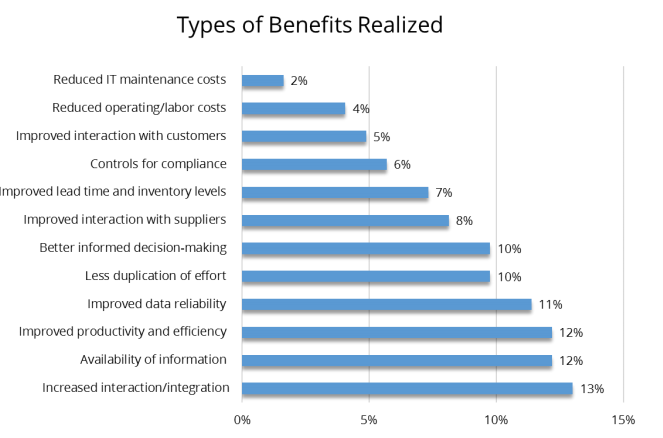
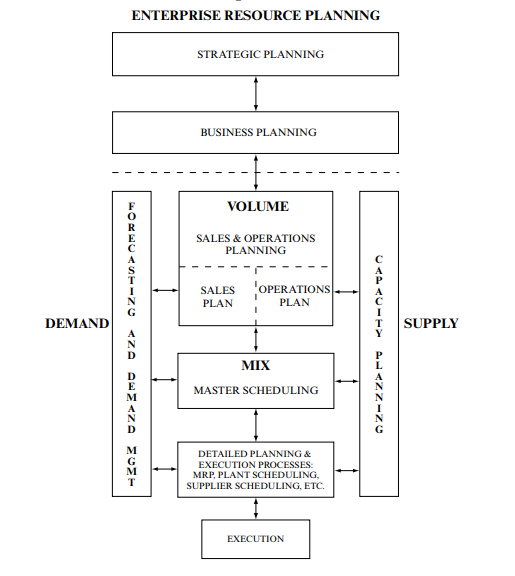
To see the whole picture of what can be done by Enterprise Resource Planning alone, enjoy the graph:

card Source: Panorama report on ERP systems and Enterprise software

So, make a step forward and simplify the process by implementing ERP systems:

  • ERP analyzes the functional side of your enterprise and along the way automates and/or removes the irrelevant business functions.
  • Each department has its own unique software that automates simple processes.
  • Simplified working process.
  • The info is already in the database, ready to be used. That will make the information exchange between the inner systems simpler and more robust.
  • The modules have an access to each other’s outputs, while reduced time and effort consumption please the eye.
  • Increased performance and stable implementation

These make all segments of the company system fruitful; removes the spots of possible mistakes (e.g. human factor) and saves a great deal of time.

card Source: Panorama report on ERP systems and Enterprise software

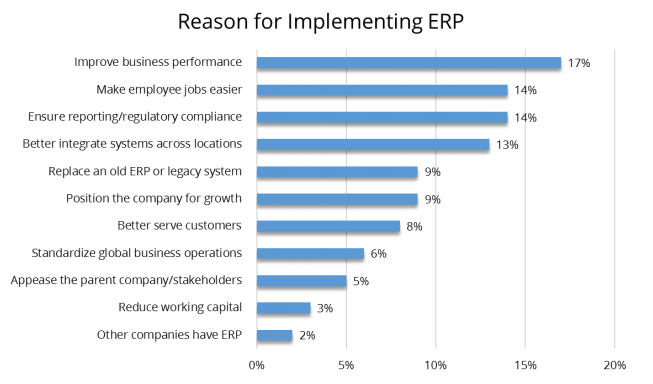
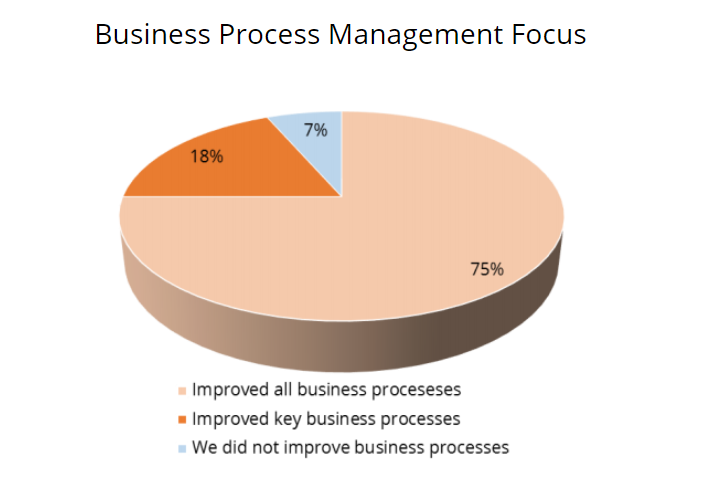
So, the main reason why people involve so much effort and money into the software of ERP is the need for constant improvement. The enhanced performance will push business processes increasing the efficiency and drawing customers’ attention. Visually, the influence of ERP systems looks like that:

card Source: Panorama report on ERP systems and Enterprise software

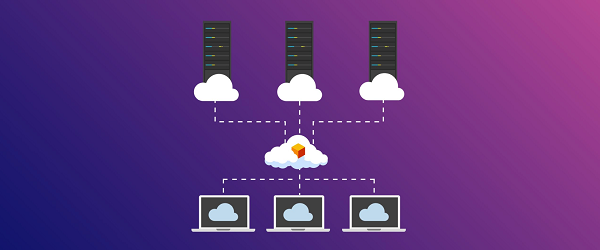
Cloud-based ERP

Today, a number of modern companies prefer this type of ERP. And BelitSoft isn’t an exception.

However, because the security here is still questionable, some would prefer to have their data behind the walls.

People still are suspicious of the Clouds. According to the Panorama report, 72% of respondents were frightened of the possible risks of data loss, and 12% of a possible security breach.

Pros:

  1. Fast and easy data sharing+the access is seamless and handy.
  2. Saves money (no need in servicing and specific equipment)
  3. Good choice for small companies that are looking to start without going into too much technical aspects of setting their own hosting

Cons:

  1. Deprives a full control over the data (hosting-provider is the one responsible for stable work and data integrity)
  2. Data security is in the hands of the vendor
  3. Still expensive: the price of VM in the Cloud is higher than in the local data-center

Belitsoft provides expertise in modernization of business-critical applications, including ERP systems. We help you transition to secure, scalable cloud environments that meet your compliance, performance, and integration needs.

On-premise ERP

On-premise hosting means using your own resources for the software deployment (you need your equipment to make it work). However, you may also use VPS (Virtual Private Server) or VDS (Virtual Dedicated Server).

As my interlocutor noticed, “To keep the machine working you need to hire people that could manage fixing whenever it breaks. Moreover, the space taken is also a reason to think your choice over". So, to make sure nothing will spoil “the moment of truth", the on-premise ERP holder should think of:

Pros:

  1. Maximum security for your corporate data
  2. Full control 24/7 (physical access to any data on the server)
  3. Excellent for large and mid-sized enterprises which have a data control and safety in the first place

Cons:

  1. Additional expenses (hiring specialists for servicing the equipment, space, safety, electricity)
  2. Complexities with data access for the distant branches
  3. OPEX (operating expenditure) is more profitable than CAPEX (capital exp.) you have buying facilities

Ready-to-go vs ERP from scratch: Pros, Cons, and Cost Factors

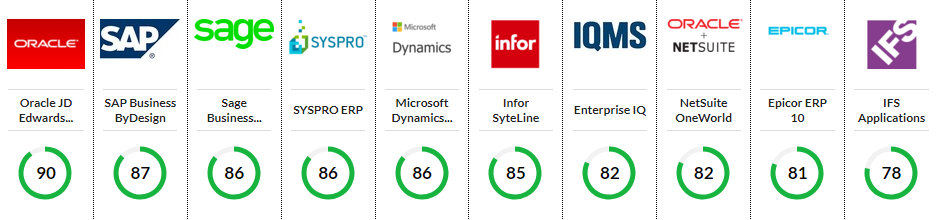
Today you can purchase everything effortlessly. You may choose the way of the least resistance and check out what ERP software has been developed years ago and is still relevant.

card Source: https://selecthub.com/erp-software/

‘However, we can’t say that the purchased product is the cure that works straight away. There are always things to change that make developers remove lots of discrepancies. It also happens that some existing modules that are not necessary anymore may be eliminated.’
Dmitry Garbar

So, before the implementation, developers have to straighten everything up, adjust and test the results - to make sure the work is done the way you’ve expected.

‘I've never come across ready-to-use ERP software that fits a client perfectly. Often, they're not entirely willing to change their business processes to fit the ERP product. There's always room for the idea of a customized ERP solution.’
Dmitry Garbar

Let’s sum up the information.

When Off-the-Shelf ERP Works - and When It Doesn’t

Off-the-shelf ERP can be a fast solution but often requires trade-offs in flexibility and long-term ownership.

The advantages of the ready-to-go ERP are:

  1. Short-term savings (by avoiding high costs associated with customization).
  2. Faster implementation
  3. Stable knowledge support (lots of outside experts on the software who can provide long-term training and advice)
  4. Software Sophistication (few bugs, industry-specific solutions and extensive elaboration)

The drawbacks are as follows:

  1. The need for adjustments and additional development
  2. May be difficult to customize it to your processes
  3. You have less control over the product (software vendor holds the rights to the code)

Is Building Custom ERP Worth It?

Developing ERP system from scratch gives you full control, but it’s not without its trade-offs. Let’s look at the benefits and the challenges you should plan for.

Some entrepreneurs may find it much more difficult to wisely develop an ERP core that holds their systems together.

Firstly, you need to analyze what and how do people do their job in each department. “Each role that is performed in the company is under the question of automatization", Garbar said. “So to get the ball rolling, business analytics (BA) have a chat with every employee in the company to understand the mechanics better". And after the picture of company’s “back-end" has been drawn, we are ready to discuss the time frame, costs, individual desires, and suggestions.

card Source: ERP - Making It Happen.

The overall process builds a totally unique architecture that is capable to adapt to the further changes in the company’s work.

However, that coin has two sides. Pros:

  1. You get a unique software tailored to the specific nature of your business
  2. You have a full control over the software code
  3. You save money on the long-term prospects
  4. Intellectual property rights to the ERP increase company valuation.

Cons:

  1. Long development time
  2. High costs compared to off-the-shelf solution
  3. May become obsolete by the time of implementation

ERP Implementation: Costs, Timelines, and ROI Expectations

card Source: Panorama report on ERP systems and Enterprise software

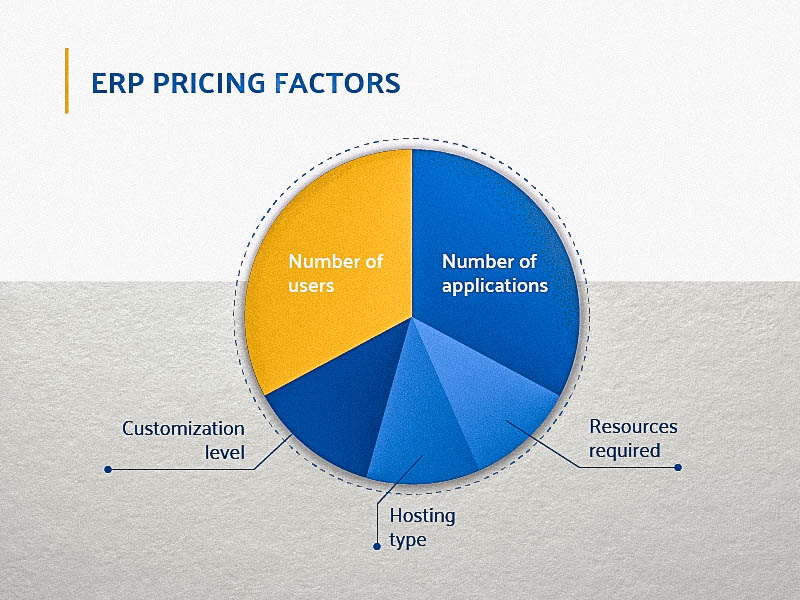
The final cost for the software is always formed individually and depends on the range of factors.

What Affects the Cost of ERP?

Speaking of ERP system developing, the price includes:

  • Company size (the number of employees, branches, locations and so on)
  • The industry of the business
  • Solution (industry-specific and customized, or general and flexible)
  • Resources required (external consulting, user training, task tracking, etc.)
  • Specific requirements

For instance, if you expect to see a sophisticated custom ERP system, you may not find complete designs and architecture that will fully satisfy your desires. In such cases, the implementation may require heavy customization and third-party add-ons, which will increase the costs.

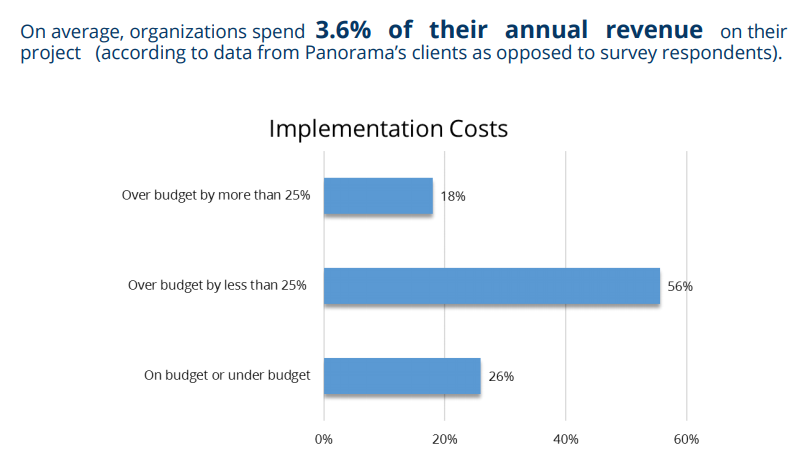
But even if the price was named, it can’t be steady when push comes to the software expected to support your business for decades:

card Source: Panorama report on ERP systems and Enterprise software

ERP Cost Ranges by Company Size

ERP pricing varies significantly depending on company scale. Industry-wide, ERP implementation costs in the U.S. typically fall within these ranges, broken down by business size:

  • Small businesses: $10K - $150K
  • Mid-sized companies: $150K - $500K
  • Large enterprises: $1M - $10M+

‘Considering Belitsoft, it’s difficult to name even the average price we offer. The projects we are involved into are diversive and usually require a wide spectrum of services: from the company size and technology team to personal wishes and preferable time frames.’
Dmitry Garbar

At Belitsoft, the effort on the project varies from 2000 hours to 96 man-months. And a plethora of those that need ongoing support and constant improvements.

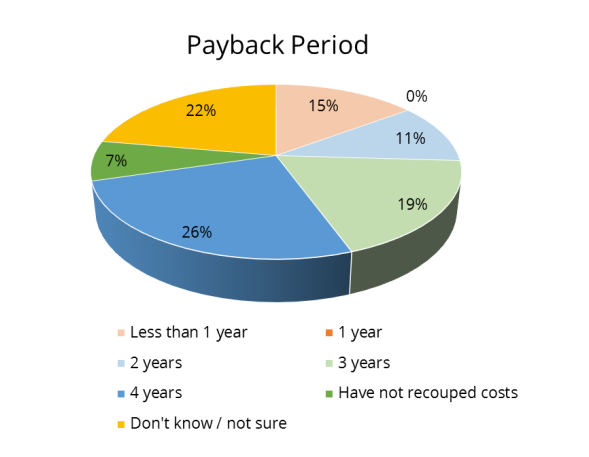
The question that doubts is shall the project pay off? Well, let’s see:

card Source: Panorama report on ERP systems and Enterprise software

How Long Does ERP Implementation Take - and Why It Often Gets Delayed

Time. If only "as fast as you can" would be taken literally and fulfilled right away. But in the real IT world all we have is to nod hearing 25, 32, 48+ months from the developer. But what takes them so long?

  • Size. Same as with the costs. The size of your company, the amount of employees, and many other factors influence the time spent on analysis, chosen technology, the type of data storage etc.
  • The industry you are operating in
  • Types of ERP. The time needed for the final implementation of purchased and adjusted ERP on the Cloud differs from the on-premise solution tailored directly for the business you run.
  • Personal desires. Any additional functions you want to see in the final product need extra time for development and adoption
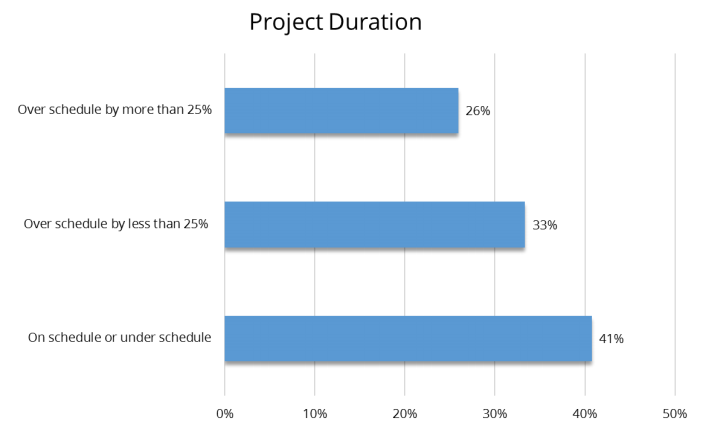
  • Respect the deadlines. Not many IT companies may boast for their accurate relationship with deadlines and set time-frames. According to the 2017 report, project duration was over scheduled by 59% in total:
card Source: Panorama report on ERP systems and Enterprise software

Is ERP a Long-Term Investment Worth Making?

Just face the fact: Enterprise Resource Planning solutions can’t be developed in a day. ERP is a life-time project - one that demands continuous support and adaptation, but delivers deep operational impact over time. It shapes how your organization operates, grows, and even how your people work, reaching everything you care about in your business.

The Best Technologies for ERP Implementation

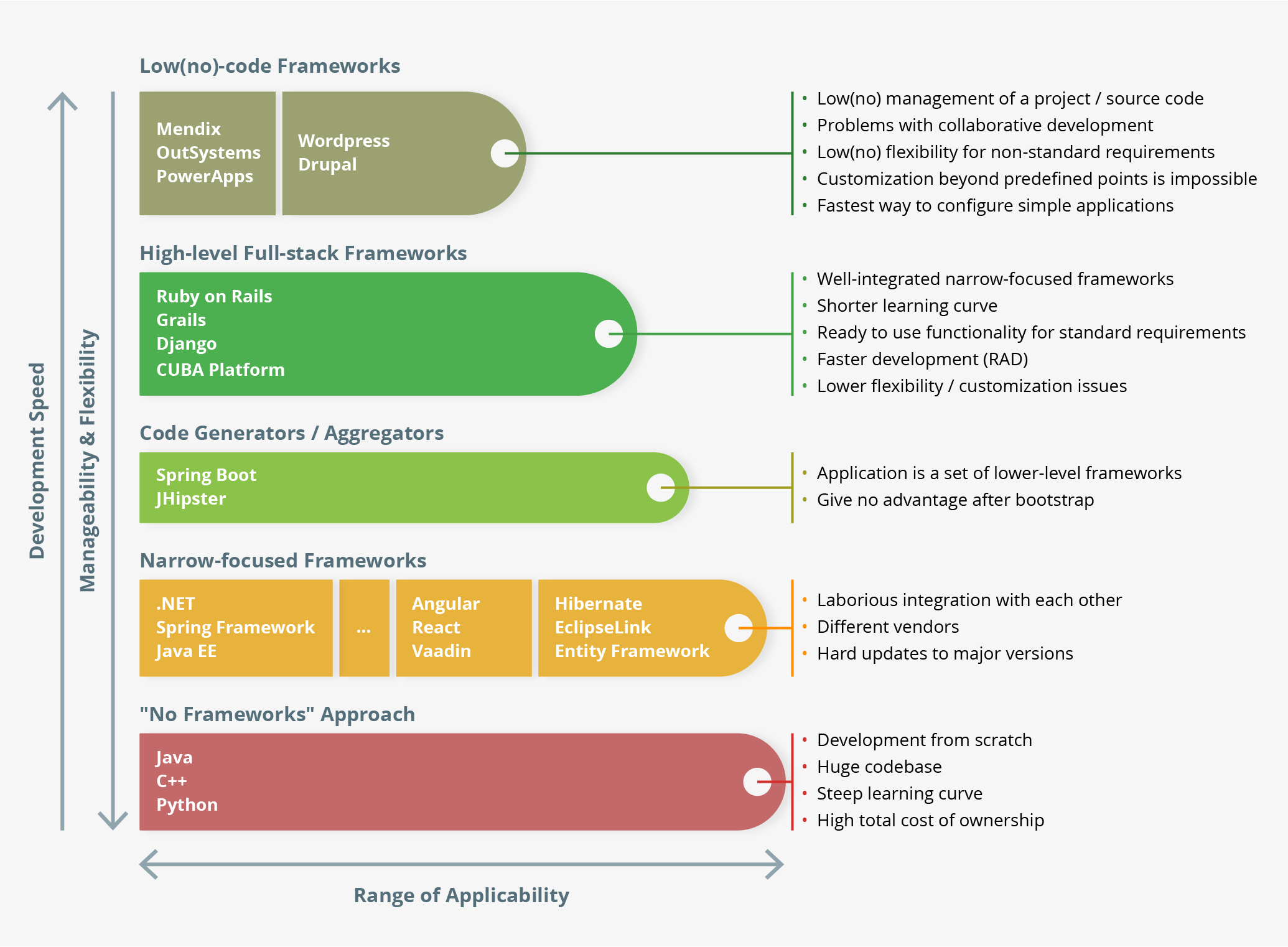
card Source: https://www.cuba-platform.com/

The choice of technology arises from the size of a company you run. At Belitsoft, we provide PHP solutions for small and mid-sized businesses, and Java or .NET solutions for larger companies. If your project specifically requires Java expertise, you also have the option to hire dedicated Java developers from our skilled team.

hire dedicated java developers

Developing a desktop application for a Football Federation we’ve chosen .NET - as a prevalent technology - accompanied by C# and PHP.

Creation of the ERP system for Granite Industry vendors involved Laravel, HTML and PHP. Angular JS coupled with .NET is a good replacement for Java to build financial software

‘One independent company carried out the technical audit of the project we were going to engage in. The focus was on specifications and architecture. In the end, they acknowledged only Java and .NET as the most secured technologies.’

As a programming language, Java shows itself as a perfect tool in finance and enterprise development. Amongst its advantages, the most substantial one is versatility. Java is essentially reliable and proven partner when it comes to the building software castles, skyscrapers and highway bridges.

However, no one stops mid-sized companies to choose Java as well. It is a balanced language with well-oiled filling for the diverse purposes.

Conclusion

Two words: simplification and automation. Enterprise Resource Planning systems:

  1. Is a complex process that requires a distant understanding of the target.
  2. Requires re-orienting and teaching staff to work within a totally new environment.
  3. Transforms your enterprise into a computerized structural body managed by a set of software. modules covering the entire business.
  4. Provides the techniques accompanied by effective forecasting, planning, and scheduling processes.
  5. Makes the data exchange between modules much easier and more systematic.
  6. Helps to avoid repeated data entering.
  7. Automates business functions so that business processes go flawlessly.

Still uncertain which ERP path is right for you? Our architects have guided 300+ projects through in various industries. Book a consultation.

Never miss a post! Share it!

Written by
Delivery Manager
"I've been leading projects and managing teams with core expertise in ERP development, CRM development, SaaS development in HealthTech, FinTech and other domains for 15 years."
5.0
5 reviews

Rate this article

Leave a comment
Your email address will not be published.

Recommended posts

Belitsoft Blog for Entrepreneurs
Software Project Rescue Services
Having extensive experience in software project rescue, software project rescue company Belitsoft has grouped the reasons our clients from the USA, UK, and Europe come to our agency for project and application rescue services. Deadlines are Missed: Your Project Has Stalled Our clients feel the pressure to replace a stalled custom software vendor and finish everything quickly because it had to be finished long ago. The previous development team may have spent months and produced no viable product or new version of the application. Constant delays by their old dev partner cause the software projects to stall and go grossly over time and budget. Unstable Code: Your Product Is Bug-Ridden Very often, our clients' software products become unstable because the unreliable developers our clients hired before took shortcuts in their work day after day. Previous vendors may have hardcoded critical components, so it looks like the frontend may work, but the backend is actually faulty. It gets to the point where mistakes they made in the first place have resulted in a hodgepodge of code they can't fix later or even track and find bugs in. Lately, there has been an increased number of clients who come with AI-generated prototypes held together with duct tape and prayers. They are riddled with so many technical issues that even the frontend doesn't work as required and the app crashes on every second click, requiring emergency software project rescue. A separate category of projects we take on for rescue could be called "big mechanical beasts" with dragged down performance: software apps with years of legacy code that nobody else wants to maintain. Clients may even try to rebuild what they had with another vendor but again find the progress frustrating and too slow for different reasons, including lack of transparency and smooth communication. Lost Faith in the Current Agency: The Company Didn't Meet Expectations It quite often happens that our clients' prior team was working at a satisfactory level, but at some point its service quality became poor. The speed and quality requirements started being ignored, the price increased, and other examples of unethical business practices started to appear, pushing our clients away. Tired of blame games ("it's a PM mistake," "no, it's a dev mistake," "no, it's a new dev mistake") and finding every aspect of the project like pulling teeth, our clients decide to look for new true technology partners. However, they may still make three or more attempts before succeeding because not every new vendor is able to deliver what they promised. Multiple Attempts: None of the Vendors Delivered on Their Promises It's true that finding a reliable development company can be difficult for many external reasons beyond your control. That's why hiring a software project rescue company can be a logical next step in product growth. For example, if the first version of a product consists of several parts developed by different freelancers with little technical coordination between them, the final result can be poor. The same product could be developed professionally using different technical approaches depending on the product perspective. The problem starts when one non-senior technical specialist recommends one tech stack, while another recommends a completely different one. The client becomes confused, if not outright misdirected, because they may not realize that by the time they receive these recommendations, their software products have already outgrown both proposed options. Before finding the right software project rescue company (with consulting experts on staff, not only programmers), clients may go through several development companies and replace multiple developers. Unexpected Developer Departures: The Team of Developers Fell Apart The urgent need for developers creates a hard time for our clients, not just because the former technology resources were performing badly and therefore weren't meeting expectations. Conversely, the previous developers may have had decent skills, and the issues may not have been with the quality at all but rather with organizational issues. The key lead and senior developer or the original CTO from their external design/development agency may depart for reasons such as burnout or retirement. Sometimes it causes a domino effect in such companies when other developers leave afterward too, so the development team falls apart and development itself stops. The situation becomes more complicated if our clients lose development resources when the software is already halfway done, so they need not just anybody but, first of all, the right technical folks who can understand their architecture and technical direction and take it on. Our clients' deadlines, meanwhile, don't go anywhere, and new ones suddenly appear in the form of transition timelines. Often, contracts give one month's notice before a developer may leave, so clients have only this much time, or even less, to find someone who can jump in for him. It's not unusual for some small niche outsourcing companies to be acquired by larger vendors just months after kicking off the project. If our clients' projects are not big enough at this stage, not enough resources may be allocated to the project in the new organizational reality because new owners may have their own business priorities. Such a situation also makes our clients feel like nobody pays attention to their project and forces them to look for alternatives. Outsourced Overseas: An Ineffective or Poorly Performing Offshore Vendor Our clients certainly ensured that the development team they chose, working from another country, could speak English and communicate well. Unfortunately, they soon realized that the web application development work of their partners abroad was extremely poor, even though their coding was fast. Some of our clients have had terrible experiences with offshore developers, only later understanding that their contractors were not just unorganized and not flexible and adaptable enough to change, but simply could not resolve the problem because they did not have enough technical competence, and their lies just delayed the project. Additionally, our clients complain that their Indian vendors were deliberately not upfront about things that went wrong for a long time, which in the end caused problems for our clients. In-house Software Development Project Rescue Expertise Lets Belitsoft Quickly Step In Evaluating Stage Clients are different, and their situations are too. But our solution never comes down to saying that our clients have to start from scratch. Very often some of the core logic is perfectly usable, and there is no reason for our clients to waste their developer resources rebuilding something that already works. In some cases, depending on the project complexity, we can start the evaluation stage even prior to engagement by going through the client's project management and business messaging applications to investigate key aspects of the problem. Then we create an extremely detailed spreadsheet listing what needs to be addressed first. This way, we win our clients' trust not just by volunteering our time but also by impressing them with the initial assessment's scope. Regardless of having offers from other development companies too, they still choose us because nobody else comes close in the detail and attention we put into the assessment report itself. In other cases, we may be brought in for a time-limited trial period when our developer does the code evaluation and at the same time works on some small-scale projects. After this initial evaluation, we then advise our client on how to proceed. Quick Initial Corrections and Fixing Stage If the product is already live, as a rule it is a large project involving software products like SaaS and e-commerce systems with complex infrastructure and high SLAs to keep. They need a results-driven partner that can put together a team within 24 hours, even on a holiday or weekend, to save the project by making the first corrections within a short time frame. After learning the system quickly, we start with critical issues that need to be fixed, and very often immediately after that clients also ask us to take on the development of new features. Deep Technical Audit Stage What we learned about the system for the first corrections is enough to keep it running, but not enough to decide what to do with it, so we start the audit by mapping the entire system. After the previous team, there is usually no documentation left, and we need to see what the application actually consists of and where its critical parts are. Then we review the existing architecture and the application's entire code, as well as investigate user security. Depending on the platform, we may also review core functionality, custom themes, and plugins for deviations from coding standards and deprecated functions. In the case of AI-generated prototypes, the problems are typically the same from project to project: almost no tests, security vulnerabilities, a lot of duplication, and hardcoded shortcuts that make the app look like it works. Then we prepare a detailed report on what is wrong, what is needed, and what could be improved, with every issue we have found ranked by priority, so that our clients fully understand the next steps needed to bring their application up to their standards. In the case of a migration from an outdated framework, the report may become a detailed migration roadmap with a component-by-component analysis. We Deliver the Results Our Clients Need Under Pressure Our clients have a very tight time window, especially if they're fundraising and actively demoing the project to investors. We try not just to deliver on schedule but also to be ready to re-prioritize or turn the dial to 11 and spend extra time if the scope shifts, while critical dates stay intact. Our clients always have a detailed progress-tracking roadmap, ensuring they always have control over whether they can actually launch the product on time without incomplete work or technical debt holding them back. If you have crashing and burning projects, we can rescue them at the last minute, completely turn them around, and get them across the finish line. Our software project rescue services company gets our clients to the finish line and keeps them happy, getting them out of a bind. Software Project Rescue for Stalled, Unstable and Half-Finished Products Previous developer vanished? Burned by your last development agency? Product half-finished and unstable? We replace stalled custom software vendors, take over existing codebases, stabilize failing enterprise software and rebuild poorly built platforms. Our trustworthy developers who handle complex code issues and offer both AI implementation and software project rescue services. Verifiable project rescue results, proven case studies, named B2B clients in the USA, UK and Europe. Show me your verifiable rescue results Common Questions About Software Project Rescue
Hire DevOps Engineer
Hire DevOps engineers
What is DevOps? DevOps is a software development best practice that unites the formerly separate roles of security, development, IT operations, and quality engineering (testing). DevOps teams automate processes that were originally manual and slow. DevOps engineers use a tech stack and tools that help them deploy code or provision infrastructure quickly and independently, which increases overall velocity. As a result, businesses with DevOps build reliable products that better respond to customer needs, deliver these products more rapidly, and compete more effectively in the market. The DevOps culture gets divided into narrower sub-categories, for example, CloudOps is the practice of improving the performance of your applications and infrastructure in the cloud, automating continuous compliance, and setting up centralized control, agility, and scale across all environments. DevSecOps is the practice of introducing security earlier in the software development life cycle, including PCI compliance (the security of credit card transactions), CIS compliance (setting benchmarks for protecting the company´s systems and data from cyberattacks), patching, etc. InfraOps/SysOps is the practice of automating and optimizing cloud infrastructure operations, including performing predictive capacity planning, provisioning a new workload to the cloud, or scheduling a resource shutdown. and others. Why Your Business Needs DevOps Ensure software security to drive user satisfaction DevOps helps create software products that have fewer bugs and vulnerabilities, boosting user satisfaction and your brand image. DevOps engineers widely use automated compliance policies, fine-grained controls, and configuration management techniques to retain control and preserve compliance. Deliver rapidly and frequently to build a competitive advantage DevOps teams innovate and improve an end product faster due to applying CI/CD pipeline that automates manual and slow processes and speeds up the software release from build to deployment. The quicker your development team fixes bugs and releases new features, the faster your business responds to customers’ needs, adapt to changing markets better, and gains competitive advantage.  Guarantee software reliability to bring positive UX DevOps engineers apply monitoring and logging to stay informed of software performance in real time. Use CI/CD best practices to ensure that each software update and infrastructure change is functional and safe. These best practices are the key to maintaining high software reliability while delivering at a more rapid pace. As a result, your product and brand bring a positive experience for end users. Scale software securely and easily to favor business growth DevOps engineers use the microservices architecture to manage your infrastructure and development processes at scale. Besides, DevOps teams use Infrastructure as Code (IaC) for managing your development, testing, and production by automating repeating, manual processes. The IaC technique helps you manage complex or changing systems efficiently and with reduced risk. Improved collaboration to drive higher performance and better results The DevOps model implies building more effective teams with a focus on ownership and accountability. DevOps engineers cooperate closely, share many job functions and responsibilities, and combine their workflows. As a result, such an approach reduces inefficiencies and saves time due to avoiding long handover periods between developers and operations. Save up to 40% on Development/Security Compliance/Maintenance costs with Belitsoft´s DevOps engineering team. Talk to our business development manager to get a free quote. DevOps Staff Augmentation What is DevOps Staff Augmentation?  DevOps staff augmentation skips traditional recruitment to place DevOps engineers directly onto your team. They join your delivery flow alongside your developers to build scalable infrastructure, write infrastructure-as-code, automate CI/CD pipeline deployments, and configure system observability. Whether used for ongoing support or as an emergency measure, they accelerate the release process and secure the engineering pipeline. Benefits of DevOps Staff Augmentation Speed to Hire Skip job boards, CVs, and months spent searching for an engineer. Avoid ecruitment delays and the risk of hiring the wrong person. DevOps staff augmentation gives you a predictable monthly capacity of pre-vetted IT specialists and verified professionals. Get fast access to exact DevOps expertise you need. They are ready to code right away, productive from day one, and start within 24 hours to a couple of weeks. Flexibility Scale the team size up or down based on your business needs. Increase and decrease the number of DevOps engineers without limitation, upfront fees, lock-in contracts, or any commitment. Use DevOps experts to temporarily fill your needs, or hire for the long term for ongoing collaboration. You can flexibly increase or reduce capacity each month. When full-time is too expensive, part-time support is often enough. With staff augmentation, you can hire a DevOps engineer on a full-time, part-time, or contract-to-hire basis. You are bringing in expertise exactly when you need it and letting it go when project requirements decrease, ensuring you have the correct skills required for each project phase. Cost Efficiency Do not spend your time on the hiring process. You pay no recruitment costs, no upfront or placement fees, and get a full-time employee without full employment costs. You gain skilled, experienced DevOps staff without the extra expences and complications of a W-2 hire. You do not pay U.S. or European employment taxes, benefits, redundancy liabilities, or office space. You avoid equipment costs and do not pay for sick days or vacations. Working with remote talent from Europe cuts salary and benefit costs. This is nearshoring that actually works. DevOps staff augmentation is billed hourly. You save significantly on long-term costs. Operational Velocity & Pipeline Stability Delivery slows when DevOps work is missed. You bring in the DevOps talent needed to complete complex cloud-based projects on time and within budget. DevOps engineers automate, monitor, and scale your systems to accelerate software development. They shorten development cycles because they are part of your delivery flow. You prevent data loss and downtime by keeping your engineering pipeline stable and secure and removing friction from your release process, so you deliver changes to production faster. Full Integration DevOps engineers offering overlapping time zones plug directly into your day-to-day communication channels (company email, Teams, Slack, Discord, Zoom, and project management platforms). While the DevOps staff augmentation provider takes care of payroll, tax, and compliance, DevOps developers integrate into your delivery process, align with your working style, and fit into your internal team. Must-Have DevOps Skills and Job Functions Whatever your business needs are, the software development cycle remains equal: planning, developing, delivering, and the operational part (monitoring, maintaining, and troubleshooting). To actively participate in each stage and perform effectively, make sure your DevOps team fulfills the core skills and job functions, essential for each stage of the development cycle. Compared to traditional software development, in DevOps teams, remote dedicated developers work along the entire software development lifecycle, from development and QA to deployment to operations. So each engineer in such a DevOps team develops a skillset not limited to a single function. However, due to such diversity of functions, the DevOps label covers a vast array of engineers with various skills and responsibilities. We know! It’s hard even to read such a list of skills thoroughly. Imagine how a single person can know all of this as thoroughly as you’d like him to. This is why, ideally, DevOps refers to a team and not a single person. Only such an approach will bring your business the expected outcomes. 1. Planning Skills and Responsibilities Understand customer requirements and project KPIs. Use Jira to optimize collaboration, prioritize tasks, and manage regular reporting on the progress. Manage Agile software development with Scrum to create iterative development and delivery process with constant feedback. Use Kanban boards to visualize progress. Create backlogs to plan further development adequately. Set strong cultural norms around information sharing and facilitating communication through the use of chat applications, issue or project-tracking systems, and wikis. 2. Software Developing Skills and Responsibilities Continuous Integration Select and use a suitable development environment, e.g., IDEs like Visual Studio, Visual Studio Code, Eclipse for Java, or IntelliJ IDEA. Build the code into artifacts to deploy into various environments. Commit changes to a shared repository using a version control system such as Git. Run local unit tests, integration tests, load tests, API reliability tests, etc as an extra verification layer before integrating a new piece of code to validate updates and pre-emptively discover issues. Apply Trunk-based development methodology to merge small, frequent updates to a core “trunk” or main branch. Automate the creation and replication of multiple environments for testing in the cloud. Cloud computing Be skilled in AWS cloud migration services, Azure, and GCP to create and design serverless apps with AWS Lambda, Amazon API Gateway, AWS Amplify, Amazon DynamoDB, or similar tools for Azure/Google Cloud. Work with cloud-native architecture environments, perform load-balancing, autoscaling, clustering launches per region, queueing long-running tasks to create highly scalable systems in the cloud. Know and work with Kubernetes clustering: Amazon EKS, Azure EKS, and Google Kubernetes Service to automate many of the manual processes involved in deploying, managing, and scaling containerized applications. 3. Delivering Skills and Responsibilities Continuous Delivery Work with DevOps platforms that offer delivery automation, e.g., GitHub Actions and Azure Pipelines to decrease the deployment time. Have skills in at least one CI/CD tool (Jenkins, Shippable, GitlabCI, Buildkite, TeamCity, Codefresh for Kubernetes, Semaphore, etc ) to make frequent, error-free, predictable software releases. Deploy and launch web app stack, e.g. Java app, MERN stack, or Python / Django application. Define a release management process with clear manual approval stages. Set automated gates to move applications between stages until the final release to customers. Microservices Create microservices architectures for SaaS applications to deploy releases more often and without disruptions to the entire system. Automate building and software testing processes to ensure that code in the main branch is always production-quality. Follow access control policy as a data security technique to prevent unauthorized physical or remote access to company data. Have a unified and automated pipeline to build and deploy services to mitigate the risk of having many small independent and diversified code bases. Use deployment techniques such as blue-green or canary release for non-breaking changes to keep up with service updates. Optimize the deployment process using such tools as Amazon Elastic Container Service (ECS) or others. Infrastructure as Code Apply IaC methodology as a part of CI/CD to ensure release consistency and velocity. Speed up cloud provisioning with infrastructure as code (IaC) by applying tools like AWS Cloud Formation, Azure Resouce Manager, Terraform, Ansible, Chef platforms, etc. Scale infrastructure and manage resources across multiple accounts and regions through a single operation. Extend and manage infrastructure to include cloud resources published in the CloudFormation Registry, the developer community, or libraries. Automate resource management across your organization with Azure, AWS, or Google Cloud service integrations offering turnkey application distribution and governance controls. 4. Maintaining and Troubleshooting Skills and Responsibilities Security compliance Handle security incidents including hacks, security audits, hardening of servers, and user security controls such as SSH keys, permissions, SSL certs, encryption, and API key encryption. Work with all the technical qualifications from security compliance, creating a VPN, hardening containers, adopting DevSecOps, Vuln assessments, patching vulnerabilities, and disaster recovery strategies. Be familiar with at least one of the following regulations: HIPAA, PCI, or SOC2. Identify and deploy cybersecurity measures by continuously performing vulnerability assessment and risk management. Monitoring and Logging Capture and consolidate user activity and API usage across locations and accounts on a single, centrally controlled platform. Monitor, store, and validate activity events for authenticity. Easily generate audit reports required by internal policies and external regulations. Improve operational performance using alarms and automated actions set to activate at predetermined thresholds. Continuously monitor API usage history using automation tools to spot unusual activity in your accounts and determine a root cause. Visualize performance data, create alarms, and correlate data to understand and resolve the root cause of performance issues Troubleshooting Understand if it is a DevOps issue or a code issue and channel it to the right tech team. Apply troubleshooting techniques to diagnose issues with your pipeline and fix the code bugs. Database Maintenance Maintain and administer databases. Have proficient knowledge to troubleshoot, create and build database clusters, such as Mysql, RDS replicas, PostgreSQL, MongoDB sharding, etc. No matter your tech stack, our DevOps team has got you covered. We ensure you are matched with the right resource based on your requirements to timely deliver a product that customers are willing to pay for. A Real-Life Business Case When to Choose a Dedicated DevOps Team When a business gets a DevOps team, and not a single person who can superficially do dozens of things, the outcomes are fast, reliable, and future-proof. Let's see how it works with real businesses. A global creative technology company Technicolor with 100+ years of market presence opted for Belitsoft's DevOps team to design, build, and maintain a core business app for managing their 17,000 employees over the world. We provided a team of 19 specialists: 1 Business analyst to create requirements specifications, analyze requirements, and translate a business idea into a well-documented workflow, 1 Project manager to plan, communicate, and arrange the development process effectively, 1 Designer to create engaging, intuitive, and functional User Experience, 9 Backend developers to build a powerful and highly-scalable backend behind the app, 4 Frontend developers to make User Interface clear and responsive,  3 QA engineers to ensure smooth, rapid, and error-free app functioning. Belitsoft arranged a highly-effective DevOps pipeline at all stages from planning and developing to delivering and troubleshooting to deliver a top-quality, scalable, and secure software product rapidly. As a part of a DevOps culture, Belitsoft also retained key members of the development team on the project to keep up a high performance level and deliver results even faster. Moreover, our development team scaled up and down on the client’s demand. Our DevOps engineers were also proactive in recommending solutions that could save budget when possible. As a result of the DevOps teamwork, the Client received a full-featured web application that thousands of enterprise employees use daily to perform daily tasks. Belitsoft and Technicolor continue working mutually to enhance the software functionality further while keeping its reliable and fast performance. Development tools: Visual Studio, Visual Studio Code, SSMS, DataGrip, Data Migration Assistant for migrating the SQL database. Azure architecture components: Azure Front Door, Azure App Service, Virtual Machines, Azure Functions, Azure SQL Database, Application Insights, Azure VPN, Network Interfaces, Network Security Groups, Private Endpoints, Storage Accounts. Get DevOps engineers with the required skillsets in Belitsoft’s pool of 400+ specialists
AWS Outage Prevention: Single Сloud with multi-Region or Multi Сloud?
AWS Outage in October 20, 2025 If there is no cloud, there are no cloud-native applications. The outage affected businesses worldwide (over 3,500 companies across more than 60 countries, and at least 1,000 sites and apps). Websites and platforms went down, including food delivery apps and airline booking systems that run on AWS servers.  The outage caused delayed flights, blocked online purchases, disrupted financial transactions, and stopped workers from accessing business systems. Most of their main services were restored by the afternoon of October 20, but some, such as AWS Config, Redshift, and Connect, took longer to recover.  This was the third time in five years that things went wrong in the AWS US-EAST-1 (Northern Virginia) data center. There were similar issues in 2021 and 2020, but AWS has not explained why this region continues to have problems. Amazon Web Services data centers in Ashburn AWS Outage Root Cause and Technical Details Amazon looked into the problem. They found that an update to their DNS system caused the issues.  It started with DynamoDB crashing. (DynamoDB is a popular database service.)  The DNS system converts website names into IP addresses. When it broke, applications trying to connect to DynamoDB couldn't find it. This is because they couldn't translate the DynamoDB API name into the IP address of its servers. Without being able to find the right IP address, they couldn't establish a connection. Other AWS services also failed, affecting users everywhere from London to Tokyo. 113 AWS services stopped working. The problem started inside Amazon's EC2 network, specifically in a subsystem that manages resource allocation. EC2 gives companies virtual servers to run applications and websites. When the problem occurred, Amazon stopped new EC2 virtual machines from being created to prevent the issue from getting worse. As the situation improved, they allowed customers to create new EC2 servers again. AWS Outage Economic Impact AWS holds 37% of the world’s cloud market, with Microsoft Azure in second place and Google Cloud in third.  Large companies that rely on these cloud services suffer major losses when the systems go down. Major AWS clients can lose millions of dollars in revenue for every hour that systems are unavailable. When Google or Microsoft Azure cloud systems fail, companies lose hundreds of billions of dollars. Airlines, factories, and hospitals all experience disruptions. Financial Services Impact In Britain, Lloyds Bank, Bank of Scotland, HMRC’s online services, Vodafone, and BT had problems. In the U.S., Coinbase, Robinhood, Venmo, and Perplexity also struggled with outages. Consumer Services and Apps Impact Amazon’s shopping site, Prime Video, and Alexa were down.Social and productivity apps Reddit, Roblox, Snapchat, and Duolingo also stopped working. Gaming platforms Fortnite, Clash Royale, and Clash of Clans were offline. Transportation and communication tools Lyft and Zoom could not connect. Amazon Web Services Introduced a New Feature to Prevent Future Outages One month after the incident (November, 2025), Amazon introduced a new Route 53 feature that was reported to help prevent similar disruption. The DNS Control Plane in AWS Route 53 is the API you use to add, change, or remove DNS records. The DNS Data Plane is what actually resolves DNS queries when users access your services. During major problems in AWS's US East region, Route 53's Data Plane usually remains available because it is globally distributed across many locations. However, the Control Plane can fail during major US East outages, which prevents you from updating DNS records to redirect traffic. That is why AWS added this new feature with a 60-minute recovery guarantee. But even if you can update DNS records during an outage, that does not mean your applications will work. Do not rely on DNS updates alone to handle outages. If your servers are in one AWS region and it goes down, switching DNS records alone is not enough. Your application and databases need to be running if you want your service to stay up. AWS Outage Prevention Microsoft Azure and Google Cloud also experience outages from time to time. You cannot prevent all downtime in the public cloud. The best approach is to plan well and respond quickly when something goes wrong. Modern cloud-native applications should be spread across availability zones. Use active-active deployment for systems that cannot go down. Run the same services in multiple regions at the same time. If one region goes down, traffic automatically switches to the working region. This keeps your services working with no or very little downtime. Alternatively, keep a small backup environment, called a pilot light. Have some databases and common infrastructure set up in a second region and keep them running with minimal resources. When you need to switch to it, scale up those services quickly to handle your production traffic. Be ready to switch to the backup (secondary) region quickly. If done right, single-cloud typically provides better reliability than multicloud for most organizations, unless specific business requirements necessitate multicloud. Plan AWS architecture assuming every region can go dark. Your engineers must set up data replication correctly, test the network latency, and figure out how to keep data consistent across different regions. Using multiple cloud providers for resilience usually costs more. Good single-cloud architecture is easier to plan, build, and scale. Teams should analyze what makes their systems stop working when something breaks, such as DNS servers and data stores. When they think they have everything figured out, they should test how well the systems work during outages. Critical operations should be ready to launch from backup platforms or even handle tasks manually if the main system crashes. Often, backup plans like these also satisfy compliance requirements, while costing less than completely separate cloud systems. Gartner research shows that multicloud for resilience usually costs more and is more complicated. Additionally, in a world with only three major cloud providers (AWS, Microsoft Azure, Google Cloud) there’s not a lot of diversity. For most companies, a strong single-cloud design provides better uptime and easier management than multicloud, while still meeting regulatory requirements if you engineer and manage it correctly. Public cloud is often the most practical and reliable way to get large computing power. To make it work, set up backups from the start in a different region. Practice recovery to understand if your team can restore quickly when a region goes down. Test disaster recovery often so everyone knows what to do. Companies that cut costs by skipping these protective steps, do not have anything to fall back on when AWS systems go down - they are vulnerable.
Catastrophic Outage of Online Security Company Cloudflare
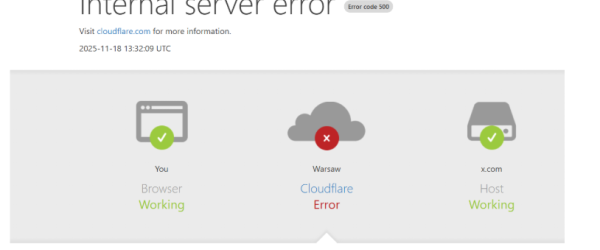
Technical logs cited "CF_EDGE_ROUTING_FAILURE", "Origin-Shield connectivity loss," and "BGP path withdrawals" for key clusters (LCP-LON in London and LCP-FRA in Frankfurt). They also caused DNS resolution timeouts on Cloudflare's 1.1.1.1 service and "Security Audit Lockout" errors. Reports of downtime were coming from the UK (London, Manchester), Poland (Warsaw), Germany, the Netherlands, Singapore, India, Australia (Sydney), South Africa, and the US (East Coast). Switch Cloudflare DNS System administrators were unable to disable proxies. Cloudflare Dashboard and SSO logins are protected by the failing "Turnstile" (CAPTCHA replacement) and Cloudflare Access services. Attempts to switch DNS were unsuccessful. Major domain registrars Namecheap and Spaceship use Cloudflare for their own frontend/login protection, so users can't change nameservers. However, some engineers were able to use the API, which remained partially functional while the UI was dead. A workaround was to programmatically disable the Cloudflare proxy ("proxied":false) for DNS records using curl commands and API tokens. This way, traffic bypassed Cloudflare and went directly to origin servers. The access were restored at the cost of exposing server IPs and losing SSL/DDoS protection. Some services relying on Cloudflare were able to fall back to alternative infrastructure (like AWS). Affected Websites and Services The outage knocked offline X/Twitter (11,500+ outage reports), OpenAI's ChatGPT and Anthropic's Claude (users were stuck in infinite "verify you are human" loops due to Cloudflare challenges failing), Spotify, Grindr, Letterboxd, and the fan fiction site Archive of Our Own (AO3). Google's Gemini remained functional. Development tools were inaccessible, halting productivity for software engineers. This included outages at Supabase (impacting services), TailwindCSS (CDN failure), Mercury Bank (dashboard and card payments failed), and Replicate (AI platform). The digital failure disrupted the Velib bike rental app in Paris (leaving stations empty or unresponsive), Garmin services, South African local websites, and affected government websites in Denmark during an active election day. Even independent third-party monitoring web tools Downdetector and "Down For Everyone Or Just Me" were initially useless as they also rely on Cloudflare's infrastructure to load. At the same time, users reported that DigitalOcean, Linode, and Hetzner infrastructure remained stable. This time, legacy setups (a Linode VM running for 20 years with minimal dependencies) survived the outage while modern "multi-cloud" setups failed. Owners of many websites remained online and fully functional throughout the crisis because their architecture ran on bare metal / FreeBSD without reliance on Cloudflare or AWS, serving as an example of the benefits of old-school, decentralized hosting. Was it a Cyberattack? It was unlikely to be a cyberattack. Cloudflare services are designed with redundancy to avoid being a single point of failure that attackers could exploit to cause a collapse. Cloudflare says that root cause of the outage was a "configuration file". Cloudflare's systems use automation to constantly update their firewall rules and routing tables. When their sensors detect malicious activity (like a botnet or DDoS attack), an automated process creates a configuration file containing "signatures" or IP addresses that need to be blocked or filtered. This time, the configuration file that is automatically generated to manage threat traffic grew beyond an expected size of entries. The file grew too large - exceeding the limits that the reading software was programmed to handle. When the traffic management software attempted to load or parse this oversized configuration file, it crashed. This likely caused a memory overflow (running out of RAM) or a parser error (the code didn't know how to process the extra data), causing the entire service process to terminate. Since this specific software is responsible for handling traffic, meaning it decides where web requests go and if they are safe, its crash meant that Cloudflare's servers stopped processing requests entirely. Suspected Causes and Technical Theories Many developers initially had a "heart attack" because they believed their own recent deployments or config changes had broken their sites. Technical discussions tried to find the real cause, like "Vibe Coding" (the idea that an increasing reliance on AI-generated code in production is leading to hard-to-debug infrastructure), a potential state-sponsored DDoS attack (supported by Cloudflare disabling WARP VPN access in London during remediation), or a BGP misconfiguration similar to previous incidents. Disabling WARP (VPN) access in London led to speculation that a potential routing loop or localized attack vector was the root cause, not a simple global misconfiguration. The outage also coincided suspiciously with scheduled maintenance taking place in Atlanta and Los Angeles, leading to speculation that a maintenance window contributed to the traffic spike or routing failure. The Centralization Problem Many recognized again that the modern internet is dangerously centralized. Cloudflare and AWS act as single points of failure that can take down the internet. However, everybody understands that it's a prisoner's dilemma. Using Cloudflare is mandatory to survive DDoS attacks and bot scraping. Decentralization is hard to achieve for small businesses. The rise of aggressive resource-intensivу AI scrapers (like ByteSpider from TikTok) makes independent hosting no longer viable without Cloudflare's umbrella to filter this traffic. Financial Consequences Cloudflare's stock (NET) value dropped 3.4%  after the news. A single hour of downtime costs mid-sized tech-dependent businesses an average of $300,000 in lost sales and wages. The outage, which lasted more than 90 minutes, breached Service Level Agreements guaranteeing uptime. This may force Cloudflare to issue refunds to its 300,000+ paying customers, impacting revenue. The breach of trust could potentially increase Cloudflare's customer churn rate by 2 to 3% in the coming quarter and force the company to increase large investments in multi-cloud redundancy. This could squeeze near-term profits by 5% or more. About Cloudflare The company defines its services as "protecting websites, apps, APIs, and AI workloads" and "accelerating performance". Cloudflare has an often invisible role in monitoring web traffic to verify that users are human and defending against malicious distributed denial of service (DDoS) attacks targeted to overwhelm sites with requests. Cloudflare has a documented history of similar widespread disruptions. A July 2019 incident, a software bug impacted Discord, Shopify, and Coinbase for 30 minutes. A June 2022 outage in 19 data centers lasted about 90 minutes. The current problems at Cloudflare occurred less than a month after a major outage at Amazon Web Services (AWS), a separate infrastructure giant, which also brought down thousands of sites.
Cloud .NET Development
The Big 5 Risks of Cloud .NET Development For C-level executives, CTOs, or VPs of Engineering, success in developing secure cloud-based applications in .NET depends on selecting the right expert partner with a proven track record. These leaders need vetted professionals who can be trusted to architect the cloud system, manage the migration, and recommend viable solutions that balance trade-offs between cost and performance. When a senior technical leader or C-level executive searches for how to develop a complex system, they are building a mental model to evaluate a vendor's true expertise, not just their sales pitch. They know that a bad decision made on day one - a decision they are outsourcing - can lead to years of technical debt, lost revenue, and competitive disadvantage. A cloud development or migration initiative is not a simple technical upgrade. The path is complex and filled with business-critical risks that can inflate budgets. Understanding these Big 5 risks is the first step toward mitigating them.  These five challenges are not isolated. They interact and compound each other, creating a web of trade-offs, where every solution to one problem potentially creates or worsens another. Risk 1: The Scalability Myth When cloud service providers like Amazon Web Services, Google Cloud, or Microsoft Azure market their services, their number one pitch is elastic scalability. This is the compelling idea that their systems can instantly and automatically grow or shrink to meet any amount of user demand. While their infrastructure can indeed scale, this promise leads non-experts to believe they can simply move their existing applications to the cloud and that those applications will automatically become scalable. The core of the problem lies in the nature of older applications, a legacy monolith. A monolith is a large application built as a single, tightly-knit unit, where all its functions - like user logins, data processing, and the user interface - are combined into one big, interdependent system. If a company simply lifts and shifts this monolith onto a cloud server, it hasn't fixed the application's fundamental problem. Its internal design, or architecture, remains rigid. When usage soars, this monolithic design prevents the application from handling the pressure. Because all components are interdependent, one part of the application getting overloaded - such as a monolithic back end failing under a heavy data load - will still crash the entire system. The powerful cloud infrastructure underneath becomes irrelevant because the application itself is the bottleneck. Scalability isn't a product you buy from a cloud provider. It's an architectural outcome: scalability must be a core part of the application's design from the very beginning. To achieve this, the application's different jobs must be loosely coupled and independent. This involves breaking the single, giant monolith into smaller, separate pieces that can communicate with each other but do not depend on each other to function. Microservices are the most common and specific solution. This involves re-architecting the application, breaking that one big monolith into many tiny, separate applications called microservices. For example, instead of one app, a company would have a separate login service, a payment service, and a search service. The true benefit of this design is efficient scalability: if the search service suddenly experiences millions of users, the system can instantly make thousands of copies of just that one microservice to handle the load, without ever touching or endangering the login or payment services. Finally, a hybrid cloud strategy is a broader architectural choice that complements this modern design. This strategy, which involves using a mix of different cloud environments (like a public cloud such as AWS and a company's own private cloud), gives a company genuine flexibility to place the right services in the right environments, further breaking up the old, rigid structure of the monolith. Risk 2: Vendor Lock-In Vendor lock-in is a significant and costly challenge in cloud computing, occurring when a company becomes overly dependent on a single cloud provider such as AWS, Google Cloud, or Microsoft Azure. This dependency becomes a problem because it makes switching to a different provider prohibitively expensive or practically impossible. It prevents the company's systems from interoperating with other providers and stops them from easily moving their applications and data elsewhere. This is a major concern for about three-quarters of enterprises. Companies initially choose a specific provider because its ecosystem offers genuine advantages, such as superior integration between its own services, reduced operational complexity, and faster innovation on proprietary features. Lock-in only becomes a problem later, if the provider's prices increase, its service quality drops, or its strategy no longer aligns with the company's needs. Cloud pricing models are strategically structured to make departure expensive. Multi-year contracts often include heavy penalties for early termination, and valuable volume-based discounts are lost if a company splits its workloads. Furthermore, data egress fees - charges for moving data out of the provider's network - can be exceptionally high, deliberately discouraging migration. Companies also have sunk investments in things like reserved instances or prepaid credits, which represent financial commitments they are reluctant to abandon. Additionally, over time, teams develop specialized expertise and provider-specific certifications related to the platform they use daily. Entire operational frameworks - from monitoring systems and incident response procedures to compliance workflows - get built around that single provider's tools. Custom connections are built to link the cloud services to internal systems, and teams naturally develop a preference and comfort with familiar platforms, creating internal resistance to change. Companies are rarely locked in by basic infrastructure, which containers solve. The real dependency comes from the high-value managed services - such as proprietary databases, AI and machine learning platforms, and serverless computing functions. An application running in a portable container is still locked in if it relies on a provider-specific database API or a unique AI service. Moreover, trying to avoid lock-in completely carries its own costs. If a company restricts itself to only common services, it forgoes the provider's most advanced and innovative features. Operating a true multi-cloud environment is also complex and typically increases operational costs by 20-30% due to duplicated tooling and coordination overhead. Instead of complete avoidance, a more effective strategy involves designing applications with abstraction layers to keep core logic separate from provider-specific services. It means accepting strategic lock-in for services that deliver substantial value while ensuring critical systems remain portable. Companies should conduct regular migration exercises to ensure their teams maintain the capability to move, even if they have no immediate plans to do so. Companies should also negotiate favorable data export terms with low egress fees, secure exit assistance, minimize long-term commitments, and establish strong Service-Level Agreements (SLAs). Risk 3: Performance, Latency, and Downtime The problem of slow application response (performance), high latency, and unexpected downtime is a constant and primary concern for any company using the cloud. While cloud providers offer powerful infrastructure, they are not immune to failures. Performance can be inconsistent, and major outages, while rare, do happen and can be catastrophic for businesses. Physical distance is an unavoidable fact. If your user is in Sydney and your data center is in London, latency will be high simply because of the time it takes for light to travel thousands of miles through fiber optic cables. The provider isn't hiding this - it's a strategic choice the company must make. The most common reasons for performance problems are often not the provider's fault. Application architecture is frequently the true bottleneck - a poorly designed application will be slow regardless of the infrastructure. In a public cloud, a company shares infrastructure. Sometimes, another customer's high-traffic application can temporarily degrade the performance of others on the same physical hardware. The application may be fast, but if it's constantly waiting for a slow or overwhelmed database, the user experiences it as slow response. A sufficient solution combines provider-management steps - due diligence, continuous monitoring, performance testing, and geo-replication - with application-design principles. True success requires both good architecture (building the application for scalability through microservices and loose coupling) and good management (continuously monitoring, testing, and selecting the right infrastructure, including geo-replication and correct data center regions, to support that architecture). Risk 4: Data Security and Privacy The challenge of data security and privacy is significant. The main issue is the move to storing sensitive data off-premises, a model that requires a company to trust a third party (the cloud provider) to maintain data confidentiality. The web delivery model and the use of browsers create a vast attack surface because any system exposed to the public internet becomes a potential target. The attack surface in the cloud also results from misconfigured permissions, weak identity and access management (IAM), and poor API security. The complexity of managing identity, access controls, and compliance with regulations such as HIPAA, GDPR, and PCI-DSS creates an operational challenge where even small errors can lead to major security breaches. Cloud computing shifts security from a perimeter-based model to an identity-based, zero-trust approach that demands appropriate skills, automation, continuous visibility, and DevSecOps integration. Regulated industries should work with a trusted partner to configure and use cloud services in compliance with HIPAA, GDPR, and PCI-DSS requirements.  Proposed solutions may include reverse proxies and SSL encryption, IAM (with multi-factor authentication and least-privilege access), data encryption at rest as well as in transit, comprehensive logging and monitoring (such as SIEM systems), and backup and disaster recovery for ransomware protection. Additional safeguards such as continuous compliance automation, data loss prevention (DLP), cloud access security brokers (CASB), workload isolation, and integrated incident response are required to achieve resilient cloud security. Risk 5: Cost Overruns and Project Failure The most visible problem in a failing cloud project is cost overruns, which means the project ends up spending far more money than was originally budgeted.  However, these overruns are symptoms of deeper, more fundamental issues. The company did not properly define the project's scope, goals, and required resources before starting.  Additional root causes include resistance to change, meaning employees and managers actively or passively resist new ways of working, misaligned incentives between teams, where different departments have conflicting goals that sabotage the project, and wrong cloud strategy, such as simply moving existing applications to the cloud without redesigning them to take advantage of cloud capabilities.  Often, the company's staff does not have the technical skills required to implement or manage the cloud technology correctly. Meticulous planning must include a detailed TCO (Total Cost of Ownership) calculation. A TCO is a financial analysis that calculates the total cost of the project over its entire lifecycle, including hidden costs like maintenance, training, and support, not just the initial setup price. However, many companies perform TCO calculations but use flawed assumptions, such as assuming immediate optimization or underestimating data egress costs (the fees charged for moving data out of the cloud) and idle resource expenses (paying for computing power that sits unused). The company must bridge its internal skills gap. The recommended approach is partnering with an expert team - meaning hiring an external company or group of consultants who already have the necessary experience. Companies need a hybrid approach: combining selective consulting with internal capability building through targeted hiring and training programs, and implementing FinOps practices (continuous financial operations and cost optimization, not just upfront planning). Many successful cloud migrations have been led by internal teams who learned through incremental iteration - starting small, learning from failures, and gradually scaling - combined with selective expert consultation on specific technical challenges. The ultimate success depends on understanding and actively managing these five interconnected risks from the outset.  Choosing Cloud Platform for .NET applications  As a modern, actively developed framework with Microsoft's backing, .NET continues to evolve with cloud computing trends. Modern .NET provides the architectural patterns (microservices), deployment models (containers), and platform independence needed to solve the core challenges when building and maintaining modern web applications: scalability, deployment, vendor independence, maintainability, and security in a single, integrated platform. Companies can create applications that are secure and highly scalable while maintaining the flexibility to operate in any cloud environment including Microsoft Azure, Amazon Web Services, and Google Cloud Platform. However, the choice of which cloud provider to use will have significant implications for a company's costs, the performance of its applications, and developer velocity (the speed at which its programming team can build and release new software). Microsoft Azure: The Native Ecosystem Azure is the path of least resistance, or the easiest and most straightforward option, for companies that are already heavily invested in the Microsoft stack and already paying Microsoft enterprise licensing fees. The integration between .NET and various Azure services, including AI and blockchain tools, is seamless and deep. Key Azure services include: Azure App Service (for hosting web applications), Azure Functions (a serverless service for running code snippets), Azure SQL Database (a cloud database service), Azure Active Directory (for managing user logins and identity), and Azure DevOps (for managing the entire development lifecycle, including code, testing, and deployment pipelines). An expert .NET developer can use this native ecosystem to quickly build secure and automated deployment processes, using tools like Key Vault to protect passwords and other secrets. Azure's competitive advantage also lies in its focus on enterprise solutions. The platform is often chosen for healthcare and finance due to its regulatory certifications. Amazon Web Services (AWS): The Market Leader AWS is the leader in the global infrastructure-as-a-service market with approximately 31% of total market share, with dominance in North America, especially among large enterprises and government agencies. AWS is the largest and most dominant cloud provider, offering the most comprehensive service catalog featuring more than 250 tools. AWS recognizes the importance of .NET and provides support for .NET workloads. Key AWS services that are useful for .NET include AWS Application Discovery Service (to help plan moving existing applications to AWS), AWS Lambda (AWS's serverless competitor to Azure Functions), Amazon RDS (its managed database service, which supports SQL Server), and AWS Cognito (its service for managing user identities, competing with Azure Active Directory). AWS is a good choice for companies that want a multi-cloud strategy (using more than one cloud provider) or those with high-compliance needs, such as in HealthTech. AWS also powers e-commerce and logistics sectors, and its compliance frameworks, security tooling, and depth of third-party integrations make it the right choice when you need infrastructure at scale. Google Cloud Platform (GCP): The Strategic Third Option GCP holds about 11% market share and is popular among digital-native companies and sectors such as retail and marketing that rely on real-time analytics and machine learning, continuing to lead in media and AI-based sectors. GCP provides sustained use discounts resulting in lower costs for continuous use of specific services and custom virtual machines, with the clear winner position among the three cloud solutions regarding pricing. GCP excels in AI/ML and data analytics services, making it especially valuable for data-intensive workloads that benefit from BigQuery or advanced machine learning tools. Google Cloud is best for businesses with a strong focus on AI and big data that want to save money. The Multi-Cloud and Hybrid-Cloud Strategy The strategy of using a hybrid cloud (a mix of private servers and public cloud) or multi-cloud (using services from more than one provider, like AWS and Azure together) has evolved significantly. As of 2025, 93% of enterprises now operate in multi-cloud environments, up from 76% just three years ago, driven by performance needs, regional data residency requirements, and best tool selection. Gartner reports that enterprises now use more than one public cloud provider, not just for redundancy, but to harness best-of-breed capabilities from each platform. The October 2025 AWS outage sent a clear message that multi-region and multi-cloud skills are no longer optional specializations. Benefits and Challenges This approach is effective for preventing vendor lock-in, which is the state of being so dependent on a single provider that it becomes difficult and expensive to switch. However, multi-cloud brings significant complexity, including operational overhead from managing tools, APIs, SLAs, and contracts across multiple vendors, data fragmentation, compliance drift, and visibility and governance challenges. Technical Implementation Containerizing applications using Docker and Kubernetes makes them portable, allowing you to package applications with all necessary dependencies so they run consistently across different environments. Kubernetes provides workload portability by helping companies avoid getting locked into any one cloud provider, with an application-centric API on top of compute resources. Kubernetes has matured significantly, with 76% of developers having personal experience working with it. Multi-cloud demands automation and Infrastructure-as-Code tools like Terraform. The key is having strong orchestration tools, automation maturity, and teams trained on multi-cloud tooling. With these capabilities in place, you can build applications using containers and Kubernetes so they could move between providers if needed, while still selecting the best services from each platform for specific workloads. Best Practices and Considerations Companies considering multi-cloud should begin with two cloud providers and isolate well-defined workloads to simplify management, use open standards and containers from day one, and automate compliance checks and security scanning across environments. Common challenges include ensuring data is synchronized and accessible across environments without introducing latency or inconsistency, so careful planning around data architecture is essential. A true cloud strategy requires a development partner with deep, provable expertise in all the major cloud platforms. This ensures the partner is designing the software to be portable (movable) and is truly selecting the best-of-breed service for each specific task from any provider, rather than force-fitting the project into the one provider they know best. Understanding True Cost of .NET Cloud Development Beyond the Hourly Rate The "how much" is often the most pressing question for a manager. The temptation is to find a simple hourly rate.  A search reveals a vast range of developer hourly rates. In some regions, rates can be as low as $19-$45, while in the USA, they can be $65-$130 or higher. A simple calculation (e.g., a basic app taking 720 hours) might show a tempting cost of $13,680 from a low-cost provider versus $46,800 from a US-based one. This sticker price is a trap. The $19/hr developer team is the most likely to lack the deep architectural expertise required to navigate the Big 5 risks. They are the most likely to deliver a non-scaled monolith.  They are the most likely to use vendor-specific tools incorrectly, leading to vendor lock-in.  They are the most likely to skip security protocols, creating vulnerabilities.  Their lack of expertise directly causes cost overruns. When the application fails to scale, requires a complete re-architecture, or suffers a data breach, the TCO (Total Cost of Ownership) of that cheap $13,680 project explodes, dwarfing the cost of the expert team that would have built it correctly the first time. A strategic buyer ignores the hourly rate and focuses on TCO. Microsoft's TCO Calculator is a good starting point for infrastructure comparison.  But the real savings do not come from cheap hours. They come from partner-driven efficiency and architectural optimization. The expert partner reduces TCO in two ways: A senior, experienced team (even at a higher rate) works faster, produces fewer bugs, and delivers a stable product sooner, reducing the overall development cost. An expert knows how to architect for the cloud to reduce long-term infrastructure spend. An expert partner can deliver both a 30% reduction in development costs compared to high-cost regions and a reduction of up to 40% in long-term cloud infrastructure costs through intelligent optimization. That is the TCO-centric answer a strategic leader is looking for. Why outsource .NET Cloud Development?  The alternative is to build internally. This is only viable if the company already has a team of senior, cloud-native .NET architects who are not already committed to business-critical operations. For most, this is not the case. An expert partner can begin work immediately, delivering a product to market months or even years faster than an in-house team that must be hired and trained. Outsourcing instantly solves the lack of expertise. An external team brings best practices for code quality, security, and DevOps from day one. It also provides the flexibility a CTO needs. A company can scale a team up for a major build and then scale back down to a maintenance contract, without the overhead of permanent staff. How To Choose Cloud .NET Development Partner Top 5 Questions to Ask Once the decision to outsource is made, the evaluation process begins. Use questionsl liske this. 1. Past Performance & Relevant Expertise Can you present a project similar to mine in technology, business domain, and, most importantly, scale? Can you provide verifiable references from past clients who faced a scaling crisis or a complex legacy migration? Who is your ideal client? What size and type of companies do you typically work with? 2. Process, Methodology, & Quality What is your development methodology (Agile, Scrum, etc.), and how do you adapt it to project needs? How do you ensure and guarantee quality? What does your formal Quality Assurance and testing process look like? Can you describe your standard CI/CD (Continuous Integration/Continuous Deployment) pipeline, code review process, and version control standards? What project management and collaboration tools do you use to ensure transparency? Do you have a test/staging environment, and how easily can you roll back changes? 3. Team & Resources Who will actually be working on my project? Can I review their profiles and experience? Will my team be 100% dedicated, or will they be juggling my project with multiple others? How many .NET developers do you have with specific, verifiable experience in cloud-native Azure or AWS services? What is your internal hiring and vetting process? How do you ensure your engineers are top-tier? What is the plan for team members taking leave during the project? 4. Security & Compliance What is your formal process for ensuring cybersecurity and data privacy throughout the development lifecycle? Can you demonstrate past, auditable experience with projects requiring HIPAA, SOC 2, GDPR, or PCI-DSS compliance? 5. Commercials & Risk What is your pricing model (e.g., fixed-price, time & materials), and which do you recommend for this project? Who will own the final Intellectual Property (IP)? What happens after launch? What are your post-launch support and maintenance agreements? What are your contract terms, termination clauses, and are there any hidden fees? The Killer Question: What if my company is dissatisfied for any reason after the project is 'complete' and paid for? What guarantees or warranties do you offer on your work? Vetting a vendor based on conversation alone is difficult. The single most effective, de-risked vendor selection strategy is the Test Task model. For experienced CTOs, the best way to test a new .NET development vendor is with a small, self-contained task before outsourcing the full project. This task, typically lasting one or two weeks, is a litmus test for a vendor's true capabilities. It reveals, in a way no sales pitch can: Their real communication and project management style. The actual quality of their code and adherence to best practices (like version control and testing). Their problem-solving approach. Their speed and efficiency. Differentiating Proof from Claims Many vendors make similar high-level claims. The key is to differentiate generic claims from specific, verifiable proof. Vendor 1 This vendor positions itself as a Microsoft Gold Certified Partner and an AWS Select Consulting Partner, with strong expertise in cloud solutions. These are strong claims. However, their featured .NET success stories are categorized with generic value propositions like Cloud Solutions and Digital Transformation. This high-level pitching lacks the granular, service-level technical detail and specific, C-level business outcome metrics. Vendor 2 This vendor highlights its 20 years of experience in .NET and makes promises of 20-50% project cost reduction. Their testimonials are positive but, again, more general (e.g., skilled and experienced .NET developers, great agile collaboration skills). These are all positive indicators, but they remain claims rather than evidence. A CTO evaluating these vendors (and others like them) is faced with a sea of sameness. All top vendors claim .NET expertise, cloud partnerships, and cost savings. The only way to break this tie is to demand proof. This is where the evaluation framework becomes decisive: Does the vendor provide granular, multi-page case studies with specific architectures and C-level business metrics? Does the vendor offer a contractual, post-launch warranty for their work? Does the vendor encourage a small, paid test task to prove their value? The competitor landscape is filled with alternatives. But the quality of verified G2 reviews combined with the specificity of the case studies and the unmatched 6+ month warranty sets Belitsoft apart as an expert partner, not just another vendor. Belitsoft - a Reliable Cloud .NET Development Company Belitsoft offers an immediate 30% cost reduction compared to the rates of equivalent Western European development teams. The value proposition extends beyond development hours: Belitsoft's cloud optimization expertise can reduce long-term infrastructure costs by up to 40%. A coordinated, full-cycle approach to design, development, testing, and deployment ensures that software reaches end-users sooner. Belitsoft provides a 6+ month warranty with a Service Level Agreement (SLA) for projects developed by its teams. This is a contractual guarantee of quality that demonstrates a long-term commitment to client success, far beyond the final invoice. Independent, verified reviews from G2 and Gartner confirm Belitsoft's proactive communication, professional project management, and timely project delivery. Belitsoft encourages the Test Task model and is confident in its ability to prove value in a one- to two-week paid engagement, de-risking the decision for partners. Belitsoft's technical capabilities are verified, deep, and cover the full spectrum of modern .NET cloud initiatives. Expertise spans the entire .NET stack, including modernizing 20-year-old legacy .NET Framework monoliths and building new, high-performance cloud-native applications from scratch using ASP.NET Core, .NET 8, Blazor, and MAUI. Belitsoft has deep experience with Azure SQL and NoSQL, database migration, Azure OpenAI integration, Azure Active Directory for centralized authentication, Key Vault for encrypted storage, and Azure DevOps for CI/CD. The company has proven its ability to build complex, cloud-native architectures, including Business Intelligence and Analytics (AWS Redshift, QuickSight), serverless computing (AWS Lambda), and advanced security (AWS Cognito, Secrets Manager). Belitsoft builds applications designed to meet the rigorous controls for SOC 2, HIPAA, GDPR, and PCI-DSS. This is a non-negotiable requirement for companies in healthcare, finance, or other regulated industries. Proven Track Record: Case Studies Claims are meaningless without proof. Here is verifiable evidence that Belitsoft has solved the Big 5 risks for real-world clients. Case Study 1. Solving Scalability Crisis Client A Fortune 1000 Telecommunication Company. The Challenge The client's in-house team had an urgent, pressing need for 15+ skilled .NET and Angular developers. Their Minimum Viable Product (MVP) for a VoIP service was an unexpected, massive success. They were in a race to build the full-scale product and capture the market before competitors could copy them. This was a classic scalability crisis. Our Solution Belitsoft deployed a senior-level dedicated team. The process began with a core of 7 specialists and quickly scaled to 25. This team built a scalable, well-designed, high-performance SaaS application from scratch to replace the MVP. The Business Outcome In just 3-4 months, the client received a world-class software product. This new system successfully scaled to support over 7 million users with NO performance issues. Case Study 2: Solving Security/Compliance and Performance Client A US-based HealthTech SaaS Provider. The Challenge The client was burdened with a legacy, desktop-based, on-premise product. They needed to move terabytes of highly sensitive patient medical data to the cloud. The key challenges were ensuring unlimited scalability, absolute tenant isolation for data, and meeting strict HIPAA compliance. A critical performance bottleneck was that custom BI dashboards for new tenants took 1 month to create. Our Solution Belitsoft executed a full cloud-native rebuild on AWS. The architecture used AWS Lambda for serverless scaling, AWS Cognito for secure identity and access control, and a sophisticated BI and analytics pipeline involving AWS Glue (for ETL), AWS Redshift (for the data warehouse), and AWS QuickSight (for visualizations). The Business Outcome The new platform is secure, scalable, and fully HIPAA-compliant. The performance optimization was transformative: the delivery time for custom BI dashboards was reduced from 1 month to just 2 days. This successful modernization secured the client new investments and support from government programs. Case Study 3. Solving Performance, Reliability, and Global Availability Client Global Creative Technology Company (17,000 employees). The Challenge A core, on-premise .NET business application was suffering from severe performance and reliability issues for its global workforce. Staff in the USA, UK, Canada, and Australia experienced significant latency. They needed to migrate the entire IT infrastructure surrounding this app to the cloud and integrate it with their existing Okta-based security. Our Solution Belitsoft executed a carefully phased migration to Microsoft Azure. This complex project involved migrating the SQL Database, adapting its structure for Azure's requirements, seamlessly integrating with the Okta-based solution for authentication, and launching the core business app within the new cloud infrastructure. The Business Outcome The project was a complete success, providing steady, secure, and fast web access to the application for all 17,000 global employees. This demonstrates proven expertise in handling complex, large-scale enterprise migrations for global corporations without disrupting core business operations. Your Next Step The end of this search is the beginning of a conversation. Scope a 1-2 week test project with Belitsoft. Let our team demonstrate our expertise, our process, and our quality.  
Microsoft Reports Strong Earnings Amid Major Azure Outage
Companies Affected by Microsoft Outage Users could not access Azure management functions, the Microsoft Store, Copilot AI products, or Microsoft 365 tools (Outlook, Teams, Word Online, Excel Online). Failures, delays, or timeouts continued. Many large companies and government organizations that use Azure had a hard time. Alaska Airlines and Hawaiian Airlines could not check in passengers or access their systems. Customers had to go to an agent at the airport to get their boarding passes and were told to expect delays. The same thing happened to Hawaiian Airlines passengers, since they rely on Alaska's systems. Heathrow Airport's website was offline. Customers at Starbucks, Kroger, and Costco had problems with mobile ordering, loyalty programs, and point-of-sale systems. Big U.K. brands Asda and O2 said their clients could not place orders, make transactions, or talk to customer support. Capital One, Royal Bank of Scotland, and British Telecom customers could not access their online account services. NatWest's website was impacted. The Scottish Parliament had to suspend its online voting. Corporate IT teams processing end-of-month payroll were affected. Microsoft Entra ID authentication failed. Developers saw endless loading screens and could not log in to Microsoft services. Microsoft Outage Root Cause  Microsoft said someone accidentally changed a setting in Azure Front Door. That caused the routing to break, so Azure could not direct user requests to the right servers The cloud provider also found that the Azure Front Door problem caused connection issues inside Microsoft 365's own systems. Engineers locked down Azure Front Door so nobody could make any more changes, and turned off the broken route to stop it from causing more issues. Microsoft started rolling things back to the last setup that actually worked, though they couldn't say how long that would take. The company started to send traffic around the broken parts of Azure Front Door and temporarily moved the Azure Portal over to backup servers. This let users get some basic management tasks done. Microsoft recommends the use of PowerShell or CLI to manage resources when the Azure Portal is not working. They also recommend setting up Azure Traffic Manager as a backup plan for when Front Door goes down. This is a standard redundancy and high-availability practice. Microsoft’s Azure incident lasted over 8 hours. The company will conduct an internal retrospective and share its findings within 14 days in a final Post-Incident Review. Microsoft Reports Strong Earnings Microsoft reported Q1 earnings of $3.72 per share vs. $3.68 expected and revenue of $77.7 billion vs. $75.5 billion expected, up from $3.30 EPS and $65.6 billion a year ago, despite a major outage. Azure grew about 40% and topped expectations. Operating income rose 24% to $38 billion, and net income reached $27.7 billion. Microsoft lifted quarterly spending on new AI projects to $34.9 billion, which is 74% higher than the same quarter last year. Data centers are set to double in the next two years to serve demand that is already booked. Microsoft holds 27 percent of OpenAI Group PBC, valued around $135 billion. The Bigger Picture The outage took down things you use for fun and shopping: gaming servers like Xbox Live and Minecraft, services at coffee shops, and grocery stores. It also broke important infrastructure: airline systems, banking, and government services. An Azure outage shows how a small configuration mistake can take down an entire cloud network, affecting thousands of companies. When everything is run by just a few massive cloud companies, a problem that used to only affect one service now hits millions of people. Amazon Web Services had a similar outage. A broken DNS configuration for DynamoDB affected social media, gaming, and financial platforms. The Azure outage is the second major failure by a different tech giant within two weeks. The same configuration mistakes happening at big cloud companies show where the cloud setup has a built-in weakness. Discussions resumed on how to prevent such outages. Experts say we need more backup options. Some talk about building systems that can work across multiple cloud providers. Others think governments should step in to regulate or oversee how these companies manage risk.
Custom ASP.NET Development Services in 2025
Types of ASP.NET Development Services Application Design & Architecture Understanding the project requirements and designing a suitable architecture involves choosing the right ASP.NET components (MVC, Web API, etc.), architectural patterns, and cloud/on-premise setup to meet scalability and security needs.  The team often starts by designing and implementing the web application’s structure using ASP.NET in C#. Back-End Development ASP.NET services cover the server-side logic.  Developers implement business logic, database interactions, and APIs using C# and the .NET framework. They set up databases (e.g. SQL Server), write data access code (using technologies like Entity Framework), and ensure the back-end is secure. A core responsibility of ASP.NET developers is to produce code that is efficient, maintainable, and scalable for future needs. This includes following best practices in coding and architecture so the application can grow without major refactoring. Front-End Development If the project includes user interfaces, ASP.NET developers can build the web front-end (views, pages, client-side interactivity).  This means creating web pages and user interfaces with technologies like HTML5, CSS, JavaScript (and often front-end frameworks) that integrate with the ASP.NET backend. Quality Assurance and Testing This includes debugging issues, troubleshooting errors during development, and performing unit tests/integration tests to ensure everything works as intended.  Many teams conduct code reviews and follow continuous integration practices to catch and fix defects early. Project Management A custom development service often includes project managers who work closely with the client’s stakeholders.  They collaborate with other developers, designers, and any of the client’s in-house team members to make sure the software meets requirements.  Regular status updates, agile sprint planning, and direct communication with the client’s CTO/PM are common. Ongoing Maintenance & Support ASP.NET services often not only create new applications but also help monitor and improve existing applications and provide user support for them. They handle bug fixes, performance tuning, and updates (e.g. adapting to new OS, browser, or framework versions).  When Should You Hire Custom ASP.NET Development Services? When you don’t have a complete in-house development team available Building a complex web application requires multiple roles – front-end and back-end developers, database experts, QA testers, UI/UX designers, project managers, etc. Many businesses (especially startups or non-tech companies) lack all of these skills internally.  A custom development service gives you an instant, ready-built team of experts. This can be faster and more effective than trying to assemble and train a full in-house team from scratch. If your company has limited IT staff, an ASP.NET agency can provide experienced C# developers, QA engineers, and architects who start working on your project immediately as a cohesive unit. For complex, long-term, or evolving projects If your project is a core business application that has grown over time or has frequently changing requirements, a dedicated ASP.NET development team is a good choice.  Hire external APS.NET developers when the project is long-term, likely to evolve, or needs specific technical skills that you don’t have in-house.  The external team can bring deep knowledge of the latest ASP.NET Core features, cloud integrations, etc., and remain engaged as the project iterates. This is also useful if you plan to scale development quickly – an outsourcing partner can add more developers quickly as the scope expands. When speed and time-to-market are critical A specialized ASP.NET service delivers faster because they have established development processes, reusable components, and experience with similar projects.  If you have a tight deadline or need to rapidly prototype an application (for example, a startup building an MVP on ASP.NET), hiring an experienced ASP.NET team can accelerate development. They can hit the ground running with minimal oversight.  One benefit of hiring an agency is that if you begin building a custom solution and need to scale or speed up, an experienced software development company can readily add team members or adjust schedules to meet your timeline. When you require specific ASP.NET expertise or new tech integration Perhaps you need to implement something very specialized – e.g. building a Web API for mobile apps, migrating legacy .NET Framework applications to ASP.NET Core, integrating with Azure cloud services, or implementing high-security features for a finance or healthcare app.  By hiring a custom ASP.NET service company, you get developers who have done similar implementations.  If your business is heavily Microsoft-centric (using Azure, SQL Server, etc.), bringing in ASP.NET experts who know that ecosystem will ensure a smooth integration with your existing systems. They can also advise on architectural decisions using industry best practices. When your internal team is at capacity or you want to focus them elsewhere Even if you have an IT/development department, there are times when they are overloaded with other priorities (maintenance of existing systems, other projects, etc.).  Hiring an external team for a new ASP.NET project allows your internal team to focus on core business or strategic activities while the external experts handle the dedicated development work.  Many companies use this model to offload one-time or peripheral projects. As one tech executive noted, outsourcing short-term development needs to a team of skilled developers keeps your internal team focused and saves you the overhead of hiring more full-time employees for a temporary project. For projects requiring quick scaling or flexible resource allocation If your development needs are not constant – e.g., you foresee needing extra developers for a 6-month burst – an ASP.NET service is ideal.  You can engage them for that period rather than hiring permanent staff. Should the project scope expand or contract, you can scale the outsourced team size accordingly.  This flexibility ensures you’re not understaffed (causing delays) or overstaffed (wasting budget) at any point. It is often noted that dedicated development teams are useful if you want the flexibility to ramp resources up or down quickly without the long-term burden of in-house hiring. When Should You Not Hire Custom ASP.NET Development Services? When a simple off-the-shelf solution can meet your needs Suppose you require a basic content website or a simple CRM/ERP function that a readily available product or SaaS tool could provide. Purchasing or using an existing solution is often faster and cheaper than custom-building.  Hiring developers to create a custom system to fill a temporary gap or a one-time need can be overkill – a cheaper off-the-shelf software product might be a better alternative.  Custom ASP.NET development is best reserved for needs that cannot be met by existing software or where you seek a competitive advantage through a tailored system. If you need an e-commerce website, there are platforms (Shopify, etc.) that might handle 90% of requirements out-of-the-box. Only opt for custom ASP.NET development if the remaining 10% (or other factors like self-hosting, integration, etc.) justify it.  There are many off-the-shelf tools available that you can buy and customize. Some even allow branding so they appear custom.  If a commercial product or open-source project already solves the problem, and it’s not a core differentiator for your business, it could be prudent to use that instead of investing in custom development. When budget constraints outweigh the need for customization Custom development is more expensive than using existing software, because you are paying for engineering time to create something new. If your budget is very limited or if the ROI of a custom solution is uncertain, hiring a development service could lead to financial strain. Be cautious: the cost and scope of custom software can quickly blow your budget, especially if requirements expand. For small businesses or early-stage startups, it might be wise to start with simpler tech (even if it’s less tailored) until resources allow for a custom build. In short, do not hire a custom dev team if you cannot comfortably afford the potential costs, including contingency for overruns. For very small or short-lived projects If you only need a script or a very basic web page, or a utility that will run for a few weeks/months, an entire ASP.NET development service is likely overkill.  Such tasks could be handled by a single freelance developer or even an internal technically-savvy staff member.  Consider not hiring an agency when the piece of software you need is just to fill a temporary gap or add a single minor feature – in those cases, a simpler approach often suffices. How Much Does It Cost to Hire ASP.NET Development Services? Regional Differences in Rates Developer salaries and rates differ significantly across geographies. In the United States or Western Europe, ASP.NET developers are relatively expensive, whereas in Eastern Europe, the rates are lower (often for similarly skilled talent, due to lower cost of living).  For example, in the United States a full-time ASP.NET developer typically earns between $80,000 and $125,000 per year (with an average around ~$70/hour when converted to hourly). In contrast, in Eastern European countries like Poland  senior .NET engineers salaries are on the order of $60,000 per year. This means hiring developers from Eastern Europe or other offshore locations can often save 30-50% of the cost compared to U.S. rates, which is a major reason companies pursue outsourcing. Fixed-Price Project Costs In a fixed-price contract, you pay a lump sum for the defined scope of work. The cost here is entirely project-dependent – it will be estimated based on the number of developer-hours required, plus a margin for risk. For example, if a project is estimated at 225 hours of work and the blended hourly rate is $45/hour, the fixed price might be around $10,000 (plus some contingency). One important point: in fixed bids, vendors often include a buffer to cover uncertainties, so the quote might be higher than the pure time estimate.  If requirements change mid-project, costs will go up via change requests. Small, well-defined web projects (like a simple company website or basic web portal) might be a few thousand dollars, whereas large enterprise ASP.NET applications (multi-module systems, high complexity) could run into the hundreds of thousands of dollars. Always get a detailed quote and possibly break it into phases if using fixed-price. Dedicated Team/Monthly Rates If you hire a dedicated ASP.NET development team (staff augmentation model), you will typically pay a monthly rate per developer or a monthly lump sum for the team.  The monthly per-developer cost depends on seniority and location: for example, an ASP.NET developer from an outsourcing firm in Eastern Europe might be, say, $7,200/month. In the U.S., equivalent monthly costs would be much higher ($10k/month+).  By hiring dedicated offshore developers, companies can cut development expenses by around 40-50% versus local hires, after accounting for all costs. A dedicated team model sometimes comes with a minimum engagement period (e.g. 3 months or 6 months minimum commitment). Benefits of Hiring Custom ASP.NET Development Services Access to a Full, Skilled Team and Modern Skills When you hire an ASP.NET development company, you’re not just getting a single developer – you often get a ready-made team that includes all the necessary roles (project managers, backend/front-end developers, QA testers, etc.).  This "instant team" comes equipped with specialized skills in the ASP.NET (C#, .NET Core, SQL Server, Azure, etc.) as well as experience with similar projects. It spares you the trouble of hiring each role individually.  High-Quality Output and Adherence to Best Practices External consultants/developers often have broad exposure from working on many projects, which means they can inject fresh ideas and proven approaches into your software.  This can speed up development, lower risks, and ensure the final software is built to high performance and quality standards.  You benefit from their experience – common pitfalls are avoided. Additionally, they will make sure the application aligns with industry best practices (for example, proper architectural layering, secure coding standards, and thorough testing). Focus on Core Business & Less Management Burden By outsourcing the technical heavy lifting to a dedicated team, your management can focus more on core business decisions, product strategy, and other critical tasks. The development service will handle day-to-day project management of the developers.  They will ensure progress, handle technical hurdles, and often provide a project manager to coordinate work. This reduces the management burden on your side.  Handing off projects to an external team allows your internal staff to remain razor-focused on other projects, with the outsourcing partner taking care of the implementation details. Technical Support and Post-Launch Maintenance A key benefit of working with a development service is the continuity of support. After the initial development, the companies typically offer maintenance contracts or on-demand support.  Developers are familiar with the codebase and can efficiently handle updates, bug fixes, and upgrades (for example, migrating your app to the newest .NET version in the future).  You have experts on call who can step in if an issue arises in production. This gives peace of mind that the solution will remain stable and up-to-date. Leverage Latest Technologies & Security Practices ASP.NET development companies keep up with Microsoft’s technology stack improvements and industry trends. When you hire them, you gain access to modern capabilities like cloud services integration (Azure functions, DevOps pipelines), advanced libraries (for example, using Blazor for rich web UI or SignalR for real-time features), and so on.  They also bring strong security know-how – e.g., implementing proper authentication/authorization, protecting against common web vulnerabilities (XSS, SQL injection) – which is built into ASP.NET’s features. This means your project benefits from the latest innovations and security standards without you having to research and implement them from scratch. Factors That Make an ASP.NET Development Engagement Successful Select the Right Partner (Expertise and Experience) Success starts with choosing a vendor that has proven experience in delivering ASP.NET projects similar to yours. Look for a strong track record and portfolio in the .NET space. Check client reviews or references to gauge their performance on past projects. Ensure they are proficient in the latest technologies you plan to use - e.g., ASP.NET Core, Azure cloud services, front-end frameworks, etc.. A good partner will also demonstrate knowledge of your industry domain if possible. Define Clear Objectives and Requirements Up Front Document your business objectives, major features, and any specific constraints. If you have internal stakeholders (CEOs, CTOs, department heads) involved, gather their input to form a solid requirements baseline.  When the project starts, communicate this clearly to the development team. Clear initial direction helps avoid confusion and rework.  It's understood that requirements may evolve (especially in agile projects), but having at least a well-defined MVP or first phase scope is critical. It's been noted that lack of clear requirements is a primary cause of project issues - so addressing this factor greatly increases the chance of success. Adopt Effective Communication and Collaboration Practices Establish regular communication channels - e.g., a weekly progress meeting, daily stand-ups (if time zones allow), and collaborative tools (Slack/Teams for quick chats, project tracking tools like Jira or Trello for tasks).  Transparency of cooperation and close communication greatly contribute to success, especially under flexible development models. If something isn't working or you have feedback, communicate it promptly rather than letting issues fester. Use an Agile, Flexible Approach (especially for complex projects) Embrace an iterative development process such as Agile or Scrum. This allows for frequent check-ins on progress and the ability to adapt to changes.  A time & materials or dedicated team engagement dovetails well with agile methods, giving you flexibility to reprioritize features as you learn more or market conditions change. By working in sprints and delivering incremental builds, you can continuously validate that the project is on the right track and give feedback. Emphasize Quality Assurance and Testing Ensure that the development service includes thorough QA processes. From the outset, define the testing approach - unit tests, automated UI tests, manual testing cycles, performance testing if applicable, etc.  Monitor quality by asking for test results and perhaps doing your own UAT (User Acceptance Testing) on interim releases. It's much easier (and cheaper) to fix bugs and refine features during development than after the software has been deployed.  If your domain has specific quality needs (like financial calculations accuracy or medical data compliance), communicate those clearly. A good vendor should welcome this and possibly even assign dedicated QA engineers to your project. Maintain Project Governance and Senior Oversight For CEOs/CTOs of the company, this means scheduling periodic reviews (say, milestone reviews or monthly steering meetings) to stay informed and to provide executive input when needed.  While day-to-day project management might be handled by the vendor's PM, your organization's leadership should remain engaged to make key decisions quickly (for example, approving a change in scope or adjusting priorities).  Clarify Cost, Timeline, and Deliverables (and monitor them) Even in a flexible model, it's wise to set expectations about budget and timeline and then track against them.  If you're using a fixed price model, obviously those are agreed upfront - but then monitor milestones closely to ensure things are on schedule (or if not, understand why).  In a T&M or dedicated model, you should still have an approximate roadmap and budget in mind. Use burn rate charts or reports from the vendor to see how the spending aligns with progress.  Transparent pricing and knowing your planned budget usage is a factor in success -  you don't want surprises at the end.  Ensure the Team Can Scale and Support Future Growth Make sure the vendor is writing scalable code (you might request an architecture review or have an independent expert glance over it if you don't have that skill in-house).  Also consider future engagement: if you'll need ongoing development, can the team stay on board for maintenance or new phases? Ideally, the initial development lays a foundation that the same team (or at least the vendor) can continue to build on, providing continuity. Ensure the team can handle your project's future growth and scalability needs. This might involve using a modular architecture, cloud-ready design, and documenting the system for easier handovers. Cultural and Working Style Alignment If your company values strict processes and documentation, the vendor should be able to follow that. If you're more dynamic and fast-paced, the vendor should adapt to that style.  An alignment in professional ethos (e.g., both teams value innovation, or both value risk-averse careful planning - whichever is important to you) will smooth the collaboration. Even time zone strategy - like if you expect overlap hours daily, ensure they commit to that.  Why Hire a Custom ASP.NET Development Service from Belitsoft? If you have decided to seek an ASP.NET development partner, you might come across Belitsoft in your research. Belitsoft is a well-known software development company (headquartered in Poland) that specializes in .NET and other technologies.  There are several compelling reasons why a company might choose Belitsoft for custom ASP.NET development. Proven Expertise in ASP.NET and Domain Experience Belitsoft has a strong track record in building .NET applications across various domains, notably healthcare, manufacturing and finance. Their focus on these industries means they have pre-existing knowledge of common requirements and compliance standards (for instance, HIPAA in healthcare, or high security for finance).  This domain expertise can accelerate understanding your project and ensure industry best practices are followed. They are not a generalist body-shop. .NET is one of their core competencies. High-Quality Deliverables at Competitive Cost According to independent reviews, Belitsoft's team delivers high-quality .NET solutions at competitive rates. This suggests a strong value proposition - you can expect a robust, well-engineered software product without an exorbitant price tag.  As a Poland-based company, their development costs are lower than in the US/Western Europe, and Belitsoft passes those savings to clients while maintaining quality. You get the benefits of East European outsourcing (cost efficiency, well-educated engineers) with a company that has Western client references and standards. Successful Track Record (Case Studies) Belitsoft can point to concrete project successes. For example, one highlight project mentioned in an industry report is a telemedicine platform featuring video consultations and patient data management that Belitsoft developed.  Delivering such a complex healthcare solution (which would require real-time video streaming integration, secure patient records, etc.) demonstrates their ability to handle challenging ASP.NET projects end-to-end.  This kind of case study provides confidence that Belitsoft can tackle enterprise-grade applications with modern requirements. Comprehensive Service Offerings When you hire Belitsoft for ASP.NET, you're also getting a company that provides complementary services around the development itself.  They can assist with business analysis (refining requirements), UI/UX design, quality assurance (they mention including QA testers by default in teams), DevOps (deploying to cloud, CI/CD), and ongoing support.  Belitsoft can thus deliver a full-cycle solution: from initial consulting and architecture through to long-term maintenance. This one-stop-shop capability can simplify vendor management - you won't need separate providers for testing or design, for example. Client Testimonials and Reputation Belitsoft has been included in lists of top .NET development companies and has positive testimonials.  Clients have noted that Belitsoft “provided a dedicated development team and we highly recommend this company” for those wanting similar benefits.  Such references, plus their long-standing operation (they've been in business since 2004, over a decade of .NET experience), indicate a reliable partner. They also often work with startups and enterprises alike, indicating adaptability to different project scales. Focus on Communication and Transparency Being a company that frequently works with international clients (including in the US and EU), Belitsoft emphasizes communication. They typically assign English-proficient project managers and make use of tools for transparency (you'll likely have access to JIRA boards, regular sprint demos, etc.).  Cultural compatibility and work ethic from Eastern European developers are generally high, which helps in collaboration with Western clients. This reduces the friction often experienced in outsourcing. Belitsoft’s Engagement Models and How to Choose Dedicated Developer or Team You hire Belitsoft's developers (or a team of developers, plus optionally QA engineers, etc.) who work full-time on your project. They function as an extension of your team.  Belitsoft's dedicated team model allows you to have one or more developers who are managed either by your in-house managers or jointly with Belitsoft's project manager, but in any case, they focus only on your tasks.  This model is best for long-term collaborations or when you have a pipeline of work and want consistent personnel continuity.  Belitsoft being a nearshore/offshore provider means these dedicated resources come at a cost savings compared to hiring locally, yet you still get to hand-pick from their talent pool and integrate the team as needed.  You pay a monthly rate per developer or a monthly fee for the team. The advantage is flexibility and deep involvement (you can real-time reprioritize work) and over time the dedicated team becomes very knowledgeable about your product.  Clients who have ongoing development (for example, a SaaS product that will need continuous new features) often choose this model. Fixed-Price Project Belitsoft can execute a project for a fixed cost if the scope is clearly defined. In this model, you would work with Belitsoft to specify requirements in detail upfront - once both sides agree on the deliverables, Belitsoft will provide a fixed price and timeline for completion.  This is suitable for well-defined, smaller projects or MVPs. It gives you a predictable budget and is somewhat “hands-off” after kickoff (though you'll want to monitor progress).  Belitsoft uses this model for clients who have a very clear specification or for initial phases/prototypes. It's a good choice if you have fixed requirements, limited budget, and need a guarantee of delivery for that set scope.  Time & Material (Hourly Billing) Belitsoft also supports a classic time & materials model. You don't commit to specific people or full-time resources, but rather they log hours on your project and bill periodically. It's effectively outsourcing on a pay-as-you-go basis. This model is ideal when you have an evolving project or need support in sporadic bursts.  For example, you might need 100 hours of a .NET developer's time in January, then nothing in February, then 50 hours in March - T&M can handle that variability.  It offers maximum flexibility for changing requirements, as you can adjust the workload and deliverables on the fly. It also allows incorporating continuous feedback, as you're not bounded by a pre-set scope.  Belitsoft tracks hours via timesheets and will charge based on agreed hourly rates for different roles. In addition to these, Belitsoft have variants or hybrids (for instance, Staff Augmentation which is good the dedicated model, or Managed Team where you get a dedicated team but Belitsoft also provides a project manager on their side to manage day-to-day). They also offer consulting or discovery engagements (short-term fixed-price analysis phases that can precede a larger project).
ASP.NET Cloud Development: Enterprise Strategy and Best Practices
Belitsoft is a cloud-native ASP.NET software development company that provides end-to-end product-development and DevOps services with cross-functional .NET & cloud engineers. Types of ASP.NET Applications to Build ASP.NET Core MVC The Model-View-Controller framework is a scalable pattern for building dynamic web applications with server-rendered HTML UI. An ASP.NET MVC app returns views (HTML/CSS) to browsers and is ideal for internal web portals or customer-facing websites. MVC can also expose APIs, but its primary role is delivering a self-contained web application (UI + logic). ASP.NET Core Web API A Web API project provides RESTful HTTP services and returns data (JSON or XML) for client applications. This is the preferred approach when building backend services for single-page applications (Angular, React, Vue), mobile apps, or B2B integrations. Unlike MVC, Web API projects do not serve HTML pages – they deliver data via endpoints to any authorized client. You can mix MVC and API in one project, but if a UI is not needed at all, a pure Web API project is a good choice. Blazor Applications Blazor is a modern ASP.NET Core framework for interactive web UIs in C# (alternative to JavaScript front-ends). Blazor can run on the server (Blazor Server) or in the browser via WebAssembly (Blazor WebAssembly).  Blazor is ideal when you want a single-page application and prefer .NET for both client and server logic. It reuses .NET code on client and server and integrates with existing .NET libraries.  Blazor improves developer productivity for .NET teams. (For comparison, Razor Pages – another ASP.NET option – also provides server-rendered pages, but Blazor is more dynamic on the client side.) Cloud Services & Features to Prioritize Successful ASP.NET cloud architectures rely on managed services that provide scalability, reliability, and efficiency out-of-the-box.  Automatic Scaling Autoscaling adjusts capacity on demand. Enable elastic scaling so the application can handle fluctuations in load. Cloud platforms offer auto-scaling for both PaaS and container workloads.  For example, Azure App Service can automatically adjust instance counts based on CPU or request load, and AWS Auto Scaling groups or Google Cloud’s autoscalers can do similarly for VMs or containers.  Designing stateless application components is important – if the app keeps little or no session state in-memory, new instances can spin up or down seamlessly. Use health checks and load balancers to distribute traffic across instances.  CI/CD Pipelines A continuous integration/continuous deployment pipeline is required for enterprise projects.  Automated build and release pipelines ensure that every code change goes through build, test, and deployment stages consistently All major clouds support CI/CD: Azure offers Azure DevOps pipelines and GitHub Actions, AWS provides CodePipeline/CodeBuild, and GCP has Cloud Build. These services (or third-party tools like Jenkins) automate compiling the .NET code, running tests, containerizing apps if needed, and deploying to staging or production.  Investing in DevOps automation and infrastructure-as-code reduces errors and speeds up delivery. For example, Azure DevOps or GitHub Actions can build and deploy an ASP.NET app to Azure App Service or AKS with every commit, including running tests and security scans. CI/CD lets you release updates often and reliably, and makes rollbacks easy. Containerization Containerize ASP.NET applications using Docker to gain portability and consistency across environments.  A container image bundles the app and its runtime, ensuring it runs the same on a developer’s machine, in testing, and in production. Containerization is especially useful for microservices or when moving legacy .NET Framework apps to .NET in Linux containers.  All cloud platforms have container support: Azure App Service can deploy Docker containers, AWS offers Elastic Container Service (ECS) and Fargate, and Google Cloud Run or GKE run containers without custom infrastructure.  Kubernetes is widely used to orchestrate containers – Azure Kubernetes Service (AKS), Amazon EKS, and Google GKE are managed Kubernetes offerings to run containerized .NET services at scale.  Kubernetes provides features like service discovery, self-healing, and rolling updates, but also adds complexity. If your application consists of many microservices or requires multilanguage components, Kubernetes is a powerful choice.  For simpler needs, consider PaaS container services (Azure App Service for Containers, AWS App Runner, or Cloud Run) which allow running container images without managing the full Kubernetes control plane.  Containers wrap .NET apps so they run the same everywhere, and orchestration tools manage scaling and resilience — things like automatic restarts and traffic routing during updates. Serverless Functions Serverless computing allows running small units of code on demand without managing any servers.  For ASP.NET, this means using Functions-as-a-Service to run .NET code for individual tasks or endpoints. Azure Functions supports .NET for building event-driven pieces – an HTTP-triggered function to handle a form submission or a timer-triggered job for nightly data processing, etc. AWS Lambda similarly supports .NET for serverless functions, and Google Cloud Functions can be used via .NET runtimes (or run .NET code in a container with Cloud Run for a serverless effect).  These services automatically scale and charge based on execution rather than idle time. Serverless is ideal for sporadic or bursty workloads like processing messages from a queue, image processing, or lightweight APIs. For example, an e-commerce app might offload PDF report generation or thumbnail image processing to an Azure Function that spins up on-demand.  By using serverless, you gain extreme elasticity (including scale-to-zero when no requests) and fine-grained cost control (pay only for what you use). Combine serverless with event-driven design (using queues or pub/sub topics) to decouple components and improve resilience through asynchronous processing. Managed Backing Services Beyond compute, prioritize cloud-managed services for databases, caching, and messaging in your architecture.  Cloud providers offer database-as-a-service (Azure SQL Database, Amazon RDS for SQL Server or Aurora, Google Cloud SQL/Postgres, etc.) so you don’t manage VMs for databases.  Use distributed caches (Azure Cache for Redis or AWS ElastiCache) instead of in-memory caches on app servers, so that new instances have immediate access to cached data.  Likewise, use managed message brokers (Azure Service Bus, AWS SQS/SNS, Google Pub/Sub) for reliable inter-service communication and to implement asynchronous processing. These services are built to scale, highly available, and maintained by the provider, freeing your team from patching. Monitoring and Diagnostics Enable logging, monitoring, and tracing. Cloud-native monitoring tools like Azure Application Insights for .NET apps provide distributed tracing, performance metrics, and error logging with minimal configuration, Amazon CloudWatch with X-Ray for tracing on AWS, or Google Cloud Operations suite for GCP. These provide real-time telemetry on system health and user activity.  Set up alerts on key metrics (CPU, error rates, response times) and use centralized log search. In production, a monitoring setup helps quickly pinpoint issues –  tracing a slow API request across microservices in Application Insights, etc. This is critical for meeting enterprise reliability requirements. Cloud Deployment Models for ASP.NET Applications Deciding on the right deployment model is a fundamental architectural choice. ASP.NET applications can be deployed using Platform as a Service, Infrastructure as a Service, or container-based solutions, each with pros and cons. Often a combination is used in enterprise solutions (for example, using PaaS for the web front-end and Kubernetes for a complex back-end). Below we outline the main models. Platform-as-a-Service (PaaS) PaaS offerings allow you to deploy applications without managing the underlying servers.  For ASP.NET, the prime example is Azure App Service – a fully managed web app hosting platform. You simply publish your Web App or API to App Service and Microsoft handles the VM infrastructure, OS patching, load balancing, and auto-scaling for you.  Azure App Service has built-in support for ASP.NET (both .NET Framework and .NET Core/5+), including easy deployment from Visual Studio, integration with Azure DevOps pipelines, and features like deployment slots (for staging), custom domain and SSL support, and auto-scale settings.  AWS offers a comparable PaaS in AWS Elastic Beanstalk, which can deploy .NET applications on AWS-managed IIS or Linux with .NET Core. Elastic Beanstalk simplifies provisioning of load-balanced EC2 instances and auto scaling for your app, with minimal manual configuration. Google Cloud’s closest equivalent is App Engine (particularly the App Engine Flexible Environment which can run containerized .NET Core apps). However, Google now often recommends Cloud Run (a container-based PaaS) as a simpler alternative for new projects. When to use PaaS PaaS is ideal for most web applications and standard enterprise APIs. It accelerates development by removing the OS and server maintenance.  For example, an internal business web app for a bank or manufacturer can run on Azure App Service and benefit from built-in high availability and scaling without a dedicated infrastructure team.  PaaS supports continuous deployment –  developers can push updates via Git or CI pipeline and the platform deploys them.  The trade-off is slightly less control over the environment compared to VMs or containers, but for .NET apps the managed environment is usually well-optimized.  In Azure App Service, you can still configure .NET version, scalability rules, and use deployment slots for zero-downtime releases.  Similarly, AWS Elastic Beanstalk provides configuration for instance types and scaling policies, but handles the heavy lifting of provisioning.  PaaS is a productivity booster that covers most needs for web and API apps, unless you have custom OS dependencies or very specific networking needs. Infrastructure-as-a-Service (IaaS) With IaaS, you manage the virtual machines, networking, and OS yourself on the cloud. All three major clouds provide easy ways to create VMs (Azure Virtual Machines, Amazon EC2, Google Compute Engine) with Windows or Linux images for .NET.  In this model, you could deploy an ASP.NET app to a Windows Server VM (perhaps running IIS for a traditional .NET Framework app) or to a Linux VM with .NET Core runtime. IaaS offers maximum control – you configure the OS, you install any required software or dependent services, and you manage scaling (perhaps via manual provisioning or custom scripts). However, this also means more maintenance overhead: you must handle OS updates, scaling out/in, and ensuring high availability via load balancers, etc. When to use IaaS Pure IaaS is typically chosen for legacy applications or scenarios requiring custom server configurations that PaaS cannot support.  For example, if an enterprise has an older ASP.NET Framework app that relies on specific COM components or third-party software that must be installed on the server, it might need to run on a Windows VM in Azure or AWS.  You might also choose VMs if you need full control over networking (custom network appliances or domain controllers in the environment) or if you’re lifting-and-shifting a whole environment to cloud.  In modern cloud strategies, IaaS is often a stepping stone – many organizations first rehost their VMs on cloud, then gradually migrate to PaaS or containers for easier management.  While you can achieve great performance and security with IaaS, it requires cloud engineering expertise to set up auto-scaling groups, manage images, use infrastructure-as-code for consistency, etc. Whenever possible, cloud architects recommend PaaS over IaaS for web apps to reduce management burden, unless specific requirements dictate otherwise. Container & Kubernetes Deployments Containers can be seen as a middle ground between pure PaaS and raw VMs. Using Docker containers, you package the app and its environment, which guarantees consistency, and then you have choices in how to run those containers. Managed Container Services Both Azure and AWS offer simplified container hosting without needing a full Kubernetes setup. Azure App Service for Containers allows you to deploy a Docker image to the App Service platform – giving you the benefits of PaaS (easy deployment, scaling, monitoring) while letting you use a custom container ( if your app needs specific OS libraries or you just prefer Docker workflows).  AWS App Runner is a similar service that can directly run a web application from a container image or source code repo, automatically handling load balancing and scaling.  Google Cloud Run is another service in this category – it runs stateless containers and can scale them from zero to N based on traffic, effectively a serverless containers approach. These services are great for microservices or apps that need custom runtimes without the complexity of managing Kubernetes. They are often cheaper and simpler for small to medium workloads, and you pay only for resources used (Cloud Run even scales to zero on no traffic). Kubernetes (AKS, EKS, GKE) For large-scale microservices architectures or multi-container applications, a Kubernetes cluster offers the most flexibility.  Azure Kubernetes Service (AKS), Amazon Elastic Kubernetes Service (EKS), and Google Kubernetes Engine (GKE) are managed services where the cloud provider runs the Kubernetes control plane and you manage the worker nodes (or even those can be serverless in some cases).  With Kubernetes, you can run dozens or hundreds of containerized services (each could be an ASP.NET Web API, background processing service, etc.), and take advantage of advanced scheduling, service meshes, and custom configurations.  Kubernetes excels if your system is composed of many independent services that must be deployed and scaled independently – a common case in complex enterprise systems or SaaS platforms.  It also allows scenarios when some services are in .NET, others maybe Python or Java, etc. - all on one platform.  The trade-off is operational complexity: running Kubernetes requires cluster maintenance, monitoring of pods/nodes, and knowledge of container networking, which is why some enterprises only adopt it when needed. When considering containers vs other models, ask how much control and flexibility you need.  If you simply want to “lift and shift” an on-premises multi-tier .NET app, Azure App Service or AWS Beanstalk might do it with minimal changes.  But if you plan a modern microservice design from the ground up, containers orchestrated by Kubernetes provide maximum flexibility (at the cost of more management). Many enterprise solutions use a mix: for example, an e-commerce SaaS might host its front-end Blazor server app on Azure App Service, use Azure Functions for some serverless tasks, and run an AKS cluster for background processing microservices that require fine-grained control.  Enterprise Use Cases and Examples Internal Business Application (Manufacturing or Corporate ERP) Many enterprises build internal web applications for employees – such as an inventory management system for a manufacturing company or an internal CRM/ERP module. In this scenario, security and integration with corporate systems are key.  An ASP.NET Core MVC app could be deployed on Azure App Service with a VNet integration to securely connect to on-premises databases (via VPN or ExpressRoute). Using Azure Active Directory for authentication allows single sign-on for employees (similarly, AWS IAM Identity Center or GCP Identity-Aware Proxy could be used if on those clouds).  For a manufacturing firm, the app might need to ingest data from IoT devices or factory systems – an architecture could include an IoT Hub (in Azure) or IoT Core (AWS) feeding data to a backend API.  The web app itself can use a tiered architecture: a Web API layer for data access and an MVC or Blazor front-end for the UI.  Autoscaling might not be heavily needed if usage is predictable (office hours), but the design should still handle spikes (end-of-month processing, etc.) by scaling out or up.  Given its internal, compliance is usually about data protection and perhaps SOX if it deals with financial records. All cloud resources for this app should likely reside in a specific region close to the corporate HQ or factory locations (for low latency).  For example, a European manufacturer might host in West Europe (Netherlands) region to ensure data stays in the EU. Backup/DR: They might use a secondary region in the EU for redundancy. Key best practices applied: use managed services like Azure SQL for the database (with Transparent Data Encryption on), App Insights for monitoring usage by employees, and infrastructure-as-code to be able to reproduce dev/test instances of the app easily. Software-as-a-Service (SaaS) Platform (Healthcare SaaS) Consider a startup or enterprise unit providing a SaaS product for healthcare providers – for example, a patient management system or telehealth platform delivered as a multi-tenant web application. Here, multi-tenancy and data isolation are critical.  An ASP.NET solution might use a single application instance serving multiple hospital customers, with row-level security per tenant in the database or separate databases per tenant. Cloud choices like Azure SQL elastic pools or AWS’s multi-tenant database patterns can help.  This SaaS could be built based on microservices architecture for different modules (appointments, billing, notifications) – implemented as ASP.NET Web APIs running in containers orchestrated by AKS or EKS, for example, to allow independent scaling of each module.  Front-end could be Blazor WebAssembly for a client, served from Azure Blob Storage/Azure CDN or AWS S3/CloudFront (since Blazor WASM is static files plus an API backend).  For a healthcare SaaS, regulatory compliance (HIPAA) is a top priority: you’d ensure all services used are HIPAA-eligible and sign BAAs with the cloud provider.  Data encryption and audit logging is mandatory – every access to patient data should be logged (using App Insights or AWS CloudTrail logs).  The SaaS might need to operate in multiple regions: US and EU versions of the service for respective clients, to address data residency concerns. You could deploy separate instances of the platform in Azure’s US regions and EU regions, or use a single global instance if legally allowed and implement data partitioning logic.  Auto-scaling is critical here because usage might vary widely as customers come on board. Using Azure Functions or AWS Lambda could be an effective way to handle certain workloads in the SaaS – processing medical images or PDFs asynchronously as a function, rather than tying up the web app.  CI/CD must be very rigorous for SaaS: with frequent updates, automated testing and blue-green deployments (perhaps using deployment slots or separate staging clusters) will ensure new releases don’t interrupt service. Another best practice is to implement tenant-specific encryption or keys if possible, so that each client’s data is isolated (Azure Key Vault can hold separate keys per tenant).  The cloud platform comparison factor here: Azure’s strong integration with enterprise logins might help if your SaaS allows customers to use their hospital’s Active Directory for SSO.  On the other hand, AWS’s emphasis on scalability and its reliable infrastructure might appeal for global reach. In practice, both Azure and AWS have large healthcare customers, and both have healthcare-specific offerings (Azure has the Healthcare API FastTrack, AWS has health AI services) that could enhance the SaaS.  The decision might come down to which cloud the development team is more adept with and where the majority of target customers are (some European healthcare organisations might prefer Azure due to data sovereignty assurances by EU-based Microsoft Cloud for Healthcare initiatives). B2B API Service (Finance Trading API or Supply Chain Integration) In this case, an enterprise offers an API that external business partners or clients integrate with. For example, a financial company might expose market data or trading operations via a RESTful API, or a manufacturing company might provide an API to suppliers for inventory updates. Reliability, performance, and security (especially authentication/authorization and rate limiting) are key here.  An ASP.NET Web API project is a natural fit to create the HTTP endpoints. This could be hosted on a scalable platform like Azure App Service or in AWS EKS if containerized. Often, an API gateway is used in front: Azure API Management or AWS API Gateway can provide a single entry point, with features like request throttling, API keys/OAuth support, and caching of frequent responses.  For a finance API, you might require client certificate authentication or JWT tokens issued via Azure AD or an IdentityServer – implement robust auth to ensure only authorized B2B clients access it.  Because this is external-facing, a Web Application Firewall and DDoS protection (which Azure and AWS include by default at some level) should be in place.  In terms of cloud specifics, if low latency is critical (electronic trading), you might choose regions carefully and possibly even specific services optimized for performance (AWS has placement groups, Azure has proximity placement, etc., though those matter more for internal latency).  A trading API could be latency-sensitive enough to consider an on-premises edge component, but assuming cloud-only, one might choose the cloud region closest to major financial hubs (New York or London, for example).  For manufacturing supply chain APIs, latency is less critical than reliability – partners must trust the API will be up.  Here multi-region active-active deployment might be warranted: run the API in two regions with a traffic manager that fails over in case one goes down, to achieve near 24/7 availability. Data behind the API (like inventory DB or market data store) would then need cross-region replication or a highly available cluster.  .NET’s performance with JSON serialization is very good, but you can further speed up responses with caching - frequently requested data can be cached in Redis so the API call returns quickly.  Monitoring for a B2B API must be very granular – use Application Insights or CloudWatch to track every request, and possibly create custom dashboards for API usage by each partner (this helps both in capacity planning and in showing value to partners).  In terms of compliance, a finance API may need to log extensively for audit (like MiFID II in EU for trade logs) – ensure those logs are stored securely (perhaps in an append-only storage or a database with write-once retention).  Manufacturing APIs might have less regulatory burden but could involve trade secrets, so ensuring no data leaks and using strong encryption is important.  When supporting external partners, also consider providing a sandbox environment – here cloud makes it easier: you can have a duplicate lower-tier deployment of the API for testing, isolated from prod but easily accessible to partners for integration testing.  Deployment automation helps spin up such environments on demand.  Finally, documentation is part of the deployment – using OpenAPI/Swagger with ASP.NET, you can expose interactive docs, and API Management services often provide developer portal capabilities out of the box. How Belitsoft Can Help Belitsoft is your cloud-native ASP.NET partner. We supply full-stack .NET architects, cloud engineers, QA specialists, and DevOps professionals as a blended team, so you get code, pipelines, and monitoring from a single partner. Our "startup squads" feature product-minded developers who code, test, and deploy — no hand-holding required. We provide cross-functional .NET and DevOps teams that design, build, and operate secure, scalable applications. Whether you need to migrate a 20-year-old intranet portal, launch a healthcare SaaS platform, or deliver millisecond-latency trading APIs, Belitsoft brings the expertise to match your goals.
Cloud-Native .NET Development on Azure
Cloud-Native Core Implementation Practices Cloud-native applications use the cloud’s built-in features — automatic scaling, managed services, and global distribution. Cloud-native architectures are built on different principles than traditional on-premises designs. Elastic workload sizing Elastic workload sizing refers to cloud infrastructure that automatically adjusts the number of running instances as demand rises or falls. Applications that keep little or no state in memory can scale this way without interruption. Asynchronous processing Asynchronous processing moves slow or bursty tasks to background queues or event streams, allowing user-facing requests to finish quickly while the deferred work runs in parallel. Resilience by design Resilience by design assumes components will fail and prioritizes restoring service quickly (low MTTR) instead of eliminating every failure (high MTBF). Polyglot persistence Polyglot persistence stores each workload’s data in the engine that matches its needs: relational tables for structured transactions, document databases for flexible schemas, in-memory key-value caches for rapid reads, and column stores for analytics. Loose coupling Loose coupling means each service communicates through APIs, messages, or events, so a fault in one part stays isolated and the rest of the system keeps running. Infrastructure as code Servers, networks, and security rules are stored as code in version-controlled templates. Automation tools read these files and create or update the resources exactly as described. Each change is recorded, repeatable, and easy to roll back. Immutable servers An immutable server never changes once it is in production. When a new version of the application or its dependencies is ready, automation builds a fresh machine image, starts new instances from that image, shifts traffic to them, and then removes the old instances. Operational foundations built in Operational foundations built in means the system handles three routines by default: Automated deployment pipelines – every code change moves through the same build, test, and release steps, so each production release is predictable. Security in code and templates – access rules, secret storage, and compliance checks are written into the same files that define servers and networks, keeping them version-controlled and repeatable. Monitoring and telemetry – logs, metrics, and traces are collected automatically, giving current data on system health and user activity. High-Level Cloud-Native System Design Approaches Microservices Architecture Microservices help a team release software faster. Each service is a small, self-contained program, so a dedicated team can build, test, and deploy it on its own schedule, and the service can be scaled up or down without affecting the rest of the system. If one service fails, the failure is less likely to bring down the whole application. This flexibility adds operational overhead. Running many services means more work for routing requests, discovering endpoints, and keeping data consistent across service boundaries. Solid DevOps practices — automated pipelines, clear observability, and well-rehearsed incident response — become important. Choose microservices when a part of the application maps naturally to a single business domain and benefits from its own release cycle or elastic scaling. For a small or straightforward system, a well-structured monolith or simple N-tier design may be easier to build and run, yet still count as cloud native if it uses features like autoscaling and infrastructure as code.  Web Applications (N-Tier) Many customer-facing web apps or internal tools can be built as modern 3-tier applications (front-end, API/backend, database) using Azure’s PaaS offerings.  This simpler architecture is often sufficient and easier to govern. Azure App Service (for web/API) with a managed database can deliver scalability and resilience without breaking the app into dozens of services. Cloud design patterns (like caching, retry policies, CDNs for static content, etc.) can still be applied to increase reliability and performance. Serverless & Event-Driven For certain workloads, an event-driven serverless approach is ideal. Azure Functions (Functions-as-a-Service) allow running .NET code triggered by events (HTTP requests, queue messages, timers, etc.) with automatic scaling and a pay-per-execution model. This is great for sporadic workloads, background jobs, or integrating application events.  Serverless architectures can speed up development (no infrastructure to manage) and minimize costs for low-volume services since you "pay only for what you use" in compute.  Event-driven patterns (using message queues or pub/sub) further decouple components – instead of direct calls, services communicate via events, which improves resiliency and allows asynchronous processing to smooth out load spikes. Designing apps to be eventually consistent and reactive to events is a common cloud-native pattern, especially in microservices environments. Implementation Guidelines for Cloud-Native .NET Applications Cloud-native .NET applications should follow modern best practices akin to the 12-Factor App guidelines. Below we highlight 6 of these principles that are particularly relevant for .NET cloud applications. Store every setting outside the codebase In Azure App Configuration or environment variables. A change reaches running instances in about 30 – 60 seconds, so recovering from a bad value rarely takes more than a minute. Manage external configuration Reach databases, queues, and caches through injected connection strings kept in configuration. Moving from Azure SQL to Cosmos DB or resizing Redis becomes a configuration switch - downtime is limited to the brief connection cut-over. Keep the service stateless Persist data in Cosmos DB, Azure SQL, or Azure Cache for Redis, not local memory. With no pod owning state, Kubernetes can add or replace replicas in well under a minute during a traffic spike or node failure. Publish the API contract first Each microservice or function exposes a versioned HTTP or gRPC interface before implementation. Clear boundaries let other teams develop and deploy independently, which reduces integration defects and shortens release cycles. Build in observability Emit structured logs, correlation IDs, and distributed traces to Azure Application Insights. A support engineer can trace a failing request across services in one query and usually find the root cause within minutes. Wrap all outbound calls in resilience policies Polly applies retries with exponential back-off, circuit breakers, and fallback handlers around every HTTP or database call. Most transient errors recover automatically and are never visible to the user. Adopting these steps gives you zero-downtime configuration changes, rapid horizontal scaling, and predictable recovery. This is the baseline for any cloud-native .NET system. Well-Architected Framework Use Microsoft’s Azure Well-Architected Framework as the baseline checklist for every cloud workload. The framework groups guidance into reliability, security, cost optimization, operational excellence, and performance efficiency.  Reliability Design for high availability and disaster recovery (multi-zone or multi-region deployment, use of Azure load balancers or Traffic Manager, database replication, etc.) to meet uptime SLAs. Security Enforce strong identity (Azure Active Directory integration for apps), protect secrets (Azure Key Vault), apply network controls (Azure Firewall, NSGs), and adopt a zero-trust posture. Ensure compliance requirements are met (discussed later). Cost Optimization Avoid over-provisioning with autoscale and Azure’s pay-as-you-go model. Use Azure Cost Management and Azure Advisor to continually optimize spending. Operational Excellence Invest in DevOps automation, CI/CD pipelines, and infrastructure as code to enable frequent, reliable releases and simplified management. This reduces human error and speeds up feature delivery. Performance Efficiency Use Azure’s global infrastructure (CDNs, caching, geo-distribution of data) to minimize latency for users, and design for scalability so that performance remains acceptable even under peak loads. Evaluate each cloud-native .NET project against those areas before it moves to production. Building New Cloud-Native .NET Applications on Azure Designing a new application is the best time to implement cloud-native principles from the ground up. For new development, a cloud-first strategy is recommended – meaning you architect the solution with Azure’s PaaS and serverless services, rather than on-premises or VM-based deployments. This leads to immediate scalability.  Use Modern .NET and Cross-Platform Tools Build on the latest .NET (which is cross-platform, high-performance, and designed for cloud workloads) to stay compatible with Linux containers and Azure services. Development teams use Visual Studio or VS Code along with Azure SDKs to streamline integration with Azure services (storage, identity, etc.). All major Azure services have .NET SDK support, which accelerates development. PaaS-over-IaaS Favor Azure’s platform-as-a-service offerings to minimize infrastructure management. For example, instead of self-managing VMs for web servers, use Azure App Service to host web apps and APIs – it’s a fully managed web platform with servers, load balancing, auto scaling, and patching. Similarly, use Azure Functions to run background tasks or microservices without provisioning servers.  By offloading infrastructure to Azure, your team concentrates on application code and business logic, delivering value faster.  PaaS services also come with built-in high availability and scalability. Adopt Microservices & Containers thoughtfully If the application domain is large or complex, consider a microservices architecture from the start. Design the system as a suite of small services, each representing a specific business capability, communicating via REST APIs, gRPC, or messaging.  Azure offers Azure Kubernetes Service (AKS) as a managed container orchestration platform to run microservices in Docker containers. AKS gives full flexibility to run any custom or open-source stacks alongside .NET (useful if some services use Python, Node.js, etc.), and makes easier rolling updates, self-healing, and orchestration of the services.  AKS introduces more operational complexity than purely using PaaS – it’s optimized for scenarios where you have many microservices or need fine-grained control over container runtime and networking.  If your new app doesn’t require the full power of Kubernetes, opt for simpler alternatives like Azure App Service (which can also host containerized apps) or Azure Container Apps (a newer service that runs containers in a serverless way).  The key is to choose the right hosting model for each component: use Azure App Service for front-end web apps or standard business APIs (it provides built-in load balancing and multi-region failover out-of-the-box for high availability), use AKS for complex microservice backends, and Functions for event-driven or intermittent tasks. Use Azure-Managed Datastores New applications store data in several models—relational, document, and key-value—and Azure supplies a managed service for each. Use Azure SQL Database for relational data. It keeps SQL Server features and adds automatic scaling, backups, and auto-tuning. Entity Framework runs without code changes, so .NET projects can adopt it quickly. Use Azure Cosmos DB for global NoSQL workloads. It offers Core (SQL), MongoDB, and Cassandra APIs, replicates across regions, and targets under 10 ms read latency at the 99th percentile. This suits SaaS apps that need low latency and flexible schemas. For event sourcing or CQRS design pattern, write event logs to Cosmos DB or Azure Storage. Both scale without preset limits. Store documents and images in Azure Blob Storage. Use Tables for key-value data, Files for shared file storage, and Queues for message buffering. Integrate Advanced Services as Needed New .NET projects can plug directly into Azure’s managed services and add advanced features without building new infrastructure. To bring in AI, call Azure Cognitive Services or Azure OpenAI and use their vision or language models through simple APIs. When your product needs a custom model, train and deploy it in Azure Machine Learning and keep all model assets in one place. For analytics, load bulk data into Azure Synapse Analytics or Azure Data Lake Storage and stream device or application events through Azure Event Hubs. Synapse then runs queries at scale, so reports and dashboards stay fast as data grows. Azure manages scaling, patching, and security for each service, so engineering teams spend their time on application logic and new capabilities reach customers sooner. Security and DevOps from Day One Start with security. Use Azure AD for authentication and role management. Run sensitive workloads inside virtual networks and expose databases only through private endpoints. Store every secret — API keys, connection strings — in Azure Key Vault, not in code or configuration files. Create a basic CI/CD pipeline as soon as the first commit lands with Azure DevOps or GitHub Actions. Keep infrastructure as code, run automated tests on every commit, and publish monitoring dashboards with each release. Early setup is a small task when the codebase is new. It prevents later refactoring and lets the team ship updates quickly and safely. Modernizing Existing .NET Applications Many enterprises have a portfolio of legacy .NET applications (ASP.NET MVC/Web Forms, WCF services, Windows Services, etc.) that are critical to the business. Modernizing these applications to the cloud provides access to scalability, reliability, and cost efficiency – but it needs to be done strategically. A one-size-fits-all approach does not work. Assess each application and choose an appropriate modernization strategy.  Rehost ("Lift and Shift" to Azure IaaS) A lift-and-shift migration places the existing application on Azure virtual machines that mirror the on-premises servers, leaving the code untouched. Azure Migrate assesses the environment, replicates each virtual machine or database, and orchestrates the cutover. Projects of this type usually complete in days or weeks. User experience stays stable while Azure assumes responsibility for hardware, redundancy, and a 99.95 percent virtual machine–level service-level agreement. Capital tied up in data center assets can be retired, and operational overhead decreases. The workload still runs on infrastructure as a service, so it gains baseline cloud benefits such as elastic virtual machine scale sets and global reach. However, the architecture itself remains unchanged, and platform-level efficiencies become available only if the application is refactored later. Replatform ("Lift, Tinker, and Shift" to Azure PaaS/Containers) Replatforming requires light adjustments so that an existing application can run on newer, more managed Azure services without changing its core logic.  A legacy .NET workload may be containerized and scheduled on Azure Kubernetes Service or Azure Container Instances, or an IIS-based site may move from virtual machines to Azure App Service. Teams often replace a self-hosted SQL Server with Azure SQL Database, or upgrade from .NET Framework to a current .NET release to support Linux hosting. You get autoscaling, managed patching, and built-in monitoring while leaving business rules untouched. App Service assumes operating system maintenance and load balancing. AKS containers gain Azure Monitor insights and can be split into smaller components over time.  As a result, companies benefit from cloud elasticity without a full rewrite, making replatforming a middle step between lift-and-shift and full refactoring. Refactor / Rearchitect (Cloud-Optimized Rewrite) Refactoring is a major modernization where you significantly redesign and recode the application to align with cloud-native principles.  This means decomposing a monolithic application into microservices, rewriting portions to use serverless functions or managed services, and restructuring the solution to be cloud-native (twelve-factor compliant, highly scalable, loosely coupled).  For example, a legacy on-premises ASP.NET app might be refactored into a set of .NET microservices running in containers on AKS, with a React front-end, using Azure Service Bus for communication and Cosmos DB for certain data, etc.  Or you might replace parts of the system with Azure PaaS offerings (like using Azure Functions to run background jobs that were previously Windows scheduled tasks).  This approach offers the full benefits of the cloud – maximizing scalability, agility, and resilience – because the application is re-built to natively exploit Azure capabilities (autoscale, distributed caching, global distribution, etc.).  The obvious downside is the effort, time, and cost: refactoring is a significant software project, akin to developing a new application. It requires strong technical teams and careful change management.  It’s best suited for applications that are strategic to the business where long-term benefits (feature agility, virtually unlimited scalability, etc.) justify the upfront investment.  Companies that succeed with refactoring often do it in stages (module by module) or use the strangler pattern (gradually replacing parts of the old system with new services) to mitigate risk. Rebuild (Replace with a New Cloud-Native Application) In some cases, the fastest way to modernization is to start over and build a new application that fulfills the same needs, then migrate the users/data from the old system to the new one.  Rebuilding allows you to design the solution with a clean slate, using modern architecture from day one (a brand new .NET microservices or serverless architecture on Azure) without any legacy constraints.  Microsoft’s guidance and tooling can accelerate such rebuilds – for example, using the latest .NET project templates, perhaps the "Modernization Platform" guidance for cloud-native .NET, and ready-to-use services.  The advantage is maximum flexibility and innovation: you can incorporate cloud-native features freely, integrate AI/analytics from the ground up, eliminate all technical debt, and create a solution that will serve for the next decade.  As an example, if you have a legacy on-prem ERP-like system, you might decide to build a new solution using microservices on AKS, with each service aligned to a business domain, and a separate modern web front-end – delivering a next-generation product.  This approach is appropriate if the legacy app is too outdated or inflexible to justify incremental fixes, and if the business can afford the time and cost of a full rebuild.  Often, this goes hand-in-hand with a strategic shift (offering a SaaS version of a historically on-premises product).  The risk is ensuring feature parity and data migration, but if done successfully, the new application can dramatically out-perform the old one and be much easier to evolve going forward. When planning modernization, consider the strategic importance of each application, its current pain points (scalability issues? high operations cost? etc.), and regulatory or compatibility constraints. Not every app warrants an expensive refactor – some can remain on VMs if they are low priority, whereas customer-facing or revenue-generating systems likely deserve full modernization. Conduct a portfolio assessment to segment applications and assign a modernization strategy to each (often with Azure’s guidance via a Cloud Adoption Framework methodology). Key Azure Services for Modernization For web apps and APIs, Azure App Service is a great target (it supports running full .NET Framework apps on Windows or .NET Core on Linux). Microsoft provides the Azure App Service Migration Assistant (a free tool) that can scan your IIS-hosted .NET sites and automate moving them to App Service. This can significantly accelerate rehosting/replatforming of web applications. If you containerize legacy apps (for example, using Docker images for older .NET apps with Windows Containers), Azure Kubernetes Service can run those containers with enterprise-grade orchestration. AKS is often used when modernizing large .NET apps that are broken into multiple services or where you introduce new microservices alongside parts of the old system. It provides consistency – you can run both Linux and Windows containers, meaning you can host older .NET Framework components (which require Windows Server) and newer .NET Core services together in one AKS cluster. For legacy WCF or service bus scenarios, consider Azure Service Bus or Azure Relay to bridge connectivity, and look at modern alternatives like gRPC or REST APIs for internal communications going forward. Azure Service Bus is often part of modernization to decouple and "cloud-enable" communications – replacing older MSMQ or in-process calls with Service Bus topics/queues for asynchronous messaging between components. Data modernization If you have on-prem SQL Server, migrating to Azure SQL Database or Azure SQL Managed Instance is usually the best route.  These provide the same T-SQL surface area with automatic patches, high availability, and scaling. Managed Instance is ideal if you need near-100% SQL Server compatibility (supports more legacy features), whereas Azure SQL DB is a great target for most new .NET apps or simple migrations.  For NoSQL data (like if you used MongoDB or Couchbase on-prem), Azure Cosmos DB’s MongoDB API could allow a relatively easy switch to a fully managed service. Azure’s Database Migration Service can facilitate migrating data with minimal downtime. Also, consider moving on-prem file shares to Azure Storage or Azure Files, and using Azure Blob Storage for archival data as part of modernization. DevOps and Process Modernization isn’t just about where the app runs – it’s an opportunity to improve how it’s built and operated.  Introduce a proper CI/CD pipeline for applications being moved to Azure (if you didn’t have one).  Azure DevOps or GitHub Actions can automate the build, testing, and deployment of even legacy apps once they are in the cloud environment.  Future updates or refactoring can be delivered continuously, not in big painful releases. Quick Wins vs Long-Term Refactoring An effective strategy is to identify "low-hanging fruit" that can be quickly replatformed to show immediate value – like an internal tool that can move to Azure App Service in a couple of weeks and demonstrate reduced downtime or improved performance.  These wins build confidence and support for deeper changes. Meanwhile, plan for more challenging refactoring of core systems on a realistic timeline. It’s often wise to time major refactoring efforts with business cycles (do not overhaul a critical customer system right before peak season, instead, do a portion off-season and another portion later). Use feature flags or parallel running (blue-green deployments) to minimize risk when deploying refactored components. How Belitsoft Can Help Belitsoft supplies dedicated teams and full-lifecycle services that help enterprises and mid-market organizations modernize existing .NET applications and build new ones on Azure, ensuring secure, resilient, and scalable systems for the decade ahead. Engagements are staffed with cloud architects, senior .NET/Azure developers, DevOps engineers, QA automation specialists, project managers, and security experts, scaled to the project’s size and regulatory context. After deployment, Belitsoft provides managed services for updates, monitoring, incident response, performance tuning, and cost control.
Hire Dedicated Development Team To Cut Costs by more than 40%
How to Hire a Dedicated Development Team
What Is a Dedicated Software Development Team Model? A dedicated development team is a partnership between a client and outsourced developers. This kind of model works like having your own in-house team, but without the extra hassle, like administrative, HR, tax, and social benefits issues. You can focus on important business tasks while your dedicated software development services team takes care of the rest. Areas of Responsibility Your Software Development Vendor: hire skilled talents for the software development project build dedicated team for the project plan software development resources and workflow set up an effective communication between the dedicated software development team and you equip and supply infrastructure for the dedicated team seamless transfer knowledge and roles within the project Your Company: approve the members of a dedicated team monitor the product development provide feedback and reviews to the dedicated development team accept the software development results if they meet your expectations Hire dedicated offshore developers from Belitsoft to reveal your full business capacity. Talk directly to our specialist on building a dedicated development team. The Structure of a Dedicated Development Team A highly performing dedicated software development team comprises specialists with strong professional skills, motivation to achieve the goal, transparent communication, and a clear understanding of their roles and duties. The dedicated development team typically includes the roles agreed for a specific project. In practice, this structure may differ. A dedicated team includes: Front-end engineers. Companies hire dedicated front-end developers if they want to get experts who code and test the elements and functionality of the user interface—the “visible” part of the product. Back-end engineers. When you need experts who are to develop the inner part and the background components, you can hire dedicated backend developers. DevOps. If your processes require the involvement of skilled professionals who specialize in coordination of software development, IT operations, and testing, hire dedicated DevOps engineers. UX/UI designers. Specialists who make the user experience simple, intuitive, and engaging. QA engineers. Software product businesses often use a dedicated testing team model to ensure the optimal quality and bug-free functioning of their main assets. Project managers. The team leaders who mitigate risks, plan, manage, track, and optimize the entire development process. Responsible for delivering project requirements to the dedicated team and reporting to the client. Business analysts. The mediator between the development team and the business. They determine requirements, evaluate processes, make reports, and offer suggestions to CEOs, business owners, and other stakeholders. The dedicated development team size varies based on your specific needs. We can start a project with 1-2 specialists, adding more along with the project evolution. We have also built dedicated development teams of 100+ developers and IT experts in an extended period for our clients. Dedicated Development Team Services Custom web and mobile development Testing and QA UX/UI design Data backup and migration services Product engineering services Big Data analytics Remote hosting services for IT infrastructure Maintenance and support for IT infrastructure When You Should Hire Dedicated Development Team Early-stage startups Assemble the required dedicated software team quickly for an early-stage startup with growth aspirations. Hire dedicated developers to save money and speed up the software development process without resorting to full-time in-house developers. Large projects with changing scope To skip a time-consuming recruiting process and build a professional dedicated team quickly, opt to hiring a dedicated software development team for large growing projects. Optimize the working processes by assigning more important, business-oriented tasks to the in-house staff and forward additional work to the remote team. New product launch Hiring a dedicated software development team is an effective way to create and launch a new product. In case your company lacks technical specialists with the enforced skills. So you have to spend a lot of time recruiting. It results in product launch delays. When you decide to work with an outsourcing software development vendor, it speeds the recruitment of a professional dedicated team. Business scaling While your business enlarges, it demands more dedicated developers. Connect to those companies with access to a large pool of proficient engineers. They can supply rapidly extra resources and adjust them to your existing procedures, while offering a thorough experience for every stage of development. Lack of unique skills When there’s a realm that requires specific expertise you don’t have inside your company, or you need to engage specialists who may be limited in your region. With a dedicated development team model, all talents are available to you worldwide. Urgent need for scaling the development capacity An increased scope or unexpected changes to your current development team may cause difficulties with handling the project. Hiring dedicated development teams is an alternative solution, it saves you time and effort on recruitment and HR processes, while providing a functional line-up immediately. When You Should Not Hire Dedicated Development Team Short and middle-term projects If your project is not large and has well-defined requirements, it may not be urgent to hire a dedicated development team. More likely, you need an in-house team to carry out the outlined tasks. For short-term projects, a fixed-price model is suitable, whereas the Time & Material approach is appropriate for medium-term projects. Projects with a full defined scope Projects with well-defined requirements and a rational plan of execution don't demand a dedicated development team. The choice between a fixed-price or Time & Material model should be based on the size and scope of the project. Short overlap time with the vendor Most outsourcing vendors work in different countries. So you need to choose the one that offers convenient working conditions in terms of availability and response time. Agree with your prospective vendor about the minimal overlap period. Otherwise, the working process won’t be smooth. How Much Does It Cost to Hire a Dedicated Development Team? The pricing model in a dedicated development team is quite simple. Every member has a monthly salary. Just as you pay your in-house workforce, you pay remote workers monthly as well. Plus, the vendor’s fee for administrative, overhead, and infrastructure expenses. The total cost of your project depends on the duration and scope. No extra expenses such as renting an office for a dedicated team, purchasing equipment, paying taxes, electricity bills, taking care of sick leaves, etc. Benefits Of Hiring Dedicated Development Team Hiring a dedicated team with Belitsoft ensures you control the development while we guarantee smooth integration with other teams in your company. Access to global talent Hire dedicated developers at Belitsoft and select skilled experts from a wide talent pool. Do not be limited to the experts within your city. Get a wide range of technology expertise. Make your business agile and your products versatile through outsourcing vendors with talents in mobile apps and web apps, blockchain, IoT, and AI. Time & resources savings on hiring Collaborating with outsourcing vendors, you skip the expensive recruitment process. Bring in talents hand-picked on your requirements for your particular project. The dedicated development team model implies your participation in hiring as well. Your role is to select the best candidates from the shortlist suggested by the vendor. Benefit from a quick and simple software development staff augmentation. Transparent and effective management Effective communication is key to the success of an outsourcing model. With tools such as Skype, Basecamp, JIRA, and GoToMeeting, you keep informed and in control of the project's progress. Regular communication and collaboration between the client and the development team ensure transparency, boost productivity, and create a smooth workflow. Flexibility in time, materials, and scalability With a dedicated development team model, you get the best of all the engagement models. You earn flexibility in time and material along with predictability in cost. Cost-efficiency in comparison with in-house models There are no single statistics, but the average outsourcing rate is much lower compared to the average in-house rate. Sometimes, the difference in the rates is not so large. But such vendors usually offer the top efficiency that could hardly be reached with the in-house workforce. Cut extra expenses and resources on equipment, office and infrastructure. Apart from arrangement activities, release more time and resources for important business processes such as competitor analysis and technology research. Dedicated team scalability Access the flexibility to determine the size of the dedicated team on their project. Throughout the development process, you can increase or decrease the team as required. Quality infrastructure Setting up a full IT department is expensive for startups and mid-sized companies. Hiring a dedicated development team offers a cost-effective solution for creating complex tech products with the best resources without additional investments. A software development vendor is already well-equipped to handle projects of varying sizes or complexities, and deliver optimal results. Continuous integration Ongoing evolution and enhancement are crucial for large project success. A dedicated team model is effective for projects that need growth and evolution. Keeping the dedicated team intact avoids the need to expand or set up a new one. What Are the Challenges When Hiring Dedicated Development Teams? Finding remote developers matching company values Finding a development team that aligns with your company's values and approach to software creation can sometimes pose a challenge. While industry standards and recommended methods are widely known, not all practitioners follow them. Setting up effective communication Commonly, dedicated development teams are composed of remote workers who may be co-in a shared office, but not necessarily at your physical location. As a result, managing remote teams presents typical challenges such as maintaining effective communication and keeping dedicated team members motivated. Fortunately, these difficulties are less pronounced when you hire remote dedicated development team with a higher level of experience. Ensuring high level of security For security considerations, especially during the early stages of working with a specific development team, we advise to keep critical projects and software development processes in-house. Over time, as you build a relationship and gain a deeper understanding of the team's capabilities, you can determine the extent to which you can rely on outsourcing. How to Build a Dedicated Development Team? Define requirements and estimate the scope Although changes during the development process are inevitable, it's important to have a well-defined framework in place. It may include the type of solution you need (such as web or mobile), the problem that this solution should solve, and the timeline. To ensure they meet the requirements, the software development vendor needs to understand clearly the tasks and the specialists required. A business analyst works with the clients to determine their needs, and then define the project requests and scope. There are two potential scenarios in determining the project scope: The client has a predefined scope. Here the budget is discussed with the client, considering the priorities and estimated or given timelines. The client does not understand precisely the exact scope. Then, a discovery stage may be conducted to make hypotheses and test them through prototypes. Based on the test results, they analyze the existing scope to determine if it meets the objectives. If not, they conduct further discovery and research, until they identify the needed scope. Choosing a reliable software development vendor We recommend you to pay attention to 3 important aspects, like experience, portfolio, and level of communication. But there are so many results that you definitely need to narrow down the search. And here are great ways to do this: Searching in Google works the best, B2B portals such as Clutch, References from other clients. Find outsourcing vendors with pricing, descriptions, and real reviews from other clients. It facilitates your choice. Searching and interviewing team members The software provider selects suitable candidates for every needed role and interviews. It gives you the option to take part in the interviewing process, providing a valuable opportunity to clarify expectations for the project goals and each development team member's role and responsibilities. By being involved in the hiring process, you can select dedicated software developers who not only possess the technical expertise, but also align with the company culture and exhibit strong soft skills. The goal of this stage is to build a team of highly skilled and motivated professionals to work on your project. Before you hire a dedicated team Before hiring a dedicated team, it's important to agree on the responsibility distribution. Clearly understand the development process and determine in advance who will be responsible for each task to avoid conflicts during critical moments of the project. At this step, the outsourcing vendor deals with the legal nuances of your cooperation. The set of documents usually includes: Non-Disclosure Agreement (NDA). A dedicated team works with sensitive internal information. That’s why such cooperation normally starts with signing an NDA. The document outlines what material and knowledge should be confidential and what the penalty for its disclosure will be. Master Services Agreement (MSA). It’s a contract specifying most of the terms of the cooperation. Usually, it covers payment terms, protocols for invoicing & payment, dispute resolution, available volume discounts, product warranties, credit limits and credit periods, intellectual property ownership, and liabilities. And the critical thing to mention. To grant all the rights for the developed product to you and your company, it shall clearly state this condition in the MSA.  Statement of work (SOW). This document describes and defines all terms and conditions of your project. It clarifies deliverables, timeline, costs, project conditions, and special requirements. It’s essential to make the SOW clear to every party, which will help avoid misunderstanding and disputes. The development team is given the go-ahead, and the collaboration begins with a call to meet the team, discuss responsibilities, receive access to development tools, align project and business priorities, and establish regular check-ins. Managing the development team To ensure a successful development process with your dedicated team, it's important to stay involved and maintain open communication. Some actions you may take for that include: Holding regular online meetings to review progress and address any issues. Encouraging development team members to ask questions and provide feedback. Staying in touch with the vendor's project manager to ensure everything is on track. Consider holding an offline meeting with the dedicated team to build personal relationships and foster a positive work environment. By actively participating and being available to the team, you can help ensure a successful outcome and build a positive reputation as a supportive client. Why Hire a Dedicated Development Team from Belitsoft? Tangible cost reduction Hiring dedicated developers with Belitsoft allows you to cut your software development costs due to lower rates compared to the US, UK, Israel, and many other countries. You also save on creating IT infrastructure, as well as hiring and onboarding costs. Faster time-to-market Belitsoft’s ability to create a dedicated development team within a shorter timeframe and scale it up promptly afterwards helps reduce your solution’s time-to-market. Team scaling speed and capacity In a matter of weeks, we can assemble a top-notch, multidisciplinary team of 6–8 dedicated software developers and other specialists to work on your project. To get things started quickly, we can even provide you with 1–2 developers right away. For example, in one of our major long-term projects, we have started by providing the enterprise with a dedicated team of 5 specialists, and then gradually expanded the team up to 100+ software developers and QA testers. Multidisciplinary & cross-domain expertise We have created Dedicated Teams for startups, well-established clients, and projects that aimed to merge multiple other standalone projects. Our dedicated development teams comprise skilled professionals in a variety of technologies, including Java developers, .NET developers, including those proficient in SharePoint development, Python developers, PHP developers, C++ developers, and more. As for domains, our team has strong expertise in eLearning, Healthcare, Business Intelligence, Insurance, Logistics, etc. Great flexibility Wherever our clients are located, we make our schedule with at least several hours of time overlap. When you require closer collaboration, our dedicated teams adjust their working hours bound to your schedule. Effective management and regular communication Our dedicated teams are self-sufficient and expertly led by experienced Project Managers with years of managing expertise. By assigning a dedicated project manager to oversee the day-to-day operations and workflows, we ensure that the project is transparent and aligned with your goals. The project manager will keep in regular contact with your in-house project manager or product owner to keep you informed. This allows you to focus on the key aspects of the project while still retaining full technical ownership. Gain access to our company's best practices and the project artifacts and knowledge accumulated during the project. Control the results without spending time on daily management. Quick start To assemble a tailored dedicated development team for you promptly, we refer to the extensive pool of over 400 in-house Developers, Product Managers, and Business Analysts. This vast network and access to top talent from major software development hubs also helps us create dedicated teams that meet your specific needs. Efficient recruitment processes and fast turnaround times allow us to quickly add more skilled developers to your team as on demand. Most times, we can provide an additional 1-2 software developers almost immediately. Years of hands-on expertise Belitsoft has been in software development and IT consulting for 20+ years. We’ve received experience in various business scenarios and environments, including mergers and acquisitions, project recovery, and collaboration with both in-house and third-party development teams, among others. These experts have honed their skills in overcoming challenges and delivering successful outcomes. Reliable support Our dedicated development teams provide support services during and after product implementation. You get technical support and backups for your product. This ensures exceptional customer service in the long run. Total security and compliance All the dedicated teams at Belitsoft have a proven track record of delivering successful projects that meet the needs of our clients. Now that we use our ISO 9001 certified quality management system, we ensure that projects are executed with a focus on meeting our customers' expectations for quality, time, and budget. Additionally, Belitsoft provides assurance that our customers' data is protected and secure. Invest in a dedicated development team with us for a smart and profitable solution and get top-notch results at a fair price. Let’s talk. 5 Factors That Make Dedicated Development Team Work Define requirements and goals Before assembling a dedicated development team or outsourcing to a third-party provider, it's crucial to take the time to assess your business needs. From there, establish well-defined goals based on these requirements, including the project's scope, desired outcomes, and potential benefits. Do your own research Before hiring a dedicated development team, it's crucial to conduct a thorough background check. This includes reviewing references, experiences, portfolios, and client testimonials. Assess the team's expertise in handling projects similar to yours, including the number of projects they have completed, the types of clients they have worked with, and the technology they use. With this information you have a better understanding of the development team's ability to meet your expectations. When it comes to long-term projects, consider conducting interviews and skill assessments for each dedicated team member to ensure they are the right fit for the job. Maintain transparent communication Effective communication is crucial for the success of your project and outsourcing relationships. Before deciding, consider the cultural differences, common language, and time zone differences. For example, if you are based in the US and looking to hire a dedicated development team based in India, these factors can greatly affect the outcome of the project. Misalignment in these areas can lead to difficulties in feedback and communication, thus hindering the progress of the project. Build trust To ensure the success of remote projects, establishing trust is essential. Building trust is a gradual process and requires continuous effort from both parties. One way to foster trust is by offering flexible work arrangements, clearly communicating project expectations, being transparent in payment processes, and avoiding changes in project requirements without proper compensation. By making credit a priority, you can ensure a strong and productive relationship with your dedicated development team. Start small To get initiated with hiring a dedicated development team, set up with a small project. This allows you to assess the viability of this model for your needs and determine if you can form a long-lasting relationship with the dedicated team. Starting small reduces risks and helps manage costs effectively, which is beneficial for startups, as well as small and mid-sized businesses. Dedicated Development Team VS Fixed Price Model A fixed-price model is a cooperation based on a fixed budget for the project, regardless of the time and resources needed to complete the project. It means that you and the software vendor agree on the price, deadline, project scope, technologies, and detailed product requirements in advance. However, the vendor needs more time to prepare the detailed specifications. The key favor of a fixed-price is skipping budget-related surprises. The major disadvantage—you cannot make changes in the workflow. Actually, you can work it out, but be ready for extra pay and moving the deadline. The fixed price will work for: MVP development Short-term projects Projects with clear deadlines Projects with determined specifications Dedicated Team VS Time & Material Model The time & material model means that the client pays only for time and resources spent on the project. The leading improvement of the time & material model is the freedom in changing project requirements and scope of work alongside the development. While the key obstacle is the difficulty in planning and controlling the budget because of such changes. This engagement model is suitable for: Projects where requirements can change The market is not thoroughly explored Product market fit is yet to be determined Belitsoft's Engagement Models to Choose From Belitsoft offers several engagement models that ensure an efficient solution to your software development needs, whether it's to expand your in-house team, acquire specialized technical knowledge, or speed up the development process. The Dedicated Team model provides access to Belitsoft's top-notch software development professionals on a long-term basis. The Team Extension model ensures you receive a highly skilled software development team that aligns with the required expertise and cultural fit for your project. The Project-based model offers a dependable collaboration between you and Belitsoft specialists who are focused on delivering specific project objectives. Ready to work with a dedicated team? No need to spend your valuable time searching for a reliable and experienced partner. At Belitsoft we offer top technical talents and 10+ years of expertise. With us, you will reduce costs of software development by over 40%. Need assistance?
Modern Inventory System Development
North America had a major share of the inventory management software market of approximately 40% in 2024. Advanced technology solutions driven by machine learning (ML), Artificial Intelligence (AI), and data analytics capabilities are in high demand by manufacturers and retailers. Both SMEs and large enterprises appreciate the opportunity to integrate modern inventory management platforms with other business systems, such as CRM systems, Point-of-Sale (POS) software, Enterprise Resource Planning (ERP) solutions, accounting software, or e-commerce platforms. That eliminates the need to process data manually and reduces human errors by automated data collection. Mature companies invest in B2B inventory management solutions. In June 2023, the SaaS enablement platform Unicommerce released its system with real-time inventory synchronization that helps clients process maximum orders. In October 2023, the logistics SaaS provider Shipsy, which serves enterprise clients across various industries, acquired Stockone, an inventory management solutions and a cloud-based Warehouse Management System (WMS) provider. Inventory management SaaS startups also attract investors' interest and gain funds. A Belgium-based company Ventory won the sixth European Supply Chain Startup Contest in 2023 with their field inventory management solution and raised €1.75 million in 2024. Challenges a Modern Custom Cloud-Based Inventory Management Solution Helps Address Businesses struggle with problems caused not only by outdated listing systems like paper-based databases and spreadsheets. Legacy inventory management solutions also cause a range of restrictions: The desktop-based system may have compatibility concerns with upgraded OS versions. Lack of needed updates for a long time leads to all sorts of bugs. Maintaining obsolete desktop-based systems may be a burden for support specialists. They need to access the client’s desktop remotely, which often causes difficulties due to security policies. Lack of real-time synchronization leads to situations when customers try to order merchandise that either has a different price or is out of stock Legacy systems don’t deal with handling objects in a large space, finding ordered products, and updating stocks in a timely manner. Delays lead to missed deadlines, unsatisfied buyers, and decreased order volume. Retail outlets may be managed by separate (stand-alone) inventory management tools and linked to local retail store databases. Therefore, inventory managers cannot gather, process, calculate, and visualize the data from independent databases in real time. An out-of-the-box system is able to satisfy basic company needs and offers versatile plans. Implementing that solution might be enough for companies with small stock and a limited budget. But in which cases do businesses require development or migration to a custom cloud-based inventory management platform? First, when you run an international business with multichannel sales, manage multiple goods categories, and need to support many integrations. Second, when you have unique business processes and require custom functionality that is unavailable in ready-made solutions. Third, when you don't want to make regular payments for the subscription/license and the excessive functionality that you don't use, but pay for. Fourth, when you would like to design customized UX/UI to cover various team workflows, but off-the-shelf systems don’t provide you with needed customization options. Finally, when you are looking for advanced data analytics, AI forecasting tools, custom reporting, and improved security compliance. Key Features of Inventory Management Software Reports say that global firms lose 3,6% of annual profit due to goods overproduction and supply chain waste. The inventory management software provides companies with real-time stock updates, and extensive reporting enabling them to boost revenue growth up to $163 billion. After implementing Power BI inventory management to prevent under- and overstocking, companies report the average monthly active inventory increased by 7,5%, and the inventory turnover improved by 2,5% in just a few months. These improvements allowed the business to increase the company revenue and boost the gross margin return on investment (GMROI). Easily modifying according to specific business objectives and the high scalability of a custom inventory management solution enables companies to benefit from the following functionality: Warehouse and Multi-Channel Management Stock synchronization by keeping the data from various selling channels and warehouses in one place Maintaining multiple warehouses to understand the company's total stock through multi-location support Providing the exact location of a product within the store or warehouse including a shelf or bin Inventory Tracking and Control Product list visualization by organizing and arranging inventory according to SKU, stock status, price, etc. Parts availability tracking for custom product orders Items shelf life tracking by expiration dates registration and assigning Multiple images to a product assigning and setting a default picture for the item Order Management and Fulfillment Creating order labels directly within the system Simple stock-taking and product identification by fast QR code and barcode scanning Quick order fulfillment by tracking delivery dates, suppliers' documents, and performance The order movements (location and timing) tracking with integrated logistics management software Manual Processes Automation Alert setting to replenish inventory and avoid becoming overstocked or running out of goods Automated creating and sending of purchase orders with item details to vendors by setting reorder points for each product Inventory counts automation through setting automated reorders according to demand, helping to avoid stock-outs and overstocking Production process optimization by raw material availability monitoring Reporting and Analytics Generating detailed audit reports to visualize trends, item flow, move summaries, etc. Identifying the products with the lowest and greatest turnover rates to plan future stock reorders Precise inventory estimation with embedded accounting tools The custom inventory management solution also supports global operations with various price settings and multi-currency transactions. Controlling access to sensitive data by assigning user roles and permissions based on their responsibilities ensures its security. AI-Powered Functionality of a Modern Inventory Management System At Belitsoft, we power inventory optimization with AI to help businesses maximize the efficiency of their inventory management software. Faster and easier inventory segmentation We implement AI tools to find new correlations among the goods based on their value, demand, profitability, and return rates. Businesses get data-driven insights about which segments to prioritize and how to manage certain products. It is important because different categories require different conditions like storage and shipping. Better goods allocation and storage Our experts know how to analyze data about an item, such as its demand, expiration date, size, and weight to identify the best location and exact place for stocking it in a warehouse by AI-driven algorithms. Improved risk management The Belitsoft team provides expertise on how to benefit from AI-powered tools to find disruptions in the supply chain, monitor regulatory compliance, and track documents. With this feature, we help companies avoid extra fees and fines. High forecasting accuracy We know how to leverage AI algorithms to predict demand and volume based on the available historical and real-time data. This feature assists with automatically reordering inventory at proper times and in sensible quantities. How Belitsoft Can Help Belitsoft offers 20 years of expertise in supply chain software development to design reliable general-purpose inventory solutions (custom inventory database, custom stock control software, inventory optimization software, custom inventory counting software, inventory automation software), and industry-specific inventory software (digital inventory system for manufacturing, custom hospital inventory management system, ecommerce inventory management system, and more). The duration, number of dedicated software engineers, and approach depend on the project scope and scaling capabilities. The typical inventory software development process, that we at Belitsoft plan to release a robust inventory solution, includes the following stages. Requirements Gathering Inventory Management System Development begins from the discovery phase. A seasoned business analyst (BA) communicates with the customer to gather detailed functional and non-functional project requirements. They negotiate integrations with other systems (such as an accounting solution, CRM, ERP, POS, and WMS), discuss data migration activities, and define user roles. Prototyping and Design According to the requirements, the analyst designs interactive wireframes to demonstrate to the customer how their future platform would work and receive feedback from the customer. Software Requirements Specification The BA prepares the accurate Software requirements specification (SRS). Once the client approves the wireframes and the SRS, dedicated software developers get to coding. Choosing the Proper Pricing Model The IT outsourcing industry is predicted to reach a $425.19 billion market value by next year. Companies that outsource software development projects cut their expenditures by up to 40% on average, but only by opting for the proper pricing model. In the Time & Material (T&M) model, the final cost will be counted de facto based on the number of assigned specialists and the hours they spent delivering the project. Choosing the Cost plus pricing model, the client gets fully controlled dedicated developers with fixed salaries de facto, but they stay being employees of the vendor de jure. A fixed-price contract is based on a fixed project cost approved before the development starts. Clients expect that a hired team will strictly follow an agreed Statement of Work (SOW) without ongoing changes. Developing Inventory Software and Conducting QA Belitsof’s software development team delivers the back end of the inventory system with a chosen tech stack. They engineer a user-facing web application and a mobile application. Additionally, we may implement custom features, such as a demand forecasting module based on machine learning. Finally, our quality assurance team validates inventory solution quality compliance to fix bugs before production. Inventory Software Modernization for the Cloud Our expert team can employ strategies such as database structure adaptation, active geo-replication, containerization, transfer to a microservice-based architecture, and operational database modernization to ensure security and maximize ROI. Database Cloud Migration We start this stage with designing a migration scenario, data mappings, and scripts for data transfer automation. Our experts can automate data migration to BigQuery, use managed Cloud SQL, or choose to run Microsoft SQL Server on Compute to minimize infrastructure and licensing expenses. Deploying the Inventory Solution The Belitsoft’s team starts this phase with configuring software infrastructure. We conduct backup and disaster recovery scripts. Also, we implement required security protocols: DDoS protection algorithms, authorization controls for APIs, IDSs / IPSs, firewalls, etc. If needed, the team installs the following software: RFID tags and readers, barcode readers and printers, computer vision cameras, and more. Then, the project team deploys a pilot run to one of the facilities, such as a warehouse or a distribution center. We monitor how the software works in real-life conditions and manage additional change requests and concerns. Eventually, we deploy the final version in the whole facilities network. Partner with a reliable custom software development company to create an inventory management system that scales with your business—whether you need RFID integration for real-time warehouse tracking, AI-driven demand forecasting to optimize stock levels, or HIPAA-compliant encryption for healthcare inventory. Contact us today to discuss your project requirements.
Custom ERP for Automotive Repair Industry
The Challenges of Standard Auto Repair Workflows Typically, automobile repair shops use a combination of a legacy ERP or CRM with .xls files, paper notes, and local folders for media files as well as different 3rd-party software to manage the core workflows. Such workflows are manual, time-consuming, and prone to human errors. Accepting a car for repair. A manager takes photos of the damage and saves them in a local folder. Then, they create a new order and manually estimate the repair cost. Then, the manager schedules the repair on a paper or in a CSV table and agrees this schedule with a responsible technician in person. Ordering lacking parts. The manager creates an email to a vendor where they manually indicate all the details (amount, estimated cost, and due date). After receiving the ordered parts, the manager manually notifies the vendor and confirms the final cost. Tracking employees' working hours. When a technician receives an order, they manually enter the start and completion time, lunch breaks, etc. For that, a technician has to write down these data on paper, then bring it to a manager. Calculating the costs of technicians' work, parts, and final repair expenses. A technician or manager goes to the accounting department to manually pass the information about the completed type of work and the number of hours spent on it. A manager also manually brings or emails the details about ordered parts to an accountant. The accountant enters the received data into accounting software by hand. Notifying customers about a current repair status. A customer has to call or email to find out the information about the repair process. Otherwise, a customer knows nothing about the repairing status until a manager calls and asks to pick up the car. Reporting to an automobile repair shop owner. The owner enters the accounting software to get data about cash flows. Then they enter the CRM to get information about customers, employees' efficiency, services, etc. How Custom ERP Automates Key Auto Repair Workflows Implementing a custom or on-demand auto repair software helps resolve a series of challenges typical of auto repair services, decrease costs, and improve customer service by automating every step of the workflow. 1. Advanced reporting tools to give business owners full visibility and control over a single or multiple auto repair shops In order to know strengths and bottlenecks of the business, an auto repair owner needs detailed and simple-to-use reporting to see the full picture. For that, an ERP needs an advanced reporting tool, that may include: financial reports (how much the company has earned from each order or during a certain period) for evaluating the business's financial health and earnings potential; business reports about dealing with 3rd party suppliers for analyzing the profitability of cooperating with each vendor; reports about cost-effectiveness of labor for calculating the auto repair shop's profit, etc. An example of a report illustrating the weekly number of orders and earnings, the parts and labor margins, a sales trend, and other KPIs. 2. Accepting a car for repair and scheduling work to save managers' time While creating an order in the ERP, a manager needs to take photos of a damage, estimate the repair cost, calculate the number of hours for repairing and types of work. All of this can be facilitated and automated by a custom ERP used in a combination with a mobile app. A manager takes photos of a damage using a mobile app. Photos get uploaded to a media storage, such as Dropbox, Google Drive, OneDrive, etc. Then, the media files are synchronized with a corresponding order. A manager estimates the cost of repair directly through the ERP thanks to integrations with collision estimating software (CCC, Audatex, AdjustRite, Mitchell) and with paint-scale systems (PPG Paint Scales, Akzo Nobel, or BASF) estimating the amount of paint needed. A manager plans repairing with the help of a scheduler, where they can see which time slots for each type of work are available. 3. Procurement management to save the time of auto repair shop's managers and accountants To order a lacking part, a manager selects a necessary integrated service (Partstech, Carfax, TireConnect, etc) and gets a list of required parts with pricing. The cost of repairing is calculated automatically based on a vendor's price list. A vendor receives an automated message with all the order details. 4. Tracking technician's working hours to monitor efficiency of work and calculate repair cost A technician selects a type of work to do and starts the countdown. When they need to make a break, or their shift ends, a technician marks the end time of the work through the mobile phone. The ERP contains a detailed timesheet, which facilitates further payroll. 5. Calculating the costs of technicians' work, parts, and final repair expenses to exclude human risks and save accountants' time Thanks to the integration of the ERP with the accounting software, an accountant automatically gets data about: technicians' working hours for calculating a salary; cost of parts and other materials, types of works, and repairing time for calculating a final repair cost; payments from customers (the paid sum, the number and dates of payments, the amount to be paid, etc.). The ERP for repair and maintenance gets all the transactions automatically thanks to the integration with such accounting software as QuickBooks, Sage One, Xero, or others. 6. Notifying customers about a current repair status to improve customer service When accepting a car for repairing, a manager agrees with a customer a preferable means of communication – SMS or email. Thus, a customer receives auto notifications about the repair status changes without involving a manager. An example of how customers can view the actual information. Create All-in-One ERP by Outsourcing ERP Development However, most ready-made car repair database software systems don't cover all the repair workflows. So, to get all the mentioned features, creating a multifunctional custom ERP is the best option. In case you don't want to risk employing a big team internally, choose a good technology partner to rely on who could get up to speed quickly and scale the team up and down as the project progresses. By outsourcing automotive repair software development to Belitsoft, the company with an extended pool of specialists, you get the following benefits: Quick start of the MVP development. Involving an experienced developer into the project from our talent pool without wasting time on hiring allows launching the MVP, get the first customers and start earning in a few months; On-demand scaling of the team up and down based on the current development needs. Not keeping extra developers in the team allows saving budget. At the same time, you quickly receive the necessary workforce on demand from our 300+ developers. Get the business-oriented and highly scalable ERP with unique functionality by partnering with Belitsoft's developers with expertise in the repair industry.
Common Risks in Agile Projects and How to Prevent Them
What risks exist for the client using Agile/Scrum? Budget risks It’s sometimes hard to precisely estimate the cost of the development of a new product at its early stages. Agile assumes constant changing of the product according to the customers’ and market needs. So, one day a client may discover that the expenses have overcome the initial level. What we do to prevent the budget risks The best thing we can do here is to propose LEAN development to manage the cost. The team estimates the work step-by-step, module-by-module to make the numbers as accurate as possible. We can also use Rolling Wave Planning. This method implies making the decisions and giving estimations when all the necessary requirements are absolutely clear. To reach this point, we apply best practices in business analysis and teamwork to help clients find the best solutions and estimate the efforts precisely.    Scope creep risk This risk assumes scope changes during the development that lead to shifting timelines, changing deliverables, and budget increases. What we do to prevent the risk of scope creep To avoid scope creep and to meet the deadlines, we usually suggest splitting the development into several phases, like MVP, 1.0, 1.1, etc. It helps to keep the scope for each version more or less stable, though several adjustments can be made. Not sticking to Agile principles This risk is related to applying Agile while sticking to traditional management principles and approaches. What we do to prevent the risk If clients don’t feel confident about understanding Agile/Scrum principles and values we explain them and can teach how to apply them appropriately. At the same time, we monitor how clients apply the principles and may guide them during this process if needed.   Agile is not suitable for a project Agile is not applicable to all kinds of projects. Some of them need a traditional management approach, close to Waterfall. What we do to prevent the risk So, if a client wants to use agile on projects that are not suitable for it because of many reasons (clear scope, clear requirements, fixed budget, etc) we try to persuade them to use another approach that will bring more profit. The recommendations are based on common sense, business needs, and project details. Less predictability Agile implies constant changes and it is hard sometimes to give long-term predictions. It also deals with shifting deadlines and reputational losses for the vendor.  What we do to prevent this risk of less predictability Again, we split a project into smaller phases, clarify requirements in detail, and then give our forecast on delivery. In its turn, it helps us to give forecasts on budget and resources needed so the clients will know when they will receive a new piece of their system and how much it will cost. All these factors help us to keep clients’ satisfaction level at its highest point because deadlines are met, the scope is done according to previous arrangements, and clients receive the product they need. Following these steps helps us to keep the company reputation at a very high level so we can guarantee that clients will receive top-class services and top gear products. What risks exist for the vendor using Agile/Scrum? Lack of Staff Knowledge Agile/Scrum needs qualified team members to run it smoothly. If the dedicated software development team doesn’t understand what Scrum is about, then they might get into trouble during the project progress. Another consideration is the skills each developer possesses. If someone is underqualified and doesn’t get proper training or support it can also destroy all the benefits of using Agile.  What we do to prevent the risk To avoid this situation we always gather a team of skilled developers who understand Scrum and value its principles. If some of the team members don’t have much experience, they can ask for help from their colleagues. We promote and support knowledge sharing and mentoring practices to teach and coach the developers.Constant retrospective meetings help us to keep to Continuous improvements practice. A sudden stop of work This risk might happen when the product doesn’t fit the market anymore or the initial goals were set wrongly. It leads to a sudden stop of work and, as a result, the company and resource managers have to put extra efforts to avoid idle time. What we do to prevent the risk At the very beginning of a project, we conduct a discovery phase to learn more about the product, its purpose, and its functions. Our business analysts try to bring proper ideas and advice to clients on how to improve the product and bring more value to the end-users and market. They stay in close touch with Product Owners during the whole development process and help them to find the best solution if needed. Technical debt Changes in a project cause changes in code and it can lead to technical debt and quality problems, low system performance, etc. What we do to prevent the risk of technical debt Before the project starts we clarify the non-functional requirements related to performance quality etc. After that, we design system architecture in a way that is applicable to these requirements, like modular architecture or microservices.For managing the quality of the final product, each user story or task has its own acceptance criteria and definition of done. For some complex projects, we use several stages, usually close to production one to make sure that the system performance and quality will fit the non-functional requirements agreed upon.  Why Agile Is Good For Customers Image Source: www.prolinxservices.com The essence of Agile approach for customer can be briefly stated as follows: Development is carried out by short cycles (iterations) in 1-4 weeks; Customer gets a valuable software (or part thereof) at the end of each iteration, which can be used in business. I’ll try to look into the following questions: Why are customers so fond of Agile? Why is Agile good? Why is Agile so popular? First, let's leave technical details, and switch to something more important: evident and hidden clients’ expectations. That’s often determining the choice of operation method, rather than rational discussions and accurate calculations. Thus there are 4 main reasons why customers love Agile: Agile is fast Agile-principle speaks about upbuilding some set of functions within each iteration. But in order to be ready within one small iteration these rapid changes shouldn’t be large. Therefore, Agile-approach allows you to: More quickly implement any customers' wishes Launch a product or its new version quickly on the market as there is no need for detailed documentation and planning in the beginning. Agile is cheap No need to spend money on architectural design. For majority of customers, people from business environment, it’s totally unclear and it’s not necessary to spend their time and money on this. It’s better just to start doing something that "works here and right now". No need to spend money on documentation. The developers have special tools for documenting, recording, classification and systematization of all customers' wishes. If customer has a good Agile team then he can be sure that even if he wakes up in the morning and while he is brushing his teeth and sending any ideas via iPhone for developers team, these ideas will be immediately added into the system as stories / issues / requirements / improvements, and they will never be lost as the developers team will take them into account. No need to overpay for development. Agile methodology usually allows to reduce hours on project compared with Fixed Price method as business analyst doesn't include "Fix price risk airbag" as an element of insurance in the budget, because it’s just not necessary since Agile is paid based on hours spent. And of course customer quickly gets a software with minimum investment (or part thereof), which can be used in business. Agile is easy and comfortable For Customers: Agile works as a set of control lights on dashboard. Do you like to drive? Do you like that dashboard allows you to control all car parameters? We think ‘Yes’. For example in our company using Agile methodology we provide "dashboard" of project for the customers where they can answer the following questions: What issues does team have? Who is the executor of a task? How many tasks do developers have currently? What priorities do tasks have? How many tasks have a certain status and priority? What issues or tasks will be launched next sprint? When will a sprint be launched? What tasks have "in progress" status? What tasks were already finished by developers and what tasks have been verified by QA-specialist etc. If project has a problem, then "light flashes" immediately - the team can see it and fix within hour or to the next release (depending on the priorities). We allow our clients sleep well - as we have everything under control! Are you far away from your developers team? Are you in a different time zone? Don't you have clear requirements for the software? Usually if a customer is in a neighboring building he can come to the meeting, clearly represents the final view of his product and describe it to the project team, then any development methodology will work practically. But when you have a distributed team, difference in 3-12 hours with the customer and the project's field is little-known for you and your developers then you are ready for experiments, failures and successes, then Agile is the only way to work in such a complex and uncertain environment, where the main goal is to take on a market and to be competitive on it. For Developers Team: “JIRA” as Tasks & issues tracking system. This is a wonderful helper that allow us to classify all incoming tickets from the customer in a single structured place. Using tasks & issues tracking system is a guarantee that you will not lose any customer's requirements and develop them. Let your customers feel like at home! Put on his comfortable house slippers! “Confluence” as Team Collaboration Software. It’s one place for keeping of all docs, easy and quick search, collaborating on technical documentation, description of API, a manual with project participants, main decisions, meeting results, project files, test cases, final design, shared links, etc. This system makes that easily accessible. Even if tomorrow someone leaves your team, the customer will be sure that new employee will quickly join the team and easily learn the basic aspects of technical description. Let your customer to feel confidence in the future in this very unstable world! “PHPUnit” as PHP Testing Framework, Source code review and refactoring …. Work speed using Agile may entail some mistakes from release to release. Sometimes it’s very difficult to track these bugs so don't lose sight of it. Unit tests allow to check source code quickly for any changes that could lead to regression and mistakes in the already tested parts of software, as well as facilitate detection and elimination of such mistakes. Source code review and refactoring. Periodically Team Leader reviews the source code of all team developers as an independent expert, thus the overall quality of source code increases from iteration to iteration. Use unit tests, source code review and refactoring today and keep your customer’s money tomorrow! Agile is safe Do new requirements in Agile project and a speed of work influence the quality of the product? Customer shouldn’t think about it. He doesn’t need to take responsibility for decisions. Today customer wants one thing, tomorrow – he wants another and that's fine. If the customer will change his mind – it’s not a problem. There are always Team Leader, Senior Developers and guys with a huge work experience in Agile project and they understand the importance to build cross-platform, cross-browser, mobile, easy and scalable solution. There are main principles of our team, which allows our customer to: Make a demand on project: the requirements with any complexity and importance Cancel previously specified requirements and replace them with others. Do it at any project stage For example today the customer wants to do only 10 functional pages, which will be reloaded with page updating. Tomorrow the customer will ask to implement everything using AJAX technology, with the interactive user interface that allows you to receive data from server in a background and update pages without need to refresh it. This feature allows you to make the software faster and more convenient.  No problem! This feature development takes about 5-7% of previous budget as frameworks/CMS/Libraries (Joomla! CMS, Symfony 2, CodeIgniter, YiiFramework, Warp, AngularJS, jQuery, Bootstrap, ...) allow to make it quite quickly. And if something is broken? And if something suddenly stops working? And if there is a conference or a meeting tomorrow and I need to present my product ... What do I need to do? Don’t worry ... There is GIT - distributed management system of files versions. Developers working in a team on Agile projects always keep all releases in a special system, which allows to manage products versions using the above-mentioned PHP and JavaScript Frameworks/CMS/Libraries. This system allows monitoring any source code changes, which have been made by team participants and prevents from accidental overwriting…. It’s cool and safe. Isn’t it? Conclusion Agile works only when it fulfils all certain conditions: Cross-functional team of highly skilled professionals Real customers’ involvement and his constant readiness to work with the team. The main idea of Agile is close communication and cooperation with customer. That means that Agile methods are used for documentation shrinkage and getting high-quality software in a short period of time. It allows paying only for the results, which are worth for business. Actually, if to be honest, most of the projects aren't "pure" Agile. Each project is a collection of iterative processes with their requirements, goals and development approaches. So my team is trying to combine the advantages of different methodologies (including Agile) in software development and thus offers our customers a truly flexible approaches in software development with a reasonable price based on the realities of pricing in Eastern Europe. Dear reader, if you have any questions or you would like to start working with my team, please leave your questions and requirements to the software via our contact form with the mark «For Dmitry Garbar». I will be happy to answer any questions, advise you in the selection of technology and develop comfortable software product for you.
These 7 Steps Will Help Prepare Your Software  for GDPR
These 7 Steps Will Help Prepare Your Software for GDPR
Protect your users' data and ensure GDPR compliance with this checklist. If you need help implementing these measures, let us know. What is GDPR? Who needs to prepare for GDPR? The acronym stands for General Data Protection Regulation. It is a legal document detailing the rules pertaining to personal information collection and processing. In contrast to the recommendation-like 1995 Data Protection Directive, GDPR is a binding legislative act. According to the full text of GDPR, any organization which gathers or processes EU citizens’ personal data is subject to the regulation. Moreover, all your contractors (including software development companies) need to adhere to the standard for your app to be GDPR-compliant. Experts at Gartner think that the authorities would start enforcing the legislation right after it comes into effect, so the sooner you will be ready, the better. The regulation and its accompanying documents are massive in scope and size (260 pages), but there are things you can do to make your product fit its requirements. 1. Get informed consent Description The GDPR states that the businesses now have to ask users to agree to collecting and processing their personal information. The request "must be given in an intelligible and easily accessible form, with the purpose for data processing attached to that consent”. Your application has to describe what information will be handled, why and where. Silence or doing nothing doesn’t equal consent – the user has to take an action (like ticking the checkbox). A timely notification with a clear description and an option for the user to accept/decline will do the job. Moreover, if you already have a certain user base, you might need to have them “repermission” your app, lest their consent level is below the GDPR-compliant. User must take an action to confirm consent to processing their personal information (e.g. click on the "I agree" form). Withdrawing consent should be as easy. No expression of consent is needed if you ask for an information which is absolutely necessary to do your part of the agreement (e.g. full name and address for an online shop) If you want to use client's data for extra purposes (behavior analysis, advertising etc.) you have to ask for consent. Tech. Solution Include the consent withdrawal option in the user's profile. The text of the consent request must be clear and unambiguous. The "I agree" tickbox will be enough, but the user must take an action to clearly express their will. 2. Data Minimization Description Store only the data that is necessary, delete when it is not needed anymore. Make sure that you are collecting only the information you can’t do without. And, if possible, implement automatic deletion of the data you no longer need. This will both protect your users’ privacy (giving you another selling point) and help you avoid lots of trouble in case of a data breach: informing the authorities and the owners of affected accounts, as well as paying a huge fine for ignoring data minimization rules. ‘Where there is a reason to process the data, there is no problem. Where the reason ends, the processing should, too.’ Bart Willemsen, research director at Gartner Solution There are three main types of collected information: The necessary minimum data to do business (e.g. an online shop needs only the name and address of a person to deliver their goods); Extra data (sex, age, marital state) which isn't directly involved in company's service requires getting extra consent or justification in the public offer of your business; Sensitive personal data, which is often used for profiling (sexual orientation, political and religious views, race, ethnicity etc.) requires another expression of consent. 3. Personal data encryption Description Encryption adds an extra layer of security the hacker must defeat before they can access the information. The GDPR Article 32 requires that the personal data is protected by the “state-of-the-art” measures. However, the exact nature of those measures is left for the companies to decide. As Belitsoft has quite a bit of experience in building HIPAA-compliant medical apps which have similar technical requirements, there are a few options we can recommend. It goes without saying that the personal data must be encrypted. The Ashley Madison hack has shown that the company has stored the users’ addresses and credit card details in plain text, leading to multimillion-dollar lawsuits. If GDPR was in effect back then, the company would’ve also received a huge fine. Tech. Solution There are three main ways that you can approach the creation of the GDPR-compliant database. First one is developing your own custom server with centralized database development. It will be able to provide the necessary level of security and saves you money in the long run, although you will need to make a certain investment up front. However, it will require careful optimization, as encrypting and decrypting information might be resource-intensive. The second option is turning to the third-party GDPR-compliant server with centralized DB. It is a much quicker solution, as all the technical issues have already been solved by the provider. It is also cheaper in the short term (the associated development costs are relatively minor) but will cost more in the long run. The third option is using blockchain technology and building custom server with a decentralized database. It is secure by design and will be considered a sufficient measure of protection. It is also a cost-effective long-term solution. Data Encryption, Third Party Server. Need a team of experts to build your GDPR-compliant application? Contact us and get a free quote on your project! 4. Implement "privacy by design" and "privacy by default" The concept of “privacy by design” is somewhat uncertain, but boils down to making sure privacy is taken care of at every stage of the product’s lifecycle. Implementing this idea is a much larger undertaking, which may even lead you to rewrite your app from scratch. To start, you need to conduct a Privacy Impact Assessment to determine which functionality you need to implement or modify. After the results are in, it is a matter of using them to design the application in a way that keeps personal information safe. ‘Many of the companies who we're talking to… they're going to want to trade with Europe too, and therefore it's very important that they buy a platform that is going to be compliant with those regulations.’ Paul Clarke (CTO at Ocado) on GDPR 4.1 Two-Factor Authentication Description TFA protects from online fraud and identity theft Tech. Solution Integrate with Google Authenticator or similar service. For iOS For Android 4.2 Blocking brute force attacks Description If a hacker intends to use automated login/password guessing, these measures can stop them. More about Brute Force Attack Tech. Solution Use Google Authenticator which can change access code every few seconds. Block account for several minutes after three failed login attempts Ask users to pass a CAPTCHA test after a certain number of failed logins. 4.3 Automatic Log-Off Description This feature helps prevent unauthorized access and modification of data 4.4 Separate domain names for Customer and Admin portals Description Separating portals helps protect the information and allows securing admin section without hampering users. 4.5 HTTP Authentication for Web Admin Panel Description Common CMS's have common vulnerabilities. This feature adds another layer of protection against them. Tech. Solution HTTP Authentication 4.6 SSL Certificate Description SSL certificates protect the information transfer between app server and database or between the user and your service. Tech. Solution SSL Certificate 4.7 Locking Unused Database Ports Description New servers are shipped with all the ports open. Lock the unneeded ones so they can't be used for intrusion. 4.8 Database can be accessed only from API server IP Description Allowing only one IP-address will prevent unauthorised access and locate data breach. Cloud firewalls could help with that. Tech. Solution Cloud Firewalls 4.9 Database connects to API server via HTTPS Description Encryption helps protect the information while it is in transfer. 4.10 Server is accessed via VPN Description VPN adds another layer of security to the data on the server. 4.11 Regular Database backup Description Backup the information in the DB and store it on an external cloud service. In the event of data breach, it will help to minimize losses. Tech. Solution Block Storage 4.12 Regular Server Log Backup Description All the server logs should be kept and stored externally. It helps locate inconsistensies in case of hacker attacks. Tech. Solution Block Storage 4.13 Adjust Inotify Description Set up triggers and notifications to detect intrusion quickly. Tech. Solution Inotify 4.14 Log all the Server Actions Description Logs allow to find out which data was modified. “Privacy by default” “Privacy by default” essentially means that if there are privacy settings in your product, they must be set to maximum at the start. Feel free to include an option to downscale the protection, should someone wish it. But your app cannot make a new user do something to get the highest level of privacy. The Privacy by default options in the app should be set to maximum protection when a user first registers/installs the app. Tech. Solution "Restrict private data usage" checkbox should be selected by default. Solution should pass "Data Protection Impact Assessments" (DPIA.) Seven Stages of DPIA Pseudonymization Pseudonymization means storing information which can identify a person (e.g. social security number) and the related data (gender, age, location etc.) separately. Tech. Solution System shouldn't collect data, which can allow matching user profile with real person without user consent; Private data should be stored on separate server with encrypted database; Application APIs should be covered by automated tests to prevent personal data leak 5. Prepare for the users exercising their rights The new European regulation has given people extra rights that companies must grant: Right to be forgotten; Right to object; Right to rectification; Right to access; Right to portability. . This calls for an update to your privacy policy, as well as the public offer of your product. In addition, giving every user an option to request correction, transfer or deletion of their data (even through a simple contact form) will be a must. 5.1 Right to be Forgotten Description Users can ask the company to delete all of their personal data if at least one of the following is true: Personal data is no longer needed for the stated purposes of processing; A person has withdrawn their consent and there is no other basis for the processing; Personal data has been acquired/processed illegally; Tech. Solution Manual removal of user data in private storage after receiving (for example by mail) request from a user. 5.2 Right to Object Description Users can object to using their personal data for direct marketing purposes, including profiling. Company must clearly inform the user about this right at the first contact and stop this user's data processing after receiving an objection. Tech. Solution "Restrict private data usage" checkbox should be introduced to the user profile. 5.3 Right to Rectification Description If their stored personal data is wrong, the user has the right to request its correction. Taking into account the purposes of the processing, the data subject shall have the right to have incomplete personal data completed, including by means of providing a supplementary statement. Tech. Solution Manual editing of data in private storage after receiving (for example by mail) a request from a user. 5.4 Right of Access Description Users have a right to know what information is stored. Tech. Solution This information should be presented to a user before registering in the system. 5.5 Right of Portability Description A user can ask to receive their personal data in a convenient format and request the transfer of their data to the other company (if technically feasible). Tech. Solution Implement the following: Automatic report generation to present private data in a convenient form; Manual removal of user data in private storage. 6. Document everything The regulation requires companies to not only implement additional data protection measures but also document them to be able to prove that they’ve taken the necessary steps. Otherwise, the official audit will prove that the company is incompliant and – you’ve guessed it – must pay a fine. That is why it is important to properly prepare security policies, data protection impact assessments, personal data registry and other relevant documents. See the complete list of things to describe on the Information Commissioner’s Office website. This task of mapping out the information processing and putting it on paper usually falls to Data Protection Officer (it’s likely you’ll need one). If you don’t have such a specialist on staff, you might also be breaking the law and putting your business at risk. 7. Plan for contingencies No matter how well you are defended at the moment, it pays to be prepared for personal data breaches. In most cases, you’ll need to notify the Information Commissioner’s Office (ICO) within 72 hours of detecting a breach. If you opt not to, you must have a valid (and properly supported by documents) reason for it. But if there is a “high risk to the rights and freedoms of individuals”, you need to inform your users as well. The notification for users must be written in a clear and plain language and include the following: Name and contacts of your DPO (or another contact point, if you don’t have a Data Protection Officer); Description of the likely consequences of the data breach (costs, reputation damage and so forth); Measures you’ve taken or intend to take to mitigate the information leak. If you fail to notify the ICO when necessary, the maximum fine might reach EUR 10M or 2% of annual global turnover. Note that this might stack with other fines, so having a reporting procedure in place is important. Tech. Solution Prepare a mass mailing plan for this contingency.
Functions of Transportation Management System in Logistics
Transportation Management System for a Freight Management Business The major business challenges of freight management companies arise due to manual repetitive work that leads to human errors, requires much employees' time, and results in lower service quality level for end customers. The robust Transportation Management System (TMS) with rich API integrations automates the major freight management workflows by carrying out the following 7 functions: 1. Finding a carrier for a new load When a freight management company gets an order request from a customer to transfer goods, they start by searching for a carrier. To avoid a manual search, a TMS gets integrated with such carrier services as Trucker Tools, DAT, TruckStop, and others, to automatically post new load requests directly through the TMS in one click. 2. Signing agreements and an insurance package with a carrier After finding a carrier, a freight broker has to sign agreements and an insurance package with a carrier. The integration of the TMS with carrier onboarding services, such as MyCarrierPackets, allows signing insurance packets for carriers and then delivering them to a broker. The carrier is automatically assigned to a load (order) and can start working. The compliance of the carrier's profile (insurance, driving license data, etc.) is monitored through the integrated services without broker's manual checkups. 3. Freight shipping tracking and notifying a customer After signing the required documents, a carrier picks up freight at the agreed pick-up point to deliver it to the agreed destination. A broker tracks a truck location using GPS connection. A customer should also be notified about changes in a load status. For that, a TMS uses its integration with a carrier service, for example, Trucker Tools, to upload tracking information and send auto notifications to a customer about any updates on a regular basis. 4. Covering on-the-road expenses During transportation, a broker arranges a quick and convenient money transfer to cover driver's expenses on the road. A freight broker can issue EFS money codes for on-the-road expenses directly through the TMS. The integration with the money transfer system EFS simplifies advance payments to drivers, maintaining full visibility of all payment details in a carrier profile. 5. Preparing an invoice for a customer and a bill payment for a carrier After the freight delivery, a freight broker prepares an invoice for a customer (to receive money) and a bill payment for a carrier (to pay for transportation). The TMS gets integrated with accounting software, for example, QuickBooks, to automatically issue invoices and transfer documents and financial data between the Transportation Management System and the accounting software. 6. Preparing and resending backup documentation To close the deal, a freight management company gets all the backup documents from a carrier and sends them to a customer and to the company's accountants. Thanks to the integrated documents processing services, such as the AI-powered platform Hubtran, the TMS automatically processes invoices uploaded from the accounting software, bills customers, and manages collateral docs for every load. 7. Analyzing performance and profitability The owners of the freight management company analyze information about the profitability of carriers and customers, as well as brokers' performance. The custom TMS is able to gather and calculate the profitability of mutual work with every carrier and customer. It also evaluates the performance of every freight broker, and can calculate other KPIs by company's request. If you need a development team with years-long expertise in Logistics & Transportation, Belitsoft's experts can share and apply their knowledge in favor of your business. Why Build a Custom Transportation Management System? The array of ready-to-use logistics management systems allows selecting one and starting to use it right away. However, users of ready-made TMS solutions share that these products may lack simplicity and may have certain restrictions. Let's take just one example. Casey G, who works in the enterprise with 1000+ employees and uses Oracle TMS, experiences a series of issues: “The functionality is outdated. The pathways to get to specific areas where data is stored is not always clear or logical. Making changes sometimes involves exiting out of the software and starting from the beginning.” Together with avoiding such issues, creating a custom transportation management system is a go-to option for a transportation or logistics company if it: needs unique functionality, branding, or high integration capacity that will improve service level and productivity and will help business stand out of the competition; loves to get a user-friendly, highly intuitive, and easy-to-use product; prefers to have full control over the software and not to pay subscription fees to a third party; wants to have extra income by reselling a proprietary Transportation Management System; needs personalized ongoing support, maintenance, and updates to keep usability, performance, and security up to safety and efficiency standards. Let's partner to develop a Transportation Management System that will decrease your freight costs, optimizes your employees' time, and help avoid human errors. Just drop us a message for that.
6 Best Practices to Guarantee Your Data Security and Compliance When Migrating to Azure
6 Data Security and Compliance Best Practices Migrating to Azure
1. Avoiding potential legal penalties by adhering to regional compliance laws To protect your business from legal risks and maintain trust and reputation with customers, stakeholders, and investors, we rigorously follow regional compliance laws during cloud migration. For businesses in the EU, we adhere to General Data Protection Regulation (GDPR), and in California, the US, we comply with the California Consumer Privacy Act (CCPA). In our migration strategy, we prioritize key provisions, such as granting users the right to delete their personal data upon request, and strictly processing only the necessary amount of data for each purpose. We meticulously document every step and keep detailed logs to uphold GDPR's accountability standards. This thorough preparation allows us to navigate data protection audits by data protection authorities (DPAs) successfully, without penalties. 2. Responding to threats fast by adopting a cybersecurity framework To enhance response to threats, it is recommended to adopt a proven cybersecurity framework. These frameworks, such as NIST, CIS, or ISO/IEC 27001 and 27002, provide a structured approach for quickly detecting risks, handling threats, and recovering from incidents. They act as comprehensive manuals for threat response, which is especially vital for sectors dealing with sensitive data or under stringent regulatory requirements, such as finance, healthcare, and government sectors. We can adapt frameworks such as NIST and incorporat your own criteria to measure security program effectiveness. Intel’s adoption of the NIST Cybersecurity Framework highlights that it "can provide value to even the largest organizations and has the potential to transform cybersecurity on a global scale by accelerating cybersecurity best practices". NIST CSF can streamline threat responses, but success depends on meticulous implementation and regular updates by an experienced cloud team to keep up with emerging threats. 3. Minimizing the risk of unauthorized breaches with firewalls and private endpoints Restricting IP address access with firewall We secure your data by implementing firewalls that restrict access to authorized IP addresses during and after the migration. For that, we create an "allow list" to ensure only personnel from your company's locations and authorized remote workers can access migrating data. The user's IP address is checked against the firewall's white list when connecting to your database. If a match is found, the client can connect; otherwise, the connection request is rejected. Firewall rules are regularly reviewed and updated throughout the migration process. This adaptability is key, as the migration stages might require different access levels and controls. To manage this, our proven approach involves using Azure Portal to create, review, and update firewall rules with a user-friendly interface. PowerShell provides more advanced control through scripting, allowing for automation and management of firewall settings across multiple databases or resources. Limiting external access to your data with Azure Private Endpoints When your company migrates to Azure, your database might be accessible over the internet, creating security risks. To limit public access and make network management more secure, we employ tools like Azure Private Endpoint. This service creates a private connection from your database to Azure services, allowing access without exposing them to the public internet. Our specialists implement it by setting up Azure services like SQL databases directly on a Virtual Network (VNet) with a private IP address. As a result, access to the database is limited to your company's network. 4. Identifying users before granting access to sensitive data with strict authentication Firewalls and private endpoints are the initial steps in securing your data against external threats. Our next security layer involves user authentication to ensure authorized access to your sensitive business data and services. We suggest using Azure Active Directory (AD) for user authentication. Azure AD offers different authentication methods, such as logging in with Azure credentials or Multi-factor Authentication (MFA). MFA requires additional verification, like a code sent via SMS, phone call, or email. While Multi-factor authentication enhances security, it can inconvenience users with extra steps and a complex login process, or by requiring confirmation on another device. We choose MFA techniques that balance top security with ease of use, like push notifications or biometrics, and integrate them smoothly into daily operations. With authentication complete, we assign specific roles to the users through Role-Based Access Control (RBAC). This allows precise permission for accessing and managing Azure services, including databases. 5. Proactively detecting threats with regular automated audits With your cloud environment secured through access controls and compliance protocols, the next step is to establish robust threat detection. To automate analysis and protection of your Azure data, we use tools from the Azure Security Center, such as Advanced Threat Detection and Vulnerability Assessment. For instance, our team configures threat detection to alert on unusual activities—such as repeated failed login attempts or access from unrecognized locations—that could indicate attempted breaches. When an alert is triggered, it provides details and potential solutions via integration with the Azure Security Center. We also automate the detection and fixing of weak points in your database with the Vulnerability Assessment service. It scans your Azure databases for security issues, system misconfiguration, superfluous permissions, unsecured data, firewall and endpoint rules, and server-level permissions. Having skilled personnel is the key to benefitting from automated threat detection tools, as their effectiveness depends on proper configuration and regular review of alerts to ensure they are not false positives. 6. Extra security layers for protecting data during and after migration Protecting sensitive data by encrypting it When businesses migrate data to Azure, allocating resources to encryption technologies is key to protecting your data throughout its migration and subsequent storage in Azure, ensuring both security and compliance. This includes encrypting data during transfer using Transport Layer Security (TLS), which is like adding an extra layer of security. Azure SQL Database also automatically encrypts stored data, including files, backups, with Transparent Data Encryption (TDE), keeping your data secure even when it is in storage. Also, the Always Encrypted method protects sensitive data even while it's processed by applications, enhancing security throughout its lifecycle. Setting access and controls to a shared database for multiple clients For multiple clients sharing the same database, we implement Row-Level Security (RLS) policies to control data access, ensuring that each client interacts only with data relevant to their roles. This control mechanism streamlines data management and enhances data privacy and security. Our team also creates custom access rules based on user roles to segregate data visibility, keeping shared databases secure. For instance, access can be tailored so that the HR department views only employee-related data, while the financial department accesses solely financial records. RLS rules manage data visibility and actions with precision. The RLS rules work in two ways: they enable viewing and editing permissions tailored to user roles and issue error messages for unauthorized actions, like preventing junior staff from altering financial reports. Disguising sensitive data Security experts emphasize internal staff is a significant source of data breaches. To address this issue, we employ Dynamic Data Masking (DDM) and RLS to add an extra layer of protection. DDM is a crucial security feature that shields sensitive information, including credit card numbers, national ID numbers, and employee salaries, from internal staff, including database administrators. It replaces this critical data with harmless placeholders in query results while keeping the original data intact and secure. This approach avoids the complexity of managing encryption keys. We customize DDM to suit specific needs, offering full, partial, or random data masking. These masks apply to selected database columns, ensuring tailored protection for various data types. By deploying DDM, we protect sensitive information from internal risks, preventing unintentional security breaches caused by human error or susceptibility to phishing attacks. To ensure your data migration to Azure is secure and compliant, reach out to our expert cloud team. Our expertise lies in implementing encryption, compliance rules, and automating threat detection to safeguard your sensitive data.
Cloud Performance Monitoring Before and After Migration
The Challenge of Accurately Assessing Cloud Workload If not planned well, moving from on-premises to cloud systems can use up a year's budget much faster than expected. The difficulty arises from accurately assessing the performance requirements of workloads in the new cloud environment. There are also differences between on-premises and cloud provisioning, leading to poor resource allocation decisions if not timely addressed. To avoid these issues, our cloud experts apply a step-by-step pipeline to ensure that you don't overspend by overprovisioning resources in the cloud nor your users experience a lack of performance due to underprovisioning resources. Here is how we do it. Collecting on-premises performance data as a benchmark We start with collecting information - metrics, logs, and traces - from your on-premises infrastructure to create a comprehensive performance profile. This step is fundamental, as it establishes a baseline against which we can measure the success of the migration. A customizable dashboard with metrics, logs, and traces Logs provide detailed information about system activities and events. For example, we see that the database makes 10 user data requests for a single page load. Traces track the execution of specific processes through the entire system, like an order processing trace in an e-commerce system. It tracks the entire order processing workflow, recording each step, such as order creation, payment processing, and shipment. Traces help identify bottlenecks or failures in the process to prevent them further. Metrics capture system functioning at a specific point in time. Page load time, throughput, errors, and performance are measured by Work Metrics. Resource Metrics, like CPU utilization, measure a system's current state, looking at factors like utilization. Setting precise benchmarks for cloud environment sizing Data migration testing is essential before transitioning to the cloud as it validates expected cloud performance. We can refine benchmarks to reflect accurately cloud capabilities and address limitations by scrutinizing data and applications. This process helps in avoiding overprovisioning resources in the cloud, ensuring cost-efficiency, and maintaining performance without compromising on user experience. Rather than duplicating your on-premises setup in the cloud, we establish clear benchmarks based on your existing metrics, traces, and logs. These benchmarks are instrumental in determining the expected values and usage patterns for your system in the cloud. For example, we may set a CPU utilization benchmark around 80% for typical operations, ensuring efficiency without overwhelming resources. We also strive for high accuracy, aiming to keep the error rates below 1% for over 99% of all transactions. These benchmarks serve as reference points for ongoing performance monitoring and future adjustments, so we can guarantee that your cloud system operates within optimal parameters. Setting actionable and relevant alerts for timely responses Once we establish precise benchmarks using your on-premises data, our focus shifts to optimizing performance and cost management in the cloud. Your team receives alerts through a robust system to maintain software health and respond to deviations from benchmarks. There are two types in our alert system that can be used and combined: We apply fixed alerts to prevent exceeding a defined absolute value. For example, we are aware that the search index size is 2GB. With cloud changes, it may occasionally increase to 4GB. However, if it exceeds 5GB, we set an alert because it surpasses our defined limit. This type of alert is crucial for detecting and responding to critical issues that require immediate attention. We also apply adaptive alerts, that are more dynamic and tailored to monitor and respond to abnormal behavior in metrics over time. For instance, in cloud migration, adaptive cost alerts help manage your expenses by analyzing factors like storage, bandwidth, and computing resources. Let's say your usual monthly cloud budget is $2,500, but you're gradually adding more resources like virtual machines or database storage. These alerts automatically adjust your spending limit accordingly, up to $3,000 over a year, without notifying you. However, if there's an unexpected surge, such as a sudden increase in database storage usage, your team will be promptly alerted, just like with fixed alerts. This approach allows for flexible and intelligent cost management, adapting to your evolving cloud resource needs. By combining both alert types in your monitoring system, you're equipped to resolve issues promptly and minimize non-actionable alerts. Disparate Data Collection as a Barrier to Performance and Cost Management The challenge of using multiple monitoring tools lies in their separate data outputs. This complicates a unified analysis of performance issues or cost overruns, and hinders obtaining a single view of the impact or root cause of incidents or overspending, ultimately prolonging their duration. To address this, we integrate various tools into a singular analytics platform. This platform merges technical metrics from different monitoring tools through APIs and presents them in a customizable dashboard for relevant stakeholders. We help transition from reactive to proactive monitoring, preventing potential incidents from escalating. Streamlining monitoring with AWS/Azure tools integration For enhanced continuous monitoring after migrating to the cloud, our cloud specialists can integrate monitoring tools provided by AWS and Azure into your single custom monitoring system for convenient and unified access to all your data through a single platform. Integrating Microsoft's Azure Monitor provides a dashboard with essential information and detailed insights for effective cloud environment health management With all data in one place, managing cloud performance and expenses becomes more efficient, helping you avoid overprovisioning and unexpected costs. Our development team can create unified custom analytics to help you avoid poor performance and overspending in the cloud. Talk about your specific case with the cloud expert.
3 Ways to Migrate SQL Database to Azure
Simple and quick "lift-and-shift" to SQL Server on Azure Virtual Machines This approach is best for straightforward migration (rehosting) of an existing on-premises SQL database safely to the cloud without investing in the app. By using SQL Server on virtual machines (VMs), you can experience the same performance capabilities as on-premises in VMWare managing no on-premises hardware. Azure VMs are available globally with different machine sizes with varying amounts of memory (RAM) and the number of virtual CPU cores to match your application's resource needs. You can customize your VM size and location based on your specific SQL Server requirements, ensuring efficient handling of tasks regardless of your location or project demands. However, it's important to note that while this option removes the need to manage physical servers, you still are responsible for overseeing the virtual machine, including managing the operating system, applying patches, and handling the SQL Server installation and configuration. Low-effort database modernization with migration to Azure SQL Managed Instance Best for large-scale modernization projects and is recommended for businesses seeking to shift to a fully managed Azure infrastructure. This option eliminates the need for direct VM management and aligns with on-premises SQL Server features, simplifying it. Including data migration testing in the migration strategy helps teams identify and resolve compatibility or performance issues. This step confirms if the Azure SQL Managed Instance can meet your database's needs, ensuring a seamless transition without any surprise. Azure SQL Managed Instance (MI) brings the benefits of the Platform as a Service (PaaS) model for migration projects, such as managed services, scalability, and high availability. MI stands out for its support of advanced database features like cross-database transactions (which allow transactions across multiple databases) and Service Broker (used for managing message-based communication in databases). These features are not available in the standard Azure SQL Database service. The flip side is that it involves more hands-on management, such as tasks like tuning indexes for performance optimization and managing database backups and restorations. Like Azure SQL, MI also boasts a high service-level agreement of 99.99%, underlining its reliability and uptime. It consistently runs on the latest stable version of the SQL Server engine, providing users with the most up-to-date features and security enhancements. It further includes built-in features for operational efficiency and accessibility. Compatibility-level protections are included to ensure older applications remain compatible with the updated database system. Migration to Azure SQL database: cloud-native experience with minimal management Great for applications with specific database requirements, such as fluctuating workloads or large databases up to 100TB, Azure SQL Database offers a solution for those seeking consistent performance at the database level. Azure SQL Database, a fully managed PaaS offering, significantly reduces manual administrative tasks. It automatically handles backups, patches, upgrades, and monitoring, ensuring your applications run on the latest stable version of the SQL Server engine. With a high availability service level of 99.99%, Azure SQL Database guarantees reliable performance. While Azure SQL Database provides an experience close to cloud-native, it lacks certain server-level features. These include SQL Agent for job scheduling, Linked Servers for connecting to other servers, and SQL Server Auditing for security and compliance event tracking. To accommodate different needs, Azure SQL Database offers two billing models: the vCore-based model and the DTU-based model. The vCore purchasing model allows you to customize the number of CPU cores, memory, storage capacity, and speed. Alternatively, the DTU (Database Transaction Unit) billing model combines memory, I/O, and computing resources into distinct service tiers, each tailored for various database workloads. We tailor specialized configurations for Azure SQL Database to meet your scalability, performance, and cost efficiency requirements: Migrating large databases up to 100TB For extensive, high-performance database applications, we utilize Azure SQL Database Hyperscale. This service is especially beneficial for databases exceeding traditional size limits, offering up to 100 TB. We leverage Hyperscale's robust log throughput and efficient Blob storage for backups, reducing the time needed for backup processes in large-scale databases from hours to seconds. Handling unpredictable workloads Our cloud experts use Azure SQL Database Serverless for intermittent and unpredictable workloads. We set up these databases to automatically scale and adjust computing power according to real-time demands, which saves costs. Our configurations also allow for automatic shutdown during inactive periods, reducing costs by only charging for active usage periods. Find more expert recommendations in the guide Azure Cost Management Best Practices for Cost-Minded Organizations. Managing IoT-scale databases on 1000+ devices For IoT scenarios, such as databases running on a large fleet of devices, like RFID tags on delivery vehicles, we suggest using Azure SQL Database Edge. This option uses minimal resources, making it suitable for various IoT applications. It also offers important time-scale analysis capabilities, necessary for thorough data tracking and analysis over time. Migrating multi-tenant apps with shared resources Our team chooses Azure SQL Database Elastic Pool for SaaS applications with different workloads across multiple databases. This solution allows for efficient resource sharing and cost control. It can adapt to the changing performance needs of various clients. With Elastic Pool, billing is based on the pool's duration calculated hourly, not individual database usage. This enables more predictable budgeting and resource allocation. As a SaaS ISV, you may be the hosting provider for multiple customers. Each customer has their own dedicated database, but their performance requirements can vary greatly. Some need high performance, while others only need a limited amount. Elastic pools solve this problem by allocating the resources to each database within a predictable budget. Each migration path to Azure SQL Database has unique complexities and opportunities. Effectively navigating these options requires understanding Azure's capabilities and aligning with your business objectives and technology. At Belitsoft, we provide expertise in Azure and aim to make your transition to Azure SQL Database strategic, efficient, and cost-effective. If you need assistance to find the best migration destination for your SQL Server databases, talk to our cloud migration expert. They'll guide you through the process and provide personalized consultations for your Azure migration. This will help you make timely and informed decisions for a seamless transition to the cloud.
Azure Cost Management Best Practices for Cost-Minded Organizations
Azure Cost Management Best Practices
Reducing Cloud Costs Before Migration: Building a Budget Companies often face overpayment challenges due to Azure's complex pricing, cloud metric misconception, and lack of expert guidance. A key step in preparing for these intricacies is developing a strategic budgeting plan that sets the foundation for a smooth migration. Key budgeting process focuses on: identifying and optimizing major cost drivers selecting the right hosting region to balance cost with performance choosing cost-effective architectural solutions defining the necessary computing power and storage requirements Addressing these aspects is essential to avoid unnecessary expenses and make informed decisions throughout the Azure cloud migration journey. With Belitsoft's application modernization services, you can evaluate your legacy systems, decrease inefficiencies, and modernize architectures for improved cloud performance and reduced costs. Planning Cloud Resource Utilization Selecting the Appropriate Service As part of our cloud migration strategy, we conduct a thorough assessment of your current on-premises resources, encompassing databases, integrations, architecture, and application workloads. The goal is to transition these elements to the cloud in a way that maximizes resource efficiency, optimizes performance, and reduces costs post-migration. Consider, for instance, a customer database primarily active during business hours in your current setup. In planning its cloud migration, we assess cloud storage and access patterns, considering them a critical aspect. There are several methods for this, such as using Azure VM running SQL, Azure SQL Database, Managed Instance, or a Synapse pool, each offering unique features. In this scenario, for cost-efficiency, the Azure SQL Database’s serverless option might be the preferred choice. It scales automatically, reducing resources during off-peak times and adjusting to meet demand during busy periods. This decision exemplifies our approach to matching cloud services to usage patterns, balancing flexibility and cost savings. Our detailed pre-migration planning prepares you for a cloud transition that is both efficient and economical. You'll have a clear strategy to effectively manage and optimize cloud resources, leading to a smoother and more budget-friendly migration experience. Calculating necessary computing power and storage to avoid overpayment When migrating to the cloud, it's not a good idea to blindly match the resources 1:1, as it can lead to wasted spending. Why? On-premises setups usually have more capacity than needed for peak usage and future growth, with around 30% CPU utilization. In contrast, cloud environments allow for dynamic scaling, adjusting resources in real time to match current needs and significantly reducing overprovisioning. As a starting point, we aim to run cloud workloads at about 80% utilization to avoid paying for unused resources. Utilizing TCO Calculator for Cost Comparisons To define the optimal thresholds for computing power and storage, we evaluate your workloads, ensuring you only invest in what is necessary to build. There are tools like Database Migration Assistant (DMA), Database Experimentation Assistant (DEA), Azure Migrate, DTU Calculator, and others that can assist in this process. Our cloud migration team uses the Total Cost of Ownership (TCO) Calculator to provide a comprehensive financial comparison between on-premises infrastructure and the Azure cloud. This tool evaluates costs related to servers, licenses, electricity, storage, labor, and data center expenses in your current setup and compares them to the cloud. It helps you understand the financial implications of the move. Accurately Budgeting Your Cloud Resources with Azure Pricing Calculator After gaining a general understanding of potential savings with the TCO Calculator, we employ the Azure Pricing Calculator for a more detailed budget for your cloud resources. This free web-based tool Microsoft that helps estimate the costs of specific Azure services you plan to use. It allows you to adjust configurations, choose different service options, and see how they impact on your overall budget. Selecting the Region for Cloud Hosting When preparing for cloud migration, selecting the right Azure hosting region involves a balanced consideration of latency, and cost. Evaluating Latency Our assessment focuses on the speed of data access for your end-users. Contrary to assumptions, the best region is not always the closest to your company's office but depends on the location of your main user base and data center. For example, if your company is based in Seattle but most users and the data center are in Chicago, a region near Chicago would be more appropriate for faster data access. We use tools like Azurespeed for comprehensive latency tests, prioritizing your users' and data center's location over office proximity. Complexity with multiple user locations: Choosing a single Azure region becomes challenging, with a diverse user base spread across multiple countries. Different user groups may experience varying latency, affecting data transmission speed. In such scenarios, hosting services in multiple Azure regions could be the solution, ensuring all users, regardless of location, enjoy fast access to your services. Strategic planning for multi-region hosting: Operating in multiple regions requires careful planning and data structuring to balance efficiency and costs. This may include replicating data across regions or designing services to connect users to the nearest region for optimal performance. Evaluating Cost Costs for the same Azure services can vary significantly between regions. For instance, running a D4 Azure Virtual Machine in the East US region costs $566.53 per month, while the same setup in the West US region could rise to $589.89. This seemingly small price difference of $23.36 can cause significant extra expenses annually. Let's consider a healthcare enterprise with 20 key departments that requires about 40 VMs for data-intensive apps. If they choose the more expensive region, it could add around $11,212 to their annual costs. So, the decision of which region to choose is not just about picking the lowest cost option. It involves balancing cost with specific operational needs, particularly latency. We aim to guide you in selecting a hosting region that delivers optimal performance while aligning with your budgetary constraints. This will ensure a smooth and cost-effective cloud migration experience for your business. Reducing Cloud Costs Post-Migration Transfer existing licenses If you have existing on-premises Windows and SQL Server licenses, we can help you capitalize on the Azure Hybrid Benefit. This allows you to transfer your existing licenses to the cloud instead of buying new ones. To quantify the savings, Azure provides a specialized calculator. We use this tool to help you understand the financial advantages of transferring your licenses and discover potential cost reductions. Our goal is to ensure you get the most value out of your existing investments when moving to the cloud. For a 4-core Azure SQL Database with Standard Edition, for example, Azure Hybrid Benefit can save you about $292per month, which adds up to $3,507 in savings over a year Continual Architectural Review for Cost Savings After migrating to Azure, it’s vital to review your cloud architecture periodically. Cloud services frequently introduce new, cost-efficient alternatives, presenting opportunities to reduce expenses without compromising on functionality. While it's not recommended to overhaul your architecture for small savings, substantial cost reductions warrant consideration. For instance, let's say you initially set up an Azure virtual machine for SQL Server, but later discover that Azure SQL Database is a more affordable option. By switching early, you can save on costs and minimize disruption. To illustrate, consider a healthcare company that moved its patient data management system to Azure using Azure Virtual Machines. This setup cost them $7,400 per month (10 application server VMs at $500 each and 3 database server VMs at $800 each). However, after implementing Azure Kubernetes Service (AKS) and Azure SQL Database Managed Instance, they reevaluated their setup. Switching to AKS for application servers and Azure SQL Database Managed Instance for databases required a one time expense of $35,000, which covered planning, implementation, and training. This change brought their monthly expenses down to $4,500, (AKS at $3,000 and Azure SQL Database Managed Instance at $1,500), resulting in monthly savings of $2,900. Within a year, these savings will have offset the initial migration costs, resulting in an annual saving of approximately $34,800. Autoscale turning on and off the computing resources on demand Azure's billing model charges for compute resources, like virtual machines (VMs), on an hourly basis. To reduce the overall spend, we identify and turn off resources you don't need to run 24/7. Our approach includes: We thoroughly review your Azure resources to optimize spending, focusing on deactivating idle VMs. Organizing resources with clear naming and tagging helps us to track their purpose and determine the best times for activation and deactivation. Resources used for development, testing, or quality assurance, like Dev/Test/QA, often remain idle overnight and on weekends. We can automate turning them off when they're not needed, resulting in significant cost savings. Compared to production VMs, the savings from these resources can be substantial. For example, consider an organization with 1.5 TB of production data on SQL Servers, primarily used for monthly reporting, costing about $2,000 per month. Since these systems are idle about 95% of the time, they're incurring unnecessary costs for mostly unused resources. With Azure's autoscaling feature, the organization can configure the system to scale up during high-demand periods, like the monthly reporting cycle, and scale down when demand is low. This way, they only pay the full rate of $2,000 during active periods (only 5% of the month), reducing monthly costs to around $600. Annually, this leads to saving of $16,800, a significant reduction in expenditure. Cost-conscious organizations can effectively handle and save on cloud migration expenses by partnering with Belitsoft's cloud experts, who handle Azure migration budget planning and ongoing cost management. Contact us to involve our experts in your cloud migration process.
4 Cloud Migration Challenges
Unexpected high costs post-migration challenge To mitigate the risk of unexpected cost increases after moving to the cloud, our team employs the following strategies: ✅ Smart budget planning. To manage and predict these costs, we use tools like the Azure Pricing Calculator and AWS Pricing Calculator. We meticulously consider all important cost factors such as resource types, size, features, services, scalability, backup and recovery options. This way, you can anticipate and limit cloud costs. ✅ Cloud-native cost control methods. We professionally configure the auto de-provisioning feature, that turns off resources when they are no longer needed, and elastic pools, the set of resources like CPU, memory, and storage that automatically adjust resources based on actual demand. These methods help prevent overpaying. While cloud providers offer these tools, effective cost management requires expertise of specialized third-party or in-house professionals. They can help you select resources, integrate with existing systems, and enhance them regularly to optimize cost control. Challenge of uncontrolled cloud spending due to poor access management In some on-premises scenarios, especially in smaller organizations with fewer than 500 employees, in-house developers often have sysadmin-level privileges. This means they have almost unlimited control over the system, including the ability to delete databases. The financial implications of this are generally limited to the existing infrastructure in on-premises setups. In cloud computing these control issues present more significant challenges, where costs directly correlate with usage. Developers with extensive cloud privileges can unintentionally activate expensive features, leading to uncontrolled spending. ✅ Strict role-based access. This ensures only authorized personnel have specific data access, reducing the risk of unplanned expenses. Using systems to track who accesses what data and when provides oversight and helps in maintaining control over cloud spending and data security. See the full guide on Cloud Security and Compliance for more insights. Sudden costs challenge by making changes in production Organizations accustomed to implementing live changes in on-premises production environments may encounter immediate cost implications when they move to the cloud without modifying their practice. Consider an IT engineer adjusting auto-scaling settings to enhance system responsiveness during peak traffic. Incorrect thresholds can cause the cloud system to deploy more servers than necessary, significantly increasing the monthly bill and straining the budget. Prioritizing data migration testing before deploying the system is key to identifying and addressing cost-related issues early. This testing phase ensures cost-effective cloud modifications. In such cases, we focus on keeping the service available by temporarily increasing resources, even at higher costs. Once the demand returns to normal, it is important to quickly optimize the settings for cost-efficiency. The broad cloud access often granted to developers, particularly those with sysadmin privileges, poses additional risks. Unintended access can trigger expensive cloud features, causing unforeseen costs and uncontrolled spending. Furthermore, allowing the IT department unrestricted ability to make live changes in the cloud can invite operational challenges, including service disruptions from unresolved bugs. ✅ A robust change management process is crucial for cloud migration strategy, requiring review and approval of changes, particularly in production. This process includes thorough impact assessments, with a focus on potential cost implications. Changes should first be tested in development or staging environments. For instance, simulating peak traffic in staging can effectively evaluate auto-scaling responses, identifying any issues before they affect the production environment. Increased cost challenge due to pursuing a swift single-phase migration Many inexperienced IT managers rush their cloud migration, often transferring the entire on-premises setup in one move. This overlooks key differences in cloud architecture, impacting storage and computing needs. Additionally, such a fast migration approach strains the IT team, and the lack of historical data is causing further challenges. This can cause either paying for unnecessary cloud resources (over-provisioning) or not having enough resources to handle the workload (under-provisioning). Both scenarios can lead to avoidable expenses and operational issues. ✅ Progress in application modernization can be achieved with less funding. We recommend incremental migration for complex on-premises applications. This method involves breaking migration projects into smaller chunks that require fewer resources. At the technology stack level, each iteration adds modernized code, gradually reducing the percentage of legacy code until the legacy system is completely modernized. Throughout this process, the system remains fully operational. Cloud migration experts also use time-tested approaches, such as API-first modernization approach, migrating customizations separately from the core app to microservices, or modernizing critical user journeys first – all minimizing risks and costs. Why Belitsoft For your cloud migration project, we provide skilled and experienced cloud migration experts. They are trained to analyze project requirements, assess alternatives, and make the best choices. Here are some of the core responsibilities of our cloud migration experts that are pivotal to the project's success: assess current data estate, infrastructure, and application(s) to be migrated and, in response, develop a migration plan compare pilot requirements to technical implementation options and recommend a migration strategy to the team deploy the production application with adjustments from earlier migration stages conduct a post-migration analysis with an eye on future enhancements, such as recoverability at a cheaper cost Belitsoft provides external talent to navigate complex technical and management challenges, ensuring a smooth and successful legacy application migration. Contact us for more details how we can support your enterprise app transition.
How To Hire A Software Developer: Complete Guide
I’ve been working in an outsourcing software development business from a vendor side for many years and on some projects, I have to be involved in the process of creating remote dedicated software development teams as an account and overall control manager. Usually, this new staff (mostly software programmers) is going to be a part of existing dedicated teams or we plan such programmers to be the core of new teams. My experience is connected with creating/augmentation small/medium sized teams (from 2 to 25 people) where direct project management and technical leads (employees of clients) are sometimes situated overseas. This peculiarity (remote and overseas manager who approves the last candidate in the team), requires a specific approach for the exact hiring process and this article is aimed at providing some tips and tricks on how to organize it effectively. If our internal personnel resources are not enough to satisfy customer’s needs, we usually hire programmers from our job market. To optimize the recruiting process and improve the result, I have divided it into three key parts: Pre-screening and Preparation, Interviewing, and Hiring. Preparation and screening The primary motivation behind the groundwork is to ensure that your outsourcing vendor comprehends the job vacancy clearly, as well as having the capacity to envisage the most qualified individual for the role (under skills and salary package requirements) - this will aid in finding the ideal candidate. In order to increase the number of quality candidates and decrease the number of irrelevant ones, vendor recruiters should prepare the most detailed, attractive (but, of course, honest) description of the vacancy and working conditions. At least the following information should be provided in a clear and obvious way: Information about the vendor, its location; optionally about you as a client. Project details — every project has its own history, perspectives, and advantages. It is important to mention its duration, age, and give some links if possible. Even if it is only supporting the current system (some individuals are content with this kind of work — providing aid and not being interested in more taxing endeavors). Potential candidate’s role and charge at a project – vendors should pay attention to this point. It is crucial to provide true info about the position. It's better to mention if the project assumes any career growth in perspective, business trips or other benefits. Project team – who are they? Great if a newcomer will consider them as a talented team! Benefits and Perks of vendor’s social package. Ideal and must have skills, education, level of English and required years of working experience, etc. Planned budget. If you provide detailed information on each point, you will get a lot of CVs. If you receive a little of CVs, it means that either your recruiting team is not performing well enough or there is required to be fixed in vacancy description (like in the picture below) to attract more candidates: Anyway, with the low or high number of CVs, the next step will be - SCREENING. The major goal of screening is to make sure that your outsourcing vendor doesn’t miss any potentially suitable candidates. Screening a lot of CVs looks like a very simple process, but actually, many people are making mistakes at this most important initial stage. The common mistake is in conclusion for the definition of an “ideal” and “non-perfect” CV of a candidate. "Ideal" CV means the candidate has a lot of required experience, references, text in CV is divided into logical blocks and everything looks perfect. When getting such a CV, you want to hire this person immediately. Please, keep calm, because sometimes it means that either: Candidate used someone who helped him with a fulfilling CV (real programmers care little about formatting text in CV). Or candidate has already visited many companies and is trying to create a better CV to improve his chances at the next interview. Better to double check all skills, experience and career steps mentioned in such CVs. I had an unpleasant experience with candidates with “ideal” CVs, so please pay serious attention to this point. “Non-perfect" CV means the candidate does not provide a lot of details. It is a maximum-page list with a very laconic description of their working career, skills, and experience. Sometimes these CVs do not pass the first recruiter’s filter. Not all talented programmers are good at describing their skills how recruiters like. That’s why you have to pay additional attention to such CVs and if you see the candidate is supposed to be appropriate for your project, do not hesitate to review such CVs more accurately and get more info from this candidate. Believe me, sometimes people with "non-perfect CV" surprise you with their performance. Though some CVs still should be passed on. After your outsourcing vendor has fulfilled Preparation and Screening stages, he definitely has to ask his recruiters to speak with selected candidates over phone/Skype to check: candidate’s communication skills – if required English, as well candidate’s adequateness, personal qualities and motivation candidate’s opinion on the experience of some key technologies used in the project terms of start introductory level of requested salary That is a completing process for two previous steps. All the received info will help your outsourcing vendor to create the initial profile (at least in their mind for each potential candidate and compare how it matches their expectations. According to my practice, if at this stage a candidate complements at least 50% to the "ideal" profile, he (she) can move to the next stage. You can ask "why only 50% of similarity", the answer is simple - the candidate has passed, but the screening process, and you never know how a real person will perform at the following stages and if you find better candidates. The accurate Preparation and Screening processes will definitely increase the chances of getting a lot of quality candidates. Interviewing The principal goal is to make sure that the candidate is fully suitable for your requirements for the project or at least he (she) has the good potentiality to improve required skills in the shortest period. To make the process more effective and less time consuming for our client we use 2 steps of technical interview scenario: First step - all the actions being fulfilled on the outsource Executor side (on our side), such as seeking for people, screening them, preliminary and technical interviewing. Second and final step is done by our client, who receives just A FEW best candidates from tens screened and who can carry out full technical (based on results of the first step) or just general interview (checking some critical things like a degree of matching with the team on client’s side, communication abilities, level of English etc.). Usually, I start the first step after I’ve completed building a candidate’s profile and got all the needed clarifications from recruiters and clients. Time is really important and your vendor shouldn’t wait for CV’s of different candidates. They should work with CVs one by one as they come from recruiters. Before I arrange a technical interview, I call each candidate via Skype or phone to have an “overall discussion”. The main goal of this action is to communicate with a particular candidate, present a company and project to him (her), arouse additional interest and check his (her) adequateness, personal qualities etc. In any case, it is really a friendly gesture when someone from team management (but not recruiters) takes an initiative to talk directly with a candidate informally and candidates appreciate it certainly. Note: ‘It takes some time, but it’s just 15-20 minutes via Skype or phone and the eventual result has a huge effect - it intrigues the candidate much more than from conversations with recruiters and awaits the following steps.’ Next step is the technical interview. Mostly, I prefer to do that in live mode - we invite a candidate to our office, meet and greet him/her with our technical interviewers (they could work together in the future) and examine him/her technically. This approach works perfectly but has an issue negative moment – it takes a lot of time since tens of candidates can be interviewed before we will find one rock star. Note: ‘In order to save time of valuable tech specialists it might be a good idea to arrange a preliminary technical interview (10-15 min) via Skype/phone when we determine if this candidate is worthy of being invited to the office and spend 1 - 2 hours of tech-related talk. If this concern is explained properly, candidates will fully agree with it, because this procedure saves their time also and technical interviewer’s time is really expensive nowadays.’ Keep in mind we hire programmers into your team (as a part of your dedicated team) and a friendly gesture from your outsourcing vendor is to inform you on time about updates on the results achieved. I email to my client presenting only 3 CVs of candidates interviewed and selected by our tech team + brief comments on each candidate. If there are over 3 CVs I prepare an Excel list with pros and cons of the candidates. This informative and clear email will make the choice of who your team interviews, eventually. This meeting will be conducted using Skype, Google Hangout or any other service for voice conferences. Note: ‘It will be a good idea if your overseas technical team will be informed by your vendor what questions (in one page list) the vendor has already asked the candidate and what were the answers (pass or no pass). That will really help you not to check additionally.’ Hiring The main goal here is to make sure that all of the previous efforts lead to the positive final result and you will not lose your “ideal” candidates, otherwise it will take time/effort to find new ones. In case you see that one or a few candidates are suitable for the project, you can ask your vendor to prepare a personal Job Offer. The most important thing is describing calendar terms of Job Offer acceptance (usually it is about 2-3 business days). This moment will discipline candidates on fast responding to Job Offer acceptance or decline. You can ask why the terms of accepting or disclaiming are so short? I insist that in case the candidate you’ve chosen has passed so many steps and he/she is still available, it will be easy for him/her to make the final decision. Also, making a Job offer is significant. It can be a final personal meeting in a relaxing and friendly atmosphere in the vendor’s office where a person who is in charge of this exact position will present the Offer accompanying it with some inspiring message. We send the Offer via email, but you or your vendor should inform your candidate via phone and explain to him/her that he/she was chosen as the best candidate and so on and so forth. Sometimes you like a candidate but you feel that for some reasons he/she will not accept your offer (for example a project is not so suitable for him/her, or proposed salary package is not fully suitable to the candidate’s expectations). Here, you can make a Job offer to several candidates simultaneously and just wait to see who will accept it first - in this case, you need to clarify to the candidates that the offer was made to several people and the best candidate will be selected from those who agree. I can mention that you/your vendor can combine the approaches described according to your wishes. The most important thing here is to have a fast and effective process to hire proper and qualified programmers. And hope your vendor won’t forget to inform the candidates who will not have passed your selection steps. Who knows, probably a couple of weeks/months later, you will interview them for a different project and they will fully suit it. As last words, I wish you all the best when working with outsourcing vendors as like in any business. It is a partnership of 2 companies where both depend on one another in order to achieve their business results goals.
Reduce Costs with Incremental App Modernization
Incremental Application Modernization Why Incremental Application Modernization Works Incremental modernization lets you upgrade legacy systems without the pain and risk of a full rewrite. It's ideal when budgets are tight but progress can't wait. Application modernization can be achieved with less funding or a full system migration to the cloud. Begin with the most critical areas that deliver quick wins, then build on that success. Even complex on-premises applications can be modernized step by step, often yielding faster results with less disruption than major rewrites. Low‑risk modernization: Uses APIs, microservices, and cloud platforms to update core functionality incrementally. Reduce technical debt: Each update phase removes legacy code, modernizes your tech stack, and moves toward cloud readiness. Business‑driven roadmap: Activities are chosen by complexity, cost, and impact, delivering quick wins and stakeholder confidence. This systematic and fact-based method focuses on modifying organization-critical applications through a series of smaller, well-defined projects that require fewer resources. Each improvement builds on the last, helping your team to recognize value quickly and adapt at its own pace. The entire application can be modernized using the incremental approach. At the technology stack level each increment adds modernized code which decreases the percentage of legacy code. Eventually, the legacy system will become completely modernized. Modernization activities can be prioritized, using complexity, cost and business value to determine the order based on Quick Wins approach. Transforming a long-term ambitious legacy modernization project into mini steps with clearly defined goals and outcomes will help show all stakeholders the tangible results from each milestone. It can also help prevent procrastination because small, quick wins stimulate progress and boost morale. Dmitry Baraishuk Chief Innovation Officer at Belitsoft on Forbes.com "An iterative light‑weight modernization approach that is informed by data, and driven by business value and priorities, is the ideal approach for CIOs to get over the modernization hurdle." — Ted Tritchew, CTO Cloud Consulting IBM Canada 01. Use APIs to Extend Legacy Systems Without Downtime Why this matters: API-based modernization lets you integrate new cloud technologies into existing systems keeping everything up and running. Many legacy systems can't be replaced all at once. Modernizing applications can't pause business. Waiting for a new system while relying on the old one isn't practical. Benefits from modernization must be seen in months, not years, preventing team exhaustion and reducing anxiety within the organization. We prioritize mission‑critical applications when designing APIs to ensure that business operations remain uninterrupted during the modernization process. An API-first approach is the solution. We design custom APIs specifically for your system's critical components and integrate them with cloud-managed or cloud‑native solutions, enhancing legacy component capabilities. New features roll out continuously with no interruption to service. Many current integration software programs require legacy application modernization to support hybrid cloud environments and updated data flows. These platforms often rely on outdated middleware, including ETL tools, ESB frameworks, or point-to-point coding, is inflexible, expensive, and poorly suited to integrate modern cloud platforms with on-site systems. Sometimes, it's also necessary to identify and remove redundant integrations as well as reduce the scaffolding code. Our app modernization engineers design and deploy secure integration pipelines that connect legacy applications with mobile, social, IoT, big data sources. Using API capabilities of modern integration platform as a service (iPaaS), we enable seamless interoperability - inside and outside your corporate firewall. 02. Move Customizations to Microservices — Keep the Core Stable Why this matters: Modernizing legacy apps often starts by isolating business logic - microservices make this possible without overhauling the entire system. When migrating legacy systems, isolating customizations into microservices reduces complexity while preserving the integrity of your core system. Instead of rewriting your entire system, you can isolate the features that are unique to your business and move just those into microservices. That makes it easier to update or replace parts of the system without affecting everything else. Since microservices can be deployed on their own, development teams can work on different parts of the system at the same time and release changes faster - accelerating app modernization. Each service scales separately and consumes only the resources it needs, so you only pay for what's used. This makes it easy to integrate with managed services and avoid overprovisioning. Isolating custom features this way also improves application security, simplifies maintenance and troubleshooting. 03. Build a Global Platform with Local Customization How can enterprises balance consistency and localization? To support regional expansion, businesses need consistent and adaptable systems. A modular platform gives you a shared core while letting each location customize to fit local needs - driving effective application modernization at scale. Large companies want one shared backbone - covering essentials like product workflows, data security, and user authentication - so every team works from the same foundation. But each region has its own context: different languages, taxes, currencies, or marketing approaches. Localized modules can plug into the shared core to handle those needs,supporting modernizing applications across markets.. Technically, this means using modular architecture or microservices, so local modules can be updated or scaled independently without impacting the global system, leveraging the power of cloud computing and hybrid cloud environments. These modules "talk" to the core through APIs, ensuring data and workflows stay in sync no matter where they're deployed. The global core can be updated without disrupting local modules. So no matter the region, your team and users get the same smooth experience. And if a law or market condition changes in one country, you can tweak just that local module - without touching the rest of your platform. Meanwhile, shared features stay consistent and centrally maintained, so you don’t waste time rebuilding the same thing twice. 04. Modernize Critical User Journeys First Where should you start modernizing for maximum impact? Not all of your system requires immediate upgrades. Start with the workflows your users rely on most - that’s where modernization drives customer experience, productivity, and ROI - rather than covering the entire application at once. Some parts of an application matter more than others. A critical user journey is a workflow that directly affects how customers or employees use your product like creating a project, submitting an order, or assigning a task. If that journey is slow or outdated, users feel it immediately. Fixing just this one area can make the whole system feel faster, smarter, and more modern - even if the backend is still partially legacy. By narrowing scope to specific workflows, you limit risk while maximizing business impact: faster time to market, lower technical debt, and improved business processes. The risks associated with the modernization are easier to manage because the scope is limited to specific, well-defined areas of the application. In contrast, arbitrary modernization - updating large parts of the system because they "look" outdated - can consume time and budget without delivering proportional benefits. Not all components are tied to core operations or customer experience. By concentrating modernization efforts, we align cloud technologies and hybrid cloud investments with measurable business objectives. 05. Migrate Non-Differentiating Functions from Core App to Specialized 3-Party SaaS/PaaS What to offload - and why it matters: Not every function needs to live in your core application. Reporting, billing, or authentication can often be migrated to cloud platforms like SaaS and PaaS to save costs and speed up delivery supporting application modernization. While SaaS usually replaces a particular function or application entirely, PaaS provides the building blocks that allow you to more easily develop and manage your own custom applications. For instance, if your in-house application has a reporting feature that requires a specific database and server setup, rather than maintaining this internally, you can offload this to a PaaS solution that provides the necessary database and server resources. This allows your team to focus solely on business logic and user interface of the reporting feature itself. Maintaining in-house solutions for non-core functions can be expensive. By moving non-essential tasks to third-party services, a business can focus more on what it does best, whether that's product development, customer service, or another core competency, while ensuring predictable cost optimization. Third-party solutions are plug-and-play to accelerate development cycles and help get products or features to market faster.  SaaS and PaaS solutions are generally built to be scalable, allowing companies to easily expand or contract usage based on needs, without the complex and costly process of altering in-house systems.  Third-party providers often invest in application security and compliance measures, and meet industry standards.  Using third-party solutions means you don't have to worry about the upkeep of the software. Updates, security patches, and new features are handled by the service provider. Belitsoft helps you approach cloud migration incrementally - without disrupting core business operations. From wrapping legacy systems with APIs to offloading non-core functions to SaaS or migrating business-critical workflows to the cloud, our application modernization services guide every step. Contact our experts.
How Much Does a Custom Software Development Cost
How to Calculate Software Development Cost: Our Detailed Estimation Process Every project brings unique challenges. Relying solely on the Ballpark Estimation often yields rough, risk-prone estimates. While quick, we steer clear of this method. Why? Our aim is to offer you precise estimations, ensuring you can plan your budget effectively and mitigate project risks. You can contact me directly right now to discuss your project. Step 1: Detailed Requirements Gathering Clear and well-defined requirements are the cornerstone of accurate project costing. Typically, we commence with 1 to 3 complimentary meetings. During these interactions our business analyst (BA) works closely with the customer to grasp the idea and its intended product outcome. From this collaborative dialogue, a Proposal for Discovery Phase, along with estimates, is prepared, highlighting its projected duration. Once the proposal receives approval, we launch the Discovery Phase. Depending on project complexity, this phase usually spans between 40 to 160 hours. Drawing from our vast experience, this timeframe ensures a thorough yet efficient process of gathering. The main goal during this stage is to define the project's scope in detail. The outcome of this effort is that our Business Analyst crafts Vision and Scope document, which sets the stage for accurate cost estimation. Example of a Vision and Scope document Following this, the Work Breakdown Structure (WBS) is created— a clear, structured table that serves as the blueprint for project cost estimation. An exemplar WBS table derived from the Vision and Scope Step 2: In-Depth Cost Estimation by Senior Specialists Upon gaining a comprehensive understanding of the product vision during the discovery phase, we transition to the cost estimation step led by a specialized team. This team functions like a SWAT unit, comprising senior-level experts. The core of such a SWAT team is a back-end developer with system architect experience and a front-end developer. Depending on the project's nuances, we may also involve a UX/UI designer, project manager, and business analyst. With the groundwork laid by the business analyst during the discovery phase, where the BA aids in risk mitigation, our SWAT team refines and finalizes the hours needed for each feature or piece of functionality. Their calculations draw from extensive experience with projects of similar complexity and scope. Though our methodology finds its origins in the three-point estimation from the Project Management Body of Knowledge (PMBOK guide), it’s been enhanced over nearly two decades of practical experience. We strive for a consistent 20% margin between optimistic and pessimistic cost projections. When risks are higher, this gap may expand. In such cases, we pair the optimistic value with a risk percentage, and the pessimistic value becomes their product. Whenever risks exceed our 20% target, we pinpoint the cause and suggest ways to mitigate it. Throughout this process, the project manager communicates with the client, spotlighting risks and presenting alternative trajectories. This collaborative approach ensures that clients remain informed and can make pivotal decisions with clarity. For clarity, here's a sample cost estimation by a front-end developer based on the WBS This meticulous approach to cost estimation extends to all specialists involved in the project. Step 3: Personal Client Demo To present the cost estimation results, Belitsoft team organizes a video call or a face-to-face meeting, depending on your location and preferences. This direct interaction lets us elucidate the reasoning behind every figure and discuss all associated risks. It also allows you to verify the expertise of our team and assess their grasp of your project. You're placed in the driver's seat from this point onwards. We prioritize clarity over complexity. Instead of inundating clients with intricate formulas, we ensure the entire cost estimation process is transparent and accessible. During the demo, we provide a consolidated table detailing rates and the final cost estimation. We incorporate an 'Agile coefficient,' set at 20%. This coefficient accounts for sprint planning, daily meetings, reporting, presenting demos, and incorporating your feedback. This approach guarantees you remain informed and actively involved, preventing any blind spots regarding the project's progress. The example of a final cost estimation table that includes hours, developers' rates, three-point estimation, and Agile coefficient Navigating High Cost Estimations If our cost projection seems steep, we usually recommend a phased development approach. The MVP Strategy The initiation with a Minimum Viable Product (MVP) is a beneficial method for startups and businesses. We help prioritize MVP features so that in a few months, you have a functional product to present to investors and gather initial user feedback. This approach not only aids in cost management but also provides valuable insights for further development. Learn more about MVP software development in our detailed post, where we explore feature selection and other essential considerations. Risk Management Our primary focus on risk management ensures final project cost aligns with initial optimistic estimates. This commitment reflects our dedication to transparency and trust. A Practical Scenario For instance, if tasked with developing a registration form with SMS-based two-factor authentication (2FA) and the client suggests an unfamiliar service provider with limited documentation, this raises potential risks. To address these, we propose: Switching to a more cost-effective email-based 2FA, generally more economical than its SMS counterpart. Using Twilio, a platform we're well-acquainted with, which offers comprehensive documentation. Both options are geared towards minimizing risks and delivering value. What You Receive at the Conclusion Comprehensive Documentation. Vision and Scope, as well as Work Breakdown Structure (WBS) documents, meticulously crafted in line with international best practices. Clear Estimations. A detailed breakdown of hours and corresponding USD rates for the project, coupled with a projected development timeline. Strategic Recommendations. Insights on segmenting the project into phases (MVP, 1.0, 2.0, etc.) for optimal execution. Technical Guidance. Expert advice on the ideal tech stack tailored to your project's unique demands. Team Composition. Proposals regarding the optimal size, scope, and roles of the delivery team for efficient project completion. Risk Management. Identification of potential risks, accompanied by actionable strategies to mitigate them. This ensures your budget and timeline remain consistent with initial projections. Our method ensures that its cost estimation will be both accurate and human-centric. Contact me to discuss your project.
Cloud vs Self-Hosted LMS
How Belitsoft Can Help LMS Consulting. Using our elearning software development and implementation experience for startups, SMEs, and large enterprises, we can recommend the deployment mode and the LMS that suits your company best. LMS Migration. We can help your business to move from cloud to on-premise and vice versa. Custom LMS Development. Thanks to 15+ years of building and maintaining eLearning applications and a proven experience in making LMS’ from scratch, we can provide you with a unique and powerful system for improved learning outcomes. Ready-made LMS. We have a boxed LMS solution that could be just what you are looking for. Available in both cloud and on-premise versions. LMS Customization. Our team can tailor any open-source LMS to your requirements, whatever they may be. LXP platform consulting, development and implementation. Learning Experience Platforms offer several features that are often not available in traditional Learning Management Systems to create a more personalized learning experience. We usually implement skill mapping to identify the skills present within an organization and mapping them to available learning resources; automatically customized courses based on individual learner preferences, skills, and career goals based on AI-powered recommendations, microlearning and gamification. We also provide career development tools such as career path visualization based on the skills and courses completed. GET A FREE QUOTE What Is a Self-Hosted LMS The LMS part of the term is pretty clear - Learning Management System. The “self-hosted” is a bit trickier: it means that the company using the LMS also owns and controls the hosting server, whether on-premise or elsewhere. Who Needs a Self-Hosted LMS Now that these systems have become more of a niche option than a universal one, here’s who can benefit from them the most: Security-conscious companies. In the case of organizations that store very sensitive information in their system, even the best cloud-based LMS’ become a liability. Large enterprises. Big companies likely have the infrastructure and specialists that can support self-hosted systems without trouble. They can also benefit from the better long-term value of such LMS’. Unique courses. If your company needs a custom workflow or a very special curriculum, cloud-based systems aren’t flexible enough to support them. Self-hosted LMS vs Cloud LMS While self-hosted systems are losing in popularity to their cloud-based counterparts, they have a number of advantages over the cloud-based ones. More Customization Flexibility Custom functions are an Achilles’ heel of the cloud-based systems. And it gets especially noticeable when the vendor is making updates. Any update has a chance to disrupt the custom features and even third-party integrations a user has. Feel free to check the reviews of the popular LMS’ to see what we are talking about. This is why the vendors of the cloud-based systems limit the users’ ability to make changes - it’s a one-size-fits-all approach. On-premise systems don’t have this problem. Your company would be an exclusive user of your version of the LMS and you’ll be free to modify it as you see fit. Better Data Security Possibilities Any LMS vendor worth their salt will take steps to protect their product against malicious actors. While cloud-based systems are generally pretty safe, self-hosted ones have more inherent potential in this regard. This ties in with the previous point on the list. For example, you need your system to be HIPAA-compliant. Implementing many of these security measures wouldn’t be viable for a common cloud-based system, but there is nothing stopping you from using them on your own server. Another part of the issue is that people using the same system share the same vulnerabilities. No software is unbreakable, and if a hacker locates an exploit that lets them access sensitive information, all the people on the shared platform become threatened. If your system has been modified, the vulnerability in question might not exist. Moreover, you can host your LMS on a server without access to the Internet whatsoever, negating the risk almost entirely. Better Integrations If you need to connect a self-hosted LMS to other software (HRM, CRM, ERP, etc.) you’ll have a much easier time. The shared cloud-based systems typically have integration options, but they are more limited and less reliable. More Independence from Vendor If the LMS vendor goes out of business, people using the shared cloud-based platform can kiss their system goodbye. The on-premise systems, however, have a number of ways to ensure that they remain working no matter what happens to the company that developed them. Examples include giving customers perpetual licenses for free, making the system open source, or distributing the on-premise version of the LMS as open source by default. Disadvantages of Self-Hosted LMS This is where the self-hosted LMS’ are inferior to cloud-based systems. Higher Upfront Costs Hosting an LMS yourself requires a substantial initial investment. This includes the payment for the perpetual license, as well as (possibly) domain name, hosting services, hardware, IT-team salaries, and more. The long-term total cost of ownership is lower, but the initial payment is much higher. More Responsibility Hosting and managing your LMS yourself takes much more effort than with a shared cloud-based system. You have to take care of maintenance, security, uptime, and many other things that are otherwise the provider’s responsibility. Updating Issues Working with a cloud-based LMS allows you to get all the updates almost immediately. Yes, sometimes they can disrupt the work, but other times they bring useful new features and improvements. In the case of a self-hosted LMS you’ll have to remain without updates entirely, pay for them, or have your IT-team work on upgrading the system. Popular Self-Hosted LMS’ JoomlaLMS JoomlaLMS is a powerful, yet easy to use software that is based on the popular Joomla! Content Management System. It is available in both cloud-based and desktop versions and has a mobile app. Core features: Built-in authoring tool Videoconferencing support Mobile learning Learner portal SCORM compliance Here’s what the users praise it for: Cost-efficiency. “As a teacher, I appreciate when a platform I use is very user-friendly and cost-effective. I like that JoomlaLMS satisfies my professional needs. I am also very satisfied with the support team because they helped me a lot since my IT skills are not outstanding.” — Ljiljana G. Convenience. “Super friendly and modern interface receives frequent updates including security. It has several free and paid templates to make the look professional. As well as extensions to add features to the website or blog.” — Carlos R. Flexibility. “In every instance that we had, where customization was not possible, we were able to find a satisfactory workaround. For example, if students need to sit a final, external exam that is not part of the online training , the results can be manually added via JoomlaLMS. No other moderately-priced programme that we looked at was able to do this. This flexibility makes JoomlaLMS far more powerful than is seen at first glance.” — Dile S. But there are some disadvantages too: Complicated maintenance. “It is difficult to show someone else how to maintain the website, as so many features are organized in strange fashions. Also, you have to click many times just to get to one item, and often has very clunky ways to finish up a project. Also, after a while, many links were irreparably broken. I also got multiple emails from Joomla - sometimes every few minutes. That seemed to be a flaw” — Mary W. Open edX Open edX is a free open-source LMS created by MIT and Harvard University. It is mostly focused on delivering MOOCs. Open EdX. Source Core features: In-built authoring tool SCORM support Gamification This is what the users like about it: Convenient course management. “It is easy to break long courses into manageable chunks and to check a learner's understanding at each step. Usually this would require me to fly to meet my new sales agents, but now I can simply sign them up for the course and track their progress.” — Marianne L. Powerful features. “Awesome features... I use less dynamic LMS platforms and this one is one of the most engaging. It feels like a real classroom; students can engage in real time as long as they follow syllabi. If you fall behind you can reset your dates and your grades are rolled over from the previous date. I've used the live video conferencing feature which adds to real-life interaction. The discussion boards and forums are aesthetically pleasing. You can download the app and the features are equally good. You can audit the course.” — Carol H. Helpful community. “Openedx has a wonderful community behind it - we have always got help from them if we ever get stuck. The product has evolved over the years and with a fantastic mobile app available - it has made learning and reaching the users far easier” — Million L.. And this is what they don’t: Access control issues. “We had to find a work-around for being able to hide internal (Sales agent) courses from the general public. It would be nice to have an internal course option available.” — Marianne L. Complicated to install. “The deployment can be a bit cumbersome since it's a fairly large project. Luckily you are able to get help from the community or reach out to vendors.” — Luiz A. Weak learner interaction tools. “The tools for learner interaction (i.e. the forums) are fairly weak. They need more modern features, and especially more support for team-based moderation.” — Reviewer verified by LinkedIn Moodle Moodle is a free LMS that is available in both cloud-based and on-premise versions. It is highly customizable and has a vibrant community around it.  Moodle. Source Core features: Built-in authoring tool Gamification Videoconferencing support Mobile learning Learner portal SCORM compliance Moodle advantages: Good documentation. "There is a good amount of helping documentation with Moodle you can find almost anything on their documentation. I am happy to say that our students are still using it daily." Good design. “The design and layout is simple and the best part about it is that it makes learning fun and interactive for the students.” Low cost. “Moodle is open source, and therefore inexpensive and low risk to test. If a company is considering eLearning, this should be your first option as a pilot. No pre-planning is as good as actual experience.” Moodle disadvantages: Complicated implementation. “This is difficult to set up, particularly if you want to make use of the assessments. You need to define your users and your strategy upfront or it can become a muddle with different departments adding "courses". Buggy updates. “Whenever updates for Moodle are released (six-monthly) there are always some problems with existing content, especially with non-standard features that have been designed exclusively for a course or institution. Sometimes they are not immediately evident and can cause issues during the teaching period.” Hard for newbies. “Moodle is not intuitive to the novice. It took some time for me to learn how to use its many features and implement them well. I have been doing this for at least 8 years, but I am still learning more about the system and its capabilities.” Chamilo Chamilo is an open-source LMS from Spain, which has been on the eLearning market since 2010. Chamilo. Source Core features: Built-in authoring tool Videoconferencing support Mobile learning SCORM compliance These are the Chamilo’s advantages: Flexibility. “Stable, mature, solid software. You can use it as a fully working LMS or just as a framework to create your own solution. Also the possibility for gamification or selling courses/sessions makes it even more attractive for running your own online academy. And with the skill wheel, talent management got easier.” Good UI and UX. “Chamilo is really easy to use as a student. As a teacher it is intuitive but very broad. You can create simple basic courses (text courses with multiple choice quizzes) or really advanced courses (conditional questions, wiki, assignments, group collaboration, forums, ...) It offers a huge set of features to organize students in classes, work with sessions (date based set of courses) or single courses. It fully pulls the card of open source and is thus invested in reaching out to open source solutions like Big Blue Button or OpenMeetings for webinar features.” Free. “Chamillo is a free learning management system that has can be used for medium sized businesses. Installation is easy as it comes in Softacoulous bundle available in any standard hosting.” And these are its disadvantages: Questionable architecture. “At the team, we are not 100% happy with the architecture behind Chamilo. It's not easy to make modifications since the html code is distributed in hard to follow chunks all over the place. The fact that it's using an unsafe language like PHP doesn't make it easier.” SCORM compatibility issues. “Although it supports SCORM content , some of the SCORM files I tried on Chamilo didn't work. That was the reason I had to move away . However , its internal authoring tool developed content functioned very smoothly.” iSpring Learn This venerable system has been on the market since 2001 and has both cloud-based and self-hosted versions.  iSpring Learn. Source Core features: Built-in authoring tool Gamification Videoconferencing support Mobile learning Learner portal SCORM compliance This is what the users like about iSpring: Ease of use. “iSpring Learn is an affordable and easy-to-use solution. You don't need to be an expert to use it and you can set the solution in just a couple of hours! Thus, you can quickly offer e-Learning courses to your customers. The users can also access to courses on their mobile devices with the app, which is a really great feature. iSpring Suite is perfectly integrated with iSpring Learn, so you can directly publish your presentations to the LMS. That means time saving.” Offline mode. “iSpring learn have the capability to track all my assignments and their completion statistics. the courses could be used offline. also the courses could adapt to any screen size. its a great platform for learning and enhancing one's skills.” Cost-efficiency. “Reasonable/fair billing No limit for on-line content I found this amazing when I first started using iSpring Learn in 2010. There seems to be no limit to how much content can be uploaded to iSpring Learn servers. I currently have about 10gb in the system. Other learning management systems I have used charged by the megabyte combined with the number of students. Great up-time track record. It goes without saying that students must have consistent access to the eLearning system.” And this is what they don’t: Slow to improve. “New functionality has only been added piecemeal, presumably where a client has paid for a new feature to match their specific requirements. The new functions then aren't applied across the whole system (since the client didn't pay for that work). The result is a "swiss cheese" of a product, with huge holes. For example, the API doesn't allow you to retrieve attributes that were added in new functionality. The API itself allows you to set and retrieve (limited parts of) individual records, but doesn't let you get access to reports programmatically. SSO is all-or-nothing - you have to have the same SSO for all Organizations, which sucks if you're using the same course material in-house as well as externally. And SSO doesn't support the latest standards. Discussion forums are similarly only open to all and can't be limited to Organizations. Presumably both SSO and Discussions were added before some client paid for multiple Organizations to be added.” Limited features. “eCommerce is limited. iSpring's definition of a "Course" is just about any content item (presentation, reading material, test, assignment, etc.). My "courses" typically have 10 modules and as many as 28 lessons. Each lesson contains about 5 content items. For eCommerce, it would be better to provide access to a full course (by my definition), instead of a single content item.” Weak reporting. “A report writer has been identified as one feature which would greatly assist the administrator in creating reports on the fly according to requirements he may have to get a view of course progress. The available online reports are good but self-generated reports would be a great feature.”
SaaS Deployment Architecture
Advise with a professional SaaS developer Choosing the deployment architecture for your SaaS solution is not straightforward as you have to consider a variety of business aspects. Your tiered pricing model, customers' usage patterns, and consumption rates must all be factored into the application's architecture model. Advising with an experienced SaaS development company, you can be sure you've chosen the right path. PARTNER WITH US TO SUCCESSFULLY DEPLOY YOUR SAAS Selecting a tenancy model isn't just a technical decision, it's also a commercial one.  The tenant is a purchased instance of your SaaS application or, in other words, a group of cloud resources (such as database space and many more) that each of your customers can use within the quota. You may want to use multitenancy deployment architecture to allow cloud resources, that your SaaS app consumes, to be shared between all your customers. Below are the benefits and risks of different types of deployment architecture. Multi-Tenancy in SaaS Application Architecture Multitenancy in SaaS for you as a SaaS owner means that you buy resources from your cloud provider to host your software and then allow your customers to share these resources. For example, potentially millions of tenants could be stored in a single database (resource costs for a single database are quite low). In a fully multitenant deployment architecture, all components are shared. Benefits of Fully Multitenant Deployment Architecture Low cost to operate even if you need to deploy more resources globally. You may want to use this type of architecture to decrease your cloud costs when your business scales and you onboard more and more customers.  Cost maintenance is simpler since you only have to update one set of resources.  Do not have to migrate data between two separate deployments and just need to update tenant identifiers and keys, if a user or tenant needs to move their data to another tenant. Risks of Fully Multitenant Deployment Architecture High risk of data leaks between tenants. Separate data for each tenant carefully. Cloud cost changing affect your entire customer base. Be careful.  Hitting a resource quota limit affects your entire customer base. Consider deploying multiple instances of your resources (for example, multiple storage accounts). Noisy Neighbor problem. Be concerned about the effects that single large tenants can have on other tenants while performing a heavy query or operation.  Non-linear cost increase of scaling to keep up with the demand, especially when you have only a single, shared database. Automated Single-Tenant Deployment Architecture In an automated single-tenant deployment model, each tenant has a dedicated set of infrastructure. Benefits of Automated Single-Tenant Deployment Architecture Low risk of data leakage. Data for each tenant is isolated which is important to customers with high regulatory compliance.  Absence of Noisy Neighbor problem. Tenants don’t affect each other's system performance.  Low risk of system-wide outage due to updates and changes. Ones can be rolled out progressively across tenants. Risks of Automated Single-Tenant Deployment Architecture Low-cost efficiency. Think about the provision and use a dedicated subscription, per tenant.  Time-consuming ongoing maintenance. Consider automating these processes, as well as other cross-deployment operations, like reporting and analytics across your whole SaaS solution.  Mixed-Tenancy Deployment Architecture Some of your customers may want to use more cloud resources your SaaS provides than others, and it’s not correct to cover their spending with the help of others. It's more thoughtful to issue invoices to each subgroup depending on consumed resources.  SaaS philosophy is to provide the same pool of features and a shared environment. However, some of your clients will want customizations and will be ready to pay for them. Pay well. But these customizations are only be needed by them. Or they will prohibit your other customers to get access to these customizations.   In a vertically partitioned mixed-tenancy deployment architecture there are shared deployments for some tenants and single-tenant deployments for others. Benefits of Vertically Partitioned Mixed-Tenancy Deployment Architecture  Cloud cost benefits because you can deploy cheaper shared resources for trial customers and provide a higher rate for customers who require higher performance or data isolation. Risks of Vertically Partitioned Mixed-Tenancy Deployment Architecture  More spending on the codebase because the code needs to be designed to support both multitenant and single-tenant deployments, support migrating customers from a multitenant deployment to a single-tenant one, and help you understand which of your tenants are on which deployments to communicate information about system issues or upgrades to the relevant customers. In a horizontally partitioned mixed-tenancy deployment architecture, some components of the infrastructure are shared, while others are within single-tenant deployments  (like individual databases). Benefits of Horizontally Partitioned Mixed-Tenancy Deployment Architecture Absence of Noisy Neighbor problem. If you've found that some of your tenants send a large number of requests to your SaaS solution and your shared database is overloaded that negatively affects other tenants, you may provide them with separate databases.
Multi-Tenant SaaS Identity and Access Control Management
When thinking about solutions to manage, authenticate, and authorize their users, SaaS owners with the help of SaaS developers have to make architecture design choices. The right design depends on what customers of SaaS platforms need. Using a centralized identity provider and implementing role-based access control seems today the most common, however not exclusive, scenario for identity and access control management. Centralization The approach to implementing the identification and access control by the code in multiple sections within the application is insecure and considered legacy because the app developers can make accidental changes to it. A possible security breach is cross-tenant data access. The modern approach focuses on offloading the authentification/authorization logic to a separate centralized system from the application code. It increases the security of a SaaS application and makes it less vulnerable to attacks or exploitations. Additionally, centralization helps escape the need to write repetitive code each time. Role-Based Access Control Role-based access control is an authorization system that determines access to resources based on a user’s role. It’s a simple access control model to implement because it aligns well with easily recognizable business logic. In such a design, administration permissions can be provided to any level of the group hierarchy. visual-guard.com Example of the Role-Based Access Control for a Hospitality SaaS Solution to protect cloud tenants’ privacy and improve the efficiency of cloud management. This model works well with large-scale users and can cope with the surge of user numbers within limited cloud resources. Example of SaaS Identity and Access Control Management using Azure Active Directory  The Challenge of Multi-Tenant SaaS Identity and Access Control Management and its Solution Let's say you're writing an enterprise multi-tenant cloud-based SaaS application.  The application has two users alice@contoso and bob@fabricam which belong to different organizations. When Alice signs in, the application has to know that Alice employee is part of Contoso Customer and should have access to Contoso Customer data but shouldn't have access to Fabrikam Customer data.  Moreover, each SaaS customer should have the ability to assign the roles like "Admin" or "Standard User" themselves without asking the help from you as the SaaS provider The properly configured processes of verifying the identity of users (Authentication) and controlling their access to resources and actions (Authorization) are solutions to the above-described challenge.  microsoft.com After implementing Azure AD, the flow looks like this: Authentication. Alice from Contoso uses the browser to navigate to the SaaS application and press the "Log in" button. She's redirected to a sign-in screen where she enters her corporate credentials (for example, username and password). She's logged into the app. Authorization. The multi-tenant SaaS application knows that Alice is an admin user for this application and can use the resources that belong to Contoso. However, she can't view Fabrikam's resources, because she's an admin only within her tenant. Architecture for Tenant Authentication Let's say such a multitenant SaaS application consists of a web front-end and a web API backend implemented using ASP.NET Core, which has built-in middleware for the OpenID Connect protocol.  microsoft.com microsoft.com The SaaS web application:  uses the OpenID Connect protocol to authenticate users with Azure Active Directory; calls Azure AD to get OAuth 2 access tokens for the Web API;  cache them in Azure Cache for Redis to enable multiple instances to share the same token (if necessary). What happens when the user signs in, at a high level: The tenant’s user clicks the "sign in" button in the multi-tenant SaaS app. This action is handled by an MVC controller. The MVC controller returns an action to verify their identity. The middleware creates a 302 response, which redirects the user to the Azure AD sign-in page. The user authenticates with Azure AD. Azure AD sends an ID token to the application. The middleware validates the ID token and authenticates the user inside the SaaS application. The middleware redirects the user back to the SaaS application. When the user first signs in, the Cookie Authentication middleware writes the user claims to a session cookie, which gets deleted once the user closes the browser (it’s convenient for banking applications, for example, and can be reconfigured to persistent cookies). After that, HTTP requests are authenticated by reading the cookie. Example of SaaS Identity and Access Control Management using Auth0 and Amazon API Gateway  Basic multi-tenant setup with Auth0 and Amazon API Gateway. aws.amazon.com Auth0 is a third-party cloud identity and access control management provider. Auth0 Organizations is their solution for SaaS owners to manage customers and partners in their B2B SaaS applications. It allows to manage the business customer’s identity, including single sign-on, role-based access control, user management workflows, and even co-branding login flows. Create Tenants To setup multi-tenant identity and access control management for your SaaS platform, you need to:  Create Auth0 tenants using your Auth0 account. Map all your tenants 1:1 with Auth0 tenants. Auth0 provides Database Connections to authenticate users with their emails/usernames and passwords* (users’ profiles). These credentials can be stored in the Auth0 user store or in your own database. You can have your Auth0 Application read that information after the user logs in. This approach allows users, regardless of which tenant to which they belong to, to log in using in a uniform configuration. Create two Auth0 Applications. The first one is used to allow users to authenticate to the SaaS application. The second one is used to onboard new tenants and invite tenant users. *Different authentication methods can be used within the same tenant: some users authorize through an enterprise identity provider and others by email/password; a separate database connection and stricter security rules may be utilized for the root user within each tenant, while standard tenant users are stored in separate connections.  Onboard New Tenants Using a Registration Form A SaaS registration service (AWS Lambda in this design) orchestrates calls:  Tenant microservice creates a new tenant entry in your backend database. User microservice will be invoked to invite the user to the tenant’s Auth0 Organization. The Auth0 Login Flow Control Access to Resources and Actions Based on the Permissions of the User Assign specific permissions to individual users or create roles with a set of permissions that can be granted to a group of users in an Auth0 organization.  When an application requests an access token for a specific action, it specifies the required scopes. If the user has the appropriate privileges, Auth0 returns an access token with the requested scopes.  Belitsoft SaaS development company specializes in creating multi-tenant applications with custom authentication and authorization modules to protect sensitive information and properly control user access. If you want the best solution for managing tenants and data in your SaaS application, look no further. Contact us today to learn more about how we can help you build a secure and scalable SaaS application. LET'S TALK ABOUT YOUR SAAS PROJECT
Software Development Company vs Freelance Software Developers
NEED A SOFTWARE DEVELOPER? LET’S TALK BUSINESS You are probably just considering whether to hire a freelance web/mobile developer or an appropriate software development company instead, if you are a non-technical person yet. What do you need to take in account? Often when talking about a company vs a freelancer, there are the following arguments in favor of a freelancer: The cost is lower; They are  easier to find (just sort by the “Top Rated” in the list on the appropriate freelancer platform).  But there are also counterarguments:  Freelance web developers may cost from $41 per hour while the cost to hire a developer from an offshore software development company such as ours, starts just from $35 per hour; Even the best freelancers can disappear in the middle of the project; The economics of freelancing usually means that a freelancer supports many clients simultaneously. This may become an issue when a freelancer does not apply the appropriate level of focus to your project.  In fact, if you would like to create a product, you need to choose not between a company or freelancer but look to work with those who understand you better and those who you can effectively manage. Sometimes the best solution is to use ready-made applications instead of custom development. Comparative analysis of pros and cons of bespoke vs off the shelf software might help. Choose to work with those who better understand you Regardless of whether you will work with a company or a freelancer, it’s a fair chance to fail or win.  The fact is that the founder has one way of thinking or “empathy map”, and developers (whether freelancers or company based) - another one.  As a result they communicate the same things differently.  This leads to the higher risk of ineffective communication strictly associated with financial losses. The non-technical founder The developer But if a founder and a developer speak different languages (business vs technical) what should the founder do to be really clear? After all if the task is set in a way that is open to varying interpretations it could lead to waste of time and dissatisfaction on both sides. Alex Turnbull, CEO of GrooveHQ ($5M/Year Business):Early on at my second startup, we were trying to build a login page for our customers, and it was going…poorly. “The form needs to be bigger, and we need fewer navigation links,” I emailed our development lead. “No problem,” he’d say. And an hour later, I’d get a new version with a too-big form box and critical links missing from the header. We had been dancing this dance for days; me flat-footedly asking for vague changes, and him dutifully matching my steps.  How to communicate smoothly with a developer? What to do to narrow down possible misunderstanding with a software developer?    There may be options here: Find a freelancer who is able to translate business language into technical requirements and won’t start working until he creates the appropriate documentation and has you approve it. These freelancers are more expensive than regular coders. Find two freelancers, a developer and a business analyst who will translate business language into one that the engineers will understand. Find a custom software development company that has in-house developers and business analysts. And, if your project is complex, a project manager as well - he will be responsible for completing your tasks on time and on budget. The agency model usually involves a business development person securing projects. And if something goes wrong, you will always be able to raise the issue with the head of the development company. It is easier to manage one company than multiple independent freelancers. Moreover, if something happens to a freelancer (e.g. they quit or get sick) you won’t have to spend time looking for a replacement and bringing them up to speed, the company will handle it. Good companies will keep thorough documentation and will pass it on to another staff member. Find a technical co-founder who will handle all the engineering talk with the programmer, while you will be dealing with business issues only. Learn yourself how to translate business requirements into technical ones. Alex Turnbull, CEO of GrooveHQ: I started to draw sketches. And then those turned into wireframes. And finally, I learned how to use Photoshop and built mockups of the app. It bridged the gap between the thoughts in my head and my cofounder’s understanding of them, which meant that we saved a lot of time on changes and iterations early on. And while these days I’ve ditched Photoshop and switched to Balsamiq for mockups, it’s still my favorite way to show our team exactly what we need to do. For example, I wireframe up a whole page to make it easier for the team to understand my vision for it: Choose to work with those who you can effectively manage How to manage developers?  Lack of control over software developers may lead to broken promises, failure to deliver the product on time, and an increase in its price.  Keeping software developers under control means that business stakeholders have the possibility: To get detailed information about which project parts are going to be developed and when, how long it will take, when the software development will begin, when it will be finished, project assumptions, etc.; To talk to the developers (or their project manager) about how work is going on by phone/Skype/Google Hangouts on a daily basis; To track progress and budget using Issue tracking and Project management tools and timely updates via email/chat. Good software developers manage the projects and workflow with the help of online collaboration software – Issue tracking and Project management tools. Such software makes each step of the development cycle visible to the client. Each manager from the customer’s side has an idea who is working on a current task, how close the task or project is to the completion or which steps still need to be done. Issue traсking applications help to prioritize issues, give visibility into trending problems, as well as the ability to track each developer’s work on specific issues. JIRA is an example of the issue tracking software that is used for control and management. As yoг can see, if you would like to create a product, you need to choose not between a company or freelancer but look to work with those who understand you better and those who you can effectively manage.
Azure Cloud Migration Process and Strategies
Belitsoft is a team of Azure migration and modernization experts with a proven track record and portfolio of projects to show for it. We offer comprehensive application modernization services, which include workload analysis, compatibility checks, and the creation of a sound migration strategy. Further, we will take all the necessary steps to ensure your successful transition to Azure cloud. Planning your migration to Azure is an important process as it involves choosing whether to rehost, refactor, rearchitect, or rebuild your applications. A laid-out Azure migration strategy helps put these decisions in perspective. Read on to find our step-by-step guide for the cloud migration process, plus a breakdown of key migration models. An investment in on-premises hosting and data centers can be a waste of money nowadays, because cloud technologies provide significant advantages, such as usage-based pricing and the capacity to easily scale up and down. In addition, your downtime risks will be near-zero in comparison with on-premises infrastructure. Migration to the cloud from the on-premises model requires time, so the earlier you start, the better. Dmitry Baraishuk Chief Innovation Officer at Belitsoft on Forbes.com Cloud Migration Process to Microsoft Azure We would like to share our recommended approach for migrating applications and workloads to Azure. It is based on Microsoft's guidelines and outlines the key steps of the Azure Migration process. 1. Strategize and plan your migration process The first thing you need to do to lay out a sound migration strategy is to identify and organize discussions among the key business stakeholders. They will need to document precise business outcomes expected from the migration process. The team is also required to understand and discover the underlying technical aspects of cloud adoption and factor them into the documented strategy. Next, you will need to come up with a strategic plan that will prioritize your goals and objectives and serve as a practical guide for cloud adoption. It begins with translating strategy into more tangible aspects like choosing which applications and workloads have higher priority for migration. You move on deeper into business and technical elements and document them into a plan used to forecast, budget, and implement your Azure migration strategy. In the end, you'll be able to calculate your total cost of ownership with Azure’s TCO calculator which is a handy tool for planning your savings and expenses for your migration project. 2. Evaluate workloads and prepare for migration After creating the migration plan you will need to assess your environment and categorize all of your servers, virtual machines, and application dependencies. You will need to look at such key components of your infrastructure as: Virtual Networks: Analyze your existing workloads for performance, security, and stability and make sure you match these metrics with equivalent resources in Azure cloud. This way you can have the same experience as with the on-premise data center. Evaluate whether you will need to run your own DNS via Active Directory and which parts of your application will require subnets. Storage Capacity: Select the right Azure storage services to support the required number of operations per second for virtual machines with intensive I/O workloads. You can prioritize usage based on the nature of the data and how often users access it. Rarely accessed (cold data) could be placed in slow storage solutions. Computing resources: Analyze how you can win by migrating to flexible Azure Virtual Machines. With Azure, you are no longer limited by your physical server’s capabilities and can dynamically scale your applications along with shifting performance requirements. Azure Autoscale service allows you to automatically distribute resources based on metrics and keeps you from wasting money on redundant computing power. To make life easier, Azure has created tools to streamline the assessment process: Azure Migrate is Microsoft’s current recommended solution and is an end-to-end tool that you can use to assess and migrate servers, virtual machines, infrastructure, applications, and data to Azure. It can be a bit overwhelming and requires you to transfer your data to Azure’s servers. Microsoft Assessment and Planning (MAP) toolkit can be a lighter solution for people who are just at the start of their cloud migration journey. It needs to be installed and stores data on-premise but is much simpler and gives a great picture of server compatibility with Azure and the required Azure VM sizes. Virtual Machine Readiness Assessment tool Is another great tool that guides the user all the way through the assessment with a series of questions. Besides the questions, it also provides additional information with regard to the question. In the end, it gives you a checklist for moving to the cloud. Create your migration landing zone. As a final step, before you move on to the migration process you need to prepare your Azure environment by creating a landing zone. A landing zone is a collection of cloud services used for hosting, operating, and governing workloads migrated to the cloud. Think of it as a blueprint for your future cloud setup which you can further scale to your requirements. 3. Migrate your applications to Azure Cloud First of all, you can simply replace some of your applications with SaaS products hosted by Azure. For instance, you can move your email and communication-related workloads to Office 365 (Microsoft 365). Document management solutions can be replaced with Sharepoint. Finally, messaging, voice, and video-shared communications can step over to Microsoft Teams. For other workloads that are irreplaceable and need to be moved to the cloud, we recommend an iterative approach. Luckily, we can take advantage of Azure hybrid cloud solutions so there’s no need for a rapid transition to the cloud. Here are some tips for migrating to Azure: Start with a proof of concept: Choose a few applications that would be easiest to migrate, then conduct data migration testing on your migration plan and document your progress. Identifying any potential issues at an early stage is critical, as it allows you to fine-tune your strategy before proceeding. Collect insights and apply them when you move on to more complex workloads. Top choices for the first move include basic web apps and portals. Advance with more challenging workloads: Use the insights from the previous step to migrate workloads with a high business impact. These are often apps that record business transactions with high processing rates. They also include strongly regulated workloads. Approach most difficult applications last: These are high-value asset applications that support all business operations. They are usually not easily replaced or modernized, so they require a special approach, or in most cases - complete redesign and development. 4. Optimize performance in Azure Сloud After you have successfully migrated your solutions to Azure, the next step is to look for ways to optimize their performance in the cloud. This includes revisions of the app’s design, tweaking chosen Azure services, configuring infrastructure, and managing subscription costs. This step also includes possible modifications when after you’ve rehosted your application, you decide to refactor and make it more compatible with the cloud. You may even want to completely rearchitect the solution with Azure cloud services. Besides this, some vital optimizations include: Monitoring resource usage and performance with tools like Azure Monitor and Azure Traffic Manager and providing an appropriate response to critical issues. Data protection using measures such as disaster recovery, encryption, and data back-ups. Maintaining high security standards by applying centralized security policies, eliminating exposure to threats with antivirus and malware protection, and responding to attacks using event management. Azure migration strategies The strategies for migrating to the Azure cloud depend on how much you are willing to modernize your applications. You can choose to rehost, refactor, rearchitect, or rebuild apps based on your business needs and goals. 1. Rehost (Lift & Shift) — Fast, No‑Code Cloud Move Rehosting means moving applications from on-premise to the cloud without any code or architecture design changes. This type of migration fits apps that need to be quickly moved to the cloud, as well as legacy software that supports key business operations. Choose this method if you don’t have much time to modernize your workload and plan on making the big changes after moving to the cloud. Advantages: Speedy migration with no risk of bugs and breakdown issues. Disadvantages: This approach may limit performance, scalability, and automation until further modernization. 2. Refactor — Minor Updates to Leverage Azure Services Refactoring involves making small changes to the application to improve its cloud compatibility. This can be done if you want to avoid maintenance challenges and would like to take advantage of services like Azure SQL Managed Instance, Azure App Service, or Azure Kubernetes Service. Advantages: Compared to a complete architectural redesign, this method is much faster and easier, improving cloud application performance and allowing the use of advanced DevOps automation tools. Disadvantages: Less efficient than moving to improved design patterns like the transition to microservices from monolith architecture. 3. Rearchitect — Modularize for Cloud‑Native Scale Some legacy software may not be compatible with the Azure cloud environment. In this case, the application needs a complete redesign to a cloud-native architecture. This often entails migrating to microservices from the monolith and moving relational and nonrelational databases to a managed cloud storage solution. Advantages: High performance, scalability, and flexibility are delivered to applications through Azure's cloud capabilities. Disadvantages: Migrating may be tricky and pose challenges, including issues in the early stages like breakdowns and service disruptions. 4. Rebuild — Full Cloud-Native Replacement The rebuild strategy takes things even further and involves taking apart the old application and developing a new one from scratch using Azure Platform as a service (PaaS) services. It allows taking advantage of cloud-native technologies like Azure Containers, Functions and Logic Apps to create the application layer and Azure SQL Database for the data tier. A cloud-native approach gives you complete freedom to use Azure’s extensive catalog of products to optimize your application’s performance. Advantages: This fully redesigned, cloud-native app enables business innovation through the use of AI, blockchain, and IoT technologies. Disadvantages: Features and functionality may be more limited in a fully cloud-native approach than in a custom-built application. Compare Azure Migration Strategies: Rehost vs Refactor vs Rearchitect vs Rebuild Choosing the right Azure migration strategy depends on how much you want to modernize your existing applications. This side-by-side comparison outlines the effort, timeline, risk, and best-fit scenarios for each approach, including lift-and-shift, replatforming, and full modernization. Strategy Effort Time Risk Best for Rehost (Lift and Shift) Low: No code or architecture changes Fast: Quickest way to move to Azure Low: Minimal risk, but limited cloud optimization Legacy apps needing fast migration without refactoring Refactor (Replatform) Medium: Minor code updates for cloud compatibility Moderate: Slight dev effort required Medium: Code changes pose some risk Apps requiring minor code changes to use managed services/features Rearchitect High: Significant structural changes required Long: Due to architectural complexity High: Greater risk from deep changes Apps needing modernization, microservices, cloud-native features Rebuild Very high: Complete rewrite using Azure PaaS tools Longest: Full redevelopment effort High: High complexity and risk Legacy systems that no longer meet business needs; full modernization Each modernization approach has pros and cons as well as different costs, risks and time frames. That is the essence of the risk-return principle, and you have to balance between less effort and risks but more value and outputs. The challenge is that as a business owner, especially without tech expertise, you don't know how to modernize legacy applications. Who's creating a modernization plan? Who's executing this plan? How do you find staff with the necessary experience or choose the right external partner? How much does legacy software modernization cost? Conducting business and technical audits helps you find your modernization path. Dmitry Baraishuk Chief Innovation Officer at Belitsoft on Forbes.com Professional support for your Azure migration Every migration process is unique and requires a personal approach. It is never a one-way street and there are a lot of nuances and challenges on the path to cloud adoption. Often, having an experienced migration partner can seriously simplify and accelerate your Azure cloud migration journey. Our Azure developers help you overcome cloud migration challenges through tailored planning, modernization expertise, and hands-on delivery. Let’s simplify your transition secure, efficient, and aligned with your business goals.
MVP software development
MVP software development: best practices
We know how to turn ideas into MVPs that bring money and engage users. Let's talk! Choosing the Right MVP Features There are many ways to assess which functions are needed, which are nice-to-have, and which are an absolute no-no for the first release. Let’s consider the best 2 techniques of selecting the right MVP features. Value vs. Complexity Technique One of the best practices, as ProductPlan states, is the Value vs. Complexity Quadrant. Features prioritization in a real MVP example: food delivery app The owner of a small prosperous chain of pizzerias decides to build an app that allows ordering food online. They start with an MVP. The MVP features that have come to the owner intuitively are: The personal cabinet where a user can place orders quickly without having to reenter the information. Menu with descriptions of various pizzas, sauces, drinks, etc. Delivery tracking that would let people see the current location of their order on the map. Chat with customer service to help address any concerns regarding the order. In-app payments. A social network for pizza lovers. Integration with the ERP system used to process orders. The business owner gets together with the newly hired development team. They go over the project idea picking the features based on the Value vs Complexity Quadrant. The personal cabinet is quite simple. However, it doesn’t provide much business value either. Priority: Low value, low effort - bottom left. The menu is of paramount importance and is relatively simple. Priority: high value, low effort - upper left. Delivery tracking is hard to make good and it is not something that her typical customers want that much. Priority: Low value, high effort - bottom right. Chat with customer service is pretty straightforward to develop and can be helpful. Priority: Low value, low effort - bottom left. In-app payments can be implemented by integrating existing third-party solutions like Stripe or Braintree. They are also important for the good overall user experience. Priority: high value, low effort - upper left. A social network would be time-consuming to build and the business value it presents is unclear at best. Priority: Low value, high effort - bottom right. Integrating the ERP would be complicated, but it is important to quickly process and deliver the orders. Priority: high value, high effort - upper right. They’ve got three “must-have” features for an MVP: menu, in-app payments, and the ERP integration. The estimation of effort and value is up to the product owner and business analyst. They need to assess every feature of the future product considering its business value and the complexity of its implementation. The right features to include in the MVP development have high business value and low complexity, i.e. efforts and resources needed to implement them.  The features with high value but a high level of effort shall be left for future product scaling. While the features with low business value and high effort lead to failure.  Source: productplan.com Weighted Scoring Technique Weighted scoring is another best practice for the right feature prioritization.  You figure out a scoring method for the value of features, give every function a numerical value, and count the total score. The higher the score of the feature, the more you need it. Those with the highest scores should be included in the MVP selection. Applying the weighted scoring method, the pizzerias’ owner and their team would get the following result for the same features. Personal cabinet 4 Menu 7 Delivery tracking 2 Chat with customer service 3 In-app payments 6 Social network 1 Integration with the ERP system 5 The budget allows them to implement the three points that give the most business value: menu, in-app payments, and integration with the ERP. MVP Development Scenarios Successful MVP scenario W2 (Wi on the first graph) is the amount of money the product owner has for a software team at the beginning of the development. W1 (Wo on the initial graph) is the amount of money left when the product enters the market. T1 is the time of the first release T2 is the time when money returns to W2 level T+ (needs to be added at the end of stress time) is the time when the product starts to bring a profit The perfect scenario of a product launch looks like this. The idea of the pizzerias’ business owner was viable. They did marketing research. So did the software development team. The MVP is now out there, gathering feedback and earning its first money. Only a few people use the app at first, to the dismay of the business owner (stress time on the graph).  Doubts make them not sure about the decision to make an app. But soon the app starts showing a profit, usually, the stress time passes as well. The greater the number of popular and frequently used features implemented, the faster the cash will start to return to the product owner. Hence, stress time will be reduced. The goal of a competent software team is to make a product that minimizes the time between T1 and T2. The time before T1 should also not take an eternity as it is important to get on the market quickly and within budget. Busted MVP scenario Sometimes though, startups fail. And the reasons are infinite.  For example, the product owner might stop believing in the product and end the operation long before the money ends. Also, if business requirements were defined wrongly in the beginning, there will be no green line or arrival of cash flow. Choosing the wrong features and the wrong team are also in the Top 3 reasons for the failure of startups, remember? The graph shows a scenario when the startup ran out of cash. After studying the market, selecting the right features for the MVP, make sure the software team you’ve chosen to work with is competent. It is not just about WHICH functions you select for the MVP - it’s also about HOW these functions will be implemented. By the way, experienced analysts in our software team not only implement the business requirements of a client but also come down to the in-depth analysis creating a perfect scenario. How to build an MVP for SaaS: Success stories from Top Enterpreneurs The key problem in SaaS development is creating a successful business model that can scale. Before custom application development for their startups, which later became multimillion-dollar SaaS companies, these founders and top software developers used MVP for SaaS. MVP for SaaS success story: Fake demo method The former startup Sendwithus is now a SaaS company. They developed the Email Marketing Automation platform in 2013 and raised $2.6 million a year later. Brad Van Vugt, a Co-founder at Sendwithus, shared his experience of pre-launch activities. Step 1. Investigate the target market and audience. The survey of the target market permits measuring and validating big product ideas.  For that, you can use a “fake demo” as Sendwithus did. They built a website that seemingly offered many features and measured which features customers were most interested in.  "We then peppered these features throughout the UI as buttons, links, checkboxes – whatever made sense. We made the UI look like it supported all these features. Interacting with any of these “dead end” features would open a dialog that prompted the user to sign up for early beta access. This would hopefully give us a clear picture of what our users were doing inside the experiment. We spent the next 24 hours getting as many people as possible to view and interact with the experiment." The goal is to gather information about what a great product might look like. How? 1) interacting with any of the features should open a dialog that prompts the user to sign up for early beta access;  2) connect Google Analytics to track every mouse click. Step 2. Analyze results. After getting data from such a demo, you can make conclusions about the most expected features. Regarding Sendwithus, as a bonus, after the experiment, they received a list of 92 potential early adopters ready to go. Step 3. Start creating an MVP based on the results. Next, you and your team need to brainstorm all the features your customers want. The pictures below show how it looked like in the case of Sendwithus. Potential customers wanted an API to send and A/B Test transactional email templates. The $50,000 cost of skipping MVP for SaaS (the real example) Skipping an MVP development usually means missing out researching, choosing, and trying out the right product features. Alex Turnbull, the non-tech founder of Groove SaaS startup, lost money, time, and resources to learn the lesson. He shared his experience of pre-launch activities without MVP. "When we started building Groove, we spent $50,000 creating the wrong product. We built based on our own wishlist of features, based on what we thought people would want. What I learned: Swallow your pride, and test your assumptions vigorously. Whatever you think you know, there’s a great chance that you’re wrong, so test fast before betting the house on a single strategy." Groove SaaS startup was launched in 2011. Passed five years, they reported over $5 million annual revenue. This Customer Service Platform is now developed and maintained by a remote team.  The company started from pre-launch activities with not-public beta using free access (pic1).There was some initial success. So the founder decided to transform the landing pages to marketing sites. They spent 5 months creating a great marketing site before public launch without validation (pics 2, 3).  Immediately after launching, it failed. The marketing site almost did not convert users to subscribers. To save the project, they put up a three-page site (landing, pricing, and sign up) that was hyper-focused on the benefits of this platform, and nothing else. The site took three days to build (figure 4). Conversions tripled overnight. The feedback they received from the first customers let them realize the mistake.  The design was awesome but the product was more than users need. And it was getting more complicated each time the team “enhanced” it.  This disproved the initial hypothesis about the features they thought users wanted and learned what the users actually wanted. Simple ticketing and knowledge base software.  So armed with that data, they stripped down the product to its core. The simplification of the user experience was a major turning point. MVP for SaaS Use Case: How to lose 1,5 years developing a platform Y Combinator-Rejected startup Buffer, founded in 2010, got more than $10m annual recurring revenue in 2016. This Social Media Management platform is now a SaaS company with a distributed team. Joel Gascoigne, a Co-founder and CEO at Buffer shared his experience of pre-launch activities. Buffer used landing pages to gather emails from potential customers in order to start a discussion with them. "I had lost 1.5 years of my life to not validating ideas before building them. The landing page - and more importantly the conversations resulting from people signing up through it - proved to be great validation." Step 1. Gather information from your potential customer. Surveying your customers in the form of “problem and solution” is a good approach. Buffer did the following: 1) create a simple website with 2-3 landing pages to gather emails without specifying plans and pricing,  2) get the traffic to the landing page;  3) communicate with every subscriber;  4) create a three-page landing website to gather emails with specified plans and pricing;  5) get the traffic to the landing page;  6) communicate with every subscriber; Step 2. Start creating a product based on the survey. The benefit of this method is that you can also work on your product in parallel with learning about your customers and about how clearly your landing page is getting across the idea of your product.  Put up a landing page for your product. Make it look like the product exists, and then when people try and sign up, show them a page letting them know that you’re not quite ready for them yet.  With a few tweaks, you’re very likely to launch the actual product with the same landing page. Your first landing page can be very simple.  "This is how I launched Buffer and it worked pretty well. Treat the emails as people who are happy for you to get in touch with them to discuss your product idea further in order to validate that it would solve a real problem for them and that they might actually pay." MVP Development Services: How to validate and monetize your idea Remember that V stands for Viable in MVP, so do not enter the market if you have some half-baked useless product your target audience doesn’t need in the end.  For that, it’d be wise to find a reliable software development company with IT experts possessing the skillset needed to turn your idea into a profitable product. Belitsoft is a custom software development company that provides top MVP development services. 360+ IT specialists deliver clean and scalable code. You can select your own development team to rely on. And you get professional help on every stage of the MVP development from ideation to a ready-to-go product. The stages of MVP development with a professional software development team Professional consulting and analysis. Come with your idea to a software vendor to estimate your project. Business analysis for MVP includes creating a product concept, deciding on MVP functionality, cost-benefit analysis, performance, and security requirements. Assembling a dedicated team. Based on the project requirements, the software company handpicks a dedicated development team with a skill-set matched to your MVP. At Belitsoft, your project may involve project managers, business analysts, software developers, QA engineers, and IT consultants. MVP software development. The development team focuses on the development of a minimal set of crucial features to meet your target audience in a short period. This stage includes MVP coding, UX/UI design. Technologies we use: .NET, Java, Node.js, PHP, Laravel, Ruby on Rails, iOS, Android, and many others.  MVP software testing. The well-versed QA team tests the MVP version of your software product. In particular, we apply Stress Testing and Load Testing to ensure that your software can process large volumes of data and transactions. As a result, you get a working MVP with supporting documentation. We follow the “build-measure-learn” feedback loop. We focus on solving real business problems, build software fast, and learn how it is accepted by the market. It will save you money for future software modification. You get an MVP your customers want, need, and are ready to pay for. Get a Free Quote
SaaS Migration
SaaS Migration
Business First Mindset before Migration to SaaS One of the key concepts here is having a business mindset first and a technical approach second. The move to SaaS begins with business strategy and goals. Do not let the technical aspects pressure you to rush with your SaaS migration process.  Your business needs have a definite influence on the path and the top priorities for your SaaS project migration.  When crafting your strategy, focus on the questions that unleash the most about what your future product will look like:  How can SaaS help us grow our business? Which segments are we targeting? What is the size and profile of these segments? What tiers will we need to support? What service experience are we targeting? What is our pricing and packaging strategy? Anyone who had previous experience with SaaS migration knows that most of the time answers to these questions influence the answers to technical questions such as: How do we isolate tenant data? How do we connect users to tenants? How do we avoid noisy neighbor conditions? How do we do A/B testing? How do we do based on tenant load? Which billing provider should we use? Introduce True SaaS Experience: Shared Services for Identity, Onboarding, Metrics, and Billing Management The key concept embraced by all SaaS solutions is having shared services surrounding your application. These services are used by SaaS business owners for identity, onboarding, metrics, and billing management. From the migration point of view, these services play a titular role.  You’ll need services to manage and monitor your SaaS solution centrally.  The general goal is to get your application running in a SaaS model with basic functionality. It allows you to improve the customers' experience instantly with ongoing updates based on incoming feedback. That’s why implementing these services should be at the forefront of your migration path. It allows you to present a true SaaS experience to your customers no matter what SaaS deployment architecture you choose.  You can make further modifications to your app and its architecture at a later stage. How much you modernize your application will vary based on the nature of your legacy environment, market needs, cost considerations, and so on.  Support your SaaS migration process Your team can handle the business aspects of your SaaS migration, but understanding the technical side may be challenging. Once you have planned a sound business strategy, the next step is to address the technical challenges. This involves assessing and adjusting your application and data for the new cloud environment. Integrating data migration testing into this phase is about identifying and resolving any data compatibility or performance issues before they impact your SaaS operation. Seek professional support from SaaS development company who have expertise in setting up the necessary shared services environment for your customers and ensuring a smooth and secure transition of your data to the cloud. STREAMLINE YOUR SAAS MIGRATION WITH A RELIABLE PARTNER
Top Software Developers Shared How They Came Up With Profitable SaaS Ideas
#1 THE STORY OF CHRIS NAGELE: "It was just a big pain and I didn’t want to do it" Chris was 19 years old when he started working as a software developer. He was doing PHP development and building brochure (Flash) websites for Philadelphia’s local bars and clubs. In 2000, he founded Wildbit as a web design shop. On October 2007, he launched a startup, Beanstalk (a private code hosting SaaS platform for developers that now allows writing, reviewing and deploying of code). According to Chris’ wife Natalie, today Wildbit is a multi-million dollar company that has more than 100 000 clients (companies) of this and some of their other products. From where did the idea for Beanstalk startup come to Chris? He needed to deal with his own pain. It just came out of a need of our own. We were managing our own subversion repositories in-house (SPN repositories). When a new person joined the team or needed to access our code in order to work with us, I would have to go into config files and the server and do all this stuff. It was just a big pain and I didn’t want to do it. I said, “There has to be a better way, some easy way to save, click, add user, and manage your repository.” But there wasn’t. And we asked a few friends and said, “Would you ever put your source code on somebody else’s server?” And they’re like, “No, you’re crazy.” We did it anyway and, you know, Beanstalk became like our big product.  #2 THE STORY OF JOEL GASCOIGNE: "This became quite cumbersome, and so my idea was born" Joel Gascoigne was working full-time as a freelance web developer. During that time, he had several projects that he considered as startups, but all of them were not very successful. In October 2010 he launched his new startup, Buffer (a SaaS platform that now automatically updates your several social media accounts and allows scheduling posts for the specific time). Today Buffer has more than $1,000,000/month in recurring revenue (2017). Joel Gascoigne had a hobby and needed a tool for himself to get more out of it. “The idea for Buffer came to me after I had been using Twitter for about 1.5 years. I had started to share links to blog posts and quotes I found inspiring, and I found that my followers seemed to really like these types of tweets. I would often get retweets or end up having a great conversation around the blog post or quote. That's when I decided I wanted to share this kind of content more frequently, because the conversations being triggered were allowing me to be in touch with some super smart and interesting people.” Then Joel decided to find an app for himself.  But the current solutions lacked crucial built-in features or required a lot of manual operations – hence, he needed a custom software development. “So, with my goal of sharing more blog posts and quotes, I started to do it manually. I quickly realized that it would be far more efficient to schedule these tweets for the future, so I started to use a few available Twitter clients to do this. The key pain I ran into here was that I would have to choose the exact date and time for the tweet, and in reality all I wanted to do was to tweet "five times per day." I just wanted the tweets to be spread out so I didn't share them all at the same time when I did my daily reading. For awhile, I used a notepad and kept track of when I had scheduled tweets, so that I could try and tweet five times per day. This became quite cumbersome, and so my idea was born: I wanted to make scheduling tweets 'x times a day' as easy as tweeting regularly.” #3 THE STORY OF BRYAN HELMIG: "It was boring work" Bryan Helmig was doing a lot of freelancing for small businesses in Columbia, Missouri. He and his friends were helping companies integrate their many business services with one another. In October 2011, they launched a startup Zapier (a SaaS platform that enables easy data integration between 750+apps). Zapier does not disclose its financial data, but it may have close to $7 million in annual revenue (2016). Bryan Helmig had many boring repetitive tasks during his job as a software developer. “Wade Foster (co-founder of Zapier): “We’d set up Wordpress sites, create forms and little lead gen things for them, and we’d often get asked to do a lot of API grunt work. A customer would ask, “can you get our PayPal sales into Quick Books for us, or get our leads coming from this Wordpress site into our CRM or mailing list for us?” So we’d write a little API code, set it up and it would work fine. The customers liked it and they’d pay us our rates. It was boring work but it paid the bills”. There was an absence of solutions to make his job less boring. So Bryan decided to create one. “Bryan came to Wade Foster and said, “I think we can build a tool that productizes this API work we’re doing so that the end user can set this up themselves and wouldn’t need to approach persons like us.” So we teamed up with Mike and for the first year of Zapier it was this side project we were doing on top of our day jobs. Mike was actually still in school at the time. We just worked as often as we could to get the app launched and off the ground, trying to get people using it and to a place where we could finally go full-time on it. “ #4 THE STORY OF DANNY WEN: "We started looking at problems that we were having" In 2000, Danny Wen got his degree in computer science from the Cornell University (Ithaca, New York). In 2003, he started a two-person agency to provide web design and web development services. In 2006, they launched a startup, Harvest (a SaaS platform for developers that now allows tracking time, invoice clients, collect payments, and send estimates). According to Danny Wen, today, it is a multi-million dollar company with 40 000+ customers, and 51 employees (2017). Danny Wen discovered that it was not very interesting to track time and send invoices to their customers manually or with the help of not very convenient tools, so he decided to find a more appropriate solution. We started looking at problems that we were having as a consulting company. As our business grew, we looked for tools to help us scale. We searched for a way to easily track time and invoice for our services. We started to think about how we could make that process better. As an agency, we’ve been using Excel for timesheets for our clients, and we thought, it would be so much easier if this was on the web. We wanted a better way to put timesheets on the Web as well as actually track time while you work on the Web.  At that moment there were no matching apps. So he decided to create one for himself. We wanted a service that innovated with technology. We couldn’t find one… So we decided to invest our own time, energy and money into creating it. What we’re doing is taking a look at time tracking, time recording and online reporting for small businesses and reinventing all those things. We looked around and didn’t see anything like what we had in mind, so we decided: “okay, clearly we’re capable of taking a product from idea to launch, why don’t we do it for this?” We were building the product for ourselves.  #5 THE STORY OF MATT HARRIS: "It was painful. They didn’t want to be working on it" Matt Harris was the “typical nerd who started programming when he was ten or eleven”. He and his friend were working on different startup projects as contract developers. In late November 2012,  they launched a startup, Sendwithus (a SaaS platform that now allows marketers to test different variations of so-called transactional emails without having to involve a developer). Sendwithus does not disclose its financial data, but it raised $2.3M in 2014. Today it powers more than 10M emails each day, and process over 100M API requests between its customers and their Email Service Provider (ESP). Matt Harris had many boring repetitive tasks during his job as a software developer. The process started feeling "Groundhog Day"-like. “We really focused on transactional email, like welcome emails after web site sign ups, Facebook or LinkedIn message alert emails. When people build apps, those emails end up being stuck in source code. It was painful having to edit all of those files. We build some one-off products, to let marketing people manage their email templates without bugging us. We ended up building tools to off-load the work we didn’t want to do.” The market was untapped and there was no viable solution and no real technology in place.  “Brad Van Vugt (co-founder of Sendwithus) said, “this is stupid, we just kept building the same thing over and over again, so that’s when we kind of took our heads out of the sand. We started looking at the market. We were lucky to have friends working at Dropbox and Amazon who were happy to talk about how they handle transactional email (not well), which got us thinking that not only do startups need this, but there are really big companies who have the same problem. Amazon had a team working on this problem, and they didn’t want to be working on it. None of the companies we talked to were happy with their current system” #6 THE STORY OF NATHAN BARRY: "It was just too frustrating to use that interface and to go through that" Nathan Barry sometimes describes himself as a self-taught IOS app developer. At one moment he became obsessed with the world of audience building and book publishing. During that time, he wrote 3 books, 2 courses, and built an email list of 37,000 subscribers. In October 2014 he made the decision to walk away from the book and training business and focus full-time on his startup ConvertKit (a SaaS platform that now helps professional bloggers to grow their email lists and sell courses). Today ConvertKit makes $480,000/month in recurring revenue (2017). Nathan Barry had realized that email marketing is, probably, the best way to sell his books and courses. “I had no audience really, when I started writing the App design handbook.  But I just started writing a blog post, getting people to sign up for my email list, and all this helped, when I launched, as I had 800 people on the list, and did $12,000 in the first day. I learned that email was so amazing and so powerful.” Then Nathan decided to find an app for himself.  But the current solutions were hard to use or were lacking crucial built-in features; hence, he needed a custom solution. “Email courses, or follow-up email sequence are really powerful for getting people to come back and buy, but you should automate that. If you give away a sample chapter on your sales page [and get subscribers], you should remind them over time to come back and purchase. But it was such a pain to set that up in MailChimp. The autoresponder follow-up sequence would make me a bunch of money, but I didn’t set it because it was just too frustrating to use that interface and to go through that. You had to create a bunch of different lists, and it was also a pain. I also wanted to know about the conversion rates for my forms - I had to either use an outside plug-in, or go calculate it with Google analytics. And I thought “okay, there are always best practices, what if I built a tool that had all of them built in by default? After trying to find a painful problem to solve, I decided to solve one of my own: email marketing. That journey led me to create ConvertKit, my dream email marketing application. No more hacking together a system using other off the shelf providers — I built ConvertKit to follow the best practices I use, built in by default”. #7 THE STORY OF BEN CONGLETON: "We suffered through software that didn’t really meet our needs" In 2006, Ben Congleton got his Master's Degree in Computer Science and Applications. In 2009, with initial funding by seed accelerator Y Combinator, Ben and his friends built Olark (a SaaS live chat). They made their first million in sales in 2010. Today, this app is used by 12000 paying customers worldwide. The initial idea of the software that should solve their own pane was born 10 years before Olark was launched. “In the late 90s, I co-founded a web hosting company with some friends. We used instant messaging clients to talk to each other, and wanted a way to connect instantly with our customers too. We looked around for solutions and finally found live chat software that was built for call centers, but not for really small teams like us. The software was clunky, but it was so valuable that we committed to using it. Live chat became essential to the growth of our business. It allowed us to connect with our customers, explain our value proposition, and make the sale. Live chat was really valuable, but we suffered through software that didn’t really meet our needs. At that time, almost all chat platforms were built for giant call centers. We ended up paying a lot of money for a solution that didn’t really fit our needs. Ten years later, we realized that there was an enormous opportunity to build a beautiful, easy-to-use product that felt and operated more like the chat we were using to talk to our friends online, like GTalk. Our hope was that by making live chat easier to use, we could unlock the value of talking directly to your customers for every business that sold online. Then, Olark was born.” #8 THE STORY OF CHRIS KELLER: "There has got to be a better way for this" Chris Keller has a degree in Computer Science from Virginia Tech (2003). In 2007 he launched his app FollowUp (an email reminder SaaS), but he didn't get the first paying client until 2011. FollowUp was acquired by Argon Technologies in 2014. Now Chris Keller is an investor. Chris Keller built this app to solve a problem he had. “I was reaching out to people that I met at conferences. So every time I emailed them, I go to my calendar and put, like, “Email Bob, if he hasn’t replied”. Then the Google Calendar reminder comes in, and I’m like, “Who the hell is Bob? And where is that email?” So, I was like, “There has got to be a better way for this.” So one day, I was like, “You know, I really wish I could put the reminder on the email when I send it, and it brings back the email to me. And so, I started thinking about, how can I do this? And I thought, well, if you could somehow use the BCC field, only I can see it, they can’t, and you can indicate when in the form of an email address. And so that was literally when it was born, and I built the first version in a week after I thought of it. I built it as a service that anyone could use, but I was the only one using it.” As a primary user, he knew exactly how to improve the product. “I kept tweaking follow-up for my own needs. The fact is that when I used my own product, I knew where the deficiencies were just in terms of my own use of Gmail. I’d be like, "Oh I wish it would do this!". And I’d add it in. And they’re all just little tweaks in my spare time. And I feel with my email product being the number one user, I was able to do a lot of good development that actually made sense for the product. When FollowUp got out to more of the general public, I certainly got more feedback than from just my own usage”. #9 THE STORY OF BRANDON PEARCE: "I used to get frustrated" Brandon Pearce received his B.S. in Computer Science in 2005. In 2004, he launched his startup Music Teacher's Helper (today, it is a 6-figure SaaS that helps music teachers manage their private music teaching studios). In 2009, Brandon sold almost everything he owned and began traveling the world with his wife and two daughters (now three), while continuing to run his business. How did Brandon come up with the idea for his startup? “When I was teaching private piano lessons, I used to get frustrated trying to keep track of when all my students’ lessons were and how much they owed me. So I wrote a little program to keep track of their schedules and payments. Students could login to see when their next lesson was and how much they owed. It saved me lots of time and headache. Soon, other teachers saw what I was doing and wanted it for themselves, so I decided to make it available to others. I listened carefully to feedback from my customers and improved the program a LOT over the next few years, adding everything from automatic invoicing, to on-line payments. Now it does pretty much everything except teach the student, and teachers love it!” #10 THE STORY OF BRIAN WONG: “TAKE ADVANTAGE OF AN OPPORTUNITY WHEN IT IS PUT IN FRONT OF YOU” Brian Wong was 19 when turned his idea into a $20M/year business. His company Kiip (pronounced “keep”) offers a SaaS rewards platform for virtual achievements. Kiip started with $300K hand by True Ventures, and today they have received $32M in total funding 8 rounds. In 2009 Brian graduated from the University of British Columbia. Five months after being hired by Digg, Brian was laid off and had to go back to Vancouver since his visa expired. While thinking about the next move, Brian remembered how he was flying on a plane where passengers all were playing mobile games. He noticed that advertising was being shoved at these experiences in a very unnatural way. So the main question was how to make banner ads and interstitials more attractive to the consumer. Within a week, Brian generated ideas for what he thought was a better alternative: having brands offer rewards (e.g. products, gift cards, etc.) inside mobile games. In the following weeks, he showed his idea and asked for feedback from anyone who would listen including baristas at Starbucks or cab drivers. However, Kiip was just an idea, and Brian needed a sustainable livelihood. While he was looking for a job in business development, he shared the Kiip idea with job hunters and many of them advised him to build the company; a few of them introduced him to VC’s, one of which was True Ventures. "So I basically just showed them the idea, and said ‘tell me how it works.’ And they’re like, ‘well, we give you a term sheet and we give you money and you build a company and then we own a piece of your company.’ I had no idea what vesting meant, or cliffs, or anything like that. I had the textbook version of it that I learned in college, but I didn’t know what it meant in the startup context." Having partnered with game developers who would host the rewards weren’t the main problem since Kiip could attract them if there was money. The primary challenge here was to find brand partners who say yes to offer rewards to gamers. So Kiip had to be creative. "At the start, we falsely funded one side of the platform. We bought gift cards from these brands, even though they weren’t our clients, and we’d use those as rewards. It actually worked out really well, because then we could go to Nike and say, ‘hey, look how many people liked your reward, even though you didn’t actually spend money it?’." That “game plan” helped Kiip find some key early partners. However, a big brand or two didn’t make the business, so Brian had to develop his tactic correctly. “Nothing is ever as amazing as it seems, and nothing is ever as terrible as it seems. So you’ll do a deal that you think is going to be life-changing and that deal ends up giving you 10 grand, and you’ll try to do a deal and you’ll lose it and think ‘oh my god we just lost this really important deal my life is over’ and then nothing bad happens. That’s usually how life works. [...] You can never expect to do anything right the first time. Be willing to fail, and know what all of the possible outcomes are. This is so important as a founder: whenever you do anything important, lay all the possible scenarios out in front of you, from best to worst, so that you don’t get surprised when something happens. The number one key to ensuring that you don’t react irrationally is to not let yourself be surprised.” #11 THE STORY OF NEIL PATEL: “I JUST WANTED TO BE RICH” Neil Patel is the co-founder of brian wongCrazy Egg (web analytics tool), KISSmetrics (customer engagement automation platform), and Neil Patel Digital (marketing consulting firm). Well, what are the lessons Neil learned from building three successful businesses? Neil started his first business, Advice Monkey, an online job board, at the age of fifteen. His motivation was simple: to be rich. However, the idea failed to succeed, giving him the first painful business lesson. “It made me realize that money isn’t everything. If you’re just working for money, you’re going to get burned out very quickly. You have to find something you’re passionate about that solves real problems for people. Advice Monkey didn’t work out and it didn’t work out because I created it for the wrong reasons. I wasn’t passionate about it.” Crazy Egg was Neil’s next venture, which has comprised 100.000 users for 5 years since its establishment in 2006. But, Neil and Hiten Shah, his co-founder, agreed that the company could grow faster if they keep a free plan. “We used to have a free plan at Crazy Egg and decided to stop making it available for new customers. It was a short-term great decision for increasing revenue but I believe it was not the best decision for the long-term. If I’m starting a new SaaS business today, I would highly consider having a free plan that you invest resources in and plan on keeping forever.” Neil and Hiten’s second SaaS business, KISSmetrics, was one of the groundbreaking SaaS companies who has made money on content marketing. Another lesson Neil learned was that he should write content to help his paying customers solve the problems they had. “When we first started off, we would just write content that would generate traffic, as opposed to content that specifically benefits a potentially paying customer. It was a mistake. We would teach people how to optimize your blog or optimize in search engines, but our paying customers aren’t bloggers. Our paying customers are typically SaaS business and Ecommerce sites.” Nearly every successful business will agree it’s challenging to stand out amongst the competitors that are mushrooming at breakneck speed. To stay on top, Neil advice to execute faster and go for distribution. “A lot of companies, especially early on, look to optimize for revenue. Although revenue looks good, the company that’s going to win in any SaaS vertical, especially early on, is the one that has the most distribution. So if you have the biggest, largest user base out there, eventually you can figure out how to upsell, monetize and reduce churn. Don’t worry too much about revenue, focus on distribution.” THE BOTTOM LINE ‘Do what you can, with what you have, where you are.’ Theodore Roosevelt Where do startup ideas spring from? What are the best ways to brainstorm ideas for a startup? How do entrepreneurs come up with new startup ideas? What are good startup ideas for 2017? «The way to get startup ideas is not to try to think of startup ideas. It's to look for problems, preferably problems you have yourself. The very best startup ideas tend to have [the one crucial thing] in common: they're something the founders themselves want» (Paul Graham, a co-founder at Y Combinator - one of the top startup accelerators in the USA). «You don't make an innovative and ground-breaking product by asking people what they need, you do it by identifying the problems that people want solved and creating an elegant, approachable solution» (Cliff Gilley, Product Leader & Agile Evangelist at Product Management Consortium (Seattle, Washington). But every idea needs a validation. Take a look at founders of these startups, which later became multimillion-dollar SaaS companies – they used a "minimum viable product" (MVP) approach to validate their ideas. Other articles you might be interested in: List of 20+ Successful EdTech Companies Located in San Francisco Top Online Education SaaS Companies from New York 7 Reasons to Launch an EdTech Startup
SRS document Helps to Protect IT Projects From Failure
Working without a software requirements specification document. Source: projectcartoon.com The common cause of software project failure: absence of well-defined requirements Unfortunately, up to 70 percent of IT projects without well-defined requirements fail. Poor management of requirements is the second most commonly-cited reason projects fail. Organizations are wasting up to 10 times more money on projects and programs due to poor management of requirements. Case study: Libra IT system for magistrates’ courts. The cost of the Libra project to provide a national system for 385 magistrates courts in Great Britain soared from £146m to £390m, and the main supplier Fujitsu twice threatened to withdraw unless it was paid more money. Review in February 2002 revealed that Fujitsu had made "too many mistakes in the early life of the project" including a poor analysis of requirements. Professor Leon Kappelman who consults for the White House and United Nations puts in his research article ‘Early warning signs of it project failure: the dominant dozen’: «If functional, performance, and reliability requirements are not documented, then each dedicated development team member and stakeholder inevitably will have different expectations and assumptions about the project, because each participant is working from a different mental blueprint. Asking for sign-offs on requirements documentation forces differences in expectations and assumptions to the surface where they can be resolved». List of failed and overbudget custom software projects. Benefits of software requirements specification According to International Standard ISO/IEC/IEEE 29148:2011 (Systems and software engineering — Life cycle processes — Requirements engineering), the benefits of documenting the software requirements include: It provides a realistic basis for estimating product costs, risks and schedules. It provides an informed basis for deploying a product to new users or new operational environments. It provides a basis for product enhancement. It forces a rigorous assessment of requirements before design can begin and minimizes later redesign. It establishes the basis for agreement between the acquirers or suppliers on what the product is to do (in market driven projects, the user input may be provided by marketing). Organizations can use the specifications to develop validation and verification plans. Figure. What should be considered before Software Requirement document is done. The right people should write the software requirements specification The software requirements specification may be written by one or more representatives of the supplier, one or more representatives of the acquirer, or by both. The main rule here is that only professionals should write it. Otherwise, software requirements specification should be reworked to detect defects in it, further fix them and thus avoid problems in future. Defects in software requirements specification can lead to wrong or incomplete product. The outcome of the development process will not satisfy the customers’ needs. The more progress is achieved in the software development life cycle, the more defects will emerge. Consequently, the earlier the detection of requirements defects, the more money and time of rework that can be saved.   Here, the most typical mistakes in the software requirement specification (SRS) are gathered. Examples are taken from real documents in real commercial software projects. Typical Mistakes SRS has no glossaries. «UUID is set incrementally to make sure there are no two users with the same account number». It would be great to know what “UUID” stands for. What is the difference between UUID and account number? Is it "unique user ID" or maybe "unified user identity descriptor"? SRS has questions, opinions and so on. «I believe that multiple versions of the API must be supported. What options do we have? I'd suggest we go with versioned URLs. Feel free to post your thoughts here». SRS should contain exactly what needs to be done without discussions. SRS has un-measurable quality requirements. «The app should launch in less than 2 seconds». On what equipment? What does "launch" mean? Such a requirement is difficult to implement or test. SRS describes functions without defined user. «PDF report should be generated when required. It is possible to download a report or save it in the account». It's not clear who is doing all this. It may be a system, a RESTful API client, a database, registered user, admin etc. SRS contains no requirements. «Our primary concern is performance and an attractive user interface». This is an example of useless information for the developer. Example of software requirements specification There is no one optimal complete example of software requirement specification for all types of software projects. Besides, these documents are confidential (check out our Privacy Policy).  However, we prepared a general example of what kind of information the software requirement specification should contain to prevent software projects from failure.
What is IaaS (Infrastructure-as-a-Service)?
When to use IaaS? Companies that face the following challenges are the prime candidates for IaaS adoption: Your current infrastructure doesn’t support your fast business growth. You can't upgrade your on-premise infrastructure as often as needed. You buy costly infrastructure but never use it at its full capacity. Your infrastructure constraints limit your apps' performance. Your on-premise storage resources are constantly overwhelmed. Unpredictable user traffic spikes constantly lead your apps to crash. Your on-premise applications have slow response times. Advantages of IaaS IaaS allows us to eliminate infrastructure management burdens, increases operational agility, and offers greater scalability for our apps.  Reduced capital expenditures With an on-premise setup, the company manages its own data centers. They must acquire servers, storage, and development software and set up their own networking. Besides that, data centers must invest in physical spaces with special power and cooling systems. They need IT experts to purchase, manage, and upgrade all the equipment and licenses. Procurement processes can take months.  IaaS is more economical because resources are provided on demand. You only pay for the computing, storage, and networking services you have consumed. IaaS maintenance expenses are much more predictable and easily budgeted. Each resource is offered as a separate service which you can add to your system as needed. IaaS providers offer price calculators and cost management tools to make administering your expenses a seamless process. The main disadvantage of IaaS here is that you still have to purchase, install, configure, and manage operating systems, middleware, and applications. Increasing Application Availability  Businesses often need to scale their application up or down according to changing demands. For instance, eCommerce companies experience seasonal traffic spikes, especially during the holidays. IaaS servers allow them to overcome these challenges with infrastructure provided on a pay-as-you-go basis. With cloud computing services offering almost unlimited resources, companies can easily meet all their business, legal, and compliance needs. IaaS providers have advanced content delivery networks with data centers distributed across the globe. You can choose to scale your application in areas that are closer to the customer. This way you increase performance while reducing network latency. Ultimately, you can create a setup that reaches all your customers geographically. With traditional on-premise infrastructure, it's a hard task to achieve. Improving disaster recovery, reliability, and business continuity With IaaS, there's no need for heavy infrastructure maintenance and troubleshooting hardware issues. Cloud service providers ensure %99.9 availability of their servers with service-level agreements (SLAs). Workloads can be spread between multiple servers and data centers, so even if one of your components fails, another one will take over. IaaS servers are equipped with fault-tolerance mechanisms that establish high reliability for your solutions. You can easily set up data back-ups and sync them automatically. With these tools in place, you can save costs and forge robust business continuity processes. Innovate and bring new app features to users faster Upgrading your current solution or launching a new product is much easier with IaaS as you can instantly create a dedicated environment for development, testing, and delivery. Infrastructure can be ready in minutes or hours, rather than in days or weeks, so you can be more focused on business innovation. IaaS Use Cases Initially, companies used IaaS mostly for temporary purposes. Today we see startups, enterprises, and state organizations use IaaS for the development and hosting of customer-facing web apps, data warehousing, and analytics solutions, as well as for data storage, backup, and recovery tasks. IaaS supports internal applications such as ERP, supply chain, or finance.  There are different scenarios when you would apply IaaS infrastructure. The Least Expensive Method of  Migrating to the Cloud Moving your existing software from on-premise to IaaS is the fastest way to cloud adoption:   it’s the fastest and least expensive method of migrating; you lower your expenses by eliminating costs associated with on-premise maintenance; you don’t need to completely refactor your application while taking advantage of the enhanced performance and security.   Quickly Scalable Development and Testing Environments Development and testing in production are tightly associated with the risk of system crashing that can result in damage to a company's reputation and financial losses. So development and testing environments are crucial. However, it’s again about infrastructure issues for you and your DevOps teams.  With IaaS, you can easily set up and discard development and quality assurance environments, continuously delivering updates to your applications at lower costs.  The environments can be instantly scaled up or down within a few clicks so you can test new ideas, and deliver the new version of your app to market faster.  Web Applications Hosting  Web application hosting is a traditional low-cost way of using IaaS. It can be used for information websites, complex data delivery web systems, and mobile app backends.  High-performance computing (HPC IaaS solutions) Complex predictions and modeling (like simulating all aspects of vehicle engineering; risk modeling in financial services; insights in genomics, precision medicine, and clinical trials) require high-performance computing solutions.  With IaaS infrastructure you can simply scale your resources upward and pay for the amount you use. It's a much more cost-efficient way compared to traditional hardware upgrades to sustain such computational tasks.  Quickly Scalable Storage and Computing Power for Big Data Analytics Searching for relationships and patterns within a mountain of information requires enormous, backend processing power to analyze the high volume of data and get the job done in a reasonable amount of time. With IaaS, data can be stored in large volumes and processed. Simplifying Planning and Management of Backup and Recovery systems Traditional storage management is complex, costly due to capital outlay, and requires specially trained personnel to meet legal and compliance regulations. IaaS provides data backup and recovery features that outperform traditional methods.  For example, the cloud provides off-site locations in the event of a primary data center disaster.  How does Infrastructure as a Service work? Infrastructure resources in IaaS are provided via virtualization. The cloud computing platform provides you with choices for different types of infrastructure and configuration. After you've made your choice, the system creates digital environments called virtual machines with their own CPUs, memory, network interface, and storage. Virtualized resources function in the same way as physical hardware, so on a business level, everything works the same as with on-premise servers. However, you get the advantages that come with using IaaS infrastructure. Cloud providers offer additional services such as load balancing, security, clustering, monitoring, and storage resiliency. Businesses are able to create policies to automate crucial infrastructure tasks and configurations across multiple applications which lead to advanced system orchestration. For instance, companies can establish load-balancing policies to sustain optimal application availability and performance as well as configure automatic backups.   Ultimately, IaaS allows you to create an infrastructure with performance monitoring with minimal intervention from your team. Types of IaaS Services IaaS provides compute services, storage services, and networking services. Compute Resources IaaS compute resources include central processing units (CPUs), graphical processing units (GPUs), and internal memory (RAM).  Typically a virtual machine packages together CPUs, internal memory, and storage. IaaS users select virtual machine packages that fit their business needs.   Compute services come paired with additional services like load balancing and autoscale to make sure businesses make the most of their infrastructure capabilities. Storage Resources IaaS providers offer three types of data storage resources: object storage (the most common mode of storage in the cloud), file storage, and block storage (more complex to scale). Hierarchical file storage provides a centralized way to store files within a rigid directory/subdirectory/folder structure and works well with easily organized amounts of structured data. However, the file retrieval process can become time-consuming, as the number of files grows. Block storage stores data in blocks like an SSD or hard drive and is ideal for containers. Such type of data storage offers faster performance than file storage because it breaks a file into blocks of data and stores each block separately under a unique address. It takes less time to access a file by pulling the blocks back together, than navigating through directories and file hierarchies.  Object storage stores data as objects similar to those in object-oriented programming. It’s a preferred method for backing-up unstructured media and web content like emails, videos, image files, and web pages, as well as sensor data produced by the Internet of Things (IoT). It’s also ideal for archiving large volumes of pharmaceutical data or music, image, and video files - data that does not change frequently. Cloud-native applications are built today using cloud-based object storage as a persistent data store.  Networking Resources IaaS physical infrastructure also comprises networking devices such as routers, switches, and load balancers that are available through APIs.  As with computing and storage resources, IaaS platforms virtualize the functionality of this hardware to provide cloud networking services on-demand. Use cases include the building of multi-zone regions and virtual private clouds. IaaS vs Bare Metal Cloud  You can achieve an even lower level of control over cloud infrastructure than traditional IaaS with bare-metal-as-a-service (BMaaS) sometimes also called dedicated servers.  This type of cloud service does not virtualize the computing, storage, and network resources, but instead provides direct access to the provider's infrastructure. It enables almost complete control of the underlying hardware without sharing its resources with any other cloud service customers. Without virtualization, BMaaS also offers higher performance which is beneficial for complex computing tasks. Additionally, companies who are familiar with operating traditional on-premise servers will feel very comfortable with orchestrating BMaaS-hosted applications. At the same time, BMaaS does not carry the scalability benefits of traditional SaaS where you can easily provide more resources in case of usage spikes and balance the load across different servers. The choice between BMaaS and IaaS depends on the requirements of a specific business case. BMaaS generally works great for high-performance computing, GPU computing, big data, analytics, and other tasks with high resource consumption rates. IaaS Security Security and compliance responsibilities are shared under the IaaS model with the appropriate service agreement. In most cases, the level of security attained in a cloud environment bests any on-premise setup. IaaS providers guarantee that the infrastructure they provide as a service is completely secure. For that they oversee security measures taken at every level: Physical security is ensured by monitoring the premises of data centers via advanced surveillance systems making use of security cameras, video recording, motion sensors, and sentries. Infrastructure security (compute, storage, patching, and the physical network) is attained with restricted access, monitoring, and regular maintenance. Data security is achieved with strong encryption, back-ups, and regular third-party audits for compliance with protection regulations. As a user of IaaS, you are responsible for securing your data, applications, virtual network controls, operating system, and user access.  IaaS providers offer sophisticated tools to monitor your app's security and respond to potential threats. And that is provided out-of-the-box, without the need to bear the expenses to develop and set up your own tools.  Cloud providers stay on top of the latest security standards and upgrade their services to better protect their infrastructure from outside and internal threats. However, each service provider has its own approach to protecting its customers. So make sure you carefully evaluate their offerings. IaaS Pricing In Iaas you are usually charged for the consumed amount of resources. However, cloud providers have come to introduce a variety of pricing models to accommodate various businesses: Subscriptions and reserved instances. Often cloud providers offer discounts to users who are ready to sign up for a longer subscription period, usually 1-3 years. Monthly billing. Monthly billing is traditional for Bare Metal as-a-Service (BMaaS) provision where the infrastructure is meant to support applications that don't experience user traffic and consumption spikes. By the hour/second. It's a very popular pricing model used for traditional cloud infrastructure. Transient/spot. Some providers offer temporary usage of freed-up resources which can be reclaimed by their original users when needed. Take advantage of IaaS cloud infrastructure Transitioning to a cloud setup is a process that requires both business strategy and technical expertise. Our team of experienced engineers and cloud developers can assist you in migration and help choose the right cloud delivery model. Get support for your transition to the cloud
ERP vs CRM
ERP vs CRM
In short, CRM is a part of ERP. ERP handles manufacturing and financial operations, while CRM traditionally deals with customers on all stages, automating marketing and sales activities. In real life, there are several scenarios: a company uses ERP but not CRM; a company uses CRM but not ERP; a company doesn't have either ERP or CRM. Whatever your scenario is, you can get the benefits of both systems and keep all your business's data in a centralized database by developing the ERP with CRM functionality from scratch, integrating CRM into ERP, or customizing ERP adding CRM features. Contact us to learn how we can help you. Enterprise Resource Planning (ERP) Using the ERP, you can reduce operating costs by 11% according to the research from a global research company. That's why the bigger a company is, the more savings in absolute numbers it can gain. Such saving numbers can be achieved on condition of automating key business processes typical of your industry. In practice, it's about implementing particular functionality in ERP. Budget Forecasting and Planning The ERP acts as a single database that provides business leaders with current financial data across the company, including profitability ratios, fixed assets, inventory margins, liabilities, and many more that can be added and customized individually. Using these metrics, business leaders can forecast revenue, expenses, and plan budgets across departments and company-wide. An example of the accounting module of the ERP with key performance indicators and trends necessary for making data-backed forecasts Automating Accounting Tasks The ERP automates all bookkeeping repetitive tasks, such as creating invoices, bills, entries for material costs, collecting data from other departments for calculating payrolls, order costs, or incomes. Now, your finance team can allocate dozens of hours saved monthly to more beneficial tasks, such as analyzing trends, reviewing transaction details, and investigating anomalies. The ERP can replace your standalone accounting software. Or, if you already use one (such as QuickBooks, Sage One, Xero, or others), the ERP can be integrated with it. As a result, all the financial activities will be managed through the ERP solely. An example of the accounting module of the ERP with outgoing and incoming cashflows details Procurement and Inventory Management The inventory is updated based on actual sales data, helping avoid both out-of-stock and excess inventory. The ERP alerts managers when it's time to place purchase orders and assists them throughout the procure-to-pay process. The software simplifies procurement management, saves time, and improves accuracy by automatically creating purchase orders, linking procurement transactions with vendor records, goods receipts, and billing documents. All procurement-related information, such as transactions, a list of approved suppliers, pre-negotiated contracts, is consolidated in the procurement dashboard. An example of the ERP dashboard with monthly inventory trend, orders to fullfill, purchase orders, and other essential data. Here you can also see reminders for purchasing managers Order Management The ERP helps handle the complete order lifecycle, from receipt to delivery. This module can automate and ensure accurate record keeping, covering order readiness status, order release, shipment confirmation, etc. Some ERPs, such as the woodworking ERP by Belitsoft, also support complex processes such as split shipments (when a large order can be shipped in several batches). All of this favors increasing on-time delivery rates and customer satisfaction. An example of a custom ERP dashboard where a split order shipment is applied Manufacturing The ERP grants you real-time visibility into every step of the production process, from production planning and scheduling to order fulfillment. There is a lot of potential for different technologies and features in manufacturing management. Here are the examples of what Belitsoft has implemented in custom ERPs: Quality monitoring by implementing IoT technology on production lines to allow the ERP to get data about the number of quality items and the number of defects. The ability to schedule employee hours, accept sick leave requests, see the projects that staff members are working on to correctly allocate human resources, and more. It streamlines the entire manufacturing process, reducing costs and increasing on-time delivery. An example of an ERP dashboard with employees' workload during the manufacturing process Make faster, data-backed decisions, impacting profitability and efficiency across your company by building a custom ERP as a single, shared database for all financial and operational data. Customer Relationship Management (CRM) According to the research from a consulting group, Microsoft’s partner, every $1 you spend on your CRM implementation returns as much as $8.71 in ROI on your sales revenue. So it's no wonder that over 91% of organizations with more than ten employees in their workforce use CRM. Marketing automation The CRM allows tracking and measuring all marketing campaigns, including emails, multichannel campaigns, events. It gives valuable data about a prospect's activity and helps identify when a lead meets certain buyer-readiness conditions. CRM analytics help marketers pass a lead to a sales team at the right moment. In addition, the CRM allows segmenting leads based on demographics, response patterns, purchase trends, and support histories to deliver personalized marketing campaigns. By aligning marketing with sales in real-time, you can continually fine-tune marketing campaigns, generate more leads, and maximize ROI. An example of a CRM dashboard illustrating the number of gained contacts, deals, the lead target, the list of leads, and other key data Sales and Customer Service Automation A study shows that sales teams spend only about a third of their day selling, while all the other time goes for tasks that could be automated, such writing emails (21%), entering data (17%), scheduling calls (12%). The CRM cuts out manual work from day-to-day sales tasks by managing quotes and invoices, automating follow-up messages, scheduling meetings, and much more. All of this speeds up the lead-to-cash process and boosts overall sales efficiency by shifting your sales managers' time from routine tasks to more beneficial ones, such as improving customer acquisition, upselling, and retaining existing customers. An example of a CRM dashboard with the customer history, including the latest messages, information about previous tickets and deals, contact data, and other helpful things Analytics and Forecasting The CRM can use real-time sales data to more accurately predict future sales and revenue, consequently. Thanks to advanced analytical tools, the CRM allows marketing, sales, and service teams to monitor their performance: Marketing reps can examine acquisition, engagement and conversion metrics for certain campaigns. Sales managers, for example, can access personal goals, such as sales achieved against the benchmark. Customer service teams can measure post-sales inquiries trends and overall client satisfaction. An example of forecasting sales opportunities based on actual sales data Through integrating CRM analytics into your business strategy, you can not only enhance your CRM capabilities and successfully implement them but also foster growth and attain your organizational goals. Make informed decisions on how to service customers efficiently, which customers to pursue for higher revenue, how sales teams are performing, and much more by building your proprietary CRM with a skilled development team.
How to Protect Intellectual Property / Confidential Information
Maximizing the economic value of an software development asset critically depends on understanding how best to use the available forms of legal regulations to protect intellectual rights. If vendor cannot be trusted to protect trade secrets, then the risks of an outsourcing software development may outweigh its potential benefits.  Hence, it is critical to review the intellectual property policy of the potential outsourcing supplier. According to the World Intellectual Property Organization, offshoring software development means that company A turns over responsibility, in whole or in part, of an in-house software development to company B whose location is outside of company A’s national jurisdiction.  Each type of intellectual property asset may be involved in such relationships: Patents for ideas, systems, methods, and functions embodied in a software product; Trade secrets (the code with embedded ideas and concepts); Copyright and related rights to protect the source code and certain unique elements of the user interface. The intellectual property protection policy of an outsourcing software development company must be reflected in these crucial documents: General Agreement; Non-Disclosure Agreement; Employee Confidentiality Contract. General Agreement: How Good Outsourcing Company Should Protect Clients’ Intellectual Property Rights When Doing Work For Hire We understand the importance of intellectual property to our Clients’ business development. The ownership of intellectual property assets created by our software developers, as a part of the work done for hire, as well as patents, copyrights and all the data related to the Clients and their projects, belongs to our Clients. This may be reflected in our software development Agreement in the following manner: The SERVICE PROVIDER transfers to the CUSTOMER property rights on the developed software under an exclusive license. The exclusive right means the right to use the software at its sole discretion in any form and in any way. Exclusive rights are transferred for the whole period of copyrights and act in any territory of the world. Exclusive rights are transferred on a grant basis. The transfer of exclusive rights from the SERVICE PROVIDER to the CUSTOMER is reflected in the Confirmation of services rendered. Date of transfer of exclusive rights is the date of signing the Confirmation of the services rendered by the Parties. The source code of the software is transferred to the CUSTOMER in electronic form to the email address specified in this Agreement or to the server of the CUSTOMER. Moreover, our Clients’ lawyers feel free to make changes in the Agreement and NDA which are signed prior to the start of any development work.  Non-Disclosure Agreement: How Good Outsourcing Software Development Company Treats Confidential Information During And After The Project ‘To assure that Belitsoft treats intellectual property of its Clients with the ultimate care, we sign a Non-Disclosure Agreement (NDA) with all our Clients at the start of a business relationship.’ Its contents may vary, but would typically contain the following statements: “Confidential Information" includes all information, technical data, or know-how, including, but not limited to, that which relates to a disclosing party's research, products, hardware, software, designs, inventions, ideas, processes, drawings, business plans, product implementations, financial information, marketing techniques, business operation and systems, pricing policies, information concerning current and possible new employees, customers, and/or vendors disclosed by one party to another in writing, orally, by inspection, or otherwise. The receiving party and its Representatives shall not disclose any Confidential Information to third parties, in any manner, and shall protect the Confidential Information for five (5) years following the date of its disclosure. Nothing in this Agreement is intended to grant or imply any rights, by license or otherwise, to either party under any patent, copyright, trade secret, or other intellectual property right, nor shall this Agreement grant or imply to either party any rights in or to the other party's Confidential Information. The receiving party shall take all measures reasonably necessary to protect the Confidential Information received from the disclosing party, at least as great as the measures it takes to protect its own confidential information. These Terms and Conditions shall be governed by and construed in accordance with English law. Disputes arising in connection with these Terms and Conditions shall be subject to the exclusive jurisdiction of the English courts. Employee Confidentiality Contract: Not Only Contract Party But Each Member Of Software Development Company’s Team Should Be Responsible To assure that all Belitsoft developers are fully aware of the critical importance of protecting Clients’ rights, all Belitsoft developers sign Employee Confidentiality Contract along with their Employee Contract upon joining the company. These contracts would normally state that developers must comply with Belitsoft intellectual property protection policy. In addition, each developer can sign a personal NDA with the Client directly on demand. The Bottom Line “My idea is brilliant, but what is there to stop them from seeing my concept as a lucrative idea, but saying to me 'hey, sorry, but we're not interested' and moving forward with the idea themselves?!' Meanwhile, they have my product in their hands and can tweak it a bit and 'make it their own'. I'll be left with nothing…” Belitsoft is a business with 17 years of experience on the global market. Dozens of startups and enterprises come to us with innovative ideas every month. We value our reputation highly and would not sacrifice it for the sake of short-term gain. You can see testimonials of our big and small clients along with other independent reviews they keep giving us. These include healthcare companies and startups who trusted us to work with their highly secure solutions.
Region-specific Design
Language differences Script length and font sizes Word equivalents often tend to vary in the number of symbols across different languages. Source: https://www.w3.org As seen from the table above, even cognate languages like English and German need a drastically different amount of space. For their part, the ability of logographic systems to express much more meaning with a single character always results in their conciseness. ‘English and Chinese text is typically very compact, and text translated from these languages will typically be longer in the translation than the original – sometimes to an alarming degree.’ World Wide Web Consortium (W3C) Source: medium.com (Amazon vs Pinduoduo) The images above illustrate how language conciseness can help optimize a page space, which is a pain point of most mobile apps. Each category in the English version of the Amazon app is placed horizontally, while in Chinese Pinduoduo each category name can be expressed with just two characters. The same principle is true for font sizes. Though similar at the first glance, the smallest fonts that are applicable to languages like English and Italian may render the text almost unreadable when applied to logographic languages like Chinese or other writing systems with complex calligraphy. What is more, there are a number of sophisticated scripts that typically require much greater height than Latin text: Arabic (especially Nastaliq fonts), Chinese, Devanagari (used for Hindi), Japanese, Korean, Tibetan, etc. English vs. Thai The presence of spaces between words also adds to the text stretch. Unlike most Western languages, where white spaces are used to separate words, some their Asian counterparts like Chinese, Japanese and Thai do not have any visible boundaries. Not all languages allow the use of bold and italic typefaces too. English vs. Chinese There are no universally accepted values, that would work equally well across all world languages. To avoid distorted layouts when switching between language versions, designers can either increase minimum font sizes or add programmatic changes to layouts for each language or locale. ‘In general, the more flexibly you can design your layout, the better. Allow text to reflow and avoid small fixed-width containers or tight squeezes where possible. Be especially careful about fitting text snugly into graphic designs. Separate presentation and content, so that font sizes, line heights, etc. can be easily adapted for translated text. You should also bear these ideas in mind when designing database field widths in character lengths.’ W3C Text direction Certain languages like Arabic and Hebrew arrange their task flows from right to left (RTL). To ensure the content is understood, left-to-right (LTR) layouts, including sequence of actions identifiers, should be mirrored. The elements that change their direction are: text navigation buttons direction icons text fields icons (moved to the opposite side of a field) However, the flip rule does not apply to the following items: text pieces written in an LTR language icons that don’t show direction numbers (clock, phone) charts and graphs The LTR object can be tricky though. For example, components that show the clock direction should not be mirrored. The same goes for the objects that are typically held with one’s right hand as well as for icons that show the passage of time (e.g. media playback buttons, progress indicators). Locale-specific deviations There are no small details for a successful app when it comes to cultural norms. Such things as wrong country’s currency, date formats, number or address formats can instantly make your app strange-looking. For example, Chinese users are accustomed to YYYY-MM-DD date format, while in the US it will be MM/DD/YYYY, and for Europe and Great Britain DD/MM/YYYY. Visual and color complexity Reinecke and K. Z Gajos published research that demonstrates how the country where people come from affects their preferences on how an app should look. The X-axis here reflects the degree of visual (blue) and color (red) complexity. The Y-axis, in turn, shows how much people in certain locales like such things. As seen from the chart, users in the United States like colorful designs to a certain point, after which there is a sharp drop-off. The same pattern is applied for visual complexity, although the decrease starts sooner and is more gentle. Comparing this with the color curve in Hong Kong, we see that people there like complex color combinations as much as more simple ones. KFC website in Hong Kong vs. in the USA However, the main difference between designs for Asian and Western countries lies in the fact that the former like bright and warm colorful layouts with a lot of information on one page and grid menus. These designs may often seem cluttered and illogical to Westerners used to minimalistic and laconic forms. This is partly due to the density of the characters and the absence of bold or italic typefaces in Asian languages, so they need some other ways to emphasize things. Other contributing factors are the holistic way of thinking and attention to context. Thus, users are more inclined to scan through the whole page before making an opinion. For designers, it makes sense to place the most important action items within one page and add elements that distinctly convey a certain meaning so the users can spot them quickly. Western countries, on the opposite, tend to absorb information analytically. They focus on separate data elements, processing each unit at a time. Design for Western users should be well-structured with information grouped around a certain theme. A combination of just a few colors with a lot of negative space is preferred. Culture-specific characteristics Icons and imaging The meaning of graphical elements can be drastically different depending on the region. Hence, designers should either opt for universally understood symbols as much as possible or localize controversial images for each locale. Many icons that we are familiar with, depict gestures or ideograms. However, this category should be treated with particular caution. Thumbs down gesture is widely used to express dislike or disagreement. Though used in Japan, it may cause a sort of confusion, as there its meaning is close to showing the middle finger in the US. To show “no”, Japanese people will rather choose an icon with crossed index fingers. Source: www.design-nation.com Animal symbols can also be controversial. For example, owls images are often used in Western countries in e-learning apps like Duolingo, since they symbolize wisdom. At the same time, in India owls represent foolishness and may be considered insulting. The icon depicting world is considered universal. Although different positions of the globe make it culture-specific. Source: medium.com People in Asian countries like China and Japan are characterized by a strong preference for lively images. To make icons and other images look natural and engaging, designers could add a touch of cartoon-likeness and animations when localizing for this region. Source: medium.com Designers with pictures where people are integrated into groups, especially in a family context, are more typical for collectivistic societies like China, Venezuela or Vietnam. There, the importance is given to authority, wisdom, and loyalty. In their turn, individualistic cultures like the US, Australia or the UK will emphasize personal achievements. It finds its reflection in design with more images of young people as independent entities. Color meanings Similar to images, the way people of different cultures perceive colors and their meanings varies greatly around the world. Wisely used colors can invoke associations that compel users to take particular actions. Blue is believed to be the safest color across cultures, as it has many positive associations like security, peacefulness and good health. Yet, it may also stand for sadness. In the Eastern countries, blue denotes immortality and in Hinduism, it stands for love. Connotations of red can vary from energy, love, and passion in the West to spirituality in India and death in Africa. White can symbolize purity and peace in Western countries while being a sign of death and bad luck in Korea and China. In most countries, green stands for luck, nature, and newness. Yet, in Mexico, it’s the color of independence, while in Indonesia it’s traditionally forbidden. Nationality traits We’ll cover this point with German culture peculiarities as an example. When localizing travel content for the German market, designers should address specific German characteristic - precision. ‘The systematic overview has to be given to proceed. Details are equally important to create certainty that a certain topic or project is well-thought-out. Germans prefer to compensate for their higher uncertainty by strongly relying on expertise.’ Hofstede Taking this into account, TravelBird agency came out with the localization version you can see below. Source: https://blog.prototypr.io TravelBird Netherlands v.s. TravelBird Germany The most evident changes are the list of included and excluded services and the presence of trust badges. A/B tests showed that German users tend to convert better when more information was provided. Following the same tactics, TravelBird opted for showing number of kilometers rather than hours in its car travel feature. The explanation was simple: with different driving speeds on German roads, the number of hours was meaningless. Source: https://blog.prototypr.io Number of hours v.s. Kilometers driven Key takeaways Language differences: Factors like character density and complexity may have a considerable impact on the page layout. Some cultures perceive information in right-to-left order. Yet, caution is necessary when selecting elements to mirror. Dates, phone numbers, addresses should be presented in the format that is typical for the specific locale. The same is true about currencies. Visual and color complexity: Asian cultures tend to favor bright layouts with wide color spectrum. Great attention is given to the relationships between things, in other words - context. Western cultures prefer minimalistic and laconic layouts with a combination of a few colors. The focus is on primary objects. Culture-specific characteristics: Colors are a powerful tool to encourage users to take actions. Their interpretations vary dramatically across the world. Things displayed on icons and images (e.g. gestures or animals) may have different connotations depending on the traditions and lifestyles. National traits (e.g. precision and accuracy for Germans) may require certain adjustments to the original design.
Ideation in Startups: how Successful Entrepreneurs Draw Inspiration
Entrepreneurs are people who take an idea and translate it into a successful business. Over 550,000 people in the USA step into this river each month. There are those that drown, some that swim and the lucky few who reach success from the first time. Great ideas can come from anywhere. You can discover opportunities by examining your own needs and problems, bringing your personal experience. You can also borrow and reuse an old thought. So for example, our Client has approached with a complete idea to develop a platform for healthcare professionals from scratch. Because he has wide experience in software development, he finds it easy to generate new ideas. The constant flow of new ideas, discussions and phased implementation of relevant solutions contribute to reducing refactoring hours, thus cutting costs for our Client. However, what if you are out of ideas? Source:reddit.com/r/funny/comments/8hgz7u/how_tech_company_names_are_created ‘The world around you is filled with ideas that can be useful.’ Andy Boynton, co-author of the Idea Hunter By learning to think and act in ways that shed light on new opportunities, you can find a steady stream of business ideas in everyday life. Here are some tips to help you generate new ones using the world around you. Look for what’s missing As you consider new ideas for your project or business, give greater credence to the thoughts you believe to be true, even if the others are skeptical. Scott Belsky, CPO of Adobe, is sure the most exciting products are created by people with convictions for something that seems odd for the others. Before Airbnb became a giant online marketplace for sharing homes and spaces, it was several airbeds on a floor in San Francisco. The company started in 2007 when Joe Gebbia and Brian Chesky were struggling to pay their rent and decided to make extra bucks. There was a design conference coming to the city and the local hotels were fully booked. Gebbia and Chesky came up with the idea of renting three airbeds on their living-room floor and making their guests breakfast. ‘The moment when we thought this idea wasn't going to work was the moment we came up with it. We thought, "This'll work for one weekend to pay the bills while we come up with The Big Idea." People still said it was absurd’ The next day they created a simple website, airbedandbreakfast.com. Six days later they sheltered their first guests who pay $80 each per night. The idea of creating a website based on renting something that was already in exist was great. Thus, they decided to target conferences and festivals across the U.S., getting local people to offer their room and travelers to book them. ‘Tonight, just on our service, 785,000 people in 191 countries will either stay in a stranger's home or welcome one into theirs. Clearly, it's not as crazy as we were taught. [...] Now, we know design won't solve all the world's problems. But if it can help out with this one, if it can make a dent in this, it makes me wonder, what else can we design for next?’ Source:blog.adioma.com/how-airbnb-started-infographic However, what if you find the idea absurd? Then think about how crazy the “mobile phones” must have sounded in the early 1990s, when phones were attached to objects. But they have spread so quickly that less than 25 years later there were more mobile phones in the world than people. Or how ridiculous the notion of a car that goes faster than 10 mph must have seemed to Carl Benz when he made his first vehicle. But after 133 years, stock cars are able to go over 200 miles an hour. In the age of constant change, standing still is not an option. To make profits, entrepreneurs have to shape the future. What technology or advancement is coming soon? How will that change the business landscape as you know it? And finally, can you get ahead of the curve? Crazy ideas can facilitate invaluable insights and keep you in front of what will come next. Get feedback from real customers If your business can fix a problem for your customers, they thank you for it (and produce profit). So how to figure out what exactly your customers need? Let people interact with your product and see what their vision is for it. A fresh perspective can help point out a problem you might have missed. One of the most common ways to receive feedback is to get a focus group. Thus, deliberately selected people who participate in the discussion elicit consumer perception about a product or its particular features. Source:playbacksociety.com/blog/recap-silicon-valley-s3ep9-tables-focus-groups-and-the-elephant The purpose of a focus group is not to arrive at a consensus. They are created to identify the feelings, impression, and thoughts of consumers about a particular solution. Thus, for example, our Client from healthcare industry hired a focus group consisting of 2 hospital workers. During the development cycle, we were able to show them a software prototype, figure out why they liked or didn’t like something and how could we make it better. However, they were only 2 orthopedists from one hospital among millions of people and practices. And after a while, they were out of ideas about how to improve the Client’s software. As such, we provide the following options to improve business ideation process: Conducting several focus groups. In the case of our Client, he could expand the group by hiring healthcare professionals of different practice areas and from different hospitals. Referring to healthcare consulting services. Usually, there are advisers with a solid clinical background and in-depth knowledge of healthcare practices in a hospital or other institutions. Based on the experience, they provide more information about further product development and more quickly. Get your team brainstorming great ideas No matter how creative you may be, you can always turn to your employees for some extra brain power. One major issue for many business leaders comes down to this: How to boost consistent, critical and creative thinking throughout your enterprise? ‘I come up with ideas. We could sit here with an idea, and I could fill this whiteboard in an hour with 100 ideas.If I have a week with no brainstorming meetings, I complain to my office, like "Come on, guys, help me here."’ Jeff Bezos, CEO and founder of Amazon It is essential to add some structure and refer to the objective. While brainstorming you won’t get significant results if everyone just starts shouting out their thoughts. This gives too much weight to the team’s louder members and suppresses the input of quieter shy participants. Source:hollywoodreporter.com/live-feed/hbos-silicon-valley-tech-advisor-695513 Shayla Callis, design and innovation leader at Farmers Insurance, found that brainstorming while embarking upon the design thinking process can facilitate business ideation. Callis suggests opening with a clear, exact “challenge statement” or statement of purpose. What specific problem are you trying to solve? Then describe the end user by putting yourself in their shoes. Who will the solution impact? What are their experiences? After understanding who you are designing for, you are ready to begin brainstorming. IBM has also adhered to the corporate trend in design thinking since 2012. However, traditional design thinking theories came in the late 1980s and seemed more suitable to smaller, creativity-focused companies. As a corporate titan, IBM had to adopt the canonical approach for implementation across a sprawling, complex business. ‘We wanted to shift that culture [engineering-centric] towards a focus on users' outcomes’ Charlie Hill, chief technology officer of IBM Design In total, the company has developed about a hundred products using design thinking. The most popular is Bluemix, IBM’s cloud platform for developing apps. Upgrade your corporate hierarchy Jeff Bezos is currently the richest person on the planet. As of September 2018, Amazon was valued at $1 trillion. Obviously, Bezos would never have come this far without having skills for determining and cultivating game-changing ideas. In his interview with Forbes, Bezos assessed the thought process he goes through when deciding where to move forward with a new initiative. Thus, for example, he upgraded a corporate hierarchy at Amazon. According to Bezos, a traditional corporate hierarchy is as follows: ‘Let's say a junior executive comes up with a new idea that they want to try. They have to convince their boss, their boss's boss, their boss's boss's boss and so on - any 'no' in that chain can kill the whole idea’ However, flexible startups showed Bezos the opposite: even if 19 venture capitalists say no, it just takes a 20th to say yes to get a disruptive idea into a business. Source:me.me/i/hey-whats-the-big-idea-biggest-one-youve-got-how-13308255 Consequently, Bezos structured Amazon around the “multiple paths to yes” pattern, especially regarding “two-way doors”: decisions that are often based on incremental improvements and can be reversed if they prove unwise. Hundreds of executives can green-light an idea, which employees can determine internally. As for the larger ideas and “one-way doors” that affect the direction of Amazon, Bezos plays the role of “chief slowdown officer”. He pays particular attention to three things. First, originality. ‘We have to have a differentiated idea. It can't be a 'me too' offering.’ Second, scale. ‘We're gifted with some very large businesses we've built over time, and we can't afford to put our energies into something that if it works, it's still going to be small.’ And third, a Silicon Valley-worthy ROI. ‘Even at substantial scale, it has to have good returns on capital.’ Finally, verified ideas emanate from one of the two models. They look backward at customer needs. If the team has noticed people commit a specific act, so they try to serve them with a product. Or peering forward - they know how to do something valuable, so they find customers. Bezos is sure: once you have a success, don’t rest on your laurels. ‘Friends congratulate me after a quarterly-earnings announcement and say, 'Good job, great quarter,' and I'll say, 'Thank you, but that quarter was baked three years ago.' I'm working on a quarter that'll happen in 2021 right now.’ Books on coming up with innovative ideas There are thousands of books on creativity and innovation at large. These are just a few to get entrepreneurs jump-starting their creative thinking: The Accidental Creative by Todd Henry A read on how to generate brilliant ideas at a moment’s notice. See on Amazon. Business Model Generation: A Handbook for Visionaries, Game Changers, and Challengers A manual on practical innovation techniques used by leading business thinkers and companies worldwide. See on Amazon. Creative Confidence by Tom and David Kelley The principles and strategies to tap into the creative potential in everyday life and innovate in terms of how businesses approach and solve problems. See on Amazon. The Innovator’s DNA by Jeff Dyer, Hal Gregersen, and Clayton M. Christensen A set of five skills that leaders use to develop entrepreneurial ideas (questioning, observing, networking, experimenting, and associating) and how to cultivate them. See on Amazon. Making Ideas Happen by Scott Belsky A systematic approach to merging creativity with productivity. See on Amazon. Conclusion Don’t expect ideation to be a one-and-done process. Creative solutions don’t usually arrive in a single blinding flash of insight. Meet people and ask them for feedback, seek advice from your colleagues, retrieve ideas online or use whatever method makes the most sense to you. A combination of such techniques brings the most efficient results during business ideation.
Custom SRS document  (International Standard)
Custom SRS document (International Standard)
Below you can find out a Custom Software Requirements Specification Document Example (International Standard). This document defines the normative content of the software requirements specification. Organization of the information items in the document such as the order and section structure may be selected in accordance with the project's documentation policies. 1. PURPOSE Delineate the purpose of the software to be specified. Partial example: The goal of this project is to provide a mobile application for Restaurant Clients and a web-portal for Restaurant Owners and Company’s administrators. 2. SCOPE Describe the scope of the software under consideration by: Identifying the software product(s) to be produced by name; Explaining what the software product(s) will do; Describing the application of the custom software being specified, including relevant benefits, objectives, and goals; Being consistent with similar statements in higher-level specifications (e.g., the system requirements specification), if they exist. Partial example: The “Amazing Restaurant Finder” is a GPS-based mobile application, which helps people to find the closest restaurants based on the user’s current position, price, restaurant type and dish. Users view desired restaurants on a map and get navigation to them. Restaurant owners provide their restaurant information using the web-portal. An administrator of the web-portal verifies restaurant owners and manages user information. 3. PRODUCT PERSPECTIVE Define the system's relationship to other related products. If the product is an element of a larger system, then relate the requirements of that larger system to the functionality of the product covered by the SRS. If the product is an element of a larger system, then identify the interfaces between the product covered by the SRS and the larger system of which the product is an element. A block diagram showing the major elements of the larger system, interconnections, and external interfaces can be helpful. Describe how the software operates within the following constraints: System interfaces; User interfaces; Hardware interfaces; Software interfaces; Communications interfaces; Site adaptation requirements. Partial example: The mobile application requires both Internet and GPS connection to fetch and display results. All system information is maintained in a database, which is located on a web-server. The mobile application interacts with the GPS-Navigator software, which is required to be already installed on the user’s mobile phone. Figure 1. Block diagram. Source: cse.chalmers.se 3.1. SYSTEM INTERFACES List each system interface and identify the functionality of the software to accomplish the system requirement and the interface description to match the system. 3.2. USER INTERFACES Specify the following: The logical characteristics of each interface between the software product and its users. This includes those configuration characteristics (e.g., required screen formats, page or window layouts, content of any reports or menus, or availability of programmable function keys) necessary to accomplish the software requirements. All the aspects of optimizing the interface with the person who uses, maintains, or provides other support to the system. This may simply comprise a list of do's and don'ts on how the system will appear to the user. One example may be a requirement for the option of long or short error messages. A style guide for the user interface can provide consistent rules for organization, coding, and interaction of the user with the system. Partial example: A first-time user of the mobile application should see the log-in page when he/she opens the application, see Figure 2. If the user has not registered, he/she should be able to do that on the log-in page. If the user is not a first-time user, he/she should be able to see the search page directly when the application is opened, see Figure 3. Here, the user chooses the type of search he/she wants to conduct. Every user should have a profile page where they can edit their e-mail address, phone number and password, see Figure 4. Also, the user can set the mobile application to his/her preferred language. 3.3. HARDWARE INTERFACES Specify the logical characteristics of each interface between the software product and the hardware elements of the system. This includes configuration characteristics (number of ports, instruction sets, etc.). It also covers such matters as what devices are to be supported, how they are to be supported, and protocols. For example, terminal support may specify full-screen support as opposed to line-by-line support. 3.4. SOFTWARE INTERFACES Specify the use of other required software products (e.g., a data management system, an operating system, or a mathematical package), and interfaces with other application systems (e.g., the linkage between an accounts receivable system and a general ledger system). For each required software product, specify: Specification number; Version number; For each interface specify: Discussion of the purpose of the interfacing software as related to this software product; Definition of the interface in terms of message content and format. It is not necessary to detail any well-documented interface, but a reference to the document defining the interface is required. 3.5. COMMUNICATIONS INTERFACES Specify the various interfaces to communications such as local network protocols. 3.6. MEMORY CONSTRAINTS Specify any applicable characteristics and limits on primary and secondary memory. 3.7. OPERATIONS Specify the normal and special operations required by the user such as: The various modes of operations in the user organization (e.g., user-initiated operations); Periods of interactive operations and periods of unattended operations; Data processing support functions; Backup and recovery operations. This is sometimes specified as part of the User Interfaces section. 3.8. SITE ADAPTATION REQUIREMENTS The site adaptation requirements include: Definition of the requirements for any data or initialization sequences that are specific to a given site, mission, or operational mode (e.g., grid values, safety limits, etc.); Specification of the site or mission-related features that should be modified to adapt the software to a particular installation. Ready for your own project? Get a free quote on it! 4. PRODUCT FUNCTIONS Provide a summary of the major functions that the software will perform. For example, an SRS for an accounting program may use this part to address customer account maintenance, customer statement, and invoice preparation without mentioning the vast amount of detail that each of those functions requires. Sometimes the function summary that is necessary for this part can be taken directly from the section of the higher-level specification (if one exists) that allocates particular functions to the software product. Note that for the sake of clarity: The product functions should be organized in a way that makes the list of functions understandable to the acquirer or to anyone else reading the document for the first time; Textual or graphical methods can be used to show the different functions and their relationships. Such a diagram is not intended to show a design of a product, but simply shows the logical relationships among variables. 5. USER CHARACTERISTICS Describe those general characteristics of the intended groups of users of the product including characteristics that may influence usability, such as educational level, experience, disabilities, and technical expertise. This description should not state specific requirements, but rather should state the reasons why certain specific requirements are later specified in specific requirements. Where appropriate, the user characteristics of the SyRS and SRS should be consistent. 6. LIMITATIONS Provide a general description of any other items that will limit the supplier's options, including: Regulatory policies; Hardware limitations (e.g., signal timing requirements); Interfaces to other applications; Parallel operation; Audit functions; Control functions; Higher-order language requirements; Signal handshake protocols (e.g., XON-XOFF, ACK-NACK); Quality requirements (e.g., reliability); Criticality of the application; Safety and security considerations; Physical/mental considerations 7. ASSUMPTIONS AND DEPENDENCIES List each of the factors that affect the requirements stated in the SRS. These factors are not design constraints on the software but any changes to these factors can affect the requirements in the SRS. For example, an assumption may be that a specific operating system will be available on the hardware designated for the software product. If, in fact, the operating system is not available, the SRS would then have to change accordingly. 8. APPORTIONING OF REQUIREMENTS Apportion the software requirements to software elements. For requirements that will require implementation over multiple software elements, or when allocation to a software element is initially undefined, this should be so stated. A cross reference table by function and software element should be used to summarize the apportionments. Identify requirements that may be delayed until future versions of the system (e.g., blocks and/or increments). 9. SPECIFIC REQUIREMENTS Specify all of the software requirements to a level of detail sufficient to enable designers to design a software system to satisfy those requirements. Specify all of the software requirements to a level of detail sufficient to enable testers to test that the software system satisfies those requirements. At a minimum, describe every input (stimulus) into the software system, every output (response) from the software system, and all functions performed by the software system in response to an input or in support of an output. The specific requirements should: Be stated in conformance with all the characteristics described in 5.2 of this International Standard; Be cross-referenced to earlier documents that relate; Be uniquely identifiable. 10. EXTERNAL INTERFACES Define all inputs into and outputs from the software system. The description should complement the interface descriptions in 3.1 through 3.5, and should not repeat information there. Each interface defined should include the following content: Name of item; Description of purpose; Source of input or destination of output; Valid range, accuracy, and/or tolerance; Units of measure; Relationships to other inputs/outputs; Screen formats/organization; Window formats/organization; Data formats; Command formats; End messages. 11. FUNCTIONS Define the fundamental actions that have to take place in the software in accepting and processing the inputs and in processing and generating the outputs, including: Validity checks on the inputs; Exact sequence of operations; Responses to abnormal situations, including Communication facilities and Error handling and recovery; Effect of parameters; Relationship of outputs to inputs, including Input/output sequences and Formulas for input to output conversion. It may be appropriate to partition the functional requirements into subfunctions or subprocesses. This does not imply that the software design will also be partitioned that way. Partial example: There are three types of users that interact with the system: users of the mobile application (User Class 1- User), restaurant owners (User Class 2 - Restaurant Owner) and administrators (User Class 3 - Administrator). Each of these three types of users has different use of the system so each of them has their own requirements. User Class 1 - User Functional requirement 1.3 ID: FR3 TITLE: User registration - Mobile application DESC: After user has downloaded the mobile application, then he/she is able to register through the mobile application. The user must provide user-name, password and e-mail address. The user can choose to provide a regularly used phone number. Functional requirement 1.4 ID: FR4 TITLE: User log-in - Mobile application DESC: After user has registered, then he/she should be able to log in to the mobile application. The log-in information is stored on the phone and in future the user will be logged in automatically. Functional requirement 1.5 ID: FR5 TITLE: Retrieve password DESC: After user has registered, then he/she is able to retrieve his/her password by e-mail. User Class 3 - Administrator Functional requirement 3.7 ID: FR7 Feature: Manage restaurant owners In order to keep track of the restaurant owners an administrator is able to manage the restaurant owners. Scenario: Add a new restaurant owner When the administrator creates a new restaurant owner Then the new restaurant owner should be added Scenario: Edit an existing restaurant owner When the administrator edits an existing restaurant owner Then the restaurant owner information should be updated Scenario: Delete an existing restaurant owner When the administrator deletes an existing restaurant owner Then the restaurant owner is deleted And the restaurant information is deleted 12. USABILITY REQUIREMENTS Define usability (quality in use) requirements. Usability requirements and objectives for the software system include measurable effectiveness, efficiency, and satisfaction criteria in specific contexts of use. 13. PERFORMANCE REQUIREMENTS Specify both the static and the dynamic numerical requirements placed on the software or on human interaction with the software as a whole. Static numerical requirements may include the following: The number of terminals to be supported; The number of simultaneous users to be supported; Amount and type of information to be handled. Static numerical requirements are sometimes identified under a separate section entitled Capacity. Dynamic numerical requirements may include, for example, the numbers of transactions and tasks and the amount of data to be processed within certain time periods for both normal and peak workload conditions. The performance requirements should be stated in measurable terms. For example, «95 % of the transactions shall be processed in less than 1 second» rather than, «An operator shall not have to wait for the transaction to complete». Numerical limits applied to one specific function are normally specified as part of the processing subparagraph description of that function. Partial example: Quality requirement 6 ID: QR6 TITLE: The response time of a search. DESCRIPTION: The response time of a search is the overall time beginning with the initial user action (click on the search button) on the mobile device, the request going to server, the response received from the server, and finally the response processing by the mobile application. METER: Measurements obtained from 1000 searches during testing (iOS 9, Android 5.0). MUST: No more than 2 seconds during 100% of the searches during testing. WISH: No more than 1 second during 100% of the searches during testing. 14. VERIFICATION Provide the verification approaches and methods planned to qualify the software. The information items for verification are recommended to be given in a parallel manner with the information items in subclause 10 to 17. 15. SUPPORTING INFORMATION The SRS should contain additional supporting information including: Sample input/output formats, descriptions of cost analysis studies, or results of user surveys; Supporting or background information that can help the readers of the SRS; A description of the problems to be solved by the software; Special packaging instructions for the code and the media to meet security, export, initial loading, or other requirements. The SRS should explicitly state whether or not these information items are to be considered part of the requirements. Partial example: Appendix Release Plan: Dependencies Description Motivation Release # Duration (hours) FR1 - Download mobile application This requirement makes the application available to users and is therefore an important requirement to include in the first release. 1 80 FR2 FR1 Download and notify users of new releases The download of new versions is important for users to be able to receive the future release of the application and will therefore be included in the first release. 1 2 FR3 - User registration For the user to be able to use the application, the user has to be a registrant. Consequently, this requirement needs to be met in the first release. 1 4 FR4 FR1, FR3 User Log-in For the user to be able to use the application, the user has to log in. Consequently, this requirement needs to be met in the first release. 1 2 FR5 FR1 Retrieve Password For the user to be able to receive a forgotten password, they will have to wait for the second release. This is not vital for the application and was therefore not included in the first release. 2 1 FR6 FR4 Search The search feature is one of the most important and vital part of the system. It's part of the basic goal of the program and should therefore be included in the first release. 1 2 FR7 FR6, QR22, QR23 Search result in a map view The ability to show the search result in a map view is part of the basic goal of the program and should therefore be included in the first release. 1 1 FR8 FR6, QR22 Search result in a list view The ability to show the search result in a list view is part of the basic goal. 2 2
Project Management Approach in Belitsoft
Our strategy Our company implements all processes to provide our customers with a full control of the project management, ensuring transparency and effective use of the customer’s budget and risks minimization. To choose an approach or a technique for managing a project we analyze ultimate goals and project implementation conditions of our customers. Depending on the project goals we can choose the following methods: Iterative method Flexible development techniques / Agile Waterfall Rational Unified Process (RUP) It is worth mentioning that in most cases our company does not rely on just one method, but instead uses their combination, depending on a specific situation. For example, in its pure form Agile (whether it is Kanban or Scrum) is more suitable for product teams (in our understanding). The most widespread method which we use while developing projects is the following: The first stage - or preparation: Waterfall/Rup – gathering requirements, preparation of documentation, rough estimate, search of possibilities to reduce development costs. The second stage – or an iterative development: Creation of USER stories based on requirements, prioritization and division of the entire project into small Sprints (so that each of them would result in some finished module or functional). Thus in general development goes in the versioning way, Sprints can be allocated in Epics if necessary. On most projects, the project management team at Belitsoft consists of: Project manager Business analyst Account Manager Technical expert(s) The aims at carrying out integrated management of requirements, all necessary documentation and development cycles in order to ensure professional development and implementation. Process provision To ensure the processes and development itself, Belitsoft can provide its own instruments or work with those of the customer. As of 2015 we are familiar with the following tools (major tools are listed only): Issue tracking and Project management tools - JIRA /  MS Project / Base Camp /  RedMine, Mantis Documentation and Collaboration - Confluence  / OneNote / Google Drive / Dropbox Version control platforms - Git / GitHub / BitBucket / SVN Continuous Integration and Deployment – TimCity / Bamboo / Jenkins Building Tools – Maven / Ant / NAnt / CppAnt Automated testing - Selenium / Mercury / PHPUnit / Hivelocity Performance Testing – Apache JMetter / Mercury Interactive / LoadRunner PAAS – CloudFoundry Requirements management Effective requirements management when developing IT projects is an essential component of the entire development process. It implies gathering of requirements, prioritization, as well as management of changes throughout full life cycle of the project. From our side we guarantee that we can work at different levels: Top level business requirements; Functional requirements; Nonfunctional requirements (technological, architectural, etc.). Transparent reporting and control Despite the fact that different methods of project management and levels of customer involvement into development processes imply different approaches to documentation, reporting and control, Belitsoft can assure absolute transparency by providing the following documents: Main stages of the project and intermediate delivery terms; Resources and terms for achievement of verified results; Quality control procedures; Frequency and structure of the reports on implemented works; Project risks and ways of their minimization. Communication and knowledge management One of the most important components of successful project development is proper communication, and for this reason Belitsoft pays much attention to it. At various levels of collaboration this means avoiding collision of conflicting priorities, coordinating, timely updating and reporting. One of our solutions is a reduction of information omissions by assigning a personal Account manager. However, that does not exclude the need of contact at other, lower levels (technical experts, PM, BA) and here we seek to ensure free communication among all project’s participants. In the sphere of knowledge management Belitsoft company applies a number of means to reduce the risks communication ruptures and loss of information, as well as to speed up reaction time to changes: Elaborate documentation strategy; Well-proven system of incident escalation; Use of control tasks systems; Use of the centralized storage of project documentation; At our customers’ disposal there is a full range of instruments for the most effective interaction and comfortable communication: E-mail and instant messaging such as Skype; Video-conferences; Online access to the control system of the project, tracking of defects and documentation; Periodic meetings at the premises of the customer or at Belitsoft. Belitsoft can provide a permanent presence of the project manager / coordinator on the customer’s premises if that is required by project’s specifics.
Develop High-Quality And Inexpensive Software Quickly?
Software Development Cost Analysis
If you still doubt about the real numbers of your expenses, then have a look at this small graph, where we’ve included the information about average yearly total cost for a 5 years experienced software developer. As an example, let’s take a role of a customer, who is located in the United States and requires developing a project (12 months of duration). Let’s say this project requires 10 engineers with different skills levels (it might be .NET or PHP or other technology platforms). As any customer you want to get it FAST, with a decent QUALITY and not to spend too much money on this (let’s call it – INEXPENSIVE). However, as we all know, such a combination of factors is quite a rare case, which can be illustrated by the following image: Let’s calculate what it takes to develop such a project in the USA The average salary for the team of 10 engineers including: 1 Software Architect; 2 Team Leaders; 2 Senior Developers; 5 Middle Developers. According to PayScale information (updated on 12 Jan 2016) it will cost you about 835,226 USD. The final cost won’t be just 835,226 USD as you will also bear the additional expenses. Let’s delve into this point: You’ll pay 3% for their 401k retirement savings; About $5,000 will be spend on the health insurance for each of your employees; You’ll pay 2,6% unemployment insurance per quarter on the first  $8,500 of their salary ($884 / year). You’ll pay for the rent, office utility, PCs, servers, HR staff to hire programmers, HR services to retain them and also accountant to pay them salaries. Let’s say it can be additional 20% expenses of the salary. Total average expenses for the team will be about 1.085.000 USD. For some of you this might be too much and there is no way on how to cut down expenses while working with the US full-time employees. Now let’s return to the calculation of the expenses for senior developers. This time we’ll pay attention to Western Europe, Germany To see the real cost of the same software development team in Germany, let’s analyze the list of experts included below: 1 Software Architect; 2 Team Leaders; 2 Senior Developers; 5 Middle Developers. We’ve used PayScale information (updated on 20 Sep 2015) and after a brief calculation you'll see that it will cost about 557,159 USD. Just like in the US region, you’ll have to pay for the rent, office utility, PCs, Servers, HR staff to hire programmers, HR services to retain them and also keep accounting department to pay salaries. Sometimes it can be additional 20% expenses of salary. So in total it will cost you about 670,000 USD per annum. As a consequence, you can see that a software development team in the US will cost you 1,085,000 USD and 670,000 USD in Germany. Depending on skills and timeframe to compile team it will cost you about 450,000-520,000 USD in Poland. It’s 50-60% cheaper than in the USA and 30-40% cheaper than in Germany. Apart from the savings, you need to take into account that the quality often doesn’t suffer in a way of outsourcing operations as every reliable company values its name and reputation. Moreover, every company is interested in long-term relations with its clients. As a result of our work with different clients all over the world, we’ve come to certain conclusions: To ensure fast project development, a good outsourcing vendor can gather a dedicated team according to the needs in a short period of time. Outsource Software Development companies can provide high-quality services. Thanks to the fact that well-educated engineers in Eastern Europe are more than capable of executing your project development, using standard technology stacks and provides qualitative results. Outsourcing is a very cost-effective solution for the customers who are looking for services, where you don’t need to think about taxes and additional payments. This also excludes the need to hire expensive individuals for the in-house work. Therefore, in a view of effective project implementation and compliance, inexpensive, fast, quality software development is true and often can be achieved using outsource software development companies with a good reputation.
Business Analyst Role & Definition
Main tasks and responsibilities In a nutshell, Business Analysts identify customer business problems and find the most effective technical solutions. To do this, they should have knowledge in the subject area or investigate the domain from both technical and business sides.  Although stages of Business Analyst activity could be a bit different on Waterfall and Agile projects, they could be described as follows: Identify customers’ needs, understand the business problem they want to solve. Communicate with the client to clarify any questions about the product that should be developed. Transform the business idea into technical requirements for the future product. Different techniques of business analysis can be used: business process models, diagrams and schemes, user interface prototypes, workshops as well as brainstorming with the software development team. Describe each technical requirement as use cases or Agile user stories and wrap them up into SRS (software requirements specification). Validate requirements with both software engeneering team and Product Owner. The range of tasks can be described in simple words: working with requirements.   A Business Analyst role on Agile projects There is an opinion that a Business Analyst is not necessary for Agile projects.  This is true for the Product Owners who are passionate, patient, and can speak with developers in the same ‘language’.  In fact, most of the Product Owners don’t have the patience and time to communicate with the software development outsourcing team morning to evening and Monday to Friday and define “acceptance criteria” and “definition of done” for each user story.  As a result, a Business Analyst is a must on most of the Agile projects. They are often called ‘proxy Product Owners’ which means that Business Analysts are bridging the gap between the team and the Product Owner on the client-side. Main duties of a Business Analyst Analysis of a customer’s business needs; Communication with stakeholders, developers, QA and end-users if necessary. Software requirements analysis (different methodologies and notations could be used - wireframes, surveys, brainstorming, traceability matrices, analysis of existing documentation and competitors); Problem domain analysis and improvement suggestions; Drawing up requirements documents; Requirements formalization (separation of business, user, functional and non-functional requirements as well as business rules, assumptions, and limitations); Requirements management (processing of change requests, analysis of risks, and description of the impact on existing requirements); Requirements transmission between the developers and the client. A portrait of a good Business Analyst A good Business Analyst is a communicative person who has good English, a team player who can understand the actual needs of the business and the domain, and can write clear and unambiguous requirements.  Analytical thinking and problem-solving skills are crucial. It is also important to be a hard-working, honest and conscientious team member to become a good Business Analyst. And finally, a person in this position should have an agile mind to quickly adapt to any project.  The main advantage of Business Analyst is the possibility to fathom the essence: to understand how it’s arranged, which parts relate and interact with each other and then convey difficult things with simple, but useful models and visualizations. Business Analysts are fond of beautiful problem-solving plans which are logical, simple and scalable solutions for difficult issues.  Business Analysts often need to explore large amounts of information in a short time. Besides working on their own projects, they need to feel the pulse of new methodologies and study basic principles of new software platforms, mobile applications, and web services. A typical working day of a Business Analyst A strong coffee! :)  Analysing Email correspondence; Daily stand-up meeting with the software project team including Product Owner; Working with the analysis tools: charts, diagrams, models and prototypes. In Belitsoft, we use Lucidchart and Draw.io. Working with wireframing and design tools. In Belitsoft, we love Axure RP, Figma and Balsamiq. Working with the requirements: collection, writing of requirements specification; In Belitsoft, we love Jira & Confluence. Developers and QA consultation;  Learning something new. Although bringing good ideas into the project could be limited due to terms and budget, it’s the Business Analyst who often suggests the most reasonable and scalable solution.
Project Manager Role & Definition
Tasks and responsibilities Project manager's primary duty and responsibility is bringing customers’ idea to implementation, using existing resources in time. Within the scope of this task PM should create a development plan, organize a team, adjust the project work, provide feedback between teams and the client. Also PM needs to eliminate any obstacles for teams and control the quality and delivery of products within the time limit. On the one hand, Project Manager's tasks can be classified as tactical and strategic. Tactical – solve daily project problems, remove any obstacles including team members' issues. Strategic – coordinate the overall project goals, its path and project status. On the other hand, PM’s tasks can be divided into 3 groups: Project and customers goals achievements (effective tasks implementation to ensure a high level of customers’ satisfaction); Achieving company's objectives (financial indicator); Achieving objectives of team members (motivation, assistance in career goals implementation, conflicts prevention). The main task for project manager is to make it work! That means that the team will give a result within a reasonable time with a decent quality level. Project manager responsibility: Project documentation monitoring; Drawing up a project plan; Different terms agreement; Possible risks analysis; Participate in selection and project members approval; Product segmentation into the components and distribution between team/contractors; Required resources, working environment determination and distribution within the team; Definition of team tasks (development, testing, working with requirements); Identify priorities; Team organizing around desired objectives; Monitor the status of project and implementation of tasks; Proper implementation of priority tasks and monitoring; Issue tracking tasks; Team retention in working condition and team motivation/satisfaction; Creation of transparent conditions for better communication between team/all contractors; All kinds of problem solving inside the team and with customers; Communication with the customer and management expectations; Project status report preparation; Final solutions, demos and prototypes presentation to the customer; Project manager's work can be divided into 5 ways: Designing a new product or any new functionality; At this stage the PM organizes a meeting with the technical architects and developers, announces the tasks that they have to do. As a result, the team determines the way of the development; Planning; At this stage, it is important to take into account all factors affecting the design flow, including staff qualification and the associated risks, dependence on third-party services, bug fixing; Inspecting; Daily multiple activity for understanding what is happening in the project. He should always keep an eye on; Solving the arising problems quickly and efficiently; Communication with the customer, team and involved staff at all stages of project development. Project manager's typical day include: Planning of the task queue for the current day; Checking the teams’ work performed in the past day; Conducting of team meeting; Communication with the customer by email, Skype, phone or meetings; Work with the documentation, reporting; Monitoring tasks; Various current problems solution; ‘Wake up, take the phone, check e-mail, if there is no title «URGENT» - brush your teeth. While having a breakfast, check your email and sort it out. Reply on «URGENT». Go to work, reply the emails, add tasks to your “to-do list” and prioritize.’ Pros & cons of project manager The main advantage of Project Manager’s work is to take active management participation: make decisions, organization of fast and quality product creation. Also he coordinates and controls the developers’ activity. Project Managers should like to work with people, that’s the main issue. It’s always new projects, new employees and new customers which in turn brings a new experience and knowledge, as well as the opportunity to apply the achieved skills. The ability to organize themselves as much as possible, which benefits not only at work. The main disadvantages of this position: Unlimited working hours, constant overtime perspective, the necessity to respond and solve urgent problems off time. Another negative side is high responsibility on the result even in case of an insufficient level of influence. Sometimes it happens when clients are completely unqualified and do not trust the team and try to guide everyone, but at the same time don’t know actually how to create software. Thereby sometimes only talented people can handle this work, and that’s why Belitsoft is here to help you.
Product Manager Role & Definition
Product manager’s main responsibility is to help his team (and company) to deliver the required product to your customers. If you divide the process into small points: Help your team The best product managers spend all their time on the highest priority things that help their team to deliver a product. It mainly concerns: Coordination - make sure that the team effectively plan, make decisions and work together using clear goals and objectives; Cooperation - everyone understands what is happening, when and why, especially now, with the conditions of inevitable changes. ‘By the word "team" I mean a certain number of people working together under the product itself and all the others involved in its promotion, including designers, engineers, quality assurance staff, guys responsible for technical documentation, marketing departments, development customer technical support, legal department and etc.’ Many people think that product manager is the executive director or someone who "writes" specification. But I think this opinion distorts the influence and product management authority. Best product managers create working conditions where team can feel project involvement, where everyone contributes and has the opportunity to suggest something and communicate their ideas. Best product managers coordinate making key decisions and involve each team member in this process, they are responsible for identifying differences, eliminating downtime and finding common solutions (or at least make sure that all are involved in the process). This doesn’t mean that you should do everything what product manager assumes to be right. I also don’t want to say that product managers should not have their own good ideas, but the main goal is not to find a team that just does what it was told to do. Instead of this the best product managers involve all team members and build a process on the basis of collaborative decision-making. From a tactical point of view, helping your team means to record and summarize the notes after a long meeting or writing a specification that reflects agreed and planned actions in writing. I’ve noticed that writing a good report may take more time than meeting itself. So your main responsibilities in working with your extensive team are: gather feedback, share the plan of action, and ensure that no obstacles or traps block your team on the way to the result – delivering your product to the consumer. It can be called as the involvement of all groups into the ACT SOLID expansion team. What does it mean? Abbr. for Analytics, Communications, Trust, Support, Operations, Legal, International, Design. Programmers produce the code, designers create the appearance and graphics, but product managers don't give any substantial characteristics to the final product. In the end I believe that team and product success depends on the efficiency of product managers. Help your company As a product manager you need to understand the overall company’s goals and objectives, as well as how your team comes to agreement with overall vision. The best product managers with whom I happened to meet or work perfectly understood it - they often turned to the vision of the founder and did everything to make what their team worked on helped them get closer to this goal. They could clearly articulate how the achievement of goals and indicators on their product can help the overall company strategy. Besides, they believed that their team had to work for the benefit of the entire company, in collaboration with other teams, not just do what they personally considered important. One thing that I always try to find out during the interview with candidates to the position of a product manager is how often they compare their own vision with a shared vision of the company, in particular, the vision of the founder, executive director and vice president of the group. Just as in the case with the help to the team, I'm not saying that product managers should not have their own good ideas, but they should be able to implement their ideas in line with the basic vision and objectives of the company, as well as to get support higher ex-officio colleagues. Deliver In fact, there is nothing more important than delivering the product to your users. You may help your team a lot creating great things, finding the right product or implementing the general idea, but all that will matter only if it will help your team release the product to the market. Great product managers see the difference between developing the right product and releasing it to the market on time. Teams are always testing, checking their products, considering feedbacks, but any project comes to the point when the team has to announce that the product is ready enough (but of course it’s never 100% ready). Teams with clear goals and tasks, and good understanding of the user and his needs, can find the balance. A good product management usually facilitates this process. Required product Delivering is important, but the best product managers usually ensure that the team creates the right product. Creating something new is always fun, but is not always a surefire success. That is why the goal of the team is being creative and inventing a new solution that will represent the right product and meet user’s demands. Good product managers can feel what is right and what is not, and consider feedbacks from testers and users of the product. They are great at understanding the vision of founders and management of the company, and do everything to make the product correspond their ideas. What is even more important for a great product manager is finding out after release if the delivered product is “the right one”. They should cooperate with the team to make sure that the main properties of the product are measurable and that there are answers to the difficult questions about whether people really use the product. What they do after the product delivery is sifting the data and helping the team find out which parts are not working, and then make up a collective plan for improvement and further checks. Your customers The most difficult part in development is formulating its main usage, i.e. describing who and why will use the product. The best product managers act as advocates for their users and represent their interests in nearly all decisions related to the product. This requires deep understanding of your target audience, their challenges and problems, and how your product can deliver value for them and manage their needs. Good product managers always listen to customers’ feedbacks – it may be usability testing, meeting with users in the field, reading emails or tweets to the technical support, or working with people from your company who do it every day. But the best ones absorb all this invaluable information and transform it into a product vision which ensures the team that they are creating the right product. The absolute truth is that no product can satisfy everyone, it is a continuous process of constant product development and improvement. The best product managers are those who roll their sleeves up and help their team on this way.
What Is Scrum Methodology?
Currently, Scrum is one of the most popular software development methodologies. According to the definition, Scrum – is an Agile framework with a help of which people can solve emerging problems, as well as create high-quality products with high efficiency (from the point of customers’ view). I embrace the idea of agility, which means not strictly following the exact rules of some methodology but using a combination of different models. For instance, you can adapt a few approaches according to the current conditions—complexity, timelines/speed, number of people involved in the project and so on. The final goals are client satisfaction and a healthy work environment, so experiment and create your own way of enhancing the software development process. Dmitry Baraishuk Belitsoft’s CTO on Forbes.com Of course it’s impossible to solve all of the issues with the framework's help in each situation. Framework is about to estimate the time for sprints which are about dividing project periods into sprints. When SCRUM methodology is mentioned, Agile software development with the specific rules and practices of Scrum process is always in our mind. Scrum authors defined the following features: Easy (or lightweight) Clear, accessible Complicated to learn (almost mutually exclusive paragraphs) Scrum lifecycle. Image Source: www.software-development-resource.com Roles in Scrum Scrum requires 3 roles: Product Owner (responsible for product and its priorities) Team (responsible for product implementation) Scrum Master (guide Scrum process and remove any obstacles during his work) Product Owner is a link between the development team and the customer. Product owner's task is to maximize value of developed product and team work. One of the main Product owner's tools is product backlog. Product backlog contains required tasks (such as Story, Bug, Task, and etc.), filtered in order of priority (urgency). Scrum Master is a "servant leader". The main task for him is to maximize its efficiency, remove the obstacles, assist and motivate team and Product Owner. Development Team (DT), which consists of experts, who are working on project/product. According to the Scrum Guide (the official description of Scrum), the development team must have the following qualities and characteristics: Be self-organized. No one (even Scrum Master and Product Owner) can assign who is able to convert Product Backlog into a working product. Be multifunctional and have all necessary skills to use product release. The whole team is responsible for active job, not an individual team member. Recommended team size is 7 members (plus-minus 2). According to the Scrum ideologist, large teams require too many resources on communication, while smaller teams can increase the risks (due to a possible lack of required skills) and reduce the amount of work the team can perform per unit of time. Scrum process Sprint is the basis of Scrum, during the period of work on product. At the end of Sprint a new working product version should be produced. Sprint is always time-limited (1-4 weeks), and has the same duration during product life. It is necessary to run Sprint Planning before every Sprint, to estimate the content and to form Sprint Backlog. This backlog contains different items (i.e. Story, Bugs, Tasks) to be executed in the current sprint. Each sprint should have a goal, which is a motivating factor and it’s achieved by performing tasks from the Sprint Backlog. Each day you should run Daily Scrum, where each team member answers the question: "What did I do yesterday?", "What do I plan to do today?", "What obstacles have I met?". The main meaning of Daily Scrum is a status report and work progress during Sprint, early detection of encountered obstacles, developing solutions to change the strategy in achieving the goals of Sprint. You need to carry out Review and Retrospective at the end of the Sprint to evaluate the effectiveness (performance) of team in the past Sprint, to predict the expected performance (productivity) in the next sprint, identify the existing problems, and predict the completion of all necessary work on the product and etc. Schematic representation of the Scrum process is shown in the following picture: Image Source: www.agileforall.com Important often overlooked features You can often hear that Scrum is not working, or working less than expected. It should be noted that it more often occurs because of the following reasons: Scrum is used incorrectly or incomplete According to the Scrum authors, empirical experience is the main source of reliable information. Full and accurate Scrum compliance is listed in The Scrum Guide and is associated with non-typical process organization, lack of formal leader and head. Underestimated importance of work on team motivation One of the basic principles of Scrum is self-organization and multifunctional team. According to the research by sociologists, the number of self-motivated employees who are capable of self-organization doesn’t exceed 15% of working age population. Thus, only a small number of employees are able to work effectively in Scrum without significant roles changes of Scrum Master and Product Owner. This contradicts to Scrum ideology and potentially leads to incorrect or incomplete methodology use. Scrum is used for product, which requirements contradict to the Scrum ideology Scrum is related to Agile family, so it welcomes changes in requirements at any time (Product backlog can be changed at any time). That’s why it’s difficult to use Scrum in fixed-price projects. According to Scrum ideology it’s not possible to foresee all changes. There is no sense to plan the entire project in advance, using only just-in-time planning. You need to plan the work for the current Sprint. Do not limit yourself to one tool! Select and combine tools as you wish! For example, I can hardly imagine a successful Scrum team, which is not using the majority of XP practices. Many team members prefer to use daily short meetings, but it’s a Scrum-practice. Some Scrum teams describe backlog problems in the way of Use Case scenarios (RUP practice), or limit the size of tasks queue (Kanban practice). Anything as long as it works! That is beautifully said by Miyamoto Musashi (legendary samurai of the 17th century with famous technique of fencing with two swords): ‘You should not have any special fondness for a particular weapon, or anything else, for that matter. Too much is the same as not enough. Without imitating anyone else, you should have as much weaponry as suits you.’ Pay close attention to each instruments limitations. For example, if you use Scrum and decided to refuse the use of time-limited iterations (or any other major Scrum practice), then do not say that you are using Scrum. Scrum itself is already quite minimized and if you remove something and still continue to call it Scrum, this word will be meaningless and confusing. Call it as "based on Scrum" or "Scrum subset" and etc. Belitsoft is a custom software development company (offshore software development). We provide custom application development services (PHP Development Services, NET Development Services, Java Development Services, Nodejs Development Services etc.)
When to Use Fixed Price Model for Software Development
What is required to do correct estimation? Of course, the main condition is having all requirements for the project and clear understanding of the client's aims. Actually this is the main part of the story. The more details software company gets from its potential client, the better analysis of the request and exact price can be defined. This is the ideal situation when client wants to develop software using Fixed Price model. Projects to develop using Fixed Price model usually have the following initial characteristics: clear scope of the project complete set of features and requirements client and service provider company know each other's capabilities and duties. With this information client gets confidence and software development company gets clear road map, and together these 2 elements help to make any project successful. What is SCOPE OF THE PROJECT? In short this is a list of what the developed solution should do. It's the mirror of the business goals and perspectives to be achieved with this solution by the client. For the project success it is vitally necessary to define all business goals and incorporate them into the product to develop. What is SET OF FEATURES? This is a list of specifications how the solution should work. For example, a web site is to be developed. There is a business goal to deliver news and information about special offers to the web site visitors. To achieve this aim the feature list may include newsletter subscription, RSS feeds and blog implementation. What is KNOWING CAPABILITITIES AND DUTIES? Software development involves two parties: client and service provider. Often software projects development involves client's intellectual property and confidential information. Client may request to protect intellectual property rights and to guarantee confidentiality. Service provider can be capable of it or not. Property rights protection and confidentiality guarantee usually are a part of service providers duties. These three elements are the initial stage of project which influences project price and duration. Collecting all business aims and features can take some time as this is a dialogue between client and software development company. Normally this dialogue includes a couple (or more, depending on the project size and complexity) of iterations of the steps Analysis of request and Details clarification. Fixed Price model is used for projects with rich feature list available on pre-development stage. It is ideal when a request for proposal has such an attachment. Should the client have little experience, service provider assists the client with features list making. Usually a sample feature list is sent to fill in, then its being discussed and complete feature list is being prepared. There are cases when client wants to develop project using Fixed Price model but it's not possible to define all business goals and features at the initial stage. Then it's better to split project into small subprojects or switch to other models: Time and Material or Dedicated Team. Let's sum it up. To know the exact price of software development before a contract is signed the list of business goals, features and requirements (here desired price and duration of project implementation are included too) should be ready. The more details are provided to the software development company, the better it is. Knowing this service provider makes estimation of the project and provides fixed price of its development to the client. Starting software development using Fixed price model both the service provider and the client should be ready to take a define part of responsibility. Service provider promises to deliver a quality product within approved time and budget and understands that should there be a mistake in estimate, negative consequences should be removed by the service provider. Client understands the risk of a project failure caused by inefficient business goals or the possibility of price growth should there be changes in the features to implement. Fixed Price model is good but sometimes it's better to use other software development models to insure project against failure. You may be interested in it too More information about Fixed Price model of outsourced software development can be found in the presentation we made to help people seeking for nearshore or offshore software development.

Portfolio

Portfolio
Mixed-Tenant Architecture for SaaS ERP to Guarantee Security & Autonomy for 200+ B2B Clients
A Canadian startup helps car service bodyshops make their automotive businesses more effective and improve customer service through digital transformation. For that, Belitsoft built brand-new software to automate and securely manage daily workflows.
Custom .NET-based Financial Software  (CRM/ERP System)
Custom .NET-based Financial Software (CRM/ERP System)
Our strategic customer asked us to help him in making conversion to Web application of one of his financial CRM/ERP system based on WinForms.
Web and Mobile Custom ERP for a Manufacturing Company to Cut Operational Costs by 25%
Belitsoft built for our European Client a functional, user-friendly, and easy to manage ERP that ensured full visibility both for employees and business stakeholders and automated major manufacturing and financial workflows.
ERP System Solution for Granite Industry Vendors
Organizations need to collect, store, manage and interpret data from many business activities. Enterprise resource planning (ERP) system is a software to manage these activities. Belitsoft has created an efficient ERP system for a vendor from Canada.

Our Clients' Feedback

Any software development, programming, or design needs we have had, Belitsoft company has always been able to handle this for us

We have been working for over 10 years and they have become our long-term technology partner. Any software development, programming, or design needs we have had, Belitsoft company has always been able to handle this for us.

We are very happy with Belitsoft

Belitsoft has been the driving force behind several of our software development projects within the last few years. This company demonstrates high professionalism in their work approach. They have continuously proved to be ready to go the extra mile. We are very happy with Belitsoft, and in a position to strongly recommend them for software development and support as a most reliable and fully transparent partner focused on long term business relationships.

We can recommend Belitsoft and are looking forward to start a follow-up project

It was a great pleasure working with Belitsoft. Software Development Company. New requirements and adjustments were implemented fast and precisely. We can recommend Belitsoft and are looking forward to start a follow-up project.

Let's Talk Business
Do you have a software development project to implement? We have people to work on it. We will be glad to answer all your questions as well as estimate any project of yours. Use the form below to describe the project and we will get in touch with you within 1 business day.
Contact form
We will process your personal data as described in the privacy notice
This site is protected by reCAPTCHA and the Google Privacy Policy and Terms of Service apply
Contact us

USA +1 (917) 410-57-57
700 N Fairfax St Ste 614, Alexandria, VA, 22314 - 2040, United States

UK +44 (20) 3318-18-53
26/28 Hammersmith Grove, London W6 7HA

Poland +48 222 922 436
Warsaw, Poland, st. Elektoralna 13/103

Email us

[email protected]